





Marea is a desktop companion: a little ball with a face that lives at the top of your screen and is your whole shell — notifications, control center, finder, screenshots, lock screen — written in pleamar, on any Wayland compositor.
Install
Use
pleamar
pleamar-wm
Discord

Her settings, and her skin going from dark to liquid glass.
Super+Shift+A, her menu,
the finder): a chat that grows out of her, with her AI —your ChatGPT
account, signed in from her settings— in a sandbox of its own. With
pleamar-wm she also has hands: a pointer and a keyboard of her own, apart
from yours, to open the browser, look something up or fill a form while you
keep working. Looking at a window she does at once; anything that changes
something is a card you allow or not (or, if you let her, only what sends,
buys or deletes). Her cursor is a drop of her, the monitor she works on
glows, and its «Stop» ends it at any moment. Her answers are read as they
come, at a reading pace.secret-tool),
and Marea types it for her without her ever seeing it.Super+Space, type, Enter. Drag a
file out of it into any program..pacnew) to review.
A program not installed shows up in the finder, and installs the same way.ext-session-lock), checked with PAM.MEDIDAS.md).

Her finder, as you type: apps, files, folders, and things she does herself.
Her Agents page: what is left of your Claude Code and Codex limits, as tanks.
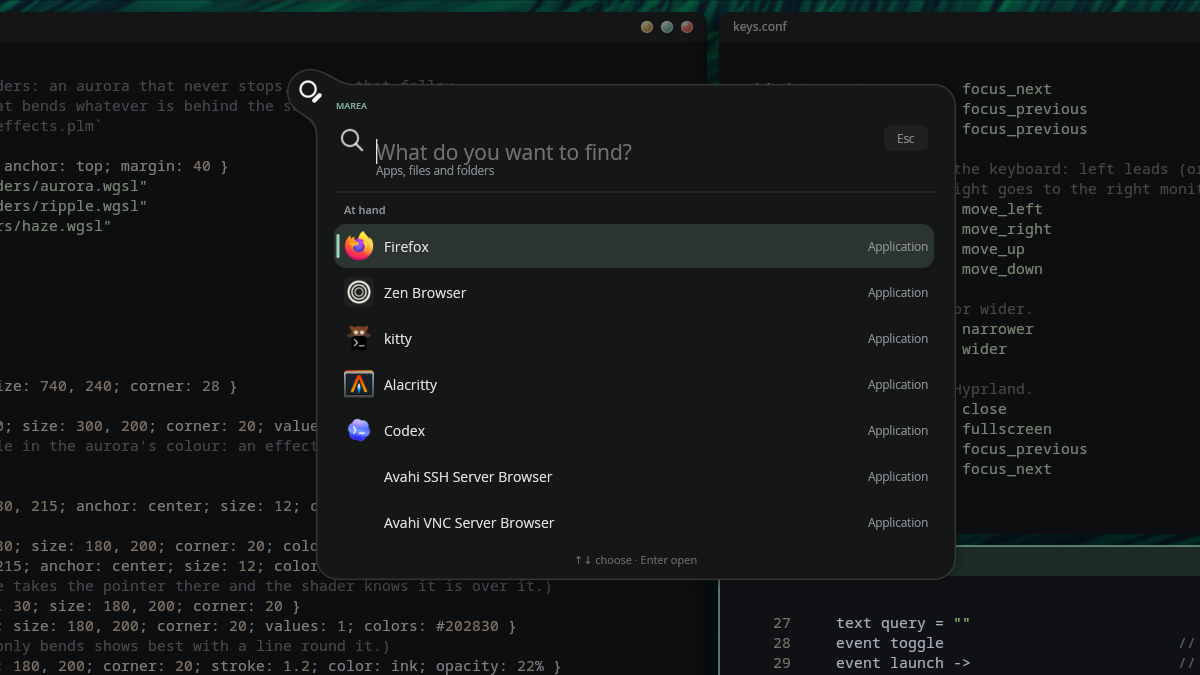
Her finder, out of the ball: apps, files and folders.
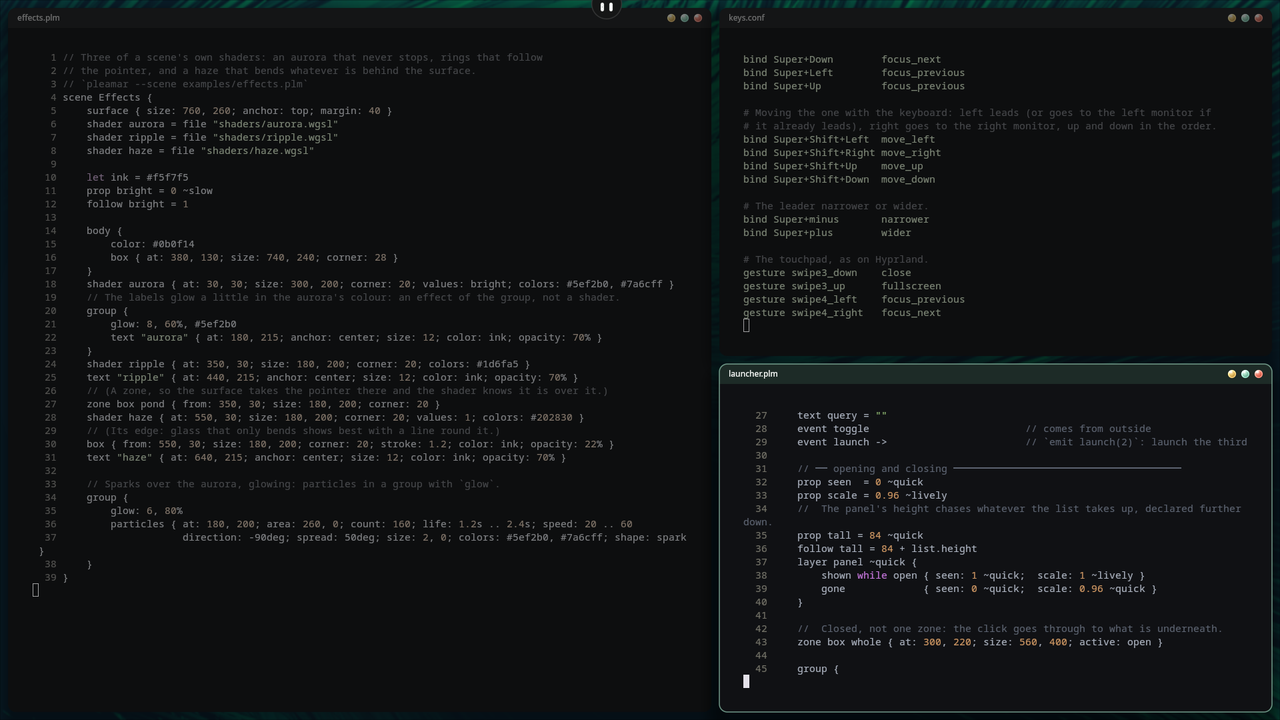
At the top of a pleamar-wm desktop, peeking out over the windows.
With pleamar and pleamar-wm, in your home, from one line:
curl -fsSL https://raw.githubusercontent.com/k4ditano/pleamar/main/install.sh | sh
That leaves marea in ~/.local/bin and starts her with pleamar-wm. On
Hyprland (or any compositor with layer-shell), start her with it and bind
her keys:
exec-once = marea start
bind = SUPER, Space, exec, marea search
bind = SUPER SHIFT, A, exec, marea chat
bind = SUPER, L, exec, marea lock
bind = , Print, exec, marea shot_region
bind = SHIFT, Print, exec, marea shot_screen
bind = CTRL, Print, exec, marea shot_window
bind = SUPER SHIFT, C, exec, marea record_toggle
pleamar-update keeps her up to date.
Deriva, the page where she keeps what you drop on her, has its library in
deriva/ (deriva-worker, a local SQLite). She builds it herself the first
time she starts, and again after an update, if Rust (cargo) is installed; it
takes a minute, in the background. On Nix it comes built.
Her chat runs in agent/ (the Pi SDK)
with Node, inside bubblewrap: it
sees its own state folder and the network to its model, nothing else of
yours, and only proposes what to do —she decides and does it—. She fetches its
packages the first time she starts (npm ci --ignore-scripts, if npm is
there); on Nix they come with her. Its sign-in is kept in
~/.local/state/marea-plm/agent; the one of the Marea written in Quickshell
is copied from there the first time, if there was one. Her memory is
in her own folder, ~/.local/share/pleamar/marea/ (memory.json, and the
conversations as chat-*.json), never in the sandbox: the worker only proposes
what to keep, and she keeps it.
On Nix: nix run github:k4ditano/marea-plm -- start, or pkgs.marea through
this flake's overlays.default. On NixOS, pleamar-wm's module brings her
with the whole desktop.
marea start          # starts her; her log goes to ~/.local/state/marea-plm/marea.log
marea status         # whether she is running
marea stop
marea report         # if she stutters: measures 30 s while you use her, writes a report to send us
marea chat           # her chat, open or closed (Super+Shift+A in pleamar-wm)
marea search         # any other word is an event she is told:
marea lock           #   search, chat, lock, shot_region, shot_screen, shot_window,
marea shot_region    #   record_toggle, celebrate, rage, adventure…
Click her for the control center, right-click for her menu. Her settings (look,
home monitor, whether she follows you, language, wallpaper) are in the last
card, and are saved in ~/.local/share/pleamar/marea/settings.json.
Two variables, and they are not the same:
MAREA_LOCK_WITH_EXIT=1 — the lock also opens with Esc, only after a minute,
and says so on screen: a way out while the lock screen is new.MAREA_TESTING=1 — locking, logging out, restarting and powering off are only
written to the log. For rehearsing; never on the one you use.To try a change without touching the Marea you use: a copy of the scene with
another name (so pleamar --say reaches the copy), and
pleamar --scene copy.plm --screen HDMI-A-1 --margin 390.
One scene (marea.plm) and its logic (marea.luau), plus her translations
(lang/), wardrobe (wardrobe/) and shaders (shaders/). The scene is in
pieces: marea.plm is its spine, and puts back in order with include the
parts under scene/ —her state, what is seen of her, the control center
with one file per page (scene/pages/), the rules and her other surfaces—.
The logic too: what stands on its own (the system pages, Deriva, software,
the chat, the calendar…) is in logic/, loaded with require. This lives outside
pleamar's repository on purpose: it is what anyone using pleamar would have —
some .plm, their .luau next to them, and the program already built.
ANIMACIONES.md is how each animation is meant to feel, and
MEDIDAS.md the measurements against Quickshell.
Marea is under the BSD 3-Clause License, like Hyprland.
Contributions are welcome, made with AI or without it: see the AI policy.
Made by @k4ditano — follow along on X for what comes next, and come and say hi, ask or show what you made on Discord. If it makes your desktop nicer, you can buy me a coffee on Ko-fi ☕
Marea is a desktop companion: a little ball with a face that lives at the top of your screen and is your whole shell — notifications, control center, finder, screenshots, lock screen — written in pleamar, on any Wayland compositor.
Install
Use
pleamar
pleamar-wm
Discord
Her settings, and her skin going from dark to liquid glass.
Super+Shift+A, her menu,
the finder): a chat that grows out of her, with her AI —your ChatGPT
account, signed in from her settings— in a sandbox of its own. With
pleamar-wm she also has hands: a pointer and a keyboard of her own, apart
from yours, to open the browser, look something up or fill a form while you
keep working. Looking at a window she does at once; anything that changes
something is a card you allow or not (or, if you let her, only what sends,
buys or deletes). Her cursor is a drop of her, the monitor she works on
glows, and its «Stop» ends it at any moment. Her answers are read as they
come, at a reading pace.secret-tool),
and Marea types it for her without her ever seeing it.Super+Space, type, Enter. Drag a
file out of it into any program..pacnew) to review.
A program not installed shows up in the finder, and installs the same way.ext-session-lock), checked with PAM.MEDIDAS.md).
Her finder, as you type: apps, files, folders, and things she does herself.
Her Agents page: what is left of your Claude Code and Codex limits, as tanks.
Her finder, out of the ball: apps, files and folders.
At the top of a pleamar-wm desktop, peeking out over the windows.
With pleamar and pleamar-wm, in your home, from one line:
curl -fsSL https://raw.githubusercontent.com/k4ditano/pleamar/main/install.sh | sh
That leaves marea in ~/.local/bin and starts her with pleamar-wm. On
Hyprland (or any compositor with layer-shell), start her with it and bind
her keys:
exec-once = marea start
bind = SUPER, Space, exec, marea search
bind = SUPER SHIFT, A, exec, marea chat
bind = SUPER, L, exec, marea lock
bind = , Print, exec, marea shot_region
bind = SHIFT, Print, exec, marea shot_screen
bind = CTRL, Print, exec, marea shot_window
bind = SUPER SHIFT, C, exec, marea record_toggle
pleamar-update keeps her up to date.
Deriva, the page where she keeps what you drop on her, has its library in
deriva/ (deriva-worker, a local SQLite). She builds it herself the first
time she starts, and again after an update, if Rust (cargo) is installed; it
takes a minute, in the background. On Nix it comes built.
Her chat runs in agent/ (the Pi SDK)
with Node, inside bubblewrap: it
sees its own state folder and the network to its model, nothing else of
yours, and only proposes what to do —she decides and does it—. She fetches its
packages the first time she starts (npm ci --ignore-scripts, if npm is
there); on Nix they come with her. Its sign-in is kept in
~/.local/state/marea-plm/agent; the one of the Marea written in Quickshell
is copied from there the first time, if there was one. Her memory is
in her own folder, ~/.local/share/pleamar/marea/ (memory.json, and the
conversations as chat-*.json), never in the sandbox: the worker only proposes
what to keep, and she keeps it.
On Nix: nix run github:k4ditano/marea-plm -- start, or pkgs.marea through
this flake's overlays.default. On NixOS, pleamar-wm's module brings her
with the whole desktop.
marea start          # starts her; her log goes to ~/.local/state/marea-plm/marea.log
marea status         # whether she is running
marea stop
marea report         # if she stutters: measures 30 s while you use her, writes a report to send us
marea chat           # her chat, open or closed (Super+Shift+A in pleamar-wm)
marea search         # any other word is an event she is told:
marea lock           #   search, chat, lock, shot_region, shot_screen, shot_window,
marea shot_region    #   record_toggle, celebrate, rage, adventure…
Click her for the control center, right-click for her menu. Her settings (look,
home monitor, whether she follows you, language, wallpaper) are in the last
card, and are saved in ~/.local/share/pleamar/marea/settings.json.
Two variables, and they are not the same:
MAREA_LOCK_WITH_EXIT=1 — the lock also opens with Esc, only after a minute,
and says so on screen: a way out while the lock screen is new.MAREA_TESTING=1 — locking, logging out, restarting and powering off are only
written to the log. For rehearsing; never on the one you use.To try a change without touching the Marea you use: a copy of the scene with
another name (so pleamar --say reaches the copy), and
pleamar --scene copy.plm --screen HDMI-A-1 --margin 390.
One scene (marea.plm) and its logic (marea.luau), plus her translations
(lang/), wardrobe (wardrobe/) and shaders (shaders/). The scene is in
pieces: marea.plm is its spine, and puts back in order with include the
parts under scene/ —her state, what is seen of her, the control center
with one file per page (scene/pages/), the rules and her other surfaces—.
The logic too: what stands on its own (the system pages, Deriva, software,
the chat, the calendar…) is in logic/, loaded with require. This lives outside
pleamar's repository on purpose: it is what anyone using pleamar would have —
some .plm, their .luau next to them, and the program already built.
ANIMACIONES.md is how each animation is meant to feel, and
MEDIDAS.md the measurements against Quickshell.
Marea is under the BSD 3-Clause License, like Hyprland.
Contributions are welcome, made with AI or without it: see the AI policy.
Made by @k4ditano — follow along on X for what comes next, and come and say hi, ask or show what you made on Discord. If it makes your desktop nicer, you can buy me a coffee on Ko-fi ☕





