// A Niri shell // with bloat and stuff!
See the code
A complete desktop shell for Niri, built on Quickshell



Install • Keybinds • IPC Reference • Discord • Contributing
English · Español · Русский · 中文 · 日本語 · Português · Français · Deutsch · 한국어 · हिन्दी · العربية · Italiano
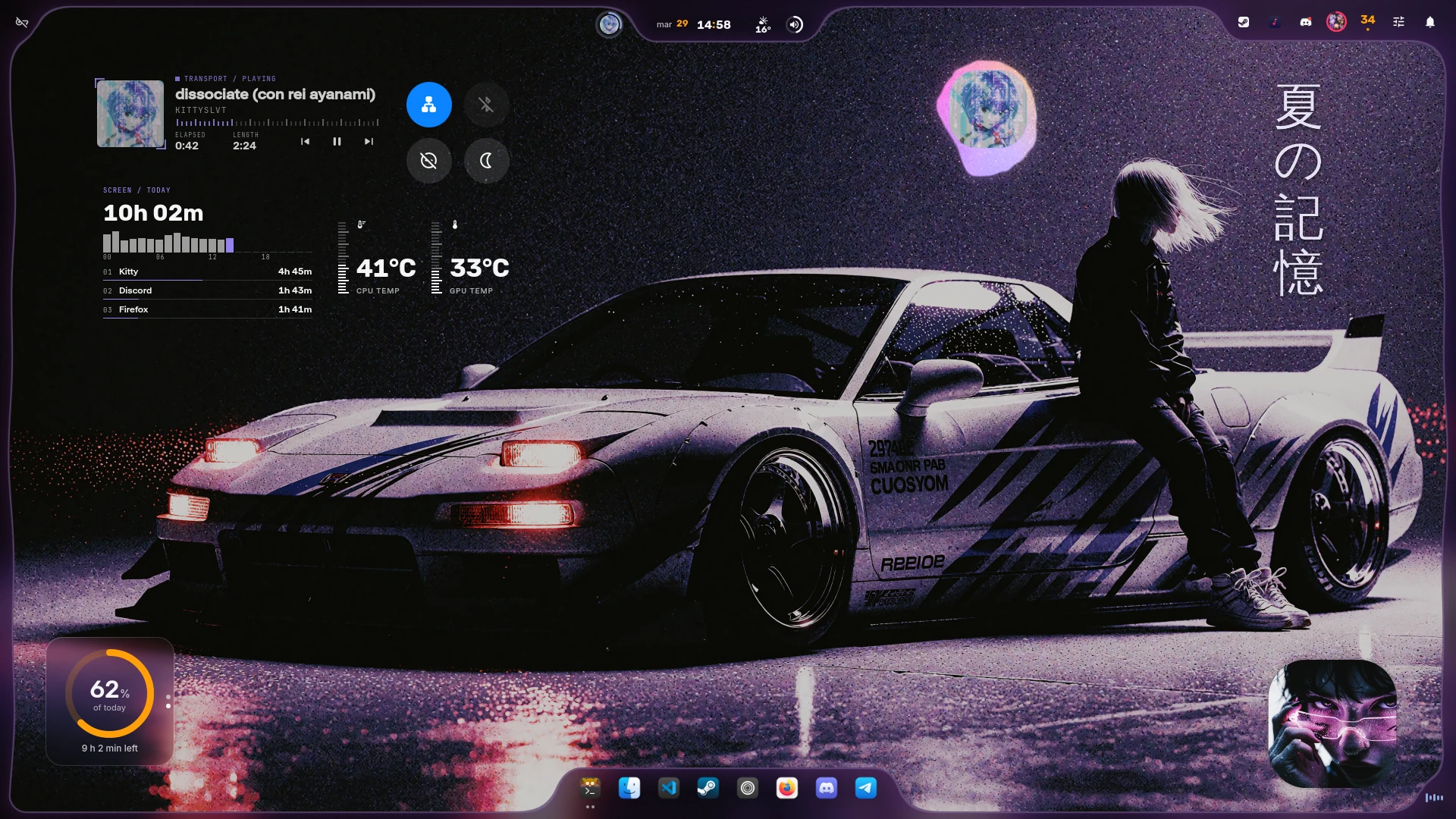
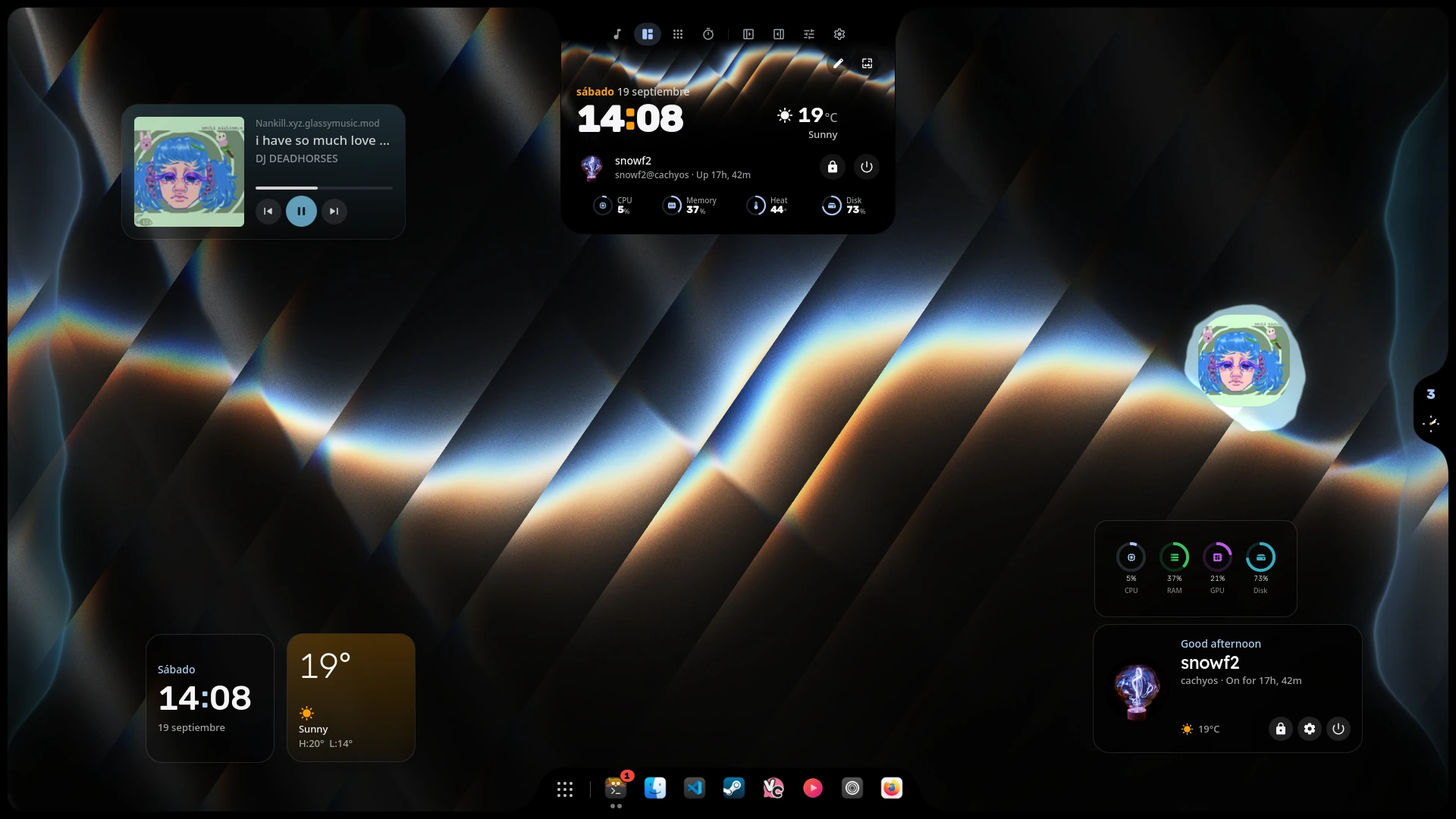
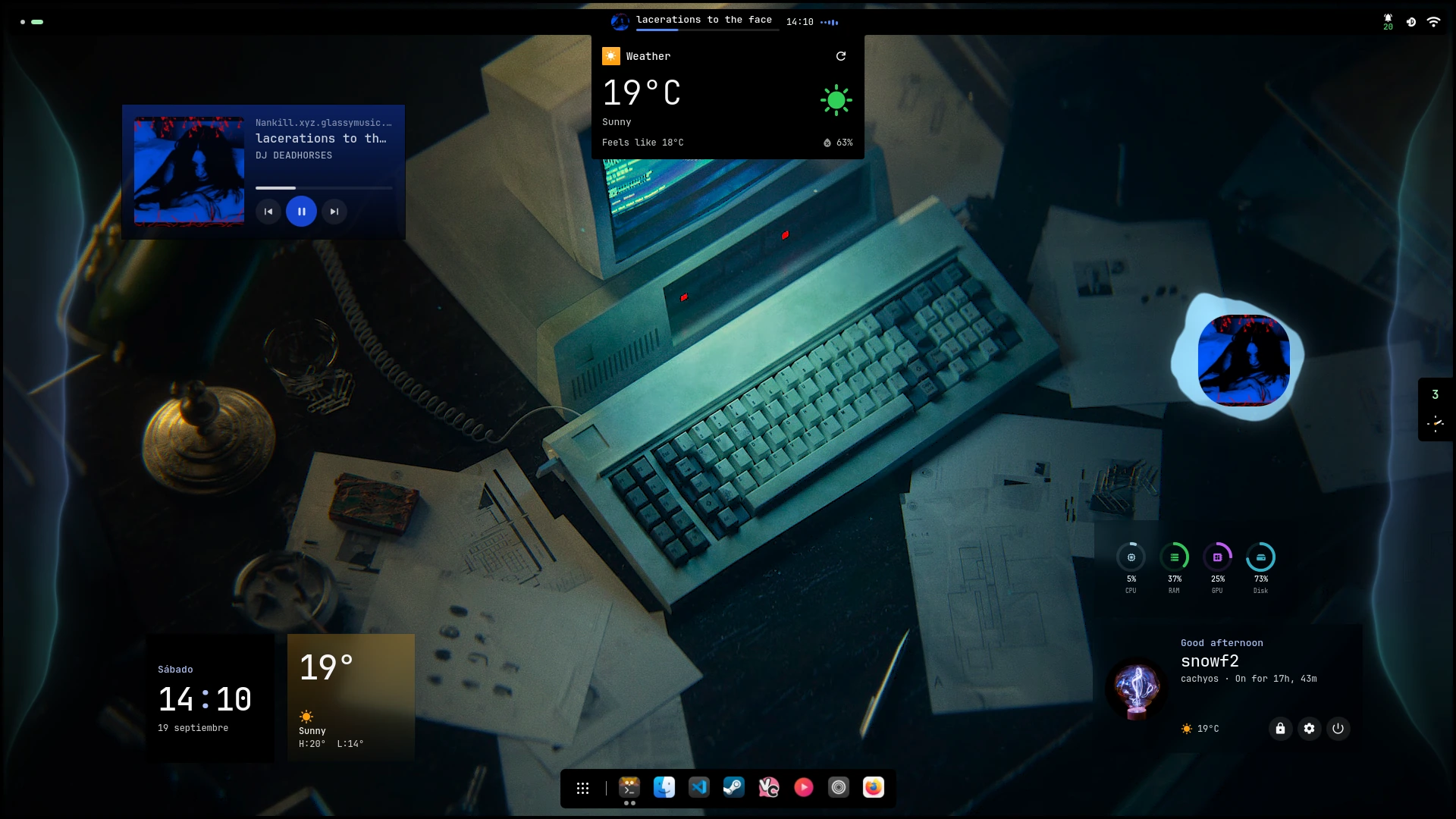
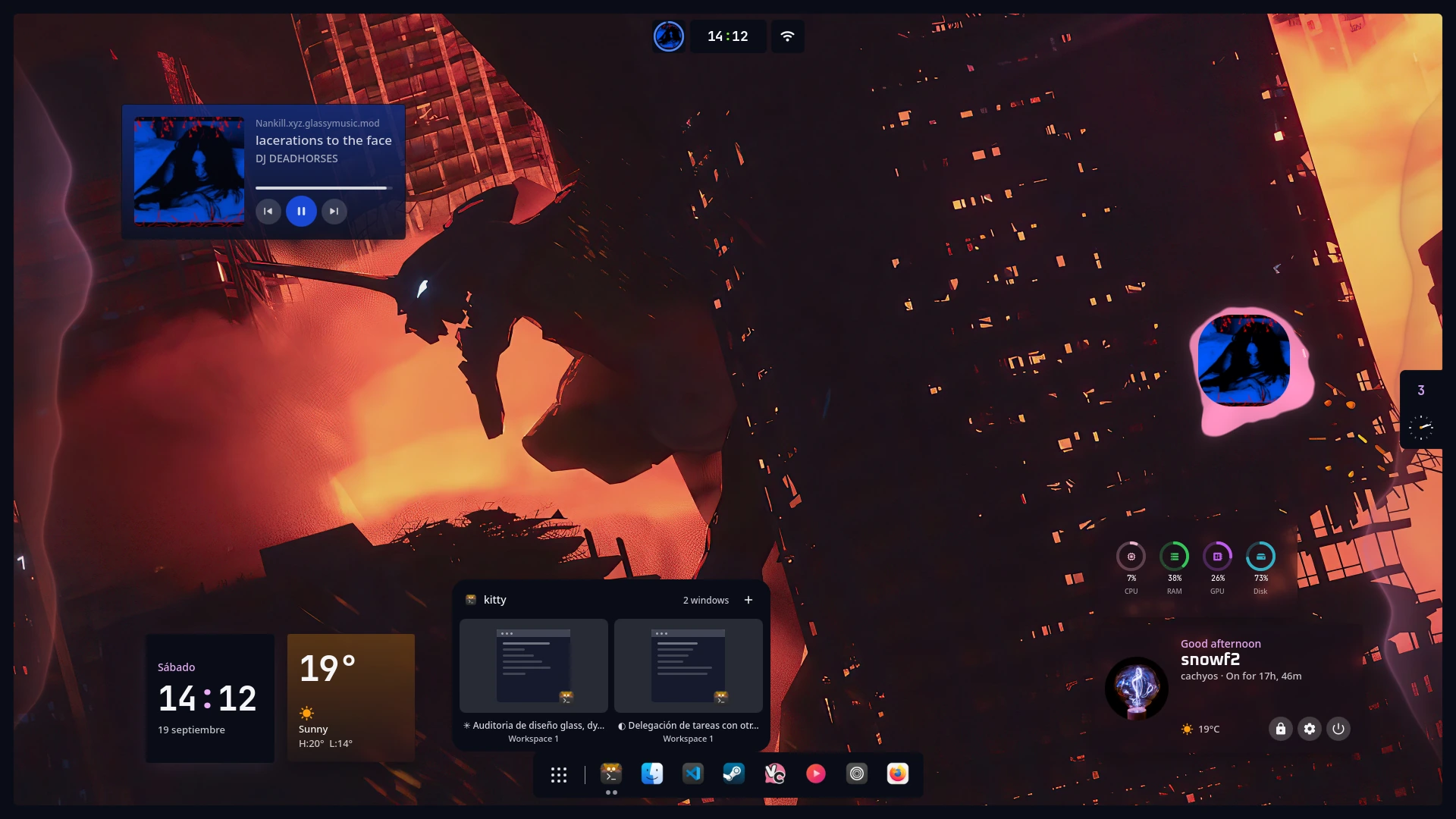
iNiR is your entire desktop. The bar at the top, the dock, notifications, settings, wallpapers, all of it. Not a theme, not dotfiles you paste. A full shell that runs on Linux.
A compositor. That's the thing that handles your windows and puts pixels on screen. iNiR is made for Niri (a tiling Wayland compositor). There's some old Hyprland code from when this was a fork of end-4's dots, but Niri is what I actually use and test.
The shell runs on Quickshell, a framework for building shells in QML (Qt's UI language). You don't need to know any of that to use it though, everything is configurable through the GUI or a JSON file.
your apps
   ↓
iNiR (shell: bar, sidebars, dock, notifications, settings...)
   ↓
Quickshell (runs QML shells)
   ↓
Niri (compositor: windows, rendering)
   ↓
Wayland → GPU
It's a personal project that got out of hand. I use it daily, lots of people in the Discord do too. But stuff breaks sometimes, code is messy in places, I'm learning as I go.
If something doesn't work, inir doctor fixes most things. Discord is active if that doesn't help. Just don't expect polished software, this is one person's rice that others happen to like.
I wanted my desktop to look and work a certain way and nothing else did exactly that. Started as end-4's Hyprland dots, became a full rewrite for Niri with way more features.
Super+Shift+W cycles through them
[!WARNING] Not for low-spec machines. You can strip it down a lot though. Turn off effects, drop panels, flatten the design. Settings or
config.json, whichever you prefer.
Three panel families, switchable on the fly with Super+Shift+W:
Automatic theming. Pick a wallpaper and everything adapts:
Built for Niri. Hyprland code survives from the fork but is not tested.
Kira, the mascot, lives on your desktop if you want her there. Off by default, art pack is a separate download.
inir iris edge <side>, or drag it there). On a side it stands up with a stacked clock and bubbles above and belowinir iris layout menubar)inir iris zone start|center|end kinds+joined+with+plus)inir iris dockEdge <side|auto>); auto sits opposite the Island, and sending one to the other's edge makes them trade placesinir iris theme)inir iris palette)inir iris edit). Studio keeps every area in one panel beside the screen if you preferinir iris control edit)inir iris lock edit)Left sidebar (app drawer):
Right sidebar:
inir update with rollback, migrations, and user change preservation./setup › Extrasid_ID) and Kalaallisut (kl_GL)git clone https://github.com/snowarch/inir.git
cd inir
./setup install # interactive, asks before each step
./setup install -y # automatic, no questions asked
The installer handles dependencies, system config and theming. After install, run inir run to start the shell, or log out and back in.
iNiR supports Void Linux glibc + runit + XBPS through the same setup entry
point instead of a separate installer. From the checkout created above, run
./setup install normally.
For a first Void install, the interactive path is recommended. Setup shows the
detected system and install plan, installs the XBPS dependency profiles, builds
the few providers that are not packaged by Void, configures the non-systemd
session path, and only then offers disruptive system changes such as migrating
from dhcpcd/standalone wpa_supplicant to NetworkManager or enabling SDDM.
./setup install -y deliberately does not make those two ownership changes for
you.
See iNiR on Void Linux, Void capabilities and the installation guide for the exact support scope.
inir run                        # launch the shell
inir settings                   # open settings GUI
inir logs                       # check runtime logs
inir doctor                     # auto-diagnose and fix
inir update                     # pull + migrate + restart
Other ways in, if ./setup install isn't what you want:
./setup                 # TUI menu, pick what you want
sudo make install       # system-wide instead of your home
./setup rollback        # undo the last update
Distros: Arch remains the upstream primary target. Void Linux glibc/runit is also supported through XBPS. Fedora and Debian/Ubuntu retain their automated dependency paths with distro-repository-first fallbacks; other distributions use the generic guidance in the package list. iNiR needs Qt 6.9 or newer: Ubuntu 25.10, Fedora 43 and Debian testing or later.
| Key | Action |
|---|---|
| Super + Space | Overview: search apps, navigate workspaces |
| Super + V | Clipboard history |
| Super + Shift + S | Screenshot a region |
| Super + Shift + X | OCR a region |
| Super + , | Settings |
| Super + Shift + W | Switch panel family |
| Super + / | Cheatsheet, in case you forget the rest |
Full list: Keybinds
15 wallpapers ship bundled. For more, check iNiR-Walls, a curated collection that works well with the Material You pipeline.
Everything user-facing lives in the Wiki.
| Page | What's in it |
|---|---|
| Install | Getting it running |
| Setup | Updates, migrations, rollback |
| Keybinds | Every shortcut |
| IPC | Targets you can bind or script |
| Packages | Every dependency and why it's there |
| Limitations | What's known broken, and workarounds |
| Void Linux | XBPS, runit/Turnstile, providers, validation and gotchas |
| Architecture | How the code is put together |
inir logs                       # check recent runtime logs
inir restart                    # restart the active runtime
inir repair                     # doctor + restart + filtered log check
./setup doctor                  # auto-diagnose and fix common problems
./setup rollback                # undo the last update
Check Limitations before opening an issue. If you'd rather just ask someone, Discord is faster.
See CONTRIBUTING.md for development setup, code patterns, and pull request guidelines.
GPL-3.0, same as end-4's dots. Copyright (C) 2025-2026 snowarch.
694 followers · starred Mar 2026
342 followers · starred Mar 2026
103 followers · starred Mar 2026
20 followers · starred Mar 2026
// A Niri shell // with bloat and stuff!
See the code
A complete desktop shell for Niri, built on Quickshell
Install • Keybinds • IPC Reference • Discord • Contributing
English · Español · Русский · 中文 · 日本語 · Português · Français · Deutsch · 한국어 · हिन्दी · العربية · Italiano
iNiR is your entire desktop. The bar at the top, the dock, notifications, settings, wallpapers, all of it. Not a theme, not dotfiles you paste. A full shell that runs on Linux.
A compositor. That's the thing that handles your windows and puts pixels on screen. iNiR is made for Niri (a tiling Wayland compositor). There's some old Hyprland code from when this was a fork of end-4's dots, but Niri is what I actually use and test.
The shell runs on Quickshell, a framework for building shells in QML (Qt's UI language). You don't need to know any of that to use it though, everything is configurable through the GUI or a JSON file.
your apps
   ↓
iNiR (shell: bar, sidebars, dock, notifications, settings...)
   ↓
Quickshell (runs QML shells)
   ↓
Niri (compositor: windows, rendering)
   ↓
Wayland → GPU
It's a personal project that got out of hand. I use it daily, lots of people in the Discord do too. But stuff breaks sometimes, code is messy in places, I'm learning as I go.
If something doesn't work, inir doctor fixes most things. Discord is active if that doesn't help. Just don't expect polished software, this is one person's rice that others happen to like.
I wanted my desktop to look and work a certain way and nothing else did exactly that. Started as end-4's Hyprland dots, became a full rewrite for Niri with way more features.
Super+Shift+W cycles through them
[!WARNING] Not for low-spec machines. You can strip it down a lot though. Turn off effects, drop panels, flatten the design. Settings or
config.json, whichever you prefer.
Three panel families, switchable on the fly with Super+Shift+W:
Automatic theming. Pick a wallpaper and everything adapts:
Built for Niri. Hyprland code survives from the fork but is not tested.
Kira, the mascot, lives on your desktop if you want her there. Off by default, art pack is a separate download.
inir iris edge <side>, or drag it there). On a side it stands up with a stacked clock and bubbles above and belowinir iris layout menubar)inir iris zone start|center|end kinds+joined+with+plus)inir iris dockEdge <side|auto>); auto sits opposite the Island, and sending one to the other's edge makes them trade placesinir iris theme)inir iris palette)inir iris edit). Studio keeps every area in one panel beside the screen if you preferinir iris control edit)inir iris lock edit)Left sidebar (app drawer):
Right sidebar:
inir update with rollback, migrations, and user change preservation./setup › Extrasid_ID) and Kalaallisut (kl_GL)git clone https://github.com/snowarch/inir.git
cd inir
./setup install # interactive, asks before each step
./setup install -y # automatic, no questions asked
The installer handles dependencies, system config and theming. After install, run inir run to start the shell, or log out and back in.
iNiR supports Void Linux glibc + runit + XBPS through the same setup entry
point instead of a separate installer. From the checkout created above, run
./setup install normally.
For a first Void install, the interactive path is recommended. Setup shows the
detected system and install plan, installs the XBPS dependency profiles, builds
the few providers that are not packaged by Void, configures the non-systemd
session path, and only then offers disruptive system changes such as migrating
from dhcpcd/standalone wpa_supplicant to NetworkManager or enabling SDDM.
./setup install -y deliberately does not make those two ownership changes for
you.
See iNiR on Void Linux, Void capabilities and the installation guide for the exact support scope.
inir run                        # launch the shell
inir settings                   # open settings GUI
inir logs                       # check runtime logs
inir doctor                     # auto-diagnose and fix
inir update                     # pull + migrate + restart
Other ways in, if ./setup install isn't what you want:
./setup                 # TUI menu, pick what you want
sudo make install       # system-wide instead of your home
./setup rollback        # undo the last update
Distros: Arch remains the upstream primary target. Void Linux glibc/runit is also supported through XBPS. Fedora and Debian/Ubuntu retain their automated dependency paths with distro-repository-first fallbacks; other distributions use the generic guidance in the package list. iNiR needs Qt 6.9 or newer: Ubuntu 25.10, Fedora 43 and Debian testing or later.
| Key | Action |
|---|---|
| Super + Space | Overview: search apps, navigate workspaces |
| Super + V | Clipboard history |
| Super + Shift + S | Screenshot a region |
| Super + Shift + X | OCR a region |
| Super + , | Settings |
| Super + Shift + W | Switch panel family |
| Super + / | Cheatsheet, in case you forget the rest |
Full list: Keybinds
15 wallpapers ship bundled. For more, check iNiR-Walls, a curated collection that works well with the Material You pipeline.
Everything user-facing lives in the Wiki.
| Page | What's in it |
|---|---|
| Install | Getting it running |
| Setup | Updates, migrations, rollback |
| Keybinds | Every shortcut |
| IPC | Targets you can bind or script |
| Packages | Every dependency and why it's there |
| Limitations | What's known broken, and workarounds |
| Void Linux | XBPS, runit/Turnstile, providers, validation and gotchas |
| Architecture | How the code is put together |
inir logs                       # check recent runtime logs
inir restart                    # restart the active runtime
inir repair                     # doctor + restart + filtered log check
./setup doctor                  # auto-diagnose and fix common problems
./setup rollback                # undo the last update
Check Limitations before opening an issue. If you'd rather just ask someone, Discord is faster.
See CONTRIBUTING.md for development setup, code patterns, and pull request guidelines.
GPL-3.0, same as end-4's dots. Copyright (C) 2025-2026 snowarch.
694 followers · starred Mar 2026
342 followers · starred Mar 2026
103 followers · starred Mar 2026
20 followers · starred Mar 2026



