
CachyOS + Niri pixel street-art rice (dotfiles + install.sh)
QML
90
92 commits
updated Oct 3, 2026
See what people are saying
README
♡ PixelStreetArt ✧ angelOS ♡
~ welcome back, internet angel ~
A pixel-pink CachyOS + Niri rice with its own desktop shell, angelOS, built on Quickshell in the spirit of NEEDY GIRL OVERDOSE: Win98 windows, pixel hearts, a bar that sings along, and a desktop you can right-click like it's 2001.





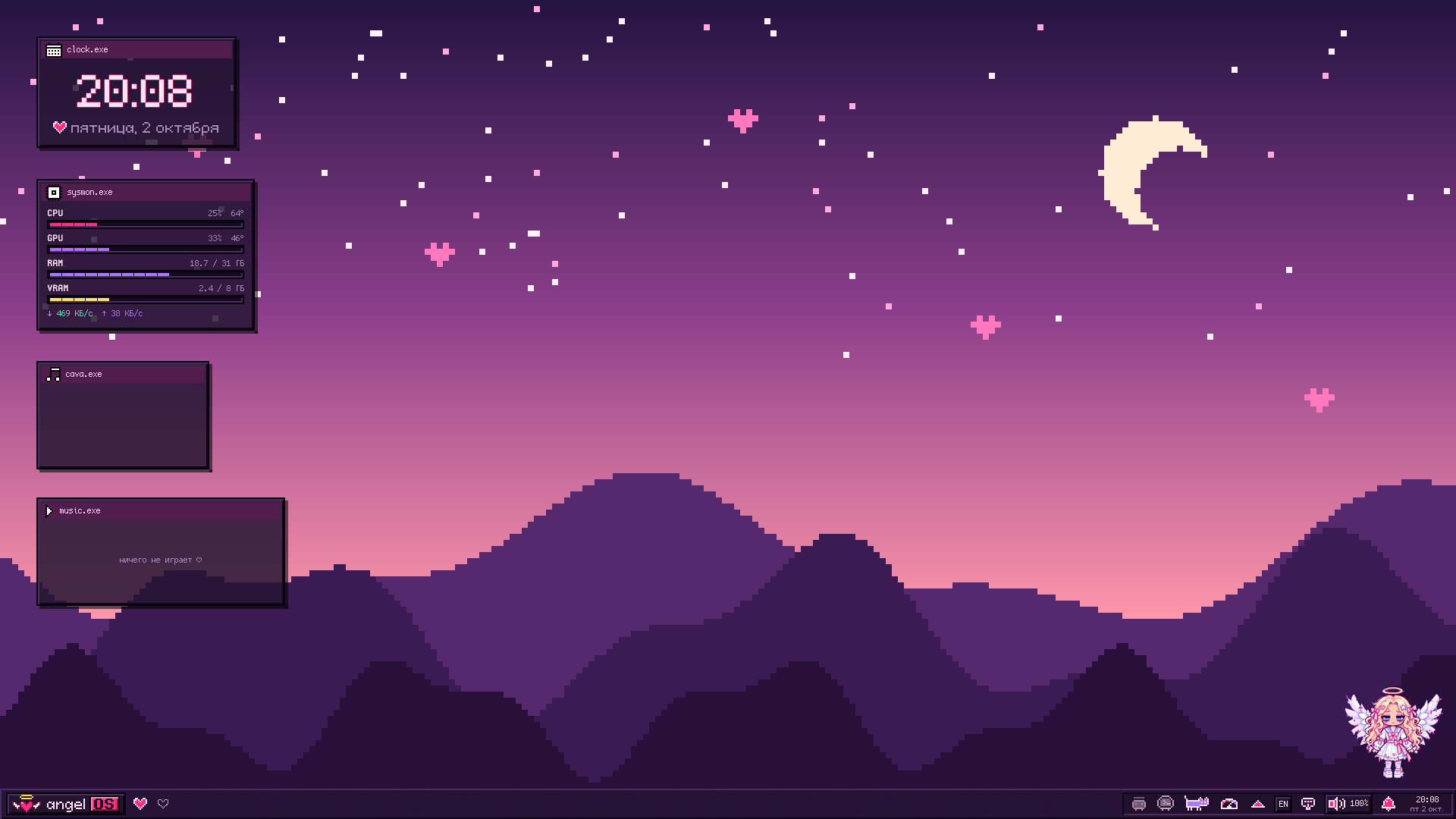
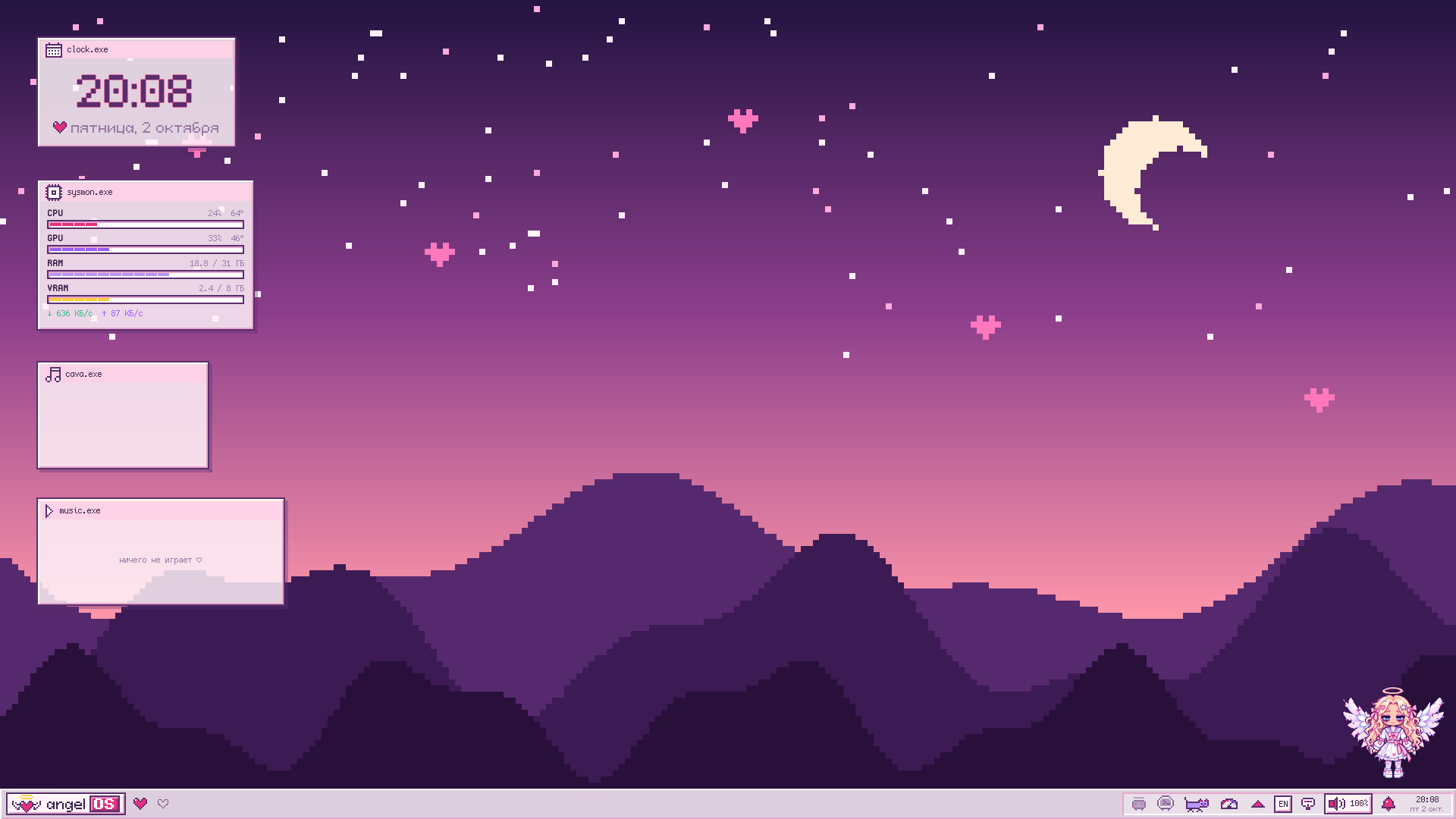
overdose (dark) ✧ angel (light) — one click apart.
[!NOTE] The screenshots are of a clean install in a nested session (a generated wallpaper, no personal data); the GIFs show angelOS in use. Wallpaper, widget placement, language and theme are configurable; the first-run wizard helps you choose your setup. The helper-tools illustration and SDDM test preview are labelled separately below. In a nested session Niri uses
AltasMod; on real hardwareModis the Super / Windows key, and that is what the tables use.
Jump to: angelOS.exe · The game · Plugins · Tiling · Keybindings · Helper tools · Install · Login screen · Keyboard · Mouse & monitors · Layout · License
✧ angelOS.exe
angelOS is the whole desktop: bar, wallpaper, widgets, launcher, notifications, OSD, lock screen, polkit dialogs, clipboard history and a settings app. It lives in .config/quickshell/angelos and is plain QML, so everything is hackable.
♡ desktop.exe
The taskbar is a Win98 one with pixel hearts for workspaces (or the icons of the apps on them), window buttons, a tray recoloured to the theme, and the current lyric line of the song in the middle (synced lyrics from lrclib.net). Widgets sit on the wallpaper. Light and dark palettes include bubblegum, overdose, cyber angel, Gruvbox, Rosé Pine, Catppuccin and colours generated from your wallpaper.
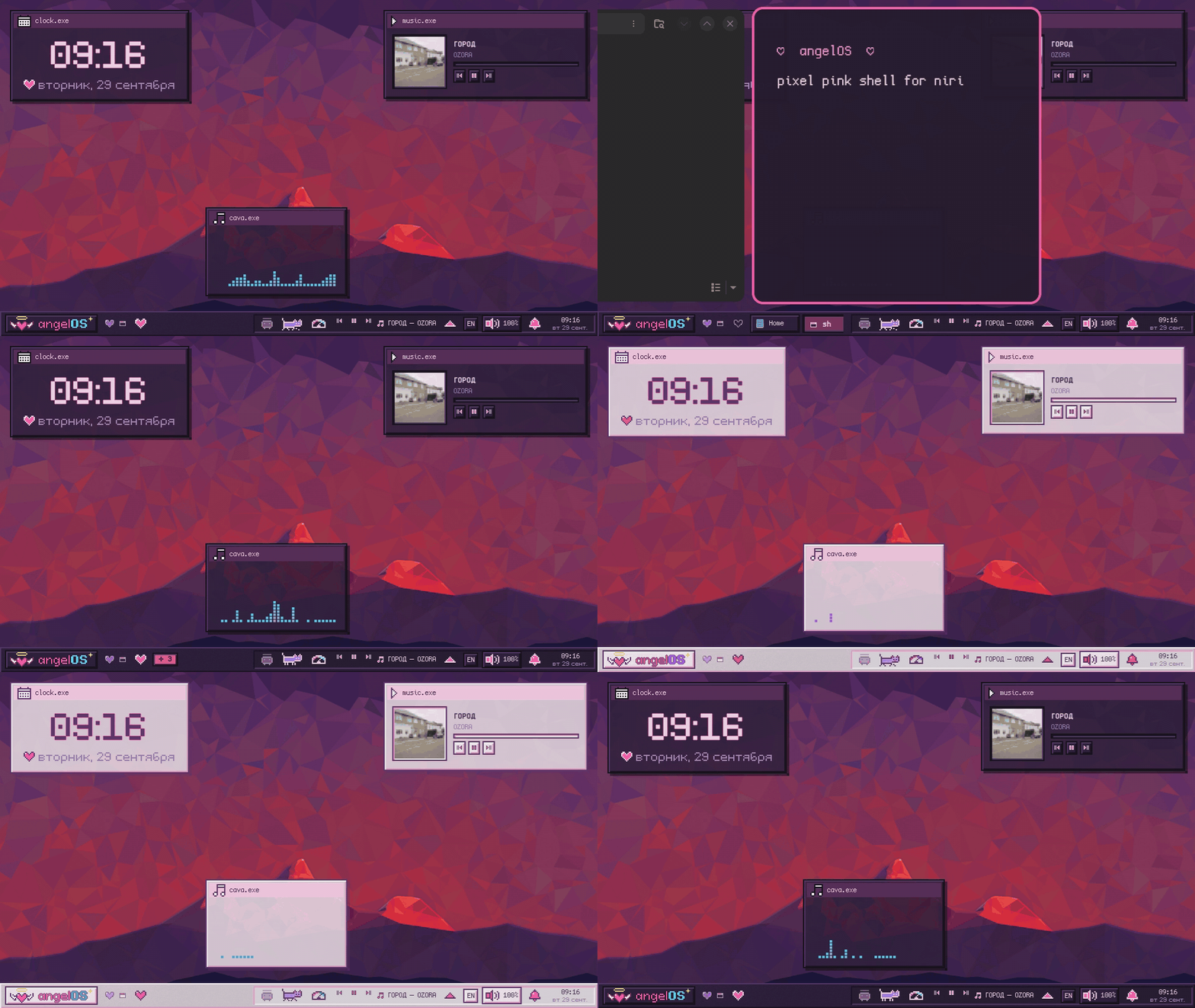
| Keys | Action |
|---|---|
Mod+Alt+T | Light ⇄ dark theme |
Mod+Alt+Y | Hide / show the lyrics line |
Mod+Mouse wheel on the hearts | Switch workspace |
| Right-click a window button | Close that window |
♡ wallpaper.exe
Changing the wallpaper plays a pixel transition: mosaic plus ordered (Bayer) dither. It only plays when the picture changes; switching workspaces stays instant, even with a wallpaper per workspace.
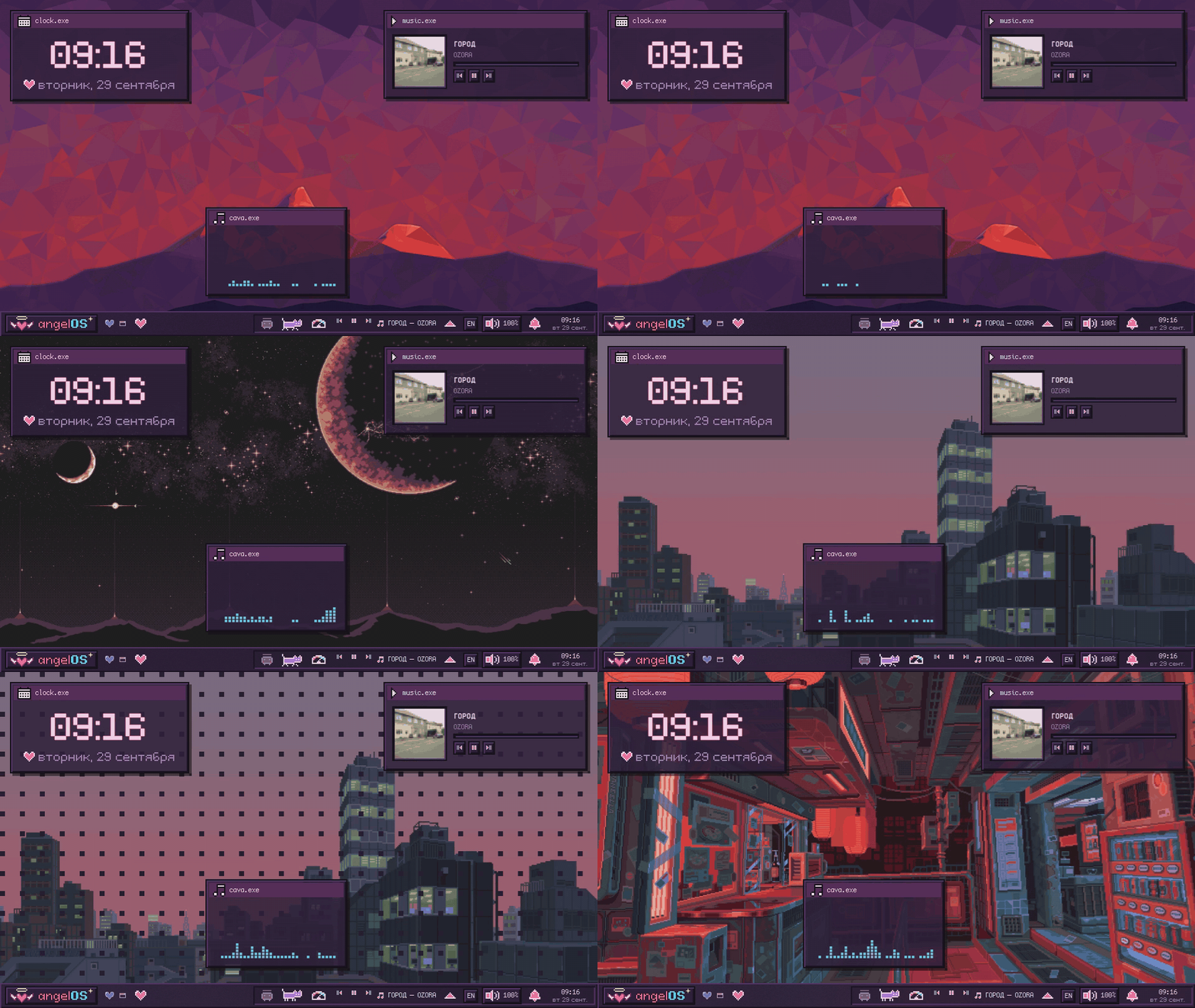
Mod+Shift+Return opens the wallpaper picker (Settings → Wallpaper): one for every screen, one per monitor, or one per workspace.
♡ menu.exe
Right-click the wallpaper for a Windows 11-style menu: quick actions on top, then View ▸ (toggle widgets, edit mode, snap to grid), New ▸ (text note, screenshot, recording), Open ▸ (your folders), display settings, personalisation, "Open in Terminal", and Show more options ▸ for plugin items.
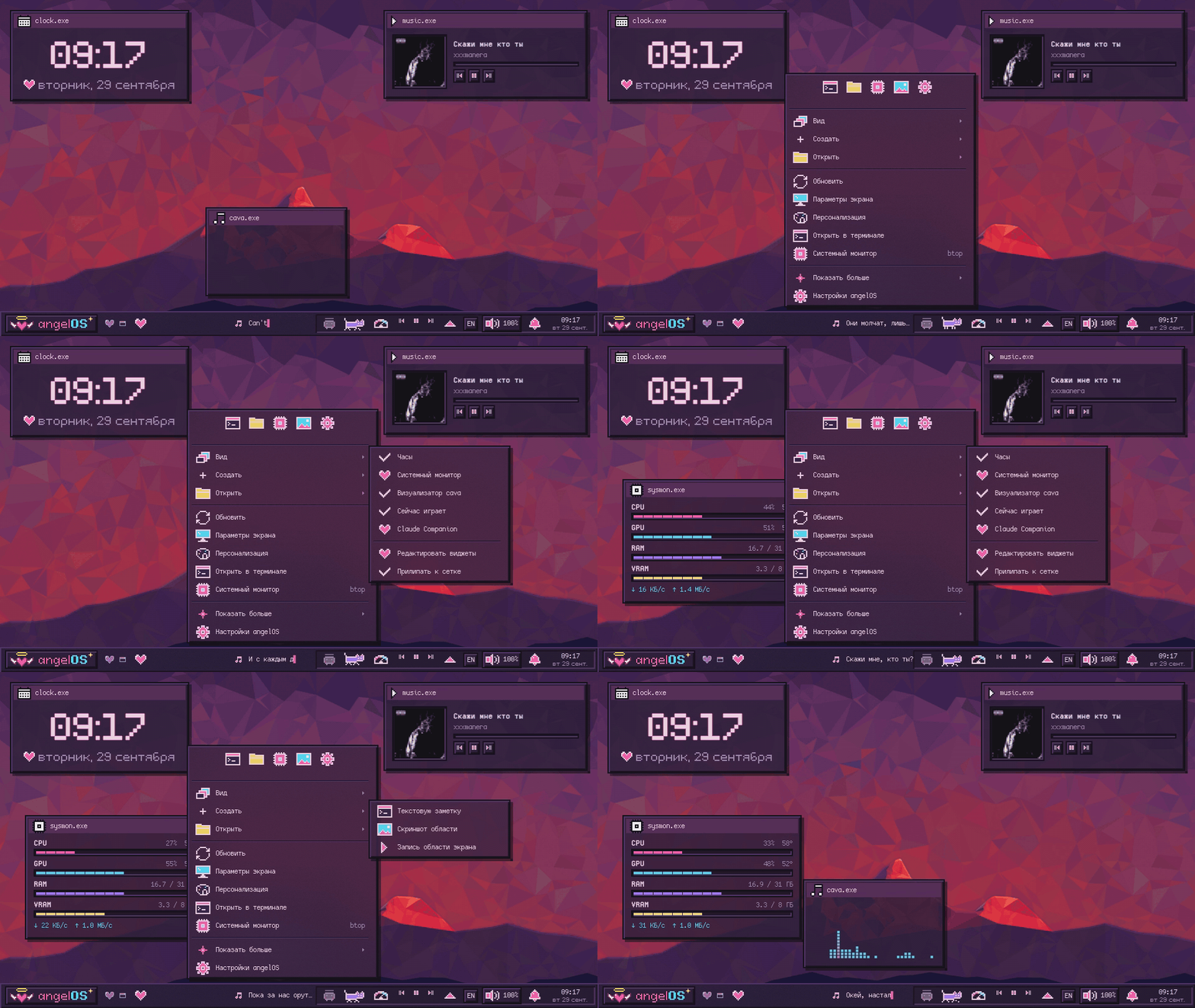
Widgets (clock.exe, sysmon.exe, cava.exe, music.exe, plus plugin ones) are dragged by their title bar; double-click a title for edit mode. Settings → Widgets adds them to any monitor, moves them between monitors and sets their options (e.g. which output cava listens to).
♡ launcher.exe
Mod+Space. Fuzzy app search that learns what you launch, web … to search the web or open favourite sites, claude … / claude ? … for Claude Code, and > command to run anything in sh.
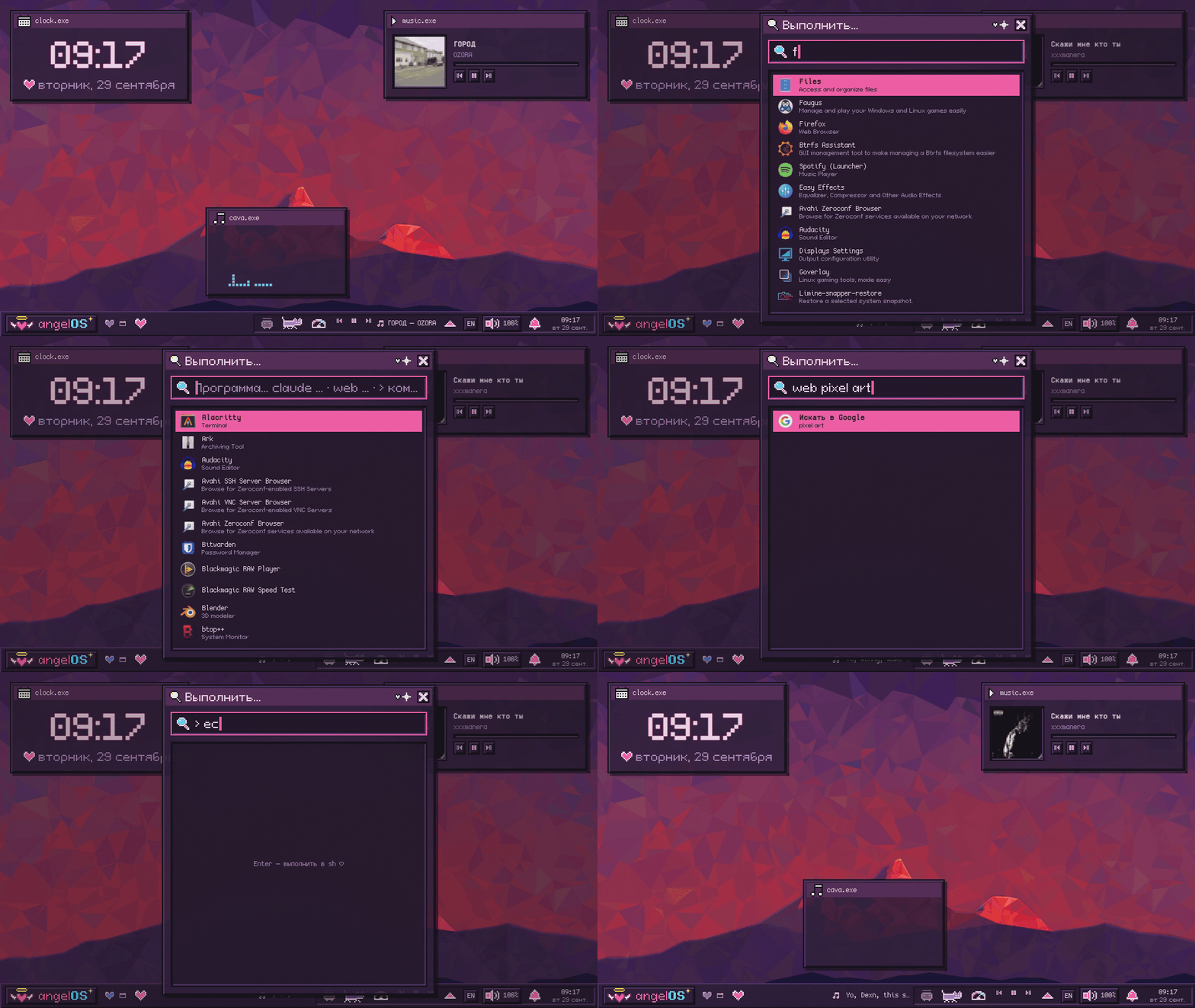
| Keys | Action |
|---|---|
Mod+Space | Launcher |
Mod+V | Clipboard history |
Mod+S / Mod+Alt+S | Settings |
Mod+Alt+L | Lock screen |
Mod+Shift+Q | Power menu (lock, sleep, log out, reboot, power off) |
♡ settings.exe
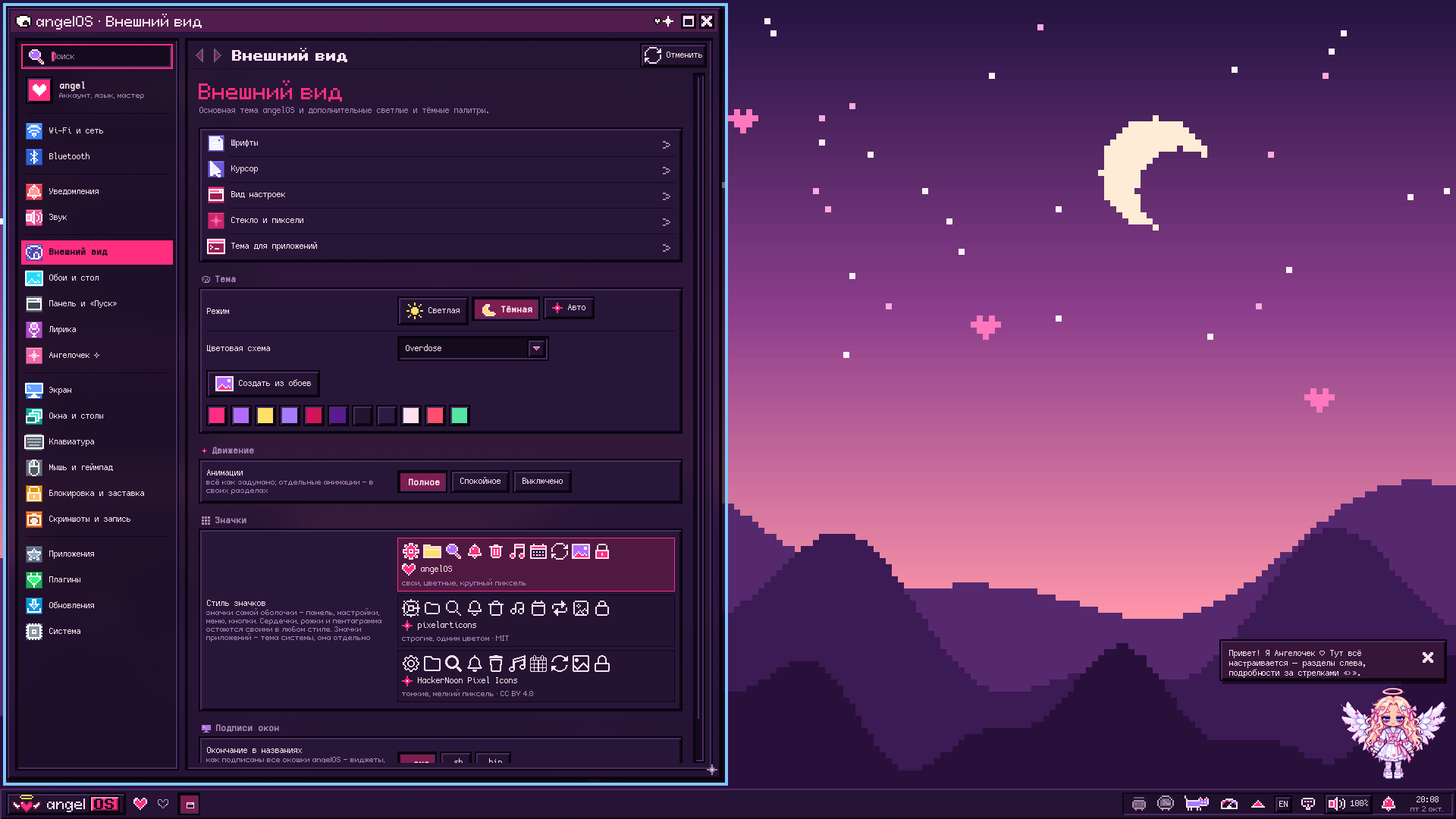
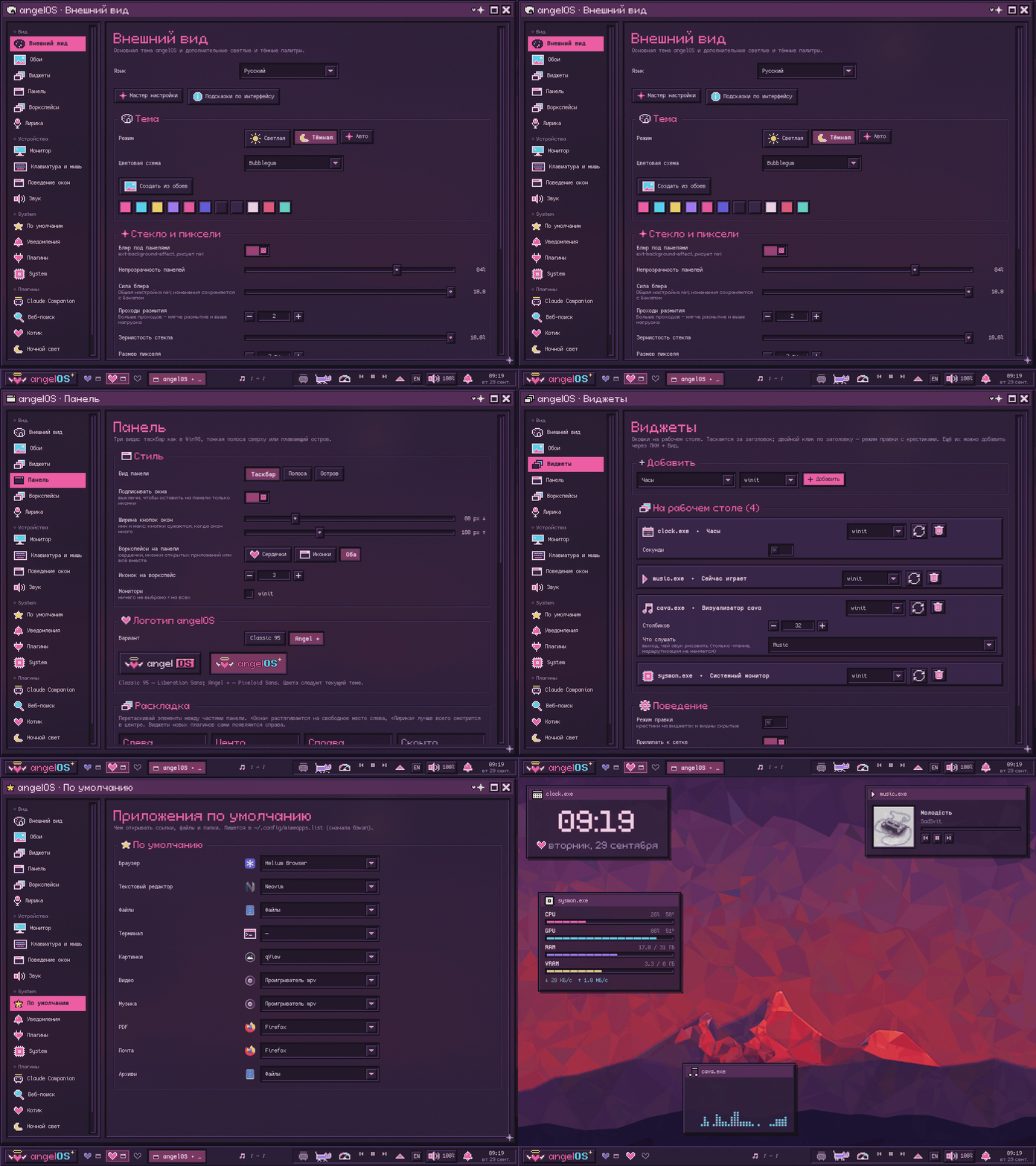
A real window with pages for Appearance, Wallpaper, Widgets, Bar (drag-and-drop layout like Noctalia's, hearts or app icons, window-button widths, tray icon colours), Workspaces, Lyrics, Monitor (drag the screens around, writes monitor.kdl), Keyboard & mouse, Windows (default width, Mod+R presets, a width per app), Sound, Default apps (browser, editor, files, terminal, media…), Notifications, Plugins and System. Changes to Niri's config are backed up, checked with niri validate and rolled back if Niri says no.
- Four views of the same pages: a macOS-like sidebar, a Win98 Control Panel, Properties tabs and big tiles (
angelos settingsView …). - Three styles of the shell's pixel icons: angelOS's own, pixelarticons or HackerNoon's Pixel Icon Library.
- Previews next to what changes the look or the motion — wallpaper transitions, window animations, Start, the bar, the lock screen; one still frame when motion is off.
- Browsers in the theme: Helium and Chromium follow angelOS live through GTK (a gentle restart brings the tabs back), Firefox gets the palette through
userChrome.css; profiles change only on a click, with a backup and Put it back.
♡ tips.exe
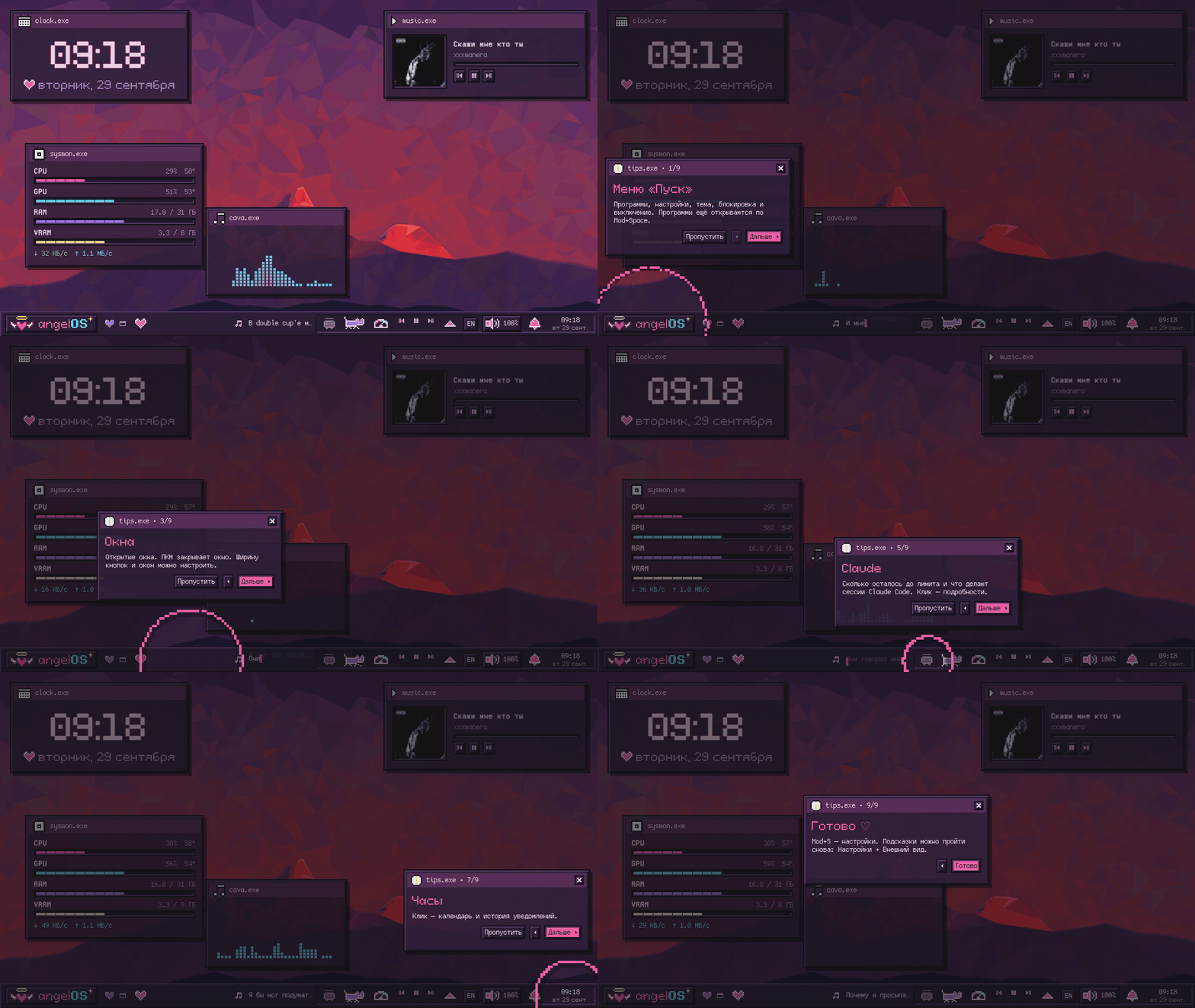
The first login opens a short setup wizard (monitors, keyboard, theme, bar, windows, desktop, default apps) and then interface tips: each part of the screen is circled in pixels and explained. Replay them any time from Settings → Appearance.
♡ game.exe
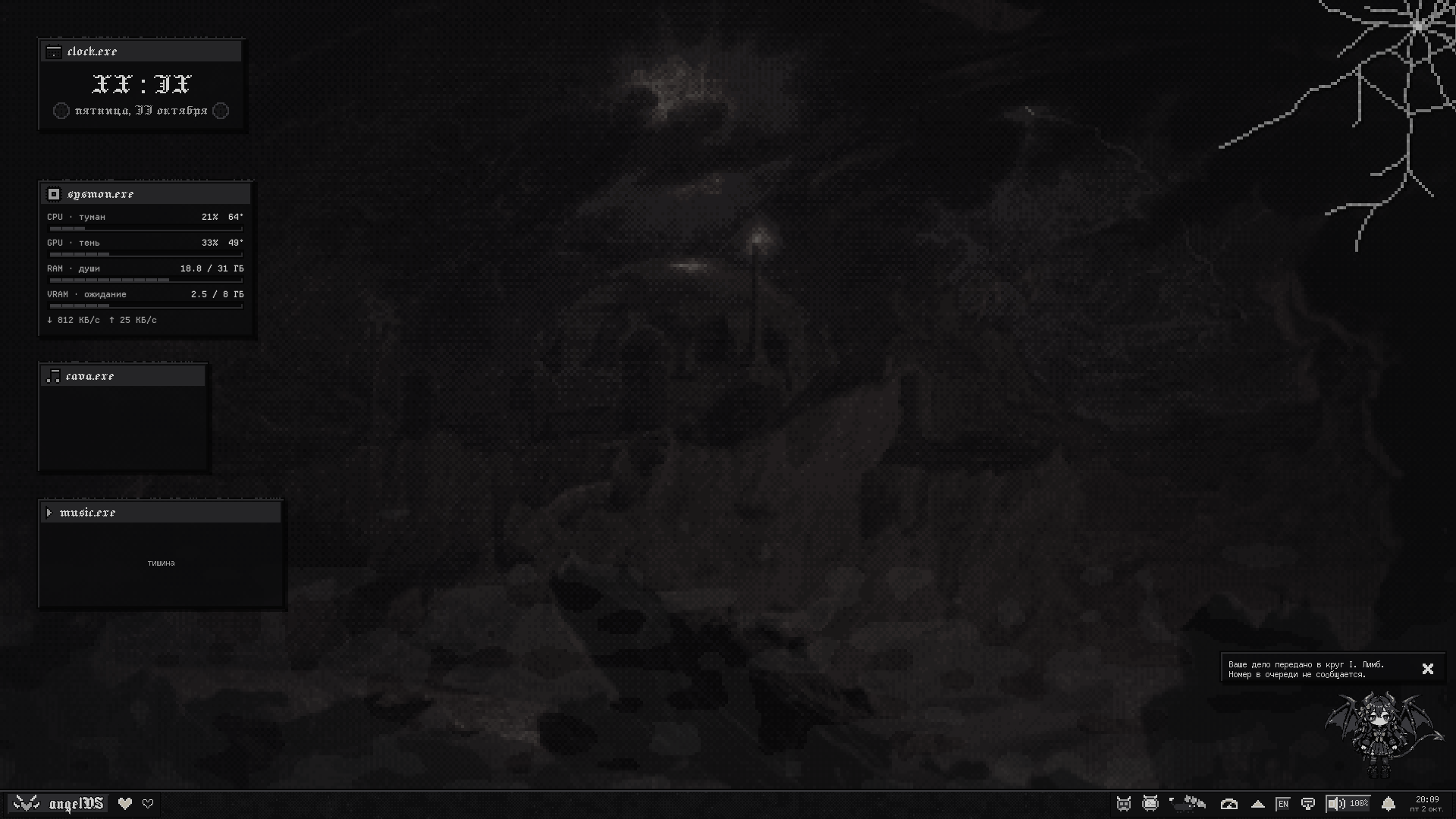
angelOS is also a game played over your real desktop: an angel lives in the corner, and what happens next depends on your choices — two people get two different stories. It may scare you, but it never harms: it doesn't touch your files, sends nothing anywhere and never reads your windows, browser or chats (the characters know only what the shell knows anyway: your name, the time, the uptime, the music playing). The lock screen, power menu, volume, notifications and polkit always work.
- Out of the game at once, any time:
angelos game offor Mod+Ctrl+Shift+Escape — angelOS stays as plain dotfiles. Back:angelos game on. - Looking for the way out of hell? The demon's menu → Ask… → “Seek the way out” (or just type it, in your own words). The button shows the circle and the minutes until the next try;
angelos game statusshows where you are. - Without the game from the start: the installer asks (
ANGELOS_GAME=0), and so does the first-run wizard. - Motion (Settings → Appearance → Motion, the setup wizard,
angelos motion full|calm|off): calm — no flashes, screen shaking or sudden loud sounds; off — no animations at all, the shell's, niri's and hell's (an optimisation mode; the angel and the demon only breathe). - Progress lives in its own file,
~/.config/angelos/save.json(updates never touch it);angelos game resetstarts over. - Not sure where you stand? Ask her — “what did I sign?”, in any words — and she shows it on paper, with the way out in numbers.
- How the story works inside:
docs/STORY.md— spoilers.
♡ from a terminal
Everything is scriptable through the angelos command:
angelos help                       # every function
angelos theme toggle               # dark <-> light
angelos flavor overdose            # bubblegum | overdose | cyberangel
angelos wallpaper random           # or a path
angelos bar island                 # taskbar | top | island
angelos widget cava DP-1           # toggle a desktop widget on a monitor
angelos settings windows           # open a settings page
angelos settingsView controlpanel  # sidebar | controlpanel | properties | tiles
angelos tour                       # interface tips
angelos switch noctalia            # go back to Noctalia (and `switch angelos` to return)
angelos game off                   # out of the game at once (`on` to come back)
angelos motion off                 # no animations at all (full | calm | off)
✧ plugins.exe
A plugin is a folder with a manifest.json; it can add right-click menu items, bar widgets, desktop widgets, launcher providers, a settings page and a background service. Settings → Plugins → New plugin scaffolds one; the guide is docs/PLUGINS.md.
Build a plugin with AI: enable Settings → System → Developer mode, then open Plugin Studio from Settings or Start. Add an OpenAI or Anthropic API key, describe your idea, answer any questions and approve the proposed behavior and size. Studio generates themed QML, shows the files and checks their syntax before you click Install. Installed plugins appear in the normal plugin settings; desktop widgets can be added to the current screen immediately. The UI supports Russian and English. Plugin Studio guide.
| Plugin | What it does |
|---|---|
cat | A pixel cat on the bar: asleep, walking or running with the CPU load |
speedtest | Internet speed test with a pixel speedometer and history |
web-search | web … in the launcher: search engines and favourite sites with favicons |
claude-companion | How much of your Claude plan is left (5-hour and weekly, like /usage), live Claude Code sessions found on their own, claude.exe on the desktop, claude … in the launcher, an MCP bridge to the desktop |
nightlight | Warm screen in the evening via wlsunset (6600 K → 3900 K) |
stream-stats | NGO-style stats.exe: stress = CPU, darkness = RAM, love = uptime (off by default) |
quick-actions | Extra right-click items (off by default) |
✧ tiling.exe
Windows live in columns on an infinite horizontal strip. New windows open to the right, focus scrolls the view, and columns can be resized, centred, stacked, turned into tabs, or popped out as floating windows. Settings → Windows sets the default width, the Mod+R presets and a width per app.
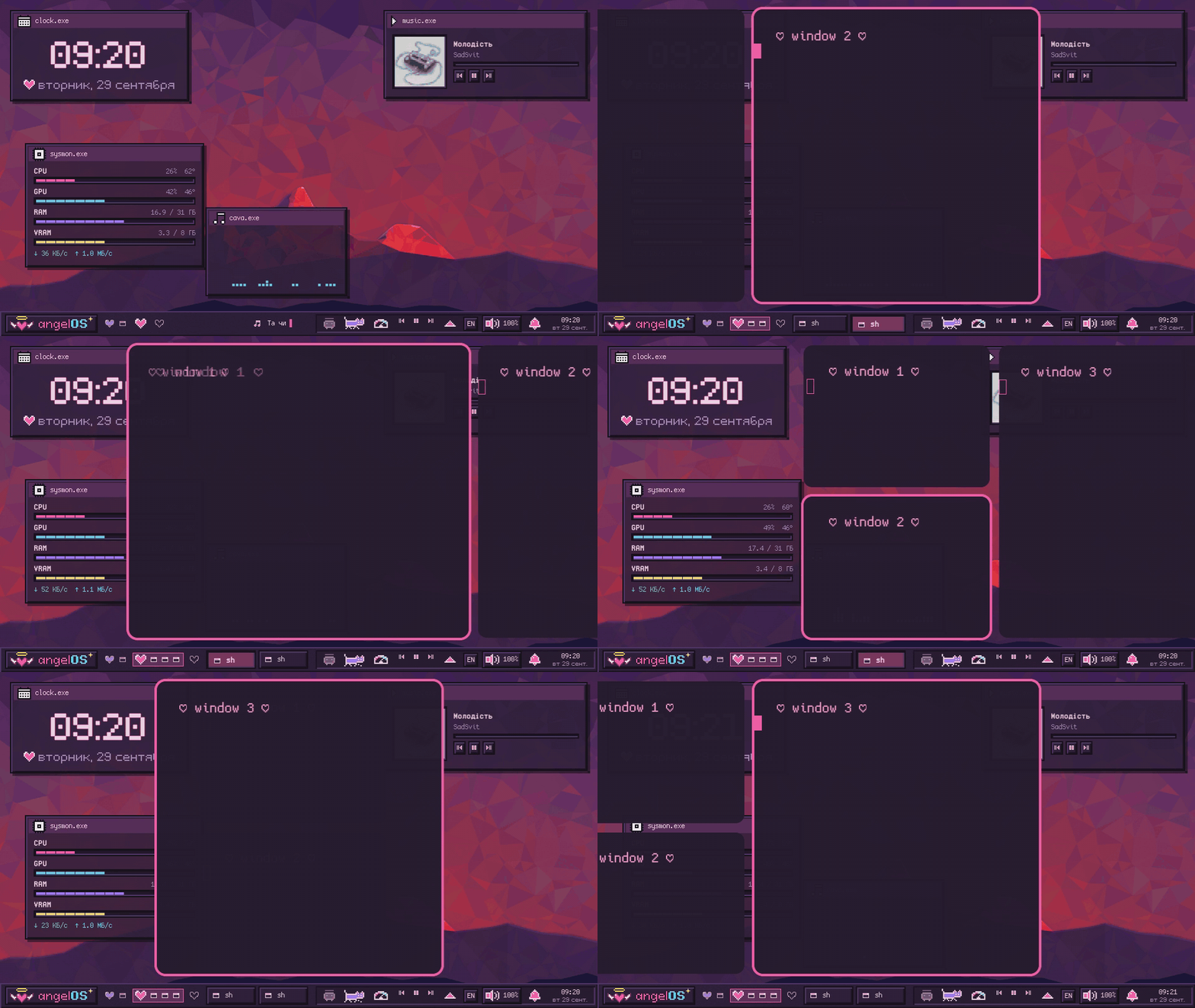
| Keys | Action |
|---|---|
Mod+H / Mod+L (or arrows) | Focus column left / right |
Mod+Ctrl+H / L | Move column left / right |
Mod+R | Cycle preset column widths |
Mod+C | Centre column |
Mod+[ / Mod+] | Pull a window into the neighbouring column, or push it out |
Mod+W | Toggle tabbed column |
Mod+Shift+Space | Toggle floating |
Mod+F / Mod+Shift+F | Fullscreen / maximise column |
overview.exe
Mod+Tab zooms out to every workspace at once. Workspaces are dynamic and vertical, so you can send a column to the next one and jump straight back. The wallpaper stays in the overview backdrop.
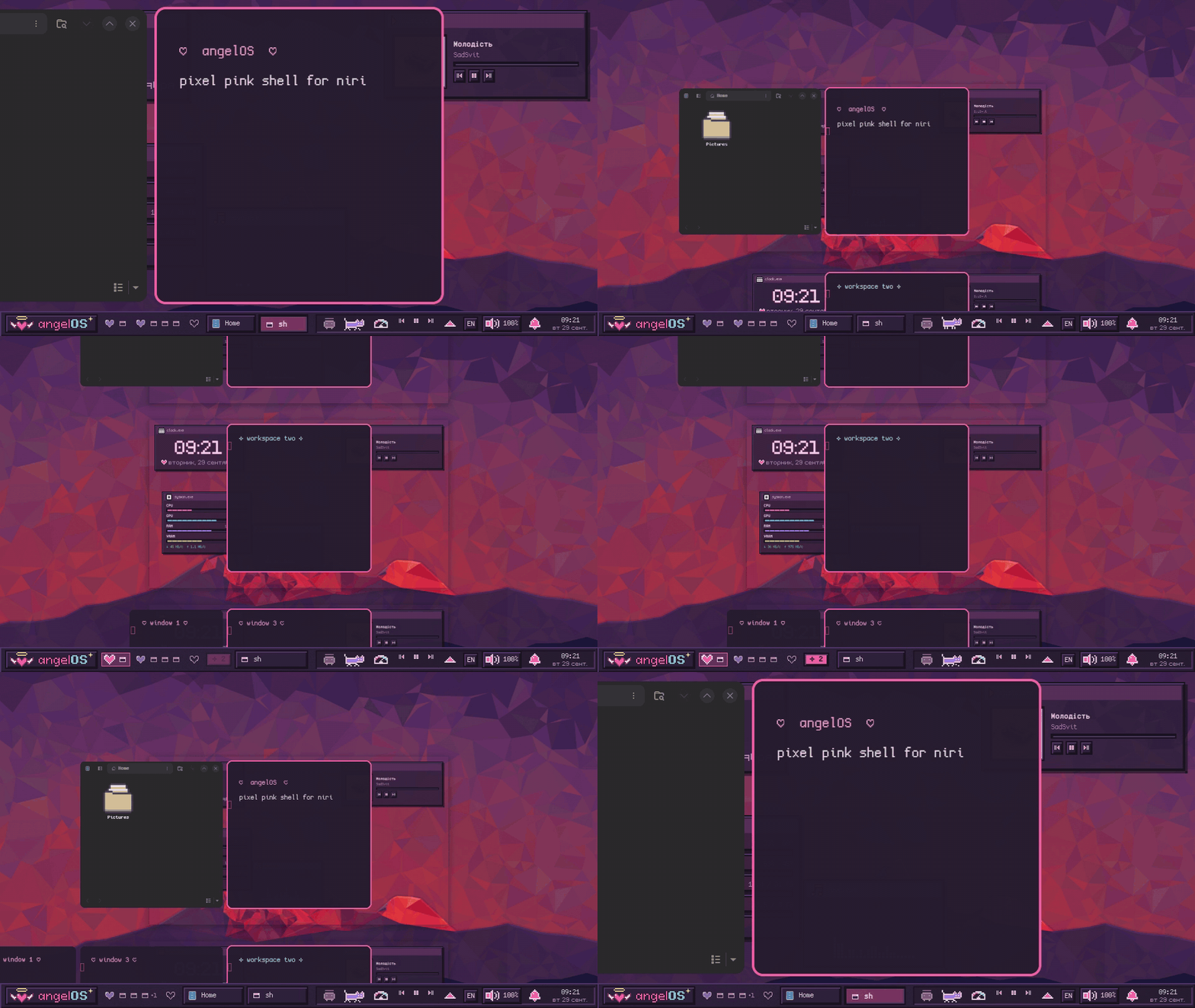
| Keys | Action |
|---|---|
Mod+Tab | Toggle overview |
Mod+1…9 | Go to workspace |
Mod+Ctrl+1…9 | Move column to workspace |
Mod+Mouse wheel | Switch workspace |
Mod+O | Previous workspace |
hotkeys.exe
Forgot a binding? Mod+Shift+Esc opens Niri's hotkey overlay. Every important bind carries a readable title, so the overlay doubles as documentation.
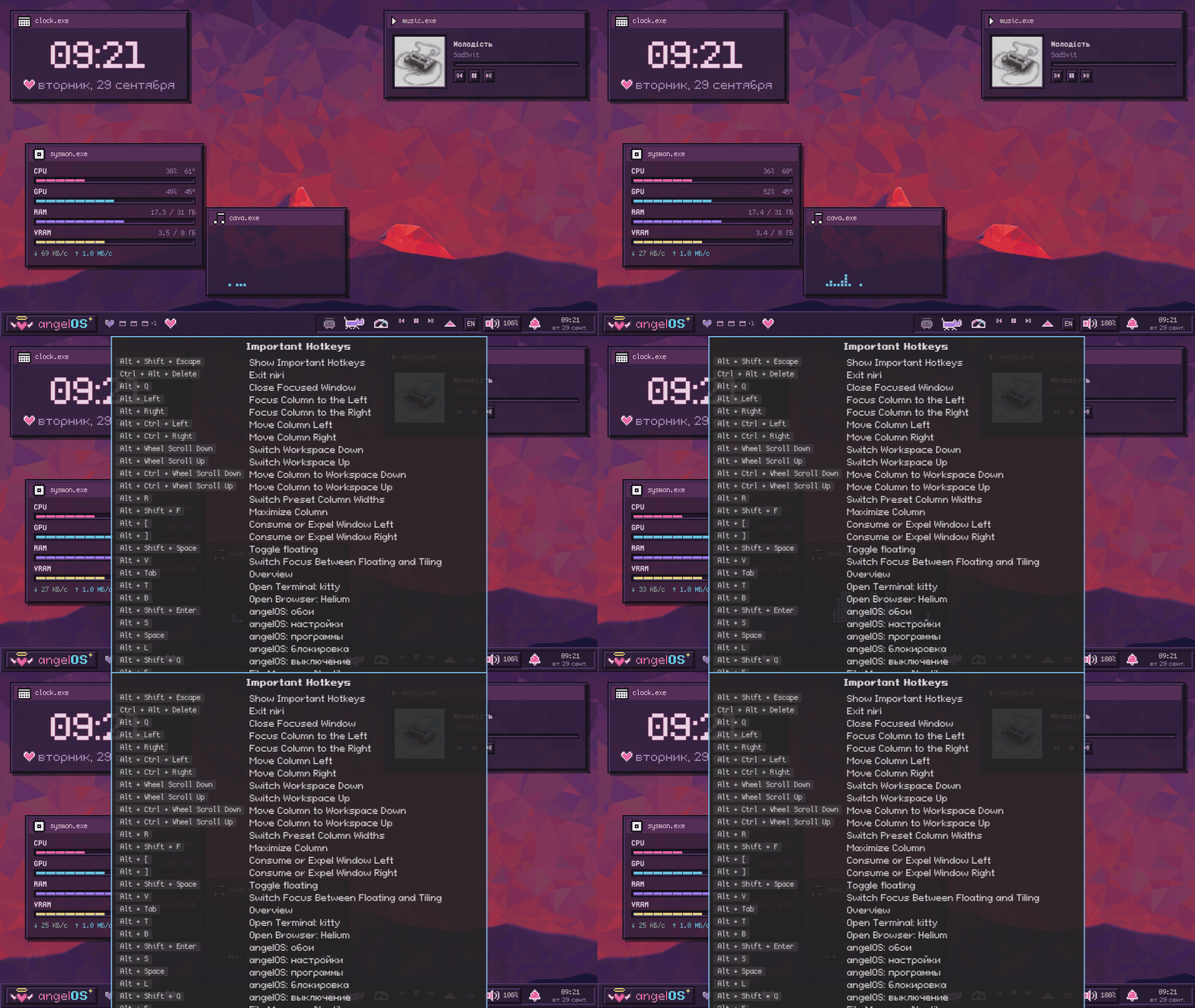
✧ Keybindings
Full list lives in .config/niri/cfg/keybinds.kdl.
| Keys | Action |
|---|---|
Mod+T | Terminal (kitty) |
Mod+B | Default browser (xdg-open) |
Mod+E | File manager (Nautilus) |
Mod+Q | Close window |
Mod+Space | angelOS launcher |
Mod+V | Clipboard history |
Mod+S / Mod+Alt+S | angelOS settings |
Mod+Shift+Return | Wallpaper picker |
Mod+Alt+L | Lock screen |
Mod+Shift+Q | Power menu |
Mod+Alt+Y | Lyrics on / off |
Mod+Alt+T | Light / dark theme |
Mod+Shift+S | Screenshot a region |
Mod+Shift+T | OCR a region to the clipboard |
Mod+Shift+R | Start / stop region recording |
Mod+Shift+V | Toggle voice dictation |
Mod+Shift+X | Toggle screencast privacy mode |
Ctrl+Shift+2 / 3 | Screenshot the screen / the window |
Mod+Shift+P | Turn monitors off |
Mod+Shift+←→↑↓ | Focus another monitor |
Mod+Esc | Emergency escape: release a keyboard-shortcuts inhibitor from a fullscreen app |
Mod+Ctrl+Shift+Esc | Out of angelOS's game at once (angelos game off) |
Ctrl+Alt+Delete | Quit Niri |
Media and volume keys are wired to angelos … (a small pixel OSD shows the level) and keep working on the lock screen.
✧ Helper tools
Installed to ~/.local/bin. They are plain Bash/Python scripts built on grim, slurp, wf-recorder, tesseract and wl-clipboard.
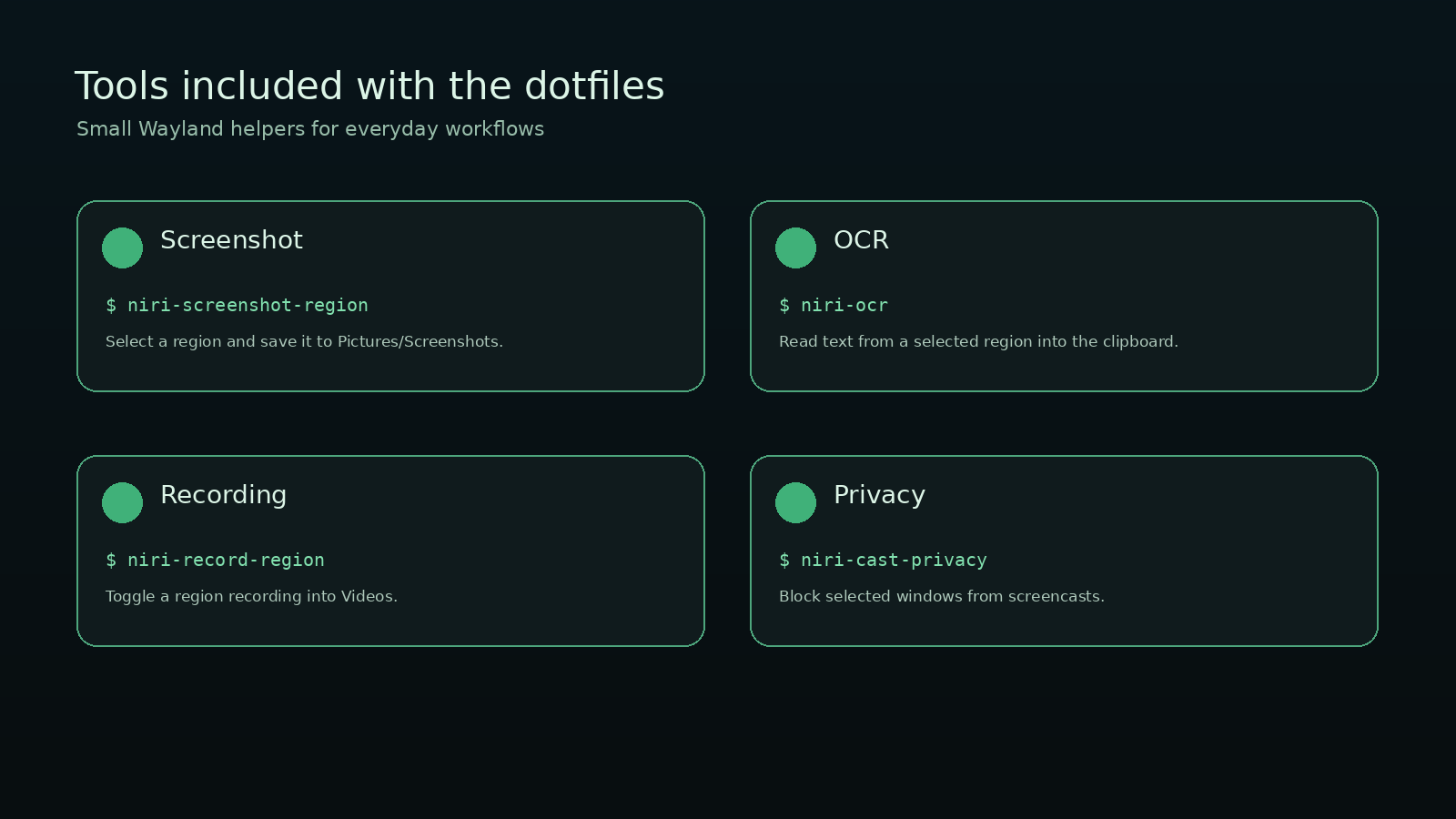
The image above is a safe repository mockup of the tools.
| Command | What it does |
|---|---|
niri-screenshot-region | Region screenshot with a pixel "gravity ropes" selection overlay; always saves to ~/Pictures/Screenshots |
niri-record-region | Toggle a region recording to ~/Videos with an on-screen overlay. Tune it with NIRI_RECORD_FPS, NIRI_RECORD_CODEC, NIRI_RECORD_CRF |
niri-ocr | Select a region and copy the recognised text to the clipboard. Uses every installed Tesseract language pack; the installer adds packs for your keyboard layouts |
niri-cast-privacy | Toggle Niri block-out-from "screencast" rules for Telegram, Bitwarden, Helium and Discord. Your screen stays live, the stream sees black |
niri-game-mode | User service that switches off animations, blur and transparency while a window covers an output, then restores them |
voxtype-indicator | The classic dictation indicator for Voxtype; angelOS shows its own pixel voice.exe instead (Settings → Sound) |
The tech install profile installs the lighter niri-screenshot-region-simple and niri-record-region-simple in place of the overlay versions.
✧ What is included
- angelOS, the Quickshell desktop shell above, with its plugins and theme templates for kitty, foot, Alacritty, GTK 3/4 and Niri's focus ring.
- Niri configuration split into small, readable KDL files (
layout,animation,rules,input,keybinds,autostart, …). - Noctalia as an alternative shell, and a shell-free fallback config.
- An SDDM login screen: the animated
pixel-cyberpunktheme, installed and enabled for you. - Kitty, Alacritty, Foot, GTK, Fastfetch and fontconfig setups, themed to match.
- fish (a small
conf.d/angelos-tools.fish:~/.local/binon the PATH,nfor Neovim) and a Neovim config on LazyVim that keeps the terminal's colours — so it follows angelOS, heaven and hell. It goes in only where~/.config/nvimis not there yet (or was put there by the installer); someone's own Neovim config is never mixed with it. - Small everyday tools, optional (
packages/tools.txt, asked by the installer orINSTALL_TOOLS=0|1): fish, btop, glances, duf, ncdu, lsd, ripgrep, tree, micro, yt-dlp, pavucontrol, helvum, Mission Center, Meld, scrcpy and the like. - The
pixorapixel icon theme, Cozette / Pixeloid pixel fonts and the wallpaper packs you pick. - Package lists — every package from Arch Linux's official repositories, no AUR.
- One command to install,
./install.sh: it asks everything itself (shell, game, wallpapers, voice input, login screen, keyboard), backs up anything it replaces, and is safe to re-run.
✧ Requirements
- Arch Linux or CachyOS. The installer reads
/etc/os-releaseand refuses anything else before a file changes — Arch-based distributions too, since their own repositories may differ (DOTFILES_FORCE_DISTRO=1runs it anyway, at your own risk). Every package it installs is in Arch's officialcore/extrarepositories (scripts/check-packages.shasks archlinux.org). - A Wayland session
sudofor the optional package stepgitandcurl
install.sh installs Niri and the rest of the rice from packages/pacman.txt, angelOS's own packages from packages/angelos.txt (quickshell, cava, wlsunset, speedtest-cli, …) and SDDM from packages/sddm.txt, with sudo pacman -Syu --needed, so the system is brought up to date in the same step: Arch does not support partial upgrades, and a plain pacman -S against a stale package database fails halfway. It does not install browsers, chat clients, games, development tools, or unrelated personal applications. No AUR packages are required.
The helper scripts use grim and slurp (screenshots), wf-recorder (recording), tesseract and wl-clipboard (OCR), Python GTK, Cairo and GtkLayerShell (overlays), and voxtype with the large-v3-turbo Whisper model (voice input).
✧ Installation
git clone https://github.com/MixaDoDs/AngelOS-Dotfiles.git
cd AngelOS-Dotfiles
./install.sh
That is the one command (./.install is the same thing). Run without arguments it asks everything itself, in a short setup (English, or Russian when your locale is ru_*):
- Profile:
full(styling, a desktop shell, pixel fonts and icons, wallpapers) ortech(Niri config and helper tools only). - Shell: angelOS (default), Noctalia, or none.
- Wallpapers: which packs to download from PixelStreetArt_Wallpapers — Lain (~410 MB), Pixel (~187 MB), green pixel art (~275 MB), Hell (pixel hell for the demon, ~0.4 MB), all or none. Only the chosen folders are fetched.
- Voice input: whether to install Voxtype and its ~1.6 GB Whisper model.
- Login screen: whether to install SDDM with the
pixel-cyberpunktheme and make it the login manager. - Keyboard layouts: pick from a list or type any XKB code.
- Layout switch shortcut: Alt+Shift, Ctrl+Shift, Caps Lock, Right Alt or Left Alt.
- The game: whether angelOS is also the game (or plain dotfiles), and extra apps from Flathub (off by default).
- GitHub (optional, only for the author of angelOS): their own tools — the chapter editor — come from a private repository and only to an account GitHub lets in. For everyone else nothing changes; skipping loses nothing. angelOS keeps no token,
ghdoes.
On the first login angelOS opens its setup wizard and then the interface tips by itself.
Everything can also be given up front, which makes the installer fully unattended:
DOTFILES_MODE=full DESKTOP_SHELL=angelos \
KB_LAYOUTS="us ru" KB_TOGGLE=alt_shift \
WALLPAPER_PACKS=Lain,Pixel INSTALL_VOXTYPE=1 DOWNLOAD_VOXTYPE_MODEL=1 \
./install.sh
Other switches (run ./install.sh --help for the full list):
SKIP_PACKAGES=1 ./install.sh                                  # config only: no pacman, no SDDM, no sudo
DESKTOP_SHELL=noctalia ./install.sh                           # Noctalia instead of angelOS
DESKTOP_SHELL=none ./install.sh                               # plain Niri, no shell
ANGELOS_GAME=0 ./install.sh                                   # angelOS as plain dotfiles, without its game
INSTALL_SDDM=0 ./install.sh                                   # keep your current login manager
INSTALL_VOXTYPE=0 DOWNLOAD_VOXTYPE_MODEL=0 ./install.sh       # no voice input
ENABLE_SERVICES=0 ./install.sh                                # do not enable user services
WALLPAPER_PACKS=none ./install.sh                             # no wallpaper packs (all | none | Lain,Pixel,…)
INSTALL_FLATPAK=1 ./install.sh                                # also the apps in packages/flatpak-apps.txt
INSTALL_TOOLS=0 ./install.sh                                  # without the small tools in packages/tools.txt
GITHUB_LOGIN=1 ./install.sh                                   # the author's tools (needs access; `angelos author login` later)
NOCTALIA=1 / NOCTALIA=0 from earlier versions still work and mean DESKTOP_SHELL=noctalia / none.
Existing files are never overwritten silently: they are moved to filename.bak.YYYYMMDD-HHMMSS. Re-running the installer leaves unchanged files alone, and files that belong to you (monitor.kdl, the XDG user-dirs files) are only created if missing.
Run the repository check before installing. Besides syntax and hygiene checks it runs the installer against throw-away home directories, so it never touches your real configuration:
./scripts/check.sh
./scripts/ci-local.sh runs the GitHub check itself (.github/workflows/angelos.yml) in the same archlinux container with Docker or Podman — what passes there passes on GitHub.
♡ Prefer Noctalia?
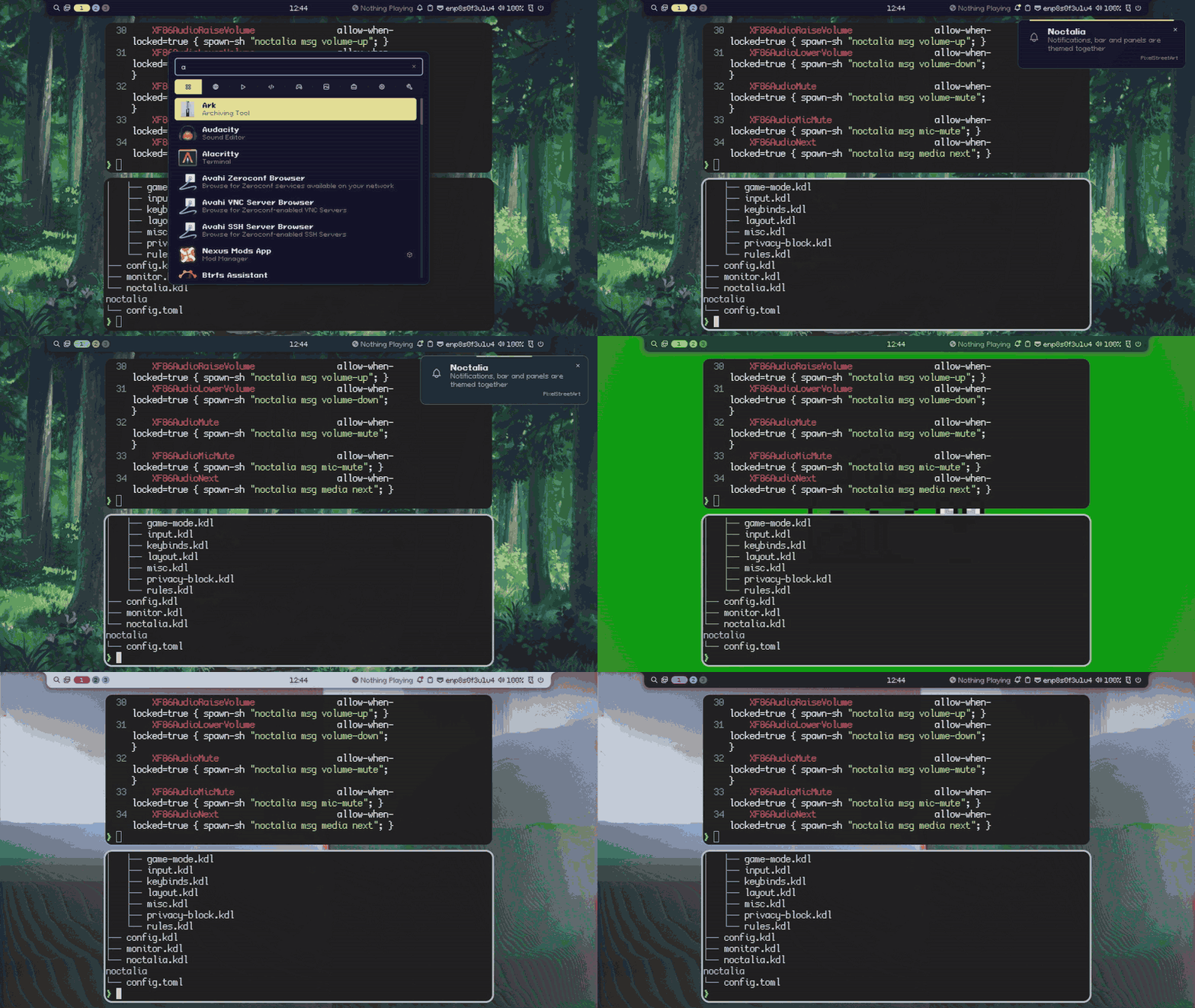
DESKTOP_SHELL=noctalia ./install.sh installs Noctalia with its preconfigured setup (.config/noctalia/config.toml) and rewires Niri for it. On an angelOS install, angelos switch noctalia does the same in place and angelos switch angelos goes back.
✧ Updating
With angelOS: Settings → Updates checks the repository you installed from, shows what is new and, on a click, runs git pull and the installer without packages. It can also check once a day and only notify you.
Before anything changes, every file the installer may write is copied to ~/.local/state/angelos/backups/<date>-update/ and read back; if that copy fails, nothing is updated. An update counts as installed only when the installer, the niri wiring and niri validate all pass. If one of them fails, the page says which step failed and where the snapshot is, and offers Restore the state before the update. Restoring only undoes what that update changed: files you changed again since then stay as they are and are listed as conflicts, and files the update created are removed. After that, niri's config is validated and the repository goes back to the old commit, so the update is offered again. From a terminal: ~/.config/quickshell/angelos/scripts/dotfiles-update.sh --restore <snapshot>.
Installs made before this page existed need one manual update to get it:
cd AngelOS-Dotfiles
git pull
./install.sh
A running angelOS keeps the previous version in memory. Once an update from Settings is done, angelOS asks whether to restart the shell now or later (windows and apps stay open); the installer run from a terminal asks the same. Later on, Settings → Updates → Restart the shell, angelos restart or logging out and back in loads the new version.
✧ Login screen (SDDM)
The installer sets up SDDM with pixel-cyberpunk, an animated pixel-art theme from Qylock by Darkkal44: a looping video background, a pixel font, clock, user and session switchers, reboot and shutdown buttons.
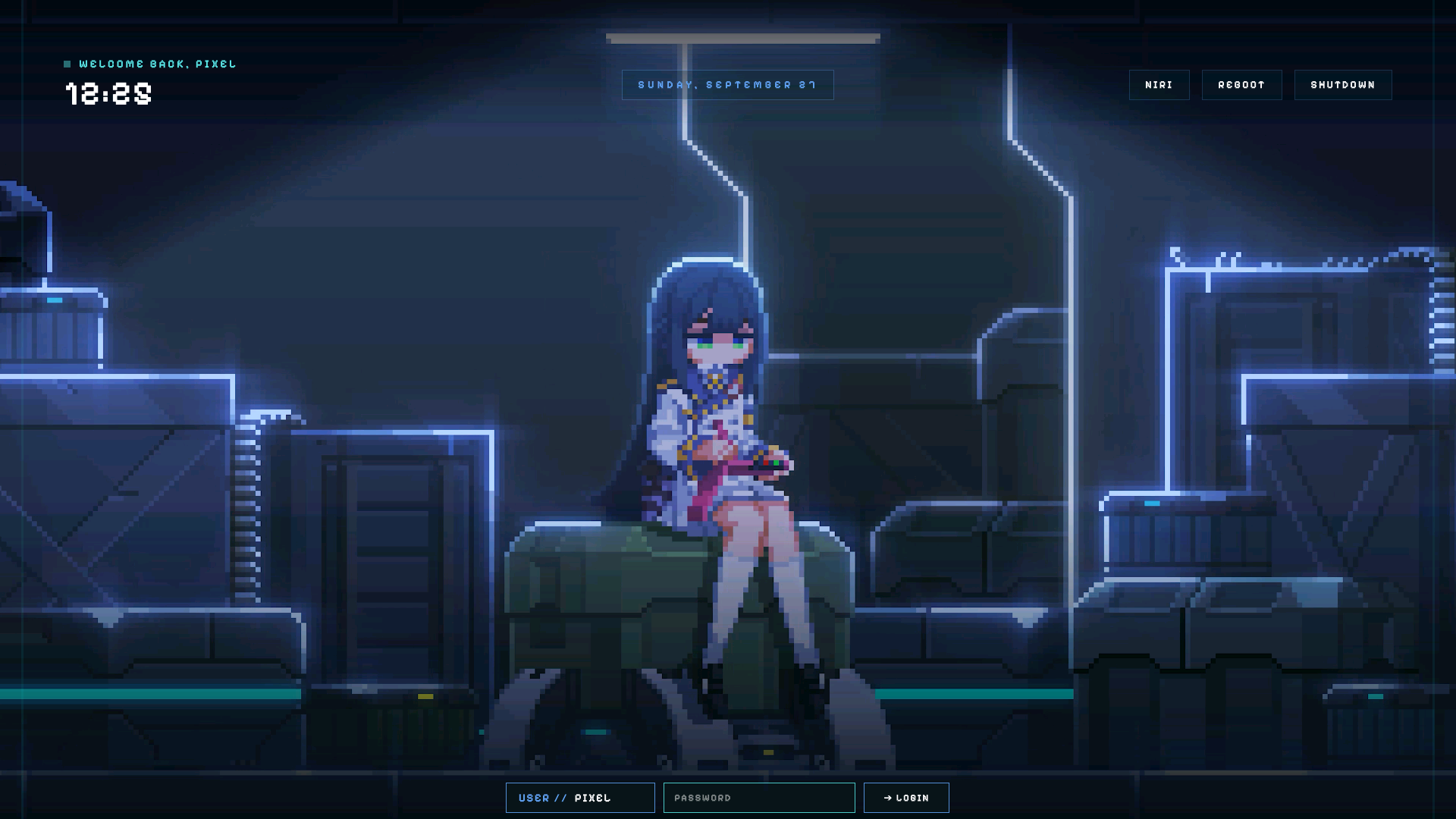
Rendered by the real greeter (sddm-greeter-qt6 --test-mode) with a placeholder user; the background is a looping pixel-art video.
What INSTALL_SDDM=1 (the default) does:
- Installs
sddmand exactly the Qt modules the theme imports (packages/sddm.txt): withoutqt6-5compatthe theme cannot load at all, and withoutqt6-multimedia-ffmpegthe background stays black. - Copies the theme to
/usr/share/sddm/themes/pixel-cyberpunk(world-readable, since the greeter runs as thesddmuser). - Selects it in
/etc/sddm.conf.d/zz-pixelstreetart.conf. ACurrent=theme in/etc/sddm.conf, which SDDM reads last and which would override the drop-in, is commented out with a backup. - Enables
sddm.service. If another login manager (GDM, LightDM, ly, greetd, …) is enabled it asks before switching; unattended runs only switch when you passINSTALL_SDDM=1explicitly. - Makes sure the machine boots into
graphical.target, the only target that starts a login manager.
The session button in the top-right corner (NIRI above) cycles through installed sessions when clicked; SDDM remembers the last one you used.
Preview the theme without logging out:
sddm-greeter-qt6 --test-mode --theme /usr/share/sddm/themes/pixel-cyberpunk
SDDM does not start
| Symptom | Cause and fix |
|---|---|
| Boots to a text console | No login manager is enabled, or the boot target is multi-user.target. Re-run the installer, or: sudo systemctl enable --force sddm && sudo systemctl set-default graphical.target |
Failed to enable unit … display-manager.service already exists | Another login manager owns the slot: sudo systemctl disable gdm (or lightdm, ly@tty2, greetd), then enable SDDM as above |
| Plain grey/blue SDDM instead of the pixel theme | The theme is not selected or cannot load. Check grep -r Current= /etc/sddm.conf /etc/sddm.conf.d/ and install qt6-5compat |
| Theme loads but the background is black | Missing video backend: sudo pacman -S qt6-multimedia qt6-multimedia-ffmpeg |
| Anything else | journalctl -b -u sddm shows the greeter's errors |
To go back to another login manager: sudo systemctl disable sddm && sudo systemctl enable <other>.
✧ Keyboard layouts
The installer writes your choice into ~/.config/niri/cfg/input.kdl, so nobody has to hunt for it:
xkb {
    layout "us,ru"
    options "grp:alt_shift_toggle"
}
| Choice | Shortcut | XKB option |
|---|---|---|
| Alt + Shift | KB_TOGGLE=alt_shift (default) | grp:alt_shift_toggle |
| Ctrl + Shift | KB_TOGGLE=ctrl_shift | grp:ctrl_shift_toggle |
| Caps Lock | KB_TOGGLE=caps | grp:caps_toggle (Caps Lock itself stops working) |
| Right Alt | KB_TOGGLE=ralt | grp:ralt_toggle |
| Left Alt | KB_TOGGLE=lalt | grp:lalt_toggle |
Win+Space is deliberately not offered because Mod+Space opens the launcher. Any other XKB option can be passed as KB_TOGGLE=grp:shifts_toggle.
Your layouts also drive two other things: the dictation language of Voxtype (the first non-English layout, e.g. ru → Russian) and the OCR language packs that get installed.
Later, change layouts in angelOS (Settings → Keyboard & mouse) or edit input.kdl; Niri reloads it instantly. niri msg keyboard-layouts shows what is active.
✧ Mouse and monitors
- Mouse: pointer speed and acceleration start at libinput defaults, because every mouse is different. Tune them in Settings → Keyboard & mouse, or with a
mouse { accel-profile "adaptive"; accel-speed 0.4 }block ininput.kdl. - Focus indicator: the focused window gets a thin outline in the angelOS accent colour, and it follows the theme. Windows stay fully opaque, with no blur and no inactive dimming.
- Pixel corners: every window is rounded by 4 px in niri (angelOS's own windows stay pixel boxes). Inside, GTK 3, GTK 4 / libadwaita and Qt (qt6ct) draw the same pixel frame as angelOS itself: a 2 px outline whose corners step in by one art pixel, with a 2 px bevel — on buttons, fields, lists, menus and tooltips, in heaven's colours or the circle's in hell. The frames are small images the theme scripts draw from the palette.
- Monitors:
~/.config/niri/monitor.kdlis created empty, so Niri auto-detects your outputs. Set resolution, refresh rate, scale, rotation and position in Settings → Monitor (drag the screens into place); it writes that file with a backup, and the installer never overwrites it.
After installation
Review and adjust for your system:
~/.config/niri/cfg/keybinds.kdl
~/.config/niri/cfg/misc.kdl
~/.config/angelos/settings.json     (written by angelOS's settings app)
- The default binds expect
kitty, a browser registered withxdg-open,nautilusand several Wayland utilities. Replace those commands, or pick defaults in Settings → Default apps. - Voxtype is downloaded from its official GitHub release and verified with a pinned SHA256 checksum. Its binary and Whisper model stay outside the repository.
✧ Repository layout
.config/quickshell/angelos/  angelOS: the shell, its plugins, templates and docs
.config/                     Niri, Noctalia, Voxtype, terminal, GTK and fastfetch configuration
.local/bin/                  Wayland helper scripts
.local/share/                Optional icon theme and pixel fonts
Pictures/                    The three default wallpapers (the packs live in PixelStreetArt_Wallpapers)
packages/                    Arch, AUR and Flatpak package lists (angelos.txt, sddm.txt)
sddm/                        SDDM pixel-cyberpunk theme and its config drop-in
scripts/check.sh             Repository check, including end-to-end installer tests
scripts/ci-local.sh          The GitHub check, run locally in its own container
docs/screenshots/            Static preview images
docs/demo/                   GIFs used in this README
install.sh                   The installer: asks everything, backs up, Arch Linux / CachyOS only
LICENSE                      MIT, for the dotfiles and angelOS
THIRD-PARTY.md, LICENSES/    What others made, under which license (and what is unclear)
✧ Notes
- No credentials, browser profiles, cookies, history, caches, keyrings or local runtime state are included. angelOS settings (
~/.config/angelos) are yours and are not part of the repository. - Wallpaper packs are a separate repository, PixelStreetArt_Wallpapers; they are optional and can be removed without affecting the configuration.
- The
pixoraicon theme (CC BY 4.0, by tsora1603) and the pixel fonts (SIL OFL / MIT) are optional visual assets — seeTHIRD-PARTY.md. - angelOS draws only its own pixel decorations; no game art is included.
- Niri configuration syntax changes between releases; check the current Niri documentation if an option is rejected.
✧ License
The dotfiles and angelOS are released under the MIT license — see LICENSE, © 2026 MixaDoDs.
Parts made by others keep their own licenses, listed with their notices in THIRD-PARTY.md: the SDDM theme from Qylock by Darkkal44 (GNU GPL v3, unmodified), the fonts (SIL OFL 1.1 — LICENSES/OFL-1.1.txt; Cozette: MIT), the pixora icon theme and HackerNoon's pixel icons (CC BY 4.0), pixelarticons (MIT) and the Claude Companion plugin, a port of lowcache/noctalia-claude-plugin (MIT). A few pictures and sounds of unknown origin are marked there as such.
♡ thank you for watching the stream ♡
Similar repos


Languages
QML
70.5%
Python
18.5%
Shell
4.1%
JavaScript
3.6%
GLSL
2.5%
CachyOS + Niri pixel street-art rice (dotfiles + install.sh)
QML
90
92 commits
updated Oct 3, 2026
See what people are saying
README
♡ PixelStreetArt ✧ angelOS ♡
~ welcome back, internet angel ~
A pixel-pink CachyOS + Niri rice with its own desktop shell, angelOS, built on Quickshell in the spirit of NEEDY GIRL OVERDOSE: Win98 windows, pixel hearts, a bar that sings along, and a desktop you can right-click like it's 2001.
overdose (dark) ✧ angel (light) — one click apart.
[!NOTE] The screenshots are of a clean install in a nested session (a generated wallpaper, no personal data); the GIFs show angelOS in use. Wallpaper, widget placement, language and theme are configurable; the first-run wizard helps you choose your setup. The helper-tools illustration and SDDM test preview are labelled separately below. In a nested session Niri uses
AltasMod; on real hardwareModis the Super / Windows key, and that is what the tables use.
Jump to: angelOS.exe · The game · Plugins · Tiling · Keybindings · Helper tools · Install · Login screen · Keyboard · Mouse & monitors · Layout · License
✧ angelOS.exe
angelOS is the whole desktop: bar, wallpaper, widgets, launcher, notifications, OSD, lock screen, polkit dialogs, clipboard history and a settings app. It lives in .config/quickshell/angelos and is plain QML, so everything is hackable.
♡ desktop.exe
The taskbar is a Win98 one with pixel hearts for workspaces (or the icons of the apps on them), window buttons, a tray recoloured to the theme, and the current lyric line of the song in the middle (synced lyrics from lrclib.net). Widgets sit on the wallpaper. Light and dark palettes include bubblegum, overdose, cyber angel, Gruvbox, Rosé Pine, Catppuccin and colours generated from your wallpaper.
| Keys | Action |
|---|---|
Mod+Alt+T | Light ⇄ dark theme |
Mod+Alt+Y | Hide / show the lyrics line |
Mod+Mouse wheel on the hearts | Switch workspace |
| Right-click a window button | Close that window |
♡ wallpaper.exe
Changing the wallpaper plays a pixel transition: mosaic plus ordered (Bayer) dither. It only plays when the picture changes; switching workspaces stays instant, even with a wallpaper per workspace.
Mod+Shift+Return opens the wallpaper picker (Settings → Wallpaper): one for every screen, one per monitor, or one per workspace.
♡ menu.exe
Right-click the wallpaper for a Windows 11-style menu: quick actions on top, then View ▸ (toggle widgets, edit mode, snap to grid), New ▸ (text note, screenshot, recording), Open ▸ (your folders), display settings, personalisation, "Open in Terminal", and Show more options ▸ for plugin items.
Widgets (clock.exe, sysmon.exe, cava.exe, music.exe, plus plugin ones) are dragged by their title bar; double-click a title for edit mode. Settings → Widgets adds them to any monitor, moves them between monitors and sets their options (e.g. which output cava listens to).
♡ launcher.exe
Mod+Space. Fuzzy app search that learns what you launch, web … to search the web or open favourite sites, claude … / claude ? … for Claude Code, and > command to run anything in sh.
| Keys | Action |
|---|---|
Mod+Space | Launcher |
Mod+V | Clipboard history |
Mod+S / Mod+Alt+S | Settings |
Mod+Alt+L | Lock screen |
Mod+Shift+Q | Power menu (lock, sleep, log out, reboot, power off) |
♡ settings.exe
A real window with pages for Appearance, Wallpaper, Widgets, Bar (drag-and-drop layout like Noctalia's, hearts or app icons, window-button widths, tray icon colours), Workspaces, Lyrics, Monitor (drag the screens around, writes monitor.kdl), Keyboard & mouse, Windows (default width, Mod+R presets, a width per app), Sound, Default apps (browser, editor, files, terminal, media…), Notifications, Plugins and System. Changes to Niri's config are backed up, checked with niri validate and rolled back if Niri says no.
- Four views of the same pages: a macOS-like sidebar, a Win98 Control Panel, Properties tabs and big tiles (
angelos settingsView …). - Three styles of the shell's pixel icons: angelOS's own, pixelarticons or HackerNoon's Pixel Icon Library.
- Previews next to what changes the look or the motion — wallpaper transitions, window animations, Start, the bar, the lock screen; one still frame when motion is off.
- Browsers in the theme: Helium and Chromium follow angelOS live through GTK (a gentle restart brings the tabs back), Firefox gets the palette through
userChrome.css; profiles change only on a click, with a backup and Put it back.
♡ tips.exe
The first login opens a short setup wizard (monitors, keyboard, theme, bar, windows, desktop, default apps) and then interface tips: each part of the screen is circled in pixels and explained. Replay them any time from Settings → Appearance.
♡ game.exe
angelOS is also a game played over your real desktop: an angel lives in the corner, and what happens next depends on your choices — two people get two different stories. It may scare you, but it never harms: it doesn't touch your files, sends nothing anywhere and never reads your windows, browser or chats (the characters know only what the shell knows anyway: your name, the time, the uptime, the music playing). The lock screen, power menu, volume, notifications and polkit always work.
- Out of the game at once, any time:
angelos game offor Mod+Ctrl+Shift+Escape — angelOS stays as plain dotfiles. Back:angelos game on. - Looking for the way out of hell? The demon's menu → Ask… → “Seek the way out” (or just type it, in your own words). The button shows the circle and the minutes until the next try;
angelos game statusshows where you are. - Without the game from the start: the installer asks (
ANGELOS_GAME=0), and so does the first-run wizard. - Motion (Settings → Appearance → Motion, the setup wizard,
angelos motion full|calm|off): calm — no flashes, screen shaking or sudden loud sounds; off — no animations at all, the shell's, niri's and hell's (an optimisation mode; the angel and the demon only breathe). - Progress lives in its own file,
~/.config/angelos/save.json(updates never touch it);angelos game resetstarts over. - Not sure where you stand? Ask her — “what did I sign?”, in any words — and she shows it on paper, with the way out in numbers.
- How the story works inside:
docs/STORY.md— spoilers.
♡ from a terminal
Everything is scriptable through the angelos command:
angelos help                       # every function
angelos theme toggle               # dark <-> light
angelos flavor overdose            # bubblegum | overdose | cyberangel
angelos wallpaper random           # or a path
angelos bar island                 # taskbar | top | island
angelos widget cava DP-1           # toggle a desktop widget on a monitor
angelos settings windows           # open a settings page
angelos settingsView controlpanel  # sidebar | controlpanel | properties | tiles
angelos tour                       # interface tips
angelos switch noctalia            # go back to Noctalia (and `switch angelos` to return)
angelos game off                   # out of the game at once (`on` to come back)
angelos motion off                 # no animations at all (full | calm | off)
✧ plugins.exe
A plugin is a folder with a manifest.json; it can add right-click menu items, bar widgets, desktop widgets, launcher providers, a settings page and a background service. Settings → Plugins → New plugin scaffolds one; the guide is docs/PLUGINS.md.
Build a plugin with AI: enable Settings → System → Developer mode, then open Plugin Studio from Settings or Start. Add an OpenAI or Anthropic API key, describe your idea, answer any questions and approve the proposed behavior and size. Studio generates themed QML, shows the files and checks their syntax before you click Install. Installed plugins appear in the normal plugin settings; desktop widgets can be added to the current screen immediately. The UI supports Russian and English. Plugin Studio guide.
| Plugin | What it does |
|---|---|
cat | A pixel cat on the bar: asleep, walking or running with the CPU load |
speedtest | Internet speed test with a pixel speedometer and history |
web-search | web … in the launcher: search engines and favourite sites with favicons |
claude-companion | How much of your Claude plan is left (5-hour and weekly, like /usage), live Claude Code sessions found on their own, claude.exe on the desktop, claude … in the launcher, an MCP bridge to the desktop |
nightlight | Warm screen in the evening via wlsunset (6600 K → 3900 K) |
stream-stats | NGO-style stats.exe: stress = CPU, darkness = RAM, love = uptime (off by default) |
quick-actions | Extra right-click items (off by default) |
✧ tiling.exe
Windows live in columns on an infinite horizontal strip. New windows open to the right, focus scrolls the view, and columns can be resized, centred, stacked, turned into tabs, or popped out as floating windows. Settings → Windows sets the default width, the Mod+R presets and a width per app.
| Keys | Action |
|---|---|
Mod+H / Mod+L (or arrows) | Focus column left / right |
Mod+Ctrl+H / L | Move column left / right |
Mod+R | Cycle preset column widths |
Mod+C | Centre column |
Mod+[ / Mod+] | Pull a window into the neighbouring column, or push it out |
Mod+W | Toggle tabbed column |
Mod+Shift+Space | Toggle floating |
Mod+F / Mod+Shift+F | Fullscreen / maximise column |
overview.exe
Mod+Tab zooms out to every workspace at once. Workspaces are dynamic and vertical, so you can send a column to the next one and jump straight back. The wallpaper stays in the overview backdrop.
| Keys | Action |
|---|---|
Mod+Tab | Toggle overview |
Mod+1…9 | Go to workspace |
Mod+Ctrl+1…9 | Move column to workspace |
Mod+Mouse wheel | Switch workspace |
Mod+O | Previous workspace |
hotkeys.exe
Forgot a binding? Mod+Shift+Esc opens Niri's hotkey overlay. Every important bind carries a readable title, so the overlay doubles as documentation.
✧ Keybindings
Full list lives in .config/niri/cfg/keybinds.kdl.
| Keys | Action |
|---|---|
Mod+T | Terminal (kitty) |
Mod+B | Default browser (xdg-open) |
Mod+E | File manager (Nautilus) |
Mod+Q | Close window |
Mod+Space | angelOS launcher |
Mod+V | Clipboard history |
Mod+S / Mod+Alt+S | angelOS settings |
Mod+Shift+Return | Wallpaper picker |
Mod+Alt+L | Lock screen |
Mod+Shift+Q | Power menu |
Mod+Alt+Y | Lyrics on / off |
Mod+Alt+T | Light / dark theme |
Mod+Shift+S | Screenshot a region |
Mod+Shift+T | OCR a region to the clipboard |
Mod+Shift+R | Start / stop region recording |
Mod+Shift+V | Toggle voice dictation |
Mod+Shift+X | Toggle screencast privacy mode |
Ctrl+Shift+2 / 3 | Screenshot the screen / the window |
Mod+Shift+P | Turn monitors off |
Mod+Shift+←→↑↓ | Focus another monitor |
Mod+Esc | Emergency escape: release a keyboard-shortcuts inhibitor from a fullscreen app |
Mod+Ctrl+Shift+Esc | Out of angelOS's game at once (angelos game off) |
Ctrl+Alt+Delete | Quit Niri |
Media and volume keys are wired to angelos … (a small pixel OSD shows the level) and keep working on the lock screen.
✧ Helper tools
Installed to ~/.local/bin. They are plain Bash/Python scripts built on grim, slurp, wf-recorder, tesseract and wl-clipboard.
The image above is a safe repository mockup of the tools.
| Command | What it does |
|---|---|
niri-screenshot-region | Region screenshot with a pixel "gravity ropes" selection overlay; always saves to ~/Pictures/Screenshots |
niri-record-region | Toggle a region recording to ~/Videos with an on-screen overlay. Tune it with NIRI_RECORD_FPS, NIRI_RECORD_CODEC, NIRI_RECORD_CRF |
niri-ocr | Select a region and copy the recognised text to the clipboard. Uses every installed Tesseract language pack; the installer adds packs for your keyboard layouts |
niri-cast-privacy | Toggle Niri block-out-from "screencast" rules for Telegram, Bitwarden, Helium and Discord. Your screen stays live, the stream sees black |
niri-game-mode | User service that switches off animations, blur and transparency while a window covers an output, then restores them |
voxtype-indicator | The classic dictation indicator for Voxtype; angelOS shows its own pixel voice.exe instead (Settings → Sound) |
The tech install profile installs the lighter niri-screenshot-region-simple and niri-record-region-simple in place of the overlay versions.
✧ What is included
- angelOS, the Quickshell desktop shell above, with its plugins and theme templates for kitty, foot, Alacritty, GTK 3/4 and Niri's focus ring.
- Niri configuration split into small, readable KDL files (
layout,animation,rules,input,keybinds,autostart, …). - Noctalia as an alternative shell, and a shell-free fallback config.
- An SDDM login screen: the animated
pixel-cyberpunktheme, installed and enabled for you. - Kitty, Alacritty, Foot, GTK, Fastfetch and fontconfig setups, themed to match.
- fish (a small
conf.d/angelos-tools.fish:~/.local/binon the PATH,nfor Neovim) and a Neovim config on LazyVim that keeps the terminal's colours — so it follows angelOS, heaven and hell. It goes in only where~/.config/nvimis not there yet (or was put there by the installer); someone's own Neovim config is never mixed with it. - Small everyday tools, optional (
packages/tools.txt, asked by the installer orINSTALL_TOOLS=0|1): fish, btop, glances, duf, ncdu, lsd, ripgrep, tree, micro, yt-dlp, pavucontrol, helvum, Mission Center, Meld, scrcpy and the like. - The
pixorapixel icon theme, Cozette / Pixeloid pixel fonts and the wallpaper packs you pick. - Package lists — every package from Arch Linux's official repositories, no AUR.
- One command to install,
./install.sh: it asks everything itself (shell, game, wallpapers, voice input, login screen, keyboard), backs up anything it replaces, and is safe to re-run.
✧ Requirements
- Arch Linux or CachyOS. The installer reads
/etc/os-releaseand refuses anything else before a file changes — Arch-based distributions too, since their own repositories may differ (DOTFILES_FORCE_DISTRO=1runs it anyway, at your own risk). Every package it installs is in Arch's officialcore/extrarepositories (scripts/check-packages.shasks archlinux.org). - A Wayland session
sudofor the optional package stepgitandcurl
install.sh installs Niri and the rest of the rice from packages/pacman.txt, angelOS's own packages from packages/angelos.txt (quickshell, cava, wlsunset, speedtest-cli, …) and SDDM from packages/sddm.txt, with sudo pacman -Syu --needed, so the system is brought up to date in the same step: Arch does not support partial upgrades, and a plain pacman -S against a stale package database fails halfway. It does not install browsers, chat clients, games, development tools, or unrelated personal applications. No AUR packages are required.
The helper scripts use grim and slurp (screenshots), wf-recorder (recording), tesseract and wl-clipboard (OCR), Python GTK, Cairo and GtkLayerShell (overlays), and voxtype with the large-v3-turbo Whisper model (voice input).
✧ Installation
git clone https://github.com/MixaDoDs/AngelOS-Dotfiles.git
cd AngelOS-Dotfiles
./install.sh
That is the one command (./.install is the same thing). Run without arguments it asks everything itself, in a short setup (English, or Russian when your locale is ru_*):
- Profile:
full(styling, a desktop shell, pixel fonts and icons, wallpapers) ortech(Niri config and helper tools only). - Shell: angelOS (default), Noctalia, or none.
- Wallpapers: which packs to download from PixelStreetArt_Wallpapers — Lain (~410 MB), Pixel (~187 MB), green pixel art (~275 MB), Hell (pixel hell for the demon, ~0.4 MB), all or none. Only the chosen folders are fetched.
- Voice input: whether to install Voxtype and its ~1.6 GB Whisper model.
- Login screen: whether to install SDDM with the
pixel-cyberpunktheme and make it the login manager. - Keyboard layouts: pick from a list or type any XKB code.
- Layout switch shortcut: Alt+Shift, Ctrl+Shift, Caps Lock, Right Alt or Left Alt.
- The game: whether angelOS is also the game (or plain dotfiles), and extra apps from Flathub (off by default).
- GitHub (optional, only for the author of angelOS): their own tools — the chapter editor — come from a private repository and only to an account GitHub lets in. For everyone else nothing changes; skipping loses nothing. angelOS keeps no token,
ghdoes.
On the first login angelOS opens its setup wizard and then the interface tips by itself.
Everything can also be given up front, which makes the installer fully unattended:
DOTFILES_MODE=full DESKTOP_SHELL=angelos \
KB_LAYOUTS="us ru" KB_TOGGLE=alt_shift \
WALLPAPER_PACKS=Lain,Pixel INSTALL_VOXTYPE=1 DOWNLOAD_VOXTYPE_MODEL=1 \
./install.sh
Other switches (run ./install.sh --help for the full list):
SKIP_PACKAGES=1 ./install.sh                                  # config only: no pacman, no SDDM, no sudo
DESKTOP_SHELL=noctalia ./install.sh                           # Noctalia instead of angelOS
DESKTOP_SHELL=none ./install.sh                               # plain Niri, no shell
ANGELOS_GAME=0 ./install.sh                                   # angelOS as plain dotfiles, without its game
INSTALL_SDDM=0 ./install.sh                                   # keep your current login manager
INSTALL_VOXTYPE=0 DOWNLOAD_VOXTYPE_MODEL=0 ./install.sh       # no voice input
ENABLE_SERVICES=0 ./install.sh                                # do not enable user services
WALLPAPER_PACKS=none ./install.sh                             # no wallpaper packs (all | none | Lain,Pixel,…)
INSTALL_FLATPAK=1 ./install.sh                                # also the apps in packages/flatpak-apps.txt
INSTALL_TOOLS=0 ./install.sh                                  # without the small tools in packages/tools.txt
GITHUB_LOGIN=1 ./install.sh                                   # the author's tools (needs access; `angelos author login` later)
NOCTALIA=1 / NOCTALIA=0 from earlier versions still work and mean DESKTOP_SHELL=noctalia / none.
Existing files are never overwritten silently: they are moved to filename.bak.YYYYMMDD-HHMMSS. Re-running the installer leaves unchanged files alone, and files that belong to you (monitor.kdl, the XDG user-dirs files) are only created if missing.
Run the repository check before installing. Besides syntax and hygiene checks it runs the installer against throw-away home directories, so it never touches your real configuration:
./scripts/check.sh
./scripts/ci-local.sh runs the GitHub check itself (.github/workflows/angelos.yml) in the same archlinux container with Docker or Podman — what passes there passes on GitHub.
♡ Prefer Noctalia?
DESKTOP_SHELL=noctalia ./install.sh installs Noctalia with its preconfigured setup (.config/noctalia/config.toml) and rewires Niri for it. On an angelOS install, angelos switch noctalia does the same in place and angelos switch angelos goes back.
✧ Updating
With angelOS: Settings → Updates checks the repository you installed from, shows what is new and, on a click, runs git pull and the installer without packages. It can also check once a day and only notify you.
Before anything changes, every file the installer may write is copied to ~/.local/state/angelos/backups/<date>-update/ and read back; if that copy fails, nothing is updated. An update counts as installed only when the installer, the niri wiring and niri validate all pass. If one of them fails, the page says which step failed and where the snapshot is, and offers Restore the state before the update. Restoring only undoes what that update changed: files you changed again since then stay as they are and are listed as conflicts, and files the update created are removed. After that, niri's config is validated and the repository goes back to the old commit, so the update is offered again. From a terminal: ~/.config/quickshell/angelos/scripts/dotfiles-update.sh --restore <snapshot>.
Installs made before this page existed need one manual update to get it:
cd AngelOS-Dotfiles
git pull
./install.sh
A running angelOS keeps the previous version in memory. Once an update from Settings is done, angelOS asks whether to restart the shell now or later (windows and apps stay open); the installer run from a terminal asks the same. Later on, Settings → Updates → Restart the shell, angelos restart or logging out and back in loads the new version.
✧ Login screen (SDDM)
The installer sets up SDDM with pixel-cyberpunk, an animated pixel-art theme from Qylock by Darkkal44: a looping video background, a pixel font, clock, user and session switchers, reboot and shutdown buttons.
Rendered by the real greeter (sddm-greeter-qt6 --test-mode) with a placeholder user; the background is a looping pixel-art video.
What INSTALL_SDDM=1 (the default) does:
- Installs
sddmand exactly the Qt modules the theme imports (packages/sddm.txt): withoutqt6-5compatthe theme cannot load at all, and withoutqt6-multimedia-ffmpegthe background stays black. - Copies the theme to
/usr/share/sddm/themes/pixel-cyberpunk(world-readable, since the greeter runs as thesddmuser). - Selects it in
/etc/sddm.conf.d/zz-pixelstreetart.conf. ACurrent=theme in/etc/sddm.conf, which SDDM reads last and which would override the drop-in, is commented out with a backup. - Enables
sddm.service. If another login manager (GDM, LightDM, ly, greetd, …) is enabled it asks before switching; unattended runs only switch when you passINSTALL_SDDM=1explicitly. - Makes sure the machine boots into
graphical.target, the only target that starts a login manager.
The session button in the top-right corner (NIRI above) cycles through installed sessions when clicked; SDDM remembers the last one you used.
Preview the theme without logging out:
sddm-greeter-qt6 --test-mode --theme /usr/share/sddm/themes/pixel-cyberpunk
SDDM does not start
| Symptom | Cause and fix |
|---|---|
| Boots to a text console | No login manager is enabled, or the boot target is multi-user.target. Re-run the installer, or: sudo systemctl enable --force sddm && sudo systemctl set-default graphical.target |
Failed to enable unit … display-manager.service already exists | Another login manager owns the slot: sudo systemctl disable gdm (or lightdm, ly@tty2, greetd), then enable SDDM as above |
| Plain grey/blue SDDM instead of the pixel theme | The theme is not selected or cannot load. Check grep -r Current= /etc/sddm.conf /etc/sddm.conf.d/ and install qt6-5compat |
| Theme loads but the background is black | Missing video backend: sudo pacman -S qt6-multimedia qt6-multimedia-ffmpeg |
| Anything else | journalctl -b -u sddm shows the greeter's errors |
To go back to another login manager: sudo systemctl disable sddm && sudo systemctl enable <other>.
✧ Keyboard layouts
The installer writes your choice into ~/.config/niri/cfg/input.kdl, so nobody has to hunt for it:
xkb {
    layout "us,ru"
    options "grp:alt_shift_toggle"
}
| Choice | Shortcut | XKB option |
|---|---|---|
| Alt + Shift | KB_TOGGLE=alt_shift (default) | grp:alt_shift_toggle |
| Ctrl + Shift | KB_TOGGLE=ctrl_shift | grp:ctrl_shift_toggle |
| Caps Lock | KB_TOGGLE=caps | grp:caps_toggle (Caps Lock itself stops working) |
| Right Alt | KB_TOGGLE=ralt | grp:ralt_toggle |
| Left Alt | KB_TOGGLE=lalt | grp:lalt_toggle |
Win+Space is deliberately not offered because Mod+Space opens the launcher. Any other XKB option can be passed as KB_TOGGLE=grp:shifts_toggle.
Your layouts also drive two other things: the dictation language of Voxtype (the first non-English layout, e.g. ru → Russian) and the OCR language packs that get installed.
Later, change layouts in angelOS (Settings → Keyboard & mouse) or edit input.kdl; Niri reloads it instantly. niri msg keyboard-layouts shows what is active.
✧ Mouse and monitors
- Mouse: pointer speed and acceleration start at libinput defaults, because every mouse is different. Tune them in Settings → Keyboard & mouse, or with a
mouse { accel-profile "adaptive"; accel-speed 0.4 }block ininput.kdl. - Focus indicator: the focused window gets a thin outline in the angelOS accent colour, and it follows the theme. Windows stay fully opaque, with no blur and no inactive dimming.
- Pixel corners: every window is rounded by 4 px in niri (angelOS's own windows stay pixel boxes). Inside, GTK 3, GTK 4 / libadwaita and Qt (qt6ct) draw the same pixel frame as angelOS itself: a 2 px outline whose corners step in by one art pixel, with a 2 px bevel — on buttons, fields, lists, menus and tooltips, in heaven's colours or the circle's in hell. The frames are small images the theme scripts draw from the palette.
- Monitors:
~/.config/niri/monitor.kdlis created empty, so Niri auto-detects your outputs. Set resolution, refresh rate, scale, rotation and position in Settings → Monitor (drag the screens into place); it writes that file with a backup, and the installer never overwrites it.
After installation
Review and adjust for your system:
~/.config/niri/cfg/keybinds.kdl
~/.config/niri/cfg/misc.kdl
~/.config/angelos/settings.json     (written by angelOS's settings app)
- The default binds expect
kitty, a browser registered withxdg-open,nautilusand several Wayland utilities. Replace those commands, or pick defaults in Settings → Default apps. - Voxtype is downloaded from its official GitHub release and verified with a pinned SHA256 checksum. Its binary and Whisper model stay outside the repository.
✧ Repository layout
.config/quickshell/angelos/  angelOS: the shell, its plugins, templates and docs
.config/                     Niri, Noctalia, Voxtype, terminal, GTK and fastfetch configuration
.local/bin/                  Wayland helper scripts
.local/share/                Optional icon theme and pixel fonts
Pictures/                    The three default wallpapers (the packs live in PixelStreetArt_Wallpapers)
packages/                    Arch, AUR and Flatpak package lists (angelos.txt, sddm.txt)
sddm/                        SDDM pixel-cyberpunk theme and its config drop-in
scripts/check.sh             Repository check, including end-to-end installer tests
scripts/ci-local.sh          The GitHub check, run locally in its own container
docs/screenshots/            Static preview images
docs/demo/                   GIFs used in this README
install.sh                   The installer: asks everything, backs up, Arch Linux / CachyOS only
LICENSE                      MIT, for the dotfiles and angelOS
THIRD-PARTY.md, LICENSES/    What others made, under which license (and what is unclear)
✧ Notes
- No credentials, browser profiles, cookies, history, caches, keyrings or local runtime state are included. angelOS settings (
~/.config/angelos) are yours and are not part of the repository. - Wallpaper packs are a separate repository, PixelStreetArt_Wallpapers; they are optional and can be removed without affecting the configuration.
- The
pixoraicon theme (CC BY 4.0, by tsora1603) and the pixel fonts (SIL OFL / MIT) are optional visual assets — seeTHIRD-PARTY.md. - angelOS draws only its own pixel decorations; no game art is included.
- Niri configuration syntax changes between releases; check the current Niri documentation if an option is rejected.
✧ License
The dotfiles and angelOS are released under the MIT license — see LICENSE, © 2026 MixaDoDs.
Parts made by others keep their own licenses, listed with their notices in THIRD-PARTY.md: the SDDM theme from Qylock by Darkkal44 (GNU GPL v3, unmodified), the fonts (SIL OFL 1.1 — LICENSES/OFL-1.1.txt; Cozette: MIT), the pixora icon theme and HackerNoon's pixel icons (CC BY 4.0), pixelarticons (MIT) and the Claude Companion plugin, a port of lowcache/noctalia-claude-plugin (MIT). A few pictures and sounds of unknown origin are marked there as such.
♡ thank you for watching the stream ♡
Similar repos
Languages
QML
70.5%
Python
18.5%
Shell
4.1%
JavaScript
3.6%
GLSL
2.5%