English | 日本語
v0.1.1 (BETA) -- fixes to v0.1, the first public release. See RELEASE-NOTES.md.
I've created a Discord server! You can also report bugs and submit ideas for new features here! link : https://discord.gg/xR5f7Xs49
DEsk is Desktop Environment and desk in one word -- a name that came from the Reddit community. It used to be called DeskWM: the commands are now
desk,desk-session,desk-settingsand so on, and what was set up for DeskWM (its settings, its data,DESKWM_*variables) carries over by itself.
A Wayland desktop for Linux in realistic skeuomorphism -- the kind iOS 6 had, where everything on the screen is drawn to look like the real thing. Here the desktop is a desk.
Windows are sheets of paper on a walnut desk. The dock is a drawer, your apps are filed in binders on a bookshelf behind the desk, notifications arrive in a post box, and the system controls are a panel built into the back of the desk. The room is ray-traced, and one desk lamp lights all of it.
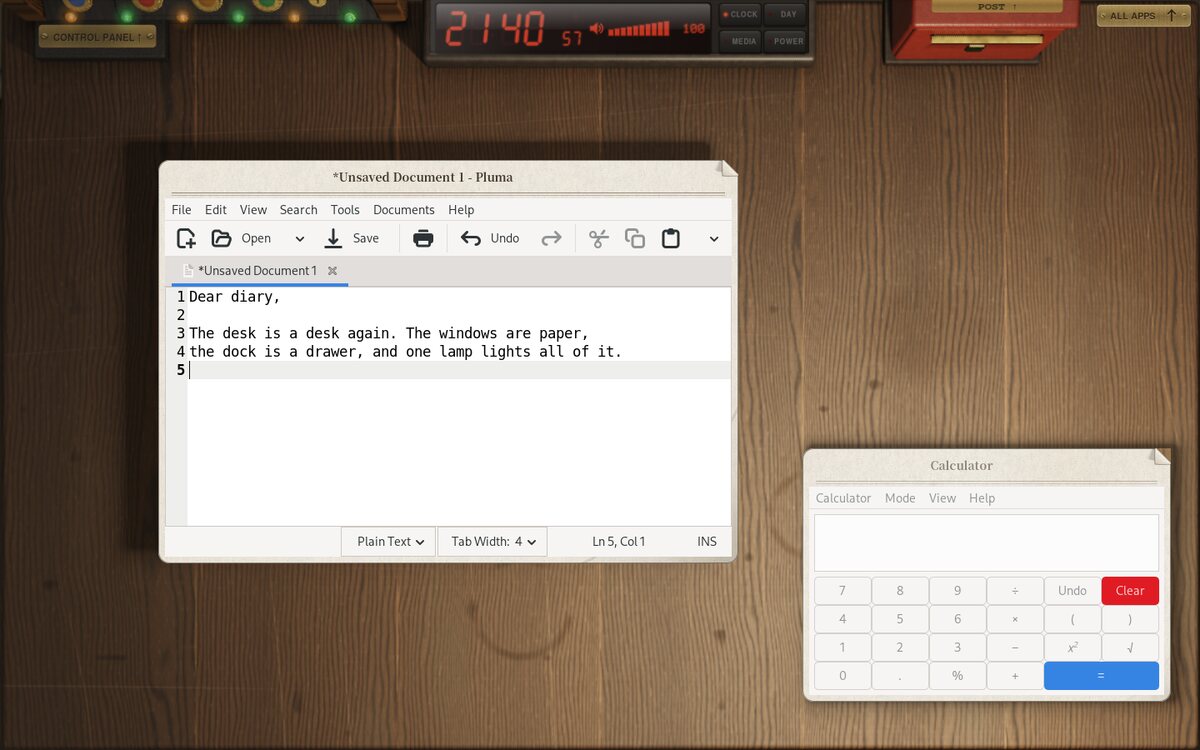
Status: beta. DEsk is used day to day on its author's machines and has been checked carefully (see docs/ARCHITECTURE.md, section 9), but this is its first release: expect rough edges, and expect things to change. Your settings and data will be carried forward.
Download the latest release from the Releases page and unpack it (or clone this repository). Then, in its folder, run the line for your system:
Debian 13
sudo sh scripts/install_debian.sh
Ubuntu 24.04 / 26.04 (and Linux Mint, Pop!_OS)
sudo sh scripts/install_ubuntu.sh
Arch Linux (and EndeavourOS, Manjaro)
sudo sh scripts/install_arch.sh
Then log out and choose DEsk on the login screen.
--yes takes the suggested
answers; --no-apps installs DEsk without the recommended programs.More options, building by hand and running DEsk in a window are under Build and Run.
Nothing here is a symbol for a thing on a desk. As in the realistic skeuomorphism of iOS 6, each is drawn to look like the real thing set down there -- its material, the light on it, its shadow and the wear of use.
Super+D).
It holds the things you put in it: any app, or a folded window. Out of
the box it holds DEsk's standard programs (below) and a screwdriver that
opens Shell Settings.Super+A, or the ALL APPS plate).
Each category is a ring binder whose sheets fan from a single ring.
Take a sheet and it is carried down to the desk, where the app's window
opens on it. At the end of the row stands an ALL APPS index book:
every program from A to Z, with thumb tabs and a line at the top of the
page to type into (input methods via IBus work).Super+N). Letters show the
sender and subject, and a letter taken out lies on the desk.Super+C) is a valve-era machine built into the
back of the desk: real meters, a volume knob, network and Bluetooth
levers, a fader for the room's lamp and one for the screen's own
backlight (on a laptop, through logind; the brightness keys work too),
a key to unlock the power buttons, and the system tray as paper slips
under it (more than fit, and the wheel slides the row along).Super+L, or logind): you walk
up to it at night, close enough to touch, traced in 3D with its own
lamps and soft shadows. Your picture and name are on the board hung on
it, the password goes in at the brass plate, the key beside it; on
Return (or a click on the key) you lean in and turn the key. Let in, it
goes round, the door swings open, you walk through into the room and sit
down at the desk; told no, it will not turn. Locking is the same run
backwards -- out of the room, the door shut, the key turned -- from
Super+L or the blue LOCK button on the Control Panel. Checked with
PAM, as at login.language = en | ja | zh | ko | es | fr | de in ~/.config/desk/shell.conf (or the Shell Settings
app), and switch live. The calendar is printed as one sold there is,
and Chinese and Korean are set in their own cut of the CJK faces.DEsk is meant to be installed as a whole desktop, like GNOME or KDE, so it
picks a standard program for each job the desk has: a terminal, a web
browser, a file manager and a text editor. The drawer's things and
Super+Enter open them. For each job, the first of these that is there:
app.terminal, app.browser, app.files, app.editor in shell.conf
(a .desktop id),~/.config/desk-mimeapps.list (DEsk only), ~/.config/mimeapps.list
(what Shell Settings' Default programs, xfce4-mime-settings, writes), and
the same two in the system's folders, ending with the
desk-mimeapps.list installed with DEsk -- the same answers xdg-open
and GIO give,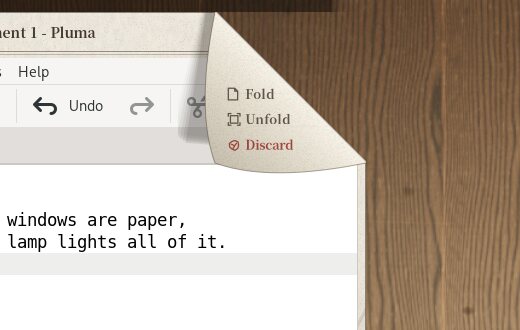 | 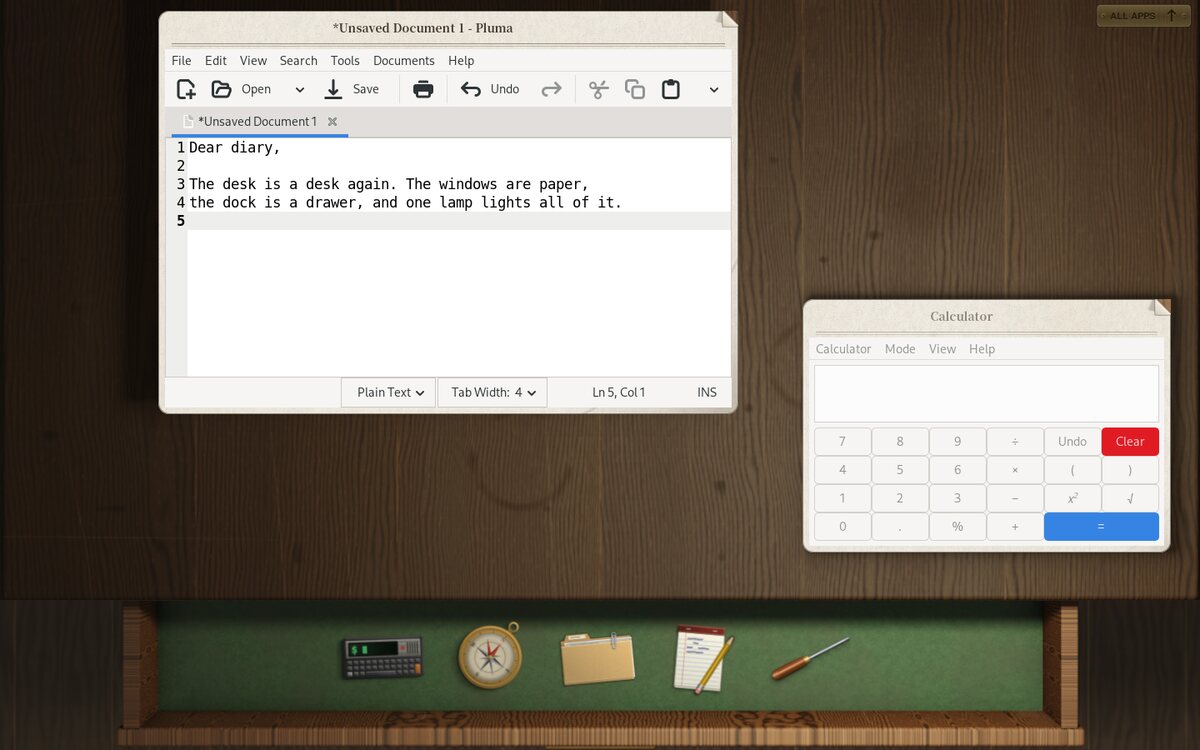 |
| The corner of every window: Fold, Unfold, Discard. | The drawer: the dock. |
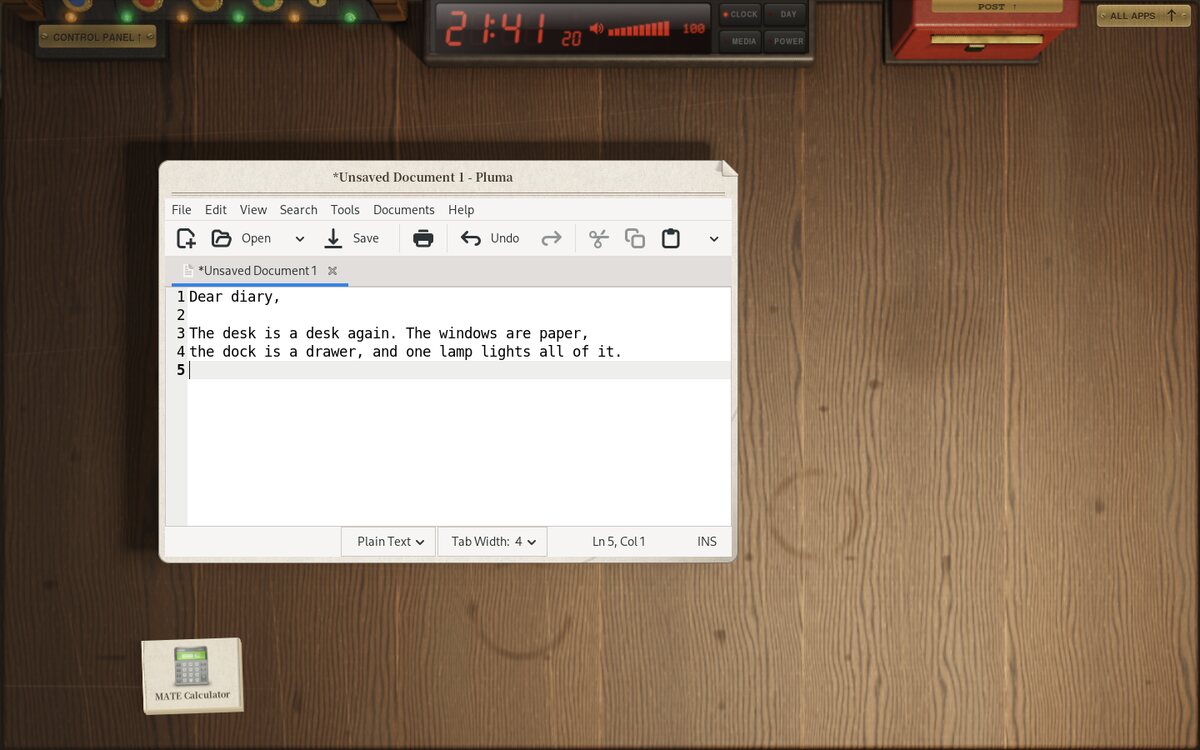 | 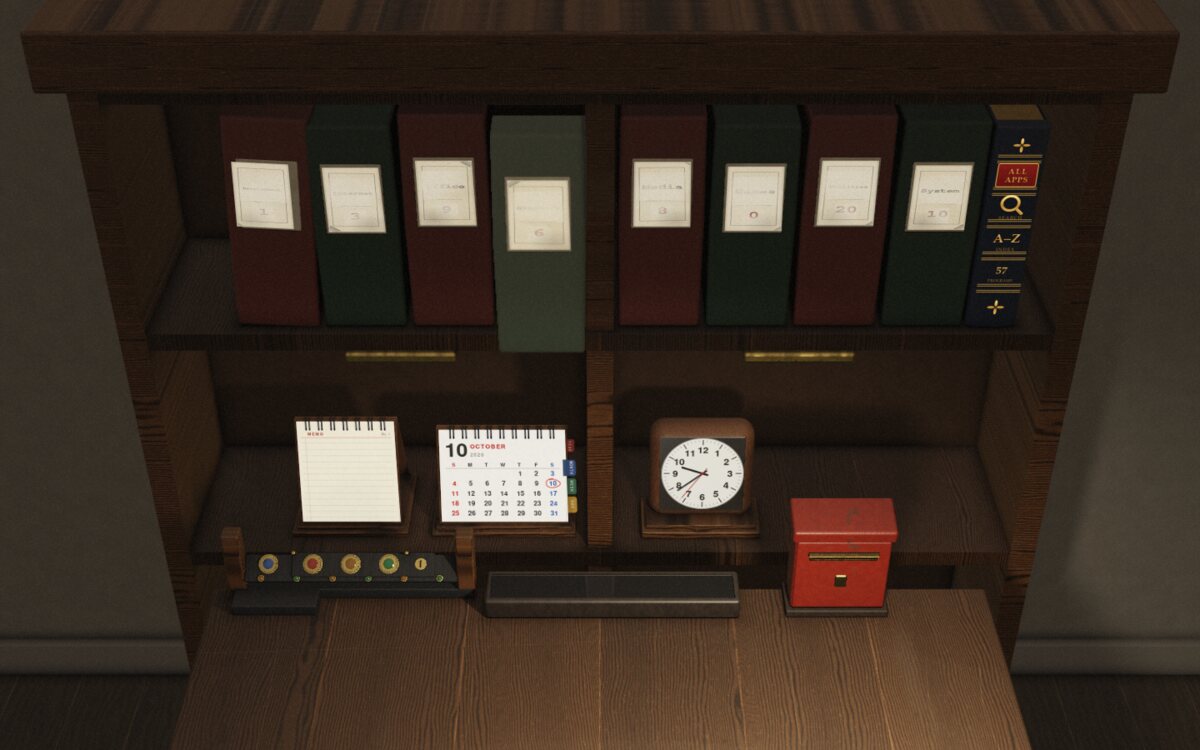 |
| A folded window, lying on the desk under the others. | The bookcase behind the desk. |
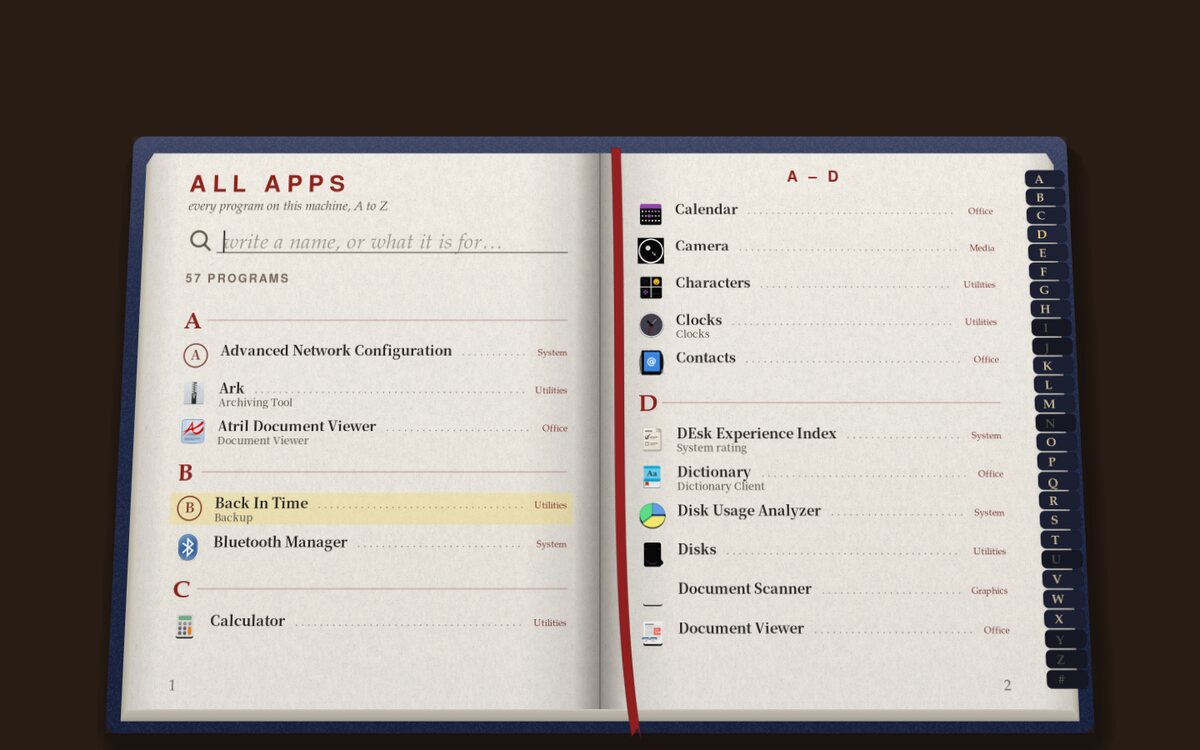 | 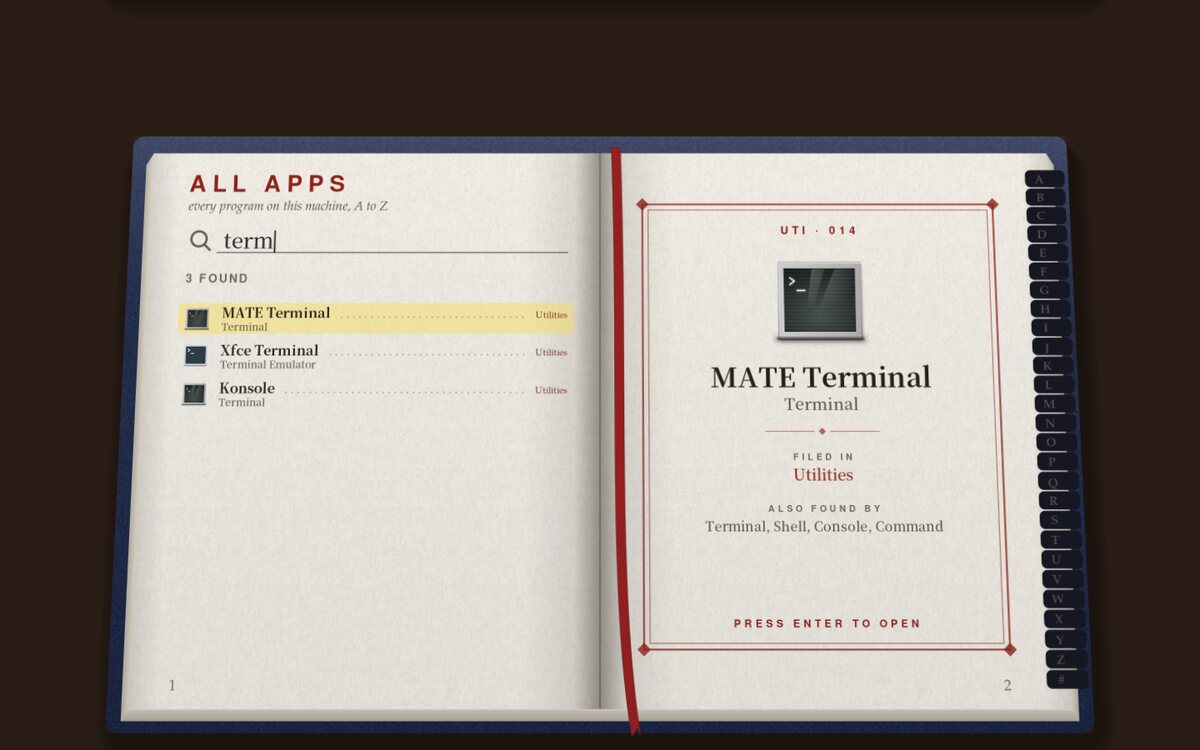 |
| ALL APPS, every program from A to Z ... | ... and a line to type into. |
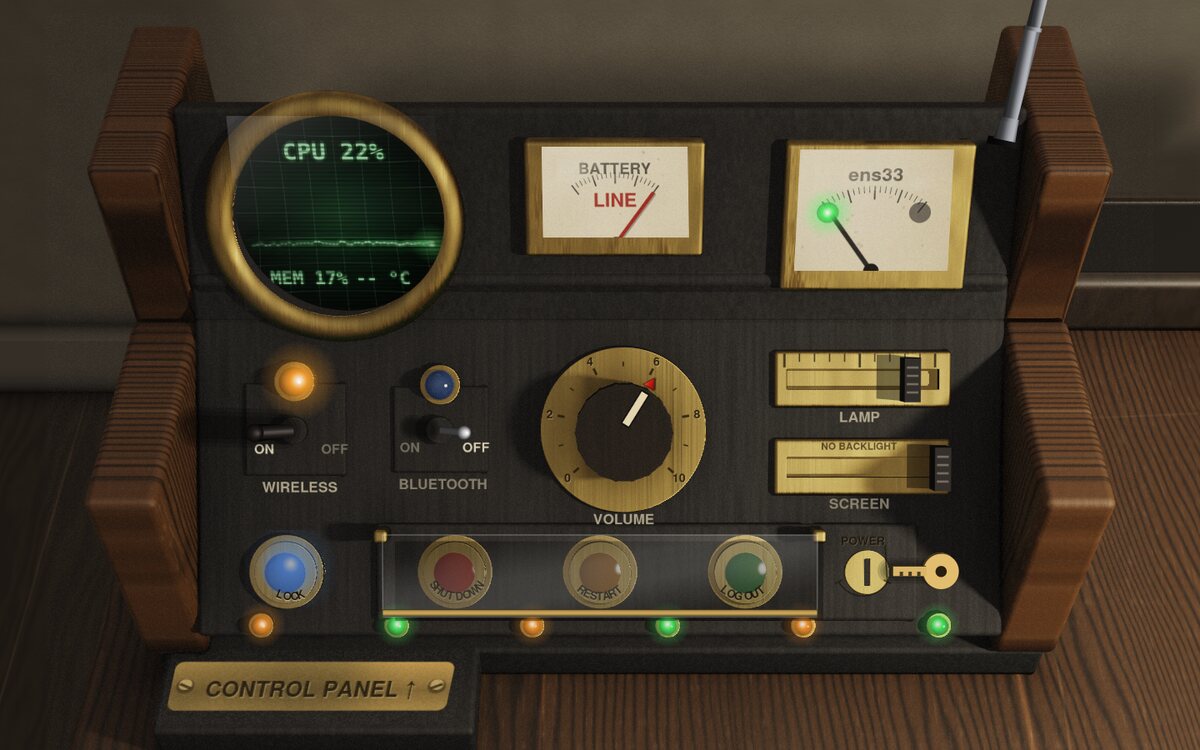 | 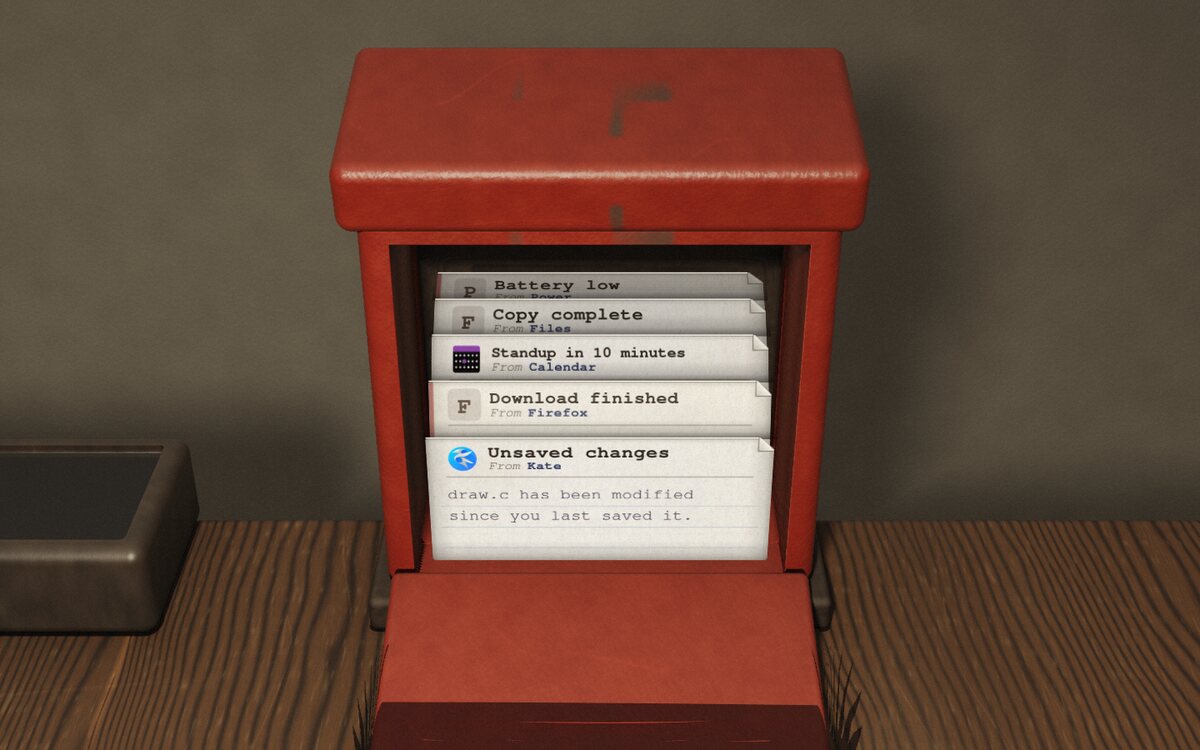 |
| The Control Panel. | The post box: notifications. |
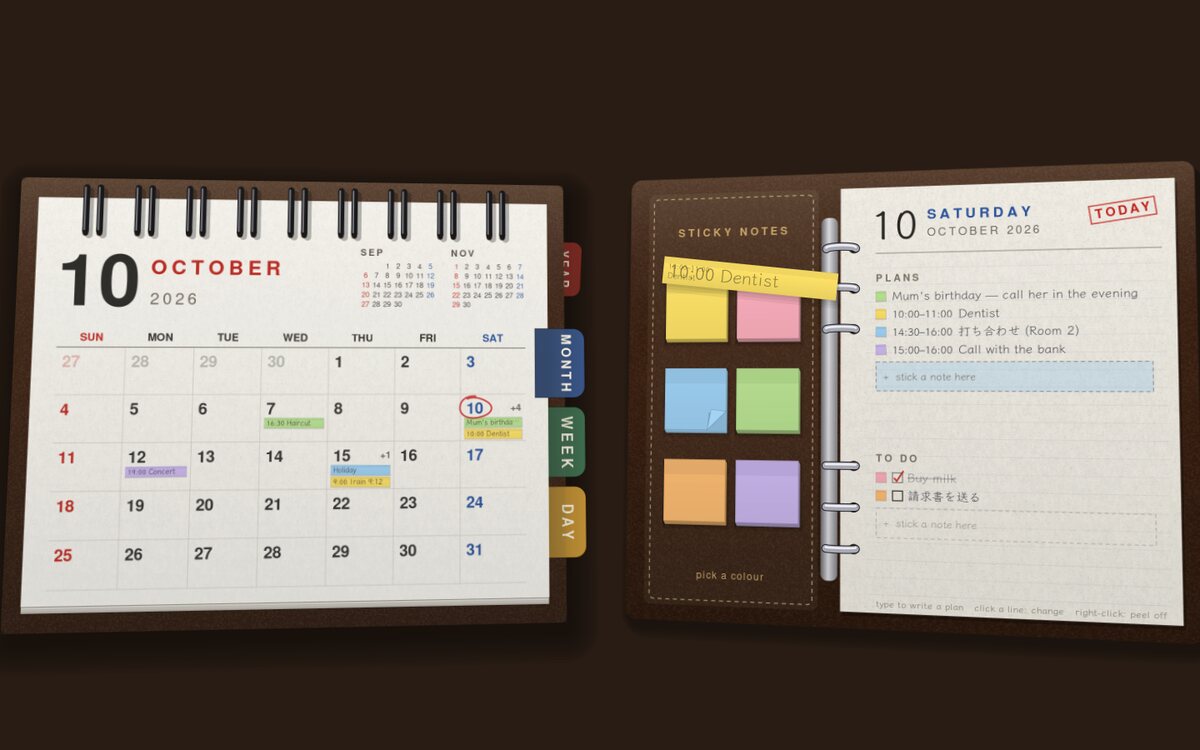 | 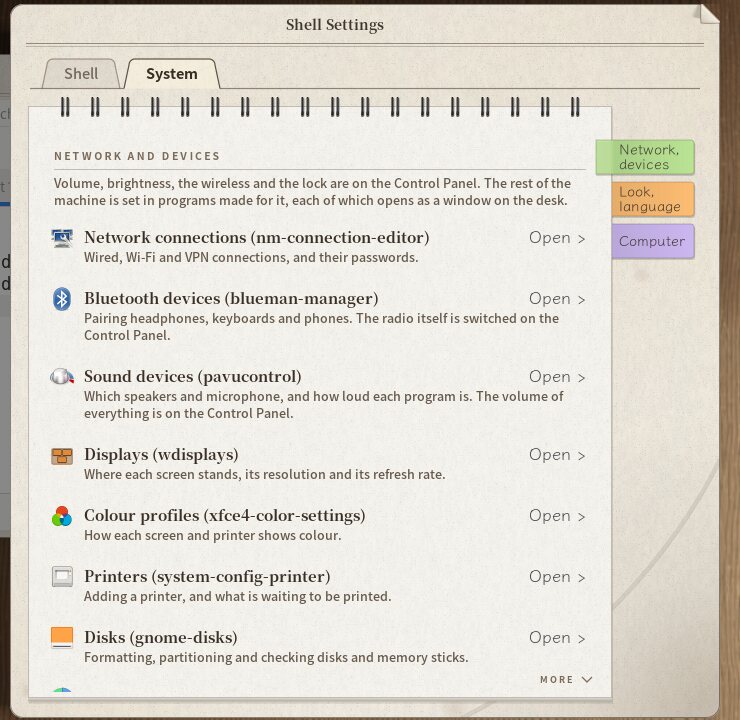 |
| The desk calendar and its notes. | Shell Settings. |
DEsk draws the desk; the work done on it is done with free software that already exists. It reaches completeness by borrowing, and keeps a firm line between what it makes and what it borrows:
| DEsk makes | both: DEsk draws it, something else does the work | borrowed | |
|---|---|---|---|
| what | what is drawn as the room and handled as its things; what only the compositor can do | programs, system settings panels, background helpers | |
| examples | windows as paper, the drawer, the bookcase, the clock, the Control Panel, the post box, the front door, the calendar and memo pad; keyboard, pointer and their keys (volume and media keys too), the screens and their power, remembering their arrangement, going idle, the lock; Shell Settings | volume knob and mute (PipeWire/PulseAudio), brightness (logind), Wi-Fi and Bluetooth levers, the post box (the desk is the notification daemon), the tray's slips (the applets' own items), the clock's MEDIA page (MPRIS), screenshots (grim), the input method (a bridge to IBus) | network connections, Bluetooth devices, sound devices, display arrangement, printers, the look of other programs, default programs, disks, polkit agent, keyring, portals -- and the programs themselves |
The rule for new cases: make only what is drawn as part of the room or can only be done inside the compositor; otherwise find an existing program that works as it is under a wlroots compositor, and make something only as a last resort. KDE's System Settings and kcmshell (which do not work outside Plasma), Xfce's and MATE's X11-only dialogs, and Xfce's display and appearance dialogs (which need xfsettingsd, and xfsettingsd overwrites GSettings with Xfce's defaults as it starts) are not used.
sudo sh scripts/install_debian.sh     # DEsk and the whole set (install_ubuntu.sh, install_arch.sh)
sh scripts/install-desktop.sh         # only the programs (shows them, then asks for sudo)
sh scripts/install-desktop.sh --extras   # and the office suite, mail...
install-desktop.sh works with apt, dnf, pacman and zypper. On Debian and
Ubuntu the same set is also one package:
equivs-build packaging/debian/desk-desktop.equivs.
| For | What comes |
|---|---|
| terminal, files, text | Xfce Terminal, Thunar (with tumbler and thunar-volman), Mousepad |
| the web | Firefox (Firefox ESR on Debian, the snap on Ubuntu) |
| pictures, documents, music and video | Ristretto, Atril, Parole |
| tools | Engrampa, GNOME Disks |
| networks, Bluetooth, sound | NetworkManager with its applet and editor, Blueman, PipeWire, pavucontrol |
| displays, looks, defaults | wdisplays, nwg-look (GNOME Tweaks on Ubuntu 24.04), Xfce's MIME settings |
| printing | system-config-printer, CUPS |
| notices | udiskie (memory sticks mounted, with a letter), poweralertd (low battery; batsignal on Arch), package-update-indicator (updates; Debian and Ubuntu) |
| looking after the machine | QDirStat (disk usage), LXQt's date and time and users, Mugshot (your name and picture), Seahorse (passwords and keys), gnome-packagekit (adding and removing programs), Back In Time (backups), Xfce Task Manager, hardinfo2 (about this computer); baobab and Deja Dup on Arch |
| passwords | MATE's polkit agent, GNOME Keyring |
| plumbing | xdg-desktop-portal (wlr, gtk), Xwayland, xdg-user-dirs, xdg-utils, wl-clipboard, grim, curl |
| looks | Qt's GTK platform theme, so Qt programs match the GTK ones |
| typing and fonts | IBus (and Mozc for Japanese), Noto (CJK, emoji), the URW base 35, Klee One |
--extras | LibreOffice (drawn with GTK), Thunderbird, Galculator, Xfce Task Manager, Simple Scan |
The classic GTK programs of Xfce and MATE come first because they are the kind of window the desk's paper is cut for -- a menu bar, plain tools and the document -- and they are light, start quickly and run on Wayland as they are. GTK 3 asks the compositor for its frame through KDE's server-decoration protocol, so they lie on DEsk's paper with its printed heading and no GTK title bar. Windows with a header bar (GNOME's programs, Firefox) keep their own frame, inside a paper margin.
Shell Settings (desk-settings) holds DEsk's own settings -- windows, the
size of things, how much is drawn, language, clock, your birthday and the
weather, when the screen goes
off and whether the desk locks then -- on its Shell tab, and on its System
tab rows that open the borrowed programs (network, Bluetooth, sound, displays, printers, the look
of other programs, default programs, disks, disk usage, colour profiles, the
input method, date and time, your name and picture, users, passwords and keys,
adding and removing programs, backups, what the computer is doing, and the
Experience Index), classic-looking programs first, each with the program's
own icon and its name -- "Displays (wdisplays)" -- so you can see what does
the setting. A row whose program is not installed is printed faint with the
package to install, by this distribution's name. The two tabs sit on the
sheet like a folder's index tabs, and in each pocket is a wire-bound pad
with a sheet to each part of the form and a sticky note on each sheet's
edge; taking hold of a note turns the sheets over the wire to it, as on the
desk calendar (Page Up and Down too). Changing tab (a click, Ctrl+Tab or
Ctrl+Page Up/Down) draws the other pad up out of the folder from below, and
the pad comes up the same way when the window opens.
Started as a session (desk-session, from a login screen), DEsk tells
D-Bus and systemd where its display is, runs the XDG autostart entries
(leaving out the ones that would fight it, such as another notification
daemon or an X screen locker), and starts an authentication agent, the
keyring, the input method and the network applet with whichever free
program for each is installed. The input method's candidates come up under
the text being written -- in a program's window as on the desk's own pages --
and leave the keys where they are. It turns the screen off when nobody is at the
desk (locking first, by default), lets video players keep it on, and
speaks wlr-output-management (wdisplays, wlr-randr, kanshi), remembering a
display tool's arrangement for each set of screens. Logging out, restarting
and powering off ask every window to close first, so a program with unsaved
work can ask about it; a window that does not close holds it up and is put in
front.
Shell Settings also sets what only a Wayland compositor can: tap to click, natural scrolling, pointer speed and left-handed buttons (through libinput), the keyboard layout, a second layout and the keys that change to it, and key repeat -- applied at once to what is plugged in.
How much the desk draws is a setting too, Graphics: Ultra (the room traced
finer, and wider where a GPU can, and nothing drawn coarser while it moves),
High (as made, the default), Medium, Low,
and 2D Fallback -- for a machine without a GPU or a virtual machine rendering
on its CPU: no shadows, nothing fading, blurred or moving, nothing ray-traced
as it moves, and the room traced once, small and plain. On two CPU cores
without a GPU the first start goes from nearly ten minutes to about a quarter
of a minute, and a frame from 2 ms to 0.5 ms. The installer takes a quick look
at the machine (desk-index --suggest: the graphics, or the processor, for a
couple of seconds, the threads and the memory, and how long the processor takes
to draw a sheet of paper folding) and picks the level for it, as the machine's
default (/etc/xdg/desk/shell.conf); each user's own choice wins.
Where the screen is drawn by the processor -- no GPU, a virtual machine without 3D, a GPU without its driver -- the desk runs in 2D Fallback unless you choose a level yourself, and says so: a letter in the post box (check the graphics drivers, or the virtual machine's settings) and a line in red beside Graphics in Shell Settings. 2D Fallback is the same desk with its effects off, not a second one, its room traced at a sample a pixel and softened. And a first start, which traces the room from nothing, leaves a letter in the middle of the desk saying it may take a minute or two, more on some machines, and that the desk can be used meanwhile.
It is meant to stay light on old machines. Measured on a machine held to about a 2010 laptop's pace (a quarter of a core each on two cores, 2 GB, no GPU for the room): a later login shows the desk in under half a second and has the light on in 1.4 s; the very first one, which has to trace the room on the processor, shows a soft first look and the light within seven seconds instead of a minute and a half in the dark; folding a sheet costs 5 ms a frame at Low. The traced room is kept across updates, and paper in motion is drawn finer or coarser by the level (whole at High, half at Low).
Programs on the desk are dressed for it too: DEsk's own icons, drawn to look like the real things set down on the desk, the way iOS 6 drew them -- manila card folders with papers in them, a typed page with its corner turned down, a letter signed in blue ink, a ledger, slides in their mounts, instant photos, a record sliding out of its sleeve, a film slate, a taped carton for an archive, a deck of punched cards for a program, a block of wood type for a font, a wire wastebasket you see through, a brass globe for the network, a drive in its aluminium case -- with the grain of paper, card, wood and brushed metal and the shadows they cast; and a GTK theme of paper, ink and brass. They are set in a dconf layer of DEsk's own over the user's, so another desktop on the same machine keeps its look.
When something on the desk gets stuck: Ctrl+Alt+Del twice puts everything
of the desk's own away and draws it all again (the windows stay as they are);
three times logs out. desk-ctl reset and desk-ctl logout do the same from
a terminal or another VT.
desk-index rates the machine at what the desk asks of it, the way the
Windows Experience Index did: processor, memory, 2D graphics (the desk's
own drawing), 3D graphics (the room's shader, checked against the CPU) and
disk, each 1.0-9.9, on brass-rimmed meters; the base score is the lowest.
desk-index --text prints the same in a terminal.
The simplest way is the installer for your distribution (below), which brings everything. To build it yourself:
/opt/desk-wlroots, used by DEsk alone through its run path)-Dpost=disabled to leave them out.-Dsound=disabled)fonts-urw-base35) and Noto CJK
(fonts-noto-cjk); fonts-klee for the memo pad.grim for screenshots, curl for the weather at the door.Measured with the CPU, GPU and memory cut down (systemd-run CPUQuota and
MemoryMax, taskset; nested, 1440x900, the same hand moves every run).
Once the room is traced, even one core without a GPU dropped no frames; a
frame costs about 2 ms. Only the first login traces the room: 6-9 s on a
GPU, about 10 minutes on two cores without one (then it is cached).
| minimum | recommended | |
|---|---|---|
| CPU | 2 x86-64 cores (1 works) | 4 cores or more |
| memory | 4 GB (DEsk itself 200-450 MB) | 8 GB or more |
| GPU | none needed (a long first login) | OpenGL ES 3.0 with GBM (Mesa Intel, AMD, Nouveau; VMware's SVGA3D) |
| screen | 1366x768 | 1440x900 or more |
| disk | about 1 GB (--bare; --no-apps adds what Shell Settings opens) | 2-2.7 GB with the whole set |
| system | Debian 13, Ubuntu 24.04 / 26.04 LTS, Arch Linux | the same |
meson setup build
meson compile -C build
Inside your current session, as a window:
./build/desk -s foot
As a session of its own, picked from the login screen (GDM, SDDM, LightDM), use the installer for your system (Install). All three take the same options:
sudo sh scripts/install_debian.sh              # or install_ubuntu.sh, install_arch.sh
sudo sh scripts/install_debian.sh --no-apps    # DEsk, what it needs and what Shell Settings opens
sudo sh scripts/install_debian.sh --bare       # DEsk and what it needs, no programs (containers)
sudo sh scripts/install_debian.sh --prefix /opt/desk
sh scripts/install_session.sh picks the right one by itself and keeps what
it says in ~/.local/state/desk/install.log. Each installer does the same
(derivatives such as Mint, Pop!_OS, EndeavourOS and Manjaro are recognised):
packages, a release build in build-install, the PAM file, the login entry,
and the removal of what the old name, DeskWM, left behind (after asking).
Every program Shell Settings' System tab opens is installed, --no-apps or
not, and at the end desk-settings --check lists what each row opens (or
which package would bring it).
On other distributions, install the requirements and run scripts/install.sh.
Or from a TTY: desk-session.
To update, get the new copy and run the installer again the same
way ("this updates it", it says): what is installed is replaced, the last build
is reused (or made afresh when it cannot be), and your settings and the traced
room stay. All the installer says is also kept in
~/.local/state/desk/install.log (the last run's) -- the thing to look at, or
send, if it stops part way. A copy made for passing round carries SHA256SUMS,
and the installer checks every file against it before building: a copy damaged
on its way says which files are wrong and stops (copy it again; if a fresh copy
is damaged too, suspect the machine's memory or disk -- memtest86+). A Japanese
locale gets the Mozc converter among the suggested programs; IBus itself is
installed for everyone but only runs for languages typed through an input
method, or when one is set up.
The first start at a new screen size spends a little while ray-tracing the
room, on the GPU the screen is drawn with: the desk first, then the bookcase,
the Control Panel and the post box, each there to turn to as soon as its
picture is, and last the films of the camera moves to them (until a film is
done, the move to its view is a cut). Each part is cached as it is done, so a
first start cut short picks up where it stopped. What DEsk says as it runs is
kept in ~/.local/state/desk/session.log (the session before in
session.log.old); its desk: room: lines say what the room was traced on
and how long each part took -- the thing to send if a start is slow. A GPU
is tried once, in a child process, before the room is traced on it; one that
fails says why (failed its trial: ...), and the processor traces the room
instead -- at High's quality even where Ultra is chosen, Ultra's being a
GPU's to trace.
| Key | |
|---|---|
Super+Enter | terminal |
Super+Q / Alt+F4 | close the focused window |
Super+M | fold / unfold the focused sheet |
Super+D | open / close the drawer |
Super+A | look up at the bookshelf |
Super+C | the Control Panel |
Super+N | the post box |
Super+Tab / Alt+F1 | cycle windows |
Esc | back to the desk |
| brightness keys | the screen's backlight (or, with none, the lamp) |
| volume, mute and media keys | the mixer and the player playing (as the clock's MEDIA page) |
Print / Alt+Print | screenshot of the screen / of the window in front |
Super+L | lock the screen: the front door; type the password, Enter (or click the key) |
Super+Esc / Alt+Esc | log out (asking the windows to close first) |
Please say which version (desk --version) and which Linux, what you did and
what happened, and attach:
~/.local/state/desk/session.log (and session.log.old if the problem was
in the session before) -- what DEsk said as it ran;~/.local/state/desk/install.log when it was run through
install_session.sh).Both are plain text; look them over before sending them. If the desk is stuck,
desk-ctl reset from a terminal (or another VT) draws everything again
without closing your windows.
DEsk was built with the help of AI. Much of the code and the documentation was written by Claude (Anthropic's AI model) under the author's direction: the author decided what DEsk should be and how it should look, tested it on real machines, and reviewed what went in. Reports and patches are welcome all the same.
22 followers · starred Oct 2026
English | 日本語
v0.1.1 (BETA) -- fixes to v0.1, the first public release. See RELEASE-NOTES.md.
I've created a Discord server! You can also report bugs and submit ideas for new features here! link : https://discord.gg/xR5f7Xs49
DEsk is Desktop Environment and desk in one word -- a name that came from the Reddit community. It used to be called DeskWM: the commands are now
desk,desk-session,desk-settingsand so on, and what was set up for DeskWM (its settings, its data,DESKWM_*variables) carries over by itself.
A Wayland desktop for Linux in realistic skeuomorphism -- the kind iOS 6 had, where everything on the screen is drawn to look like the real thing. Here the desktop is a desk.
Windows are sheets of paper on a walnut desk. The dock is a drawer, your apps are filed in binders on a bookshelf behind the desk, notifications arrive in a post box, and the system controls are a panel built into the back of the desk. The room is ray-traced, and one desk lamp lights all of it.
Status: beta. DEsk is used day to day on its author's machines and has been checked carefully (see docs/ARCHITECTURE.md, section 9), but this is its first release: expect rough edges, and expect things to change. Your settings and data will be carried forward.
Download the latest release from the Releases page and unpack it (or clone this repository). Then, in its folder, run the line for your system:
Debian 13
sudo sh scripts/install_debian.sh
Ubuntu 24.04 / 26.04 (and Linux Mint, Pop!_OS)
sudo sh scripts/install_ubuntu.sh
Arch Linux (and EndeavourOS, Manjaro)
sudo sh scripts/install_arch.sh
Then log out and choose DEsk on the login screen.
--yes takes the suggested
answers; --no-apps installs DEsk without the recommended programs.More options, building by hand and running DEsk in a window are under Build and Run.
Nothing here is a symbol for a thing on a desk. As in the realistic skeuomorphism of iOS 6, each is drawn to look like the real thing set down there -- its material, the light on it, its shadow and the wear of use.
Super+D).
It holds the things you put in it: any app, or a folded window. Out of
the box it holds DEsk's standard programs (below) and a screwdriver that
opens Shell Settings.Super+A, or the ALL APPS plate).
Each category is a ring binder whose sheets fan from a single ring.
Take a sheet and it is carried down to the desk, where the app's window
opens on it. At the end of the row stands an ALL APPS index book:
every program from A to Z, with thumb tabs and a line at the top of the
page to type into (input methods via IBus work).Super+N). Letters show the
sender and subject, and a letter taken out lies on the desk.Super+C) is a valve-era machine built into the
back of the desk: real meters, a volume knob, network and Bluetooth
levers, a fader for the room's lamp and one for the screen's own
backlight (on a laptop, through logind; the brightness keys work too),
a key to unlock the power buttons, and the system tray as paper slips
under it (more than fit, and the wheel slides the row along).Super+L, or logind): you walk
up to it at night, close enough to touch, traced in 3D with its own
lamps and soft shadows. Your picture and name are on the board hung on
it, the password goes in at the brass plate, the key beside it; on
Return (or a click on the key) you lean in and turn the key. Let in, it
goes round, the door swings open, you walk through into the room and sit
down at the desk; told no, it will not turn. Locking is the same run
backwards -- out of the room, the door shut, the key turned -- from
Super+L or the blue LOCK button on the Control Panel. Checked with
PAM, as at login.language = en | ja | zh | ko | es | fr | de in ~/.config/desk/shell.conf (or the Shell Settings
app), and switch live. The calendar is printed as one sold there is,
and Chinese and Korean are set in their own cut of the CJK faces.DEsk is meant to be installed as a whole desktop, like GNOME or KDE, so it
picks a standard program for each job the desk has: a terminal, a web
browser, a file manager and a text editor. The drawer's things and
Super+Enter open them. For each job, the first of these that is there:
app.terminal, app.browser, app.files, app.editor in shell.conf
(a .desktop id),~/.config/desk-mimeapps.list (DEsk only), ~/.config/mimeapps.list
(what Shell Settings' Default programs, xfce4-mime-settings, writes), and
the same two in the system's folders, ending with the
desk-mimeapps.list installed with DEsk -- the same answers xdg-open
and GIO give, | |
| The corner of every window: Fold, Unfold, Discard. | The drawer: the dock. |
| |
| A folded window, lying on the desk under the others. | The bookcase behind the desk. |
| |
| ALL APPS, every program from A to Z ... | ... and a line to type into. |
| |
| The Control Panel. | The post box: notifications. |
| |
| The desk calendar and its notes. | Shell Settings. |
DEsk draws the desk; the work done on it is done with free software that already exists. It reaches completeness by borrowing, and keeps a firm line between what it makes and what it borrows:
| DEsk makes | both: DEsk draws it, something else does the work | borrowed | |
|---|---|---|---|
| what | what is drawn as the room and handled as its things; what only the compositor can do | programs, system settings panels, background helpers | |
| examples | windows as paper, the drawer, the bookcase, the clock, the Control Panel, the post box, the front door, the calendar and memo pad; keyboard, pointer and their keys (volume and media keys too), the screens and their power, remembering their arrangement, going idle, the lock; Shell Settings | volume knob and mute (PipeWire/PulseAudio), brightness (logind), Wi-Fi and Bluetooth levers, the post box (the desk is the notification daemon), the tray's slips (the applets' own items), the clock's MEDIA page (MPRIS), screenshots (grim), the input method (a bridge to IBus) | network connections, Bluetooth devices, sound devices, display arrangement, printers, the look of other programs, default programs, disks, polkit agent, keyring, portals -- and the programs themselves |
The rule for new cases: make only what is drawn as part of the room or can only be done inside the compositor; otherwise find an existing program that works as it is under a wlroots compositor, and make something only as a last resort. KDE's System Settings and kcmshell (which do not work outside Plasma), Xfce's and MATE's X11-only dialogs, and Xfce's display and appearance dialogs (which need xfsettingsd, and xfsettingsd overwrites GSettings with Xfce's defaults as it starts) are not used.
sudo sh scripts/install_debian.sh     # DEsk and the whole set (install_ubuntu.sh, install_arch.sh)
sh scripts/install-desktop.sh         # only the programs (shows them, then asks for sudo)
sh scripts/install-desktop.sh --extras   # and the office suite, mail...
install-desktop.sh works with apt, dnf, pacman and zypper. On Debian and
Ubuntu the same set is also one package:
equivs-build packaging/debian/desk-desktop.equivs.
| For | What comes |
|---|---|
| terminal, files, text | Xfce Terminal, Thunar (with tumbler and thunar-volman), Mousepad |
| the web | Firefox (Firefox ESR on Debian, the snap on Ubuntu) |
| pictures, documents, music and video | Ristretto, Atril, Parole |
| tools | Engrampa, GNOME Disks |
| networks, Bluetooth, sound | NetworkManager with its applet and editor, Blueman, PipeWire, pavucontrol |
| displays, looks, defaults | wdisplays, nwg-look (GNOME Tweaks on Ubuntu 24.04), Xfce's MIME settings |
| printing | system-config-printer, CUPS |
| notices | udiskie (memory sticks mounted, with a letter), poweralertd (low battery; batsignal on Arch), package-update-indicator (updates; Debian and Ubuntu) |
| looking after the machine | QDirStat (disk usage), LXQt's date and time and users, Mugshot (your name and picture), Seahorse (passwords and keys), gnome-packagekit (adding and removing programs), Back In Time (backups), Xfce Task Manager, hardinfo2 (about this computer); baobab and Deja Dup on Arch |
| passwords | MATE's polkit agent, GNOME Keyring |
| plumbing | xdg-desktop-portal (wlr, gtk), Xwayland, xdg-user-dirs, xdg-utils, wl-clipboard, grim, curl |
| looks | Qt's GTK platform theme, so Qt programs match the GTK ones |
| typing and fonts | IBus (and Mozc for Japanese), Noto (CJK, emoji), the URW base 35, Klee One |
--extras | LibreOffice (drawn with GTK), Thunderbird, Galculator, Xfce Task Manager, Simple Scan |
The classic GTK programs of Xfce and MATE come first because they are the kind of window the desk's paper is cut for -- a menu bar, plain tools and the document -- and they are light, start quickly and run on Wayland as they are. GTK 3 asks the compositor for its frame through KDE's server-decoration protocol, so they lie on DEsk's paper with its printed heading and no GTK title bar. Windows with a header bar (GNOME's programs, Firefox) keep their own frame, inside a paper margin.
Shell Settings (desk-settings) holds DEsk's own settings -- windows, the
size of things, how much is drawn, language, clock, your birthday and the
weather, when the screen goes
off and whether the desk locks then -- on its Shell tab, and on its System
tab rows that open the borrowed programs (network, Bluetooth, sound, displays, printers, the look
of other programs, default programs, disks, disk usage, colour profiles, the
input method, date and time, your name and picture, users, passwords and keys,
adding and removing programs, backups, what the computer is doing, and the
Experience Index), classic-looking programs first, each with the program's
own icon and its name -- "Displays (wdisplays)" -- so you can see what does
the setting. A row whose program is not installed is printed faint with the
package to install, by this distribution's name. The two tabs sit on the
sheet like a folder's index tabs, and in each pocket is a wire-bound pad
with a sheet to each part of the form and a sticky note on each sheet's
edge; taking hold of a note turns the sheets over the wire to it, as on the
desk calendar (Page Up and Down too). Changing tab (a click, Ctrl+Tab or
Ctrl+Page Up/Down) draws the other pad up out of the folder from below, and
the pad comes up the same way when the window opens.
Started as a session (desk-session, from a login screen), DEsk tells
D-Bus and systemd where its display is, runs the XDG autostart entries
(leaving out the ones that would fight it, such as another notification
daemon or an X screen locker), and starts an authentication agent, the
keyring, the input method and the network applet with whichever free
program for each is installed. The input method's candidates come up under
the text being written -- in a program's window as on the desk's own pages --
and leave the keys where they are. It turns the screen off when nobody is at the
desk (locking first, by default), lets video players keep it on, and
speaks wlr-output-management (wdisplays, wlr-randr, kanshi), remembering a
display tool's arrangement for each set of screens. Logging out, restarting
and powering off ask every window to close first, so a program with unsaved
work can ask about it; a window that does not close holds it up and is put in
front.
Shell Settings also sets what only a Wayland compositor can: tap to click, natural scrolling, pointer speed and left-handed buttons (through libinput), the keyboard layout, a second layout and the keys that change to it, and key repeat -- applied at once to what is plugged in.
How much the desk draws is a setting too, Graphics: Ultra (the room traced
finer, and wider where a GPU can, and nothing drawn coarser while it moves),
High (as made, the default), Medium, Low,
and 2D Fallback -- for a machine without a GPU or a virtual machine rendering
on its CPU: no shadows, nothing fading, blurred or moving, nothing ray-traced
as it moves, and the room traced once, small and plain. On two CPU cores
without a GPU the first start goes from nearly ten minutes to about a quarter
of a minute, and a frame from 2 ms to 0.5 ms. The installer takes a quick look
at the machine (desk-index --suggest: the graphics, or the processor, for a
couple of seconds, the threads and the memory, and how long the processor takes
to draw a sheet of paper folding) and picks the level for it, as the machine's
default (/etc/xdg/desk/shell.conf); each user's own choice wins.
Where the screen is drawn by the processor -- no GPU, a virtual machine without 3D, a GPU without its driver -- the desk runs in 2D Fallback unless you choose a level yourself, and says so: a letter in the post box (check the graphics drivers, or the virtual machine's settings) and a line in red beside Graphics in Shell Settings. 2D Fallback is the same desk with its effects off, not a second one, its room traced at a sample a pixel and softened. And a first start, which traces the room from nothing, leaves a letter in the middle of the desk saying it may take a minute or two, more on some machines, and that the desk can be used meanwhile.
It is meant to stay light on old machines. Measured on a machine held to about a 2010 laptop's pace (a quarter of a core each on two cores, 2 GB, no GPU for the room): a later login shows the desk in under half a second and has the light on in 1.4 s; the very first one, which has to trace the room on the processor, shows a soft first look and the light within seven seconds instead of a minute and a half in the dark; folding a sheet costs 5 ms a frame at Low. The traced room is kept across updates, and paper in motion is drawn finer or coarser by the level (whole at High, half at Low).
Programs on the desk are dressed for it too: DEsk's own icons, drawn to look like the real things set down on the desk, the way iOS 6 drew them -- manila card folders with papers in them, a typed page with its corner turned down, a letter signed in blue ink, a ledger, slides in their mounts, instant photos, a record sliding out of its sleeve, a film slate, a taped carton for an archive, a deck of punched cards for a program, a block of wood type for a font, a wire wastebasket you see through, a brass globe for the network, a drive in its aluminium case -- with the grain of paper, card, wood and brushed metal and the shadows they cast; and a GTK theme of paper, ink and brass. They are set in a dconf layer of DEsk's own over the user's, so another desktop on the same machine keeps its look.
When something on the desk gets stuck: Ctrl+Alt+Del twice puts everything
of the desk's own away and draws it all again (the windows stay as they are);
three times logs out. desk-ctl reset and desk-ctl logout do the same from
a terminal or another VT.
desk-index rates the machine at what the desk asks of it, the way the
Windows Experience Index did: processor, memory, 2D graphics (the desk's
own drawing), 3D graphics (the room's shader, checked against the CPU) and
disk, each 1.0-9.9, on brass-rimmed meters; the base score is the lowest.
desk-index --text prints the same in a terminal.
The simplest way is the installer for your distribution (below), which brings everything. To build it yourself:
/opt/desk-wlroots, used by DEsk alone through its run path)-Dpost=disabled to leave them out.-Dsound=disabled)fonts-urw-base35) and Noto CJK
(fonts-noto-cjk); fonts-klee for the memo pad.grim for screenshots, curl for the weather at the door.Measured with the CPU, GPU and memory cut down (systemd-run CPUQuota and
MemoryMax, taskset; nested, 1440x900, the same hand moves every run).
Once the room is traced, even one core without a GPU dropped no frames; a
frame costs about 2 ms. Only the first login traces the room: 6-9 s on a
GPU, about 10 minutes on two cores without one (then it is cached).
| minimum | recommended | |
|---|---|---|
| CPU | 2 x86-64 cores (1 works) | 4 cores or more |
| memory | 4 GB (DEsk itself 200-450 MB) | 8 GB or more |
| GPU | none needed (a long first login) | OpenGL ES 3.0 with GBM (Mesa Intel, AMD, Nouveau; VMware's SVGA3D) |
| screen | 1366x768 | 1440x900 or more |
| disk | about 1 GB (--bare; --no-apps adds what Shell Settings opens) | 2-2.7 GB with the whole set |
| system | Debian 13, Ubuntu 24.04 / 26.04 LTS, Arch Linux | the same |
meson setup build
meson compile -C build
Inside your current session, as a window:
./build/desk -s foot
As a session of its own, picked from the login screen (GDM, SDDM, LightDM), use the installer for your system (Install). All three take the same options:
sudo sh scripts/install_debian.sh              # or install_ubuntu.sh, install_arch.sh
sudo sh scripts/install_debian.sh --no-apps    # DEsk, what it needs and what Shell Settings opens
sudo sh scripts/install_debian.sh --bare       # DEsk and what it needs, no programs (containers)
sudo sh scripts/install_debian.sh --prefix /opt/desk
sh scripts/install_session.sh picks the right one by itself and keeps what
it says in ~/.local/state/desk/install.log. Each installer does the same
(derivatives such as Mint, Pop!_OS, EndeavourOS and Manjaro are recognised):
packages, a release build in build-install, the PAM file, the login entry,
and the removal of what the old name, DeskWM, left behind (after asking).
Every program Shell Settings' System tab opens is installed, --no-apps or
not, and at the end desk-settings --check lists what each row opens (or
which package would bring it).
On other distributions, install the requirements and run scripts/install.sh.
Or from a TTY: desk-session.
To update, get the new copy and run the installer again the same
way ("this updates it", it says): what is installed is replaced, the last build
is reused (or made afresh when it cannot be), and your settings and the traced
room stay. All the installer says is also kept in
~/.local/state/desk/install.log (the last run's) -- the thing to look at, or
send, if it stops part way. A copy made for passing round carries SHA256SUMS,
and the installer checks every file against it before building: a copy damaged
on its way says which files are wrong and stops (copy it again; if a fresh copy
is damaged too, suspect the machine's memory or disk -- memtest86+). A Japanese
locale gets the Mozc converter among the suggested programs; IBus itself is
installed for everyone but only runs for languages typed through an input
method, or when one is set up.
The first start at a new screen size spends a little while ray-tracing the
room, on the GPU the screen is drawn with: the desk first, then the bookcase,
the Control Panel and the post box, each there to turn to as soon as its
picture is, and last the films of the camera moves to them (until a film is
done, the move to its view is a cut). Each part is cached as it is done, so a
first start cut short picks up where it stopped. What DEsk says as it runs is
kept in ~/.local/state/desk/session.log (the session before in
session.log.old); its desk: room: lines say what the room was traced on
and how long each part took -- the thing to send if a start is slow. A GPU
is tried once, in a child process, before the room is traced on it; one that
fails says why (failed its trial: ...), and the processor traces the room
instead -- at High's quality even where Ultra is chosen, Ultra's being a
GPU's to trace.
| Key | |
|---|---|
Super+Enter | terminal |
Super+Q / Alt+F4 | close the focused window |
Super+M | fold / unfold the focused sheet |
Super+D | open / close the drawer |
Super+A | look up at the bookshelf |
Super+C | the Control Panel |
Super+N | the post box |
Super+Tab / Alt+F1 | cycle windows |
Esc | back to the desk |
| brightness keys | the screen's backlight (or, with none, the lamp) |
| volume, mute and media keys | the mixer and the player playing (as the clock's MEDIA page) |
Print / Alt+Print | screenshot of the screen / of the window in front |
Super+L | lock the screen: the front door; type the password, Enter (or click the key) |
Super+Esc / Alt+Esc | log out (asking the windows to close first) |
Please say which version (desk --version) and which Linux, what you did and
what happened, and attach:
~/.local/state/desk/session.log (and session.log.old if the problem was
in the session before) -- what DEsk said as it ran;~/.local/state/desk/install.log when it was run through
install_session.sh).Both are plain text; look them over before sending them. If the desk is stuck,
desk-ctl reset from a terminal (or another VT) draws everything again
without closing your windows.
DEsk was built with the help of AI. Much of the code and the documentation was written by Claude (Anthropic's AI model) under the author's direction: the author decided what DEsk should be and how it should look, tested it on real machines, and reviewed what went in. Reports and patches are welcome all the same.
22 followers · starred Oct 2026



