
Omaxian is a port of Omarchy shell for Debian-based systems + X11/XLibre + i3. Same bar, themes, launcher, and omarchy-* commands — no Wayland, Hyprland, and no dependency on any init systems.
See the codeSee what people are saying
README

Omaxian
Omaxian is a port of Omarchy for Devuan / Debian + X11/XLibre + i3.
Same bar, themes, launcher, and omarchy-* commands — no Wayland, Hyprland, and no dependency on systemd or other init systems.
You get a top bar (workspaces, clock, media, network, weather, tray, …), popups for audio / bluetooth / Wi-Fi / power, a live theme switcher, a settings editor, an Omarchy menu (apps + commands), and a command runner. Notifications use dunst; the compositor is picom.
Porting notes and file-by-file diffs live in docs/omarchy-port/.
Gallery
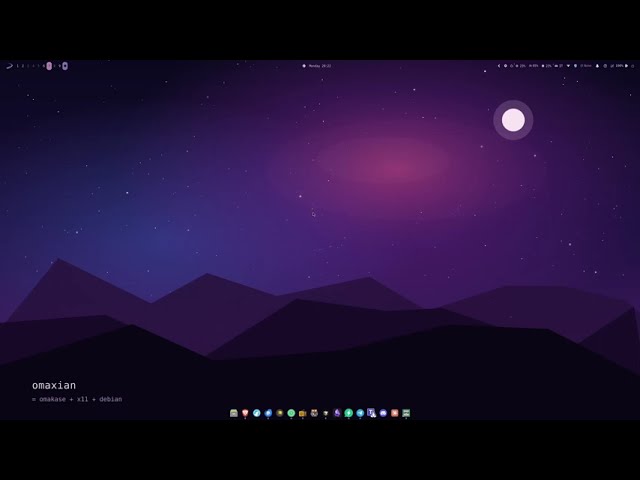
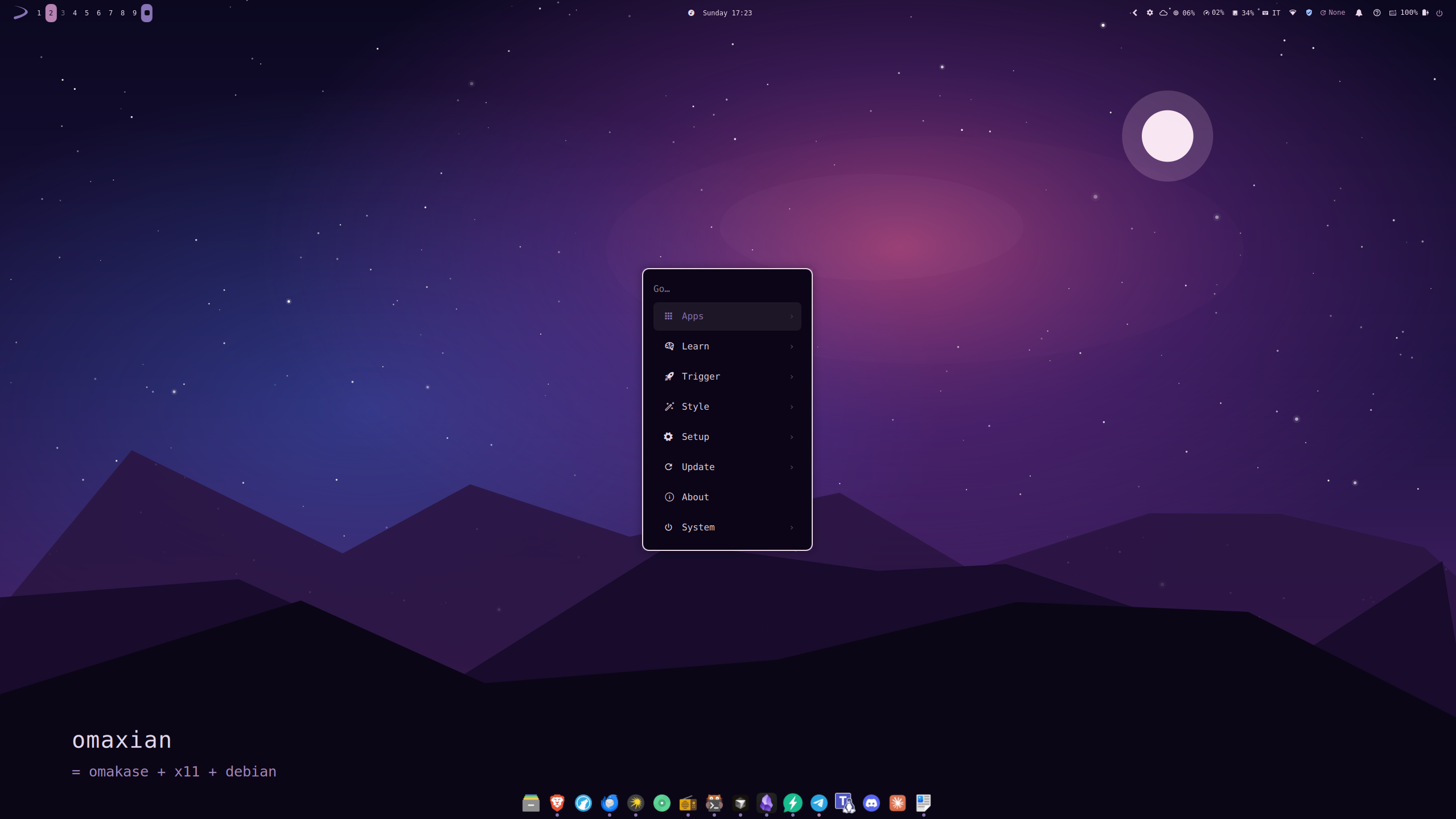 Menu | 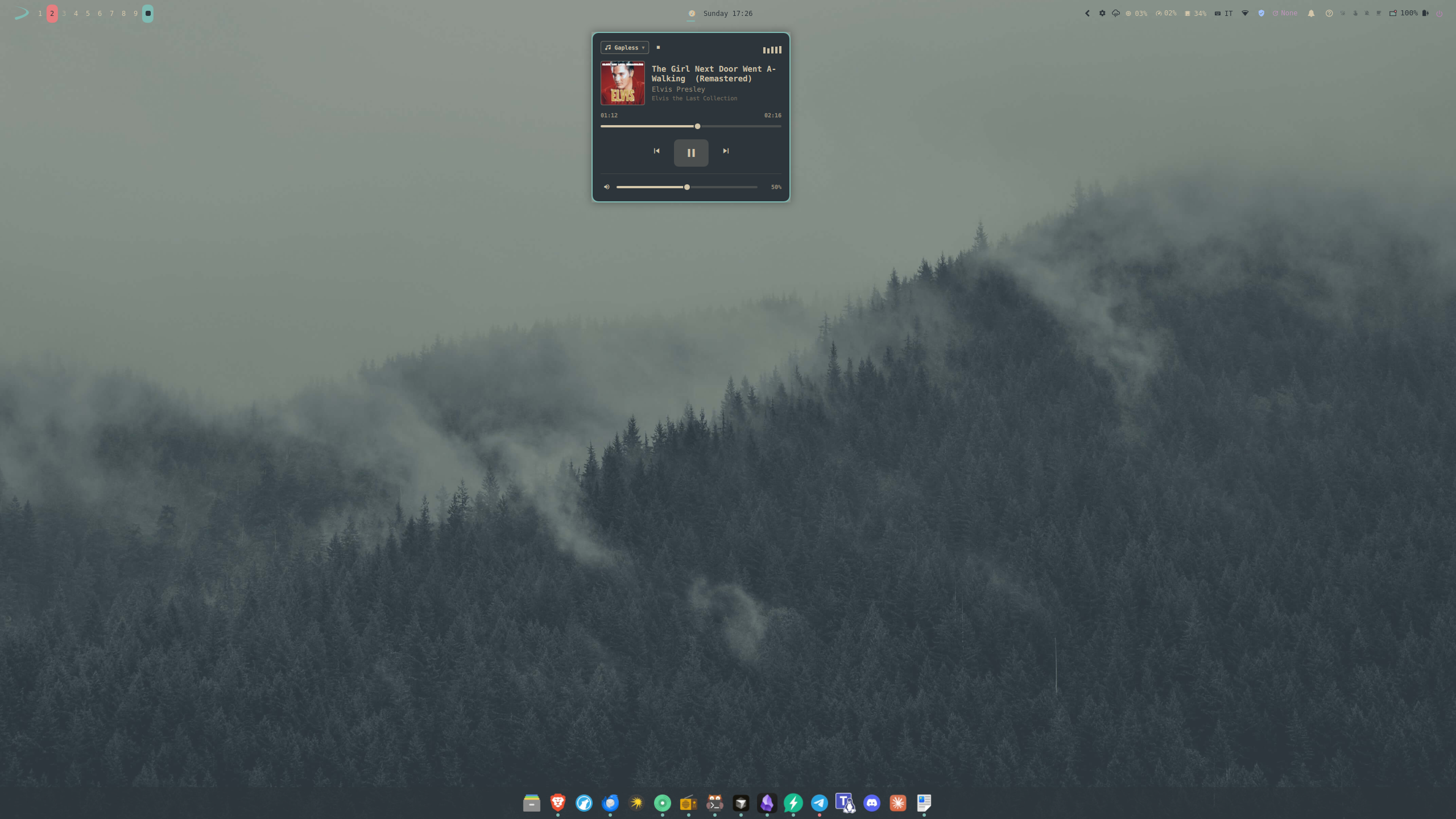 Media | 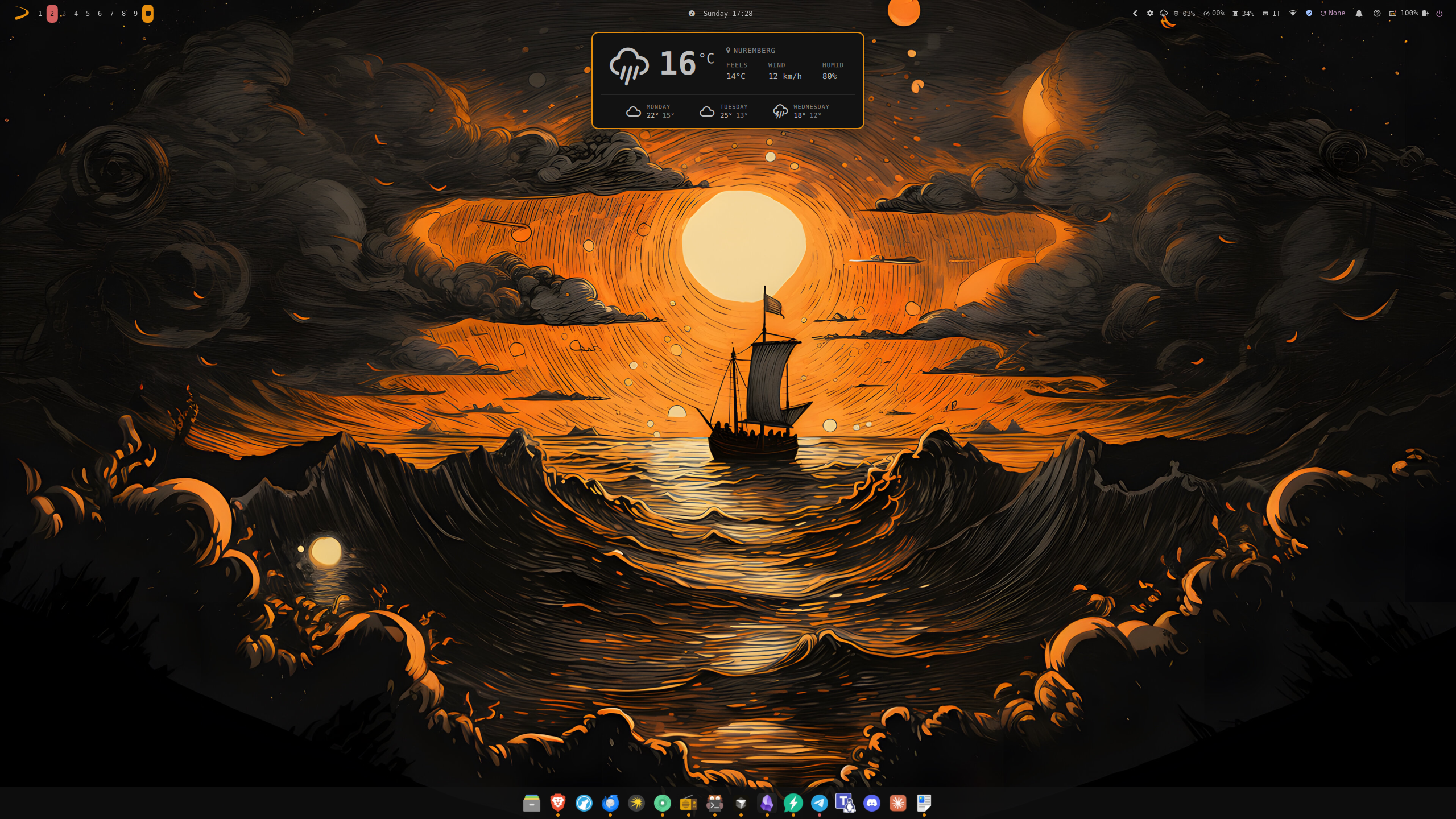 Weather |
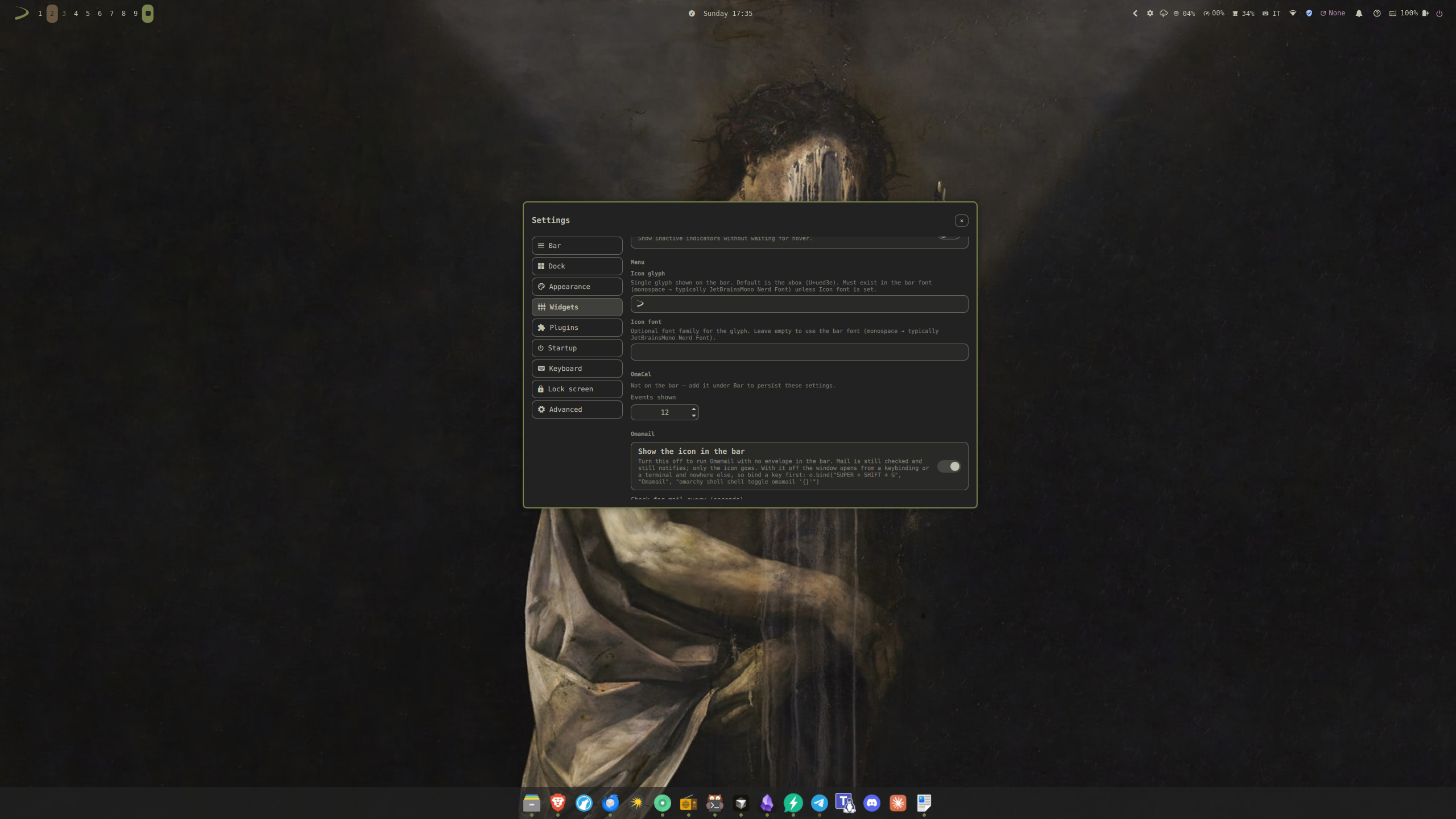 Settings | 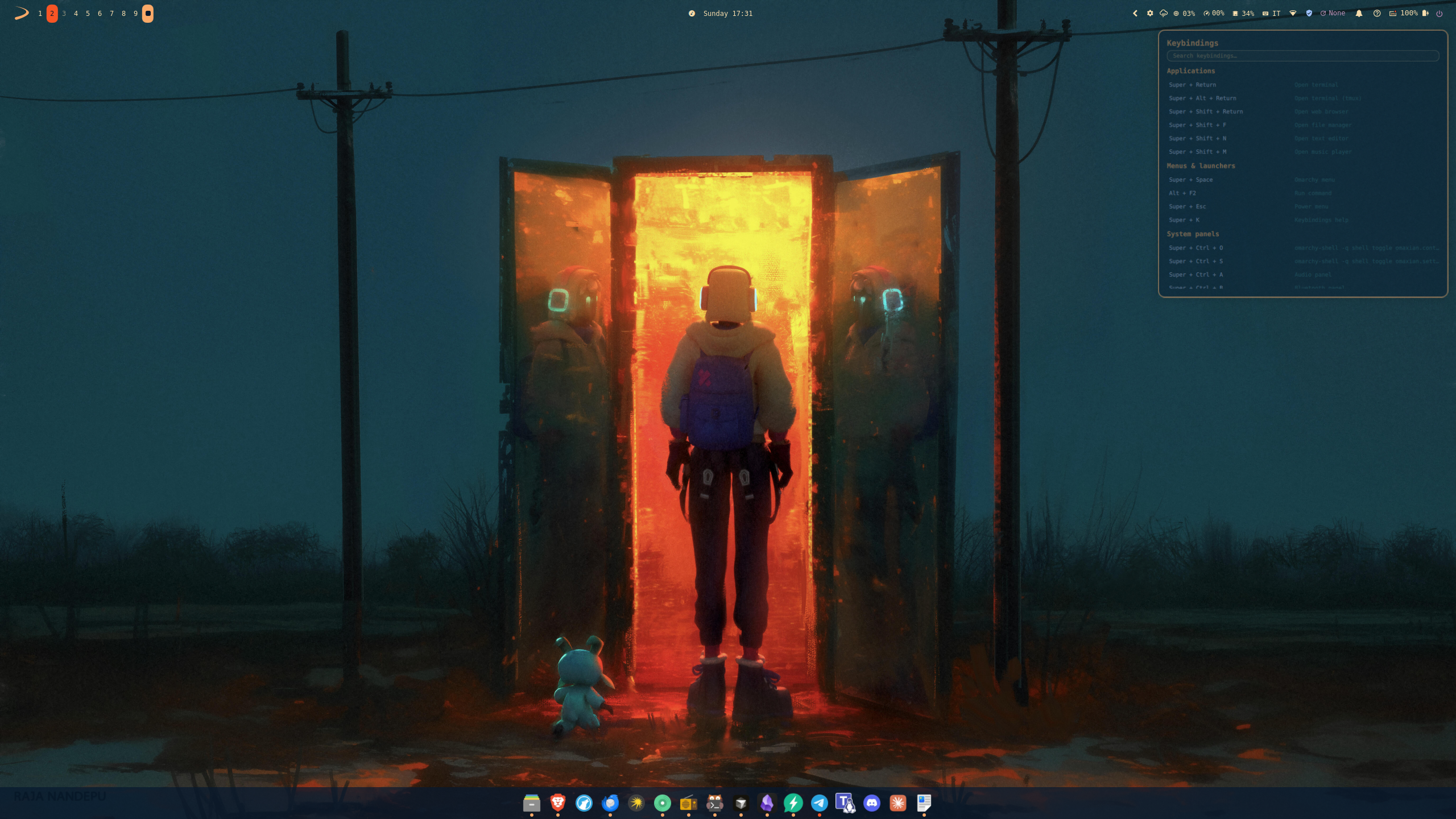 Key bindings | 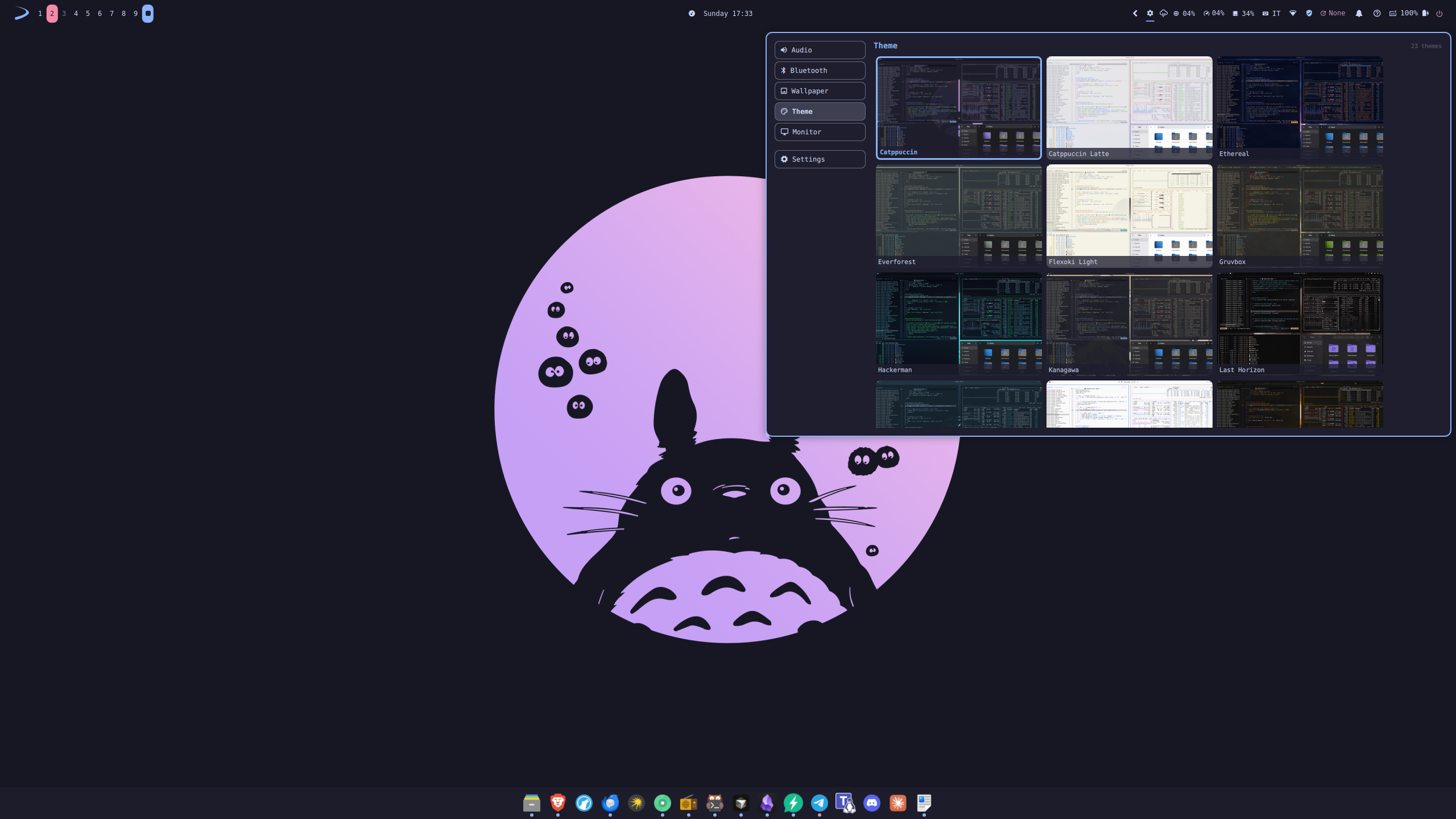 Control Panel |
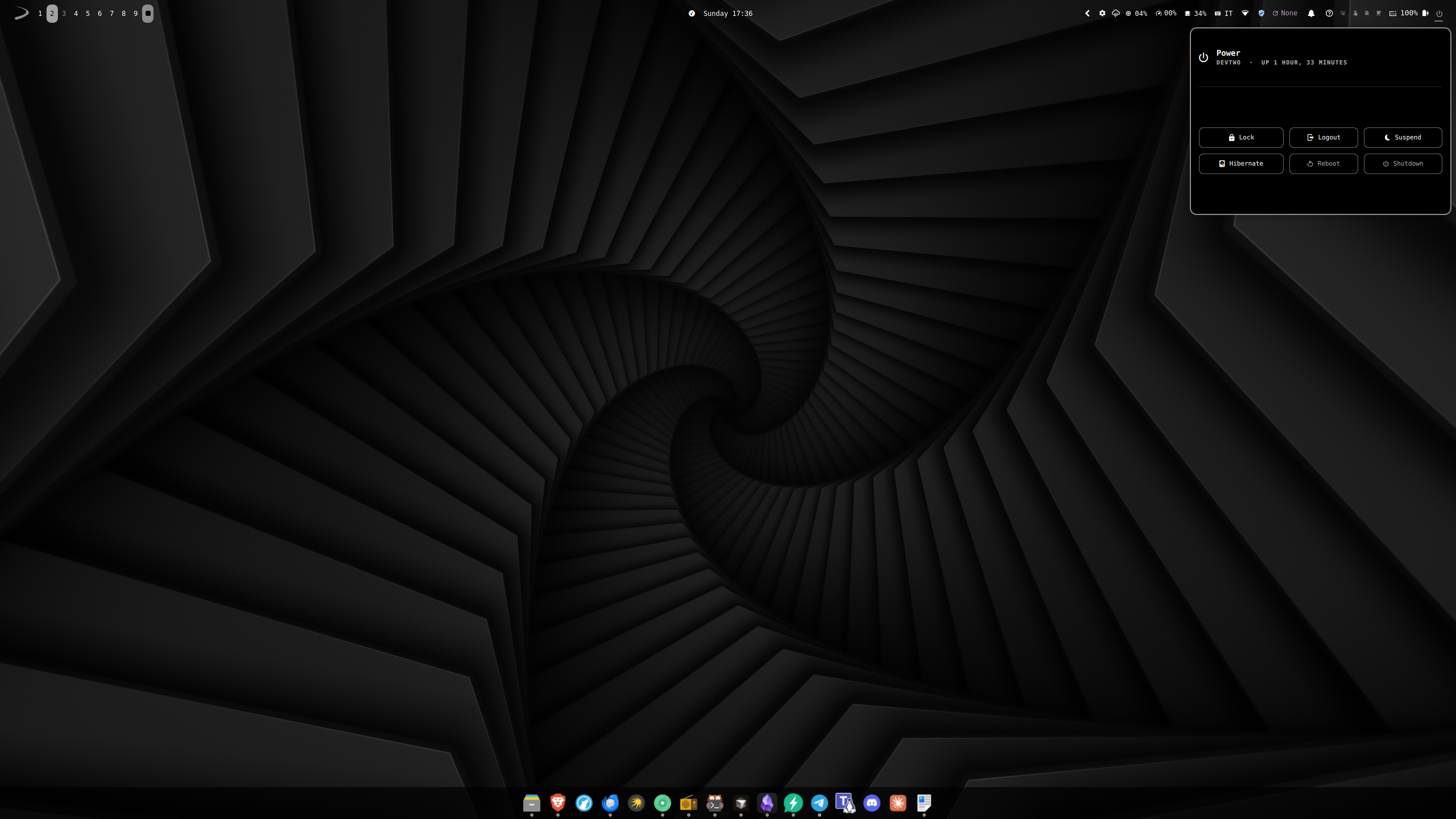 Power menu | 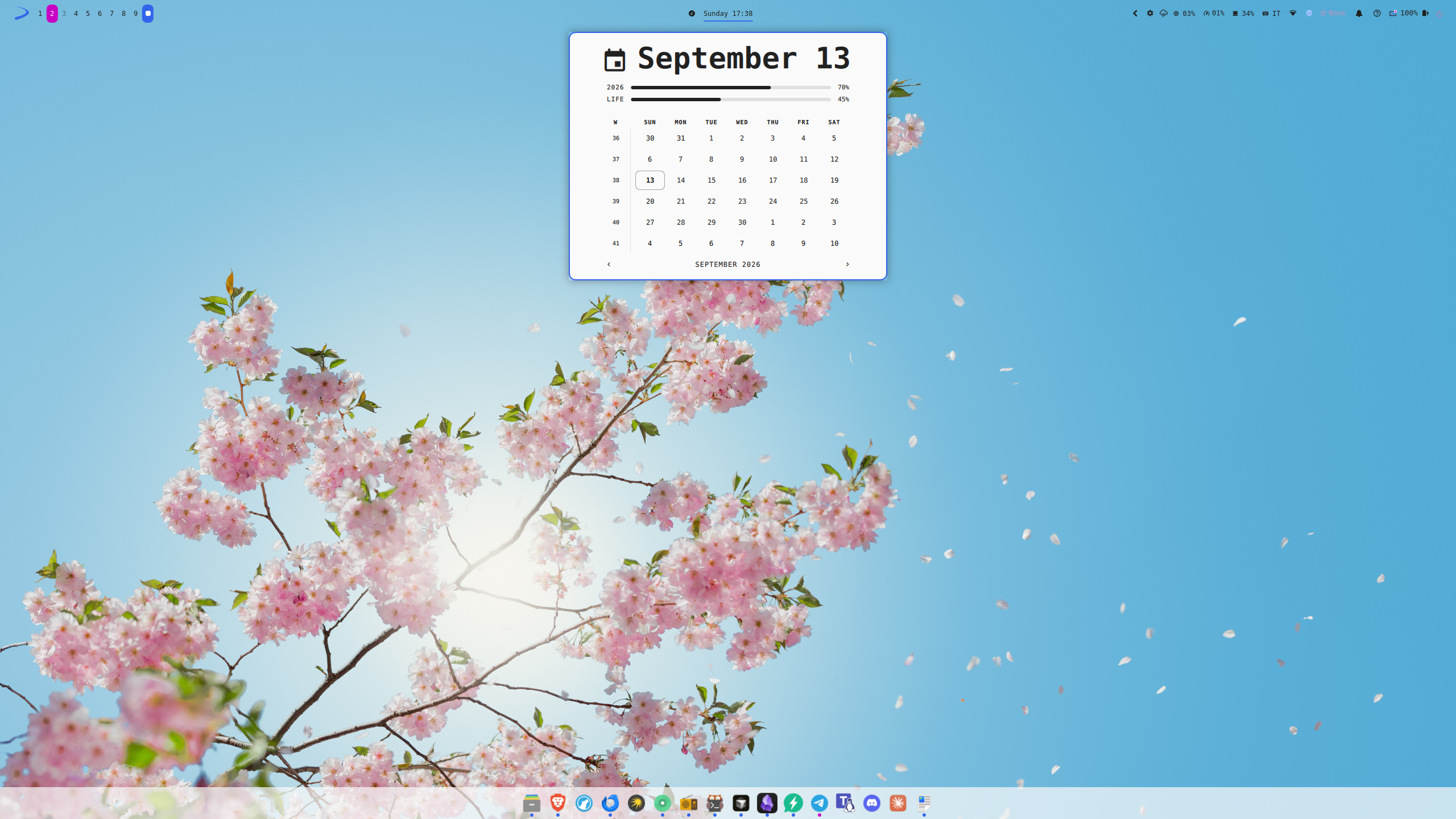 Calendar | 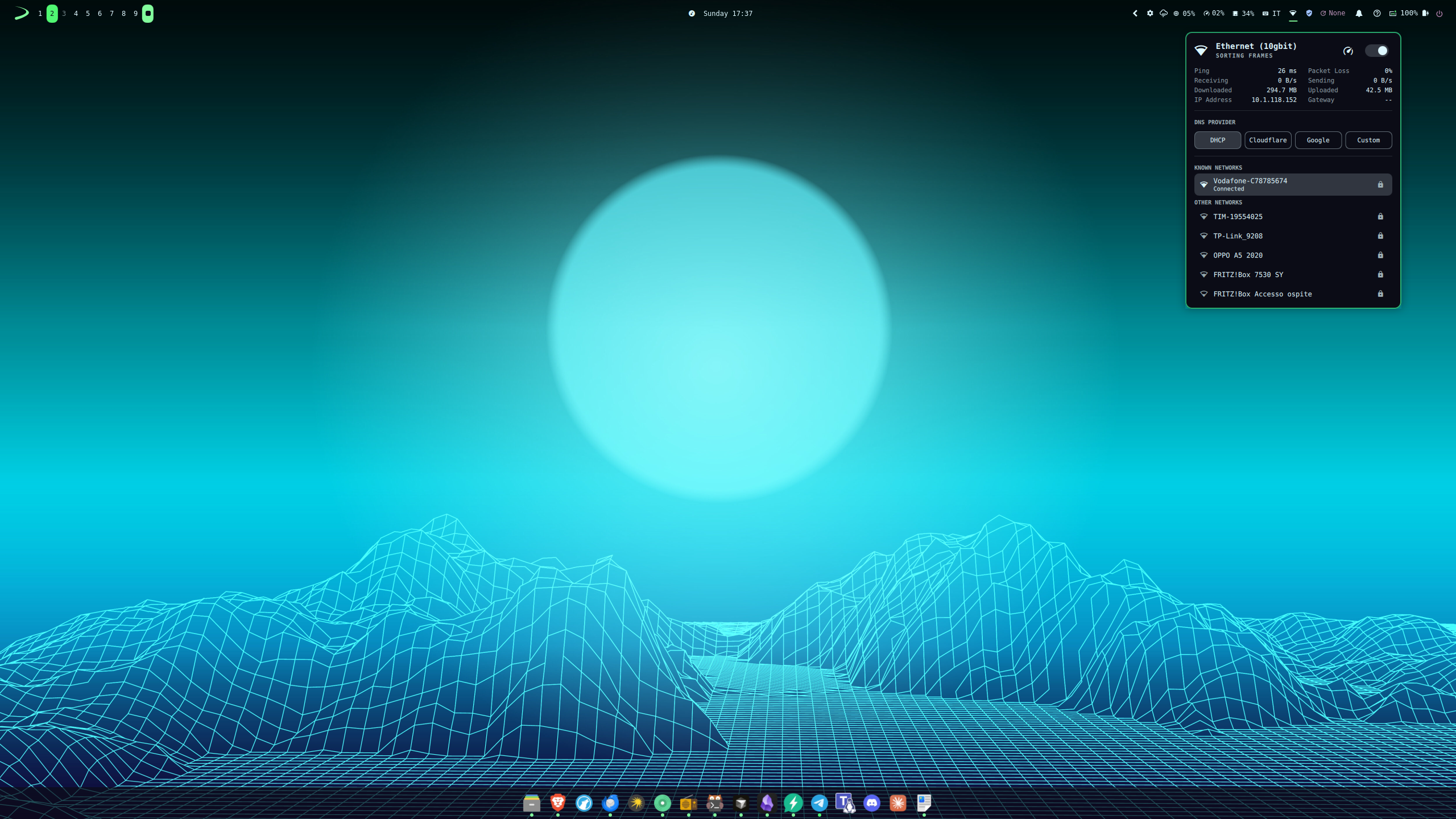 Network |
What Omaxian adds (Omarchy does not ship these)
Omaxian is not only a backend swap. Several first-party pieces have no upstream counterpart — they exist because X11/i3/Debian needed them, or because a GUI was missing.
| Piece | What you get |
|---|---|
Control Panel (Super+Ctrl+O) | One gear on the bar: audio, Bluetooth, wallpaper, theme, and monitors in a single tabbed popup. Omarchy keeps those as separate widgets (the separate widgets are still available). |
Settings (Super+Ctrl+S, or Menu → Setup → Settings) | A window to edit bar layout/position, dock chrome, widget options, plugin on/off, font/spacing, extra wallpaper folder, and startup apps. Omarchy edits the bar by drag gestures (not ported here) and has no equivalent editor. |
| Floating island bar | Optional inset rounded bar chrome (island / islandMargin / islandRadius in Settings → Bar). Same idea as the dock’s non-fullWidth pill; see docs/omaxian/customize/bar.md. |
| Dock | A persistent bottom dock (pinned apps, running-app dots, hover magnification). First-party here; upstream’s dock is a separate community plugin (https://github.com/rosakodu/omarchy-dock). |
Display profiles (Super+Ctrl+D) | xrandr resolution / on / off / primary / position, with saved layouts per output topology and laptop-lid handling. Workspaces and wallpaper across outputs: docs/omaxian/customize/displays.md. Omarchy’s monitor panel is brightness + fractional scale (Hyprland), not this. |
| SysStats, VPN, apt updates | CPU / GPU / RAM on the bar; a VPN indicator; an apt-upgradable count. None of those are Omarchy bar widgets (upstream updates are Arch checkupdates). |
| Media widget | MPD shows up next to other MPRIS players via mpDris2. It's a modified version of the Omarchy Media Control (https://github.com/MrDemonc/Omarchy-media-control) by @mrDemonc |
| Help on the bar | Super+K / the ? widget — a cheat-sheet of this session’s i3 binds. |
omarchy-plugin-check | Static check of a community plugin against this X11 port (Wayland/Hyprland/PipeWire/systemd couplings). Upstream only has schema validation. |
| Optional community ports | Curated X11/Debian-compatible third-party plugins live in community-plugins/. Not installed by deploy; opt in via ~/.config/omarchy/plugins/. |
| Debian / Devuan session | Init-agnostic: systemd Debian uses logind; Devuan / sysvinit get elogind. Power/session via omarchy-host (systemctl → loginctl → shutdown). PulseAudio or PipeWire; apt instead of pacman; no uwsm. Reminders use sleep, not systemd timers; night light is redshift, not hyprsunset. |
The shared Omarchy surface is still there: themes, the command menu, weather,
clock/calendar, tray, OSD, Wi-Fi QR, speed tests, and the omarchy-* CLI.
Install
You need an X11 session with i3 and a login path that runs
/etc/X11/Xsession (most display managers do; startx with a proper
.xsession also works). Then, from this repo:
git clone <this-repo> ~/projects/omaxian
cd ~/projects/omaxian

sudo ./setup.sh          # packages, fonts, session D-Bus
./install.sh             # themes + omarchy-* commands
./deploy.sh              # i3 / Quickshell / ~/.xsessionrc
setup.sh is safe to re-run. Useful flags: --minimal, --optional,
--deploy (runs install.sh + deploy.sh for you after packages).
Full roles, why the three scripts stay separate, and what to re-run after a
pull: docs/omaxian/install-scripts.md.
Optional third-party plugins are not part of this path — see
community-plugins/README.md.
Then log out and back in (not i3 restart) so i3 picks up PATH.
Pick the i3 / Omaxian session in your greeter (or start X however you usually do).
Quickshell
The shell needs Quickshell ≥ 0.2 (0.3.x tested).
Debian 13+ can apt install quickshell.
On Debian < 13 / Devuan it is not in apt — setup.sh warns and skips it.
You can build it from source https://quickshell.org/docs/guide/install/ or install it from the testing repository (see below).
After install
omarchy-shell shell ping                 # → ok
omarchy-shell shell listPlugins | jq length   # → ~37
pgrep -x quickshell                      # one process
Update
From the same clone you installed from, most updates are just:
cd ~/projects/omaxian
git pull
./install.sh       # refresh themes, default/, and omarchy-* commands
./deploy.sh        # refresh i3, Quickshell, and other home configs
Then log out and back in so Quickshell and the session pick up the new
tree. deploy.sh on a live i3 session pauses picom and freezes shell
file-reload; it does not reload i3 or restart Quickshell. After it
returns, optional binds-only: i3-msg reload.
When to also run sudo ./setup.sh: skip it for a normal update (bar, themes,
commands, i3 configs). Run it again only if this release needs a new apt
package on the machine — for example a new tool Omaxian now calls, updated
bundled fonts, or a change to the privileged omarchy-dns helper. If you are
unsure, check the release notes / commit message for apt or setup.sh changes;
re-running setup.sh is safe but usually unnecessary.
~/.config/omarchy/shell.json (Settings / bar layout) is left alone if it
already exists. Optional community plugins are not updated by these
scripts — use omarchy-plugin-update or see
community-plugins/README.md.
When to re-run which script:
docs/omaxian/install-scripts.md.
Daily use
Super is the Windows key. Press Super+K for the full cheat-sheet.
| Key | Action |
|---|---|
| Super+Return | terminal |
| Super+Space / Alt+F2 | Omarchy menu / run a command |
| Super+Esc | power menu |
| Super+K | keybinding help |
| Alt+Ctrl+T | theme picker |
| Super+Ctrl+A / B / W / P | audio / bluetooth / network / power |
| Super+Ctrl+O / Super+Ctrl+S | Control Panel / Settings |
| Super+1…0 | workspaces (global; see displays) |
| Super+Tab | next workspace on this monitor |
| Super+Alt+arrows | move window to adjacent monitor |
| Super+Ctrl+D | display settings |
| Super+Ctrl+C / Super+Ctrl+L | screenshot (region) / lock |
Themes (default on first login: nebula-ridge):
omarchy-theme-list
omarchy-theme-set nebula-ridge
omarchy-theme-next
That restyles the bar, i3, dunst, GTK icons, kitty/alacritty, yazi, fastfetch,
and the wallpaper. Fastfetch reads a generated config (template:
~/.config/omarchy/themed/fastfetch.jsonc.tpl); run fastfetch in a terminal
after a theme switch.
Click bar widgets for their panels; the clock opens a calendar.
Bar layout (including the optional floating island), dock, plugins, appearance,
and extra startup apps are edited from Settings (Super+Ctrl+S). The same
data still lives in ~/.config/omarchy/shell.json (and friends) if you prefer
a text editor. Restart the shell after QML or theme-file edits:
omarchy-restart-shell
The left menu glyph (default: Archcraft cat) is a widget setting — change it
in Settings → Widgets, or as a layout settings entry. The character must
exist in the bar font, or set iconFont to a family that has it:
{ "id": "omaxian.menu", "settings": { "icon": "" } }
Where it is not 1:1 with Omarchy
Omaxian is the same shell on X11/i3, not a Hyprland session. Things that work differently or are missing:
- Click-outside does not always close a popup. A widget anchored to the bar may stay open if you click into another window. Close it with Escape, the same widget, or the same keybind.
- Lock screen is
i3lock-omaxian, not Omarchy’s Wayland session-lock plugin. Settings → Lock screen sets appearance (screenshot / image / random, blur effects) and optional idle auto-lock viaxss-lock+xset. Manual lock remains Super+Ctrl+L. There is no in-shell password UI or fingerprint PAM. Lid close / suspend locking is owned byxss-lock -l(notxfce4-power-manager/xfce4-screensaver), so you should not see a second XFCE greeter unlock afteri3lock-omaxian. - No dimming overlay. Full-screen Omarchy scrims (lock, some pickers) would go black under picom; panels are small popups instead. Escape dismisses them.
- Bar cannot be dragged to another screen or reordered by dragging widgets.
Use Settings → Bar, or edit
~/.config/omarchy/shell.json. - Display panel is layout only (resolution, on/off, position). Omarchy's brightness / fractional-scale panel is not ported; use the brightness keys.
- Audio panel has no input VU meter; per-app rows show the raw app name.
- No Omarchy clipboard, emoji picker, image carousel, agents, or built-in
notification daemon. Notifications stay on dunst. Theme picking is a
thumbnail grid, not the vips carousel. The Omarchy menu (
Super+Space) skips Arch Install/Remove trees and Hyprland-only actions. - No screen recording or dictation indicators.
i3 restartis not a full reload. Log out and back in after the first deploy, or runomarchy-restart-shell.
The full skip list is in docs/omarchy-port/deltas.md.
Requirements in short
setup.sh installs these. The important ones:
- Must have: i3, Quickshell, picom, dunst, kitty, NetworkManager, PulseAudio
(or pipewire-pulse), a polkit agent (
mate-polkit),i3lock,xss-lock, and the bundled fonts (otherwise the bar shows tofu). A display manager is not packaged; use whatever already starts your X session. - Recommended (default
setup.sh):imagemagick+maim(lock compose / screenshots fori3lock-omaxian),i3lock-fancy(fallback locker),fastfetch, plus the other screenshot / media / Bluetooth tools in that script. python3-xlib: without it, typing in the Omarchy menu does nothing.python3-i3ipc: alternating split layout (alternating_layouts.py).- No systemd needed. Session pieces are elogind (
loginctl) and D-Bus.setup.shturns onuse-session-dbusin/etc/X11/Xsession.options.
Ubuntu 26
Since in Ubuntu 26.04 shipped with X11 completely removed, you cannot install Omaxian normally.
The best workaround is to use Xubuntu, or install it on a Ubuntu system using sudo apt install xubuntu-desktop.
To install Quickshell follow the instructions on the docs.
Debian 13 and Devuan Excalibur
In Debian 13 and Devuan Excalibur quickshell is available only in the testing repository. Instead of manually build it you can add the testing repository using apt pinning without compromising the system in this way:
Debian 13
- Add the Forky repo
Trixie uses deb822 format by default (your main sources live in /etc/apt/sources.list.d/debian.sources), so create:
/etc/apt/sources.list.d/forky.sources
Types: deb
URIs: http://deb.debian.org/debian
Suites: forky
Components: main contrib non-free non-free-firmware
Signed-By: /usr/share/keyrings/debian-archive-keyring.gpg
Leave your existing trixie / trixie-security / trixie-updates entries untouched.
- Pin Forky below stable
/etc/apt/preferences.d/forky
Package: *
Pin: release n=trixie-security
Pin-Priority: 990

Package: *
Pin: release n=trixie
Pin-Priority: 900

Package: *
Pin: release n=forky
Pin-Priority: 100
900 keeps stable as the default for everything, 100 makes testing installable only on explicit request while still allowing upgrades of packages you've already taken from it.
- Install from testing on demand
sudo apt update
sudo apt install -t forky quickshell qml6-module-qtquick-layouts qml6-module-qtquick-controls qml6-module-qtquick-shapes qml6-module-qt-labs-folderlistmodel qml6-module-qtquick-effects
Or per-package: apt install <package>/forky
- Verify
apt policy
Trixie should show priority 900, Forky 100.
Same caveats apply: -t forky may pull in testing versions of dependencies (watch out when it wants to upgrade libc6, gcc runtime libs, or similar core packages — that can cascade), and Debian's security team doesn't cover testing the same way as stable, so packages from Forky rely on fixes migrating from unstable rather than DSAs. If a Forky package drags in too many dependencies, a backport from trixie-backports (if available) is often the safer alternative.
Devuan Excalibur
1. Add the Freia repo (deb822 format, since Excalibur ships APT 3): /etc/apt/sources.list.d/freia.sources
Types: deb
URIs: http://deb.devuan.org/merged
Suites: freia
Components: main contrib non-free non-free-firmware
Signed-By: /usr/share/keyrings/devuan-archive-keyring.gpg
Leave your existing excalibur / excalibur-security / excalibur-updates entries as they are.
2. Pin Freia below stable
/etc/apt/preferences.d/freia
Package: *
Pin: release n=excalibur-security
Pin-Priority: 990

Package: *
Pin: release n=excalibur
Pin-Priority: 900

Package: *
Pin: release n=freia
Pin-Priority: 100
Priority 100 means Freia packages are never chosen automatically (stable at 900 always wins), but they're available if you ask for them explicitly. Anything you already pulled from Freia will still get upgraded from Freia later, since 100 is still above the "never install" threshold.
3. Install from testing
sudo apt update
sudo apt install -t freia quickshell qml6-module-qtquick-layouts qml6-module-qtquick-controls qml6-module-qtquick-shapes qml6-module-qt-labs-folderlistmodel qml6-module-qtquick-effects
Or for a one-off: apt install <package>/freia.
4. Verify with apt policy (or apt policy <package>) — Excalibur should show 900 and Freia 100.
Two caveats: -t freia will also pull Freia versions of a package's dependencies where needed, so keep an eye on the proposed changes when libc6 or other core libraries show up in the list. And per the Devuan forum, there's no -security suite for freia, so packages you take from testing won't get security updates the way stable ones do. Dev1 Galaxy
Troubleshooting
| Problem | Fix |
|---|---|
| Bar is empty (no widgets) | Quickshell started without OMARCHY_PATH. Log out/in, or run omarchy-restart-shell from a terminal that has the omarchy commands. |
Shell log: module "QtQuick.Layouts" is not installed | sudo apt install qml6-module-qtquick-layouts qml6-module-qtquick-controls qml6-module-qtquick-shapes then omarchy-restart-shell. Same packages are in setup.sh REQUIRED. |
| Shutdown / reboot from Menu or bar does nothing | Deploy omarchy-host (probes systemctl → loginctl → shutdown; re-enters via i3-msg exec for polkit). Ensure a polkit agent (mate-polkit / xfce-polkit). Terminal: systemctl poweroff (systemd) or loginctl poweroff (elogind). |
| Apps listed in the menu don't start | Restart the shell (omarchy-restart-shell). Check ~/.local/state/omarchy/shell.log. |
| Can't type in the menu / runner | sudo apt install python3-xlib |
Empty bar after i3 restart | Log out/in, or omarchy-restart-shell |
| Bar / menus invisible or freeze; popups show only borders | Almost always picom glx + software GL (llvmpipe), even when the hypervisor “3D” checkbox is on. Check: glxinfo -B | grep renderer — expect virgl/Venus/AMD/Intel/NVIDIA, not llvmpipe. Fix guest 3D, or set PICOM_BACKEND=xrender / backend = "xrender" and run ~/.config/i3/scripts/i3_comp. Also: sudo apt install qml6-module-qtquick-effects mesa-utils. |
| Theme doesn't restyle GTK apps | Start xsettingsd (or install it and log in again) |
| No wallpaper after i3 restart | sudo apt install feh |
inotifywait … not found in the log | Harmless. apt install inotify-tools to silence it. |
Logs: ~/.local/state/omarchy/shell.log. For live QML errors:
quickshell -n -p ~/.local/share/omarchy/shell
If your display manager does not run /etc/X11/Xsession, export OMARCHY_PATH
and put the omarchy bin on PATH wherever the session starts.
Community plugins (ported)
Curated third-party Omarchy plugins already ported for X11/Debian live in
community-plugins/. They are opt-in — not installed
by setup.sh / install.sh / deploy.sh. Install and enable from that
README (or Menu → Setup → Plugins).
| Plugin | What it does |
|---|---|
| Nag | Disposable bar alarms from a one-line timer |
| Better Weather | Open-Meteo / wttr.in forecast + RainViewer radar |
| Running Cat | RunCat-style CPU load cat |
| System Monitor | Low-overhead /proc//sys dashboard |
| KeePass Picker | Search KeePassXC and paste into the focused window |
| Speaker Calibrator (PulseAudio) | Mic-based parametric speaker tuning (PulseAudio) |
| Speaker Calibrator (PipeWire) | Same upstream, PipeWire-only port |
| Omamail | Gmail / HEY / JMAP / IMAP client with Rust backend |
| Voxtype Aura | Voxtype dictation overlay |
| Calculator | Spotlight-style quick calculator |
Details, upstream links, and install steps:
community-plugins/README.md.
Going further
| Want to… | See |
|---|---|
Understand setup / install / deploy | docs/omaxian/install-scripts.md — roles, flags, re-run guide; packages live in setup.sh |
| Customize bar / dock / displays | docs/omaxian/customize/ — bar (incl. floating island), dock, displays, settings |
| Install optional community plugins | community-plugins/README.md — opt-in only; not installed by setup/install/deploy |
| Understand the port / bump upstream | docs/omarchy-port/ — start with migration and deltas |
| Tinker with the Quickshell tree | docs/quickshell/ |
omarchy-quattro/ is a pinned clone of upstream Omarchy (gitignored). Don't
edit it. To move to a newer tag:
rm -rf omarchy-quattro
OMARCHY_UPSTREAM_REF=v4.0.4 ./install.sh
Credits
Omarchy by DHH / 37signals. Quickshell by outfoxxed. i3 base config derived from Archcraft.
Similar repos


Omaxian is a port of Omarchy shell for Debian-based systems + X11/XLibre + i3. Same bar, themes, launcher, and omarchy-* commands — no Wayland, Hyprland, and no dependency on any init systems.
See the codeSee what people are saying
README
Omaxian
Omaxian is a port of Omarchy for Devuan / Debian + X11/XLibre + i3.
Same bar, themes, launcher, and omarchy-* commands — no Wayland, Hyprland, and no dependency on systemd or other init systems.
You get a top bar (workspaces, clock, media, network, weather, tray, …), popups for audio / bluetooth / Wi-Fi / power, a live theme switcher, a settings editor, an Omarchy menu (apps + commands), and a command runner. Notifications use dunst; the compositor is picom.
Porting notes and file-by-file diffs live in docs/omarchy-port/.
Gallery
Menu | Media | Weather |
Settings | Key bindings | Control Panel |
Power menu | Calendar | Network |
What Omaxian adds (Omarchy does not ship these)
Omaxian is not only a backend swap. Several first-party pieces have no upstream counterpart — they exist because X11/i3/Debian needed them, or because a GUI was missing.
| Piece | What you get |
|---|---|
Control Panel (Super+Ctrl+O) | One gear on the bar: audio, Bluetooth, wallpaper, theme, and monitors in a single tabbed popup. Omarchy keeps those as separate widgets (the separate widgets are still available). |
Settings (Super+Ctrl+S, or Menu → Setup → Settings) | A window to edit bar layout/position, dock chrome, widget options, plugin on/off, font/spacing, extra wallpaper folder, and startup apps. Omarchy edits the bar by drag gestures (not ported here) and has no equivalent editor. |
| Floating island bar | Optional inset rounded bar chrome (island / islandMargin / islandRadius in Settings → Bar). Same idea as the dock’s non-fullWidth pill; see docs/omaxian/customize/bar.md. |
| Dock | A persistent bottom dock (pinned apps, running-app dots, hover magnification). First-party here; upstream’s dock is a separate community plugin (https://github.com/rosakodu/omarchy-dock). |
Display profiles (Super+Ctrl+D) | xrandr resolution / on / off / primary / position, with saved layouts per output topology and laptop-lid handling. Workspaces and wallpaper across outputs: docs/omaxian/customize/displays.md. Omarchy’s monitor panel is brightness + fractional scale (Hyprland), not this. |
| SysStats, VPN, apt updates | CPU / GPU / RAM on the bar; a VPN indicator; an apt-upgradable count. None of those are Omarchy bar widgets (upstream updates are Arch checkupdates). |
| Media widget | MPD shows up next to other MPRIS players via mpDris2. It's a modified version of the Omarchy Media Control (https://github.com/MrDemonc/Omarchy-media-control) by @mrDemonc |
| Help on the bar | Super+K / the ? widget — a cheat-sheet of this session’s i3 binds. |
omarchy-plugin-check | Static check of a community plugin against this X11 port (Wayland/Hyprland/PipeWire/systemd couplings). Upstream only has schema validation. |
| Optional community ports | Curated X11/Debian-compatible third-party plugins live in community-plugins/. Not installed by deploy; opt in via ~/.config/omarchy/plugins/. |
| Debian / Devuan session | Init-agnostic: systemd Debian uses logind; Devuan / sysvinit get elogind. Power/session via omarchy-host (systemctl → loginctl → shutdown). PulseAudio or PipeWire; apt instead of pacman; no uwsm. Reminders use sleep, not systemd timers; night light is redshift, not hyprsunset. |
The shared Omarchy surface is still there: themes, the command menu, weather,
clock/calendar, tray, OSD, Wi-Fi QR, speed tests, and the omarchy-* CLI.
Install
You need an X11 session with i3 and a login path that runs
/etc/X11/Xsession (most display managers do; startx with a proper
.xsession also works). Then, from this repo:
git clone <this-repo> ~/projects/omaxian
cd ~/projects/omaxian

sudo ./setup.sh          # packages, fonts, session D-Bus
./install.sh             # themes + omarchy-* commands
./deploy.sh              # i3 / Quickshell / ~/.xsessionrc
setup.sh is safe to re-run. Useful flags: --minimal, --optional,
--deploy (runs install.sh + deploy.sh for you after packages).
Full roles, why the three scripts stay separate, and what to re-run after a
pull: docs/omaxian/install-scripts.md.
Optional third-party plugins are not part of this path — see
community-plugins/README.md.
Then log out and back in (not i3 restart) so i3 picks up PATH.
Pick the i3 / Omaxian session in your greeter (or start X however you usually do).
Quickshell
The shell needs Quickshell ≥ 0.2 (0.3.x tested).
Debian 13+ can apt install quickshell.
On Debian < 13 / Devuan it is not in apt — setup.sh warns and skips it.
You can build it from source https://quickshell.org/docs/guide/install/ or install it from the testing repository (see below).
After install
omarchy-shell shell ping                 # → ok
omarchy-shell shell listPlugins | jq length   # → ~37
pgrep -x quickshell                      # one process
Update
From the same clone you installed from, most updates are just:
cd ~/projects/omaxian
git pull
./install.sh       # refresh themes, default/, and omarchy-* commands
./deploy.sh        # refresh i3, Quickshell, and other home configs
Then log out and back in so Quickshell and the session pick up the new
tree. deploy.sh on a live i3 session pauses picom and freezes shell
file-reload; it does not reload i3 or restart Quickshell. After it
returns, optional binds-only: i3-msg reload.
When to also run sudo ./setup.sh: skip it for a normal update (bar, themes,
commands, i3 configs). Run it again only if this release needs a new apt
package on the machine — for example a new tool Omaxian now calls, updated
bundled fonts, or a change to the privileged omarchy-dns helper. If you are
unsure, check the release notes / commit message for apt or setup.sh changes;
re-running setup.sh is safe but usually unnecessary.
~/.config/omarchy/shell.json (Settings / bar layout) is left alone if it
already exists. Optional community plugins are not updated by these
scripts — use omarchy-plugin-update or see
community-plugins/README.md.
When to re-run which script:
docs/omaxian/install-scripts.md.
Daily use
Super is the Windows key. Press Super+K for the full cheat-sheet.
| Key | Action |
|---|---|
| Super+Return | terminal |
| Super+Space / Alt+F2 | Omarchy menu / run a command |
| Super+Esc | power menu |
| Super+K | keybinding help |
| Alt+Ctrl+T | theme picker |
| Super+Ctrl+A / B / W / P | audio / bluetooth / network / power |
| Super+Ctrl+O / Super+Ctrl+S | Control Panel / Settings |
| Super+1…0 | workspaces (global; see displays) |
| Super+Tab | next workspace on this monitor |
| Super+Alt+arrows | move window to adjacent monitor |
| Super+Ctrl+D | display settings |
| Super+Ctrl+C / Super+Ctrl+L | screenshot (region) / lock |
Themes (default on first login: nebula-ridge):
omarchy-theme-list
omarchy-theme-set nebula-ridge
omarchy-theme-next
That restyles the bar, i3, dunst, GTK icons, kitty/alacritty, yazi, fastfetch,
and the wallpaper. Fastfetch reads a generated config (template:
~/.config/omarchy/themed/fastfetch.jsonc.tpl); run fastfetch in a terminal
after a theme switch.
Click bar widgets for their panels; the clock opens a calendar.
Bar layout (including the optional floating island), dock, plugins, appearance,
and extra startup apps are edited from Settings (Super+Ctrl+S). The same
data still lives in ~/.config/omarchy/shell.json (and friends) if you prefer
a text editor. Restart the shell after QML or theme-file edits:
omarchy-restart-shell
The left menu glyph (default: Archcraft cat) is a widget setting — change it
in Settings → Widgets, or as a layout settings entry. The character must
exist in the bar font, or set iconFont to a family that has it:
{ "id": "omaxian.menu", "settings": { "icon": "" } }
Where it is not 1:1 with Omarchy
Omaxian is the same shell on X11/i3, not a Hyprland session. Things that work differently or are missing:
- Click-outside does not always close a popup. A widget anchored to the bar may stay open if you click into another window. Close it with Escape, the same widget, or the same keybind.
- Lock screen is
i3lock-omaxian, not Omarchy’s Wayland session-lock plugin. Settings → Lock screen sets appearance (screenshot / image / random, blur effects) and optional idle auto-lock viaxss-lock+xset. Manual lock remains Super+Ctrl+L. There is no in-shell password UI or fingerprint PAM. Lid close / suspend locking is owned byxss-lock -l(notxfce4-power-manager/xfce4-screensaver), so you should not see a second XFCE greeter unlock afteri3lock-omaxian. - No dimming overlay. Full-screen Omarchy scrims (lock, some pickers) would go black under picom; panels are small popups instead. Escape dismisses them.
- Bar cannot be dragged to another screen or reordered by dragging widgets.
Use Settings → Bar, or edit
~/.config/omarchy/shell.json. - Display panel is layout only (resolution, on/off, position). Omarchy's brightness / fractional-scale panel is not ported; use the brightness keys.
- Audio panel has no input VU meter; per-app rows show the raw app name.
- No Omarchy clipboard, emoji picker, image carousel, agents, or built-in
notification daemon. Notifications stay on dunst. Theme picking is a
thumbnail grid, not the vips carousel. The Omarchy menu (
Super+Space) skips Arch Install/Remove trees and Hyprland-only actions. - No screen recording or dictation indicators.
i3 restartis not a full reload. Log out and back in after the first deploy, or runomarchy-restart-shell.
The full skip list is in docs/omarchy-port/deltas.md.
Requirements in short
setup.sh installs these. The important ones:
- Must have: i3, Quickshell, picom, dunst, kitty, NetworkManager, PulseAudio
(or pipewire-pulse), a polkit agent (
mate-polkit),i3lock,xss-lock, and the bundled fonts (otherwise the bar shows tofu). A display manager is not packaged; use whatever already starts your X session. - Recommended (default
setup.sh):imagemagick+maim(lock compose / screenshots fori3lock-omaxian),i3lock-fancy(fallback locker),fastfetch, plus the other screenshot / media / Bluetooth tools in that script. python3-xlib: without it, typing in the Omarchy menu does nothing.python3-i3ipc: alternating split layout (alternating_layouts.py).- No systemd needed. Session pieces are elogind (
loginctl) and D-Bus.setup.shturns onuse-session-dbusin/etc/X11/Xsession.options.
Ubuntu 26
Since in Ubuntu 26.04 shipped with X11 completely removed, you cannot install Omaxian normally.
The best workaround is to use Xubuntu, or install it on a Ubuntu system using sudo apt install xubuntu-desktop.
To install Quickshell follow the instructions on the docs.
Debian 13 and Devuan Excalibur
In Debian 13 and Devuan Excalibur quickshell is available only in the testing repository. Instead of manually build it you can add the testing repository using apt pinning without compromising the system in this way:
Debian 13
- Add the Forky repo
Trixie uses deb822 format by default (your main sources live in /etc/apt/sources.list.d/debian.sources), so create:
/etc/apt/sources.list.d/forky.sources
Types: deb
URIs: http://deb.debian.org/debian
Suites: forky
Components: main contrib non-free non-free-firmware
Signed-By: /usr/share/keyrings/debian-archive-keyring.gpg
Leave your existing trixie / trixie-security / trixie-updates entries untouched.
- Pin Forky below stable
/etc/apt/preferences.d/forky
Package: *
Pin: release n=trixie-security
Pin-Priority: 990

Package: *
Pin: release n=trixie
Pin-Priority: 900

Package: *
Pin: release n=forky
Pin-Priority: 100
900 keeps stable as the default for everything, 100 makes testing installable only on explicit request while still allowing upgrades of packages you've already taken from it.
- Install from testing on demand
sudo apt update
sudo apt install -t forky quickshell qml6-module-qtquick-layouts qml6-module-qtquick-controls qml6-module-qtquick-shapes qml6-module-qt-labs-folderlistmodel qml6-module-qtquick-effects
Or per-package: apt install <package>/forky
- Verify
apt policy
Trixie should show priority 900, Forky 100.
Same caveats apply: -t forky may pull in testing versions of dependencies (watch out when it wants to upgrade libc6, gcc runtime libs, or similar core packages — that can cascade), and Debian's security team doesn't cover testing the same way as stable, so packages from Forky rely on fixes migrating from unstable rather than DSAs. If a Forky package drags in too many dependencies, a backport from trixie-backports (if available) is often the safer alternative.
Devuan Excalibur
1. Add the Freia repo (deb822 format, since Excalibur ships APT 3): /etc/apt/sources.list.d/freia.sources
Types: deb
URIs: http://deb.devuan.org/merged
Suites: freia
Components: main contrib non-free non-free-firmware
Signed-By: /usr/share/keyrings/devuan-archive-keyring.gpg
Leave your existing excalibur / excalibur-security / excalibur-updates entries as they are.
2. Pin Freia below stable
/etc/apt/preferences.d/freia
Package: *
Pin: release n=excalibur-security
Pin-Priority: 990

Package: *
Pin: release n=excalibur
Pin-Priority: 900

Package: *
Pin: release n=freia
Pin-Priority: 100
Priority 100 means Freia packages are never chosen automatically (stable at 900 always wins), but they're available if you ask for them explicitly. Anything you already pulled from Freia will still get upgraded from Freia later, since 100 is still above the "never install" threshold.
3. Install from testing
sudo apt update
sudo apt install -t freia quickshell qml6-module-qtquick-layouts qml6-module-qtquick-controls qml6-module-qtquick-shapes qml6-module-qt-labs-folderlistmodel qml6-module-qtquick-effects
Or for a one-off: apt install <package>/freia.
4. Verify with apt policy (or apt policy <package>) — Excalibur should show 900 and Freia 100.
Two caveats: -t freia will also pull Freia versions of a package's dependencies where needed, so keep an eye on the proposed changes when libc6 or other core libraries show up in the list. And per the Devuan forum, there's no -security suite for freia, so packages you take from testing won't get security updates the way stable ones do. Dev1 Galaxy
Troubleshooting
| Problem | Fix |
|---|---|
| Bar is empty (no widgets) | Quickshell started without OMARCHY_PATH. Log out/in, or run omarchy-restart-shell from a terminal that has the omarchy commands. |
Shell log: module "QtQuick.Layouts" is not installed | sudo apt install qml6-module-qtquick-layouts qml6-module-qtquick-controls qml6-module-qtquick-shapes then omarchy-restart-shell. Same packages are in setup.sh REQUIRED. |
| Shutdown / reboot from Menu or bar does nothing | Deploy omarchy-host (probes systemctl → loginctl → shutdown; re-enters via i3-msg exec for polkit). Ensure a polkit agent (mate-polkit / xfce-polkit). Terminal: systemctl poweroff (systemd) or loginctl poweroff (elogind). |
| Apps listed in the menu don't start | Restart the shell (omarchy-restart-shell). Check ~/.local/state/omarchy/shell.log. |
| Can't type in the menu / runner | sudo apt install python3-xlib |
Empty bar after i3 restart | Log out/in, or omarchy-restart-shell |
| Bar / menus invisible or freeze; popups show only borders | Almost always picom glx + software GL (llvmpipe), even when the hypervisor “3D” checkbox is on. Check: glxinfo -B | grep renderer — expect virgl/Venus/AMD/Intel/NVIDIA, not llvmpipe. Fix guest 3D, or set PICOM_BACKEND=xrender / backend = "xrender" and run ~/.config/i3/scripts/i3_comp. Also: sudo apt install qml6-module-qtquick-effects mesa-utils. |
| Theme doesn't restyle GTK apps | Start xsettingsd (or install it and log in again) |
| No wallpaper after i3 restart | sudo apt install feh |
inotifywait … not found in the log | Harmless. apt install inotify-tools to silence it. |
Logs: ~/.local/state/omarchy/shell.log. For live QML errors:
quickshell -n -p ~/.local/share/omarchy/shell
If your display manager does not run /etc/X11/Xsession, export OMARCHY_PATH
and put the omarchy bin on PATH wherever the session starts.
Community plugins (ported)
Curated third-party Omarchy plugins already ported for X11/Debian live in
community-plugins/. They are opt-in — not installed
by setup.sh / install.sh / deploy.sh. Install and enable from that
README (or Menu → Setup → Plugins).
| Plugin | What it does |
|---|---|
| Nag | Disposable bar alarms from a one-line timer |
| Better Weather | Open-Meteo / wttr.in forecast + RainViewer radar |
| Running Cat | RunCat-style CPU load cat |
| System Monitor | Low-overhead /proc//sys dashboard |
| KeePass Picker | Search KeePassXC and paste into the focused window |
| Speaker Calibrator (PulseAudio) | Mic-based parametric speaker tuning (PulseAudio) |
| Speaker Calibrator (PipeWire) | Same upstream, PipeWire-only port |
| Omamail | Gmail / HEY / JMAP / IMAP client with Rust backend |
| Voxtype Aura | Voxtype dictation overlay |
| Calculator | Spotlight-style quick calculator |
Details, upstream links, and install steps:
community-plugins/README.md.
Going further
| Want to… | See |
|---|---|
Understand setup / install / deploy | docs/omaxian/install-scripts.md — roles, flags, re-run guide; packages live in setup.sh |
| Customize bar / dock / displays | docs/omaxian/customize/ — bar (incl. floating island), dock, displays, settings |
| Install optional community plugins | community-plugins/README.md — opt-in only; not installed by setup/install/deploy |
| Understand the port / bump upstream | docs/omarchy-port/ — start with migration and deltas |
| Tinker with the Quickshell tree | docs/quickshell/ |
omarchy-quattro/ is a pinned clone of upstream Omarchy (gitignored). Don't
edit it. To move to a newer tag:
rm -rf omarchy-quattro
OMARCHY_UPSTREAM_REF=v4.0.4 ./install.sh
Credits
Omarchy by DHH / 37signals. Quickshell by outfoxxed. i3 base config derived from Archcraft.