A calm Windows desktop for Claude Code: run several sessions at a glance, approve requests from desk or phone, live preview, git and project memory – with rain on the window and lofi in your ears. Free & open source.
See the code
A calm place to work with Claude Code.
Rain on the window, lofi in your ears, and every Claude Code session on one Windows desktop.


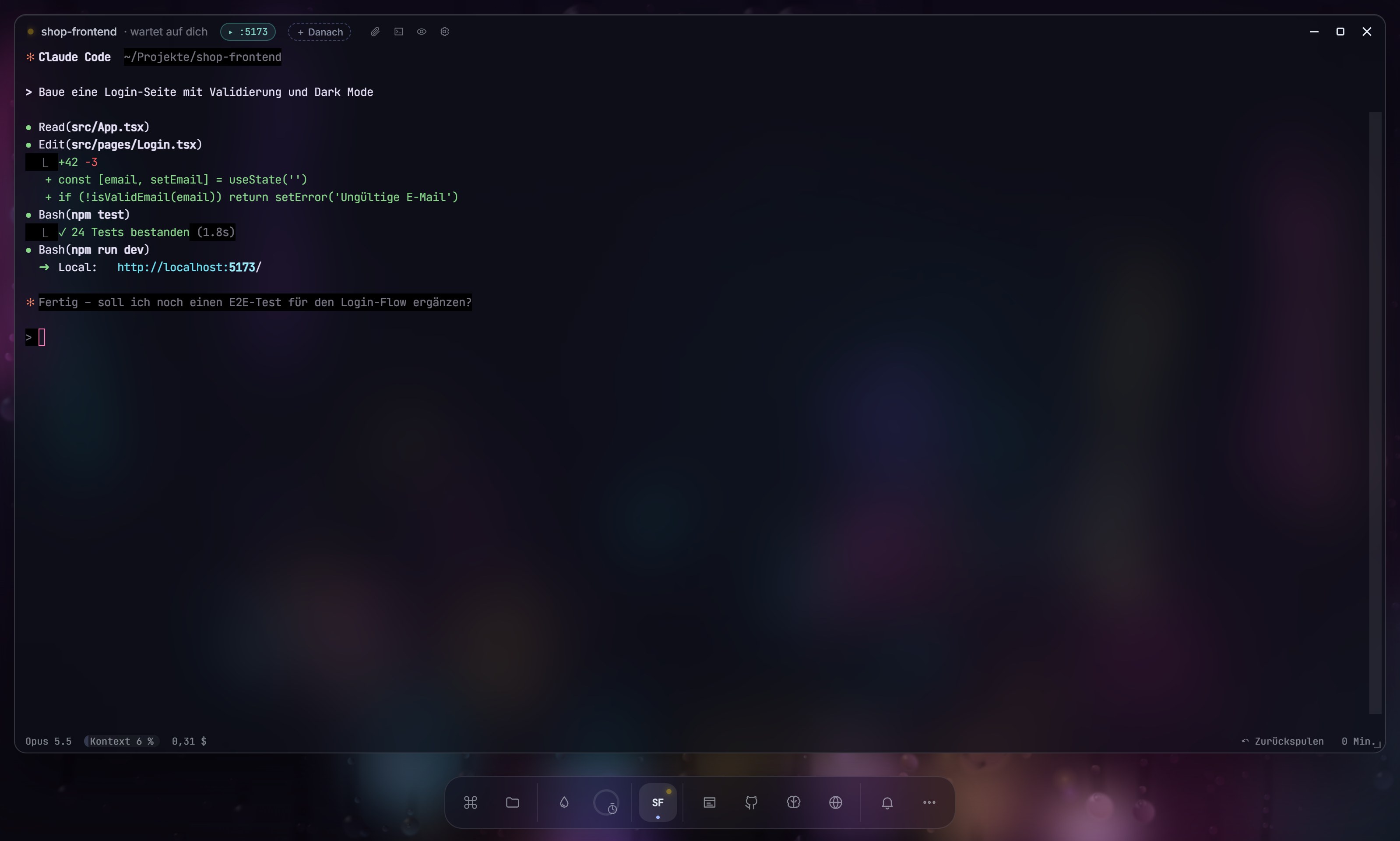
VibeDesk is a full-screen workspace for Windows built around Claude Code. Instead of switching between terminals, a browser and a music app, you sit in front of a rainy window, and the things you need for building float in front of it as glass windows.
It runs the real Claude Code CLI in real terminals. VibeDesk adds the view around it: what each session is doing, what it is waiting for, and what it costs.
Calm by default
Two layouts
Atmosphere
.env files in the editor; a curtain (Ctrl + Shift + H) covers the whole screenClaude Code sessions
Merge Studio (beta) – parallel sessions
git merge-tree – against the target branch and between sessions, even for uncommitted changes – without touching anythingrefs/vibedesk/checkpoints, not in your history) and one-click restoreInspector and stats
The brain (project memory)
.vibedesk/brain inside your project: plain Markdown with [[links]], readable in Obsidian and versionable with GitTools
Phone companion
Addons
.vibeaddon files and install them by double-clickSocial and streaming
!vibe … that you approve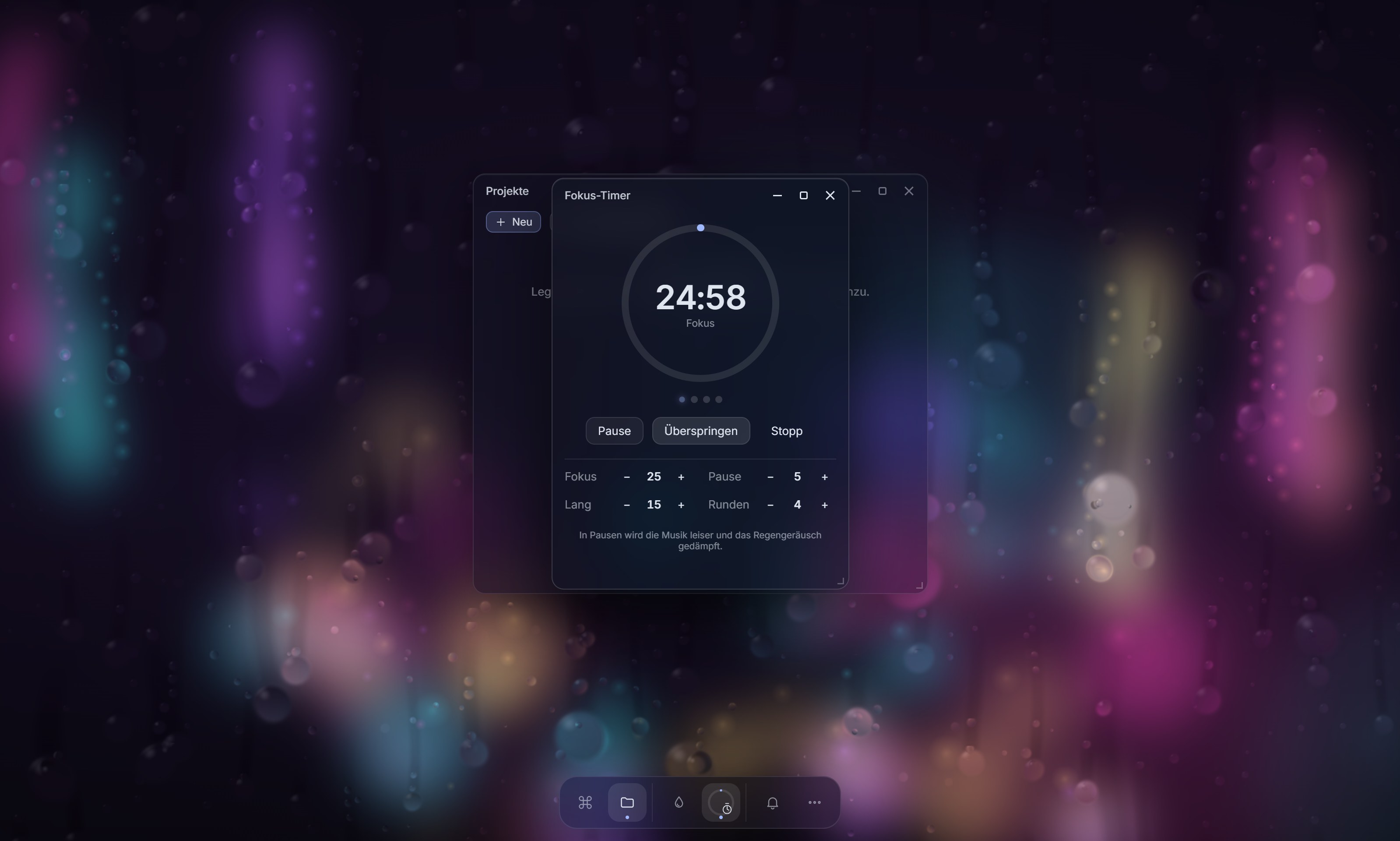 |  |
VibeDesk-Setup-<version>.exe.vibe.Updates are downloaded in the background from GitHub Releases and installed on the next start (or right away if no session is running).
The installer is not code-signed, so Windows may show "Windows protected your PC". Click More info → Run anyway.
This is common for small open-source projects: code-signing certificates cost money every year, and SmartScreen also warns about new apps that have not been downloaded often yet. It does not mean the file was flagged as malware.
If you want to make sure the file is the one published here, compare its SHA256 checksum with the one in the release notes:
Get-FileHash .\VibeDesk-Setup-<version>.exe -Algorithm SHA256
The Hash value must match the checksum listed in the release notes exactly. You can also build VibeDesk yourself from source (see below).
winget, Claude Code via the official installer script from claude.ai)Costs shown in VibeDesk are estimates based on Anthropic's API prices. With a subscription you do not pay per token; the number is meant as orientation.
Win + R → vibe | Start VibeDesk |
| Ctrl + Alt + Space | Quick prompt from any app |
| Ctrl + K · Ctrl + Shift + P | Command palette (inside the terminal only the second one) |
| Ctrl + . | Zen mode: only the current session |
| Hold Esc · F11 | Leave full screen |
| Ctrl + Shift + H | Curtain (hide the screen) |
| Ctrl + S | Save in the editor |
| Drag a window to the edge | Half screen width |
VibeDesk has no telemetry, no analytics and no account. There is no VibeDesk server.
What stays local
127.0.0.1 (random port, random token).~/.claude/projects (or CLAUDE_CONFIG_DIR) to show feed, todos and stats.%APPDATA%\vibedesk\logs\fehler.log. "Report a bug" only opens a pre-filled GitHub issue in your browser (version, Windows version, Claude Code version and the end of the error log, with user names in paths masked). You see everything before you submit, and nothing is sent unless you do.What connects to the internet, and when
| What | Where to | When |
|---|---|---|
| Lofi radio | the selected stream (laut.fm by default; also ilovemusic.de, zeno.fm) | while music is on (on by default) |
| Update check and download | GitHub Releases | on start |
| Claude Code itself, AI commit messages, Merge Studio review, prompt formulation on the phone | Anthropic, through your own Claude Code | when you use Claude |
| Spotify | accounts.spotify.com (login) and api.spotify.com (control playback), with your own Spotify app ID | only if you connect Spotify |
| Skill downloads | GitHub (codeload.github.com) | when you install a skill from a link |
| Git window | your Git remotes; GitHub login via the GitHub CLI (device code in the browser) | when you push, pull, log in or publish |
| Installing tools | winget / claude.ai installer | only when you click install |
| Discord Rich Presence | your local Discord app; discord.com for app info if you use your own app ID | only if enabled |
| Discord webhook | your Discord webhook URL | only if enabled |
| Twitch chat suggestions | Twitch chat (anonymous, read-only) | only if enabled |
| Phone companion | local network on port 17350; with "from anywhere" on (default once the companion is enabled) a Cloudflare quick tunnel (*.trycloudflare.com, cloudflared is installed via winget) | only while the companion is switched on |
| Vibe Lounge | public Nostr relays for signaling (encrypted with the room code), then WebRTC directly between participants, who can see each other's IP address | only while you are in a lounge |
What VibeDesk changes on your PC
.vibedesk/ folder with the brain notes. Add it to .gitignore if you do not want to commit it..vibedesk/worktrees/ on branches named vd/…. VibeDesk adds that folder to the repository's local .git/info/exclude (your .gitignore stays untouched). Checkpoints are Git refs under refs/vibedesk/checkpoints/; delete them with git for-each-ref --format="%(refname)" refs/vibedesk | % { git update-ref -d $_ }.~/.claude/settings.json or project settings. For sessions started in VibeDesk it writes a temporary settings file with its hooks (and, with the brain on, an MCP config for the brain tools) to %TEMP%\vibedesk and passes it via --settings / --mcp-config. Sessions you start outside VibeDesk are not affected.~/.claude/skills (or the project's .claude/skills).vibe for Win + R is a registry entry under HKCU\Software\Microsoft\Windows\CurrentVersion\App Paths\vibe.exe.Uninstall VibeDesk from Settings → Apps. The uninstaller removes the program, but these stay on your PC:
| What | Where |
|---|---|
| Settings, projects list, stats, addons, scenes, notes, error log | %APPDATA%\vibedesk |
| Temporary files (session settings, pasted screenshots) | %TEMP%\vibedesk |
| Brain notes | .vibedesk\ in each project you opened |
| Run alias | HKCU\Software\Microsoft\Windows\CurrentVersion\App Paths\vibe.exe |
| Tools you let VibeDesk install | Node.js, Claude Code, Git, GitHub CLI, cloudflared (each uninstallable on its own) |
To remove everything, run in PowerShell after uninstalling:
Remove-Item -Recurse -Force "$env:APPDATA\vibedesk", "$env:TEMP\vibedesk" -ErrorAction SilentlyContinue
Remove-Item "HKCU:\Software\Microsoft\Windows\CurrentVersion\App Paths\vibe.exe" -Recurse -ErrorAction SilentlyContinue
Delete the .vibedesk folders in your projects by hand if you do not want to keep the notes.
Requires Node.js and npm.
npm install
npm run dev      # development with hot reload
npm run dist     # build the installer into dist/
Is this an official Anthropic product? No. VibeDesk is an independent open-source project. It uses the Claude Code CLI that you install and log in to yourself.
Does it work on macOS or Linux? Not yet. VibeDesk is Windows-only for now.
What does it cost? VibeDesk is free and open source (MIT). You only need your own Claude subscription or API key for Claude Code.
Is the interface available in English? Yes. VibeDesk follows your Windows language (German or English). Switch it in the More menu under "Sprache · Language".
Questions, bug reports and ideas all go to GitHub Issues. Inside the app, "Report a bug" opens a pre-filled issue for you. Security issues: please see SECURITY.md.
MIT © 2026 fxd-gif
A calm Windows desktop for Claude Code: run several sessions at a glance, approve requests from desk or phone, live preview, git and project memory – with rain on the window and lofi in your ears. Free & open source.
See the code
A calm place to work with Claude Code.
Rain on the window, lofi in your ears, and every Claude Code session on one Windows desktop.
VibeDesk is a full-screen workspace for Windows built around Claude Code. Instead of switching between terminals, a browser and a music app, you sit in front of a rainy window, and the things you need for building float in front of it as glass windows.
It runs the real Claude Code CLI in real terminals. VibeDesk adds the view around it: what each session is doing, what it is waiting for, and what it costs.
Calm by default
Two layouts
Atmosphere
.env files in the editor; a curtain (Ctrl + Shift + H) covers the whole screenClaude Code sessions
Merge Studio (beta) – parallel sessions
git merge-tree – against the target branch and between sessions, even for uncommitted changes – without touching anythingrefs/vibedesk/checkpoints, not in your history) and one-click restoreInspector and stats
The brain (project memory)
.vibedesk/brain inside your project: plain Markdown with [[links]], readable in Obsidian and versionable with GitTools
Phone companion
Addons
.vibeaddon files and install them by double-clickSocial and streaming
!vibe … that you approve | |
VibeDesk-Setup-<version>.exe.vibe.Updates are downloaded in the background from GitHub Releases and installed on the next start (or right away if no session is running).
The installer is not code-signed, so Windows may show "Windows protected your PC". Click More info → Run anyway.
This is common for small open-source projects: code-signing certificates cost money every year, and SmartScreen also warns about new apps that have not been downloaded often yet. It does not mean the file was flagged as malware.
If you want to make sure the file is the one published here, compare its SHA256 checksum with the one in the release notes:
Get-FileHash .\VibeDesk-Setup-<version>.exe -Algorithm SHA256
The Hash value must match the checksum listed in the release notes exactly. You can also build VibeDesk yourself from source (see below).
winget, Claude Code via the official installer script from claude.ai)Costs shown in VibeDesk are estimates based on Anthropic's API prices. With a subscription you do not pay per token; the number is meant as orientation.
Win + R → vibe | Start VibeDesk |
| Ctrl + Alt + Space | Quick prompt from any app |
| Ctrl + K · Ctrl + Shift + P | Command palette (inside the terminal only the second one) |
| Ctrl + . | Zen mode: only the current session |
| Hold Esc · F11 | Leave full screen |
| Ctrl + Shift + H | Curtain (hide the screen) |
| Ctrl + S | Save in the editor |
| Drag a window to the edge | Half screen width |
VibeDesk has no telemetry, no analytics and no account. There is no VibeDesk server.
What stays local
127.0.0.1 (random port, random token).~/.claude/projects (or CLAUDE_CONFIG_DIR) to show feed, todos and stats.%APPDATA%\vibedesk\logs\fehler.log. "Report a bug" only opens a pre-filled GitHub issue in your browser (version, Windows version, Claude Code version and the end of the error log, with user names in paths masked). You see everything before you submit, and nothing is sent unless you do.What connects to the internet, and when
| What | Where to | When |
|---|---|---|
| Lofi radio | the selected stream (laut.fm by default; also ilovemusic.de, zeno.fm) | while music is on (on by default) |
| Update check and download | GitHub Releases | on start |
| Claude Code itself, AI commit messages, Merge Studio review, prompt formulation on the phone | Anthropic, through your own Claude Code | when you use Claude |
| Spotify | accounts.spotify.com (login) and api.spotify.com (control playback), with your own Spotify app ID | only if you connect Spotify |
| Skill downloads | GitHub (codeload.github.com) | when you install a skill from a link |
| Git window | your Git remotes; GitHub login via the GitHub CLI (device code in the browser) | when you push, pull, log in or publish |
| Installing tools | winget / claude.ai installer | only when you click install |
| Discord Rich Presence | your local Discord app; discord.com for app info if you use your own app ID | only if enabled |
| Discord webhook | your Discord webhook URL | only if enabled |
| Twitch chat suggestions | Twitch chat (anonymous, read-only) | only if enabled |
| Phone companion | local network on port 17350; with "from anywhere" on (default once the companion is enabled) a Cloudflare quick tunnel (*.trycloudflare.com, cloudflared is installed via winget) | only while the companion is switched on |
| Vibe Lounge | public Nostr relays for signaling (encrypted with the room code), then WebRTC directly between participants, who can see each other's IP address | only while you are in a lounge |
What VibeDesk changes on your PC
.vibedesk/ folder with the brain notes. Add it to .gitignore if you do not want to commit it..vibedesk/worktrees/ on branches named vd/…. VibeDesk adds that folder to the repository's local .git/info/exclude (your .gitignore stays untouched). Checkpoints are Git refs under refs/vibedesk/checkpoints/; delete them with git for-each-ref --format="%(refname)" refs/vibedesk | % { git update-ref -d $_ }.~/.claude/settings.json or project settings. For sessions started in VibeDesk it writes a temporary settings file with its hooks (and, with the brain on, an MCP config for the brain tools) to %TEMP%\vibedesk and passes it via --settings / --mcp-config. Sessions you start outside VibeDesk are not affected.~/.claude/skills (or the project's .claude/skills).vibe for Win + R is a registry entry under HKCU\Software\Microsoft\Windows\CurrentVersion\App Paths\vibe.exe.Uninstall VibeDesk from Settings → Apps. The uninstaller removes the program, but these stay on your PC:
| What | Where |
|---|---|
| Settings, projects list, stats, addons, scenes, notes, error log | %APPDATA%\vibedesk |
| Temporary files (session settings, pasted screenshots) | %TEMP%\vibedesk |
| Brain notes | .vibedesk\ in each project you opened |
| Run alias | HKCU\Software\Microsoft\Windows\CurrentVersion\App Paths\vibe.exe |
| Tools you let VibeDesk install | Node.js, Claude Code, Git, GitHub CLI, cloudflared (each uninstallable on its own) |
To remove everything, run in PowerShell after uninstalling:
Remove-Item -Recurse -Force "$env:APPDATA\vibedesk", "$env:TEMP\vibedesk" -ErrorAction SilentlyContinue
Remove-Item "HKCU:\Software\Microsoft\Windows\CurrentVersion\App Paths\vibe.exe" -Recurse -ErrorAction SilentlyContinue
Delete the .vibedesk folders in your projects by hand if you do not want to keep the notes.
Requires Node.js and npm.
npm install
npm run dev      # development with hot reload
npm run dist     # build the installer into dist/
Is this an official Anthropic product? No. VibeDesk is an independent open-source project. It uses the Claude Code CLI that you install and log in to yourself.
Does it work on macOS or Linux? Not yet. VibeDesk is Windows-only for now.
What does it cost? VibeDesk is free and open source (MIT). You only need your own Claude subscription or API key for Claude Code.
Is the interface available in English? Yes. VibeDesk follows your Windows language (German or English). Switch it in the More menu under "Sprache · Language".
Questions, bug reports and ideas all go to GitHub Issues. Inside the app, "Report a bug" opens a pre-filled issue for you. Security issues: please see SECURITY.md.
MIT © 2026 fxd-gif





