
A desktop app for managing multiple Claude Code sessions across different projects. Features a sidebar for saved project folders, tabbed terminal windows, automatic session discovery from ~/.claude, and workspace persistence. Resume conversations where you left off and switch between projects instantly.
51
stars
372
commits
TypeScript
primary language
Sep 6, 2026
updated
README






A distributed development workspace for managing multiple AI coding sessions across projects and execution servers. Supports Claude Code, Gemini CLI, Codex, and OpenCode.
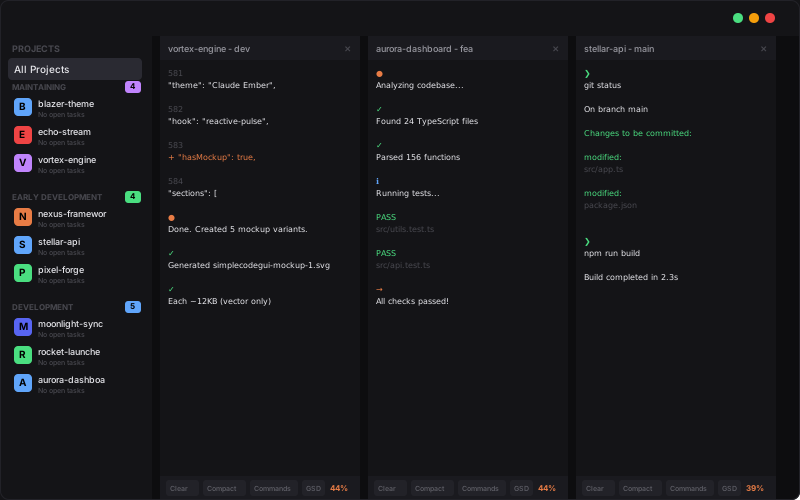
DonutCode lets you run AI coding assistants on multiple projects simultaneously, instantly resume past conversations, and switch between sessions with a click. Features voice input/output, image pasting, and 9 color themes.
Download
| Platform | Download |
|---|---|
| Windows | Installer (.exe) | Portable (.exe) |
| macOS (untested) | Apple Silicon (.dmg) |
| Linux | AppImage | .deb | .rpm |
| Arch Linux | yay -S donutcode |
macOS: "App is damaged" error fix
This is macOS Gatekeeper blocking unsigned apps. Run:
sudo xattr -dr com.apple.quarantine "/Applications/DonutCode.app"
Features
Multi-Harness Support
- Claude Code - Anthropic's Claude AI assistant
- Gemini CLI - Google's Gemini AI
- Codex - OpenAI Codex
- OpenCode - Open source alternative
Session Management
- Tabbed Interface - Multiple AI sessions open simultaneously
- Session Resume - Pick up conversations where you left off
- Session Discovery - Auto-finds existing sessions
- Tiled View - See multiple terminals side-by-side (toggle with grid button)
- Workspace Persistence - Restores your open tabs and layout on restart
Project Organization
- Project Sidebar - Save and organize project folders for quick access
- Create Projects - Make new project directories without leaving the app
- Session History - Expand projects to see all past sessions with timestamps
- Project Icons - Custom emoji icons for each project
- Per-Project Settings - Override global settings per project (harness, permissions, voice)
- Run Executable - Launch your app directly from the sidebar
Voice Features
- Speech-to-Text - Whisper models for voice input (tiny to large)
- Text-to-Speech - Piper voices and XTTS voice clones for spoken responses
- Voice Cloning - Clone your own voice for personalized TTS
- Speed Control - Adjust TTS playback speed
Terminal
- GPU Acceleration - WebGL-accelerated rendering for smooth terminal output
- Image & File Paste - Paste screenshots and copied files with Ctrl+V
- Drag & Drop - Drop files from file manager into terminal
- Smart Ctrl+C - Copies selection if text selected, sends SIGINT otherwise
- Right-Click Menu - Copy selection or paste with right-click
- Full Color Support - xterm-256color with 10,000 line scrollback
Customization
- 9 Color Themes - Including RGB Gamer mode with animations
- Settings Panel - Configure themes, permissions, harness, and voice
- Window Memory - Remembers size and position
Setup & Updates
- Auto-Install Dependencies - Installs Claude Code, Node.js, Git if missing
- Auto Updates - Downloads and installs updates automatically
- Cross-Platform - Windows, macOS (Apple Silicon), and Linux
Building from Source
git clone https://github.com/DonutsDelivery/simple-code-gui.git
cd simple-code-gui
npm install
npm run dev
Keyboard Shortcuts
| Shortcut | Action |
|---|---|
Ctrl+C | Copy selection (or SIGINT if no selection) |
Ctrl+V | Paste text, files, or images |
Ctrl+Shift+C | Copy from terminal |
Ctrl+Shift+V | Paste to terminal |
F12 | Toggle DevTools |
License
PolyForm Noncommercial 1.0.0 - Free for personal use. Commercial distribution requires permission from the author.
Contributors

371 commits

1 commits
Similar repos


Languages
TypeScript
90.0%
CSS
6.8%
JavaScript
1.7%
A desktop app for managing multiple Claude Code sessions across different projects. Features a sidebar for saved project folders, tabbed terminal windows, automatic session discovery from ~/.claude, and workspace persistence. Resume conversations where you left off and switch between projects instantly.
51
stars
372
commits
TypeScript
primary language
Sep 6, 2026
updated
README
A distributed development workspace for managing multiple AI coding sessions across projects and execution servers. Supports Claude Code, Gemini CLI, Codex, and OpenCode.
DonutCode lets you run AI coding assistants on multiple projects simultaneously, instantly resume past conversations, and switch between sessions with a click. Features voice input/output, image pasting, and 9 color themes.
Download
| Platform | Download |
|---|---|
| Windows | Installer (.exe) | Portable (.exe) |
| macOS (untested) | Apple Silicon (.dmg) |
| Linux | AppImage | .deb | .rpm |
| Arch Linux | yay -S donutcode |
macOS: "App is damaged" error fix
This is macOS Gatekeeper blocking unsigned apps. Run:
sudo xattr -dr com.apple.quarantine "/Applications/DonutCode.app"
Features
Multi-Harness Support
- Claude Code - Anthropic's Claude AI assistant
- Gemini CLI - Google's Gemini AI
- Codex - OpenAI Codex
- OpenCode - Open source alternative
Session Management
- Tabbed Interface - Multiple AI sessions open simultaneously
- Session Resume - Pick up conversations where you left off
- Session Discovery - Auto-finds existing sessions
- Tiled View - See multiple terminals side-by-side (toggle with grid button)
- Workspace Persistence - Restores your open tabs and layout on restart
Project Organization
- Project Sidebar - Save and organize project folders for quick access
- Create Projects - Make new project directories without leaving the app
- Session History - Expand projects to see all past sessions with timestamps
- Project Icons - Custom emoji icons for each project
- Per-Project Settings - Override global settings per project (harness, permissions, voice)
- Run Executable - Launch your app directly from the sidebar
Voice Features
- Speech-to-Text - Whisper models for voice input (tiny to large)
- Text-to-Speech - Piper voices and XTTS voice clones for spoken responses
- Voice Cloning - Clone your own voice for personalized TTS
- Speed Control - Adjust TTS playback speed
Terminal
- GPU Acceleration - WebGL-accelerated rendering for smooth terminal output
- Image & File Paste - Paste screenshots and copied files with Ctrl+V
- Drag & Drop - Drop files from file manager into terminal
- Smart Ctrl+C - Copies selection if text selected, sends SIGINT otherwise
- Right-Click Menu - Copy selection or paste with right-click
- Full Color Support - xterm-256color with 10,000 line scrollback
Customization
- 9 Color Themes - Including RGB Gamer mode with animations
- Settings Panel - Configure themes, permissions, harness, and voice
- Window Memory - Remembers size and position
Setup & Updates
- Auto-Install Dependencies - Installs Claude Code, Node.js, Git if missing
- Auto Updates - Downloads and installs updates automatically
- Cross-Platform - Windows, macOS (Apple Silicon), and Linux
Building from Source
git clone https://github.com/DonutsDelivery/simple-code-gui.git
cd simple-code-gui
npm install
npm run dev
Keyboard Shortcuts
| Shortcut | Action |
|---|---|
Ctrl+C | Copy selection (or SIGINT if no selection) |
Ctrl+V | Paste text, files, or images |
Ctrl+Shift+C | Copy from terminal |
Ctrl+Shift+V | Paste to terminal |
F12 | Toggle DevTools |
License
PolyForm Noncommercial 1.0.0 - Free for personal use. Commercial distribution requires permission from the author.
Similar repos
Contributors
371 commits
1 commits
Languages
TypeScript
90.0%
CSS
6.8%
JavaScript
1.7%