
A hub for vibe-coding with all Agent CLIs in one place talking to each other and working towards same or different Goals
Rust
14
528 commits
updated Oct 5, 2026
See what people are saying
README
vibe-station
Vibe code in parallel. Ship at scale.
A local-first orchestrator for parallel AI coding agents — Claude Code, Cursor, OpenCode and agy, each on its own git worktree, driven from a desktop app, your browser, your phone, or the vst CLI.





Install · Quick start · Features · Docs · Architecture
Everything runs on your machine. No accounts, no cloud service, no telemetry.
Features
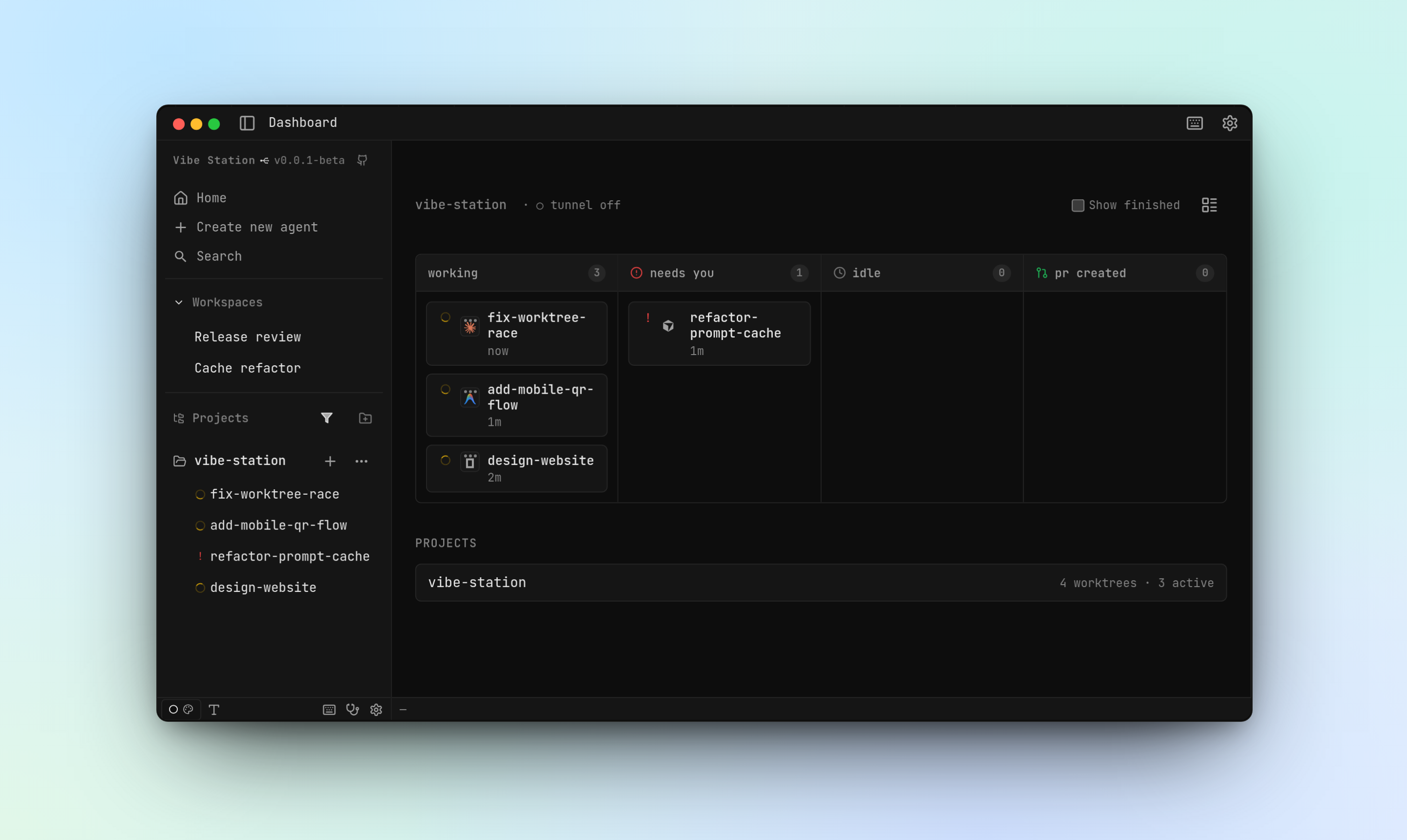
One board for every agent
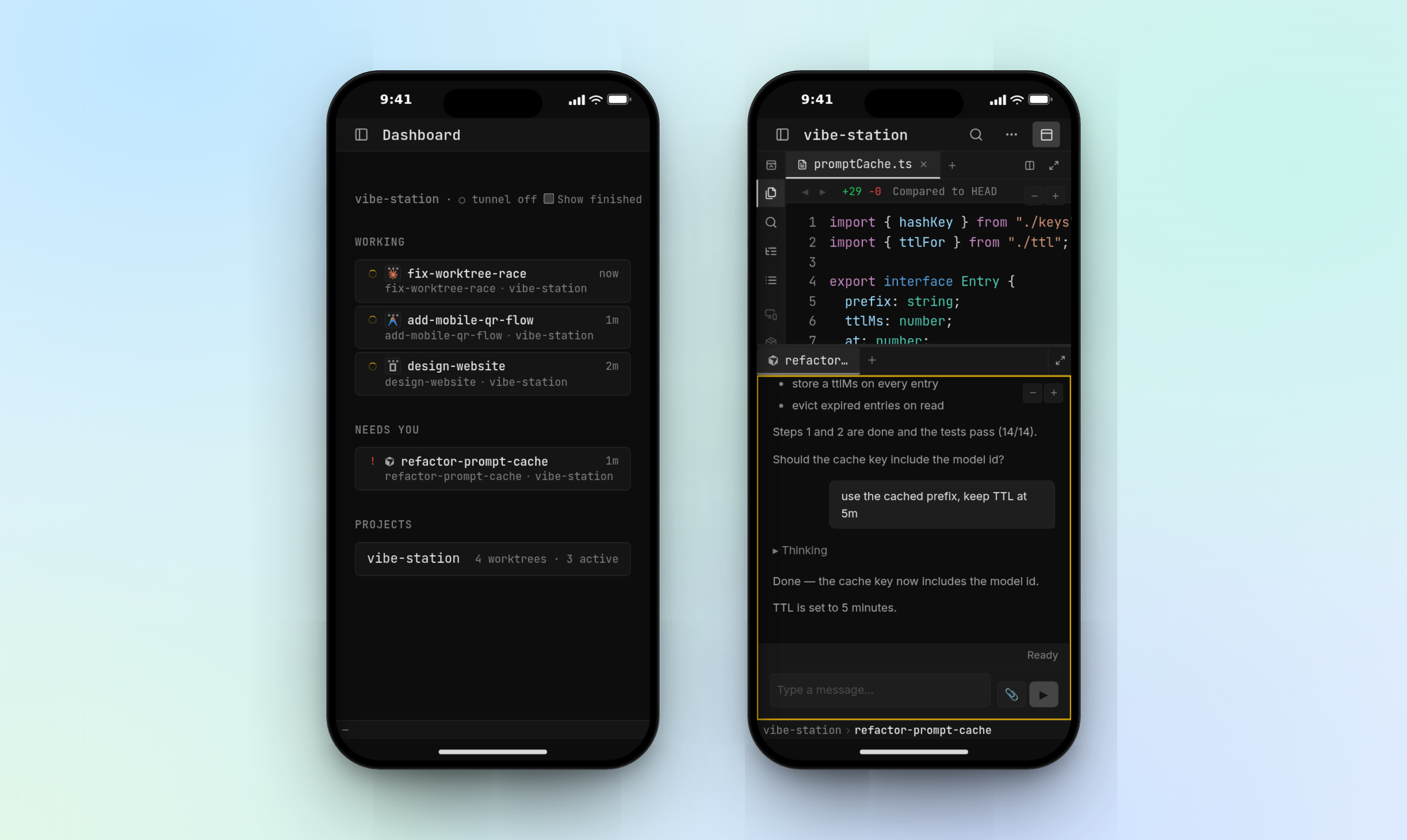
Every agent across every project lands on a single dashboard — working, needs you, idle, PR created — so you always know which one is waiting on you. Status is two independent axes (agent lifecycle and PR state); see docs/STATUS-INDICATORS.md.
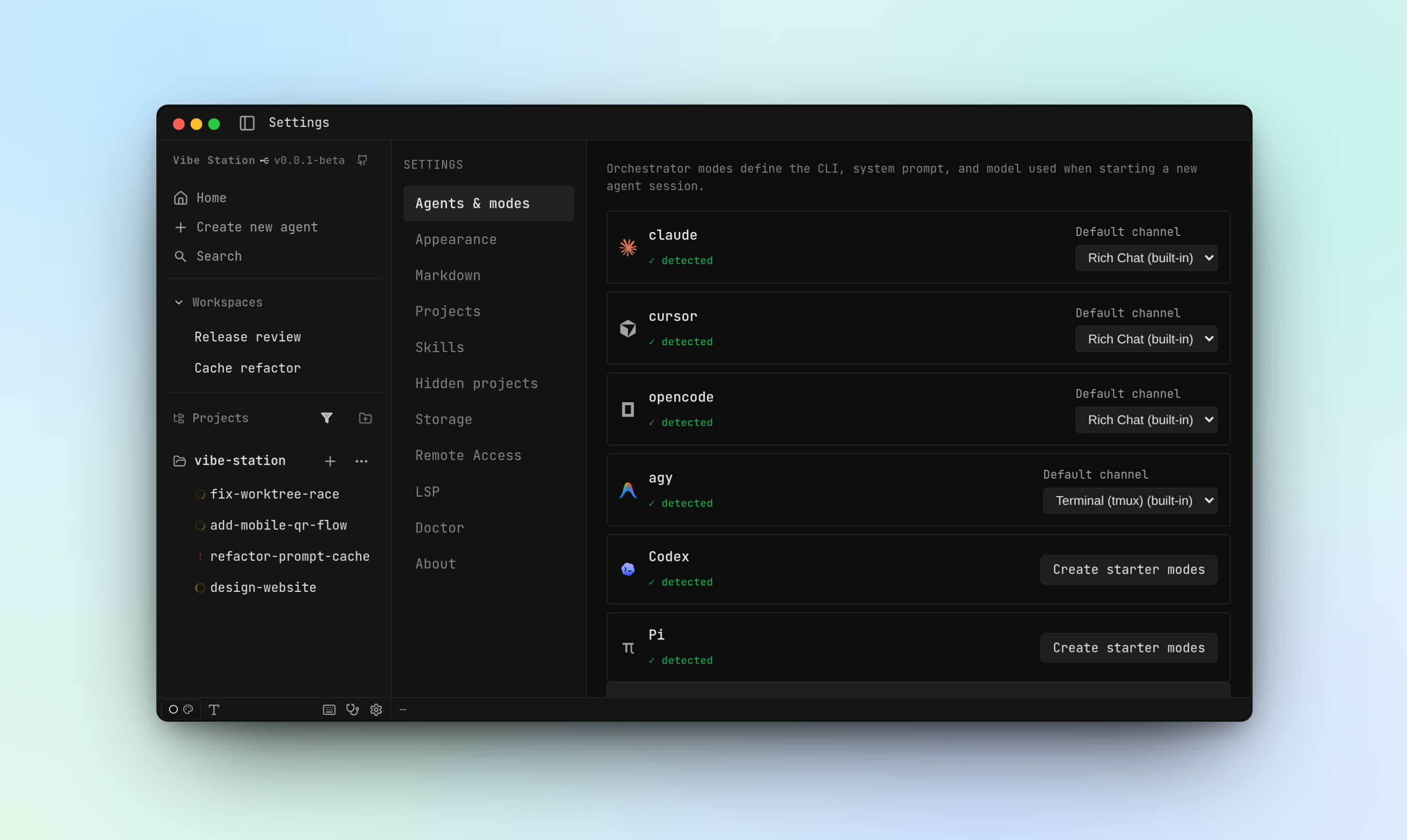
Every major harness, one app
Claude Code, Cursor, OpenCode and agy plug in through the same plugin interface. Define modes (a CLI + a system context) and mix them per worktree, per session, even per subagent.
Isolated worktrees
Each task gets its own git worktree on its own branch, so agents can never overwrite each other's files. Creating a worktree checks out the branch and starts an agent on it in one step.
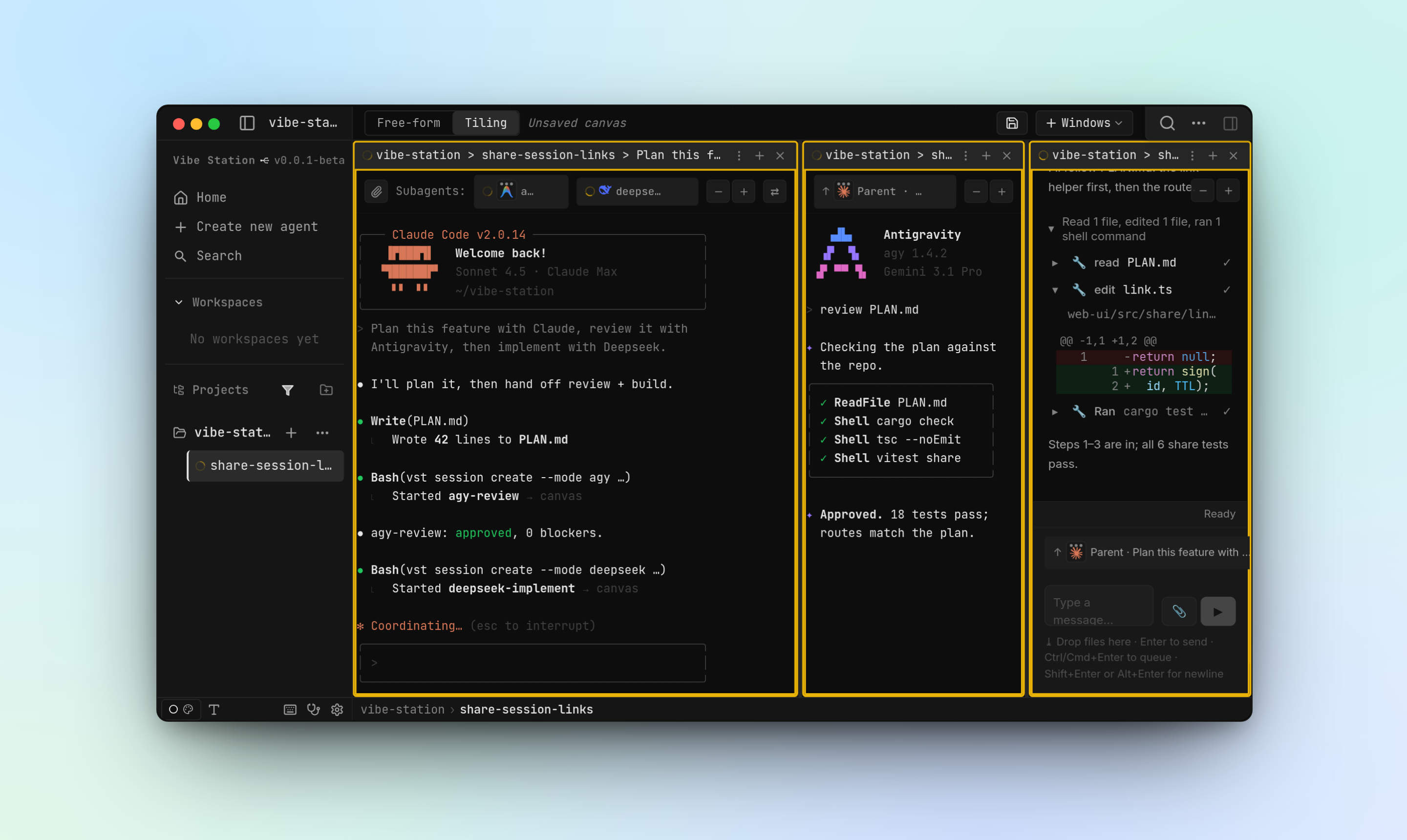
Subagents that delegate and talk to each other
Ask one agent to plan, a second to review and a third to implement — each in its own mode and model. Subagents show up as rows above the composer and as tiles on a canvas; parents wake automatically when a subagent needs them.
Rich Chat and a real terminal
Every agent runs on one of two channels. Rich Chat renders the CLI's structured output — tool calls, diffs, thinking blocks, file attachments — as UI, over ACP. Terminal is the raw tmux PTY, exactly what you'd see in a shell. Toggle between them on the same session. Details: docs/RICH-CHAT-ACP.md.
A code reader built for review
Browse the working tree live as agents edit it, read diffs (local vs HEAD, or vs the base branch), and render Markdown with full GFM and Mermaid. Syntax highlighting follows your theme, with 15+ languages and symbol navigation through LSP.
Your phone, in your pocket
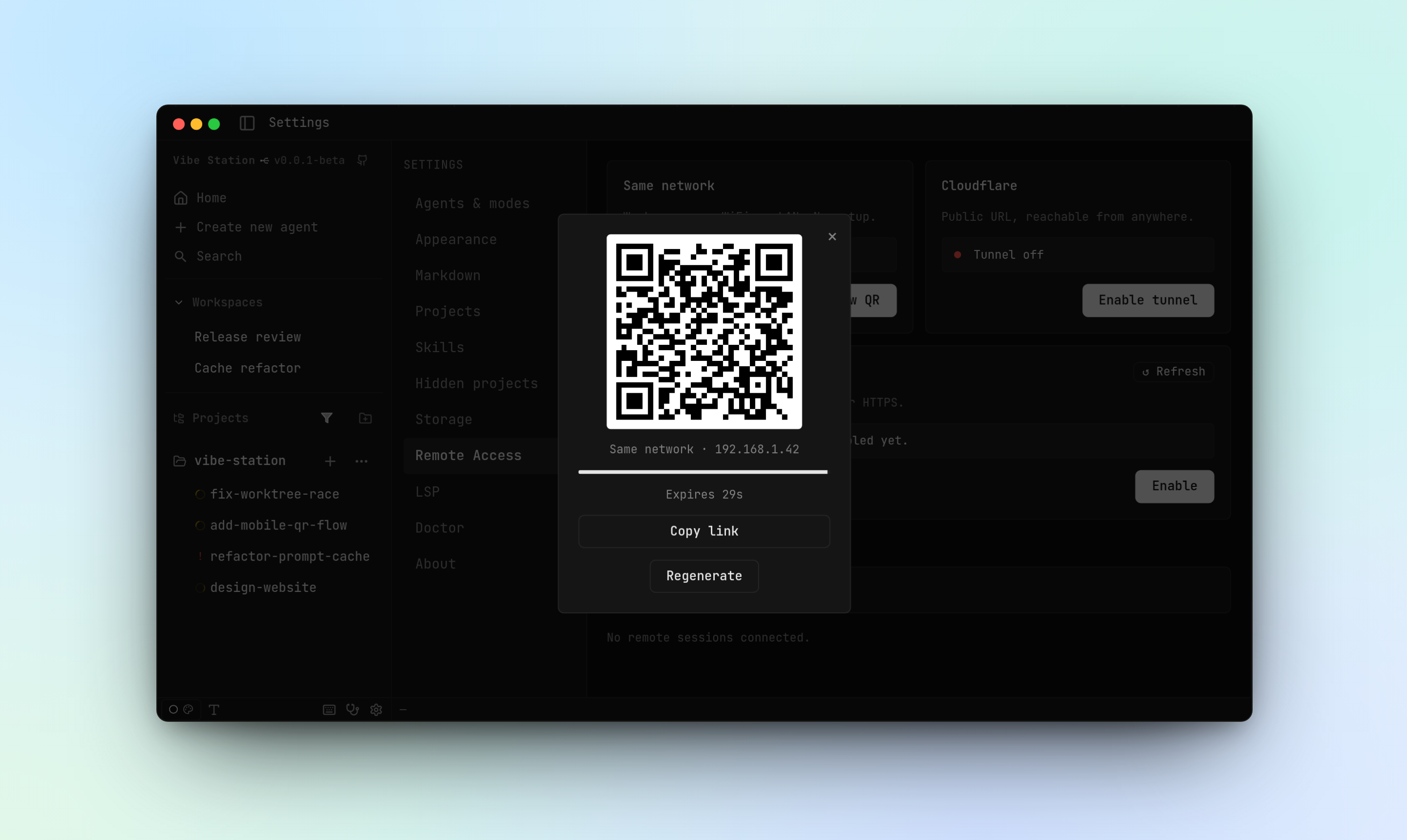
Turn on Settings → Remote Access and scan a QR code. The QR carries a short-lived one-time code; nothing leaves your machine unless you enable the tunnel.
Make it look like yours
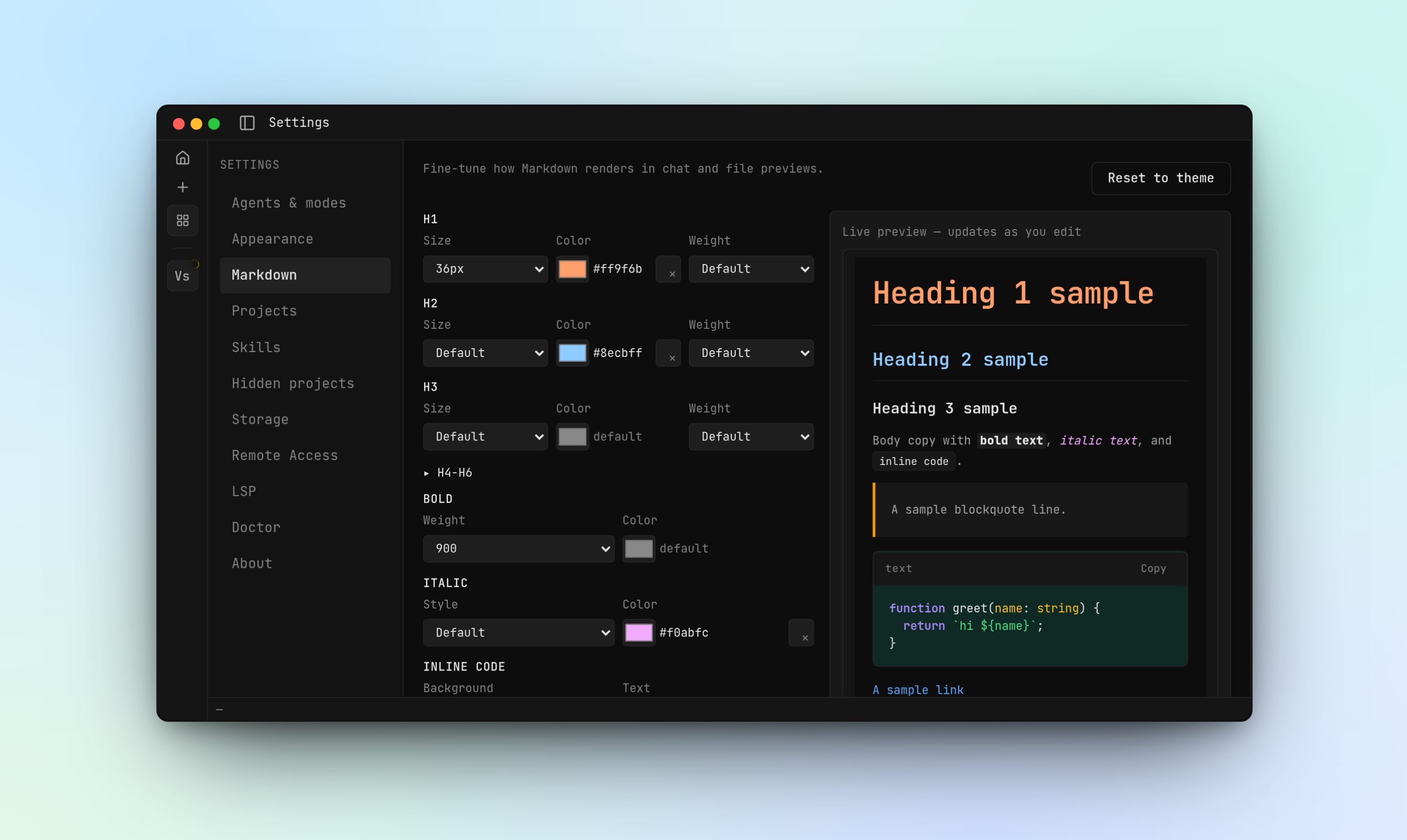
Themes, fonts, and per-element Markdown styling are all configurable, with a live preview.
Read the files your agents write
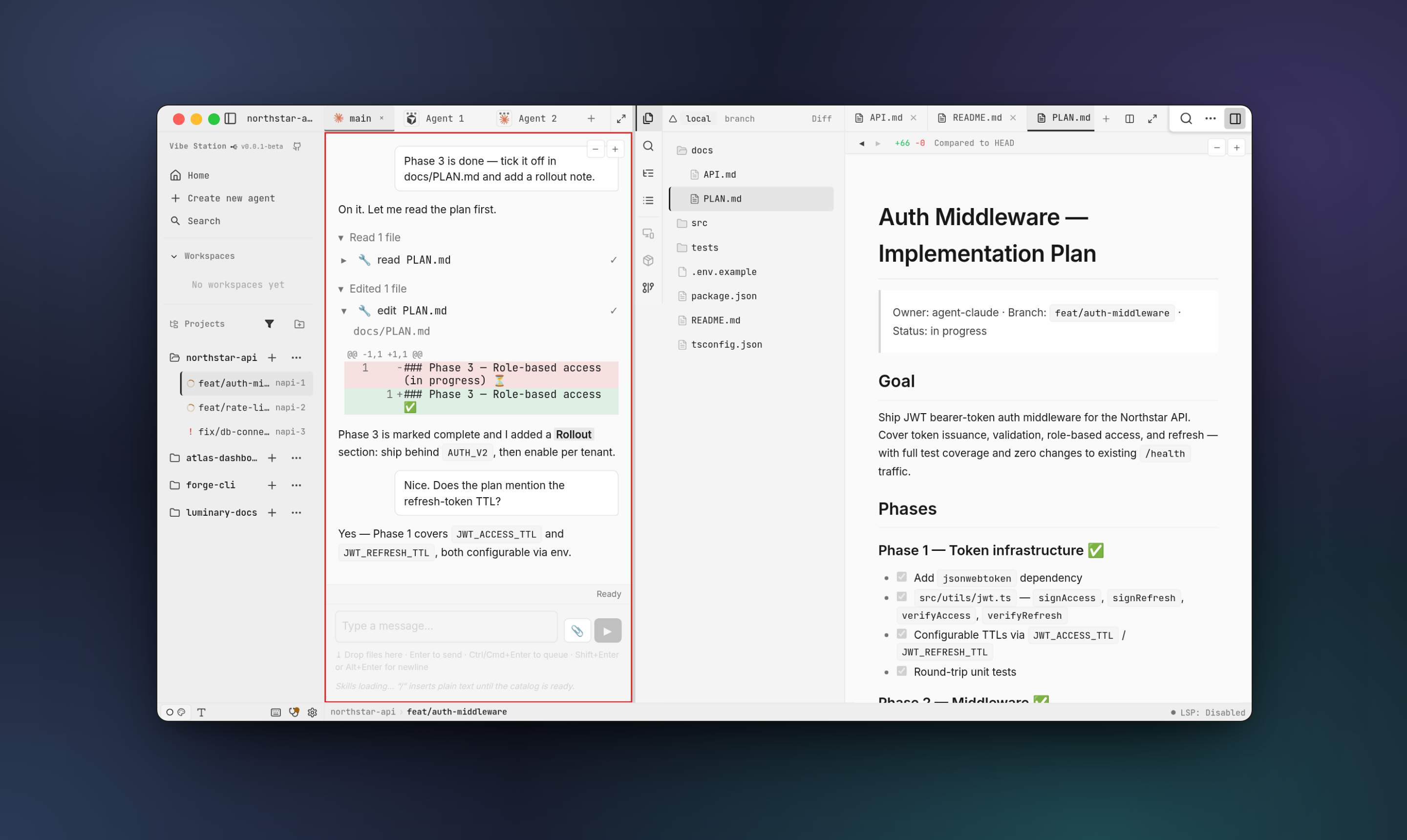
Open any file from the worktree's file tree — Markdown renders inline, with multiple files open as tabs right next to the Rich Chat agent that wrote them. Shown here in light mode.
Three front ends, one daemon
A native desktop app for daily use, the browser UI (and installable PWA) for any device, and the vst CLI for scripting, CI, and for agents driving other agents. All three are thin clients over the same daemon.
Install
No release has been published yet. The installer and release workflow are in place; until the first tag lands, build from source. Watch the repo for the first release.
curl -fsSL https://raw.githubusercontent.com/fastestdevalive/vibe-station/main/scripts/install.sh | sh
| Platform | What you get | Status |
|---|---|---|
| Linux (x86_64) | vst CLI + desktop app (.AppImage; .deb from the Releases page) | Built in CI |
| Linux (aarch64) | vst CLI only | Built in CI |
| macOS (Apple Silicon) | vst CLI via the installer; desktop .dmg from the Releases page | Built in CI; the installer deliberately skips the .dmg so Gatekeeper still checks it |
| macOS (Intel), Windows | — | Not published |
The installer needs no sudo, puts the CLI in ~/.local/bin, and is safe to re-run to upgrade. Options: --version <tag>, --install-dir <dir>, --no-modify-path.
The vst binary contains the daemon and web UI; the desktop bundle adds cloudflared as a sidecar — you install neither Node.js nor pnpm.
The CLI install also bundles the ACP adapters for Rich Chat as self-contained executables beside vst — claude-acp and codex-acp (the pinned Claude and Codex adapters compiled with the bun runtime, so no bun or Node is needed) and agy-acp (shipped ready for agy Rich Chat, which is off while agy is terminal-only). They still drive your own agy / claude / codex CLIs, which you must have installed. claude-acp and codex-acp are glibc builds and are skipped on musl systems (e.g. Alpine). cursor and opencode use your own cursor-agent / opencode binaries.
You still need tmux, git, and at least one agent CLI on your PATH: Claude Code, Cursor, OpenCode, or agy. Run vst doctor to check.
Build from source
Prerequisites: a Rust toolchain (pinned in rust/rust-toolchain.toml), Node.js ≥ 20 and pnpm ≥ 9 (for the web UI and desktop shell), tmux, git, and bun for Claude Rich Chat.
git clone https://github.com/fastestdevalive/vibe-station.git
cd vibe-station

pnpm install
pnpm --filter @vibestation/web build   # the daemon embeds web-ui/dist, so build the UI first
pnpm build:rust          # builds the `vst` binary (CLI + daemon + embedded web UI)
# binary: rust/target/release/vst — put it on your PATH

vst --version
vst doctor
Rich Chat on agy additionally needs the agy-acp adapter (built from the vendored rust/vendor/openab submodule; see scripts/build-agy-acp.sh).
Quick start
# 1. Check the daemon (any other vst command auto-starts it; `vst daemon run` runs it in the foreground)
vst daemon status

# 2. Register a project
vst project add /path/to/your/repo --name=my-app

# 3. Create a mode: an AI CLI + optional system context
vst mode add --name="Claude Coder" --cli=claude --context="You are an expert TypeScript engineer."

# 4. Create a worktree — checks out a branch and starts an agent on it
vst worktree create my-app --mode=<mode-id> \
  --prompt="Implement the user authentication flow described in docs/auth.md"

# 5. Open the UI
vst open /path/to/your/repo
The daemon binds 127.0.0.1:7421 (or the next free port) and writes its port and pid to ~/.vibe-station/config.json. --branch is optional — it's derived from the prompt. Add --channel=tmux|json to pick Terminal or Rich Chat; otherwise the default is Rich Chat for Claude, Cursor and OpenCode, and Terminal for agy (changeable in Settings).
Desktop app
A Tauri v2 shell (Rust + the system webview) around the same web UI the daemon serves.
- Zero setup — on launch it reuses a live daemon from
~/.vibe-station/config.json, or spawns the bundled one and waits for it. A pre-minted token is injected into the webview, so there is no login screen. - System tray — ✕ hides the window to the tray. The tray menu has Open vibe-station and Quit completely.
The desktop shell has no single-instance guard yet — launching it twice opens a second window against the same daemon.
Mobile access & PWA
| Mode | How it works | When to use |
|---|---|---|
| Same network | QR pointing at a detected LAN or Tailscale address | Same network; nothing leaves it |
| Cloudflare tunnel | Temporary public HTTPS URL via the bundled cloudflared | Off your network; also gives a secure context for PWA install |
The daemon binds loopback by default. Toggle Settings → Remote access → Same network to listen on your LAN with no restart (it persists allowNetworkAccess in ~/.vibe-station/config.json), or start with VST_ALLOW_NETWORK=1 to set the initial state. Disabling the tunnel invalidates only tunnel-minted codes.
Installing as a PWA: Chrome offers "Install Vibe Station…" (or "Add to Home screen" on Android) only on a secure context — https:, localhost or 127.0.0.1. A plain-HTTP LAN/Tailscale address shows no install option; that's expected. Over Tailscale, give it a real cert:
tailscale cert <machine>.<tailnet>.ts.net
tailscale serve --https=443 http://127.0.0.1:7421
Core concepts
Projects, worktrees, sessions, modes, channels
Project — a registered git repository. Worktrees live under ~/.vibe-station/projects/<project-id>/worktrees/.
Worktree — an isolated git worktree checkout on its own branch, the unit of parallel work. IDs are <project-prefix>-<n> (e.g. vs-12), monotonic and never reused. Creating one creates a main session and starts your agent.
Session (tab) — a process in a worktree: an AI agent or a plain terminal. One session per worktree is flagged main; terminating it promotes another live agent, and is rejected if it's the only one.
Mode — an AI CLI plus an optional context string prepended to the agent's system prompt (up to 20 modes).
Channel — Terminal (raw tmux PTY) or Rich Chat (structured stream: tool calls, thinking blocks, attachments as UI). Rich Chat is only offered for CLIs whose plugin supports it.
vst worktree ls --project=my-app
vst worktree rename|done|rm <worktree-id>      # `done` releases processes; `rm` deletes branch + worktree

vst agent create <worktree-id> --mode=<mode-id> --prompt="Write tests for the auth module"
vst terminal create <worktree-id>              # plain shell, no AI
vst agent ls|info|rename|terminate|reset|handoff|stop|attach|restore <session-id>
Worktree vs session: the worktree is the isolated branch + directory; sessions are the processes inside it. One worktree, many sessions.
Talking to agents, monitoring, lifecycle, resuming
vst agent send <session-id> "Add error handling for the network timeout case"
vst agent send <session-id> --file=./instructions.md --no-wait   # --wait is the default
vst agent output <session-id> --lines=100
vst agent transcript <session-id>
vst status --project=my-app --json
vst summary
--timeout <ms> caps the wait (default 60000); --queue enqueues instead of steering a running Rich Chat turn.
| State | Meaning |
|---|---|
not_started | Spawned but not yet launched |
working | Agent is actively processing |
idle | Agent is waiting for input |
waiting_for_human | Agent is blocked on a prompt or approval |
drafting | A draft agent that hasn't been started yet |
done | Marked done by you |
exited | Process died (can be resumed) |
vst agent restore <session-id> resumes an exited session. Claude Code resumes with full history via claude --resume; Cursor, OpenCode and agy resume when a native chat/session ID was captured, and start fresh otherwise.
Project-specific agent rules
Drop an AGENTS.md in your project root (or .vibe-station/rules.md as a fallback) to inject instructions into every agent spawned for that project. It's read at spawn time and included in the agent's system prompt.
# AGENTS.md
- Always write tests for new functions
- Use the existing logger from src/lib/logger.ts
- Never modify migration files directly
Data directory & auth model
~/.vibe-station/
├── config.json          # port, pid, cliToken, tauriToken, browserEpoch, … (mode 0600)
├── vibe-station.db      # SQLite — projects, worktrees, sessions (source of truth)
├── modes.json
├── logs/daemon.log
└── projects/<project-id>/
    ├── session-data/    # per-session system prompts, CLI configs, transcripts
    └── worktrees/<worktree-id>/
The daemon mints a master token in memory at every start and never writes it to disk. It always authenticates, including on loopback, and enforces an exact-origin policy with a CSRF header on writes. Two scoped tokens are derived and persisted: cliToken (the vst CLI) and tauriToken (the desktop webview, confined to the local machine). Browser logins redeem a one-time /continue?code=… link (vst open can mint and open it for you when it has just launched the daemon). Full details and the origin matrix: docs/AUTH.md.
Architecture
flowchart LR
  user([👤 You])

  subgraph desktop ["Desktop app — Tauri v2"]
    direction TB
    shell["Rust shell<br/>tray · daemon supervision"]
    webview["System webview<br/>loads the web UI"]
  end

  subgraph clients [Other clients]
    direction TB
    cli["vst CLI<br/>scripting + automation"]
    browser["Browser / PWA<br/>desktop + mobile"]
  end

  subgraph daemonbox ["vst-daemon (Rust) — 127.0.0.1:7421"]
    direction TB
    rest["REST /api<br/>projects · worktrees · sessions · auth"]
    ws["WebSocket /ws<br/>terminal stream · Rich Chat · lifecycle events"]
    state[("SQLite — ~/.vibe-station<br/>vibe-station.db · config.json")]
    tunnel["cloudflared<br/>remote access tunnel"]
  end

  subgraph runtime ["Per-worktree runtime"]
    direction TB
    tmux["tmux session"]
    pty["PTY"]
    agent["claude / cursor / opencode / agy"]
    repo[("git worktree<br/>isolated branch")]
  end

  user --> desktop
  user --> cli
  user --> browser
  shell -->|supervises| rest
  shell --- webview
  webview -->|HTTP + WS| rest
  cli -->|HTTP| rest
  browser -->|HTTP| rest
  browser <-->|WebSocket| ws
  rest --- state
  rest --- tunnel
  rest -->|spawn / terminate| tmux
  ws -.->|attach| tmux
  tmux --> pty --> agent
  agent --> repo
- The daemon is the only stateful component. It owns the SQLite database, spawns agents into tmux, and broadcasts terminal output, Rich Chat events and lifecycle changes over WebSocket.
- Desktop, browser and CLI are thin clients. Every action is an HTTP call to the daemon.
- Each worktree is an isolated checkout with one or more sessions. Agents in different worktrees never see each other.
- Sessions outlive the daemon. tmux sessions survive a restart and reattach; Claude sessions also resume their conversation.
More: docs/ARCHITECTURE.md · docs/PLUGINS.md · docs/API-CONTRACT.md
Development
pnpm install
pnpm docker       # isolated dev sandbox with demo data and hot reload (scripts/dev-sandbox.sh)
pnpm dev          # Tauri desktop dev build against the Vite dev server
pnpm run ci       # typecheck + lint + test across the workspaces

pnpm build:rust   # release `vst` binary (CLI + daemon + embedded UI)
pnpm build        # desktop bundle (.deb / .AppImage on Linux, .dmg on macOS)
Rust tests and lints: cargo test / cargo clippy from rust/ (CI runs rust/scripts/rust-gate.sh). The desktop bundle expects the vst sidecar and cloudflared in desktop/src-tauri/binaries/ (scripts/prep-sidecar.sh, scripts/download-cloudflared.sh).
| Path | What it is |
|---|---|
web-ui/ | React 19 + Vite frontend |
desktop/ | Tauri v2 app (Rust shell + system webview) |
rust/vst-daemon, vst-routes, vst-ws | Axum daemon: REST routes, WebSocket streaming |
rust/vst-cli | The vst CLI (also hosts the daemon in the single merged binary) |
rust/vst-store, vst-types, vst-lifecycle | SQLite persistence, shared types, lifecycle poller |
rust/vst-agents, vst-agy-acp, vst-lsp, vst-git, vst-proc | Agent plugins and ACP, language servers, git, process/tmux control |
skill/ | The vst agent skill published for external agents |
README screenshots are generated, not hand-captured — see docs/screenshots/README.md. Contributor and agent guidelines live in AGENTS.md.
CLI reference
vst project   add | create | rm | ls | info
vst worktree  create | rm | rename | done | ls | info
vst agent     create | terminate | stop | reset | rename | ls | info
              attach | restore | output | transcript | send | handoff
vst terminal  create | terminate | rename | ls | info | attach | output
vst mode      add | rm | ls
vst files     ls | open | close
vst file      open
vst status    [--project] [--json]
vst summary
vst open      [target]
vst daemon    status | stop | run
vst doctor
Troubleshooting
vst doctor is the first stop — it checks tmux, git, the agent CLIs on PATH, cloudflared, Tailscale, and whether a daemon is registered. It does not prove every API route works.
- Daemon not starting —
vst daemon status, thencat ~/.vibe-station/logs/daemon.log. - Port 7421 in use — the daemon picks the next free port up to 7520; the one in use is in
~/.vibe-station/config.json. - Desktop window won't close — by design, ✕ hides to the tray. Use Quit completely.
- Phone can't connect / 403 on writes — the daemon is loopback-only until you enable network access, and enforces exact origins; see Mobile access and
docs/AUTH.md. - Orphaned tmux sessions after a crash —
tmux kill-session -t <name>for leftovervst-*sessions. - Claude sessions not resuming — you need a Claude Code build with
--resume(claude --version). - No PWA install option — you're on a non-secure origin; see above.
Why vibe-station
Inspired by agent-orchestrator, emdash and claudecodeui, but built to be lightweight and local-first.
- Install and go — one
vstbinary ships the daemon and web UI; the desktop bundle addscloudflared. - Local-first, not cloud-optional — state is a SQLite file on your disk, the daemon binds loopback, remote access is opt-in.
- Terminal and structured chat — Rich Chat renders tool calls and thinking blocks while the tmux stream stays available for everything else.
- Agent-agnostic — Claude Code, Cursor, OpenCode and agy through one plugin interface; mix them per worktree.
- Agents that orchestrate agents — subagents, handoffs and cross-harness messaging through the same CLI the UI uses.
- Sessions outlive the daemon — tmux-backed sessions survive restarts; Claude resumes its history.
License
See LICENSE.
Significant stargazers

196 followers · starred May 2026
Similar repos


A hub for vibe-coding with all Agent CLIs in one place talking to each other and working towards same or different Goals
Rust
14
528 commits
updated Oct 5, 2026
See what people are saying
README
vibe-station
Vibe code in parallel. Ship at scale.
A local-first orchestrator for parallel AI coding agents — Claude Code, Cursor, OpenCode and agy, each on its own git worktree, driven from a desktop app, your browser, your phone, or the vst CLI.
Install · Quick start · Features · Docs · Architecture
Everything runs on your machine. No accounts, no cloud service, no telemetry.
Features
One board for every agent
Every agent across every project lands on a single dashboard — working, needs you, idle, PR created — so you always know which one is waiting on you. Status is two independent axes (agent lifecycle and PR state); see docs/STATUS-INDICATORS.md.
Every major harness, one app
Claude Code, Cursor, OpenCode and agy plug in through the same plugin interface. Define modes (a CLI + a system context) and mix them per worktree, per session, even per subagent.
Isolated worktrees
Each task gets its own git worktree on its own branch, so agents can never overwrite each other's files. Creating a worktree checks out the branch and starts an agent on it in one step.
Subagents that delegate and talk to each other
Ask one agent to plan, a second to review and a third to implement — each in its own mode and model. Subagents show up as rows above the composer and as tiles on a canvas; parents wake automatically when a subagent needs them.
Rich Chat and a real terminal
Every agent runs on one of two channels. Rich Chat renders the CLI's structured output — tool calls, diffs, thinking blocks, file attachments — as UI, over ACP. Terminal is the raw tmux PTY, exactly what you'd see in a shell. Toggle between them on the same session. Details: docs/RICH-CHAT-ACP.md.
A code reader built for review
Browse the working tree live as agents edit it, read diffs (local vs HEAD, or vs the base branch), and render Markdown with full GFM and Mermaid. Syntax highlighting follows your theme, with 15+ languages and symbol navigation through LSP.
Your phone, in your pocket
Turn on Settings → Remote Access and scan a QR code. The QR carries a short-lived one-time code; nothing leaves your machine unless you enable the tunnel.
Make it look like yours
Themes, fonts, and per-element Markdown styling are all configurable, with a live preview.
Read the files your agents write
Open any file from the worktree's file tree — Markdown renders inline, with multiple files open as tabs right next to the Rich Chat agent that wrote them. Shown here in light mode.
Three front ends, one daemon
A native desktop app for daily use, the browser UI (and installable PWA) for any device, and the vst CLI for scripting, CI, and for agents driving other agents. All three are thin clients over the same daemon.
Install
No release has been published yet. The installer and release workflow are in place; until the first tag lands, build from source. Watch the repo for the first release.
curl -fsSL https://raw.githubusercontent.com/fastestdevalive/vibe-station/main/scripts/install.sh | sh
| Platform | What you get | Status |
|---|---|---|
| Linux (x86_64) | vst CLI + desktop app (.AppImage; .deb from the Releases page) | Built in CI |
| Linux (aarch64) | vst CLI only | Built in CI |
| macOS (Apple Silicon) | vst CLI via the installer; desktop .dmg from the Releases page | Built in CI; the installer deliberately skips the .dmg so Gatekeeper still checks it |
| macOS (Intel), Windows | — | Not published |
The installer needs no sudo, puts the CLI in ~/.local/bin, and is safe to re-run to upgrade. Options: --version <tag>, --install-dir <dir>, --no-modify-path.
The vst binary contains the daemon and web UI; the desktop bundle adds cloudflared as a sidecar — you install neither Node.js nor pnpm.
The CLI install also bundles the ACP adapters for Rich Chat as self-contained executables beside vst — claude-acp and codex-acp (the pinned Claude and Codex adapters compiled with the bun runtime, so no bun or Node is needed) and agy-acp (shipped ready for agy Rich Chat, which is off while agy is terminal-only). They still drive your own agy / claude / codex CLIs, which you must have installed. claude-acp and codex-acp are glibc builds and are skipped on musl systems (e.g. Alpine). cursor and opencode use your own cursor-agent / opencode binaries.
You still need tmux, git, and at least one agent CLI on your PATH: Claude Code, Cursor, OpenCode, or agy. Run vst doctor to check.
Build from source
Prerequisites: a Rust toolchain (pinned in rust/rust-toolchain.toml), Node.js ≥ 20 and pnpm ≥ 9 (for the web UI and desktop shell), tmux, git, and bun for Claude Rich Chat.
git clone https://github.com/fastestdevalive/vibe-station.git
cd vibe-station

pnpm install
pnpm --filter @vibestation/web build   # the daemon embeds web-ui/dist, so build the UI first
pnpm build:rust          # builds the `vst` binary (CLI + daemon + embedded web UI)
# binary: rust/target/release/vst — put it on your PATH

vst --version
vst doctor
Rich Chat on agy additionally needs the agy-acp adapter (built from the vendored rust/vendor/openab submodule; see scripts/build-agy-acp.sh).
Quick start
# 1. Check the daemon (any other vst command auto-starts it; `vst daemon run` runs it in the foreground)
vst daemon status

# 2. Register a project
vst project add /path/to/your/repo --name=my-app

# 3. Create a mode: an AI CLI + optional system context
vst mode add --name="Claude Coder" --cli=claude --context="You are an expert TypeScript engineer."

# 4. Create a worktree — checks out a branch and starts an agent on it
vst worktree create my-app --mode=<mode-id> \
  --prompt="Implement the user authentication flow described in docs/auth.md"

# 5. Open the UI
vst open /path/to/your/repo
The daemon binds 127.0.0.1:7421 (or the next free port) and writes its port and pid to ~/.vibe-station/config.json. --branch is optional — it's derived from the prompt. Add --channel=tmux|json to pick Terminal or Rich Chat; otherwise the default is Rich Chat for Claude, Cursor and OpenCode, and Terminal for agy (changeable in Settings).
Desktop app
A Tauri v2 shell (Rust + the system webview) around the same web UI the daemon serves.
- Zero setup — on launch it reuses a live daemon from
~/.vibe-station/config.json, or spawns the bundled one and waits for it. A pre-minted token is injected into the webview, so there is no login screen. - System tray — ✕ hides the window to the tray. The tray menu has Open vibe-station and Quit completely.
The desktop shell has no single-instance guard yet — launching it twice opens a second window against the same daemon.
Mobile access & PWA
| Mode | How it works | When to use |
|---|---|---|
| Same network | QR pointing at a detected LAN or Tailscale address | Same network; nothing leaves it |
| Cloudflare tunnel | Temporary public HTTPS URL via the bundled cloudflared | Off your network; also gives a secure context for PWA install |
The daemon binds loopback by default. Toggle Settings → Remote access → Same network to listen on your LAN with no restart (it persists allowNetworkAccess in ~/.vibe-station/config.json), or start with VST_ALLOW_NETWORK=1 to set the initial state. Disabling the tunnel invalidates only tunnel-minted codes.
Installing as a PWA: Chrome offers "Install Vibe Station…" (or "Add to Home screen" on Android) only on a secure context — https:, localhost or 127.0.0.1. A plain-HTTP LAN/Tailscale address shows no install option; that's expected. Over Tailscale, give it a real cert:
tailscale cert <machine>.<tailnet>.ts.net
tailscale serve --https=443 http://127.0.0.1:7421
Core concepts
Projects, worktrees, sessions, modes, channels
Project — a registered git repository. Worktrees live under ~/.vibe-station/projects/<project-id>/worktrees/.
Worktree — an isolated git worktree checkout on its own branch, the unit of parallel work. IDs are <project-prefix>-<n> (e.g. vs-12), monotonic and never reused. Creating one creates a main session and starts your agent.
Session (tab) — a process in a worktree: an AI agent or a plain terminal. One session per worktree is flagged main; terminating it promotes another live agent, and is rejected if it's the only one.
Mode — an AI CLI plus an optional context string prepended to the agent's system prompt (up to 20 modes).
Channel — Terminal (raw tmux PTY) or Rich Chat (structured stream: tool calls, thinking blocks, attachments as UI). Rich Chat is only offered for CLIs whose plugin supports it.
vst worktree ls --project=my-app
vst worktree rename|done|rm <worktree-id>      # `done` releases processes; `rm` deletes branch + worktree

vst agent create <worktree-id> --mode=<mode-id> --prompt="Write tests for the auth module"
vst terminal create <worktree-id>              # plain shell, no AI
vst agent ls|info|rename|terminate|reset|handoff|stop|attach|restore <session-id>
Worktree vs session: the worktree is the isolated branch + directory; sessions are the processes inside it. One worktree, many sessions.
Talking to agents, monitoring, lifecycle, resuming
vst agent send <session-id> "Add error handling for the network timeout case"
vst agent send <session-id> --file=./instructions.md --no-wait   # --wait is the default
vst agent output <session-id> --lines=100
vst agent transcript <session-id>
vst status --project=my-app --json
vst summary
--timeout <ms> caps the wait (default 60000); --queue enqueues instead of steering a running Rich Chat turn.
| State | Meaning |
|---|---|
not_started | Spawned but not yet launched |
working | Agent is actively processing |
idle | Agent is waiting for input |
waiting_for_human | Agent is blocked on a prompt or approval |
drafting | A draft agent that hasn't been started yet |
done | Marked done by you |
exited | Process died (can be resumed) |
vst agent restore <session-id> resumes an exited session. Claude Code resumes with full history via claude --resume; Cursor, OpenCode and agy resume when a native chat/session ID was captured, and start fresh otherwise.
Project-specific agent rules
Drop an AGENTS.md in your project root (or .vibe-station/rules.md as a fallback) to inject instructions into every agent spawned for that project. It's read at spawn time and included in the agent's system prompt.
# AGENTS.md
- Always write tests for new functions
- Use the existing logger from src/lib/logger.ts
- Never modify migration files directly
Data directory & auth model
~/.vibe-station/
├── config.json          # port, pid, cliToken, tauriToken, browserEpoch, … (mode 0600)
├── vibe-station.db      # SQLite — projects, worktrees, sessions (source of truth)
├── modes.json
├── logs/daemon.log
└── projects/<project-id>/
    ├── session-data/    # per-session system prompts, CLI configs, transcripts
    └── worktrees/<worktree-id>/
The daemon mints a master token in memory at every start and never writes it to disk. It always authenticates, including on loopback, and enforces an exact-origin policy with a CSRF header on writes. Two scoped tokens are derived and persisted: cliToken (the vst CLI) and tauriToken (the desktop webview, confined to the local machine). Browser logins redeem a one-time /continue?code=… link (vst open can mint and open it for you when it has just launched the daemon). Full details and the origin matrix: docs/AUTH.md.
Architecture
flowchart LR
  user([👤 You])

  subgraph desktop ["Desktop app — Tauri v2"]
    direction TB
    shell["Rust shell<br/>tray · daemon supervision"]
    webview["System webview<br/>loads the web UI"]
  end

  subgraph clients [Other clients]
    direction TB
    cli["vst CLI<br/>scripting + automation"]
    browser["Browser / PWA<br/>desktop + mobile"]
  end

  subgraph daemonbox ["vst-daemon (Rust) — 127.0.0.1:7421"]
    direction TB
    rest["REST /api<br/>projects · worktrees · sessions · auth"]
    ws["WebSocket /ws<br/>terminal stream · Rich Chat · lifecycle events"]
    state[("SQLite — ~/.vibe-station<br/>vibe-station.db · config.json")]
    tunnel["cloudflared<br/>remote access tunnel"]
  end

  subgraph runtime ["Per-worktree runtime"]
    direction TB
    tmux["tmux session"]
    pty["PTY"]
    agent["claude / cursor / opencode / agy"]
    repo[("git worktree<br/>isolated branch")]
  end

  user --> desktop
  user --> cli
  user --> browser
  shell -->|supervises| rest
  shell --- webview
  webview -->|HTTP + WS| rest
  cli -->|HTTP| rest
  browser -->|HTTP| rest
  browser <-->|WebSocket| ws
  rest --- state
  rest --- tunnel
  rest -->|spawn / terminate| tmux
  ws -.->|attach| tmux
  tmux --> pty --> agent
  agent --> repo
- The daemon is the only stateful component. It owns the SQLite database, spawns agents into tmux, and broadcasts terminal output, Rich Chat events and lifecycle changes over WebSocket.
- Desktop, browser and CLI are thin clients. Every action is an HTTP call to the daemon.
- Each worktree is an isolated checkout with one or more sessions. Agents in different worktrees never see each other.
- Sessions outlive the daemon. tmux sessions survive a restart and reattach; Claude sessions also resume their conversation.
More: docs/ARCHITECTURE.md · docs/PLUGINS.md · docs/API-CONTRACT.md
Development
pnpm install
pnpm docker       # isolated dev sandbox with demo data and hot reload (scripts/dev-sandbox.sh)
pnpm dev          # Tauri desktop dev build against the Vite dev server
pnpm run ci       # typecheck + lint + test across the workspaces

pnpm build:rust   # release `vst` binary (CLI + daemon + embedded UI)
pnpm build        # desktop bundle (.deb / .AppImage on Linux, .dmg on macOS)
Rust tests and lints: cargo test / cargo clippy from rust/ (CI runs rust/scripts/rust-gate.sh). The desktop bundle expects the vst sidecar and cloudflared in desktop/src-tauri/binaries/ (scripts/prep-sidecar.sh, scripts/download-cloudflared.sh).
| Path | What it is |
|---|---|
web-ui/ | React 19 + Vite frontend |
desktop/ | Tauri v2 app (Rust shell + system webview) |
rust/vst-daemon, vst-routes, vst-ws | Axum daemon: REST routes, WebSocket streaming |
rust/vst-cli | The vst CLI (also hosts the daemon in the single merged binary) |
rust/vst-store, vst-types, vst-lifecycle | SQLite persistence, shared types, lifecycle poller |
rust/vst-agents, vst-agy-acp, vst-lsp, vst-git, vst-proc | Agent plugins and ACP, language servers, git, process/tmux control |
skill/ | The vst agent skill published for external agents |
README screenshots are generated, not hand-captured — see docs/screenshots/README.md. Contributor and agent guidelines live in AGENTS.md.
CLI reference
vst project   add | create | rm | ls | info
vst worktree  create | rm | rename | done | ls | info
vst agent     create | terminate | stop | reset | rename | ls | info
              attach | restore | output | transcript | send | handoff
vst terminal  create | terminate | rename | ls | info | attach | output
vst mode      add | rm | ls
vst files     ls | open | close
vst file      open
vst status    [--project] [--json]
vst summary
vst open      [target]
vst daemon    status | stop | run
vst doctor
Troubleshooting
vst doctor is the first stop — it checks tmux, git, the agent CLIs on PATH, cloudflared, Tailscale, and whether a daemon is registered. It does not prove every API route works.
- Daemon not starting —
vst daemon status, thencat ~/.vibe-station/logs/daemon.log. - Port 7421 in use — the daemon picks the next free port up to 7520; the one in use is in
~/.vibe-station/config.json. - Desktop window won't close — by design, ✕ hides to the tray. Use Quit completely.
- Phone can't connect / 403 on writes — the daemon is loopback-only until you enable network access, and enforces exact origins; see Mobile access and
docs/AUTH.md. - Orphaned tmux sessions after a crash —
tmux kill-session -t <name>for leftovervst-*sessions. - Claude sessions not resuming — you need a Claude Code build with
--resume(claude --version). - No PWA install option — you're on a non-secure origin; see above.
Why vibe-station
Inspired by agent-orchestrator, emdash and claudecodeui, but built to be lightweight and local-first.
- Install and go — one
vstbinary ships the daemon and web UI; the desktop bundle addscloudflared. - Local-first, not cloud-optional — state is a SQLite file on your disk, the daemon binds loopback, remote access is opt-in.
- Terminal and structured chat — Rich Chat renders tool calls and thinking blocks while the tmux stream stays available for everything else.
- Agent-agnostic — Claude Code, Cursor, OpenCode and agy through one plugin interface; mix them per worktree.
- Agents that orchestrate agents — subagents, handoffs and cross-harness messaging through the same CLI the UI uses.
- Sessions outlive the daemon — tmux-backed sessions survive restarts; Claude resumes its history.
License
See LICENSE.
Similar repos
Significant stargazers
196 followers · starred May 2026