
README

agenttik
A local workspace for running AI coding sessions across multiple projects. Use Claude Code, Codex and GitHub Copilot through their official CLIs, with your existing login, in one desktop window or browser tab. Desktop builds support Linux, macOS ARM64, and Windows x64.
Main features
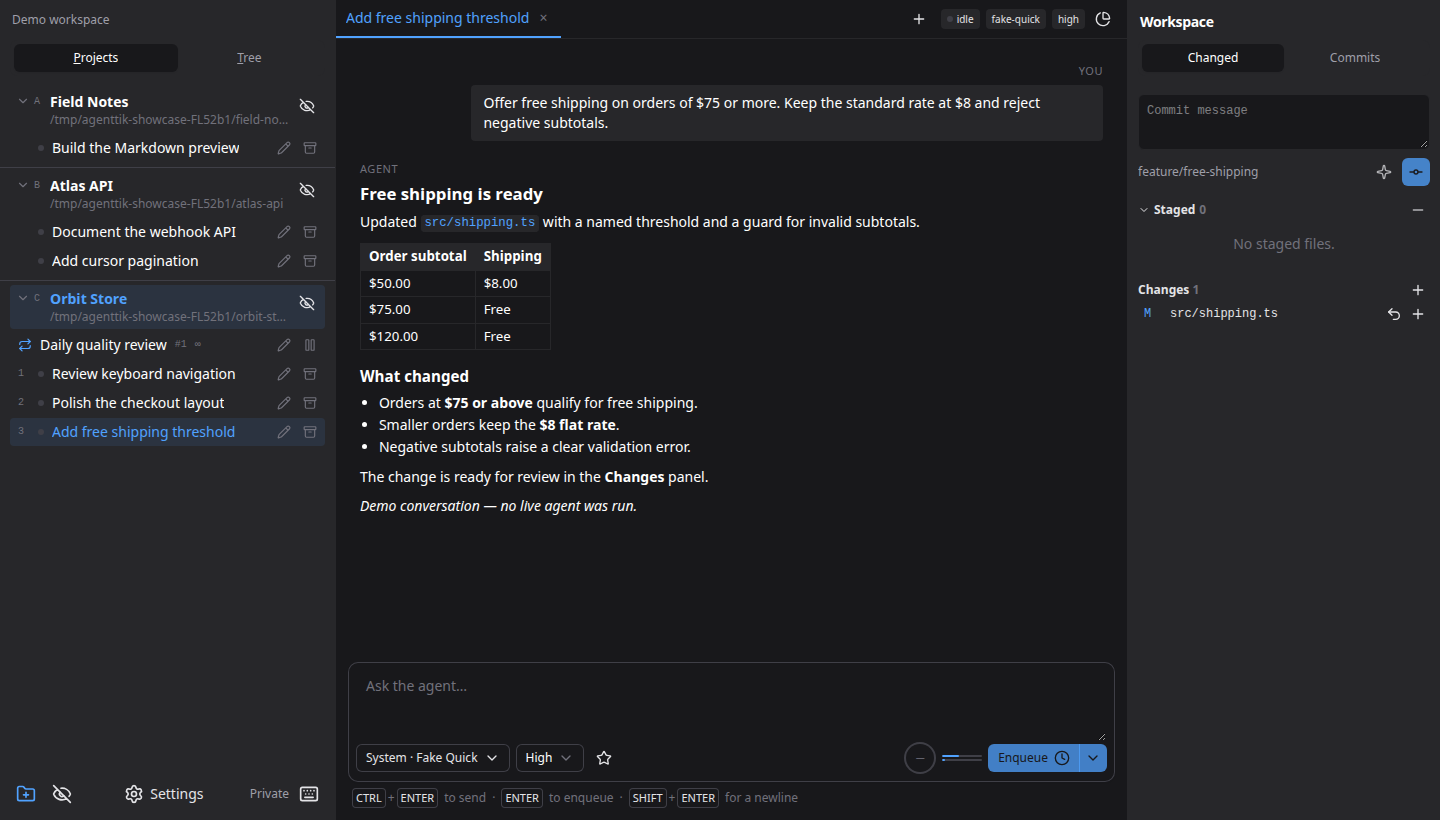
- Project workspaces: organize sessions and file tabs; archive and restore conversations.
- Orchestrator: enable a separate pinned project in Settings to inspect work and manage tasks across projects, with editable instructions and a reset to the built-in prompt.
- Live sessions: stream replies, resume conversations, and queue prompts per project.
- Reusable work: pin prompts and schedule recurring tasks.
- Model controls: choose models, effort, permissions, and favorite combinations.
- Code tools: browse and edit files, preview Markdown/HTML, inspect Git diffs, stage changes, and write commits.
- Usage tracking: view tokens, context usage, subscription allowance, and costs where reported.
- Local state: SQLite history, remembered tabs, customizable shortcuts, and color themes. Use profiles for separate workspaces or private mode for a temporary one.
Claude Code is working; Codex, GitHub Copilot and OpenCode Go are implemented, with live-turn validation still pending. OpenCode Go supports direct use with a subscription key and an optional CLI; Settings defaults to the CLI when installed.
Screenshots
Captured from a fresh private instance and browser context with fictional projects and demo conversation data. No live agent was run. Click an image to view it full size.
Review code where you work
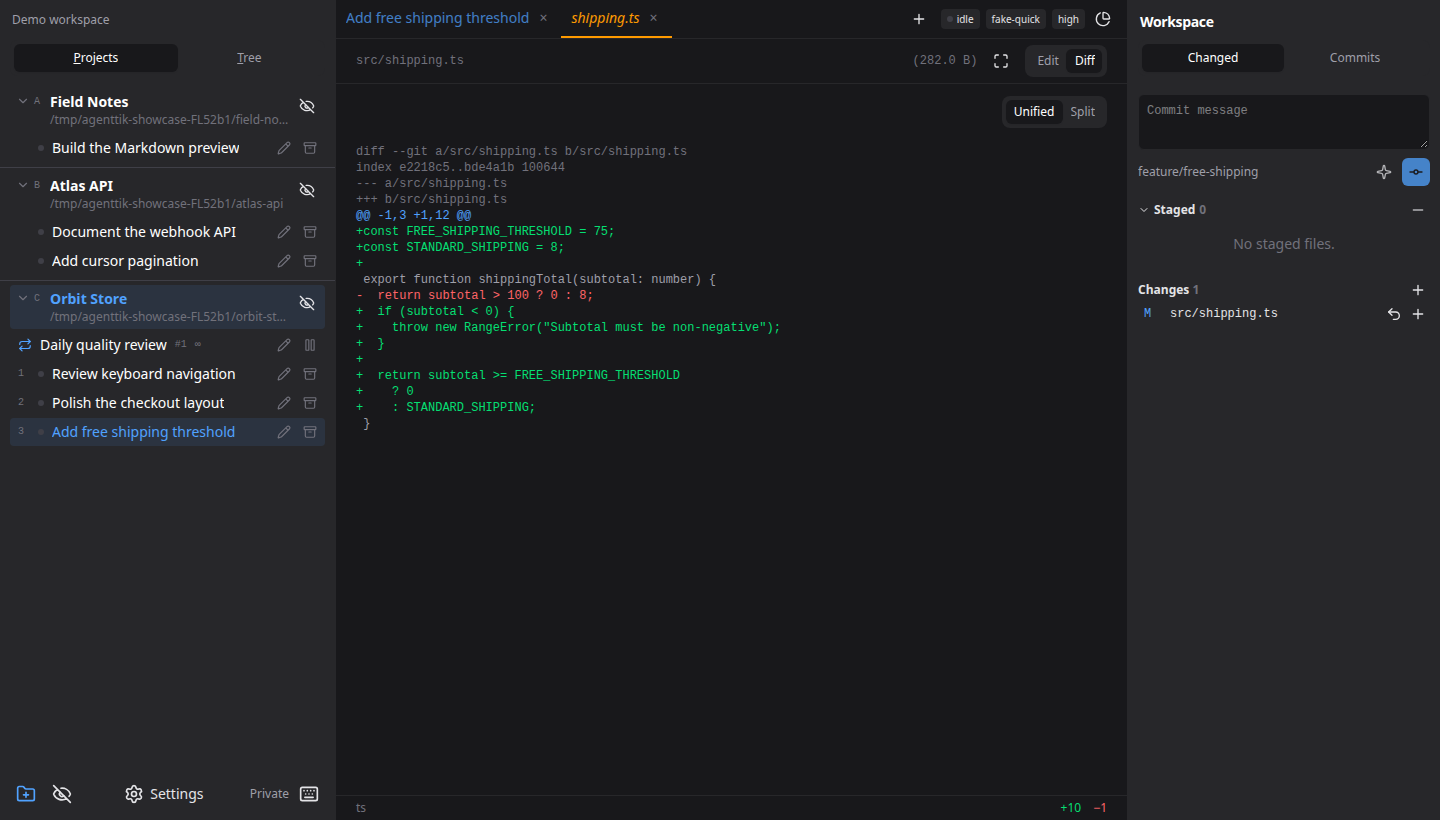
Open a changed file beside your project tasks. Compare the diff, stage individual files, and prepare a commit from the workspace panel.
Schedule recurring work
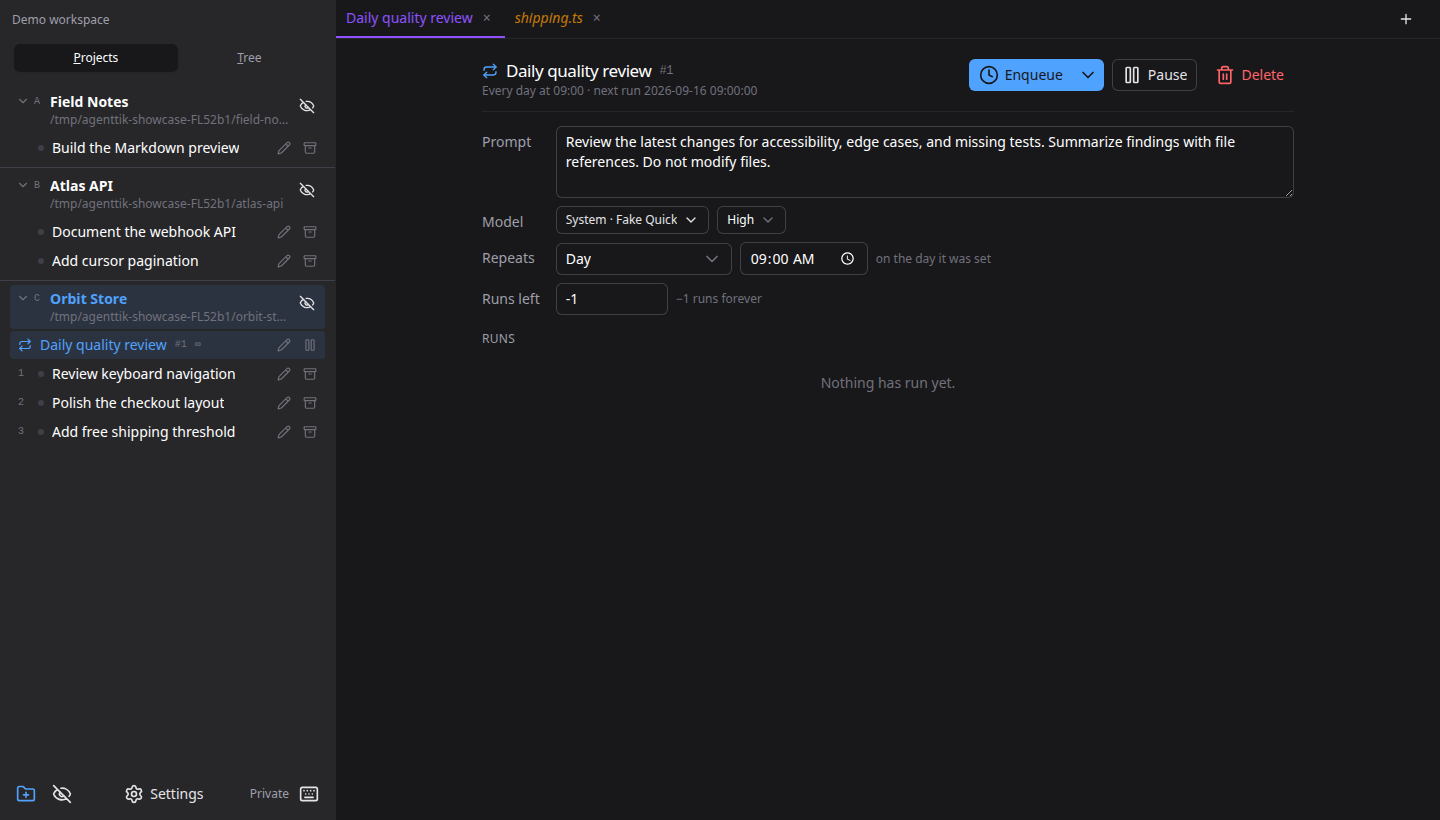
Give a recurring task its own prompt, model, and schedule. Review its next run and history, or pause it from the same view.
Quick start
Use Go 1.25+, Node.js 22.12+ with npm, and either a logged-in claude, codex or copilot CLI on PATH, or an OpenCode Go key configured in Settings → Subscriptions. The opencode CLI is optional.
make run-web
Open localhost:7717, add a project folder, and start a session.
Or add one from the terminal with agenttik --init in the folder you want —
agenttik --init path/to/repo names another — which works whether or not the
app is already open, and shows up in an open window straight away.
Remote servers and private workspaces
Connect to another server with agenttik --remote host:7717 (or an HTTPS
URL), or choose Connect to remote server in the command palette. The
client checks /api/version first, then shows the server’s login if needed.
See remote connections.
Start a temporary, separate instance with agenttik --private. Its app data is
removed on exit; project files stay on disk. Manage local profiles in
Settings → Profiles. With multiple profiles, the picker before Shortcuts
switches between their isolated projects and tasks.
--addr and --data-dir change where it listens and where it keeps its
database, --web skips the desktop window, and --help and --version say
what this build is.
Desktop builds
For the desktop app, install the native build dependencies (make deps on
Debian/Ubuntu), then run make run. make build-windows-amd64 cross-compiles
the Windows x64 binary; build the macOS ARM64 target on macOS with
make build-macos-arm64. macOS builds also create an ad-hoc-signed
agenttik.app and a ZIP (bin/ for make build, dist/ for the ARM64 target).
Extract the release ZIP and move the app to Applications. No Apple developer
account is needed to build it. Downloaded builds are not notarized; after a
blocked launch, use System Settings → Privacy & Security → Open Anyway.
On macOS, Close to tray works even without Accessibility permission. The global show/hide shortcut needs that permission; grant it in System Settings → Privacy & Security → Accessibility, then restart agenttik. Shortcut failures appear in agenttik's desktop settings while the tray menu remains usable.
Local access by default: agenttik binds to loopback. Anyone who can reach an unauthenticated server has full control of it. Before exposing it through Settings → Server, configure authentication and use a trusted network. See server access.
Built with Go, SQLite, Vue 3, Nuxt UI, and Wails. See specs for architecture and implementation details.
License
MIT.


See what people are saying
Similar repos


Languages
Go
53.9%
JavaScript
25.2%
Vue
19.6%
README
agenttik
A local workspace for running AI coding sessions across multiple projects. Use Claude Code, Codex and GitHub Copilot through their official CLIs, with your existing login, in one desktop window or browser tab. Desktop builds support Linux, macOS ARM64, and Windows x64.
Main features
- Project workspaces: organize sessions and file tabs; archive and restore conversations.
- Orchestrator: enable a separate pinned project in Settings to inspect work and manage tasks across projects, with editable instructions and a reset to the built-in prompt.
- Live sessions: stream replies, resume conversations, and queue prompts per project.
- Reusable work: pin prompts and schedule recurring tasks.
- Model controls: choose models, effort, permissions, and favorite combinations.
- Code tools: browse and edit files, preview Markdown/HTML, inspect Git diffs, stage changes, and write commits.
- Usage tracking: view tokens, context usage, subscription allowance, and costs where reported.
- Local state: SQLite history, remembered tabs, customizable shortcuts, and color themes. Use profiles for separate workspaces or private mode for a temporary one.
Claude Code is working; Codex, GitHub Copilot and OpenCode Go are implemented, with live-turn validation still pending. OpenCode Go supports direct use with a subscription key and an optional CLI; Settings defaults to the CLI when installed.
Screenshots
Captured from a fresh private instance and browser context with fictional projects and demo conversation data. No live agent was run. Click an image to view it full size.
Review code where you work
Open a changed file beside your project tasks. Compare the diff, stage individual files, and prepare a commit from the workspace panel.
Schedule recurring work
Give a recurring task its own prompt, model, and schedule. Review its next run and history, or pause it from the same view.
Quick start
Use Go 1.25+, Node.js 22.12+ with npm, and either a logged-in claude, codex or copilot CLI on PATH, or an OpenCode Go key configured in Settings → Subscriptions. The opencode CLI is optional.
make run-web
Open localhost:7717, add a project folder, and start a session.
Or add one from the terminal with agenttik --init in the folder you want —
agenttik --init path/to/repo names another — which works whether or not the
app is already open, and shows up in an open window straight away.
Remote servers and private workspaces
Connect to another server with agenttik --remote host:7717 (or an HTTPS
URL), or choose Connect to remote server in the command palette. The
client checks /api/version first, then shows the server’s login if needed.
See remote connections.
Start a temporary, separate instance with agenttik --private. Its app data is
removed on exit; project files stay on disk. Manage local profiles in
Settings → Profiles. With multiple profiles, the picker before Shortcuts
switches between their isolated projects and tasks.
--addr and --data-dir change where it listens and where it keeps its
database, --web skips the desktop window, and --help and --version say
what this build is.
Desktop builds
For the desktop app, install the native build dependencies (make deps on
Debian/Ubuntu), then run make run. make build-windows-amd64 cross-compiles
the Windows x64 binary; build the macOS ARM64 target on macOS with
make build-macos-arm64. macOS builds also create an ad-hoc-signed
agenttik.app and a ZIP (bin/ for make build, dist/ for the ARM64 target).
Extract the release ZIP and move the app to Applications. No Apple developer
account is needed to build it. Downloaded builds are not notarized; after a
blocked launch, use System Settings → Privacy & Security → Open Anyway.
On macOS, Close to tray works even without Accessibility permission. The global show/hide shortcut needs that permission; grant it in System Settings → Privacy & Security → Accessibility, then restart agenttik. Shortcut failures appear in agenttik's desktop settings while the tray menu remains usable.
Local access by default: agenttik binds to loopback. Anyone who can reach an unauthenticated server has full control of it. Before exposing it through Settings → Server, configure authentication and use a trusted network. See server access.
Built with Go, SQLite, Vue 3, Nuxt UI, and Wails. See specs for architecture and implementation details.
License
MIT.
See what people are saying
Similar repos
Languages
Go
53.9%
JavaScript
25.2%
Vue
19.6%