
Open-source agentic coding workspace for persistent agents, parallel sessions, and inspectable context across projects.
29
stars
967
commits
TypeScript
primary language
Sep 14, 2026
updated
README
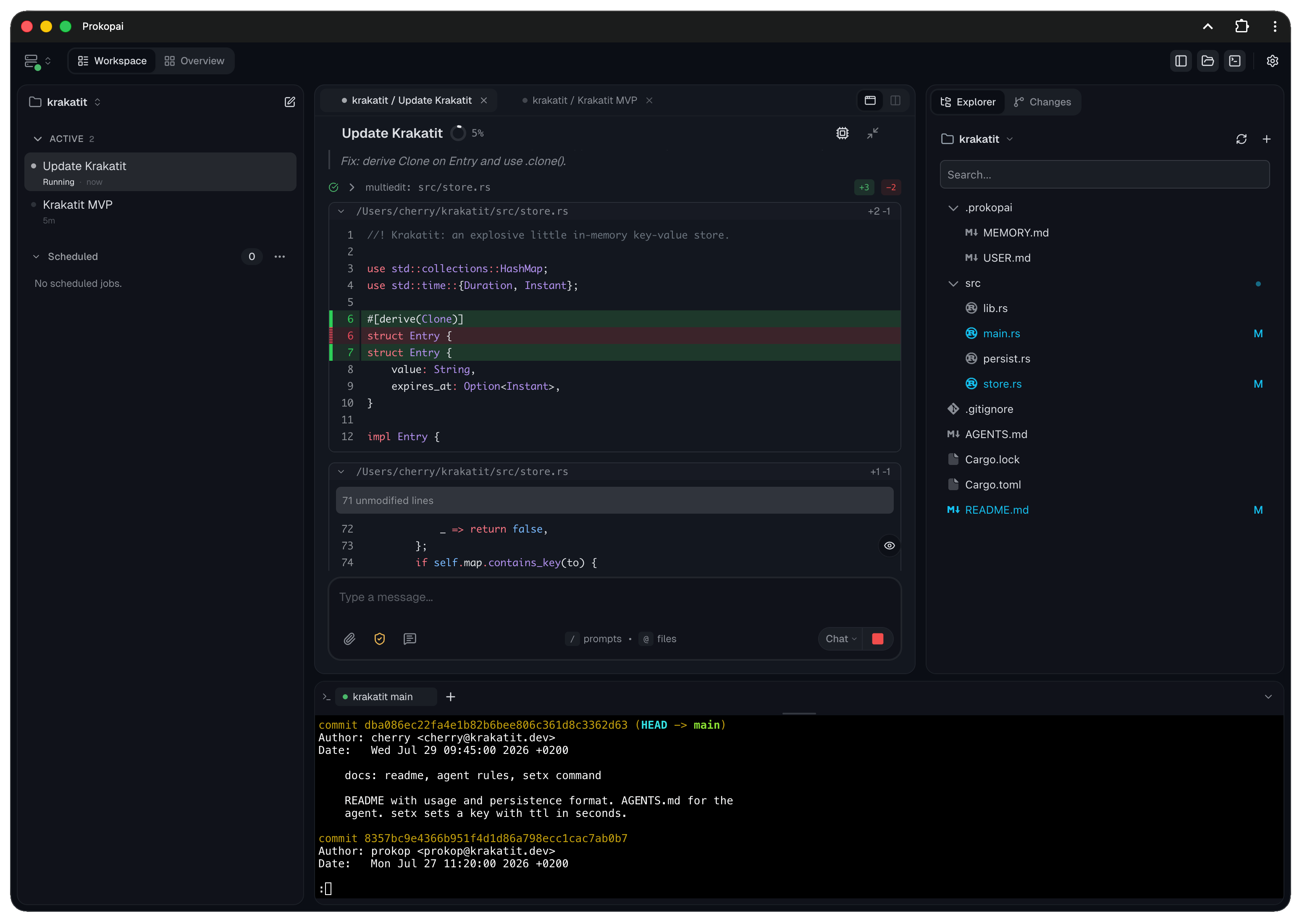
Coding agents that remember how you work.
Prokop is an open-source agentic coding workspace for persistent agents, parallel sessions, and projects that keep their context.




Website · Get Started · Documentation · Video Walkthroughs · Releases · Chrome Extension
Why Prokop
Most coding agents are capable inside one session. Prokop improves the work around and between sessions.
- Persistent agents: Give recurring agents their own memory, skills, and searchable history across projects.
- Automatic learning: Turn it on to preserve useful lessons from conversations in project or personal knowledge. No scheduled jobs to set up.
- Separate context: Agent context follows the agent. Project context stays with the project. Both remain editable.
- Parallel work: Run multiple sessions and projects without a desktop full of terminal windows.
- Complete workspace: Work with files, diffs, Git, terminals, tools, and permissions in one interface.
- Desktop and phone: Use the same responsive PWA through networking you control.
- Open stack: No required Prokop account, no telemetry, Apache 2.0.
See it in use
Short videos with written steps:
- Work across projects in Overview · 25 seconds
- Work with multiple sessions · 24 seconds
- Set up an agent and workspace capabilities · 39 seconds
All walkthroughs, including adding a project and connecting a model provider.
Install
macOS / Linux
curl -fsSL https://prokopai.dev/install.sh | bash
Windows PowerShell
irm https://prokopai.dev/install.ps1 | iex
Prefer to inspect the installer or download a binary yourself? See the macOS/Linux script, PowerShell script, and release downloads.
Then run:
prokop init
This prepares Prokop, starts the daemon, and opens the client at http://localhost:8742. See Getting Started for provider setup.
How continuity works
Persistent agent
├── Memory and skills
└── Searchable history across projects

Project A
└── Project-specific memory and skills

Project B
└── Project-specific memory and skills
Promote a reusable profile to create a persistent agent with its own home workspace. Memory and skills remain visible as files. Search can cover the current session, one workspace, or the agent's history across projects.
Automatic learning
Turn on learning in a workspace or an agent's home, adjust what you need, and keep working. Prokop automatically reviews eligible conversations and maintains useful knowledge. There is no reflection prompt to write or scheduled job to create.
- Workspace learning maintains shared project knowledge from work across participating agents.
- Personal learning reviews an agent's own participation across eligible projects and preserves transferable lessons and working preferences in its personal knowledge.
- Optional skill improvement lets learning create and refine reusable procedures, not just compact memory notes.
Learning comes with a built-in review prompt and timing defaults. You can tune the model, learning focus, and timing, or choose which projects an agent learns from. Reviews normally run during quiet periods, with a maximum pending age for unreviewed work.
Inspect learning history, source conversations, and knowledge diffs. Undo individual changes without overwriting newer edits, or exclude a session from future learning. Exclusion does not erase knowledge already saved.
Learning updates knowledge files, not model weights. It uses your configured model and is separate from scheduled work.
What is included
| Area | Capabilities |
|---|---|
| Workspace | Session board, cross-workspace Overview, files, editor, diffs, persistent terminals |
| Git | Worktree management, branch creation and switching, commit history and commit diffs, commit, fast-forward pull, push, rebase |
| Agents | Persistent identity, memory, skills, session search, subagents, workflows, scheduled work |
| Learning | Opt-in automatic reviews, shared project and personal knowledge, optional skill improvement, history, diffs, undo |
| Control | Visible tool calls, scoped permissions, auto-approval boundaries, revocable grants |
| Client | Responsive PWA, mobile layout, push support, multi-server connections |
| Tools | Filesystem, search, shell, tasks, questions, web fetch, Git worktrees, opt-in browser tools |
| Extensibility | MCP and Capek plugins for providers, tools, memory, workflows, and agent behavior |
The board displays up to six open session panes. The server is not limited to six sessions.
Providers
Connect OpenAI, OpenRouter, DeepSeek, MiniMax, Zhipu, or Zhipu Coding, or use Codex subscription authentication.
Available models depend on the integration and Prokop's supported model configuration. Anthropic and Google models may be available through OpenRouter, but Prokop has no direct integrations for those providers.
Prokop and Capek
Prokop is the coding workspace: server, client, sessions, projects, agents, terminals, permissions, and schedules.
Capek is the separately maintained plugin-based agent runtime underneath it.
Both are written in TypeScript and run on Bun.
Ownership and current limits
Prokop runs on infrastructure you control, with no required account or telemetry. Your configured model provider still receives the requests sent to it.
The daemon survives closing the browser or terminal, not host sleep, reboot, power loss, or process failure. Remote access requires your own networking, such as Tailscale. Local operation alone is not automatic security hardening.
Prokop is evolving and maintained by one developer. It is used for real daily work, but is not presented as enterprise-ready or production-hardened.
Documentation
- Getting Started
- Client and mobile access
- Workspaces and sessions
- Configuration and providers
- CLI
- Tools
- Security and authentication
License
Contributors

949 commits

18 commits
See what people are saying
Similar repos


Languages
TypeScript
98.8%
Open-source agentic coding workspace for persistent agents, parallel sessions, and inspectable context across projects.
29
stars
967
commits
TypeScript
primary language
Sep 14, 2026
updated
README
Coding agents that remember how you work.
Prokop is an open-source agentic coding workspace for persistent agents, parallel sessions, and projects that keep their context.
Website · Get Started · Documentation · Video Walkthroughs · Releases · Chrome Extension
Why Prokop
Most coding agents are capable inside one session. Prokop improves the work around and between sessions.
- Persistent agents: Give recurring agents their own memory, skills, and searchable history across projects.
- Automatic learning: Turn it on to preserve useful lessons from conversations in project or personal knowledge. No scheduled jobs to set up.
- Separate context: Agent context follows the agent. Project context stays with the project. Both remain editable.
- Parallel work: Run multiple sessions and projects without a desktop full of terminal windows.
- Complete workspace: Work with files, diffs, Git, terminals, tools, and permissions in one interface.
- Desktop and phone: Use the same responsive PWA through networking you control.
- Open stack: No required Prokop account, no telemetry, Apache 2.0.
See it in use
Short videos with written steps:
- Work across projects in Overview · 25 seconds
- Work with multiple sessions · 24 seconds
- Set up an agent and workspace capabilities · 39 seconds
All walkthroughs, including adding a project and connecting a model provider.
Install
macOS / Linux
curl -fsSL https://prokopai.dev/install.sh | bash
Windows PowerShell
irm https://prokopai.dev/install.ps1 | iex
Prefer to inspect the installer or download a binary yourself? See the macOS/Linux script, PowerShell script, and release downloads.
Then run:
prokop init
This prepares Prokop, starts the daemon, and opens the client at http://localhost:8742. See Getting Started for provider setup.
How continuity works
Persistent agent
├── Memory and skills
└── Searchable history across projects

Project A
└── Project-specific memory and skills

Project B
└── Project-specific memory and skills
Promote a reusable profile to create a persistent agent with its own home workspace. Memory and skills remain visible as files. Search can cover the current session, one workspace, or the agent's history across projects.
Automatic learning
Turn on learning in a workspace or an agent's home, adjust what you need, and keep working. Prokop automatically reviews eligible conversations and maintains useful knowledge. There is no reflection prompt to write or scheduled job to create.
- Workspace learning maintains shared project knowledge from work across participating agents.
- Personal learning reviews an agent's own participation across eligible projects and preserves transferable lessons and working preferences in its personal knowledge.
- Optional skill improvement lets learning create and refine reusable procedures, not just compact memory notes.
Learning comes with a built-in review prompt and timing defaults. You can tune the model, learning focus, and timing, or choose which projects an agent learns from. Reviews normally run during quiet periods, with a maximum pending age for unreviewed work.
Inspect learning history, source conversations, and knowledge diffs. Undo individual changes without overwriting newer edits, or exclude a session from future learning. Exclusion does not erase knowledge already saved.
Learning updates knowledge files, not model weights. It uses your configured model and is separate from scheduled work.
What is included
| Area | Capabilities |
|---|---|
| Workspace | Session board, cross-workspace Overview, files, editor, diffs, persistent terminals |
| Git | Worktree management, branch creation and switching, commit history and commit diffs, commit, fast-forward pull, push, rebase |
| Agents | Persistent identity, memory, skills, session search, subagents, workflows, scheduled work |
| Learning | Opt-in automatic reviews, shared project and personal knowledge, optional skill improvement, history, diffs, undo |
| Control | Visible tool calls, scoped permissions, auto-approval boundaries, revocable grants |
| Client | Responsive PWA, mobile layout, push support, multi-server connections |
| Tools | Filesystem, search, shell, tasks, questions, web fetch, Git worktrees, opt-in browser tools |
| Extensibility | MCP and Capek plugins for providers, tools, memory, workflows, and agent behavior |
The board displays up to six open session panes. The server is not limited to six sessions.
Providers
Connect OpenAI, OpenRouter, DeepSeek, MiniMax, Zhipu, or Zhipu Coding, or use Codex subscription authentication.
Available models depend on the integration and Prokop's supported model configuration. Anthropic and Google models may be available through OpenRouter, but Prokop has no direct integrations for those providers.
Prokop and Capek
Prokop is the coding workspace: server, client, sessions, projects, agents, terminals, permissions, and schedules.
Capek is the separately maintained plugin-based agent runtime underneath it.
Both are written in TypeScript and run on Bun.
Ownership and current limits
Prokop runs on infrastructure you control, with no required account or telemetry. Your configured model provider still receives the requests sent to it.
The daemon survives closing the browser or terminal, not host sleep, reboot, power loss, or process failure. Remote access requires your own networking, such as Tailscale. Local operation alone is not automatic security hardening.
Prokop is evolving and maintained by one developer. It is used for real daily work, but is not presented as enterprise-ready or production-hardened.
Documentation
- Getting Started
- Client and mobile access
- Workspaces and sessions
- Configuration and providers
- CLI
- Tools
- Security and authentication
License
See what people are saying
Similar repos
Contributors
949 commits
18 commits
Languages
TypeScript
98.8%