
Share ideas, build with coding agents and hang out. A free, open-source Windows studio shaped with its community.
See the codeSee what people are saying
README

Mefi Studio
Bring an idea. Find your people. Make it together.






Download 0.4.4 for Windows · Watch the 40-second showreel
Explore Studio · Join our Discord · Read the guide
Build your ideas with coding agents, share work in progress with the community, or just come hang out. Studio is a free Windows app, shaped with the people who use it.
Quick links: What's new · Install · First launch · Tour · Keys and privacy · Community · Docs · Contributing
What's new in 0.4.4
- One sign-in for the studio. Guided setup can connect a supported coding CLI account to chat, planning and building.
- Bigger ideas become steps. Vibe can split a request into a short plan and checks for work done outside Studio when you return.
- More control. Permission modes, explanations and Undo help you decide how agents work.
- Free appearance choices. Every theme and node style is included, including the Void collection.
- Everyday improvements. Compact Vibe panels, a media player and queue, PC sync through GitHub and a log viewer.
Read the 0.4.4 release notes or the full changelog. Existing portable installations can check App updates. The showreel above uses sample tasks from the earlier 0.4.2 release.
What it does
- One folder at a time. Pick a project folder and Studio scans it locally. Tasks, conversations, plans and references stay with that project.
- Chat or create work. Use Chat to think an idea through, or Create task to put work on the board with acceptance checks.
- Agents do the work, visibly. Coding workers (OpenCode, Claude Code, Codex, Grok or Antigravity CLIs) build tasks while an always-on service loop organises, audits and briefs. The Command view shows every session, task and agent as a live node tree.
- "Done" means verified. A finished attempt waits in Review with its evidence until checks pass or you confirm it.
- Local storage, your choice of AI. Project records and settings stay on your machine, keys are encrypted with the OS keystore, and Studio has no usage telemetry or required hosted account. Connected AI providers and coding tools may receive prompts and project context. The Discord community and optional connected room features are separate from your local projects.
Requirements
| Needed for | Notes | |
|---|---|---|
| Windows 10/11 | Everything | Keys are protected by the Windows keystore (DPAPI). Other platforms are untested. |
| Node 24 + npm | Running from source | npm ci downloads Electron once (about 110 MB), and stops at once on an older Node. The portable build needs neither. |
| Git | Cloning; recommended at runtime | Studio reads the open project through git to verify a result that claims a commit, warn agents about staged or uncommitted work and add history to the project map; Friends › Your PCs and opt-in worktree runs need it. Without git those checks are skipped or read as unknown. |
| Python 3 | npm test only | Found as python, py -3 or python3; the py launcher that python.org's installer adds by default is enough. |
| A builder CLI (optional) | Building tasks | opencode is preferred; claude, codex, grok and agy are detected. Without one Studio still plans, chats and browses the catalog, but no build can start. |
| An API key or local model (optional) | The companion | z.ai, OpenCode Go or Zen, OpenRouter, a CLI login, LM Studio or any OpenAI-compatible endpoint. |
Install and run
git clone https://github.com/nateecho32-stack/mefi-studio.git
cd mefi-studio
npm ci                   # once; downloads Electron
npm run build-booklet    # bundles renderer/ into the committed renderer/booklet.html
npm start
npm startneeds a normal shell. IfELECTRON_RUN_AS_NODEis set (some agent harnesses set it), Studio refuses to start and prints the fix.Run Mefi's Studio AI+.cmdstarts the portable build when one exists indist/, otherwise the source install.- Portable build: download 0.4.4, extract the whole folder, then open
Mefi Studio AI+.exe. Its tasks, ideas, plans and conversations stay in its ownresources\app\datafolder. Settings, saved keys, the project list, the Discord link and resume state live in%APPDATA%\Mefi's Studio AI+, shared with a source install on the same Windows account, so only one of the two runs at a time: opening the other brings the running one forward. npm run start:webserves a browser-only preview on http://localhost:4173; it cannot launch workers.
First launch
-
Choose a project on the launch screen, then Open studio (agents stay off) or Open and start agents. Nothing runs before you choose. If a crash or a restart interrupted work in the last ten minutes, Studio skips the question, reopens that folder and restarts the agents that were running; closing the studio yourself always brings the question back.
-
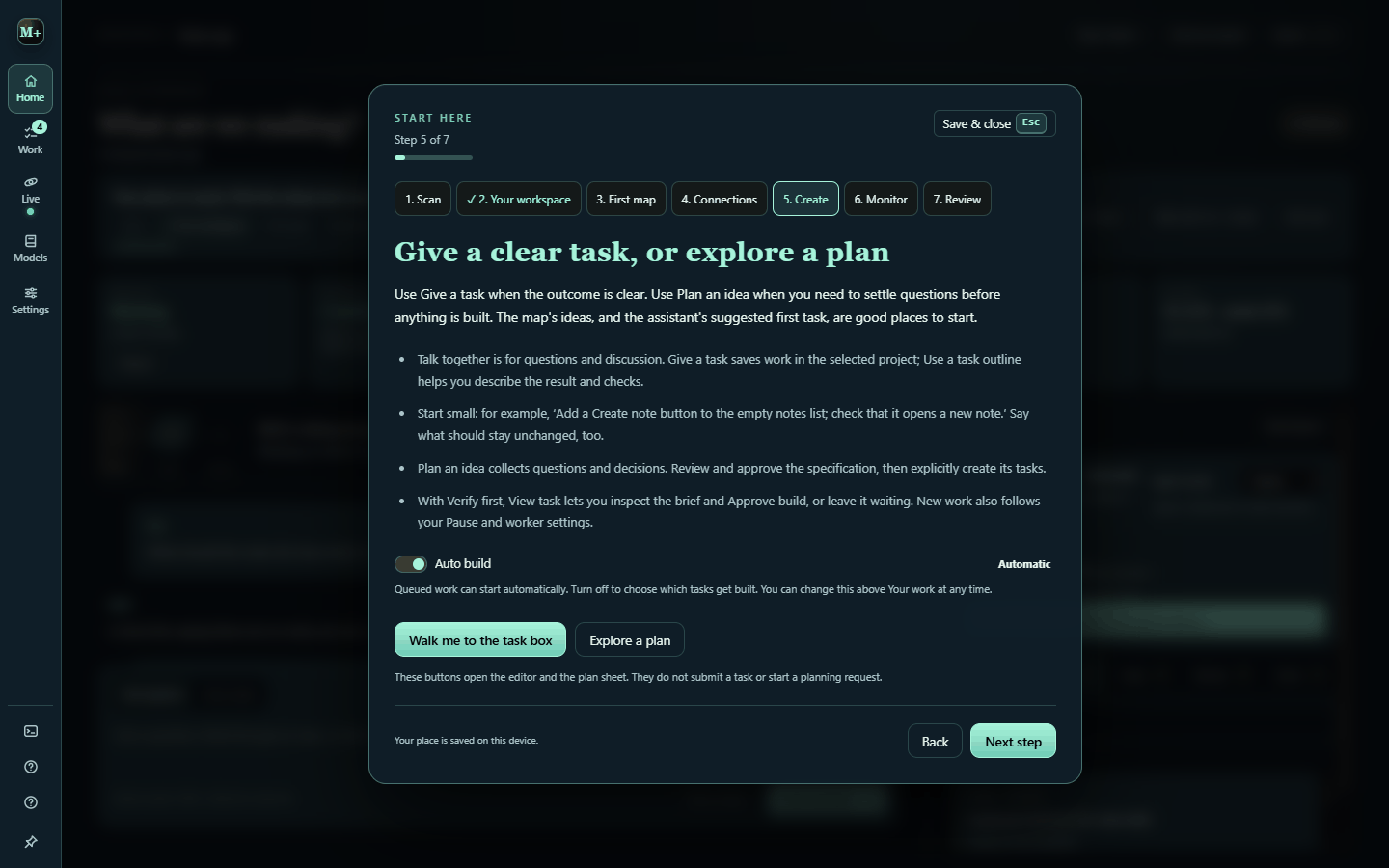
Follow the walkthrough. Start here opens on the first launch with seven short stops: scan, workspace, first map, connections, create, monitor, review. Each stop's Walk with me opens the real menu and highlights the control. It remembers your place.
At Scan or First map, choose an existing Codex, Claude Code, Grok or Antigravity login, or Install and sign in. Check connection, then Use for the whole studio routes mapping, chat, planning, agents and coding through that account. Have an API key (z.ai, OpenCode Go or Zen, OpenRouter, a custom endpoint) or a local server (LM Studio, Ollama) instead? I have an API key or a local model server takes you to Connections and scans again when you return. OpenCode is optional. See guided CLI setup for installation and account limits.
-
Check the connection. A fresh install runs auto setup by itself on the first launch, from the keys, CLIs and local servers already on the machine, and Settings › Connections says what it chose. Press Run auto setup again after adding a key or CLI, or configure a provider there. No key yet? The catalog, manual planning and saved work all work without one.
-
Give one clear task and watch it move from Ready to Working to Review.
GETTING_STARTED.md covers the same path in detail, including what every task state means and what to do next.
A short tour
Vibe or Build
Vibe puts conversation, task creation, work in progress and decisions on one screen. Its Needs you drawer handles questions, build approvals and blocked tasks. Open other tools from its dock and return to Vibe from the top of the rail. Switch to Build for the full workspace described below; Studio remembers which mode you use.
The menu down the left edge opens Home, Work, Agents and Friends, with section-local Back/Forward navigation for pages. Friends opens the companion's existing Friends menu; its Rooms, Your PCs and Playground links go straight to the matching card. Agents contains Overview, Setup, Live, Workflows, Models and Usage. It stays open by default in wide windows; Keep menu open saves your preference. Settings, Search (Ctrl K) and Help stay at its foot. Help contains Start here, Shortcuts (?) and Community. The project selector at the top switches projects, and Ctrl , opens Settings from anywhere.
Your workspace (H)
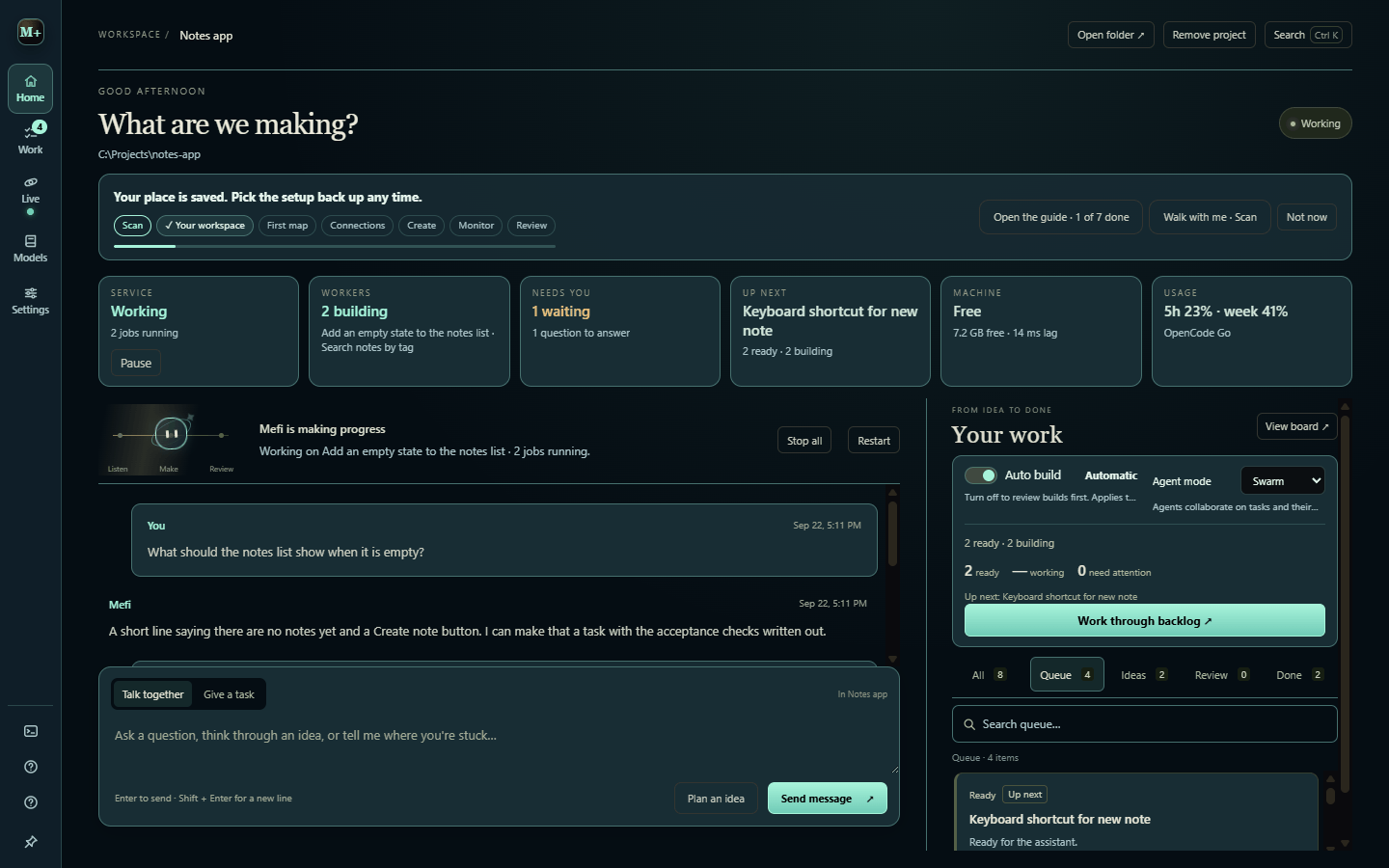
The home screen. Studio at a glance shows the service state with a single Pause / Resume, running workers, what needs you, what is up next, the machine gauge and today's usage. Below it: the conversation with Chat and Create task, and Your work (Queue, Ideas, Review, Done). Expand Queue settings to change Auto build or Agent mode.
Command view (D)
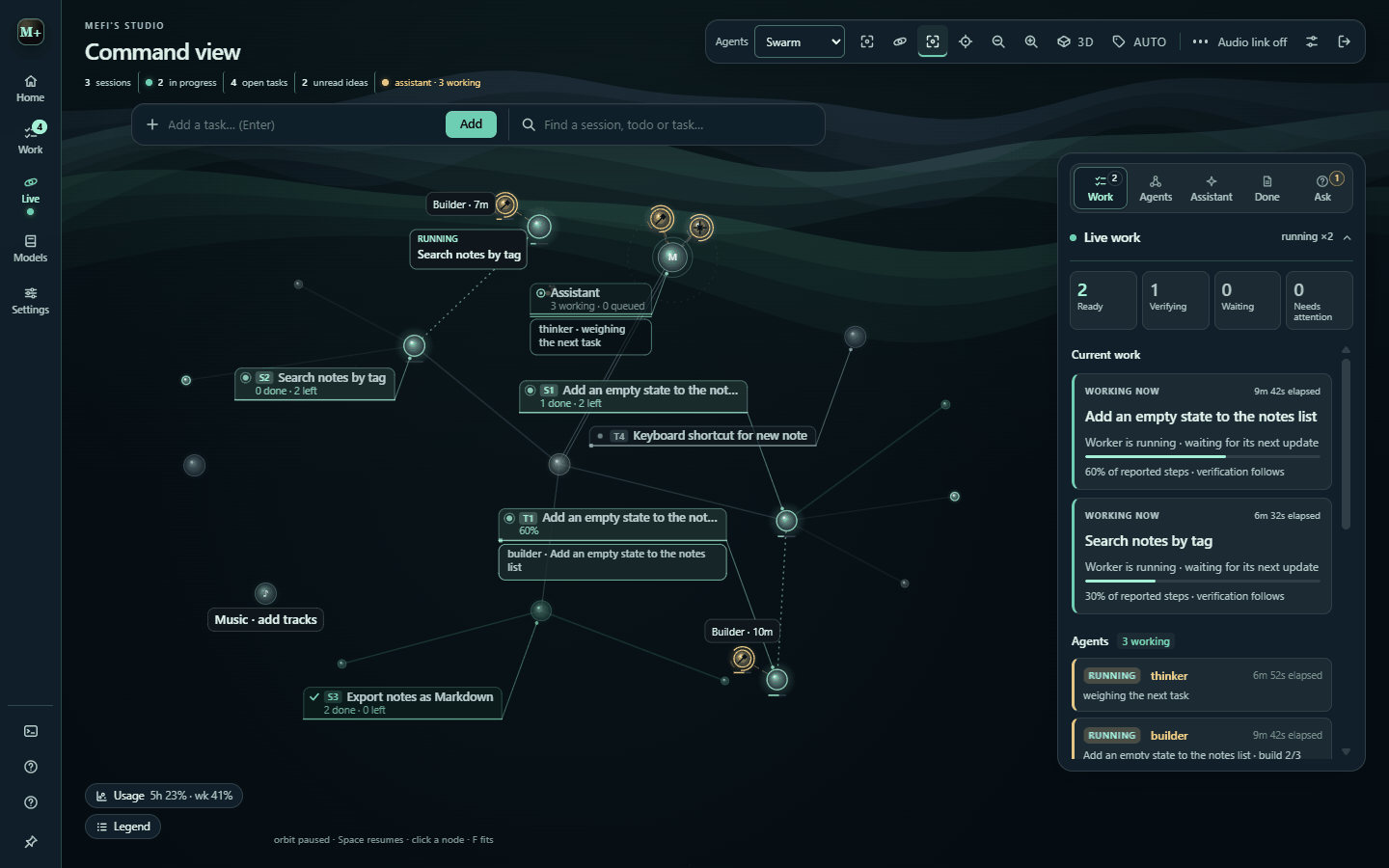
Every session, task and agent is a node. Agents orbit the assistant, fly to the task they work on, and say what they are doing in speech bubbles. The panel on the right holds Work, Assistant, Runs (recent builds grouped by task) and Ask, where agents wait for your decision with a recommended option. Agents in the top toolbar opens queue settings and links to full team setup.
Start here walkthrough
Settings (4 or Ctrl ,)
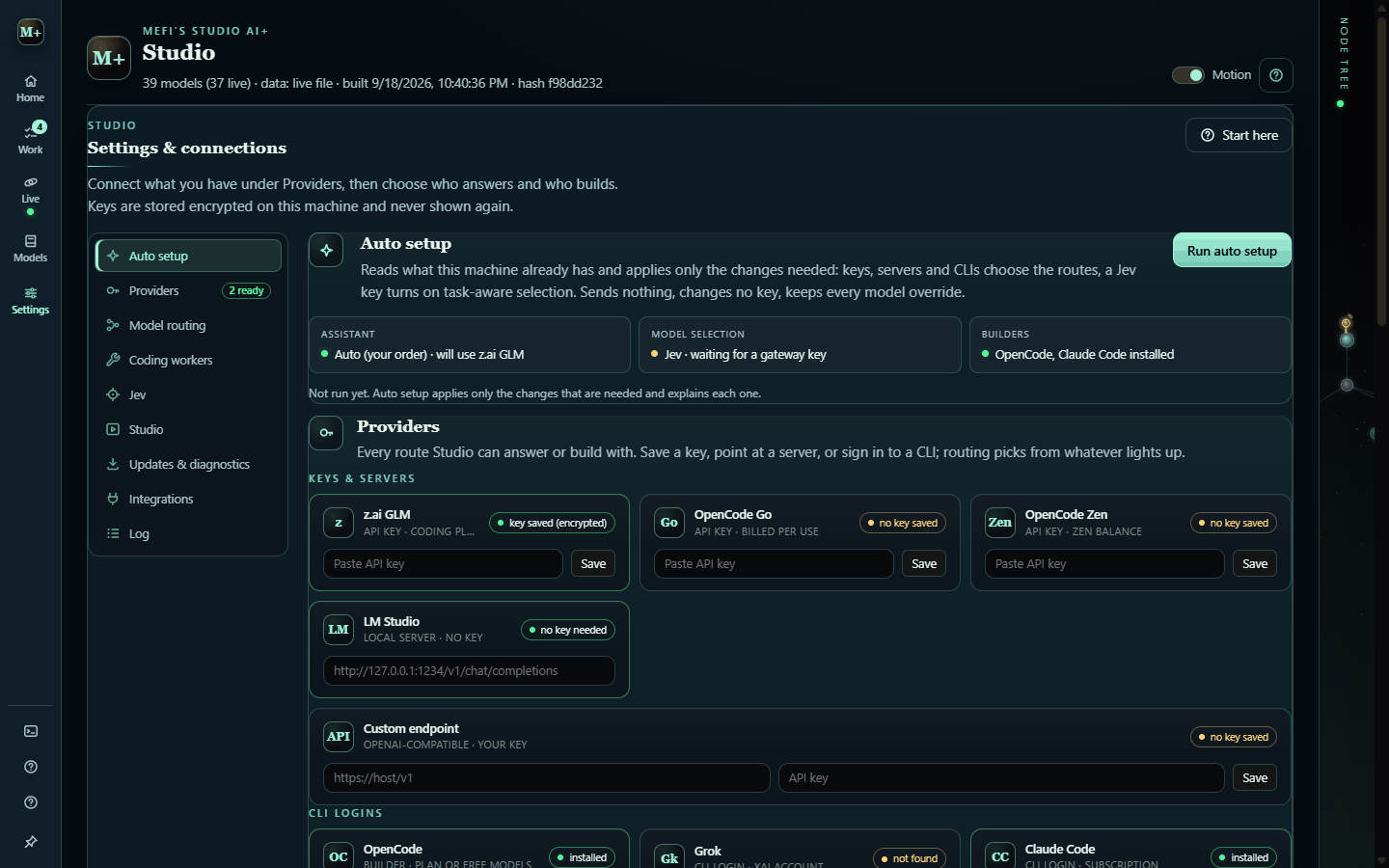
Settings keeps General, Appearance, Audio and System. Connections, model routing, team roles and workflow behavior now live in Agents › Setup. Find a setting searches individual controls and opens the matching category and disclosure. Connection forms and advanced options expand in place. Appearance includes Focus, Studio and Atmosphere presets and the live canvas preview. Agents and the companion share confirmed operational controls.
The main menu groups the app into Home, Work, Agents and Friends. See Unified Studio for team presets, configuration scope, scrollbar-free navigation and the adaptive companion. The 0.4.5 scope records what is included in the next release and what is deferred. A local navigation row exposes each group's tools, while Settings, Search and Help stay available. See the interface inventory for the full set of screens and interior menus.
Also in the box
Tasks (T) with briefs, prerequisites, attempts and evidence · Plans (P) that turn an unclear idea into a specification and tasks · Ideas (I) inbox · Model catalog (1) and Performance (2), plus Usage and Context · Activity & evidence (3), a read-only view of the coding sessions · Sessions (E), Analyzer (A), Overhead (O), Appearance (U), and the Performance profiler · Search Studio (Ctrl K) finds any page, tool, task, setting or model · ? lists every shortcut.
The full feature walkthrough, in Studio's own vocabulary with a glossary, is in docs/architecture.md.
Keys and privacy
- Keys are entered once in Settings › Connections and stored encrypted in the OS keystore; only "saved / not saved" reaches the UI. Headless setup, from a source checkout in PowerShell:
$env:MEFI_STUDIO_KEY = "<key>"; npx electron . --set-key, thenRemove-Item Env:MEFI_STUDIO_KEY(while it is set it overrides the saved key). .env.example pairs every--set-*-keyflag with its variable. - Git tracks only
data/curated.jsonanddata/models.json. Tasks, conversations, settings, databases and captures stay local and are never packaged. - Agents run real commands in the project folder you chose. Turn Auto build off (Verify first) to approve each task before it runs.
- Nothing contacts Discord unless you link an account (below). The link reads your Discord id, username and roles in the Void Engine server, and nothing about your projects.
- See SECURITY.md for reporting.
Community
The Void Engine Discord is where people share projects, ask for feedback and hang out while they build. Unfinished ideas are welcome. Come meet Studio, our new Discord bot, and help shape what it becomes.
Rooms (Friends › Rooms, on the Void Engine room service) lists your rooms and the listed ones you can join. You can Ask to join with a short note, or accept or decline an invite. For rooms you own, you can let requesters in or decline them, invite people by name, lock or close the room, and make new rooms (hangout or cowork, open to requests or invite-only, listed or not). Each room has its chat, shown as plain text with @names; links are never clickable. A message that does not go through stays in the box with the reason. Invites and requests waiting for you are counted on the Friends bubble. Rooms need the room service's address in the build and a linked Discord account; until then the panel says what is missing.
Every theme and node style is free in 0.4.4, including the Void collection. Discord membership is optional.
Shared watch-and-listen rooms in the desktop app are still rolling out and need a configured rooms hub and Discord connection. The personal media player is available now. In-app cowork rooms and an optional “Hey Studio” voice popup are future ideas, not features included in 0.4.4.
The community guide explains what's available. Public site and voice direction records the website's location, public naming and proposed voice integration.
Working from several PCs
GitHub is the meeting point. Each PC keeps its own clone, and the open project's default branch on GitHub is the one shared state.
- Friends › Your PCs in the companion hub says whether this PC matches GitHub and lists anything that has not reached it yet: uncommitted files, unpushed commits, stashes, worktrees with changes, and branches that are not on
main. Opening it only looks. Sync this PC pulls what your other PCs pushed and pushes this PC's commits on the default branch, but only after the project's ownnpm run checkpasses. It never overwrites uncommitted work, merges diverged histories or force-pushes. - Put my commits on top of GitHub's appears when this PC and GitHub both moved and nothing is uncommitted. It rebases this PC's commits onto GitHub's, then checks and pushes. On a conflict it changes nothing and names the files.
- The Friends bubble shows a badge for work only this PC holds, commits waiting on GitHub, or a GitHub it could not check (a lapsed sign-in or a renamed repository). Studio looks 45 seconds after launch and every 15 minutes, and it only looks.
- Closing Studio asks first when the open project has work on this PC alone. You can push and close, close anyway, or keep Studio open. Update restarts never ask.
npm run syncdoes the same from a terminal (--rebaseto put your commits on top,--no-checkto skip the check).- A merge that drops another branch's work is caught. If a merge keeps one side of files both sides changed (or a later commit puts the tree back to one parent) and 200 or more lines of the other side's work vanish,
npm run syncrefuses to push it and names the merge and the files; the session hook and Your PCs list recent ones. A deliberate choice is recorded with aLost-work-ok: <why>line in the merge's commit message (or--allow-lost-workfor one push). The generated booklet and TESTRUNS rows are exempt. - Set up this PC (inside Your PCs) checks what a new PC needs: Git, the GitHub CLI, Node.js, a GitHub sign-in, and whether the open project is on GitHub, has its packages installed, and sits on a drive that can hold Git worktrees (exFAT and FAT cannot). Each missing piece has a button that opens a visible setup window running Studio's own fixed command. You sign in to GitHub in your browser, and Studio never sees the password or token. Get a project from GitHub lists your own repositories, clones the one you pick into a folder you choose (never onto exFAT), and opens it.
- Claude Code runs
node scripts/sync.mjs --hookat the start of each new session (.claude/settings.json). The hook fetches, fast-forwardsmainwhen it can, and hands the report to Claude.AGENTS.mdhas the working rules.
Claude Code sessions and local branches stay on the PC that made them. Anything another PC needs belongs on GitHub.
Share between my PCs (inside Your PCs) moves what you choose between your own PCs through one private GitHub repository, <you>/mefi-studio-vault. Every file in it is sealed (AES-256-GCM) with a key that only your paired PCs hold in Windows' protected storage, so GitHub cannot read it. Make the vault on your first PC, then type its pairing code on each other PC. Nothing goes until you tick it, and Studio checks every item on the way out and again on the way in.
- Shelves: how models did by kind of task, what Studio learned from your decisions, agent team setups, agent brains, Playbook recipes, Claude Code memory notes, your preferences (no keys, no addresses), and your open tasks and ideas. Brains, recipes, notes and ideas belong to their GitHub repository and are used only in that project.
- Checked both ways: an item with a key, token, password or a login in a link is stopped; paths, your user and PC names, emails and network addresses are removed; and anything received that tells an agent to ignore its instructions, asks for keys, runs a downloaded script or sends data to a paste or webhook service is kept out, never used.
- Nothing is overwritten: a received brain, team or recipe is added beside yours with where it came from in its name, a memory note is written only where none has that name, and ideas never start work by themselves. Model results and decisions you keep count as another PC's experience when Studio picks models and suggests what to do; remove them from the library and they stop counting.
- Keys and setup are separate and strict. The screen says in capitals that you are sharing keys and setup information that can be stolen, you type the confirmation exactly, and Windows asks once more. On the other PC they are saved straight into protected storage and never shown. Take them out of the vault once your PCs have them, and replace a key at its provider if you think it leaked.
- Your PCs list shows each paired PC, when it last synced, and what waits on it per project.
- Keep this PC up to date (on by default) asks GitHub every minute whether another PC pushed, and fast-forwards when this PC has nothing of its own in the way and no builder is running.
- Agents on several PCs coordinate through a cowork room linked to the project (Friends › Rooms): builders claim the files they will edit, every PC sees the claim within a second, and a task whose files another PC holds waits. Claims are held until the work is pushed.
Share with friends saves one item (a brain, a recipe, a team setup, model results, a memory note or your preferences) to a .mefishare file you send however you like. Studio removes paths, user and PC names, emails, addresses and the repository name, refuses anything with a secret in it, and shows you exactly what the file holds first. Opening a friend's file runs the same review; a risky one is kept out, and a clean one goes to your library for you to use.
Tests and checks
npm run test:fast        # Node suites without the Electron fixtures (about 20 s)
npm run check            # targets, spec collisions, CSS merge + unused, syntax, TESTRUNS
npm run lint             # eslint, check-only
npm test                 # the gate: Node suites + Electron fixtures + Python contracts
npm run audit            # renderer/template contract audit
npm test needs Python 3 (python, py -3 or python3) and a real desktop: nine suites drive Electron windows and are timing-sensitive. CONTRIBUTING.md explains the gates and conventions; TESTRUNS.md is the maintainers' lab notebook of past runs and flake triage, not a guide.
Documentation
| Read this | For |
|---|---|
| GETTING_STARTED.md | First launch, new-machine checklist, your first task, what each state means |
| docs/architecture.md | Glossary and the detailed feature walkthrough |
| docs/code-map.md | Which file does what, folder by folder, and where to look first |
| docs/agent-loop.md | How a chat message becomes a verified task, with file references |
| docs/performance.md | Measurements and how to reproduce them |
| docs/community.md | The Void Engine Discord link: the weekly card, the login, what is stored, unlinking and the fork switch |
| docs/remote.md | Reach your PCs from Discord: what a DM can and cannot do, the PIN, alerts, and the hub protocol |
| docs/ux-audit.md | The UX audit and its phased plan |
| docs/fleet-overhaul-plan.md | The fleet overhaul: seats, pods, missions and Refocus from OpenRig, Live › Fleet, and the phase plan |
| docs/pi-provider-storage.md | How pi's coding agent stores provider config, and the settings/auth split Studio adopted from it |
| CONTRIBUTING.md | Check gates, test-file rules, parallel-session etiquette |
| SECURITY.md · CHANGELOG.md | Reporting and what changed |
| docs/archive/ | Historical audits and handoffs, kept for the reasoning |
Optional: Ruins Runner
Studio can launch the author's LÖVE game from Settings › Integrations when a checkout is found (MEFI_STUDIO_GAME_ROOT, or a sibling 2d-Trippy-Hell or 2d Trippy Hell folder). A fresh clone works without it.
Contributing
Issues and pull requests are welcome. Start with CONTRIBUTING.md; the pull-request template lists the three gates. Bug reports are most useful with the version, the install kind, the selected route and builder, and the task state you saw.
Discord Server Styler
Settings › Discord Server Styler starts the separate Server Styler project and opens its local dashboard. Start Server Styler installs dependencies and builds the web app when needed, then runs the dashboard and bot. Stop ends a process started by Mefi. The status line reports when the bot is online or still needs setup.
Keep Server Styler in a sibling discord-server-styler/ checkout. Set
MEFI_STYLER_ROOT to its absolute path if it lives elsewhere. Studio can still
find the former Discord Bot/ directory under the optional game checkout.
The card stays out of Settings until Studio finds one of these.
Bot credentials stay in Server Styler's ignored .env, outside this repository.
Create that file from .env.example, set DASHBOARD_PASSWORD, then use the
dashboard's Discord sign-in and setup wizard to connect the bot to a server.
Rebuild the portable desktop app with npm run package after Studio source
changes.
License
MIT © 2026 MefiMaxi
Significant stargazers

116 followers · starred Sep 2026
Similar repos


Languages
JavaScript
68.5%
HTML
24.3%
Python
4.0%
CSS
3.2%
Share ideas, build with coding agents and hang out. A free, open-source Windows studio shaped with its community.
See the codeSee what people are saying
README
Mefi Studio
Bring an idea. Find your people. Make it together.
Download 0.4.4 for Windows · Watch the 40-second showreel
Explore Studio · Join our Discord · Read the guide
Build your ideas with coding agents, share work in progress with the community, or just come hang out. Studio is a free Windows app, shaped with the people who use it.
Quick links: What's new · Install · First launch · Tour · Keys and privacy · Community · Docs · Contributing
What's new in 0.4.4
- One sign-in for the studio. Guided setup can connect a supported coding CLI account to chat, planning and building.
- Bigger ideas become steps. Vibe can split a request into a short plan and checks for work done outside Studio when you return.
- More control. Permission modes, explanations and Undo help you decide how agents work.
- Free appearance choices. Every theme and node style is included, including the Void collection.
- Everyday improvements. Compact Vibe panels, a media player and queue, PC sync through GitHub and a log viewer.
Read the 0.4.4 release notes or the full changelog. Existing portable installations can check App updates. The showreel above uses sample tasks from the earlier 0.4.2 release.
What it does
- One folder at a time. Pick a project folder and Studio scans it locally. Tasks, conversations, plans and references stay with that project.
- Chat or create work. Use Chat to think an idea through, or Create task to put work on the board with acceptance checks.
- Agents do the work, visibly. Coding workers (OpenCode, Claude Code, Codex, Grok or Antigravity CLIs) build tasks while an always-on service loop organises, audits and briefs. The Command view shows every session, task and agent as a live node tree.
- "Done" means verified. A finished attempt waits in Review with its evidence until checks pass or you confirm it.
- Local storage, your choice of AI. Project records and settings stay on your machine, keys are encrypted with the OS keystore, and Studio has no usage telemetry or required hosted account. Connected AI providers and coding tools may receive prompts and project context. The Discord community and optional connected room features are separate from your local projects.
Requirements
| Needed for | Notes | |
|---|---|---|
| Windows 10/11 | Everything | Keys are protected by the Windows keystore (DPAPI). Other platforms are untested. |
| Node 24 + npm | Running from source | npm ci downloads Electron once (about 110 MB), and stops at once on an older Node. The portable build needs neither. |
| Git | Cloning; recommended at runtime | Studio reads the open project through git to verify a result that claims a commit, warn agents about staged or uncommitted work and add history to the project map; Friends › Your PCs and opt-in worktree runs need it. Without git those checks are skipped or read as unknown. |
| Python 3 | npm test only | Found as python, py -3 or python3; the py launcher that python.org's installer adds by default is enough. |
| A builder CLI (optional) | Building tasks | opencode is preferred; claude, codex, grok and agy are detected. Without one Studio still plans, chats and browses the catalog, but no build can start. |
| An API key or local model (optional) | The companion | z.ai, OpenCode Go or Zen, OpenRouter, a CLI login, LM Studio or any OpenAI-compatible endpoint. |
Install and run
git clone https://github.com/nateecho32-stack/mefi-studio.git
cd mefi-studio
npm ci                   # once; downloads Electron
npm run build-booklet    # bundles renderer/ into the committed renderer/booklet.html
npm start
npm startneeds a normal shell. IfELECTRON_RUN_AS_NODEis set (some agent harnesses set it), Studio refuses to start and prints the fix.Run Mefi's Studio AI+.cmdstarts the portable build when one exists indist/, otherwise the source install.- Portable build: download 0.4.4, extract the whole folder, then open
Mefi Studio AI+.exe. Its tasks, ideas, plans and conversations stay in its ownresources\app\datafolder. Settings, saved keys, the project list, the Discord link and resume state live in%APPDATA%\Mefi's Studio AI+, shared with a source install on the same Windows account, so only one of the two runs at a time: opening the other brings the running one forward. npm run start:webserves a browser-only preview on http://localhost:4173; it cannot launch workers.
First launch
-
Choose a project on the launch screen, then Open studio (agents stay off) or Open and start agents. Nothing runs before you choose. If a crash or a restart interrupted work in the last ten minutes, Studio skips the question, reopens that folder and restarts the agents that were running; closing the studio yourself always brings the question back.
-
Follow the walkthrough. Start here opens on the first launch with seven short stops: scan, workspace, first map, connections, create, monitor, review. Each stop's Walk with me opens the real menu and highlights the control. It remembers your place.
At Scan or First map, choose an existing Codex, Claude Code, Grok or Antigravity login, or Install and sign in. Check connection, then Use for the whole studio routes mapping, chat, planning, agents and coding through that account. Have an API key (z.ai, OpenCode Go or Zen, OpenRouter, a custom endpoint) or a local server (LM Studio, Ollama) instead? I have an API key or a local model server takes you to Connections and scans again when you return. OpenCode is optional. See guided CLI setup for installation and account limits.
-
Check the connection. A fresh install runs auto setup by itself on the first launch, from the keys, CLIs and local servers already on the machine, and Settings › Connections says what it chose. Press Run auto setup again after adding a key or CLI, or configure a provider there. No key yet? The catalog, manual planning and saved work all work without one.
-
Give one clear task and watch it move from Ready to Working to Review.
GETTING_STARTED.md covers the same path in detail, including what every task state means and what to do next.
A short tour
Vibe or Build
Vibe puts conversation, task creation, work in progress and decisions on one screen. Its Needs you drawer handles questions, build approvals and blocked tasks. Open other tools from its dock and return to Vibe from the top of the rail. Switch to Build for the full workspace described below; Studio remembers which mode you use.
The menu down the left edge opens Home, Work, Agents and Friends, with section-local Back/Forward navigation for pages. Friends opens the companion's existing Friends menu; its Rooms, Your PCs and Playground links go straight to the matching card. Agents contains Overview, Setup, Live, Workflows, Models and Usage. It stays open by default in wide windows; Keep menu open saves your preference. Settings, Search (Ctrl K) and Help stay at its foot. Help contains Start here, Shortcuts (?) and Community. The project selector at the top switches projects, and Ctrl , opens Settings from anywhere.
Your workspace (H)
The home screen. Studio at a glance shows the service state with a single Pause / Resume, running workers, what needs you, what is up next, the machine gauge and today's usage. Below it: the conversation with Chat and Create task, and Your work (Queue, Ideas, Review, Done). Expand Queue settings to change Auto build or Agent mode.
Command view (D)
Every session, task and agent is a node. Agents orbit the assistant, fly to the task they work on, and say what they are doing in speech bubbles. The panel on the right holds Work, Assistant, Runs (recent builds grouped by task) and Ask, where agents wait for your decision with a recommended option. Agents in the top toolbar opens queue settings and links to full team setup.
Start here walkthrough
Settings (4 or Ctrl ,)
Settings keeps General, Appearance, Audio and System. Connections, model routing, team roles and workflow behavior now live in Agents › Setup. Find a setting searches individual controls and opens the matching category and disclosure. Connection forms and advanced options expand in place. Appearance includes Focus, Studio and Atmosphere presets and the live canvas preview. Agents and the companion share confirmed operational controls.
The main menu groups the app into Home, Work, Agents and Friends. See Unified Studio for team presets, configuration scope, scrollbar-free navigation and the adaptive companion. The 0.4.5 scope records what is included in the next release and what is deferred. A local navigation row exposes each group's tools, while Settings, Search and Help stay available. See the interface inventory for the full set of screens and interior menus.
Also in the box
Tasks (T) with briefs, prerequisites, attempts and evidence · Plans (P) that turn an unclear idea into a specification and tasks · Ideas (I) inbox · Model catalog (1) and Performance (2), plus Usage and Context · Activity & evidence (3), a read-only view of the coding sessions · Sessions (E), Analyzer (A), Overhead (O), Appearance (U), and the Performance profiler · Search Studio (Ctrl K) finds any page, tool, task, setting or model · ? lists every shortcut.
The full feature walkthrough, in Studio's own vocabulary with a glossary, is in docs/architecture.md.
Keys and privacy
- Keys are entered once in Settings › Connections and stored encrypted in the OS keystore; only "saved / not saved" reaches the UI. Headless setup, from a source checkout in PowerShell:
$env:MEFI_STUDIO_KEY = "<key>"; npx electron . --set-key, thenRemove-Item Env:MEFI_STUDIO_KEY(while it is set it overrides the saved key). .env.example pairs every--set-*-keyflag with its variable. - Git tracks only
data/curated.jsonanddata/models.json. Tasks, conversations, settings, databases and captures stay local and are never packaged. - Agents run real commands in the project folder you chose. Turn Auto build off (Verify first) to approve each task before it runs.
- Nothing contacts Discord unless you link an account (below). The link reads your Discord id, username and roles in the Void Engine server, and nothing about your projects.
- See SECURITY.md for reporting.
Community
The Void Engine Discord is where people share projects, ask for feedback and hang out while they build. Unfinished ideas are welcome. Come meet Studio, our new Discord bot, and help shape what it becomes.
Rooms (Friends › Rooms, on the Void Engine room service) lists your rooms and the listed ones you can join. You can Ask to join with a short note, or accept or decline an invite. For rooms you own, you can let requesters in or decline them, invite people by name, lock or close the room, and make new rooms (hangout or cowork, open to requests or invite-only, listed or not). Each room has its chat, shown as plain text with @names; links are never clickable. A message that does not go through stays in the box with the reason. Invites and requests waiting for you are counted on the Friends bubble. Rooms need the room service's address in the build and a linked Discord account; until then the panel says what is missing.
Every theme and node style is free in 0.4.4, including the Void collection. Discord membership is optional.
Shared watch-and-listen rooms in the desktop app are still rolling out and need a configured rooms hub and Discord connection. The personal media player is available now. In-app cowork rooms and an optional “Hey Studio” voice popup are future ideas, not features included in 0.4.4.
The community guide explains what's available. Public site and voice direction records the website's location, public naming and proposed voice integration.
Working from several PCs
GitHub is the meeting point. Each PC keeps its own clone, and the open project's default branch on GitHub is the one shared state.
- Friends › Your PCs in the companion hub says whether this PC matches GitHub and lists anything that has not reached it yet: uncommitted files, unpushed commits, stashes, worktrees with changes, and branches that are not on
main. Opening it only looks. Sync this PC pulls what your other PCs pushed and pushes this PC's commits on the default branch, but only after the project's ownnpm run checkpasses. It never overwrites uncommitted work, merges diverged histories or force-pushes. - Put my commits on top of GitHub's appears when this PC and GitHub both moved and nothing is uncommitted. It rebases this PC's commits onto GitHub's, then checks and pushes. On a conflict it changes nothing and names the files.
- The Friends bubble shows a badge for work only this PC holds, commits waiting on GitHub, or a GitHub it could not check (a lapsed sign-in or a renamed repository). Studio looks 45 seconds after launch and every 15 minutes, and it only looks.
- Closing Studio asks first when the open project has work on this PC alone. You can push and close, close anyway, or keep Studio open. Update restarts never ask.
npm run syncdoes the same from a terminal (--rebaseto put your commits on top,--no-checkto skip the check).- A merge that drops another branch's work is caught. If a merge keeps one side of files both sides changed (or a later commit puts the tree back to one parent) and 200 or more lines of the other side's work vanish,
npm run syncrefuses to push it and names the merge and the files; the session hook and Your PCs list recent ones. A deliberate choice is recorded with aLost-work-ok: <why>line in the merge's commit message (or--allow-lost-workfor one push). The generated booklet and TESTRUNS rows are exempt. - Set up this PC (inside Your PCs) checks what a new PC needs: Git, the GitHub CLI, Node.js, a GitHub sign-in, and whether the open project is on GitHub, has its packages installed, and sits on a drive that can hold Git worktrees (exFAT and FAT cannot). Each missing piece has a button that opens a visible setup window running Studio's own fixed command. You sign in to GitHub in your browser, and Studio never sees the password or token. Get a project from GitHub lists your own repositories, clones the one you pick into a folder you choose (never onto exFAT), and opens it.
- Claude Code runs
node scripts/sync.mjs --hookat the start of each new session (.claude/settings.json). The hook fetches, fast-forwardsmainwhen it can, and hands the report to Claude.AGENTS.mdhas the working rules.
Claude Code sessions and local branches stay on the PC that made them. Anything another PC needs belongs on GitHub.
Share between my PCs (inside Your PCs) moves what you choose between your own PCs through one private GitHub repository, <you>/mefi-studio-vault. Every file in it is sealed (AES-256-GCM) with a key that only your paired PCs hold in Windows' protected storage, so GitHub cannot read it. Make the vault on your first PC, then type its pairing code on each other PC. Nothing goes until you tick it, and Studio checks every item on the way out and again on the way in.
- Shelves: how models did by kind of task, what Studio learned from your decisions, agent team setups, agent brains, Playbook recipes, Claude Code memory notes, your preferences (no keys, no addresses), and your open tasks and ideas. Brains, recipes, notes and ideas belong to their GitHub repository and are used only in that project.
- Checked both ways: an item with a key, token, password or a login in a link is stopped; paths, your user and PC names, emails and network addresses are removed; and anything received that tells an agent to ignore its instructions, asks for keys, runs a downloaded script or sends data to a paste or webhook service is kept out, never used.
- Nothing is overwritten: a received brain, team or recipe is added beside yours with where it came from in its name, a memory note is written only where none has that name, and ideas never start work by themselves. Model results and decisions you keep count as another PC's experience when Studio picks models and suggests what to do; remove them from the library and they stop counting.
- Keys and setup are separate and strict. The screen says in capitals that you are sharing keys and setup information that can be stolen, you type the confirmation exactly, and Windows asks once more. On the other PC they are saved straight into protected storage and never shown. Take them out of the vault once your PCs have them, and replace a key at its provider if you think it leaked.
- Your PCs list shows each paired PC, when it last synced, and what waits on it per project.
- Keep this PC up to date (on by default) asks GitHub every minute whether another PC pushed, and fast-forwards when this PC has nothing of its own in the way and no builder is running.
- Agents on several PCs coordinate through a cowork room linked to the project (Friends › Rooms): builders claim the files they will edit, every PC sees the claim within a second, and a task whose files another PC holds waits. Claims are held until the work is pushed.
Share with friends saves one item (a brain, a recipe, a team setup, model results, a memory note or your preferences) to a .mefishare file you send however you like. Studio removes paths, user and PC names, emails, addresses and the repository name, refuses anything with a secret in it, and shows you exactly what the file holds first. Opening a friend's file runs the same review; a risky one is kept out, and a clean one goes to your library for you to use.
Tests and checks
npm run test:fast        # Node suites without the Electron fixtures (about 20 s)
npm run check            # targets, spec collisions, CSS merge + unused, syntax, TESTRUNS
npm run lint             # eslint, check-only
npm test                 # the gate: Node suites + Electron fixtures + Python contracts
npm run audit            # renderer/template contract audit
npm test needs Python 3 (python, py -3 or python3) and a real desktop: nine suites drive Electron windows and are timing-sensitive. CONTRIBUTING.md explains the gates and conventions; TESTRUNS.md is the maintainers' lab notebook of past runs and flake triage, not a guide.
Documentation
| Read this | For |
|---|---|
| GETTING_STARTED.md | First launch, new-machine checklist, your first task, what each state means |
| docs/architecture.md | Glossary and the detailed feature walkthrough |
| docs/code-map.md | Which file does what, folder by folder, and where to look first |
| docs/agent-loop.md | How a chat message becomes a verified task, with file references |
| docs/performance.md | Measurements and how to reproduce them |
| docs/community.md | The Void Engine Discord link: the weekly card, the login, what is stored, unlinking and the fork switch |
| docs/remote.md | Reach your PCs from Discord: what a DM can and cannot do, the PIN, alerts, and the hub protocol |
| docs/ux-audit.md | The UX audit and its phased plan |
| docs/fleet-overhaul-plan.md | The fleet overhaul: seats, pods, missions and Refocus from OpenRig, Live › Fleet, and the phase plan |
| docs/pi-provider-storage.md | How pi's coding agent stores provider config, and the settings/auth split Studio adopted from it |
| CONTRIBUTING.md | Check gates, test-file rules, parallel-session etiquette |
| SECURITY.md · CHANGELOG.md | Reporting and what changed |
| docs/archive/ | Historical audits and handoffs, kept for the reasoning |
Optional: Ruins Runner
Studio can launch the author's LÖVE game from Settings › Integrations when a checkout is found (MEFI_STUDIO_GAME_ROOT, or a sibling 2d-Trippy-Hell or 2d Trippy Hell folder). A fresh clone works without it.
Contributing
Issues and pull requests are welcome. Start with CONTRIBUTING.md; the pull-request template lists the three gates. Bug reports are most useful with the version, the install kind, the selected route and builder, and the task state you saw.
Discord Server Styler
Settings › Discord Server Styler starts the separate Server Styler project and opens its local dashboard. Start Server Styler installs dependencies and builds the web app when needed, then runs the dashboard and bot. Stop ends a process started by Mefi. The status line reports when the bot is online or still needs setup.
Keep Server Styler in a sibling discord-server-styler/ checkout. Set
MEFI_STYLER_ROOT to its absolute path if it lives elsewhere. Studio can still
find the former Discord Bot/ directory under the optional game checkout.
The card stays out of Settings until Studio finds one of these.
Bot credentials stay in Server Styler's ignored .env, outside this repository.
Create that file from .env.example, set DASHBOARD_PASSWORD, then use the
dashboard's Discord sign-in and setup wizard to connect the bot to a server.
Rebuild the portable desktop app with npm run package after Studio source
changes.
License
MIT © 2026 MefiMaxi
Similar repos
Significant stargazers
116 followers · starred Sep 2026
Languages
JavaScript
68.5%
HTML
24.3%
Python
4.0%
CSS
3.2%