
Agent-drivable generative creation studio on the desktop: 310 MCP actions across 26 families cover everything the interface can do. Local models on the machine — GGUF LLMs, offline dictation — and cloud generation of images, video and 3D, with API keys encrypted in the main process, never exposed to the renderer.
0
stars
5,595
commits
TypeScript
primary language
Sep 10, 2026
updated
README
AI Desktop Studio
A desktop creation studio for generative models. Generate and edit images, videos, 3D models, audio, textures and skyboxes — in one place, on your machine.








Documentation
| English | Français | |
|---|---|---|
| User guide — how to use the studio | docs/en/user-guide.md | docs/fr/guide-utilisateur.md |
| Architecture — how it is built | docs/en/architecture.md | docs/fr/architecture.md |
The application itself ships in French and English; the language follows your settings.
What it is
Not a web client wrapped in a window. A studio: you generate assets, then edit them, combine them, and assemble them into 3D scenes or video sequences — without leaving the application and without your API credentials ever reaching the browser context.
The unit of work is a project: a folder on your disk. The unit of display is a workspace: seven of them — Image, Video, 3D, Audio, Textures, Skyboxes and Graph — each rearranging the panels around what that kind of work needs. The Graph is the newest: it holds nodes, wires them, saves them and runs them, reusing whatever has not changed — its logic and loop nodes are still to come.
| Seven workspaces | Image, Video, 3D, Audio, Textures, Skyboxes and Graph, each with its own toolbar and its own panels |
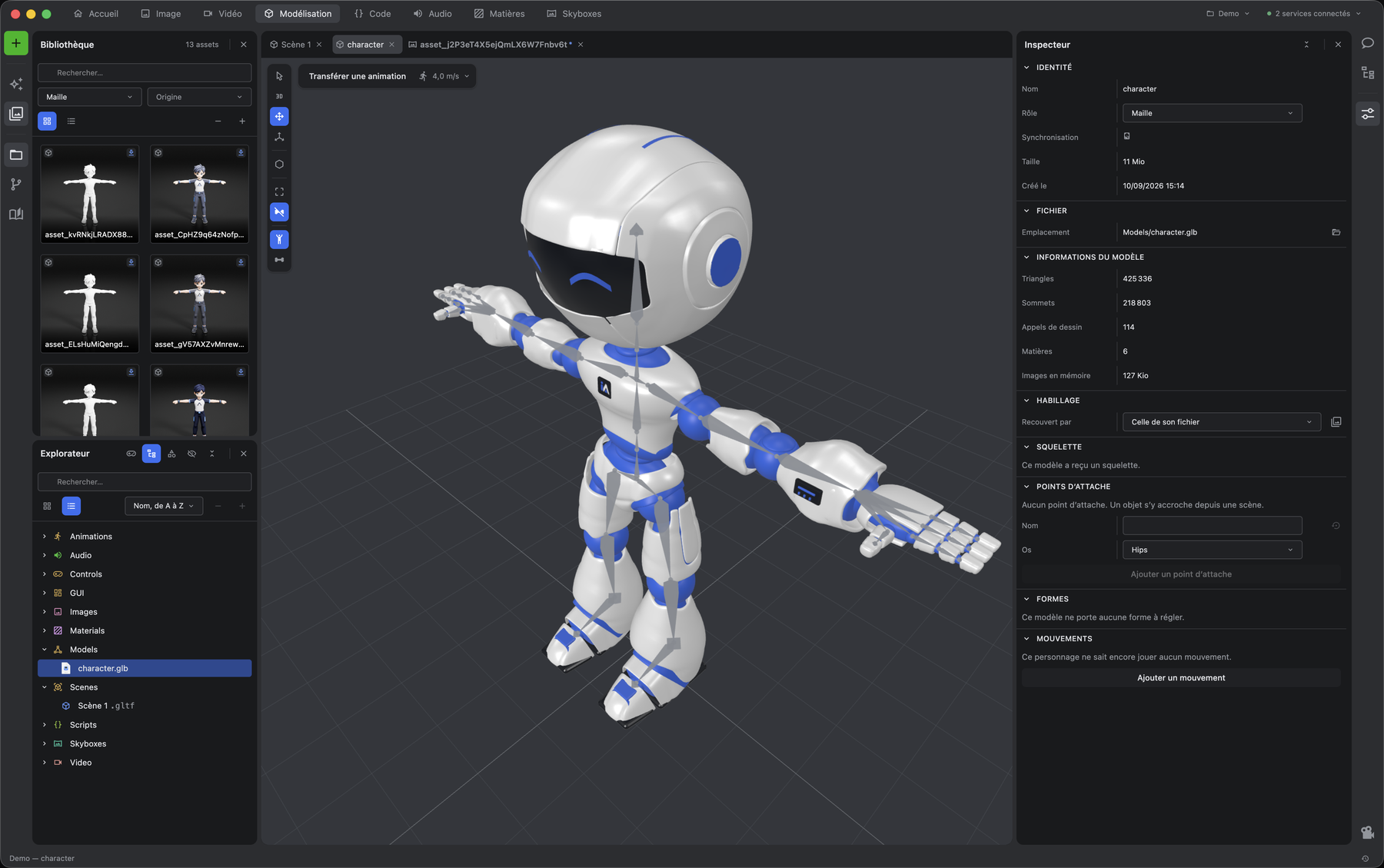
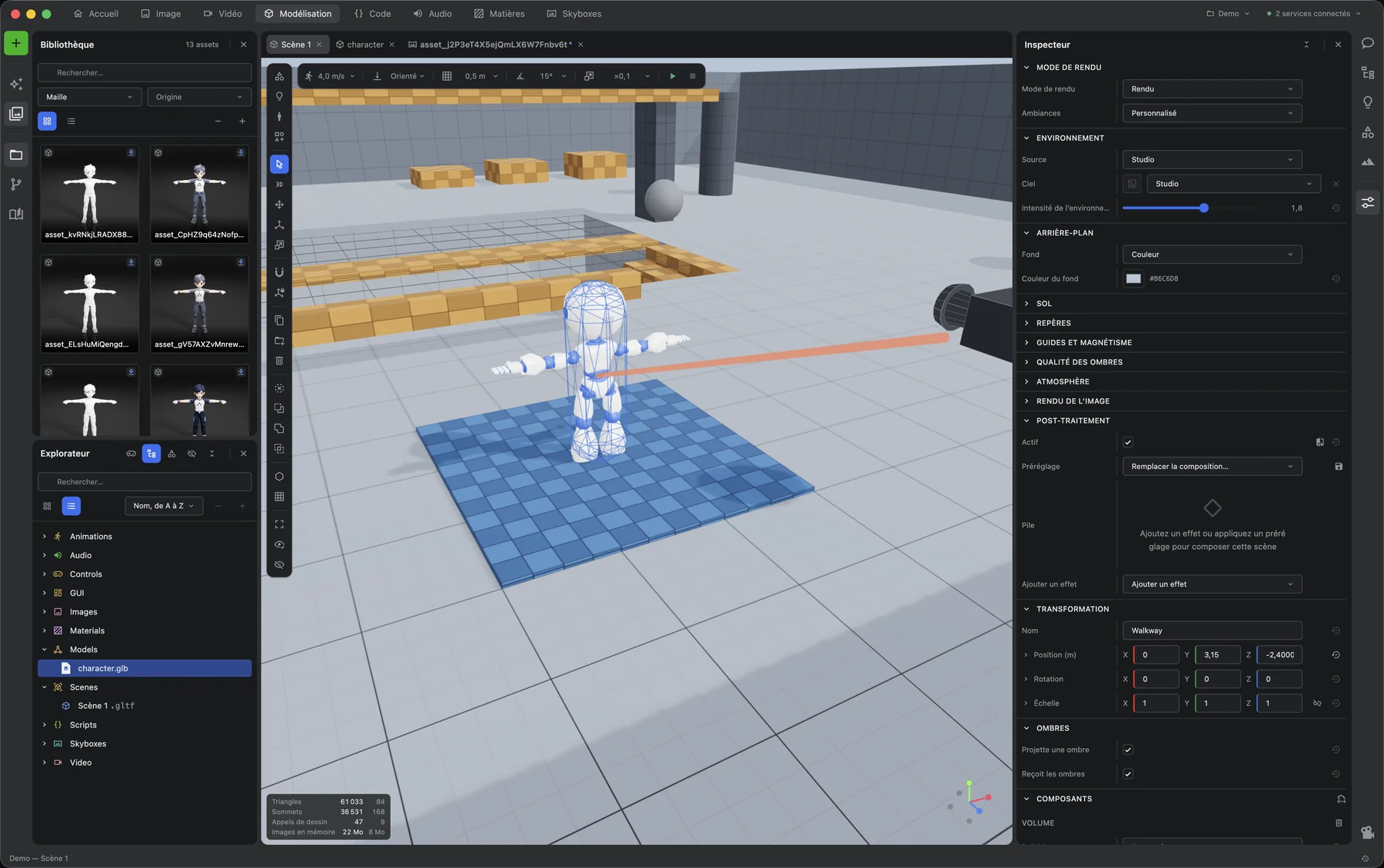
| Real editors, not previews | a Pixi-backed image canvas, a three.js 3D viewport, a video timeline that decodes for real, and a sound editor working on samples |
| No hand-written generation forms | every model's inputs are discovered from the API and rendered from its schema |
| Your keys stay in the main process | encrypted by the OS keychain, never handed to the renderer |
| Bounded concurrency | one queue polls the API, with exponential backoff on 429 and 5xx |
| Local catalogue | assets indexed in SQLite, searched off the UI thread |
The workspaces
Above: the model workshop, and a scene built from the third-person starter. The rest, one panel arrangement per kind of work.
|
Home The project shelf, the tools, and what your models already cover. 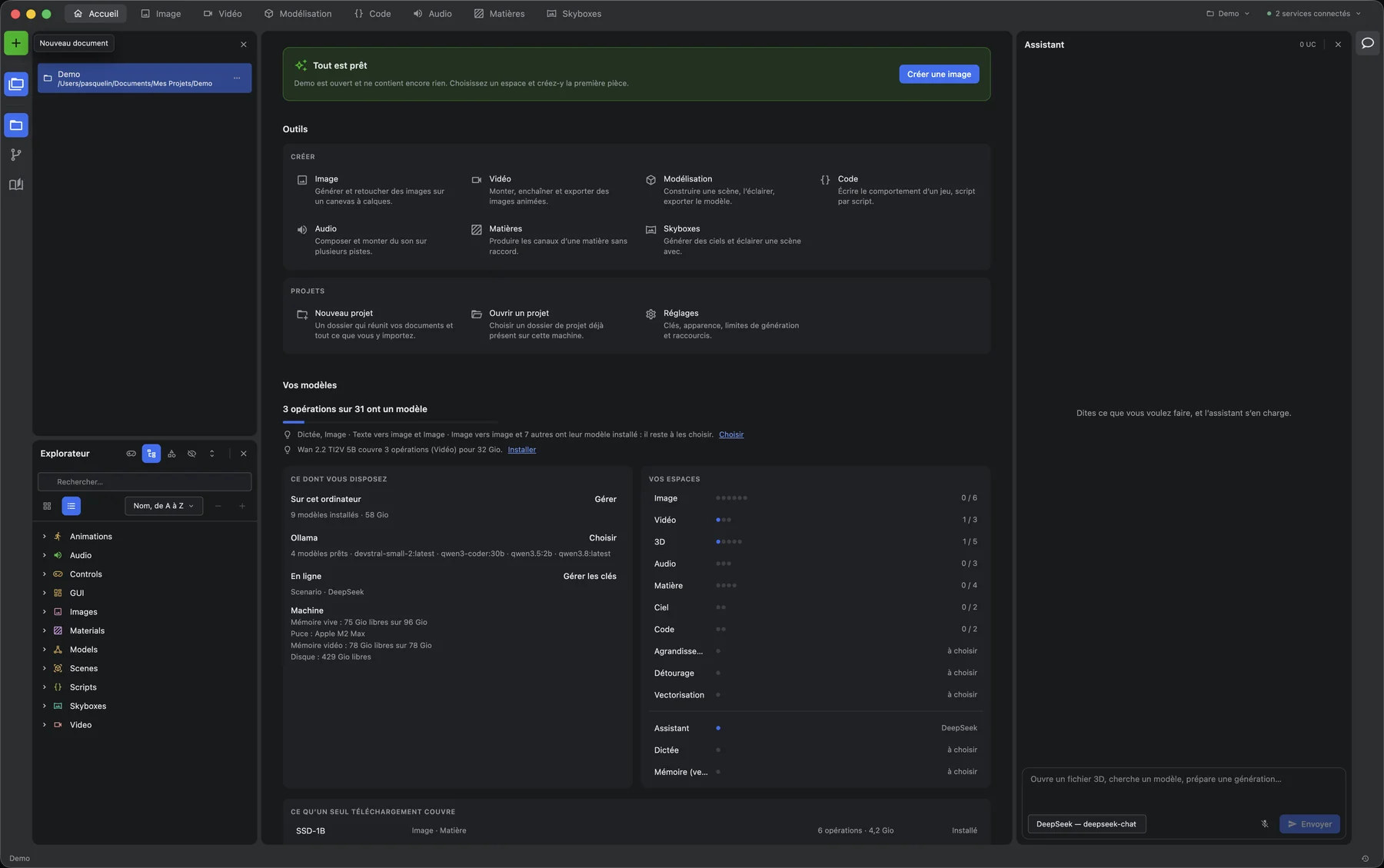
|
Image A layered canvas, with document, layer and transform in the inspector. 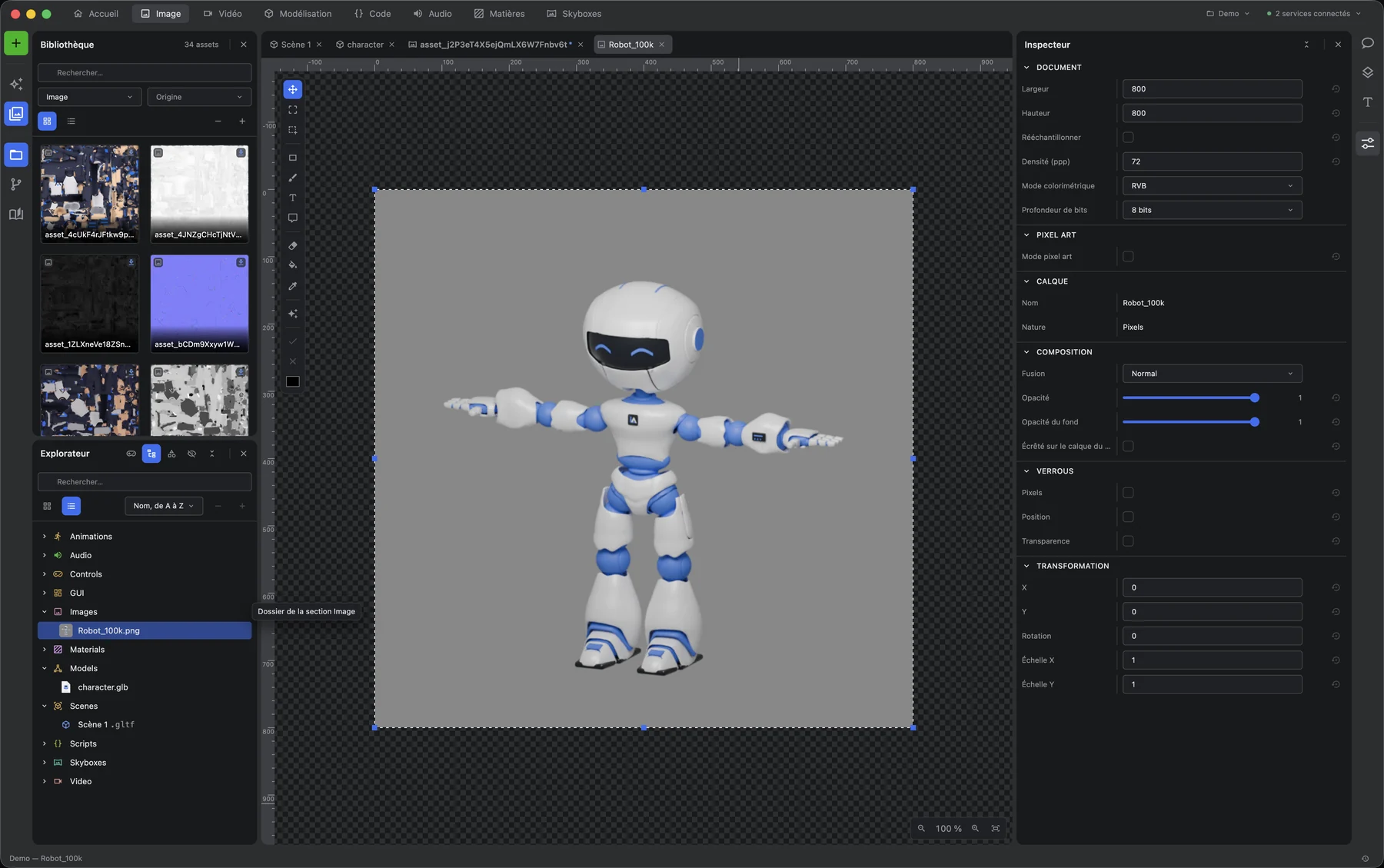
|
|
Video Source and programme viewers, over a timeline that decodes for real. 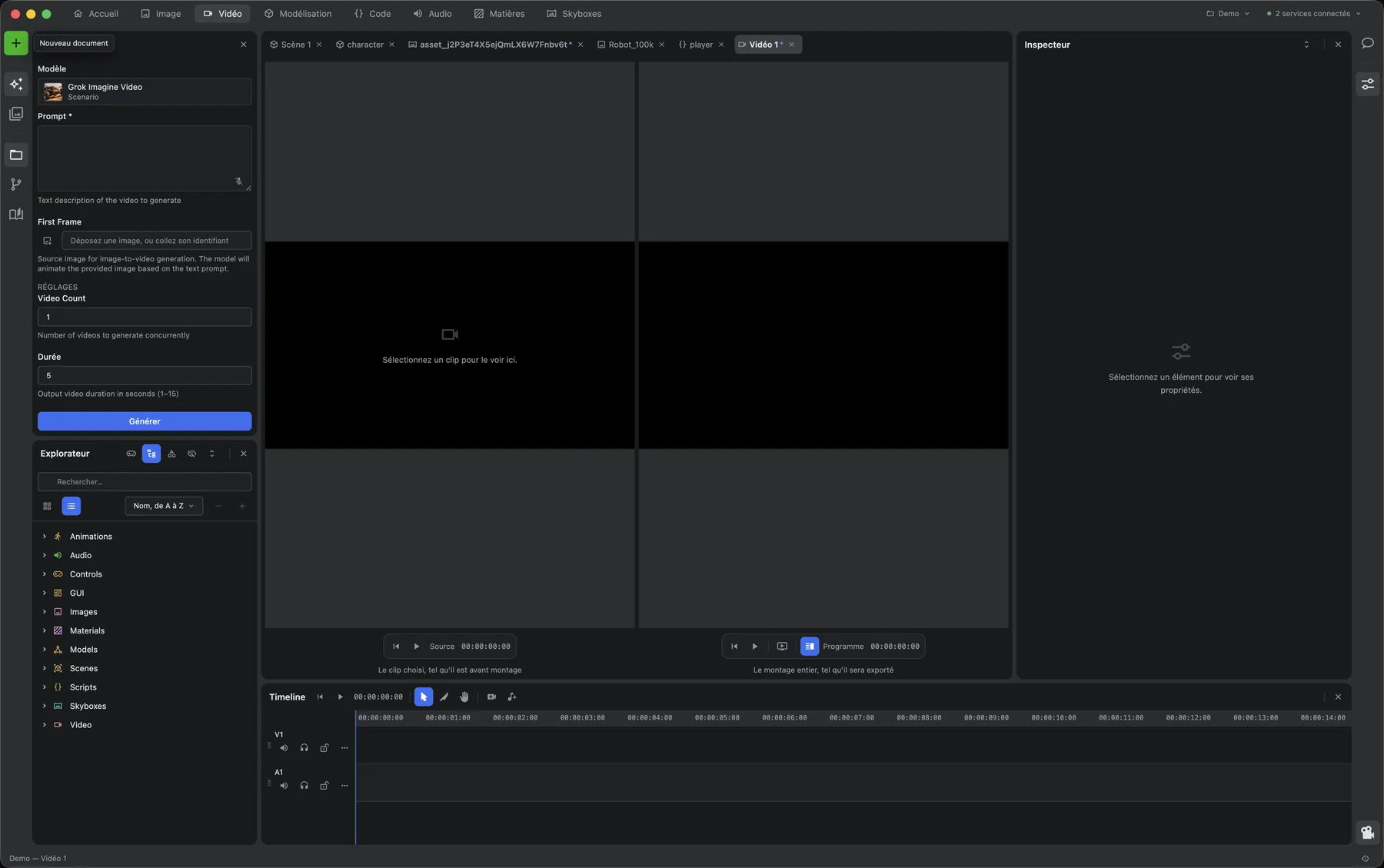
|
Code Behaviour written script by script, and rewritten in place by a model. 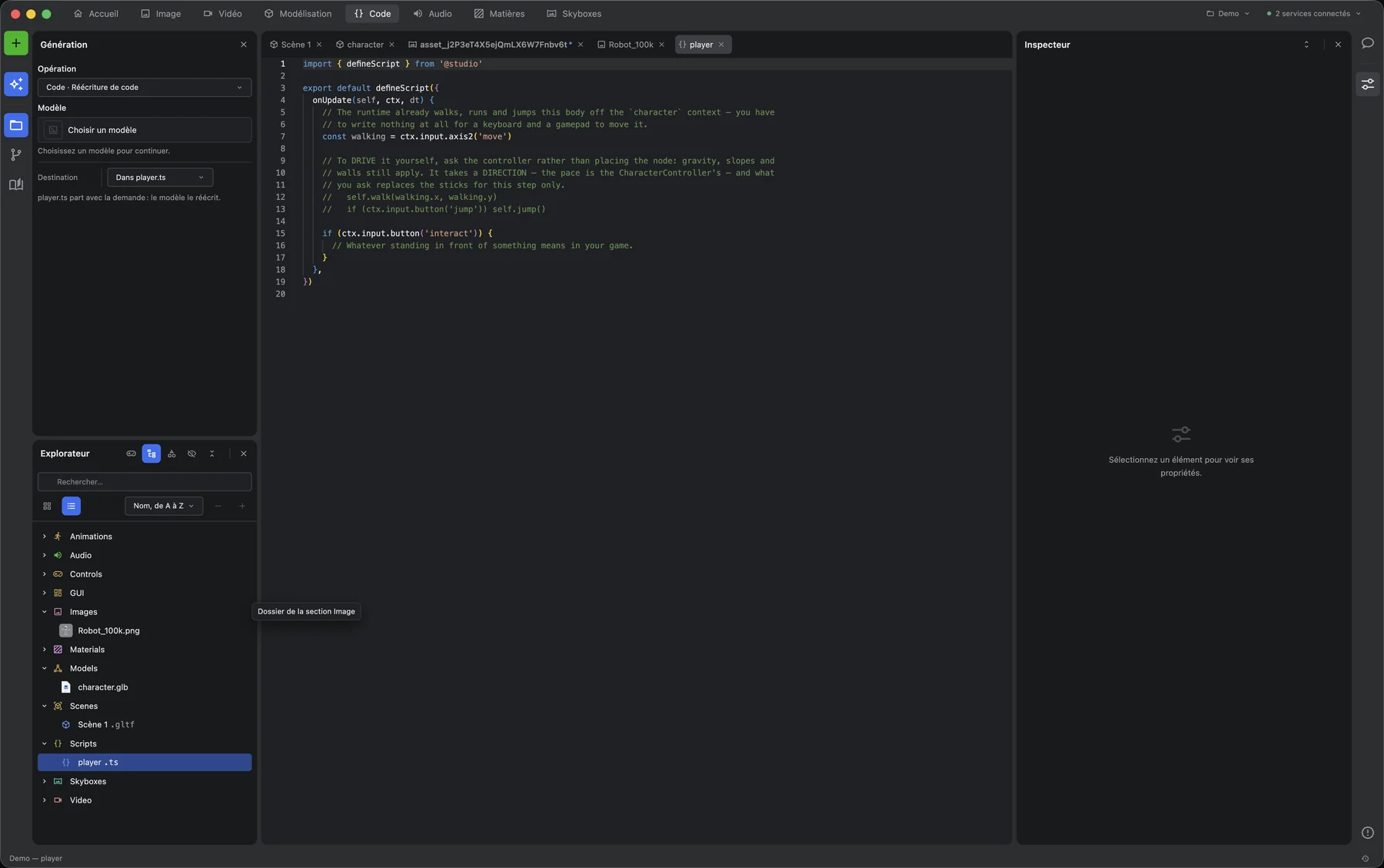
|
|
Audio A spectrum, a clip editor and a multitrack montage, working on samples. 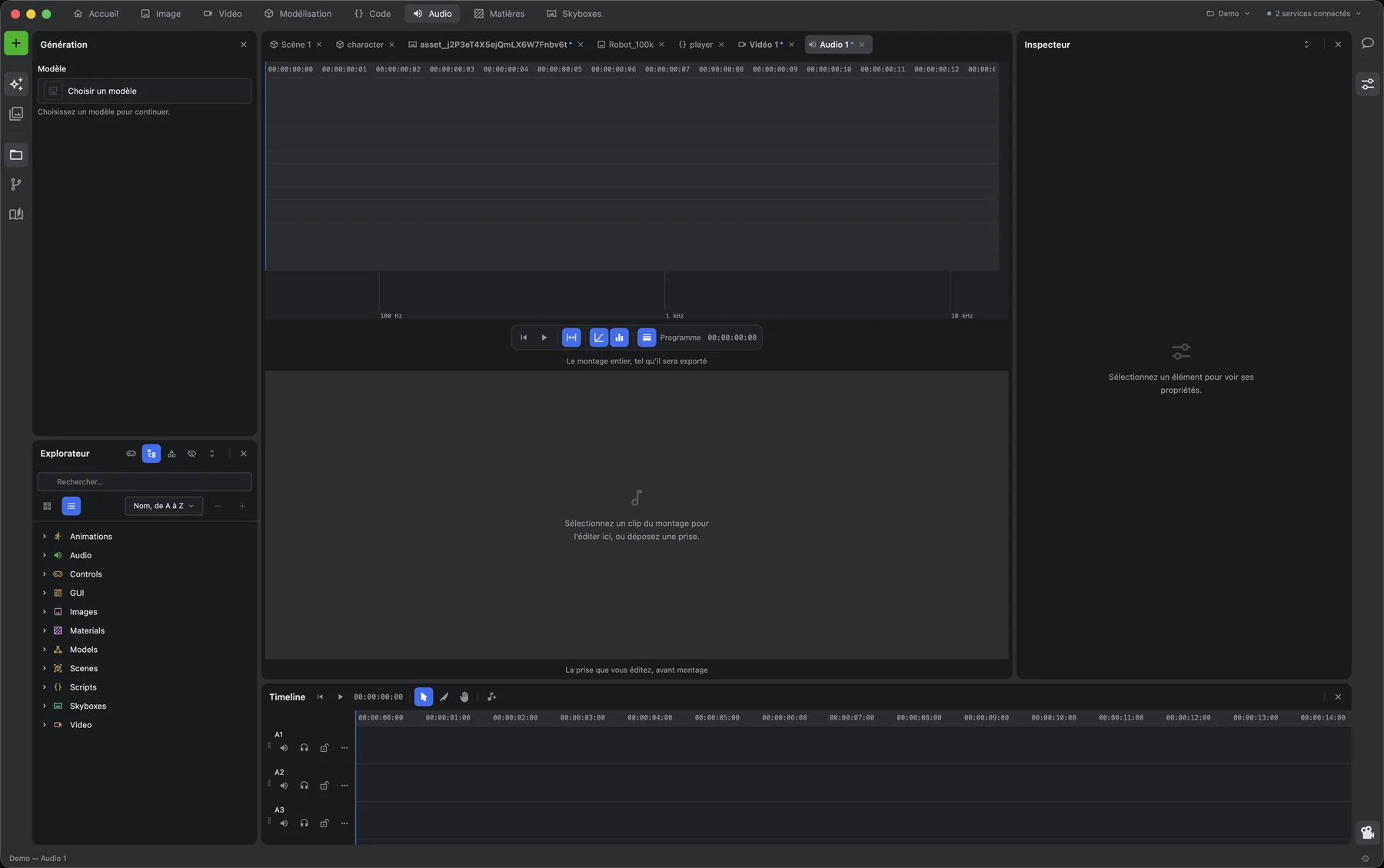
|
Skyboxes A panorama, the sun that goes with it, and test objects lit on the spot. 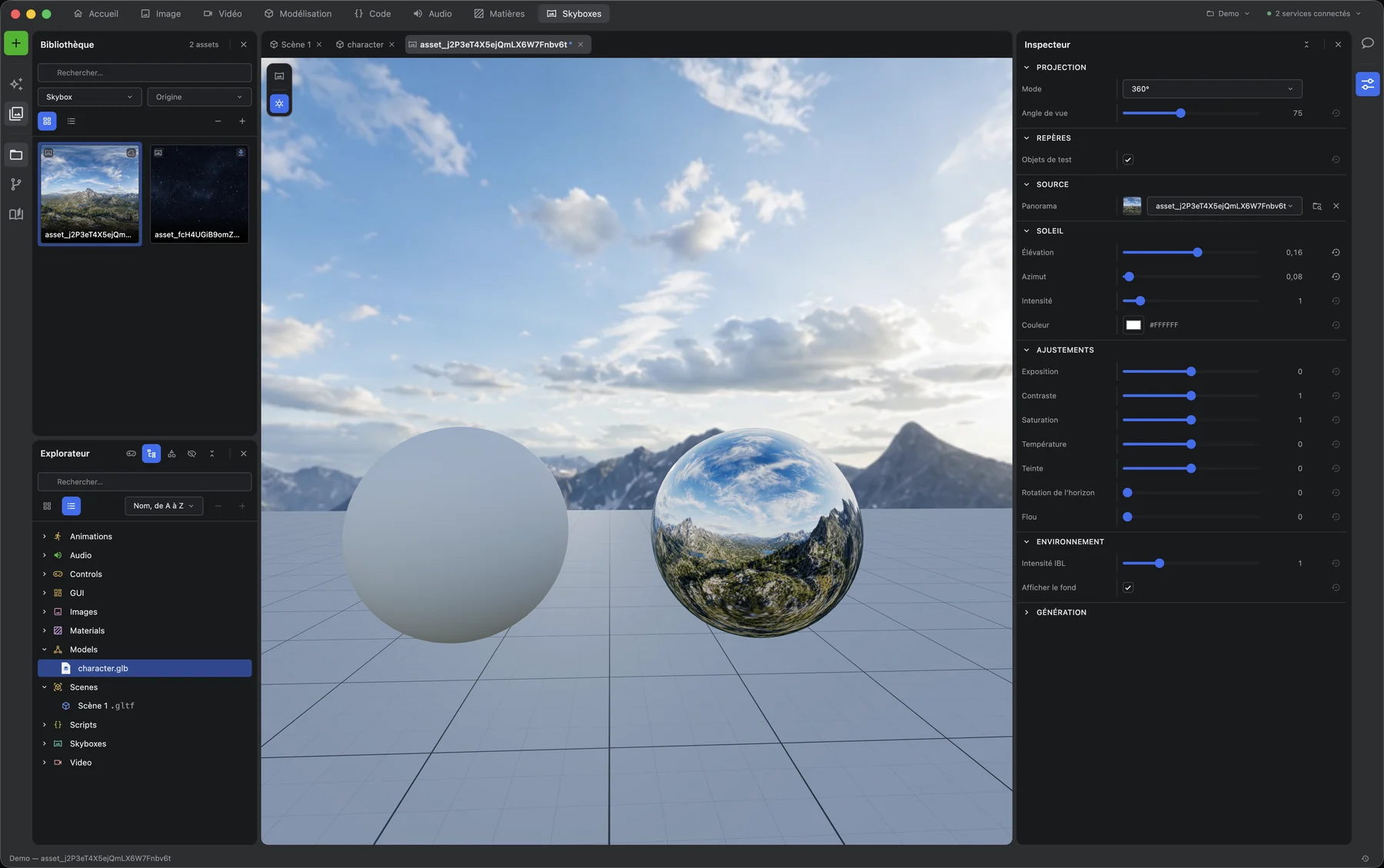
|
Getting started
Requirements — Node 24 (the version in .nvmrc, which is also what CI runs), pnpm 12.3.4 installed with its standalone installer (Corepack does not yet run pnpm 12), macOS / Windows / Linux, and a
API key and secret from your generation provider.
pnpm install
pnpm rebuild:native   # better-sqlite3 against this Electron build
pnpm start
Then open Settings (⌘, / Ctrl+,) and enter your API key and secret. They are encrypted
with the OS keychain and never leave the main process.
Full walkthrough: user guide · every setting explained: Settings · how configuration is layered: Architecture.
Commands
| Command | What it does |
|---|---|
pnpm start | electron-vite in watch mode, hot reload on main, preload and renderer |
pnpm start:debug | same, with the remote debugging port on 9222 — what drives the app from outside |
pnpm world:validate | with pnpm start:debug already running, compares real WebGL frames and runtime observations for benchmark scenes S1–S5; this is separate from pnpm validate |
pnpm build | typecheck, then build the three targets |
pnpm dist | build, then package and sign with electron-builder |
pnpm typecheck | tsc --noEmit across the three targets |
pnpm test · pnpm test:watch | vitest, single run or watching |
pnpm lint · pnpm lint:fix | oxlint over src, scripts and config, warnings included |
pnpm format · pnpm format:check | prettier, write or check |
pnpm validate | the gate: every check a commit must pass, chained. package.json names its links, and the CI job runs this very command rather than a copy of it |
pnpm unused:main | knip — exports, files and dependencies nothing reaches. src/main only: the same unreachable export is reported there and ignored under renderer and shared, and no configuration found so far widens it |
pnpm duplication | jscpd — blocks written twice, from sixty tokens up, over the whole of src |
pnpm dry | dry-ts — same-shape functions, names forgotten, tests excluded |
pnpm duplication:report | classified jscpd + dry-ts report (production vs tests, same-name first) |
pnpm rebuild:native | electron-rebuild — required after touching better-sqlite3 |
Repository layout
src/
├── main/          Electron main process — the only side that holds secrets
│   ├── provider/    API client, model registry, job manager, credentials
│   ├── project/     project folders, manifest, SQLite catalogue
│   ├── settings/    encrypted store and its handlers
│   ├── assets/      asset ingestion and the ai-desktop-studio:// protocol
│   ├── media/       ffmpeg-backed media work
│   ├── menu/        native menu, built from the shared registries
│   └── window/      window lifecycle, navigation lockdown
├── preload/       the typed bridge, and nothing else
├── renderer/src/
│   ├── app/         the shell: rails, zones, tool windows, document area
│   ├── design/      the in-house design system — every docked component
│   ├── engines/     one engine per kind of surface. No React in here
│   ├── spaces/      one document editor per kind
│   ├── panels/      the dockable tools
│   ├── stores/      zustand stores
│   ├── hooks/       shared hooks
│   └── helpers/     pure functions
└── shared/        types and constants only — no runtime dependency
    ├── domain/      the vocabulary both processes speak
    └── i18n/        one directory of sections per language, read by the menu and the UI
A selection, not an inventory — enough to find your way, and no more. Architecture goes through each side in turn.
Quality bar
pnpm validate must be green before any commit. It chains every check this repository
enforces — package.json is where they are listed, so that no second list can drift from it —
and the suite it runs is north of 9,000 tests (9,315 across 686 files on 2026-08-17). Unit
tests are colocated with the code they cover and written in the same movement, never after.
pnpm sizes:check enforces strict physical-line limits on every tracked maintained source,
including tests: files < 500, classes < 300, ordinary functions < 50, React components
< 250, and hooks named use… < 150. A function with cyclomatic complexity 10 or more is
instead limited to < 30 lines. Complexity starts at 1 and adds a path for each conditional,
loop, catch, non-empty switch/match arm, and short-circuit boolean operator. Nested functions are
measured separately. Vendored code, copied three.js decoders, and generated outputs are excluded.
The same guard runs in both pnpm check and pnpm validate; there is no debt baseline.
Every change also goes through a reuse-and-simplification pass and an automated review before it is called done.
Releasing
A git tag vX.Y.Z builds and packages the three platforms, and opens a draft GitHub Release.
| docs/ci/RELEASE.md | The checklist to publish a version, and how to roll one back |
| docs/ci/SECRETS.md | Code-signing secrets: what each one is, how to obtain it, when it expires |
| docs/ci/TROUBLESHOOTING.md | Symptom, cause, fix — for when the pipeline breaks |
The decisions behind the pipeline are recorded in docs/ci/adr/. Builds are
currently unsigned: macOS and Windows both warn on first launch until the certificates of
SECRETS.md are provisioned.
License
Three texts, three scopes:
- The source code in this repository is available under the PolyForm Noncommercial License 1.0.0. Read it, build it, study it, use it for any noncommercial purpose. Commercial use is reserved.
- The application distributed on the releases page has its own terms of use.
- The third-party components both of them carry keep their own licences — 36 of them, in THIRD-PARTY-NOTICES.md and shown in the app under Help ▸ Licences.
FFmpeg is shipped beside the application as a separate program, under GPL-3.0 on macOS and LGPL-2.1 elsewhere. Its corresponding sources are attached to every release. The reasoning is in ADR-16.
Independence
This is an independent project, developed personally by Alban Pasquelin. Its name, its icon and its interface are its own, and it reproduces no third party's brand.
The application provides no generation service and resells none. It connects to a generation API using the key you supply, under your own account: your use of that service is governed by its own provider's terms, which you accept directly with them, and the cost is yours.
© 2026 Alban Pasquelin.
Contributors

5,595 commits
Similar repos


Languages
TypeScript
96.9%
JavaScript
1.2%
Python
1.2%
Agent-drivable generative creation studio on the desktop: 310 MCP actions across 26 families cover everything the interface can do. Local models on the machine — GGUF LLMs, offline dictation — and cloud generation of images, video and 3D, with API keys encrypted in the main process, never exposed to the renderer.
0
stars
5,595
commits
TypeScript
primary language
Sep 10, 2026
updated
README
AI Desktop Studio
A desktop creation studio for generative models. Generate and edit images, videos, 3D models, audio, textures and skyboxes — in one place, on your machine.
Documentation
| English | Français | |
|---|---|---|
| User guide — how to use the studio | docs/en/user-guide.md | docs/fr/guide-utilisateur.md |
| Architecture — how it is built | docs/en/architecture.md | docs/fr/architecture.md |
The application itself ships in French and English; the language follows your settings.
What it is
Not a web client wrapped in a window. A studio: you generate assets, then edit them, combine them, and assemble them into 3D scenes or video sequences — without leaving the application and without your API credentials ever reaching the browser context.
The unit of work is a project: a folder on your disk. The unit of display is a workspace: seven of them — Image, Video, 3D, Audio, Textures, Skyboxes and Graph — each rearranging the panels around what that kind of work needs. The Graph is the newest: it holds nodes, wires them, saves them and runs them, reusing whatever has not changed — its logic and loop nodes are still to come.
| Seven workspaces | Image, Video, 3D, Audio, Textures, Skyboxes and Graph, each with its own toolbar and its own panels |
| Real editors, not previews | a Pixi-backed image canvas, a three.js 3D viewport, a video timeline that decodes for real, and a sound editor working on samples |
| No hand-written generation forms | every model's inputs are discovered from the API and rendered from its schema |
| Your keys stay in the main process | encrypted by the OS keychain, never handed to the renderer |
| Bounded concurrency | one queue polls the API, with exponential backoff on 429 and 5xx |
| Local catalogue | assets indexed in SQLite, searched off the UI thread |
The workspaces
Above: the model workshop, and a scene built from the third-person starter. The rest, one panel arrangement per kind of work.
|
Home The project shelf, the tools, and what your models already cover.
|
Image A layered canvas, with document, layer and transform in the inspector.
|
|
Video Source and programme viewers, over a timeline that decodes for real.
|
Code Behaviour written script by script, and rewritten in place by a model.
|
|
Audio A spectrum, a clip editor and a multitrack montage, working on samples.
|
Skyboxes A panorama, the sun that goes with it, and test objects lit on the spot.
|
Getting started
Requirements — Node 24 (the version in .nvmrc, which is also what CI runs), pnpm 12.3.4 installed with its standalone installer (Corepack does not yet run pnpm 12), macOS / Windows / Linux, and a
API key and secret from your generation provider.
pnpm install
pnpm rebuild:native   # better-sqlite3 against this Electron build
pnpm start
Then open Settings (⌘, / Ctrl+,) and enter your API key and secret. They are encrypted
with the OS keychain and never leave the main process.
Full walkthrough: user guide · every setting explained: Settings · how configuration is layered: Architecture.
Commands
| Command | What it does |
|---|---|
pnpm start | electron-vite in watch mode, hot reload on main, preload and renderer |
pnpm start:debug | same, with the remote debugging port on 9222 — what drives the app from outside |
pnpm world:validate | with pnpm start:debug already running, compares real WebGL frames and runtime observations for benchmark scenes S1–S5; this is separate from pnpm validate |
pnpm build | typecheck, then build the three targets |
pnpm dist | build, then package and sign with electron-builder |
pnpm typecheck | tsc --noEmit across the three targets |
pnpm test · pnpm test:watch | vitest, single run or watching |
pnpm lint · pnpm lint:fix | oxlint over src, scripts and config, warnings included |
pnpm format · pnpm format:check | prettier, write or check |
pnpm validate | the gate: every check a commit must pass, chained. package.json names its links, and the CI job runs this very command rather than a copy of it |
pnpm unused:main | knip — exports, files and dependencies nothing reaches. src/main only: the same unreachable export is reported there and ignored under renderer and shared, and no configuration found so far widens it |
pnpm duplication | jscpd — blocks written twice, from sixty tokens up, over the whole of src |
pnpm dry | dry-ts — same-shape functions, names forgotten, tests excluded |
pnpm duplication:report | classified jscpd + dry-ts report (production vs tests, same-name first) |
pnpm rebuild:native | electron-rebuild — required after touching better-sqlite3 |
Repository layout
src/
├── main/          Electron main process — the only side that holds secrets
│   ├── provider/    API client, model registry, job manager, credentials
│   ├── project/     project folders, manifest, SQLite catalogue
│   ├── settings/    encrypted store and its handlers
│   ├── assets/      asset ingestion and the ai-desktop-studio:// protocol
│   ├── media/       ffmpeg-backed media work
│   ├── menu/        native menu, built from the shared registries
│   └── window/      window lifecycle, navigation lockdown
├── preload/       the typed bridge, and nothing else
├── renderer/src/
│   ├── app/         the shell: rails, zones, tool windows, document area
│   ├── design/      the in-house design system — every docked component
│   ├── engines/     one engine per kind of surface. No React in here
│   ├── spaces/      one document editor per kind
│   ├── panels/      the dockable tools
│   ├── stores/      zustand stores
│   ├── hooks/       shared hooks
│   └── helpers/     pure functions
└── shared/        types and constants only — no runtime dependency
    ├── domain/      the vocabulary both processes speak
    └── i18n/        one directory of sections per language, read by the menu and the UI
A selection, not an inventory — enough to find your way, and no more. Architecture goes through each side in turn.
Quality bar
pnpm validate must be green before any commit. It chains every check this repository
enforces — package.json is where they are listed, so that no second list can drift from it —
and the suite it runs is north of 9,000 tests (9,315 across 686 files on 2026-08-17). Unit
tests are colocated with the code they cover and written in the same movement, never after.
pnpm sizes:check enforces strict physical-line limits on every tracked maintained source,
including tests: files < 500, classes < 300, ordinary functions < 50, React components
< 250, and hooks named use… < 150. A function with cyclomatic complexity 10 or more is
instead limited to < 30 lines. Complexity starts at 1 and adds a path for each conditional,
loop, catch, non-empty switch/match arm, and short-circuit boolean operator. Nested functions are
measured separately. Vendored code, copied three.js decoders, and generated outputs are excluded.
The same guard runs in both pnpm check and pnpm validate; there is no debt baseline.
Every change also goes through a reuse-and-simplification pass and an automated review before it is called done.
Releasing
A git tag vX.Y.Z builds and packages the three platforms, and opens a draft GitHub Release.
| docs/ci/RELEASE.md | The checklist to publish a version, and how to roll one back |
| docs/ci/SECRETS.md | Code-signing secrets: what each one is, how to obtain it, when it expires |
| docs/ci/TROUBLESHOOTING.md | Symptom, cause, fix — for when the pipeline breaks |
The decisions behind the pipeline are recorded in docs/ci/adr/. Builds are
currently unsigned: macOS and Windows both warn on first launch until the certificates of
SECRETS.md are provisioned.
License
Three texts, three scopes:
- The source code in this repository is available under the PolyForm Noncommercial License 1.0.0. Read it, build it, study it, use it for any noncommercial purpose. Commercial use is reserved.
- The application distributed on the releases page has its own terms of use.
- The third-party components both of them carry keep their own licences — 36 of them, in THIRD-PARTY-NOTICES.md and shown in the app under Help ▸ Licences.
FFmpeg is shipped beside the application as a separate program, under GPL-3.0 on macOS and LGPL-2.1 elsewhere. Its corresponding sources are attached to every release. The reasoning is in ADR-16.
Independence
This is an independent project, developed personally by Alban Pasquelin. Its name, its icon and its interface are its own, and it reproduces no third party's brand.
The application provides no generation service and resells none. It connects to a generation API using the key you supply, under your own account: your use of that service is governed by its own provider's terms, which you accept directly with them, and the cost is yours.
© 2026 Alban Pasquelin.
Similar repos
Contributors
5,595 commits
Languages
TypeScript
96.9%
JavaScript
1.2%
Python
1.2%