
A voxel desktop studio for AI agents, missions, and messaging from your phone.
See the codeSee what people are saying
README
Crewlo


Your agents. A studio of their own.
Bring your coding agents into one visual workspace. Send a mission, follow the work, find the reply. A crew of twelve voxel characters makes the studio feel alive, from focused work to coffee breaks.
Explore the interactive studio · Read the journal · Build from source · Windows & macOS packaging
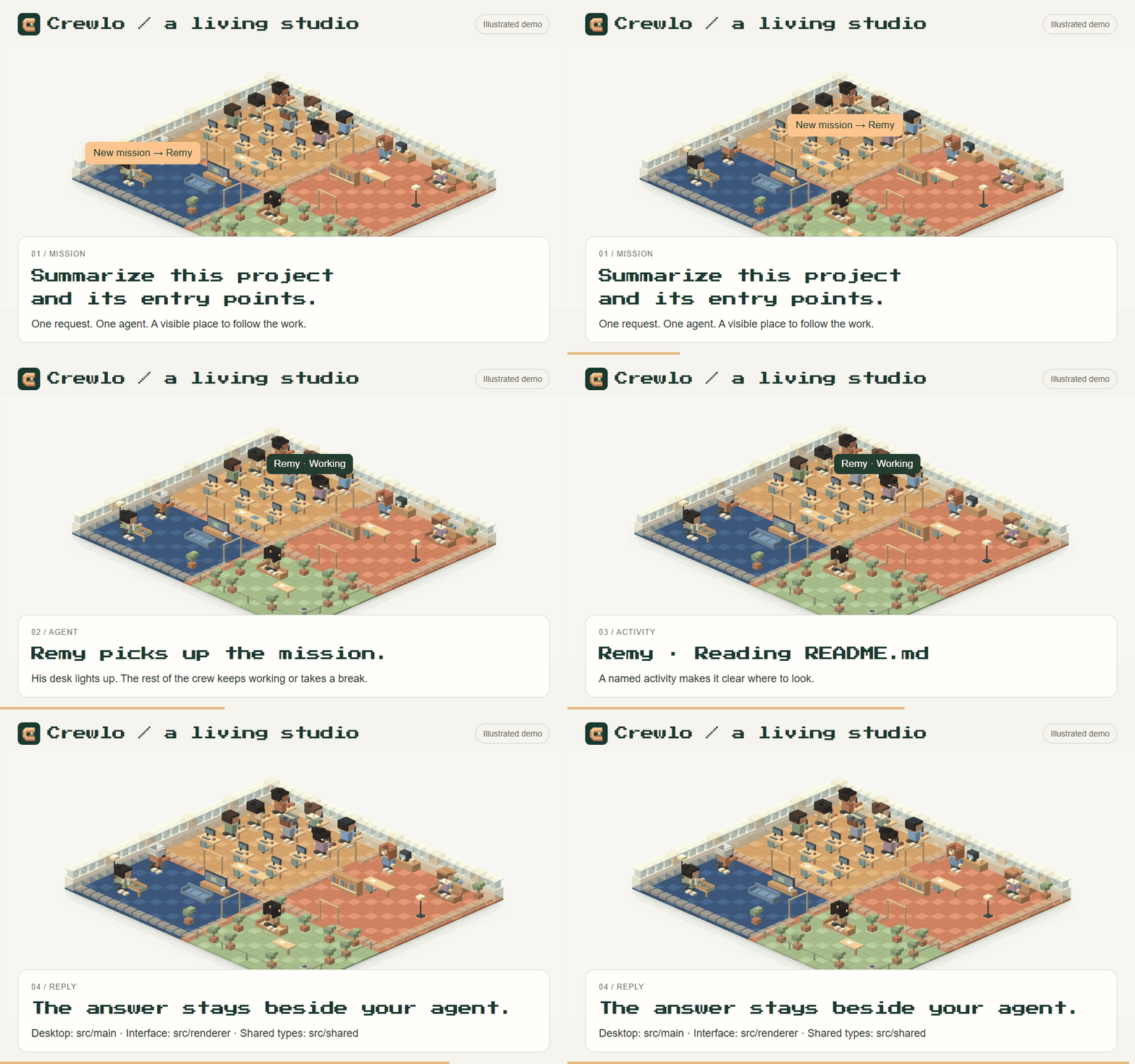
Illustrated demo · 12 seconds. Scripted mission and reply, not a live AI recording. Watch the video · Still image · Original interface capture · Studio MP4.
The GIFs play directly in the README when your GitHub animation preference allows it. Click an animation for the MP4, with playback controls. Media & capture notes.
Your crew, one message away.
| Telegram · documented exchange | WhatsApp · experimental |
|---|---|
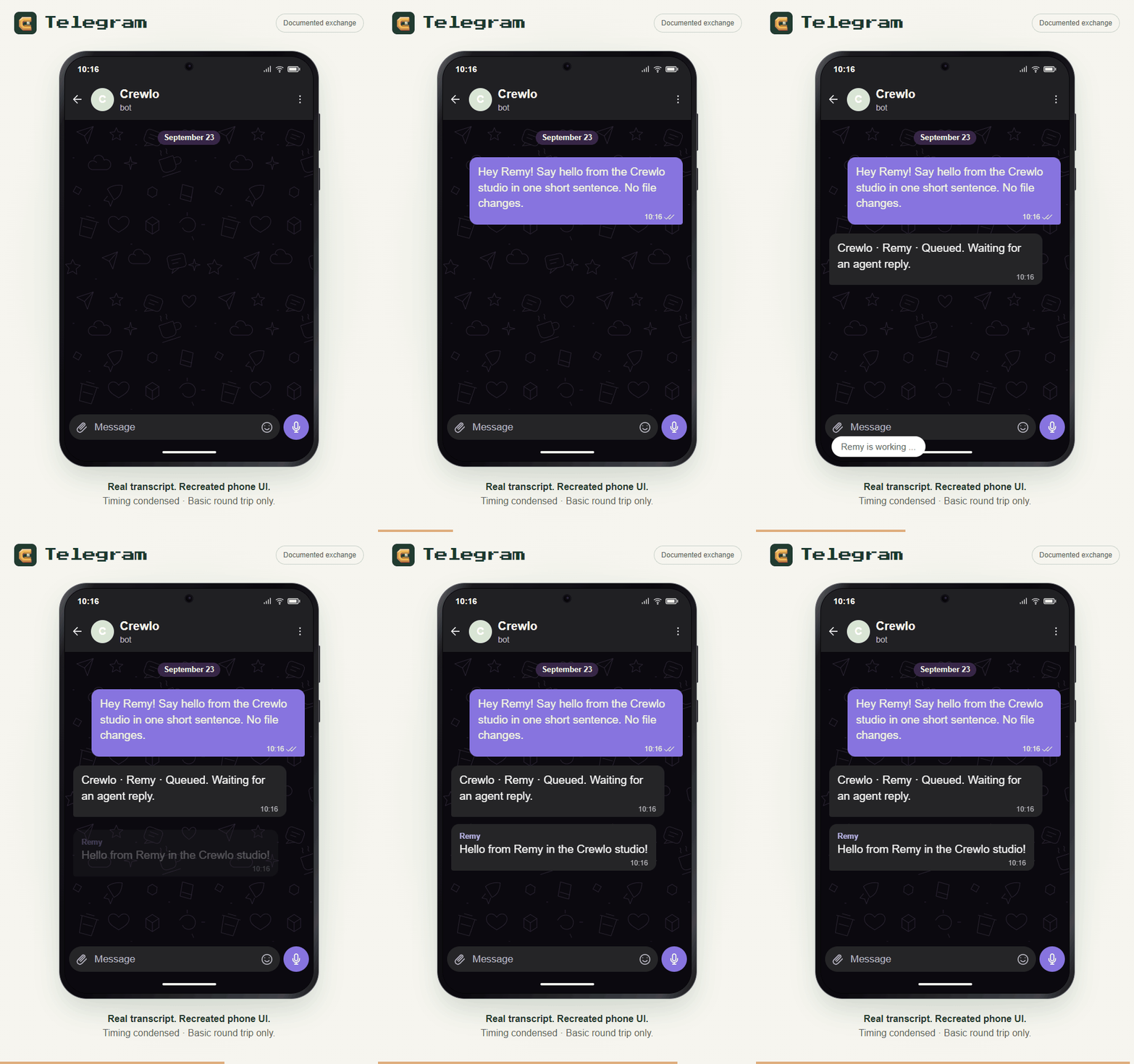 | 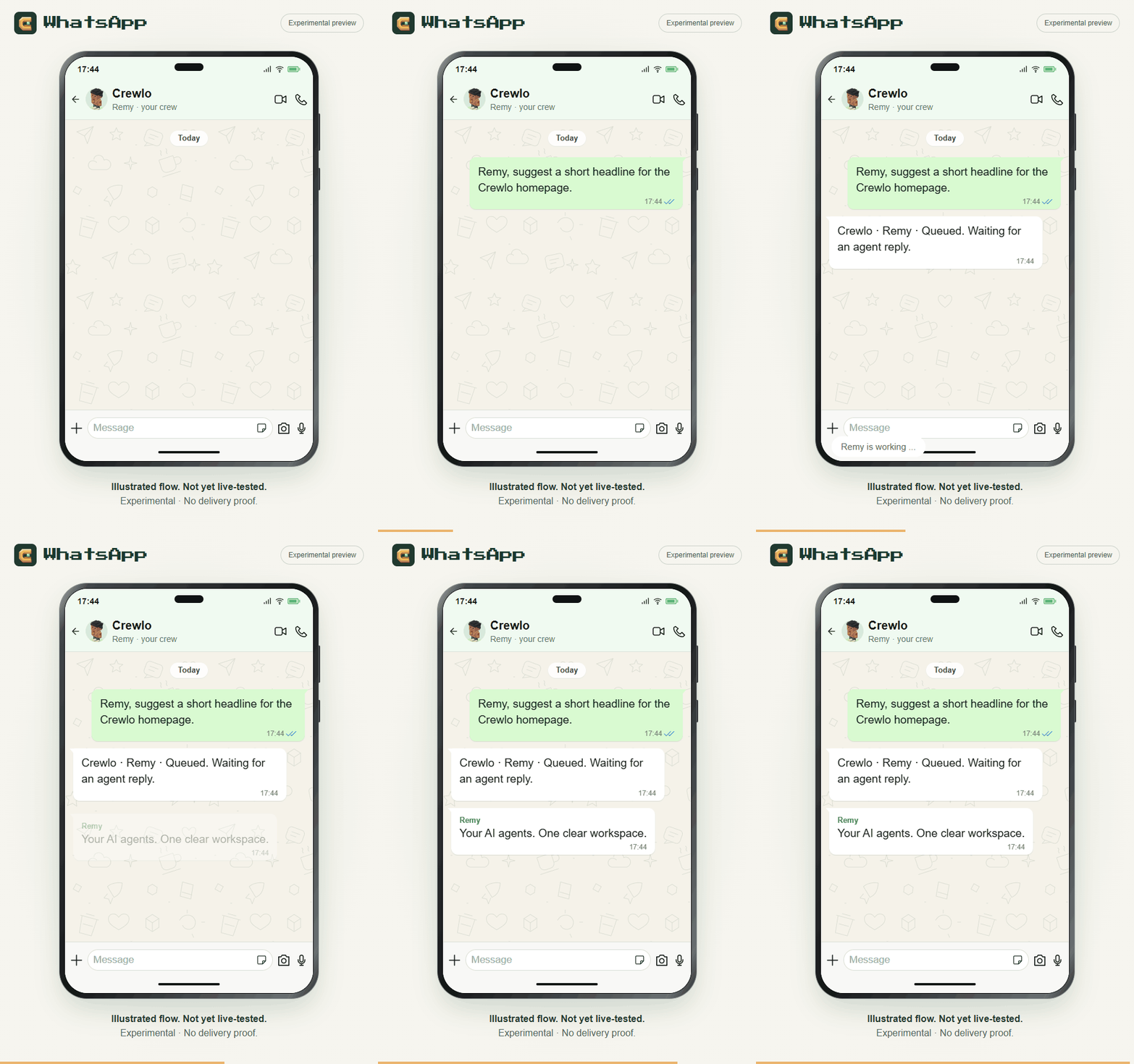 |
| A basic request and named reply were verified in Telegram Web. The phone layout is recreated and the wait is condensed. | Illustrative flow: not a WhatsApp conversation or proof of delivery. Requires Meta Cloud API and an HTTPS relay. |
| Transcript & verification scope · Still image | Preview scope · Still image |
Early preview: an unsigned Windows installer has been built and checked locally. Download the Windows x64 preview (129 MB). No automatic updates are enabled. macOS packages pass SQLite and terminal checks on CI; full Mac installation, Linux runtime validation and live WhatsApp delivery remain open. Details & limits.
Latest changes & earlier captures
Latest work — September 2026
- A living studio on the website. Choose a sample mission and agent, follow the four steps, pause or replay. Select a character to see their activity and last illustrated reply beside the scene.
- Twelve provider presets. Four featured figurines with an expandable shelf; the desktop onboarding now includes Gemini in its twelve-engine list. Presets are not a claim that every provider has been live-tested.
- One messaging section. Telegram and experimental WhatsApp previews share tabs, with redesigned phone layouts and evidence kept next to each feature.
- Windows preview installer. French/English setup, per-user installation, branded shortcuts, and checks of the packaged terminal, SQLite, onboarding and settings persistence.
- Safer Windows worktree cleanup. Shared dependency junctions are detached before removal; other links cause removal to be refused to protect external files.
- macOS previews. Separate Apple Silicon and Intel DMGs, built and checked on matching macOS runners. No Apple Developer ID certification or notarization.
Why Crewlo?
- See the work, not just the terminals. Activity labels above agents reflect execution-hook events when available. Select a character to inspect its conversation or terminal.
- Give the crew one clear mission. A wide composer keeps your request in focus, with one delivery status and an explicit Resume control when message delivery is paused.
- Keep the useful tools close. Tasks & results, Approvals & input, Memory and Settings remain part of the same workspace.
- Check in from your phone. Telegram has a verified basic message round trip. Optional Telegram and WhatsApp connections route paired-owner messages to existing connected agents, with replies and channel badges in Conversation; WhatsApp still needs a live account-to-agent test.
Bring the agent CLI you already use: provider presets include Claude Code, Codex, Gemini CLI and others. Your accounts and credentials stay under your control; coordination and remote-messaging support vary by provider.
Current status
Preview 2 removes the reported production dependency alerts (npm audit --omit=dev: zero at build time). Fresh-runner Windows installation and mounted-DMG Mac onboarding/settings checks pass. Community readiness report and remaining manual checks.
| Area | Verified scope | Remaining limits |
|---|---|---|
| Windows installer | French setup on the development PC; rebuilt package starts; SQLite, PTY and settings persistence pass | Unsigned; clean Server 2022 CI install passes, personal-PC and uninstall checks remain open |
| Real agent | Codex read a temporary file and returned the exact marker through packaged Crewlo IPC and PTY | Does not establish full hive routing, all providers or messaging delivery |
| Website | Five widths from 320 to 1440 px; keyboard selection, timed animations, pause, offscreen stop and reduced motion | Illustrated agents and missions; full accessibility audit remains open |
| macOS | Apple Silicon and Intel DMGs built; packaged SQLite, PTY and disk-image verification pass on macOS 15 CI | No Developer ID or notarization; personal-Mac permissions and live agents unverified |
| Linux | Packaging configuration retained | Runtime and installer not validated |
The 27 September full-suite run passed 961 tests, with 0 failures and 8 skipped (969 total), including the signing-command and universal-DMG regressions. Earlier baseline failures are resolved; the old report remains as historical evidence. Windows validation · macOS validation · Historical baseline.
A basic real Telegram request and named reply were observed in Telegram Web; that does not prove every agent, reconnection or physical-phone scenario. Automated messaging tests use simulated Telegram/Meta traffic and agent replies. WhatsApp still needs a live acceptance test. Additional live messaging checks and signing are deferred. There is no Crewlo release feed or enabled automatic update service.
Download for Windows
Download Crewlo 0.4.6 preview for Windows x64 · Release notes and SHA-256 checksum
Run the setup file, follow the French/English installer, then connect your own authenticated agent CLI. Source build tools are not needed for this installer. It is unsigned: Windows may show an unknown-publisher warning. Clean-PC installation and uninstall remain unverified. Linux installers are not available.
Download for Mac
Apple Silicon (M-series) · Intel Mac · Release notes and checksums
Open the DMG, drag Crewlo into Applications, then launch it and connect your own agent CLI. These previews have local ad-hoc signatures, without Apple Developer ID certification or notarization. macOS may block opening them; see installation guidance. SQLite and terminal checks pass on both CI architectures; DMG installation and onboarding/settings checks pass in CI; personal-Mac permissions and live agents remain open. No automatic updates are enabled.
Build from source
You need Git, Node.js 22.22 or newer, npm, and the credentials required by your chosen agent CLI. Provider setup is available through onboarding; provider subscriptions and API usage are separate from Crewlo.
On Windows, the native node-pty dependency also requires Visual Studio C++ build tools, the Windows SDK and matching MSVC Spectre-mitigated libraries. If installation reports MSB8040, add those libraries in Visual Studio Installer, then rerun npm ci.
Run npm run doctor from the checkout to check prerequisites before installing, and again after installation to check the native runtime. It does not install software or change your settings. Windows quick start and troubleshooting — français.
Clone the repository, or skip the first two commands if you already have a checkout:
git clone https://github.com/HafidIdrissi/crewlo.git
cd crewlo
npm ci
npm run dev
Complete onboarding, connect an agent and open a studio. Review the chosen CLI's permissions and automation settings before giving it work; execution permissions depend on those settings.
To check the code and preview a production build:
npm run typecheck
npm run test:focused
npm run build
npm run preview
Despite its historical name, test:focused runs all test/*.test.cjs files with portable filename expansion. npm run test:crewlo runs the smaller Crewlo-specific smoke suite. Live provider checks are separate and can consume provider usage.
Desktop packaging
| Command | Purpose |
|---|---|
npm run dist:win | Build Windows x64 NSIS with native-module reconstruction |
npm run dist:win:preview | Local Windows preview using already installed, validated native modules |
npm run dist:win:signed | Require code signing; needs your signing credentials and native build tools |
npm run dist:mac | Build universal DMG and ZIP on macOS |
These platform commands do not publish. The Windows preview produces
dist/windows-preview/Crewlo-0.4.6-win-x64-preview-setup.exe locally; this path is
also available in the public preview linked above. It does not prove a clean native rebuild or another PC's
compatibility. macOS expects dist/Crewlo-0.4.6-mac-universal.dmg after a successful
Mac build. Signing and Apple notarization have not been validated.
Windows installer guide · Mac checks and next steps
In the studio
- Start a mission from the composer. Crewlo routes it through the coordinator and message-delivery controls.
- Click a figurine or use the keyboard-accessible roster to open an agent's conversation or terminal.
- Open Tasks & results to inspect actual task records, or Approvals & input when work needs your attention.
- If the composer says Message delivery paused, use Resume on the desktop when you are ready.
Scene controls, accessibility and visual states
- Collapse the agent panel to focus on the studio, or drag its divider to resize it. With the scene focused, arrow keys pan, +/− zoom, and 0 or Fit resets the camera.
- Additional agents expand the individual desks. The roster scrolls as the crew grows.
- In smaller windows, the conversation panel sits below the studio. Selecting an agent scrolls to it; Back to studio returns to the scene. Reduced motion disables figurine animation.
- Agents come from the actual roster. Confirmed idle agents may take clearly labeled cosmetic breaks, rendered locally without prompts or tokens. Unknown, queued, blocked and disconnected agents never take leisure breaks. Smoking is opt-in per agent in Scene preferences.
- The workshop, break room, game room and terrace are visual zones, not separate autonomous teams.
Voxel implementation and verification · 1920 desktop · 1440 desktop · Empty studio · Animation recording
Populated screenshots are labeled test fixtures, not evidence of running agents or completed work.
From your phone
Both channels use single-use pairing links/QRs and desktop confirmation. Only the paired owner's private messages are accepted. They use existing connected agent sessions; they do not start agents, approve tools or remotely resume paused delivery. Keep Crewlo open and your PC awake.
| Telegram | ||
|---|---|---|
| Official transport | Bot API long polling | Meta Cloud API and signed webhooks |
| What you supply | A BotFather bot token | Meta app, Cloud API number, access token, App secret and verification token |
| Public endpoint | None required | Your own HTTPS callback forwarded to Crewlo's local receiver |
| Important limit | Another poller/webhook must not use the same bot | Free-form replies need an open 24-hour user-message window; no automatic tunnel setup |
Open Telegram or WhatsApp from Crewlo's top bar, complete setup and confirm your identity on the desktop. Send /agents to list agents, then /agent <id> to select one. Send plain text and check the agent-named reply in your phone chat and Crewlo's Conversation view.
Telegram setup · Telegram + WhatsApp setup and live-test checklist — français
Want to see the verified basic Telegram exchange before setting up a bot? Watch the 20-second phone-style GIF, then read its verification scope.
The WhatsApp phone GIF is an illustrative preview only. A real WhatsApp phone-to-agent round trip has not yet been verified.
WhatsApp's Accepted state is not proof of delivery: Delivered and Read come from Meta receipts. Paused, unavailable, failed or uncertain delivery remains visible. Consult Conversation before resending an uncertain message.
Watch the Telegram setup interface demo
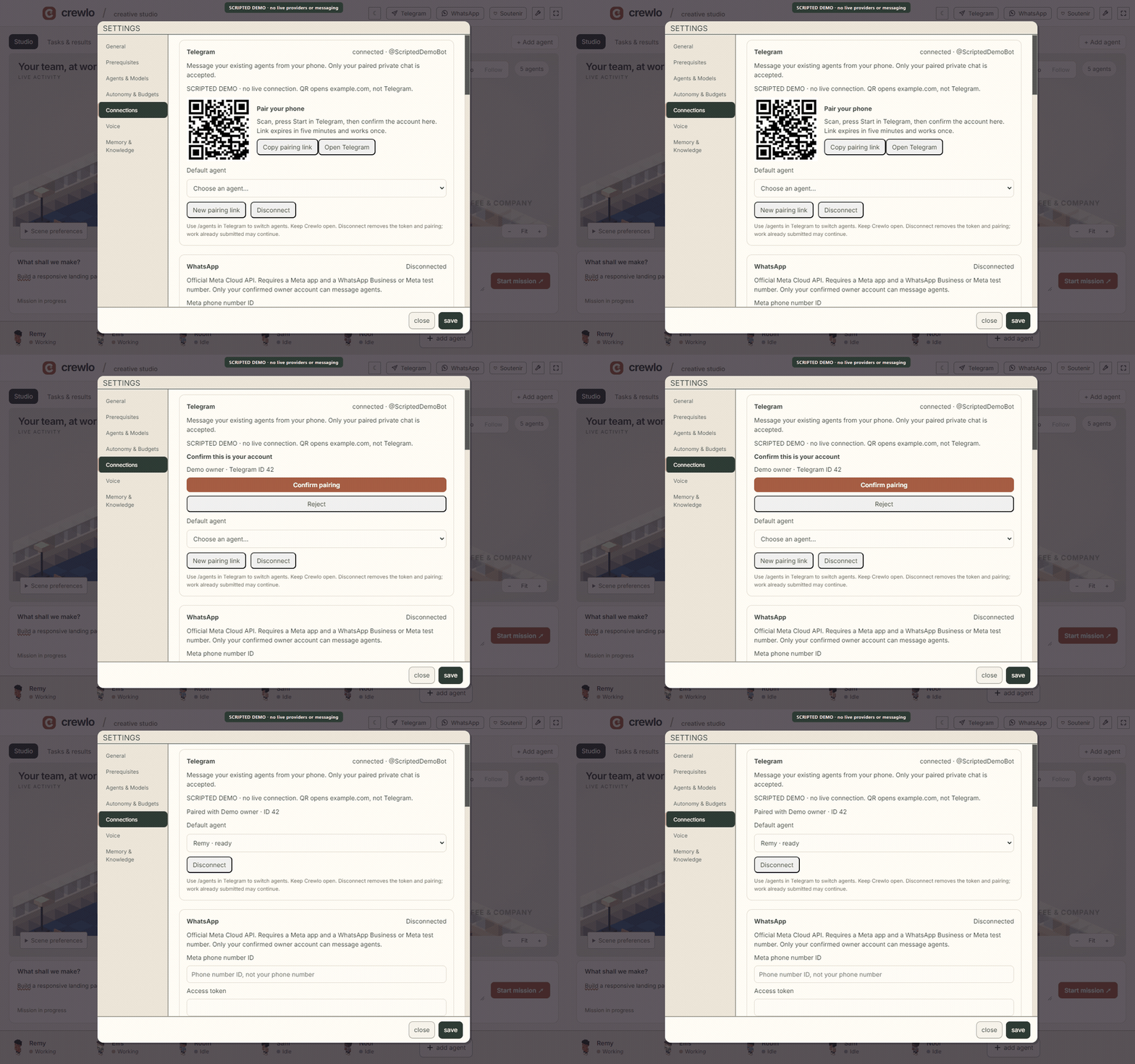
Scripted setup demo only. The QR opens example.com and cannot pair a bot. No real Telegram delivery is shown. Static setup image.
Local workspace, explicit connections
Crewlo stores workspace state locally. Telegram and WhatsApp credentials use an OS-encrypted vault, with no plaintext fallback; conversation history is not encrypted by those features. Connected cloud providers and messaging services receive the data needed for their work—local-first does not mean offline-only.
Anonymous usage analytics requires a configured build-time key and can be disabled in Settings or with DO_NOT_TRACK. See the telemetry contract for its allowlisted events.
Help shape Crewlo
Try the source, report a reproducible bug, suggest an idea, or take on one small improvement. Windows/macOS/Linux verification, accessibility, messaging and clearer agent activity are useful places to contribute. Read the contribution guide before opening a PR.
If Crewlo interests you, give the repository a star. Starring happens on GitHub after you sign in; Crewlo never requests a GitHub token or stars automatically.

Support Crewlo: buy Hafid Idrissi a coffee. The website, app and Windows installer use this same maintainer-supplied profile. Support is optional; Crewlo works without a donation. The destination is configured in docs/crewlo-links.json.
Preview the website locally
After installing dependencies, run:
npm run site
Open the localhost address shown in your terminal. This serves the website locally; it does not publish anything.
Shareable demo kit · Design system · Asset origins · Engine architecture
Credits
Crewlo is independently maintained and builds on Munder Difflin, by Chaitanya Giri and contributors. The original copyright notices and MIT license are preserved. Engineering notes cover the project's foundations and compatibility choices.
Original Crewlo artwork is MIT-licensed. Bundled third-party art and fonts retain their own licenses, including credits to LimeZu and shahar061/the-office. See asset licenses and full attribution.
Similar repos


Languages
TypeScript
70.7%
JavaScript
23.9%
CSS
2.8%
HTML
1.3%
A voxel desktop studio for AI agents, missions, and messaging from your phone.
See the codeSee what people are saying
README
Crewlo
Your agents. A studio of their own.
Bring your coding agents into one visual workspace. Send a mission, follow the work, find the reply. A crew of twelve voxel characters makes the studio feel alive, from focused work to coffee breaks.
Explore the interactive studio · Read the journal · Build from source · Windows & macOS packaging
Illustrated demo · 12 seconds. Scripted mission and reply, not a live AI recording. Watch the video · Still image · Original interface capture · Studio MP4.
The GIFs play directly in the README when your GitHub animation preference allows it. Click an animation for the MP4, with playback controls. Media & capture notes.
Your crew, one message away.
| Telegram · documented exchange | WhatsApp · experimental |
|---|---|
| |
| A basic request and named reply were verified in Telegram Web. The phone layout is recreated and the wait is condensed. | Illustrative flow: not a WhatsApp conversation or proof of delivery. Requires Meta Cloud API and an HTTPS relay. |
| Transcript & verification scope · Still image | Preview scope · Still image |
Early preview: an unsigned Windows installer has been built and checked locally. Download the Windows x64 preview (129 MB). No automatic updates are enabled. macOS packages pass SQLite and terminal checks on CI; full Mac installation, Linux runtime validation and live WhatsApp delivery remain open. Details & limits.
Latest changes & earlier captures
Latest work — September 2026
- A living studio on the website. Choose a sample mission and agent, follow the four steps, pause or replay. Select a character to see their activity and last illustrated reply beside the scene.
- Twelve provider presets. Four featured figurines with an expandable shelf; the desktop onboarding now includes Gemini in its twelve-engine list. Presets are not a claim that every provider has been live-tested.
- One messaging section. Telegram and experimental WhatsApp previews share tabs, with redesigned phone layouts and evidence kept next to each feature.
- Windows preview installer. French/English setup, per-user installation, branded shortcuts, and checks of the packaged terminal, SQLite, onboarding and settings persistence.
- Safer Windows worktree cleanup. Shared dependency junctions are detached before removal; other links cause removal to be refused to protect external files.
- macOS previews. Separate Apple Silicon and Intel DMGs, built and checked on matching macOS runners. No Apple Developer ID certification or notarization.
Why Crewlo?
- See the work, not just the terminals. Activity labels above agents reflect execution-hook events when available. Select a character to inspect its conversation or terminal.
- Give the crew one clear mission. A wide composer keeps your request in focus, with one delivery status and an explicit Resume control when message delivery is paused.
- Keep the useful tools close. Tasks & results, Approvals & input, Memory and Settings remain part of the same workspace.
- Check in from your phone. Telegram has a verified basic message round trip. Optional Telegram and WhatsApp connections route paired-owner messages to existing connected agents, with replies and channel badges in Conversation; WhatsApp still needs a live account-to-agent test.
Bring the agent CLI you already use: provider presets include Claude Code, Codex, Gemini CLI and others. Your accounts and credentials stay under your control; coordination and remote-messaging support vary by provider.
Current status
Preview 2 removes the reported production dependency alerts (npm audit --omit=dev: zero at build time). Fresh-runner Windows installation and mounted-DMG Mac onboarding/settings checks pass. Community readiness report and remaining manual checks.
| Area | Verified scope | Remaining limits |
|---|---|---|
| Windows installer | French setup on the development PC; rebuilt package starts; SQLite, PTY and settings persistence pass | Unsigned; clean Server 2022 CI install passes, personal-PC and uninstall checks remain open |
| Real agent | Codex read a temporary file and returned the exact marker through packaged Crewlo IPC and PTY | Does not establish full hive routing, all providers or messaging delivery |
| Website | Five widths from 320 to 1440 px; keyboard selection, timed animations, pause, offscreen stop and reduced motion | Illustrated agents and missions; full accessibility audit remains open |
| macOS | Apple Silicon and Intel DMGs built; packaged SQLite, PTY and disk-image verification pass on macOS 15 CI | No Developer ID or notarization; personal-Mac permissions and live agents unverified |
| Linux | Packaging configuration retained | Runtime and installer not validated |
The 27 September full-suite run passed 961 tests, with 0 failures and 8 skipped (969 total), including the signing-command and universal-DMG regressions. Earlier baseline failures are resolved; the old report remains as historical evidence. Windows validation · macOS validation · Historical baseline.
A basic real Telegram request and named reply were observed in Telegram Web; that does not prove every agent, reconnection or physical-phone scenario. Automated messaging tests use simulated Telegram/Meta traffic and agent replies. WhatsApp still needs a live acceptance test. Additional live messaging checks and signing are deferred. There is no Crewlo release feed or enabled automatic update service.
Download for Windows
Download Crewlo 0.4.6 preview for Windows x64 · Release notes and SHA-256 checksum
Run the setup file, follow the French/English installer, then connect your own authenticated agent CLI. Source build tools are not needed for this installer. It is unsigned: Windows may show an unknown-publisher warning. Clean-PC installation and uninstall remain unverified. Linux installers are not available.
Download for Mac
Apple Silicon (M-series) · Intel Mac · Release notes and checksums
Open the DMG, drag Crewlo into Applications, then launch it and connect your own agent CLI. These previews have local ad-hoc signatures, without Apple Developer ID certification or notarization. macOS may block opening them; see installation guidance. SQLite and terminal checks pass on both CI architectures; DMG installation and onboarding/settings checks pass in CI; personal-Mac permissions and live agents remain open. No automatic updates are enabled.
Build from source
You need Git, Node.js 22.22 or newer, npm, and the credentials required by your chosen agent CLI. Provider setup is available through onboarding; provider subscriptions and API usage are separate from Crewlo.
On Windows, the native node-pty dependency also requires Visual Studio C++ build tools, the Windows SDK and matching MSVC Spectre-mitigated libraries. If installation reports MSB8040, add those libraries in Visual Studio Installer, then rerun npm ci.
Run npm run doctor from the checkout to check prerequisites before installing, and again after installation to check the native runtime. It does not install software or change your settings. Windows quick start and troubleshooting — français.
Clone the repository, or skip the first two commands if you already have a checkout:
git clone https://github.com/HafidIdrissi/crewlo.git
cd crewlo
npm ci
npm run dev
Complete onboarding, connect an agent and open a studio. Review the chosen CLI's permissions and automation settings before giving it work; execution permissions depend on those settings.
To check the code and preview a production build:
npm run typecheck
npm run test:focused
npm run build
npm run preview
Despite its historical name, test:focused runs all test/*.test.cjs files with portable filename expansion. npm run test:crewlo runs the smaller Crewlo-specific smoke suite. Live provider checks are separate and can consume provider usage.
Desktop packaging
| Command | Purpose |
|---|---|
npm run dist:win | Build Windows x64 NSIS with native-module reconstruction |
npm run dist:win:preview | Local Windows preview using already installed, validated native modules |
npm run dist:win:signed | Require code signing; needs your signing credentials and native build tools |
npm run dist:mac | Build universal DMG and ZIP on macOS |
These platform commands do not publish. The Windows preview produces
dist/windows-preview/Crewlo-0.4.6-win-x64-preview-setup.exe locally; this path is
also available in the public preview linked above. It does not prove a clean native rebuild or another PC's
compatibility. macOS expects dist/Crewlo-0.4.6-mac-universal.dmg after a successful
Mac build. Signing and Apple notarization have not been validated.
Windows installer guide · Mac checks and next steps
In the studio
- Start a mission from the composer. Crewlo routes it through the coordinator and message-delivery controls.
- Click a figurine or use the keyboard-accessible roster to open an agent's conversation or terminal.
- Open Tasks & results to inspect actual task records, or Approvals & input when work needs your attention.
- If the composer says Message delivery paused, use Resume on the desktop when you are ready.
Scene controls, accessibility and visual states
- Collapse the agent panel to focus on the studio, or drag its divider to resize it. With the scene focused, arrow keys pan, +/− zoom, and 0 or Fit resets the camera.
- Additional agents expand the individual desks. The roster scrolls as the crew grows.
- In smaller windows, the conversation panel sits below the studio. Selecting an agent scrolls to it; Back to studio returns to the scene. Reduced motion disables figurine animation.
- Agents come from the actual roster. Confirmed idle agents may take clearly labeled cosmetic breaks, rendered locally without prompts or tokens. Unknown, queued, blocked and disconnected agents never take leisure breaks. Smoking is opt-in per agent in Scene preferences.
- The workshop, break room, game room and terrace are visual zones, not separate autonomous teams.
Voxel implementation and verification · 1920 desktop · 1440 desktop · Empty studio · Animation recording
Populated screenshots are labeled test fixtures, not evidence of running agents or completed work.
From your phone
Both channels use single-use pairing links/QRs and desktop confirmation. Only the paired owner's private messages are accepted. They use existing connected agent sessions; they do not start agents, approve tools or remotely resume paused delivery. Keep Crewlo open and your PC awake.
| Telegram | ||
|---|---|---|
| Official transport | Bot API long polling | Meta Cloud API and signed webhooks |
| What you supply | A BotFather bot token | Meta app, Cloud API number, access token, App secret and verification token |
| Public endpoint | None required | Your own HTTPS callback forwarded to Crewlo's local receiver |
| Important limit | Another poller/webhook must not use the same bot | Free-form replies need an open 24-hour user-message window; no automatic tunnel setup |
Open Telegram or WhatsApp from Crewlo's top bar, complete setup and confirm your identity on the desktop. Send /agents to list agents, then /agent <id> to select one. Send plain text and check the agent-named reply in your phone chat and Crewlo's Conversation view.
Telegram setup · Telegram + WhatsApp setup and live-test checklist — français
Want to see the verified basic Telegram exchange before setting up a bot? Watch the 20-second phone-style GIF, then read its verification scope.
The WhatsApp phone GIF is an illustrative preview only. A real WhatsApp phone-to-agent round trip has not yet been verified.
WhatsApp's Accepted state is not proof of delivery: Delivered and Read come from Meta receipts. Paused, unavailable, failed or uncertain delivery remains visible. Consult Conversation before resending an uncertain message.
Watch the Telegram setup interface demo
Scripted setup demo only. The QR opens example.com and cannot pair a bot. No real Telegram delivery is shown. Static setup image.
Local workspace, explicit connections
Crewlo stores workspace state locally. Telegram and WhatsApp credentials use an OS-encrypted vault, with no plaintext fallback; conversation history is not encrypted by those features. Connected cloud providers and messaging services receive the data needed for their work—local-first does not mean offline-only.
Anonymous usage analytics requires a configured build-time key and can be disabled in Settings or with DO_NOT_TRACK. See the telemetry contract for its allowlisted events.
Help shape Crewlo
Try the source, report a reproducible bug, suggest an idea, or take on one small improvement. Windows/macOS/Linux verification, accessibility, messaging and clearer agent activity are useful places to contribute. Read the contribution guide before opening a PR.
If Crewlo interests you, give the repository a star. Starring happens on GitHub after you sign in; Crewlo never requests a GitHub token or stars automatically.
Support Crewlo: buy Hafid Idrissi a coffee. The website, app and Windows installer use this same maintainer-supplied profile. Support is optional; Crewlo works without a donation. The destination is configured in docs/crewlo-links.json.
Preview the website locally
After installing dependencies, run:
npm run site
Open the localhost address shown in your terminal. This serves the website locally; it does not publish anything.
Shareable demo kit · Design system · Asset origins · Engine architecture
Credits
Crewlo is independently maintained and builds on Munder Difflin, by Chaitanya Giri and contributors. The original copyright notices and MIT license are preserved. Engineering notes cover the project's foundations and compatibility choices.
Original Crewlo artwork is MIT-licensed. Bundled third-party art and fonts retain their own licenses, including credits to LimeZu and shahar061/the-office. See asset licenses and full attribution.
Similar repos
Languages
TypeScript
70.7%
JavaScript
23.9%
CSS
2.8%
HTML
1.3%