One list of every Claude Code and Codex session on Windows
TypeScript
2
4 commits
updated Oct 15, 2026



One list of every Claude Code and Codex session on your machine: which ones are waiting for you, what each one is about, and a double-click to jump to the right editor window.
When you run several AI coding agents at once, one per VS Code window or git worktree, it is easy to lose track. Claude Code's own history only shows the sessions of the folder that is open, so a session started in a worktree window cannot be found from the main repo's window. Vibe Session Manager is a small tray app that reads the session files the agents already write and shows them all in one place.

Ctrl+Alt+Enter goes straight to the most urgent one.
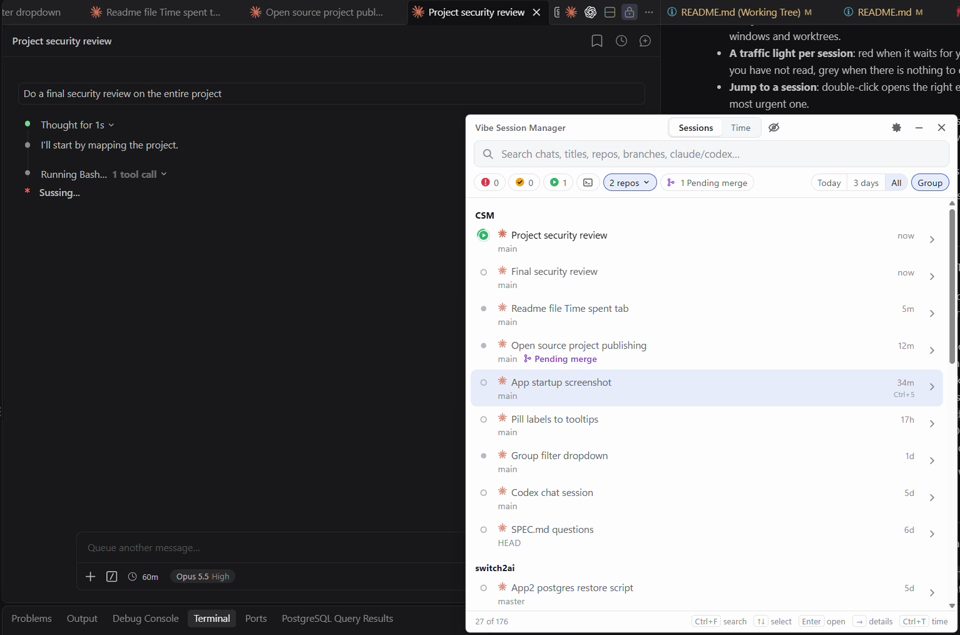
▶ Watch the 30-second demo: open the list, pick a session, land in the right VS Code window.
See docs/USAGE.md for the full guide and all keyboard shortcuts.
The Time tab (Ctrl+T switches between Sessions and Time) shows how much active time went into your sessions, one day at a time:
08:02–09:15 · 10:30–11:05). A dot marks sessions that are working right now.← and → switch day, Today jumps back, and clicking a session opens it.date, repo, worktree, branch, title, start, end, active_minutes, periods and agent.~/.vibe-session-manager/time/. They keep your time after Claude Code deletes old transcripts, and hidden sessions still count.Claude Code and Codex sessions are counted the same way.
Vibe Session Manager runs on Windows 10 and 11. macOS and Linux are not supported yet.
Vibe-Session-Manager-Setup-<version>.exe from the latest release.Get-FileHash <file> in PowerShell with SHA256SUMS.txt in the release.There is also a portable .exe that needs no install. It unpacks itself on every start, so it starts a few seconds slower.
The app lives in the tray. Press Ctrl+Alt+Space to open the list from anywhere, and turn on Start at login in Settings.
For reliable red and yellow lights for Claude Code, click Install hooks in the banner (see Privacy for what that changes).
Your transcripts can contain anything, so here is exactly what the app does with them:
~/.claude (transcripts and live session status), ~/.codex (Codex sessions and titles), and VS Code's or Cursor's own storage.json to see which folders are open.~/.claude/settings.json. Your existing settings and hooks are kept, a backup is saved as settings.json.vsm-backup, and Remove hooks takes them out again. The hook records session id, event name, time and notification text. It never records prompts.custom-title line to that session's transcript, exactly as Claude Code's own /rename does.~/.vibe-session-manager/.vscode:// links after opening the folder. It has not been tested on every setup; if it opens the wrong window, a companion VS Code extension is planned.claude --resume <id> command instead.See the open issues for what is planned.
You need Node.js 22.6 or later.
npm install
npm run dev        # run with hot reload of the UI
npm test
npm run dist       # build the installer and portable .exe in dist/
See CONTRIBUTING.md for the project layout, demo data and how to send changes.
Bug reports, ideas and pull requests are welcome. Please read CONTRIBUTING.md first, and report security problems as described in SECURITY.md.
MIT © 2026 Switch2AI
Vibe Session Manager is an independent project. It is not affiliated with, endorsed by or sponsored by Anthropic or OpenAI. Claude and Claude Code are trademarks of Anthropic, PBC. Codex and OpenAI are trademarks of OpenAI.
One list of every Claude Code and Codex session on Windows
TypeScript
2
4 commits
updated Oct 15, 2026
One list of every Claude Code and Codex session on your machine: which ones are waiting for you, what each one is about, and a double-click to jump to the right editor window.
When you run several AI coding agents at once, one per VS Code window or git worktree, it is easy to lose track. Claude Code's own history only shows the sessions of the folder that is open, so a session started in a worktree window cannot be found from the main repo's window. Vibe Session Manager is a small tray app that reads the session files the agents already write and shows them all in one place.
Ctrl+Alt+Enter goes straight to the most urgent one.
▶ Watch the 30-second demo: open the list, pick a session, land in the right VS Code window.
See docs/USAGE.md for the full guide and all keyboard shortcuts.
The Time tab (Ctrl+T switches between Sessions and Time) shows how much active time went into your sessions, one day at a time:
08:02–09:15 · 10:30–11:05). A dot marks sessions that are working right now.← and → switch day, Today jumps back, and clicking a session opens it.date, repo, worktree, branch, title, start, end, active_minutes, periods and agent.~/.vibe-session-manager/time/. They keep your time after Claude Code deletes old transcripts, and hidden sessions still count.Claude Code and Codex sessions are counted the same way.
Vibe Session Manager runs on Windows 10 and 11. macOS and Linux are not supported yet.
Vibe-Session-Manager-Setup-<version>.exe from the latest release.Get-FileHash <file> in PowerShell with SHA256SUMS.txt in the release.There is also a portable .exe that needs no install. It unpacks itself on every start, so it starts a few seconds slower.
The app lives in the tray. Press Ctrl+Alt+Space to open the list from anywhere, and turn on Start at login in Settings.
For reliable red and yellow lights for Claude Code, click Install hooks in the banner (see Privacy for what that changes).
Your transcripts can contain anything, so here is exactly what the app does with them:
~/.claude (transcripts and live session status), ~/.codex (Codex sessions and titles), and VS Code's or Cursor's own storage.json to see which folders are open.~/.claude/settings.json. Your existing settings and hooks are kept, a backup is saved as settings.json.vsm-backup, and Remove hooks takes them out again. The hook records session id, event name, time and notification text. It never records prompts.custom-title line to that session's transcript, exactly as Claude Code's own /rename does.~/.vibe-session-manager/.vscode:// links after opening the folder. It has not been tested on every setup; if it opens the wrong window, a companion VS Code extension is planned.claude --resume <id> command instead.See the open issues for what is planned.
You need Node.js 22.6 or later.
npm install
npm run dev        # run with hot reload of the UI
npm test
npm run dist       # build the installer and portable .exe in dist/
See CONTRIBUTING.md for the project layout, demo data and how to send changes.
Bug reports, ideas and pull requests are welcome. Please read CONTRIBUTING.md first, and report security problems as described in SECURITY.md.
MIT © 2026 Switch2AI
Vibe Session Manager is an independent project. It is not affiliated with, endorsed by or sponsored by Anthropic or OpenAI. Claude and Claude Code are trademarks of Anthropic, PBC. Codex and OpenAI are trademarks of OpenAI.



