
A keyboard-first menubar app to monitor and jump between AI coding sessions — minimum setup required.
See the codeREADME
cctop
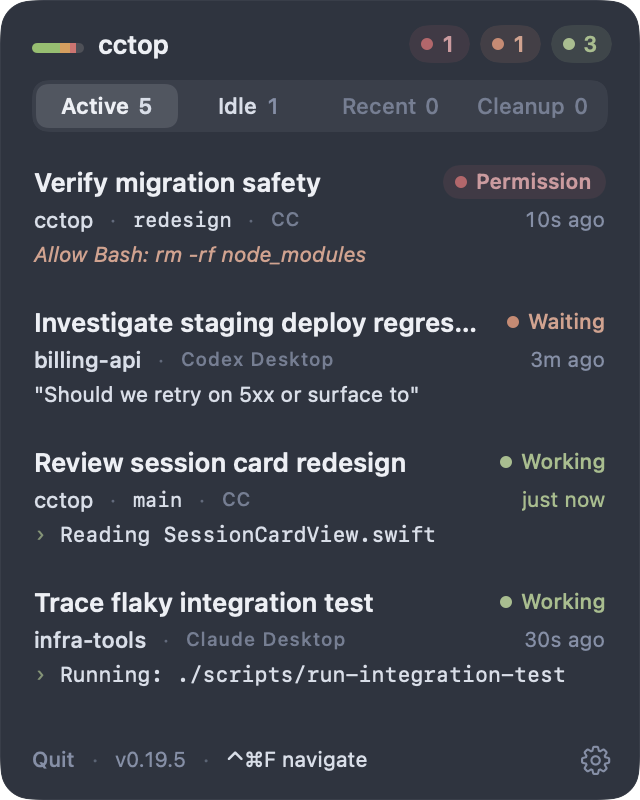
Keep an eye on your AI coding sessions.
See which session is waiting on you. Jump back to the right tab, pane, thread, or project with a keystroke.
Download for Apple Silicon | Intel | Website

One compact menubar view for sessions across tools.
Full launch video (MP4)
Why cctop
- See at a glance which coding sessions are working, idle, or waiting on you.
- Right-click to hide a session from cctop without stopping it or deleting its data. cctop asks first because you cannot show it again while its local session record exists.
- Jump directly to the right editor window, terminal pane, desktop thread, or project.
- Keep recent projects close without leaving a menubar app open all day.
- Find leftover ended-session worktrees, check Git safety, and remove the ones you are done with.
- Store session state locally as plain JSON. No analytics, telemetry, or session upload.
Works With Your Coding Tools
Each integration reports session events locally; cctop turns them into one menubar view and a reliable jump target.
 Claude Code / Desktop Claude plugin + event hooks |
 Codex CLI / Desktop Codex event hooks + trust step |
 opencode opencode plugin events |
 pi pi extension events |
Jump Support
When you click a session card, or use Navigate mode, cctop tries to take you to the most specific place it can.
- Targets the exact session: iTerm2, Warp, cmux, Kitty, Ghostty, Terminal, Codex Desktop, Herdr, Zellij, tmux. cctop jumps to the right window, tab, pane, surface, or desktop thread.
- Opens the project: VS Code, Cursor, Windsurf, Zed. cctop focuses the editor window, using the workspace file if present.
- Activates the app: Claude Desktop and other detected macOS apps. cctop brings the app to the front so you can find the tab manually.
Focus details and requirements
- iTerm2, Ghostty, and Apple Terminal require macOS Automation permission.
- Kitty targets the exact window when
allow_remote_control socket-onlyandlisten_onare enabled inkitty.conf; otherwise it falls back to app activation. - Warp targets the exact pane via its session deep link
(
WARP_FOCUS_URL), available since Warp v0.2026.05.27. Sessions started on older Warp versions fall back to app activation. - cmux targets the exact workspace surface from stored metadata, and can recover live cmux metadata for already-running sessions.
- Ghostty requires version 1.3.0+ for AppleScript support. If the session TTY is unavailable, cctop falls back to working-directory matching.
- Apple Terminal targets the tab by tty. Inside a multiplexer such as tmux or screen, it falls back to raising Terminal because the captured tty belongs to the multiplexer pane.
- If cctop cannot find an exact target or app, it opens the project folder in Finder.
Designed For Scanning, Then Jumping
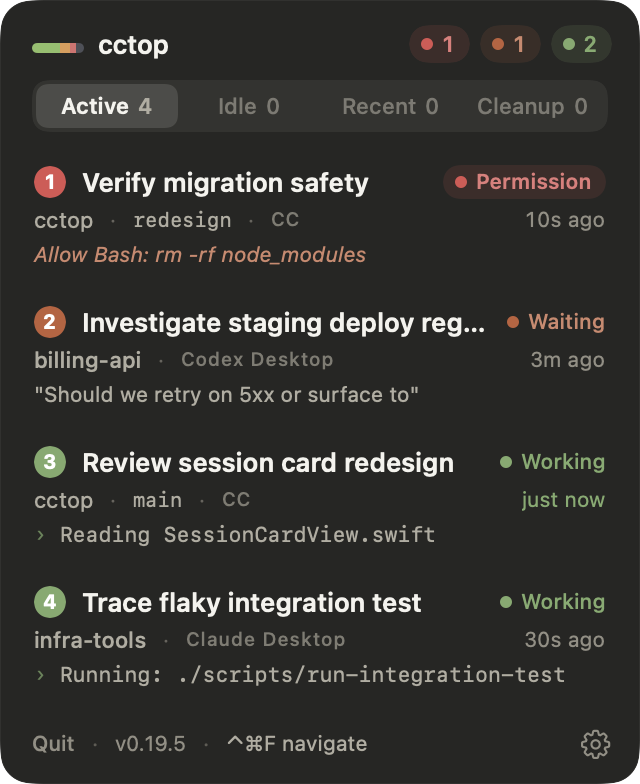
Navigate modeHit a global hotkey to overlay numbered badges on every session card, then press 1 to 9 to jump instantly. |
|
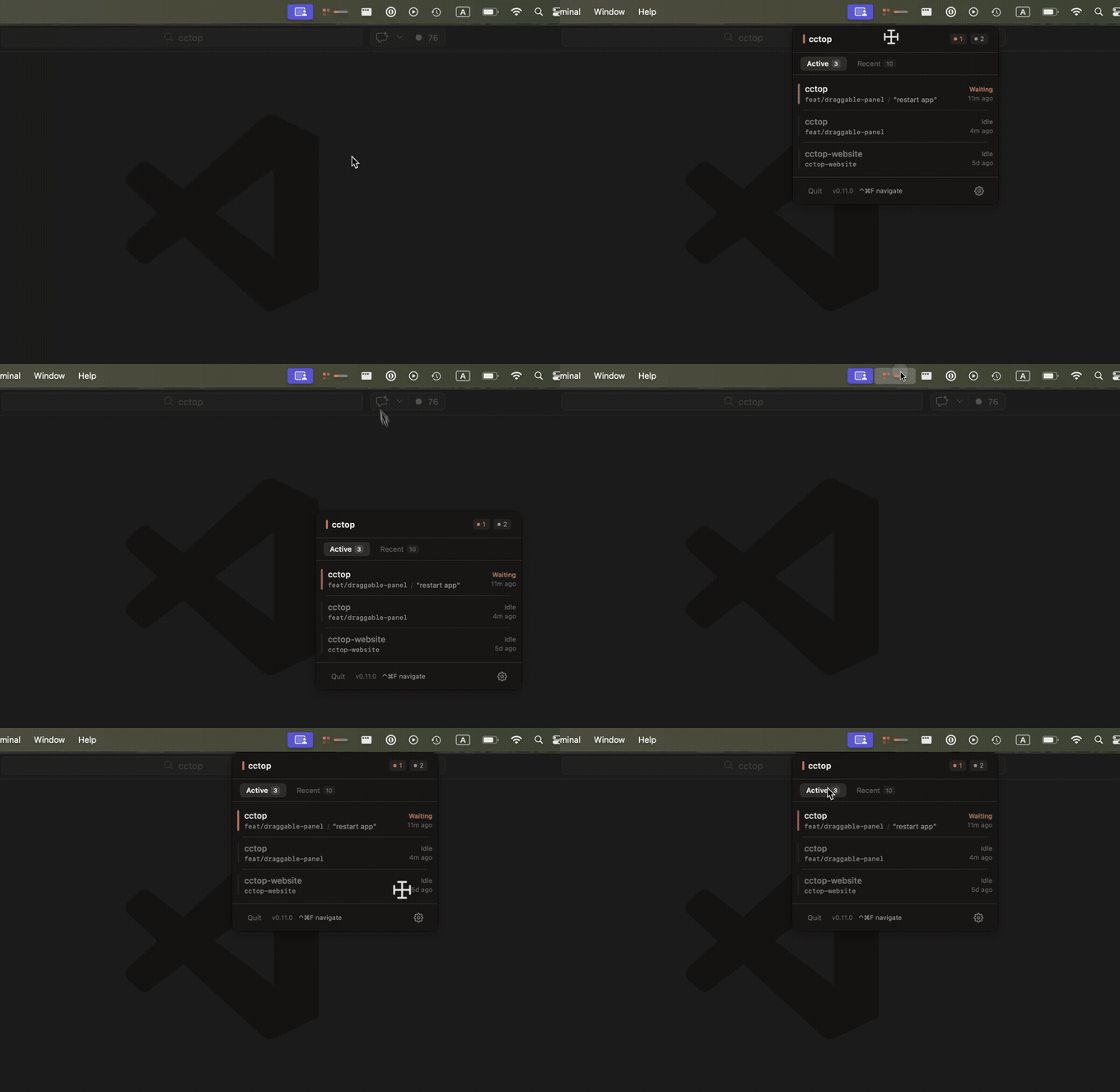
Draggable panelDrag the header anywhere on screen. cctop remembers the position, and double-clicking snaps it back to the menubar anchor. |
|
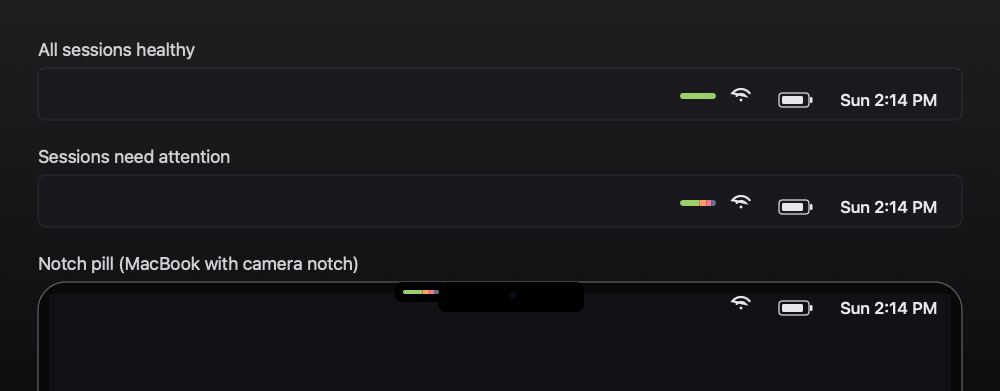
Smart status iconThe menubar icon summarizes session health: healthy, needs attention, and a slim pill for laptops with a camera notch. |
|
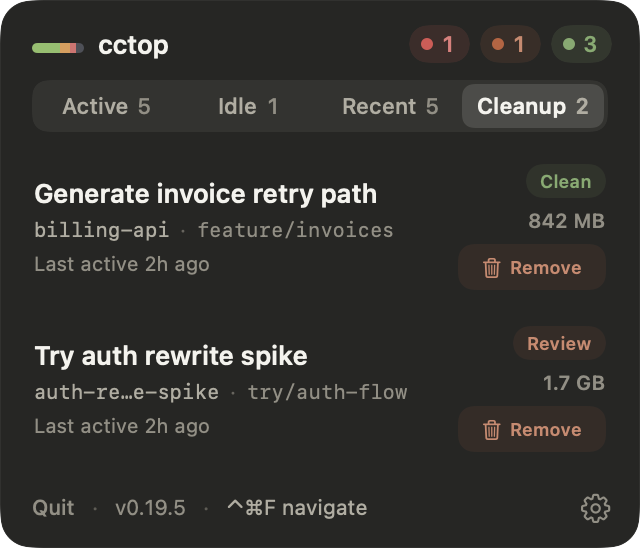
Worktree cleanupCleanup finds ended agent worktrees that still exist on disk, especially CLI or manual worktree runs. cctop checks Git state before offering the right remove action. |
|
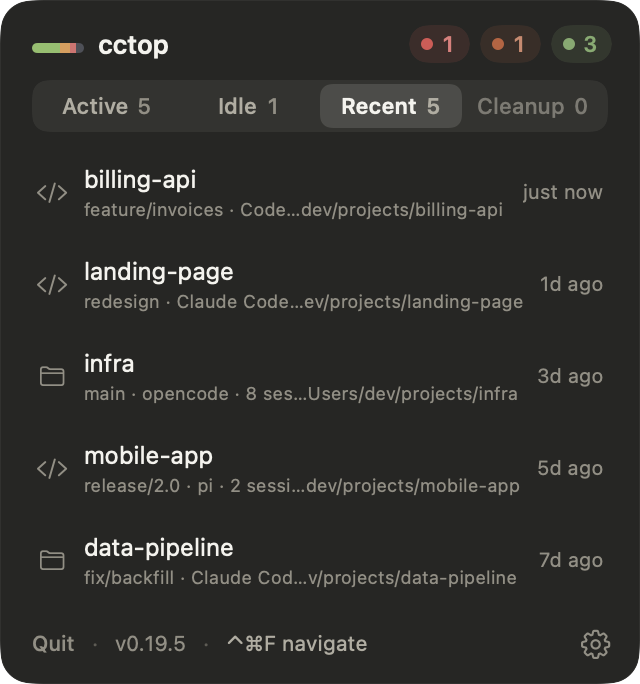
Recent projectsA second tab keeps session history so you can reopen past projects without hunting through old terminals. |
|
Install
1. Install the app
Download the latest signed and notarized build:
Or use Homebrew:
brew install --cask st0012/cctop/cctop
cctop runs on macOS 13+. Signed release builds can check for updates through Sparkle.
2. Connect your tools
Open Settings. cctop shows setup actions for detected coding clients under Tools, and companion apps under Integrations:
- Claude Code / Claude Desktop: click Copy Install Command, then run the two commands below in a terminal.
- opencode and pi: click Install Plugin.
- Stream Deck: under Integrations, click Install Plugin. Stream Deck offers cctop's optional default profile for compatible 15-key Stream Decks; it adds the first five sessions across the top row and Toggle Panel at row 2, column 1 without switching away from your current profile. If you skip that prompt, use Import default profile later or place the Session and Toggle Panel actions manually on any supported model. To show more sessions, add Session actions and set their slots to 6, 7, and so on.
- Codex CLI / Codex Desktop: click Install Hooks, then start a new Codex CLI session and choose Trust all and continue when Codex reviews the hooks. Codex Desktop shares that trust state.
Claude setup:
claude plugin marketplace add st0012/cctop
Then install the plugin:
claude plugin install cctop
Restart any running sessions to pick up newly installed hooks or plugins.
Themes
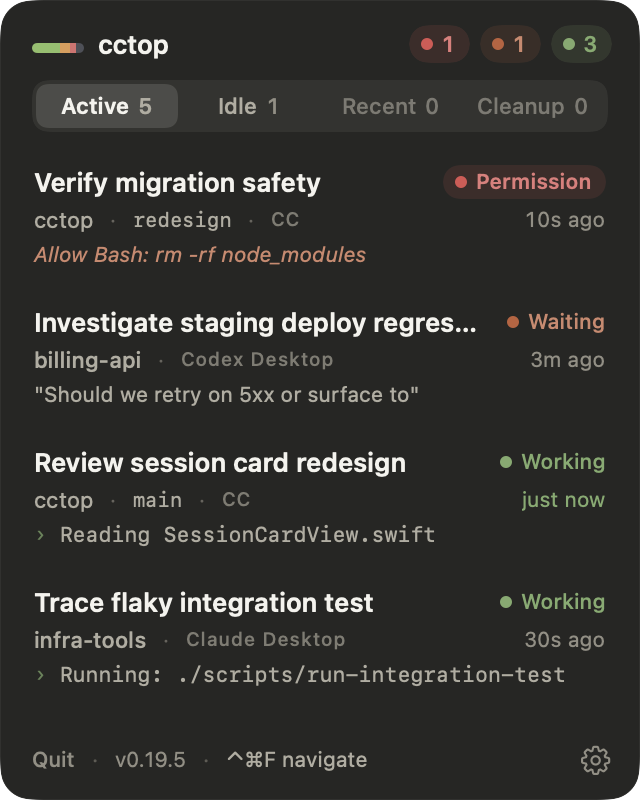
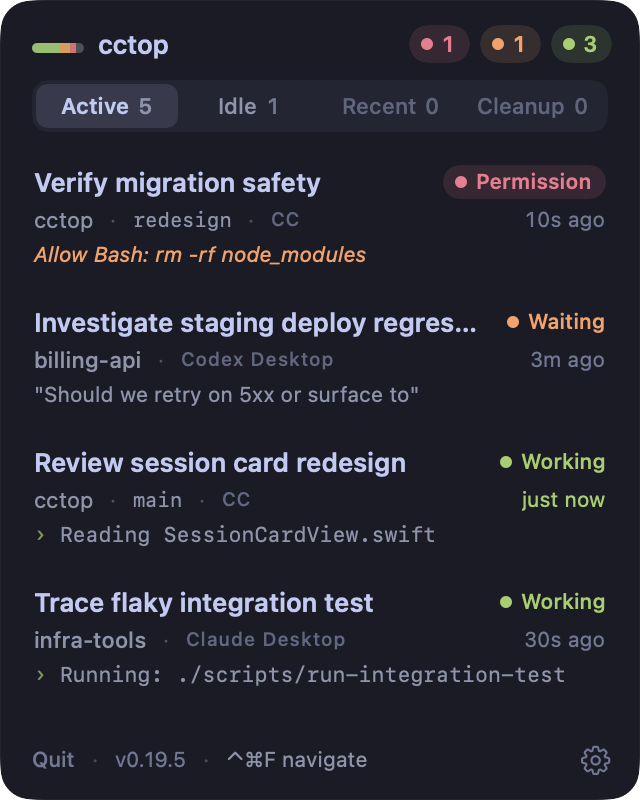
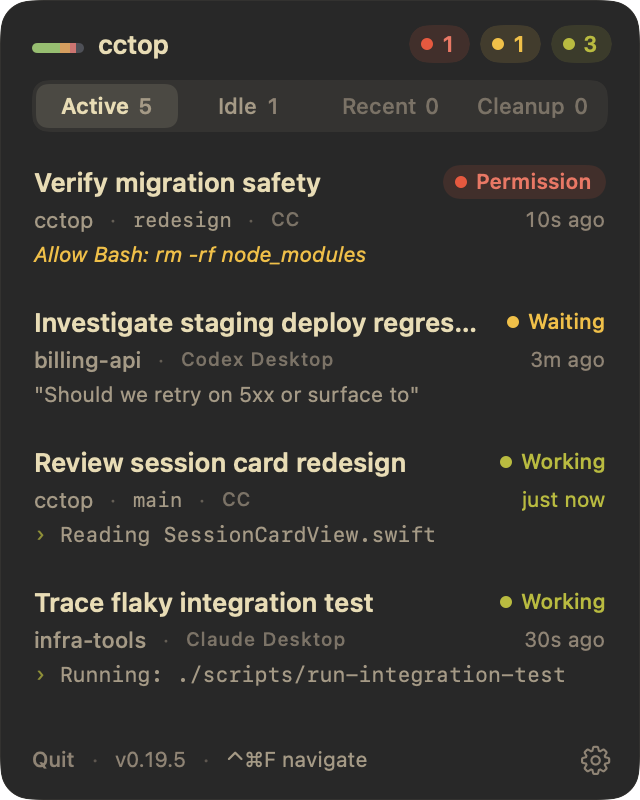
Four palettes inspired by developer tools, each with light and dark variants. Switch themes in Settings > Appearance > Color.
| Claude | Tokyo Night | Gruvbox | Nord |
|---|---|---|---|
|
|
|
|
Privacy
No analytics, no telemetry, and no session upload. Session data stays on your
machine in ~/.cctop/sessions/ as plain JSON.
cctop also publishes ~/.cctop/display-state.json for display integrations.
Each session entry contains only the ordered display identity, name, status,
and resolved color needed for the keys. The file also includes its schema
version, generation time, and cctop process-liveness metadata. The Stream Deck
plugin does not inspect session files or any Claude, Codex, opencode, or pi data.
Signed release builds use network access only for Sparkle update checks and downloads.
What cctop stores locally
- Session status, such as idle, working, or waiting.
- Project directory name.
- Last activity timestamp.
- Current tool or prompt context.
Inspect the files anytime:
ls ~/.cctop/sessions/
cat ~/.cctop/sessions/*.json | python3 -m json.tool
The session-file fields are documented in
docs/session-files.md.
FAQ
Does cctop slow down my coding tool?
No. Each integration calls the lightweight native helper (cctop-hook) on
session events, writes a small JSON file, and returns immediately.
Do I need to configure anything per project?
No. Once your tools are connected, new sessions are automatically tracked.
How does cctop name sessions?
By default, cctop uses the project directory name. In Claude Code, you can rename
a session with /rename and cctop picks that up.
No sessions are showing up. What do I check?
First, restart sessions after installing the plugin or hooks. Then check whether session files exist:
ls ~/.cctop/sessions/
If the directory is empty, the integration is not writing data yet. If files
exist but the menubar shows nothing, check whether those JSON files have
"hidden": true, then try restarting cctop.
Why do some archived desktop sessions not appear in Cleanup?
Some desktop clients remove their managed worktree when you archive a session. In that case, there is nothing left for cctop to remove, so Cleanup stays quiet. Cleanup is most useful for CLI and manual-worktree sessions where the linked Git worktree remains on disk after the session ends.
Why does Codex Desktop need an extra trust step?
Codex only runs hooks you have explicitly reviewed and trusted. cctop can install the hooks, but Codex Desktop does not currently surface the hook-review prompt. Start one Codex CLI session in a terminal and trust the hooks there; Codex Desktop shares that trust state.
What happens if a coding tool crashes?
cctop detects dead sessions automatically by checking whether each session's process is still running, then removes stale entries.
Why does the app need to live in /Applications?
Plugins look for cctop-hook inside /Applications/cctop.app,
~/Applications/cctop.app, or ~/.cctop/bin/. Installing elsewhere breaks the
hook path.
I am on an Intel Mac and the updater installed the wrong architecture.
cctop releases up to and including v0.15.2 shipped an appcast that confused Sparkle's update picker, so Intel Macs could receive the Apple Silicon build. The fix is in place going forward, but installed copies of cctop v0.15.2 and older may need one manual replacement:
- Quit cctop.
- Download
cctop-macOS-x86_64.dmg. - Drag the new
cctop.appinto/Applications/, replacing the existing one. - Relaunch cctop. Future updates will pick the correct architecture.
Reference
How it works
All integrations call cctop-hook, a single native helper that owns session
state.
flowchart LR
  tools["Claude / Codex / opencode / pi"] --> hook["cctop-hook"]
  hook --> files["~/.cctop/sessions/*.json"]
  files --> app["cctop menubar app"]
- A tool plugin or hook translates client events into
cctop-hookcalls. cctop-hookwrites one small JSON file per session.- The menubar app watches
~/.cctop/sessions/and renders live status. - pi skips non-interactive background sessions automatically.
Uninstall
# Remove the menubar app
rm -rf /Applications/cctop.app

# Remove the Claude Code / Claude Desktop plugin
claude plugin remove cctop
claude plugin marketplace remove cctop

# Remove the opencode plugin
rm ~/.config/opencode/plugins/cctop.js

# Remove the pi extension
rm ~/.pi/agent/extensions/cctop.ts

# Remove the Codex CLI / Codex Desktop hooks
rm ~/.codex/cctop-shim.sh
# Then remove cctop entries from ~/.codex/hooks.json

# Remove session data and config
rm -rf ~/.cctop
If installed via Homebrew:
brew uninstall --cask cctop
Build from source
Requires Xcode 16+ and macOS 13+.
git clone https://github.com/st0012/cctop.git
cd cctop
./scripts/bundle-macos.sh
cp -R dist/cctop.app /Applications/
open /Applications/cctop.app
License
MIT
Contributors


Similar repos


Languages
Swift
87.3%
HTML
5.1%
JavaScript
3.5%
Shell
3.0%
A keyboard-first menubar app to monitor and jump between AI coding sessions — minimum setup required.
See the codeREADME
cctop
Keep an eye on your AI coding sessions.
See which session is waiting on you. Jump back to the right tab, pane, thread, or project with a keystroke.
Download for Apple Silicon | Intel | Website
One compact menubar view for sessions across tools.
Full launch video (MP4)
Why cctop
- See at a glance which coding sessions are working, idle, or waiting on you.
- Right-click to hide a session from cctop without stopping it or deleting its data. cctop asks first because you cannot show it again while its local session record exists.
- Jump directly to the right editor window, terminal pane, desktop thread, or project.
- Keep recent projects close without leaving a menubar app open all day.
- Find leftover ended-session worktrees, check Git safety, and remove the ones you are done with.
- Store session state locally as plain JSON. No analytics, telemetry, or session upload.
Works With Your Coding Tools
Each integration reports session events locally; cctop turns them into one menubar view and a reliable jump target.
|
Claude Code / Desktop Claude plugin + event hooks |
Codex CLI / Desktop Codex event hooks + trust step |
opencode opencode plugin events |
pi pi extension events |
Jump Support
When you click a session card, or use Navigate mode, cctop tries to take you to the most specific place it can.
- Targets the exact session: iTerm2, Warp, cmux, Kitty, Ghostty, Terminal, Codex Desktop, Herdr, Zellij, tmux. cctop jumps to the right window, tab, pane, surface, or desktop thread.
- Opens the project: VS Code, Cursor, Windsurf, Zed. cctop focuses the editor window, using the workspace file if present.
- Activates the app: Claude Desktop and other detected macOS apps. cctop brings the app to the front so you can find the tab manually.
Focus details and requirements
- iTerm2, Ghostty, and Apple Terminal require macOS Automation permission.
- Kitty targets the exact window when
allow_remote_control socket-onlyandlisten_onare enabled inkitty.conf; otherwise it falls back to app activation. - Warp targets the exact pane via its session deep link
(
WARP_FOCUS_URL), available since Warp v0.2026.05.27. Sessions started on older Warp versions fall back to app activation. - cmux targets the exact workspace surface from stored metadata, and can recover live cmux metadata for already-running sessions.
- Ghostty requires version 1.3.0+ for AppleScript support. If the session TTY is unavailable, cctop falls back to working-directory matching.
- Apple Terminal targets the tab by tty. Inside a multiplexer such as tmux or screen, it falls back to raising Terminal because the captured tty belongs to the multiplexer pane.
- If cctop cannot find an exact target or app, it opens the project folder in Finder.
Designed For Scanning, Then Jumping
Navigate modeHit a global hotkey to overlay numbered badges on every session card, then press 1 to 9 to jump instantly. |
|
Draggable panelDrag the header anywhere on screen. cctop remembers the position, and double-clicking snaps it back to the menubar anchor. |
|
Smart status iconThe menubar icon summarizes session health: healthy, needs attention, and a slim pill for laptops with a camera notch. |
|
Worktree cleanupCleanup finds ended agent worktrees that still exist on disk, especially CLI or manual worktree runs. cctop checks Git state before offering the right remove action. |
|
Recent projectsA second tab keeps session history so you can reopen past projects without hunting through old terminals. |
|
Install
1. Install the app
Download the latest signed and notarized build:
Or use Homebrew:
brew install --cask st0012/cctop/cctop
cctop runs on macOS 13+. Signed release builds can check for updates through Sparkle.
2. Connect your tools
Open Settings. cctop shows setup actions for detected coding clients under Tools, and companion apps under Integrations:
- Claude Code / Claude Desktop: click Copy Install Command, then run the two commands below in a terminal.
- opencode and pi: click Install Plugin.
- Stream Deck: under Integrations, click Install Plugin. Stream Deck offers cctop's optional default profile for compatible 15-key Stream Decks; it adds the first five sessions across the top row and Toggle Panel at row 2, column 1 without switching away from your current profile. If you skip that prompt, use Import default profile later or place the Session and Toggle Panel actions manually on any supported model. To show more sessions, add Session actions and set their slots to 6, 7, and so on.
- Codex CLI / Codex Desktop: click Install Hooks, then start a new Codex CLI session and choose Trust all and continue when Codex reviews the hooks. Codex Desktop shares that trust state.
Claude setup:
claude plugin marketplace add st0012/cctop
Then install the plugin:
claude plugin install cctop
Restart any running sessions to pick up newly installed hooks or plugins.
Themes
Four palettes inspired by developer tools, each with light and dark variants. Switch themes in Settings > Appearance > Color.
| Claude | Tokyo Night | Gruvbox | Nord |
|---|---|---|---|
|
|
|
|
|
Privacy
No analytics, no telemetry, and no session upload. Session data stays on your
machine in ~/.cctop/sessions/ as plain JSON.
cctop also publishes ~/.cctop/display-state.json for display integrations.
Each session entry contains only the ordered display identity, name, status,
and resolved color needed for the keys. The file also includes its schema
version, generation time, and cctop process-liveness metadata. The Stream Deck
plugin does not inspect session files or any Claude, Codex, opencode, or pi data.
Signed release builds use network access only for Sparkle update checks and downloads.
What cctop stores locally
- Session status, such as idle, working, or waiting.
- Project directory name.
- Last activity timestamp.
- Current tool or prompt context.
Inspect the files anytime:
ls ~/.cctop/sessions/
cat ~/.cctop/sessions/*.json | python3 -m json.tool
The session-file fields are documented in
docs/session-files.md.
FAQ
Does cctop slow down my coding tool?
No. Each integration calls the lightweight native helper (cctop-hook) on
session events, writes a small JSON file, and returns immediately.
Do I need to configure anything per project?
No. Once your tools are connected, new sessions are automatically tracked.
How does cctop name sessions?
By default, cctop uses the project directory name. In Claude Code, you can rename
a session with /rename and cctop picks that up.
No sessions are showing up. What do I check?
First, restart sessions after installing the plugin or hooks. Then check whether session files exist:
ls ~/.cctop/sessions/
If the directory is empty, the integration is not writing data yet. If files
exist but the menubar shows nothing, check whether those JSON files have
"hidden": true, then try restarting cctop.
Why do some archived desktop sessions not appear in Cleanup?
Some desktop clients remove their managed worktree when you archive a session. In that case, there is nothing left for cctop to remove, so Cleanup stays quiet. Cleanup is most useful for CLI and manual-worktree sessions where the linked Git worktree remains on disk after the session ends.
Why does Codex Desktop need an extra trust step?
Codex only runs hooks you have explicitly reviewed and trusted. cctop can install the hooks, but Codex Desktop does not currently surface the hook-review prompt. Start one Codex CLI session in a terminal and trust the hooks there; Codex Desktop shares that trust state.
What happens if a coding tool crashes?
cctop detects dead sessions automatically by checking whether each session's process is still running, then removes stale entries.
Why does the app need to live in /Applications?
Plugins look for cctop-hook inside /Applications/cctop.app,
~/Applications/cctop.app, or ~/.cctop/bin/. Installing elsewhere breaks the
hook path.
I am on an Intel Mac and the updater installed the wrong architecture.
cctop releases up to and including v0.15.2 shipped an appcast that confused Sparkle's update picker, so Intel Macs could receive the Apple Silicon build. The fix is in place going forward, but installed copies of cctop v0.15.2 and older may need one manual replacement:
- Quit cctop.
- Download
cctop-macOS-x86_64.dmg. - Drag the new
cctop.appinto/Applications/, replacing the existing one. - Relaunch cctop. Future updates will pick the correct architecture.
Reference
How it works
All integrations call cctop-hook, a single native helper that owns session
state.
flowchart LR
  tools["Claude / Codex / opencode / pi"] --> hook["cctop-hook"]
  hook --> files["~/.cctop/sessions/*.json"]
  files --> app["cctop menubar app"]
- A tool plugin or hook translates client events into
cctop-hookcalls. cctop-hookwrites one small JSON file per session.- The menubar app watches
~/.cctop/sessions/and renders live status. - pi skips non-interactive background sessions automatically.
Uninstall
# Remove the menubar app
rm -rf /Applications/cctop.app

# Remove the Claude Code / Claude Desktop plugin
claude plugin remove cctop
claude plugin marketplace remove cctop

# Remove the opencode plugin
rm ~/.config/opencode/plugins/cctop.js

# Remove the pi extension
rm ~/.pi/agent/extensions/cctop.ts

# Remove the Codex CLI / Codex Desktop hooks
rm ~/.codex/cctop-shim.sh
# Then remove cctop entries from ~/.codex/hooks.json

# Remove session data and config
rm -rf ~/.cctop
If installed via Homebrew:
brew uninstall --cask cctop
Build from source
Requires Xcode 16+ and macOS 13+.
git clone https://github.com/st0012/cctop.git
cd cctop
./scripts/bundle-macos.sh
cp -R dist/cctop.app /Applications/
open /Applications/cctop.app
License
MIT
Similar repos
Contributors
Languages
Swift
87.3%
HTML
5.1%
JavaScript
3.5%
Shell
3.0%