
Desktop environment for AI coding agents on Windows with quest logs and terminal access
See the codeSee what people are saying
README

Horadric
Every coding agent you have running, as a tile on your desktop, on Windows and macOS.
Grouped by project. Lit when it needs you. A full terminal when you click it.




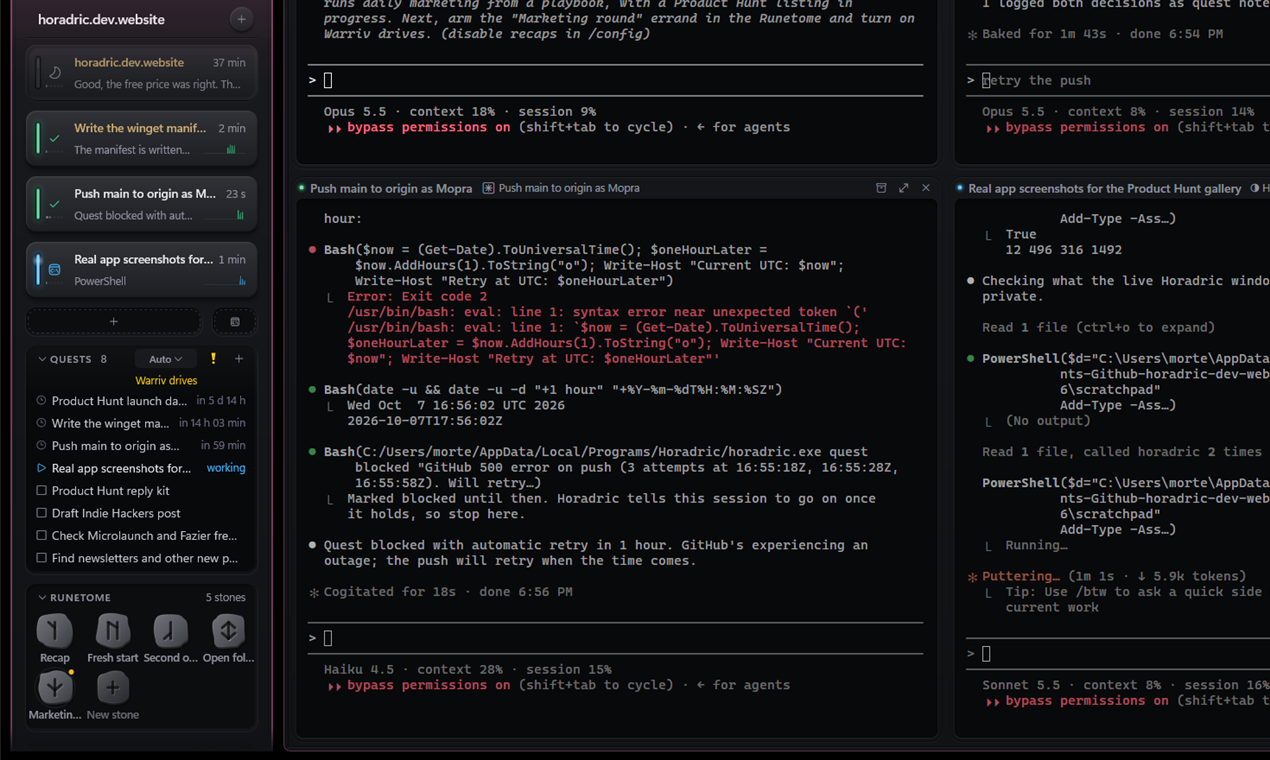
Every agent session is a small tile, grouped by project. Amber means it needs you.
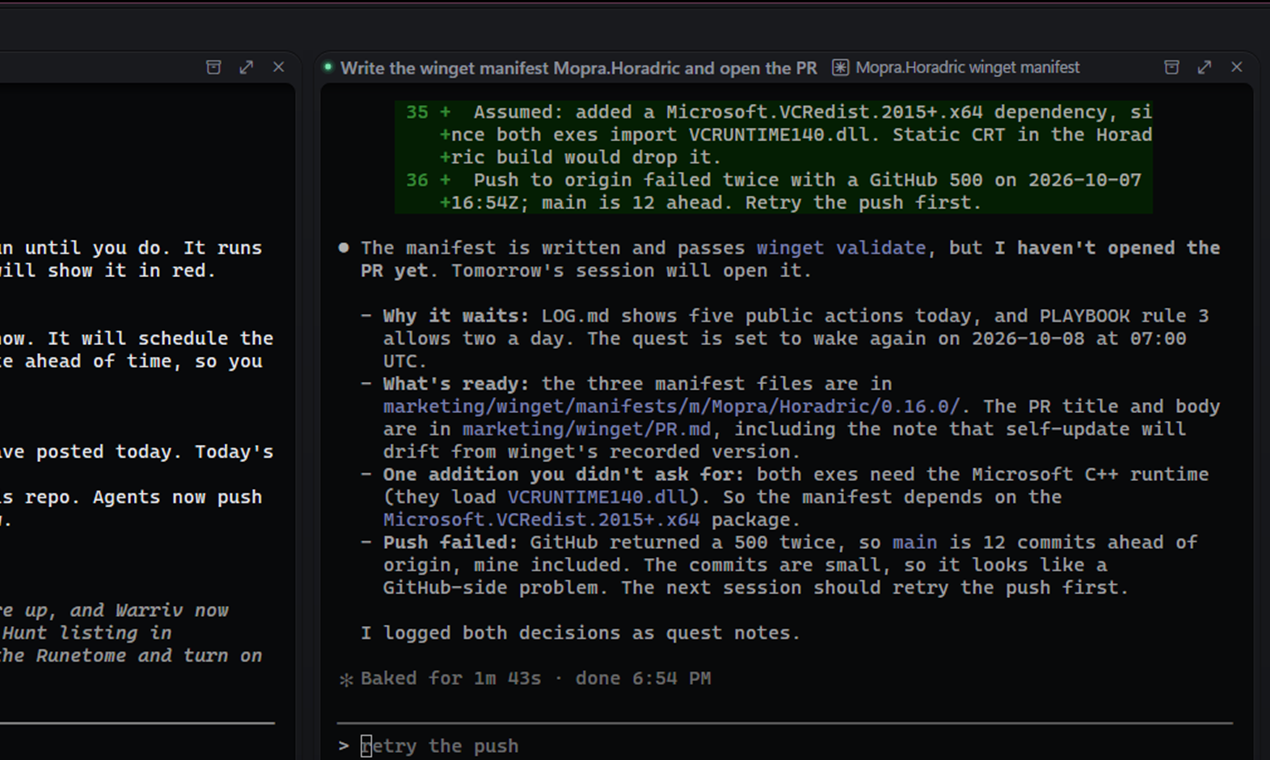
Click a tile and the real CLI opens in a real terminal. No chat UI of its own.
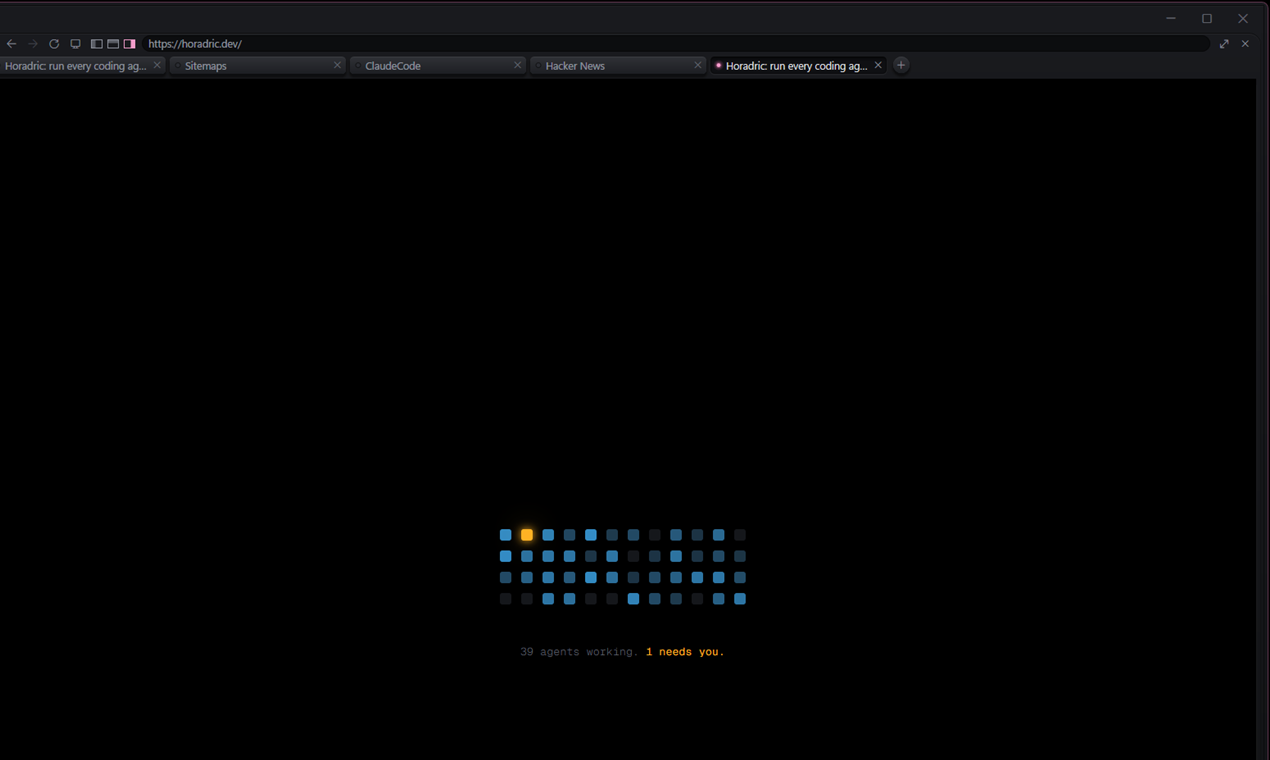
A browser pane beside the agents, for localhost or anything else. Agents can drive it too.
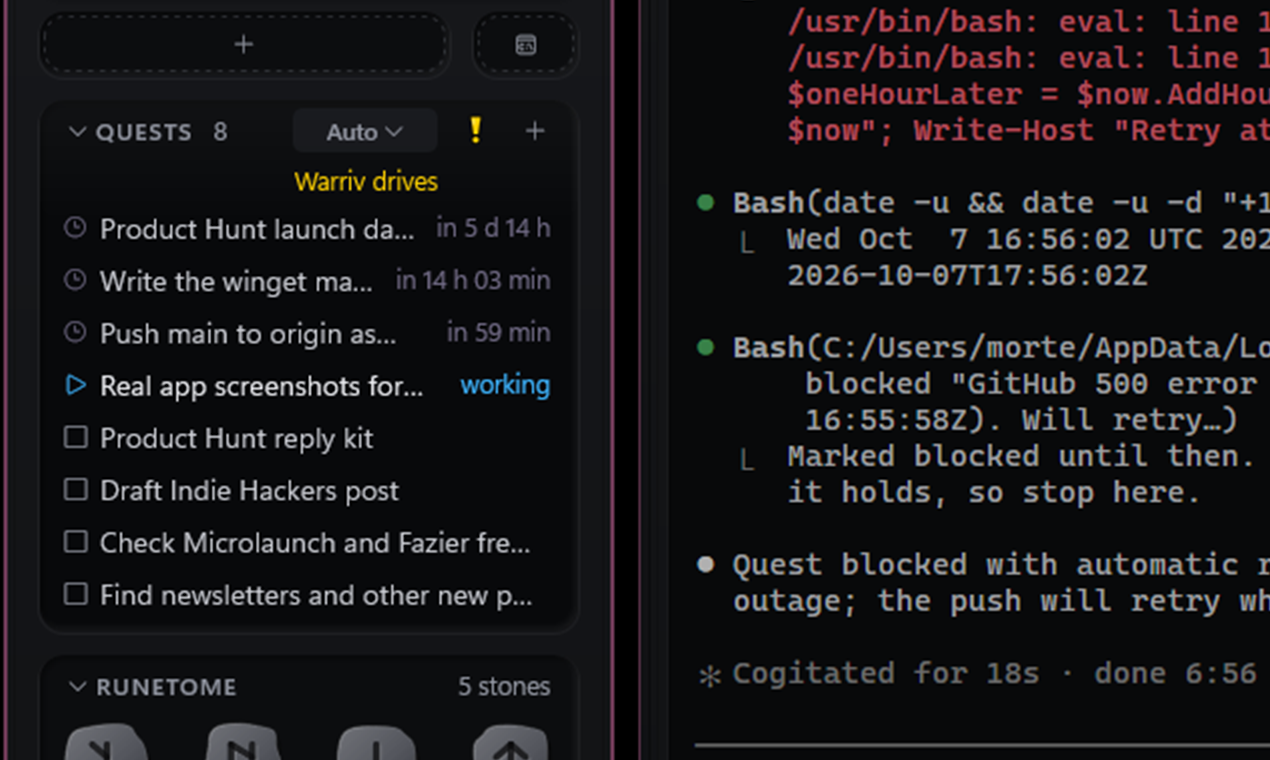
A quest log per project, a plain Markdown checklist in the repo.
What is Horadric?
Running five agent sessions at once means five terminals piled on top of each other, and the one that has been waiting for your permission for twenty minutes is always at the bottom.
Horadric fixes that. Each session becomes a small tile on the edge of your screen, grouped by project, showing what it is doing and how long it has been doing it. A tile lights up amber the moment its agent needs you. Click it and the session opens in a real terminal, with the real CLI in it.
It works with Claude Code, Codex and Grok Build. It never puts a chat UI of its own in front of the agent. The terminal is the UI.
Features
Tiles
- One small, frameless cluster window per project. Never steals focus, never in the taskbar or alt tab.
- Each tile shows the session's state, name, an age line like "needs permission 12 min", the last line worth reading and how full its context is.
- A files tile shows the project's tree with changed files marked, like VS Code's explorer. Click a file to open it in VS Code.
- Drag clusters into columns, collapse them, scroll a long column.
The stage
- One terminal window for every session. It shows one project at a time, each session a pane in a grid. Click a tile to switch projects.
- Zoom a pane, swap panes by dragging, search 10,000 lines of history.
- Plain terminals beside the agents, for a dev server, a log or a deploy.
- A browser pane for
localhost:3000or anything else, that your agents can drive too. - Ctrl+click a path in a pane to open the file in VS Code at that line.
Getting your attention
- Ctrl+Alt+Space, from anywhere, jumps to the session that has waited longest. Press it again for the next one.
- A Windows notification when a session starts waiting and you are not looking at it.
Working through a list
- A quest log per project, a plain Markdown checklist in the repo. Click a quest and a session starts on it. Run the list by hand, with your review between items, or all the way down.
- Warriv, an optional orchestrator that wakes when a quest gets stuck and answers it, splits it, or hands it to you.
- The Runetome: buttons that run a list of steps on a session. Approve, interrupt, commit, ask for a review, or anything you describe to the Runesmith, which writes the button for you.
Accounts and limits
- See how much of your five hour, weekly and spend limits is used, and pick the model, effort and permission mode for new sessions.
- Switch between Claude subscriptions. Every session resumes on the new account, conversations and all.
Built to stay out of the way
- Pure Rust, drawing straight to Win32 and Direct2D. About 45 MB with four sessions open, and no CPU between events.
- Sessions survive a crash, a restart of Horadric or an update. Click a paused tile after a reboot and the conversation resumes.
- Updates itself, with every build signed.
- Optional Discord status: "Playing Horadric: 2 agents working, 1 waits for you".
Install on macOS
You need macOS 11 or later, on Apple Silicon or Intel, and Claude Code. In a terminal:
curl -fsSL https://horadric.dev/install.sh | sh
No admin rights needed. Horadric is now in ~/Applications (Launchpad and
Spotlight find it), opens at login, answers to horadric in a terminal
(linked from ~/.local/bin, where Claude Code's installer puts claude),
and has its hooks in Claude Code's settings. Its icon is in the menu bar.
The Mac app is not notarized yet. The install script never meets
Gatekeeper, because a download by curl is not quarantined. If you
download Horadric-macos.tar.gz from the releases page with a browser
instead, clear the quarantine once before opening it:
xattr -dr com.apple.quarantine Horadric.app
The first Mac release has the tiles, the stage with real terminals, sessions that outlive the app, plain terminals, the menu bar menu and the updater. The browser pane, the quest log and Warriv, the files tile, the usage window and Discord status are Windows only for now.
| Key on a Mac | Does |
|---|---|
| Cmd+N | New session in a folder |
| Cmd+J | Show the session that has waited longest, then the next |
| Cmd+T | New plain terminal in this project |
| Cmd+Shift+Return | Zoom the pane in or out |
| Cmd+Option+Arrow | Move to the pane beside |
| Cmd+C, Cmd+V | Copy the selection, paste |
| Cmd+Plus, Cmd+Minus, Cmd+0 | Font size |
The Dock icon counts the sessions waiting for you, and bounces when one starts waiting while you are in another app.
Install on Windows
You need Windows 10 or 11 and at least one of Claude Code, Codex or Grok Build.
-
Download
horadric.exeandhoradricw.exefrom the latest release into the same folder. -
Open a terminal in that folder and run:
.\horadric.exe install
That is all. No admin rights needed. Horadric now:
- is in the Start menu (search "Horadric") and starts with Windows,
- answers to
horadricin any new terminal, - adds "Open in Horadric" to folders in Explorer (under "Show more options" on Windows 11),
- has the hooks it needs in your agent's settings.
It lives in the tray. Windows may hide a new tray icon behind the ^ by the
clock.
The downloaded files are not yet code signed, so Windows SmartScreen may warn you the first time. Choose "More info", then "Run anyway". Updates after that are checked against Horadric's own signature.
Getting started
- Click the tray icon and pick New session..., or right click a project folder in Explorer and choose Open in Horadric.
- A tile appears and the stage opens with your agent in it. Work as you always do.
- Start more sessions with the
+on the project's header. Click away. When one needs you, its tile turns amber.
Everything else is in Settings... in the tray menu.
Keys
| Key | Does |
|---|---|
| Ctrl+Alt+Space | Show the session that has waited longest (global) |
| Ctrl+Shift+T | New plain terminal in this project |
| Ctrl+Shift+B | Browser pane |
| Ctrl+Shift+Enter | Zoom the pane in or out |
| Ctrl+Alt+Arrow | Move to the pane beside |
| Ctrl+Shift+F | Search the pane's history |
| Ctrl+Plus, Ctrl+Minus, Ctrl+0 | Font size |
| Ctrl+click | Open the link, file or folder under the mouse |
The global shortcuts can be changed in Settings, under Keys.
From the command line
horadric new --name fix-login          start a session in this folder
horadric new --agent codex             start one with another agent
horadric quest add "Fix the login bug" add to the quest log
horadric serve                         every session's state as a table
horadric help lists the rest.
How it knows
Horadric reads state from your agent's own lifecycle hooks, never from the text in the terminal. Claude Code posts each event to Horadric over localhost: a prompt submitted means working, a permission request means waiting, a stop means done. Only sessions Horadric started are tracked; anything else is ignored.
Privacy
No telemetry, no analytics, no crash reporting. The only thing that leaves your machine is the daily update check against GitHub, and Discord status if you switch it on. docs/PRIVACY.md has the full audit.
Uninstall
horadric uninstall
On Windows this removes Horadric from PATH, the Start menu, Explorer and
startup, and takes out only its own hooks. Your agent settings stay as
they were. Saved sessions stay in %APPDATA%\Horadric.
On a Mac it removes the app, the horadric link, opening at login and its
hooks. Saved sessions stay in ~/Library/Application Support/Horadric.
Build from source
Rust stable (the exact version is pinned in rust-toolchain.toml).
cargo build --release
target\release\horadric.exe install     # Windows
target/release/horadric install          # macOS
HORADRIC_AGENT=cmd.exe runs a shell instead of an agent in the terminals,
the cheap way to try them. HORADRIC_DEV=1 runs a build beside the
installed one with its own port and state, which is how Horadric is
developed from inside Horadric. horadric reload swaps a running Horadric
over to a new build without stopping a single session.
docs/PLAN.md has the design, the decisions behind it and the known gaps.
Not doing
- A chat UI of its own.
- Progress bars or time estimates.
- An embedded editor or diff viewer. VS Code does that.
- Mac or Linux, for now.
License
MIT.
Similar repos


Desktop environment for AI coding agents on Windows with quest logs and terminal access
See the codeSee what people are saying
README
Horadric
Every coding agent you have running, as a tile on your desktop, on Windows and macOS.
Grouped by project. Lit when it needs you. A full terminal when you click it.
Every agent session is a small tile, grouped by project. Amber means it needs you.
Click a tile and the real CLI opens in a real terminal. No chat UI of its own.
A browser pane beside the agents, for localhost or anything else. Agents can drive it too.
A quest log per project, a plain Markdown checklist in the repo.
What is Horadric?
Running five agent sessions at once means five terminals piled on top of each other, and the one that has been waiting for your permission for twenty minutes is always at the bottom.
Horadric fixes that. Each session becomes a small tile on the edge of your screen, grouped by project, showing what it is doing and how long it has been doing it. A tile lights up amber the moment its agent needs you. Click it and the session opens in a real terminal, with the real CLI in it.
It works with Claude Code, Codex and Grok Build. It never puts a chat UI of its own in front of the agent. The terminal is the UI.
Features
Tiles
- One small, frameless cluster window per project. Never steals focus, never in the taskbar or alt tab.
- Each tile shows the session's state, name, an age line like "needs permission 12 min", the last line worth reading and how full its context is.
- A files tile shows the project's tree with changed files marked, like VS Code's explorer. Click a file to open it in VS Code.
- Drag clusters into columns, collapse them, scroll a long column.
The stage
- One terminal window for every session. It shows one project at a time, each session a pane in a grid. Click a tile to switch projects.
- Zoom a pane, swap panes by dragging, search 10,000 lines of history.
- Plain terminals beside the agents, for a dev server, a log or a deploy.
- A browser pane for
localhost:3000or anything else, that your agents can drive too. - Ctrl+click a path in a pane to open the file in VS Code at that line.
Getting your attention
- Ctrl+Alt+Space, from anywhere, jumps to the session that has waited longest. Press it again for the next one.
- A Windows notification when a session starts waiting and you are not looking at it.
Working through a list
- A quest log per project, a plain Markdown checklist in the repo. Click a quest and a session starts on it. Run the list by hand, with your review between items, or all the way down.
- Warriv, an optional orchestrator that wakes when a quest gets stuck and answers it, splits it, or hands it to you.
- The Runetome: buttons that run a list of steps on a session. Approve, interrupt, commit, ask for a review, or anything you describe to the Runesmith, which writes the button for you.
Accounts and limits
- See how much of your five hour, weekly and spend limits is used, and pick the model, effort and permission mode for new sessions.
- Switch between Claude subscriptions. Every session resumes on the new account, conversations and all.
Built to stay out of the way
- Pure Rust, drawing straight to Win32 and Direct2D. About 45 MB with four sessions open, and no CPU between events.
- Sessions survive a crash, a restart of Horadric or an update. Click a paused tile after a reboot and the conversation resumes.
- Updates itself, with every build signed.
- Optional Discord status: "Playing Horadric: 2 agents working, 1 waits for you".
Install on macOS
You need macOS 11 or later, on Apple Silicon or Intel, and Claude Code. In a terminal:
curl -fsSL https://horadric.dev/install.sh | sh
No admin rights needed. Horadric is now in ~/Applications (Launchpad and
Spotlight find it), opens at login, answers to horadric in a terminal
(linked from ~/.local/bin, where Claude Code's installer puts claude),
and has its hooks in Claude Code's settings. Its icon is in the menu bar.
The Mac app is not notarized yet. The install script never meets
Gatekeeper, because a download by curl is not quarantined. If you
download Horadric-macos.tar.gz from the releases page with a browser
instead, clear the quarantine once before opening it:
xattr -dr com.apple.quarantine Horadric.app
The first Mac release has the tiles, the stage with real terminals, sessions that outlive the app, plain terminals, the menu bar menu and the updater. The browser pane, the quest log and Warriv, the files tile, the usage window and Discord status are Windows only for now.
| Key on a Mac | Does |
|---|---|
| Cmd+N | New session in a folder |
| Cmd+J | Show the session that has waited longest, then the next |
| Cmd+T | New plain terminal in this project |
| Cmd+Shift+Return | Zoom the pane in or out |
| Cmd+Option+Arrow | Move to the pane beside |
| Cmd+C, Cmd+V | Copy the selection, paste |
| Cmd+Plus, Cmd+Minus, Cmd+0 | Font size |
The Dock icon counts the sessions waiting for you, and bounces when one starts waiting while you are in another app.
Install on Windows
You need Windows 10 or 11 and at least one of Claude Code, Codex or Grok Build.
-
Download
horadric.exeandhoradricw.exefrom the latest release into the same folder. -
Open a terminal in that folder and run:
.\horadric.exe install
That is all. No admin rights needed. Horadric now:
- is in the Start menu (search "Horadric") and starts with Windows,
- answers to
horadricin any new terminal, - adds "Open in Horadric" to folders in Explorer (under "Show more options" on Windows 11),
- has the hooks it needs in your agent's settings.
It lives in the tray. Windows may hide a new tray icon behind the ^ by the
clock.
The downloaded files are not yet code signed, so Windows SmartScreen may warn you the first time. Choose "More info", then "Run anyway". Updates after that are checked against Horadric's own signature.
Getting started
- Click the tray icon and pick New session..., or right click a project folder in Explorer and choose Open in Horadric.
- A tile appears and the stage opens with your agent in it. Work as you always do.
- Start more sessions with the
+on the project's header. Click away. When one needs you, its tile turns amber.
Everything else is in Settings... in the tray menu.
Keys
| Key | Does |
|---|---|
| Ctrl+Alt+Space | Show the session that has waited longest (global) |
| Ctrl+Shift+T | New plain terminal in this project |
| Ctrl+Shift+B | Browser pane |
| Ctrl+Shift+Enter | Zoom the pane in or out |
| Ctrl+Alt+Arrow | Move to the pane beside |
| Ctrl+Shift+F | Search the pane's history |
| Ctrl+Plus, Ctrl+Minus, Ctrl+0 | Font size |
| Ctrl+click | Open the link, file or folder under the mouse |
The global shortcuts can be changed in Settings, under Keys.
From the command line
horadric new --name fix-login          start a session in this folder
horadric new --agent codex             start one with another agent
horadric quest add "Fix the login bug" add to the quest log
horadric serve                         every session's state as a table
horadric help lists the rest.
How it knows
Horadric reads state from your agent's own lifecycle hooks, never from the text in the terminal. Claude Code posts each event to Horadric over localhost: a prompt submitted means working, a permission request means waiting, a stop means done. Only sessions Horadric started are tracked; anything else is ignored.
Privacy
No telemetry, no analytics, no crash reporting. The only thing that leaves your machine is the daily update check against GitHub, and Discord status if you switch it on. docs/PRIVACY.md has the full audit.
Uninstall
horadric uninstall
On Windows this removes Horadric from PATH, the Start menu, Explorer and
startup, and takes out only its own hooks. Your agent settings stay as
they were. Saved sessions stay in %APPDATA%\Horadric.
On a Mac it removes the app, the horadric link, opening at login and its
hooks. Saved sessions stay in ~/Library/Application Support/Horadric.
Build from source
Rust stable (the exact version is pinned in rust-toolchain.toml).
cargo build --release
target\release\horadric.exe install     # Windows
target/release/horadric install          # macOS
HORADRIC_AGENT=cmd.exe runs a shell instead of an agent in the terminals,
the cheap way to try them. HORADRIC_DEV=1 runs a build beside the
installed one with its own port and state, which is how Horadric is
developed from inside Horadric. horadric reload swaps a running Horadric
over to a new build without stopping a single session.
docs/PLAN.md has the design, the decisions behind it and the known gaps.
Not doing
- A chat UI of its own.
- Progress bars or time estimates.
- An embedded editor or diff viewer. VS Code does that.
- Mac or Linux, for now.
License
MIT.