
Mission control for a fleet of AI coding agents (Claude Code, Codex, Antigravity, OpenCode, Cursor, Aider) across many repos — desktop app + Rust TUI, tmux-backed, with durable fleet mail and policy-based agent supervision.
See the codeREADME

repomon
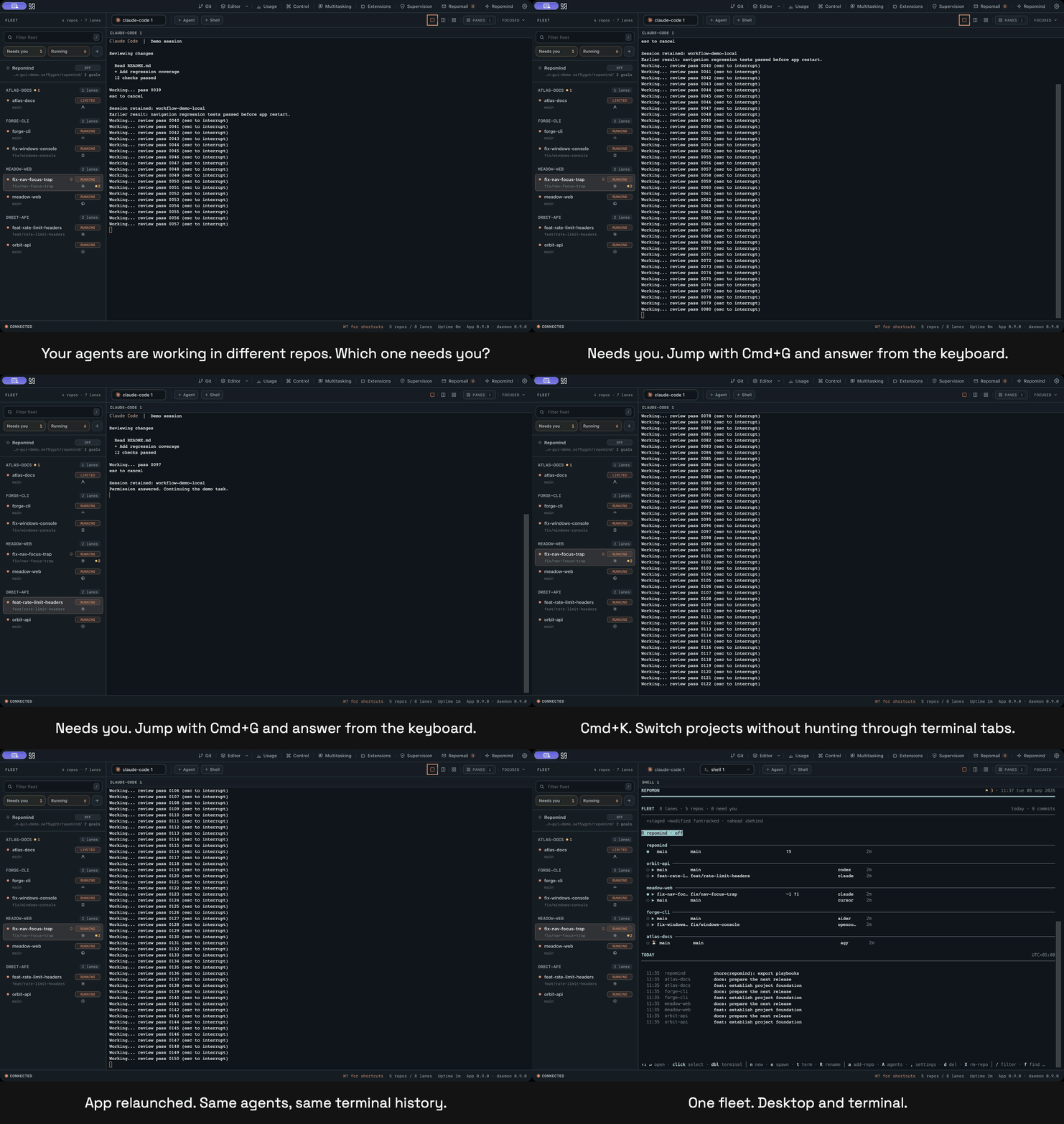
Claude Code and Codex. Multiple repos. One local workspace: see which agents need you, switch between projects, and keep sessions alive across app restarts, from your desktop or terminal.




Install
Download the desktop app from the moving desktop-preview release.
| Platform | Download and install |
|---|---|
| macOS (Apple silicon and Intel) | Repomon_<version>_universal.dmg: open it and drag Repomon to Applications. |
| Windows | Repomon_<version>_x64-setup.exe: run the installer. No WSL or separate Visual C++ runtime is required. |
| Linux | An AppImage, deb or rpm: make the AppImage executable, or install the package with your distribution's package manager. |
The app bundles the daemon (repomond), the CLI/TUI (repomon), portable tmux on macOS and Linux, and the ConPTY agent host on Windows. No existing Repomon installation or separate tmux install is required for the desktop app.
Install Git and at least one agent CLI, such as Claude Code or Codex, and sign in to that agent. The setup wizard checks these prerequisites. To use the bundled CLI from a terminal, choose Settings > System > Command-line tools > Install.
The desktop-preview tag is the moving desktop release used by preview-channel installs for updates. "Preview" names that rolling testing channel, not a requirement to assemble the app yourself. The standalone CLI uses the latest versioned release. The desktop app checks for updates on launch and in Settings > General > Check for updates.
Updates are cryptographically signed. The current desktop downloads do not yet have an OS-level code signature, so macOS Gatekeeper or Windows SmartScreen may prompt on first install. Those are separate signing systems. On macOS, use the system's Open Anyway approval for the downloaded app; on Windows, use More info > Run anyway if SmartScreen prompts.
Open Repomon after the OS approval. The bundled daemon starts automatically. The first-run wizard checks Git, the agent runtime and installed agent CLIs, then helps you add a repository, choose an agent and configure notifications and optional Repomind. Add a lane and start your agent; its terminal appears in the workspace.
Command line
The repomon CLI and TUI can be installed from the app (Settings > System > Command-line tools)
or directly:
# macOS and Linux
curl -fsSL https://github.com/AliHamzaAzam/repomon/releases/latest/download/install.sh | sh

# macOS with Homebrew
brew install AliHamzaAzam/tap/repomon
brew services start repomon        # optional: run the daemon at login
# Windows
irm https://github.com/AliHamzaAzam/repomon/releases/latest/download/install.ps1 | iex
From source, with a Rust toolchain: cargo install --git https://github.com/AliHamzaAzam/repomon repomon-tui repomon-daemon repomon-host.
The standalone CLI needs Git on every platform and tmux on macOS/Linux. Windows uses the bundled ConPTY host. Follow any PATH instructions printed by the installer. Choose either Homebrew services or repomon daemon install as your daemon supervisor, not both.
First useful task
- Open Repomon and complete the system check. Add two Git repositories you already work in.
- Select the first repository, create a lane, and start Claude Code or another installed agent. Ask it to inspect the repository and propose one small improvement without editing files.
- Add a lane in the second repository and start Codex or another installed agent. Give it the same bounded task. Both repositories and their agent statuses remain visible in the fleet sidebar.
- When an agent asks for input, press Cmd+G on macOS or Ctrl+G on Windows/Linux to jump to a lane needing attention. Read the question, focus its terminal, and answer it from the keyboard. Approve only the operation you intend.
- Open the palette with Cmd+K or Ctrl+K, search for the other repository or lane, and press Enter. You have agents visible in two repositories and have answered the one waiting on you. If neither agent asks a question, ask one to request a decision before continuing, then answer it.
Closing and reopening the app reattaches those sessions. On Windows/Linux, bound Ctrl shortcuts also reach a focused terminal; use the sidebar or palette outside the terminal when you want to avoid sending that control key to the agent. Press ? outside a text field or terminal for the shortcut guide.
Limits
Live agent processes survive app and daemon restarts, not an operating-system reboot. Windows ships with its own ConPTY host, but physical-machine validation is still catching up. Repomind is optional and still evolving. The iOS companion is built but not yet released; it awaits an Apple Developer account. Current desktop downloads lack an OS-level code signature, as described above.
What Repomon reads and sends
Repomon reads the repositories you register, their Git state, and transcript files from the agents it monitors to show status, history and usage. It writes its own SQLite database in its platform data directory (REPOMON_DATA_DIR overrides it) and a Repomind home, normally ~/repomind, when that feature is enabled. Actions you request, such as creating worktrees, saving files or merging a lane, also write to those repositories.
Repomon itself fetches the LiteLLM price list once a day when price refresh is enabled, checks the updater feed and downloads updates you install. Remote access opens the optional bridge you enable; optional push notifications use Apple's APNs service when configured. Plugin installation and other explicit tool actions can make their own network requests. Usage calculation stays local; it is not an upload of your transcripts.
The agents themselves talk to their providers as they always do; nothing about Repomon changes that.
Documentation
| Guide | Covers |
|---|---|
| Desktop | Every view, setting, and shortcut of the app |
| Agents | Supported agent kinds, status detection, fleet mail wiring |
| Architecture | Daemon, clients, crates, data flow |
| Daemon protocol | The JSON-RPC API for writing your own client |
| Messaging | Repomail addresses, delivery, and the MCP tools |
| Supervision | Policies, dialog handling, stall nudges, audit |
| Host protocol | The Windows agent-host control contract |
Features
- Fleet view. Repos, worktree lanes, and agents with live status: running, needs you, idle, rate limited. Filter, jump to the next agent that needs attention, pin what matters.
- Terminals and multitasking. Real terminals for each agent, focused or tiled in a grid, with keyboard-first navigation and a command palette.
- Git explorer and editor. Status, diffs, commits, and an in-app editor with syntax highlighting, search, file finder, and PDF and image viewers, per lane.
- Usage and cost. A local ledger reads supported agent transcripts, counts tokens per message, prices them with published rates (LiteLLM, refreshed daily) or your own overrides, and shows cost per agent, model, repo, lane, and session. Usage calculation stays local.
- Repomail and supervision. Durable mail between agents and you, policy-based handling of permission dialogs, stall nudges, and a complete audit trail.
- Repomind. A controller lane with its own memory that can plan, run playbooks, and steer the rest of the fleet through the same daemon API.
- Remote. An optional WebSocket bridge and optional APNs push notifications, so you can approve a prompt from your phone.
- Same fleet, two clients. The desktop app and the
repomonTUI talk to the same daemon and can run side by side.
How it compares
ccmanager and the built-in claude agents view also span repositories. Repomon combines session durability across app and daemon restarts, mixed agent kinds, and one local fleet shared by desktop and terminal. If you work in a single repository, a single-repo tool may be simpler.
Full tour
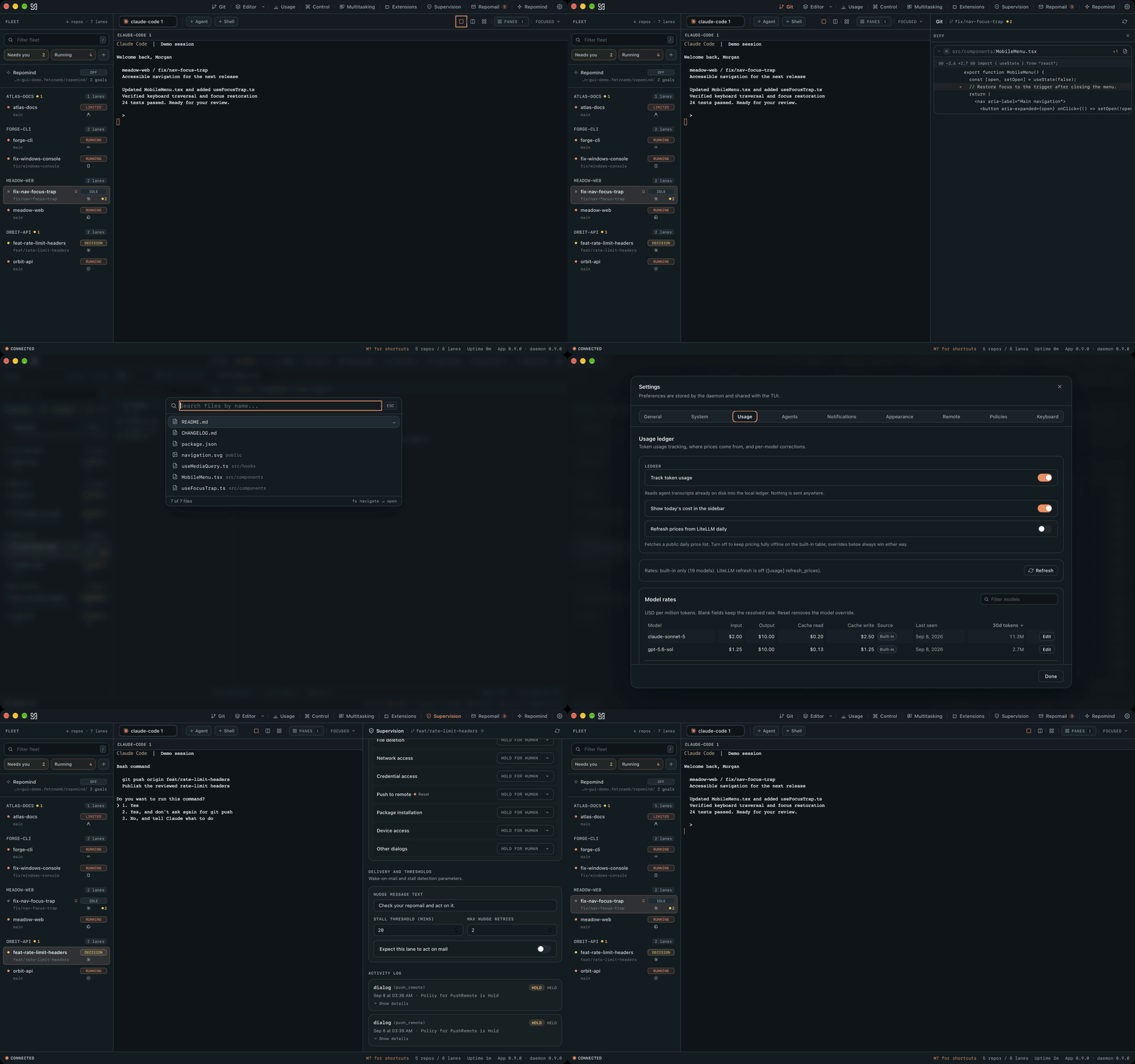
Every view in ninety seconds: fleet, multitasking, git, editor, usage, repomail, supervision, Repomind.
Terminal UI
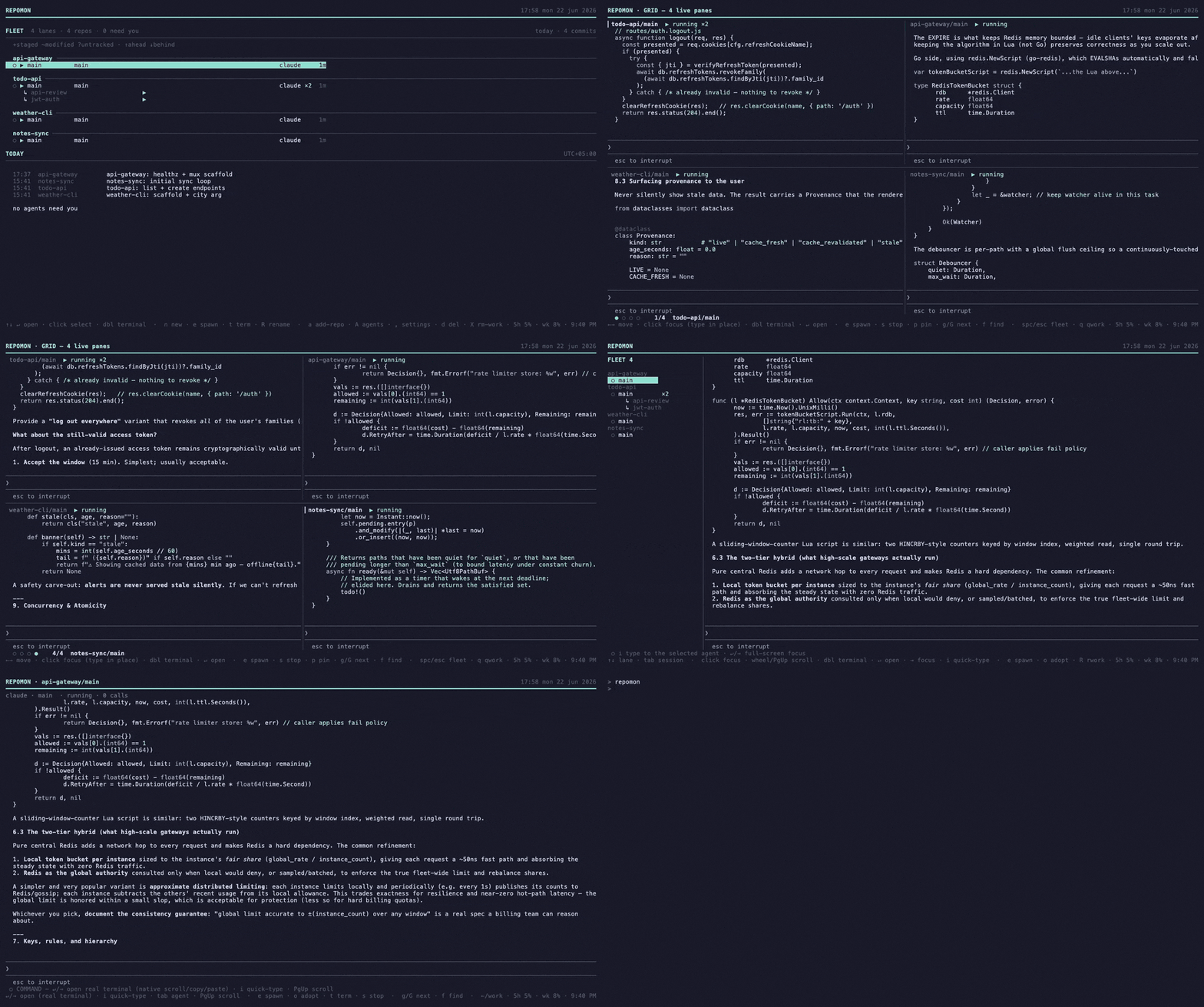
The repomon TUI is the original interface and stays a first-class client: the same fleet, the
same daemon, usable over SSH or alongside the app.
Architecture
A background daemon, repomond, owns SQLite, file watchers, the git layer, and the agent
runtime, and exposes a JSON-RPC API over a Unix socket (macOS, Linux) or a named pipe
(Windows). The desktop app, the TUI, and the iOS companion are thin clients over that API.
| Crate or app | Role |
|---|---|
repomon-core | Data model, git layer (gix), SQLite store, watchers, usage ledger, agent runtime |
repomon-daemon | The repomond server and its background services |
repomon-tui | The repomon terminal UI and CLI |
repomon-mcp | The MCP server (repomond mcp) that exposes the fleet to agents |
repomon-host | The per-agent ConPTY host that gives Windows tmux-style durability |
apps/desktop | The Tauri desktop app, bundling the daemon and, on macOS and Linux, tmux |
Development
cargo test --workspace                           # Rust
cd apps/desktop && bun install && bun run test   # desktop frontend
cd apps/desktop && bun tauri dev                 # run the app against your local daemon
Local preview bundles use apps/desktop/src-tauri/tauri.preview.conf.json. See
apps/desktop/README.md for packaging and signing.
License
Apache-2.0. Contributions are welcome; open an issue first for anything larger than a fix.
If Repomon is useful to you, a star on GitHub helps others find it.
Contributors

1,308 commits
Similar repos


Languages
Rust
60.5%
TypeScript
36.6%
Python
1.2%
Mission control for a fleet of AI coding agents (Claude Code, Codex, Antigravity, OpenCode, Cursor, Aider) across many repos — desktop app + Rust TUI, tmux-backed, with durable fleet mail and policy-based agent supervision.
See the codeREADME
repomon
Claude Code and Codex. Multiple repos. One local workspace: see which agents need you, switch between projects, and keep sessions alive across app restarts, from your desktop or terminal.
Install
Download the desktop app from the moving desktop-preview release.
| Platform | Download and install |
|---|---|
| macOS (Apple silicon and Intel) | Repomon_<version>_universal.dmg: open it and drag Repomon to Applications. |
| Windows | Repomon_<version>_x64-setup.exe: run the installer. No WSL or separate Visual C++ runtime is required. |
| Linux | An AppImage, deb or rpm: make the AppImage executable, or install the package with your distribution's package manager. |
The app bundles the daemon (repomond), the CLI/TUI (repomon), portable tmux on macOS and Linux, and the ConPTY agent host on Windows. No existing Repomon installation or separate tmux install is required for the desktop app.
Install Git and at least one agent CLI, such as Claude Code or Codex, and sign in to that agent. The setup wizard checks these prerequisites. To use the bundled CLI from a terminal, choose Settings > System > Command-line tools > Install.
The desktop-preview tag is the moving desktop release used by preview-channel installs for updates. "Preview" names that rolling testing channel, not a requirement to assemble the app yourself. The standalone CLI uses the latest versioned release. The desktop app checks for updates on launch and in Settings > General > Check for updates.
Updates are cryptographically signed. The current desktop downloads do not yet have an OS-level code signature, so macOS Gatekeeper or Windows SmartScreen may prompt on first install. Those are separate signing systems. On macOS, use the system's Open Anyway approval for the downloaded app; on Windows, use More info > Run anyway if SmartScreen prompts.
Open Repomon after the OS approval. The bundled daemon starts automatically. The first-run wizard checks Git, the agent runtime and installed agent CLIs, then helps you add a repository, choose an agent and configure notifications and optional Repomind. Add a lane and start your agent; its terminal appears in the workspace.
Command line
The repomon CLI and TUI can be installed from the app (Settings > System > Command-line tools)
or directly:
# macOS and Linux
curl -fsSL https://github.com/AliHamzaAzam/repomon/releases/latest/download/install.sh | sh

# macOS with Homebrew
brew install AliHamzaAzam/tap/repomon
brew services start repomon        # optional: run the daemon at login
# Windows
irm https://github.com/AliHamzaAzam/repomon/releases/latest/download/install.ps1 | iex
From source, with a Rust toolchain: cargo install --git https://github.com/AliHamzaAzam/repomon repomon-tui repomon-daemon repomon-host.
The standalone CLI needs Git on every platform and tmux on macOS/Linux. Windows uses the bundled ConPTY host. Follow any PATH instructions printed by the installer. Choose either Homebrew services or repomon daemon install as your daemon supervisor, not both.
First useful task
- Open Repomon and complete the system check. Add two Git repositories you already work in.
- Select the first repository, create a lane, and start Claude Code or another installed agent. Ask it to inspect the repository and propose one small improvement without editing files.
- Add a lane in the second repository and start Codex or another installed agent. Give it the same bounded task. Both repositories and their agent statuses remain visible in the fleet sidebar.
- When an agent asks for input, press Cmd+G on macOS or Ctrl+G on Windows/Linux to jump to a lane needing attention. Read the question, focus its terminal, and answer it from the keyboard. Approve only the operation you intend.
- Open the palette with Cmd+K or Ctrl+K, search for the other repository or lane, and press Enter. You have agents visible in two repositories and have answered the one waiting on you. If neither agent asks a question, ask one to request a decision before continuing, then answer it.
Closing and reopening the app reattaches those sessions. On Windows/Linux, bound Ctrl shortcuts also reach a focused terminal; use the sidebar or palette outside the terminal when you want to avoid sending that control key to the agent. Press ? outside a text field or terminal for the shortcut guide.
Limits
Live agent processes survive app and daemon restarts, not an operating-system reboot. Windows ships with its own ConPTY host, but physical-machine validation is still catching up. Repomind is optional and still evolving. The iOS companion is built but not yet released; it awaits an Apple Developer account. Current desktop downloads lack an OS-level code signature, as described above.
What Repomon reads and sends
Repomon reads the repositories you register, their Git state, and transcript files from the agents it monitors to show status, history and usage. It writes its own SQLite database in its platform data directory (REPOMON_DATA_DIR overrides it) and a Repomind home, normally ~/repomind, when that feature is enabled. Actions you request, such as creating worktrees, saving files or merging a lane, also write to those repositories.
Repomon itself fetches the LiteLLM price list once a day when price refresh is enabled, checks the updater feed and downloads updates you install. Remote access opens the optional bridge you enable; optional push notifications use Apple's APNs service when configured. Plugin installation and other explicit tool actions can make their own network requests. Usage calculation stays local; it is not an upload of your transcripts.
The agents themselves talk to their providers as they always do; nothing about Repomon changes that.
Documentation
| Guide | Covers |
|---|---|
| Desktop | Every view, setting, and shortcut of the app |
| Agents | Supported agent kinds, status detection, fleet mail wiring |
| Architecture | Daemon, clients, crates, data flow |
| Daemon protocol | The JSON-RPC API for writing your own client |
| Messaging | Repomail addresses, delivery, and the MCP tools |
| Supervision | Policies, dialog handling, stall nudges, audit |
| Host protocol | The Windows agent-host control contract |
Features
- Fleet view. Repos, worktree lanes, and agents with live status: running, needs you, idle, rate limited. Filter, jump to the next agent that needs attention, pin what matters.
- Terminals and multitasking. Real terminals for each agent, focused or tiled in a grid, with keyboard-first navigation and a command palette.
- Git explorer and editor. Status, diffs, commits, and an in-app editor with syntax highlighting, search, file finder, and PDF and image viewers, per lane.
- Usage and cost. A local ledger reads supported agent transcripts, counts tokens per message, prices them with published rates (LiteLLM, refreshed daily) or your own overrides, and shows cost per agent, model, repo, lane, and session. Usage calculation stays local.
- Repomail and supervision. Durable mail between agents and you, policy-based handling of permission dialogs, stall nudges, and a complete audit trail.
- Repomind. A controller lane with its own memory that can plan, run playbooks, and steer the rest of the fleet through the same daemon API.
- Remote. An optional WebSocket bridge and optional APNs push notifications, so you can approve a prompt from your phone.
- Same fleet, two clients. The desktop app and the
repomonTUI talk to the same daemon and can run side by side.
How it compares
ccmanager and the built-in claude agents view also span repositories. Repomon combines session durability across app and daemon restarts, mixed agent kinds, and one local fleet shared by desktop and terminal. If you work in a single repository, a single-repo tool may be simpler.
Full tour
Every view in ninety seconds: fleet, multitasking, git, editor, usage, repomail, supervision, Repomind.
Terminal UI
The repomon TUI is the original interface and stays a first-class client: the same fleet, the
same daemon, usable over SSH or alongside the app.
Architecture
A background daemon, repomond, owns SQLite, file watchers, the git layer, and the agent
runtime, and exposes a JSON-RPC API over a Unix socket (macOS, Linux) or a named pipe
(Windows). The desktop app, the TUI, and the iOS companion are thin clients over that API.
| Crate or app | Role |
|---|---|
repomon-core | Data model, git layer (gix), SQLite store, watchers, usage ledger, agent runtime |
repomon-daemon | The repomond server and its background services |
repomon-tui | The repomon terminal UI and CLI |
repomon-mcp | The MCP server (repomond mcp) that exposes the fleet to agents |
repomon-host | The per-agent ConPTY host that gives Windows tmux-style durability |
apps/desktop | The Tauri desktop app, bundling the daemon and, on macOS and Linux, tmux |
Development
cargo test --workspace                           # Rust
cd apps/desktop && bun install && bun run test   # desktop frontend
cd apps/desktop && bun tauri dev                 # run the app against your local daemon
Local preview bundles use apps/desktop/src-tauri/tauri.preview.conf.json. See
apps/desktop/README.md for packaging and signing.
License
Apache-2.0. Contributions are welcome; open an issue first for anything larger than a fix.
If Repomon is useful to you, a star on GitHub helps others find it.
Similar repos
Contributors
1,308 commits
Languages
Rust
60.5%
TypeScript
36.6%
Python
1.2%