
For Claude Code, Codex, Cursor CLI, and other CLI agents. macOS and Windows with WSL.
JavaScript
4
775 commits
updated Sep 20, 2026
See what people are saying (1)
README
AgentTerm: A terminal built for coding agents
From telling sessions apart to the finished project.
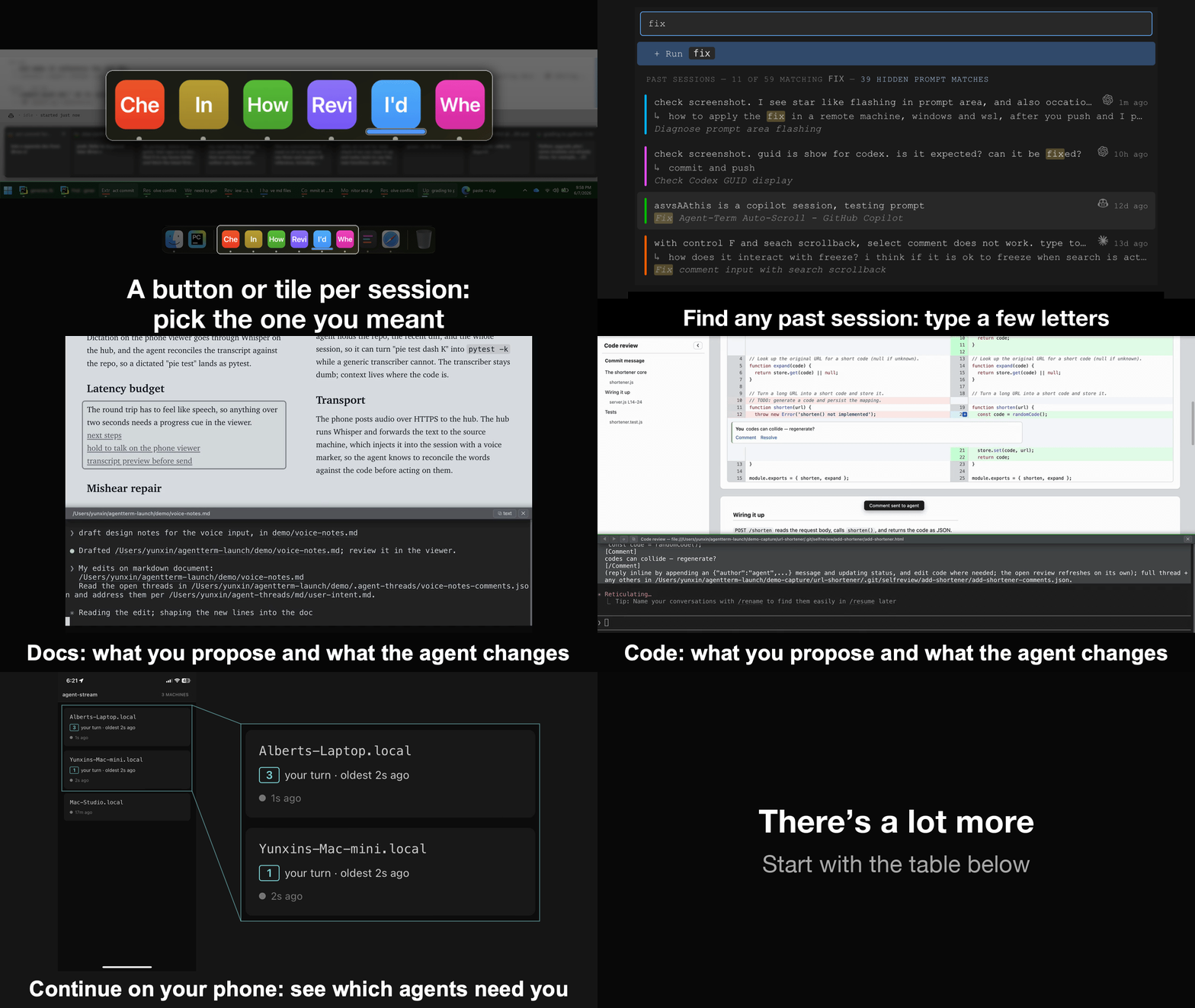
Explore a section: Switch sessions · Resume · Comment · Docs · Code · Phone.
Quick start
For macOS and Windows with WSL. Ask your coding agent:
Clone https://github.com/albertwujj/agent-term to ~/agent-term, then set it
up and launch it for my current project, following the basic setup in its
docs/setup.md.
Click docs/setup.md if you want to read it.
Once it opens, start or resume your usual agent, select something in its output, and write a comment.
Why a terminal, and why this shape
The landscape this repo is in. Skip to what's added so far if you want to get straight to it.
The terminal path
People run coding agents in an IDE, in the terminal, or in the vendor's desktop app. The terminal keeps pulling them in: Claude Code and Codex shipped as terminal programs, and Cursor and Copilot, born in the IDE, added CLIs of their own. A form from decades ago turned out to have what an agent needs: text in, text out, and your shell, git, and every other tool one command away.
So why do people still run agents in the IDE, and why are the vendors adding their agents to desktop apps? Partly because the standard terminal interface (TUI), great for text-centric iteration, cannot offer agents and users the essentials and the boosts a richer interface can. One answer is to move the agent out, into an app built around it. The other is to treat the terminal as the core and extend it. This repo is the second path: a full terminal wrapped in a modern extensible window (Electron), retaining everything you already have and raising the ceiling.
Extending it on demand is what keeps it a terminal. Additions come in only when you need them, and the window is a terminal again the moment you finish. An IDE or a vendor's desktop app has its panels up before you type, which can distract. Here the window is your session alone, shaped only by the work you do in it, and full screen if you like, with nothing else in view (one OS window per session).
A vendor's desktop app holds that vendor's agents and only those, and pulls you away from your shell. Here the agent can be of any kind, right in your shell, like a plain terminal.
Some other terminals have gone the vendors' way and grown an agent of their own, with ways to run many at once, including in the cloud; to get their environment, you take their agent. In this one, nothing about working with your agent changes.
One OS window per session
Why not tmux, or one manager app over every session? This terminal takes the opposite shape: each session is its own OS window and process, the way each agent stands on its own. The OS is the manager you already know, so the taskbar, the Dock, Mission Control, and alt-tab do the juggling, and each agent, through its terminal host, is instantly recognizable. An agent and its host grow into one whole, cooperating with the others through shared conventions.
Why it holds
This path can look hacky: the host parses text, and reacts to it. But established text patterns are a stable interface, and a helpful output style sticks around. An agent's intentions arrive in those patterns through every turn, so the parsers keep working. It holds from both sides: guide files instruct the agents to print what the host understands, and the parser tracks the natural output styles the agents use intuitively. Extending it is quick when something new shows up, and none of it is tied to a vendor SDK or API.
With a host that understands its agents, and agents that understand the host, a capable agent does more than its CLI can alone. A CLI does not own the window, so when Claude Code publishes a design mock it can only print the URL and go around the terminal, opening your browser on it. This terminal responds to the reference an agent calls out and opens it inside the window, rendered, for you to read, comment on, and edit, and agents can see and update it through their protocol with the host.
Make it fit
You and your agents can change and extend this terminal, down to its code, to fit your work and your team's.
Use it as is first, a boost for working with your agents; what you need may already be there. When something is missing, add it with your agents: the gap is in front of you and the agents, who are in a good position to evaluate it and build the addition. And with the features listed below, agents run better when you build with them.
What's added so far
Below are examples, all on the same terminal. Follow the links to revisit the demos and explore features not shown in the GIF.
| In a plain terminal | In AgentTerm |
|---|---|
| Several agents running means identical tabs outside, walls of text inside. | Each session is its own OS window, with a unique taskbar button or Dock tile (a preview on Windows, the session title on macOS), so you tell them apart at a glance. Type a few letters to find and resume a closed session; the picker searches your prompts and the agents' own titles to help you return to the session. |
| Everything the agent prints (a diff, a plan, a claim, a link) is words or symbols you cannot click. | Select any of it and comment, precise feedback with the exact text quoted; the agent makes the change. A click opens whatever renders (docs, reviews, images, video, PDFs) inside the window; web links open in your browser (the click rule). |
| Its plans are append-only text. | Ask for the plan as a markdown file and click its name. The doc opens rendered, and the rendered page is where you work: comment on any passage, or write in it directly; the agent takes an edit as intent and applies it in its own words in the source, and answers in a thread on the passage. You can follow what you proposed and what the agent changed. |
| Agents sharing a checkout have no awareness of each other: branches move, files change, test ports collide. | Type one @ mention (@proceed-b completes to the guide doc's path) and the agent takes the checkout lock and cuts a branch before its first edit; a padlock at the top right of each window shows who holds it. |
| The agent finishes a change and you get a wall of diff. | It hands you a curated review, rendered, with a narrative you can follow and the parts that need your attention called out; you comment inline, it fixes and replies in place. |
| A long CI run either blocks the session, or outlives the agent's turn and finishes unnoticed. | The agent starts the job and hands the terminal back; the job reports its own completion through the terminal and the idle agent is prompted to pick it up, even across a session restart; a runner icon at the top right shows what is running. |
| You keep checking sessions to see which agent needs you. | See which agents need you across your machines. Open the same terminal on your phone, with the same layout so you recognize at once what you left behind; reply by voice. |
| The agent cites file:line and symbols; checking a claim means finding it by hand. | Click any reference and your IDE jumps to that exact line after a brief pause for selection; Ctrl/Cmd-click jumps immediately. The editor stays read-only so a stray key changes nothing. |
Where to go next
The first start gives you sessions as windows with their taskbar buttons or Dock tiles, the picker, and commenting on anything the agent prints. Existing sessions from before this terminal work too.
The rest are the optional suite: plans and reviews (one repo covers both), the checkout lock, long jobs, the phone view, the IDE integration. Ask your agent for the ones you want. For example, this adds the checkout lock:
Clone https://github.com/yunxin/agent-lock into ai/ in this project,
and leave ai/ out of .gitignore.
Then start a task with @proceed-b, which completes to the lock's guide doc in the agent-lock clone, and the agent takes the checkout lock before it works. For the other pieces, see their guides.
Grow it. Make a change with your agents, and the next window you open picks it up, since every window starts from the latest source (how a window opens).
AgentTerm is built on Electron with xterm.js (the terminal emulator) and node-pty (the shell's pty). MIT.
Contributors

774 commits

1 commits
Similar repos


Languages
JavaScript
96.2%
Python
2.9%
For Claude Code, Codex, Cursor CLI, and other CLI agents. macOS and Windows with WSL.
JavaScript
4
775 commits
updated Sep 20, 2026
See what people are saying (1)
README
AgentTerm: A terminal built for coding agents
From telling sessions apart to the finished project.
Explore a section: Switch sessions · Resume · Comment · Docs · Code · Phone.
Quick start
For macOS and Windows with WSL. Ask your coding agent:
Clone https://github.com/albertwujj/agent-term to ~/agent-term, then set it
up and launch it for my current project, following the basic setup in its
docs/setup.md.
Click docs/setup.md if you want to read it.
Once it opens, start or resume your usual agent, select something in its output, and write a comment.
Why a terminal, and why this shape
The landscape this repo is in. Skip to what's added so far if you want to get straight to it.
The terminal path
People run coding agents in an IDE, in the terminal, or in the vendor's desktop app. The terminal keeps pulling them in: Claude Code and Codex shipped as terminal programs, and Cursor and Copilot, born in the IDE, added CLIs of their own. A form from decades ago turned out to have what an agent needs: text in, text out, and your shell, git, and every other tool one command away.
So why do people still run agents in the IDE, and why are the vendors adding their agents to desktop apps? Partly because the standard terminal interface (TUI), great for text-centric iteration, cannot offer agents and users the essentials and the boosts a richer interface can. One answer is to move the agent out, into an app built around it. The other is to treat the terminal as the core and extend it. This repo is the second path: a full terminal wrapped in a modern extensible window (Electron), retaining everything you already have and raising the ceiling.
Extending it on demand is what keeps it a terminal. Additions come in only when you need them, and the window is a terminal again the moment you finish. An IDE or a vendor's desktop app has its panels up before you type, which can distract. Here the window is your session alone, shaped only by the work you do in it, and full screen if you like, with nothing else in view (one OS window per session).
A vendor's desktop app holds that vendor's agents and only those, and pulls you away from your shell. Here the agent can be of any kind, right in your shell, like a plain terminal.
Some other terminals have gone the vendors' way and grown an agent of their own, with ways to run many at once, including in the cloud; to get their environment, you take their agent. In this one, nothing about working with your agent changes.
One OS window per session
Why not tmux, or one manager app over every session? This terminal takes the opposite shape: each session is its own OS window and process, the way each agent stands on its own. The OS is the manager you already know, so the taskbar, the Dock, Mission Control, and alt-tab do the juggling, and each agent, through its terminal host, is instantly recognizable. An agent and its host grow into one whole, cooperating with the others through shared conventions.
Why it holds
This path can look hacky: the host parses text, and reacts to it. But established text patterns are a stable interface, and a helpful output style sticks around. An agent's intentions arrive in those patterns through every turn, so the parsers keep working. It holds from both sides: guide files instruct the agents to print what the host understands, and the parser tracks the natural output styles the agents use intuitively. Extending it is quick when something new shows up, and none of it is tied to a vendor SDK or API.
With a host that understands its agents, and agents that understand the host, a capable agent does more than its CLI can alone. A CLI does not own the window, so when Claude Code publishes a design mock it can only print the URL and go around the terminal, opening your browser on it. This terminal responds to the reference an agent calls out and opens it inside the window, rendered, for you to read, comment on, and edit, and agents can see and update it through their protocol with the host.
Make it fit
You and your agents can change and extend this terminal, down to its code, to fit your work and your team's.
Use it as is first, a boost for working with your agents; what you need may already be there. When something is missing, add it with your agents: the gap is in front of you and the agents, who are in a good position to evaluate it and build the addition. And with the features listed below, agents run better when you build with them.
What's added so far
Below are examples, all on the same terminal. Follow the links to revisit the demos and explore features not shown in the GIF.
| In a plain terminal | In AgentTerm |
|---|---|
| Several agents running means identical tabs outside, walls of text inside. | Each session is its own OS window, with a unique taskbar button or Dock tile (a preview on Windows, the session title on macOS), so you tell them apart at a glance. Type a few letters to find and resume a closed session; the picker searches your prompts and the agents' own titles to help you return to the session. |
| Everything the agent prints (a diff, a plan, a claim, a link) is words or symbols you cannot click. | Select any of it and comment, precise feedback with the exact text quoted; the agent makes the change. A click opens whatever renders (docs, reviews, images, video, PDFs) inside the window; web links open in your browser (the click rule). |
| Its plans are append-only text. | Ask for the plan as a markdown file and click its name. The doc opens rendered, and the rendered page is where you work: comment on any passage, or write in it directly; the agent takes an edit as intent and applies it in its own words in the source, and answers in a thread on the passage. You can follow what you proposed and what the agent changed. |
| Agents sharing a checkout have no awareness of each other: branches move, files change, test ports collide. | Type one @ mention (@proceed-b completes to the guide doc's path) and the agent takes the checkout lock and cuts a branch before its first edit; a padlock at the top right of each window shows who holds it. |
| The agent finishes a change and you get a wall of diff. | It hands you a curated review, rendered, with a narrative you can follow and the parts that need your attention called out; you comment inline, it fixes and replies in place. |
| A long CI run either blocks the session, or outlives the agent's turn and finishes unnoticed. | The agent starts the job and hands the terminal back; the job reports its own completion through the terminal and the idle agent is prompted to pick it up, even across a session restart; a runner icon at the top right shows what is running. |
| You keep checking sessions to see which agent needs you. | See which agents need you across your machines. Open the same terminal on your phone, with the same layout so you recognize at once what you left behind; reply by voice. |
| The agent cites file:line and symbols; checking a claim means finding it by hand. | Click any reference and your IDE jumps to that exact line after a brief pause for selection; Ctrl/Cmd-click jumps immediately. The editor stays read-only so a stray key changes nothing. |
Where to go next
The first start gives you sessions as windows with their taskbar buttons or Dock tiles, the picker, and commenting on anything the agent prints. Existing sessions from before this terminal work too.
The rest are the optional suite: plans and reviews (one repo covers both), the checkout lock, long jobs, the phone view, the IDE integration. Ask your agent for the ones you want. For example, this adds the checkout lock:
Clone https://github.com/yunxin/agent-lock into ai/ in this project,
and leave ai/ out of .gitignore.
Then start a task with @proceed-b, which completes to the lock's guide doc in the agent-lock clone, and the agent takes the checkout lock before it works. For the other pieces, see their guides.
Grow it. Make a change with your agents, and the next window you open picks it up, since every window starts from the latest source (how a window opens).
AgentTerm is built on Electron with xterm.js (the terminal emulator) and node-pty (the shell's pty). MIT.
Similar repos
Contributors
774 commits
1 commits
Languages
JavaScript
96.2%
Python
2.9%