The VRAM leasing service for every GPU you run. Engines lease the card instead of grabbing it: llama.cpp, llama-swap, Ollama, vLLM, SGLang, ComfyUI and more on one GPU, no collisions.
Go
1
5 commits
updated Oct 18, 2026
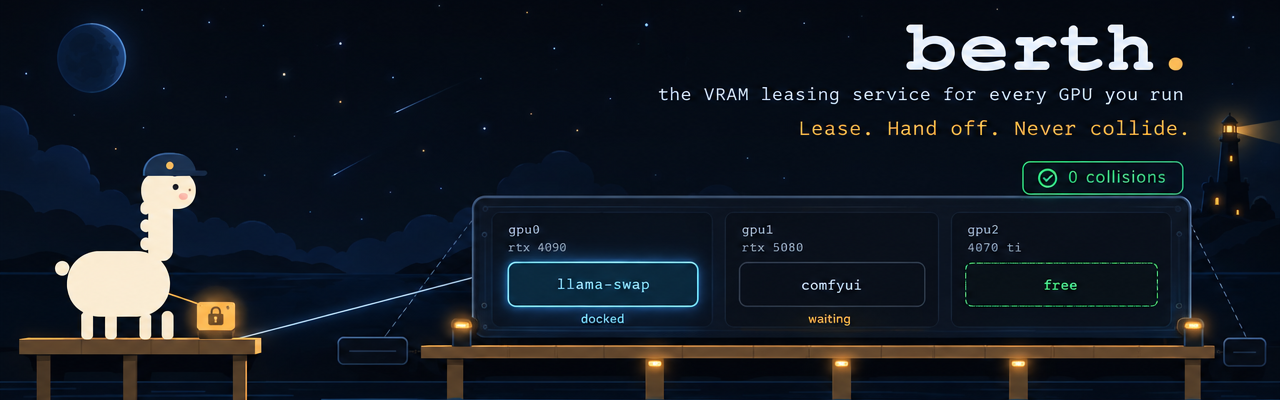
The VRAM leasing service for every GPU you run.
Lease. Hand off. Never collide.
Run a chat model in llama-swap, an image pipeline in ComfyUI and a game on one GPU, and sooner or later two of them load at once and one dies with an out-of-memory error.
Berth puts a harbormaster on the card. Your engines lease the GPU instead of grabbing it. When another engine needs the card, Berth asks the holder to unload (ComfyUI finishes its current jobs first), waits until the driver reports the memory free, then lets the next one in. A process holding VRAM without a lease shows up as a stowaway; Berth reports it and leaves it running.
The same daemon reads every inference engine on the machine (llama.cpp, llama-swap, Ollama, vLLM, SGLang, ComfyUI, LM Studio and more, found on their default ports without config) and the harbor web UI shows the card, the leases, the engines, every request and a token ledger in one place. One Go binary, no cloud account, nothing else to install.
And you switch engines by naming a model. berth gateway gives every engine on the machine one
OpenAI-compatible port. Ask it for a model whose engine is down and it starts that engine under a
lease, drains whichever engine holds the card, waits for the new one to load, and streams the answer.
Point your agent harness at the gateway, and a switch from a llama-swap model to Strata and back takes as
long as the engines take to load.
Status: alpha (v0.1). Linux + NVIDIA. Runs daily on an RTX 4090 workstation alongside llama-swap, NInfer and Strata. Capabilities lists what works and has tests; the Roadmap lists what does not exist yet.
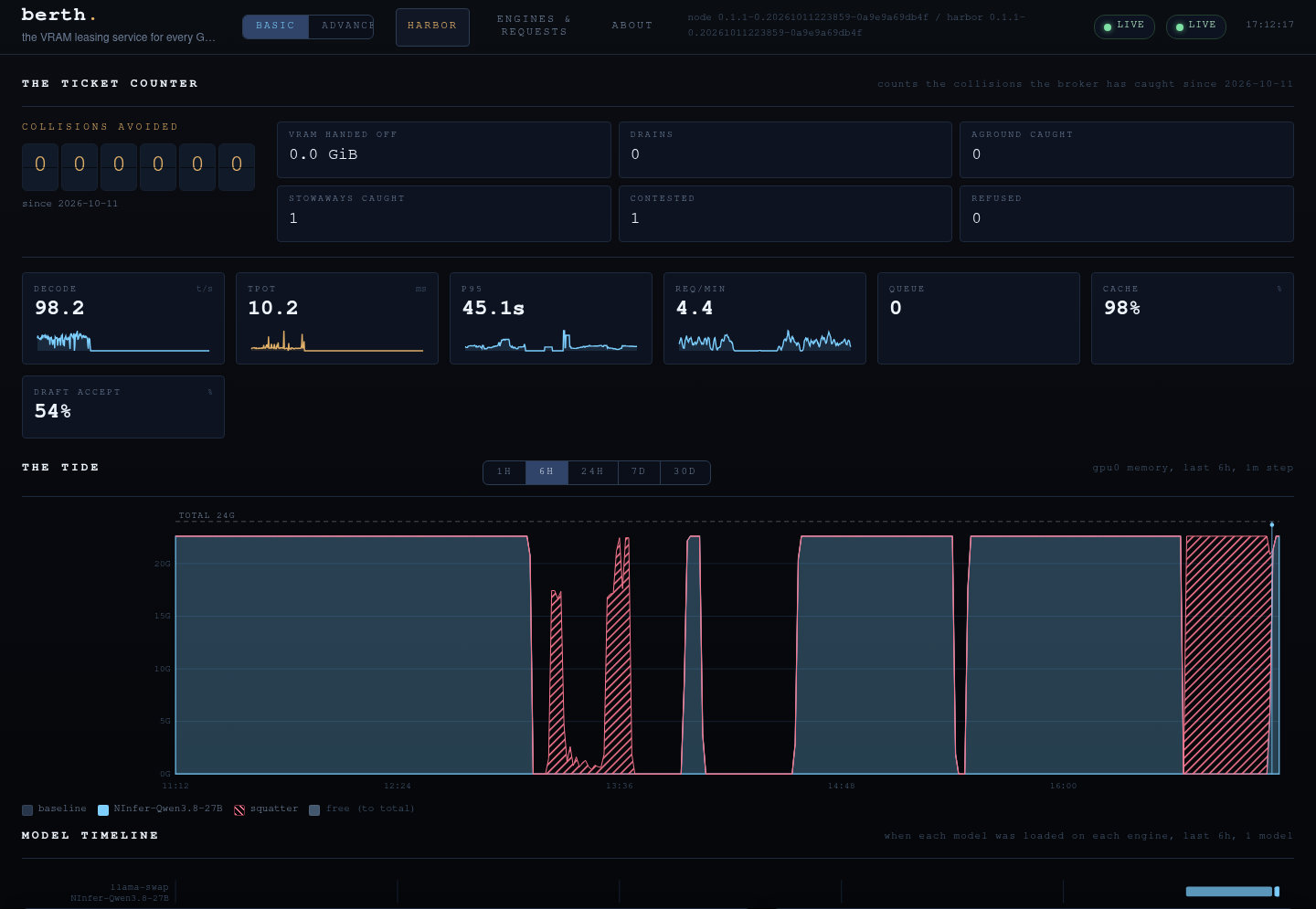
The harbor on an RTX 4090 running NInfer through llama-swap (real data, basic mode). The tide shows the card's memory by holder over six hours; the hatched stretch is a stowaway Berth reported while the model ran without a lease after a daemon restart.
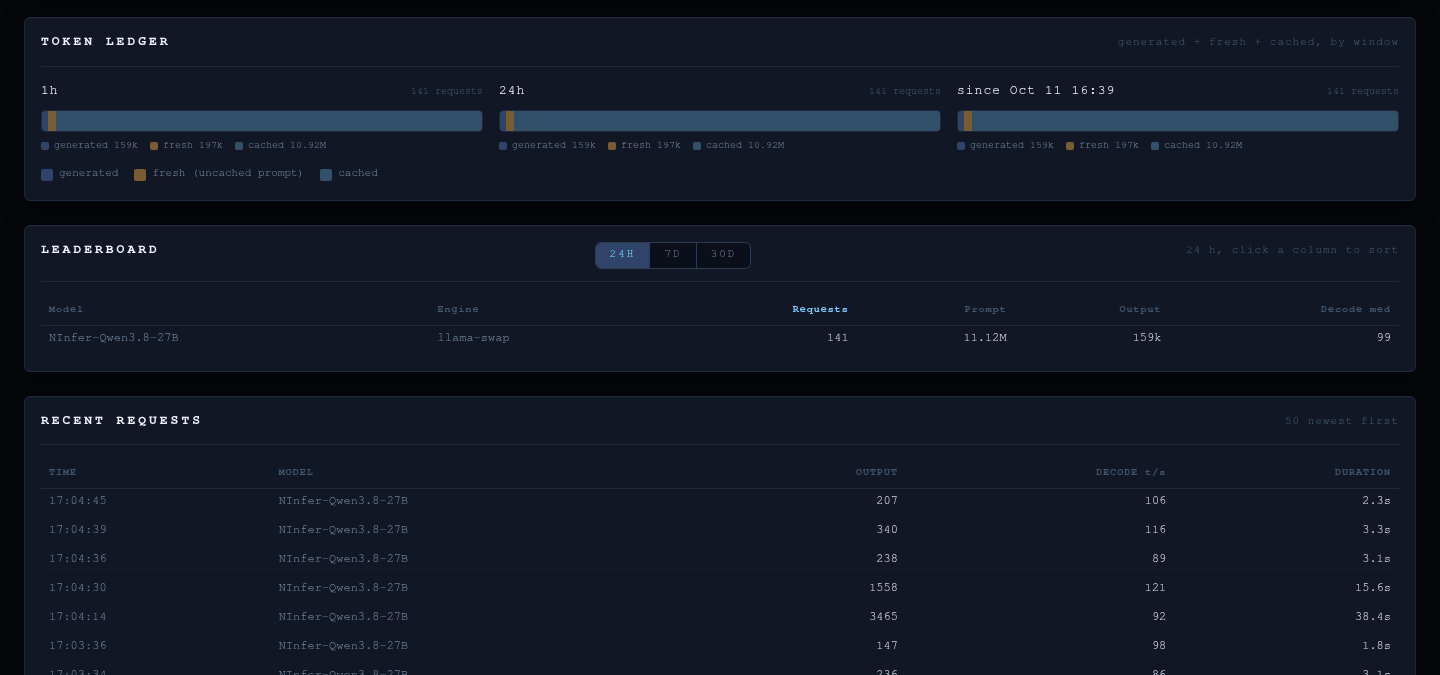
The Engines & Requests tab: the token ledger, the per-model leaderboard and the request log.
Two engines that each want the whole card can't run together, and most harnesses can't start an engine
before they call it. berth gateway starts it for them. Give an engine a start command and the model names it
serves in berth.toml:
[[engine]]
name     = "strata"
type     = "llamacpp"
url      = "http://127.0.0.1:8080"
start    = ["/path/to/strata/.venv/bin/python", "serve/server.py", "--engine", "strata",
            "--config", "strata-262k.json", "--port", "8080"]
serves   = ["router-strata", "qwen3.8-flash-next-iq2_xs"]
priority = "foreground"   # equal to the engine it replaces, so the last model you ask for wins
Run berth gateway (loopback 127.0.0.1:9799; a user unit is in contrib/berth-gateway.service) and send
your requests there with the node's API key as the bearer token. The gateway creates the key on first start
(~/.config/berth/api.key, mode 600) and berth key prints it, so a client that runs commands for its key
never has the secret written into its config:
{ "baseUrl": "http://127.0.0.1:9799/v1", "apiKey": "!berth key" }
For each request the gateway:
serves it through the same path as berth run: it takes a lease,
Berth drains the holder (llama-swap through its unload URL, then SIGTERM, then SIGKILL), and the
gateway waits until the new engine answers /v1/models;Requests that arrive during a start wait on that one start. A model no engine serves gets a 404, and a
start the broker refuses comes back as a 503 with the broker's reason. A start waits for the card no longer
than --ready (10 minutes); if the holder has not left by then, the request fails and the start is
dropped, so it cannot take the card hours later. Asking llama-swap for one of its
models later drains the gateway's engine the same way, so either side can take the card back.
Measured on the reference RTX 4090 with an agent harness switching models between NInfer (through llama-swap) and Strata (262K context):
| Switch | Drain of the holder | Request answered after |
|---|---|---|
| Strata on an empty card | none | 106 s (Strata's own cold load) |
| Strata to NInfer | Strata released in 2 s | 41 s |
| NInfer to Strata | NInfer released in 0.6 s | 110 s |
At no point did the two engines hold the card at the same time. The gateway serves /v1/chat/completions,
/v1/completions, /v1/embeddings and a merged /v1/models. Every route needs the key. The gateway listens
on loopback only, refuses a Host that is not a loopback name (DNS rebinding) and refuses any request that
carries a browser Origin, so a web page cannot start an engine. ComfyUI already hands off at a job boundary under a lease (--drain-comfyui); starting
ComfyUI on demand from its own API through the gateway comes next.
Two ways: hand it to your coding agent, or do it yourself. Both end in the same place: the
daemon running as a user service, your engines wrapped in berth run, and the harbor UI on
http://127.0.0.1:9798/.
Paste this into Claude Code, Codex, Cursor, OpenCode or any coding agent that can run shell commands on the machine with the GPU:
Install Berth (https://github.com/T-Crypt/berth), a VRAM lease broker for NVIDIA GPUs, on this
Linux machine, following its README and contrib/INTEGRATION.md. Steps:

1. Check prerequisites: Linux, an NVIDIA driver with `nvidia-smi` working, systemd user
   services. Stop and tell me if any is missing.
2. Download the latest release binary for this CPU (berth-linux-amd64 or berth-linux-arm64)
   and its SHA256SUMS from https://github.com/T-Crypt/berth/releases/latest, verify the
   checksum, and install it as ~/.local/bin/berth. (If Go 1.27+ is installed you may instead
   run: go install github.com/T-Crypt/berth/cmd/berth@latest.) Run `berth version`.
3. Install contrib/berthd.service and contrib/berth-harbor.service as systemd user units and
   start them. Confirm with `berth status`.
4. Find the inference engines on this machine (llama.cpp, llama-swap, Ollama, vLLM, SGLang,
   ComfyUI, LM Studio, KoboldCpp, TabbyAPI, LocalAI and so on): what runs them (systemd unit,
   llama-swap config, script) and on which port. Show me the list before changing anything.
5. For each engine I approve, wrap its start command in `berth run` as contrib/INTEGRATION.md
   shows (llama-swap: per-model cmd with the unload URL as --drain-post; ComfyUI: contrib/
   comfyui.service with --drain-comfyui; Ollama: a systemd override of `ollama serve`). Ask me
   which engine wins the card (--priority foreground) and which waits (interactive or batch).
   Back up every file before you edit it and tell me how to undo each change.
6. Engines on non-default ports or other machines: add [[engine]] entries or
   [engines] discover_ports / discover_hosts to ~/.config/berth/berth.toml, then run
   `berth config check`.
7. Restart what you changed, then show me `berth status` with each engine leased and read,
   and the harbor at http://127.0.0.1:9798/. Do not expose the harbor beyond loopback unless
   I ask; it has no authentication.
The agent asks before it wraps anything, and every change it makes has an undo.
1. The binary. Download berth-linux-amd64 (or -arm64) and SHA256SUMS from the
latest release:
cd /tmp
curl -fLO https://github.com/T-Crypt/berth/releases/latest/download/berth-linux-amd64
curl -fLO https://github.com/T-Crypt/berth/releases/latest/download/SHA256SUMS
sha256sum --check --ignore-missing SHA256SUMS
install -Dm755 berth-linux-amd64 ~/.local/bin/berth
berth version
Or build it: go install github.com/T-Crypt/berth/cmd/berth@latest (Go 1.27+, no C toolchain).
2. The daemon and the UI (one per machine, systemd user units from contrib/):
mkdir -p ~/.config/systemd/user
cp contrib/berthd.service contrib/berth-harbor.service ~/.config/systemd/user/
systemctl --user daemon-reload
systemctl --user enable --now berthd berth-harbor
berth status            # the card, leases, stowaways, engines found
Open http://127.0.0.1:9798/. Engines on their default ports appear on their own.
3. Wrap your engines so they lease the card instead of grabbing it. The pattern:
berth run --as <name> --priority <batch|interactive|foreground> -- <the engine's command>
Per-engine recipes (llama-swap, llama.cpp, Ollama, ComfyUI, vLLM, SGLang, custom) are in contrib/INTEGRATION.md.
4. Optional configuration in ~/.config/berth/berth.toml; validate with
berth config check:
[metrics]
listen = "127.0.0.1:9797"      # Prometheus text, loopback only

[engines]
# discover = true              # default: probe the well-known engine ports every minute
# discover_ports = [9123]      # extra ports to probe
# discover_hosts = ["192.168.1.40"]

[[engine]]                     # anything discovery does not find, on any port
name = "llama-swap"
type = "llama-swap"
url  = "http://127.0.0.1:9090"

[alerts]
[alerts.queue]
warn = 4
crit = 10
Uninstall: systemctl --user disable --now berthd berth-harbor, remove the two unit
files and ~/.local/bin/berth, and take berth run ... -- off any engine command you
wrapped. History lives in ~/.local/state/berth/.
| Engine | Reader (type) | Found on its own | What Berth reads |
|---|---|---|---|
llama.cpp llama-server | llamacpp | :8080 | tokens, rates, queue, context window, KV slots |
| llama-swap | llama-swap | :8080 | every running model's upstream, request log, per-model window |
| Ollama | ollama | :11434 | loaded models and their VRAM |
| vLLM | vllm | :8000 | models, window; tokens and queue from /metrics |
| SGLang | sglang | :30000 | models, window; tokens and queue with --enable-metrics |
| ComfyUI | comfyui | :8188 | jobs running and queued, version; job-boundary handoff |
| LM Studio | lmstudio | :1234 | loaded models, context length |
| KoboldCpp | koboldcpp | :5001 | model, context length |
| TabbyAPI (ExLlamaV3) | tabbyapi | :5000 | models, context length |
| LocalAI | localai | :8080 | models, tokens |
| Unsloth Studio | unsloth | :8888 | health; models with an API key |
| FreeToken | freetoken | :1919 | tokens, queue |
| NInfer | ninfer | as llama.cpp | as llama.cpp, plus draft acceptance |
| Strata | strata | :8080 | model, window, tokens, queue |
| Any OpenAI-compatible server | openai | :8080, :8000 | models |
| Anything else | custom | never | your health, models, metrics and slots paths |
Every reader takes any URL, so any port and any host works. Engines that need a key name the
environment variable that holds it (api_key_env); the key never goes in the file. An
engine's figures are its own claims and are shown apart from what the driver measures.
berth run, which waits for a berth, starts
the engine in its own process group, and gives the berth back when the engine exits.foreground > interactive > batch. An equal or higher request
asks the holder to drain; a lower one waits and is refused with a reason naming the
holder (exit 75), never an out-of-memory crash.--needs-mib N lets engines that fit share a card.berth run still starts the engine
but records it as an unprotected run that status shows (--fail-closed refuses).berth run dials the new daemon and re-attaches by PID plus start time. For
15 s after a start the daemon grants nothing new while such engines are still due back,
so nothing is loaded onto a card an engine already holds.--drain-comfyui waits until ComfyUI's queue is empty
before stopping it; a job in progress is never cut off.berth gateway proxies OpenAI-style requests to the engine
that serves the requested model, streaming.start and serves in berth.toml starts on
the first request that names one of its models, through the berth run path: lease, drain
of the holder, measured release, then the start. One start per engine, however many
requests arrive while it loads.priority = "foreground" next to a foreground llama-swap) and each side drains the other on
demand. A lower priority waits behind the holder instead.serves by two engines fails berth config check.berth key prints it (created on first use, mode
600). Loopback only; browser origins and non-loopback Host names are refused.berth events -f follows it live.~/.local/state/berth/counters.json
(--counters), so a restart or a reboot carries the counts on. The harbor stores a
reading a minute and its ticket counter shows the last 5 min, 15 min, hour, 24 h or
7 days next to the all-time board (GET /v1/counters?range=5m|15m|1h|24h|7d).berth.toml ([alerts]): warn and crit per key
(queue, ttft, tpot, p95, cache, reingest, vram, temp, power, kv).
The node evaluates it on its 5 s sample cycle, fires a desktop notification and webhook
on entering a level, and logs alert.raised / alert.cleared events (berth events -f, the harbor log); a level stays until the value stays clear for clear_polls
samples (default 3). GPU probe failure and aground leases are built-in danger alerts,
always on. Default posture: no [alerts] table means no KPI alerts, and the
notification channels are separately opt-in (--notify, --webhook). The harbor
colors the same state the node notifies on: KPI tiles and GPU cells, a strip of the
currently-breaching keys, and an overall LIVE / DEGRADED / OFFLINE state beside the
connection pill./props, Strata
/health, llama-swap per model proxy), and the live KV slot pool (/slots: per-slot
context tokens against the window). An engine without those endpoints degrades to
"no window / no slot data", never an error. An engine that was up and stops
answering is shown as unresponsive (latched), distinct from one that never ran.berth status, berth events -f, berth run, berth gateway, berth key, berth config check,
berth export.
Berth runs fully headless.berth harbor): a departures board of every lease, a boat ticket
per lease, the collisions counter, berths with measured memory, stowaways, the event
log, and engine metrics. The tide (card memory by holder) and the model timeline share a
1H / 6H / 24H / 7D / 30D picker; the Engines tab adds a queue KPI (the berth's own
queue; each engine's own queue stays on its card), the KV pool (the live slots of each
engine against their model windows, stored ranges the per-minute peak slot fill), context
residency (the last requests' token figures against the model's window, plus the live
KV sessions), a throughput chart, a 24H / 7D / 30D leaderboard and, in advanced mode, a
storage panel. The top bar shows the overall state (LIVE / DEGRADED / OFFLINE) and a
strip of the alerts currently breaching, colored from the node's own threshold state.
Basic and advanced modes.
Read-only, strict content security policy. It listens on loopback by default
(127.0.0.1:9798); passing a non-loopback --listen address (e.g. 0.0.0.0:9798;
a specific interface IP works too) is the explicit opt-in to expose it on your
network: the startup logs a warning and the page shows a banner on every screen while
exposed. There is no authentication in this release — expose it only on a network you
trust; phones on that network get the full read-only dashboard. To reach it from elsewhere
without exposing it, keep the loopback listener and put a same-machine reverse proxy in
front (tailscale serve, caddy), passing the proxy's hostname with --allow-host. A systemd user unit is
in contrib/berth-harbor.service./metrics (loopback only) for Grafana and friends.| Platform | Status |
|---|---|
| Linux + NVIDIA | Supported |
| Windows + NVIDIA | Experimental (builds; process-tree attribution and named pipes pending) |
| AMD, Intel, Apple | Not supported yet (the telemetry layer is an interface for later backends) |
| Multiple GPUs | Inventoried with real limits; leases schedule one card per daemon today |
| Phase | What it delivers | Status |
|---|---|---|
| P0 | Safety core: identity, measured release, stuck and contested detection, unprotected runs | Done |
| P1 | Node API: event log, collisions board, config, engine readers, /metrics, light probe | Done |
| P2 | Harbor web UI; native telemetry, request KPIs, ledger, leaderboard, stored history, measured against Speculum parity | Done |
| P3 | Actions: drain, berth hold / resume (for games and calls), behind authentication | Planned |
| P3.5 | Node gateway: one OpenAI-compatible port; engines start on demand under a lease and drain each other | Preview |
| P4 | Restart reconciliation: engines re-attach after a daemon restart, nothing left unprotected | Done |
| P5 | Fleet: berth install --harbor <addr> --join <token> on every machine; nodes push metrics into the harbor's store (already built for one box in P2) | Planned |
| P6 | ComfyUI job-boundary handoff on Linux (done); ComfyUI started on demand through the gateway (next); first Windows node (planned) | Partly done |
| P7 | Offers: a waiting request can offer for an idle card on another machine; the holder decides | Planned |
| P8 | Multi-GPU scheduling: a lease table per card, "any card that fits" | Planned |
| P9 | Organisations: single sign-on, roles, audit log, regional harbors | Planned |
| P10 | Opt-in auto-yield: a card's owner can pre-approve offers for their own card | Later |
| P11 | A staffed harbor: a local model routes leases and offers, seeing only VRAM metadata | Later |
P0, P1, P2 and P4 are done, ComfyUI on Linux from P6, and the gateway (P3.5) runs as a preview, with a reader for every engine in the table above.
Issues and pull requests are welcome. AGENTS.md has the one command that proves a change (build, format, vet, tests, lint, as CI runs them) and the invariants a change must keep.
Apache License 2.0. The Berth name, the Pilot mascot and the artwork in assets/
are not covered by the license; see NOTICE. Third-party components:
THIRD_PARTY_NOTICES.
The VRAM leasing service for every GPU you run. Engines lease the card instead of grabbing it: llama.cpp, llama-swap, Ollama, vLLM, SGLang, ComfyUI and more on one GPU, no collisions.
Go
1
5 commits
updated Oct 18, 2026
The VRAM leasing service for every GPU you run.
Lease. Hand off. Never collide.
Run a chat model in llama-swap, an image pipeline in ComfyUI and a game on one GPU, and sooner or later two of them load at once and one dies with an out-of-memory error.
Berth puts a harbormaster on the card. Your engines lease the GPU instead of grabbing it. When another engine needs the card, Berth asks the holder to unload (ComfyUI finishes its current jobs first), waits until the driver reports the memory free, then lets the next one in. A process holding VRAM without a lease shows up as a stowaway; Berth reports it and leaves it running.
The same daemon reads every inference engine on the machine (llama.cpp, llama-swap, Ollama, vLLM, SGLang, ComfyUI, LM Studio and more, found on their default ports without config) and the harbor web UI shows the card, the leases, the engines, every request and a token ledger in one place. One Go binary, no cloud account, nothing else to install.
And you switch engines by naming a model. berth gateway gives every engine on the machine one
OpenAI-compatible port. Ask it for a model whose engine is down and it starts that engine under a
lease, drains whichever engine holds the card, waits for the new one to load, and streams the answer.
Point your agent harness at the gateway, and a switch from a llama-swap model to Strata and back takes as
long as the engines take to load.
Status: alpha (v0.1). Linux + NVIDIA. Runs daily on an RTX 4090 workstation alongside llama-swap, NInfer and Strata. Capabilities lists what works and has tests; the Roadmap lists what does not exist yet.
The harbor on an RTX 4090 running NInfer through llama-swap (real data, basic mode). The tide shows the card's memory by holder over six hours; the hatched stretch is a stowaway Berth reported while the model ran without a lease after a daemon restart.
The Engines & Requests tab: the token ledger, the per-model leaderboard and the request log.
Two engines that each want the whole card can't run together, and most harnesses can't start an engine
before they call it. berth gateway starts it for them. Give an engine a start command and the model names it
serves in berth.toml:
[[engine]]
name     = "strata"
type     = "llamacpp"
url      = "http://127.0.0.1:8080"
start    = ["/path/to/strata/.venv/bin/python", "serve/server.py", "--engine", "strata",
            "--config", "strata-262k.json", "--port", "8080"]
serves   = ["router-strata", "qwen3.8-flash-next-iq2_xs"]
priority = "foreground"   # equal to the engine it replaces, so the last model you ask for wins
Run berth gateway (loopback 127.0.0.1:9799; a user unit is in contrib/berth-gateway.service) and send
your requests there with the node's API key as the bearer token. The gateway creates the key on first start
(~/.config/berth/api.key, mode 600) and berth key prints it, so a client that runs commands for its key
never has the secret written into its config:
{ "baseUrl": "http://127.0.0.1:9799/v1", "apiKey": "!berth key" }
For each request the gateway:
serves it through the same path as berth run: it takes a lease,
Berth drains the holder (llama-swap through its unload URL, then SIGTERM, then SIGKILL), and the
gateway waits until the new engine answers /v1/models;Requests that arrive during a start wait on that one start. A model no engine serves gets a 404, and a
start the broker refuses comes back as a 503 with the broker's reason. A start waits for the card no longer
than --ready (10 minutes); if the holder has not left by then, the request fails and the start is
dropped, so it cannot take the card hours later. Asking llama-swap for one of its
models later drains the gateway's engine the same way, so either side can take the card back.
Measured on the reference RTX 4090 with an agent harness switching models between NInfer (through llama-swap) and Strata (262K context):
| Switch | Drain of the holder | Request answered after |
|---|---|---|
| Strata on an empty card | none | 106 s (Strata's own cold load) |
| Strata to NInfer | Strata released in 2 s | 41 s |
| NInfer to Strata | NInfer released in 0.6 s | 110 s |
At no point did the two engines hold the card at the same time. The gateway serves /v1/chat/completions,
/v1/completions, /v1/embeddings and a merged /v1/models. Every route needs the key. The gateway listens
on loopback only, refuses a Host that is not a loopback name (DNS rebinding) and refuses any request that
carries a browser Origin, so a web page cannot start an engine. ComfyUI already hands off at a job boundary under a lease (--drain-comfyui); starting
ComfyUI on demand from its own API through the gateway comes next.
Two ways: hand it to your coding agent, or do it yourself. Both end in the same place: the
daemon running as a user service, your engines wrapped in berth run, and the harbor UI on
http://127.0.0.1:9798/.
Paste this into Claude Code, Codex, Cursor, OpenCode or any coding agent that can run shell commands on the machine with the GPU:
Install Berth (https://github.com/T-Crypt/berth), a VRAM lease broker for NVIDIA GPUs, on this
Linux machine, following its README and contrib/INTEGRATION.md. Steps:

1. Check prerequisites: Linux, an NVIDIA driver with `nvidia-smi` working, systemd user
   services. Stop and tell me if any is missing.
2. Download the latest release binary for this CPU (berth-linux-amd64 or berth-linux-arm64)
   and its SHA256SUMS from https://github.com/T-Crypt/berth/releases/latest, verify the
   checksum, and install it as ~/.local/bin/berth. (If Go 1.27+ is installed you may instead
   run: go install github.com/T-Crypt/berth/cmd/berth@latest.) Run `berth version`.
3. Install contrib/berthd.service and contrib/berth-harbor.service as systemd user units and
   start them. Confirm with `berth status`.
4. Find the inference engines on this machine (llama.cpp, llama-swap, Ollama, vLLM, SGLang,
   ComfyUI, LM Studio, KoboldCpp, TabbyAPI, LocalAI and so on): what runs them (systemd unit,
   llama-swap config, script) and on which port. Show me the list before changing anything.
5. For each engine I approve, wrap its start command in `berth run` as contrib/INTEGRATION.md
   shows (llama-swap: per-model cmd with the unload URL as --drain-post; ComfyUI: contrib/
   comfyui.service with --drain-comfyui; Ollama: a systemd override of `ollama serve`). Ask me
   which engine wins the card (--priority foreground) and which waits (interactive or batch).
   Back up every file before you edit it and tell me how to undo each change.
6. Engines on non-default ports or other machines: add [[engine]] entries or
   [engines] discover_ports / discover_hosts to ~/.config/berth/berth.toml, then run
   `berth config check`.
7. Restart what you changed, then show me `berth status` with each engine leased and read,
   and the harbor at http://127.0.0.1:9798/. Do not expose the harbor beyond loopback unless
   I ask; it has no authentication.
The agent asks before it wraps anything, and every change it makes has an undo.
1. The binary. Download berth-linux-amd64 (or -arm64) and SHA256SUMS from the
latest release:
cd /tmp
curl -fLO https://github.com/T-Crypt/berth/releases/latest/download/berth-linux-amd64
curl -fLO https://github.com/T-Crypt/berth/releases/latest/download/SHA256SUMS
sha256sum --check --ignore-missing SHA256SUMS
install -Dm755 berth-linux-amd64 ~/.local/bin/berth
berth version
Or build it: go install github.com/T-Crypt/berth/cmd/berth@latest (Go 1.27+, no C toolchain).
2. The daemon and the UI (one per machine, systemd user units from contrib/):
mkdir -p ~/.config/systemd/user
cp contrib/berthd.service contrib/berth-harbor.service ~/.config/systemd/user/
systemctl --user daemon-reload
systemctl --user enable --now berthd berth-harbor
berth status            # the card, leases, stowaways, engines found
Open http://127.0.0.1:9798/. Engines on their default ports appear on their own.
3. Wrap your engines so they lease the card instead of grabbing it. The pattern:
berth run --as <name> --priority <batch|interactive|foreground> -- <the engine's command>
Per-engine recipes (llama-swap, llama.cpp, Ollama, ComfyUI, vLLM, SGLang, custom) are in contrib/INTEGRATION.md.
4. Optional configuration in ~/.config/berth/berth.toml; validate with
berth config check:
[metrics]
listen = "127.0.0.1:9797"      # Prometheus text, loopback only

[engines]
# discover = true              # default: probe the well-known engine ports every minute
# discover_ports = [9123]      # extra ports to probe
# discover_hosts = ["192.168.1.40"]

[[engine]]                     # anything discovery does not find, on any port
name = "llama-swap"
type = "llama-swap"
url  = "http://127.0.0.1:9090"

[alerts]
[alerts.queue]
warn = 4
crit = 10
Uninstall: systemctl --user disable --now berthd berth-harbor, remove the two unit
files and ~/.local/bin/berth, and take berth run ... -- off any engine command you
wrapped. History lives in ~/.local/state/berth/.
| Engine | Reader (type) | Found on its own | What Berth reads |
|---|---|---|---|
llama.cpp llama-server | llamacpp | :8080 | tokens, rates, queue, context window, KV slots |
| llama-swap | llama-swap | :8080 | every running model's upstream, request log, per-model window |
| Ollama | ollama | :11434 | loaded models and their VRAM |
| vLLM | vllm | :8000 | models, window; tokens and queue from /metrics |
| SGLang | sglang | :30000 | models, window; tokens and queue with --enable-metrics |
| ComfyUI | comfyui | :8188 | jobs running and queued, version; job-boundary handoff |
| LM Studio | lmstudio | :1234 | loaded models, context length |
| KoboldCpp | koboldcpp | :5001 | model, context length |
| TabbyAPI (ExLlamaV3) | tabbyapi | :5000 | models, context length |
| LocalAI | localai | :8080 | models, tokens |
| Unsloth Studio | unsloth | :8888 | health; models with an API key |
| FreeToken | freetoken | :1919 | tokens, queue |
| NInfer | ninfer | as llama.cpp | as llama.cpp, plus draft acceptance |
| Strata | strata | :8080 | model, window, tokens, queue |
| Any OpenAI-compatible server | openai | :8080, :8000 | models |
| Anything else | custom | never | your health, models, metrics and slots paths |
Every reader takes any URL, so any port and any host works. Engines that need a key name the
environment variable that holds it (api_key_env); the key never goes in the file. An
engine's figures are its own claims and are shown apart from what the driver measures.
berth run, which waits for a berth, starts
the engine in its own process group, and gives the berth back when the engine exits.foreground > interactive > batch. An equal or higher request
asks the holder to drain; a lower one waits and is refused with a reason naming the
holder (exit 75), never an out-of-memory crash.--needs-mib N lets engines that fit share a card.berth run still starts the engine
but records it as an unprotected run that status shows (--fail-closed refuses).berth run dials the new daemon and re-attaches by PID plus start time. For
15 s after a start the daemon grants nothing new while such engines are still due back,
so nothing is loaded onto a card an engine already holds.--drain-comfyui waits until ComfyUI's queue is empty
before stopping it; a job in progress is never cut off.berth gateway proxies OpenAI-style requests to the engine
that serves the requested model, streaming.start and serves in berth.toml starts on
the first request that names one of its models, through the berth run path: lease, drain
of the holder, measured release, then the start. One start per engine, however many
requests arrive while it loads.priority = "foreground" next to a foreground llama-swap) and each side drains the other on
demand. A lower priority waits behind the holder instead.serves by two engines fails berth config check.berth key prints it (created on first use, mode
600). Loopback only; browser origins and non-loopback Host names are refused.berth events -f follows it live.~/.local/state/berth/counters.json
(--counters), so a restart or a reboot carries the counts on. The harbor stores a
reading a minute and its ticket counter shows the last 5 min, 15 min, hour, 24 h or
7 days next to the all-time board (GET /v1/counters?range=5m|15m|1h|24h|7d).berth.toml ([alerts]): warn and crit per key
(queue, ttft, tpot, p95, cache, reingest, vram, temp, power, kv).
The node evaluates it on its 5 s sample cycle, fires a desktop notification and webhook
on entering a level, and logs alert.raised / alert.cleared events (berth events -f, the harbor log); a level stays until the value stays clear for clear_polls
samples (default 3). GPU probe failure and aground leases are built-in danger alerts,
always on. Default posture: no [alerts] table means no KPI alerts, and the
notification channels are separately opt-in (--notify, --webhook). The harbor
colors the same state the node notifies on: KPI tiles and GPU cells, a strip of the
currently-breaching keys, and an overall LIVE / DEGRADED / OFFLINE state beside the
connection pill./props, Strata
/health, llama-swap per model proxy), and the live KV slot pool (/slots: per-slot
context tokens against the window). An engine without those endpoints degrades to
"no window / no slot data", never an error. An engine that was up and stops
answering is shown as unresponsive (latched), distinct from one that never ran.berth status, berth events -f, berth run, berth gateway, berth key, berth config check,
berth export.
Berth runs fully headless.berth harbor): a departures board of every lease, a boat ticket
per lease, the collisions counter, berths with measured memory, stowaways, the event
log, and engine metrics. The tide (card memory by holder) and the model timeline share a
1H / 6H / 24H / 7D / 30D picker; the Engines tab adds a queue KPI (the berth's own
queue; each engine's own queue stays on its card), the KV pool (the live slots of each
engine against their model windows, stored ranges the per-minute peak slot fill), context
residency (the last requests' token figures against the model's window, plus the live
KV sessions), a throughput chart, a 24H / 7D / 30D leaderboard and, in advanced mode, a
storage panel. The top bar shows the overall state (LIVE / DEGRADED / OFFLINE) and a
strip of the alerts currently breaching, colored from the node's own threshold state.
Basic and advanced modes.
Read-only, strict content security policy. It listens on loopback by default
(127.0.0.1:9798); passing a non-loopback --listen address (e.g. 0.0.0.0:9798;
a specific interface IP works too) is the explicit opt-in to expose it on your
network: the startup logs a warning and the page shows a banner on every screen while
exposed. There is no authentication in this release — expose it only on a network you
trust; phones on that network get the full read-only dashboard. To reach it from elsewhere
without exposing it, keep the loopback listener and put a same-machine reverse proxy in
front (tailscale serve, caddy), passing the proxy's hostname with --allow-host. A systemd user unit is
in contrib/berth-harbor.service./metrics (loopback only) for Grafana and friends.| Platform | Status |
|---|---|
| Linux + NVIDIA | Supported |
| Windows + NVIDIA | Experimental (builds; process-tree attribution and named pipes pending) |
| AMD, Intel, Apple | Not supported yet (the telemetry layer is an interface for later backends) |
| Multiple GPUs | Inventoried with real limits; leases schedule one card per daemon today |
| Phase | What it delivers | Status |
|---|---|---|
| P0 | Safety core: identity, measured release, stuck and contested detection, unprotected runs | Done |
| P1 | Node API: event log, collisions board, config, engine readers, /metrics, light probe | Done |
| P2 | Harbor web UI; native telemetry, request KPIs, ledger, leaderboard, stored history, measured against Speculum parity | Done |
| P3 | Actions: drain, berth hold / resume (for games and calls), behind authentication | Planned |
| P3.5 | Node gateway: one OpenAI-compatible port; engines start on demand under a lease and drain each other | Preview |
| P4 | Restart reconciliation: engines re-attach after a daemon restart, nothing left unprotected | Done |
| P5 | Fleet: berth install --harbor <addr> --join <token> on every machine; nodes push metrics into the harbor's store (already built for one box in P2) | Planned |
| P6 | ComfyUI job-boundary handoff on Linux (done); ComfyUI started on demand through the gateway (next); first Windows node (planned) | Partly done |
| P7 | Offers: a waiting request can offer for an idle card on another machine; the holder decides | Planned |
| P8 | Multi-GPU scheduling: a lease table per card, "any card that fits" | Planned |
| P9 | Organisations: single sign-on, roles, audit log, regional harbors | Planned |
| P10 | Opt-in auto-yield: a card's owner can pre-approve offers for their own card | Later |
| P11 | A staffed harbor: a local model routes leases and offers, seeing only VRAM metadata | Later |
P0, P1, P2 and P4 are done, ComfyUI on Linux from P6, and the gateway (P3.5) runs as a preview, with a reader for every engine in the table above.
Issues and pull requests are welcome. AGENTS.md has the one command that proves a change (build, format, vet, tests, lint, as CI runs them) and the invariants a change must keep.
Apache License 2.0. The Berth name, the Pilot mascot and the artwork in assets/
are not covered by the license; see NOTICE. Third-party components:
THIRD_PARTY_NOTICES.



