Open-source control panel for the real llama.cpp: see where a model lands in your VRAM before loading, every llama-server flag per model, one-click llama.cpp updates, several models at once, and Embers (local agents whose quotes are checked by code). Windows · Linux · macOS.
See the code

The real llama.cpp server, run from a browser tab.
Pick a model, see if it fits your GPU, load it, chat. Every llama-server flag is still there when you want it.




irm https://raw.githubusercontent.com/dadwritestech/LlamaForge/master/install.ps1 | iex # Windows, no admin
curl -fsSL https://raw.githubusercontent.com/dadwritestech/LlamaForge/master/install.sh | sh # Linux / macOS
Then Install llama.cpp (the official build for your GPU, no compiler) → Discover → Chat. Early preview: Windows + NVIDIA is the most-tested path. Linux and macOS pass CI but have had little real-hardware use.
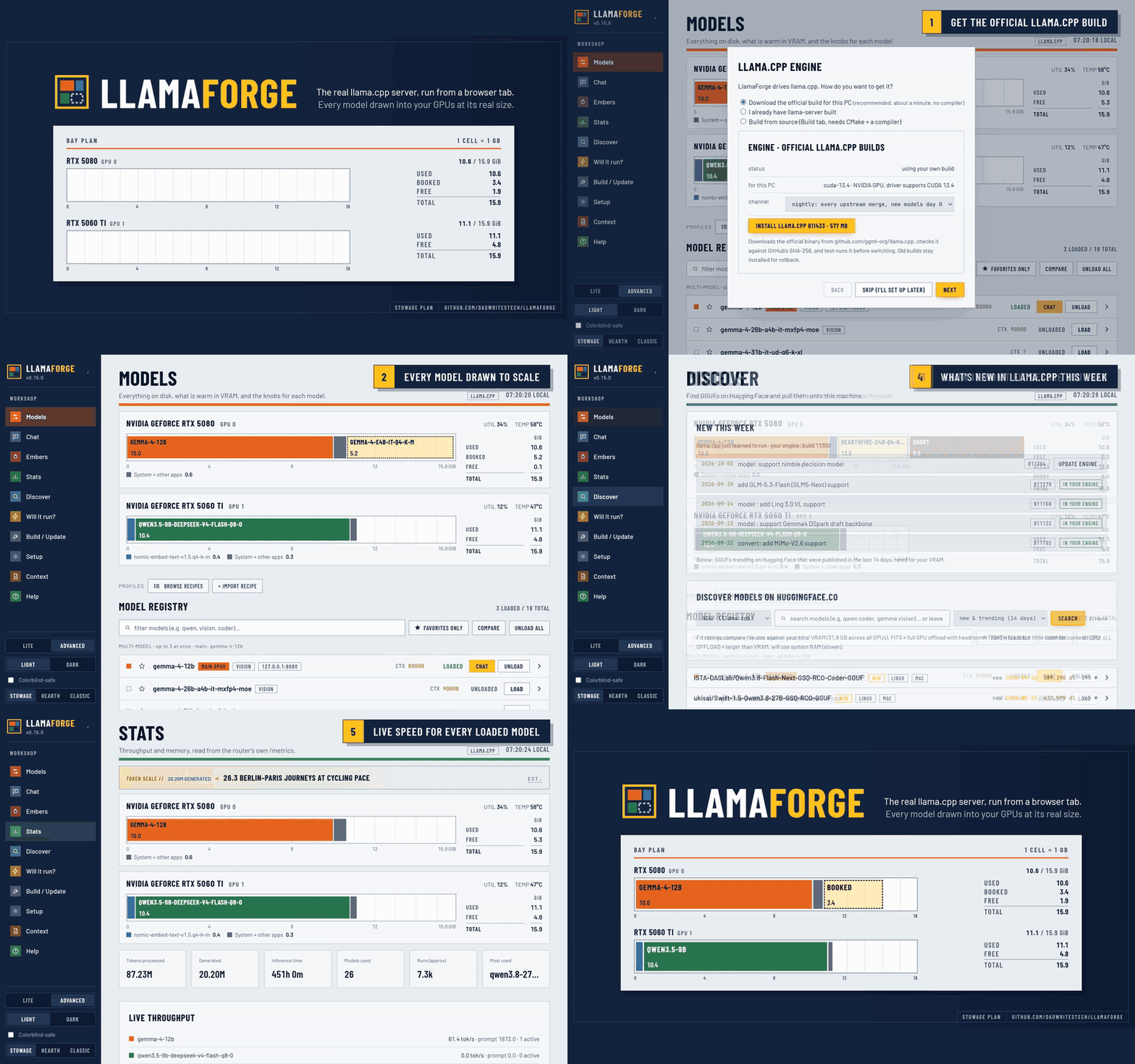
LlamaForge runs no models itself. It installs and drives llama.cpp's own llama-server router and
edits its models.ini for you. Not affiliated with ggml-org. If you'd rather have polish than
control, use LM Studio, Ollama or Jan.
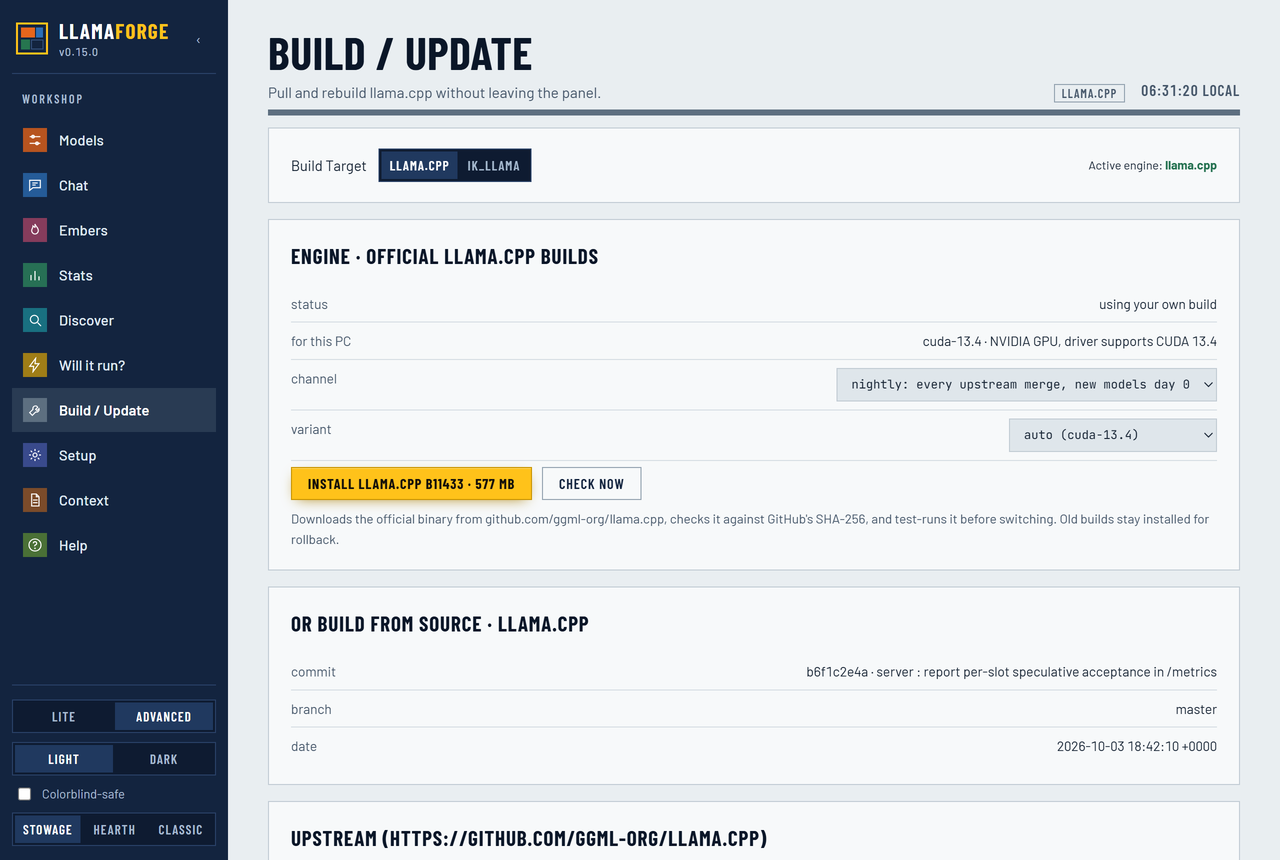
New model architectures land in llama.cpp first. Desktop apps pass them on when they next update their bundled engine. LlamaForge runs the official llama.cpp release itself (or your own build or fork), so a new model is one Update click away, and it puts a UI over every server flag instead of a curated subset.
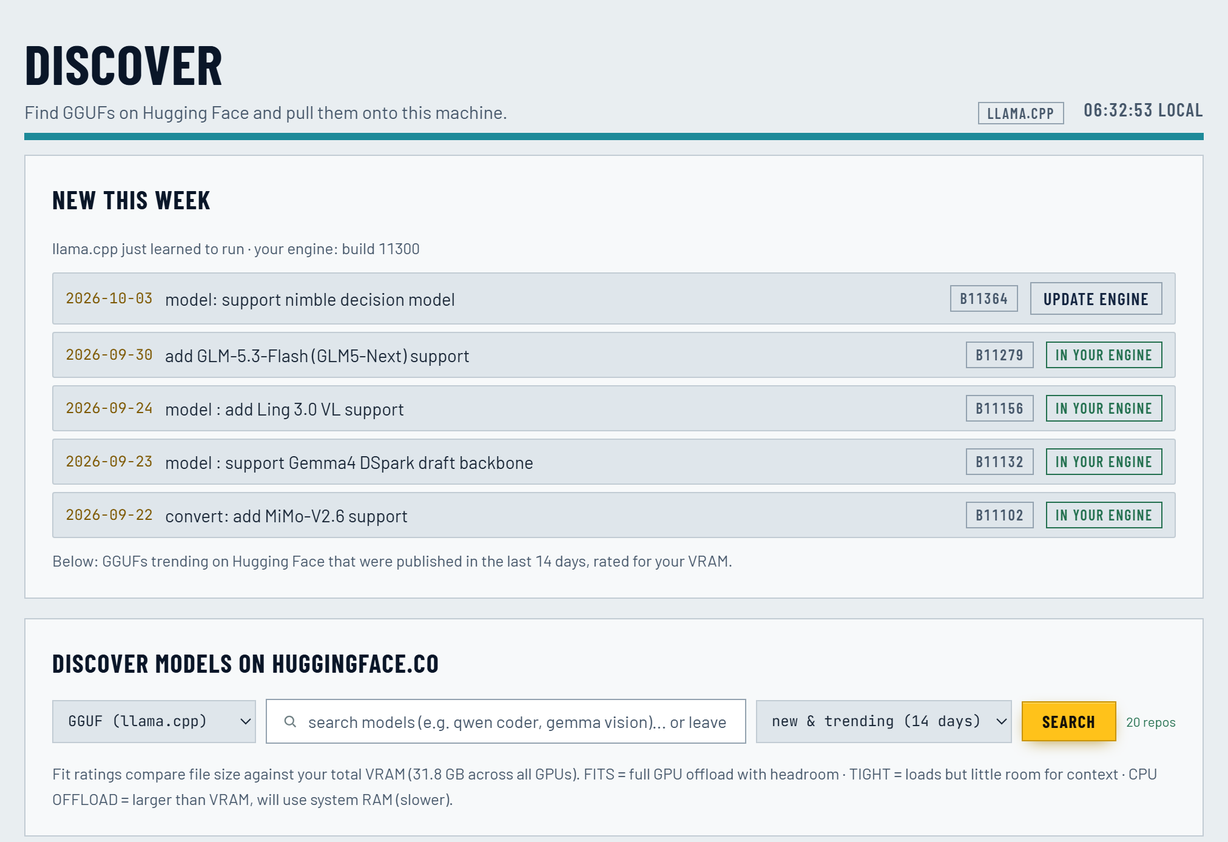
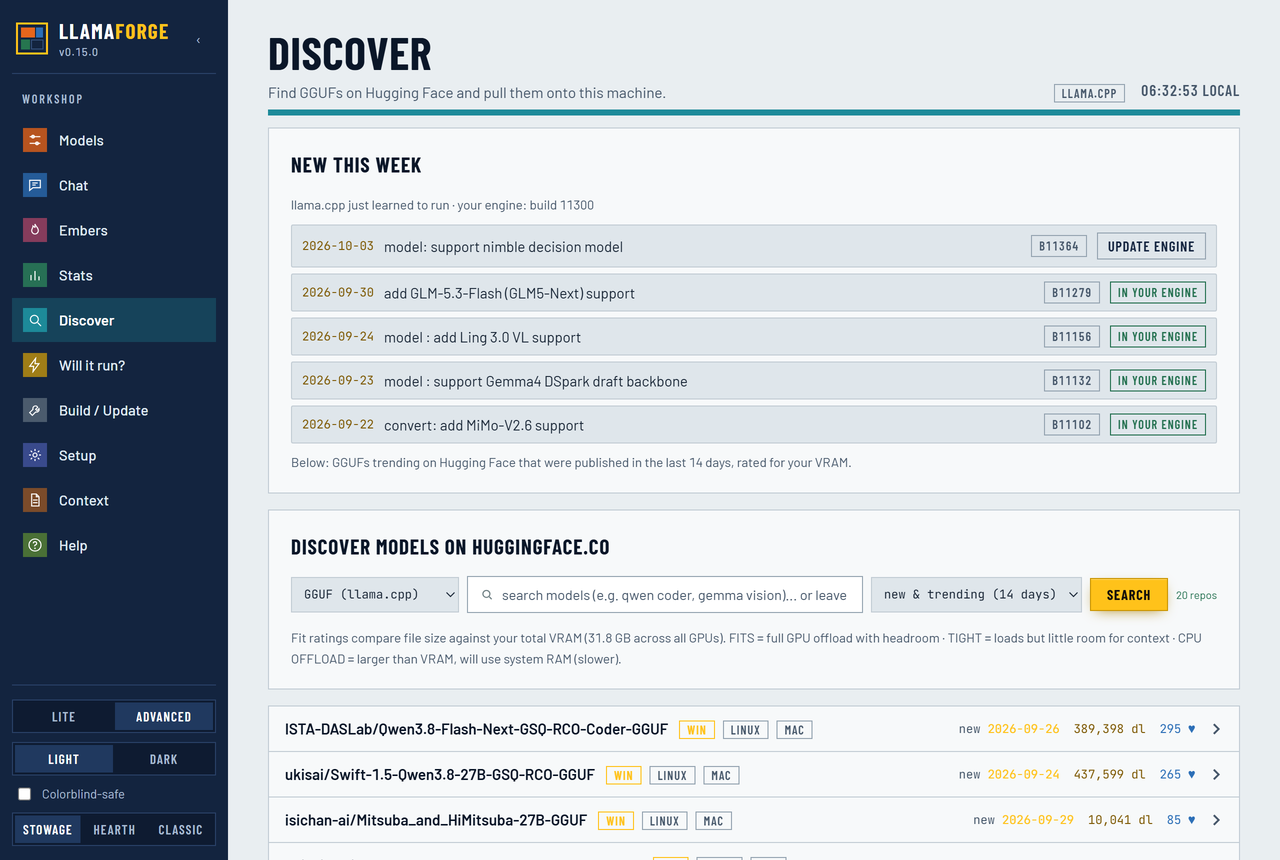
Discover opens on what llama.cpp just learned to run, checked against the engine you have.
| LlamaForge | LM Studio | Ollama | |
|---|---|---|---|
| Open source | ✅ MIT | ❌ proprietary app | ✅ MIT |
| Engine | official upstream llama.cpp builds, any version, or your own fork | LM Studio's bundled llama.cpp / MLX runtimes | Ollama's own engine on ggml |
| Per-model settings | every flag your llama-server --help lists (200+ on current builds) | many, curated | Modelfile parameters |
| Any GGUF from Hugging Face, rated for your VRAM before download | ✅ (a rough estimate) | ✅ | pulls GGUFs, no fit rating |
| OpenAI + Anthropic-compatible API | ✅, plus one-click Claude Code / Codex / pi.dev config | ✅ | ✅ |
| Backend dependencies | none (Python stdlib) | – | – |
| Native desktop app | ❌ runs in your browser | ✅ | ✅ |
| Maturity | early preview | mature | mature |
As of October 2026, to the best of our knowledge. Spot something wrong? A PR to fix this table is very welcome.
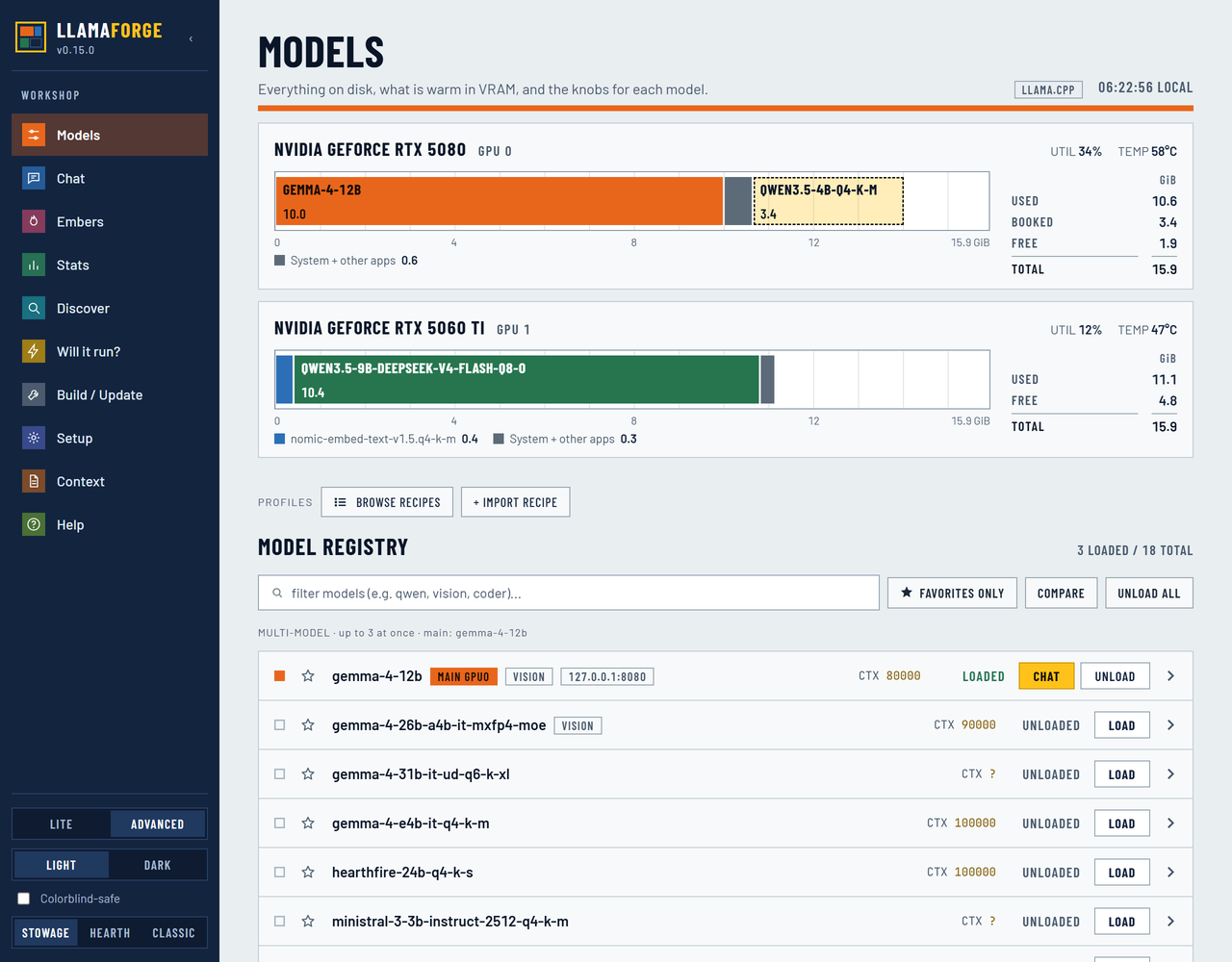
master, coming in the next release; NVIDIA): when another app needs the GPU, a loaded model moves layers to the CPU instead of unloading, keeps its conversation, and moves back once the memory is free. Slower while it's shrunk.llama-tts: Qwen3-TTS in 10 languages, or the tiny English Pocket TTS that runs faster than real time even on a CPU, optionally in a voice you record or upload (only clone voices you may use).CLAUDE.md / AGENTS.md.A first-run wizard and a Lite / Advanced toggle keep the deep knobs out of the way until you want them. The default look, Stowage, draws each GPU as a bay plan ruled in 1 GiB cells; Hearth and Classic are one click away, and each comes in light, dark and colorblind-safe.
Anything that speaks the OpenAI API (Open WebUI, SillyTavern, Continue, Cline, Aider, the OpenAI SDKs) works against
http://127.0.0.1:8080/v1. The router always runs with an API key, and Client Config on any model gives you the
base URL, key and model id ready to paste.
POST /v1/messages on the panel, with streaming and tool use.POST /v1/audio/speech on the panel (WAV or PCM), backed by llama-tts.backend/mcp_server.py): Claude Code, Codex or any MCP client can see what's loaded,
load and unload models, check what fits, pull GGUFs from Hugging Face, and hand a whole task to
pi running on a loaded local model (pi_run). One-line setup under
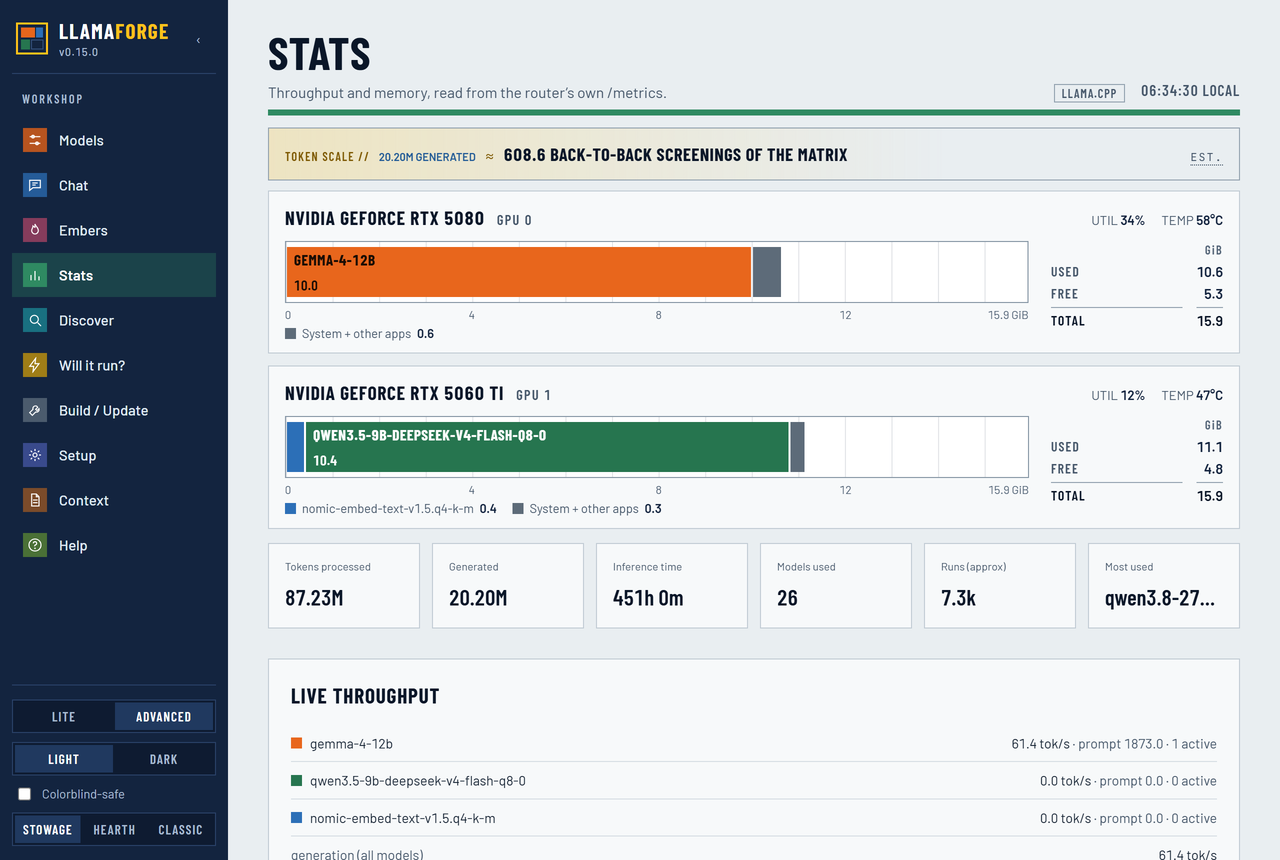
Setup -> MCP server, e.g. claude mcp add --scope user llamaforge -- python <LlamaForge>/backend/mcp_server.py.| Models: each GPU drawn to scale, with the open model booked in | Stats: memory and live speed per model |
|---|---|
 |  |
| Discover: new in llama.cpp, then trending GGUFs | Build / Update |
|---|---|
 |  |
The one-liners above need no git, admin or compiler. Re-run them any time to update.
The installer finds Python 3.10+ (on Windows it drops a private, SHA-256-pinned copy of
python.org's embeddable Python if you have none), downloads the latest release, adds a
Start menu / app-menu entry (~/Applications/LlamaForge.app on macOS, plus a llamaforge
command on Linux/macOS) and opens the dashboard. Updating keeps your settings, models and
engines. Uninstall from Apps & Features on Windows, or llamaforge uninstall; it asks
before touching your settings or models.
git clone https://github.com/dadwritestech/LlamaForge
cd LlamaForge
powershell -ExecutionPolicy Bypass -File bootstrap.ps1   # Windows
./bootstrap.sh                                           # Linux / macOS
The bootstrap script checks for Python and Git (asking before installing anything),
writes config.json and opens the dashboard.
Daily use: open LlamaForge from the Start menu / app menu, or run llamaforge.
It starts the router and the dashboard and opens your browser.
llamaforge stop (or stop.ps1 / stop.sh) shuts down the dashboard, the router and
the models it spawned. It stops only processes LlamaForge started; any other
llama-server you run is left alone.
Requirements: Windows 10/11, Linux, or macOS on Apple Silicon. Python 3.10+ (stdlib only; the Windows installer brings its own). NVIDIA (CUDA), AMD/Intel (Vulkan) or Apple (Metal) GPUs run models when present; CPU-only works. The VRAM preview, fit ratings and GPU stats read NVIDIA and Apple memory today; AMD/Intel cards don't show VRAM in the panel yet. Building from source also needs Git, CMake, Ninja and a C++ compiler, which the Setup tab can install where a package manager allows.
LlamaForge contains no llama.cpp code. A pure-stdlib Python backend drives llama.cpp's own
router API, edits models.ini, and fetches official builds (or shells out to git / cmake).
The knob list is parsed live from llama-server --help, so it tracks whatever build you run.
LlamaForge doesn't pin context size, GPU layers or the multi-GPU split. llama.cpp's --fit
(on by default) sizes all three to your free VRAM at load, and moves MoE experts to CPU when
needed. Pinning any of them turns fit off, so they stay unset unless you set them yourself.
Security: the dashboard only listens on 127.0.0.1. The router is keyed even when
local, so a web page you visit can't drive it. LAN access is opt-in from Setup and always
needs a key. Details and how to report a vulnerability privately: SECURITY.md.
Everything is in the in-app Help tab and at dadwritestech.github.io/LlamaForge: configuration, keyboard shortcuts, themes & colorblind-safe mode, vLLM, troubleshooting, and what's new. ROADMAP.md has what's shipped and planned; it's an early preview, so priorities follow feedback.
LlamaForge is MIT-licensed (LICENSE). It builds and drives llama.cpp - MIT, (c) The ggml authors - see NOTICE and LICENSE.llama.cpp.txt. The hard part is theirs; please star and support the upstream project.
pi_run drives pi, Mario Zechner's open-source coding agent (MIT).
LlamaForge doesn't ship it: Setup → Install pi fetches the published npm package into
LlamaForge's own agents/ folder using your Node.js (or install it yourself with
npm install -g @earendil-works/pi-coding-agent).
409 followers · starred Jul 2026
6,308 followers · starred Jul 2026
Open-source control panel for the real llama.cpp: see where a model lands in your VRAM before loading, every llama-server flag per model, one-click llama.cpp updates, several models at once, and Embers (local agents whose quotes are checked by code). Windows · Linux · macOS.
See the code
The real llama.cpp server, run from a browser tab.
Pick a model, see if it fits your GPU, load it, chat. Every llama-server flag is still there when you want it.
irm https://raw.githubusercontent.com/dadwritestech/LlamaForge/master/install.ps1 | iex # Windows, no admin
curl -fsSL https://raw.githubusercontent.com/dadwritestech/LlamaForge/master/install.sh | sh # Linux / macOS
Then Install llama.cpp (the official build for your GPU, no compiler) → Discover → Chat. Early preview: Windows + NVIDIA is the most-tested path. Linux and macOS pass CI but have had little real-hardware use.
LlamaForge runs no models itself. It installs and drives llama.cpp's own llama-server router and
edits its models.ini for you. Not affiliated with ggml-org. If you'd rather have polish than
control, use LM Studio, Ollama or Jan.
New model architectures land in llama.cpp first. Desktop apps pass them on when they next update their bundled engine. LlamaForge runs the official llama.cpp release itself (or your own build or fork), so a new model is one Update click away, and it puts a UI over every server flag instead of a curated subset.
Discover opens on what llama.cpp just learned to run, checked against the engine you have.
| LlamaForge | LM Studio | Ollama | |
|---|---|---|---|
| Open source | ✅ MIT | ❌ proprietary app | ✅ MIT |
| Engine | official upstream llama.cpp builds, any version, or your own fork | LM Studio's bundled llama.cpp / MLX runtimes | Ollama's own engine on ggml |
| Per-model settings | every flag your llama-server --help lists (200+ on current builds) | many, curated | Modelfile parameters |
| Any GGUF from Hugging Face, rated for your VRAM before download | ✅ (a rough estimate) | ✅ | pulls GGUFs, no fit rating |
| OpenAI + Anthropic-compatible API | ✅, plus one-click Claude Code / Codex / pi.dev config | ✅ | ✅ |
| Backend dependencies | none (Python stdlib) | – | – |
| Native desktop app | ❌ runs in your browser | ✅ | ✅ |
| Maturity | early preview | mature | mature |
As of October 2026, to the best of our knowledge. Spot something wrong? A PR to fix this table is very welcome.
master, coming in the next release; NVIDIA): when another app needs the GPU, a loaded model moves layers to the CPU instead of unloading, keeps its conversation, and moves back once the memory is free. Slower while it's shrunk.llama-tts: Qwen3-TTS in 10 languages, or the tiny English Pocket TTS that runs faster than real time even on a CPU, optionally in a voice you record or upload (only clone voices you may use).CLAUDE.md / AGENTS.md.A first-run wizard and a Lite / Advanced toggle keep the deep knobs out of the way until you want them. The default look, Stowage, draws each GPU as a bay plan ruled in 1 GiB cells; Hearth and Classic are one click away, and each comes in light, dark and colorblind-safe.
Anything that speaks the OpenAI API (Open WebUI, SillyTavern, Continue, Cline, Aider, the OpenAI SDKs) works against
http://127.0.0.1:8080/v1. The router always runs with an API key, and Client Config on any model gives you the
base URL, key and model id ready to paste.
POST /v1/messages on the panel, with streaming and tool use.POST /v1/audio/speech on the panel (WAV or PCM), backed by llama-tts.backend/mcp_server.py): Claude Code, Codex or any MCP client can see what's loaded,
load and unload models, check what fits, pull GGUFs from Hugging Face, and hand a whole task to
pi running on a loaded local model (pi_run). One-line setup under
Setup -> MCP server, e.g. claude mcp add --scope user llamaforge -- python <LlamaForge>/backend/mcp_server.py.| Models: each GPU drawn to scale, with the open model booked in | Stats: memory and live speed per model |
|---|---|
| |
| Discover: new in llama.cpp, then trending GGUFs | Build / Update |
|---|---|
| |
The one-liners above need no git, admin or compiler. Re-run them any time to update.
The installer finds Python 3.10+ (on Windows it drops a private, SHA-256-pinned copy of
python.org's embeddable Python if you have none), downloads the latest release, adds a
Start menu / app-menu entry (~/Applications/LlamaForge.app on macOS, plus a llamaforge
command on Linux/macOS) and opens the dashboard. Updating keeps your settings, models and
engines. Uninstall from Apps & Features on Windows, or llamaforge uninstall; it asks
before touching your settings or models.
git clone https://github.com/dadwritestech/LlamaForge
cd LlamaForge
powershell -ExecutionPolicy Bypass -File bootstrap.ps1   # Windows
./bootstrap.sh                                           # Linux / macOS
The bootstrap script checks for Python and Git (asking before installing anything),
writes config.json and opens the dashboard.
Daily use: open LlamaForge from the Start menu / app menu, or run llamaforge.
It starts the router and the dashboard and opens your browser.
llamaforge stop (or stop.ps1 / stop.sh) shuts down the dashboard, the router and
the models it spawned. It stops only processes LlamaForge started; any other
llama-server you run is left alone.
Requirements: Windows 10/11, Linux, or macOS on Apple Silicon. Python 3.10+ (stdlib only; the Windows installer brings its own). NVIDIA (CUDA), AMD/Intel (Vulkan) or Apple (Metal) GPUs run models when present; CPU-only works. The VRAM preview, fit ratings and GPU stats read NVIDIA and Apple memory today; AMD/Intel cards don't show VRAM in the panel yet. Building from source also needs Git, CMake, Ninja and a C++ compiler, which the Setup tab can install where a package manager allows.
LlamaForge contains no llama.cpp code. A pure-stdlib Python backend drives llama.cpp's own
router API, edits models.ini, and fetches official builds (or shells out to git / cmake).
The knob list is parsed live from llama-server --help, so it tracks whatever build you run.
LlamaForge doesn't pin context size, GPU layers or the multi-GPU split. llama.cpp's --fit
(on by default) sizes all three to your free VRAM at load, and moves MoE experts to CPU when
needed. Pinning any of them turns fit off, so they stay unset unless you set them yourself.
Security: the dashboard only listens on 127.0.0.1. The router is keyed even when
local, so a web page you visit can't drive it. LAN access is opt-in from Setup and always
needs a key. Details and how to report a vulnerability privately: SECURITY.md.
Everything is in the in-app Help tab and at dadwritestech.github.io/LlamaForge: configuration, keyboard shortcuts, themes & colorblind-safe mode, vLLM, troubleshooting, and what's new. ROADMAP.md has what's shipped and planned; it's an early preview, so priorities follow feedback.
LlamaForge is MIT-licensed (LICENSE). It builds and drives llama.cpp - MIT, (c) The ggml authors - see NOTICE and LICENSE.llama.cpp.txt. The hard part is theirs; please star and support the upstream project.
pi_run drives pi, Mario Zechner's open-source coding agent (MIT).
LlamaForge doesn't ship it: Setup → Install pi fetches the published npm package into
LlamaForge's own agents/ folder using your Node.js (or install it yourself with
npm install -g @earendil-works/pi-coding-agent).
409 followers · starred Jul 2026
6,308 followers · starred Jul 2026



