Run open AI models on your own computer — a friendly desktop app and local gateway for llama.cpp and more. Private, free, open source.
Rust
11
29 commits
updated Oct 16, 2026
English | Türkçe
Run AI models on your own computer. Private, free, and easy to use.





Download · User guide · FAQ · Roadmap · Support the project
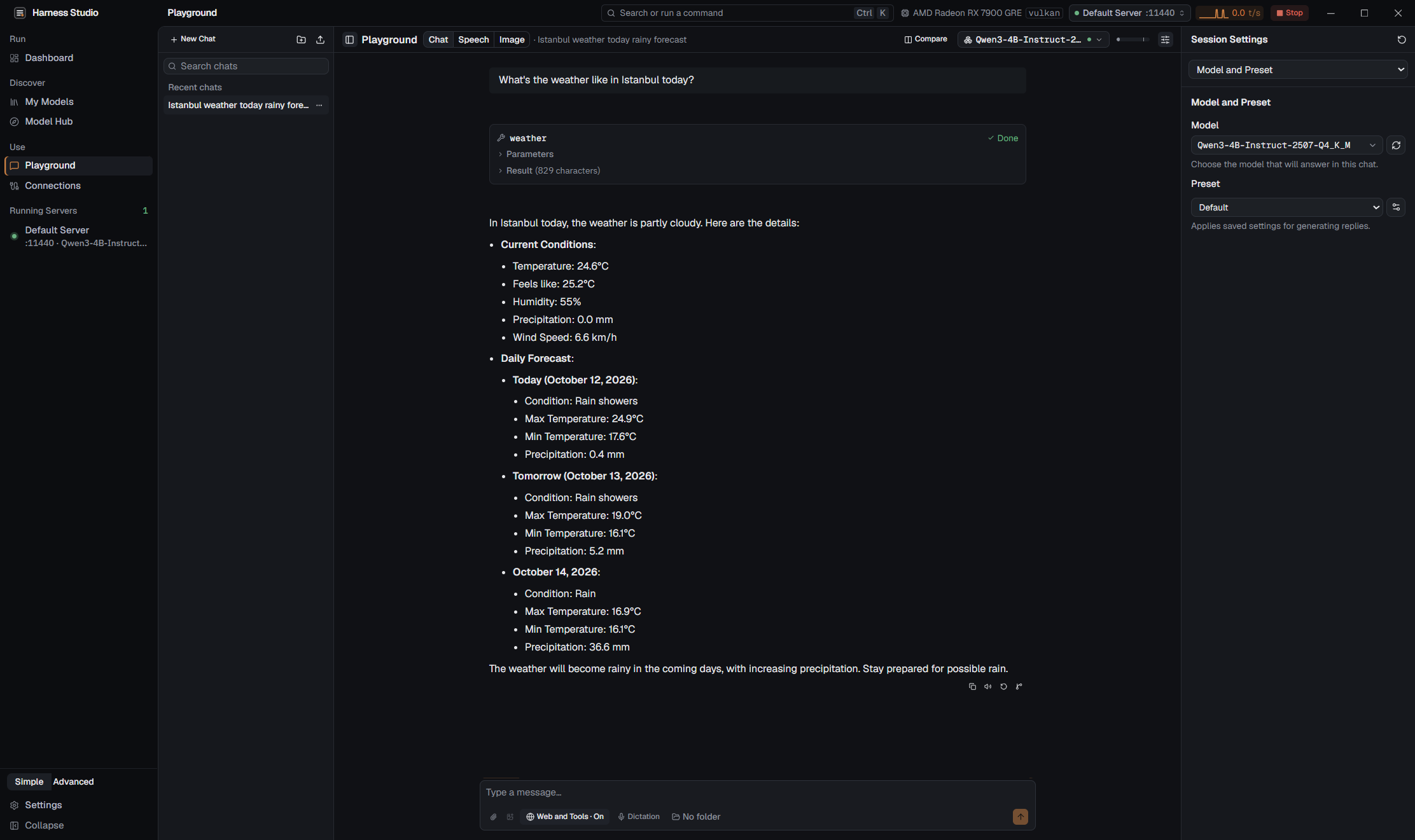
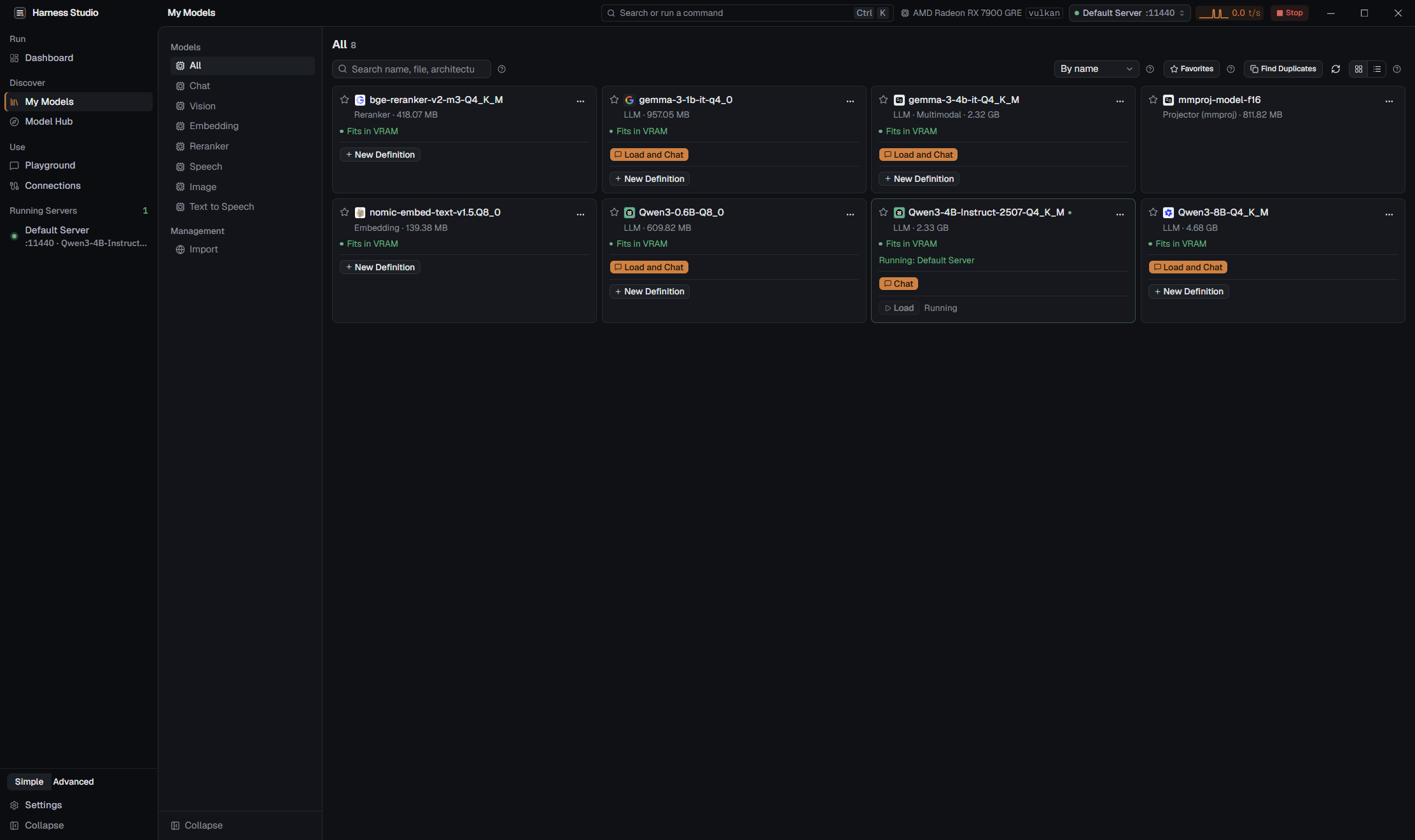
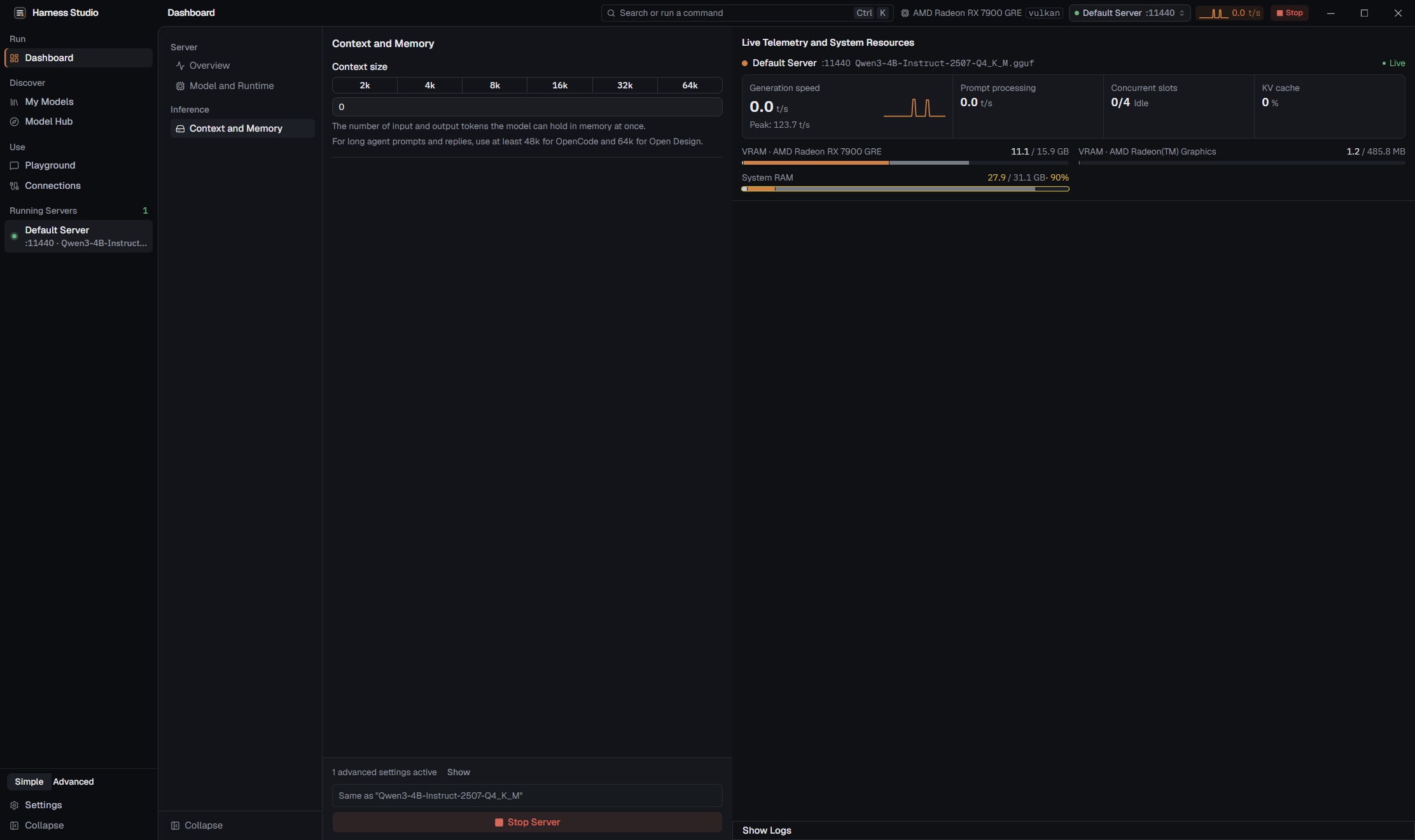
Screenshots are from the Windows app. The interface is available in English and Turkish.
An AI chatbot such as ChatGPT normally runs on a company's computers: your words travel over the internet to get an answer. Harness Studio lets you run the AI on your own computer instead. You download a model (a file that holds the AI's "brain"), press a button, and chat. After the download, nothing has to leave your machine, there is no subscription, and it keeps working without internet.
You do not need to be a programmer. The app finds models for you, checks whether they fit your computer, downloads them, starts them, and gives you a chat window. If you are a programmer or power user, the same app is also a local AI server with an OpenAI-compatible API, a command line, and tool and MCP support, so your editor, coding tools, or scripts can use your local models.
Harness Studio is a desktop app built with Tauri, Rust, and Svelte. It manages the open-source engines that actually run the models (mainly llama.cpp) and adds a friendly interface, safety checks, and measurements on top.
Harness Studio_..._x64-setup.exe (about 21 MB). The installer is not code-signed yet, so Windows SmartScreen may say "Windows protected your PC". Click More info, then Run anyway. macOS: open the DMG for your Mac (Harness Studio_..._aarch64.dmg for Apple Silicon, about 29 MB; Harness Studio_..._x64.dmg for Intel, about 32 MB) and drag Harness Studio to Applications. The app is signed with an Apple Developer ID and notarized by Apple, so it opens like any other downloaded app. The source code and the build workflow are open in this repository.Step by step, with every screen explained: User guide.
These are the requirements of Harness Studio itself, not of any model. Figures are measured on v0.1.0 on Windows and on macOS (Apple M1, 8 GB).
| Operating system | Windows 10 or 11, 64-bit, or macOS 13.3 or later on Apple Silicon (with Metal acceleration) or Intel (CPU only). Linux (x86_64, .deb and AppImage) is a preview: tested on one Ubuntu machine so far. |
| Installer size | About 21 MB on Windows; on macOS the DMG is about 29 MB (Apple Silicon) or 32 MB (Intel) |
| Installed size | About 65 MB (about 64 MB on macOS). On top of that, the app downloads the model engines it needs on demand (a llama.cpp build is tens of MB; CUDA builds are larger). |
| Memory used by the app | About 250-350 MB of RAM for the app itself (interface plus WebView2), before any model is loaded. On macOS about 250 MB (interface plus WebKit). |
| WebView2 | Preinstalled on Windows 11. On Windows 10 the installer sets it up automatically if it is missing (this needs an internet connection once). |
| macOS | A disk image (DMG): open it and drag the app to Applications. The app is signed with a Developer ID and notarized by Apple; microphone and Terminal-control permissions carry over to updates. |
| Graphics card | Not required. The CPU works. A GPU only makes models faster. |
| Disk for models | Depends on the model: from about 100 MB for a tiny model to 10 GB or more for a large one. You choose the folder, including another drive. |
| Internet | Needed to download the app, engines, and models. Not needed to chat once a model is on your disk. |
Supported acceleration, chosen automatically for your hardware: CUDA (NVIDIA), ROCm/HIP (recent AMD cards), SYCL (Intel Arc), Vulkan (most other GPUs), Metal (Apple Silicon, with the macOS build), and CPU.
What matters is how much memory the model needs, which depends on its size and on how heavily it is compressed. Most people download quantized models in the GGUF format: a quantization (such as Q4_K_M) stores the model's numbers in a more compact form, so the file is much smaller for a small loss of quality. VRAM is your graphics card's own memory; if the whole model fits in it, the model runs fastest.
These are rough guides for quantized GGUF models. Real needs also grow with the context (how much text the model can keep in mind at once).
| Free memory (RAM, or VRAM on a GPU) | Models you can comfortably try |
|---|---|
| About 0.5 GB | Tiny models, 135M-360M parameters. For example SmolLM2-135M: a file of roughly 100-150 MB that runs with about 500 MB of RAM, so it works on almost any computer. |
| About 4 GB | Small models, 1B-3B |
| About 8 GB | Mid-size models, 4B-8B |
| 16 GB or more, or a GPU with 8 GB+ VRAM | 12B-14B models and above |
You do not have to work this out yourself. The Model Hub and the Dashboard show a hardware-fit hint next to each model (Fits in VRAM, VRAM is tight, Partial GPU offload, Mostly CPU, May run out of memory). When Context size and GPU layers are left on Auto, Harness Studio picks safe settings for you: on a small graphics card it prefers keeping every layer on the GPU and shrinking the context, and it refuses to load a request that cannot fit instead of running it painfully slowly. If a model still does not fit, a dialog explains what ran out and what to change.
Everything below works locally. Details are in the user guide and FEATURES.md.
harness launch starts a tool with the right settings and changes nothing global.tool_calls, so coding tools get usable results (measurements)./metrics, and optional OpenTelemetry export.harness command, an authenticated Control API with an OpenAPI schema, and harness serve to run without a window. All of them share the same Rust code as the app.There are good tools already, and Harness Studio does not replace all of them for everyone. It aims to do what LM Studio and Ollama do without hiding llama.cpp's advanced controls, while being stronger at observability and at working with coding tools, and staying fully open source.
Same GGUF files on one Windows PC (AMD RX 7900 GRE 16 GB, Vulkan), each tool at its own defaults:
| Out of the box | Harness Studio | LM Studio | Ollama | llama.cpp |
|---|---|---|---|---|
| Qwen3-4B decode (tok/s) | 140.9 | 142.0 | 128.9 | 114.5 |
| Qwen2.5-Coder-14B decode (tok/s) | 48.6 | 42.0 | 49.0 | 40.9 |
| 4 concurrent requests, total (tok/s) | 344 | 157 | 126 | 152 |
| 14B tool calling (38 cases) | 36/38 | 5/38 | 4/38 | 5/38 |
| 20k-token prompt | correct | context error | context error | correct |
| 14B at 65k context: spill to shared memory | 98 MiB | 12.4 GB | 10.3 GB | 5.2 GB |
| Switch models through one endpoint | 6.5 s | wrong model answered | 5.6 s | restart needed |
The others win some rows too: Ollama processed long prompts faster, and at 65k context LM Studio and Ollama decoded about 3x faster by spilling into shared memory, while Harness keeps the model in video memory. Methodology, caveats, and the full tables: COMPARISON.md.
✓ available · ✗ not available · partial = limited. Sourced from the audited matrix in FEATURES.md; competitor columns reflect the versions listed there.
| Feature | Harness Studio | LM Studio | Ollama | llama.cpp (llama-server) |
|---|---|---|---|---|
| Friendly desktop app | ✓ | ✓ | ✓ | ✗ (server with a basic web page) |
| Windows / Linux / macOS | Windows and macOS; Linux preview | ✓ | ✓ | ✓ |
| Apple MLX engine | planned | ✓ | ✓ | ✗ |
| Built-in request analytics (P50/P95, per client) | ✓ | ✗ | ✗ | ✗ |
| Prometheus metrics and OpenTelemetry | ✓ | ✗ | ✗ | partial (metrics endpoint) |
| Works as an MCP server for other tools | ✓ | ✗ | ✗ | ✗ |
| One-command launch of coding tools | ✓ | ✗ | ✓ | ✗ |
| Named access tokens with scopes | ✓ | ✓ | ✗ | ✗ |
| OpenAPI schema for its management API | ✓ | ✗ | ✓ | ✗ |
| High-contrast and color-blind-friendly themes | ✓ | ✗ | ✗ | — |
| Interface languages | partial (English, Turkish) | ✓ (30+) | not verified | — |
| Official JS and Python SDKs | planned | ✓ | ✓ | ✗ |
| Tool | What it is | How Harness Studio relates |
|---|---|---|
| Jan | A desktop chat app for local and cloud models | Harness has a step-by-step setup so Jan can use the Harness endpoint. Harness adds server management and observability. |
| GPT4All | A desktop chat app for running models locally | Similar everyday use case; Harness adds an OpenAI/Anthropic/Ollama-compatible gateway, CLI, and tool support. |
| AnythingLLM | A workspace app for chatting with your documents | Harness has built-in local document chat (RAG), and any OpenAI-compatible app can use its endpoint. |
| LocalAI | A self-hosted, OpenAI-compatible API server | LocalAI is server first. Harness is desktop first today; a server mode with a web UI is planned. |
| Open WebUI | A web chat interface for Ollama and OpenAI-style APIs | Works with the Harness endpoint (guided setup included). Harness has its own desktop UI. |
| llama-swap / raw llama.cpp | A model-swapping proxy and the engine itself | Harness manages llama.cpp for you, including model switching, safe defaults, and the same raw controls. |
Start a headless owner with the gateway in one terminal, and use it from another:
harness serve --gateway                  # run without the UI; gateway on 127.0.0.1:11435
harness search Qwen3                     # search Hugging Face
harness pull unsloth/Qwen3-4B-Instruct-2507-GGUF:Q4_K_M
harness load Qwen3-4B-Instruct-2507-Q4_K_M
harness run Qwen3-4B-Instruct-2507-Q4_K_M "Say hello."
harness ps --json                        # loaded models, machine-readable
Any OpenAI-compatible client can then use your local model:
curl http://127.0.0.1:11435/v1/chat/completions \
  -H "Content-Type: application/json" \
  -d '{"model":"Qwen3-4B-Instruct-2507-Q4_K_M","messages":[{"role":"user","content":"Say hello."}]}'
from openai import OpenAI

client = OpenAI(base_url="http://127.0.0.1:11435/v1", api_key="not-needed")
reply = client.chat.completions.create(
    model="Qwen3-4B-Instruct-2507-Q4_K_M",
    messages=[{"role": "user", "content": "Say hello."}],
)
print(reply.choices[0].message.content)
Anthropic-style (/v1/messages) and Ollama-style (/api/chat) clients work on the same gateway. harness mcp exposes Harness as an MCP server over stdio. One-shot use without a running owner: harness --headless run ./model.gguf "2+2?" --json.
Reference: CLI.md · MCP.md · INTEGRATIONS.md · ARCHITECTURE.md · PERFORMANCE.md
Yes. The app is open source under the MIT License, with no subscription, account, or ads. Models you download have their own licenses (see the commercial-use question below).
Once the app, an engine, and a model are on your disk, chatting works without internet, and your conversations stay on your computer. The app only goes online when you ask it to (model search and downloads, engine and app updates, and web tools you switch on). See Privacy.
No. The CPU works, and a GPU only makes models faster. Small models run on modest machines; see How big a model can my PC run?. The app itself uses roughly 250-350 MB of RAM.
Mainly GGUF models for llama.cpp: chat, coding, vision, embedding, and reranking models. The Model Hub searches Hugging Face for you, shows size and hardware fit, and downloads with checksum verification. Speech (Whisper and sherpa-onnx), image generation (Stable Diffusion and FLUX packs), and ONNX models need their optional engines, which the app offers to install. Safetensors models can be converted to GGUF inside the app.
Yes. Add the folders that hold your GGUF files under Settings > Storage > Directories, or import from Ollama and LM Studio in the Library. See the Model Hub and Library guide.
Yes. Turn on the gateway and you get one local endpoint compatible with the OpenAI, Anthropic, and Ollama APIs. Connections offers guided setup for Claude Code, Codex, OpenCode, Aider, Goose, Continue, Zed, VS Code, Cline, JetBrains, Open WebUI, and others, with preview and undo. See INTEGRATIONS.md.
All three run models locally on top of llama.cpp. Harness Studio keeps the advanced controls visible, is fully open source, makes tool calling and long contexts work out of the box, and has built-in analytics, tracing, an MCP server, and a CLI. LM Studio and Ollama are more mature and available on more platforms. See Why Harness Studio?.
The v0.1.0 installer is not code-signed yet, so SmartScreen warns about unknown publishers. Choose More info, then Run anyway. The source code and the build workflow are public in this repository, and a signed installer is on the roadmap.
Settings > Updates can check for a new version and install it. If no update source is available, download the newest installer from Releases and run it. The llama.cpp engine is updated separately under Settings > Runtime, where you can also roll back.
Use Windows Apps > Installed apps. Uninstalling does not delete your data. Settings, chats, engines, and logs live in %APPDATA%\com.harnessstudio.app; models are in the model folder you chose in the wizard (Settings > Storage > Directories). Delete those folders yourself for a clean removal.
macOS: yes. There is a DMG for Apple Silicon (with Metal acceleration) and one for Intel Macs (CPU only), for macOS 13.3 or later; see Quick start for the first-open step. Linux: a preview .deb and AppImage (x86_64) are on the Releases page. They have been tested on one Ubuntu machine so far, so expect rough edges and please report what you find. Wider Linux testing is on the roadmap.
harness serve runs without a window and exposes the gateway and Control API, and remote instances can be used with HARNESS_HOST and HARNESS_TOKEN. A full server mode with a web interface, automatic HTTPS, and Docker images is planned, not yet available.
The app is MIT-licensed, so you may use it commercially. Each model has its own license (some forbid or limit commercial use). The Model Hub shows a model's license; check it before using a model in a product.
No. There is no telemetry and no account. See Privacy.
In Settings > Gateway, enable Allow network access and create a named token with the inference scope. Keyless network access is not allowed. You must set your firewall yourself. A built-in way to use models from another Harness instance (Harness Link) is planned.
If memory runs out, a dialog shows what did not fit and offers fixes (shorter context, fewer GPU layers, a smaller quant). See the troubleshooting guide.
Open an issue with your OS, GPU and driver, backend, app version, model, and the error text (diagnostics reports can be exported with personal information removed). Questions and ideas go to Discussions. Security problems: SECURITY.md.
The full, living list is in ROADMAP.md. It shows direction, not promises.
Available now (v0.1.0)
In progress
Planned next
Later: a community registry of tools and MCP servers, a ComfyUI bridge, a tool router, and more creation pages.
Harness Studio is built in the open and every bit of help counts.
bench/compare/.| Document | What it covers |
|---|---|
| User guide (English) | Installation, Model Hub, Dashboard, Playground, connections, tools, settings, CLI, troubleshooting |
| Kullanım kılavuzu (Türkçe) | The same guide in Turkish |
| CLI | Commands, services, JSON output, exit codes |
| Integrations | Coding tools: launch and configuration formats, rollback |
| MCP · Tools | Harness as MCP server and client; built-in and custom tools |
| Performance · Comparison | Measurements and methodology |
| Architecture · Security model | Services, gateway, trust boundaries |
| Features · UI levels | Feature-by-feature matrix; Simple and Advanced levels |
| Roadmap · Changelog | Open work; what changed in each version |
You need Rust (stable), Node.js 22+, and the Tauri prerequisites for your operating system.
npm ci
npm run tauri dev      # run the app in development mode
npm run tauri build    # build the installer (NSIS and MSI on Windows)
The build also compiles the harness CLI and helper programs. CLI only: cargo build -p harness-cli --release. Development checks and conventions: CONTRIBUTING.md.
Please read our Code of Conduct. Questions: Discussions. Bugs and requests: Issues. Help options: SUPPORT.md. Found a vulnerability? Follow SECURITY.md instead of opening a public issue.
Harness Studio is released under the MIT License. Copyright (c) 2026 struklabs and Harness Studio contributors.
Harness Studio stands on the shoulders of great open-source projects:
See each project for its full license terms. Model files you download have their own licenses, shown in the Model Hub.
Harness Studio is an open-source project by struklabs.
Run open AI models on your own computer — a friendly desktop app and local gateway for llama.cpp and more. Private, free, open source.
Rust
11
29 commits
updated Oct 16, 2026
English | Türkçe
Run AI models on your own computer. Private, free, and easy to use.
Download · User guide · FAQ · Roadmap · Support the project
Screenshots are from the Windows app. The interface is available in English and Turkish.
An AI chatbot such as ChatGPT normally runs on a company's computers: your words travel over the internet to get an answer. Harness Studio lets you run the AI on your own computer instead. You download a model (a file that holds the AI's "brain"), press a button, and chat. After the download, nothing has to leave your machine, there is no subscription, and it keeps working without internet.
You do not need to be a programmer. The app finds models for you, checks whether they fit your computer, downloads them, starts them, and gives you a chat window. If you are a programmer or power user, the same app is also a local AI server with an OpenAI-compatible API, a command line, and tool and MCP support, so your editor, coding tools, or scripts can use your local models.
Harness Studio is a desktop app built with Tauri, Rust, and Svelte. It manages the open-source engines that actually run the models (mainly llama.cpp) and adds a friendly interface, safety checks, and measurements on top.
Harness Studio_..._x64-setup.exe (about 21 MB). The installer is not code-signed yet, so Windows SmartScreen may say "Windows protected your PC". Click More info, then Run anyway. macOS: open the DMG for your Mac (Harness Studio_..._aarch64.dmg for Apple Silicon, about 29 MB; Harness Studio_..._x64.dmg for Intel, about 32 MB) and drag Harness Studio to Applications. The app is signed with an Apple Developer ID and notarized by Apple, so it opens like any other downloaded app. The source code and the build workflow are open in this repository.Step by step, with every screen explained: User guide.
These are the requirements of Harness Studio itself, not of any model. Figures are measured on v0.1.0 on Windows and on macOS (Apple M1, 8 GB).
| Operating system | Windows 10 or 11, 64-bit, or macOS 13.3 or later on Apple Silicon (with Metal acceleration) or Intel (CPU only). Linux (x86_64, .deb and AppImage) is a preview: tested on one Ubuntu machine so far. |
| Installer size | About 21 MB on Windows; on macOS the DMG is about 29 MB (Apple Silicon) or 32 MB (Intel) |
| Installed size | About 65 MB (about 64 MB on macOS). On top of that, the app downloads the model engines it needs on demand (a llama.cpp build is tens of MB; CUDA builds are larger). |
| Memory used by the app | About 250-350 MB of RAM for the app itself (interface plus WebView2), before any model is loaded. On macOS about 250 MB (interface plus WebKit). |
| WebView2 | Preinstalled on Windows 11. On Windows 10 the installer sets it up automatically if it is missing (this needs an internet connection once). |
| macOS | A disk image (DMG): open it and drag the app to Applications. The app is signed with a Developer ID and notarized by Apple; microphone and Terminal-control permissions carry over to updates. |
| Graphics card | Not required. The CPU works. A GPU only makes models faster. |
| Disk for models | Depends on the model: from about 100 MB for a tiny model to 10 GB or more for a large one. You choose the folder, including another drive. |
| Internet | Needed to download the app, engines, and models. Not needed to chat once a model is on your disk. |
Supported acceleration, chosen automatically for your hardware: CUDA (NVIDIA), ROCm/HIP (recent AMD cards), SYCL (Intel Arc), Vulkan (most other GPUs), Metal (Apple Silicon, with the macOS build), and CPU.
What matters is how much memory the model needs, which depends on its size and on how heavily it is compressed. Most people download quantized models in the GGUF format: a quantization (such as Q4_K_M) stores the model's numbers in a more compact form, so the file is much smaller for a small loss of quality. VRAM is your graphics card's own memory; if the whole model fits in it, the model runs fastest.
These are rough guides for quantized GGUF models. Real needs also grow with the context (how much text the model can keep in mind at once).
| Free memory (RAM, or VRAM on a GPU) | Models you can comfortably try |
|---|---|
| About 0.5 GB | Tiny models, 135M-360M parameters. For example SmolLM2-135M: a file of roughly 100-150 MB that runs with about 500 MB of RAM, so it works on almost any computer. |
| About 4 GB | Small models, 1B-3B |
| About 8 GB | Mid-size models, 4B-8B |
| 16 GB or more, or a GPU with 8 GB+ VRAM | 12B-14B models and above |
You do not have to work this out yourself. The Model Hub and the Dashboard show a hardware-fit hint next to each model (Fits in VRAM, VRAM is tight, Partial GPU offload, Mostly CPU, May run out of memory). When Context size and GPU layers are left on Auto, Harness Studio picks safe settings for you: on a small graphics card it prefers keeping every layer on the GPU and shrinking the context, and it refuses to load a request that cannot fit instead of running it painfully slowly. If a model still does not fit, a dialog explains what ran out and what to change.
Everything below works locally. Details are in the user guide and FEATURES.md.
harness launch starts a tool with the right settings and changes nothing global.tool_calls, so coding tools get usable results (measurements)./metrics, and optional OpenTelemetry export.harness command, an authenticated Control API with an OpenAPI schema, and harness serve to run without a window. All of them share the same Rust code as the app.There are good tools already, and Harness Studio does not replace all of them for everyone. It aims to do what LM Studio and Ollama do without hiding llama.cpp's advanced controls, while being stronger at observability and at working with coding tools, and staying fully open source.
Same GGUF files on one Windows PC (AMD RX 7900 GRE 16 GB, Vulkan), each tool at its own defaults:
| Out of the box | Harness Studio | LM Studio | Ollama | llama.cpp |
|---|---|---|---|---|
| Qwen3-4B decode (tok/s) | 140.9 | 142.0 | 128.9 | 114.5 |
| Qwen2.5-Coder-14B decode (tok/s) | 48.6 | 42.0 | 49.0 | 40.9 |
| 4 concurrent requests, total (tok/s) | 344 | 157 | 126 | 152 |
| 14B tool calling (38 cases) | 36/38 | 5/38 | 4/38 | 5/38 |
| 20k-token prompt | correct | context error | context error | correct |
| 14B at 65k context: spill to shared memory | 98 MiB | 12.4 GB | 10.3 GB | 5.2 GB |
| Switch models through one endpoint | 6.5 s | wrong model answered | 5.6 s | restart needed |
The others win some rows too: Ollama processed long prompts faster, and at 65k context LM Studio and Ollama decoded about 3x faster by spilling into shared memory, while Harness keeps the model in video memory. Methodology, caveats, and the full tables: COMPARISON.md.
✓ available · ✗ not available · partial = limited. Sourced from the audited matrix in FEATURES.md; competitor columns reflect the versions listed there.
| Feature | Harness Studio | LM Studio | Ollama | llama.cpp (llama-server) |
|---|---|---|---|---|
| Friendly desktop app | ✓ | ✓ | ✓ | ✗ (server with a basic web page) |
| Windows / Linux / macOS | Windows and macOS; Linux preview | ✓ | ✓ | ✓ |
| Apple MLX engine | planned | ✓ | ✓ | ✗ |
| Built-in request analytics (P50/P95, per client) | ✓ | ✗ | ✗ | ✗ |
| Prometheus metrics and OpenTelemetry | ✓ | ✗ | ✗ | partial (metrics endpoint) |
| Works as an MCP server for other tools | ✓ | ✗ | ✗ | ✗ |
| One-command launch of coding tools | ✓ | ✗ | ✓ | ✗ |
| Named access tokens with scopes | ✓ | ✓ | ✗ | ✗ |
| OpenAPI schema for its management API | ✓ | ✗ | ✓ | ✗ |
| High-contrast and color-blind-friendly themes | ✓ | ✗ | ✗ | — |
| Interface languages | partial (English, Turkish) | ✓ (30+) | not verified | — |
| Official JS and Python SDKs | planned | ✓ | ✓ | ✗ |
| Tool | What it is | How Harness Studio relates |
|---|---|---|
| Jan | A desktop chat app for local and cloud models | Harness has a step-by-step setup so Jan can use the Harness endpoint. Harness adds server management and observability. |
| GPT4All | A desktop chat app for running models locally | Similar everyday use case; Harness adds an OpenAI/Anthropic/Ollama-compatible gateway, CLI, and tool support. |
| AnythingLLM | A workspace app for chatting with your documents | Harness has built-in local document chat (RAG), and any OpenAI-compatible app can use its endpoint. |
| LocalAI | A self-hosted, OpenAI-compatible API server | LocalAI is server first. Harness is desktop first today; a server mode with a web UI is planned. |
| Open WebUI | A web chat interface for Ollama and OpenAI-style APIs | Works with the Harness endpoint (guided setup included). Harness has its own desktop UI. |
| llama-swap / raw llama.cpp | A model-swapping proxy and the engine itself | Harness manages llama.cpp for you, including model switching, safe defaults, and the same raw controls. |
Start a headless owner with the gateway in one terminal, and use it from another:
harness serve --gateway                  # run without the UI; gateway on 127.0.0.1:11435
harness search Qwen3                     # search Hugging Face
harness pull unsloth/Qwen3-4B-Instruct-2507-GGUF:Q4_K_M
harness load Qwen3-4B-Instruct-2507-Q4_K_M
harness run Qwen3-4B-Instruct-2507-Q4_K_M "Say hello."
harness ps --json                        # loaded models, machine-readable
Any OpenAI-compatible client can then use your local model:
curl http://127.0.0.1:11435/v1/chat/completions \
  -H "Content-Type: application/json" \
  -d '{"model":"Qwen3-4B-Instruct-2507-Q4_K_M","messages":[{"role":"user","content":"Say hello."}]}'
from openai import OpenAI

client = OpenAI(base_url="http://127.0.0.1:11435/v1", api_key="not-needed")
reply = client.chat.completions.create(
    model="Qwen3-4B-Instruct-2507-Q4_K_M",
    messages=[{"role": "user", "content": "Say hello."}],
)
print(reply.choices[0].message.content)
Anthropic-style (/v1/messages) and Ollama-style (/api/chat) clients work on the same gateway. harness mcp exposes Harness as an MCP server over stdio. One-shot use without a running owner: harness --headless run ./model.gguf "2+2?" --json.
Reference: CLI.md · MCP.md · INTEGRATIONS.md · ARCHITECTURE.md · PERFORMANCE.md
Yes. The app is open source under the MIT License, with no subscription, account, or ads. Models you download have their own licenses (see the commercial-use question below).
Once the app, an engine, and a model are on your disk, chatting works without internet, and your conversations stay on your computer. The app only goes online when you ask it to (model search and downloads, engine and app updates, and web tools you switch on). See Privacy.
No. The CPU works, and a GPU only makes models faster. Small models run on modest machines; see How big a model can my PC run?. The app itself uses roughly 250-350 MB of RAM.
Mainly GGUF models for llama.cpp: chat, coding, vision, embedding, and reranking models. The Model Hub searches Hugging Face for you, shows size and hardware fit, and downloads with checksum verification. Speech (Whisper and sherpa-onnx), image generation (Stable Diffusion and FLUX packs), and ONNX models need their optional engines, which the app offers to install. Safetensors models can be converted to GGUF inside the app.
Yes. Add the folders that hold your GGUF files under Settings > Storage > Directories, or import from Ollama and LM Studio in the Library. See the Model Hub and Library guide.
Yes. Turn on the gateway and you get one local endpoint compatible with the OpenAI, Anthropic, and Ollama APIs. Connections offers guided setup for Claude Code, Codex, OpenCode, Aider, Goose, Continue, Zed, VS Code, Cline, JetBrains, Open WebUI, and others, with preview and undo. See INTEGRATIONS.md.
All three run models locally on top of llama.cpp. Harness Studio keeps the advanced controls visible, is fully open source, makes tool calling and long contexts work out of the box, and has built-in analytics, tracing, an MCP server, and a CLI. LM Studio and Ollama are more mature and available on more platforms. See Why Harness Studio?.
The v0.1.0 installer is not code-signed yet, so SmartScreen warns about unknown publishers. Choose More info, then Run anyway. The source code and the build workflow are public in this repository, and a signed installer is on the roadmap.
Settings > Updates can check for a new version and install it. If no update source is available, download the newest installer from Releases and run it. The llama.cpp engine is updated separately under Settings > Runtime, where you can also roll back.
Use Windows Apps > Installed apps. Uninstalling does not delete your data. Settings, chats, engines, and logs live in %APPDATA%\com.harnessstudio.app; models are in the model folder you chose in the wizard (Settings > Storage > Directories). Delete those folders yourself for a clean removal.
macOS: yes. There is a DMG for Apple Silicon (with Metal acceleration) and one for Intel Macs (CPU only), for macOS 13.3 or later; see Quick start for the first-open step. Linux: a preview .deb and AppImage (x86_64) are on the Releases page. They have been tested on one Ubuntu machine so far, so expect rough edges and please report what you find. Wider Linux testing is on the roadmap.
harness serve runs without a window and exposes the gateway and Control API, and remote instances can be used with HARNESS_HOST and HARNESS_TOKEN. A full server mode with a web interface, automatic HTTPS, and Docker images is planned, not yet available.
The app is MIT-licensed, so you may use it commercially. Each model has its own license (some forbid or limit commercial use). The Model Hub shows a model's license; check it before using a model in a product.
No. There is no telemetry and no account. See Privacy.
In Settings > Gateway, enable Allow network access and create a named token with the inference scope. Keyless network access is not allowed. You must set your firewall yourself. A built-in way to use models from another Harness instance (Harness Link) is planned.
If memory runs out, a dialog shows what did not fit and offers fixes (shorter context, fewer GPU layers, a smaller quant). See the troubleshooting guide.
Open an issue with your OS, GPU and driver, backend, app version, model, and the error text (diagnostics reports can be exported with personal information removed). Questions and ideas go to Discussions. Security problems: SECURITY.md.
The full, living list is in ROADMAP.md. It shows direction, not promises.
Available now (v0.1.0)
In progress
Planned next
Later: a community registry of tools and MCP servers, a ComfyUI bridge, a tool router, and more creation pages.
Harness Studio is built in the open and every bit of help counts.
bench/compare/.| Document | What it covers |
|---|---|
| User guide (English) | Installation, Model Hub, Dashboard, Playground, connections, tools, settings, CLI, troubleshooting |
| Kullanım kılavuzu (Türkçe) | The same guide in Turkish |
| CLI | Commands, services, JSON output, exit codes |
| Integrations | Coding tools: launch and configuration formats, rollback |
| MCP · Tools | Harness as MCP server and client; built-in and custom tools |
| Performance · Comparison | Measurements and methodology |
| Architecture · Security model | Services, gateway, trust boundaries |
| Features · UI levels | Feature-by-feature matrix; Simple and Advanced levels |
| Roadmap · Changelog | Open work; what changed in each version |
You need Rust (stable), Node.js 22+, and the Tauri prerequisites for your operating system.
npm ci
npm run tauri dev      # run the app in development mode
npm run tauri build    # build the installer (NSIS and MSI on Windows)
The build also compiles the harness CLI and helper programs. CLI only: cargo build -p harness-cli --release. Development checks and conventions: CONTRIBUTING.md.
Please read our Code of Conduct. Questions: Discussions. Bugs and requests: Issues. Help options: SUPPORT.md. Found a vulnerability? Follow SECURITY.md instead of opening a public issue.
Harness Studio is released under the MIT License. Copyright (c) 2026 struklabs and Harness Studio contributors.
Harness Studio stands on the shoulders of great open-source projects:
See each project for its full license terms. Model files you download have their own licenses, shown in the Model Hub.
Harness Studio is an open-source project by struklabs.



