
Private, on-device AI desktop app — GGUF (llama.cpp) & MLX, running Muse-Glimmer and Qwen3.8 with their native reasoning-effort ladders wired in as real controls. Local coding agent, RAG knowledge base, Deep Research, vision and voice. 100% offline, no account, no telemetry. Windows & macOS.
See the codeREADME
English · 简体中文 · Português (BR)
Chaty
Private, on-device AI — your models, your data, your machine.
Chaty runs open LLMs 100% offline in a polished desktop app. No account, no cloud, no telemetry — with a local coding agent, a document knowledge base, Deep Research, and hands-free voice built right in.










↓ Download · Website · Docs · Chaty model on Hugging Face
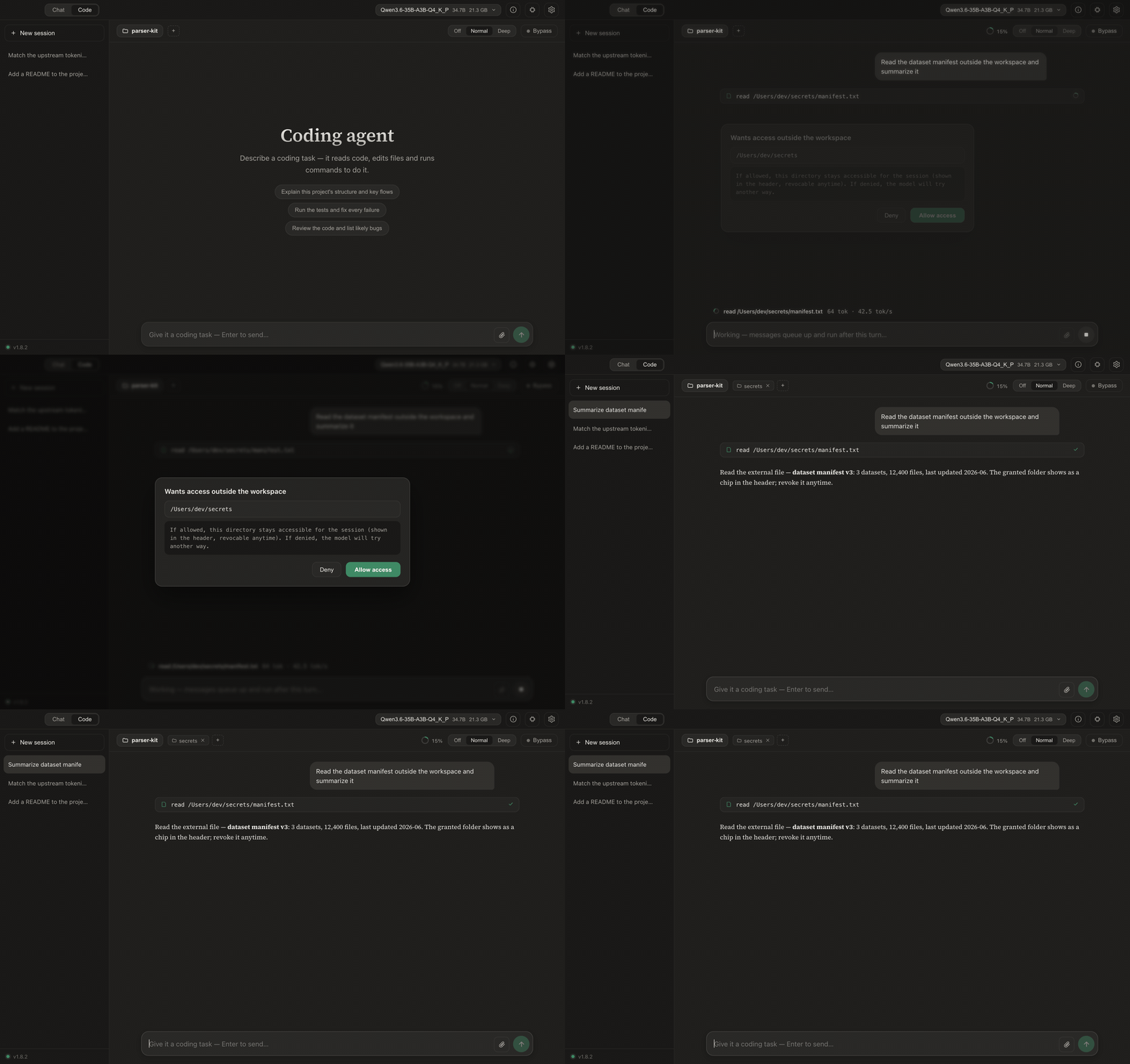
A local coding agent — searches GitHub, reads the source, edits your files, and runs the tests. All on your machine.
Why Chaty
- 🔒 Truly private — every model, document, and conversation stays on your device. No sign-up, no server, nothing phoned home.
- ⚡ Native and fast — a Rust + llama.cpp core with Vulkan / Metal GPU offload that auto-tunes to your hardware and falls back gracefully to CPU.
- 🧰 More than a chat box — a coding agent, a knowledge base (RAG), Deep Research, hands-free voice, and a self-healing Design Canvas — all offline.
- 🧠 Runs almost anything — Llama 3 / Muse-Glimmer, Gemma 3 / 4, Qwen 3 / 3.5 / 3.6 / 3.8, any GGUF from Hugging Face — and MLX models natively on Apple Silicon — plus Chaty's own fine-tuned model.
- 💻 Friendly to modest hardware — a first-launch “Set up for me” picks a model sized to your RAM and downloads it in one click.
Reasoning effort as a first-class control
Some models ship a native reasoning-effort ladder they were trained to obey —
Qwen3.8 has three rungs (low · medium ·
xhigh), Muse-Glimmer four (low ·
medium · high · xhigh). The rung arrives as a chat-template kwarg, so a runtime that
doesn't know about it silently gets the default and you wait through maximum-length thinking
for "what's 2 + 2".
Chaty treats the ladder as a control you actually turn:
|
Same question, same seed, one rung apart — Qwen3.8-27B (8-bit MLX, 48 GB Apple Silicon):
Five times the wait, or five times the deliberation — your call, per message. |
A local coding agent
Flip the Chat · Code switch and Chaty becomes an agent for your codebase. Point it at a folder, describe the task, and it explores, edits, and verifies the project by itself — every step shown live, every change behind an approval + diff.
- 🌐 The whole web as a tool — key-less search of GitHub (repos, issues, and code), Reddit, YouTube, Bilibili, and any domain; fetching adapts to the content (articles → Markdown, PDFs → text, videos → transcripts).
- 🧭 Drives a real browser — opens pages, reads dynamic content as text, clicks and fills whole forms with real mouse events, logs in and paginates — and looks with the vision model when it matters.
- 🧠 Tools that do the thinking —
understand_repoorients in one call,search_coderanks files by relevance,read_filelifts a single symbol plus its call sites,validate_changeruns just the tests the change touches. Small models spend their steps on decisions, not grunt work. - ✏️ Precise edits, real shell — exact-string patches behind a diff preview with a syntax gate, plus commands and long background jobs (dev servers, builds) sandboxed to the workspace.
- ⏪ You stay in control — per-action approval, a command allowlist, prompt-injection defense on everything it reads, and one-click checkpoint rewind that restores files and rolls back the conversation.
- 🔌 MCP, sized for small models — connect any Model Context Protocol server (stdio or streamable HTTP), or one-click a curated, version-pinned store entry that's live-certified against Chaty's own client. Tool docs are synthesized lean so a 16K context fits as many servers as you like; every result is injection-defended and untrusted servers need per-call approval.
- 📚 Skills & project memory — drop a
SKILL.mdof procedural steps in~/.chaty/skills/(or per-project) and the agent loads it only when relevant;remembersaves non-obvious findings to.chaty/memory/so the next session starts knowing them. Plain markdown, human-editable, never leaves the machine.
More Code-mode details
- Reads PDF / Word / Excel / PowerPoint (a scanned PDF has no text layer and says so);
search_filesfinds by name or content; file outlines navigate big files; failed patches get “did-you-mean” hints. - Browser automation is verified end-to-end against real sites, and can run in your real Chrome — watch it work, logins and all.
- Built for local models: an Off / Normal / Deep reasoning switch, a prompt-processing progress ring, a context-usage ring with automatic compaction, whole-file reads sized to your context window, ranked
search_code+ knowledge-basesearch_docs, and loop-breaking for repetitive small models. - Persistent sessions, project memory (AGENTS.md), custom /skills, and slash commands.
- Tune it under Settings → Code: step limit, command timeout, step temperature, tool-call format, an auto-approve-edits toggle, a headless-browser toggle, and a command allowlist.
- Each model's own tool-call format — Qwen3.5 / 3.6 / 3.8 were trained to write tool calls as XML, Qwen3 and QwQ as JSON, Gemma 4 and LFM in forms of their own. Chaty reads the format from the model's chat template and speaks it, so long edits stop coming back as broken JSON; a family whose template names none gets XML, and Settings → Code can pick one by hand.
- File access never leaves the folder you pick; out-of-workspace access asks per folder; a
sudocommand asks first with a secure password prompt; downloads land in the workspace and are covered by checkpoints too.
Benchmarks
One local model for every row — Qwen3.5-35B-A3B (MoE, ~3 B active per token), mxfp8 on MLX, reasoning off, entirely on one machine:
| SWE-bench Verified — 45-task macOS-validated subset | Resolved |
|---|---|
| Chaty agent (v1.9) — the full tool loop, 16K context | 15/45 (33 %) |
| qwen-code 0.20 — the model family's own CLI (needs 32K) | 12/45 (27 %) |
| pi 0.81 — minimal 4-tool agent CLI | 10/45 (22 %) |
| opencode 1.18 | 7/45 (16 %) |
| bare bash agent — single-tool ablation | 6/45 (13 %) |
Same model, same tasks, same grading, one machine — five agent designs. Chaty leads the field, including the model family's own first-party CLI (qwen-code) while using half its context window, and resolves 2.5× the bare-bash ablation. That's the design thesis measured: with frontier models a thin scaffold is enough — on small local models, the intelligence has to live in the tools (repo-aware search, symbol reads, precise edits, recovery guards, post-edit diagnostics). Methodology, per-agent configs, and honest-comparison notes (subset, macOS harness — not comparable to leaderboard numbers): docs/BENCHMARKS.md.
Design Canvas

- Preview | code, side by side — every page opens as a split studio: live preview left, the actual source right, syntax-highlighted and palette-following. Three drag-resizable columns, fullscreen, page reload, and a Console tab for the page's logs and errors.
- Point at what you mean — Inspect links the panes both ways: hover an element and the code jumps to its line; click a code line and the element flashes. Click to select (⌘/Ctrl multi-select) and your next instruction edits exactly those elements — or open the source yourself with the Edit button.
- Watch the edit happen — iterations stream in Cursor-style: the code pane scans the document line by line and lands on a Changes diff (+N/−N, same language as Code mode).

- Self-healing, persistent — runtime errors offer a one-click Fix (always asks first); a compat layer keeps browser-clean pages clean here too (history API, cookies, clipboard); and each reply keeps its canvas session across close/reopen, with version history, a confirmed reset, and export to a standalone
.html.
Chat that renders everything
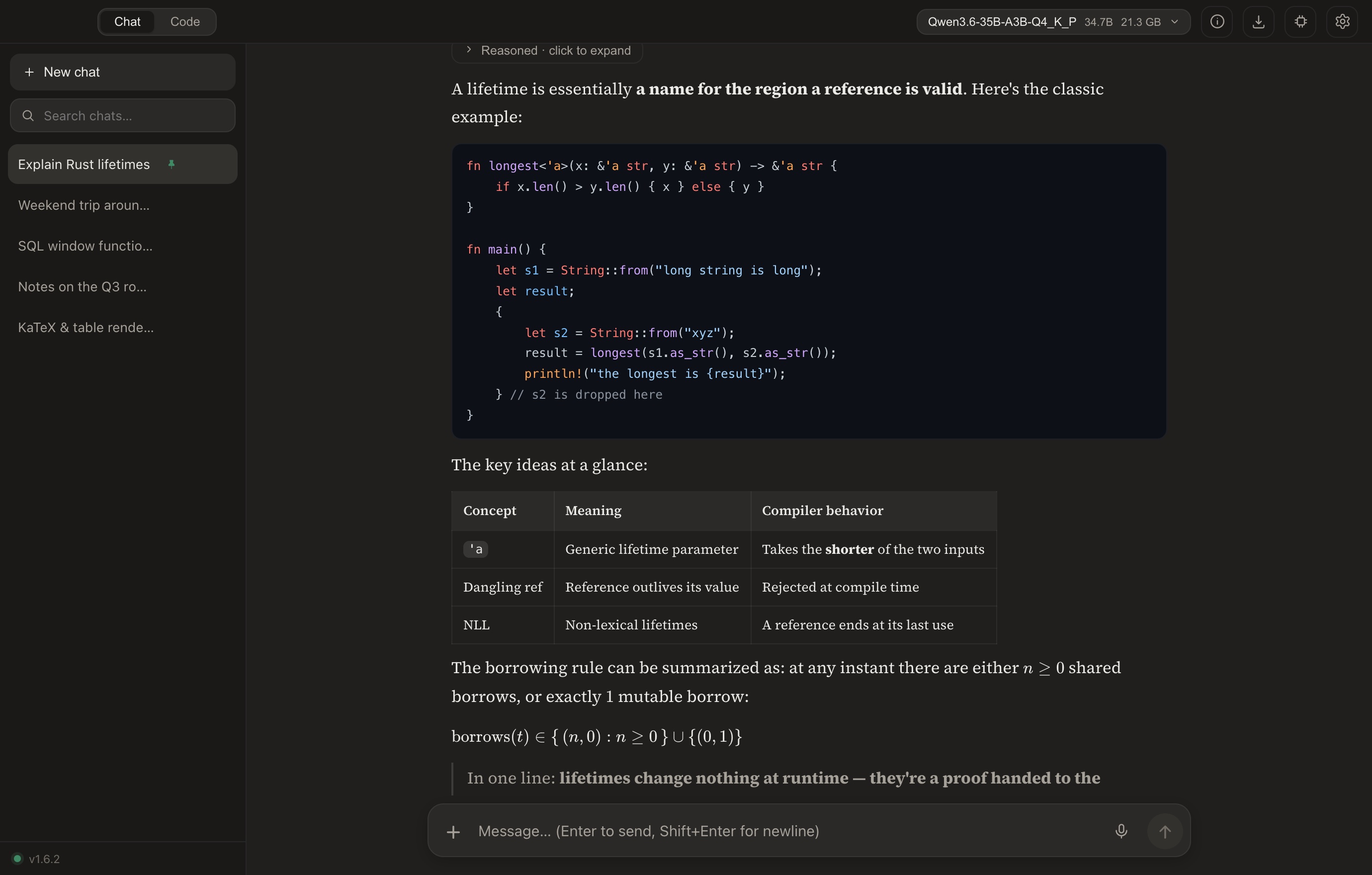 | 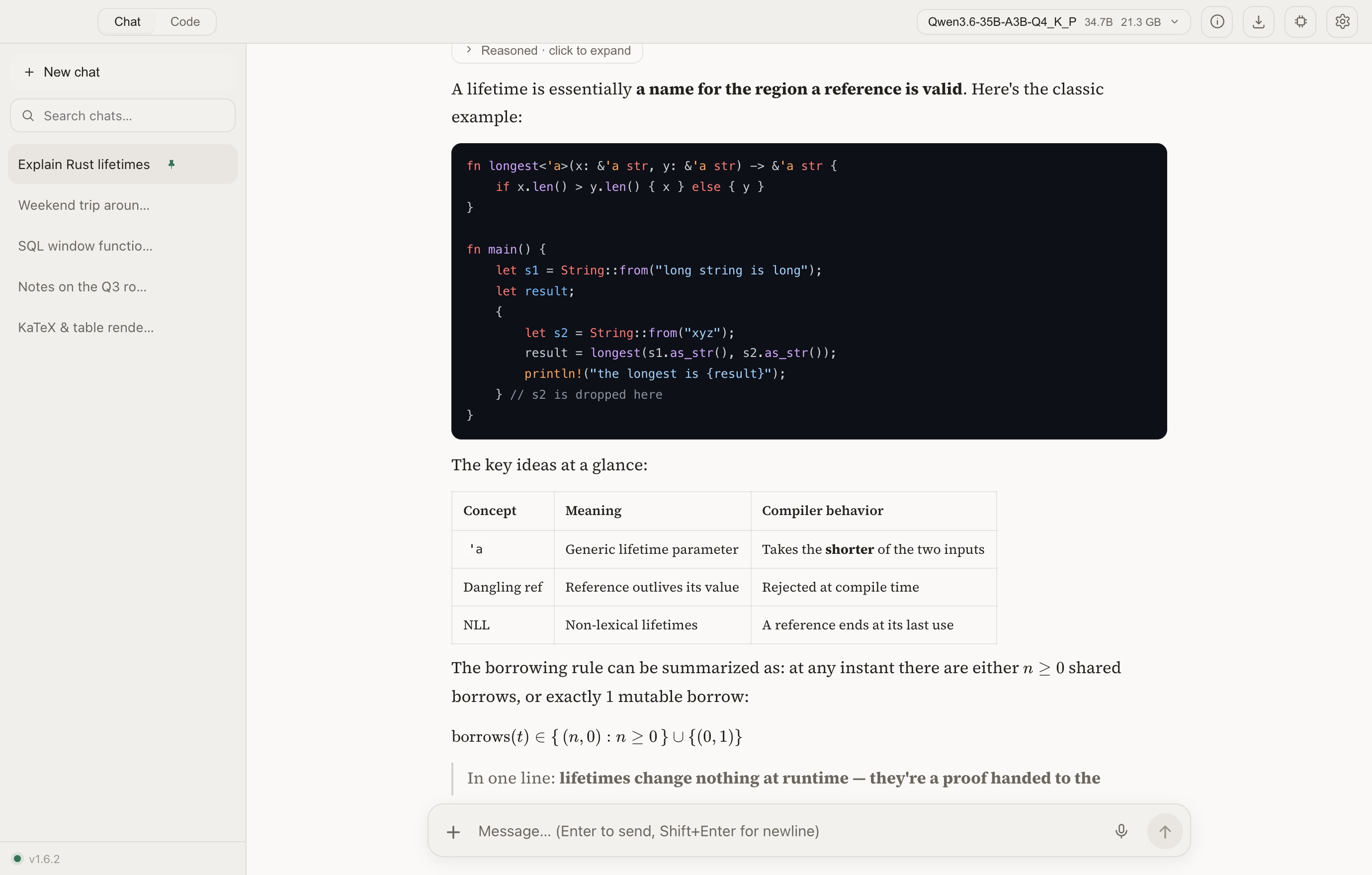 |
- A streaming, foldable
<think>panel that follows the model's reasoning as it generates. - KaTeX math, tables, Mermaid diagrams, per-block code copy, and in-app rendering of single-file HTML — including playable web games.
- A ⌘K command palette, pinnable / renameable conversations, drag-and-drop attachments, export (Markdown / JSON), and full-text search.
- Four palettes (two dark, two light) with system-theme following, native UI zoom, reduced-motion support, and an English / 简体中文 / Português (BR) UI.
Chaty can see
Load a vision model (its weights and mmproj encoder live together in one folder, paired automatically) and image understanding turns on everywhere:
- Chat — attach a picture and ask about it; follow-ups stay fast (already-seen images aren't re-encoded).
- Code — the agent reads screenshots and can look at any image with
view_image; the composer takes images and documents just like chat. - Knowledge base — imported images get a written description beside their OCR text, so search finds what's in them; images embedded inside PDFs, Word, Excel and PowerPoint files are extracted and described too.
- Canvas — the model sees the live rendered page when you ask for an edit.
Text-only models keep the OCR path, so nothing regresses — and updating from an older version, a one-time prompt tidies your existing loose .gguf files into the one-folder-per-model layout with a single click.
Models: the store, native MLX — and Chaty's own
- A built-in model store: search Hugging Face by name or author, filter GGUF / MLX, sort by trending or downloads — then pick a quantization from a dropdown and hit download. Models, not file lists.
- Parameter / architecture / vision badges, the repo's README rendered in-app, and a "fits fully in memory" hint sized to your machine. Vision models fetch their encoder automatically; pasting a repo link still works.
- MLX runs natively on Apple Silicon: mlx-community folder models load through Apple's MLX stack in an isolated sidecar — same chat, vision, reasoning controls, Code agent and knowledge-base support as GGUF, and ejecting a model always returns its memory.
- Chaty's own fine-tune — a Qwen3.5-4B distilled from a much larger teacher for leaner on-device single-file web design, with a baked-in Chaty identity and grounded citations. A one-click pick in “Set up for me”, fully open on Hugging Face.
A private knowledge base
| 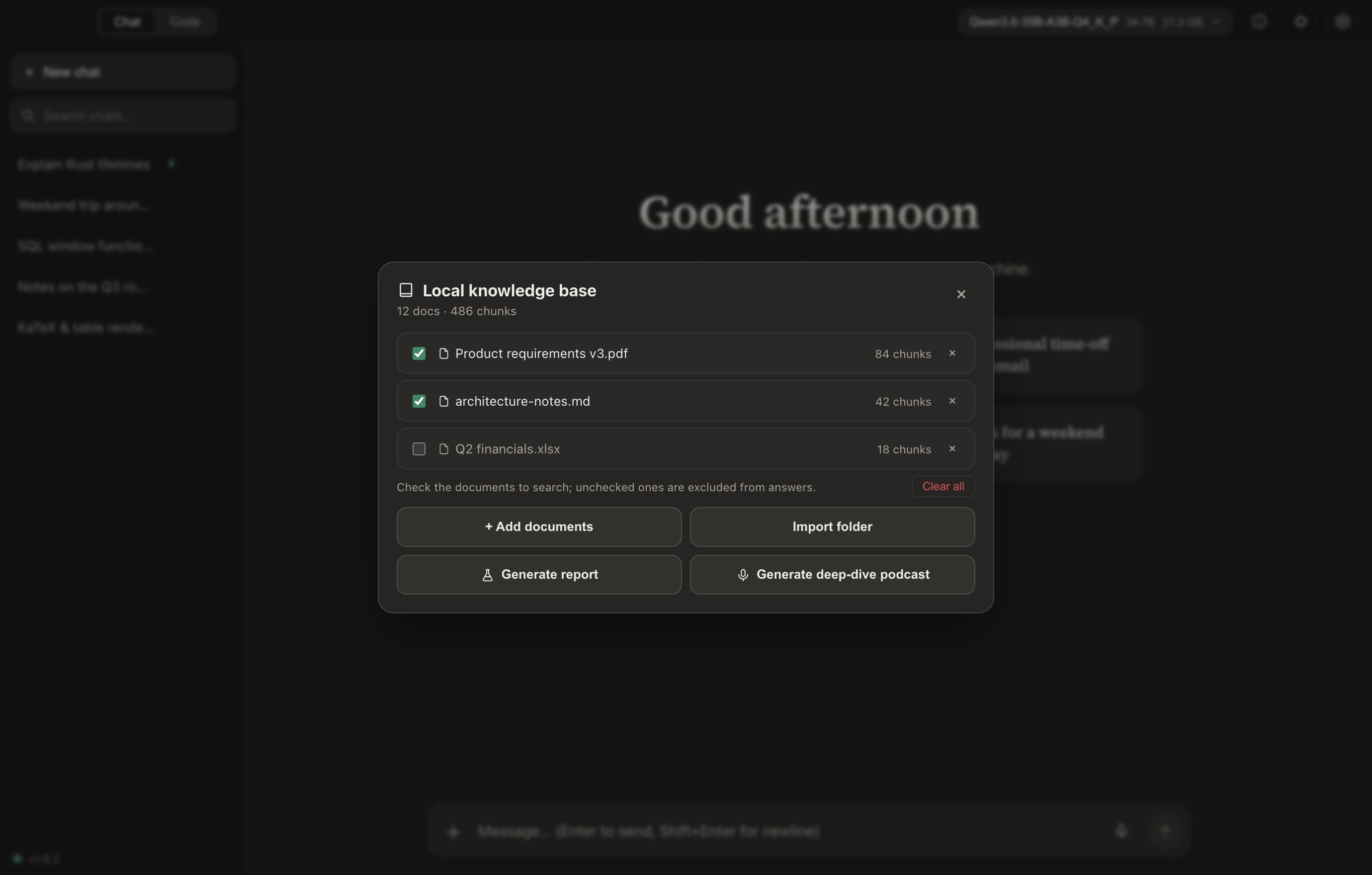 |
Deep Research & the web
- Give a topic and Chaty plans queries, runs multiple rounds of web search interleaved with reasoning, and writes a structured, cited report — exportable to PDF or Markdown.
- Honest by design: the reference list contains only sources it actually cited.
- A free, key-less, multi-provider search chain (Brave → Bing → DuckDuckGo → Wikipedia) so one blocked provider never breaks search.
Hands-free voice
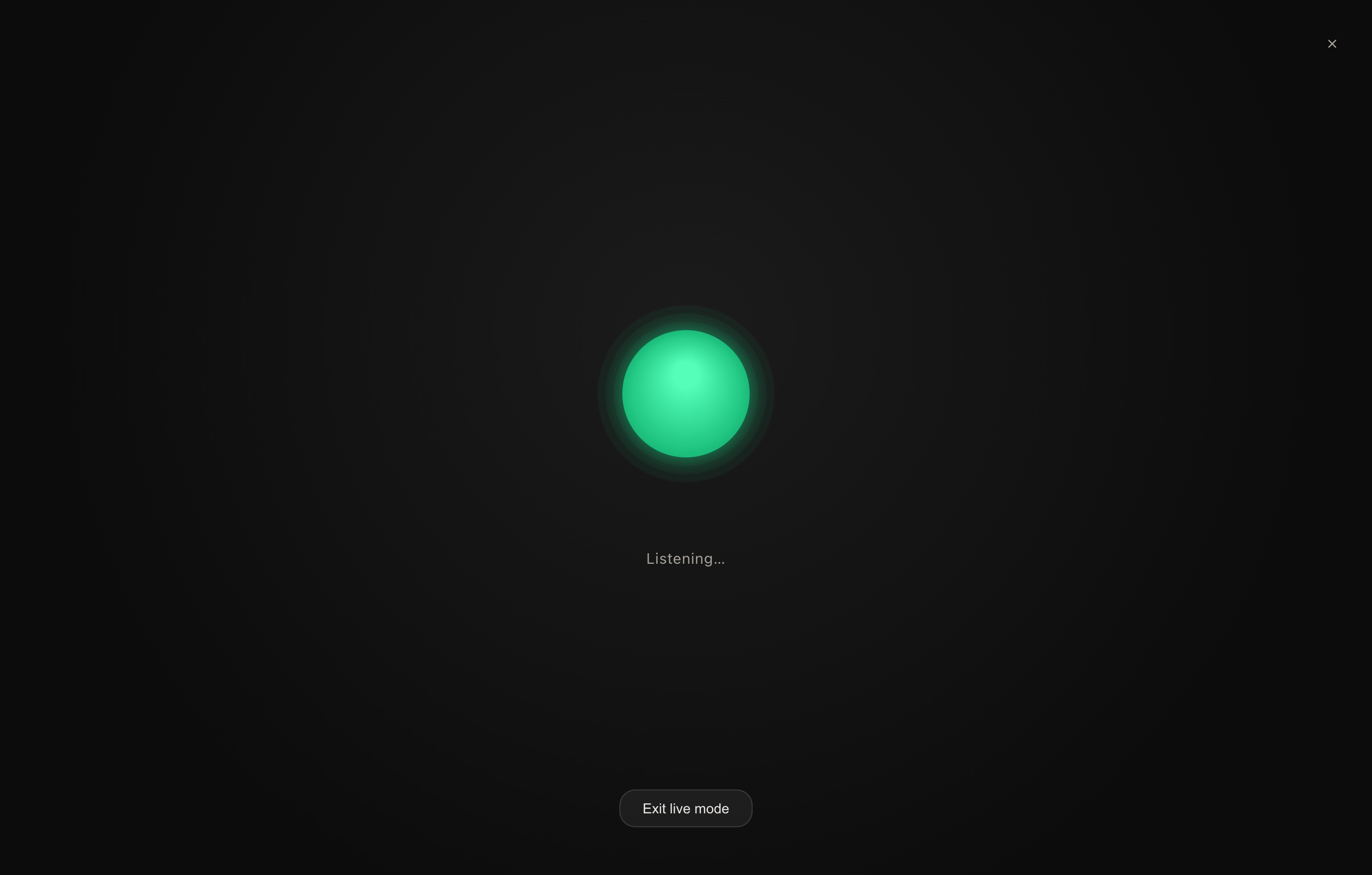 |
|
Everything stays on your machine
| 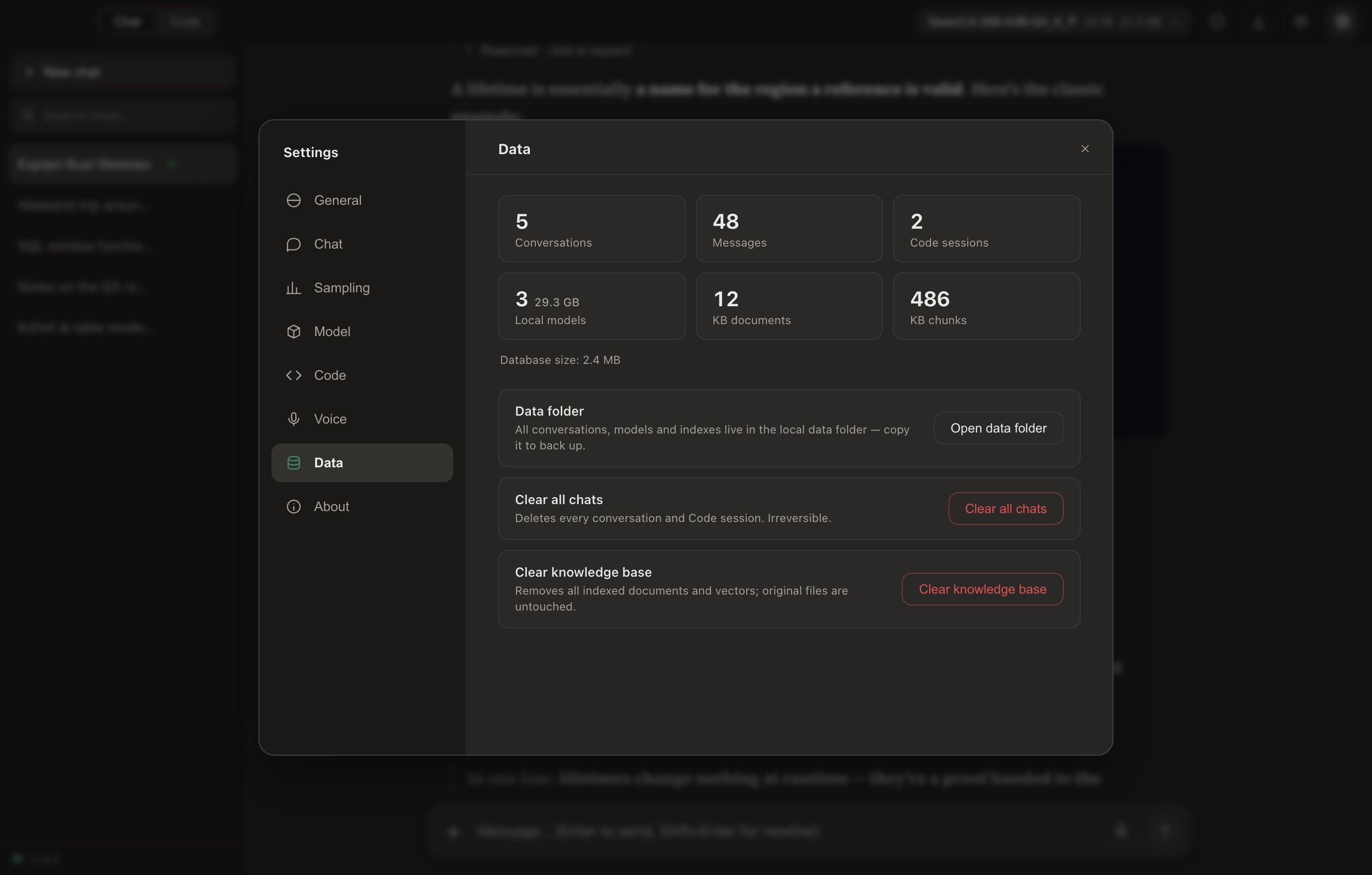 |
Offline-first. The network is used only for optional web search and one-time model downloads.
Install
Grab the latest build from the Releases page:
| Platform | File | Notes |
|---|---|---|
| Windows x64 | Chaty_*_x64-setup.exe | Per-user installer — no admin required |
| macOS (Apple Silicon) | Chaty_*_aarch64.dmg | See the first-launch note below |
macOS first launch. Chaty is ad-hoc signed but not notarized (there's no paid Apple Developer account behind it), so Gatekeeper warns on first open. The app is safe — everything runs locally. Clear the download quarantine once:
xattr -dr com.apple.quarantine /Applications/Chaty.app
then open Chaty normally. (Or: open it, dismiss the warning, and choose System Settings → Privacy & Security → Open Anyway.) On macOS the writable models folder lives in app data — use Open models folder in the model menu — or point it at another drive with Settings → Model → Models folder → Change location.
Build
Full details in BUILD.md.
# Windows
npm install
.\dev.ps1                            # dev
npm run tauri build -- --no-bundle   # release exe → compile the Inno installer
# macOS (Apple Silicon)
npm install
npm run tauri dev      # dev (Metal)
npm run tauri build    # → .app + .dmg
Releases are produced by CI: bump with scripts/bump-version.sh x.y.z, then push a vx.y.z
tag — GitHub Actions builds both installers onto a single release.
Architecture
| Layer | Stack |
|---|---|
| Shell | Tauri 2 — system tray, global shortcut, single-instance |
| Frontend | React 19 · Vite · react-markdown · KaTeX |
| Inference | Rust · llama-cpp-2 (llama.cpp) — Vulkan (Windows) / Metal (macOS) · MLX via an mlx-swift-lm sidecar (Apple Silicon) |
| Voice | sherpa-rs (ONNX Runtime, CPU) — Whisper (base.en for English, multilingual base for Chinese) + Kokoro-82M and a VITS Chinese voice |
| Knowledge base | bge-m3 embeddings + BM25 · hybrid RRF / MMR retrieval · SQLite vector store |
| Storage | SQLite — conversations, messages, full-text search |
License
MIT — see LICENSE. Built with llama.cpp, Tauri, and sherpa-onnx.
Contributors


Similar repos


Languages
TypeScript
46.8%
Rust
38.9%
Swift
5.0%
CSS
4.0%
Python
3.4%
Private, on-device AI desktop app — GGUF (llama.cpp) & MLX, running Muse-Glimmer and Qwen3.8 with their native reasoning-effort ladders wired in as real controls. Local coding agent, RAG knowledge base, Deep Research, vision and voice. 100% offline, no account, no telemetry. Windows & macOS.
See the codeREADME
English · 简体中文 · Português (BR)
Chaty
Private, on-device AI — your models, your data, your machine.
Chaty runs open LLMs 100% offline in a polished desktop app. No account, no cloud, no telemetry — with a local coding agent, a document knowledge base, Deep Research, and hands-free voice built right in.
↓ Download · Website · Docs · Chaty model on Hugging Face
A local coding agent — searches GitHub, reads the source, edits your files, and runs the tests. All on your machine.
Why Chaty
- 🔒 Truly private — every model, document, and conversation stays on your device. No sign-up, no server, nothing phoned home.
- ⚡ Native and fast — a Rust + llama.cpp core with Vulkan / Metal GPU offload that auto-tunes to your hardware and falls back gracefully to CPU.
- 🧰 More than a chat box — a coding agent, a knowledge base (RAG), Deep Research, hands-free voice, and a self-healing Design Canvas — all offline.
- 🧠 Runs almost anything — Llama 3 / Muse-Glimmer, Gemma 3 / 4, Qwen 3 / 3.5 / 3.6 / 3.8, any GGUF from Hugging Face — and MLX models natively on Apple Silicon — plus Chaty's own fine-tuned model.
- 💻 Friendly to modest hardware — a first-launch “Set up for me” picks a model sized to your RAM and downloads it in one click.
Reasoning effort as a first-class control
Some models ship a native reasoning-effort ladder they were trained to obey —
Qwen3.8 has three rungs (low · medium ·
xhigh), Muse-Glimmer four (low ·
medium · high · xhigh). The rung arrives as a chat-template kwarg, so a runtime that
doesn't know about it silently gets the default and you wait through maximum-length thinking
for "what's 2 + 2".
Chaty treats the ladder as a control you actually turn:
|
Same question, same seed, one rung apart — Qwen3.8-27B (8-bit MLX, 48 GB Apple Silicon):
Five times the wait, or five times the deliberation — your call, per message. |
A local coding agent
Flip the Chat · Code switch and Chaty becomes an agent for your codebase. Point it at a folder, describe the task, and it explores, edits, and verifies the project by itself — every step shown live, every change behind an approval + diff.
- 🌐 The whole web as a tool — key-less search of GitHub (repos, issues, and code), Reddit, YouTube, Bilibili, and any domain; fetching adapts to the content (articles → Markdown, PDFs → text, videos → transcripts).
- 🧭 Drives a real browser — opens pages, reads dynamic content as text, clicks and fills whole forms with real mouse events, logs in and paginates — and looks with the vision model when it matters.
- 🧠 Tools that do the thinking —
understand_repoorients in one call,search_coderanks files by relevance,read_filelifts a single symbol plus its call sites,validate_changeruns just the tests the change touches. Small models spend their steps on decisions, not grunt work. - ✏️ Precise edits, real shell — exact-string patches behind a diff preview with a syntax gate, plus commands and long background jobs (dev servers, builds) sandboxed to the workspace.
- ⏪ You stay in control — per-action approval, a command allowlist, prompt-injection defense on everything it reads, and one-click checkpoint rewind that restores files and rolls back the conversation.
- 🔌 MCP, sized for small models — connect any Model Context Protocol server (stdio or streamable HTTP), or one-click a curated, version-pinned store entry that's live-certified against Chaty's own client. Tool docs are synthesized lean so a 16K context fits as many servers as you like; every result is injection-defended and untrusted servers need per-call approval.
- 📚 Skills & project memory — drop a
SKILL.mdof procedural steps in~/.chaty/skills/(or per-project) and the agent loads it only when relevant;remembersaves non-obvious findings to.chaty/memory/so the next session starts knowing them. Plain markdown, human-editable, never leaves the machine.
More Code-mode details
- Reads PDF / Word / Excel / PowerPoint (a scanned PDF has no text layer and says so);
search_filesfinds by name or content; file outlines navigate big files; failed patches get “did-you-mean” hints. - Browser automation is verified end-to-end against real sites, and can run in your real Chrome — watch it work, logins and all.
- Built for local models: an Off / Normal / Deep reasoning switch, a prompt-processing progress ring, a context-usage ring with automatic compaction, whole-file reads sized to your context window, ranked
search_code+ knowledge-basesearch_docs, and loop-breaking for repetitive small models. - Persistent sessions, project memory (AGENTS.md), custom /skills, and slash commands.
- Tune it under Settings → Code: step limit, command timeout, step temperature, tool-call format, an auto-approve-edits toggle, a headless-browser toggle, and a command allowlist.
- Each model's own tool-call format — Qwen3.5 / 3.6 / 3.8 were trained to write tool calls as XML, Qwen3 and QwQ as JSON, Gemma 4 and LFM in forms of their own. Chaty reads the format from the model's chat template and speaks it, so long edits stop coming back as broken JSON; a family whose template names none gets XML, and Settings → Code can pick one by hand.
- File access never leaves the folder you pick; out-of-workspace access asks per folder; a
sudocommand asks first with a secure password prompt; downloads land in the workspace and are covered by checkpoints too.
Benchmarks
One local model for every row — Qwen3.5-35B-A3B (MoE, ~3 B active per token), mxfp8 on MLX, reasoning off, entirely on one machine:
| SWE-bench Verified — 45-task macOS-validated subset | Resolved |
|---|---|
| Chaty agent (v1.9) — the full tool loop, 16K context | 15/45 (33 %) |
| qwen-code 0.20 — the model family's own CLI (needs 32K) | 12/45 (27 %) |
| pi 0.81 — minimal 4-tool agent CLI | 10/45 (22 %) |
| opencode 1.18 | 7/45 (16 %) |
| bare bash agent — single-tool ablation | 6/45 (13 %) |
Same model, same tasks, same grading, one machine — five agent designs. Chaty leads the field, including the model family's own first-party CLI (qwen-code) while using half its context window, and resolves 2.5× the bare-bash ablation. That's the design thesis measured: with frontier models a thin scaffold is enough — on small local models, the intelligence has to live in the tools (repo-aware search, symbol reads, precise edits, recovery guards, post-edit diagnostics). Methodology, per-agent configs, and honest-comparison notes (subset, macOS harness — not comparable to leaderboard numbers): docs/BENCHMARKS.md.
Design Canvas
- Preview | code, side by side — every page opens as a split studio: live preview left, the actual source right, syntax-highlighted and palette-following. Three drag-resizable columns, fullscreen, page reload, and a Console tab for the page's logs and errors.
- Point at what you mean — Inspect links the panes both ways: hover an element and the code jumps to its line; click a code line and the element flashes. Click to select (⌘/Ctrl multi-select) and your next instruction edits exactly those elements — or open the source yourself with the Edit button.
- Watch the edit happen — iterations stream in Cursor-style: the code pane scans the document line by line and lands on a Changes diff (+N/−N, same language as Code mode).
- Self-healing, persistent — runtime errors offer a one-click Fix (always asks first); a compat layer keeps browser-clean pages clean here too (history API, cookies, clipboard); and each reply keeps its canvas session across close/reopen, with version history, a confirmed reset, and export to a standalone
.html.
Chat that renders everything
| |
- A streaming, foldable
<think>panel that follows the model's reasoning as it generates. - KaTeX math, tables, Mermaid diagrams, per-block code copy, and in-app rendering of single-file HTML — including playable web games.
- A ⌘K command palette, pinnable / renameable conversations, drag-and-drop attachments, export (Markdown / JSON), and full-text search.
- Four palettes (two dark, two light) with system-theme following, native UI zoom, reduced-motion support, and an English / 简体中文 / Português (BR) UI.
Chaty can see
Load a vision model (its weights and mmproj encoder live together in one folder, paired automatically) and image understanding turns on everywhere:
- Chat — attach a picture and ask about it; follow-ups stay fast (already-seen images aren't re-encoded).
- Code — the agent reads screenshots and can look at any image with
view_image; the composer takes images and documents just like chat. - Knowledge base — imported images get a written description beside their OCR text, so search finds what's in them; images embedded inside PDFs, Word, Excel and PowerPoint files are extracted and described too.
- Canvas — the model sees the live rendered page when you ask for an edit.
Text-only models keep the OCR path, so nothing regresses — and updating from an older version, a one-time prompt tidies your existing loose .gguf files into the one-folder-per-model layout with a single click.
Models: the store, native MLX — and Chaty's own
- A built-in model store: search Hugging Face by name or author, filter GGUF / MLX, sort by trending or downloads — then pick a quantization from a dropdown and hit download. Models, not file lists.
- Parameter / architecture / vision badges, the repo's README rendered in-app, and a "fits fully in memory" hint sized to your machine. Vision models fetch their encoder automatically; pasting a repo link still works.
- MLX runs natively on Apple Silicon: mlx-community folder models load through Apple's MLX stack in an isolated sidecar — same chat, vision, reasoning controls, Code agent and knowledge-base support as GGUF, and ejecting a model always returns its memory.
- Chaty's own fine-tune — a Qwen3.5-4B distilled from a much larger teacher for leaner on-device single-file web design, with a baked-in Chaty identity and grounded citations. A one-click pick in “Set up for me”, fully open on Hugging Face.
A private knowledge base
| |
Deep Research & the web
- Give a topic and Chaty plans queries, runs multiple rounds of web search interleaved with reasoning, and writes a structured, cited report — exportable to PDF or Markdown.
- Honest by design: the reference list contains only sources it actually cited.
- A free, key-less, multi-provider search chain (Brave → Bing → DuckDuckGo → Wikipedia) so one blocked provider never breaks search.
Hands-free voice
|
|
Everything stays on your machine
| |
Offline-first. The network is used only for optional web search and one-time model downloads.
Install
Grab the latest build from the Releases page:
| Platform | File | Notes |
|---|---|---|
| Windows x64 | Chaty_*_x64-setup.exe | Per-user installer — no admin required |
| macOS (Apple Silicon) | Chaty_*_aarch64.dmg | See the first-launch note below |
macOS first launch. Chaty is ad-hoc signed but not notarized (there's no paid Apple Developer account behind it), so Gatekeeper warns on first open. The app is safe — everything runs locally. Clear the download quarantine once:
xattr -dr com.apple.quarantine /Applications/Chaty.app
then open Chaty normally. (Or: open it, dismiss the warning, and choose System Settings → Privacy & Security → Open Anyway.) On macOS the writable models folder lives in app data — use Open models folder in the model menu — or point it at another drive with Settings → Model → Models folder → Change location.
Build
Full details in BUILD.md.
# Windows
npm install
.\dev.ps1                            # dev
npm run tauri build -- --no-bundle   # release exe → compile the Inno installer
# macOS (Apple Silicon)
npm install
npm run tauri dev      # dev (Metal)
npm run tauri build    # → .app + .dmg
Releases are produced by CI: bump with scripts/bump-version.sh x.y.z, then push a vx.y.z
tag — GitHub Actions builds both installers onto a single release.
Architecture
| Layer | Stack |
|---|---|
| Shell | Tauri 2 — system tray, global shortcut, single-instance |
| Frontend | React 19 · Vite · react-markdown · KaTeX |
| Inference | Rust · llama-cpp-2 (llama.cpp) — Vulkan (Windows) / Metal (macOS) · MLX via an mlx-swift-lm sidecar (Apple Silicon) |
| Voice | sherpa-rs (ONNX Runtime, CPU) — Whisper (base.en for English, multilingual base for Chinese) + Kokoro-82M and a VITS Chinese voice |
| Knowledge base | bge-m3 embeddings + BM25 · hybrid RRF / MMR retrieval · SQLite vector store |
| Storage | SQLite — conversations, messages, full-text search |
License
MIT — see LICENSE. Built with llama.cpp, Tauri, and sherpa-onnx.
Similar repos
Contributors
Languages
TypeScript
46.8%
Rust
38.9%
Swift
5.0%
CSS
4.0%
Python
3.4%