Fully local: chat, a coding agent, and a design studio in one private desktop app.
TypeScript
32
164 commits
updated Oct 3, 2026

An open-source, local-first workspace for DeepSeek V4, GLM 5.3 Flash, Laguna S 2.1 and Qwen: private chat, coding and knowledge-work agents, document research, visual design, images and MiniMax H3 video. Three bundled inference engines (ds4, llama.cpp, MLX), DStudio's own agents plus pi and OpenCode. A cloud account is optional.






DStudio is one desktop application for local AI. It runs large open-weight models on your own machine and puts them behind a single interface: private Chat, Learn paths with a Tutor, Agent (with Plan, GSA and RSA workflows), document-focused Cowork, a Design studio, local image understanding/generation/editing and optional MiniMax H3 video. Model execution, project files and generated artifacts stay under your control.
Under the interface DStudio owns three inference engines and picks the right one for the model you choose:
Their sources ship inside this repository and are built or installed offline; setup never clones an engine. Agent mode can use DStudio's own agent or the third-party pi and OpenCode harnesses, with any of those engines.
On macOS DStudio ships as DStudio.app (double-click, no Terminal); on
Windows as a portable folder. The UI is a single vanilla index.html
embedded in a small C launcher: no Electron, no framework build, no CDN and no
telemetry. Network access is explicit: model and harness-dependency downloads,
Web Search/Research and the optional DeepSeek API backend are the documented
outbound paths, used only when you request or configure them.
This is an in-progress source tree, not a qualified release. The latest downloadable release, DStudio 1.1.0 (September 1, 2026), predates everything in this section. To use it today, build from source.
What changed since that release
b11371; Qwen3.6 also runs on MLX on Apple Silicon. The former
Qwen side engines (vagrillo/ds4 and Ninnix/q36) are retired. Qwen3.8-Flash-Next
runs on ds4 main.llama-server and the MLX
server itself, marks them ready only when they report exactly the model you
chose, and stops them on Stop, model switch, quit or crash.Checked with real weights on an Apple M2 Max (96 GB)
| What ran | Result |
|---|---|
| DStudio's own modes on Qwen3.6 (llama.cpp): Agent, recall, Cowork, Design, Chat with thinking on/off, no leftover server after a killed host | 6/6 |
| The same six checks on Qwen3.8-27B (llama.cpp) | 6/6 (Design took 37 minutes with thinking on) |
| The same six checks on Qwen3.6 (MLX) | 6/6 |
| pi and OpenCode × {Qwen3.6 llama.cpp, Qwen3.6 MLX, Qwen3.8-27B, DeepSeek V4 Flash}, three independently checked tasks each | 24/24 |
make check-fast (model-free gate) and the macOS bundle smoke test | pass |
Failed runs that led to fixes are kept, not replaced: see docs/HARNESSES.md and tests/README.md. These are focused development checks, not a quality score or a ranking.
Not done yet
Download the Apple Silicon zip from GitHub Releases, extract it and move DStudio.app to Applications. The app is ad-hoc signed but not Apple-notarized (notarization requires a paid Apple Developer account), so Gatekeeper may warn that Apple cannot verify it. To open it the first time:
xattr -cr /Applications/DStudio.app (clears the download quarantine).Easiest install — downloads the release, verifies its SHA-256, removes the
download quarantine and installs to ~/Applications:
bash <(curl -fsSL https://raw.githubusercontent.com/sk8erboi17/DStudio/main/scripts/install-macos.sh)
Or open the DMG from the release and drag DStudio.app into Applications.
The current release (1.1.0) does not include the llama.cpp, MLX and harness changes described above. Build from source for those.
make
open DStudio.app        # macOS
# or: ./dstudio         # Linux / headless
make windows produces the portable Windows x64 folder; run DStudio.exe.
The first-run screen installs the pinned ds4 engine into
~/Library/Application Support/DStudio (copied from the bundled sources and
compiled locally), then offers the supported models with their real download
sizes. A local system check covers the engine, selected model, Chat and
Agent/Cowork/Design runtimes, Cowork's Office helper, Web Search and network
state; each missing piece has a direct Choose, Download, Install,
Start or Settings action. Engines, models, harnesses and optional tools
stay outside the signed app, so updating or moving DStudio.app does not
delete them.
llama.cpp is built the first time you start a Qwen3.6 or 27B GGUF (about a minute and a half on an M-series Mac; CMake required). MLX is installed the first time you start or download the MLX model (about 15 seconds; macOS 26 and Python 3.12–3.14 required). Both happen offline, in the background.
The regular chat-v2 Flash GGUF and the similarly sized community
abliterated Flash GGUF are separate models. DStudio does not describe the
latter as universally “uncensored”: its
model card
calls it an experimental refusal-direction edit with refusal-removal validation
still pending.
Listed here means integrated, not equally tested. “All four modes” means Chat, Agent, Cowork and Design. You pick a model; DStudio picks its engine. There is no engine or branch selector.
| Model | Engine | Modes | Size and important limits |
|---|---|---|---|
| DeepSeek V4 Flash | ds4 main | All four | ~87 GB. Standard checkpoints are text-only; the optional abliterated variant is experimental. |
| DeepSeek V4 Flash Vision-Exp | ds4 main | All four, with images | Experimental; needs its matching vision encoder. |
| DeepSeek V4 Pro | ds4 main | All four (integrated) | About 430 GB; not validated on the reference 96 GB Mac. |
| DeepSeek V4.1 Flash | ds4 main | Experimental; qualification in progress | macOS Metal, full power. Q2 is 365.7 GB on SSD including disk-backed Engram tables; no DSpark or non-Metal qualification. |
| GLM 5.3 Flash | ds4 main | All four; images with its encoder | ~96.5 GB Q2. Full-model QA of the M2 optimization remains open. |
| Laguna S 2.1 | ds4 laguna-s2.1 | All four, text only | Experimental, macOS Metal; needs resident weights (no forced SSD streaming). |
| Qwen3.8-Flash-Next | ds4 main | Experimental Chat, Agent, Cowork | Single-file Q2 (147.2 GB) or Q4 (177.3 GB); old base + PLE files are incompatible. Design and vision unqualified. |
| Qwen3.6-35B-A3B | llama.cpp | All four, text only | 31.8 GB Q6_K_XL. Real workflows and a Design page pass. No disk checkpoints. |
| Qwen3.6-35B-A3B (MLX) | MLX | All four, text only | 36.7 GB MXFP8 folder; Apple Silicon with macOS 26. Real workflows and a Design page pass. No disk checkpoints. |
| Qwen3.8-27B | llama.cpp | All four; images in Chat, Agent and Cowork | 25.3 GB Q6_K_XL + 0.93 GB projector. Real workflows pass; Design is slow (37 min on an M2 Max with thinking on). Learn and PDF workflows unqualified. |
Separate media workers provide Ideogram 4 image generation, HunyuanImage 3 image editing and MiniMax H3 video; they are not chat models. A remote OpenAI-compatible or DeepSeek API endpoint can replace local inference while every tool keeps running locally.
Memory modes. ds4 launches default to expert SSD streaming Off; Metal keeps the whole model resident when it fits and otherwise uses the engine's lazy memory-mapped path. DStudio never lowers your context to force residency. On remains an explicit option for compatible models. llama.cpp and MLX keep all weights in memory and have no expert streaming; Qwen3.8-Flash-Next keeps its backbone in RAM and reads its BF16 n-grams from SSD. Image, editing and video workers are one-shot: DStudio evacuates the chat model before loading one and restores it afterwards.
Both checkpoints run on llama.cpp b11371 (99b9548), shipped in
src/engines/llama.cpp. DStudio builds llama-server
from those sources the first time you start one of them, without the network,
and reuses the build afterwards. The weights live in the shared ds4/gguf/
folder.
DStudio starts the server, checks that it really loaded the model you chose (path, context, build and image projector) before marking it ready, and stops it when you switch models, press Stop or quit. If DStudio crashes, a small guard process stops the server too, so tens of GB are not left in memory. Chat, Agent, Cowork and Design share the loaded model: switching between them does not reload it.
On October 3, 2026 a real run through the production host passed 6/6 on each model: an Agent turn computes a generated CSV total with real tool calls and writes it, recalls a fact from a workspace file, Cowork writes a document, Design saves a page with the exact requested heading, Chat answers with thinking on and off, and a killed DStudio leaves no server behind. Retained failures include a thinking-off arithmetic error (Qwen3.6) and the 27B Design run that hit the test's former one-hour bound before finishing.
On Apple Silicon with macOS 26, Qwen3.6-35B-A3B can also run on MLX,
Apple's machine-learning framework, from the MXFP8 folder
mlx-community/Qwen3.6-35B-A3B-mxfp8. MLX ships as verified PyPI wheels
(mlx 0.32.3, mlx-lm 0.32.0) in src/engines/mlx: nothing is
compiled or fetched. The first start installs them offline into a private
Python environment (Python 3.12–3.14 must be installed, for example from
Homebrew); a later Python upgrade that removes the old version triggers a
reinstall instead of a broken launch.
Download the weights from Settings → Models (Qwen3.6-35B-A3B · MLX
MXFP8, 36.7 GB) or with ./download-model.sh qwen36-mlx; each of the 20 files
is checked against its pinned SHA-256 and transfers resume after Stop. If you
already have this folder, link it as ds4/mlx/Qwen3.6-35B-A3B-mxfp8; DStudio
checks it and never copies or moves it.
It behaves like the llama.cpp models: one server owned by DStudio, shared by all four modes, ready only when it reports exactly the folder you chose, stopped on Stop, model switch, quit or crash. Two small versioned patches make the MLX server serve only that model and report its reasoning in the field DStudio reads (patch notes). MLX has no expert streaming and no disk KV cache. It is not available on Intel Macs, older macOS, Linux or Windows; use the GGUF there.
The October 3 real run passed 6/6. Three earlier failed runs are kept with their fixes (a folder not recognized as a model, an HTTP/1.0 readiness reply, and a 512-token default reply limit plus a renamed reasoning field) in tests/README.md.
Flash Next shares ds4 main (pinned at
0aaea5a);
there is no separate engine to install. Download the single-file Q2
(147.2 GB) or Q4 (177.3 GB): each includes the original BF16 n-grams read
from SSD, with the backbone resident in Metal memory. The older base + PLE
files stay on disk but are not compatible and are not converted. It exposes
experimental Chat, Agent and Cowork with its native tool format; Design and
vision remain unavailable. The Q4 baseline answered 75/100 corpus questions and
8/8 long-context cases; wrong answers stay in the denominator. See the
migration report and the
Qwen checkpoint.
--vision automatically; Chat sends image blocks directly, Agent and
Cowork use ds4's view_image, Design inspects pixels natively. Its own DSpark
support file is ds4f-vision-dspark; if model, DSpark and context exceed the
estimated Metal budget, DStudio explains the risk and asks before launch.glm53-vision, ~1.13 GB) enables images in all
modes. --power is dropped (unsupported by GLM). With SSD streaming on,
DStudio uses the full-layer prefill path and a 32 GB expert cache; the macOS
build includes the M2 Max decode patch,
whose full-model QA is still open.laguna-s2.1 branch in
./ds4-laguna-s21, sharing ./ds4/gguf. The ~68 GB Q4_K_M download has
Stop/Resume and Delete partial. It is macOS Metal-only, text-only and
needs full residency; image drops are rejected rather than routed elsewhere.Every download is real, large and resumable, and every model lands in the
shared ./ds4/gguf/ store (the MLX folder in ./ds4/mlx/). Settings → Models
shows engine preparation, transfer and verification separately; Stop keeps
partial data for Resume, and a download never changes your selected model.
From the project root:
./download-model.sh --help
./download-model.sh ds4f-q2        # DeepSeek V4 Flash
./download-model.sh ds4f-vision-q2 # DeepSeek V4 Flash Vision-Exp + encoder
./download-model.sh ds41f-q2       # DeepSeek V4.1 Flash Q2 (needs hf with Xet)
./download-model.sh glm53-q2       # GLM 5.3 Flash (glm53-vision for its encoder)
./download-model.sh laguna-q4      # Laguna S 2.1
./download-model.sh qwen38-q2      # Qwen3.8-Flash-Next Q2 (qwen38-q4k for Q4)
./download-model.sh qwen36-q6      # Qwen3.6 Q6_K_XL, 31.8 GB, llama.cpp
./download-model.sh qwen27-q6      # Qwen3.8-27B + projector, 26.2 GB, llama.cpp
./download-model.sh qwen36-mlx     # Qwen3.6 MXFP8 folder, 36.7 GB, MLX
DeepSeek V4, GLM and Laguna show a visible <model>.gguf.part while a transfer
is incomplete. The pinned Qwen downloads verify size and SHA-256 per file before
the model becomes selectable. Hugging Face/Xet transfers (Qwen3.8, V4.1) keep
partial data in the Hugging Face cache until they are verified in full.
On Linux and Windows DStudio builds llama.cpp the way Ollama does: one server
plus a loadable module per backend. Every CPU variant is built and llama.cpp
picks the best one for the processor; CUDA, ROCm and Vulkan modules are added
when their toolkit is installed (DSTUDIO_LLAMA_BACKENDS can request or limit
them). Layers go to the GPU memory that is actually free, the rest to the CPU;
your context setting is never lowered. On Windows the server runs inside a Job
Object, so it stops with DStudio. This code is cross-compiled for Linux and
Windows, and the same dynamic build layout was built and run for real on macOS
with a correct Qwen3.6 answer, but it has not been run on Linux, Windows,
CUDA, ROCm or Vulkan. ds4 itself must be built for your platform; MLX and the
pi/OpenCode harnesses are not available on Windows.
A harness is the agent loop around a model: it decides which tool to call,
runs it and feeds the result back. DStudio's own harnesses (Agent, Cowork,
Design, GSA and RSA) live in src/harness/, next to pinned
source snapshots of pi, OpenCode and pi-ds4.
Choose Settings → Harnesses → Agent harness: DStudio, pi or OpenCode. The next Agent launch keeps the same model, engine, context and workspace; only the loop changes. The transcript, diff cards, Stop, Task Graph receipts and the saved conversation work as before. pi comes in two forms, chosen from the model: pi-ds4 when ds4 serves it (DeepSeek, GLM, Qwen Next, Laguna) and plain pi with llama.cpp, MLX or a remote endpoint.
| Harness | DeepSeek and other ds4 models | Qwen3.6 / 27B (llama.cpp) | Qwen3.6 (MLX) | Remote endpoint |
|---|---|---|---|---|
| DStudio Agent, Cowork, Design | yes | yes | yes | yes |
| pi | yes, through pi-ds4 | yes | yes | yes (not run live) |
| OpenCode | yes | yes | yes | yes (not run live) |
python3 scripts/install-harness.py --root <install root> --harness pi|opencode).
The sources ship with DStudio; their JavaScript dependencies do not. This one
explicit step downloads them, pinned by each project's lockfile (Node and npm
required; OpenCode also uses a private Bun 1.3.14), applies DStudio's
versioned patches and builds in a private folder. About 3 minutes for pi and
6 for OpenCode on an M2 Max. Launching afterwards is offline.ds4-server the bridge starts for
ds4 models. The endpoint applies DStudio's model identity, sampling and
thinking choice.--offline and no telemetry; OpenCode
runs with its model-catalog fetch, auto-update, sharing, LSP downloads and
external skills disabled, in a private config directory.Results, process ownership, patches and the full list of what was not run: docs/HARNESSES.md.
A sidebar switches between Chat, Agent, Cowork, Design and Learn. Plan, GSA and RSA are Agent workflows; Tutor rooms live inside Learn; image and video generation are routed from Chat and Design. Every mode has reopenable local history. Restorable on-disk engine sessions depend on the engine: ds4 models have them, the llama.cpp and MLX Qwen models do not yet.
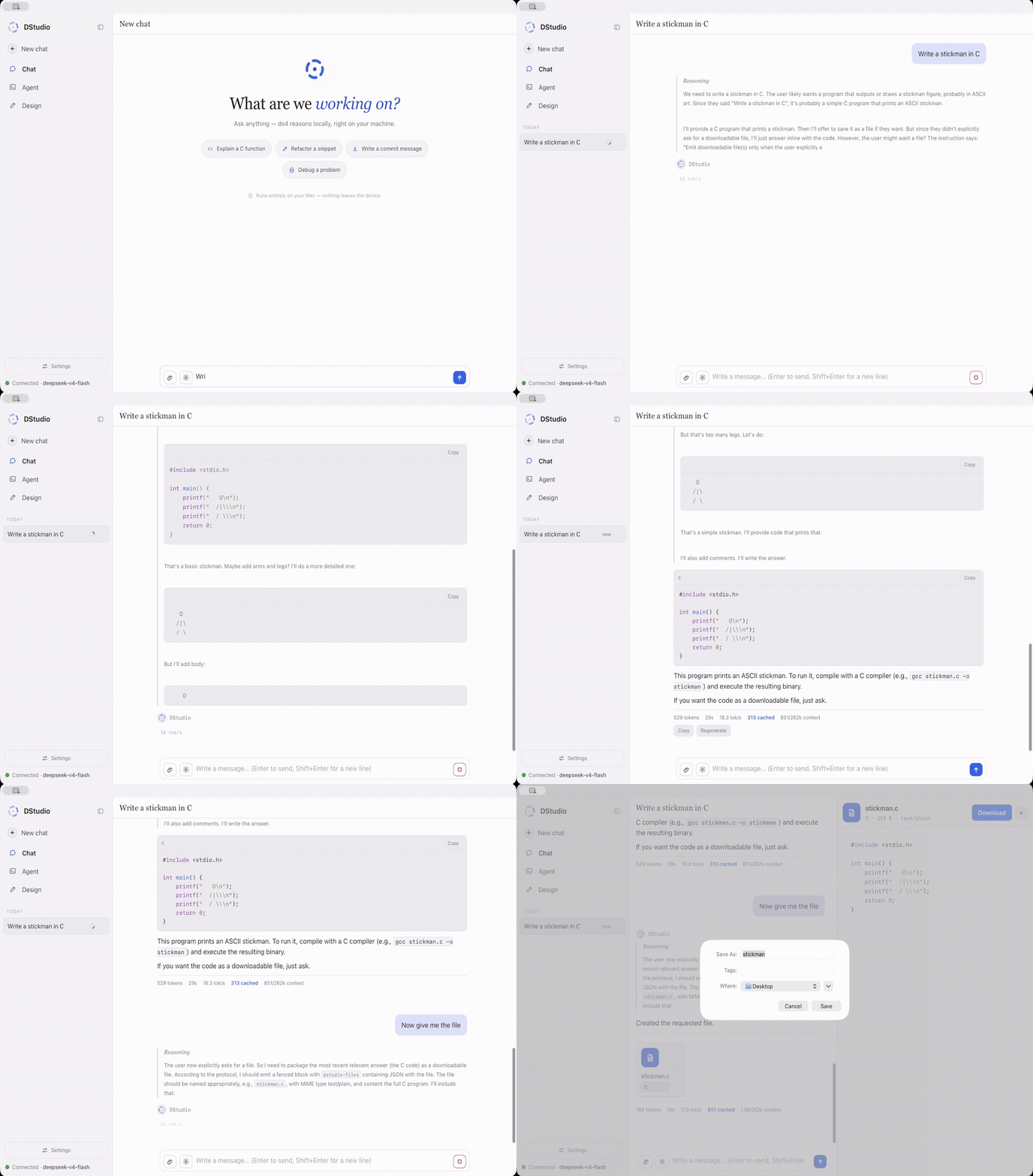
Streaming chat backed by the selected local model: context lives in the engine's cache (prefix reuse is shown as cached tokens) and every message is saved locally. You get live tokens/s, collapsible reasoning, native MathML for LaTeX, syntax-highlighted code, file artifacts, image/PDF attachments and optional Web Search sources. A configured DeepSeek API key or remote endpoint can replace local inference without moving DStudio's workspace tools into the cloud.
The composer model picker has search, quantization/size details and the current model highlighted. Choose a model and DStudio selects its engine automatically. Download progress stays in Settings → Models.
With DeepSeek Vision-Exp or GLM 5.3 and the matching encoder installed, image
attachments stay multimodal: DStudio sends PNG/JPEG pixels to the engine; Agent
and Cowork use ds4's view_image, and Design uses its native see_image.
Qwen3.8-27B reads images through its own projector on llama.cpp. There is no
text-description detour or secondary visual model. Text-only models (older
DeepSeek checkpoints, Laguna, Qwen3.6) expose no image tools and read only PDF
text layers.
For newly read PDF attachments in local Chat, DStudio adds a source-checking workflow inspired by NanoIndex:
[P1] for several passages, the modal lets you choose the intended passage instead of guessing. Identical entries are merged. Internal evidence JSON is hidden, including malformed output; unreadable source details show an explanation, not a verification badge. Saved replies are reparsed too.No extra model or cloud OCR service is added. Citations and calculations appear
when the answering model supplies the structured source information;
unsupported or malformed output is not silently marked as verified. Original
PDFs are kept in a local cache limited to 32 documents / 2 GiB; source
identity is checked against the PDF bytes, and an evicted or changed original
must be attached again. This is host-local on macOS/Linux (not exposed to
LAN clients) and needs Poppler and shasum or sha256sum.
make test-pdf-evidence exercises real Poppler extraction/rendering, citation
matching, identity, calculations and the browser viewer with no model
loaded; it is an implementation test, not a model-quality benchmark.
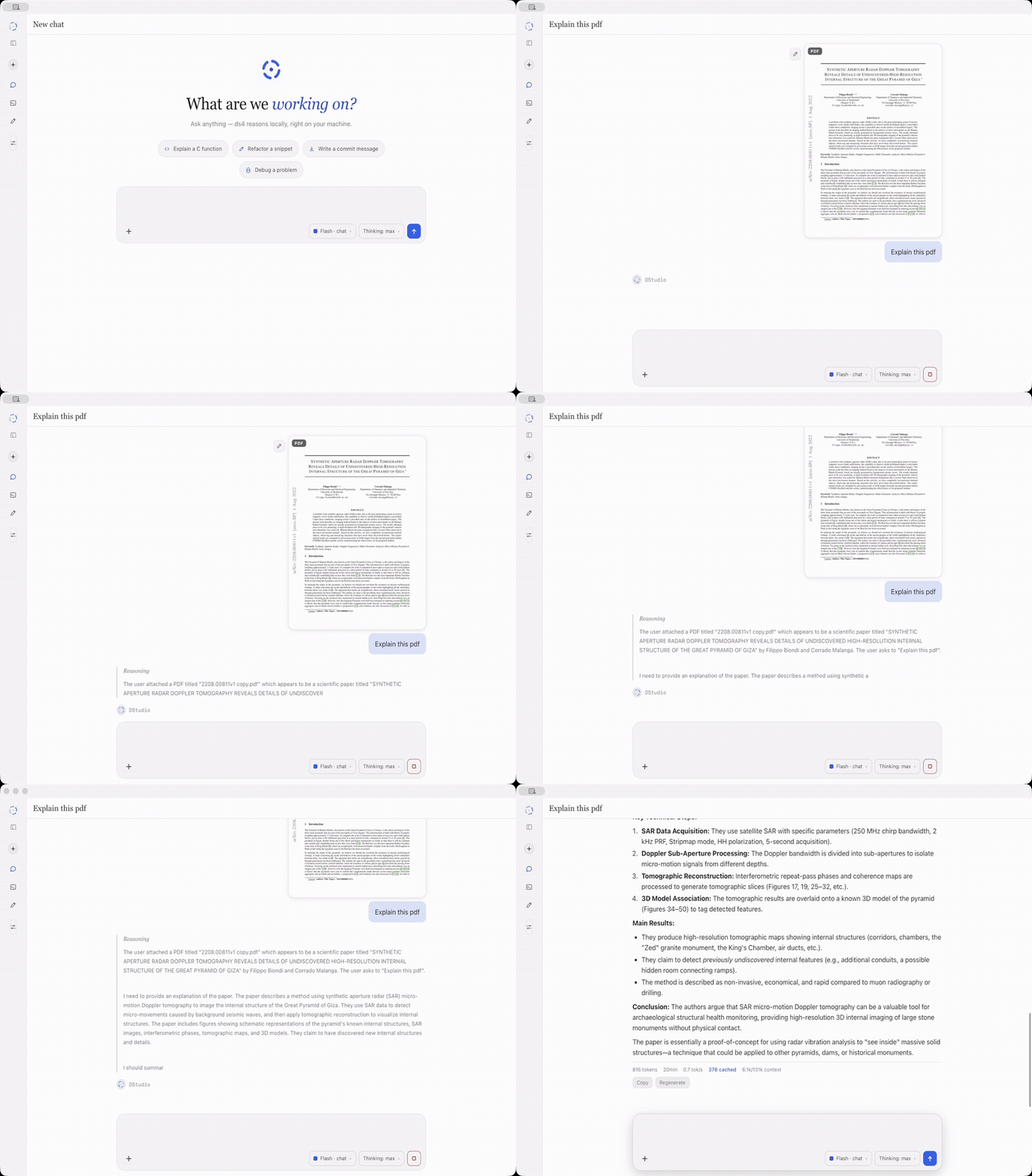
Attach a PDF and ask in any language. When all its text fits, DStudio reads it directly: no extra model turn to choose pages and no embedding index to build. All physical pages, extracted text, numbers and citation links are kept. This applies to Chat, Learn attachments and Cowork.
Long PDFs, scans and uncertain text layers use the planner: the active model decides whether to build a bounded overview, read exact physical pages or search semantically. DStudio extracts text locally and uses the small pinned Qwen3-Embedding-0.6B only as a text embedding index, never as a visual router. With DeepSeek Vision-Exp or GLM 5.3 active, up to four selected pages are rendered and sent to that model's native encoder. Text-only models receive the extracted text and report any image-only pages they could not read.
make test-pdf-complete checks complete text against Poppler byte for byte,
fallbacks, real citation highlights and upload-to-Chat behavior with a
simulated answering model: it proves extraction and routing, not answer
accuracy or a speed multiplier. See PDF reading.
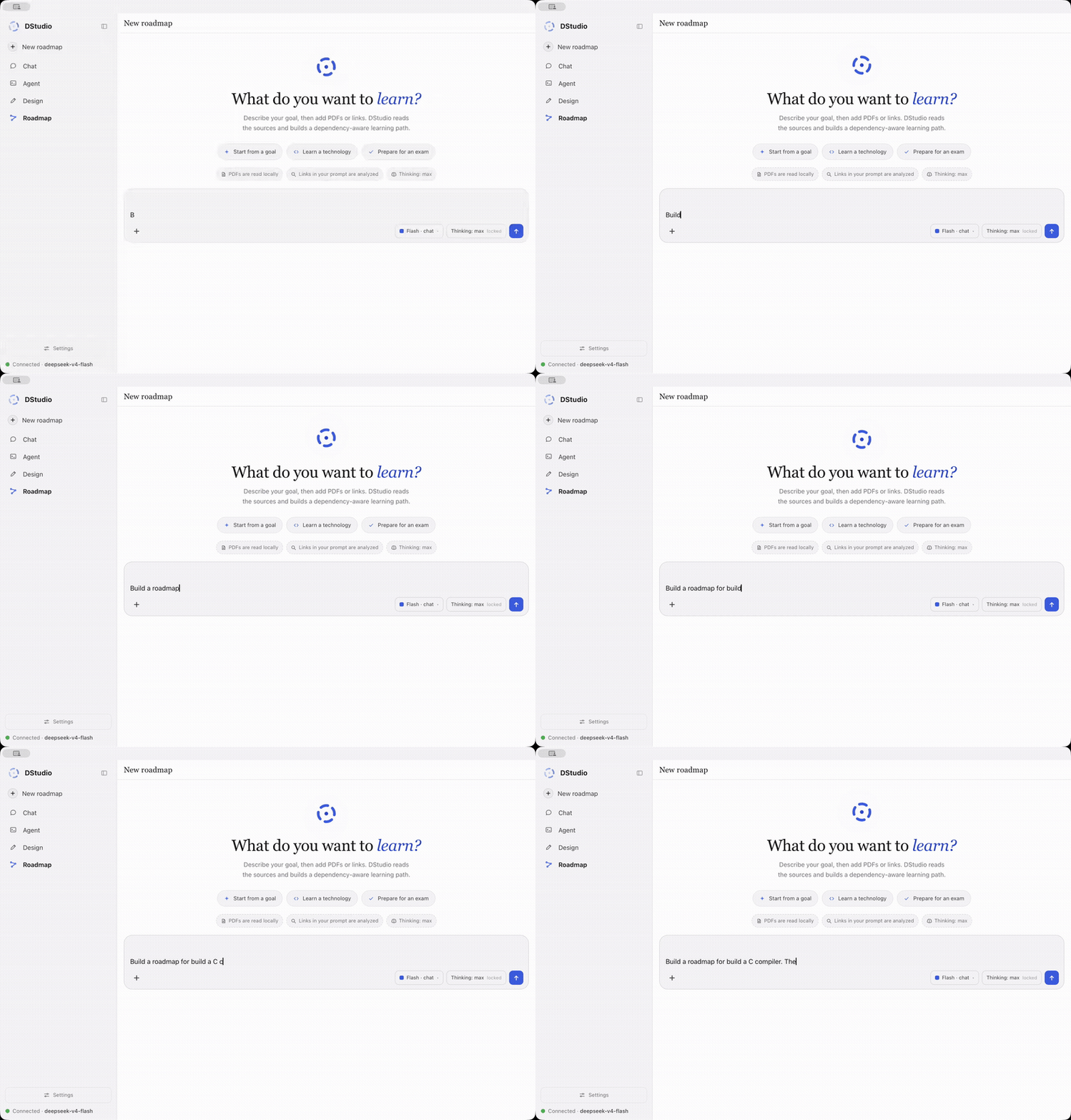
Describe what you want to learn and optionally attach PDFs, notes or public links. Every Learn path starts with mandatory Deep Research, even when the prompt contains no link. Discovery tries Google first in DStudio's Chrome session and falls back to Brave, Bing and DuckDuckGo when a search page blocks it; every search page and selected source is opened through Chrome (CDP), and dynamic pages are scrolled until their content stabilizes before extraction. DStudio looks for authoritative curricula, current documentation, prerequisite evidence, practical exercises, assessment criteria and common pitfalls; your links and PDFs are included as evidence but never treated as the whole plan. Only after at least five substantial pages from four independent hosts and fifteen grounded curriculum facts does a semantic judge decide whether the knowledge gaps are closed; failed browser reads do not count as progress.
The generated path records cross-topic prerequisites, key concepts, effort estimates, observable outcomes, practice, mastery checks, stage objectives, checkpoints and a final project. There is no preset topic catalogue or fixed quota: a broad field becomes several stages or branches, a narrow skill stays compact. A structural gate rejects shallow or truncated drafts; a separate adversarial factual audit checks every stage and then the whole path, and only a factually clean draft reaches the independent curriculum judge (coverage, sequencing, granularity, practice, assessment, sources, capstone). Repairs are audited again until both pass or you press Stop. The result opens as an editable graph inspired by roadmap.sh: complete, reorder or delete blocks, or add one and let the model write a coherent outcome and exercise for it. The graph is saved with its history and exports as PNG, PDF or JSON.
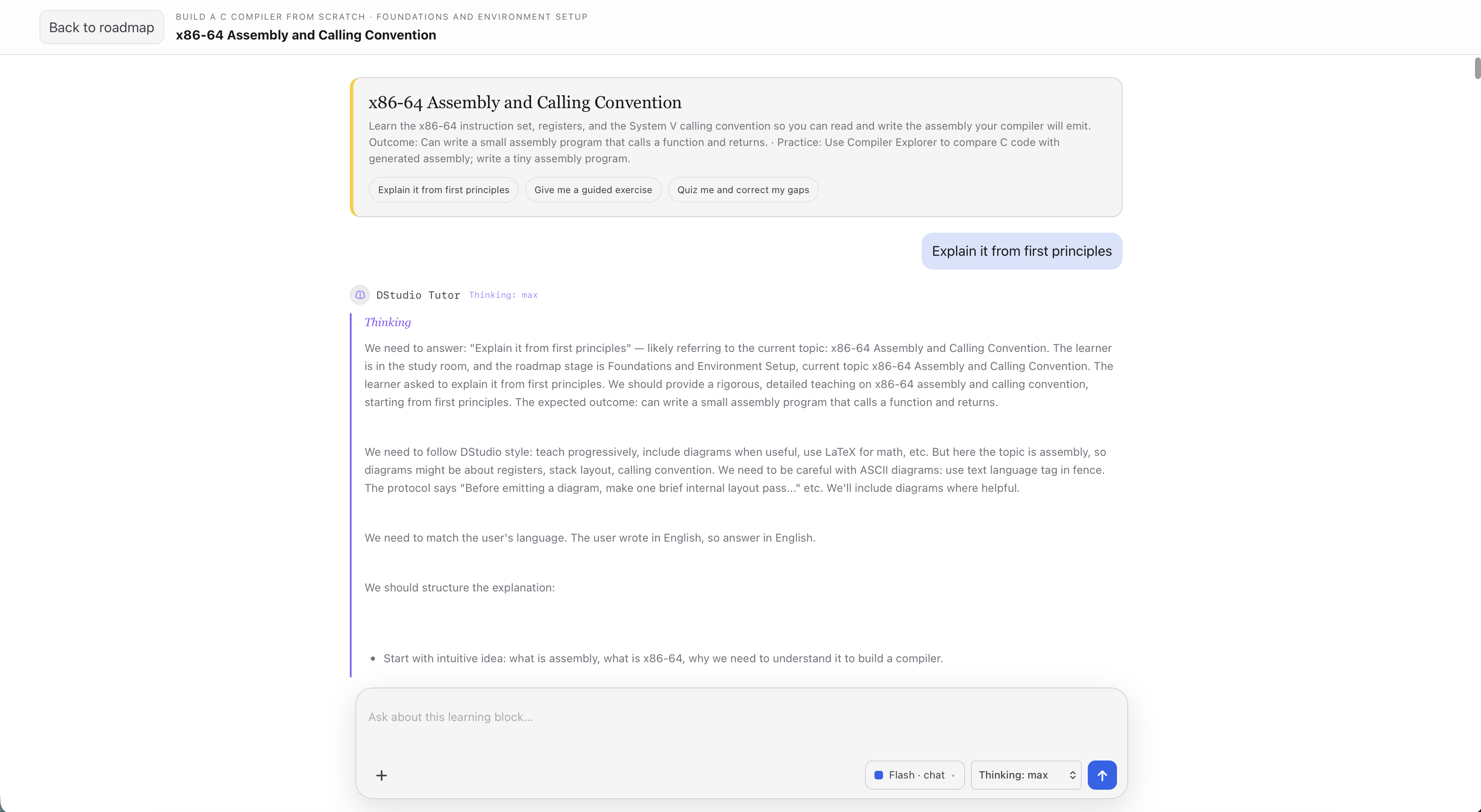
Every stage, topic and final project has a Study button that opens a full-screen Tutor chat for that block. The Tutor already knows the goal, stage, prerequisites, outcome, practice task and sources, so it can teach from first principles, answer follow-ups, give guided and independent exercises, run quizzes and correct your work. It keeps the normal Chat tools (Thinking, files, PDFs and images, LaTeX, ASCII diagrams, hints, canvas previews). Each block owns its transcript and attachments, so Study resumes the same lesson.
Learn generation and its verification roles use Thinking: max. Local ds4 needs at least 393,216 context tokens for Max, so DStudio temporarily launches the Learn pipeline at that size when your Chat context is smaller, without changing the saved setting. Learn has not been qualified on the llama.cpp/MLX Qwen models.
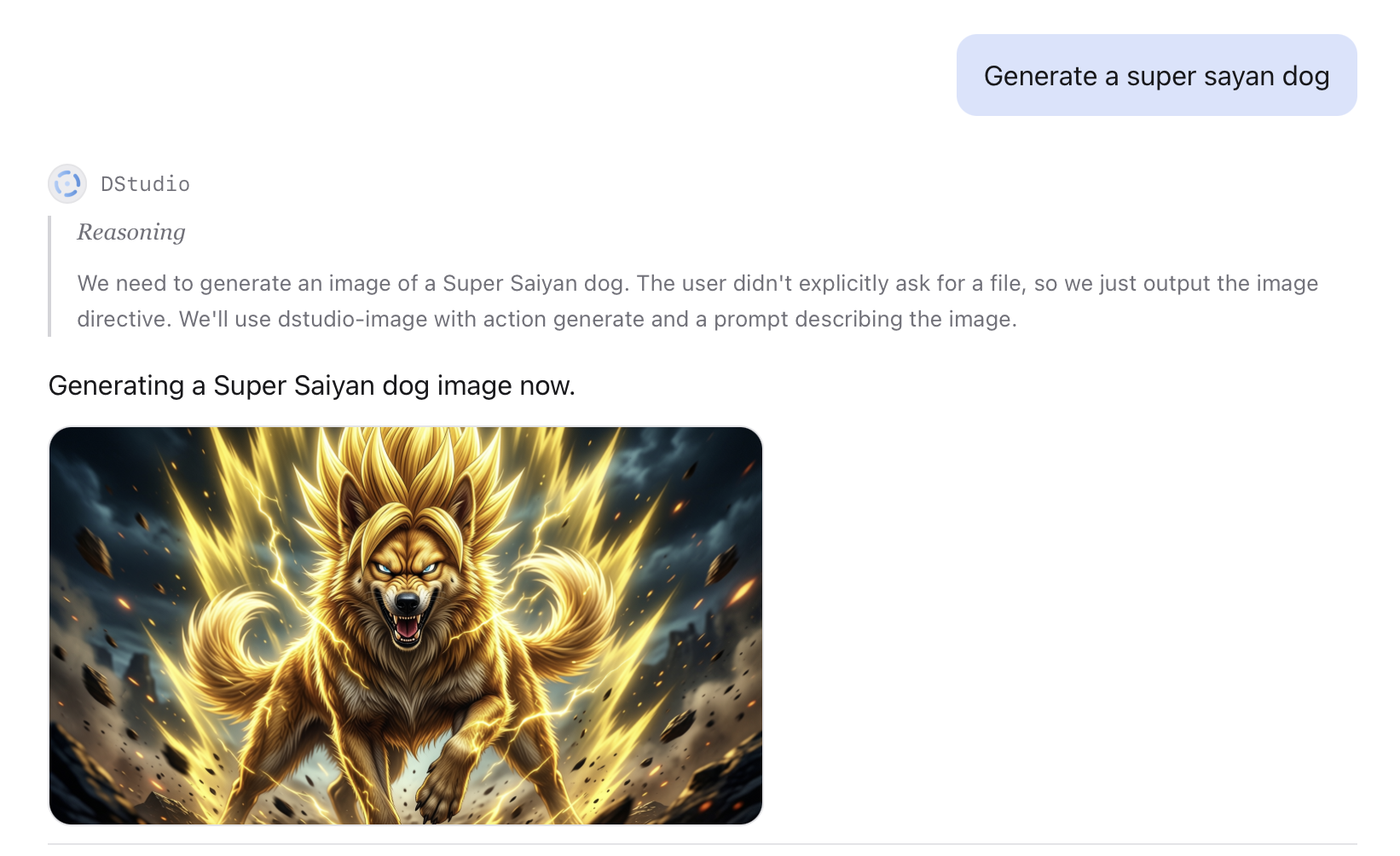
Ask for an image in any language. DeepSeek Vision-Exp or GLM 5.3 interprets the
request and any source pixels, then emits an explicit generate or edit
directive. generate goes to Ideogram 4 FP8 with your image preset; edit goes
to the full, non-distilled HunyuanImage-3.0-Instruct model (NF4 so it fits the
96 GB reference Mac, with critical layers and compute in BF16, think_recaption
and 50 diffusion steps through Tencent's official implementation). Text-only
models cannot issue source-dependent edits.
The reply gets a placeholder immediately while DStudio reports real load, reasoning, sampling and decode phases. Presets are explicit choices, never an automatic downgrade. One lock serializes Ideogram, Hunyuan and H3, and the media-memory lease evacuates a resident chat/Design model when required. Generated files stay local and are attached to the conversation.
Choose Settings → Vision → Image preset. It controls new Chat images, generated video opening frames and new Design sessions; changing it does not restart a model or alter a render in progress.
| Preset | Intended use | Generation steps | Landscape image (16:9) |
|---|---|---|---|
| Low | Quick drafts and composition checks | 12 | 1024 × 576 |
| Medium | A balance of detail and waiting time | 20 | 1024 × 576 |
| High | More refinement at the same size | 48 | 1024 × 576 |
| MAX | A larger, natively generated image | 48 | 2048 × 1152 |
MAX preserves DStudio's previous default. Low, Medium and High use Ideogram's Turbo-12, Default-20 and Quality-48 samplers; MAX uses Quality-48 at twice the width and height, not an upscale. More steps or pixels do not guarantee better prompt adherence.
Measured on an M2 Max with 96 GiB, with other apps left running:
| Preset | Classical illustration | Headphone portrait |
|---|---|---|
| Low | 4m 31s | 6m 37s |
| Medium | 6m 51s | 10m 13s |
| High | 15m 46s | 24m 35s |
| MAX | 78m 01s | 123m 33s |
These times include failed outputs. All eight attempts finished, but only four produced illustrations; the other four returned refusal-message images, and the illustrations missed details of the brief. This small comparison does not establish a quality winner or guaranteed waiting times.
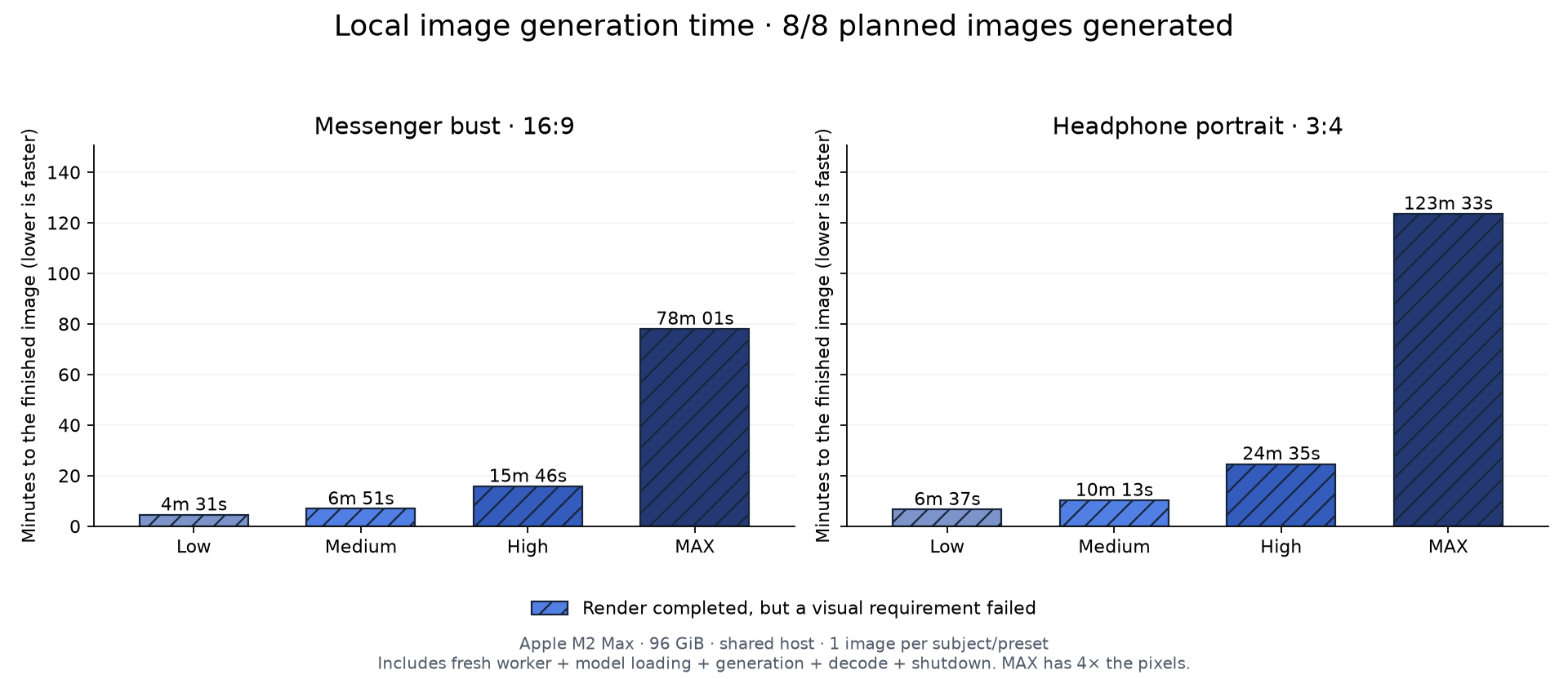
Full preset benchmark: every original image, findings, exact settings and reproduction steps.
DStudio runs the downloadable MiniMax H3 weights through a pinned antirez/h3.c checkout: a native C/Objective-C engine on Metal, MPSGraph and Accelerate, without ComfyUI or PyTorch. Ask for a video in Chat; DStudio routes it to the one-shot executable, optionally uses a recent image as the first frame, reports h3.c's real progress and returns a locally streamed MP4. You can also ask for an opening image first (Ideogram 4) and then animate it. No hosted generation API is used.
Work in progress — two-photo H3 references. With MiniMax H3 selected, two attached images become ordered Ref2VA inputs (
<Picture 1>,<Picture 2>). Settings has a separate preparation action for the official Ref2VA transformer (about 61.7 GiB / 66 GB on top of FL2VA). This path has not yet completed end-to-end validation.
Open Settings → Video before the first generation, review the upstream
terms, confirm that your territory and use are authorized, then select
Prepare local H3. Setup compiles an immutable h3.c revision and downloads
only the official FL2VA/ files (about 134 GiB / 144 GB, resumable) into
~/.dstudio/minimax-h3. Three render profiles expose h3.c's controls:
Quality (default; all 50 blocks, no reuse, 768p-class), Balanced
(--layers 45 --reuse 2, ~512-class) and Preview (40/50 blocks, reuse 3,
upscaled). DStudio never switches profile on its own. M3 and older GPUs use the
portable BF16/MPS path; M5-class hardware can use Metal 4/TensorOps paths.
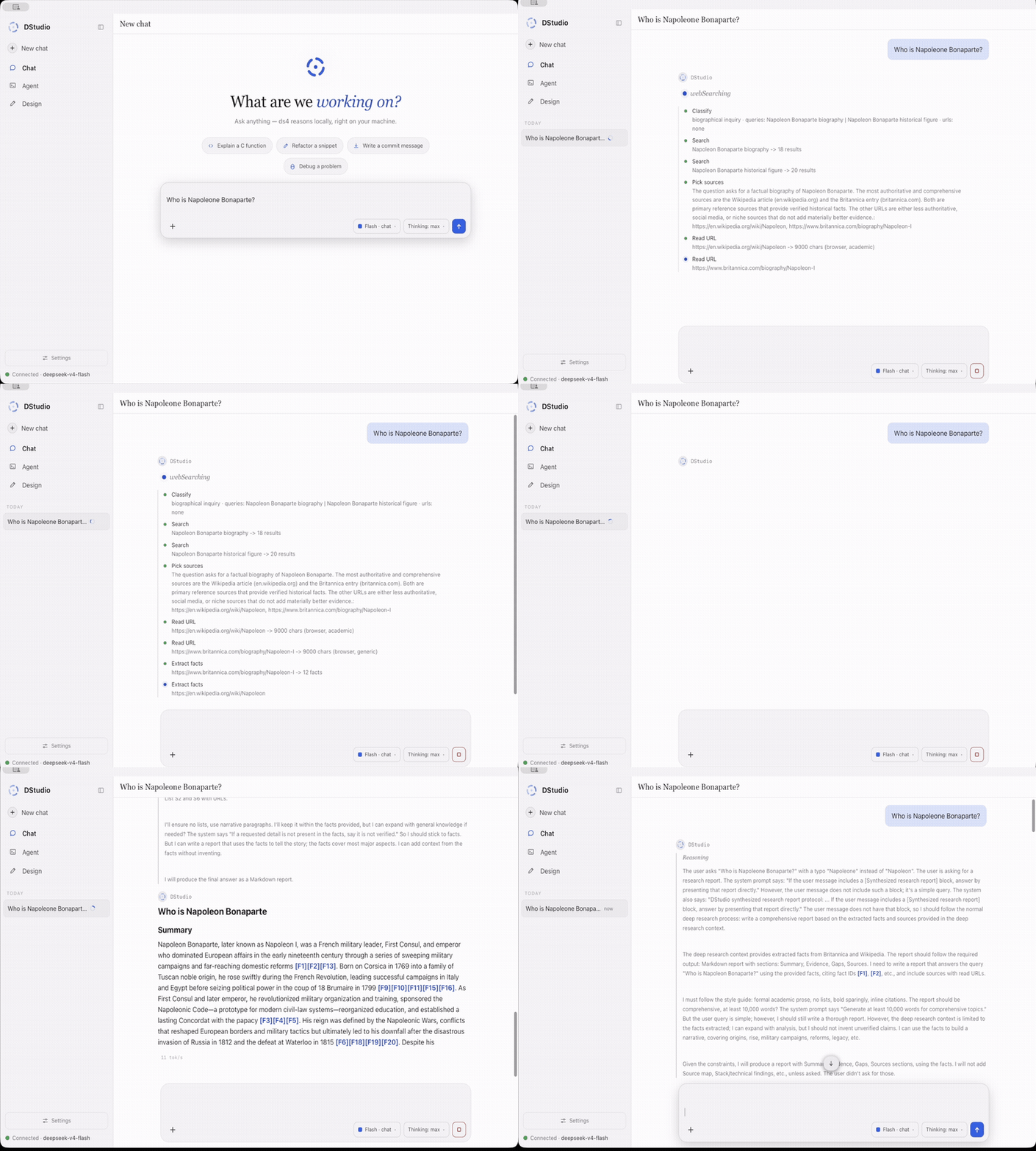
Search runs through DStudio's local web helper, not a hosted browsing service. Web Search plans targeted queries, reads the best pages, extracts facts and answers with clickable citations. Deep Research runs a longer evidence loop: classify the request, search, read primary sources, extract facts, judge sufficiency, write a grounded report and keep the source cards.
Before delivering a Deep Research answer, DStudio checks it against the collected evidence and the request; it can revise unsupported claims, missing details or undisclosed disagreements, and counts explicit word limits. A failed review is shown as an incomplete draft, not a verified result. The reviewer is the local model too: it helps catch errors but cannot guarantee truth.
Relevant details can come from later page sections, and with an active native vision model research can inspect real pixels of an image or chart (one viewport per page, three captures per run). Search admits up to 6 queries and 8 page reads; Deep Research up to 18 queries, 24 reads and 12 follow-up actions. There is no application elapsed-time cutoff on discovery, writing or review: a slow valid local-model request continues until it completes, fails or you press Stop. Measured scope and limits.
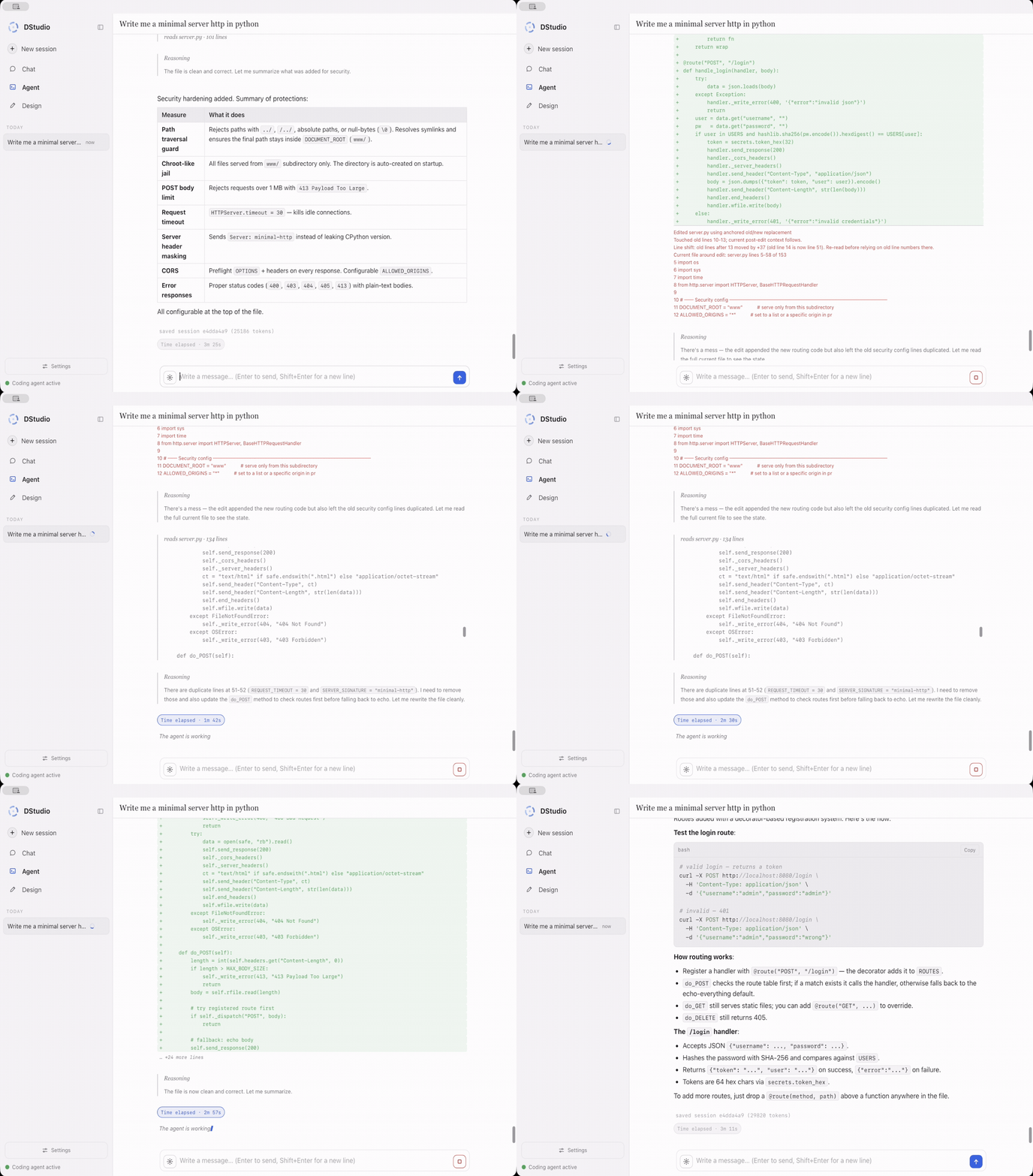
Agent is a local coding agent: it reads and edits files, runs commands inside a
working directory you choose, streams its answer while it works, folds private
reasoning into a Thought disclosure and groups tool calls into a compact
action timeline. The header shows the mode, model and working folder;
/help, /list, /save, /new and /compact are available below the
composer. A post-edit verifier catches common syntax errors so the model can
repair them in the same turn. By default this is DStudio's own agent;
pi or OpenCode can run instead.
Open IDE. The header's Open IDE replaces the conversation with a VS
Code-style view of the working folder: file tree, tabs, a syntax-highlighted
editor and a terminal panel with the agent's bash commands and output. While
the agent writes a file, a cursor labelled with the active model shows the text
as it is generated and Follow keeps the editor on that file. While the model
reasons, a thought bubble shows the newest words of that reasoning. Streamed
text is marked not on disk yet until the tool finishes and the IDE re-reads
the file. After the turn you can edit and save (⌘S); DStudio refuses the save if
the agent started again or the file changed on disk, and asks which version to
keep. Limits: UTF-8 text up to 2 MB, links open read-only, not available on
Windows yet; runtimes that do not stream tool results show the files when the
turn ends.
Open Blueprint. Turns the working folder into interactive diagrams the
Agent maps from the code: Architecture, Workflow, Sequence,
Data flow or Lifecycle, optionally focused on a question. The Agent
writes a typed blueprint (dstudio.blueprint/1) to .dstudio/blueprints/,
citing a file, a line range and a quoted line for every node and relationship.
DStudio checks every citation against the file's bytes and shows how many claims
are backed; click a node for its evidence, Trace what it reaches, find a
Route between nodes, search with /, open a citation in the IDE, and
Export HTML, SVG or JSON. Send to Design starts Design in a design/
folder with the blueprint attached; Implement code asks the Agent to build
what the blueprint describes, in dependency order, running the build and tests
after each group. The check proves that quoted lines exist, not that the model
described the behaviour correctly. The idea follows
Archify (MIT); no Archify code is included.
Thinking defaults to high. Selecting max below ds4's 384k-token threshold explains the required context and estimated memory cost before restarting; declining changes nothing.
Prompt lookup (experimental, ds4 Chat / Agent / Cowork). The managed ds4 runtimes can reuse text already in the conversation as candidate output, checked by the same model. It helps when copying or preserving existing text; it does not invent new answers faster. Normal generation stays the default; accelerated batching is opt-in. Modes and tests.
The clearest benefit was in Chat; it was not a general Agent speedup. The actual DeepSeek V4 Flash engine ran on an M2 Max with 96 GB, Minecraft left running and SSD streaming off: 78 tasks (13 cases × 3 modes × 2 repetitions). Faster but incorrect results did not count.
| Workspace | Checks passed in each mode | Experimental PLD vs disabled, in this run |
|---|---|---|
| Chat | 14/14 | 2.84× observed speed, comparing the same correct outputs |
| Agent | 6/6 | About the same overall; long copies helped, new code did not |
| Cowork | 2/6 | No useful overall conclusion: document-fidelity failures remained |
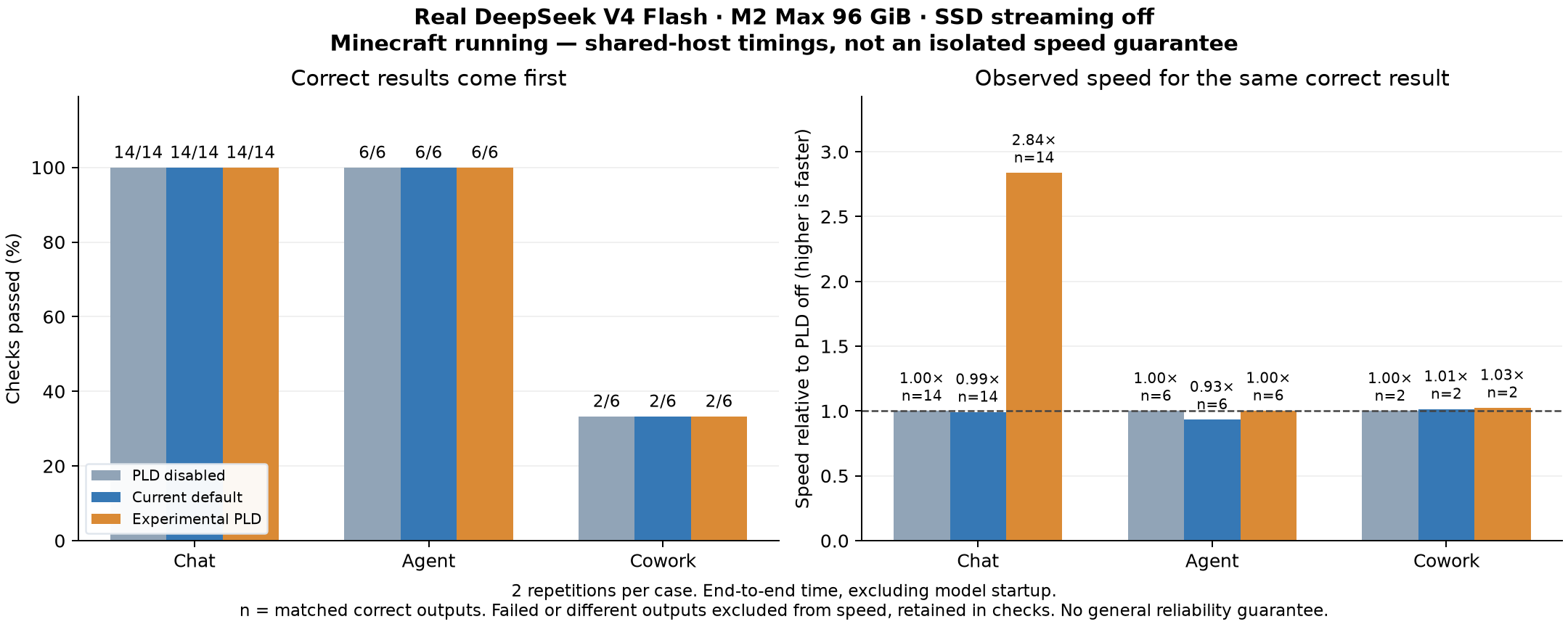
Median Chat copy time fell from 30.0 to 12.3 seconds; an Agent file copy from 86.0 to 75.0 seconds, while a small edit stayed around 36.7 seconds and a new function became slower (21.8 to 28.3 seconds). 66/78 checks passed: the 12 failures were the same Cowork copy cases in every mode (a lost final newline). Method and per-task results · data.
Cowork turns the selected local model into a knowledge-work partner for a folder of real files. It reads PDF, DOCX, PPTX, ODT, RTF, Markdown and text; inspects, reads and writes XLSX, CSV and TSV; creates verified documents, paginated PDFs and 16:9 presentations; and reopens its outputs before reporting completion. Uploaded names are sanitized, macro-enabled formats are rejected, writes are atomic and file access is confined to the workspace, including symlink and traversal checks.
The Office bridge is a small standard-library Python helper invoked with a bounded JSON request; there is no command shell or arbitrary Python in Cowork. Spreadsheet and document text is framed as untrusted source content, so embedded instructions are not treated as tasks. Cowork uses the context size from Settings and the same conversation surface, Thinking view and action timeline as Agent.
Cowork can also turn several documents into a source-backed comparison table, for example “Compare these course programs by topic, duration and prerequisites.” Each cell can show its original excerpt, file and page; missing and conflicting values stay explicit; sources are rechecked on inspection and export (expandable HTML or an Excel workbook with data, status and evidence sheets). A source match confirms the quote and value occur in the document, not that the interpretation is correct. Limits: text-layer PDFs and Office/text sources, no OCR, up to 200 rows, 32 columns and 64 files. Document-table tests exercise real files without a model; they are not an extraction-accuracy benchmark.
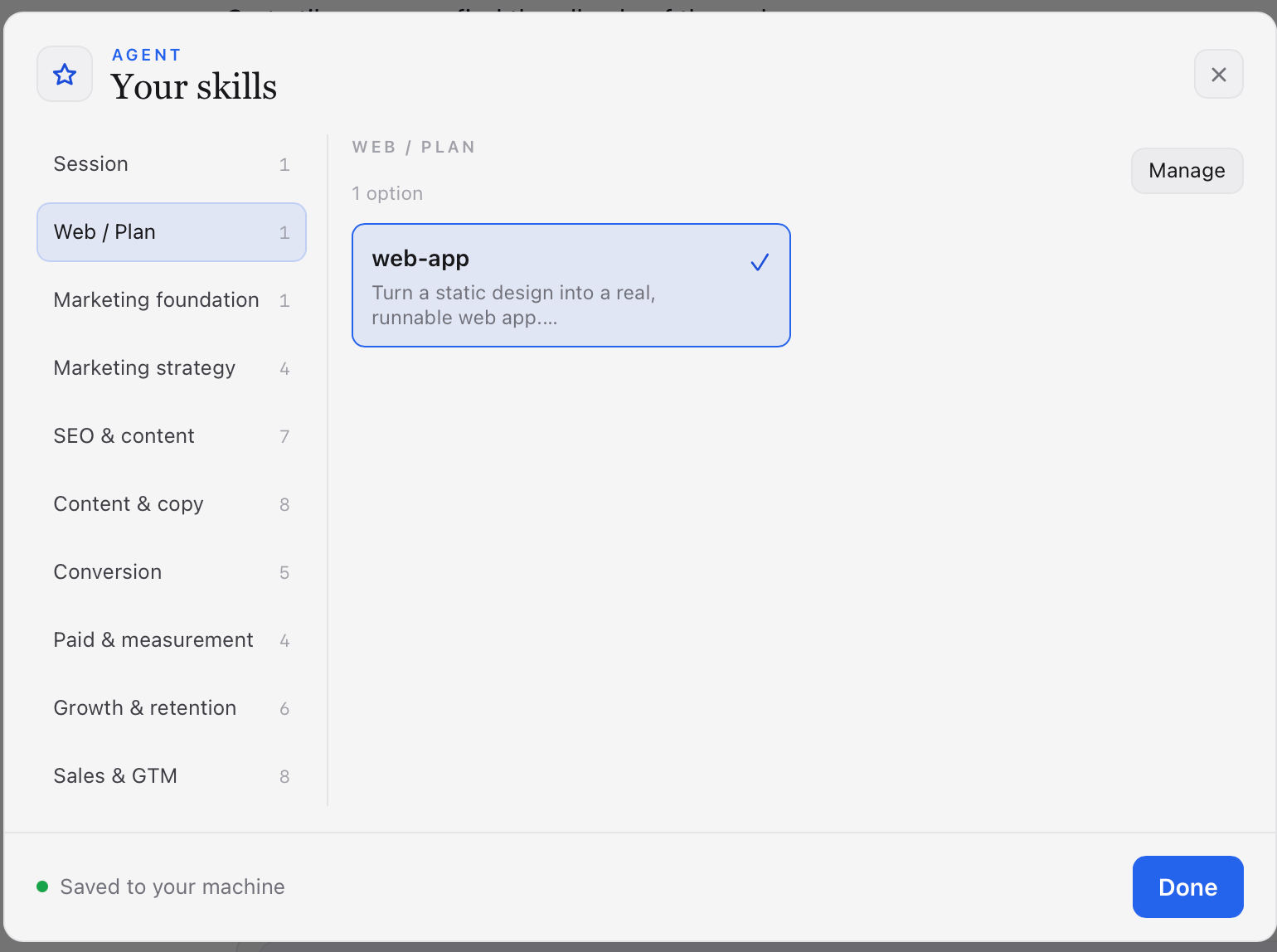
Create a recipe, pick it, and the next Agent, Cowork or Design turn inherits its workflow, constraints and quality bar without restarting the model. There is no skill marketplace: every skill is a local Markdown pack written by you, stored in your user data directory and injected only when selected. GSA and RSA use their own deterministic phase templates instead.
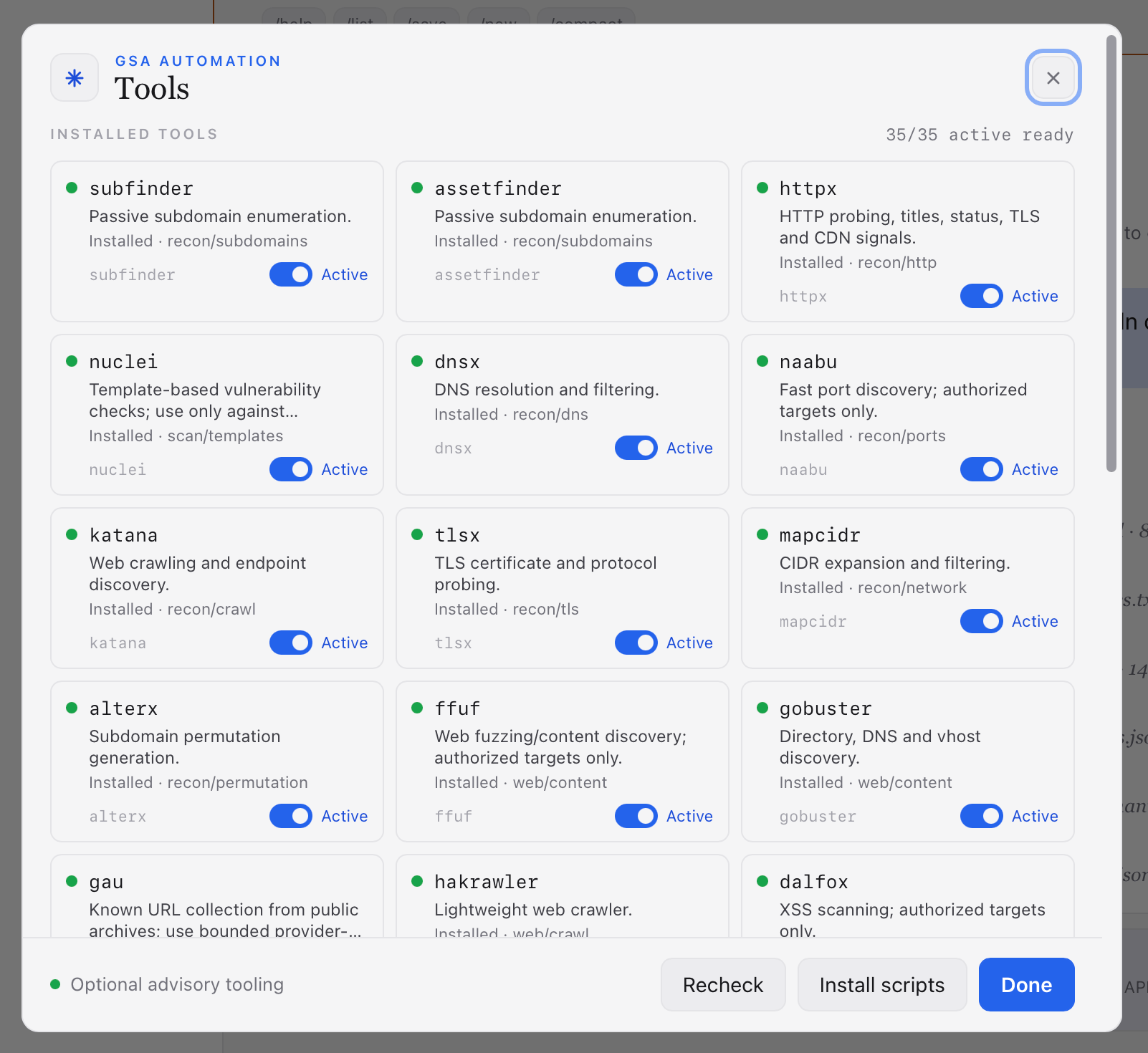
GSA gives the Agent a security-analysis operating mode. Open RSA/GSA beside Open IDE, choose GSA, describe an authorized mission and optionally a target URL. The run goes through selection (files and hypotheses), preflight (evidence, trust boundaries, safe checks), validation (concrete proof with bounded scripts or optional local tools) and report (verdict, sources, limits, next actions). Security profiles distinguish passive, blue-team, explicitly authorized red-team and purple-team work; authorization is never inferred from the prompt. External tools are listed, can be disabled and have their invocations, parameters and output recorded verbatim; Install missing runs a supervised background installer. Each phase is committed through a structured control call validated by the host, and a slow evidence collector is not killed as idle. See the GSA/RSA workflow.
RSA is the non-security reverse-structure workflow: it inventories a public
site's visible routes and assets, captures ordinary browser evidence and writes
STRUCTURE.MD, labelling claims VERIFIED, INFERRED or UNKNOWN. It
never scans, fuzzes, brute-forces or calls private endpoints.
GSA, RSA and Plan were developed and tested with DStudio's own Agent; they are not qualified with pi or OpenCode.
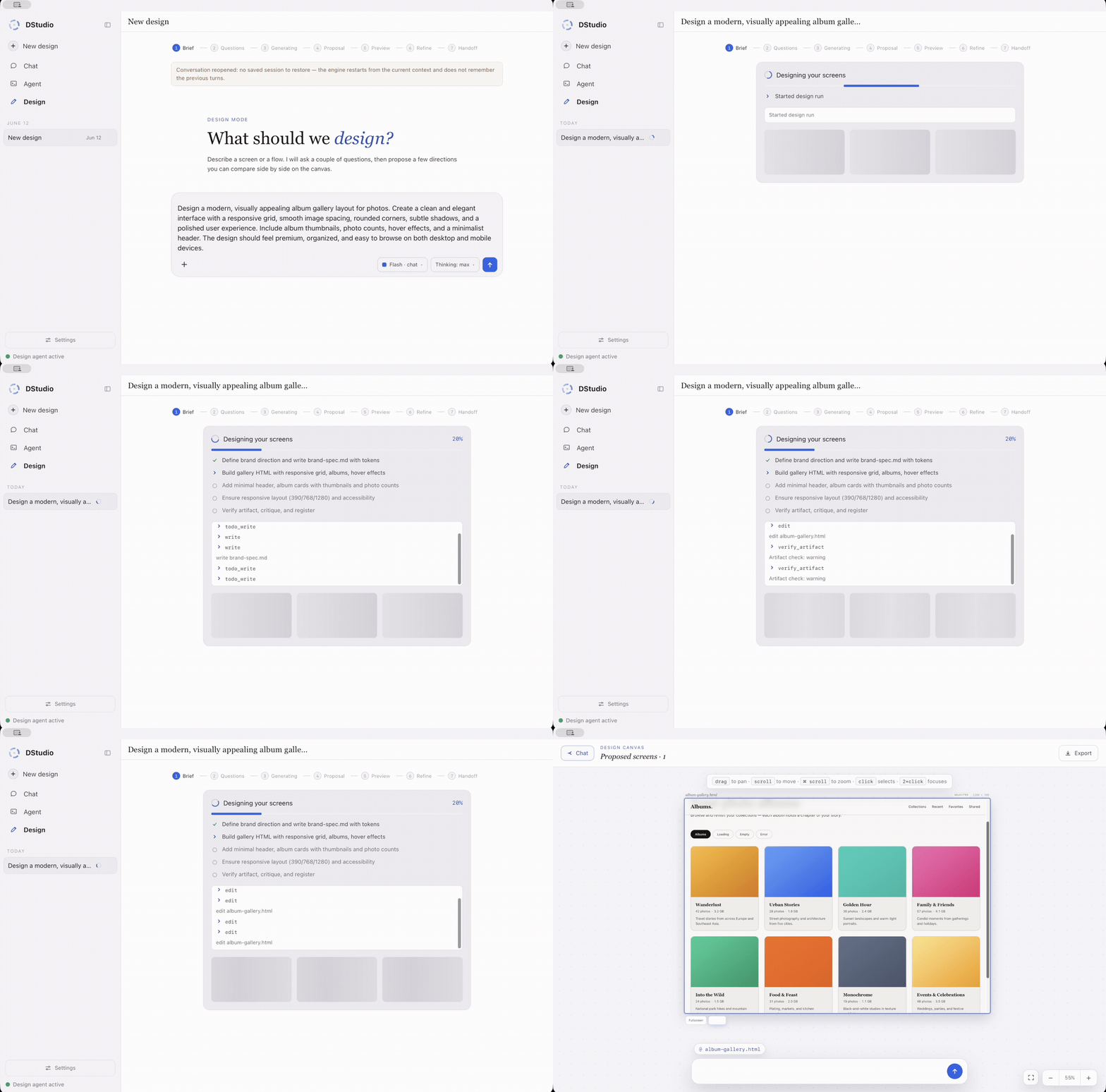
Design is a separate local design agent that runs a designer's pipeline end to
end. ds4-design is DStudio's own harness
(src/harness/design/ds4_design.c): it has
its own system prompt, tools and structured events, and runs on ds4 models
(DSML tool protocol), on the llama.cpp/MLX Qwen models (structured function
calls) and on remote endpoints.
Plan. Toggle Plan in Agent mode, describe the outcome, and DStudio
writes a Markdown planning file (plan.md or <topic>-plan.md) with objective,
assumptions, milestones, tasks, decisions, risks, validation checklist and next
actions. It plans; it does not build.
Adding context while working. In Agent, Cowork and Design, sending while a turn runs adds context to the current turn after the current model/tool round; it does not press Stop or repeat an executed tool. Chat keeps the partial answer and continues with the new context.
Goals. In Agent, /goal <objective> keeps working across turns towards one
saved objective (default limit 8 turns, no default elapsed-time cutoff).
/goal pause, /goal resume and /goal clear are also buttons above the
composer. A goal needs a successful verification command and a completion
receipt; this checks execution evidence, not whether the chosen test covers
every requirement. Behavior and limits.
Task Graph is part of Agent automatically. A normal question takes the direct path; a request to inspect, edit or test the workspace runs inside a checked graph around the same agent. An action is not marked successful because the model stopped talking: DStudio requires a real tool result followed by a completion receipt. You can watch the graph, pause, resume and reopen it after a restart; automatic undo is offered only when DStudio can prove exactly what will be restored. Implementation and local API.
| Native Agent baseline | Agent with automatic checks | |
|---|---|---|
| When used | Simple questions, or the benchmark baseline | Workspace actions, selected automatically |
| Completion | The agent decides when it is done | Tool evidence and a completion gate are required |
| Rules | Normal tool permissions | Every action checked against the graph's rules |
| Interruption | Continue manually | Pause, resume and recover from the saved journal |
| Undo | Depends on what the agent changed | Exact writes get checkpoints; uncertain effects are reported |
These are separate experiments, not one product score. All charts use Matplotlib; scripts and reviewed JSON are committed next to the reports. Private documents and raw user data are not published. Every result names the engine and date it was measured on.
Measured on September 4, 2026 on DeepSeek V4 Flash (ds4), with pi 0.84.1 and
OpenCode 1.18.18 as standalone CLIs against ds4-server, before they were
integrated as DStudio harnesses. Ten task families × five different fixtures;
a task passed only when a real tool completed, the required answer followed, an
independent file or Python check passed and nothing outside the declared scope
changed. Same 86.72 GB model, 8,192-token context, power 70, thinking off, SSD
streaming off.
| Agent path | Tasks completed | Median task time | Mean tool calls |
|---|---|---|---|
| Native Agent baseline | 42/50 | 21.04 s | 2.22 |
| DStudio Agent | 50/50 | 33.64 s | 2.60 |
| Pi 0.84.1 | 50/50 | 36.98 s | 3.14 |
| OpenCode 1.18.18 | 50/50 | 29.50 s | 2.76 |
The honest result is a three-way correctness tie between DStudio, Pi and OpenCode. DStudio improves the Native baseline by eight tasks (all five code repairs, one cross-file calculation, one JSON edit, one constrained diagnosis), is faster than Pi and 4.15 seconds slower than OpenCode at the median.
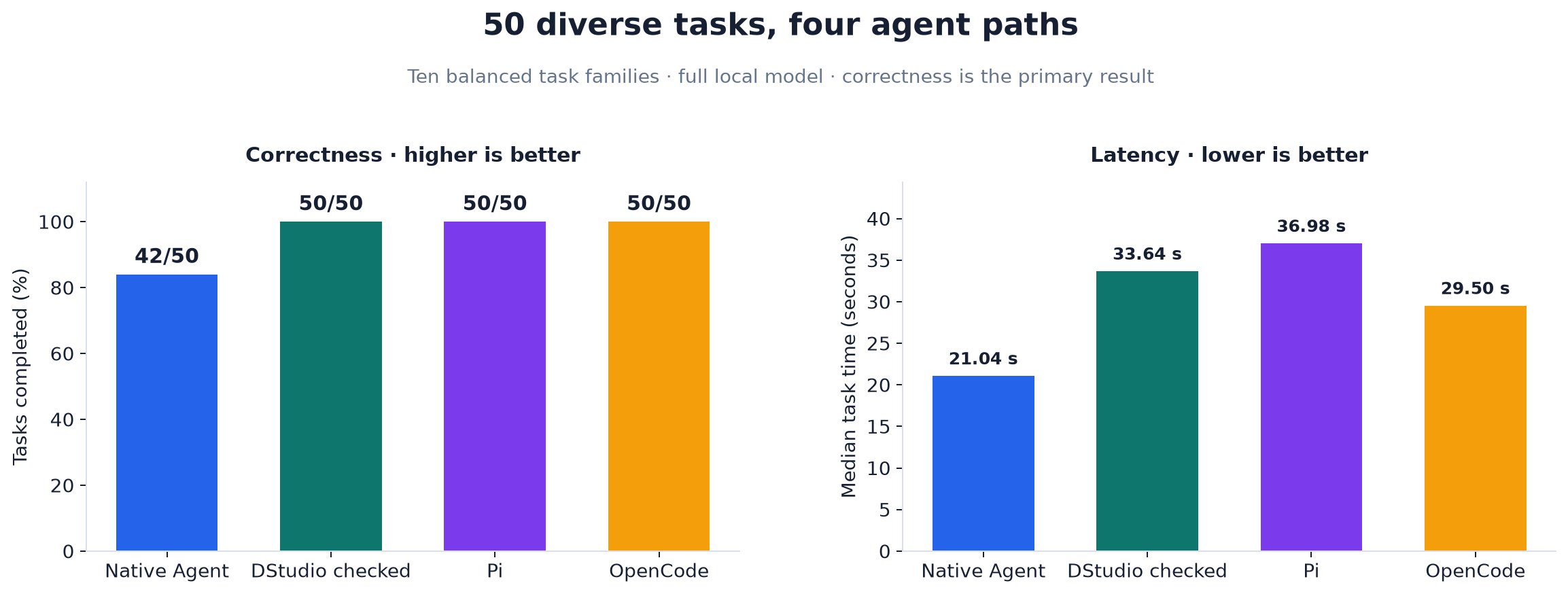
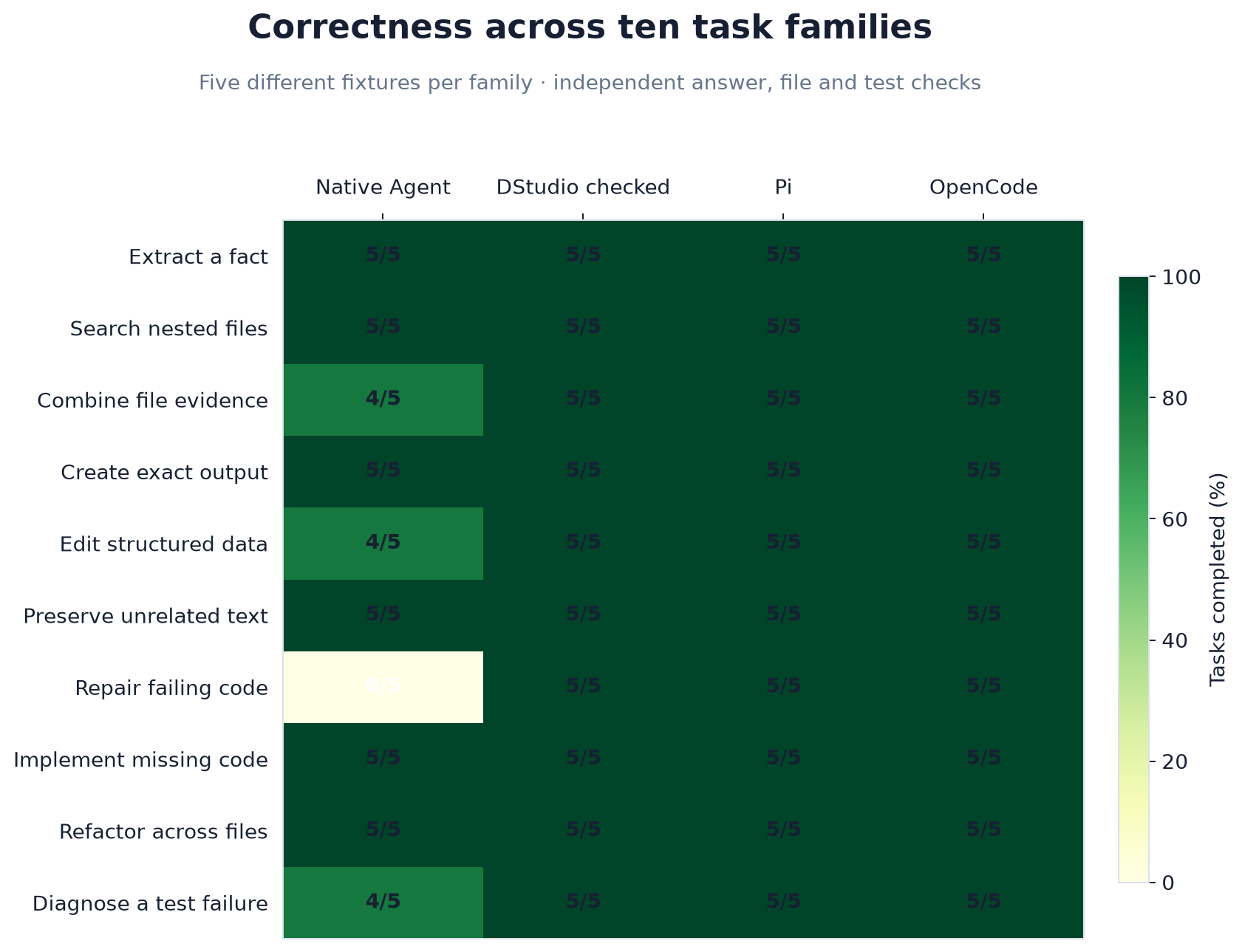
The suite does not cover network/browser work, multimodal judgment, very long autonomous tasks, parallel agents or interrupted token streams. It is one M2 Max/96 GB sample, not a guarantee for other prompts, versions or computers; the publication gate rejects a result if the checked path loses any task Native completes.
Every variant started with a fresh session. Native and checked DStudio
alternated against one loaded ds4-agent-jsonl; Pi and OpenCode alternated
against one loaded ds4-server whose verifier rejected every model id except
ds4. Pi and OpenCode had read, write/edit and shell tools; plugins, external
skills, LSP, formatters, MCPs, sharing and catalog updates were disabled, with a
1,024-token response limit. The DStudio phase took 56 min 11 s and the
Pi/OpenCode phase 1 h 2 min 36 s.
DSTUDIO_RELIABILITY_CASES=50 make test-task-graph-reliability-real
DSTUDIO_RELIABILITY_CASES=50 make test-task-graph-cli-competitors-real
node extension/task-graph/bench/publish-reliability.mjs \
  tests/.artifacts/task-graph-reliability-real/result.json \
  extension/task-graph/bench/results/2026-09-04-m2-max-diverse-reliability-no-ssd.json
node extension/task-graph/bench/publish-cli-comparison.mjs \
  tests/.artifacts/task-graph-cli-competitors-real/result.json \
  extension/task-graph/bench/results/2026-09-04-m2-max-diverse-reliability-no-ssd.json \
  extension/task-graph/bench/results/2026-09-04-m2-max-diverse-agent-comparison-no-ssd.json
python3 extension/task-graph/bench/plot-cli-comparison.py
Focused functional checks through the production host on an M2 Max, with generated tasks and independent checks; summarized in Current status and detailed in docs/HARNESSES.md. They show that each engine/harness path works end to end; they are not a quality or speed comparison between engines.
Measured on September 9, 2026 on the retired q36 engine, not on llama.cpp; it has not been rerun there. 61 of 100 tasks passed: 31 answers failed their checks and eight long requests ended in an engine error or timeout. Instruction following and language tasks worked well; arithmetic, debugging patches and long contexts need more work.
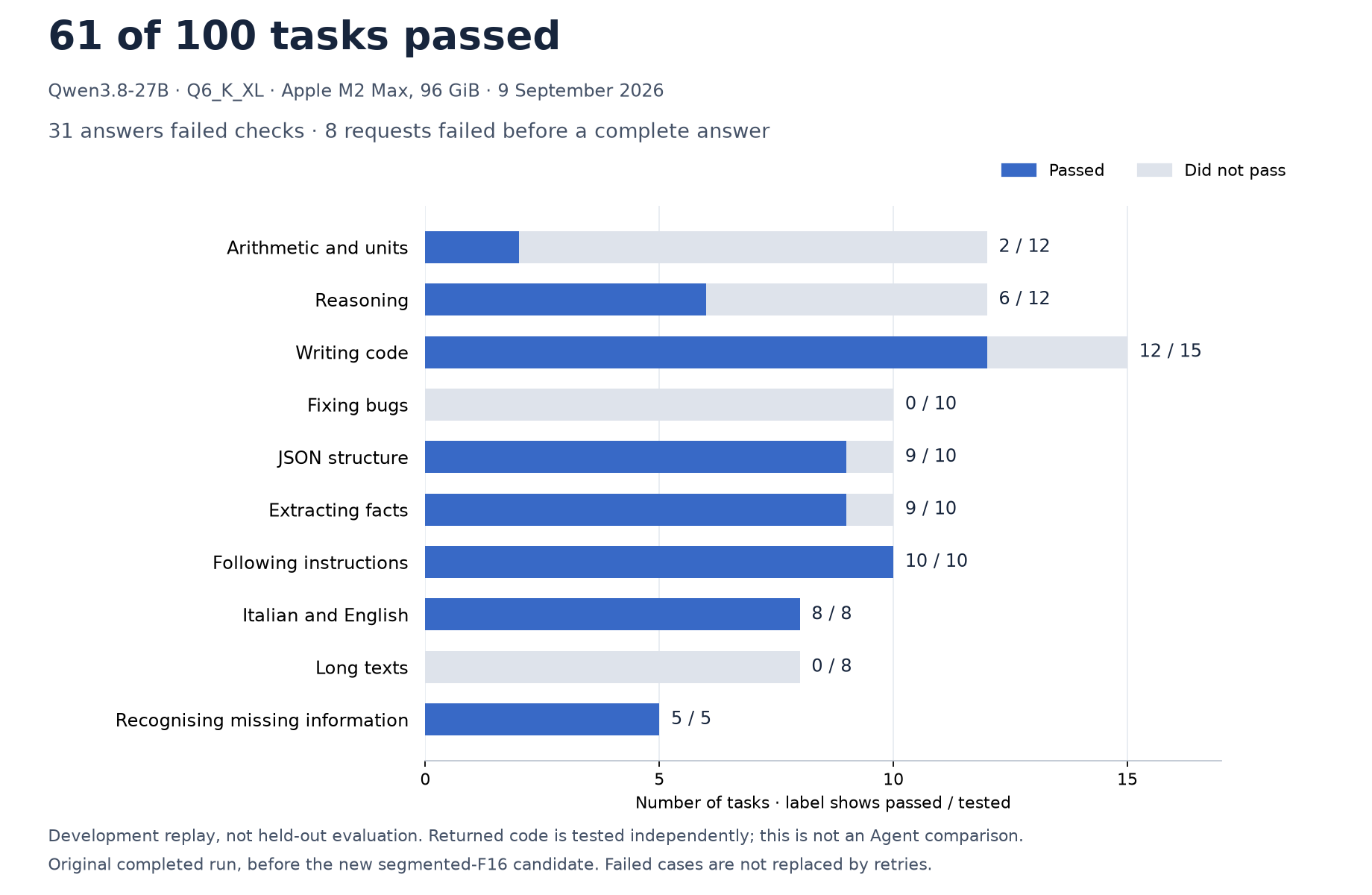
A development replay, not a held-out score. Method, data and Matplotlib script.
In eight small controlled questions with a real local model, correct evidence increased from 3/8 to 8/8: details near the end of long pages, current vs obsolete information and two simple graphics. It was not consistently faster. Development checks of page reading, not a Search ranking.
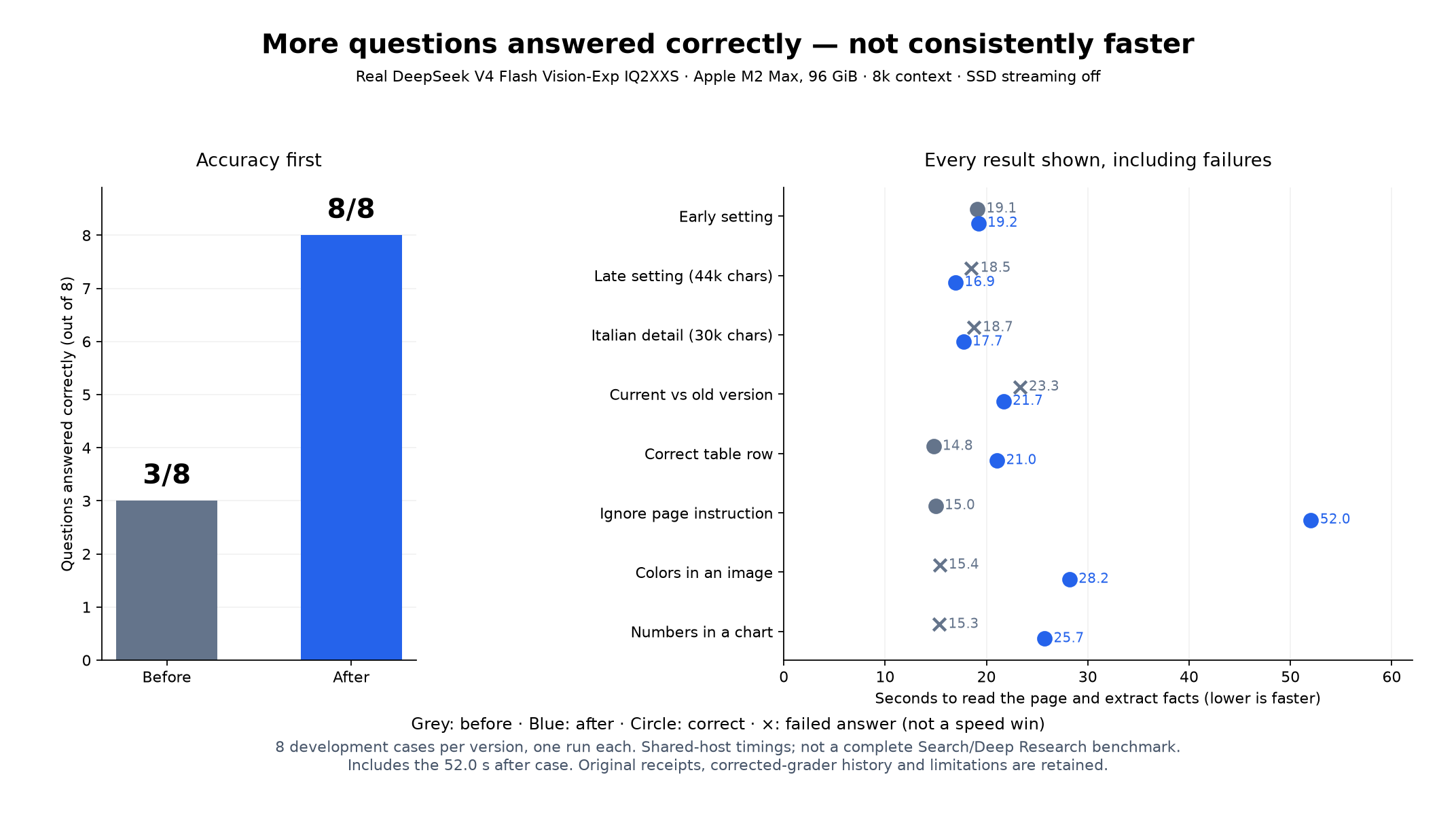
Questions, answers, settings and original failures.
The latest real public-web run meets the checked requirements on 4/4 questions, versus 2/4 before (two Search, two Deep Research). It is not faster: the two Research answers took about 312 and 293 seconds, versus 247 and 255 for the previous failed answers. All three rejected update attempts stay in the chart. Four known development questions, not a held-out score.
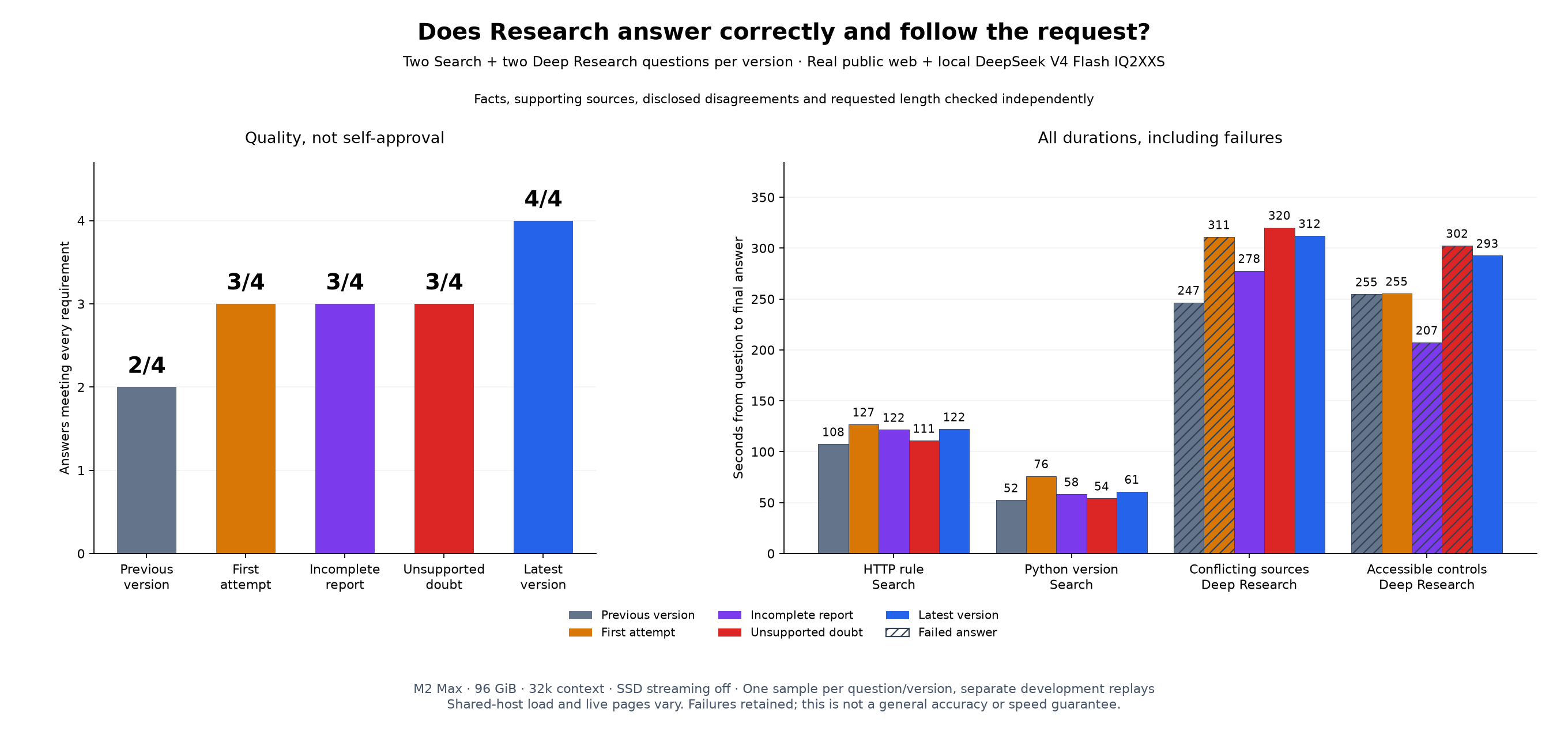
Prompts, reviews, timings and Matplotlib script.
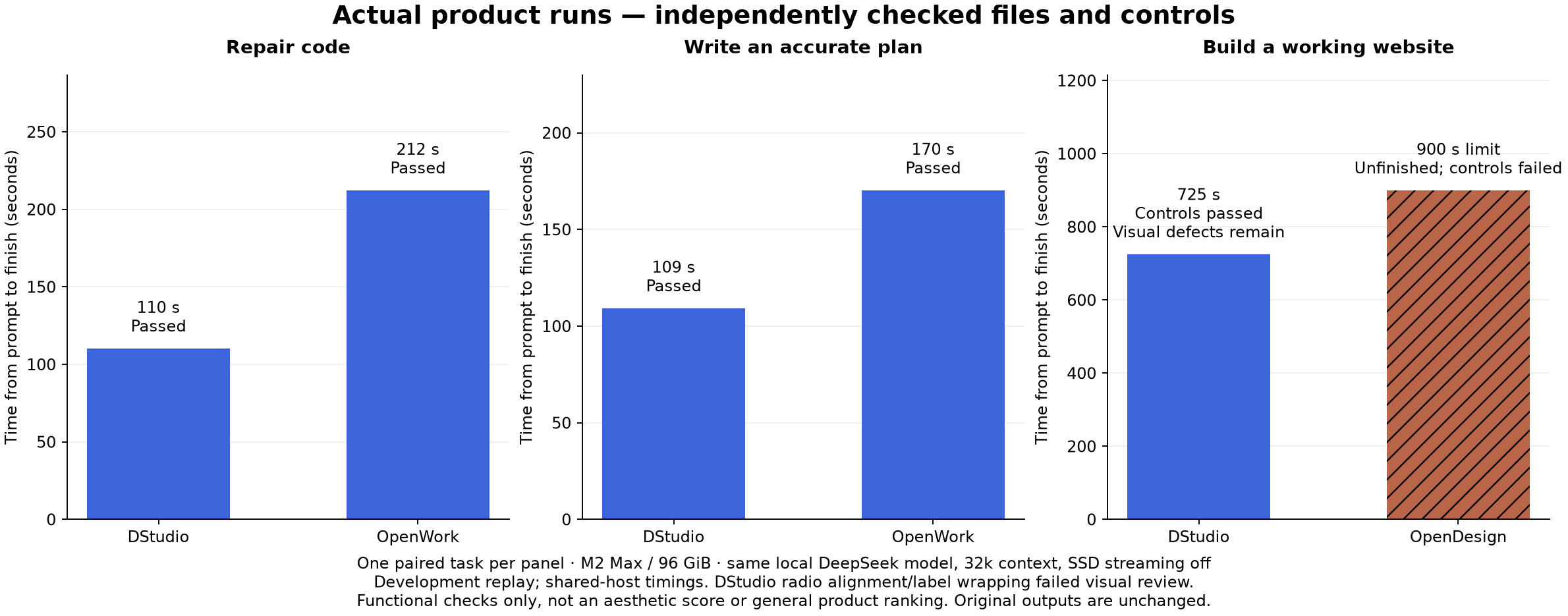
On the same local model, DStudio and OpenWork both fixed the code and produced the correct document plan; DStudio took 110 vs 212 seconds for code and 109 vs 170 seconds for the plan. DStudio's website passed the tested controls; OpenDesign reached the 15-minute limit with broken controls. DStudio's original output had misaligned radio buttons: a functional pass is not a visual-quality pass. Three small development tasks, not a ranking.
The page below was regenerated by the real ds4 Design agent from an empty workspace with the same brief and no human HTML repairs; its controls pass independent Chromium/WebKit tests, but the agent hit the 15-minute limit while iterating on its own tests, so the replay is not counted as a completed run.
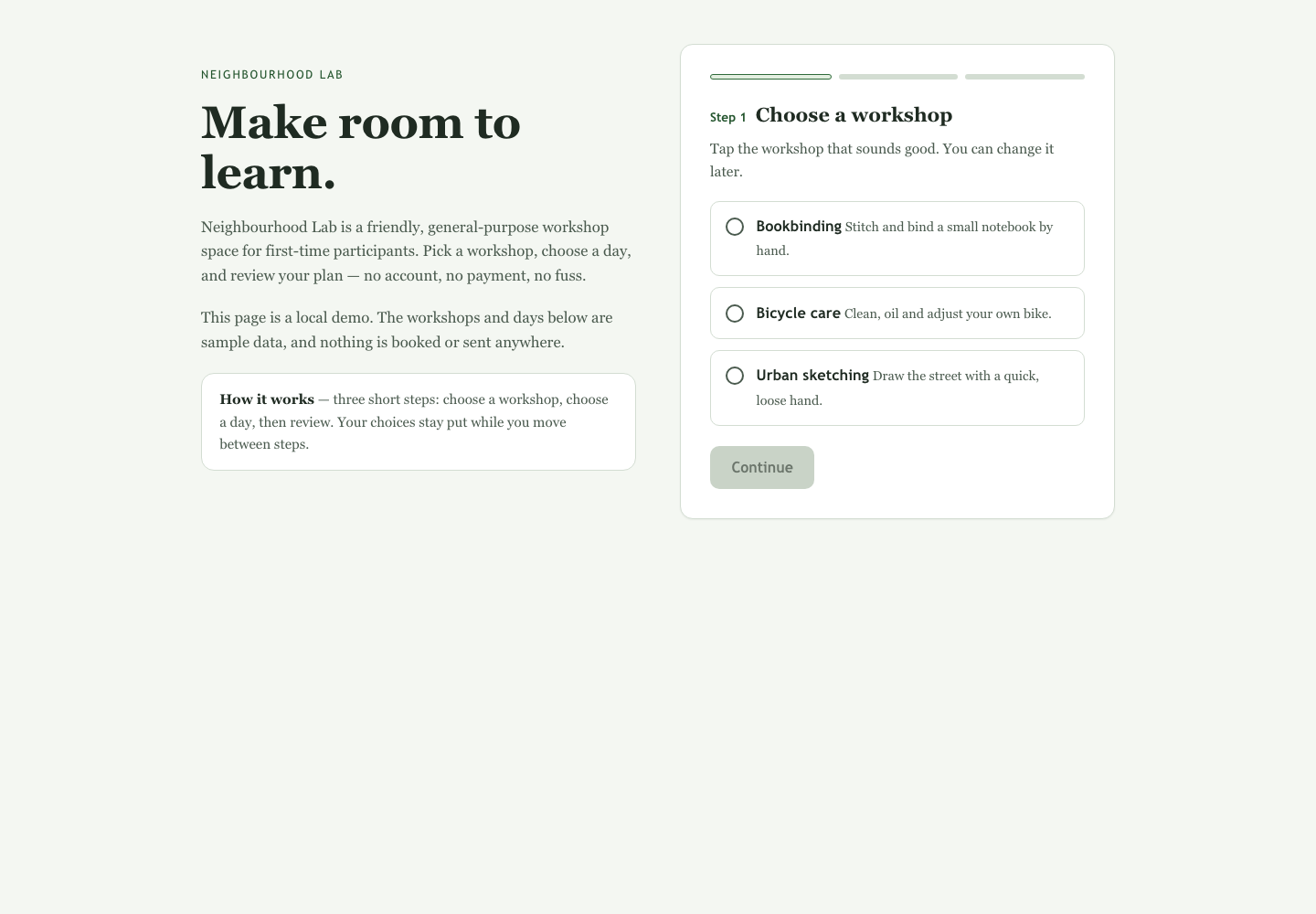
Phone screenshot · HTML · Prompts, screenshots and limitations.
DeepSeek in RAM stays near 21 tokens/s writing these responses; GLM with SSD streaming varies around 5–9 tokens/s. No clear speed gain in this shared-host run. All 36 measured answers pass, but four auxiliary checks fail: 44/48.
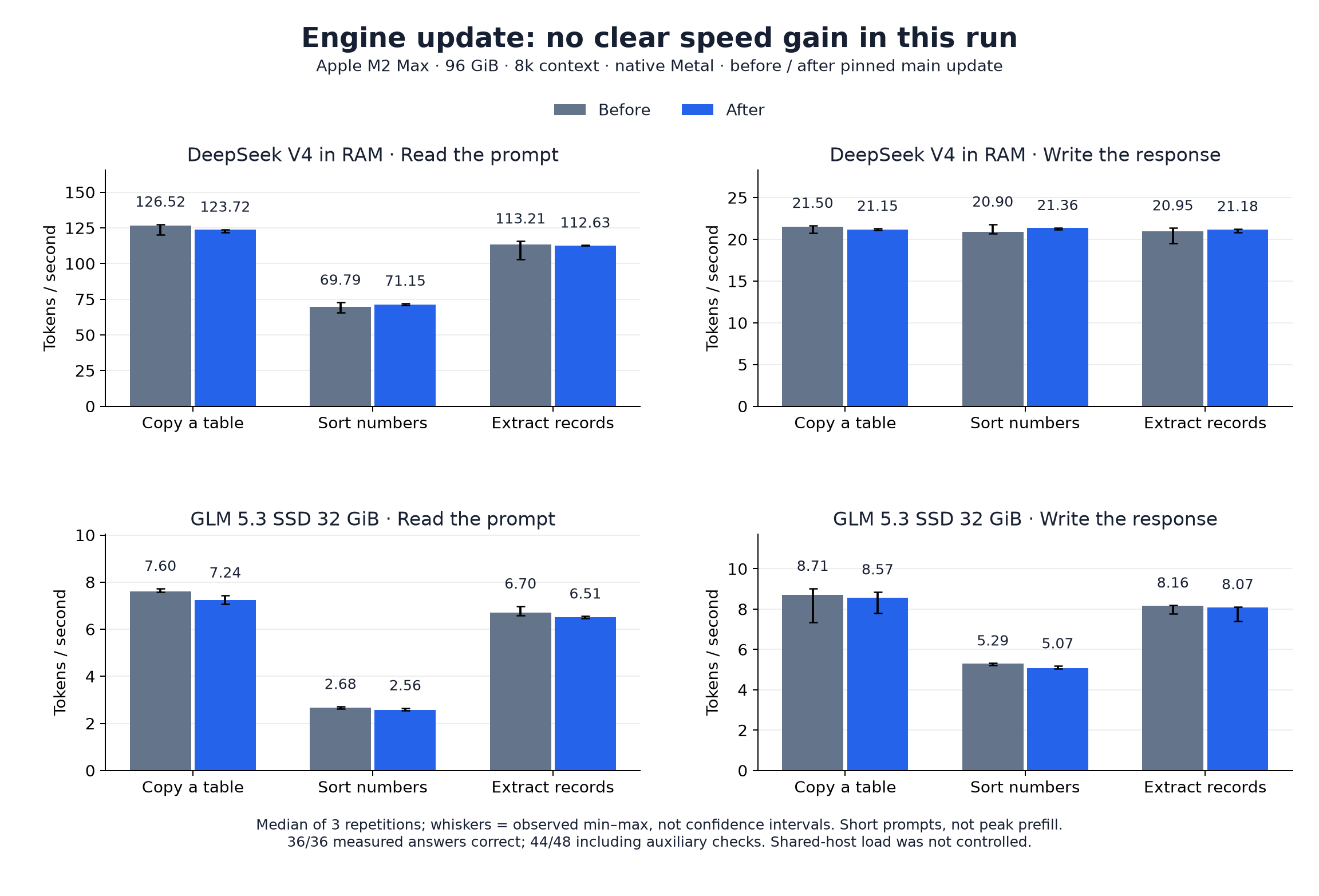
Settings, limitations and measurements.
Across 78 PDFs and 84 questions, the expected page and quote were found in 75/84 cases; citation highlight coordinates worked in 50/75 attempts. This tests search and source matching, not answer correctness.
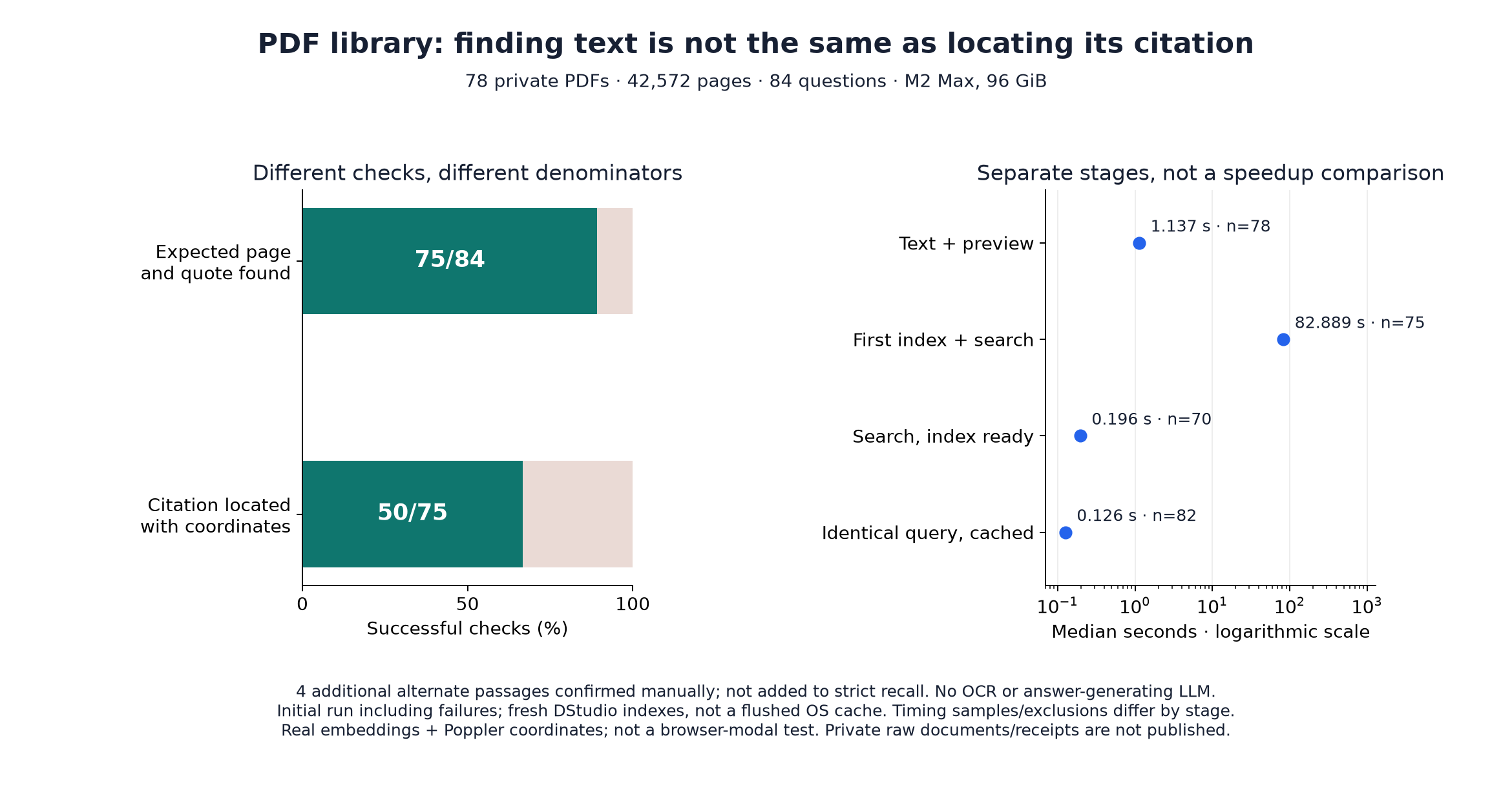
Method, anonymous aggregates and timing exclusions.
In the initial three-brief comparison both versions delivered 2/3 projects and 1/3 passed every independent browser check. No overall win yet; functional checks are not an aesthetic score.
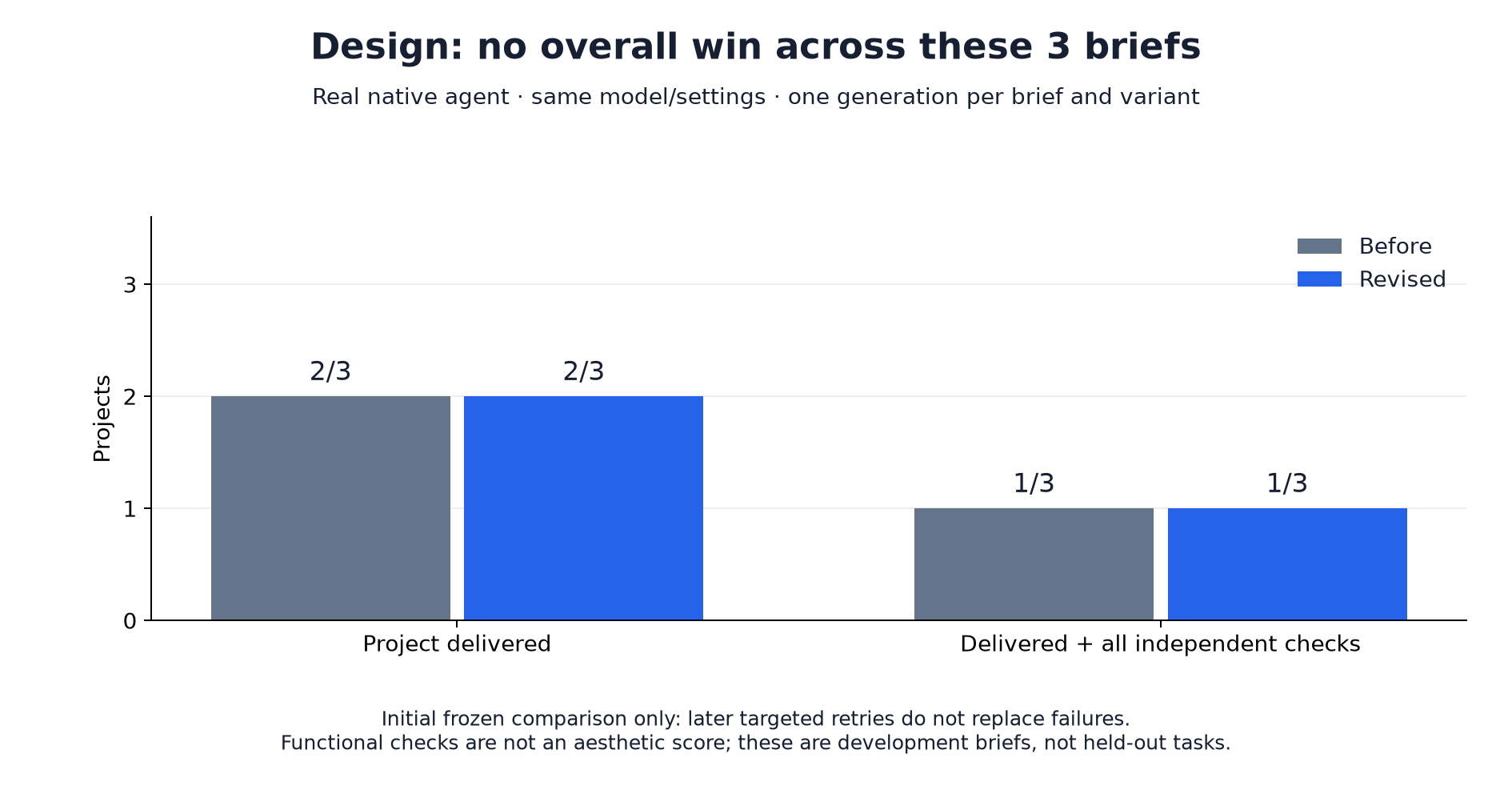
Failures, review and later targeted checks.
Regenerate these charts without running a model:
python3 tests/support/publish_benchmark_charts.py  # Requires Matplotlib
python3 extension/search/bench/plot-results.py
DStudio removes product friction, not physics: the local models are large.
dstudio binary with WebKitGTK/GTK3 (webkit2gtk-4.1);
make windows builds a portable Windows x64 folder. Linux and Windows are
much less exercised.xcode-select --install) or another
C compiler, make and Python 3. First-run setup verifies, copies and builds
the pinned engine sources included in this repository; Git is used only for
local patch application, never to fetch an engine.PATH, Homebrew, CMake.app or
C:\Program Files\CMake). For MLX: macOS 26 or later on Apple Silicon and
Python 3.12–3.14. For Qwen3.8 and DeepSeek V4.1 downloads: the Hugging Face
hf CLI with Xet.ffmpeg/ffprobe and at least 145 GiB
free for MiniMax H3 video (Apple Silicon only); Node and Playwright only for
browser tests.Engine pins: ds4 main 0aaea5a, Laguna 448d569, llama.cpp b11371
(99b9548), mlx 0.32.3 / mlx-lm 0.32.0, with per-file provenance in
docs/BUNDLED_ENGINES.md. DeepSeek V4.1 status:
update checkpoint.
For normal use, extract the portable zip and run DStudio.exe. Keep
DStudio.exe, ds4-server.exe, ds4-agent-jsonl.exe, ds4-cowork.exe,
ds4-agent-jsonl.ver, ds4-design.exe and the packaged src/harness/cowork
helper together. Cowork also needs a reachable Python 3.
To build DStudio or use Agent/Cowork/Design from a LAN client with your own ds4
checkout, install the Microsoft Edge WebView2 Runtime, MSYS2 build tools
(pacman -S make patch gcc) and Visual Studio Build Tools or clang-cl.
msys-gcc_s-seh-1.dll was not found means the MSYS2 runtime is missing: install
MSYS2 in C:\msys64 (DStudio adds it to PATH); do not copy MSYS/Cygwin DLLs
next to the ds4 binaries. Windows installation of the current source tree has
not been rerun.
make run        # build + start on http://127.0.0.1:5500
make check-fast # deterministic unit, HTTP, UI and fixture checks; no model
make check      # check-fast plus explicitly configured real-model suites
make dist-macos VERSION=1.1.0  # bundle smoke + upstream admission + release zip/checksum
make run PORT=8080 DS4_DIR=/path/to/ds4 or ./dstudio [web_port] [ds4_dir]
set the port and engine folder. DS4UI_PAGE_FROM_DISK=1 ./dstudio serves
web/index.html from disk for hot editing; DS4UI_NO_WINDOW=1 runs headless.
Useful focused targets (see tests/README.md for all of them):
| Area | Targets |
|---|---|
| Bundled sources and installers | test-engine-sources test-engine-pins test-llama-install-profile test-mlx-install-unit |
| Resident llama.cpp/MLX owner | test-resident-unit test-resident-guard |
| Harnesses | test-harness-bridge test-harness-patches |
| Downloads | test-qwen27-download-host test-mlx-download-host |
| Task Graph | test-task-graph-unit test-task-graph-http test-task-graph-bench-validate |
| Cowork / Design / PDF | test-cowork, test-design-runtime, test-pdf-complete test-pdf-evidence |
| macOS packaging | test-macos-bundle, test-first-launch-e2e (offline, isolated) |
The important distinction: can a clean installation build the included engine sources without the network, and does a real loaded model complete checked tasks? These targets use real weights, run one at a time and refuse to start when the test engine port is busy:
make test-setup-live            # build bundled main, Laguna and llama.cpp in an empty directory
make test-mlx-install           # real offline MLX install with outbound network denied
make test-llama-resident-live DSTUDIO_LLAMA_MODELS=qwen36   # or qwen27, qwen36mlx
make test-harness-live          # pi/OpenCode x models (DSTUDIO_HARNESSES, DSTUDIO_HARNESS_MODELS)
make test-first-launch-e2e      # fresh headless .app + real WebKit clicks, offline engine builds
make test-inference-live        # real DeepSeek/Laguna weights with checked answers
They retain requests, answers, failures and timings; wrong answers, missing weights and interrupted output are not passes. They are acceptance checks, not proof that every inference is correct. Browser tests with a simulated model are labelled as such.
Earlier receipts, measured on September 5, 2026 (M2 Max / 96 GB):
| What was checked | DeepSeek Flash | Laguna S 2.1 | Qwen3.8-Flash-Next (former fork) |
|---|---|---|---|
| Fresh source install, real build and startup | Passed | Passed | Passed |
| Checked answers and protocol behavior | 11/12 | 10/12 | 12/12 |
DeepSeek missed one strict output-format check; Laguna missed that check and returned one wrong value. Results and limits. The headless first-launch check also loaded every chat model installed on the test Mac at 8k context and checked exact answers and a rendered Chat reply; results and model list.
DStudio is localhost-only by default. The web/LAN port can be changed in
Settings → Network → DStudio port. To use it from a phone, tablet or another
computer on the same Wi-Fi, choose Settings → Network access → Enable on the
LAN; the app shows the address to open, e.g. http://192.168.1.207:5500.
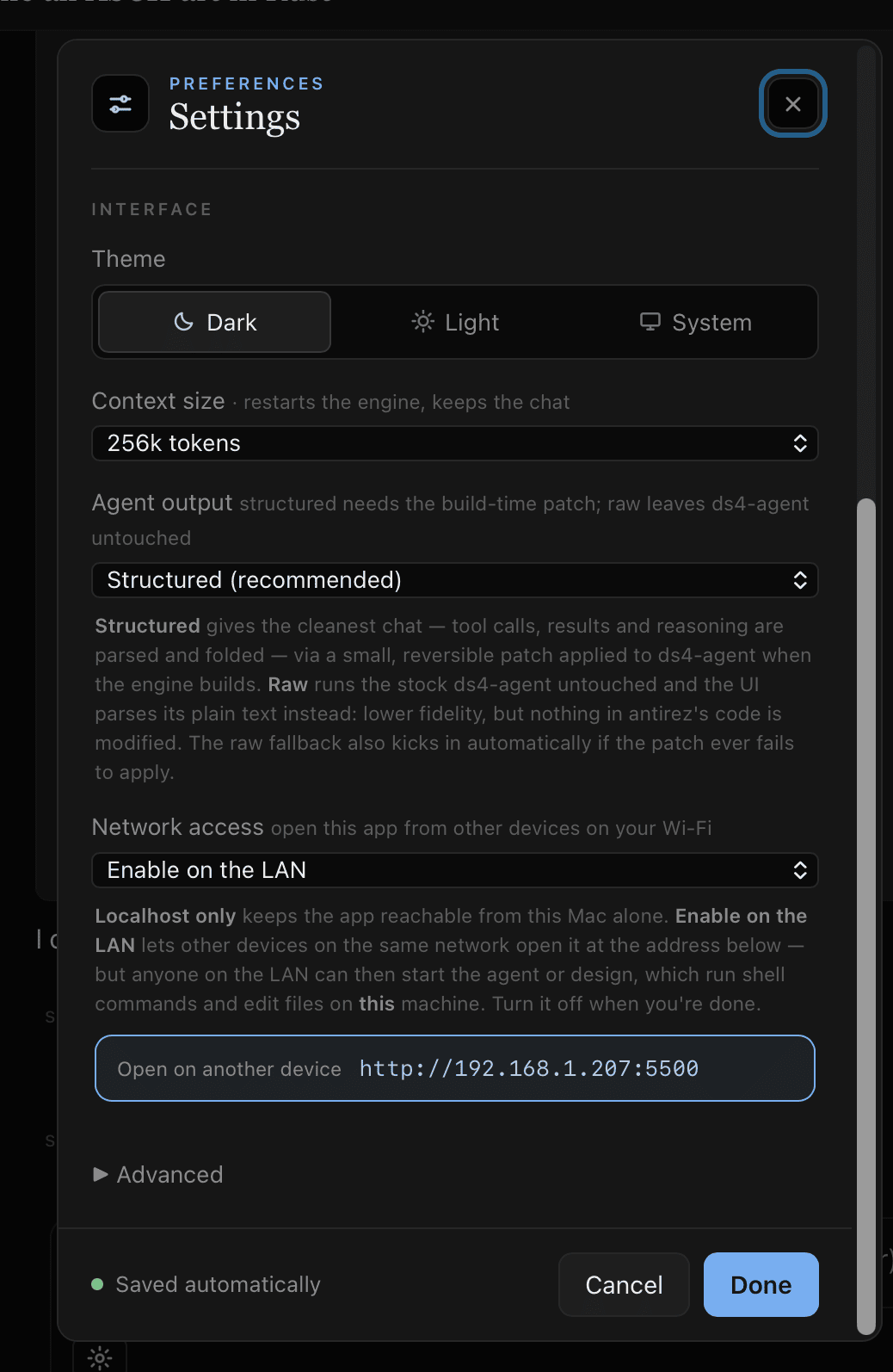
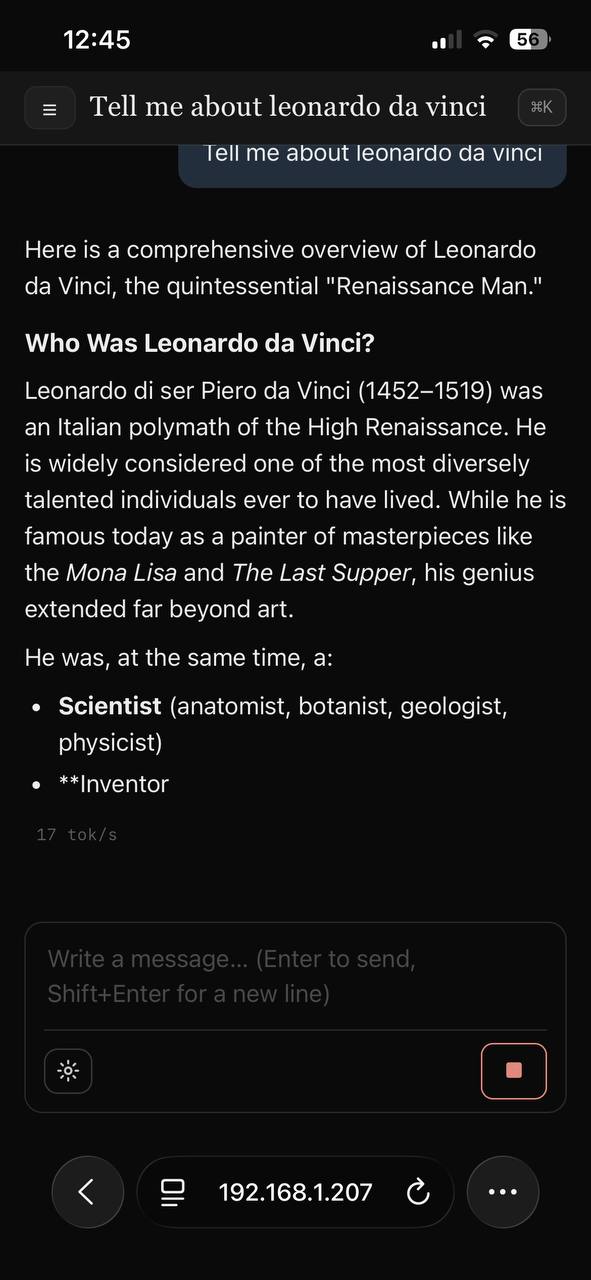
One toggle in Settings (left) → open the address on your phone (right). The model streams over the network, with no app to install on the device.
DStudio reverse-proxies the engine API (/v1), so the engine itself never
leaves 127.0.0.1: a LAN client only talks to DStudio.
⚠️ With LAN enabled, anyone on that network can reach the shared chat/model proxy. Workspace, settings, store and Agent/Cowork/Design tool APIs remain local-only, but use trusted networks and turn LAN access off when finished.
src/dstudio.c is the local
HTTP server and the process supervisor: it starts and stops the engines and
runtimes, runs the setup doctor, proxies /v1, serves Web Search and exposes a
small local API. src/app.cc opens a WKWebView (macOS) or
WebKitGTK (Linux) window around the embedded page.ds4-server for Chat
and the ds4 Agent/Cowork/Design runtimes. llama.cpp and MLX models run one
resident server per model, started through a small guard process that
leads its own process group, holds a shared installation lease and stops the
server when DStudio stops it or dies. Readiness is the server's own report
(/props for llama.cpp, /v1/models for MLX) matching the admitted model.src/harness/bridge runs pi (RPC
mode) or OpenCode (serve with SSE) behind DStudio's runtime protocol, so the
transcript, Stop and Task Graph work unchanged.src/engines and src/harness with per-file
SHA-256 manifests, verified before every build. Adaptations to other projects
are versioned .patch files in patch/, applied with
git apply --check first; a drifted source fails instead of being rewritten.events.jsonl journal is authoritative.DS4UI_HOST overrides the boot host); the page is
served from a fixed path and no client path touches the filesystem.fork+exec and an argument
array (no shell); the model comes from a fixed set and integer parameters
are range-checked.X-Requested-With: ds4web.⚠️ Agent, Design, pi and OpenCode can run shell commands autonomously; use a trusted project folder. File tools are confined to the workspace, shell commands are not sandboxed. Cowork has no arbitrary shell and confines its file/Office tools to the workspace.
Ideas, not promises:
DStudio is early, hardware-hungry and built for the local-AI crowd. The most useful contributions are setup and hardware reports (especially Linux, Windows, CUDA, ROCm and Vulkan, which are prepared but untested), reproducible agent failures, design-output examples and small PRs that reduce first-run friction. Read AGENTS.md for the contribution rules. If you want open-source local AI tools outside cloud subscriptions, a ⭐ helps the project reach the right testers.
BSD 3-Clause © 2026 Giuseppe Perrotta. Bundled third-party sources keep their own licenses: see THIRD_PARTY_NOTICES.md.
The macOS/Apple Silicon campaign is incomplete. Checked items mean the stated implementation or scoped verification is complete; they do not qualify every model or a release. Exact acceptance criteria and retained failures are in the remaining WIP and PLAN.MD.
Private prompts, documents, transcripts, weights and raw receipts remain ignored. Publishing this checkpoint does not qualify any unchecked requirement.
Fully local: chat, a coding agent, and a design studio in one private desktop app.
TypeScript
32
164 commits
updated Oct 3, 2026
An open-source, local-first workspace for DeepSeek V4, GLM 5.3 Flash, Laguna S 2.1 and Qwen: private chat, coding and knowledge-work agents, document research, visual design, images and MiniMax H3 video. Three bundled inference engines (ds4, llama.cpp, MLX), DStudio's own agents plus pi and OpenCode. A cloud account is optional.
DStudio is one desktop application for local AI. It runs large open-weight models on your own machine and puts them behind a single interface: private Chat, Learn paths with a Tutor, Agent (with Plan, GSA and RSA workflows), document-focused Cowork, a Design studio, local image understanding/generation/editing and optional MiniMax H3 video. Model execution, project files and generated artifacts stay under your control.
Under the interface DStudio owns three inference engines and picks the right one for the model you choose:
Their sources ship inside this repository and are built or installed offline; setup never clones an engine. Agent mode can use DStudio's own agent or the third-party pi and OpenCode harnesses, with any of those engines.
On macOS DStudio ships as DStudio.app (double-click, no Terminal); on
Windows as a portable folder. The UI is a single vanilla index.html
embedded in a small C launcher: no Electron, no framework build, no CDN and no
telemetry. Network access is explicit: model and harness-dependency downloads,
Web Search/Research and the optional DeepSeek API backend are the documented
outbound paths, used only when you request or configure them.
This is an in-progress source tree, not a qualified release. The latest downloadable release, DStudio 1.1.0 (September 1, 2026), predates everything in this section. To use it today, build from source.
What changed since that release
b11371; Qwen3.6 also runs on MLX on Apple Silicon. The former
Qwen side engines (vagrillo/ds4 and Ninnix/q36) are retired. Qwen3.8-Flash-Next
runs on ds4 main.llama-server and the MLX
server itself, marks them ready only when they report exactly the model you
chose, and stops them on Stop, model switch, quit or crash.Checked with real weights on an Apple M2 Max (96 GB)
| What ran | Result |
|---|---|
| DStudio's own modes on Qwen3.6 (llama.cpp): Agent, recall, Cowork, Design, Chat with thinking on/off, no leftover server after a killed host | 6/6 |
| The same six checks on Qwen3.8-27B (llama.cpp) | 6/6 (Design took 37 minutes with thinking on) |
| The same six checks on Qwen3.6 (MLX) | 6/6 |
| pi and OpenCode × {Qwen3.6 llama.cpp, Qwen3.6 MLX, Qwen3.8-27B, DeepSeek V4 Flash}, three independently checked tasks each | 24/24 |
make check-fast (model-free gate) and the macOS bundle smoke test | pass |
Failed runs that led to fixes are kept, not replaced: see docs/HARNESSES.md and tests/README.md. These are focused development checks, not a quality score or a ranking.
Not done yet
Download the Apple Silicon zip from GitHub Releases, extract it and move DStudio.app to Applications. The app is ad-hoc signed but not Apple-notarized (notarization requires a paid Apple Developer account), so Gatekeeper may warn that Apple cannot verify it. To open it the first time:
xattr -cr /Applications/DStudio.app (clears the download quarantine).Easiest install — downloads the release, verifies its SHA-256, removes the
download quarantine and installs to ~/Applications:
bash <(curl -fsSL https://raw.githubusercontent.com/sk8erboi17/DStudio/main/scripts/install-macos.sh)
Or open the DMG from the release and drag DStudio.app into Applications.
The current release (1.1.0) does not include the llama.cpp, MLX and harness changes described above. Build from source for those.
make
open DStudio.app        # macOS
# or: ./dstudio         # Linux / headless
make windows produces the portable Windows x64 folder; run DStudio.exe.
The first-run screen installs the pinned ds4 engine into
~/Library/Application Support/DStudio (copied from the bundled sources and
compiled locally), then offers the supported models with their real download
sizes. A local system check covers the engine, selected model, Chat and
Agent/Cowork/Design runtimes, Cowork's Office helper, Web Search and network
state; each missing piece has a direct Choose, Download, Install,
Start or Settings action. Engines, models, harnesses and optional tools
stay outside the signed app, so updating or moving DStudio.app does not
delete them.
llama.cpp is built the first time you start a Qwen3.6 or 27B GGUF (about a minute and a half on an M-series Mac; CMake required). MLX is installed the first time you start or download the MLX model (about 15 seconds; macOS 26 and Python 3.12–3.14 required). Both happen offline, in the background.
The regular chat-v2 Flash GGUF and the similarly sized community
abliterated Flash GGUF are separate models. DStudio does not describe the
latter as universally “uncensored”: its
model card
calls it an experimental refusal-direction edit with refusal-removal validation
still pending.
Listed here means integrated, not equally tested. “All four modes” means Chat, Agent, Cowork and Design. You pick a model; DStudio picks its engine. There is no engine or branch selector.
| Model | Engine | Modes | Size and important limits |
|---|---|---|---|
| DeepSeek V4 Flash | ds4 main | All four | ~87 GB. Standard checkpoints are text-only; the optional abliterated variant is experimental. |
| DeepSeek V4 Flash Vision-Exp | ds4 main | All four, with images | Experimental; needs its matching vision encoder. |
| DeepSeek V4 Pro | ds4 main | All four (integrated) | About 430 GB; not validated on the reference 96 GB Mac. |
| DeepSeek V4.1 Flash | ds4 main | Experimental; qualification in progress | macOS Metal, full power. Q2 is 365.7 GB on SSD including disk-backed Engram tables; no DSpark or non-Metal qualification. |
| GLM 5.3 Flash | ds4 main | All four; images with its encoder | ~96.5 GB Q2. Full-model QA of the M2 optimization remains open. |
| Laguna S 2.1 | ds4 laguna-s2.1 | All four, text only | Experimental, macOS Metal; needs resident weights (no forced SSD streaming). |
| Qwen3.8-Flash-Next | ds4 main | Experimental Chat, Agent, Cowork | Single-file Q2 (147.2 GB) or Q4 (177.3 GB); old base + PLE files are incompatible. Design and vision unqualified. |
| Qwen3.6-35B-A3B | llama.cpp | All four, text only | 31.8 GB Q6_K_XL. Real workflows and a Design page pass. No disk checkpoints. |
| Qwen3.6-35B-A3B (MLX) | MLX | All four, text only | 36.7 GB MXFP8 folder; Apple Silicon with macOS 26. Real workflows and a Design page pass. No disk checkpoints. |
| Qwen3.8-27B | llama.cpp | All four; images in Chat, Agent and Cowork | 25.3 GB Q6_K_XL + 0.93 GB projector. Real workflows pass; Design is slow (37 min on an M2 Max with thinking on). Learn and PDF workflows unqualified. |
Separate media workers provide Ideogram 4 image generation, HunyuanImage 3 image editing and MiniMax H3 video; they are not chat models. A remote OpenAI-compatible or DeepSeek API endpoint can replace local inference while every tool keeps running locally.
Memory modes. ds4 launches default to expert SSD streaming Off; Metal keeps the whole model resident when it fits and otherwise uses the engine's lazy memory-mapped path. DStudio never lowers your context to force residency. On remains an explicit option for compatible models. llama.cpp and MLX keep all weights in memory and have no expert streaming; Qwen3.8-Flash-Next keeps its backbone in RAM and reads its BF16 n-grams from SSD. Image, editing and video workers are one-shot: DStudio evacuates the chat model before loading one and restores it afterwards.
Both checkpoints run on llama.cpp b11371 (99b9548), shipped in
src/engines/llama.cpp. DStudio builds llama-server
from those sources the first time you start one of them, without the network,
and reuses the build afterwards. The weights live in the shared ds4/gguf/
folder.
DStudio starts the server, checks that it really loaded the model you chose (path, context, build and image projector) before marking it ready, and stops it when you switch models, press Stop or quit. If DStudio crashes, a small guard process stops the server too, so tens of GB are not left in memory. Chat, Agent, Cowork and Design share the loaded model: switching between them does not reload it.
On October 3, 2026 a real run through the production host passed 6/6 on each model: an Agent turn computes a generated CSV total with real tool calls and writes it, recalls a fact from a workspace file, Cowork writes a document, Design saves a page with the exact requested heading, Chat answers with thinking on and off, and a killed DStudio leaves no server behind. Retained failures include a thinking-off arithmetic error (Qwen3.6) and the 27B Design run that hit the test's former one-hour bound before finishing.
On Apple Silicon with macOS 26, Qwen3.6-35B-A3B can also run on MLX,
Apple's machine-learning framework, from the MXFP8 folder
mlx-community/Qwen3.6-35B-A3B-mxfp8. MLX ships as verified PyPI wheels
(mlx 0.32.3, mlx-lm 0.32.0) in src/engines/mlx: nothing is
compiled or fetched. The first start installs them offline into a private
Python environment (Python 3.12–3.14 must be installed, for example from
Homebrew); a later Python upgrade that removes the old version triggers a
reinstall instead of a broken launch.
Download the weights from Settings → Models (Qwen3.6-35B-A3B · MLX
MXFP8, 36.7 GB) or with ./download-model.sh qwen36-mlx; each of the 20 files
is checked against its pinned SHA-256 and transfers resume after Stop. If you
already have this folder, link it as ds4/mlx/Qwen3.6-35B-A3B-mxfp8; DStudio
checks it and never copies or moves it.
It behaves like the llama.cpp models: one server owned by DStudio, shared by all four modes, ready only when it reports exactly the folder you chose, stopped on Stop, model switch, quit or crash. Two small versioned patches make the MLX server serve only that model and report its reasoning in the field DStudio reads (patch notes). MLX has no expert streaming and no disk KV cache. It is not available on Intel Macs, older macOS, Linux or Windows; use the GGUF there.
The October 3 real run passed 6/6. Three earlier failed runs are kept with their fixes (a folder not recognized as a model, an HTTP/1.0 readiness reply, and a 512-token default reply limit plus a renamed reasoning field) in tests/README.md.
Flash Next shares ds4 main (pinned at
0aaea5a);
there is no separate engine to install. Download the single-file Q2
(147.2 GB) or Q4 (177.3 GB): each includes the original BF16 n-grams read
from SSD, with the backbone resident in Metal memory. The older base + PLE
files stay on disk but are not compatible and are not converted. It exposes
experimental Chat, Agent and Cowork with its native tool format; Design and
vision remain unavailable. The Q4 baseline answered 75/100 corpus questions and
8/8 long-context cases; wrong answers stay in the denominator. See the
migration report and the
Qwen checkpoint.
--vision automatically; Chat sends image blocks directly, Agent and
Cowork use ds4's view_image, Design inspects pixels natively. Its own DSpark
support file is ds4f-vision-dspark; if model, DSpark and context exceed the
estimated Metal budget, DStudio explains the risk and asks before launch.glm53-vision, ~1.13 GB) enables images in all
modes. --power is dropped (unsupported by GLM). With SSD streaming on,
DStudio uses the full-layer prefill path and a 32 GB expert cache; the macOS
build includes the M2 Max decode patch,
whose full-model QA is still open.laguna-s2.1 branch in
./ds4-laguna-s21, sharing ./ds4/gguf. The ~68 GB Q4_K_M download has
Stop/Resume and Delete partial. It is macOS Metal-only, text-only and
needs full residency; image drops are rejected rather than routed elsewhere.Every download is real, large and resumable, and every model lands in the
shared ./ds4/gguf/ store (the MLX folder in ./ds4/mlx/). Settings → Models
shows engine preparation, transfer and verification separately; Stop keeps
partial data for Resume, and a download never changes your selected model.
From the project root:
./download-model.sh --help
./download-model.sh ds4f-q2        # DeepSeek V4 Flash
./download-model.sh ds4f-vision-q2 # DeepSeek V4 Flash Vision-Exp + encoder
./download-model.sh ds41f-q2       # DeepSeek V4.1 Flash Q2 (needs hf with Xet)
./download-model.sh glm53-q2       # GLM 5.3 Flash (glm53-vision for its encoder)
./download-model.sh laguna-q4      # Laguna S 2.1
./download-model.sh qwen38-q2      # Qwen3.8-Flash-Next Q2 (qwen38-q4k for Q4)
./download-model.sh qwen36-q6      # Qwen3.6 Q6_K_XL, 31.8 GB, llama.cpp
./download-model.sh qwen27-q6      # Qwen3.8-27B + projector, 26.2 GB, llama.cpp
./download-model.sh qwen36-mlx     # Qwen3.6 MXFP8 folder, 36.7 GB, MLX
DeepSeek V4, GLM and Laguna show a visible <model>.gguf.part while a transfer
is incomplete. The pinned Qwen downloads verify size and SHA-256 per file before
the model becomes selectable. Hugging Face/Xet transfers (Qwen3.8, V4.1) keep
partial data in the Hugging Face cache until they are verified in full.
On Linux and Windows DStudio builds llama.cpp the way Ollama does: one server
plus a loadable module per backend. Every CPU variant is built and llama.cpp
picks the best one for the processor; CUDA, ROCm and Vulkan modules are added
when their toolkit is installed (DSTUDIO_LLAMA_BACKENDS can request or limit
them). Layers go to the GPU memory that is actually free, the rest to the CPU;
your context setting is never lowered. On Windows the server runs inside a Job
Object, so it stops with DStudio. This code is cross-compiled for Linux and
Windows, and the same dynamic build layout was built and run for real on macOS
with a correct Qwen3.6 answer, but it has not been run on Linux, Windows,
CUDA, ROCm or Vulkan. ds4 itself must be built for your platform; MLX and the
pi/OpenCode harnesses are not available on Windows.
A harness is the agent loop around a model: it decides which tool to call,
runs it and feeds the result back. DStudio's own harnesses (Agent, Cowork,
Design, GSA and RSA) live in src/harness/, next to pinned
source snapshots of pi, OpenCode and pi-ds4.
Choose Settings → Harnesses → Agent harness: DStudio, pi or OpenCode. The next Agent launch keeps the same model, engine, context and workspace; only the loop changes. The transcript, diff cards, Stop, Task Graph receipts and the saved conversation work as before. pi comes in two forms, chosen from the model: pi-ds4 when ds4 serves it (DeepSeek, GLM, Qwen Next, Laguna) and plain pi with llama.cpp, MLX or a remote endpoint.
| Harness | DeepSeek and other ds4 models | Qwen3.6 / 27B (llama.cpp) | Qwen3.6 (MLX) | Remote endpoint |
|---|---|---|---|---|
| DStudio Agent, Cowork, Design | yes | yes | yes | yes |
| pi | yes, through pi-ds4 | yes | yes | yes (not run live) |
| OpenCode | yes | yes | yes | yes (not run live) |
python3 scripts/install-harness.py --root <install root> --harness pi|opencode).
The sources ship with DStudio; their JavaScript dependencies do not. This one
explicit step downloads them, pinned by each project's lockfile (Node and npm
required; OpenCode also uses a private Bun 1.3.14), applies DStudio's
versioned patches and builds in a private folder. About 3 minutes for pi and
6 for OpenCode on an M2 Max. Launching afterwards is offline.ds4-server the bridge starts for
ds4 models. The endpoint applies DStudio's model identity, sampling and
thinking choice.--offline and no telemetry; OpenCode
runs with its model-catalog fetch, auto-update, sharing, LSP downloads and
external skills disabled, in a private config directory.Results, process ownership, patches and the full list of what was not run: docs/HARNESSES.md.
A sidebar switches between Chat, Agent, Cowork, Design and Learn. Plan, GSA and RSA are Agent workflows; Tutor rooms live inside Learn; image and video generation are routed from Chat and Design. Every mode has reopenable local history. Restorable on-disk engine sessions depend on the engine: ds4 models have them, the llama.cpp and MLX Qwen models do not yet.
Streaming chat backed by the selected local model: context lives in the engine's cache (prefix reuse is shown as cached tokens) and every message is saved locally. You get live tokens/s, collapsible reasoning, native MathML for LaTeX, syntax-highlighted code, file artifacts, image/PDF attachments and optional Web Search sources. A configured DeepSeek API key or remote endpoint can replace local inference without moving DStudio's workspace tools into the cloud.
The composer model picker has search, quantization/size details and the current model highlighted. Choose a model and DStudio selects its engine automatically. Download progress stays in Settings → Models.
With DeepSeek Vision-Exp or GLM 5.3 and the matching encoder installed, image
attachments stay multimodal: DStudio sends PNG/JPEG pixels to the engine; Agent
and Cowork use ds4's view_image, and Design uses its native see_image.
Qwen3.8-27B reads images through its own projector on llama.cpp. There is no
text-description detour or secondary visual model. Text-only models (older
DeepSeek checkpoints, Laguna, Qwen3.6) expose no image tools and read only PDF
text layers.
For newly read PDF attachments in local Chat, DStudio adds a source-checking workflow inspired by NanoIndex:
[P1] for several passages, the modal lets you choose the intended passage instead of guessing. Identical entries are merged. Internal evidence JSON is hidden, including malformed output; unreadable source details show an explanation, not a verification badge. Saved replies are reparsed too.No extra model or cloud OCR service is added. Citations and calculations appear
when the answering model supplies the structured source information;
unsupported or malformed output is not silently marked as verified. Original
PDFs are kept in a local cache limited to 32 documents / 2 GiB; source
identity is checked against the PDF bytes, and an evicted or changed original
must be attached again. This is host-local on macOS/Linux (not exposed to
LAN clients) and needs Poppler and shasum or sha256sum.
make test-pdf-evidence exercises real Poppler extraction/rendering, citation
matching, identity, calculations and the browser viewer with no model
loaded; it is an implementation test, not a model-quality benchmark.
Attach a PDF and ask in any language. When all its text fits, DStudio reads it directly: no extra model turn to choose pages and no embedding index to build. All physical pages, extracted text, numbers and citation links are kept. This applies to Chat, Learn attachments and Cowork.
Long PDFs, scans and uncertain text layers use the planner: the active model decides whether to build a bounded overview, read exact physical pages or search semantically. DStudio extracts text locally and uses the small pinned Qwen3-Embedding-0.6B only as a text embedding index, never as a visual router. With DeepSeek Vision-Exp or GLM 5.3 active, up to four selected pages are rendered and sent to that model's native encoder. Text-only models receive the extracted text and report any image-only pages they could not read.
make test-pdf-complete checks complete text against Poppler byte for byte,
fallbacks, real citation highlights and upload-to-Chat behavior with a
simulated answering model: it proves extraction and routing, not answer
accuracy or a speed multiplier. See PDF reading.
Describe what you want to learn and optionally attach PDFs, notes or public links. Every Learn path starts with mandatory Deep Research, even when the prompt contains no link. Discovery tries Google first in DStudio's Chrome session and falls back to Brave, Bing and DuckDuckGo when a search page blocks it; every search page and selected source is opened through Chrome (CDP), and dynamic pages are scrolled until their content stabilizes before extraction. DStudio looks for authoritative curricula, current documentation, prerequisite evidence, practical exercises, assessment criteria and common pitfalls; your links and PDFs are included as evidence but never treated as the whole plan. Only after at least five substantial pages from four independent hosts and fifteen grounded curriculum facts does a semantic judge decide whether the knowledge gaps are closed; failed browser reads do not count as progress.
The generated path records cross-topic prerequisites, key concepts, effort estimates, observable outcomes, practice, mastery checks, stage objectives, checkpoints and a final project. There is no preset topic catalogue or fixed quota: a broad field becomes several stages or branches, a narrow skill stays compact. A structural gate rejects shallow or truncated drafts; a separate adversarial factual audit checks every stage and then the whole path, and only a factually clean draft reaches the independent curriculum judge (coverage, sequencing, granularity, practice, assessment, sources, capstone). Repairs are audited again until both pass or you press Stop. The result opens as an editable graph inspired by roadmap.sh: complete, reorder or delete blocks, or add one and let the model write a coherent outcome and exercise for it. The graph is saved with its history and exports as PNG, PDF or JSON.
Every stage, topic and final project has a Study button that opens a full-screen Tutor chat for that block. The Tutor already knows the goal, stage, prerequisites, outcome, practice task and sources, so it can teach from first principles, answer follow-ups, give guided and independent exercises, run quizzes and correct your work. It keeps the normal Chat tools (Thinking, files, PDFs and images, LaTeX, ASCII diagrams, hints, canvas previews). Each block owns its transcript and attachments, so Study resumes the same lesson.
Learn generation and its verification roles use Thinking: max. Local ds4 needs at least 393,216 context tokens for Max, so DStudio temporarily launches the Learn pipeline at that size when your Chat context is smaller, without changing the saved setting. Learn has not been qualified on the llama.cpp/MLX Qwen models.
Ask for an image in any language. DeepSeek Vision-Exp or GLM 5.3 interprets the
request and any source pixels, then emits an explicit generate or edit
directive. generate goes to Ideogram 4 FP8 with your image preset; edit goes
to the full, non-distilled HunyuanImage-3.0-Instruct model (NF4 so it fits the
96 GB reference Mac, with critical layers and compute in BF16, think_recaption
and 50 diffusion steps through Tencent's official implementation). Text-only
models cannot issue source-dependent edits.
The reply gets a placeholder immediately while DStudio reports real load, reasoning, sampling and decode phases. Presets are explicit choices, never an automatic downgrade. One lock serializes Ideogram, Hunyuan and H3, and the media-memory lease evacuates a resident chat/Design model when required. Generated files stay local and are attached to the conversation.
Choose Settings → Vision → Image preset. It controls new Chat images, generated video opening frames and new Design sessions; changing it does not restart a model or alter a render in progress.
| Preset | Intended use | Generation steps | Landscape image (16:9) |
|---|---|---|---|
| Low | Quick drafts and composition checks | 12 | 1024 × 576 |
| Medium | A balance of detail and waiting time | 20 | 1024 × 576 |
| High | More refinement at the same size | 48 | 1024 × 576 |
| MAX | A larger, natively generated image | 48 | 2048 × 1152 |
MAX preserves DStudio's previous default. Low, Medium and High use Ideogram's Turbo-12, Default-20 and Quality-48 samplers; MAX uses Quality-48 at twice the width and height, not an upscale. More steps or pixels do not guarantee better prompt adherence.
Measured on an M2 Max with 96 GiB, with other apps left running:
| Preset | Classical illustration | Headphone portrait |
|---|---|---|
| Low | 4m 31s | 6m 37s |
| Medium | 6m 51s | 10m 13s |
| High | 15m 46s | 24m 35s |
| MAX | 78m 01s | 123m 33s |
These times include failed outputs. All eight attempts finished, but only four produced illustrations; the other four returned refusal-message images, and the illustrations missed details of the brief. This small comparison does not establish a quality winner or guaranteed waiting times.
Full preset benchmark: every original image, findings, exact settings and reproduction steps.
DStudio runs the downloadable MiniMax H3 weights through a pinned antirez/h3.c checkout: a native C/Objective-C engine on Metal, MPSGraph and Accelerate, without ComfyUI or PyTorch. Ask for a video in Chat; DStudio routes it to the one-shot executable, optionally uses a recent image as the first frame, reports h3.c's real progress and returns a locally streamed MP4. You can also ask for an opening image first (Ideogram 4) and then animate it. No hosted generation API is used.
Work in progress — two-photo H3 references. With MiniMax H3 selected, two attached images become ordered Ref2VA inputs (
<Picture 1>,<Picture 2>). Settings has a separate preparation action for the official Ref2VA transformer (about 61.7 GiB / 66 GB on top of FL2VA). This path has not yet completed end-to-end validation.
Open Settings → Video before the first generation, review the upstream
terms, confirm that your territory and use are authorized, then select
Prepare local H3. Setup compiles an immutable h3.c revision and downloads
only the official FL2VA/ files (about 134 GiB / 144 GB, resumable) into
~/.dstudio/minimax-h3. Three render profiles expose h3.c's controls:
Quality (default; all 50 blocks, no reuse, 768p-class), Balanced
(--layers 45 --reuse 2, ~512-class) and Preview (40/50 blocks, reuse 3,
upscaled). DStudio never switches profile on its own. M3 and older GPUs use the
portable BF16/MPS path; M5-class hardware can use Metal 4/TensorOps paths.
Search runs through DStudio's local web helper, not a hosted browsing service. Web Search plans targeted queries, reads the best pages, extracts facts and answers with clickable citations. Deep Research runs a longer evidence loop: classify the request, search, read primary sources, extract facts, judge sufficiency, write a grounded report and keep the source cards.
Before delivering a Deep Research answer, DStudio checks it against the collected evidence and the request; it can revise unsupported claims, missing details or undisclosed disagreements, and counts explicit word limits. A failed review is shown as an incomplete draft, not a verified result. The reviewer is the local model too: it helps catch errors but cannot guarantee truth.
Relevant details can come from later page sections, and with an active native vision model research can inspect real pixels of an image or chart (one viewport per page, three captures per run). Search admits up to 6 queries and 8 page reads; Deep Research up to 18 queries, 24 reads and 12 follow-up actions. There is no application elapsed-time cutoff on discovery, writing or review: a slow valid local-model request continues until it completes, fails or you press Stop. Measured scope and limits.
Agent is a local coding agent: it reads and edits files, runs commands inside a
working directory you choose, streams its answer while it works, folds private
reasoning into a Thought disclosure and groups tool calls into a compact
action timeline. The header shows the mode, model and working folder;
/help, /list, /save, /new and /compact are available below the
composer. A post-edit verifier catches common syntax errors so the model can
repair them in the same turn. By default this is DStudio's own agent;
pi or OpenCode can run instead.
Open IDE. The header's Open IDE replaces the conversation with a VS
Code-style view of the working folder: file tree, tabs, a syntax-highlighted
editor and a terminal panel with the agent's bash commands and output. While
the agent writes a file, a cursor labelled with the active model shows the text
as it is generated and Follow keeps the editor on that file. While the model
reasons, a thought bubble shows the newest words of that reasoning. Streamed
text is marked not on disk yet until the tool finishes and the IDE re-reads
the file. After the turn you can edit and save (⌘S); DStudio refuses the save if
the agent started again or the file changed on disk, and asks which version to
keep. Limits: UTF-8 text up to 2 MB, links open read-only, not available on
Windows yet; runtimes that do not stream tool results show the files when the
turn ends.
Open Blueprint. Turns the working folder into interactive diagrams the
Agent maps from the code: Architecture, Workflow, Sequence,
Data flow or Lifecycle, optionally focused on a question. The Agent
writes a typed blueprint (dstudio.blueprint/1) to .dstudio/blueprints/,
citing a file, a line range and a quoted line for every node and relationship.
DStudio checks every citation against the file's bytes and shows how many claims
are backed; click a node for its evidence, Trace what it reaches, find a
Route between nodes, search with /, open a citation in the IDE, and
Export HTML, SVG or JSON. Send to Design starts Design in a design/
folder with the blueprint attached; Implement code asks the Agent to build
what the blueprint describes, in dependency order, running the build and tests
after each group. The check proves that quoted lines exist, not that the model
described the behaviour correctly. The idea follows
Archify (MIT); no Archify code is included.
Thinking defaults to high. Selecting max below ds4's 384k-token threshold explains the required context and estimated memory cost before restarting; declining changes nothing.
Prompt lookup (experimental, ds4 Chat / Agent / Cowork). The managed ds4 runtimes can reuse text already in the conversation as candidate output, checked by the same model. It helps when copying or preserving existing text; it does not invent new answers faster. Normal generation stays the default; accelerated batching is opt-in. Modes and tests.
The clearest benefit was in Chat; it was not a general Agent speedup. The actual DeepSeek V4 Flash engine ran on an M2 Max with 96 GB, Minecraft left running and SSD streaming off: 78 tasks (13 cases × 3 modes × 2 repetitions). Faster but incorrect results did not count.
| Workspace | Checks passed in each mode | Experimental PLD vs disabled, in this run |
|---|---|---|
| Chat | 14/14 | 2.84× observed speed, comparing the same correct outputs |
| Agent | 6/6 | About the same overall; long copies helped, new code did not |
| Cowork | 2/6 | No useful overall conclusion: document-fidelity failures remained |
Median Chat copy time fell from 30.0 to 12.3 seconds; an Agent file copy from 86.0 to 75.0 seconds, while a small edit stayed around 36.7 seconds and a new function became slower (21.8 to 28.3 seconds). 66/78 checks passed: the 12 failures were the same Cowork copy cases in every mode (a lost final newline). Method and per-task results · data.
Cowork turns the selected local model into a knowledge-work partner for a folder of real files. It reads PDF, DOCX, PPTX, ODT, RTF, Markdown and text; inspects, reads and writes XLSX, CSV and TSV; creates verified documents, paginated PDFs and 16:9 presentations; and reopens its outputs before reporting completion. Uploaded names are sanitized, macro-enabled formats are rejected, writes are atomic and file access is confined to the workspace, including symlink and traversal checks.
The Office bridge is a small standard-library Python helper invoked with a bounded JSON request; there is no command shell or arbitrary Python in Cowork. Spreadsheet and document text is framed as untrusted source content, so embedded instructions are not treated as tasks. Cowork uses the context size from Settings and the same conversation surface, Thinking view and action timeline as Agent.
Cowork can also turn several documents into a source-backed comparison table, for example “Compare these course programs by topic, duration and prerequisites.” Each cell can show its original excerpt, file and page; missing and conflicting values stay explicit; sources are rechecked on inspection and export (expandable HTML or an Excel workbook with data, status and evidence sheets). A source match confirms the quote and value occur in the document, not that the interpretation is correct. Limits: text-layer PDFs and Office/text sources, no OCR, up to 200 rows, 32 columns and 64 files. Document-table tests exercise real files without a model; they are not an extraction-accuracy benchmark.
Create a recipe, pick it, and the next Agent, Cowork or Design turn inherits its workflow, constraints and quality bar without restarting the model. There is no skill marketplace: every skill is a local Markdown pack written by you, stored in your user data directory and injected only when selected. GSA and RSA use their own deterministic phase templates instead.
GSA gives the Agent a security-analysis operating mode. Open RSA/GSA beside Open IDE, choose GSA, describe an authorized mission and optionally a target URL. The run goes through selection (files and hypotheses), preflight (evidence, trust boundaries, safe checks), validation (concrete proof with bounded scripts or optional local tools) and report (verdict, sources, limits, next actions). Security profiles distinguish passive, blue-team, explicitly authorized red-team and purple-team work; authorization is never inferred from the prompt. External tools are listed, can be disabled and have their invocations, parameters and output recorded verbatim; Install missing runs a supervised background installer. Each phase is committed through a structured control call validated by the host, and a slow evidence collector is not killed as idle. See the GSA/RSA workflow.
RSA is the non-security reverse-structure workflow: it inventories a public
site's visible routes and assets, captures ordinary browser evidence and writes
STRUCTURE.MD, labelling claims VERIFIED, INFERRED or UNKNOWN. It
never scans, fuzzes, brute-forces or calls private endpoints.
GSA, RSA and Plan were developed and tested with DStudio's own Agent; they are not qualified with pi or OpenCode.
Design is a separate local design agent that runs a designer's pipeline end to
end. ds4-design is DStudio's own harness
(src/harness/design/ds4_design.c): it has
its own system prompt, tools and structured events, and runs on ds4 models
(DSML tool protocol), on the llama.cpp/MLX Qwen models (structured function
calls) and on remote endpoints.
Plan. Toggle Plan in Agent mode, describe the outcome, and DStudio
writes a Markdown planning file (plan.md or <topic>-plan.md) with objective,
assumptions, milestones, tasks, decisions, risks, validation checklist and next
actions. It plans; it does not build.
Adding context while working. In Agent, Cowork and Design, sending while a turn runs adds context to the current turn after the current model/tool round; it does not press Stop or repeat an executed tool. Chat keeps the partial answer and continues with the new context.
Goals. In Agent, /goal <objective> keeps working across turns towards one
saved objective (default limit 8 turns, no default elapsed-time cutoff).
/goal pause, /goal resume and /goal clear are also buttons above the
composer. A goal needs a successful verification command and a completion
receipt; this checks execution evidence, not whether the chosen test covers
every requirement. Behavior and limits.
Task Graph is part of Agent automatically. A normal question takes the direct path; a request to inspect, edit or test the workspace runs inside a checked graph around the same agent. An action is not marked successful because the model stopped talking: DStudio requires a real tool result followed by a completion receipt. You can watch the graph, pause, resume and reopen it after a restart; automatic undo is offered only when DStudio can prove exactly what will be restored. Implementation and local API.
| Native Agent baseline | Agent with automatic checks | |
|---|---|---|
| When used | Simple questions, or the benchmark baseline | Workspace actions, selected automatically |
| Completion | The agent decides when it is done | Tool evidence and a completion gate are required |
| Rules | Normal tool permissions | Every action checked against the graph's rules |
| Interruption | Continue manually | Pause, resume and recover from the saved journal |
| Undo | Depends on what the agent changed | Exact writes get checkpoints; uncertain effects are reported |
These are separate experiments, not one product score. All charts use Matplotlib; scripts and reviewed JSON are committed next to the reports. Private documents and raw user data are not published. Every result names the engine and date it was measured on.
Measured on September 4, 2026 on DeepSeek V4 Flash (ds4), with pi 0.84.1 and
OpenCode 1.18.18 as standalone CLIs against ds4-server, before they were
integrated as DStudio harnesses. Ten task families × five different fixtures;
a task passed only when a real tool completed, the required answer followed, an
independent file or Python check passed and nothing outside the declared scope
changed. Same 86.72 GB model, 8,192-token context, power 70, thinking off, SSD
streaming off.
| Agent path | Tasks completed | Median task time | Mean tool calls |
|---|---|---|---|
| Native Agent baseline | 42/50 | 21.04 s | 2.22 |
| DStudio Agent | 50/50 | 33.64 s | 2.60 |
| Pi 0.84.1 | 50/50 | 36.98 s | 3.14 |
| OpenCode 1.18.18 | 50/50 | 29.50 s | 2.76 |
The honest result is a three-way correctness tie between DStudio, Pi and OpenCode. DStudio improves the Native baseline by eight tasks (all five code repairs, one cross-file calculation, one JSON edit, one constrained diagnosis), is faster than Pi and 4.15 seconds slower than OpenCode at the median.
The suite does not cover network/browser work, multimodal judgment, very long autonomous tasks, parallel agents or interrupted token streams. It is one M2 Max/96 GB sample, not a guarantee for other prompts, versions or computers; the publication gate rejects a result if the checked path loses any task Native completes.
Every variant started with a fresh session. Native and checked DStudio
alternated against one loaded ds4-agent-jsonl; Pi and OpenCode alternated
against one loaded ds4-server whose verifier rejected every model id except
ds4. Pi and OpenCode had read, write/edit and shell tools; plugins, external
skills, LSP, formatters, MCPs, sharing and catalog updates were disabled, with a
1,024-token response limit. The DStudio phase took 56 min 11 s and the
Pi/OpenCode phase 1 h 2 min 36 s.
DSTUDIO_RELIABILITY_CASES=50 make test-task-graph-reliability-real
DSTUDIO_RELIABILITY_CASES=50 make test-task-graph-cli-competitors-real
node extension/task-graph/bench/publish-reliability.mjs \
  tests/.artifacts/task-graph-reliability-real/result.json \
  extension/task-graph/bench/results/2026-09-04-m2-max-diverse-reliability-no-ssd.json
node extension/task-graph/bench/publish-cli-comparison.mjs \
  tests/.artifacts/task-graph-cli-competitors-real/result.json \
  extension/task-graph/bench/results/2026-09-04-m2-max-diverse-reliability-no-ssd.json \
  extension/task-graph/bench/results/2026-09-04-m2-max-diverse-agent-comparison-no-ssd.json
python3 extension/task-graph/bench/plot-cli-comparison.py
Focused functional checks through the production host on an M2 Max, with generated tasks and independent checks; summarized in Current status and detailed in docs/HARNESSES.md. They show that each engine/harness path works end to end; they are not a quality or speed comparison between engines.
Measured on September 9, 2026 on the retired q36 engine, not on llama.cpp; it has not been rerun there. 61 of 100 tasks passed: 31 answers failed their checks and eight long requests ended in an engine error or timeout. Instruction following and language tasks worked well; arithmetic, debugging patches and long contexts need more work.
A development replay, not a held-out score. Method, data and Matplotlib script.
In eight small controlled questions with a real local model, correct evidence increased from 3/8 to 8/8: details near the end of long pages, current vs obsolete information and two simple graphics. It was not consistently faster. Development checks of page reading, not a Search ranking.
Questions, answers, settings and original failures.
The latest real public-web run meets the checked requirements on 4/4 questions, versus 2/4 before (two Search, two Deep Research). It is not faster: the two Research answers took about 312 and 293 seconds, versus 247 and 255 for the previous failed answers. All three rejected update attempts stay in the chart. Four known development questions, not a held-out score.
Prompts, reviews, timings and Matplotlib script.
On the same local model, DStudio and OpenWork both fixed the code and produced the correct document plan; DStudio took 110 vs 212 seconds for code and 109 vs 170 seconds for the plan. DStudio's website passed the tested controls; OpenDesign reached the 15-minute limit with broken controls. DStudio's original output had misaligned radio buttons: a functional pass is not a visual-quality pass. Three small development tasks, not a ranking.
The page below was regenerated by the real ds4 Design agent from an empty workspace with the same brief and no human HTML repairs; its controls pass independent Chromium/WebKit tests, but the agent hit the 15-minute limit while iterating on its own tests, so the replay is not counted as a completed run.
Phone screenshot · HTML · Prompts, screenshots and limitations.
DeepSeek in RAM stays near 21 tokens/s writing these responses; GLM with SSD streaming varies around 5–9 tokens/s. No clear speed gain in this shared-host run. All 36 measured answers pass, but four auxiliary checks fail: 44/48.
Settings, limitations and measurements.
Across 78 PDFs and 84 questions, the expected page and quote were found in 75/84 cases; citation highlight coordinates worked in 50/75 attempts. This tests search and source matching, not answer correctness.
Method, anonymous aggregates and timing exclusions.
In the initial three-brief comparison both versions delivered 2/3 projects and 1/3 passed every independent browser check. No overall win yet; functional checks are not an aesthetic score.
Failures, review and later targeted checks.
Regenerate these charts without running a model:
python3 tests/support/publish_benchmark_charts.py  # Requires Matplotlib
python3 extension/search/bench/plot-results.py
DStudio removes product friction, not physics: the local models are large.
dstudio binary with WebKitGTK/GTK3 (webkit2gtk-4.1);
make windows builds a portable Windows x64 folder. Linux and Windows are
much less exercised.xcode-select --install) or another
C compiler, make and Python 3. First-run setup verifies, copies and builds
the pinned engine sources included in this repository; Git is used only for
local patch application, never to fetch an engine.PATH, Homebrew, CMake.app or
C:\Program Files\CMake). For MLX: macOS 26 or later on Apple Silicon and
Python 3.12–3.14. For Qwen3.8 and DeepSeek V4.1 downloads: the Hugging Face
hf CLI with Xet.ffmpeg/ffprobe and at least 145 GiB
free for MiniMax H3 video (Apple Silicon only); Node and Playwright only for
browser tests.Engine pins: ds4 main 0aaea5a, Laguna 448d569, llama.cpp b11371
(99b9548), mlx 0.32.3 / mlx-lm 0.32.0, with per-file provenance in
docs/BUNDLED_ENGINES.md. DeepSeek V4.1 status:
update checkpoint.
For normal use, extract the portable zip and run DStudio.exe. Keep
DStudio.exe, ds4-server.exe, ds4-agent-jsonl.exe, ds4-cowork.exe,
ds4-agent-jsonl.ver, ds4-design.exe and the packaged src/harness/cowork
helper together. Cowork also needs a reachable Python 3.
To build DStudio or use Agent/Cowork/Design from a LAN client with your own ds4
checkout, install the Microsoft Edge WebView2 Runtime, MSYS2 build tools
(pacman -S make patch gcc) and Visual Studio Build Tools or clang-cl.
msys-gcc_s-seh-1.dll was not found means the MSYS2 runtime is missing: install
MSYS2 in C:\msys64 (DStudio adds it to PATH); do not copy MSYS/Cygwin DLLs
next to the ds4 binaries. Windows installation of the current source tree has
not been rerun.
make run        # build + start on http://127.0.0.1:5500
make check-fast # deterministic unit, HTTP, UI and fixture checks; no model
make check      # check-fast plus explicitly configured real-model suites
make dist-macos VERSION=1.1.0  # bundle smoke + upstream admission + release zip/checksum
make run PORT=8080 DS4_DIR=/path/to/ds4 or ./dstudio [web_port] [ds4_dir]
set the port and engine folder. DS4UI_PAGE_FROM_DISK=1 ./dstudio serves
web/index.html from disk for hot editing; DS4UI_NO_WINDOW=1 runs headless.
Useful focused targets (see tests/README.md for all of them):
| Area | Targets |
|---|---|
| Bundled sources and installers | test-engine-sources test-engine-pins test-llama-install-profile test-mlx-install-unit |
| Resident llama.cpp/MLX owner | test-resident-unit test-resident-guard |
| Harnesses | test-harness-bridge test-harness-patches |
| Downloads | test-qwen27-download-host test-mlx-download-host |
| Task Graph | test-task-graph-unit test-task-graph-http test-task-graph-bench-validate |
| Cowork / Design / PDF | test-cowork, test-design-runtime, test-pdf-complete test-pdf-evidence |
| macOS packaging | test-macos-bundle, test-first-launch-e2e (offline, isolated) |
The important distinction: can a clean installation build the included engine sources without the network, and does a real loaded model complete checked tasks? These targets use real weights, run one at a time and refuse to start when the test engine port is busy:
make test-setup-live            # build bundled main, Laguna and llama.cpp in an empty directory
make test-mlx-install           # real offline MLX install with outbound network denied
make test-llama-resident-live DSTUDIO_LLAMA_MODELS=qwen36   # or qwen27, qwen36mlx
make test-harness-live          # pi/OpenCode x models (DSTUDIO_HARNESSES, DSTUDIO_HARNESS_MODELS)
make test-first-launch-e2e      # fresh headless .app + real WebKit clicks, offline engine builds
make test-inference-live        # real DeepSeek/Laguna weights with checked answers
They retain requests, answers, failures and timings; wrong answers, missing weights and interrupted output are not passes. They are acceptance checks, not proof that every inference is correct. Browser tests with a simulated model are labelled as such.
Earlier receipts, measured on September 5, 2026 (M2 Max / 96 GB):
| What was checked | DeepSeek Flash | Laguna S 2.1 | Qwen3.8-Flash-Next (former fork) |
|---|---|---|---|
| Fresh source install, real build and startup | Passed | Passed | Passed |
| Checked answers and protocol behavior | 11/12 | 10/12 | 12/12 |
DeepSeek missed one strict output-format check; Laguna missed that check and returned one wrong value. Results and limits. The headless first-launch check also loaded every chat model installed on the test Mac at 8k context and checked exact answers and a rendered Chat reply; results and model list.
DStudio is localhost-only by default. The web/LAN port can be changed in
Settings → Network → DStudio port. To use it from a phone, tablet or another
computer on the same Wi-Fi, choose Settings → Network access → Enable on the
LAN; the app shows the address to open, e.g. http://192.168.1.207:5500.
One toggle in Settings (left) → open the address on your phone (right). The model streams over the network, with no app to install on the device.
DStudio reverse-proxies the engine API (/v1), so the engine itself never
leaves 127.0.0.1: a LAN client only talks to DStudio.
⚠️ With LAN enabled, anyone on that network can reach the shared chat/model proxy. Workspace, settings, store and Agent/Cowork/Design tool APIs remain local-only, but use trusted networks and turn LAN access off when finished.
src/dstudio.c is the local
HTTP server and the process supervisor: it starts and stops the engines and
runtimes, runs the setup doctor, proxies /v1, serves Web Search and exposes a
small local API. src/app.cc opens a WKWebView (macOS) or
WebKitGTK (Linux) window around the embedded page.ds4-server for Chat
and the ds4 Agent/Cowork/Design runtimes. llama.cpp and MLX models run one
resident server per model, started through a small guard process that
leads its own process group, holds a shared installation lease and stops the
server when DStudio stops it or dies. Readiness is the server's own report
(/props for llama.cpp, /v1/models for MLX) matching the admitted model.src/harness/bridge runs pi (RPC
mode) or OpenCode (serve with SSE) behind DStudio's runtime protocol, so the
transcript, Stop and Task Graph work unchanged.src/engines and src/harness with per-file
SHA-256 manifests, verified before every build. Adaptations to other projects
are versioned .patch files in patch/, applied with
git apply --check first; a drifted source fails instead of being rewritten.events.jsonl journal is authoritative.DS4UI_HOST overrides the boot host); the page is
served from a fixed path and no client path touches the filesystem.fork+exec and an argument
array (no shell); the model comes from a fixed set and integer parameters
are range-checked.X-Requested-With: ds4web.⚠️ Agent, Design, pi and OpenCode can run shell commands autonomously; use a trusted project folder. File tools are confined to the workspace, shell commands are not sandboxed. Cowork has no arbitrary shell and confines its file/Office tools to the workspace.
Ideas, not promises:
DStudio is early, hardware-hungry and built for the local-AI crowd. The most useful contributions are setup and hardware reports (especially Linux, Windows, CUDA, ROCm and Vulkan, which are prepared but untested), reproducible agent failures, design-output examples and small PRs that reduce first-run friction. Read AGENTS.md for the contribution rules. If you want open-source local AI tools outside cloud subscriptions, a ⭐ helps the project reach the right testers.
BSD 3-Clause © 2026 Giuseppe Perrotta. Bundled third-party sources keep their own licenses: see THIRD_PARTY_NOTICES.md.
The macOS/Apple Silicon campaign is incomplete. Checked items mean the stated implementation or scoped verification is complete; they do not qualify every model or a release. Exact acceptance criteria and retained failures are in the remaining WIP and PLAN.MD.
Private prompts, documents, transcripts, weights and raw receipts remain ignored. Publishing this checkpoint does not qualify any unchecked requirement.





