
Local inference command center — manage llama-server and vLLM backends, hot-swap models, monitor GPU, run agents, and browse models from one daemon + CLI + live dashboard.
Rust
6
311 commits
updated Sep 13, 2026
README
rookery
Local inference command center. Manage llama-server, SGLang and vLLM backends, hot-swap models, monitor GPU, run agents, and browse models — all from one daemon + CLI + live dashboard.


Quick Start
rookery status                     # server state + uptime
rookery gpu                        # VRAM, temp, power, processes
rookery start                      # start default profile
rookery swap qwen_thinking         # hot-swap to another model profile
rookery bench                      # quick PP + gen speed benchmark
rookery agent start my_agent       # start a managed agent
Open the dashboard at your configured address (default http://localhost:3000) — live GPU gauges, profile switcher, agent controls, chat playground, model browser.
See Installation below for setup instructions.
Dashboard
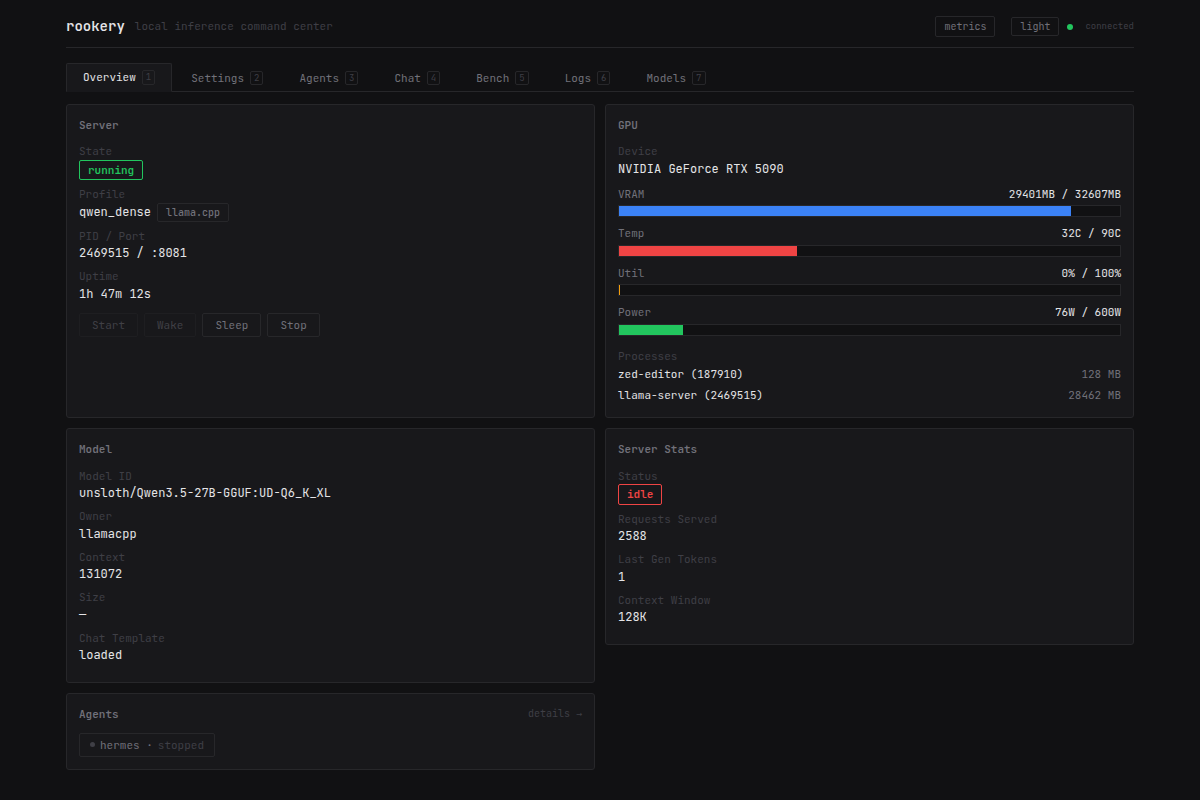
More screenshots
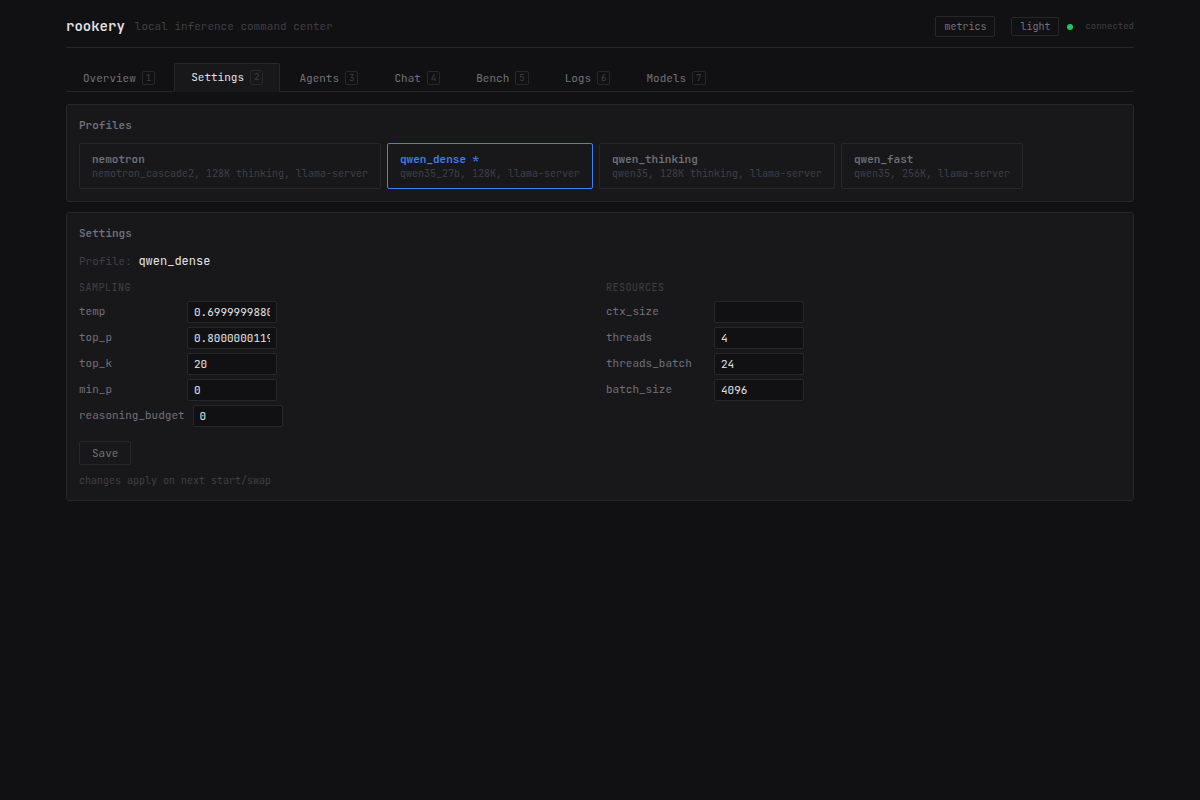
Settings — profile switcher and sampling param editor
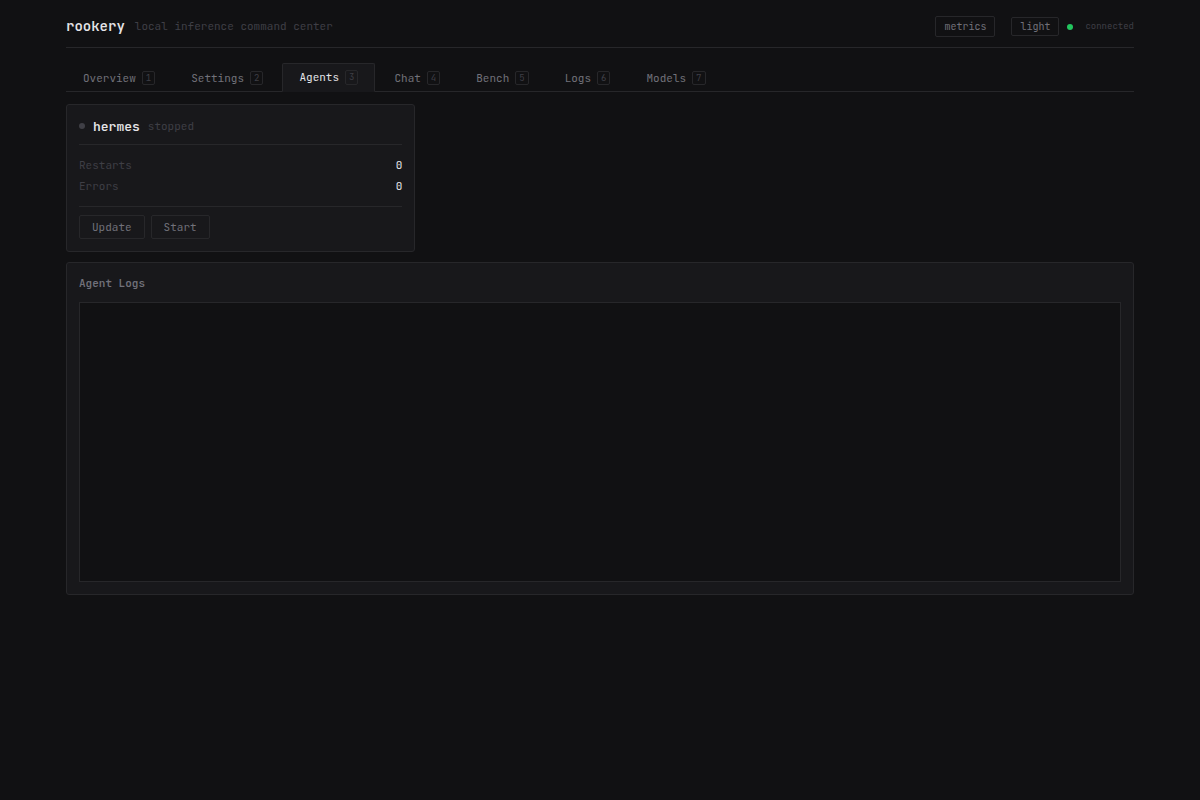
Agents — agent cards, controls, filtered logs
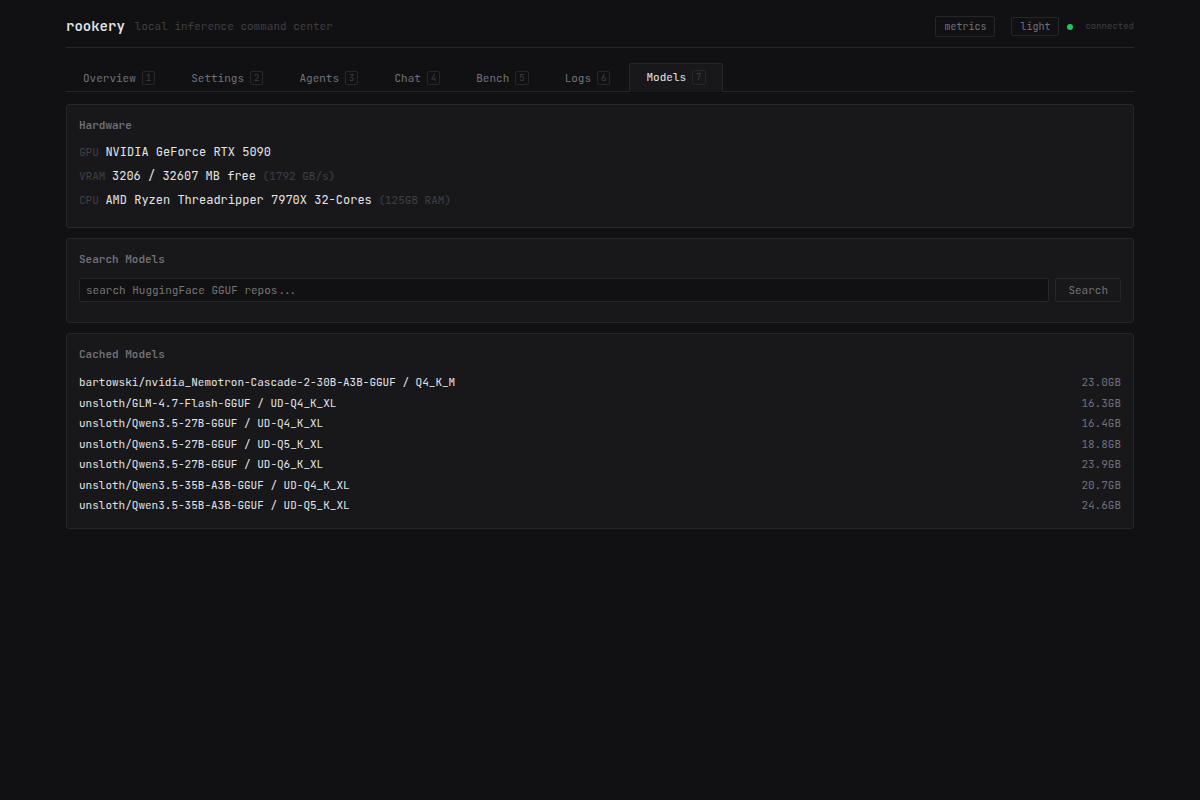
Models — hardware profile, HuggingFace search, cached models
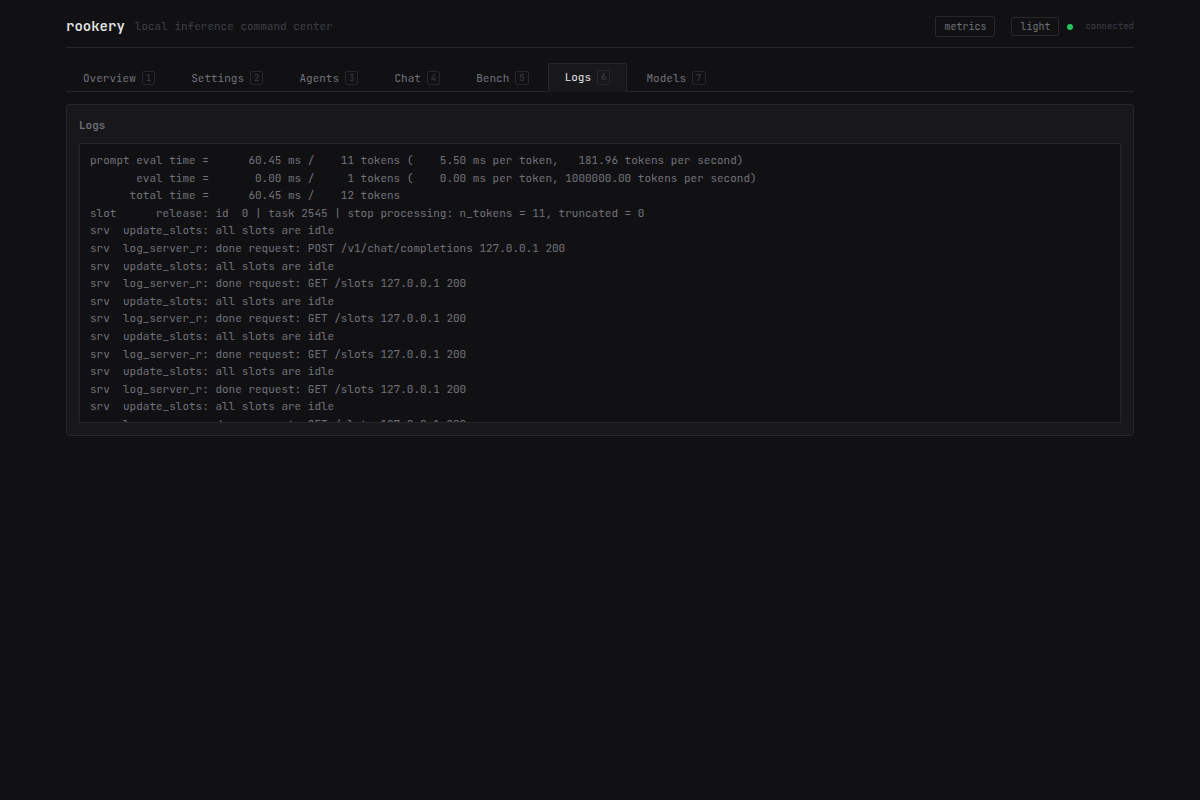
Logs — live streaming log viewer
Features
- Multi-backend — manage llama-server (GGUF), SGLang (NVFP4/FP8, speculative decoding, Docker) and vLLM (safetensors, AWQ, GPTQ, NVFP4) from the same config.
rookery swapcrosses engines: it stops a local process and starts a container, or the reverse, on the same port - Hot-swap —
rookery swap <profile>stops the running backend and brings up another one, draining in-flight requests first. The daemon, its agents, and your open dashboard all stay up - Config reload —
rookery reloadre-readsconfig.tomlin place, so adding a profile or repointing a model costs neither a daemon restart nor a model reload: the running backend and the running agents are left untouched. A config that fails to parse or validate is rejected and the daemon keeps the old one - Live dashboard — Leptos WASM frontend with 7 tabs: Overview, Settings, Agents, Chat, Bench, Logs, Models
- GPU monitoring — real-time VRAM, temperature, utilization, power draw, per-process memory via NVML
- Agent management — spawn, stop, update, and watchdog external processes like Hermes (multi-platform AI agent with tool calling, web browsing, vision, and voice), coding assistants, or any service that depends on inference
- Agent data safety — a read-only
PRAGMA quick_checksweep flags corrupt agent SQLite databases before you find out the hard way, and an update or a swap bounce takes aVACUUM INTOsnapshot first (3 generations kept underdb-backups/) - Model discovery — search HuggingFace, browse quants, VRAM-aware recommendations, one-click download
- Upstream release monitor — background polling of llama.cpp releases with version comparison, dashboard banner, and
rookery releasesCLI - Auto-sleep — unloads the model after idle timeout, wakes transparently on next request
- Inference canary — periodic health checks detect CUDA zombies and auto-restart
- Prometheus metrics —
/metricsendpoint for GPU, server, agent, and canary telemetry - Optional API key auth — single bearer token protects API and SSE data routes (dashboard shell is public, data requires auth)
- Scriptable CLI — every command has a documented exit code (
0success,1runtime or daemon-reported failure,2usage error) and most take--json, sorookery start && rookery agent start hermesdoes the right thing - systemd integration — OOM protection, journal logging, graceful shutdown
vs Alternatives
| Feature | rookery | llama-swap | GPUStack | LocalAI |
|---|---|---|---|---|
| Hot-swap profiles | Yes | Yes | No | No |
| Multi-backend (llama.cpp + SGLang + vLLM) | Yes | No | Partial | Yes |
| Live dashboard | Yes (WASM) | No | Yes | No |
| Agent lifecycle management | Yes | No | No | No |
| Model browser + download | Yes | No | Yes | Yes |
| VRAM-aware recommendations | Yes | No | Yes | No |
| Auto-sleep / wake-on-request | Yes | Yes | No | No |
| Inference canary + auto-restart | Yes | No | Yes | No |
| Prometheus metrics | Yes | No | Yes | Yes |
| Single binary + embedded dashboard | Yes | Yes | No | No |
Real-World Use Cases
Daily Driver for Hermes AI Agent
Run Hermes with a dense model for reliable tool calling. Rookery manages the full lifecycle — auto-starts on boot, restarts on crash, bounces on model swap:
rookery start qwen_dense           # 27B Q6 for best tool accuracy
rookery agent start hermes         # AI agent with crash watchdog
rookery agent describe hermes      # check health, uptime, restarts
Quick Experimentation
Hot-swap between models without restarting anything:
rookery start qwen_fast            # MoE at ~196 tok/s
rookery bench                      # measure performance
rookery swap qwen_dense            # switch to dense 27B
rookery bench                      # compare
Headless Server with Auto-Sleep
Run 24/7 with minimal power draw when idle:
auto_start = true
idle_timeout = 1800   # unload after 30 min idle
The model unloads after inactivity. Next API request wakes it transparently.
Model Shopping
Find the best quant for your GPU without leaving the terminal:
rookery models search Qwen3.5-27B
rookery models quants Qwen3.5-27B  # shows VRAM fit + estimated tok/s
rookery models pull Qwen3.5-27B    # downloads best-fit quant
Installation
Quick Install Script
Note: Review scripts before piping to sh. See the install script source.
curl -fsSL https://raw.githubusercontent.com/lance0/rookery/main/install.sh | sh
Installs binaries to /usr/local/bin and seeds a default config at ~/.config/rookery/config.toml.
Pre-built Binaries
Download from GitHub Releases:
| Platform | Target |
|---|---|
| Linux x86_64 | rookery-x86_64-unknown-linux-gnu.tar.gz |
| Linux ARM64 | rookery-aarch64-unknown-linux-gnu.tar.gz |
curl -LO https://github.com/lance0/rookery/releases/latest/download/rookery-x86_64-unknown-linux-gnu.tar.gz
tar xzf rookery-*.tar.gz
sudo mv rookeryd rookery /usr/local/bin/
From Source
Requires Rust 1.88+ and an NVIDIA GPU with CUDA drivers.
# Install Rust (if not already installed)
curl --proto '=https' --tlsv1.2 -sSf https://sh.rustup.rs | sh
source ~/.cargo/env

# Build and install
git clone https://github.com/lance0/rookery.git
cd rookery
sudo make install
This builds both binaries, installs them to /usr/local/bin, and sets up a systemd unit. Customize with:
sudo make install PREFIX=/opt/rookery SERVICE_USER=myuser HF_HOME=/mnt/models
Testing
After cloning, verify your build with the canonical test command:
make test # runs cargo test --workspace, no GPU required
All tests use mock backends and temp directories — they never touch your real config or running daemon. See docs/testing.md for the chaos-test suite and the dashboard-specific gates.
Configuration
Config file: ~/.config/rookery/config.toml
Models define what to run, profiles define how to run it. Multiple profiles can share a model.
llama_server = "/path/to/llama-server"
default_profile = "qwen_fast"
auto_start = true
idle_timeout = 1800

[models.qwen35]
source = "hf"
repo = "unsloth/Qwen3.5-35B-A3B-GGUF"
file = "UD-Q4_K_XL"
estimated_vram_mb = 25800

[profiles.qwen_fast]
model = "qwen35"
aliases = ["fast", "moe"]
port = 8081

[profiles.qwen_fast.llama_server]
ctx_size = 262144
flash_attention = true
reasoning_budget = 0
temp = 0.7
top_p = 0.8
Agents are external processes managed alongside the server:
[agents.hermes]
command = "/path/to/hermes"
args = ["gateway", "run", "--replace"]
auto_start = true
restart_on_swap = true
restart_on_crash = true
depends_on_port = 8081
restart_on_error_patterns = ["ConnectionError", "ReadTimeout"]
See config.example.toml for all options including the SGLang and vLLM backends, KV cache tuning, and API key auth.
Full reference: docs/configuration.md
Dashboard
The embedded dashboard runs at your configured listen address. Seven tabs with keyboard shortcuts:
| Tab | Key | Purpose |
|---|---|---|
| Overview | 1 | GPU gauges, server status, model info, agent summary |
| Settings | 2 | Profile switcher, sampling param editor |
| Agents | 3 | Agent cards, controls, watchdog state, filtered logs |
| Chat | 4 | Streaming chat playground with abort |
| Bench | 5 | PP + gen speed benchmark |
| Logs | 6 | Live log viewer |
| Models | 7 | Search HF, browse quants, download |
Additional shortcuts: s start, x stop, t toggle theme.
CLI Reference
rookery status              # server state, profile, PID, uptime
rookery gpu                 # VRAM, temp, utilization, power, processes
rookery start [profile]     # start server (or default profile)
rookery stop                # stop server
rookery sleep               # unload model, keep profile for fast wake
rookery wake                # wake sleeping profile
rookery swap <profile>      # hot-swap to another profile
rookery profiles            # list available profiles
rookery bench               # PP + gen speed benchmark
rookery logs [-f] [-n N]    # fetch or follow log lines
rookery agent start <name>  # start a managed agent
rookery agent stop <name>   # stop a managed agent
rookery agent update <name> # stop, update, restart
rookery agent status        # list agents
rookery agent describe <name> # detailed health, watchdog, errors
rookery models search <q>   # search HuggingFace
rookery models quants <repo> # list quants with VRAM fit
rookery models pull <repo>  # download best-fit quant
rookery models list         # locally cached models
rookery models hardware     # GPU/CPU/RAM profile
rookery releases            # upstream release status (llama.cpp)
rookery config              # validate config
rookery reload              # re-read config.toml without restarting the daemon
rookery auth generate       # generate a random API key
rookery completions <shell> # generate shell completions
Most commands support --json for scripting. Exit codes: 0 the command did what it reported, 1 runtime failure (daemon unreachable, or the daemon reported the operation failed), 2 usage error. See docs/cli.md for the full contract.
API
The daemon exposes a REST API. When api_key is configured, all /api/* data routes and SSE require Authorization: Bearer <key>. Exempt: /api/health, /metrics, and the dashboard HTML shell (which loads but shows an auth prompt before fetching data).
| Endpoint | Method | Description |
|---|---|---|
/api/health | GET | Daemon health check (always open) |
/api/status | GET | Server state, profile, PID, uptime |
/api/gpu | GET | GPU stats (VRAM, temp, utilization, power, processes) |
/api/start | POST | Start server { "profile": "name" } |
/api/stop | POST | Stop server |
/api/sleep | POST | Put server into sleeping state |
/api/wake | POST | Wake sleeping profile |
/api/swap | POST | Hot-swap { "profile": "name" } |
/api/profiles | GET | List available profiles |
/api/bench | GET | Run PP + gen benchmark |
/api/logs | GET | Fetch log lines ?n=50 |
/api/events | GET | SSE stream (gpu, state, log events) |
/api/chat | POST | Streaming chat proxy (auto-wakes sleeping backends) |
/api/agents | GET | List agents with health metrics |
/api/agents/start | POST | Start agent { "name": "..." } |
/api/agents/stop | POST | Stop agent |
/api/agents/{name}/update | POST | Stop, update, restart agent |
/api/agents/{name}/health | GET | Detailed health (watchdog, backoff, deps) |
/api/config | GET | Full config (secrets redacted) |
/api/config/profile/{name} | PUT | Update profile sampling params |
/api/reload | POST | Re-read config from disk; backend and agents untouched, invalid config rejected |
/api/releases | GET | Upstream release status (llama.cpp) |
/api/model-info | GET | Model ID, context window |
/api/server-stats | GET | Slot status, request count |
/api/hardware | GET | Hardware profile (GPU, CPU, RAM) |
/api/models/search | GET | Search HuggingFace ?q=query |
/api/models/quants | GET | List quants ?repo=name |
/api/models/recommend | GET | Best-fit quant for free VRAM ?repo=name |
/api/models/cached | GET | Locally cached models |
/api/models/pull | POST | Download model { "repo": "...", "quant": "..." } |
/metrics | GET | Prometheus/OpenMetrics (always open) |
Architecture
crates/
  rookery-core/       # config, state machine, shared types
  rookery-engine/     # process manager, GPU monitor, health checker, agent manager
  rookery-daemon/     # axum REST API, SSE, auth middleware, embedded dashboard
  rookery-dashboard/  # Leptos WASM frontend (built with trunk, embedded into daemon)
  rookery-cli/        # clap CLI client
Two binaries:
rookeryd— long-running daemon (axum REST API + embedded dashboard)rookery— thin CLI that talks to the daemon over HTTP
The daemon reconciles persisted state on startup, adopts orphan processes, auto-starts configured agents, and cleans up stale llama-servers. The InferenceBackend trait abstracts over llama-server (a supervised local process) and the container backends, SGLang and vLLM. Container backends have no host PID: liveness is a docker inspect, identity is the container ID, and adoption on daemon restart verifies the running container against the recorded one.
Platform Support
| Platform | Status |
|---|---|
| Linux x86_64 + NVIDIA GPU | Supported |
| Linux ARM64 + NVIDIA GPU | Supported (Jetson, etc.) |
| AMD GPUs (ROCm) | Not tested |
| macOS (Metal) | Not supported (no NVML) |
Documentation
- Quick Start — build, configure, run
- Configuration — full config reference
- Agent Management — watchdog, crash recovery, update
- API Reference — REST endpoints
- CLI Reference — all commands and flags
- Models — model sources, discovery, download
- GPU Guide — model recommendations by GPU tier
- Compatible Agents — OpenClaw, SillyTavern, AnythingLLM, and more
- Dashboard — tabs, shortcuts, features
- Architecture — crate structure, design decisions
- SGLang Integration — Docker backend, speculative decoding, telemetry
- vLLM Integration — Docker backend
Contributing
See CONTRIBUTING.md for development setup, code style, and PR guidelines.
License
Licensed under either of:
at your option.
Contributors


Similar repos


Languages
Rust
96.2%
CSS
1.5%
HTML
1.0%
Local inference command center — manage llama-server and vLLM backends, hot-swap models, monitor GPU, run agents, and browse models from one daemon + CLI + live dashboard.
Rust
6
311 commits
updated Sep 13, 2026
README
rookery
Local inference command center. Manage llama-server, SGLang and vLLM backends, hot-swap models, monitor GPU, run agents, and browse models — all from one daemon + CLI + live dashboard.
Quick Start
rookery status                     # server state + uptime
rookery gpu                        # VRAM, temp, power, processes
rookery start                      # start default profile
rookery swap qwen_thinking         # hot-swap to another model profile
rookery bench                      # quick PP + gen speed benchmark
rookery agent start my_agent       # start a managed agent
Open the dashboard at your configured address (default http://localhost:3000) — live GPU gauges, profile switcher, agent controls, chat playground, model browser.
See Installation below for setup instructions.
Dashboard
More screenshots
Settings — profile switcher and sampling param editor
Agents — agent cards, controls, filtered logs
Models — hardware profile, HuggingFace search, cached models
Logs — live streaming log viewer
Features
- Multi-backend — manage llama-server (GGUF), SGLang (NVFP4/FP8, speculative decoding, Docker) and vLLM (safetensors, AWQ, GPTQ, NVFP4) from the same config.
rookery swapcrosses engines: it stops a local process and starts a container, or the reverse, on the same port - Hot-swap —
rookery swap <profile>stops the running backend and brings up another one, draining in-flight requests first. The daemon, its agents, and your open dashboard all stay up - Config reload —
rookery reloadre-readsconfig.tomlin place, so adding a profile or repointing a model costs neither a daemon restart nor a model reload: the running backend and the running agents are left untouched. A config that fails to parse or validate is rejected and the daemon keeps the old one - Live dashboard — Leptos WASM frontend with 7 tabs: Overview, Settings, Agents, Chat, Bench, Logs, Models
- GPU monitoring — real-time VRAM, temperature, utilization, power draw, per-process memory via NVML
- Agent management — spawn, stop, update, and watchdog external processes like Hermes (multi-platform AI agent with tool calling, web browsing, vision, and voice), coding assistants, or any service that depends on inference
- Agent data safety — a read-only
PRAGMA quick_checksweep flags corrupt agent SQLite databases before you find out the hard way, and an update or a swap bounce takes aVACUUM INTOsnapshot first (3 generations kept underdb-backups/) - Model discovery — search HuggingFace, browse quants, VRAM-aware recommendations, one-click download
- Upstream release monitor — background polling of llama.cpp releases with version comparison, dashboard banner, and
rookery releasesCLI - Auto-sleep — unloads the model after idle timeout, wakes transparently on next request
- Inference canary — periodic health checks detect CUDA zombies and auto-restart
- Prometheus metrics —
/metricsendpoint for GPU, server, agent, and canary telemetry - Optional API key auth — single bearer token protects API and SSE data routes (dashboard shell is public, data requires auth)
- Scriptable CLI — every command has a documented exit code (
0success,1runtime or daemon-reported failure,2usage error) and most take--json, sorookery start && rookery agent start hermesdoes the right thing - systemd integration — OOM protection, journal logging, graceful shutdown
vs Alternatives
| Feature | rookery | llama-swap | GPUStack | LocalAI |
|---|---|---|---|---|
| Hot-swap profiles | Yes | Yes | No | No |
| Multi-backend (llama.cpp + SGLang + vLLM) | Yes | No | Partial | Yes |
| Live dashboard | Yes (WASM) | No | Yes | No |
| Agent lifecycle management | Yes | No | No | No |
| Model browser + download | Yes | No | Yes | Yes |
| VRAM-aware recommendations | Yes | No | Yes | No |
| Auto-sleep / wake-on-request | Yes | Yes | No | No |
| Inference canary + auto-restart | Yes | No | Yes | No |
| Prometheus metrics | Yes | No | Yes | Yes |
| Single binary + embedded dashboard | Yes | Yes | No | No |
Real-World Use Cases
Daily Driver for Hermes AI Agent
Run Hermes with a dense model for reliable tool calling. Rookery manages the full lifecycle — auto-starts on boot, restarts on crash, bounces on model swap:
rookery start qwen_dense           # 27B Q6 for best tool accuracy
rookery agent start hermes         # AI agent with crash watchdog
rookery agent describe hermes      # check health, uptime, restarts
Quick Experimentation
Hot-swap between models without restarting anything:
rookery start qwen_fast            # MoE at ~196 tok/s
rookery bench                      # measure performance
rookery swap qwen_dense            # switch to dense 27B
rookery bench                      # compare
Headless Server with Auto-Sleep
Run 24/7 with minimal power draw when idle:
auto_start = true
idle_timeout = 1800   # unload after 30 min idle
The model unloads after inactivity. Next API request wakes it transparently.
Model Shopping
Find the best quant for your GPU without leaving the terminal:
rookery models search Qwen3.5-27B
rookery models quants Qwen3.5-27B  # shows VRAM fit + estimated tok/s
rookery models pull Qwen3.5-27B    # downloads best-fit quant
Installation
Quick Install Script
Note: Review scripts before piping to sh. See the install script source.
curl -fsSL https://raw.githubusercontent.com/lance0/rookery/main/install.sh | sh
Installs binaries to /usr/local/bin and seeds a default config at ~/.config/rookery/config.toml.
Pre-built Binaries
Download from GitHub Releases:
| Platform | Target |
|---|---|
| Linux x86_64 | rookery-x86_64-unknown-linux-gnu.tar.gz |
| Linux ARM64 | rookery-aarch64-unknown-linux-gnu.tar.gz |
curl -LO https://github.com/lance0/rookery/releases/latest/download/rookery-x86_64-unknown-linux-gnu.tar.gz
tar xzf rookery-*.tar.gz
sudo mv rookeryd rookery /usr/local/bin/
From Source
Requires Rust 1.88+ and an NVIDIA GPU with CUDA drivers.
# Install Rust (if not already installed)
curl --proto '=https' --tlsv1.2 -sSf https://sh.rustup.rs | sh
source ~/.cargo/env

# Build and install
git clone https://github.com/lance0/rookery.git
cd rookery
sudo make install
This builds both binaries, installs them to /usr/local/bin, and sets up a systemd unit. Customize with:
sudo make install PREFIX=/opt/rookery SERVICE_USER=myuser HF_HOME=/mnt/models
Testing
After cloning, verify your build with the canonical test command:
make test # runs cargo test --workspace, no GPU required
All tests use mock backends and temp directories — they never touch your real config or running daemon. See docs/testing.md for the chaos-test suite and the dashboard-specific gates.
Configuration
Config file: ~/.config/rookery/config.toml
Models define what to run, profiles define how to run it. Multiple profiles can share a model.
llama_server = "/path/to/llama-server"
default_profile = "qwen_fast"
auto_start = true
idle_timeout = 1800

[models.qwen35]
source = "hf"
repo = "unsloth/Qwen3.5-35B-A3B-GGUF"
file = "UD-Q4_K_XL"
estimated_vram_mb = 25800

[profiles.qwen_fast]
model = "qwen35"
aliases = ["fast", "moe"]
port = 8081

[profiles.qwen_fast.llama_server]
ctx_size = 262144
flash_attention = true
reasoning_budget = 0
temp = 0.7
top_p = 0.8
Agents are external processes managed alongside the server:
[agents.hermes]
command = "/path/to/hermes"
args = ["gateway", "run", "--replace"]
auto_start = true
restart_on_swap = true
restart_on_crash = true
depends_on_port = 8081
restart_on_error_patterns = ["ConnectionError", "ReadTimeout"]
See config.example.toml for all options including the SGLang and vLLM backends, KV cache tuning, and API key auth.
Full reference: docs/configuration.md
Dashboard
The embedded dashboard runs at your configured listen address. Seven tabs with keyboard shortcuts:
| Tab | Key | Purpose |
|---|---|---|
| Overview | 1 | GPU gauges, server status, model info, agent summary |
| Settings | 2 | Profile switcher, sampling param editor |
| Agents | 3 | Agent cards, controls, watchdog state, filtered logs |
| Chat | 4 | Streaming chat playground with abort |
| Bench | 5 | PP + gen speed benchmark |
| Logs | 6 | Live log viewer |
| Models | 7 | Search HF, browse quants, download |
Additional shortcuts: s start, x stop, t toggle theme.
CLI Reference
rookery status              # server state, profile, PID, uptime
rookery gpu                 # VRAM, temp, utilization, power, processes
rookery start [profile]     # start server (or default profile)
rookery stop                # stop server
rookery sleep               # unload model, keep profile for fast wake
rookery wake                # wake sleeping profile
rookery swap <profile>      # hot-swap to another profile
rookery profiles            # list available profiles
rookery bench               # PP + gen speed benchmark
rookery logs [-f] [-n N]    # fetch or follow log lines
rookery agent start <name>  # start a managed agent
rookery agent stop <name>   # stop a managed agent
rookery agent update <name> # stop, update, restart
rookery agent status        # list agents
rookery agent describe <name> # detailed health, watchdog, errors
rookery models search <q>   # search HuggingFace
rookery models quants <repo> # list quants with VRAM fit
rookery models pull <repo>  # download best-fit quant
rookery models list         # locally cached models
rookery models hardware     # GPU/CPU/RAM profile
rookery releases            # upstream release status (llama.cpp)
rookery config              # validate config
rookery reload              # re-read config.toml without restarting the daemon
rookery auth generate       # generate a random API key
rookery completions <shell> # generate shell completions
Most commands support --json for scripting. Exit codes: 0 the command did what it reported, 1 runtime failure (daemon unreachable, or the daemon reported the operation failed), 2 usage error. See docs/cli.md for the full contract.
API
The daemon exposes a REST API. When api_key is configured, all /api/* data routes and SSE require Authorization: Bearer <key>. Exempt: /api/health, /metrics, and the dashboard HTML shell (which loads but shows an auth prompt before fetching data).
| Endpoint | Method | Description |
|---|---|---|
/api/health | GET | Daemon health check (always open) |
/api/status | GET | Server state, profile, PID, uptime |
/api/gpu | GET | GPU stats (VRAM, temp, utilization, power, processes) |
/api/start | POST | Start server { "profile": "name" } |
/api/stop | POST | Stop server |
/api/sleep | POST | Put server into sleeping state |
/api/wake | POST | Wake sleeping profile |
/api/swap | POST | Hot-swap { "profile": "name" } |
/api/profiles | GET | List available profiles |
/api/bench | GET | Run PP + gen benchmark |
/api/logs | GET | Fetch log lines ?n=50 |
/api/events | GET | SSE stream (gpu, state, log events) |
/api/chat | POST | Streaming chat proxy (auto-wakes sleeping backends) |
/api/agents | GET | List agents with health metrics |
/api/agents/start | POST | Start agent { "name": "..." } |
/api/agents/stop | POST | Stop agent |
/api/agents/{name}/update | POST | Stop, update, restart agent |
/api/agents/{name}/health | GET | Detailed health (watchdog, backoff, deps) |
/api/config | GET | Full config (secrets redacted) |
/api/config/profile/{name} | PUT | Update profile sampling params |
/api/reload | POST | Re-read config from disk; backend and agents untouched, invalid config rejected |
/api/releases | GET | Upstream release status (llama.cpp) |
/api/model-info | GET | Model ID, context window |
/api/server-stats | GET | Slot status, request count |
/api/hardware | GET | Hardware profile (GPU, CPU, RAM) |
/api/models/search | GET | Search HuggingFace ?q=query |
/api/models/quants | GET | List quants ?repo=name |
/api/models/recommend | GET | Best-fit quant for free VRAM ?repo=name |
/api/models/cached | GET | Locally cached models |
/api/models/pull | POST | Download model { "repo": "...", "quant": "..." } |
/metrics | GET | Prometheus/OpenMetrics (always open) |
Architecture
crates/
  rookery-core/       # config, state machine, shared types
  rookery-engine/     # process manager, GPU monitor, health checker, agent manager
  rookery-daemon/     # axum REST API, SSE, auth middleware, embedded dashboard
  rookery-dashboard/  # Leptos WASM frontend (built with trunk, embedded into daemon)
  rookery-cli/        # clap CLI client
Two binaries:
rookeryd— long-running daemon (axum REST API + embedded dashboard)rookery— thin CLI that talks to the daemon over HTTP
The daemon reconciles persisted state on startup, adopts orphan processes, auto-starts configured agents, and cleans up stale llama-servers. The InferenceBackend trait abstracts over llama-server (a supervised local process) and the container backends, SGLang and vLLM. Container backends have no host PID: liveness is a docker inspect, identity is the container ID, and adoption on daemon restart verifies the running container against the recorded one.
Platform Support
| Platform | Status |
|---|---|
| Linux x86_64 + NVIDIA GPU | Supported |
| Linux ARM64 + NVIDIA GPU | Supported (Jetson, etc.) |
| AMD GPUs (ROCm) | Not tested |
| macOS (Metal) | Not supported (no NVML) |
Documentation
- Quick Start — build, configure, run
- Configuration — full config reference
- Agent Management — watchdog, crash recovery, update
- API Reference — REST endpoints
- CLI Reference — all commands and flags
- Models — model sources, discovery, download
- GPU Guide — model recommendations by GPU tier
- Compatible Agents — OpenClaw, SillyTavern, AnythingLLM, and more
- Dashboard — tabs, shortcuts, features
- Architecture — crate structure, design decisions
- SGLang Integration — Docker backend, speculative decoding, telemetry
- vLLM Integration — Docker backend
Contributing
See CONTRIBUTING.md for development setup, code style, and PR guidelines.
License
Licensed under either of:
at your option.
Similar repos
Contributors
Languages
Rust
96.2%
CSS
1.5%
HTML
1.0%