
High-performance, Rust-native cross-platform Service Orchestrator for local AI binaries
Rust
3
1,421 commits
updated Aug 30, 2026
README
Tama
A local AI server with automatic backend management, text-to-speech, and a web-based control plane


Overview • Quick Start • Web UI • Configuration • Architecture
Overview
Tama is a local AI server written in Rust that provides an OpenAI-compatible API on a single port. It automatically manages backend lifecycles — starting models on demand, routing requests, and unloading idle models to save resources.
Key features:
- OpenAI-compatible API — Works with any client that supports the OpenAI API format
- Text-to-Speech (TTS) — Built-in Kokoro-FastAPI backend for speech synthesis via
/v1/audio/*endpoints - Automatic backend management — Starts, routes, and unloads llama.cpp/ik_llama backends on demand
- Web-based control plane — Browser UI for managing models, TTS backends, viewing logs, benchmarks, downloads, and editing configuration
- GPU acceleration — Supports CUDA, Vulkan, Metal, and ROCm
- Linux support with native systemd integration
- Model optimization — Automatically detects VRAM and suggests optimal quantizations and context sizes
- Benchmarks — Run llama-bench and speculative decoding benchmarks from the CLI or web UI
- Downloads Center — Persistent download queue with real-time progress tracking
- Updates Center — Per-quant update management with automatic version checking
- Backup & Restore — Create and restore full configuration backups (config, model cards, database)
- Max loaded models — LRU eviction to cap concurrent model loads
- Multi-version backends — Install and switch between multiple backend versions
Quick Start
Installation
Linux (Debian/Ubuntu):
sudo dpkg -i tama_*.deb
Linux (Fedora/RHEL):
sudo rpm -i tama-*.rpm
Run Tama
Tama runs as a system service with a web-based control plane:
tama service install
tama service start
Then open http://localhost:11435 to access the web UI.
[!TIP] On Linux, Tama creates a systemd user unit.
Web UI
Tama includes a web-based control plane for managing models, viewing logs, and editing configuration from your browser.
Running the web UI
The web server starts automatically alongside the proxy when using tama service start.
For development or manual startup:
cargo run --package tama
Open http://localhost:11435 to access the dashboard.
[!NOTE] The web UI proxies all
/tama/v1/requests to the running Tama proxy (defaulthttp://127.0.0.1:11434).
Pages
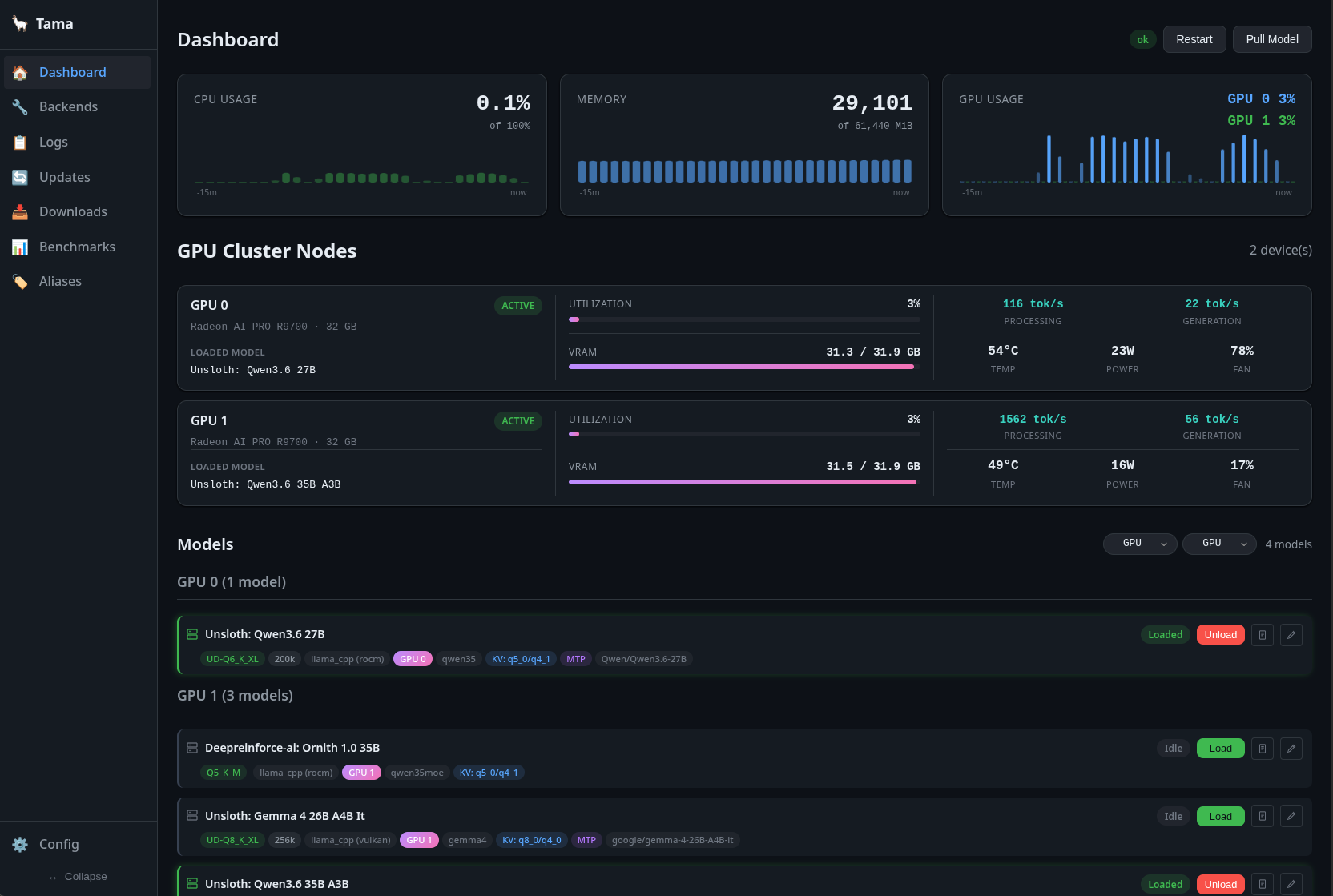
- Dashboard — Resource monitoring tiles (CPU, memory, GPU, VRAM) with sparkline charts, active models list with status and quick-load buttons
- Models — View installed models, pull new ones from HuggingFace, edit model configurations, manage sampling profiles
- Backends — Manage llama.cpp and ik_llama installations, switch between versions, update to latest
- Logs — Real-time log streaming with filtering
- Updates — Check for model/backend updates, track per-quant update status, apply updates in queue
- Downloads — Persistent download queue with progress tracking, history, and toast notifications
- Benchmarks — Run llama-bench or speculative decoding benchmarks, select backends and presets, view results table (tokens, PP/TG speed)
- Config Editor — Edit the full configuration directly from the browser with validation
Components
- Model status tiles — See which models are running, their active backends, quantization, context size, and lifecycle state (idle/loading/loaded/unloading/failed)
- Sparkline charts — Real-time CPU, memory, GPU, and VRAM usage graphs
- Job log panel — Shared component for streaming backend logs with terminal styling
- Install modal — Guided installation flow for models and backends
- Model editor — Full model configuration editing with quantization selector, context length, sampling templates, and pull wizard
Configuration
Tama auto-generates a config on first run:
- Linux:
~/.config/tama/config.toml
[backends.llama_cpp]
path = "/path/to/llama-server"
health_check_url = "http://localhost:8080/health"

[supervisor]
restart_policy = "always"
max_restarts = 10
restart_delay_ms = 3000
health_check_interval_ms = 5000

[proxy]
host = "0.0.0.0"
port = 11434
idle_timeout_secs = 300
startup_timeout_secs = 120

[max_loaded_models]
enabled = false
max = 5          # Maximum number of models loaded simultaneously (LRU eviction)
[!NOTE] On first run after upgrading from kronk, Tama automatically migrates
~/.config/kronkto~/.config/tama. Model configs are now stored in the SQLite database (tama.db) rather thanconfig.toml— a migration runs automatically on upgrade.
Directory layout
~/.config/tama/
├── config.toml              Main configuration (backends, proxy, supervisor)
├── tama.db                   SQLite database (models, backends, pulls, benchmarks)
├── configs/                 Model cards with quant info and sampling presets
│   └── bartowski--OmniCoder-8B.toml
├── models/                  GGUF model files
│   └── bartowski/OmniCoder-8B/*.gguf
├── backends/                llama.cpp and ik_llama binaries (versioned)
├── tts/                     TTS backend installations (Kokoro-FastAPI)
└── logs/                    Service logs
GPU acceleration
The installer detects your GPU and offers these acceleration options:
- CUDA (NVIDIA) — Fast inference on NVIDIA GPUs
- Vulkan (AMD/Intel/NVIDIA) — Cross-platform GPU acceleration
- Metal (Apple Silicon) — Native macOS GPU acceleration
- ROCm (AMD) — AMD GPU support on Linux
- CPU — Fallback when no GPU is available
Architecture
tama/
├── crates/
│   ├── tama-core/       # Config, process supervisor, proxy, platform abstraction
│   ├── tama-mock/       # Mock LLM backend for testing
│   └── tama/            # Main binary with web control plane (WASM + SSR)
├── config/              # Configuration templates
└── docs/                # Documentation
Core components
- tama-core — Config management, process supervision, backend registry, proxy server with streaming, database (SQLite), backup/restore, benchmark runner, download queue
- tama — Main binary combining the Leptos web control plane (WASM + SSR) with the proxy server
- tama-mock — Mock backend for testing and development
How it works
tama service startlaunches the OpenAI-compatible API server on port 11434 alongside the web UI on port 11435- When a request arrives with
"model": "my-model", tama looks up the config from the database - If the backend isn't running, tama auto-assigns a free port and starts it
- The request is forwarded to the backend and the response is streamed back
- After
idle_timeout_secsof inactivity, the backend is shut down
Proxy endpoints
The proxy exposes OpenAI-compatible API endpoints:
/tama/v1/chat/completions— Chat completions (streaming & non-streaming)/tama/v1/completions— Legacy completions/tama/v1/models— Model listing/tama/v1/audio/*— TTS endpoints (/v1/audio/speech,/v1/audio/models)/tama/v1/embeddings— Embeddings
All other non-tama paths are forwarded to the active backend via wildcard forwarding.
Building from source
git clone https://github.com/danielcherubini/tama.git
cd tama
cargo build --release
The binary is at target/release/tama.
For development with the web UI:
# Install trunk for frontend builds
cargo install trunk

# Run in dev mode (proxy + web UI)
make run

# Or run the Leptos frontend dev server with hot reload
make dev
Roadmap
- System tray — Quick service toggle from the system tray
- Tauri GUI — Lightweight desktop frontend
Contributors

1,421 commits
Similar repos


Languages
Rust
97.8%
CSS
1.3%
High-performance, Rust-native cross-platform Service Orchestrator for local AI binaries
Rust
3
1,421 commits
updated Aug 30, 2026
README
Tama
A local AI server with automatic backend management, text-to-speech, and a web-based control plane
Overview • Quick Start • Web UI • Configuration • Architecture
Overview
Tama is a local AI server written in Rust that provides an OpenAI-compatible API on a single port. It automatically manages backend lifecycles — starting models on demand, routing requests, and unloading idle models to save resources.
Key features:
- OpenAI-compatible API — Works with any client that supports the OpenAI API format
- Text-to-Speech (TTS) — Built-in Kokoro-FastAPI backend for speech synthesis via
/v1/audio/*endpoints - Automatic backend management — Starts, routes, and unloads llama.cpp/ik_llama backends on demand
- Web-based control plane — Browser UI for managing models, TTS backends, viewing logs, benchmarks, downloads, and editing configuration
- GPU acceleration — Supports CUDA, Vulkan, Metal, and ROCm
- Linux support with native systemd integration
- Model optimization — Automatically detects VRAM and suggests optimal quantizations and context sizes
- Benchmarks — Run llama-bench and speculative decoding benchmarks from the CLI or web UI
- Downloads Center — Persistent download queue with real-time progress tracking
- Updates Center — Per-quant update management with automatic version checking
- Backup & Restore — Create and restore full configuration backups (config, model cards, database)
- Max loaded models — LRU eviction to cap concurrent model loads
- Multi-version backends — Install and switch between multiple backend versions
Quick Start
Installation
Linux (Debian/Ubuntu):
sudo dpkg -i tama_*.deb
Linux (Fedora/RHEL):
sudo rpm -i tama-*.rpm
Run Tama
Tama runs as a system service with a web-based control plane:
tama service install
tama service start
Then open http://localhost:11435 to access the web UI.
[!TIP] On Linux, Tama creates a systemd user unit.
Web UI
Tama includes a web-based control plane for managing models, viewing logs, and editing configuration from your browser.
Running the web UI
The web server starts automatically alongside the proxy when using tama service start.
For development or manual startup:
cargo run --package tama
Open http://localhost:11435 to access the dashboard.
[!NOTE] The web UI proxies all
/tama/v1/requests to the running Tama proxy (defaulthttp://127.0.0.1:11434).
Pages
- Dashboard — Resource monitoring tiles (CPU, memory, GPU, VRAM) with sparkline charts, active models list with status and quick-load buttons
- Models — View installed models, pull new ones from HuggingFace, edit model configurations, manage sampling profiles
- Backends — Manage llama.cpp and ik_llama installations, switch between versions, update to latest
- Logs — Real-time log streaming with filtering
- Updates — Check for model/backend updates, track per-quant update status, apply updates in queue
- Downloads — Persistent download queue with progress tracking, history, and toast notifications
- Benchmarks — Run llama-bench or speculative decoding benchmarks, select backends and presets, view results table (tokens, PP/TG speed)
- Config Editor — Edit the full configuration directly from the browser with validation
Components
- Model status tiles — See which models are running, their active backends, quantization, context size, and lifecycle state (idle/loading/loaded/unloading/failed)
- Sparkline charts — Real-time CPU, memory, GPU, and VRAM usage graphs
- Job log panel — Shared component for streaming backend logs with terminal styling
- Install modal — Guided installation flow for models and backends
- Model editor — Full model configuration editing with quantization selector, context length, sampling templates, and pull wizard
Configuration
Tama auto-generates a config on first run:
- Linux:
~/.config/tama/config.toml
[backends.llama_cpp]
path = "/path/to/llama-server"
health_check_url = "http://localhost:8080/health"

[supervisor]
restart_policy = "always"
max_restarts = 10
restart_delay_ms = 3000
health_check_interval_ms = 5000

[proxy]
host = "0.0.0.0"
port = 11434
idle_timeout_secs = 300
startup_timeout_secs = 120

[max_loaded_models]
enabled = false
max = 5          # Maximum number of models loaded simultaneously (LRU eviction)
[!NOTE] On first run after upgrading from kronk, Tama automatically migrates
~/.config/kronkto~/.config/tama. Model configs are now stored in the SQLite database (tama.db) rather thanconfig.toml— a migration runs automatically on upgrade.
Directory layout
~/.config/tama/
├── config.toml              Main configuration (backends, proxy, supervisor)
├── tama.db                   SQLite database (models, backends, pulls, benchmarks)
├── configs/                 Model cards with quant info and sampling presets
│   └── bartowski--OmniCoder-8B.toml
├── models/                  GGUF model files
│   └── bartowski/OmniCoder-8B/*.gguf
├── backends/                llama.cpp and ik_llama binaries (versioned)
├── tts/                     TTS backend installations (Kokoro-FastAPI)
└── logs/                    Service logs
GPU acceleration
The installer detects your GPU and offers these acceleration options:
- CUDA (NVIDIA) — Fast inference on NVIDIA GPUs
- Vulkan (AMD/Intel/NVIDIA) — Cross-platform GPU acceleration
- Metal (Apple Silicon) — Native macOS GPU acceleration
- ROCm (AMD) — AMD GPU support on Linux
- CPU — Fallback when no GPU is available
Architecture
tama/
├── crates/
│   ├── tama-core/       # Config, process supervisor, proxy, platform abstraction
│   ├── tama-mock/       # Mock LLM backend for testing
│   └── tama/            # Main binary with web control plane (WASM + SSR)
├── config/              # Configuration templates
└── docs/                # Documentation
Core components
- tama-core — Config management, process supervision, backend registry, proxy server with streaming, database (SQLite), backup/restore, benchmark runner, download queue
- tama — Main binary combining the Leptos web control plane (WASM + SSR) with the proxy server
- tama-mock — Mock backend for testing and development
How it works
tama service startlaunches the OpenAI-compatible API server on port 11434 alongside the web UI on port 11435- When a request arrives with
"model": "my-model", tama looks up the config from the database - If the backend isn't running, tama auto-assigns a free port and starts it
- The request is forwarded to the backend and the response is streamed back
- After
idle_timeout_secsof inactivity, the backend is shut down
Proxy endpoints
The proxy exposes OpenAI-compatible API endpoints:
/tama/v1/chat/completions— Chat completions (streaming & non-streaming)/tama/v1/completions— Legacy completions/tama/v1/models— Model listing/tama/v1/audio/*— TTS endpoints (/v1/audio/speech,/v1/audio/models)/tama/v1/embeddings— Embeddings
All other non-tama paths are forwarded to the active backend via wildcard forwarding.
Building from source
git clone https://github.com/danielcherubini/tama.git
cd tama
cargo build --release
The binary is at target/release/tama.
For development with the web UI:
# Install trunk for frontend builds
cargo install trunk

# Run in dev mode (proxy + web UI)
make run

# Or run the Leptos frontend dev server with hot reload
make dev
Roadmap
- System tray — Quick service toggle from the system tray
- Tauri GUI — Lightweight desktop frontend
Similar repos
Contributors
1,421 commits
Languages
Rust
97.8%
CSS
1.3%