One GPU, many local services that each want it whole. vramble hands out one lease at a time, queues the rest with ids and priorities, and tells whoever arrives second who is holding the card and for how long.
Python
9
5 commits
updated Oct 5, 2026
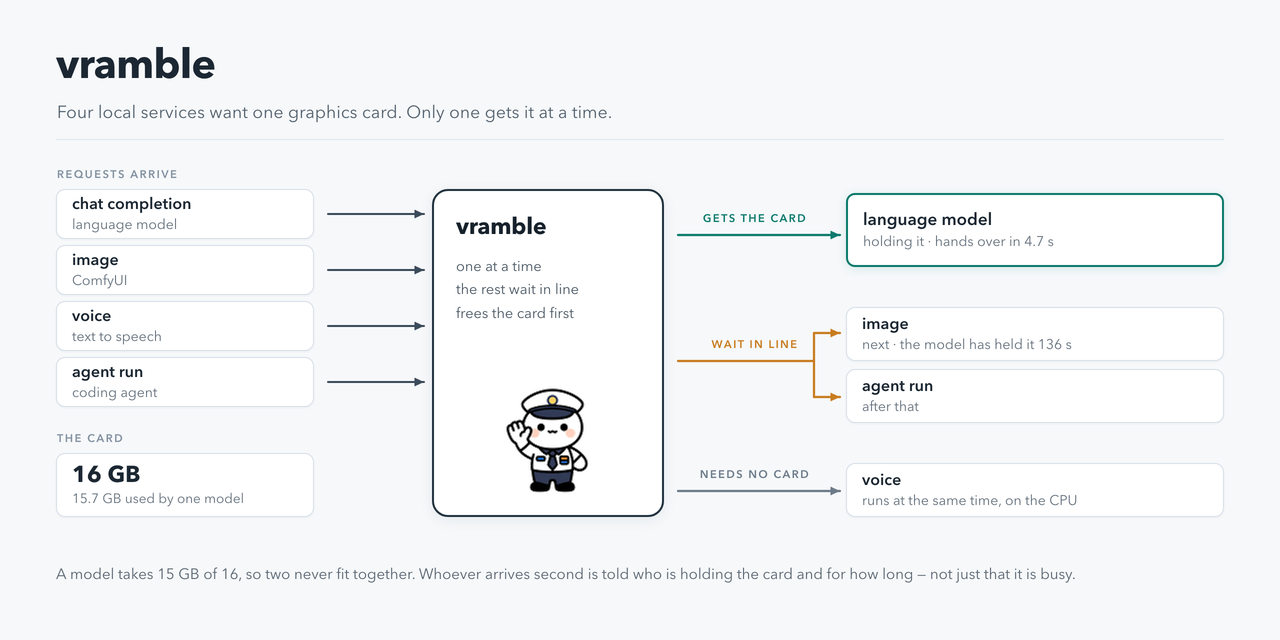
A GPU arbiter for a single workstation: one lease at a time, a queue with priorities, and services started and stopped on demand.
On one machine with one or two GPUs, several independent local services each need the whole card. A 27B model takes 15 GB of 16; ComfyUI wants the same 15 for an image; a text-to-speech, a music model and a coding agent each want their share. None of them knows the others exist, so they evict each other mid-job or fail with an out-of-memory error.
vramble sits between them. It grants one lease at a time and answers whoever arrives second with the facts: which activity holds the machine, since when, and how long the lease is still valid. Requests that cannot be served immediately are queued with a priority and an id that can be followed or cancelled. The VRAM held by activities without the lease is released — and verified by measuring it, because a service that reports a successful release without performing one is how two models end up on the same card. Work that needs no GPU runs in a separate lane alongside the lease holder.
Services are declared in YAML: how to start them, how to make them release their VRAM, how long they
may stay idle. Callers request capabilities by name — image, voice, llm — and never see a
workflow file or a node id. An OpenAI-compatible endpoint puts existing clients through the same
queue without modification.
It is not a cluster scheduler. It is a mutex for one workstation, with priorities: about 2700 lines of Python, no dependency beyond pyyaml, no database server, no broker, no container. It runs as a systemd user unit on 127.0.0.1 and has been in daily use on one machine for months.
image, voice, video, music… each declared in YAML with
its parameters. Callers ask by name; they never see workflow files or node ids.POST /v1/chat/completions goes through the same queue, so your
chat client and your batch jobs cannot trample each other.Python 3.11+ and pyyaml. Everything else is the standard library: no database server, no broker,
no container. A GPU is not needed to try it out — without nvidia-smi vramble arbitrates all the same,
it just cannot measure the VRAM.
bash install.sh         # first pass: writes ~/vramble/config.yaml and stops so you can read it
$EDITOR ~/vramble/config.yaml
bash install.sh         # second pass: installs, enables the systemd user unit, starts it
VRAMBLE_NO_SERVICE=1 bash install.sh installs the files and skips systemd (other init, or a try-out).
Then start it with python3 ~/vramble/vramble.py. VRAMBLE_BIN chooses where the two CLIs go.
Your activities.yaml and services.yaml start as copies of the .example files. They are your
configuration and stay out of git.
gpu-lease status                       # who holds the machine, VRAM, queue
gpu-job ask image --prompt "a lighthouse at dusk"   # service names come from your catalog
gpu-job list · gpu-job status <id> · gpu-job follow <id> · gpu-job cancel <id>
gpu-lease run research --ttl 43200 -- python train.py   # activity names come from activities.yaml
gpu-lease preempt "I need the machine"
A service that must not start unarbitrated (a model server, a generator) takes the lease with
gpu-lease run llm --require-lease -- <command>: if vramble is not answering it waits for it and then
refuses to start, instead of landing on a card somebody else is using. Without the flag the command
runs anyway — the arbiter must never be able to block a person working by hand.
POST /api/requests) or takes a lease directly (gpu-lease run).On the /v1/* proxy only Content-Type, Authorization and the optional X-Ninfer-Client
header (a caller label the model server records in its request log) reach the model server.
vramble listens on 127.0.0.1 only, and refuses any POST that carries an Origin or Referer header,
so a web page open in your browser cannot enqueue work. Beyond that, the default is that anything
able to reach the port can queue catalog jobs and take or preempt the lease — on a single-user
workstation that is the point; on a shared machine it means every other account on it.
Two knobs, both empty by default:
token — when set, every POST must carry it in X-Vramble.submit_token — gates POST /api/jobs, the one endpoint that runs an argv chosen by the caller.
Empty means closed, not open: that route answers 403 until you configure a token for it.Service commands themselves always come from your YAML, never from the request: a caller picks a service by name and fills its declared parameters, and the argv is executed without a shell.
config.yaml (see config.example.yaml) holds paths, port, listen address, token, endpoints and
limits; every entry can be overridden by an environment variable. Registry commands use the
placeholders {swap_url}, {comfy_url}, {acestep_url}, {base}, so pointing vramble at Ollama, at a
different ComfyUI or at another host is configuration, not a patch.
activities.yaml describes who can hold the machine: priority, whether it is preemptible, how much
VRAM it needs, how to drain it, how to start it, how long it may idle.
services.yaml describes what can be asked for: the command, the parameters, the limits. Service
and parameter names are yours — they are data, and they can be in any language.
This is the thing you will do most often. A service is a name, a command, and how the parameters map onto it — vramble never knows what a workflow or a node id is.
services:
  image:
    description: 'Z-Image Turbo: photoreal and faces, the fastest one'
    time_hint: 2.5 s (6 s the first time)
    activity: comfy                  # which activity holds the card while this runs
    command: ['{PY_COMFY}', '{T}/run_prompt.py', '{T}/wf/zimage.json']
    required: [prompt]               # refused, with the list, if missing
    set:                             # parameter -> node.input of the ComfyUI workflow
      prompt: 27.text
      seed: 3.seed
      width: 13.width
    limits: {width: [256, 2048]}     # out of range is a 400, not a broken render
Then gpu-job ask image --prompt "a lighthouse at dusk", or POST /api/requests {"service": "image", "prompt": "…"}. For a service that is a plain script, use flags instead of
set: flags: {text: --text, engine: --engine} turns --text "hello" into that script's own option.
activity_if sends a request elsewhere depending on a parameter — this is how a CPU-only voice
model stops taking a GPU turn:
    activity_if:
      engine: {kokoro: cpu}
python3 check_catalog.py validates the catalog against the workflows and refuses unknown keys or
activities that do not exist; vramble runs it at startup and logs the result.
An activity is who can hold the machine. The two that matter are how it gives the VRAM back and how it comes up:
activities:
  llm:
    match: llama-server|vllm         # how to recognise its processes on the card
    priority: 50
    attended_priority: 60            # …but a request with somebody waiting goes first
    preemptible: true                # can yield without losing work
    vram_gb: 15.7                    # >= whole_card_threshold_gb means it wants the card alone
    default_wait: 90                 # how long a request for it queues before giving up
    default_ttl: 3600
    idle_ttl: 1800                   # freed automatically after this long doing nothing
    drain_soft: curl -s -m 60 -X POST {swap_url}/api/models/unload
    drain_hard: curl -s -m 60 -X POST {swap_url}/api/models/unload
    healthcheck: curl -sf -m 3 {swap_url}/v1/models
A service that must never start unarbitrated takes the lease itself:
gpu-lease run llm --require-lease -- llama-server ….
A second lease of the activity that already holds the machine normally joins it: for llm it is
one more request to the same llama-swap. For an activity where every lease is its own process
wanting the whole card — a training, a benchmark session — that is a second workload landing on a
full card. Declare it reentrant: false: a second session then waits for the first like any other
contender (or exits 75), and only what runs inside the lease re-enters, recognised by the token
gpu-lease run hands its command in VRAMBLE_LEASE (under systemd-run, pass -E VRAMBLE_LEASE).
The registry does. Each activity declares its own priority, and that is what a request gets.
A caller may ask for a lower one — X-Prio: 20 on the proxy, "prio": 20 in a request — and
that is honoured: it is how background work yields to a person. Asking for a higher one is
ignored, and quietly: otherwise anyone able to reach the port could declare priority 999, walk past
the queue, and make a preemptible holder yield to them. Only POST /api/jobs, which already
requires its own token, may raise.
Within the same priority, first come first served — and a job waiting gains one point a minute, up to more than the widest gap in your registry, so the lowest-priority work eventually goes through instead of waiting forever behind a stream of urgent requests.
An activity may also declare attended_priority, used when somebody is waiting on the other end of
the request — a chat, a bot. Their patience is default_wait seconds; a batch job's is hours, and
it loses nothing by letting them pass. It changes the order of the queue only: whether the holder
gives the machine up is still decided by its own preemptible, never by who is asking.
A request whose turn does not come within default_wait gets a 429 with a Retry-After header
and a body that names the holder:
{"waiting": true, "job": "j0238", "position": 1, "retry_after_s": 900,
 "holder": {"activity": "research", "note": "depth curve", "held_s": 4321,
            "expires_in_s": 10079, "preemptible": false},
 "message": "busy: research (depth curve) has held the GPU for 1h12m and can keep it for up to
             2h47m more. It cannot be interrupted without losing work: wait, or `gpu-lease preempt`"}
This is not decoration. A refusal that says only busy is indistinguishable from a broken queue:
the caller retries, is refused again, and concludes the service is down — while the arbiter is
doing exactly its job. Every duration is an upper bound (a lease ends when the work ends, usually
well before its TTL), so the wording says up to, and retry_after_s never sends anybody away for
more than a quarter of an hour.
gpu-lease status says who holds it, since when, and how long the lease is still valid.
GET /status adds vram_by_activity: how much VRAM each activity is actually holding.nothing freed), not as success — if you see it,
the service is probably busy rather than idle. ComfyUI, for one, answers 200 to /free while a
prompt is running and frees nothing until that prompt ends.gpu-lease preempt "reason" takes the machine from a preemptible holder. One that declares no way
to free its VRAM answers 409 and tells you so: stop it by hand, and the lease frees itself.gpu-lease free empties the cards without touching the lease holder.drain comfy (hard): ok, freed 13122 MiB [1.7s].Developed and used daily on one machine (Linux, 2× RTX 5070 Ti). The test suite and a
from-scratch install — install.sh, start, /status, a lease — run in CI on Linux at every
push, and the same install has been done by hand on macOS, where there is neither systemd nor an
NVIDIA card. So: one machine in production, three where it is known to come up. If you run it
somewhere else and it breaks, that is worth an issue.
python3 tests/all.py # 78 tests, ~110 s, no GPU and no network needed
Registry, catalog and database are temporary; service commands are true/echo, so the tests
measure the logic — who holds the slot, who waits, who yields — not the hardware.
Writing them surfaced four defects that were live at the time: a reentrant lease handed out the
owner's token, so the first release dissolved everybody's; the aging cap was smaller than the widest
priority gap in the registry, so low-priority work could never overtake; job ids restarted after a
prune, so one id could name two different jobs; and placeholder expansion used str.format, which
destroyed any command containing JSON braces — including a drain command, which then failed
silently and left two models on the same card.
The lease is global: whoever holds it holds the machine, not a card. With two 16 GB cards and
models that take 15-16 GB each, per-GPU leases would buy you the case where a 6 GB voice model and a
15.7 GB LLM sit on separate cards — and would cost the property that makes this thing predictable:
one holder, one queue, one answer to the question of who has it. The trade was made deliberately in
favour of the simpler model. vram_gb per activity still matters: it decides whether a request wants the whole card (drain
everything, leftovers included) or can live beside what is already there.
If your models are small enough to genuinely coexist, this is the wrong tool — a VRAM budget broker would serve you better.
/release, so its launcher killed it at timeout: 30 s per switch instead of 0.2 s.internal flag.interrupt in the registry): killing the
client would leave the prompt in ComfyUI's own queue, still burning the GPU./free while a
prompt is running and frees nothing; the VRAM is measured before and after, and an activity that
freed nothing is left alone for a minute instead of being drained on every tick.SO_PEERCRED cannot be forged. The TCP port stays for the proxy and for clients on
another machine, where the caller says who it is.MIT — see LICENSE.
One GPU, many local services that each want it whole. vramble hands out one lease at a time, queues the rest with ids and priorities, and tells whoever arrives second who is holding the card and for how long.
Python
9
5 commits
updated Oct 5, 2026
A GPU arbiter for a single workstation: one lease at a time, a queue with priorities, and services started and stopped on demand.
On one machine with one or two GPUs, several independent local services each need the whole card. A 27B model takes 15 GB of 16; ComfyUI wants the same 15 for an image; a text-to-speech, a music model and a coding agent each want their share. None of them knows the others exist, so they evict each other mid-job or fail with an out-of-memory error.
vramble sits between them. It grants one lease at a time and answers whoever arrives second with the facts: which activity holds the machine, since when, and how long the lease is still valid. Requests that cannot be served immediately are queued with a priority and an id that can be followed or cancelled. The VRAM held by activities without the lease is released — and verified by measuring it, because a service that reports a successful release without performing one is how two models end up on the same card. Work that needs no GPU runs in a separate lane alongside the lease holder.
Services are declared in YAML: how to start them, how to make them release their VRAM, how long they
may stay idle. Callers request capabilities by name — image, voice, llm — and never see a
workflow file or a node id. An OpenAI-compatible endpoint puts existing clients through the same
queue without modification.
It is not a cluster scheduler. It is a mutex for one workstation, with priorities: about 2700 lines of Python, no dependency beyond pyyaml, no database server, no broker, no container. It runs as a systemd user unit on 127.0.0.1 and has been in daily use on one machine for months.
image, voice, video, music… each declared in YAML with
its parameters. Callers ask by name; they never see workflow files or node ids.POST /v1/chat/completions goes through the same queue, so your
chat client and your batch jobs cannot trample each other.Python 3.11+ and pyyaml. Everything else is the standard library: no database server, no broker,
no container. A GPU is not needed to try it out — without nvidia-smi vramble arbitrates all the same,
it just cannot measure the VRAM.
bash install.sh         # first pass: writes ~/vramble/config.yaml and stops so you can read it
$EDITOR ~/vramble/config.yaml
bash install.sh         # second pass: installs, enables the systemd user unit, starts it
VRAMBLE_NO_SERVICE=1 bash install.sh installs the files and skips systemd (other init, or a try-out).
Then start it with python3 ~/vramble/vramble.py. VRAMBLE_BIN chooses where the two CLIs go.
Your activities.yaml and services.yaml start as copies of the .example files. They are your
configuration and stay out of git.
gpu-lease status                       # who holds the machine, VRAM, queue
gpu-job ask image --prompt "a lighthouse at dusk"   # service names come from your catalog
gpu-job list · gpu-job status <id> · gpu-job follow <id> · gpu-job cancel <id>
gpu-lease run research --ttl 43200 -- python train.py   # activity names come from activities.yaml
gpu-lease preempt "I need the machine"
A service that must not start unarbitrated (a model server, a generator) takes the lease with
gpu-lease run llm --require-lease -- <command>: if vramble is not answering it waits for it and then
refuses to start, instead of landing on a card somebody else is using. Without the flag the command
runs anyway — the arbiter must never be able to block a person working by hand.
POST /api/requests) or takes a lease directly (gpu-lease run).On the /v1/* proxy only Content-Type, Authorization and the optional X-Ninfer-Client
header (a caller label the model server records in its request log) reach the model server.
vramble listens on 127.0.0.1 only, and refuses any POST that carries an Origin or Referer header,
so a web page open in your browser cannot enqueue work. Beyond that, the default is that anything
able to reach the port can queue catalog jobs and take or preempt the lease — on a single-user
workstation that is the point; on a shared machine it means every other account on it.
Two knobs, both empty by default:
token — when set, every POST must carry it in X-Vramble.submit_token — gates POST /api/jobs, the one endpoint that runs an argv chosen by the caller.
Empty means closed, not open: that route answers 403 until you configure a token for it.Service commands themselves always come from your YAML, never from the request: a caller picks a service by name and fills its declared parameters, and the argv is executed without a shell.
config.yaml (see config.example.yaml) holds paths, port, listen address, token, endpoints and
limits; every entry can be overridden by an environment variable. Registry commands use the
placeholders {swap_url}, {comfy_url}, {acestep_url}, {base}, so pointing vramble at Ollama, at a
different ComfyUI or at another host is configuration, not a patch.
activities.yaml describes who can hold the machine: priority, whether it is preemptible, how much
VRAM it needs, how to drain it, how to start it, how long it may idle.
services.yaml describes what can be asked for: the command, the parameters, the limits. Service
and parameter names are yours — they are data, and they can be in any language.
This is the thing you will do most often. A service is a name, a command, and how the parameters map onto it — vramble never knows what a workflow or a node id is.
services:
  image:
    description: 'Z-Image Turbo: photoreal and faces, the fastest one'
    time_hint: 2.5 s (6 s the first time)
    activity: comfy                  # which activity holds the card while this runs
    command: ['{PY_COMFY}', '{T}/run_prompt.py', '{T}/wf/zimage.json']
    required: [prompt]               # refused, with the list, if missing
    set:                             # parameter -> node.input of the ComfyUI workflow
      prompt: 27.text
      seed: 3.seed
      width: 13.width
    limits: {width: [256, 2048]}     # out of range is a 400, not a broken render
Then gpu-job ask image --prompt "a lighthouse at dusk", or POST /api/requests {"service": "image", "prompt": "…"}. For a service that is a plain script, use flags instead of
set: flags: {text: --text, engine: --engine} turns --text "hello" into that script's own option.
activity_if sends a request elsewhere depending on a parameter — this is how a CPU-only voice
model stops taking a GPU turn:
    activity_if:
      engine: {kokoro: cpu}
python3 check_catalog.py validates the catalog against the workflows and refuses unknown keys or
activities that do not exist; vramble runs it at startup and logs the result.
An activity is who can hold the machine. The two that matter are how it gives the VRAM back and how it comes up:
activities:
  llm:
    match: llama-server|vllm         # how to recognise its processes on the card
    priority: 50
    attended_priority: 60            # …but a request with somebody waiting goes first
    preemptible: true                # can yield without losing work
    vram_gb: 15.7                    # >= whole_card_threshold_gb means it wants the card alone
    default_wait: 90                 # how long a request for it queues before giving up
    default_ttl: 3600
    idle_ttl: 1800                   # freed automatically after this long doing nothing
    drain_soft: curl -s -m 60 -X POST {swap_url}/api/models/unload
    drain_hard: curl -s -m 60 -X POST {swap_url}/api/models/unload
    healthcheck: curl -sf -m 3 {swap_url}/v1/models
A service that must never start unarbitrated takes the lease itself:
gpu-lease run llm --require-lease -- llama-server ….
A second lease of the activity that already holds the machine normally joins it: for llm it is
one more request to the same llama-swap. For an activity where every lease is its own process
wanting the whole card — a training, a benchmark session — that is a second workload landing on a
full card. Declare it reentrant: false: a second session then waits for the first like any other
contender (or exits 75), and only what runs inside the lease re-enters, recognised by the token
gpu-lease run hands its command in VRAMBLE_LEASE (under systemd-run, pass -E VRAMBLE_LEASE).
The registry does. Each activity declares its own priority, and that is what a request gets.
A caller may ask for a lower one — X-Prio: 20 on the proxy, "prio": 20 in a request — and
that is honoured: it is how background work yields to a person. Asking for a higher one is
ignored, and quietly: otherwise anyone able to reach the port could declare priority 999, walk past
the queue, and make a preemptible holder yield to them. Only POST /api/jobs, which already
requires its own token, may raise.
Within the same priority, first come first served — and a job waiting gains one point a minute, up to more than the widest gap in your registry, so the lowest-priority work eventually goes through instead of waiting forever behind a stream of urgent requests.
An activity may also declare attended_priority, used when somebody is waiting on the other end of
the request — a chat, a bot. Their patience is default_wait seconds; a batch job's is hours, and
it loses nothing by letting them pass. It changes the order of the queue only: whether the holder
gives the machine up is still decided by its own preemptible, never by who is asking.
A request whose turn does not come within default_wait gets a 429 with a Retry-After header
and a body that names the holder:
{"waiting": true, "job": "j0238", "position": 1, "retry_after_s": 900,
 "holder": {"activity": "research", "note": "depth curve", "held_s": 4321,
            "expires_in_s": 10079, "preemptible": false},
 "message": "busy: research (depth curve) has held the GPU for 1h12m and can keep it for up to
             2h47m more. It cannot be interrupted without losing work: wait, or `gpu-lease preempt`"}
This is not decoration. A refusal that says only busy is indistinguishable from a broken queue:
the caller retries, is refused again, and concludes the service is down — while the arbiter is
doing exactly its job. Every duration is an upper bound (a lease ends when the work ends, usually
well before its TTL), so the wording says up to, and retry_after_s never sends anybody away for
more than a quarter of an hour.
gpu-lease status says who holds it, since when, and how long the lease is still valid.
GET /status adds vram_by_activity: how much VRAM each activity is actually holding.nothing freed), not as success — if you see it,
the service is probably busy rather than idle. ComfyUI, for one, answers 200 to /free while a
prompt is running and frees nothing until that prompt ends.gpu-lease preempt "reason" takes the machine from a preemptible holder. One that declares no way
to free its VRAM answers 409 and tells you so: stop it by hand, and the lease frees itself.gpu-lease free empties the cards without touching the lease holder.drain comfy (hard): ok, freed 13122 MiB [1.7s].Developed and used daily on one machine (Linux, 2× RTX 5070 Ti). The test suite and a
from-scratch install — install.sh, start, /status, a lease — run in CI on Linux at every
push, and the same install has been done by hand on macOS, where there is neither systemd nor an
NVIDIA card. So: one machine in production, three where it is known to come up. If you run it
somewhere else and it breaks, that is worth an issue.
python3 tests/all.py # 78 tests, ~110 s, no GPU and no network needed
Registry, catalog and database are temporary; service commands are true/echo, so the tests
measure the logic — who holds the slot, who waits, who yields — not the hardware.
Writing them surfaced four defects that were live at the time: a reentrant lease handed out the
owner's token, so the first release dissolved everybody's; the aging cap was smaller than the widest
priority gap in the registry, so low-priority work could never overtake; job ids restarted after a
prune, so one id could name two different jobs; and placeholder expansion used str.format, which
destroyed any command containing JSON braces — including a drain command, which then failed
silently and left two models on the same card.
The lease is global: whoever holds it holds the machine, not a card. With two 16 GB cards and
models that take 15-16 GB each, per-GPU leases would buy you the case where a 6 GB voice model and a
15.7 GB LLM sit on separate cards — and would cost the property that makes this thing predictable:
one holder, one queue, one answer to the question of who has it. The trade was made deliberately in
favour of the simpler model. vram_gb per activity still matters: it decides whether a request wants the whole card (drain
everything, leftovers included) or can live beside what is already there.
If your models are small enough to genuinely coexist, this is the wrong tool — a VRAM budget broker would serve you better.
/release, so its launcher killed it at timeout: 30 s per switch instead of 0.2 s.internal flag.interrupt in the registry): killing the
client would leave the prompt in ComfyUI's own queue, still burning the GPU./free while a
prompt is running and frees nothing; the VRAM is measured before and after, and an activity that
freed nothing is left alone for a minute instead of being drained on every tick.SO_PEERCRED cannot be forged. The TCP port stays for the proxy and for clients on
another machine, where the caller says who it is.MIT — see LICENSE.



