Make a song. Make it yours.
Generate the track, shape its score, mix it in the DAW and bring it to the screen.
Free, open source and local first. Use the UI or your own MCP assistant.
Download for Windows · 31-second Studio tour · Quickstart · Full install · YuE2 guide · How it works · Source code (for developers)
When the installer asks which build, choose Senzu's.
Windows may say “Windows protected your PC” because the installer is not signed yet: click More info, then Run anyway.
Runs on NVIDIA, AMD, Intel Arc or just your CPU.
AIPLAY Studio connects the pieces of a creative project: song → score and DAW → cover and vectors → video, VFX and 3D. Start with lyrics and a style, compare different takes, edit the musical idea, then build its visual world in the same app. You can work by hand or let an MCP assistant use the same project tools.
Local generation needs no Studio account or per-render credits. Optional hosted engines and API assistants send the inputs they need to your chosen provider; paid services use your own key. Software is Apache-2.0. Each model has its own licence, shown before installation.
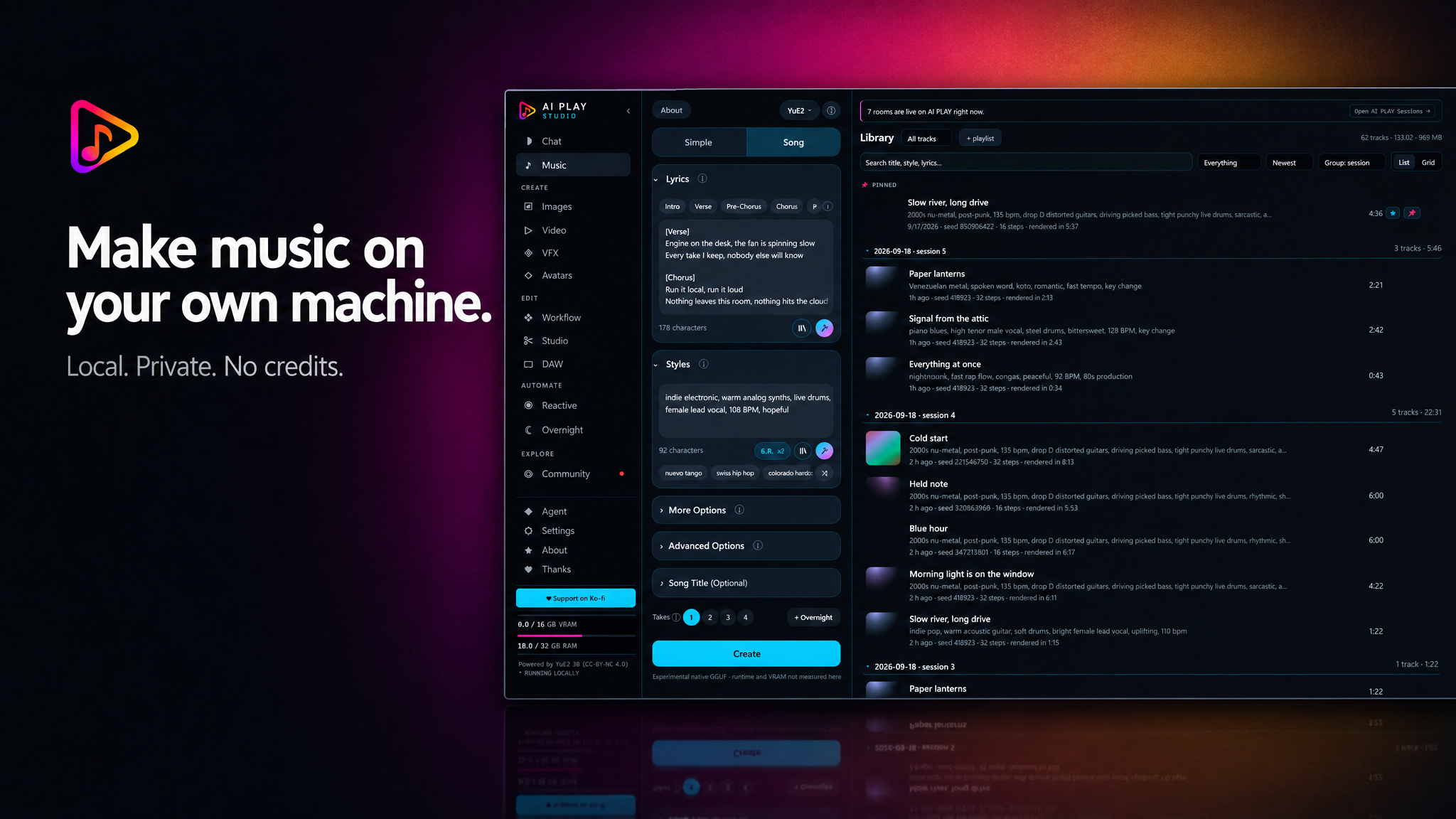
Only want music? You are in the right place. Music only is a launch mode of this same app, not a separate GitHub repository or edition. To make songs with native YuE2 GGUF you do not need ComfyUI, Python, MiniMax or any image and video models.
No strong graphics card? Two ways, in this order:
npm run start:cloud. That mode has no Music, Production or Collab screen,
so a music video still needs Full Studio. Full Studio and Music only never
spend Comfy credits.Works on Windows x64 with any card: setup picks audio.cpp's CUDA build on NVIDIA, its official Vulkan build on AMD and Intel, and its CPU build when there is no graphics card at all.
You need: Windows x64. Setup.exe brings its own Node.js 20 or newer when the PC has none; from the source ZIP you install Node.js 20 or newer yourself. On NVIDIA you also need a CUDA 13.3-compatible driver and, if it is missing, the Microsoft Visual C++ v14 x64 Redistributable. The Vulkan and CPU builds bring their own.
AIPLAY Studio.exe;
from the ZIP, double-click that file or AIPLAY Studio.cmd) and choose
Music only. The first run installs what the app needs, then opens Studio
in your browser. Keep the launcher running while you work.What gets downloaded? About 2.93 GB of model files for Q4 (4.53 GB for Q8). The separate native runtime is about 833 MB on NVIDIA, 58 MB for Vulkan or 24 MB for CPU. Nothing downloads until you take an explicit action: picking a model or asking for a song never starts a download on its own. Q8 has not been benchmarked or listening-tested in Studio yet, so treat it as optional rather than a guaranteed upgrade.
Prefer a terminal? In the extracted folder:
npm ci --omit=dev
npm run start:music
Already running Studio? Update the same checkout. Let running songs finish
and close Studio before switching modes, because both use
http://127.0.0.1:4173. Choose Full Studio in the launcher when you want
the whole suite.
Good to know: one Q4 test on an RTX 4070 Ti SUPER 16 GB made 49.4 seconds of audio in 22.0 seconds. A minimum amount of graphics memory has not been certified yet. The YuE2 weights' licence file reads CC BY-NC 4.0; the model's authors have said individuals may sell what it makes and companies need a commercial licence (15 Sep 2026), and Studio's label follows that statement. Read the hardware notes, troubleshooting and licence details before you publish or sell anything; the label is not a ruling on every song you make.
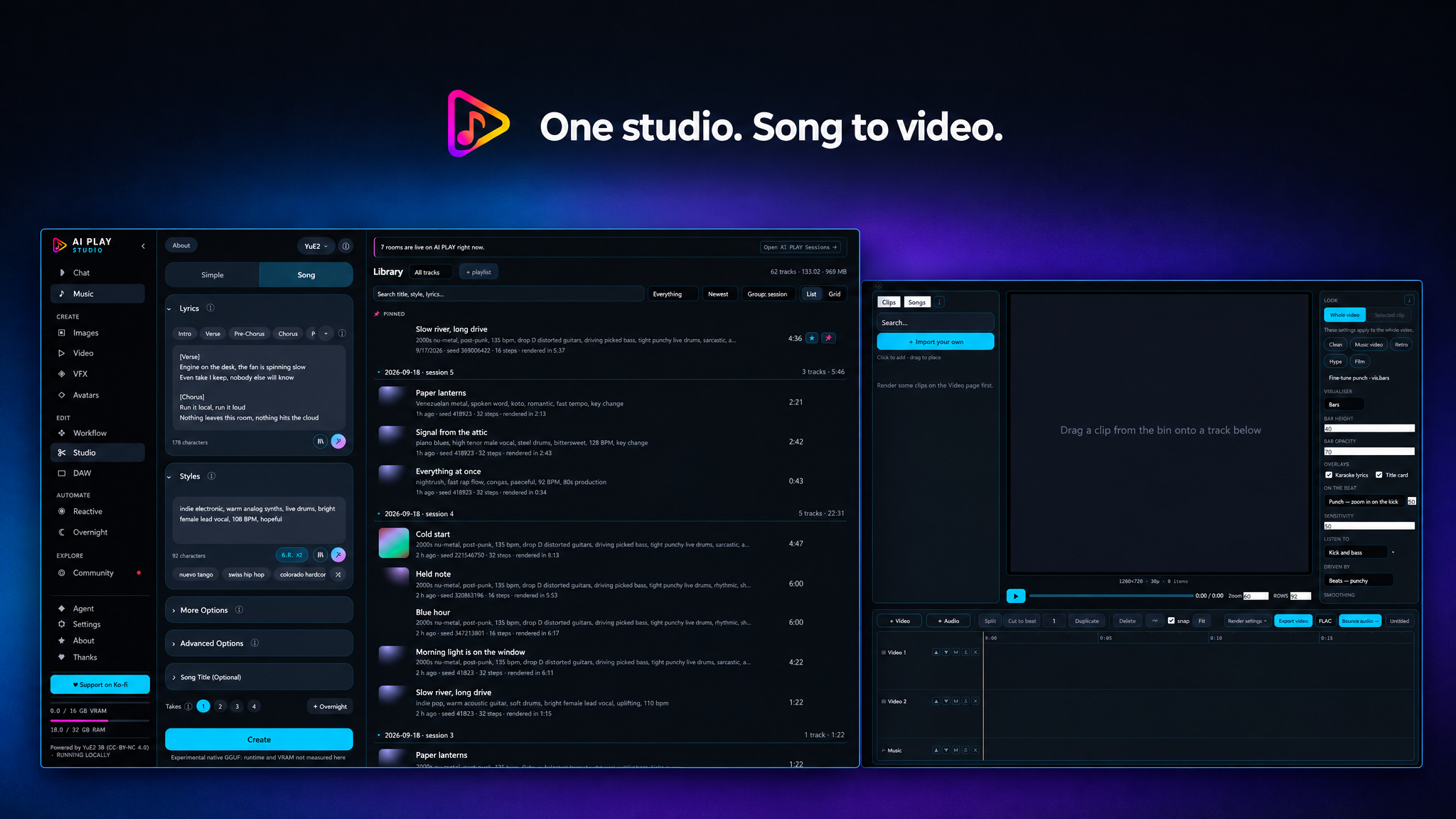
Keep developing the idea after the first render. Full Studio brings music, editing and visual production together; optional engines have their own setup and hardware requirements.
| 🎵 Music | Generate songs from lyrics and a style with native YuE2 GGUF, Python YuE2, ComfyUI YuE2, MiniMax Music 3 or ACE-Step 1.5. Model-specific controls cover references, continuation, covers and instrumentals where supported. Queue different seeds and keep the results in your library. |
| ☾ Batch & schedule | Open it from Music to collect different song ideas with their own exact lyrics, styles and engine settings. Choose takes per idea, review the queue and start now or at a later time. Studio must be running and the computer awake; songs render one at a time. Batch guide. |
| ♩ Follow the score | Open a saved score in the main fullscreen player: note highlights, Follow scrolling and timing adjustments. Edit ABC, print notation or export MIDI. Generated notation timing can drift from the recording. |
| 🎹 DAW to AI takes | Edit melody notes in the piano roll, preview their YuE2 ABC, then generate 2 or 3 alternatives for reviewed bars against a compatible saved Python YuE2 song. Keep the rest of the recording, with 80 ms blends at the seams; compare before keeping. This is background generation, not instant note-level audio inpainting. Workflow and limits. |
| 🎧 Takes | Compare 2, 4 or 8 saved recordings with loudness-matched playback, switch A–H at the same time position, save a favourite and inspect exact receipts and choice history. This compares saved audio; new songs are queued separately. Take comparison. |
| ✨ Shared cues | Place one cue at a musical bar/beat/tick. Preview a dry impact or 909 kick with a flash, then Apply to the DAW and VFX composition or Undo. Explicit alignment keeps the two timelines understandable. Shared cues. |
| 💬 Chat and Simple mode | Describe the song you want in plain words and let the assistant write the lyrics, style and title for you. |
| ✨ Enhance and galleries | One click turns a rough style line or lyrics into a fuller one. Save the ones you like and reuse them later. |
| 🎰 Genre Roulette | Spin six reels (genre, vocals, instrument, mood, rhythm, production) when you have no idea where to start. |
| 🖼️ Covers, layers and vectors | Generate cover art with Qwen Image 2.1 when installed, or choose another available engine. Use the layer image editor for masks, selections and text. Trace a raster to SVG, review detail crops and clean selected geometry through the UI or MCP. Vector workflow. |
| 🎬 Video and Production | Generate individual clips or plan a whole project on the Production screen: scenes, cast, reference sheets, storyboards, saved takes and a timeline to finish. Music videos and episode projects use the same tools; for a series, carry the bible and chosen references between episode projects. Block a camera in Blender for the render to follow. |
| 🌀 Reactive | Pictures that move with a song: cut on the beat, pulse with the bass, flash on the hits. Five cut-and-dissolve styles run on the compositor alone and work on any card, AMD included. Two more repaint a clip frame by frame so the figure moves and the look turns with the music, with a black circle that opens on the bass. |
| ⚭ Collab | Make an episode with friends, and lend each other a graphics card. A project or one scene travels as a sealed file addressed to one person; an order asking a friend to render a scene carries four words and nothing else, and the take comes home to quarantine for you to adopt or throw away. Nothing on the screen opens a connection and there is no server in it. See COLLAB.md. |
| ◎ Community sessions | Open the pinned Community entry to find public live listening rooms and upcoming events, or borrow a style pack for your next song. Browsing does not publish your local creations. |
| ✂️ Edit, mix and finish | A timeline editor, a VFX compositor and a DAW with recording, piano roll, instruments, insert racks, sends and returns. Install native VST3 effects, control their parameters through the UI or MCP and hear the same chain in playback and export. Master with EQ, dynamics and stereo tools; inspect loudness, true peak, reference differences and delivery checks. Plugin guide. |
| 🧪 Native workbench | Optional YuE2 planning and saved-stage replay, dataset preparation and adapter training, audio-to-MIDI/DAW import and processing previews. Advanced tools have separate runtime and model requirements; the current native planner/trainer needs NVIDIA CUDA. Workbench guide. |
| 📚 More | Audiobooks in Production, stems, timed lyrics, 3D models from a picture, batches of images and clips, and a little game for while you wait. |
The deep dive covers every one of these in detail, and
examples/ shows real requests next to what they produced.
Simple mode is the easiest way in: describe your idea ("a slow synthwave song about driving home at 3am") and the assistant writes the lyrics, the style and a title, ready for Create. The Chat screen does the same across the whole studio, and asks before it spends any time on your graphics card.
Both can use a local model on your own card (Qwen3 through ComfyUI) or an API model you connect yourself (Claude, ChatGPT or any OpenAI-compatible server). ✨ Enhance under the Styles and Lyrics boxes uses the same choice, set in Settings → Enhance. A local model waits while the card is busy with a render; an API model never needs to.
The full reasoning is in the deep dive.
No ComfyUI on this PC? Studio installs one. The launcher asks what to run
on (NVIDIA, AMD, Intel Arc or CPU only, with your card marked)
and installs a private ComfyUI into %USERPROFILE%\.aiplay-studio\engine. It
never touches anything else on the PC, and an existing ComfyUI is never
modified. If a step fails, the partial install is removed and the launcher
shows you the exact error.
Already have ComfyUI? Studio finds it (portable, from source, or ComfyUI Desktop) and launches it the way its own launcher does. It never installs or replaces torch, CUDA or ROCm.
| your card | what works |
|---|---|
| NVIDIA | The widest accelerated support, including optional native CUDA planner/training tools. Individual features still have runtime and memory requirements. Use the portable ComfyUI_windows_portable_nvidia.7z (not _cu126) or a source install with a +cu130 torch. |
| AMD Radeon | Native YuE2 GGUF (Vulkan), YuE2, ACE-Step 1.5, MiniMax Music 3 and images through ComfyUI, Reactive, the DAW and compositor. MiniMax needs Studio's default launch flags (below). The 3D stack needs CUDA. |
| Intel Arc | Native YuE2 GGUF (Vulkan), and ComfyUI with an XPU torch. |
| No GPU | Native YuE2 GGUF on the CPU build, the DAW and the compositor. For video clips (here, or on any card too small for them), first ask a friend with a strong card to render them for you (Collab, free; built, not yet tried between two PCs). Then, paid on your own key: the hosted engine for MiniMax Music 3 songs, or the launcher's Use Comfy API mode. |
Default ComfyUI launch flags: --use-pytorch-cross-attention --disable-cuda-graphs.
They fixed MiniMax Music 3's broken audio on an RX 9060 XT, and they replace any other
attention flag your install uses (two attention flags stop ComfyUI starting). Change them
under Advanced in the launcher.
Measured AMD results, launch flags and the details of every layout are in the hardware section of the deep dive.
For the whole suite (music, images, video and the rest):
AIPLAY Studio.exe and choose Full Studio. It fetches
its npm packages once and opens Studio in your browser.MiniMax Music 3 (11.9 GB) is still in the Models list for anyone who picks it.
On an RTX 4070 Ti SUPER a MiniMax song takes roughly real time: about four
and a half minutes for four and a half minutes of audio. A shorter lyric means
a shorter wait. Want a caption to start from? Try
examples/01-song.
INSTALL.md has the complete walkthrough and troubleshooting.
Nothing downloads on its own. The Models screen reads your card and memory, tells you what your machine can run, and fetches what you ask for, resuming if the connection drops and checking every file when it arrives.
| capability | download | licence | your card | your RAM |
|---|---|---|---|---|
| Music engine — MiniMax Music 3 | 11.9 GB | MiniMax Music3 Community | 6 GB (12 rec) | 16 GB (32 rec) |
| Music engine — YuE2 GGUF Q4 / optional Q8 (experimental) | ~2.9 GB | CC BY-NC 4.0 (weights) · Apache-2.0/MIT (native code) · NVIDIA CUDA runtime terms on NVIDIA only · ⚠ sellable by individuals | Unknown (experimental) | Unknown (experimental) |
| Cover — SheetSage2 song-to-score (ComfyUI) | 1.4 GB | CC BY-NC 4.0 (weights) · ⚠ not for sale | 4 GB (8 rec) | 8 GB (16 rec) |
| Video clips — TaoMate 3-step LoRA (H3) | 2.5 GB | MiniMax H3 Community Licence (derived from H3) · ⚠ territory | 8 GB (12 rec) | 16 GB (32 rec) |
| Video clips — video-to-video control (H3 Fun ControlNet) | 2.3 GB | MiniMax H3 Community Licence (a patch on H3's weights) · ⚠ territory | 12 GB (16 rec) | 16 GB (32 rec) |
| Video clips — Fast setting for H3 (TaoMate 3-step, 182 MB) | 182 MB | MiniMax H3 Community Licence (derived from H3) · ⚠ territory | 8 GB (12 rec) | 16 GB (32 rec) |
| Video clips — 4-step speed-up for H3 (1.96 GB) | 2.0 GB | MiniMax H3 Community Licence (derived from H3) · ⚠ territory | 8 GB (12 rec) | 16 GB (32 rec) |
| Video clips — 8-step speed-up for H3 (1.96 GB) | 2.0 GB | MiniMax H3 Community Licence (derived from H3) · ⚠ territory | 8 GB (12 rec) | 16 GB (32 rec) |
| H3 conditioning bridge — BUNNY (action logic) | 22.0 MB | MiniMax H3 Community Licence (derived from H3) · ⚠ territory | none (0 rec) | 0 GB (0 rec) |
| H3 conditioning bridge — Semantic Bridge v1 | 11.0 MB | MiniMax H3 Community Licence (derived from H3) · ⚠ territory | none (0 rec) | 0 GB (0 rec) |
| Music engine — YuE2 3B for ComfyUI (int8) | 4.0 GB | CC BY-NC 4.0 (weights) · ⚠ sellable by individuals | 8 GB (12 rec) | 16 GB (32 rec) |
| YuE2 instrumental planner LoRA (ComfyUI) | 213 MB | CC BY-NC 4.0 (weights, derived from YuE2-3B) · ⚠ not for sale | 8 GB (12 rec) | 16 GB (32 rec) |
| YuE2 real-audio NAR LoRA (ComfyUI) | 108 MB | CC BY-NC 4.0 (weights, derived from YuE2-3B) · ⚠ not for sale | 8 GB (12 rec) | 16 GB (32 rec) |
| YuE2 real-audio tokenizer (head + MERT-v2-FullSong) | 2.7 GB | CC BY-NC 4.0 (head from YuE2-3B; MERT-v2-FullSong) · ⚠ not for sale | none (4 rec) | 8 GB (16 rec) |
| Music engine — ACE-Step 1.5 turbo (ComfyUI) | 14.7 GB | MIT (ACE-Step's LICENSE; the ComfyUI repack's card tags apache-2.0 with no licence text) | 8 GB (16 rec) | 16 GB (32 rec) |
| Music engine — YuE2 3B | 7.8 GB | CC BY-NC 4.0 (weights) · ⚠ sellable by individuals | 16 GB (24 rec) | 24 GB (32 rec) |
| Audio reference — MiniMax Music 3 DAV encoder | 306 MB | MiniMax Music3 Community · +pip | 4 GB (6 rec) | 8 GB (16 rec) |
| Cover art — FLUX.2 klein 4B | 12.5 GB | Apache-2.0 | 8 GB (12 rec) | 16 GB (32 rec) |
| Fast covers: Supra2-IMG | 1.7 GB | Apache-2.0 | none (0 rec) | 4 GB (8 rec) |
| Chat — Qwen3 4B | 8.0 GB | Apache-2.0 | 8 GB (12 rec) | 16 GB (32 rec) |
| Stem separation — HTDemucs (fine-tuned) | ~336 MB | MIT · pip | 4 GB (6 rec) | 8 GB (16 rec) |
| Video clips — MiniMax H3 (quantised) | 42.9 GB | MiniMax H3 Community · ⚠ territory | 8 GB (12 rec) | 16 GB (32 rec) |
| Video clips — FastH3 (8 steps, experimental) | 42.1 GB | MiniMax H3 Community Licence (derived from H3) · ⚠ territory | 8 GB (12 rec) | 16 GB (32 rec) |
| Video references — MiniMax H3 ref2va | 22.9 GB | MiniMax H3 Community · ⚠ territory | 8 GB (12 rec) | 16 GB (32 rec) |
| Background removal — BiRefNet | 444 MB | MIT | 4 GB (6 rec) | 8 GB (16 rec) |
| Images — Ideogram 4 (open 9B) | 25.2 GB | Ideogram Non-Commercial Model Agreement · ⚠ terms unread | 12 GB (16 rec) | 32 GB (32 rec) |
| Narration — TTS voices (Kokoro + Qwen3-TTS) | ~15.5 GB | Apache-2.0 (both engines) · pip | none (8 rec) | 16 GB (32 rec) |
| Sound effects — Stable Audio 3 Small SFX | 3.5 GB | Stability AI Community License | 6 GB (8 rec) | 16 GB (32 rec) |
| Images — Z-Image Turbo (Apache-2.0) | 14.6 GB | Apache-2.0 | 8 GB (12 rec) | 16 GB (32 rec) |
| Images — Qwen Image 2.1 (research licence) | 17.3 GB | Qwen Research License Agreement · ⚠ not for sale | Unknown (experimental) | Unknown (experimental) |
| Images — Fast draft for Qwen Image 2.1 (Viggle turbo LoRA) | 680 MB | Qwen Research License Agreement · ⚠ not for sale | Unknown (experimental) | Unknown (experimental) |
| Images — Krea 2 Turbo (community licence) | 19.0 GB | Krea 2 Community License Agreement | 12 GB (16 rec) | 32 GB (48 rec) |
| Images — Z-Image base (Apache-2.0) | 14.6 GB | Apache-2.0 | 8 GB (12 rec) | 16 GB (32 rec) |
| Images — Anima (non-commercial model, sellable pictures) | 1.4 GB | CircleStone Labs Non-Commercial v1.2 | 6 GB (10 rec) | 16 GB (32 rec) |
| Video clips — LTX 2.5 (quantised) | 39.7 GB | LTX-2.x Community · ⚠ gated | 16 GB (16 rec) | 32 GB (32 rec) |
| Structural control — WAN 2.1 VACE 1.3B | 11.3 GB | Apache-2.0 | 8 GB (16 rec) | 16 GB (32 rec) |
| Pose extraction — DWPose (TorchScript) | 353 MB | Split: Apache-2.0 + terms unread · ⚠ terms unread | 4 GB (6 rec) | 8 GB (16 rec) |
| Depth extraction — Depth Anything V2 Small | 99.2 MB | Apache-2.0 | 2 GB (4 rec) | 8 GB (16 rec) |
| Depth extraction — Depth Anything V2 Large (non-commercial) | 1.3 GB | CC-BY-NC-4.0 · ⚠ not for sale | 4 GB (6 rec) | 8 GB (16 rec) |
| Motion module — AnimateDiff v3 (SD1.5) | 1.8 GB | Apache-2.0 | 6 GB (12 rec) | 16 GB (32 rec) |
| Source on the hits — SparseCtrl RGB (AnimateDiff v3) | 2.0 GB | Apache-2.0 | 8 GB (12 rec) | 16 GB (32 rec) |
| SD1.5 checkpoint — DreamShaper 8 (the Motion look's painter) | 2.1 GB | CreativeML Open RAIL-M | 4 GB (8 rec) | 8 GB (16 rec) |
| ControlNet v1.1 — depth and line art (SD1.5, fp16) | 1.4 GB | OpenRAIL | 4 GB (8 rec) | 8 GB (16 rec) |
| Picture references — IP-Adapter Plus (SD1.5) | 98.2 MB | Apache-2.0 | 4 GB (8 rec) | 8 GB (16 rec) |
| CLIP vision tower — ViT-H/14 (LAION-2B) | 2.5 GB | MIT | 4 GB (8 rec) | 8 GB (16 rec) |
| 3D mesh from a picture — TripoSG 1.5B | 7.9 GB | MIT | 4 GB (12 rec) | 16 GB (32 rec) |
| Skeleton and skin for a mesh — UniRig | 5.8 GB | MIT | 4 GB (8 rec) | 8 GB (16 rec) |
| Whisper: transcription and timed lyrics | ~3.1 GB | MIT · pip | 4 GB (6 rec) | 8 GB (16 rec) |
| Smooth motion — RIFE 4.26 | 22.7 MB | MIT | 4 GB (6 rec) | 8 GB (16 rec) |
| Upscale — Real-ESRGAN 2x | 67.1 MB | BSD-3-Clause | 4 GB (8 rec) | 16 GB (32 rec) |
| MiniMax H3 fl2va W6A8 (experimental) | 16.0 GB | MiniMax H3 Community · ⚠ territory | Unknown (experimental) | Unknown (experimental) |
| MiniMax H3 ref2va W6A8 (experimental) | 16.0 GB | MiniMax H3 Community · ⚠ territory | Unknown (experimental) | Unknown (experimental) |
| YuE2 style LoRA — TRBDR Broadside | 118 MB | CC BY-NC 4.0 (adapter weights) · ⚠ not for sale | 8 GB (12 rec) | 16 GB (32 rec) |
| YuE2 style LoRA — TRBDR Lantern | 118 MB | CC BY-NC 4.0 (adapter weights) · ⚠ not for sale | 8 GB (12 rec) | 16 GB (32 rec) |
| YuE2 style LoRA — TRBDR Hearth | 118 MB | CC BY-NC 4.0 (adapter weights) · ⚠ not for sale | 8 GB (12 rec) | 16 GB (32 rec) |
| YuE2 style LoRA — TRBDR Ferryman | 177 MB | CC BY-NC 4.0 (adapter weights) · ⚠ not for sale | 8 GB (12 rec) | 16 GB (32 rec) |
| YuE2 style LoRA — TRBDR Porch | 177 MB | CC BY-NC 4.0 (adapter weights) · ⚠ not for sale | 8 GB (12 rec) | 16 GB (32 rec) |
| YuE2 style LoRA — GRVL Ember | 118 MB | CC BY-NC 4.0 (adapter weights) · ⚠ not for sale | 8 GB (12 rec) | 16 GB (32 rec) |
| YuE2 style LoRA — GRVL Smoulder | 118 MB | CC BY-NC 4.0 (adapter weights) · ⚠ not for sale | 8 GB (12 rec) | 16 GB (32 rec) |
| YuE2 style LoRA — GRVL Cinder | 118 MB | CC BY-NC 4.0 (adapter weights) · ⚠ not for sale | 8 GB (12 rec) | 16 GB (32 rec) |
| YuE2 style LoRA — GRVL Wildfire | 118 MB | CC BY-NC 4.0 (adapter weights) · ⚠ not for sale | 8 GB (12 rec) | 16 GB (32 rec) |
| YuE2 style LoRA — GRVL Thunder | 118 MB | CC BY-NC 4.0 (adapter weights) · ⚠ not for sale | 8 GB (12 rec) | 16 GB (32 rec) |
| YuE2 style LoRA — GRVL Tempest | 118 MB | CC BY-NC 4.0 (adapter weights) · ⚠ not for sale | 8 GB (12 rec) | 16 GB (32 rec) |
63 capabilities. Choose one music engine and install the runtime and models for the features you want. Native YuE2 music-only does not require MiniMax, ComfyUI or Python. Hardware figures are capability-specific guidance, not a guarantee; an experimental Unknown means no minimum has been established. Streaming support and memory measurements from other engines must not be applied to native GGUF.
⚠ territory — TaoMate 3-step LoRA (H3) and Fast setting for H3 (TaoMate 3-step, 182 MB) and 4-step speed-up for H3 (1.96 GB) and 8-step speed-up for H3 (1.96 GB) and BUNNY (action logic) and Semantic Bridge v1. Derived from MiniMax H3, so its Community Licence applies: rights only inside the Applicable Territory, which excludes the EU, the UK, the Republic of Korea and the United States of America. The download goes straight to the publisher. video-to-video control (H3 Fun ControlNet). A patch on MiniMax H3, so its Community Licence applies unchanged: rights only inside the Applicable Territory, which excludes the EU, the UK, the Republic of Korea and the United States of America. MiniMax's hosted API is available everywhere; it is running the open weights locally that is limited. The download goes straight to the publisher. MiniMax H3 (quantised) and MiniMax H3 ref2va and MiniMax H3 fl2va W6A8 (experimental) and MiniMax H3 ref2va W6A8 (experimental). MiniMax grants H3 rights only inside its Applicable Territory, which excludes the EU, the UK, the Republic of Korea and the United States of America. If you are in one of those places you may not use these weights — and §V.4 says the same about anything they generate. AIPLAY Studio does not host them — the download goes straight to the publisher, and the licence is between you and MiniMax. FastH3 (8 steps, experimental). Derived from MiniMax H3, so its Community Licence applies: rights only inside the Applicable Territory, which excludes the EU, the UK, the Republic of Korea and the United States of America. AIPLAY Studio does not host the weights; the download goes straight to the publisher. Studio treats this as a blocking acknowledgement and refuses the download without it.
⚠ gated — LTX 2.5 (quantised). The repository is access-gated, so the built-in downloader cannot fetch it — it has no token and deliberately nowhere to keep one. Accept the licence on the model page, then in the ComfyUI python environment run hf auth login followed by python scripts/fetch_ltx25.py. About 40 GB. Licence and access: https://huggingface.co/Lightricks/LTX-2.5
⚠ terms unread — Ideogram 4 (open 9B) — https://huggingface.co/ideogram-ai/ideogram-4-fp8/blob/main/LICENSE.md
The Ideogram Non-Commercial Model Agreement is behind a gate: the URL above returns HTTP 401 to an anonymous request (checked 2026-08-27) and no copy of the text has been read here. The name says non-commercial; every other non-commercial licence in this catalogue restricts the MODEL and leaves the output alone — but Ideogram's may not, and Studio will not guess in either direction. Accept the agreement on the model page, read §-by-§, and decide. If you need a settled answer today, FLUX.2 klein 4B is Apache-2.0.
DWPose (TorchScript) — https://github.com/IDEA-Research/DWPose/blob/main/LICENSE
Half of this capability is verified and half is not, and the unread half is the one that makes the skeleton, so the row answers with the weaker of the two. The detector (yolox_l.torchscript.pt) is Apache-2.0: Megvii's own LICENSE was diffed against the canonical text and every operative clause is identical. The estimator (dw-ll_ucoco_384_bs5.torchscript.pt) has no readable terms at all — its redistributor's entire model card is 28 bytes of frontmatter with no LICENSE file, and so is the card of the yzd-v/DWPose repository usually named as its origin. The Apache-2.0 licence linked above, IDEA-Research's, is reached only by a filename match, and a filename is not a grant. In practice a skeleton is a measurement of a video you supplied, and the clip it goes on to steer carries the RENDERING model's terms — WAN 2.1 VACE's, which are settled Apache-2.0 — so this is narrower than it sounds. Read the chain yourself before relying on the skeleton itself being licensed. Separately, and binding whoever trained the model rather than whoever runs it: DWPose was trained on COCO-WholeBody and UBody, which carry dataset terms of their own.
⚠ not for sale — SheetSage2 song-to-score (ComfyUI). Studio retains a conservative noncommercial / not-for-sale classification. This does not establish that every generated output is governed by the weights' licence. Review the source terms and output scope: https://huggingface.co/m-a-p/SheetSage2/blob/main/LICENSE. YuE2 instrumental planner LoRA (ComfyUI). Studio retains a conservative noncommercial / not-for-sale classification. This does not establish that every generated output is governed by the weights' licence. Review the source terms and output scope: https://huggingface.co/m-a-p/YuE2-3B/blob/main/LICENSE. YuE2 real-audio NAR LoRA (ComfyUI). Studio retains a conservative noncommercial / not-for-sale classification. This does not establish that every generated output is governed by the weights' licence. Review the source terms and output scope: https://huggingface.co/m-a-p/YuE2-3B/blob/main/LICENSE. YuE2 real-audio tokenizer (head + MERT-v2-FullSong). Studio retains a conservative noncommercial / not-for-sale classification. This does not establish that every generated output is governed by the weights' licence. Review the source terms and output scope: https://huggingface.co/m-a-p/YuE2-3B/blob/main/LICENSE. Qwen Image 2.1 (research licence). Studio retains a conservative noncommercial / not-for-sale classification. This does not establish that every generated output is governed by the weights' licence. Review the source terms and output scope: https://huggingface.co/Qwen/Qwen-Image-2.1/blob/790c92633540aa0cb11d9abf19eb46d861714758/LICENSE. Fast draft for Qwen Image 2.1 (Viggle turbo LoRA). Studio retains a conservative noncommercial / not-for-sale classification. This does not establish that every generated output is governed by the weights' licence. Review the source terms and output scope: https://huggingface.co/Viggle/Qwen-Image-2.1-viggle-turbo/blob/2b85c1fcb7b2584c4133fe0c547ec968ff2ae20e/LICENSE. Depth Anything V2 Large (non-commercial). Studio retains a conservative noncommercial / not-for-sale classification. This does not establish that every generated output is governed by the weights' licence. Review the source terms and output scope: https://github.com/DepthAnything/Depth-Anything-V2#license. TRBDR Broadside. Studio retains a conservative noncommercial / not-for-sale classification. This does not establish that every generated output is governed by the weights' licence. Review the source terms and output scope: https://huggingface.co/becausereasons/yue2-trbdr-folk-troubadour/blob/078b19e52baebaa71463ea94afac5ce13abfe29a/README.md. TRBDR Lantern. Studio retains a conservative noncommercial / not-for-sale classification. This does not establish that every generated output is governed by the weights' licence. Review the source terms and output scope: https://huggingface.co/becausereasons/yue2-trbdr-folk-troubadour/blob/078b19e52baebaa71463ea94afac5ce13abfe29a/README.md. TRBDR Hearth. Studio retains a conservative noncommercial / not-for-sale classification. This does not establish that every generated output is governed by the weights' licence. Review the source terms and output scope: https://huggingface.co/becausereasons/yue2-trbdr-folk-troubadour/blob/078b19e52baebaa71463ea94afac5ce13abfe29a/README.md. TRBDR Ferryman. Studio retains a conservative noncommercial / not-for-sale classification. This does not establish that every generated output is governed by the weights' licence. Review the source terms and output scope: https://huggingface.co/becausereasons/yue2-trbdr-folk-troubadour/blob/078b19e52baebaa71463ea94afac5ce13abfe29a/README.md. TRBDR Porch. Studio retains a conservative noncommercial / not-for-sale classification. This does not establish that every generated output is governed by the weights' licence. Review the source terms and output scope: https://huggingface.co/becausereasons/yue2-trbdr-folk-troubadour/blob/078b19e52baebaa71463ea94afac5ce13abfe29a/README.md. GRVL Ember. Studio retains a conservative noncommercial / not-for-sale classification. This does not establish that every generated output is governed by the weights' licence. Review the source terms and output scope: https://huggingface.co/becausereasons/yue2-grvl-raspy-rock-soul/blob/314dbcf2779e92b1b04e8539f4c2ceee3516f969/README.md. GRVL Smoulder. Studio retains a conservative noncommercial / not-for-sale classification. This does not establish that every generated output is governed by the weights' licence. Review the source terms and output scope: https://huggingface.co/becausereasons/yue2-grvl-raspy-rock-soul/blob/314dbcf2779e92b1b04e8539f4c2ceee3516f969/README.md. GRVL Cinder. Studio retains a conservative noncommercial / not-for-sale classification. This does not establish that every generated output is governed by the weights' licence. Review the source terms and output scope: https://huggingface.co/becausereasons/yue2-grvl-raspy-rock-soul/blob/314dbcf2779e92b1b04e8539f4c2ceee3516f969/README.md. GRVL Wildfire. Studio retains a conservative noncommercial / not-for-sale classification. This does not establish that every generated output is governed by the weights' licence. Review the source terms and output scope: https://huggingface.co/becausereasons/yue2-grvl-raspy-rock-soul/blob/314dbcf2779e92b1b04e8539f4c2ceee3516f969/README.md. GRVL Thunder. Studio retains a conservative noncommercial / not-for-sale classification. This does not establish that every generated output is governed by the weights' licence. Review the source terms and output scope: https://huggingface.co/becausereasons/yue2-grvl-raspy-rock-soul/blob/314dbcf2779e92b1b04e8539f4c2ceee3516f969/README.md. GRVL Tempest. Studio retains a conservative noncommercial / not-for-sale classification. This does not establish that every generated output is governed by the weights' licence. Review the source terms and output scope: https://huggingface.co/becausereasons/yue2-grvl-raspy-rock-soul/blob/314dbcf2779e92b1b04e8539f4c2ceee3516f969/README.md.
⚠ sellable by individuals — YuE2 GGUF Q4 / optional Q8 (experimental). Sellable by individuals (YuE2 authors' statement, 15 Sep 2026) · companies need a commercial licence. The licence file shipped with the weights still reads CC BY-NC 4.0; Studio's label follows the authors' statement: https://huggingface.co/m-a-p/YuE2-3B/discussions/5. YuE2 3B for ComfyUI (int8). Sellable by individuals (YuE2 authors' statement, 15 Sep 2026) · companies need a commercial licence. The licence file shipped with the weights still reads CC BY-NC 4.0; Studio's label follows the authors' statement: https://huggingface.co/m-a-p/YuE2-3B/discussions/5. YuE2 3B. Sellable by individuals (YuE2 authors' statement, 15 Sep 2026) · companies need a commercial licence. The licence file shipped with the weights still reads CC BY-NC 4.0; Studio's label follows the authors' statement: https://huggingface.co/m-a-p/YuE2-3B/discussions/5.
pip, not a download — Some capabilities are Python packages that fetch their own weights, so Studio has no file to verify and no button to press. They belong in a Python that is not ComfyUI's: installing them there can pull the torch build the engine depends on back down, which costs about 5× the speed of everything (INSTALL.md §5).
· MiniMax Music 3 DAV encoder — python -m pip install numpy torch av (on top of the 306 MB of weights in the table)
· HTDemucs (fine-tuned) — python -m pip install demucs
· TTS voices (Kokoro + Qwen3-TTS) — kokoro + qwen-tts (sidecar venv at tts-venv/) — no single command; see the Models screen
· Whisper: transcription and timed lyrics — python -m pip install faster-whisper stable-ts
→ Into Studio's own whisper venv, not the python on your PATH: %USERPROFILE%\aiplay-whisper\venv (or the python chosen in Settings > Songs > "timed lyrics python", or AIPLAY_WHISPER_PYTHON). With Python 3.11 or newer, in a new Command Prompt or PowerShell window (both open in your user folder): python -m venv "aiplay-whisper\venv", then aiplay-whisper\venv\Scripts\python.exe -m pip install torch torchaudio --index-url https://download.pytorch.org/whl/cu126, then aiplay-whisper\venv\Scripts\python.exe -m pip install faster-whisper stable-ts. The torch line is for an NVIDIA card only. On Linux the venv's python is aiplay-whisper/venv/bin/python.
node scripts/extras_setup.mjs prints the exact command for your machine, aimed at the interpreter Studio will actually invoke, and says which are already installed.
selling what you make — Model licences and rights in generated material are separate questions. The catalogue records them separately. 20 of 63 are classified as placing no licence conditions on generated material (ACE-Step 1.5 turbo (ComfyUI), FLUX.2 klein 4B, Fast covers: Supra2-IMG, Qwen3 4B, HTDemucs (fine-tuned), BiRefNet, TTS voices (Kokoro + Qwen3-TTS), Z-Image Turbo (Apache-2.0), Z-Image base (Apache-2.0), WAN 2.1 VACE 1.3B, Depth Anything V2 Small, AnimateDiff v3 (SD1.5), SparseCtrl RGB (AnimateDiff v3), IP-Adapter Plus (SD1.5), ViT-H/14 (LAION-2B), TripoSG 1.5B, UniRig, Whisper: transcription and timed lyrics, RIFE 4.26, Real-ESRGAN 2x). 23 say you may and attach conditions (MiniMax Music 3, YuE2 GGUF Q4 / optional Q8 (experimental), TaoMate 3-step LoRA (H3), video-to-video control (H3 Fun ControlNet), Fast setting for H3 (TaoMate 3-step, 182 MB), 4-step speed-up for H3 (1.96 GB), 8-step speed-up for H3 (1.96 GB), BUNNY (action logic), Semantic Bridge v1, YuE2 3B for ComfyUI (int8), YuE2 3B, MiniMax Music 3 DAV encoder, MiniMax H3 (quantised), FastH3 (8 steps, experimental), MiniMax H3 ref2va, Stable Audio 3 Small SFX, Krea 2 Turbo (community licence), Anima (non-commercial model, sellable pictures), LTX 2.5 (quantised), DreamShaper 8 (the Motion look's painter), depth and line art (SD1.5, fp16), MiniMax H3 fl2va W6A8 (experimental), MiniMax H3 ref2va W6A8 (experimental)). 18 are conservatively classified noncommercial / not for sale; that label does not resolve every output's legal status. 2 — Ideogram 4 (open 9B), DWPose (TorchScript) — nobody here has read. For MiniMax Music 3: §3.1 — a commercial product or service that uses it must show “MiniMax-Music3” prominently in its interface. That is why the name sits in Studio's corner rather than on a credits page. The operative sentence is quoted verbatim in server/models.js and shown on the Models screen before you download anything.
shared files — 8 files are used by more than one capability, so picking two of those costs less than adding their rows — up to 30.9 GB less. qwen3vl_32b_minimax_h3-int4_convrot.safetensors (14.2 GB) is shared by MiniMax H3 (quantised), FastH3 (8 steps, experimental); qwen_3_4b.safetensors (8.0 GB) is shared by FLUX.2 klein 4B, Qwen3 4B, Z-Image Turbo (Apache-2.0), Z-Image base (Apache-2.0); minimax_h3_video_vae_fp16.safetensors (5.2 GB) is shared by MiniMax H3 (quantised), FastH3 (8 steps, experimental); minimax_h3_fl2v_turbo_8step_v1.0_comfyui_bf16.safetensors (2.0 GB) is shared by 8-step speed-up for H3 (1.96 GB), MiniMax H3 (quantised); minimax_h3_audio_vae_fp32.safetensors (605 MB) is shared by MiniMax H3 (quantised), FastH3 (8 steps, experimental); flux2-vae.safetensors (336 MB) is shared by FLUX.2 klein 4B, Ideogram 4 (open 9B); ae.safetensors (335 MB) is shared by Z-Image Turbo (Apache-2.0), Z-Image base (Apache-2.0); qwen_image_vae.safetensors (254 MB) is shared by Krea 2 Turbo (community licence), Anima (non-commercial model, sellable pictures). The Models screen quotes the deduplicated figure.
Studio hosts no weights and mirrors none: every download goes straight to the publisher, and the licence is between you and them.
Studio speaks MCP. Point an assistant at node server/mcp.js and it can make
songs, pictures, clips and whole music videos, edit a DAW project or a
compositor scene, and read the render log back. The Agent screen in the app
has the config block to paste. See the tool list
and API.md.
The MCP workflow map covers image references, vector
cleanup, reviewed DAW passages, take comparisons, shared cues, native training
and replay, Reactive video, and collaboration. Ask pipeline_guide for
topic:"music-editing" or topic:"music-workbench" to discover the music
workflows. Typed tools call the same API as the page. studio_api_reference
and studio_api_request cover existing JSON API
operations without a dedicated tool. Peer verification records the user's actual
word check; adding a capability does not grant trust or send files by itself.
Browser playback, OS dialogs and legacy canvas capture remain browser operations.
Studio refuses any request that pairs a child or teenager with nudity or sexual content: "This can't be made: it pairs a child or teenager with sexual content." That holds for every model, screen, agent and setting, including private and overnight renders, and nothing switches it off. Adult content stays your choice. See docs/SAFETY.md.
Changing the interface? Read docs/UI_GUIDE.md first. Short labels, one-sentence hints, status as chips, the shared page kit, and where new settings, tools and pages go. AI agents: AGENTS.md.
Run the gate before you push. sh .githooks/pre-commit runs every test lane
in the repository (about six minutes). It is the same gate that guards a commit:
it checks the licences, the docs against the catalogue, and that every screen,
route and tool matches its other half.
sh .githooks/pre-commit        every lane, about six minutes
node scripts/trace_load.mjs    just the boot check, about a second
npm test                       the JavaScript suites
Testing an install without touching your own. Copy the repo
(git ls-files -co --exclude-standard), run npm ci in the copy, then start
scripts/setup.mjs and launcher/launcher.mjs with AIPLAY_APPDATA pointing at
an empty folder, different AIPLAY_LAUNCHER_PORT / AIPLAY_UI_PORT, and
AIPLAY_LAUNCHER_NO_WINDOW=1. Point USERPROFILE, APPDATA and LOCALAPPDATA
at empty folders too to simulate a PC with nothing installed.
Three habits this codebase is built around:
git status, not from your plan.The folder layout is described in the deep dive.
The Suno-style Music screen, the one-click engine installer and AMD, Intel and CPU support were merged from bani4kaskashka's fork. Reactive is a re-creation of Yvann Barbot's idea (ComfyUI_Yvann-Nodes) on Studio's own engine. The model authors and their licences are listed on the Models screen and in NOTICE.

Made for people who would rather own their tools.
Make a song. Make it yours.
Generate the track, shape its score, mix it in the DAW and bring it to the screen.
Free, open source and local first. Use the UI or your own MCP assistant.
Download for Windows · 31-second Studio tour · Quickstart · Full install · YuE2 guide · How it works · Source code (for developers)
When the installer asks which build, choose Senzu's.
Windows may say “Windows protected your PC” because the installer is not signed yet: click More info, then Run anyway.
Runs on NVIDIA, AMD, Intel Arc or just your CPU.
AIPLAY Studio connects the pieces of a creative project: song → score and DAW → cover and vectors → video, VFX and 3D. Start with lyrics and a style, compare different takes, edit the musical idea, then build its visual world in the same app. You can work by hand or let an MCP assistant use the same project tools.
Local generation needs no Studio account or per-render credits. Optional hosted engines and API assistants send the inputs they need to your chosen provider; paid services use your own key. Software is Apache-2.0. Each model has its own licence, shown before installation.
Only want music? You are in the right place. Music only is a launch mode of this same app, not a separate GitHub repository or edition. To make songs with native YuE2 GGUF you do not need ComfyUI, Python, MiniMax or any image and video models.
No strong graphics card? Two ways, in this order:
npm run start:cloud. That mode has no Music, Production or Collab screen,
so a music video still needs Full Studio. Full Studio and Music only never
spend Comfy credits.Works on Windows x64 with any card: setup picks audio.cpp's CUDA build on NVIDIA, its official Vulkan build on AMD and Intel, and its CPU build when there is no graphics card at all.
You need: Windows x64. Setup.exe brings its own Node.js 20 or newer when the PC has none; from the source ZIP you install Node.js 20 or newer yourself. On NVIDIA you also need a CUDA 13.3-compatible driver and, if it is missing, the Microsoft Visual C++ v14 x64 Redistributable. The Vulkan and CPU builds bring their own.
AIPLAY Studio.exe;
from the ZIP, double-click that file or AIPLAY Studio.cmd) and choose
Music only. The first run installs what the app needs, then opens Studio
in your browser. Keep the launcher running while you work.What gets downloaded? About 2.93 GB of model files for Q4 (4.53 GB for Q8). The separate native runtime is about 833 MB on NVIDIA, 58 MB for Vulkan or 24 MB for CPU. Nothing downloads until you take an explicit action: picking a model or asking for a song never starts a download on its own. Q8 has not been benchmarked or listening-tested in Studio yet, so treat it as optional rather than a guaranteed upgrade.
Prefer a terminal? In the extracted folder:
npm ci --omit=dev
npm run start:music
Already running Studio? Update the same checkout. Let running songs finish
and close Studio before switching modes, because both use
http://127.0.0.1:4173. Choose Full Studio in the launcher when you want
the whole suite.
Good to know: one Q4 test on an RTX 4070 Ti SUPER 16 GB made 49.4 seconds of audio in 22.0 seconds. A minimum amount of graphics memory has not been certified yet. The YuE2 weights' licence file reads CC BY-NC 4.0; the model's authors have said individuals may sell what it makes and companies need a commercial licence (15 Sep 2026), and Studio's label follows that statement. Read the hardware notes, troubleshooting and licence details before you publish or sell anything; the label is not a ruling on every song you make.
Keep developing the idea after the first render. Full Studio brings music, editing and visual production together; optional engines have their own setup and hardware requirements.
| 🎵 Music | Generate songs from lyrics and a style with native YuE2 GGUF, Python YuE2, ComfyUI YuE2, MiniMax Music 3 or ACE-Step 1.5. Model-specific controls cover references, continuation, covers and instrumentals where supported. Queue different seeds and keep the results in your library. |
| ☾ Batch & schedule | Open it from Music to collect different song ideas with their own exact lyrics, styles and engine settings. Choose takes per idea, review the queue and start now or at a later time. Studio must be running and the computer awake; songs render one at a time. Batch guide. |
| ♩ Follow the score | Open a saved score in the main fullscreen player: note highlights, Follow scrolling and timing adjustments. Edit ABC, print notation or export MIDI. Generated notation timing can drift from the recording. |
| 🎹 DAW to AI takes | Edit melody notes in the piano roll, preview their YuE2 ABC, then generate 2 or 3 alternatives for reviewed bars against a compatible saved Python YuE2 song. Keep the rest of the recording, with 80 ms blends at the seams; compare before keeping. This is background generation, not instant note-level audio inpainting. Workflow and limits. |
| 🎧 Takes | Compare 2, 4 or 8 saved recordings with loudness-matched playback, switch A–H at the same time position, save a favourite and inspect exact receipts and choice history. This compares saved audio; new songs are queued separately. Take comparison. |
| ✨ Shared cues | Place one cue at a musical bar/beat/tick. Preview a dry impact or 909 kick with a flash, then Apply to the DAW and VFX composition or Undo. Explicit alignment keeps the two timelines understandable. Shared cues. |
| 💬 Chat and Simple mode | Describe the song you want in plain words and let the assistant write the lyrics, style and title for you. |
| ✨ Enhance and galleries | One click turns a rough style line or lyrics into a fuller one. Save the ones you like and reuse them later. |
| 🎰 Genre Roulette | Spin six reels (genre, vocals, instrument, mood, rhythm, production) when you have no idea where to start. |
| 🖼️ Covers, layers and vectors | Generate cover art with Qwen Image 2.1 when installed, or choose another available engine. Use the layer image editor for masks, selections and text. Trace a raster to SVG, review detail crops and clean selected geometry through the UI or MCP. Vector workflow. |
| 🎬 Video and Production | Generate individual clips or plan a whole project on the Production screen: scenes, cast, reference sheets, storyboards, saved takes and a timeline to finish. Music videos and episode projects use the same tools; for a series, carry the bible and chosen references between episode projects. Block a camera in Blender for the render to follow. |
| 🌀 Reactive | Pictures that move with a song: cut on the beat, pulse with the bass, flash on the hits. Five cut-and-dissolve styles run on the compositor alone and work on any card, AMD included. Two more repaint a clip frame by frame so the figure moves and the look turns with the music, with a black circle that opens on the bass. |
| ⚭ Collab | Make an episode with friends, and lend each other a graphics card. A project or one scene travels as a sealed file addressed to one person; an order asking a friend to render a scene carries four words and nothing else, and the take comes home to quarantine for you to adopt or throw away. Nothing on the screen opens a connection and there is no server in it. See COLLAB.md. |
| ◎ Community sessions | Open the pinned Community entry to find public live listening rooms and upcoming events, or borrow a style pack for your next song. Browsing does not publish your local creations. |
| ✂️ Edit, mix and finish | A timeline editor, a VFX compositor and a DAW with recording, piano roll, instruments, insert racks, sends and returns. Install native VST3 effects, control their parameters through the UI or MCP and hear the same chain in playback and export. Master with EQ, dynamics and stereo tools; inspect loudness, true peak, reference differences and delivery checks. Plugin guide. |
| 🧪 Native workbench | Optional YuE2 planning and saved-stage replay, dataset preparation and adapter training, audio-to-MIDI/DAW import and processing previews. Advanced tools have separate runtime and model requirements; the current native planner/trainer needs NVIDIA CUDA. Workbench guide. |
| 📚 More | Audiobooks in Production, stems, timed lyrics, 3D models from a picture, batches of images and clips, and a little game for while you wait. |
The deep dive covers every one of these in detail, and
examples/ shows real requests next to what they produced.
Simple mode is the easiest way in: describe your idea ("a slow synthwave song about driving home at 3am") and the assistant writes the lyrics, the style and a title, ready for Create. The Chat screen does the same across the whole studio, and asks before it spends any time on your graphics card.
Both can use a local model on your own card (Qwen3 through ComfyUI) or an API model you connect yourself (Claude, ChatGPT or any OpenAI-compatible server). ✨ Enhance under the Styles and Lyrics boxes uses the same choice, set in Settings → Enhance. A local model waits while the card is busy with a render; an API model never needs to.
The full reasoning is in the deep dive.
No ComfyUI on this PC? Studio installs one. The launcher asks what to run
on (NVIDIA, AMD, Intel Arc or CPU only, with your card marked)
and installs a private ComfyUI into %USERPROFILE%\.aiplay-studio\engine. It
never touches anything else on the PC, and an existing ComfyUI is never
modified. If a step fails, the partial install is removed and the launcher
shows you the exact error.
Already have ComfyUI? Studio finds it (portable, from source, or ComfyUI Desktop) and launches it the way its own launcher does. It never installs or replaces torch, CUDA or ROCm.
| your card | what works |
|---|---|
| NVIDIA | The widest accelerated support, including optional native CUDA planner/training tools. Individual features still have runtime and memory requirements. Use the portable ComfyUI_windows_portable_nvidia.7z (not _cu126) or a source install with a +cu130 torch. |
| AMD Radeon | Native YuE2 GGUF (Vulkan), YuE2, ACE-Step 1.5, MiniMax Music 3 and images through ComfyUI, Reactive, the DAW and compositor. MiniMax needs Studio's default launch flags (below). The 3D stack needs CUDA. |
| Intel Arc | Native YuE2 GGUF (Vulkan), and ComfyUI with an XPU torch. |
| No GPU | Native YuE2 GGUF on the CPU build, the DAW and the compositor. For video clips (here, or on any card too small for them), first ask a friend with a strong card to render them for you (Collab, free; built, not yet tried between two PCs). Then, paid on your own key: the hosted engine for MiniMax Music 3 songs, or the launcher's Use Comfy API mode. |
Default ComfyUI launch flags: --use-pytorch-cross-attention --disable-cuda-graphs.
They fixed MiniMax Music 3's broken audio on an RX 9060 XT, and they replace any other
attention flag your install uses (two attention flags stop ComfyUI starting). Change them
under Advanced in the launcher.
Measured AMD results, launch flags and the details of every layout are in the hardware section of the deep dive.
For the whole suite (music, images, video and the rest):
AIPLAY Studio.exe and choose Full Studio. It fetches
its npm packages once and opens Studio in your browser.MiniMax Music 3 (11.9 GB) is still in the Models list for anyone who picks it.
On an RTX 4070 Ti SUPER a MiniMax song takes roughly real time: about four
and a half minutes for four and a half minutes of audio. A shorter lyric means
a shorter wait. Want a caption to start from? Try
examples/01-song.
INSTALL.md has the complete walkthrough and troubleshooting.
Nothing downloads on its own. The Models screen reads your card and memory, tells you what your machine can run, and fetches what you ask for, resuming if the connection drops and checking every file when it arrives.
| capability | download | licence | your card | your RAM |
|---|---|---|---|---|
| Music engine — MiniMax Music 3 | 11.9 GB | MiniMax Music3 Community | 6 GB (12 rec) | 16 GB (32 rec) |
| Music engine — YuE2 GGUF Q4 / optional Q8 (experimental) | ~2.9 GB | CC BY-NC 4.0 (weights) · Apache-2.0/MIT (native code) · NVIDIA CUDA runtime terms on NVIDIA only · ⚠ sellable by individuals | Unknown (experimental) | Unknown (experimental) |
| Cover — SheetSage2 song-to-score (ComfyUI) | 1.4 GB | CC BY-NC 4.0 (weights) · ⚠ not for sale | 4 GB (8 rec) | 8 GB (16 rec) |
| Video clips — TaoMate 3-step LoRA (H3) | 2.5 GB | MiniMax H3 Community Licence (derived from H3) · ⚠ territory | 8 GB (12 rec) | 16 GB (32 rec) |
| Video clips — video-to-video control (H3 Fun ControlNet) | 2.3 GB | MiniMax H3 Community Licence (a patch on H3's weights) · ⚠ territory | 12 GB (16 rec) | 16 GB (32 rec) |
| Video clips — Fast setting for H3 (TaoMate 3-step, 182 MB) | 182 MB | MiniMax H3 Community Licence (derived from H3) · ⚠ territory | 8 GB (12 rec) | 16 GB (32 rec) |
| Video clips — 4-step speed-up for H3 (1.96 GB) | 2.0 GB | MiniMax H3 Community Licence (derived from H3) · ⚠ territory | 8 GB (12 rec) | 16 GB (32 rec) |
| Video clips — 8-step speed-up for H3 (1.96 GB) | 2.0 GB | MiniMax H3 Community Licence (derived from H3) · ⚠ territory | 8 GB (12 rec) | 16 GB (32 rec) |
| H3 conditioning bridge — BUNNY (action logic) | 22.0 MB | MiniMax H3 Community Licence (derived from H3) · ⚠ territory | none (0 rec) | 0 GB (0 rec) |
| H3 conditioning bridge — Semantic Bridge v1 | 11.0 MB | MiniMax H3 Community Licence (derived from H3) · ⚠ territory | none (0 rec) | 0 GB (0 rec) |
| Music engine — YuE2 3B for ComfyUI (int8) | 4.0 GB | CC BY-NC 4.0 (weights) · ⚠ sellable by individuals | 8 GB (12 rec) | 16 GB (32 rec) |
| YuE2 instrumental planner LoRA (ComfyUI) | 213 MB | CC BY-NC 4.0 (weights, derived from YuE2-3B) · ⚠ not for sale | 8 GB (12 rec) | 16 GB (32 rec) |
| YuE2 real-audio NAR LoRA (ComfyUI) | 108 MB | CC BY-NC 4.0 (weights, derived from YuE2-3B) · ⚠ not for sale | 8 GB (12 rec) | 16 GB (32 rec) |
| YuE2 real-audio tokenizer (head + MERT-v2-FullSong) | 2.7 GB | CC BY-NC 4.0 (head from YuE2-3B; MERT-v2-FullSong) · ⚠ not for sale | none (4 rec) | 8 GB (16 rec) |
| Music engine — ACE-Step 1.5 turbo (ComfyUI) | 14.7 GB | MIT (ACE-Step's LICENSE; the ComfyUI repack's card tags apache-2.0 with no licence text) | 8 GB (16 rec) | 16 GB (32 rec) |
| Music engine — YuE2 3B | 7.8 GB | CC BY-NC 4.0 (weights) · ⚠ sellable by individuals | 16 GB (24 rec) | 24 GB (32 rec) |
| Audio reference — MiniMax Music 3 DAV encoder | 306 MB | MiniMax Music3 Community · +pip | 4 GB (6 rec) | 8 GB (16 rec) |
| Cover art — FLUX.2 klein 4B | 12.5 GB | Apache-2.0 | 8 GB (12 rec) | 16 GB (32 rec) |
| Fast covers: Supra2-IMG | 1.7 GB | Apache-2.0 | none (0 rec) | 4 GB (8 rec) |
| Chat — Qwen3 4B | 8.0 GB | Apache-2.0 | 8 GB (12 rec) | 16 GB (32 rec) |
| Stem separation — HTDemucs (fine-tuned) | ~336 MB | MIT · pip | 4 GB (6 rec) | 8 GB (16 rec) |
| Video clips — MiniMax H3 (quantised) | 42.9 GB | MiniMax H3 Community · ⚠ territory | 8 GB (12 rec) | 16 GB (32 rec) |
| Video clips — FastH3 (8 steps, experimental) | 42.1 GB | MiniMax H3 Community Licence (derived from H3) · ⚠ territory | 8 GB (12 rec) | 16 GB (32 rec) |
| Video references — MiniMax H3 ref2va | 22.9 GB | MiniMax H3 Community · ⚠ territory | 8 GB (12 rec) | 16 GB (32 rec) |
| Background removal — BiRefNet | 444 MB | MIT | 4 GB (6 rec) | 8 GB (16 rec) |
| Images — Ideogram 4 (open 9B) | 25.2 GB | Ideogram Non-Commercial Model Agreement · ⚠ terms unread | 12 GB (16 rec) | 32 GB (32 rec) |
| Narration — TTS voices (Kokoro + Qwen3-TTS) | ~15.5 GB | Apache-2.0 (both engines) · pip | none (8 rec) | 16 GB (32 rec) |
| Sound effects — Stable Audio 3 Small SFX | 3.5 GB | Stability AI Community License | 6 GB (8 rec) | 16 GB (32 rec) |
| Images — Z-Image Turbo (Apache-2.0) | 14.6 GB | Apache-2.0 | 8 GB (12 rec) | 16 GB (32 rec) |
| Images — Qwen Image 2.1 (research licence) | 17.3 GB | Qwen Research License Agreement · ⚠ not for sale | Unknown (experimental) | Unknown (experimental) |
| Images — Fast draft for Qwen Image 2.1 (Viggle turbo LoRA) | 680 MB | Qwen Research License Agreement · ⚠ not for sale | Unknown (experimental) | Unknown (experimental) |
| Images — Krea 2 Turbo (community licence) | 19.0 GB | Krea 2 Community License Agreement | 12 GB (16 rec) | 32 GB (48 rec) |
| Images — Z-Image base (Apache-2.0) | 14.6 GB | Apache-2.0 | 8 GB (12 rec) | 16 GB (32 rec) |
| Images — Anima (non-commercial model, sellable pictures) | 1.4 GB | CircleStone Labs Non-Commercial v1.2 | 6 GB (10 rec) | 16 GB (32 rec) |
| Video clips — LTX 2.5 (quantised) | 39.7 GB | LTX-2.x Community · ⚠ gated | 16 GB (16 rec) | 32 GB (32 rec) |
| Structural control — WAN 2.1 VACE 1.3B | 11.3 GB | Apache-2.0 | 8 GB (16 rec) | 16 GB (32 rec) |
| Pose extraction — DWPose (TorchScript) | 353 MB | Split: Apache-2.0 + terms unread · ⚠ terms unread | 4 GB (6 rec) | 8 GB (16 rec) |
| Depth extraction — Depth Anything V2 Small | 99.2 MB | Apache-2.0 | 2 GB (4 rec) | 8 GB (16 rec) |
| Depth extraction — Depth Anything V2 Large (non-commercial) | 1.3 GB | CC-BY-NC-4.0 · ⚠ not for sale | 4 GB (6 rec) | 8 GB (16 rec) |
| Motion module — AnimateDiff v3 (SD1.5) | 1.8 GB | Apache-2.0 | 6 GB (12 rec) | 16 GB (32 rec) |
| Source on the hits — SparseCtrl RGB (AnimateDiff v3) | 2.0 GB | Apache-2.0 | 8 GB (12 rec) | 16 GB (32 rec) |
| SD1.5 checkpoint — DreamShaper 8 (the Motion look's painter) | 2.1 GB | CreativeML Open RAIL-M | 4 GB (8 rec) | 8 GB (16 rec) |
| ControlNet v1.1 — depth and line art (SD1.5, fp16) | 1.4 GB | OpenRAIL | 4 GB (8 rec) | 8 GB (16 rec) |
| Picture references — IP-Adapter Plus (SD1.5) | 98.2 MB | Apache-2.0 | 4 GB (8 rec) | 8 GB (16 rec) |
| CLIP vision tower — ViT-H/14 (LAION-2B) | 2.5 GB | MIT | 4 GB (8 rec) | 8 GB (16 rec) |
| 3D mesh from a picture — TripoSG 1.5B | 7.9 GB | MIT | 4 GB (12 rec) | 16 GB (32 rec) |
| Skeleton and skin for a mesh — UniRig | 5.8 GB | MIT | 4 GB (8 rec) | 8 GB (16 rec) |
| Whisper: transcription and timed lyrics | ~3.1 GB | MIT · pip | 4 GB (6 rec) | 8 GB (16 rec) |
| Smooth motion — RIFE 4.26 | 22.7 MB | MIT | 4 GB (6 rec) | 8 GB (16 rec) |
| Upscale — Real-ESRGAN 2x | 67.1 MB | BSD-3-Clause | 4 GB (8 rec) | 16 GB (32 rec) |
| MiniMax H3 fl2va W6A8 (experimental) | 16.0 GB | MiniMax H3 Community · ⚠ territory | Unknown (experimental) | Unknown (experimental) |
| MiniMax H3 ref2va W6A8 (experimental) | 16.0 GB | MiniMax H3 Community · ⚠ territory | Unknown (experimental) | Unknown (experimental) |
| YuE2 style LoRA — TRBDR Broadside | 118 MB | CC BY-NC 4.0 (adapter weights) · ⚠ not for sale | 8 GB (12 rec) | 16 GB (32 rec) |
| YuE2 style LoRA — TRBDR Lantern | 118 MB | CC BY-NC 4.0 (adapter weights) · ⚠ not for sale | 8 GB (12 rec) | 16 GB (32 rec) |
| YuE2 style LoRA — TRBDR Hearth | 118 MB | CC BY-NC 4.0 (adapter weights) · ⚠ not for sale | 8 GB (12 rec) | 16 GB (32 rec) |
| YuE2 style LoRA — TRBDR Ferryman | 177 MB | CC BY-NC 4.0 (adapter weights) · ⚠ not for sale | 8 GB (12 rec) | 16 GB (32 rec) |
| YuE2 style LoRA — TRBDR Porch | 177 MB | CC BY-NC 4.0 (adapter weights) · ⚠ not for sale | 8 GB (12 rec) | 16 GB (32 rec) |
| YuE2 style LoRA — GRVL Ember | 118 MB | CC BY-NC 4.0 (adapter weights) · ⚠ not for sale | 8 GB (12 rec) | 16 GB (32 rec) |
| YuE2 style LoRA — GRVL Smoulder | 118 MB | CC BY-NC 4.0 (adapter weights) · ⚠ not for sale | 8 GB (12 rec) | 16 GB (32 rec) |
| YuE2 style LoRA — GRVL Cinder | 118 MB | CC BY-NC 4.0 (adapter weights) · ⚠ not for sale | 8 GB (12 rec) | 16 GB (32 rec) |
| YuE2 style LoRA — GRVL Wildfire | 118 MB | CC BY-NC 4.0 (adapter weights) · ⚠ not for sale | 8 GB (12 rec) | 16 GB (32 rec) |
| YuE2 style LoRA — GRVL Thunder | 118 MB | CC BY-NC 4.0 (adapter weights) · ⚠ not for sale | 8 GB (12 rec) | 16 GB (32 rec) |
| YuE2 style LoRA — GRVL Tempest | 118 MB | CC BY-NC 4.0 (adapter weights) · ⚠ not for sale | 8 GB (12 rec) | 16 GB (32 rec) |
63 capabilities. Choose one music engine and install the runtime and models for the features you want. Native YuE2 music-only does not require MiniMax, ComfyUI or Python. Hardware figures are capability-specific guidance, not a guarantee; an experimental Unknown means no minimum has been established. Streaming support and memory measurements from other engines must not be applied to native GGUF.
⚠ territory — TaoMate 3-step LoRA (H3) and Fast setting for H3 (TaoMate 3-step, 182 MB) and 4-step speed-up for H3 (1.96 GB) and 8-step speed-up for H3 (1.96 GB) and BUNNY (action logic) and Semantic Bridge v1. Derived from MiniMax H3, so its Community Licence applies: rights only inside the Applicable Territory, which excludes the EU, the UK, the Republic of Korea and the United States of America. The download goes straight to the publisher. video-to-video control (H3 Fun ControlNet). A patch on MiniMax H3, so its Community Licence applies unchanged: rights only inside the Applicable Territory, which excludes the EU, the UK, the Republic of Korea and the United States of America. MiniMax's hosted API is available everywhere; it is running the open weights locally that is limited. The download goes straight to the publisher. MiniMax H3 (quantised) and MiniMax H3 ref2va and MiniMax H3 fl2va W6A8 (experimental) and MiniMax H3 ref2va W6A8 (experimental). MiniMax grants H3 rights only inside its Applicable Territory, which excludes the EU, the UK, the Republic of Korea and the United States of America. If you are in one of those places you may not use these weights — and §V.4 says the same about anything they generate. AIPLAY Studio does not host them — the download goes straight to the publisher, and the licence is between you and MiniMax. FastH3 (8 steps, experimental). Derived from MiniMax H3, so its Community Licence applies: rights only inside the Applicable Territory, which excludes the EU, the UK, the Republic of Korea and the United States of America. AIPLAY Studio does not host the weights; the download goes straight to the publisher. Studio treats this as a blocking acknowledgement and refuses the download without it.
⚠ gated — LTX 2.5 (quantised). The repository is access-gated, so the built-in downloader cannot fetch it — it has no token and deliberately nowhere to keep one. Accept the licence on the model page, then in the ComfyUI python environment run hf auth login followed by python scripts/fetch_ltx25.py. About 40 GB. Licence and access: https://huggingface.co/Lightricks/LTX-2.5
⚠ terms unread — Ideogram 4 (open 9B) — https://huggingface.co/ideogram-ai/ideogram-4-fp8/blob/main/LICENSE.md
The Ideogram Non-Commercial Model Agreement is behind a gate: the URL above returns HTTP 401 to an anonymous request (checked 2026-08-27) and no copy of the text has been read here. The name says non-commercial; every other non-commercial licence in this catalogue restricts the MODEL and leaves the output alone — but Ideogram's may not, and Studio will not guess in either direction. Accept the agreement on the model page, read §-by-§, and decide. If you need a settled answer today, FLUX.2 klein 4B is Apache-2.0.
DWPose (TorchScript) — https://github.com/IDEA-Research/DWPose/blob/main/LICENSE
Half of this capability is verified and half is not, and the unread half is the one that makes the skeleton, so the row answers with the weaker of the two. The detector (yolox_l.torchscript.pt) is Apache-2.0: Megvii's own LICENSE was diffed against the canonical text and every operative clause is identical. The estimator (dw-ll_ucoco_384_bs5.torchscript.pt) has no readable terms at all — its redistributor's entire model card is 28 bytes of frontmatter with no LICENSE file, and so is the card of the yzd-v/DWPose repository usually named as its origin. The Apache-2.0 licence linked above, IDEA-Research's, is reached only by a filename match, and a filename is not a grant. In practice a skeleton is a measurement of a video you supplied, and the clip it goes on to steer carries the RENDERING model's terms — WAN 2.1 VACE's, which are settled Apache-2.0 — so this is narrower than it sounds. Read the chain yourself before relying on the skeleton itself being licensed. Separately, and binding whoever trained the model rather than whoever runs it: DWPose was trained on COCO-WholeBody and UBody, which carry dataset terms of their own.
⚠ not for sale — SheetSage2 song-to-score (ComfyUI). Studio retains a conservative noncommercial / not-for-sale classification. This does not establish that every generated output is governed by the weights' licence. Review the source terms and output scope: https://huggingface.co/m-a-p/SheetSage2/blob/main/LICENSE. YuE2 instrumental planner LoRA (ComfyUI). Studio retains a conservative noncommercial / not-for-sale classification. This does not establish that every generated output is governed by the weights' licence. Review the source terms and output scope: https://huggingface.co/m-a-p/YuE2-3B/blob/main/LICENSE. YuE2 real-audio NAR LoRA (ComfyUI). Studio retains a conservative noncommercial / not-for-sale classification. This does not establish that every generated output is governed by the weights' licence. Review the source terms and output scope: https://huggingface.co/m-a-p/YuE2-3B/blob/main/LICENSE. YuE2 real-audio tokenizer (head + MERT-v2-FullSong). Studio retains a conservative noncommercial / not-for-sale classification. This does not establish that every generated output is governed by the weights' licence. Review the source terms and output scope: https://huggingface.co/m-a-p/YuE2-3B/blob/main/LICENSE. Qwen Image 2.1 (research licence). Studio retains a conservative noncommercial / not-for-sale classification. This does not establish that every generated output is governed by the weights' licence. Review the source terms and output scope: https://huggingface.co/Qwen/Qwen-Image-2.1/blob/790c92633540aa0cb11d9abf19eb46d861714758/LICENSE. Fast draft for Qwen Image 2.1 (Viggle turbo LoRA). Studio retains a conservative noncommercial / not-for-sale classification. This does not establish that every generated output is governed by the weights' licence. Review the source terms and output scope: https://huggingface.co/Viggle/Qwen-Image-2.1-viggle-turbo/blob/2b85c1fcb7b2584c4133fe0c547ec968ff2ae20e/LICENSE. Depth Anything V2 Large (non-commercial). Studio retains a conservative noncommercial / not-for-sale classification. This does not establish that every generated output is governed by the weights' licence. Review the source terms and output scope: https://github.com/DepthAnything/Depth-Anything-V2#license. TRBDR Broadside. Studio retains a conservative noncommercial / not-for-sale classification. This does not establish that every generated output is governed by the weights' licence. Review the source terms and output scope: https://huggingface.co/becausereasons/yue2-trbdr-folk-troubadour/blob/078b19e52baebaa71463ea94afac5ce13abfe29a/README.md. TRBDR Lantern. Studio retains a conservative noncommercial / not-for-sale classification. This does not establish that every generated output is governed by the weights' licence. Review the source terms and output scope: https://huggingface.co/becausereasons/yue2-trbdr-folk-troubadour/blob/078b19e52baebaa71463ea94afac5ce13abfe29a/README.md. TRBDR Hearth. Studio retains a conservative noncommercial / not-for-sale classification. This does not establish that every generated output is governed by the weights' licence. Review the source terms and output scope: https://huggingface.co/becausereasons/yue2-trbdr-folk-troubadour/blob/078b19e52baebaa71463ea94afac5ce13abfe29a/README.md. TRBDR Ferryman. Studio retains a conservative noncommercial / not-for-sale classification. This does not establish that every generated output is governed by the weights' licence. Review the source terms and output scope: https://huggingface.co/becausereasons/yue2-trbdr-folk-troubadour/blob/078b19e52baebaa71463ea94afac5ce13abfe29a/README.md. TRBDR Porch. Studio retains a conservative noncommercial / not-for-sale classification. This does not establish that every generated output is governed by the weights' licence. Review the source terms and output scope: https://huggingface.co/becausereasons/yue2-trbdr-folk-troubadour/blob/078b19e52baebaa71463ea94afac5ce13abfe29a/README.md. GRVL Ember. Studio retains a conservative noncommercial / not-for-sale classification. This does not establish that every generated output is governed by the weights' licence. Review the source terms and output scope: https://huggingface.co/becausereasons/yue2-grvl-raspy-rock-soul/blob/314dbcf2779e92b1b04e8539f4c2ceee3516f969/README.md. GRVL Smoulder. Studio retains a conservative noncommercial / not-for-sale classification. This does not establish that every generated output is governed by the weights' licence. Review the source terms and output scope: https://huggingface.co/becausereasons/yue2-grvl-raspy-rock-soul/blob/314dbcf2779e92b1b04e8539f4c2ceee3516f969/README.md. GRVL Cinder. Studio retains a conservative noncommercial / not-for-sale classification. This does not establish that every generated output is governed by the weights' licence. Review the source terms and output scope: https://huggingface.co/becausereasons/yue2-grvl-raspy-rock-soul/blob/314dbcf2779e92b1b04e8539f4c2ceee3516f969/README.md. GRVL Wildfire. Studio retains a conservative noncommercial / not-for-sale classification. This does not establish that every generated output is governed by the weights' licence. Review the source terms and output scope: https://huggingface.co/becausereasons/yue2-grvl-raspy-rock-soul/blob/314dbcf2779e92b1b04e8539f4c2ceee3516f969/README.md. GRVL Thunder. Studio retains a conservative noncommercial / not-for-sale classification. This does not establish that every generated output is governed by the weights' licence. Review the source terms and output scope: https://huggingface.co/becausereasons/yue2-grvl-raspy-rock-soul/blob/314dbcf2779e92b1b04e8539f4c2ceee3516f969/README.md. GRVL Tempest. Studio retains a conservative noncommercial / not-for-sale classification. This does not establish that every generated output is governed by the weights' licence. Review the source terms and output scope: https://huggingface.co/becausereasons/yue2-grvl-raspy-rock-soul/blob/314dbcf2779e92b1b04e8539f4c2ceee3516f969/README.md.
⚠ sellable by individuals — YuE2 GGUF Q4 / optional Q8 (experimental). Sellable by individuals (YuE2 authors' statement, 15 Sep 2026) · companies need a commercial licence. The licence file shipped with the weights still reads CC BY-NC 4.0; Studio's label follows the authors' statement: https://huggingface.co/m-a-p/YuE2-3B/discussions/5. YuE2 3B for ComfyUI (int8). Sellable by individuals (YuE2 authors' statement, 15 Sep 2026) · companies need a commercial licence. The licence file shipped with the weights still reads CC BY-NC 4.0; Studio's label follows the authors' statement: https://huggingface.co/m-a-p/YuE2-3B/discussions/5. YuE2 3B. Sellable by individuals (YuE2 authors' statement, 15 Sep 2026) · companies need a commercial licence. The licence file shipped with the weights still reads CC BY-NC 4.0; Studio's label follows the authors' statement: https://huggingface.co/m-a-p/YuE2-3B/discussions/5.
pip, not a download — Some capabilities are Python packages that fetch their own weights, so Studio has no file to verify and no button to press. They belong in a Python that is not ComfyUI's: installing them there can pull the torch build the engine depends on back down, which costs about 5× the speed of everything (INSTALL.md §5).
· MiniMax Music 3 DAV encoder — python -m pip install numpy torch av (on top of the 306 MB of weights in the table)
· HTDemucs (fine-tuned) — python -m pip install demucs
· TTS voices (Kokoro + Qwen3-TTS) — kokoro + qwen-tts (sidecar venv at tts-venv/) — no single command; see the Models screen
· Whisper: transcription and timed lyrics — python -m pip install faster-whisper stable-ts
→ Into Studio's own whisper venv, not the python on your PATH: %USERPROFILE%\aiplay-whisper\venv (or the python chosen in Settings > Songs > "timed lyrics python", or AIPLAY_WHISPER_PYTHON). With Python 3.11 or newer, in a new Command Prompt or PowerShell window (both open in your user folder): python -m venv "aiplay-whisper\venv", then aiplay-whisper\venv\Scripts\python.exe -m pip install torch torchaudio --index-url https://download.pytorch.org/whl/cu126, then aiplay-whisper\venv\Scripts\python.exe -m pip install faster-whisper stable-ts. The torch line is for an NVIDIA card only. On Linux the venv's python is aiplay-whisper/venv/bin/python.
node scripts/extras_setup.mjs prints the exact command for your machine, aimed at the interpreter Studio will actually invoke, and says which are already installed.
selling what you make — Model licences and rights in generated material are separate questions. The catalogue records them separately. 20 of 63 are classified as placing no licence conditions on generated material (ACE-Step 1.5 turbo (ComfyUI), FLUX.2 klein 4B, Fast covers: Supra2-IMG, Qwen3 4B, HTDemucs (fine-tuned), BiRefNet, TTS voices (Kokoro + Qwen3-TTS), Z-Image Turbo (Apache-2.0), Z-Image base (Apache-2.0), WAN 2.1 VACE 1.3B, Depth Anything V2 Small, AnimateDiff v3 (SD1.5), SparseCtrl RGB (AnimateDiff v3), IP-Adapter Plus (SD1.5), ViT-H/14 (LAION-2B), TripoSG 1.5B, UniRig, Whisper: transcription and timed lyrics, RIFE 4.26, Real-ESRGAN 2x). 23 say you may and attach conditions (MiniMax Music 3, YuE2 GGUF Q4 / optional Q8 (experimental), TaoMate 3-step LoRA (H3), video-to-video control (H3 Fun ControlNet), Fast setting for H3 (TaoMate 3-step, 182 MB), 4-step speed-up for H3 (1.96 GB), 8-step speed-up for H3 (1.96 GB), BUNNY (action logic), Semantic Bridge v1, YuE2 3B for ComfyUI (int8), YuE2 3B, MiniMax Music 3 DAV encoder, MiniMax H3 (quantised), FastH3 (8 steps, experimental), MiniMax H3 ref2va, Stable Audio 3 Small SFX, Krea 2 Turbo (community licence), Anima (non-commercial model, sellable pictures), LTX 2.5 (quantised), DreamShaper 8 (the Motion look's painter), depth and line art (SD1.5, fp16), MiniMax H3 fl2va W6A8 (experimental), MiniMax H3 ref2va W6A8 (experimental)). 18 are conservatively classified noncommercial / not for sale; that label does not resolve every output's legal status. 2 — Ideogram 4 (open 9B), DWPose (TorchScript) — nobody here has read. For MiniMax Music 3: §3.1 — a commercial product or service that uses it must show “MiniMax-Music3” prominently in its interface. That is why the name sits in Studio's corner rather than on a credits page. The operative sentence is quoted verbatim in server/models.js and shown on the Models screen before you download anything.
shared files — 8 files are used by more than one capability, so picking two of those costs less than adding their rows — up to 30.9 GB less. qwen3vl_32b_minimax_h3-int4_convrot.safetensors (14.2 GB) is shared by MiniMax H3 (quantised), FastH3 (8 steps, experimental); qwen_3_4b.safetensors (8.0 GB) is shared by FLUX.2 klein 4B, Qwen3 4B, Z-Image Turbo (Apache-2.0), Z-Image base (Apache-2.0); minimax_h3_video_vae_fp16.safetensors (5.2 GB) is shared by MiniMax H3 (quantised), FastH3 (8 steps, experimental); minimax_h3_fl2v_turbo_8step_v1.0_comfyui_bf16.safetensors (2.0 GB) is shared by 8-step speed-up for H3 (1.96 GB), MiniMax H3 (quantised); minimax_h3_audio_vae_fp32.safetensors (605 MB) is shared by MiniMax H3 (quantised), FastH3 (8 steps, experimental); flux2-vae.safetensors (336 MB) is shared by FLUX.2 klein 4B, Ideogram 4 (open 9B); ae.safetensors (335 MB) is shared by Z-Image Turbo (Apache-2.0), Z-Image base (Apache-2.0); qwen_image_vae.safetensors (254 MB) is shared by Krea 2 Turbo (community licence), Anima (non-commercial model, sellable pictures). The Models screen quotes the deduplicated figure.
Studio hosts no weights and mirrors none: every download goes straight to the publisher, and the licence is between you and them.
Studio speaks MCP. Point an assistant at node server/mcp.js and it can make
songs, pictures, clips and whole music videos, edit a DAW project or a
compositor scene, and read the render log back. The Agent screen in the app
has the config block to paste. See the tool list
and API.md.
The MCP workflow map covers image references, vector
cleanup, reviewed DAW passages, take comparisons, shared cues, native training
and replay, Reactive video, and collaboration. Ask pipeline_guide for
topic:"music-editing" or topic:"music-workbench" to discover the music
workflows. Typed tools call the same API as the page. studio_api_reference
and studio_api_request cover existing JSON API
operations without a dedicated tool. Peer verification records the user's actual
word check; adding a capability does not grant trust or send files by itself.
Browser playback, OS dialogs and legacy canvas capture remain browser operations.
Studio refuses any request that pairs a child or teenager with nudity or sexual content: "This can't be made: it pairs a child or teenager with sexual content." That holds for every model, screen, agent and setting, including private and overnight renders, and nothing switches it off. Adult content stays your choice. See docs/SAFETY.md.
Changing the interface? Read docs/UI_GUIDE.md first. Short labels, one-sentence hints, status as chips, the shared page kit, and where new settings, tools and pages go. AI agents: AGENTS.md.
Run the gate before you push. sh .githooks/pre-commit runs every test lane
in the repository (about six minutes). It is the same gate that guards a commit:
it checks the licences, the docs against the catalogue, and that every screen,
route and tool matches its other half.
sh .githooks/pre-commit        every lane, about six minutes
node scripts/trace_load.mjs    just the boot check, about a second
npm test                       the JavaScript suites
Testing an install without touching your own. Copy the repo
(git ls-files -co --exclude-standard), run npm ci in the copy, then start
scripts/setup.mjs and launcher/launcher.mjs with AIPLAY_APPDATA pointing at
an empty folder, different AIPLAY_LAUNCHER_PORT / AIPLAY_UI_PORT, and
AIPLAY_LAUNCHER_NO_WINDOW=1. Point USERPROFILE, APPDATA and LOCALAPPDATA
at empty folders too to simulate a PC with nothing installed.
Three habits this codebase is built around:
git status, not from your plan.The folder layout is described in the deep dive.
The Suno-style Music screen, the one-click engine installer and AMD, Intel and CPU support were merged from bani4kaskashka's fork. Reactive is a re-creation of Yvann Barbot's idea (ComfyUI_Yvann-Nodes) on Studio's own engine. The model authors and their licences are listed on the Models screen and in NOTICE.
Made for people who would rather own their tools.



