
Native local/cloud AI music studio powered by MiniMax Music 3
TypeScript
52
616 commits
updated Sep 14, 2026
README
MiniMax Music3 Studio
Full-length AI music on your own GPU. One executable — no Python, no Node.js, no launcher.











English · Русский · 中文 · 日本語 · 한국어
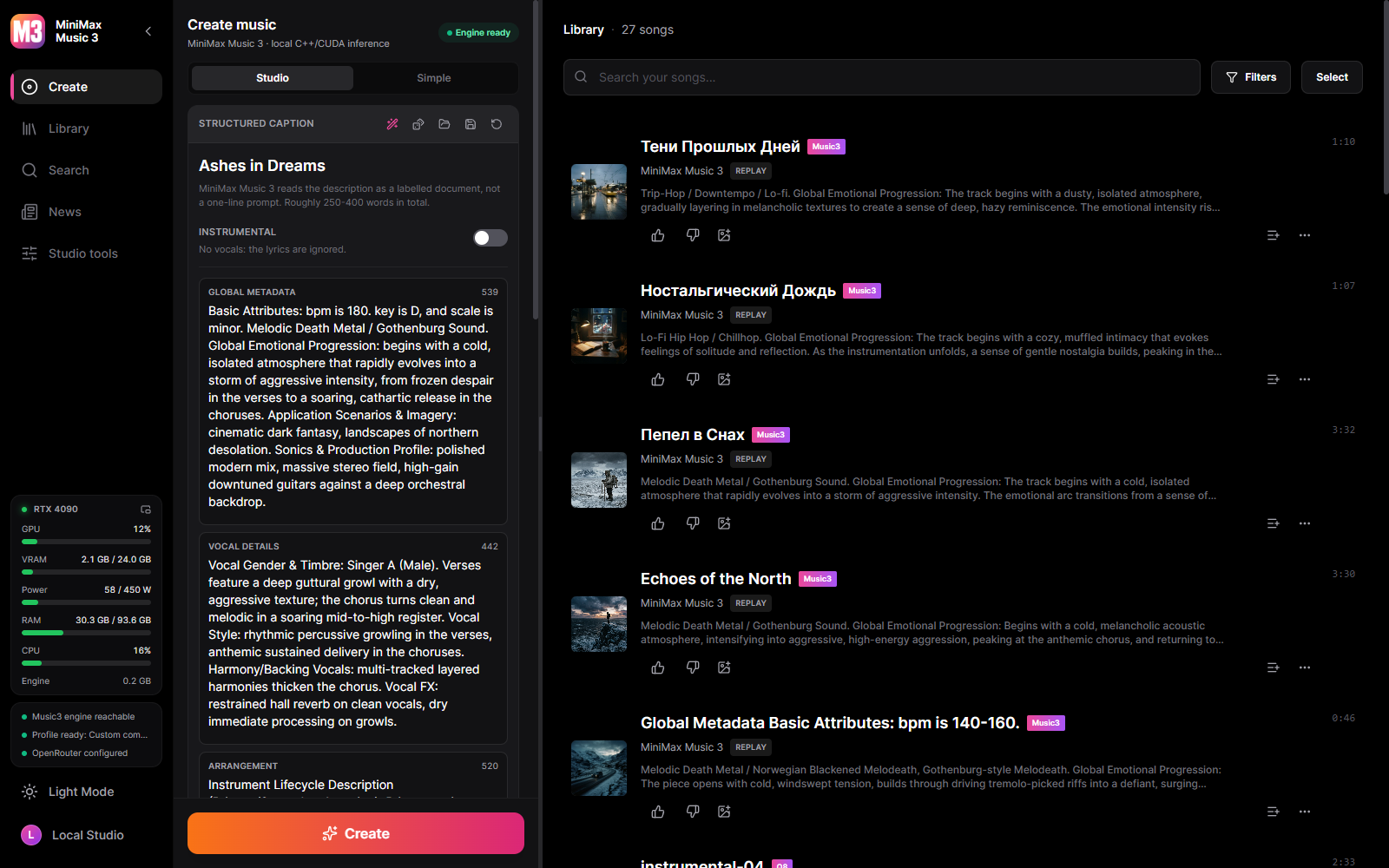
A Windows desktop studio for MiniMax Music3. Write a caption and lyrics, generate a full-length track on your own GPU, and keep everything — audio, settings and the exact request that produced it — in a local library.
One executable. No Python, no Node.js, no launcher script, nothing phoning home unless you ask it to.
What you can do
- Generate music locally with the complete Music3 component set: caption, lyrics, duration, DiT steps, LM CFG and top-k, DiT CFG, peak clip, separate DiT and LM seeds, several songs per prompt and several variations per song, MP3 or 16/24/32-bit WAV.
- Reproduce any track exactly. Every generation stores its request and its audio codes, so a track can be re-rendered deterministically, or re-rendered with different steps, seed or output format.
- Word-level karaoke — enhanced LRC with a timestamp on every word, aligned by Parakeet, Whisper or a cloud model. Your lyrics are kept; only the timing is borrowed.
- Karaoke video written with the bundled ffmpeg, hardware-encoded when the machine can and software-encoded when it cannot.
- A writing assistant for captions and lyrics, from a local GGUF model or OpenRouter, following MiniMax's own published prompting skill.
- Cover art from templates — write the look once with
{title},{style}and{excerpt}, and the track fills the rest in. - Manage your library — search, playlists, favourites, rename, import your own audio, export tracks, edit audio in the built-in editor.
- Watch what generation costs — live GPU load, VRAM, temperature, power draw, RAM and engine memory, in the sidebar or in a pop-out panel.
- Add cloud capabilities when you want them. Speech-to-text, a caption/lyrics assistant, cover art and cloud music can each independently use OpenRouter, chosen from the live model catalog. Local stays the default.
- Split a finished track into six stems — drums, bass, other, vocals, guitar and piano — with HT-Demucs on the GPU, or on the CPU when you prefer. The model is an optional download like everything else.
- Export files that carry their own data — MP3s are written with ID3v2.4: title, artist, album, genre, tempo, the lyrics and the cover art.
- Choose your own quality/VRAM trade-off in the model manager. Nothing downloads by itself.
Screenshots
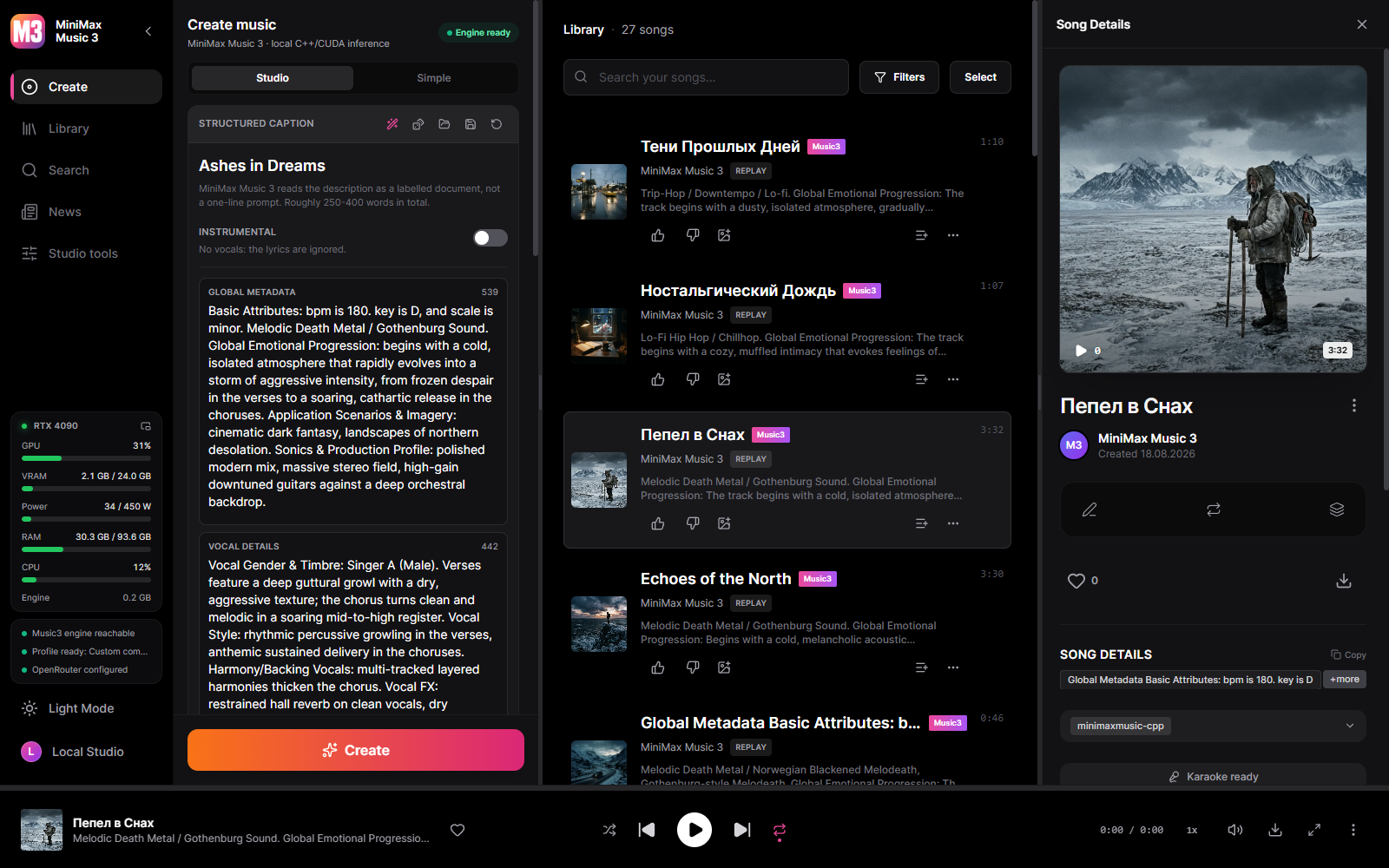 | 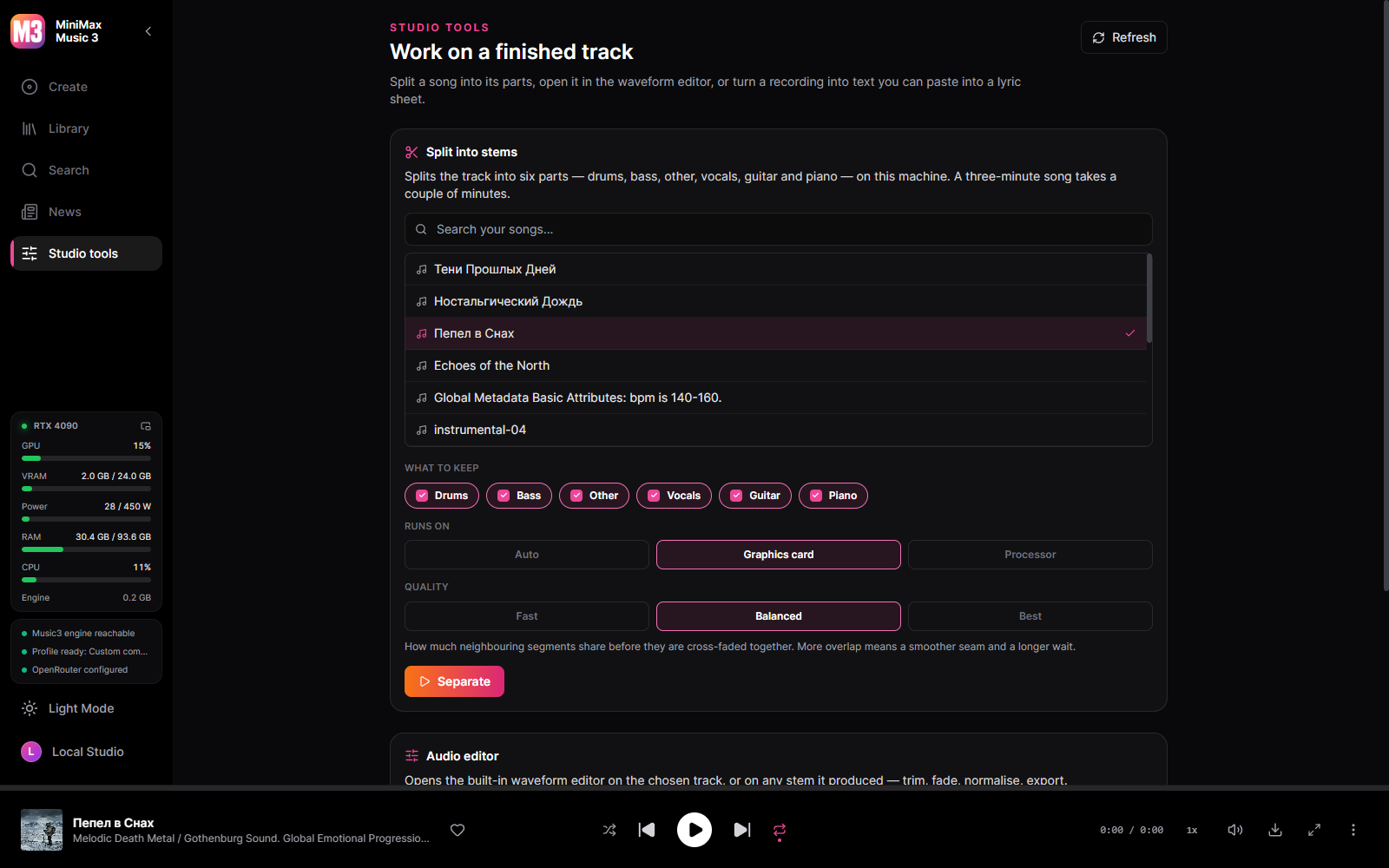 |
| A finished track — cover, timed lyrics, the request that made it | Studio tools — six-stem separation on the GPU, transcription, editor |
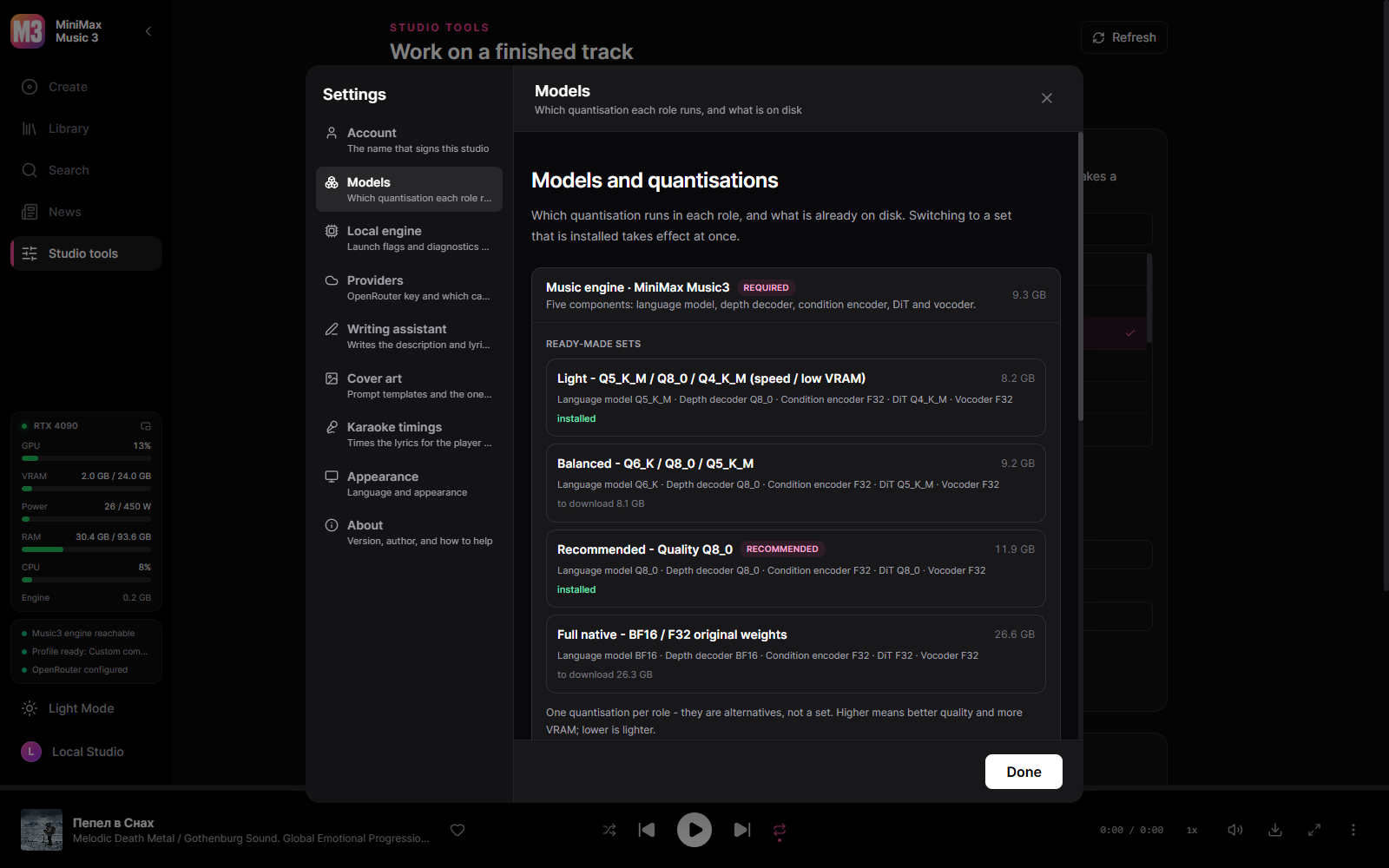 | 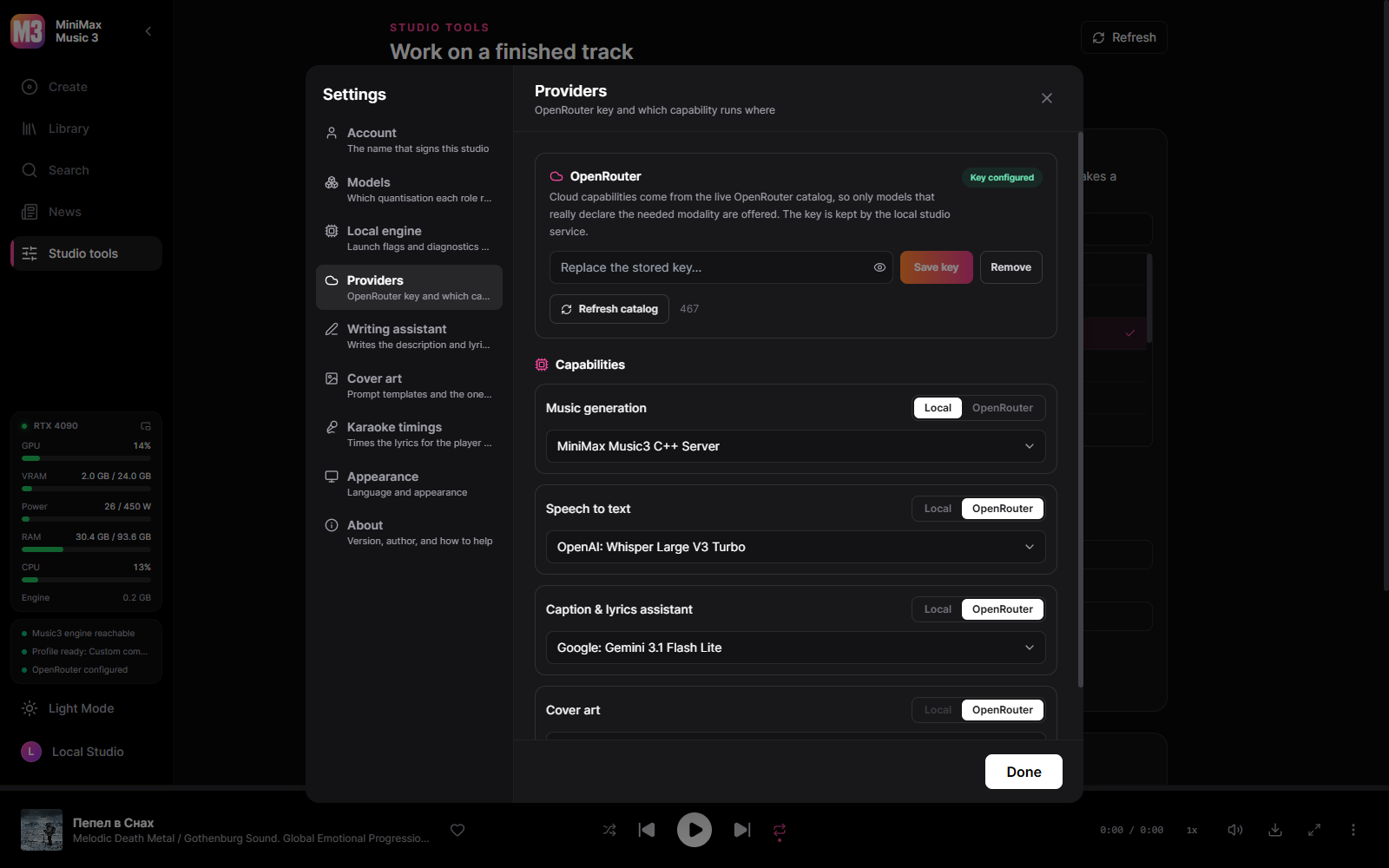 |
| Model sets — one quantisation per role, switchable once installed | Every capability runs where you say, local or OpenRouter |
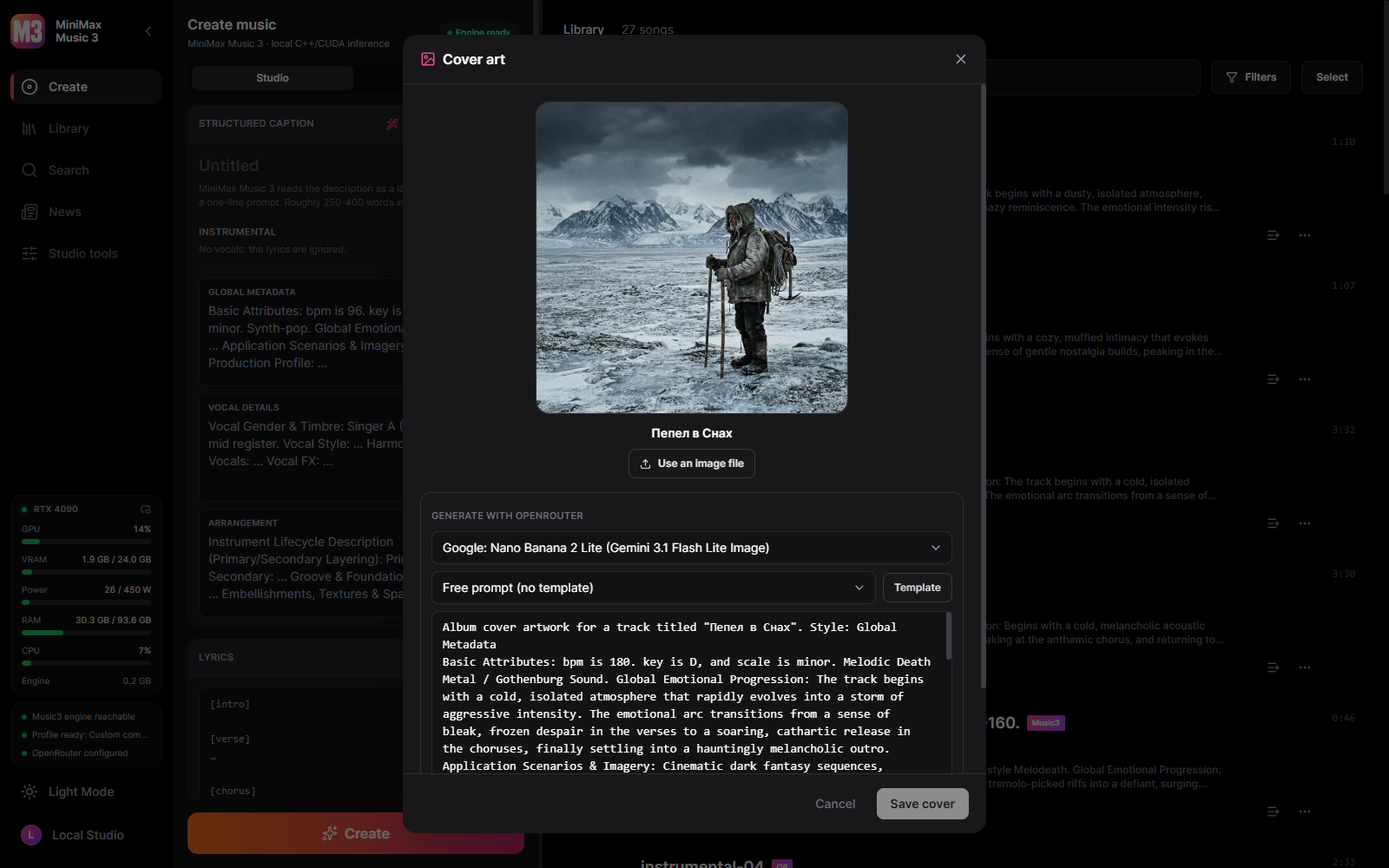 | |
| Cover art — large preview, prompt templates filled from the track | Writing a track — the caption as a document, every parameter a slider |
The same six screens are in the interface language you read: Русский, 中文, 日本語, 한국어 — on the project page, or in docs/screenshots.
What it needs
Windows 10/11 x64 and an NVIDIA card of the GTX 16 / RTX 20 generation or newer — Turing, Ampere, Ada and Blackwell. The engine ships compiled for those architectures; Pascal and older (GTX 10 series and down) are not supported, because the CUDA 13 toolkit that builds it dropped them.
Models
A runnable Music3 installation is always five components: language model, RVQ depth decoder, condition encoder, DiT and vocoder.
| Your GPU | Recommended profile | Download |
|---|---|---|
| 30 GB VRAM and above | Full Native — BF16 / BF16 / F32 | 28.6 GB |
| 15 GB and above | Quality — Q8_0 | 12.8 GB |
| 11.5 GB and above | Balanced — Q6_K / Q8_0 / Q5_K_M | 9.8 GB |
| 9.5 GB and above | Light — Q4_K_M / Q4_K_M / Q4_K_S | 7.7 GB |
| 8 GB cards | Minimal — Q3_K_M | 6.5 GB |
The studio detects your GPU and preselects the profile it can actually run, but the download is always your decision. Every component is checksum-verified against a pinned Hugging Face revision and downloads resume where they stopped.
Every profile is the same five roles at a different quantisation. The heavier sets — Q5 and up, and the original BF16/F32 weights — come from Serveurperso/MiniMax-Music3-GGUF; the lighter ones that let the studio fit an 8 GB card — Q4 and below, plus the two FP4 formats — come from scragnog/MiniMax-Music3-GGUF. Both repositories are pinned to a fixed revision.
The files are written to, and can be dropped into by hand at:
- Installed:
%LOCALAPPDATA%\MiniMax Music3 Studio\models\minimaxmusic-cpp\ - Portable:
<the folder you unzipped>\data\models\minimaxmusic-cpp\
Filenames must match the catalogue exactly. The studio checks each file's size and SHA-256, so a file you place by hand is recognised as already installed and never re-downloaded.
Model zoo — every file, with direct download links
Only the profile that matches your GPU is downloaded automatically; the rest are here for manual placement or for building a custom mix role-by-role in the model manager.
Language model (writes the audio-token stream)
| File | Size | Used by | Source |
|---|---|---|---|
MiniMax-Music3-language_model-BF16.gguf | 17.17 GB | Full native | Serveurperso |
MiniMax-Music3-language_model-Q8_0.gguf | 9.13 GB | Quality | Serveurperso |
MiniMax-Music3-language_model-Q6_K.gguf | 7.05 GB | Balanced | Serveurperso |
MiniMax-Music3-language_model-Q5_K_M.gguf | 6.28 GB | Custom | Serveurperso |
mm3-lm-Q4_K_M.gguf | 5.51 GB | Light | scragnog |
mm3-lm-Q4_K_S.gguf | 5.29 GB | Custom | scragnog |
mm3-lm-Q3_K_M.gguf | 4.59 GB | Minimal | scragnog |
mm3-lm-MXFP4.gguf | 5.44 GB | Custom (FP4) | scragnog |
mm3-lm-NVFP4.gguf | 5.66 GB | Custom (Blackwell FP4) | scragnog |
DiT / transformer (the diffusion generator)
| File | Size | Used by | Source |
|---|---|---|---|
MiniMax-Music3-transformer-F32.gguf | 9.73 GB | Full native | Serveurperso |
MiniMax-Music3-transformer-Q8_0.gguf | 2.60 GB | Quality | Serveurperso |
MiniMax-Music3-transformer-Q6_K.gguf | 2.01 GB | Custom | Serveurperso |
MiniMax-Music3-transformer-Q5_K_M.gguf | 1.69 GB | Balanced | Serveurperso |
MiniMax-Music3-transformer-Q4_K_M.gguf | 1.39 GB | Custom | Serveurperso |
mm3-dit-Q4_K_S.gguf | 1.39 GB | Light | scragnog |
mm3-dit-Q3_K_M.gguf | 1.14 GB | Minimal | scragnog |
mm3-dit-MXFP4.gguf | 1.31 GB | Custom (FP4) | scragnog |
mm3-dit-NVFP4.gguf | 1.38 GB | Custom (Blackwell FP4) | scragnog |
RVQ depth decoder
| File | Size | Used by | Source |
|---|---|---|---|
MiniMax-Music3-rvq_depth_decoder-BF16.gguf | 1.29 GB | Full native | Serveurperso |
MiniMax-Music3-rvq_depth_decoder-Q8_0.gguf | 687 MB | Quality / Balanced | Serveurperso |
mm3-depth-Q6_K.gguf | 530 MB | Custom | scragnog |
mm3-depth-Q5_K_M.gguf | 466 MB | Custom | scragnog |
mm3-depth-Q4_K_M.gguf | 405 MB | Light / Minimal | scragnog |
mm3-depth-MXFP4.gguf | 384 MB | Custom (FP4) | scragnog |
mm3-depth-NVFP4.gguf | 401 MB | Custom (Blackwell FP4) | scragnog |
Condition encoder and vocoder — the same file in every profile:
| File | Size | Used by | Source |
|---|---|---|---|
MiniMax-Music3-condition_encoder-F32.gguf | 101 MB | every profile | Serveurperso |
MiniMax-Music3-vocoder-F32.gguf | 306 MB | every profile | Serveurperso |
The engine and the DLLs it needs
The generator is a native CUDA program, not a Python stack. mm-server.exe loads a short
chain of libraries, and the studio's job before it starts the engine is to make sure every
link in that chain is present:
mm-server.exe
  ├─ ggml.dll → ggml-base.dll, ggml-cpu.dll, ggml-cuda.dll     shipped inside the app
  │                               └─ cublas64_13.dll, cublasLt64_13.dll   downloaded once
  │                               └─ nvcuda.dll                           your NVIDIA driver
  └─ vcruntime140.dll, msvcp140.dll, vcomp140.dll              Visual C++ runtime
Shipped inside the app. mm-server.exe, the four ggml*.dll files and
neural-codec.exe are part of every release, in resources\minimaxmusic-cpp\ beside the
main executable. They are built from the pinned minimaxmusic.cpp commit and never
downloaded.
Downloaded once, on the first engine start.
| File(s) | Where from | Size | Why |
|---|---|---|---|
cublas64_13.dll, cublasLt64_13.dll | NVIDIA's redistributable libcublas-windows-x86_64-13.5.1.27-archive.zip | 391 MB (zip) | The CUDA linear-algebra library ggml-cuda.dll is linked against. Too large, and under NVIDIA's own licence, to bundle — so it comes straight from NVIDIA. This is the NVIDIA cuBLAS 13.5 item in the model panel. |
| Visual C++ 2015–2022 runtime | Microsoft's permanent link vc_redist.x64.exe | small installer | The C++ runtime the engine is compiled against. Run only when the DLLs are missing — most Windows machines already have it. |
Never downloaded. nvcuda.dll is part of your NVIDIA driver; if the engine complains
about it, update the driver. A machine that already has the CUDA Toolkit installed has
cuBLAS on its PATH and downloads nothing at all.
If the automatic download can't reach out (proxy, firewall, offline)
You can place the CUDA libraries by hand:
- Download the cuBLAS archive from the NVIDIA link above and open the
.zip. - Inside
libcublas-windows-x86_64-13.5.1.27-archive\bin\, takecublas64_13.dllandcublasLt64_13.dll. - Drop both next to
mm-server.exe— theresources\minimaxmusic-cpp\folder beside the app's main.exe. - If the engine still won't start, install the Visual C++ runtime from the Microsoft link, and make sure your NVIDIA driver is current.
On startup the engine reads its own import table and fetches only what is genuinely missing, so a hand-placed DLL is simply found and used.
Architecture
React UI ─┐
          ├─ MiniMax Music3 Studio.exe   (window + native service)
Rust axum ┘        │
                   └─ minimaxmusic.cpp `mm-server`  (C++/CUDA, GGUF)
The service is compiled into the desktop binary and supervises the C++ engine. Cloud capabilities go through a capability catalog fetched live from OpenRouter, so the studio never offers a model that does not declare the modality it would be used for.
Music generation, speech-to-text, the assistant and cover art are configured independently, which makes fully local, fully cloud and hybrid setups possible without changing anything about how projects are stored.
Building from source
npm --prefix app install
npm --prefix desktop install
npm --prefix desktop run build      # the studio executable
cargo test --workspace
Developing the UI against a running service:
cargo run -p music-server           # service on 127.0.0.1:8765
npm --prefix app run dev            # UI on 127.0.0.1:3000
Native engine
scripts/build-minimax-runtime.ps1 builds the pinned minimaxmusic.cpp runtime. Releases
always stage a universal CUDA build; a card-specific build is for local testing only:
scripts\build-minimax-runtime.ps1 -OutputDirectory .\build\engine -RuntimeBackend cuda -CudaArchitecture native
Release
scripts/build-release.ps1 -Version X.Y.Z produces the NSIS installer, a portable
archive and a signed latest.json for the in-app updater. It needs the updater signing
keys: it reads them from TAURI_SIGNING_PRIVATE_KEY, TAURI_SIGNING_PRIVATE_KEY_PASSWORD
and TAURI_UPDATER_PUBKEY if they are set, and otherwise from
%USERPROFILE%\.tauri\mm3-release.key, its .pub, and .password beside them. It stops
if it can find the key neither way. Model weights are never included in an installer.
Other Projects by @timoncool
| Project | Description |
|---|---|
| ACE-Step Studio | Local AI music generation on ACE-Step — the studio this one grew out of |
| ACE-Step Studio · Pinokio | One-click cross-platform launcher for ACE-Step Studio |
| telegram-api-mcp | Full Telegram Bot API as an MCP server |
| civitai-mcp-ultimate | Civitai search, downloads and trend analysis over MCP |
Support the Author
I build open-source software and do AI research. Most of what I create is free and available to everyone. Your donations help me keep creating without worrying about where the next meal comes from =)
All donation methods · Русский · 中文 · 日本語 · 한국어 | dalink.to/nerual_dreming | boosty.to/neuro_art
- BTC:
1E7dHL22RpyhJGVpcvKdbyZgksSYkYeEBC - ETH (ERC20):
0xb5db65adf478983186d4897ba92fe2c25c594a0c - USDT (TRC20):
TQST9Lp2TjK6FiVkn4fwfGUee7NmkxEE7C
Star History

Licensing
This studio is a fork of ACE-Step Studio with ACE inference replaced by MiniMax Music3; the ACE sources live in their own repository. MiniMax Music3 weights are governed by their own community license — commercial use must display the MiniMax-Music3 name and implement the safeguards that license requires.
What changed and when is in CHANGELOG.md.
Contributors

607 commits

9 commits
Similar repos


Languages
TypeScript
38.0%
JavaScript
35.9%
Rust
22.3%
CSS
1.4%
HTML
1.0%
Native local/cloud AI music studio powered by MiniMax Music 3
TypeScript
52
616 commits
updated Sep 14, 2026
README
MiniMax Music3 Studio
Full-length AI music on your own GPU. One executable — no Python, no Node.js, no launcher.
English · Русский · 中文 · 日本語 · 한국어
A Windows desktop studio for MiniMax Music3. Write a caption and lyrics, generate a full-length track on your own GPU, and keep everything — audio, settings and the exact request that produced it — in a local library.
One executable. No Python, no Node.js, no launcher script, nothing phoning home unless you ask it to.
What you can do
- Generate music locally with the complete Music3 component set: caption, lyrics, duration, DiT steps, LM CFG and top-k, DiT CFG, peak clip, separate DiT and LM seeds, several songs per prompt and several variations per song, MP3 or 16/24/32-bit WAV.
- Reproduce any track exactly. Every generation stores its request and its audio codes, so a track can be re-rendered deterministically, or re-rendered with different steps, seed or output format.
- Word-level karaoke — enhanced LRC with a timestamp on every word, aligned by Parakeet, Whisper or a cloud model. Your lyrics are kept; only the timing is borrowed.
- Karaoke video written with the bundled ffmpeg, hardware-encoded when the machine can and software-encoded when it cannot.
- A writing assistant for captions and lyrics, from a local GGUF model or OpenRouter, following MiniMax's own published prompting skill.
- Cover art from templates — write the look once with
{title},{style}and{excerpt}, and the track fills the rest in. - Manage your library — search, playlists, favourites, rename, import your own audio, export tracks, edit audio in the built-in editor.
- Watch what generation costs — live GPU load, VRAM, temperature, power draw, RAM and engine memory, in the sidebar or in a pop-out panel.
- Add cloud capabilities when you want them. Speech-to-text, a caption/lyrics assistant, cover art and cloud music can each independently use OpenRouter, chosen from the live model catalog. Local stays the default.
- Split a finished track into six stems — drums, bass, other, vocals, guitar and piano — with HT-Demucs on the GPU, or on the CPU when you prefer. The model is an optional download like everything else.
- Export files that carry their own data — MP3s are written with ID3v2.4: title, artist, album, genre, tempo, the lyrics and the cover art.
- Choose your own quality/VRAM trade-off in the model manager. Nothing downloads by itself.
Screenshots
| |
| A finished track — cover, timed lyrics, the request that made it | Studio tools — six-stem separation on the GPU, transcription, editor |
| |
| Model sets — one quantisation per role, switchable once installed | Every capability runs where you say, local or OpenRouter |
| |
| Cover art — large preview, prompt templates filled from the track | Writing a track — the caption as a document, every parameter a slider |
The same six screens are in the interface language you read: Русский, 中文, 日本語, 한국어 — on the project page, or in docs/screenshots.
What it needs
Windows 10/11 x64 and an NVIDIA card of the GTX 16 / RTX 20 generation or newer — Turing, Ampere, Ada and Blackwell. The engine ships compiled for those architectures; Pascal and older (GTX 10 series and down) are not supported, because the CUDA 13 toolkit that builds it dropped them.
Models
A runnable Music3 installation is always five components: language model, RVQ depth decoder, condition encoder, DiT and vocoder.
| Your GPU | Recommended profile | Download |
|---|---|---|
| 30 GB VRAM and above | Full Native — BF16 / BF16 / F32 | 28.6 GB |
| 15 GB and above | Quality — Q8_0 | 12.8 GB |
| 11.5 GB and above | Balanced — Q6_K / Q8_0 / Q5_K_M | 9.8 GB |
| 9.5 GB and above | Light — Q4_K_M / Q4_K_M / Q4_K_S | 7.7 GB |
| 8 GB cards | Minimal — Q3_K_M | 6.5 GB |
The studio detects your GPU and preselects the profile it can actually run, but the download is always your decision. Every component is checksum-verified against a pinned Hugging Face revision and downloads resume where they stopped.
Every profile is the same five roles at a different quantisation. The heavier sets — Q5 and up, and the original BF16/F32 weights — come from Serveurperso/MiniMax-Music3-GGUF; the lighter ones that let the studio fit an 8 GB card — Q4 and below, plus the two FP4 formats — come from scragnog/MiniMax-Music3-GGUF. Both repositories are pinned to a fixed revision.
The files are written to, and can be dropped into by hand at:
- Installed:
%LOCALAPPDATA%\MiniMax Music3 Studio\models\minimaxmusic-cpp\ - Portable:
<the folder you unzipped>\data\models\minimaxmusic-cpp\
Filenames must match the catalogue exactly. The studio checks each file's size and SHA-256, so a file you place by hand is recognised as already installed and never re-downloaded.
Model zoo — every file, with direct download links
Only the profile that matches your GPU is downloaded automatically; the rest are here for manual placement or for building a custom mix role-by-role in the model manager.
Language model (writes the audio-token stream)
| File | Size | Used by | Source |
|---|---|---|---|
MiniMax-Music3-language_model-BF16.gguf | 17.17 GB | Full native | Serveurperso |
MiniMax-Music3-language_model-Q8_0.gguf | 9.13 GB | Quality | Serveurperso |
MiniMax-Music3-language_model-Q6_K.gguf | 7.05 GB | Balanced | Serveurperso |
MiniMax-Music3-language_model-Q5_K_M.gguf | 6.28 GB | Custom | Serveurperso |
mm3-lm-Q4_K_M.gguf | 5.51 GB | Light | scragnog |
mm3-lm-Q4_K_S.gguf | 5.29 GB | Custom | scragnog |
mm3-lm-Q3_K_M.gguf | 4.59 GB | Minimal | scragnog |
mm3-lm-MXFP4.gguf | 5.44 GB | Custom (FP4) | scragnog |
mm3-lm-NVFP4.gguf | 5.66 GB | Custom (Blackwell FP4) | scragnog |
DiT / transformer (the diffusion generator)
| File | Size | Used by | Source |
|---|---|---|---|
MiniMax-Music3-transformer-F32.gguf | 9.73 GB | Full native | Serveurperso |
MiniMax-Music3-transformer-Q8_0.gguf | 2.60 GB | Quality | Serveurperso |
MiniMax-Music3-transformer-Q6_K.gguf | 2.01 GB | Custom | Serveurperso |
MiniMax-Music3-transformer-Q5_K_M.gguf | 1.69 GB | Balanced | Serveurperso |
MiniMax-Music3-transformer-Q4_K_M.gguf | 1.39 GB | Custom | Serveurperso |
mm3-dit-Q4_K_S.gguf | 1.39 GB | Light | scragnog |
mm3-dit-Q3_K_M.gguf | 1.14 GB | Minimal | scragnog |
mm3-dit-MXFP4.gguf | 1.31 GB | Custom (FP4) | scragnog |
mm3-dit-NVFP4.gguf | 1.38 GB | Custom (Blackwell FP4) | scragnog |
RVQ depth decoder
| File | Size | Used by | Source |
|---|---|---|---|
MiniMax-Music3-rvq_depth_decoder-BF16.gguf | 1.29 GB | Full native | Serveurperso |
MiniMax-Music3-rvq_depth_decoder-Q8_0.gguf | 687 MB | Quality / Balanced | Serveurperso |
mm3-depth-Q6_K.gguf | 530 MB | Custom | scragnog |
mm3-depth-Q5_K_M.gguf | 466 MB | Custom | scragnog |
mm3-depth-Q4_K_M.gguf | 405 MB | Light / Minimal | scragnog |
mm3-depth-MXFP4.gguf | 384 MB | Custom (FP4) | scragnog |
mm3-depth-NVFP4.gguf | 401 MB | Custom (Blackwell FP4) | scragnog |
Condition encoder and vocoder — the same file in every profile:
| File | Size | Used by | Source |
|---|---|---|---|
MiniMax-Music3-condition_encoder-F32.gguf | 101 MB | every profile | Serveurperso |
MiniMax-Music3-vocoder-F32.gguf | 306 MB | every profile | Serveurperso |
The engine and the DLLs it needs
The generator is a native CUDA program, not a Python stack. mm-server.exe loads a short
chain of libraries, and the studio's job before it starts the engine is to make sure every
link in that chain is present:
mm-server.exe
  ├─ ggml.dll → ggml-base.dll, ggml-cpu.dll, ggml-cuda.dll     shipped inside the app
  │                               └─ cublas64_13.dll, cublasLt64_13.dll   downloaded once
  │                               └─ nvcuda.dll                           your NVIDIA driver
  └─ vcruntime140.dll, msvcp140.dll, vcomp140.dll              Visual C++ runtime
Shipped inside the app. mm-server.exe, the four ggml*.dll files and
neural-codec.exe are part of every release, in resources\minimaxmusic-cpp\ beside the
main executable. They are built from the pinned minimaxmusic.cpp commit and never
downloaded.
Downloaded once, on the first engine start.
| File(s) | Where from | Size | Why |
|---|---|---|---|
cublas64_13.dll, cublasLt64_13.dll | NVIDIA's redistributable libcublas-windows-x86_64-13.5.1.27-archive.zip | 391 MB (zip) | The CUDA linear-algebra library ggml-cuda.dll is linked against. Too large, and under NVIDIA's own licence, to bundle — so it comes straight from NVIDIA. This is the NVIDIA cuBLAS 13.5 item in the model panel. |
| Visual C++ 2015–2022 runtime | Microsoft's permanent link vc_redist.x64.exe | small installer | The C++ runtime the engine is compiled against. Run only when the DLLs are missing — most Windows machines already have it. |
Never downloaded. nvcuda.dll is part of your NVIDIA driver; if the engine complains
about it, update the driver. A machine that already has the CUDA Toolkit installed has
cuBLAS on its PATH and downloads nothing at all.
If the automatic download can't reach out (proxy, firewall, offline)
You can place the CUDA libraries by hand:
- Download the cuBLAS archive from the NVIDIA link above and open the
.zip. - Inside
libcublas-windows-x86_64-13.5.1.27-archive\bin\, takecublas64_13.dllandcublasLt64_13.dll. - Drop both next to
mm-server.exe— theresources\minimaxmusic-cpp\folder beside the app's main.exe. - If the engine still won't start, install the Visual C++ runtime from the Microsoft link, and make sure your NVIDIA driver is current.
On startup the engine reads its own import table and fetches only what is genuinely missing, so a hand-placed DLL is simply found and used.
Architecture
React UI ─┐
          ├─ MiniMax Music3 Studio.exe   (window + native service)
Rust axum ┘        │
                   └─ minimaxmusic.cpp `mm-server`  (C++/CUDA, GGUF)
The service is compiled into the desktop binary and supervises the C++ engine. Cloud capabilities go through a capability catalog fetched live from OpenRouter, so the studio never offers a model that does not declare the modality it would be used for.
Music generation, speech-to-text, the assistant and cover art are configured independently, which makes fully local, fully cloud and hybrid setups possible without changing anything about how projects are stored.
Building from source
npm --prefix app install
npm --prefix desktop install
npm --prefix desktop run build      # the studio executable
cargo test --workspace
Developing the UI against a running service:
cargo run -p music-server           # service on 127.0.0.1:8765
npm --prefix app run dev            # UI on 127.0.0.1:3000
Native engine
scripts/build-minimax-runtime.ps1 builds the pinned minimaxmusic.cpp runtime. Releases
always stage a universal CUDA build; a card-specific build is for local testing only:
scripts\build-minimax-runtime.ps1 -OutputDirectory .\build\engine -RuntimeBackend cuda -CudaArchitecture native
Release
scripts/build-release.ps1 -Version X.Y.Z produces the NSIS installer, a portable
archive and a signed latest.json for the in-app updater. It needs the updater signing
keys: it reads them from TAURI_SIGNING_PRIVATE_KEY, TAURI_SIGNING_PRIVATE_KEY_PASSWORD
and TAURI_UPDATER_PUBKEY if they are set, and otherwise from
%USERPROFILE%\.tauri\mm3-release.key, its .pub, and .password beside them. It stops
if it can find the key neither way. Model weights are never included in an installer.
Other Projects by @timoncool
| Project | Description |
|---|---|
| ACE-Step Studio | Local AI music generation on ACE-Step — the studio this one grew out of |
| ACE-Step Studio · Pinokio | One-click cross-platform launcher for ACE-Step Studio |
| telegram-api-mcp | Full Telegram Bot API as an MCP server |
| civitai-mcp-ultimate | Civitai search, downloads and trend analysis over MCP |
Support the Author
I build open-source software and do AI research. Most of what I create is free and available to everyone. Your donations help me keep creating without worrying about where the next meal comes from =)
All donation methods · Русский · 中文 · 日本語 · 한국어 | dalink.to/nerual_dreming | boosty.to/neuro_art
- BTC:
1E7dHL22RpyhJGVpcvKdbyZgksSYkYeEBC - ETH (ERC20):
0xb5db65adf478983186d4897ba92fe2c25c594a0c - USDT (TRC20):
TQST9Lp2TjK6FiVkn4fwfGUee7NmkxEE7C
Star History
Licensing
This studio is a fork of ACE-Step Studio with ACE inference replaced by MiniMax Music3; the ACE sources live in their own repository. MiniMax Music3 weights are governed by their own community license — commercial use must display the MiniMax-Music3 name and implement the safeguards that license requires.
What changed and when is in CHANGELOG.md.
Similar repos
Contributors
607 commits
9 commits
Languages
TypeScript
38.0%
JavaScript
35.9%
Rust
22.3%
CSS
1.4%
HTML
1.0%