
Portable AI music generator — full songs with vocals, covers, music videos. One-click install, 100% offline, NVIDIA GPU.
See the codeREADME
ACE-Step Studio
Suno at home. Local AI music generation studio — songs, vocals, lyrics, covers, music videos.




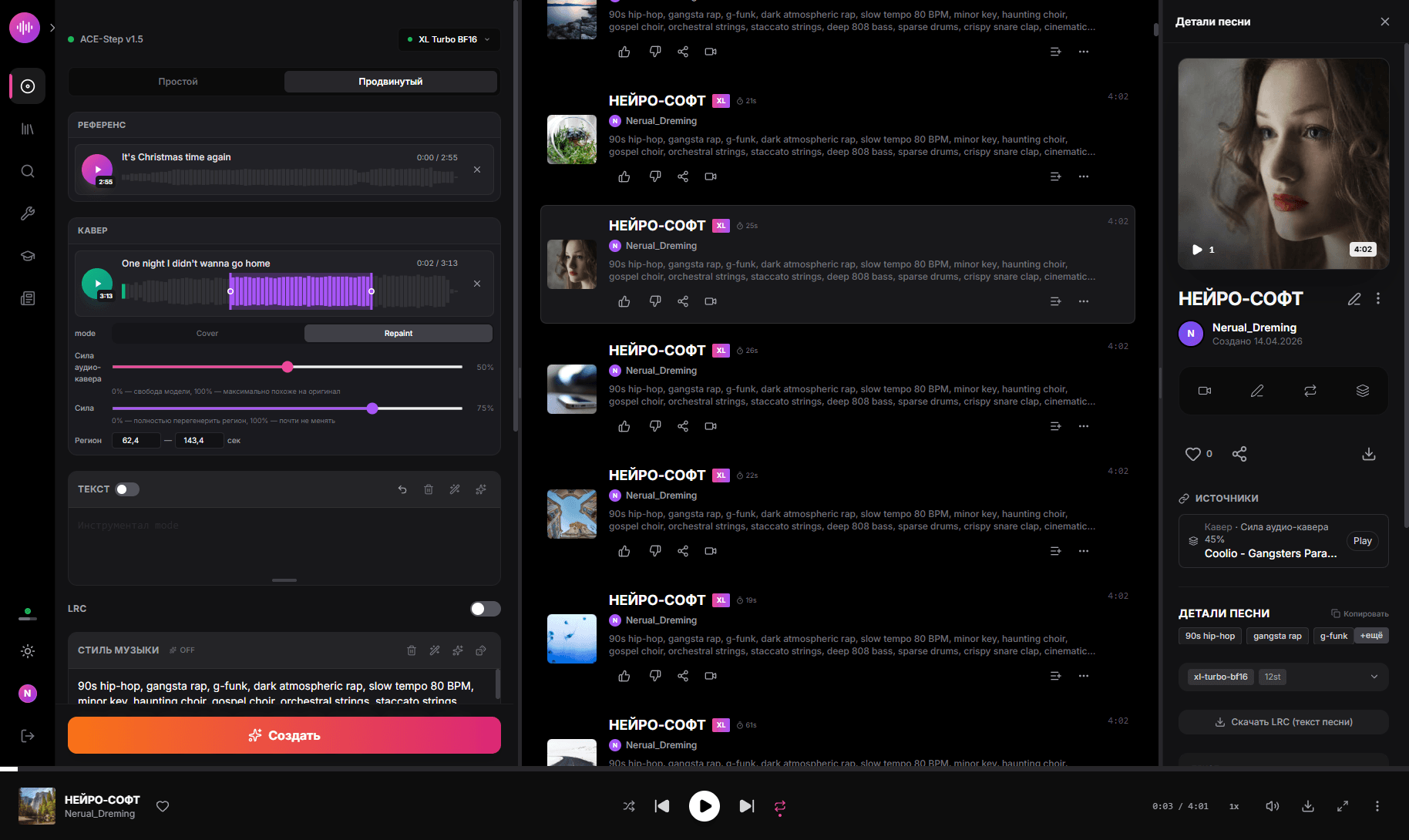
Create full songs with vocals, lyrics, covers, remixes and music videos — 100% local, no cloud, no subscriptions, no internet required. One-click install on Windows, runs on any NVIDIA GPU with 12+ GB VRAM.
Built on ACE-Step 1.5 XL — the open-source 4B parameter DiT music generation model.
Why ACE-Step Studio?
- Free forever — no API keys, no credits, no usage limits
- Private — your music never leaves your machine
- Portable — everything in one folder, copy to USB, delete = uninstall
- One-click —
install.bat→run.bat→ make music
Features
Music Generation
- Full songs with vocals — up to 8 minutes, any language, any genre
- Simple & Custom modes — describe what you want or fine-tune every parameter
- 3 XL Models — XL Turbo (8 steps, fast), XL SFT (50 steps, max quality), XL Turbo BF16 (compact, 7.5 GB)
- AI Lyrics & Style — LLM generates lyrics and enriches style descriptions
- Hot Model Switching — change DiT/LM models without restart
- Batch generation — create multiple variations at once
- 10 samplers, 7 schedulers — euler, heun, midpoint, dopri5, deis, ipndm, and more
- LoRA support — load LoRA weights at inference time
- ID3 tags — MP3 files include title, artist, cover art, lyrics, BPM
Cloud LLM & Image (optional, off by default)
- OpenRouter for lyrics & style — bring-your-own-key alternative to the local LM. Pick any model (Claude, GPT-4o, DeepSeek, Llama 3.x, etc.), get instant lyrics + caption + key/BPM/duration metadata without using GPU VRAM. Local LM keeps working in parallel — toggle anytime.
- Pollinations.ai cover generation — auto-generate album covers in parallel with audio (server-side, fire-and-forget, never blocks audio gen). The visual prompt comes straight from the OpenRouter LLM (which writes a 1–2 sentence visual description tailored to the song's lyrics and mood) or from a keyword fallback. Anonymous tier works; bring your own token for higher rate limits and no watermark.
- Manual cover regen modal — picture-with-pencil button on every track. Pick any Pollinations model, write your own prompt, "Try again" until you like it, or upload your own image from disk (JPEG/PNG/WEBP, ≤10MB). Saved cover replaces both
songs.cover_urland the embedded ID3 frame inside the MP3, so external players see your picked image too. - Independent toggles — every cloud feature is opt-in. Use only Pollinations covers + local LM, or only OpenRouter lyrics + auto-picsum covers, or both, or neither. Local-only mode is the default.
Cover & Remix
- Cover mode — transform existing audio into a new style while keeping the melody
- Repaint mode — regenerate specific sections of a song (region selection on waveform)
- Reference audio — use a reference track to guide the generation style
- Audio strength control — blend between source and generated audio
Video Studio
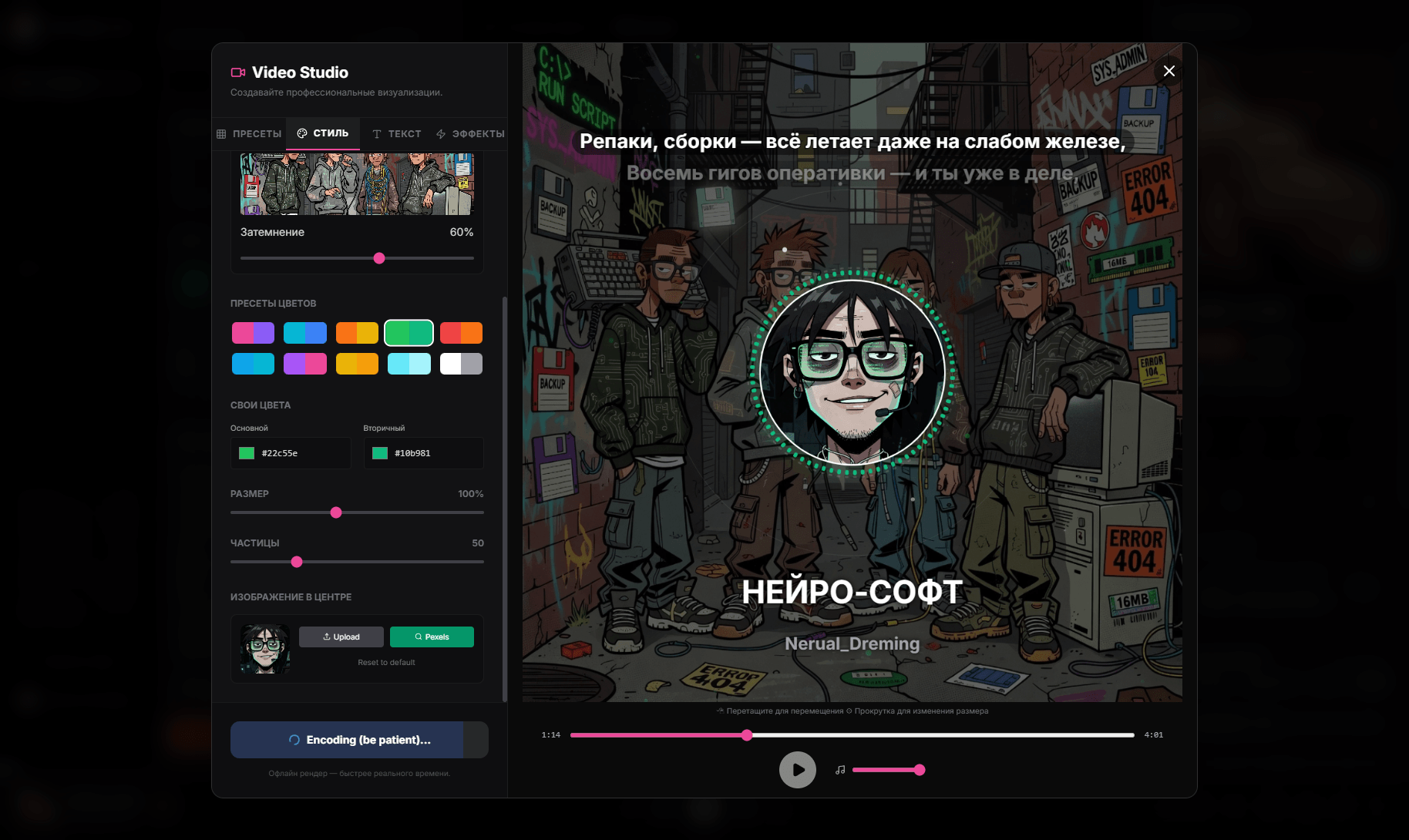
- Music video generator — NCS-style visualizers with 10 presets
- Karaoke lyrics — synchronized LRC subtitles with 3 styles (lines, scroll, karaoke fill)
- WYSIWYG editor — drag elements, scroll to resize, selection frames
- Aspect ratios — 16:9, 9:16 (Reels/TikTok), 1:1 (Instagram)
- 12 effects — shake, glitch, VHS, CCTV, scanlines, bloom, film grain, strobe, vignette, hue shift, letterbox, pixelate
- Background — random, custom image, Pexels search, video backgrounds
- Server-side rendering — native ffmpeg with NVENC GPU acceleration
Audio Tools
- Audio editor — trim, fade, effects (AudioMass)
- Stem extraction — separate vocals, drums, bass, other (Demucs)
- LRC download — export synchronized lyrics
Model Tools
- BF16 Converter — convert safetensors from FP32/FP16 to BFloat16 (~50% size reduction)
- Model Merger — merge two ACE-Step models with adjustable alpha (3 methods)
- Bake LoRA — bake LoRA weights into base model
Interface
- Single terminal — one
run.bat, Express manages Python/Gradio automatically - Portable — everything in one folder, no system-wide installs
- 5 languages — English, Russian, Chinese, Japanese, Korean
- LAN access — use from any device on your network (phone, tablet)
- GPU monitoring — live VRAM, RAM, CPU, temperature stats
- Dark/Light theme
System Requirements
| Component | Minimum | Recommended |
|---|---|---|
| GPU VRAM | 12 GB | 20+ GB |
| RAM | 16 GB | 32 GB |
| Disk | 30 GB | 60 GB (all models) |
| OS | Windows 10/11 | Windows 11 |
| GPU | RTX 3060+ | RTX 4090 |
Quick Start
🚀 One-click cross-platform install via Pinokio:

Works on Windows / Linux (x64 & aarch64) / macOS (Apple Silicon & Intel). No
install.batrequired — Pinokio bundles Python, Node, ffmpeg, venv and picks the right PyTorch build for your GPU automatically.Pinokio launcher repo: timoncool/ACE-Step-Studio-pinokio

Or install manually on Windows:
1. Clone
git clone https://github.com/timoncool/ACE-Step-Studio.git
cd ACE-Step-Studio
2. Install
install.bat
Select your GPU type (CUDA 12.8 / 12.6 / 12.4). Installs portable Python 3.12, PyTorch, Node.js 22, and all dependencies — nothing system-wide.
3. Run
run.bat
Browser opens automatically at http://localhost:3001. Models download on first run (~7.5 GB for default BF16 model).
Launchers
| Script | Description |
|---|---|
run.bat | Standard launch — DiT + LM (0.6B PT), full features |
run-no-lm.bat | Launch without LM — more VRAM for DiT, cover/repaint work, no AI lyrics/thinking |
run-dev.bat | Dev mode — 3 terminals with Vite HMR |
install.bat | One-click installer |
update.bat | Update code + deps + rebuild frontend |
reinstall.bat | Clean reinstall (preserves models and data) |
download_model.bat | Pre-download models |
Models
| Model | Size | Steps | Speed | Quality |
|---|---|---|---|---|
| XL Turbo BF16 | 7.5 GB | 8 | Fast | High |
| XL Turbo | 18.8 GB | 8 | Fast | Very High |
| XL SFT | 18.8 GB | 50 | Slow | Highest |
| XL Merge SFT+Turbo | 18.8 GB | 12 | Medium | Very High |
LM Models (text/lyrics AI)
| Model | VRAM | Quality |
|---|---|---|
| 0.6B | ~0.5 GB | Basic |
| 1.7B | ~1.5 GB | Good |
| 4B | ~4 GB | Best |
LM backend: PT (PyTorch, lighter) or vLLM (faster inference, more VRAM).
API Keys (optional)
ACE-Step Studio is fully usable without any API keys — local DiT + local LM cover everything music-generation related. The keys below unlock optional cloud services that some users prefer for convenience or quality. They are stored in browser localStorage only, never sent to any server but the provider's own.
TL;DR — both providers can be used 100 % free. OpenRouter has dozens of completely free models you can pick (DeepSeek R1 free, Llama 3.3 70B free, Gemini 2.0 Flash free, Qwen 2.5 free, Mistral Small free…) — just create a key and choose any model with a
:freetag. Pollinations.ai works without any account at all on the anonymous tier (slower, occasional watermark on some models) — leave the key field blank and it just works.
| Provider | What it does in the app | Where to get it | Free tier |
|---|---|---|---|
| OpenRouter | Generates lyrics + caption + BPM/key/duration metadata + a visual cover prompt from your one-line description (replaces the local LM). Lets you pick Claude / GPT-4o / DeepSeek / Llama / Mistral / Gemini / any of 200+ models. | openrouter.ai/keys — sign in with Google/GitHub, click Create Key. | Yes — many fully free models (filter the model picker by :free): DeepSeek R1 free, Llama 3.3 70B Instruct free, Gemini 2.0 Flash free, Qwen 2.5 free, Mistral Small 3 free, and more. Paid models are pay-per-token from your wallet — no monthly subscription required. |
| Pollinations.ai | Generates the album cover image in parallel with audio gen, plus powers the manual cover-regen modal. Token also unlocks the full image-model catalogue (FLUX, Qwen-Image, Klein, GPT-Image, Z-Image, …) and removes the watermark. | auth.pollinations.ai — sign in, copy pk_… (public) or sk_… (private) key. | Yes — fully free, anonymous tier works without any account or key. Slower (1 req/15 s) and may have a small watermark on certain models. With a free token: 1 req/5 s + no watermark + full model list. |
Where to enter them
- OpenRouter → Create panel → Advanced → toggle "Use OpenRouter" → paste key, pick model, Test.
- Pollinations → Create panel → Advanced → Cover image (Pollinations.ai) → toggle "Generate covers via Pollinations.ai" → paste key (optional), pick model, Test.
Both toggles persist across sessions and are independent — turn either one off to fall back to the local pipeline (LM for lyrics, picsum for covers).
How private is this?
- Keys live only in your browser's
localStoragefor this site. - They are sent only to
openrouter.ai/gen.pollinations.aiover HTTPS, attached to that single API call. ACE-Step Studio does not have a backend account, telemetry, or proxy server. - Cover images you generate are written to
app/server/public/audio/<userId>/covers/<songId>.jpgon your machine. Nothing is uploaded anywhere. - If you don't want any cloud calls, simply leave both toggles off — the entire app works offline.
Architecture
ACE-Step-Studio/
├── app/              # React + Express frontend & backend
├── ACE-Step-1.5/     # Python ML pipeline
├── python/           # Portable Python 3.12 (created by install.bat)
├── node/             # Portable Node.js 22 (created by install.bat)
├── models/           # HuggingFace cache (created at runtime)
├── run.bat           # Standard launcher
├── run-no-lm.bat     # Launch without LM
├── install.bat       # One-click installer
├── update.bat        # Updater
└── CHANGELOG.md      # Version history
Updating
update.bat
Pulls latest code, updates Python/Node deps, rebuilds frontend.
Contributing
Contributions welcome! Here's how to help:
- Report bugs — open an issue
- Suggest features — start a discussion
- Submit PRs — see AGENTS.md for architecture, coding conventions, and pitfalls
Areas where help is especially needed:
- macOS / Linux support
- New visualizer presets for Video Studio
- Translations (i18n)
- LoRA training UI improvements
- Documentation & tutorials
Other Portable Neural Networks
| Project | Description |
|---|---|
| Foundation Music Lab | Music generation + timeline editor |
| VibeVoice ASR | Speech recognition (ASR) |
| LavaSR | Audio quality enhancement |
| Qwen3-TTS | Text-to-speech by Qwen |
| SuperCaption Qwen3-VL | Image captioning |
| VideoSOS | AI video production |
| RC Stable Audio Tools | Music and audio generation |
Authors
- Nerual Dreming — Telegram | neuro-cartel.com | ArtGeneration.me
- Neiro-Soft — Telegram | portable neural network builds
Acknowledgments
- ACE-Step Team — open source ACE-Step 1.5 music generation model
- fspecii — original ACE-Step UI
- AudioMass — browser audio editor
- Demucs — stem extraction by Meta
- Pexels — free stock photos/videos
- Gradio — ML model serving
- FFmpeg — video encoding
Support This Project
I build software and do research in AI and music generation. Most of what I create is free and open source. Your donations allow me to keep creating and exploring without worrying about where the next meal comes from =)
All donation methods | dalink.to/nerual_dreming | boosty.to/neuro_art
- BTC:
1E7dHL22RpyhJGVpcvKdbyZgksSYkYeEBC - ETH (ERC20):
0xb5db65adf478983186d4897ba92fe2c25c594a0c - USDT (TRC20):
TQST9Lp2TjK6FiVkn4fwfGUee7NmkxEE7C
Star History

Contributors

494 commits

13 commits
Similar repos


Languages
Python
52.3%
JavaScript
23.4%
TypeScript
18.1%
Shell
2.5%
Batchfile
2.1%
Portable AI music generator — full songs with vocals, covers, music videos. One-click install, 100% offline, NVIDIA GPU.
See the codeREADME
ACE-Step Studio
Suno at home. Local AI music generation studio — songs, vocals, lyrics, covers, music videos.
Create full songs with vocals, lyrics, covers, remixes and music videos — 100% local, no cloud, no subscriptions, no internet required. One-click install on Windows, runs on any NVIDIA GPU with 12+ GB VRAM.
Built on ACE-Step 1.5 XL — the open-source 4B parameter DiT music generation model.
Why ACE-Step Studio?
- Free forever — no API keys, no credits, no usage limits
- Private — your music never leaves your machine
- Portable — everything in one folder, copy to USB, delete = uninstall
- One-click —
install.bat→run.bat→ make music
Features
Music Generation
- Full songs with vocals — up to 8 minutes, any language, any genre
- Simple & Custom modes — describe what you want or fine-tune every parameter
- 3 XL Models — XL Turbo (8 steps, fast), XL SFT (50 steps, max quality), XL Turbo BF16 (compact, 7.5 GB)
- AI Lyrics & Style — LLM generates lyrics and enriches style descriptions
- Hot Model Switching — change DiT/LM models without restart
- Batch generation — create multiple variations at once
- 10 samplers, 7 schedulers — euler, heun, midpoint, dopri5, deis, ipndm, and more
- LoRA support — load LoRA weights at inference time
- ID3 tags — MP3 files include title, artist, cover art, lyrics, BPM
Cloud LLM & Image (optional, off by default)
- OpenRouter for lyrics & style — bring-your-own-key alternative to the local LM. Pick any model (Claude, GPT-4o, DeepSeek, Llama 3.x, etc.), get instant lyrics + caption + key/BPM/duration metadata without using GPU VRAM. Local LM keeps working in parallel — toggle anytime.
- Pollinations.ai cover generation — auto-generate album covers in parallel with audio (server-side, fire-and-forget, never blocks audio gen). The visual prompt comes straight from the OpenRouter LLM (which writes a 1–2 sentence visual description tailored to the song's lyrics and mood) or from a keyword fallback. Anonymous tier works; bring your own token for higher rate limits and no watermark.
- Manual cover regen modal — picture-with-pencil button on every track. Pick any Pollinations model, write your own prompt, "Try again" until you like it, or upload your own image from disk (JPEG/PNG/WEBP, ≤10MB). Saved cover replaces both
songs.cover_urland the embedded ID3 frame inside the MP3, so external players see your picked image too. - Independent toggles — every cloud feature is opt-in. Use only Pollinations covers + local LM, or only OpenRouter lyrics + auto-picsum covers, or both, or neither. Local-only mode is the default.
Cover & Remix
- Cover mode — transform existing audio into a new style while keeping the melody
- Repaint mode — regenerate specific sections of a song (region selection on waveform)
- Reference audio — use a reference track to guide the generation style
- Audio strength control — blend between source and generated audio
Video Studio
- Music video generator — NCS-style visualizers with 10 presets
- Karaoke lyrics — synchronized LRC subtitles with 3 styles (lines, scroll, karaoke fill)
- WYSIWYG editor — drag elements, scroll to resize, selection frames
- Aspect ratios — 16:9, 9:16 (Reels/TikTok), 1:1 (Instagram)
- 12 effects — shake, glitch, VHS, CCTV, scanlines, bloom, film grain, strobe, vignette, hue shift, letterbox, pixelate
- Background — random, custom image, Pexels search, video backgrounds
- Server-side rendering — native ffmpeg with NVENC GPU acceleration
Audio Tools
- Audio editor — trim, fade, effects (AudioMass)
- Stem extraction — separate vocals, drums, bass, other (Demucs)
- LRC download — export synchronized lyrics
Model Tools
- BF16 Converter — convert safetensors from FP32/FP16 to BFloat16 (~50% size reduction)
- Model Merger — merge two ACE-Step models with adjustable alpha (3 methods)
- Bake LoRA — bake LoRA weights into base model
Interface
- Single terminal — one
run.bat, Express manages Python/Gradio automatically - Portable — everything in one folder, no system-wide installs
- 5 languages — English, Russian, Chinese, Japanese, Korean
- LAN access — use from any device on your network (phone, tablet)
- GPU monitoring — live VRAM, RAM, CPU, temperature stats
- Dark/Light theme
System Requirements
| Component | Minimum | Recommended |
|---|---|---|
| GPU VRAM | 12 GB | 20+ GB |
| RAM | 16 GB | 32 GB |
| Disk | 30 GB | 60 GB (all models) |
| OS | Windows 10/11 | Windows 11 |
| GPU | RTX 3060+ | RTX 4090 |
Quick Start
🚀 One-click cross-platform install via Pinokio:
Works on Windows / Linux (x64 & aarch64) / macOS (Apple Silicon & Intel). No
install.batrequired — Pinokio bundles Python, Node, ffmpeg, venv and picks the right PyTorch build for your GPU automatically.Pinokio launcher repo: timoncool/ACE-Step-Studio-pinokio
Or install manually on Windows:
1. Clone
git clone https://github.com/timoncool/ACE-Step-Studio.git
cd ACE-Step-Studio
2. Install
install.bat
Select your GPU type (CUDA 12.8 / 12.6 / 12.4). Installs portable Python 3.12, PyTorch, Node.js 22, and all dependencies — nothing system-wide.
3. Run
run.bat
Browser opens automatically at http://localhost:3001. Models download on first run (~7.5 GB for default BF16 model).
Launchers
| Script | Description |
|---|---|
run.bat | Standard launch — DiT + LM (0.6B PT), full features |
run-no-lm.bat | Launch without LM — more VRAM for DiT, cover/repaint work, no AI lyrics/thinking |
run-dev.bat | Dev mode — 3 terminals with Vite HMR |
install.bat | One-click installer |
update.bat | Update code + deps + rebuild frontend |
reinstall.bat | Clean reinstall (preserves models and data) |
download_model.bat | Pre-download models |
Models
| Model | Size | Steps | Speed | Quality |
|---|---|---|---|---|
| XL Turbo BF16 | 7.5 GB | 8 | Fast | High |
| XL Turbo | 18.8 GB | 8 | Fast | Very High |
| XL SFT | 18.8 GB | 50 | Slow | Highest |
| XL Merge SFT+Turbo | 18.8 GB | 12 | Medium | Very High |
LM Models (text/lyrics AI)
| Model | VRAM | Quality |
|---|---|---|
| 0.6B | ~0.5 GB | Basic |
| 1.7B | ~1.5 GB | Good |
| 4B | ~4 GB | Best |
LM backend: PT (PyTorch, lighter) or vLLM (faster inference, more VRAM).
API Keys (optional)
ACE-Step Studio is fully usable without any API keys — local DiT + local LM cover everything music-generation related. The keys below unlock optional cloud services that some users prefer for convenience or quality. They are stored in browser localStorage only, never sent to any server but the provider's own.
TL;DR — both providers can be used 100 % free. OpenRouter has dozens of completely free models you can pick (DeepSeek R1 free, Llama 3.3 70B free, Gemini 2.0 Flash free, Qwen 2.5 free, Mistral Small free…) — just create a key and choose any model with a
:freetag. Pollinations.ai works without any account at all on the anonymous tier (slower, occasional watermark on some models) — leave the key field blank and it just works.
| Provider | What it does in the app | Where to get it | Free tier |
|---|---|---|---|
| OpenRouter | Generates lyrics + caption + BPM/key/duration metadata + a visual cover prompt from your one-line description (replaces the local LM). Lets you pick Claude / GPT-4o / DeepSeek / Llama / Mistral / Gemini / any of 200+ models. | openrouter.ai/keys — sign in with Google/GitHub, click Create Key. | Yes — many fully free models (filter the model picker by :free): DeepSeek R1 free, Llama 3.3 70B Instruct free, Gemini 2.0 Flash free, Qwen 2.5 free, Mistral Small 3 free, and more. Paid models are pay-per-token from your wallet — no monthly subscription required. |
| Pollinations.ai | Generates the album cover image in parallel with audio gen, plus powers the manual cover-regen modal. Token also unlocks the full image-model catalogue (FLUX, Qwen-Image, Klein, GPT-Image, Z-Image, …) and removes the watermark. | auth.pollinations.ai — sign in, copy pk_… (public) or sk_… (private) key. | Yes — fully free, anonymous tier works without any account or key. Slower (1 req/15 s) and may have a small watermark on certain models. With a free token: 1 req/5 s + no watermark + full model list. |
Where to enter them
- OpenRouter → Create panel → Advanced → toggle "Use OpenRouter" → paste key, pick model, Test.
- Pollinations → Create panel → Advanced → Cover image (Pollinations.ai) → toggle "Generate covers via Pollinations.ai" → paste key (optional), pick model, Test.
Both toggles persist across sessions and are independent — turn either one off to fall back to the local pipeline (LM for lyrics, picsum for covers).
How private is this?
- Keys live only in your browser's
localStoragefor this site. - They are sent only to
openrouter.ai/gen.pollinations.aiover HTTPS, attached to that single API call. ACE-Step Studio does not have a backend account, telemetry, or proxy server. - Cover images you generate are written to
app/server/public/audio/<userId>/covers/<songId>.jpgon your machine. Nothing is uploaded anywhere. - If you don't want any cloud calls, simply leave both toggles off — the entire app works offline.
Architecture
ACE-Step-Studio/
├── app/              # React + Express frontend & backend
├── ACE-Step-1.5/     # Python ML pipeline
├── python/           # Portable Python 3.12 (created by install.bat)
├── node/             # Portable Node.js 22 (created by install.bat)
├── models/           # HuggingFace cache (created at runtime)
├── run.bat           # Standard launcher
├── run-no-lm.bat     # Launch without LM
├── install.bat       # One-click installer
├── update.bat        # Updater
└── CHANGELOG.md      # Version history
Updating
update.bat
Pulls latest code, updates Python/Node deps, rebuilds frontend.
Contributing
Contributions welcome! Here's how to help:
- Report bugs — open an issue
- Suggest features — start a discussion
- Submit PRs — see AGENTS.md for architecture, coding conventions, and pitfalls
Areas where help is especially needed:
- macOS / Linux support
- New visualizer presets for Video Studio
- Translations (i18n)
- LoRA training UI improvements
- Documentation & tutorials
Other Portable Neural Networks
| Project | Description |
|---|---|
| Foundation Music Lab | Music generation + timeline editor |
| VibeVoice ASR | Speech recognition (ASR) |
| LavaSR | Audio quality enhancement |
| Qwen3-TTS | Text-to-speech by Qwen |
| SuperCaption Qwen3-VL | Image captioning |
| VideoSOS | AI video production |
| RC Stable Audio Tools | Music and audio generation |
Authors
- Nerual Dreming — Telegram | neuro-cartel.com | ArtGeneration.me
- Neiro-Soft — Telegram | portable neural network builds
Acknowledgments
- ACE-Step Team — open source ACE-Step 1.5 music generation model
- fspecii — original ACE-Step UI
- AudioMass — browser audio editor
- Demucs — stem extraction by Meta
- Pexels — free stock photos/videos
- Gradio — ML model serving
- FFmpeg — video encoding
Support This Project
I build software and do research in AI and music generation. Most of what I create is free and open source. Your donations allow me to keep creating and exploring without worrying about where the next meal comes from =)
All donation methods | dalink.to/nerual_dreming | boosty.to/neuro_art
- BTC:
1E7dHL22RpyhJGVpcvKdbyZgksSYkYeEBC - ETH (ERC20):
0xb5db65adf478983186d4897ba92fe2c25c594a0c - USDT (TRC20):
TQST9Lp2TjK6FiVkn4fwfGUee7NmkxEE7C
Star History
Similar repos
Contributors
494 commits
13 commits
Languages
Python
52.3%
JavaScript
23.4%
TypeScript
18.1%
Shell
2.5%
Batchfile
2.1%