OpenSuno-YuE2: local music generation studio for the YuE2 model on Apple Silicon and Windows/NVIDIA, with automatic model downloads.
See the codeLocal music generation with a browser interface for the YuE2 model on Apple Silicon and Windows/NVIDIA: lyrics and style prompts, instrumental mode, covers of uploaded recordings, song editing and extension, community LoRAs, a library with projects, and an optional render node on another machine.
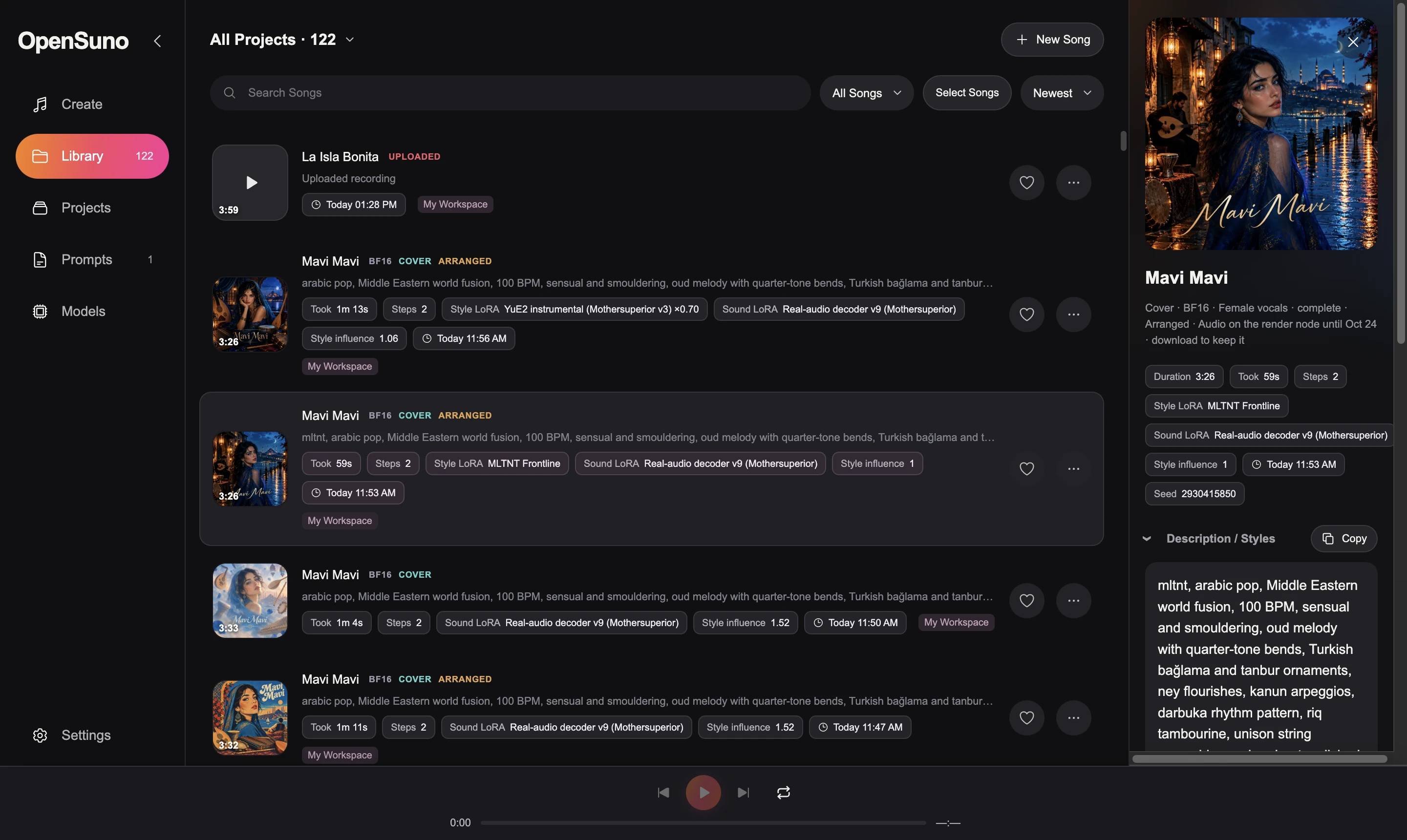
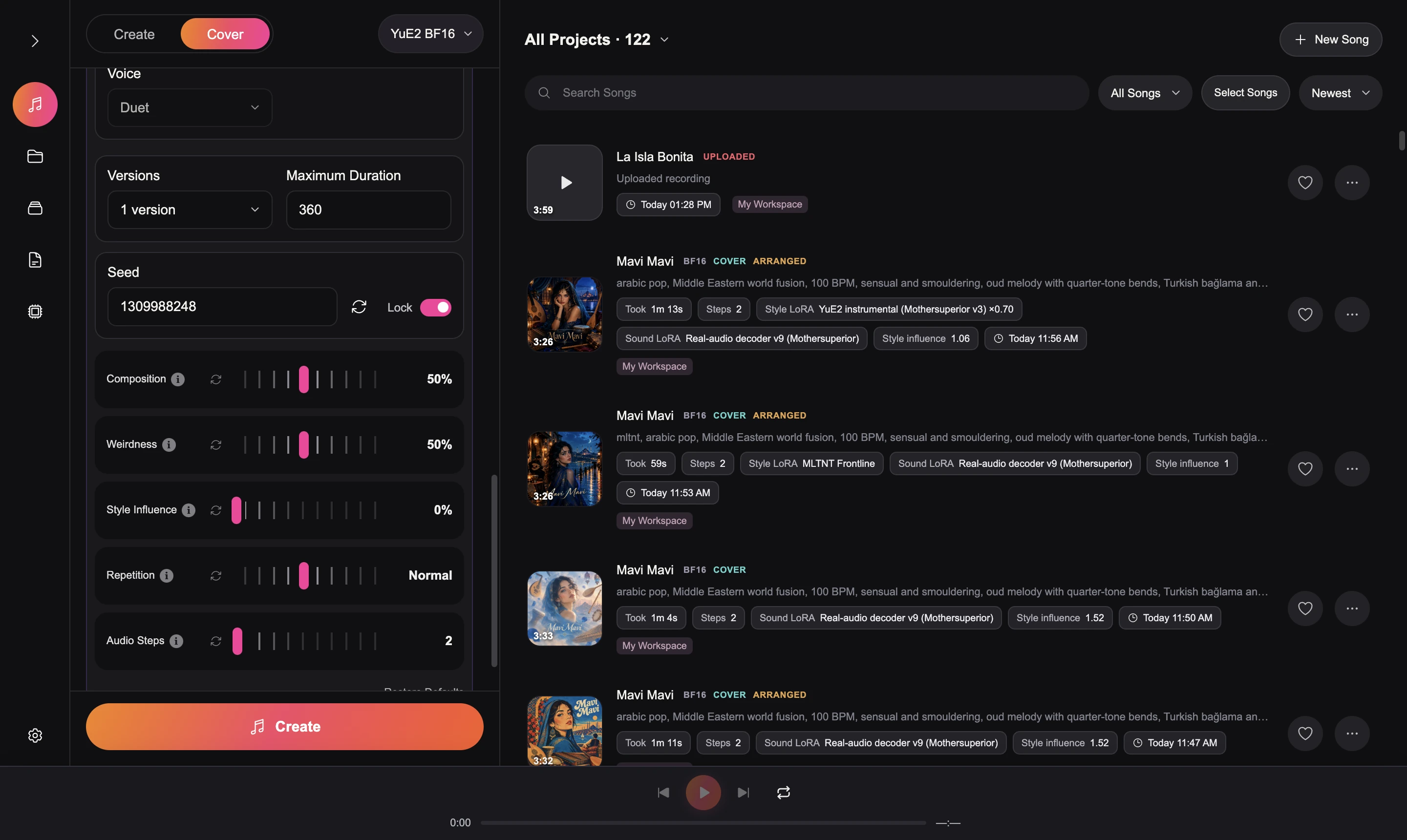
Details for each are in FEATURES.md.
Create songs
[Verse], [Chorus] and other section tags; a
structure check fixes malformed tags in one click and warns when the lyrics won't fit the
duration; Find lyrics searches LRCLIB by title and artist.Cover / Remix an uploaded recording
Work with finished songs
LoRA adapters
loras/.Library
Models and performance
Setup and privacy
127.0.0.1 only, and recordings are never uploaded.
The only network calls are model downloads, LRCLIB lyric search, and OpenAI when a key is set.sv_oldschoolhiphop,
qtstrm, trbdr, mltnt, chnsn, qwwl, drksf, blgr, cnzn, grvl).
Allow at least 20 GB of free disk space for weights and Python environments. Tested on an M4 Pro with 64 GB and on an RTX 4070 Ti SUPER 16 GB; other hardware has not been benchmarked here.
OpenSuno.dmg is one installer for a Mac with nothing else installed (no Homebrew, no Terminal).
Open it and open Install OpenSuno. Tick what this Mac should do:
Both on one Mac is the all-in-one setup. The installer puts the code, a self-contained Python and
ffmpeg into ~/OpenSuno, downloads the Python packages the chosen parts need (internet required),
installs the apps into /Applications and starts them. Running it again updates in place without
touching songs, settings or models. The installer is not notarized: on the first open go to
System Settings → Privacy & Security and click Open Anyway.
A Studio on another Mac pairs in Settings → Rendering with the node's address and token (both
under the menu bar icon). To build the disk image on a Mac with Xcode:
scripts/Build OpenSuno Installer.command writes dist/OpenSuno.dmg.
bash "scripts/Install OpenSuno.command" installs Python 3.12 and 3.11, FFmpeg and two isolated Python
environments (MLX for generation, PyTorch for cover analysis). It can be rerun after a failure.scripts/Launch Studio.command. The page at http://127.0.0.1:7862 lists the model packages under
Models: BF16 (the generator, about 7.5 GB), Cover analysis (SheetSage2 and MERT-v2,
about 2.8 GB, for uploaded recordings) and Audio input (about 0.3 GB, needs Cover analysis,
for Continue this recording).Downloads run one file at a time, resume after interruption and are verified with SHA-256. Once installed, generation runs offline. MODELS.md lists every package and how to download it by hand.
Studio uses port 7862 by default (YUE2_PORT overrides it). When Settings → Rendering points to
a local render node, launching Studio also starts that node on the configured port (normally 7863),
even if Studio is already open. This makes the node's installed models and LoRAs available again.
Nodes on other machines must be started on those machines.
Use 64-bit Windows, an NVIDIA GPU with a current CUDA 13-capable driver, Python 3.11 (with the
py launcher) and FFmpeg/FFprobe on PATH. Run
powershell -ExecutionPolicy Bypass -File "scripts\Install OpenSuno.ps1", then
powershell -ExecutionPolicy Bypass -File "scripts\Launch Studio.ps1" and open http://127.0.0.1:7862.
In Models download PyTorch CUDA BF16, the Windows default: the official YuE2-3B checkpoint run by
the upstream yue2-infer package in an isolated .cuda-venv (PyTorch 2.10 / CUDA 12.8).
PyTorch CUDA FP8 shares those downloads and quantizes token generation only; it was slower in
testing. MLX BF16 stays available for comparison.
The CUDA adapter (app/cuda_engine.py, not a fork of upstream) reserves 2 GiB of VRAM, offloads
token-generation layers during synthesis and decodes audio in 512-frame tiles; on Windows it selects
cuDNN attention so SDPA never falls back to a large math-attention buffer. Seeds are repeatable
within a backend, not across Metal and CUDA. Verify with
.venv\Scripts\python.exe app\check_runtime.py and
.venv\Scripts\python.exe -m unittest discover -s tests -v. Treat Windows as experimental until
your song lengths and cover workflow have been validated.
The Studio (interface, library, OpenAI helpers) and the GPU can be separate machines. The GPU machine runs the render node, a small API that receives a job, downloads the model it needs, renders, reports progress and keeps the finished song for streaming.
On a Mac the disk image installs the OpenSuno Render Node menu bar app (start/stop through launchd, current song and speed, the address and token other Studios need, Start at login). From a terminal:
OPENSUNO_NODE_TOKEN=choose-a-secret "./scripts/Launch Render Node.command"   # macOS
$env:OPENSUNO_NODE_TOKEN = 'choose-a-secret'; .\scripts\"Launch Render Node.ps1"   # Windows
The node listens on port 7863 (OPENSUNO_NODE_PORT); without a token it only accepts its own
machine. It keeps loaded models in memory and releases them after 30 idle minutes
(OPENSUNO_NODE_IDLE_MINUTES). In the Studio, Settings → Rendering: address, token,
Connect. Models are downloaded on the node; a song keeps rendering if the Studio disconnects and
the Studio reattaches when it is back. OPENSUNO_RENDER_URL / OPENSUNO_RENDER_TOKEN fix the node
and hide the setting.
The audio stays on the node: it encodes an MP3 next to the WAV, the Studio fetches only the small
files (tokens, plan, result) and streams the MP3. Download brings the WAV and MP3 into the
library for keeps. The node keeps finished jobs for 30 days (OPENSUNO_NODE_KEEP_DAYS).
Node API (/v1, bearer token): GET health, POST models/download?model=, POST jobs
(multipart: request JSON, inputs side files, uploads recordings), GET jobs/{id}?log_offset=,
GET jobs/{id}/files/{name}, POST jobs/{id}/cancel, DELETE jobs/{id}.
The OpenAI key for Ask AI and album art goes in Settings, OPENAI_API_KEY, or a local
.openai-key file, which is never committed.
Logs are in ~/Library/Logs/OpenSuno/server.log on a Mac. The server listens only on 127.0.0.1;
recordings and results stay in uploads/ and library/.
| Variable | Read by | Meaning |
|---|---|---|
YUE2_PORT | Studio | Port of the browser page (default 7862). |
OPENSUNO_DATA | Studio | Folder for library/, uploads/ and caches (default: the checkout). |
OPENSUNO_HOSTED | Studio | Hosted mode: no local models, jobs go to a render node. |
OPENSUNO_RENDER_URL, OPENSUNO_RENDER_TOKEN | Studio | Fix the render node; the Settings form is then read-only. |
OPENSUNO_NODE_PORT, OPENSUNO_NODE_HOST, OPENSUNO_NODE_TOKEN | Render node | Port (default 7863), bind address and shared token. |
OPENSUNO_NODE_IDLE_MINUTES, OPENSUNO_NODE_KEEP_DAYS | Render node | Unload models when idle; delete finished audio after this many days. |
OPENSUNO_HOME, OPENSUNO_APPLICATIONS, OPENSUNO_INSTALL_START | Mac installer | Install folder, Applications folder, and 0 to skip launching after install. |
OPENAI_API_KEY | Studio / node | Key for Ask AI and album art when none is saved in Settings. |
Application code, model runtime source, small configuration files, pinned dependency lists and the download manifest. No model weights, tokenizers, recordings, generated songs, environments or caches are tracked.
| Folder | Contents |
|---|---|
app/ | Python backend: Studio server (server.py), render node, worker and helpers |
web/ | The browser interface |
model/, mert/, transcriber/ | Model runtimes (YuE2 MLX, MERT-v2, SheetSage2) |
config/ | Model and LoRA download manifests, generation defaults |
scripts/ | Install and launch scripts for macOS (.command) and Windows (.ps1) |
launcher/ | The Mac installer, apps and menu bar render node |
requirements/ | Extra dependency lists (requirements.txt stays at the root for Vercel) |
docs/ | Guides and screenshots |
site/ | The opensuno.org landing page |
tests/ | Unit and API tests |
fe0a9050fd658257b486b880422d8872ee1f81e3eab522a8168e8b8b8c4856bf8609cd86198f01fed8ba1c745e733b3908ce6ad16ebeb17ac7600a42web/style-presets*.js
and web/lyrics-structure.jsUpstream attribution and license notices are retained with the runtime source. YuE2 model weights are CC BY-NC 4.0 (non-commercial); upstream terms apply when downloaded separately.
OpenSuno's own code is MIT. Code adapted from SheetSage2, MERT-v2 and the YuE2 MLX port
(transcriber/, mert/, parts of model/) stays CC BY-NC 4.0, and the model weights are
CC BY-NC 4.0; see THIRD_PARTY_NOTICES.md.
.venv/bin/python -m unittest discover -s tests -v and for f in tests/*.cjs; do node "$f"; done.
The tests use tiny local HTTP fixtures and fake models; nothing is downloaded.
OpenSuno-YuE2: local music generation studio for the YuE2 model on Apple Silicon and Windows/NVIDIA, with automatic model downloads.
See the codeLocal music generation with a browser interface for the YuE2 model on Apple Silicon and Windows/NVIDIA: lyrics and style prompts, instrumental mode, covers of uploaded recordings, song editing and extension, community LoRAs, a library with projects, and an optional render node on another machine.
Details for each are in FEATURES.md.
Create songs
[Verse], [Chorus] and other section tags; a
structure check fixes malformed tags in one click and warns when the lyrics won't fit the
duration; Find lyrics searches LRCLIB by title and artist.Cover / Remix an uploaded recording
Work with finished songs
LoRA adapters
loras/.Library
Models and performance
Setup and privacy
127.0.0.1 only, and recordings are never uploaded.
The only network calls are model downloads, LRCLIB lyric search, and OpenAI when a key is set.sv_oldschoolhiphop,
qtstrm, trbdr, mltnt, chnsn, qwwl, drksf, blgr, cnzn, grvl).
Allow at least 20 GB of free disk space for weights and Python environments. Tested on an M4 Pro with 64 GB and on an RTX 4070 Ti SUPER 16 GB; other hardware has not been benchmarked here.
OpenSuno.dmg is one installer for a Mac with nothing else installed (no Homebrew, no Terminal).
Open it and open Install OpenSuno. Tick what this Mac should do:
Both on one Mac is the all-in-one setup. The installer puts the code, a self-contained Python and
ffmpeg into ~/OpenSuno, downloads the Python packages the chosen parts need (internet required),
installs the apps into /Applications and starts them. Running it again updates in place without
touching songs, settings or models. The installer is not notarized: on the first open go to
System Settings → Privacy & Security and click Open Anyway.
A Studio on another Mac pairs in Settings → Rendering with the node's address and token (both
under the menu bar icon). To build the disk image on a Mac with Xcode:
scripts/Build OpenSuno Installer.command writes dist/OpenSuno.dmg.
bash "scripts/Install OpenSuno.command" installs Python 3.12 and 3.11, FFmpeg and two isolated Python
environments (MLX for generation, PyTorch for cover analysis). It can be rerun after a failure.scripts/Launch Studio.command. The page at http://127.0.0.1:7862 lists the model packages under
Models: BF16 (the generator, about 7.5 GB), Cover analysis (SheetSage2 and MERT-v2,
about 2.8 GB, for uploaded recordings) and Audio input (about 0.3 GB, needs Cover analysis,
for Continue this recording).Downloads run one file at a time, resume after interruption and are verified with SHA-256. Once installed, generation runs offline. MODELS.md lists every package and how to download it by hand.
Studio uses port 7862 by default (YUE2_PORT overrides it). When Settings → Rendering points to
a local render node, launching Studio also starts that node on the configured port (normally 7863),
even if Studio is already open. This makes the node's installed models and LoRAs available again.
Nodes on other machines must be started on those machines.
Use 64-bit Windows, an NVIDIA GPU with a current CUDA 13-capable driver, Python 3.11 (with the
py launcher) and FFmpeg/FFprobe on PATH. Run
powershell -ExecutionPolicy Bypass -File "scripts\Install OpenSuno.ps1", then
powershell -ExecutionPolicy Bypass -File "scripts\Launch Studio.ps1" and open http://127.0.0.1:7862.
In Models download PyTorch CUDA BF16, the Windows default: the official YuE2-3B checkpoint run by
the upstream yue2-infer package in an isolated .cuda-venv (PyTorch 2.10 / CUDA 12.8).
PyTorch CUDA FP8 shares those downloads and quantizes token generation only; it was slower in
testing. MLX BF16 stays available for comparison.
The CUDA adapter (app/cuda_engine.py, not a fork of upstream) reserves 2 GiB of VRAM, offloads
token-generation layers during synthesis and decodes audio in 512-frame tiles; on Windows it selects
cuDNN attention so SDPA never falls back to a large math-attention buffer. Seeds are repeatable
within a backend, not across Metal and CUDA. Verify with
.venv\Scripts\python.exe app\check_runtime.py and
.venv\Scripts\python.exe -m unittest discover -s tests -v. Treat Windows as experimental until
your song lengths and cover workflow have been validated.
The Studio (interface, library, OpenAI helpers) and the GPU can be separate machines. The GPU machine runs the render node, a small API that receives a job, downloads the model it needs, renders, reports progress and keeps the finished song for streaming.
On a Mac the disk image installs the OpenSuno Render Node menu bar app (start/stop through launchd, current song and speed, the address and token other Studios need, Start at login). From a terminal:
OPENSUNO_NODE_TOKEN=choose-a-secret "./scripts/Launch Render Node.command"   # macOS
$env:OPENSUNO_NODE_TOKEN = 'choose-a-secret'; .\scripts\"Launch Render Node.ps1"   # Windows
The node listens on port 7863 (OPENSUNO_NODE_PORT); without a token it only accepts its own
machine. It keeps loaded models in memory and releases them after 30 idle minutes
(OPENSUNO_NODE_IDLE_MINUTES). In the Studio, Settings → Rendering: address, token,
Connect. Models are downloaded on the node; a song keeps rendering if the Studio disconnects and
the Studio reattaches when it is back. OPENSUNO_RENDER_URL / OPENSUNO_RENDER_TOKEN fix the node
and hide the setting.
The audio stays on the node: it encodes an MP3 next to the WAV, the Studio fetches only the small
files (tokens, plan, result) and streams the MP3. Download brings the WAV and MP3 into the
library for keeps. The node keeps finished jobs for 30 days (OPENSUNO_NODE_KEEP_DAYS).
Node API (/v1, bearer token): GET health, POST models/download?model=, POST jobs
(multipart: request JSON, inputs side files, uploads recordings), GET jobs/{id}?log_offset=,
GET jobs/{id}/files/{name}, POST jobs/{id}/cancel, DELETE jobs/{id}.
The OpenAI key for Ask AI and album art goes in Settings, OPENAI_API_KEY, or a local
.openai-key file, which is never committed.
Logs are in ~/Library/Logs/OpenSuno/server.log on a Mac. The server listens only on 127.0.0.1;
recordings and results stay in uploads/ and library/.
| Variable | Read by | Meaning |
|---|---|---|
YUE2_PORT | Studio | Port of the browser page (default 7862). |
OPENSUNO_DATA | Studio | Folder for library/, uploads/ and caches (default: the checkout). |
OPENSUNO_HOSTED | Studio | Hosted mode: no local models, jobs go to a render node. |
OPENSUNO_RENDER_URL, OPENSUNO_RENDER_TOKEN | Studio | Fix the render node; the Settings form is then read-only. |
OPENSUNO_NODE_PORT, OPENSUNO_NODE_HOST, OPENSUNO_NODE_TOKEN | Render node | Port (default 7863), bind address and shared token. |
OPENSUNO_NODE_IDLE_MINUTES, OPENSUNO_NODE_KEEP_DAYS | Render node | Unload models when idle; delete finished audio after this many days. |
OPENSUNO_HOME, OPENSUNO_APPLICATIONS, OPENSUNO_INSTALL_START | Mac installer | Install folder, Applications folder, and 0 to skip launching after install. |
OPENAI_API_KEY | Studio / node | Key for Ask AI and album art when none is saved in Settings. |
Application code, model runtime source, small configuration files, pinned dependency lists and the download manifest. No model weights, tokenizers, recordings, generated songs, environments or caches are tracked.
| Folder | Contents |
|---|---|
app/ | Python backend: Studio server (server.py), render node, worker and helpers |
web/ | The browser interface |
model/, mert/, transcriber/ | Model runtimes (YuE2 MLX, MERT-v2, SheetSage2) |
config/ | Model and LoRA download manifests, generation defaults |
scripts/ | Install and launch scripts for macOS (.command) and Windows (.ps1) |
launcher/ | The Mac installer, apps and menu bar render node |
requirements/ | Extra dependency lists (requirements.txt stays at the root for Vercel) |
docs/ | Guides and screenshots |
site/ | The opensuno.org landing page |
tests/ | Unit and API tests |
fe0a9050fd658257b486b880422d8872ee1f81e3eab522a8168e8b8b8c4856bf8609cd86198f01fed8ba1c745e733b3908ce6ad16ebeb17ac7600a42web/style-presets*.js
and web/lyrics-structure.jsUpstream attribution and license notices are retained with the runtime source. YuE2 model weights are CC BY-NC 4.0 (non-commercial); upstream terms apply when downloaded separately.
OpenSuno's own code is MIT. Code adapted from SheetSage2, MERT-v2 and the YuE2 MLX port
(transcriber/, mert/, parts of model/) stays CC BY-NC 4.0, and the model weights are
CC BY-NC 4.0; see THIRD_PARTY_NOTICES.md.
.venv/bin/python -m unittest discover -s tests -v and for f in tests/*.cjs; do node "$f"; done.
The tests use tiny local HTTP fixtures and fake models; nothing is downloaded.



