Free, open-source AI music studio on your Android phone: full songs with vocals, Write with AI, stem splitting, mixer, recording and drum pads. No cloud, no subscription.
See the code
Full songs, with vocals, written and rendered entirely on an Android phone.
Killa YuE is a native Android app around YuE2, the open lyrics-to-song model from M-A-P. You type a style and lyrics, the phone's GPU does the rest, and your songs and lyrics stay on the device. (When you ask Write with AI to look something up, it sends the search queries it writes to web search sites; nothing else goes out.)
As far as we could find when we built it (October 2026), this is the first app that runs YuE2 on a phone's GPU.
If Killa YuE made you a song, please ⭐ star this repository. Stars are how other artists find a free, open-source studio like this one, and they tell us which features to build next.
Version 1.5.0. It has been run on exactly one phone: a Samsung Galaxy S25 Ultra (Snapdragon 8 Elite, Adreno 830, 12 GB). Treat every other device as untested. Reports from other Adreno phones are the most useful contribution right now.
killa-yue-*.apk under Assets.KillaYuE/ where you can find them.Updating: install the new APK over the old one. Your songs, projects and models stay.
Killa YuE runs on any arm64 phone with Android 9 or later, Samsung Exynos, Google Tensor and MediaTek included, by making songs on the processor instead of the GPU.
CPU mode is much slower than the GPU. We have not timed it on any phone yet, so we cannot say how long a song takes; please post your timings and a Device report (Engine > Developer options) on GitHub. Album covers painted on the NPU need a Snapdragon 8 Elite; the GPU cover model and the Studio's stem splitter have so far only been run on the test phone's Adreno GPU.
Create: style with genre chips, lyrics with section tags, a length dial and slider (10 seconds to 6 minutes), score mode, an editable ABC score, and advanced settings (render steps, variations, seeds, sampling, MP3 or WAV).
Library: play, re-render a song with a new sound, edit its score and render again, start a new song from part of an old one, share, rename, delete.
Recordings: cover a recording (melody, or melody and chords), continue from it, or re-render it. Needs the cover and recording packs from the Engine tab.
Style adapters (LoRA): install from a Hugging Face repository or a file, then switch them on per song.
Writing aids: save and recall styles and lyrics, clear both at once, undo and redo.
Player: a deck with previous, back 10 s, play or pause, forward 10 s and next; song titles; a sleep timer; the song in the system's now-playing card, lock screen and status bar.
Lyrics: a Lyrics tab that lights up each line as it is sung; tap along once for exact timing. Every song gets an .lrc file and MP3 tags with the title, lyrics, timed lyrics and cover.
Queue, takes and recipes: line up songs to make one after another on the charger; songs with the same lyrics and score are grouped as takes; share a song's recipe as a .killa file so another phone can make it.
Album covers on the NPU: on a Snapdragon 8 Elite, a cover is painted in about three seconds with Stable Diffusion 1.5 on the Hexagon NPU, and the app letters the title. The cover model is a separate 710 MB download on the Engine tab.
Skins: Killa Gold, Neon District and Foundry.
Gentle mode (on by default): the engine runs at low CPU and GPU priority, in smaller GPU jobs with short pauses, so the phone stays smooth while a song is made. On the test phone, with a hot GPU, a 30-second song took about 2% longer in gentle mode, and Android's "isn't responding" message stopped appearing. Turn it off on the Engine tab for the last bit of speed.
Time left: an estimate next to the elapsed time, learned from this phone's earlier songs and corrected live when the GPU slows down with heat.
Background: songs keep going while you use other apps. Before the first song the app asks Android to let it run without battery optimisation; the Engine tab shows what else can stop a song and links to the settings.
Albums: put songs in order under one title, sound and cover; queue new songs straight into an album from saved lyrics; paint the album cover on the NPU; export to Music/Killa YuE/<album> with every track tagged (album, track number, lyrics, timed lyrics, cover) plus a playlist, or share the album as a zip.
Share phone to phone with a QR code: the app itself, a song, an album, or the models. The other phone scans with its camera and gets a page in the app's style with players, downloads and install steps (songs and albums work on iPhones too). No internet needed: the phones only have to share a Wi-Fi network or a hotspot.
Copy the models from a friend's phone instead of downloading 4 GB: each file is checked against its published checksum, and an interrupted copy resumes.
Lyric videos (new, experimental): a vertical 1080x1920 video of a song with its cover and lyrics lighting up, ready for TikTok, Reels and Shorts.
Phone check: on phones without a supported Adreno GPU the app switches to the processor and says why. "Device report" on the Engine tab copies what we need to bring Killa YuE to your phone: please post it on GitHub.
New in 1.5.0, Studio expansion:
New in 1.4.1, GPU driver recovery:
New in 1.4.0, the Studio, a music studio inside the app:
skins/: Abbey '68 and Arctic Tactical.New in 1.3.0:
skins/).What comes next is in ROADMAP.md.
Every picture is the app on the test phone, in the Killa Gold skin. Engine > How everything works explains every control inside the app too.
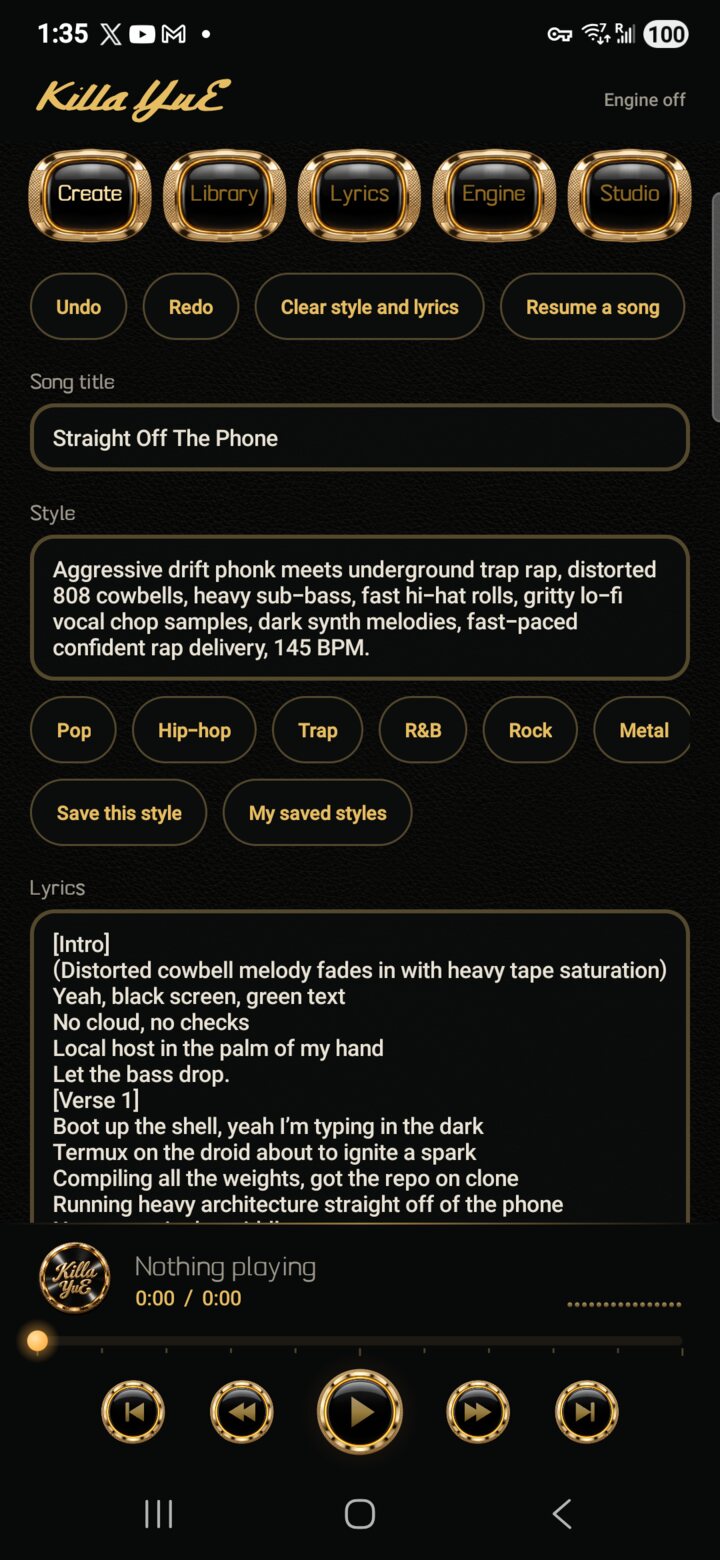 |
CreateWhere a song starts. Song title, then Style: the genre, mood, instruments and voice in plain words; the chips (Pop, Hip-hop, Trap, R&B, Rock, Metal) add common styles, and Save this style keeps one to reuse. Lyrics are written in sections. Undo and Redo at the top cover every change on this screen, Clear style and lyrics starts over, and Resume a song finishes one that was interrupted. |
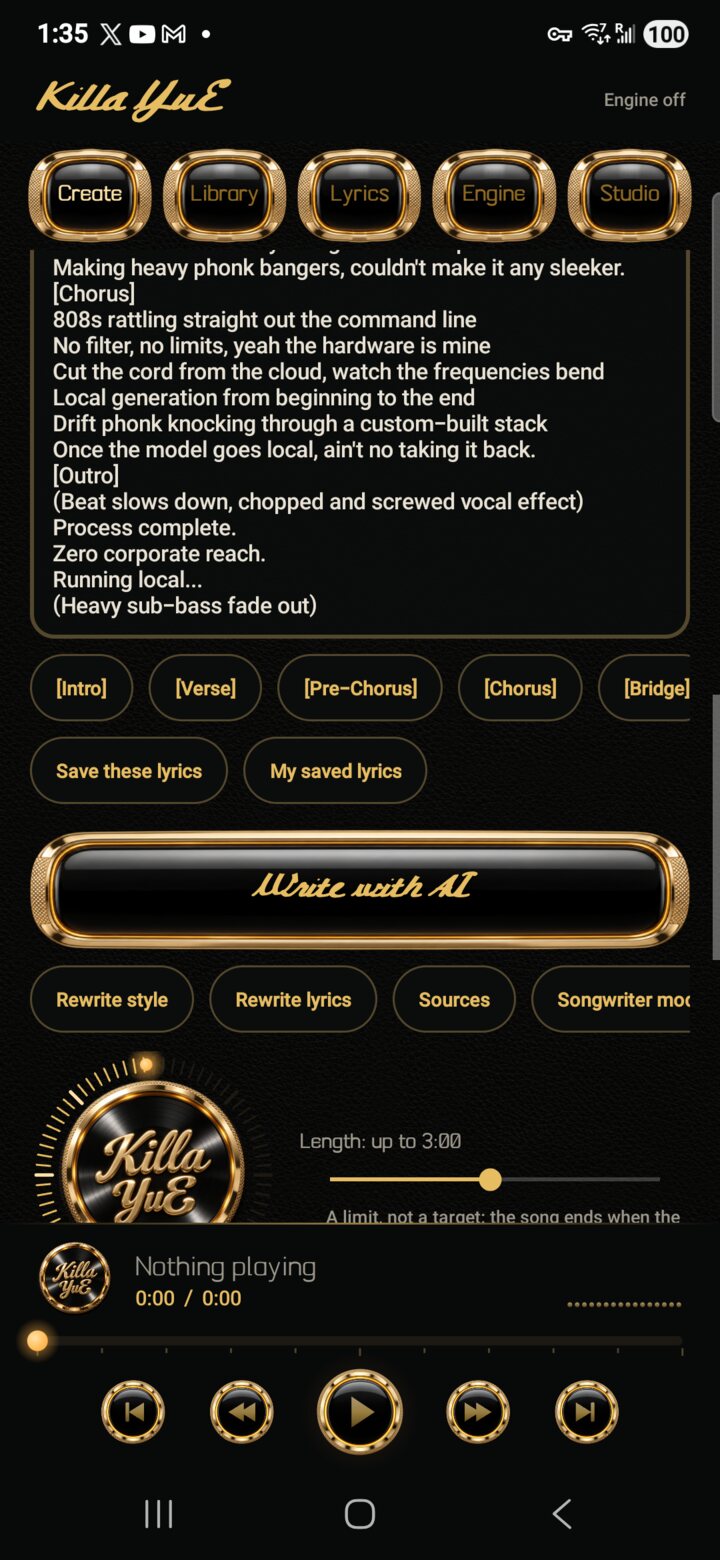 |
Lyrics and Write with AIThe section buttons add [Intro] [Verse] [Pre-Chorus] [Chorus] [Bridge] [Outro]. Save these lyrics keeps them under the song's title. The big Write with AI button runs a songwriter model on the phone: give it an idea and it writes the title, style and lyrics straight into the boxes (one Undo takes them back). Rewrite style and Rewrite lyrics redo one part, Sources shows what it looked up when it is allowed to search first, and Songwriter model picks or downloads its model. |
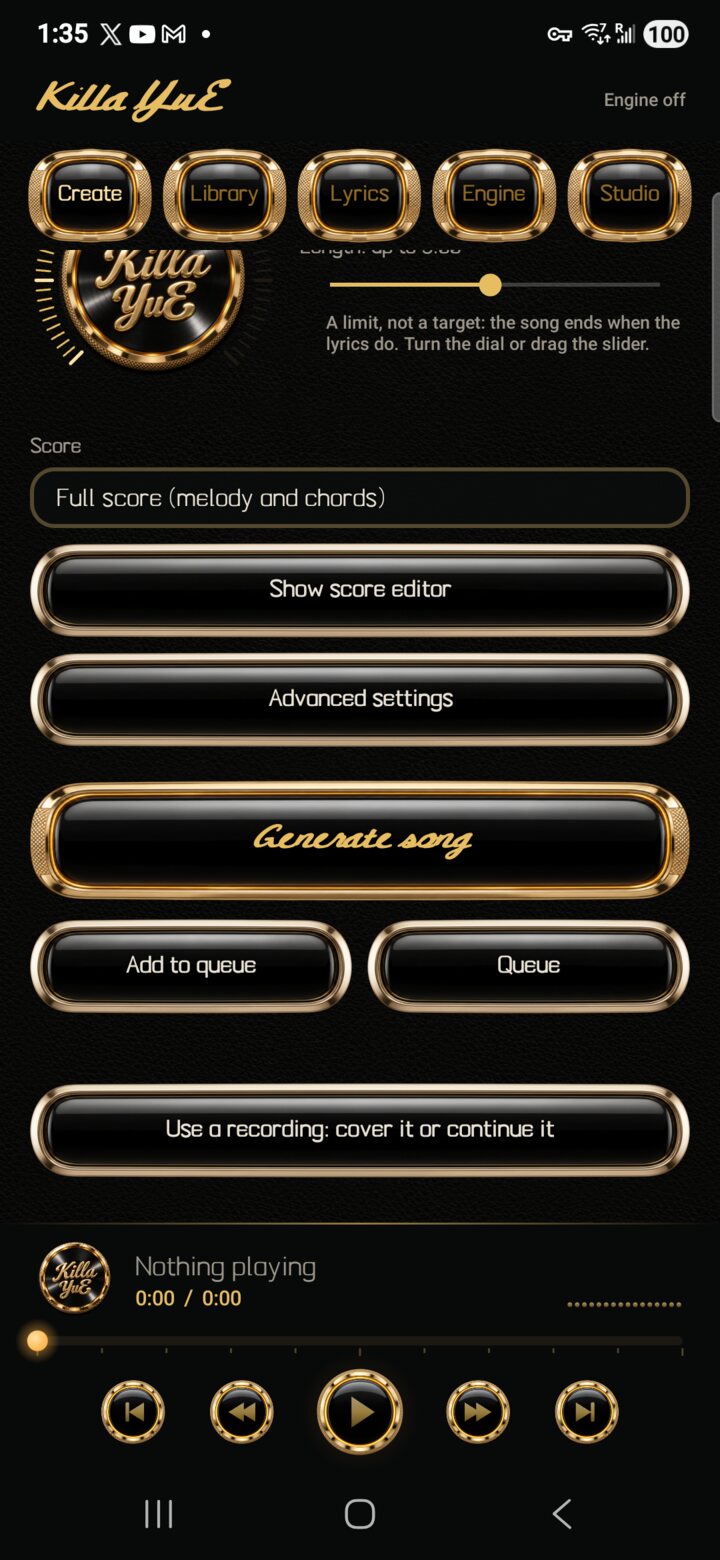 |
Length, score and generatingTurn the dial or drag the slider for the length: a limit, not a target, since the song ends when the lyrics do. Score sets how much the engine plans first: a full score with melody and chords, melody only, or none. Show score editor shows the written score (ABC notation) to read or change. Advanced settings holds render steps, variations, seeds, creativity, guidance, MP3 quality, file format and style adapters (LoRA). Generate song starts it now; Add to queue saves it for later and Queue shows what is waiting, so the phone can make songs overnight. Use a recording covers or continues a recording of yours. |
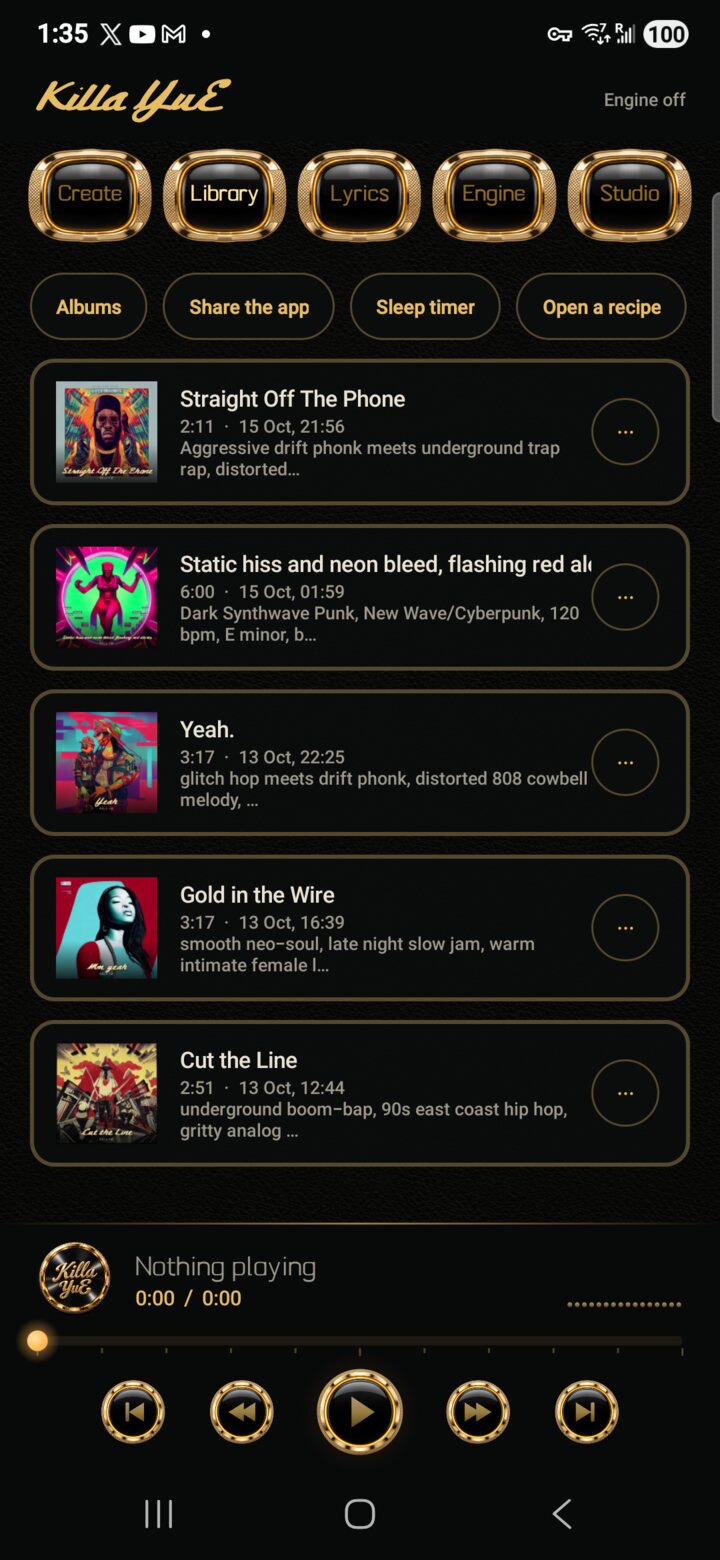 |
Library and the playerEvery song you have made, with its cover, length, date and style. Tap one to play it in the gold player at the bottom (previous, rewind, play, fast forward, next, and a bar to drag through it). Albums groups songs, Share the app shows a QR code that installs Killa YuE on another phone, Sleep timer stops playback after a while, and Open a recipe loads a recipe (everything needed to make one exact song again, shared from another phone, without the audio). |
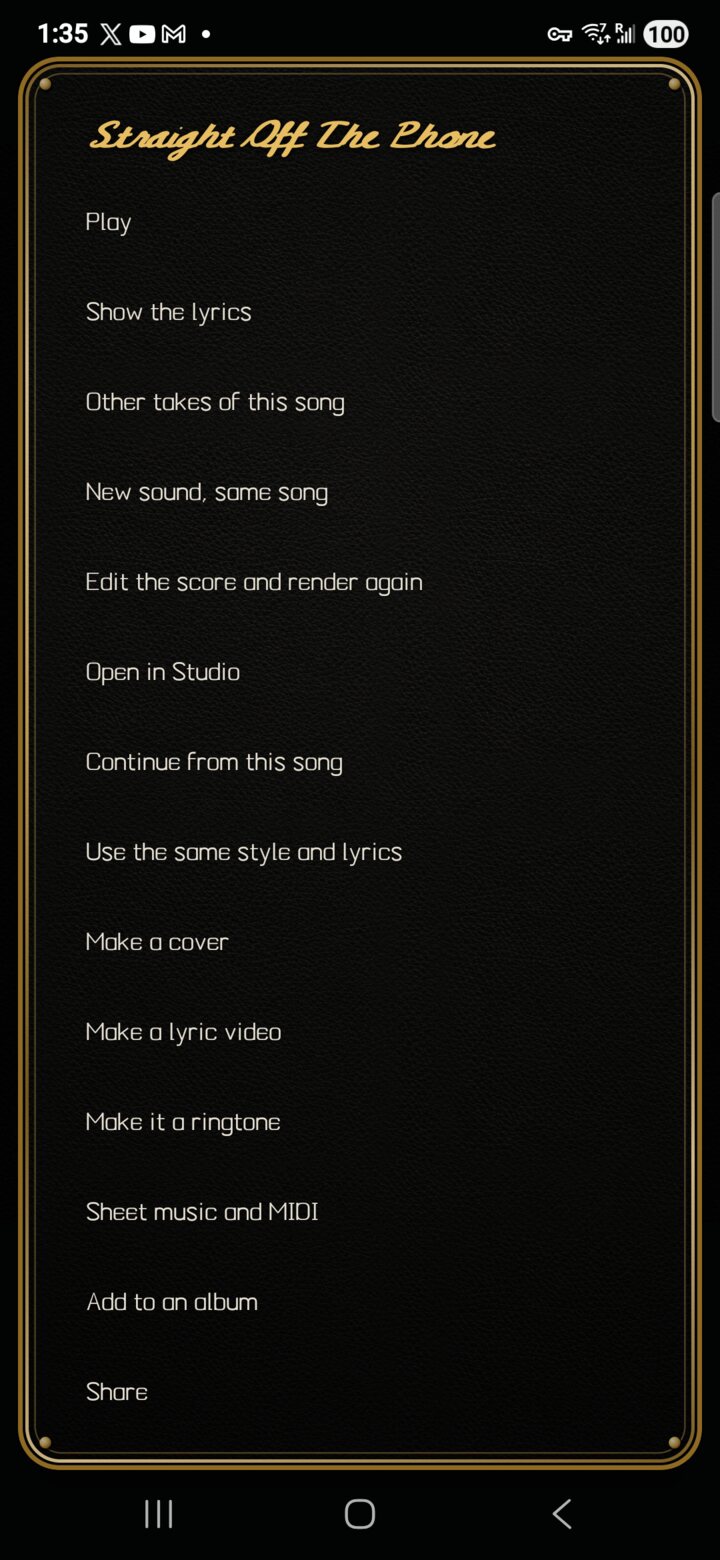 |
A song's optionsThe ⋯ beside a song: play it, show its lyrics in time, other takes, a new sound with the same song, edit the score and render it again, Open in Studio, continue it, reuse its style and lyrics, make an album cover, make a lyric video, set it as a ringtone, export sheet music and MIDI, add it to an album, and share it. |
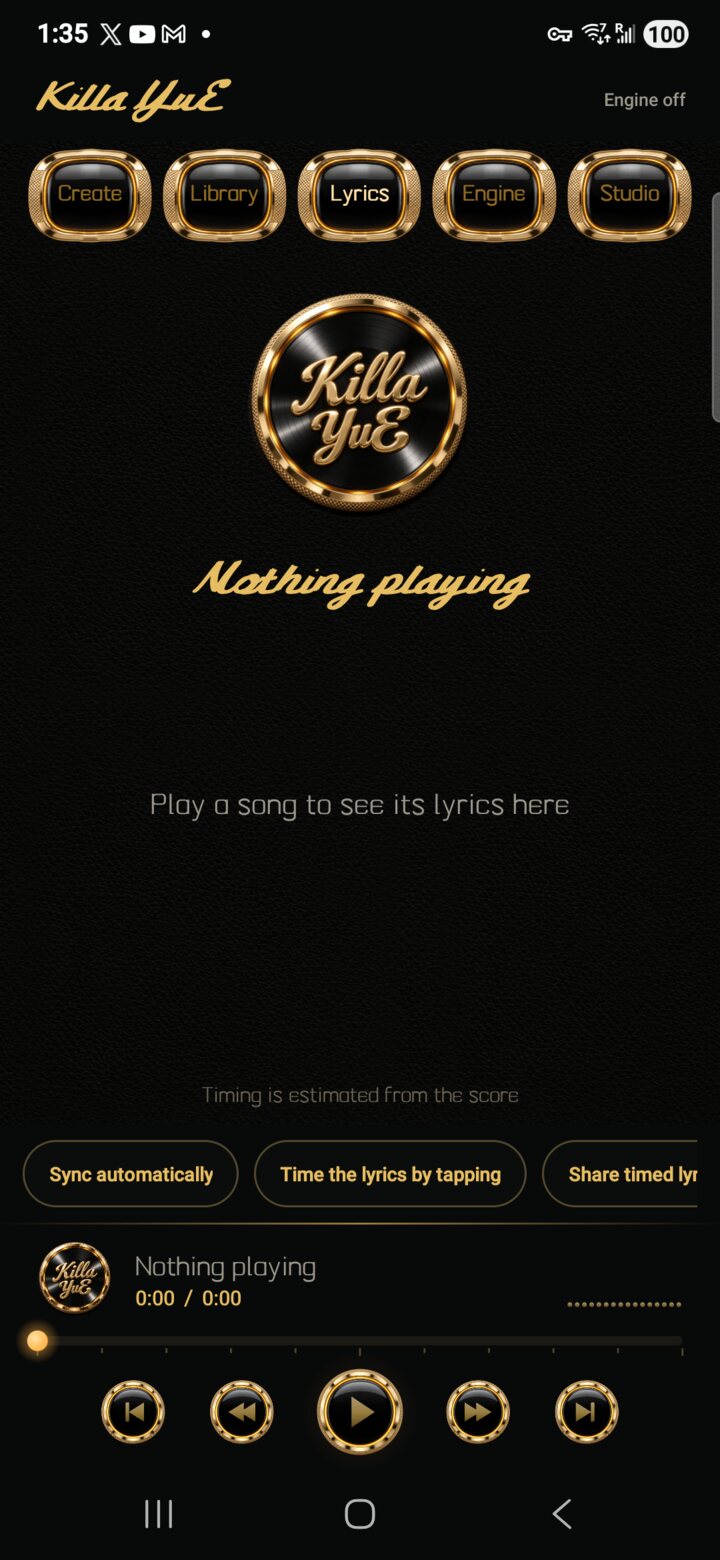 |
Lyrics, in timeThe words of the playing song, lit line by line. Sync automatically listens to the song on the phone and times every line; Time the lyrics by tapping lets you tap along instead; Share timed lyrics sends the words with their timings. |
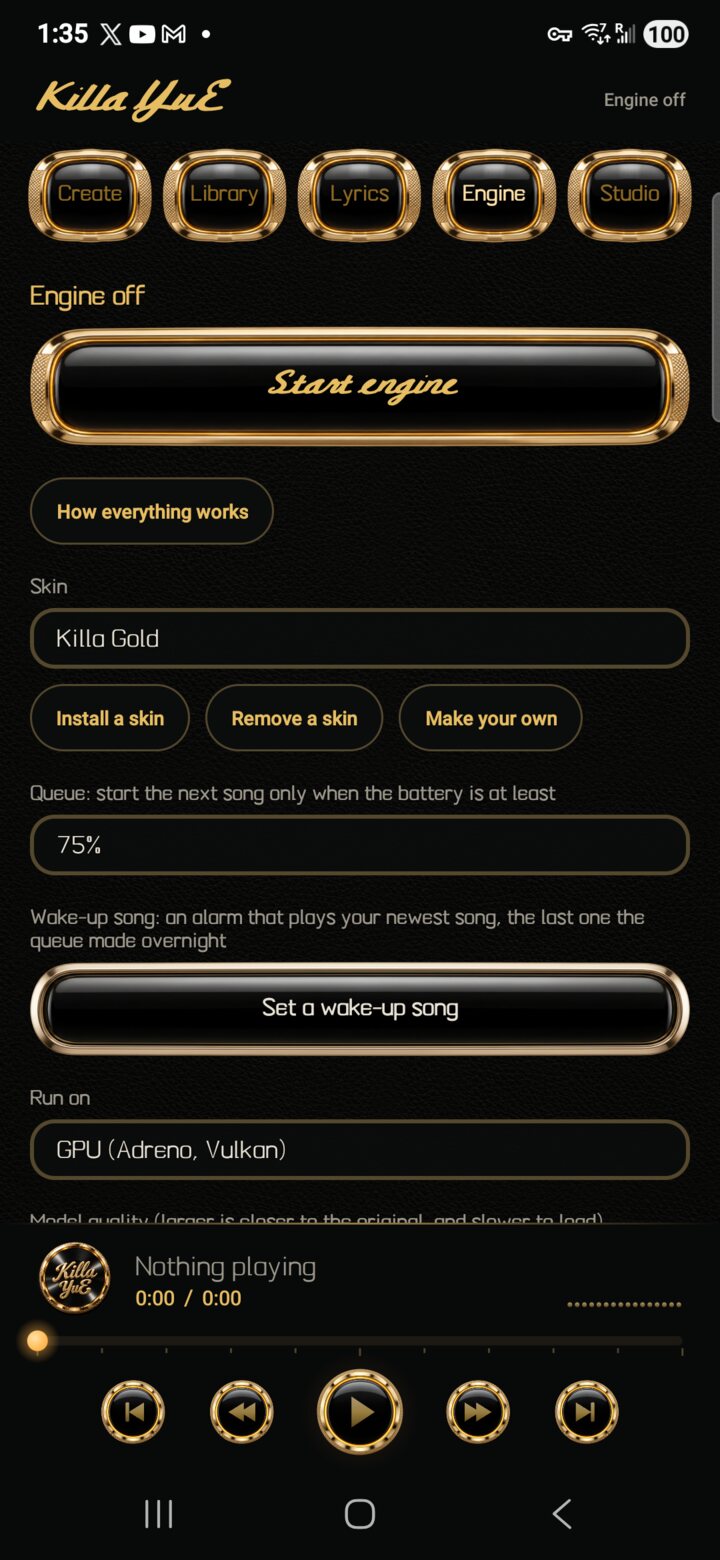 |
EngineStart engine loads the song engine early to save a wait. How everything works opens the in-app guide. Skin changes the whole look; Install a skin adds a community skin from a file. Below: the queue's battery limit, a wake-up song alarm that plays the newest song from the overnight queue, Run on (GPU or CPU), Model quality, memory for song length, Gentle mode, Studio jobs at full speed, running the engine in its own process, the model downloads, and Share the models by QR. |
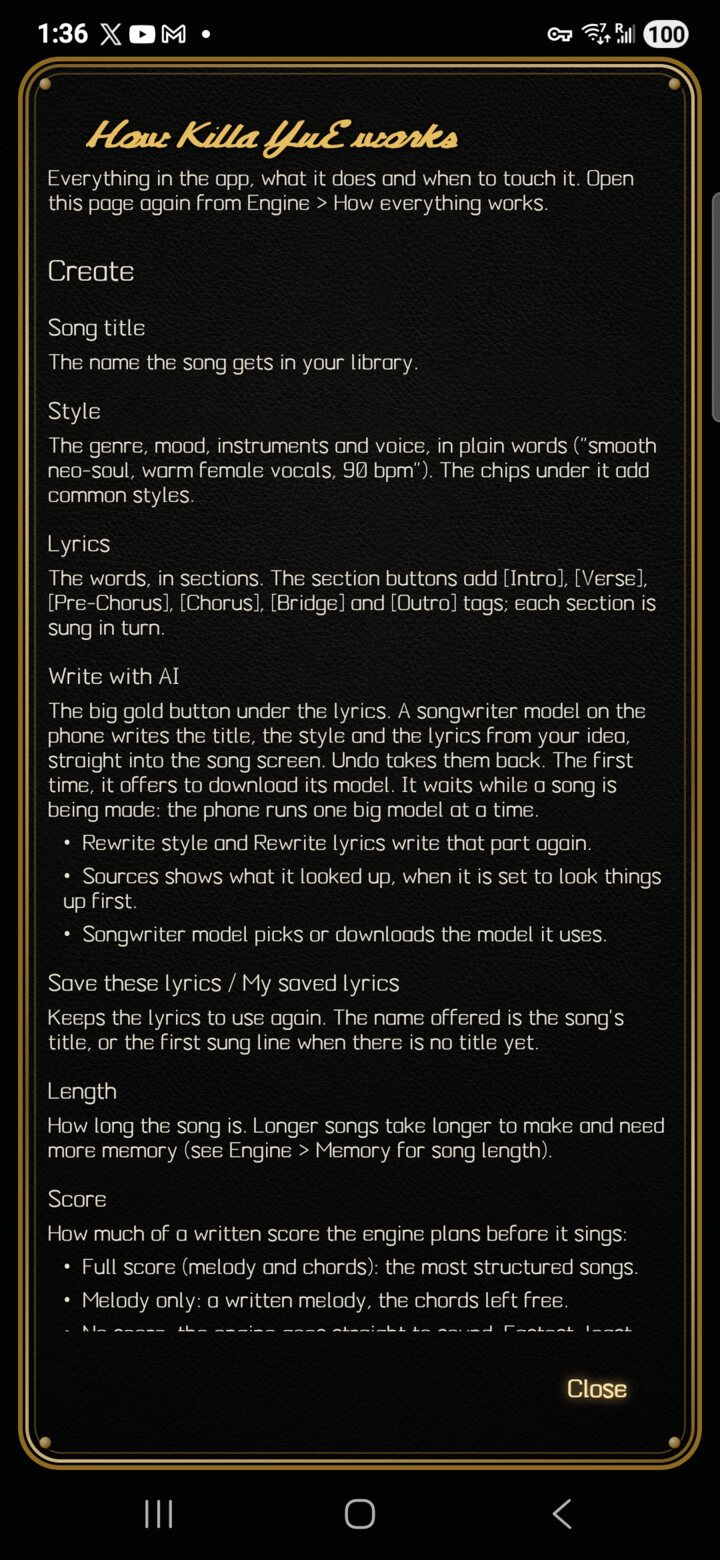 |
How everything worksThe app's own manual, from Engine. It explains every setting and button on every screen, Studio included, in plain words with the defaults. It grows with every feature: see CONTRIBUTING.md. |
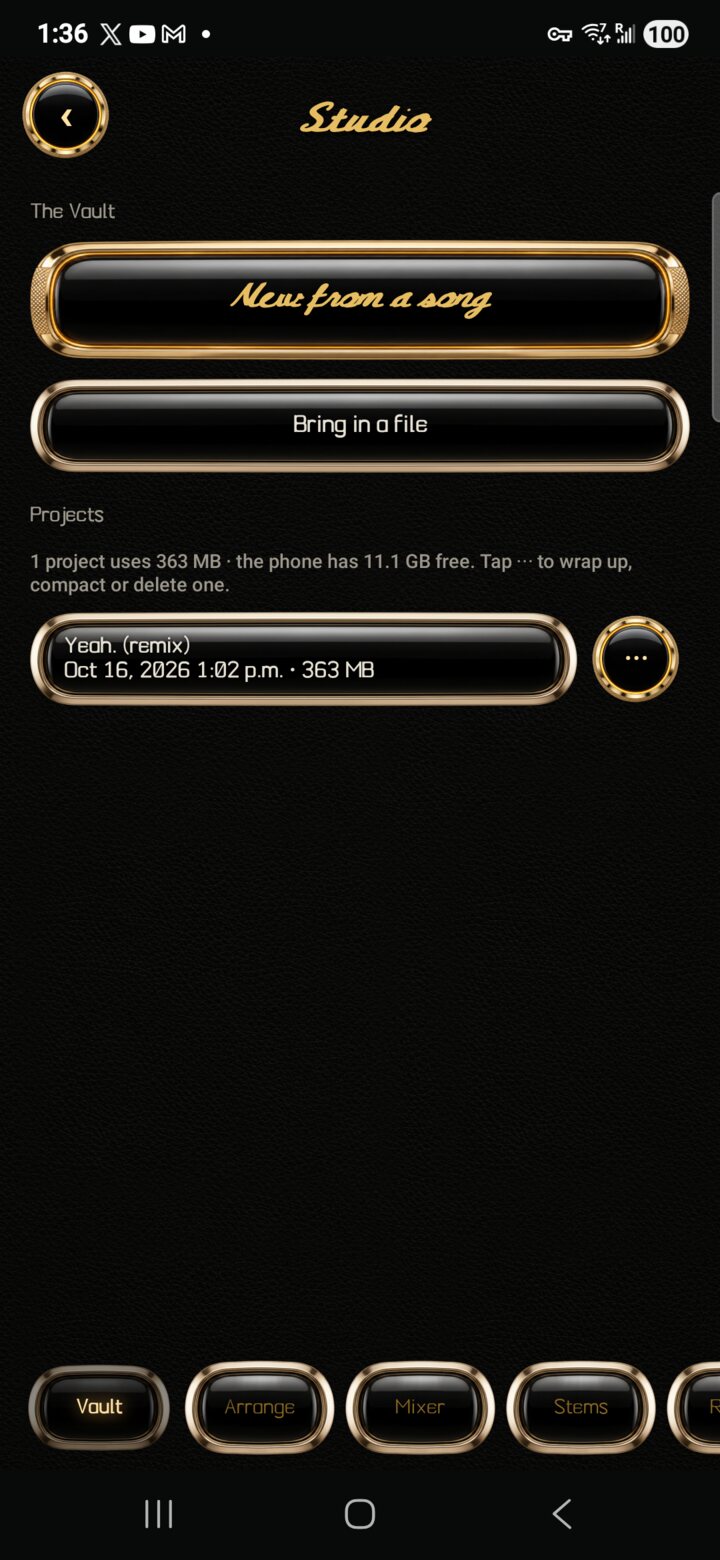 |
Studio: the VaultA music studio inside the app. New from a song turns a song from your library into a project; Bring in a file starts one from any audio file. The line above the projects shows how much space they use and how much the phone has free. The ⋯ beside a project opens it, renames it, wraps it up (the mix goes into your library as a song, then you can delete the project to free its space), compacts it (removes audio nothing uses, keeping whatever Undo can bring back) or deletes it. |
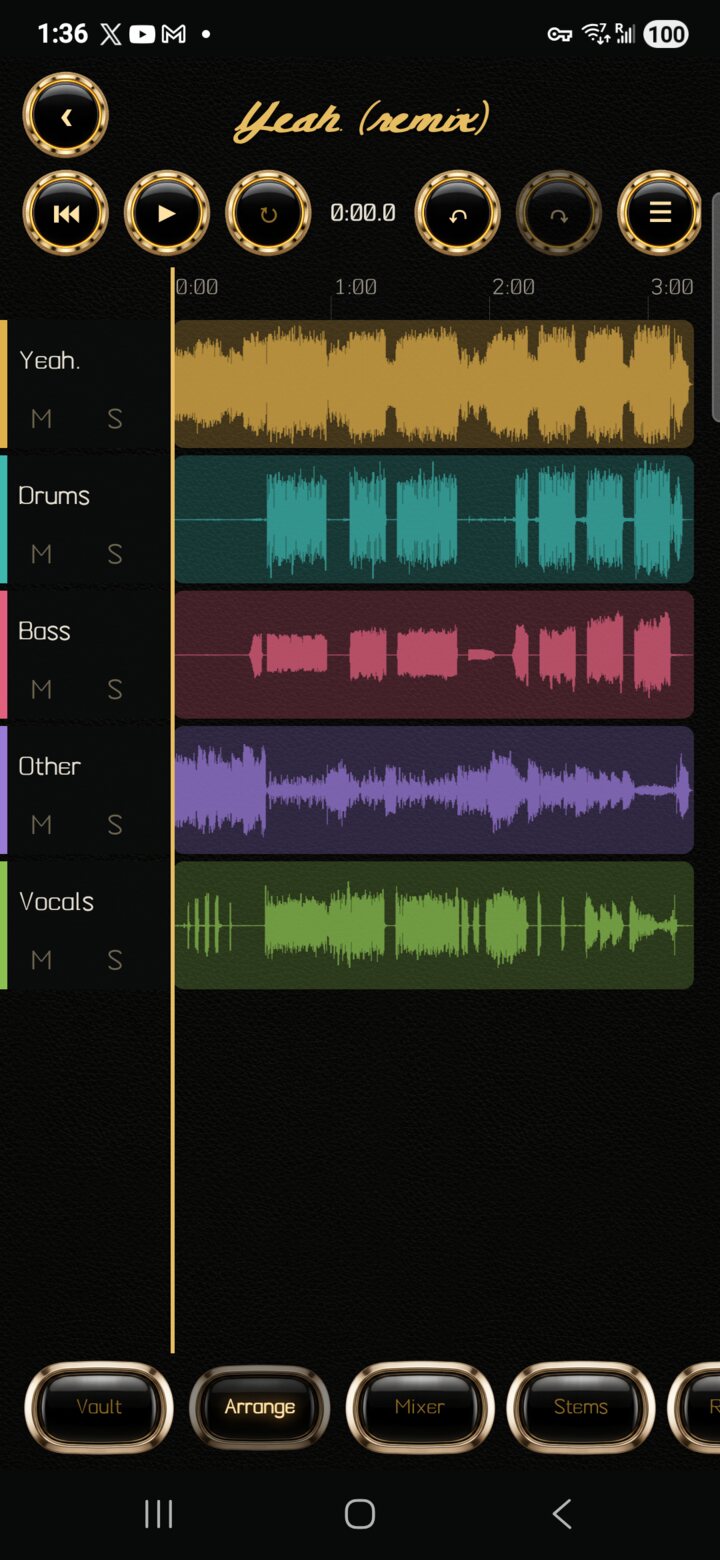 |
ArrangeThe tracks laid out in time. The round buttons: back to the start, play and stop, loop (hold and drag the ruler to mark one), undo and redo (a whole drag is one step), the edit mode, and history. Tap the timeline to move the playhead and pinch to zoom; M mutes and S solos. The edit mode cycles Navigate, Move clips (snapped to the beat grid) and Swipe comp (build the best take from several). Hold a clip for its menu: move to the playhead, nudge, trim, split, duplicate, fades, stretch and pitch (25 to 400% of the length, −24 to +24 semitones) and remove. |
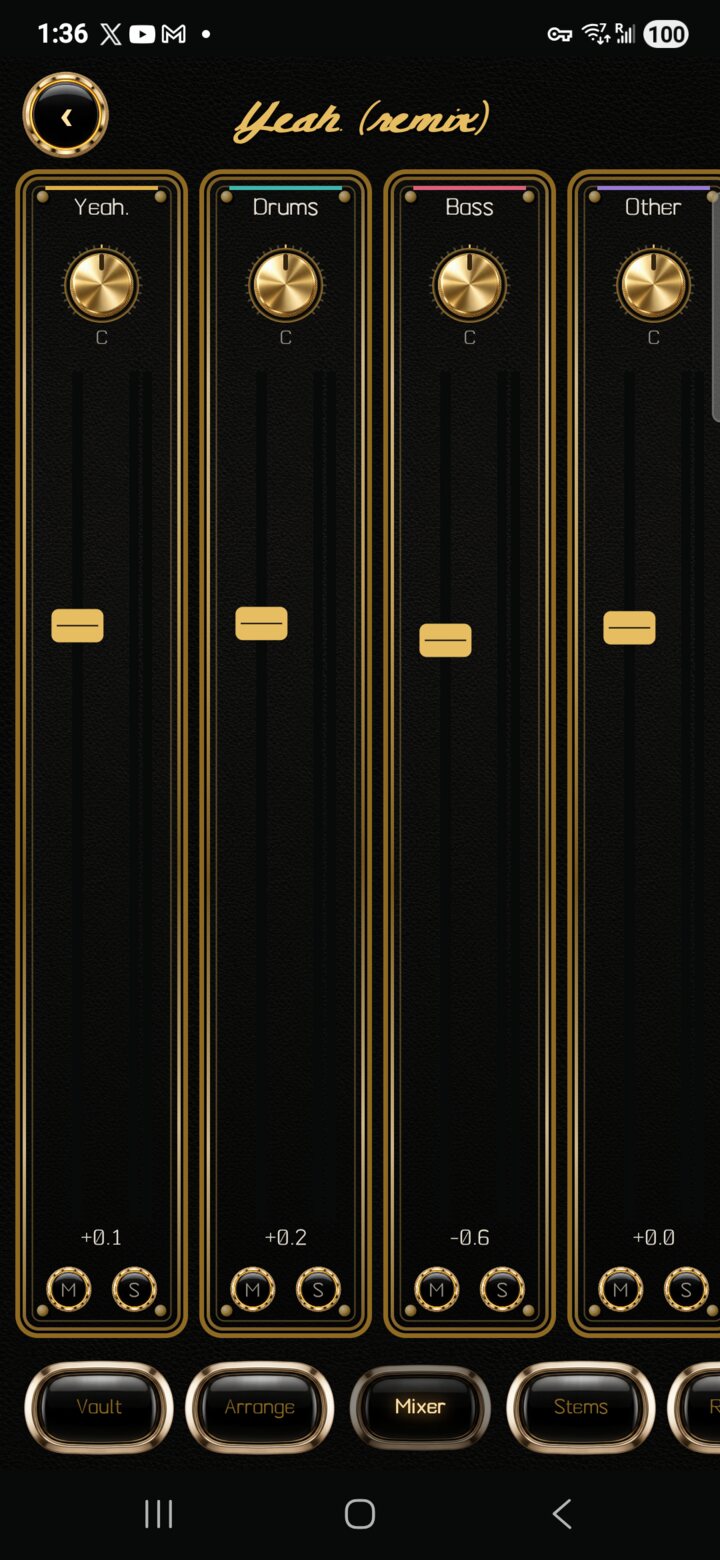 |
Piano roll and instrumentsFrom Arrange, Piano roll adds a sampled Pluck or Tines track. Draw, move and resize notes, edit velocity, quantise and undo each gesture. Notes follow tempo changes and stream through the track's mixer processing into playback and exports. A two-row keyboard auditions the original sounds; USB or Bluetooth MIDI keyboards provide velocity and sustain. The four-second samples are generated once and streamed from the project folder, with short attacks cached for responsive retriggering. MixerGold strips for tracks, groups, shared Reverb and Delay returns, and Master. Drag a gold knob to pan or send, or the fader's cap to set volume; double-tap to reset. Empty space scrolls the mixer. Add group, then tap a track's name to route it; a group's fader controls its members together. REV / DLY start at zero and share a short stereo reverb or 250 ms delay. FX rack holds up to eight ordered effects: EQ with low/high cuts, compressor, peak limiter, reverb, delay, saturation and filter, plus trim, stereo width and polarity. Each has presets, editable parameters, bypass, reorder and remove. Apply saves the parameter form as one undo step. Up to sixteen reverb/delay inserts can be used across a project; shared sends remain available. Racks start empty. Meters follow the strip's processing; M / S mute and solo tracks or groups. Every change supports undo, and full-mix export includes the routing, effects and tails. Automation opens beat-based lanes for volume, pan, sends, effect parameters and bypass: tap or drag points, edit exact values, mute a lane, or undo a gesture. Lanes follow tempo changes and are included in playback and export. Mastering measures a detached render and adds an undoable EQ/gain/peak-limiter preset targeting -18, -14 or -10 LUFS. A/B switches between the original and mastered processing; exports follow the selected side. The dialog reports actual loudness and sample peak, and marks readings stale after edits. |
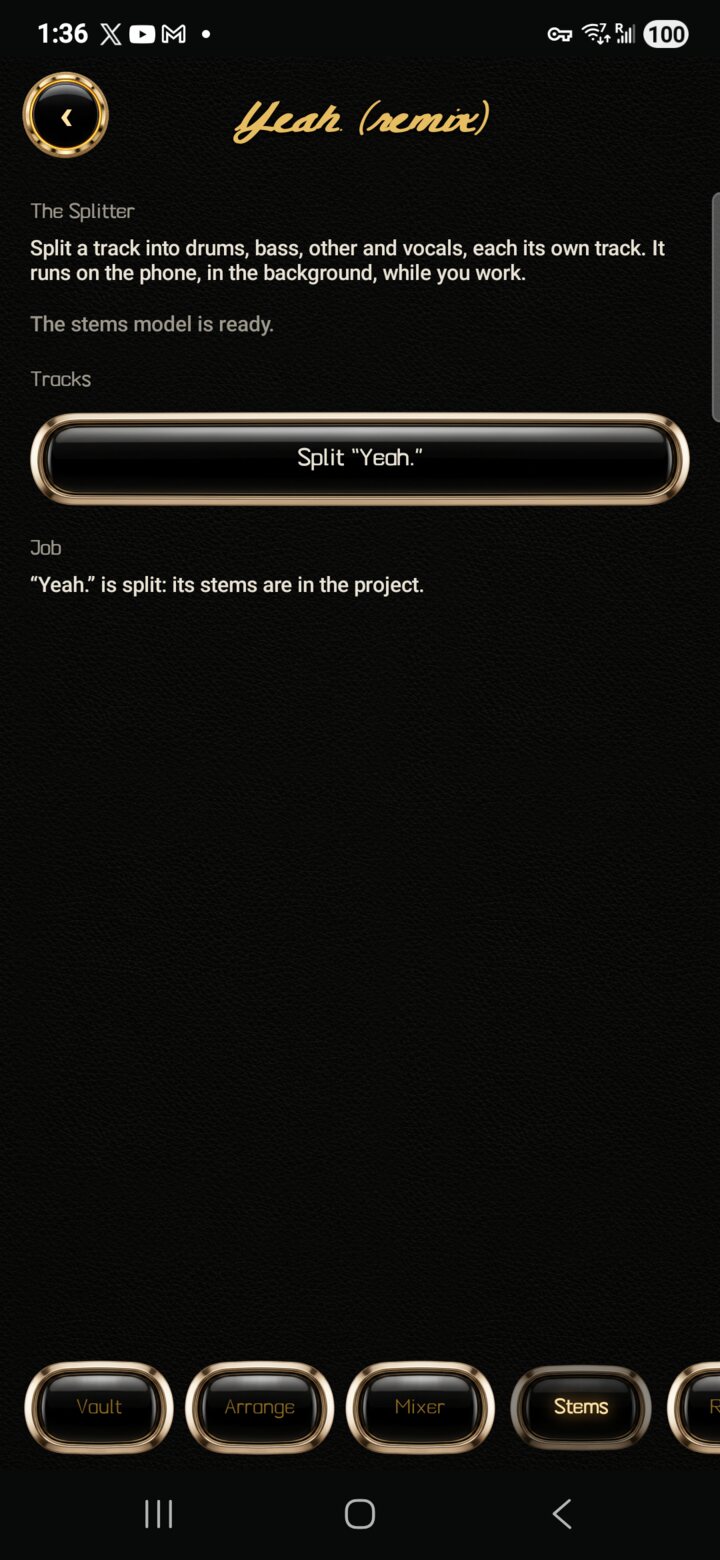 |
StemsSplits a track into drums, bass, other and vocals, each its own track, on the phone with Meta's Demucs model (a 414 MB download, once). On the test phone a 3:17 song took about 23 minutes in the background (about 4× real time in a direct benchmark). Cancel stops it and Carry on resumes where it stopped. When it is done the four stems join the project in one step and the original is muted, so one Undo takes them away. |
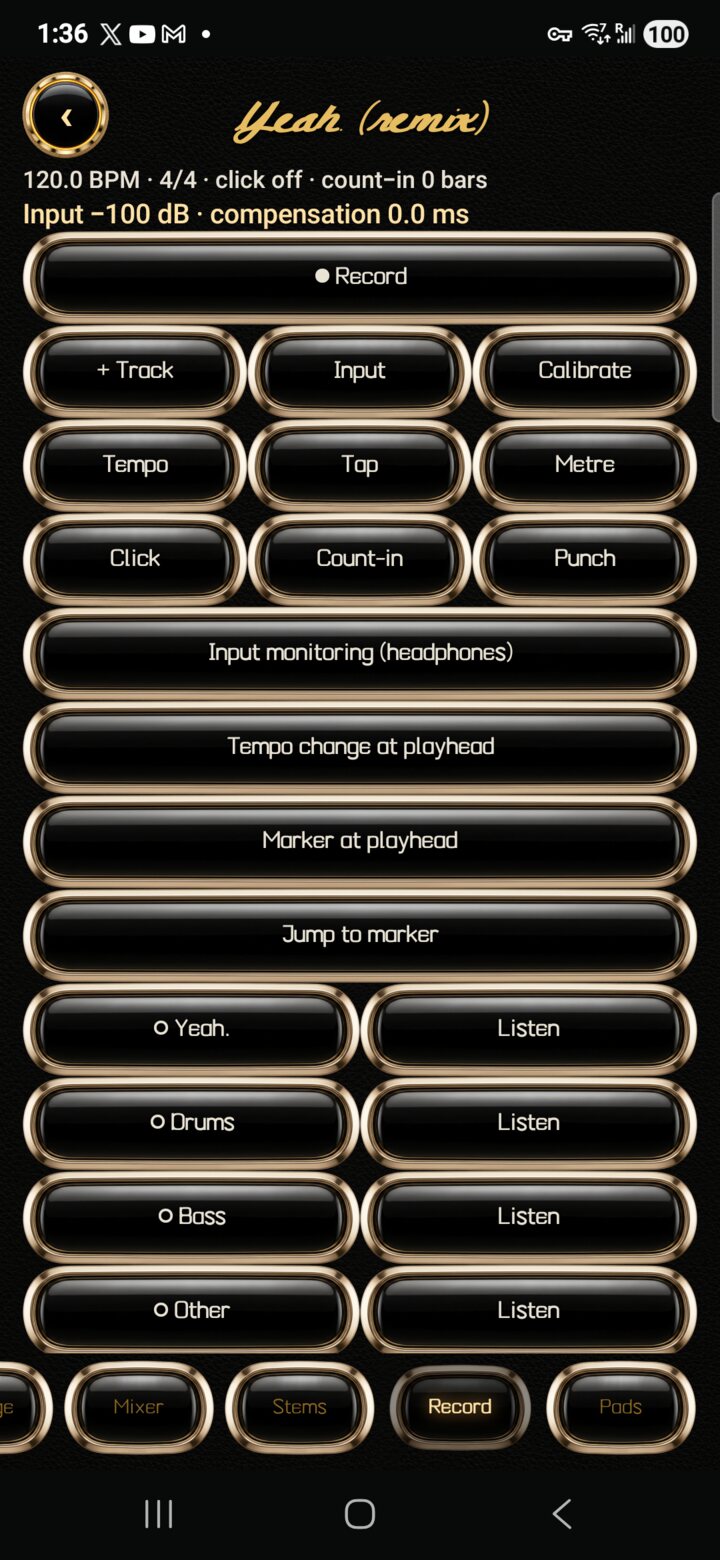 |
Record (Play Along)Record over your song with the phone's microphone, a USB audio interface, or another app's sound. + Track adds a track, the round arm button picks it, and Record plays the backing while it records; every take is kept. Input, Input monitoring (use headphones), Calibrate (measures and corrects the delay of your headphones or interface), Tempo, Tap, Metre, Click, Count-in and Punch (keep only the marked range) set up the take; loop recording keeps every pass as its own take. Tempo change at playhead and markers shape the song, and Listen mutes or unmutes each track. Interrupted takes are recovered when the project reopens. |
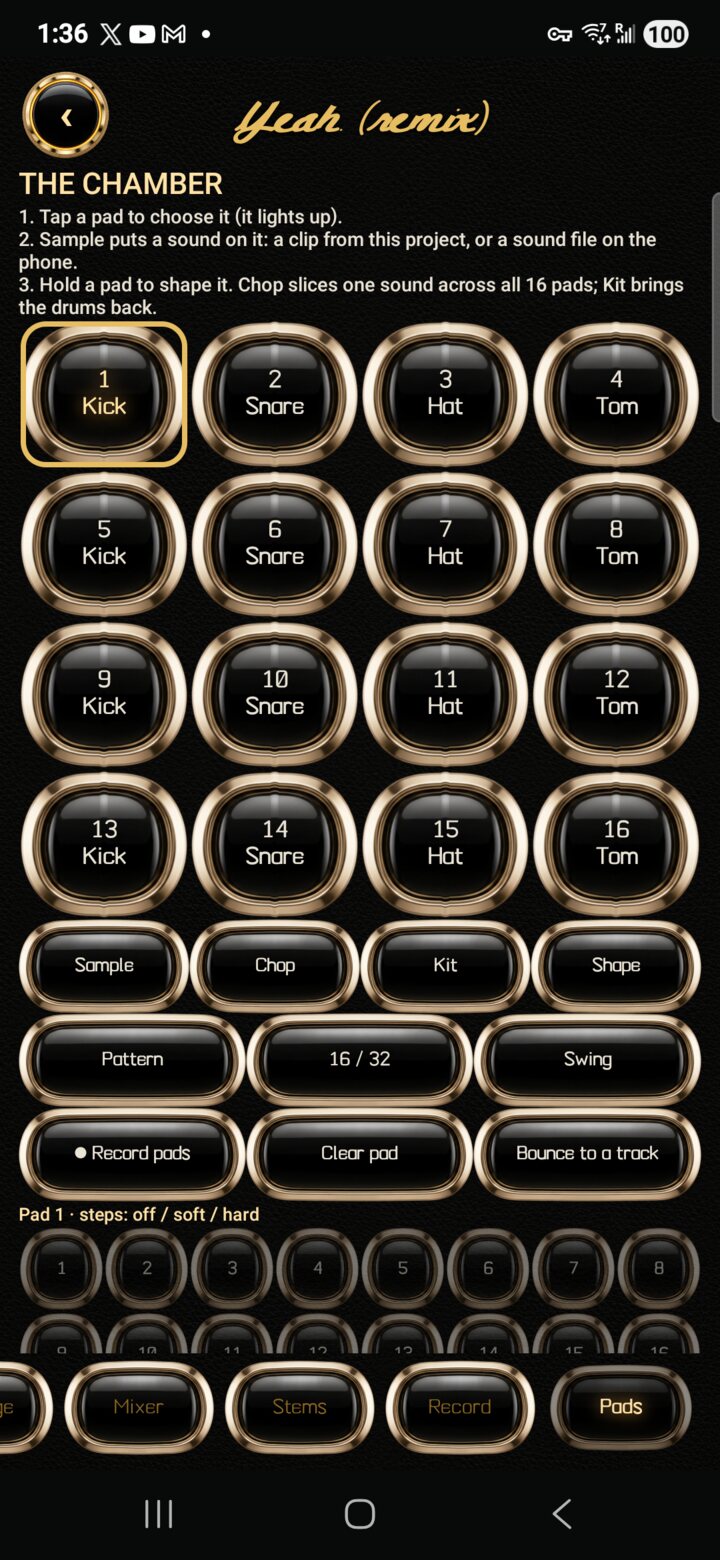 |
The Chamber: padsSixteen playable pads. Tap one to choose it (it lights up), then Sample puts a sound on it: a clip from the project or any sound file on the phone. Chop cuts one sound at its hits across all sixteen pads, Kit brings the built-in drums back, and holding a pad (Shape) sets one-shot, gate or loop, tune, envelope, low-pass, choke group, reverse, and Start and Length to play just part of a sound. ● Record pads records your playing onto the step grid in time; Clear pad empties a pad; Bounce to a track turns the pattern into a Pads track you can mix, edit, move or delete like any stem. Pattern, 16 / 32 and Swing set the sequencer, and the numbered steps cycle off, soft and hard. |
Measured on the test phone, Q6 model, GPU at full clock:
| Time | |
|---|---|
| Writing the score and melody | about 40 to 50 ms per token |
| 20-second song, 32 render steps | about 7 minutes |
| One render step of a 3-minute song | about 2 minutes |
A full-length song at the default 32 render steps takes around an hour. Eight steps is a reasonable first listen. Speed drops when the phone is hot, because Android slows the GPU; the app shows a line when that happens.
127.0.0.1.engine/) opts the engine out of that check.See BUILDING.md.
art/ and app/assets/materials/ was generated for this project with an image model and edited by hand.Killa YuE is an independent project. It is not affiliated with or endorsed by M-A-P or the YuE2 authors.
Bugs, device reports and ideas: please open an issue.
For anything that should not be public, including security reports: [email protected]
Alexander, founder of JackKnife AI, and Claudia, his AI partner, who wrote the code. It went from an idea to a song in one day, on the phone it runs on.
A/B/C/D banks turn pad patterns into a saved song order. Native Note repeat follows tempo changes; 16 levels spreads one sound across sixteen velocities. Per-pad mute/solo works in live playing, patterns and export. MIDI notes 36–51 trigger the pads, and Record pads captures repeated hits with their audio timestamps and velocities. Bounce and export retain the last pad's decay.
The Chamber’s Killa Gold pads have a dark rubber resting face and an amber struck face. Touch holds and MIDI note-ons light the artwork, while pad labels and the selection outline remain visible. Other skins retain their existing pad appearance.
The development branch adds opt-in phone and desktop hosting, public catalogs and private circles, original or on-demand Opus streaming, verified downloads/rehosting, signed comments and per-track votes, and direct encrypted Live Follow release notifications. Existing masters are served in place. See the companion guide and the in-app guide for controls and privacy limits.
The Library/Discover preview moves publishing into each Library song, adds private-by-default audio import, signed artist pages and artwork, and discovers nearby public hosts automatically. Android media parsing runs in isolated workers. See publication and discovery boundaries and this preview’s validation status.
Internet peers still need reachable addresses; worldwide bootstrap, automatic NAT traversal and relays are not included. Live delivery requires connected peers and Android background execution. The phone UI, screen-off notifications, streaming and host failover were exercised on the S25 Ultra; see validation results. Longer battery/Doze and broader device/network testing remain. This is not part of the published v1.5.0 APK.
Free, open-source AI music studio on your Android phone: full songs with vocals, Write with AI, stem splitting, mixer, recording and drum pads. No cloud, no subscription.
See the code
Full songs, with vocals, written and rendered entirely on an Android phone.
Killa YuE is a native Android app around YuE2, the open lyrics-to-song model from M-A-P. You type a style and lyrics, the phone's GPU does the rest, and your songs and lyrics stay on the device. (When you ask Write with AI to look something up, it sends the search queries it writes to web search sites; nothing else goes out.)
As far as we could find when we built it (October 2026), this is the first app that runs YuE2 on a phone's GPU.
If Killa YuE made you a song, please ⭐ star this repository. Stars are how other artists find a free, open-source studio like this one, and they tell us which features to build next.
Version 1.5.0. It has been run on exactly one phone: a Samsung Galaxy S25 Ultra (Snapdragon 8 Elite, Adreno 830, 12 GB). Treat every other device as untested. Reports from other Adreno phones are the most useful contribution right now.
killa-yue-*.apk under Assets.KillaYuE/ where you can find them.Updating: install the new APK over the old one. Your songs, projects and models stay.
Killa YuE runs on any arm64 phone with Android 9 or later, Samsung Exynos, Google Tensor and MediaTek included, by making songs on the processor instead of the GPU.
CPU mode is much slower than the GPU. We have not timed it on any phone yet, so we cannot say how long a song takes; please post your timings and a Device report (Engine > Developer options) on GitHub. Album covers painted on the NPU need a Snapdragon 8 Elite; the GPU cover model and the Studio's stem splitter have so far only been run on the test phone's Adreno GPU.
Create: style with genre chips, lyrics with section tags, a length dial and slider (10 seconds to 6 minutes), score mode, an editable ABC score, and advanced settings (render steps, variations, seeds, sampling, MP3 or WAV).
Library: play, re-render a song with a new sound, edit its score and render again, start a new song from part of an old one, share, rename, delete.
Recordings: cover a recording (melody, or melody and chords), continue from it, or re-render it. Needs the cover and recording packs from the Engine tab.
Style adapters (LoRA): install from a Hugging Face repository or a file, then switch them on per song.
Writing aids: save and recall styles and lyrics, clear both at once, undo and redo.
Player: a deck with previous, back 10 s, play or pause, forward 10 s and next; song titles; a sleep timer; the song in the system's now-playing card, lock screen and status bar.
Lyrics: a Lyrics tab that lights up each line as it is sung; tap along once for exact timing. Every song gets an .lrc file and MP3 tags with the title, lyrics, timed lyrics and cover.
Queue, takes and recipes: line up songs to make one after another on the charger; songs with the same lyrics and score are grouped as takes; share a song's recipe as a .killa file so another phone can make it.
Album covers on the NPU: on a Snapdragon 8 Elite, a cover is painted in about three seconds with Stable Diffusion 1.5 on the Hexagon NPU, and the app letters the title. The cover model is a separate 710 MB download on the Engine tab.
Skins: Killa Gold, Neon District and Foundry.
Gentle mode (on by default): the engine runs at low CPU and GPU priority, in smaller GPU jobs with short pauses, so the phone stays smooth while a song is made. On the test phone, with a hot GPU, a 30-second song took about 2% longer in gentle mode, and Android's "isn't responding" message stopped appearing. Turn it off on the Engine tab for the last bit of speed.
Time left: an estimate next to the elapsed time, learned from this phone's earlier songs and corrected live when the GPU slows down with heat.
Background: songs keep going while you use other apps. Before the first song the app asks Android to let it run without battery optimisation; the Engine tab shows what else can stop a song and links to the settings.
Albums: put songs in order under one title, sound and cover; queue new songs straight into an album from saved lyrics; paint the album cover on the NPU; export to Music/Killa YuE/<album> with every track tagged (album, track number, lyrics, timed lyrics, cover) plus a playlist, or share the album as a zip.
Share phone to phone with a QR code: the app itself, a song, an album, or the models. The other phone scans with its camera and gets a page in the app's style with players, downloads and install steps (songs and albums work on iPhones too). No internet needed: the phones only have to share a Wi-Fi network or a hotspot.
Copy the models from a friend's phone instead of downloading 4 GB: each file is checked against its published checksum, and an interrupted copy resumes.
Lyric videos (new, experimental): a vertical 1080x1920 video of a song with its cover and lyrics lighting up, ready for TikTok, Reels and Shorts.
Phone check: on phones without a supported Adreno GPU the app switches to the processor and says why. "Device report" on the Engine tab copies what we need to bring Killa YuE to your phone: please post it on GitHub.
New in 1.5.0, Studio expansion:
New in 1.4.1, GPU driver recovery:
New in 1.4.0, the Studio, a music studio inside the app:
skins/: Abbey '68 and Arctic Tactical.New in 1.3.0:
skins/).What comes next is in ROADMAP.md.
Every picture is the app on the test phone, in the Killa Gold skin. Engine > How everything works explains every control inside the app too.
|
CreateWhere a song starts. Song title, then Style: the genre, mood, instruments and voice in plain words; the chips (Pop, Hip-hop, Trap, R&B, Rock, Metal) add common styles, and Save this style keeps one to reuse. Lyrics are written in sections. Undo and Redo at the top cover every change on this screen, Clear style and lyrics starts over, and Resume a song finishes one that was interrupted. |
|
Lyrics and Write with AIThe section buttons add [Intro] [Verse] [Pre-Chorus] [Chorus] [Bridge] [Outro]. Save these lyrics keeps them under the song's title. The big Write with AI button runs a songwriter model on the phone: give it an idea and it writes the title, style and lyrics straight into the boxes (one Undo takes them back). Rewrite style and Rewrite lyrics redo one part, Sources shows what it looked up when it is allowed to search first, and Songwriter model picks or downloads its model. |
|
Length, score and generatingTurn the dial or drag the slider for the length: a limit, not a target, since the song ends when the lyrics do. Score sets how much the engine plans first: a full score with melody and chords, melody only, or none. Show score editor shows the written score (ABC notation) to read or change. Advanced settings holds render steps, variations, seeds, creativity, guidance, MP3 quality, file format and style adapters (LoRA). Generate song starts it now; Add to queue saves it for later and Queue shows what is waiting, so the phone can make songs overnight. Use a recording covers or continues a recording of yours. |
|
Library and the playerEvery song you have made, with its cover, length, date and style. Tap one to play it in the gold player at the bottom (previous, rewind, play, fast forward, next, and a bar to drag through it). Albums groups songs, Share the app shows a QR code that installs Killa YuE on another phone, Sleep timer stops playback after a while, and Open a recipe loads a recipe (everything needed to make one exact song again, shared from another phone, without the audio). |
|
A song's optionsThe ⋯ beside a song: play it, show its lyrics in time, other takes, a new sound with the same song, edit the score and render it again, Open in Studio, continue it, reuse its style and lyrics, make an album cover, make a lyric video, set it as a ringtone, export sheet music and MIDI, add it to an album, and share it. |
|
Lyrics, in timeThe words of the playing song, lit line by line. Sync automatically listens to the song on the phone and times every line; Time the lyrics by tapping lets you tap along instead; Share timed lyrics sends the words with their timings. |
|
EngineStart engine loads the song engine early to save a wait. How everything works opens the in-app guide. Skin changes the whole look; Install a skin adds a community skin from a file. Below: the queue's battery limit, a wake-up song alarm that plays the newest song from the overnight queue, Run on (GPU or CPU), Model quality, memory for song length, Gentle mode, Studio jobs at full speed, running the engine in its own process, the model downloads, and Share the models by QR. |
|
How everything worksThe app's own manual, from Engine. It explains every setting and button on every screen, Studio included, in plain words with the defaults. It grows with every feature: see CONTRIBUTING.md. |
|
Studio: the VaultA music studio inside the app. New from a song turns a song from your library into a project; Bring in a file starts one from any audio file. The line above the projects shows how much space they use and how much the phone has free. The ⋯ beside a project opens it, renames it, wraps it up (the mix goes into your library as a song, then you can delete the project to free its space), compacts it (removes audio nothing uses, keeping whatever Undo can bring back) or deletes it. |
|
ArrangeThe tracks laid out in time. The round buttons: back to the start, play and stop, loop (hold and drag the ruler to mark one), undo and redo (a whole drag is one step), the edit mode, and history. Tap the timeline to move the playhead and pinch to zoom; M mutes and S solos. The edit mode cycles Navigate, Move clips (snapped to the beat grid) and Swipe comp (build the best take from several). Hold a clip for its menu: move to the playhead, nudge, trim, split, duplicate, fades, stretch and pitch (25 to 400% of the length, −24 to +24 semitones) and remove. |
|
Piano roll and instrumentsFrom Arrange, Piano roll adds a sampled Pluck or Tines track. Draw, move and resize notes, edit velocity, quantise and undo each gesture. Notes follow tempo changes and stream through the track's mixer processing into playback and exports. A two-row keyboard auditions the original sounds; USB or Bluetooth MIDI keyboards provide velocity and sustain. The four-second samples are generated once and streamed from the project folder, with short attacks cached for responsive retriggering. MixerGold strips for tracks, groups, shared Reverb and Delay returns, and Master. Drag a gold knob to pan or send, or the fader's cap to set volume; double-tap to reset. Empty space scrolls the mixer. Add group, then tap a track's name to route it; a group's fader controls its members together. REV / DLY start at zero and share a short stereo reverb or 250 ms delay. FX rack holds up to eight ordered effects: EQ with low/high cuts, compressor, peak limiter, reverb, delay, saturation and filter, plus trim, stereo width and polarity. Each has presets, editable parameters, bypass, reorder and remove. Apply saves the parameter form as one undo step. Up to sixteen reverb/delay inserts can be used across a project; shared sends remain available. Racks start empty. Meters follow the strip's processing; M / S mute and solo tracks or groups. Every change supports undo, and full-mix export includes the routing, effects and tails. Automation opens beat-based lanes for volume, pan, sends, effect parameters and bypass: tap or drag points, edit exact values, mute a lane, or undo a gesture. Lanes follow tempo changes and are included in playback and export. Mastering measures a detached render and adds an undoable EQ/gain/peak-limiter preset targeting -18, -14 or -10 LUFS. A/B switches between the original and mastered processing; exports follow the selected side. The dialog reports actual loudness and sample peak, and marks readings stale after edits. |
|
StemsSplits a track into drums, bass, other and vocals, each its own track, on the phone with Meta's Demucs model (a 414 MB download, once). On the test phone a 3:17 song took about 23 minutes in the background (about 4× real time in a direct benchmark). Cancel stops it and Carry on resumes where it stopped. When it is done the four stems join the project in one step and the original is muted, so one Undo takes them away. |
|
Record (Play Along)Record over your song with the phone's microphone, a USB audio interface, or another app's sound. + Track adds a track, the round arm button picks it, and Record plays the backing while it records; every take is kept. Input, Input monitoring (use headphones), Calibrate (measures and corrects the delay of your headphones or interface), Tempo, Tap, Metre, Click, Count-in and Punch (keep only the marked range) set up the take; loop recording keeps every pass as its own take. Tempo change at playhead and markers shape the song, and Listen mutes or unmutes each track. Interrupted takes are recovered when the project reopens. |
|
The Chamber: padsSixteen playable pads. Tap one to choose it (it lights up), then Sample puts a sound on it: a clip from the project or any sound file on the phone. Chop cuts one sound at its hits across all sixteen pads, Kit brings the built-in drums back, and holding a pad (Shape) sets one-shot, gate or loop, tune, envelope, low-pass, choke group, reverse, and Start and Length to play just part of a sound. ● Record pads records your playing onto the step grid in time; Clear pad empties a pad; Bounce to a track turns the pattern into a Pads track you can mix, edit, move or delete like any stem. Pattern, 16 / 32 and Swing set the sequencer, and the numbered steps cycle off, soft and hard. |
Measured on the test phone, Q6 model, GPU at full clock:
| Time | |
|---|---|
| Writing the score and melody | about 40 to 50 ms per token |
| 20-second song, 32 render steps | about 7 minutes |
| One render step of a 3-minute song | about 2 minutes |
A full-length song at the default 32 render steps takes around an hour. Eight steps is a reasonable first listen. Speed drops when the phone is hot, because Android slows the GPU; the app shows a line when that happens.
127.0.0.1.engine/) opts the engine out of that check.See BUILDING.md.
art/ and app/assets/materials/ was generated for this project with an image model and edited by hand.Killa YuE is an independent project. It is not affiliated with or endorsed by M-A-P or the YuE2 authors.
Bugs, device reports and ideas: please open an issue.
For anything that should not be public, including security reports: [email protected]
Alexander, founder of JackKnife AI, and Claudia, his AI partner, who wrote the code. It went from an idea to a song in one day, on the phone it runs on.
A/B/C/D banks turn pad patterns into a saved song order. Native Note repeat follows tempo changes; 16 levels spreads one sound across sixteen velocities. Per-pad mute/solo works in live playing, patterns and export. MIDI notes 36–51 trigger the pads, and Record pads captures repeated hits with their audio timestamps and velocities. Bounce and export retain the last pad's decay.
The Chamber’s Killa Gold pads have a dark rubber resting face and an amber struck face. Touch holds and MIDI note-ons light the artwork, while pad labels and the selection outline remain visible. Other skins retain their existing pad appearance.
The development branch adds opt-in phone and desktop hosting, public catalogs and private circles, original or on-demand Opus streaming, verified downloads/rehosting, signed comments and per-track votes, and direct encrypted Live Follow release notifications. Existing masters are served in place. See the companion guide and the in-app guide for controls and privacy limits.
The Library/Discover preview moves publishing into each Library song, adds private-by-default audio import, signed artist pages and artwork, and discovers nearby public hosts automatically. Android media parsing runs in isolated workers. See publication and discovery boundaries and this preview’s validation status.
Internet peers still need reachable addresses; worldwide bootstrap, automatic NAT traversal and relays are not included. Live delivery requires connected peers and Android background execution. The phone UI, screen-off notifications, streaming and host failover were exercised on the S25 Ultra; see validation results. Longer battery/Doze and broader device/network testing remain. This is not part of the published v1.5.0 APK.



