Write songs from a sentence, reshape your own recordings, and turn any recording into sheet music.
Web app · Phone and Mac app · Chrome extension
Kiku AI is a music studio built around open models: ACE-Step and YuE2 write and edit songs, SheetSage2 writes sheet music from audio, and Demucs splits a mix into stems. It comes in three forms that share one set of engines and one library in your Hugging Face account:
| What it is | Where | |
|---|---|---|
| Web app | The full studio, live on the Hugging Face Space Reubencf/Kiku-AI | outputs/kiku-ai |
| Flutter app | The same app for Android, iPhone, iPad and Mac | kiku_app |
| Chrome extension | YouTube to Score: record part of a video and get sheet music | outputs/youtube-to-score-extension |
| Engines | Gradio ZeroGPU Spaces and private Modal GPUs | outputs/kiku-engine-space, outputs/kiku-acestep15-space, outputs/kiku-modal |
| On-device experiment | YuE2 and SheetSage2 as GGUF, running inside a Flutter app | flutter_app |
| Branding | The logo and the script that draws every icon | branding |
flowchart LR
  subgraph clients [Clients]
    web["Web app<br>(browser)"]
    app["Flutter app<br>(kiku_app)"]
    ext["Chrome extension"]
  end
  server["Kiku-AI Space<br>Next.js server"]
  modal["Private Modal GPUs<br>ACE-Step 1.5 · YuE2 · DreamLite"]
  engine["Kiku-Engine Space<br>Gradio + ZeroGPU<br>SheetSage2 · Demucs · lyrics · ACE-Step 1"]
  hub["Hugging Face Hub<br>your kiku-ai-library dataset"]
  web --> server
  app -- "your HF token" --> server
  server --> modal
  web -- "your HF token" --> engine
  app -- "your HF token" --> engine
  ext -- "SheetSage2 only" --> engine
  web --> hub
  app --> hub
Everyone signs in with Hugging Face. ACE-Step 1.5 and YuE2 run on Kiku's private Modal GPUs through the Kiku-AI server. Transcription, stems, lyrics and ACE-Step 1 run on the Kiku-Engine Space against each user's own ZeroGPU allowance. Songs, studio projects and scores are saved to a private dataset in each user's own account, so work moves between browser and phone.
Open it at huggingface.co/spaces/Reubencf/Kiku-AI. It has a home page, Generate (songs from an idea or from your own style and lyrics), Studio (a multitrack editor where selections can be restyled, rewritten, extended, split into stems or covered by YuE2, and instruments added), Score (SheetSage2 lead sheets you can play, edit and download) and Library.
To run it locally you need Node.js 24 and FFmpeg/ffprobe. From outputs/kiku-ai, run npm ci,
copy env.example to .env.local, set a private SESSION_SECRET and the API and OAuth
settings, then run npm run dev. Never commit credentials. Details:
outputs/kiku-ai/README.md.
kiku_app is Kiku AI as a native app for Android, iPhone, iPad and Mac, written
in Flutter. It has the same five sections as the web app:
It signs in with Hugging Face (OAuth with PKCE, or a pasted access token) and calls the deployed services directly with the user's own token. It has no server of its own.
Try it on Android: open the latest successful
Kiku AI app workflow run
and download the kiku-ai-android artifact (a test APK signed with a debug key).
Build it yourself with Flutter 3.44.7:
cd kiku_app
flutter pub get
flutter run            # pick an Android phone, an iPhone, a simulator or macOS
[!NOTE] The app needs two things from the Kiku-AI server: bearer-token sign-in and the
kikuai://oauth/callbackredirect in its OAuth client. Both are inoutputs/kiku-aiin this repository. If the deployed Space predates them, redeploy it withwork/deploy_kiku_app.py.
Requirements, sign-in, the library layout, development notes and troubleshooting are in kiku_app/README.md.
Record part of a YouTube video and get it back as sheet music: SheetSage2 writes the melody and chords, and the extension engraves them as a piano score or a lead sheet that plays along with the recording.
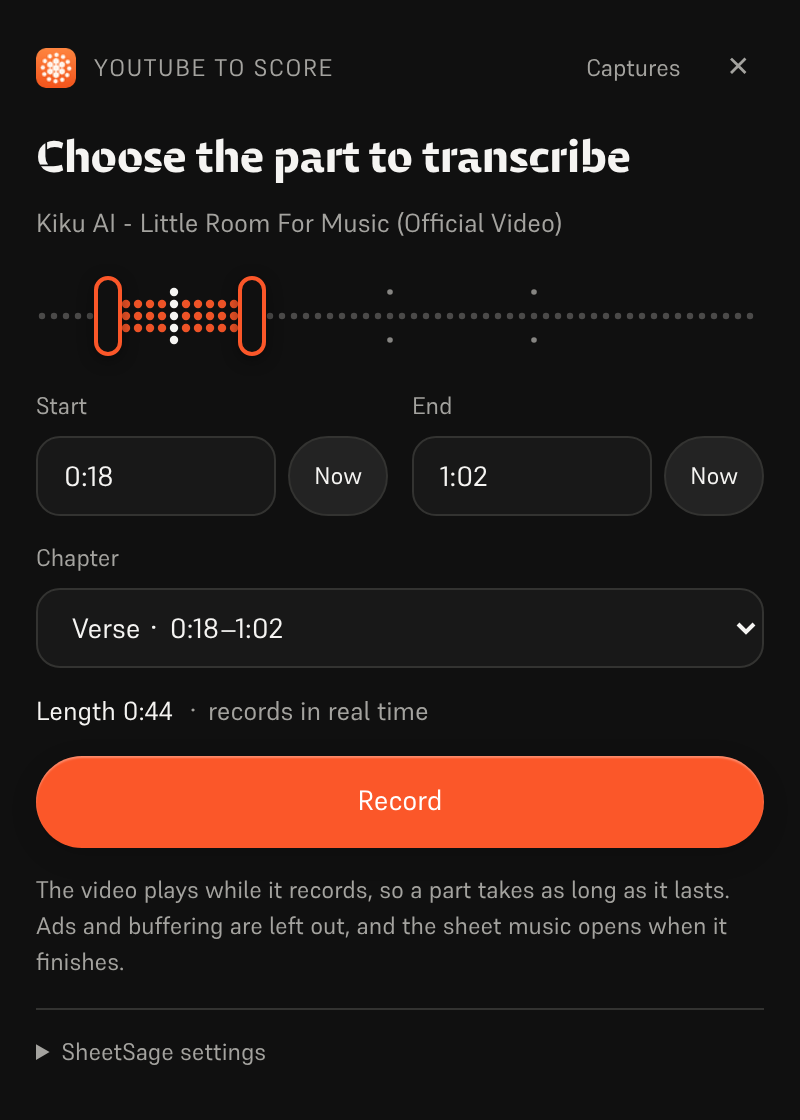
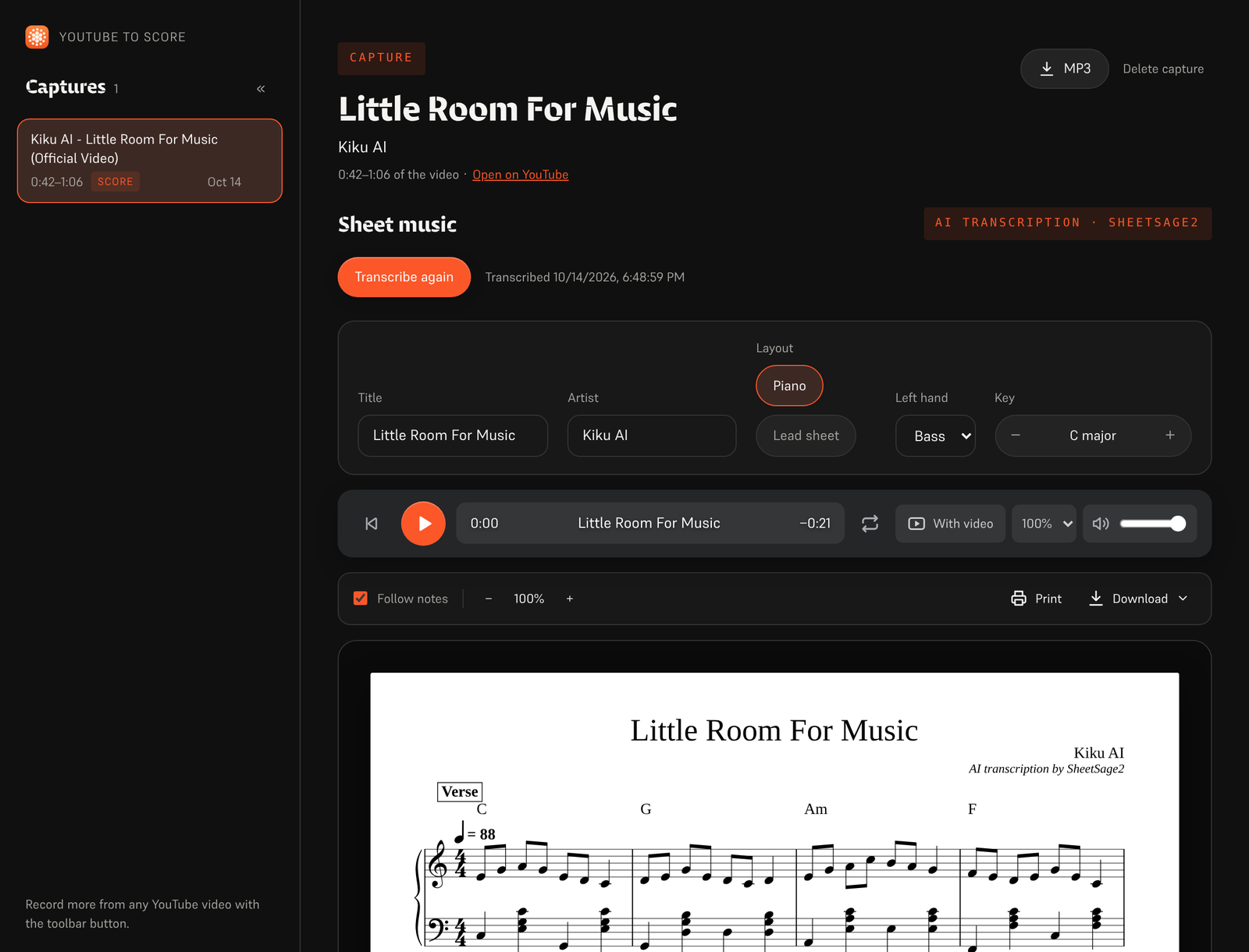
Left: choosing the part to record. Right: the capture page with the engraved score (example transcription).
The extension is not on the Chrome Web Store; you load it into Chrome yourself. It needs Chrome 116 or newer (other Chromium browsers such as Edge work too).
kiku-youtube-to-score.zip from the
extension-latest release
and unzip it. (GitHub Actions rebuilds it from main whenever the extension changes.)git clone https://github.com/Reubencfernandes/musical.git)
and use the folder outputs/youtube-to-score-extension.chrome://extensions and switch on Developer mode (top right).manifest.json in it).To update, replace the folder with the new files and click the reload arrow on the extension's
card in chrome://extensions.
Transcription runs on a Hugging Face ZeroGPU Space. Without a token it uses the Space's shared anonymous allowance, which runs out after a few clips.
Reubencf/Score-Studio-API. Any Space with the same
/transcribe(audio, start, duration, melody_only, piano) endpoint works, such as
Reubencf/Kiku-Engine; enter it as owner/name or a full https://….hf.space address.On your own PC the extension can fetch the part with yt-dlp
instead of recording it in real time. Install Python, pip install -U yt-dlp and ffmpeg, then run
powershell -ExecutionPolicy Bypass -File native\install.ps1 from the extension folder (pass
-ExtensionId <id> with the ID chrome://extensions shows for your copy). Reload the extension and
the panel shows Get audio now. This helper is left out of the release ZIP; see the
extension README.
More detail, including how each file works: extension README.
flutter_app)Separate from the Kiku AI app above, flutter_app explores running the models on the device
itself: on-device generation and transcription, audio editing and export, with the same orange
dot-matrix musicians and visual style. See the mobile feasibility notes.
It calls the pinned audio.cpp C API for YuE2 and SheetSage2 GGUF execution, with verified model downloads, style and lyrics generation, recording transcription, local playback and file export. Follow Flutter setup and the Apple native build instructions; a normal Flutter build alone does not bundle the audio runtime, and browser builds show a native-app notice.
Its current limits: actual inference with model weights and Apple device builds still need validation; incremental generated audio and the editor are not implemented; Android native packaging is pending (the integration prioritises iOS and macOS). No phone performance, generation speed or low-end phone support is claimed.
ZeroGPU only supports the Gradio SDK, so inference lives in Gradio Spaces and the interface is a separate CPU Docker Space. ACE-Step 1.5 needs Python 3.11 and Gradio 6, which cannot share the engine's stack, so it has its own Space with the same endpoint names:
| Space | SDK | Holds |
|---|---|---|
| Kiku-Engine | Gradio + ZeroGPU | SheetSage2, YuE2, ACE-Step, Demucs, and the OAuth client |
| Kiku-ACE-Step-15 | Gradio 6 + ZeroGPU | ACE-Step 1.5 (turbo, base and the 1.7B planner) and Demucs |
| Kiku-AI | Docker (CPU) | The Next.js interface and server |
| Score-Studio-API | Gradio + ZeroGPU | The original transcription API, still the extension's default |
Sources: outputs/kiku-engine-space, outputs/kiku-acestep15-space and outputs/kiku-ai. Deploy with
work/deploy_kiku_spaces.py and work/deploy_kiku_app.py (both read HF_TOKEN). Each deploy of
the Kiku-AI Space restarts it, which ends any job running at the time.
The ACE-Step 1.5 Modal backend is deployed in the active konkanillm
workspace. Source, setup commands, and measured cold/warm timings are in
the Modal deployment notes and
the trial report. It uses one L40S worker with private
API access, CPU memory snapshots, and scale-to-zero. The web app routes ACE-Step
1.5 generation and planning through authenticated server routes to Modal.
YuE2 runs on its own private Modal L40S worker (kiku-yue2), using the native
PyTorch runtime and CPU import snapshots. Generate allows choosing YuE2 or
ACE-Step 1.5 in both Simple and Custom mode. SheetSage2, ACE-Step 1 and
standalone stem/lyrics jobs still use Hugging Face.
outputs/score-studio-api, outputs/kiku-yue2-space and outputs/kiku-acestep-space are the
superseded single-model Spaces, kept until the merged engine has run in earnest.
outputs/sheetsage2-space is the original Gradio implementation. work holds deployment and
verification scripts. Hosting more than two ZeroGPU Spaces on one account requires PRO.
They pin conflicting versions — transformers 4.45.2 (SheetSage2), 4.50.0 (ACE-Step) and 4.57.6
(YuE2) — so pip cannot satisfy all three. The YuE2 wheel's stack wins and the other two run on
it; acestep installs with --no-deps at startup and its real inference imports are listed in
requirements.txt. torchaudio and torchvision must stay pinned to the torch 2.10.0 pair, or
pip takes CUDA 13 builds that cannot load against CUDA 12 torch.
Each model loads on first use, not at import: YuE2 reaches low-level CUDA init while
constructing, which ZeroGPU refuses outside a @spaces.GPU function. SheetSage2 additionally
merges LoRA adapters during load and accepts only CPU float32, so it is cast on the way to
the GPU.
YuE2 keeps a tune by working from a score, not the sound: SheetSage2 reads a stretch's melody, chords and bar lines, the user can edit that score, and YuE2 performs it (a cover, sung or on an instrument). The render is time-warped bar by bar onto the recording's own bar lines, so it stays in sync with the rest of the project.
The engine also has endpoints that build a band under a kept vocal (/accompany and
/band_score): they lift the voice off any backing with Demucs, measure the beat grid and
per-bar chords, and have ACE-Step or YuE2 play a band on them before mixing it under the voice.
The studio no longer offers this, but the endpoints remain.
| Part | Check it | Run it |
|---|---|---|
Web app (outputs/kiku-ai) | npm run typecheck | npm ci, then npm run dev |
Flutter app (kiku_app) | flutter analyze, flutter test | flutter pub get, then flutter run |
On-device experiment (flutter_app) | flutter analyze, flutter test | see its README |
| Extension | load it unpacked | see its README |
Both Flutter projects are validated with Flutter 3.44.7 / Dart 3.12.2. iPhone builds need macOS, Xcode and signing set up for your account.
GitHub Actions:
kiku-app.yml, on changes to kiku_app/: analyzer and
tests (including a FLAC check against libFLAC), an Android APK artifact, and iOS and macOS builds.extension.yml, on changes to the extension: checks the
manifest, packages the ZIP and, on main, updates the extension-latest release.Development scripts in work may still contain Windows-specific paths, so review them before
use. Credentials, build caches and private test recordings are kept out of the repository.
The mark is a bold pixel K on an orange tile, drawn in the same pixel language as the dot-matrix
musicians. In the web and Flutter apps its pixels drop in when it appears, and a wave runs through
them every few seconds. Icons of 32 px and under use a plainer K that sits exactly on the pixel grid.
branding/generate.py draws it and writes every icon: the extension's, the
web app's favicon, and the Flutter app's launcher icons.

Model weights are downloaded separately and keep their own licences; this repository does not
relicense them. YuE2, SheetSage2 and DreamLite-base are CC BY-NC 4.0 (non-commercial); ACE-Step
is Apache 2.0 and Demucs is MIT. Soundfont attribution is in
outputs/kiku-ai/public/soundfonts/ATTRIBUTION.md, font notices are in
outputs/kiku-ai/public/fonts/README.md, and the bundled abcjs notices travel with its copies.
Kiku AI was formerly called Score Studio; notation remains one of its modes. This repository is
named musical. Original project folder: E:\ScoreStudio.
Write songs from a sentence, reshape your own recordings, and turn any recording into sheet music.
Web app · Phone and Mac app · Chrome extension
Kiku AI is a music studio built around open models: ACE-Step and YuE2 write and edit songs, SheetSage2 writes sheet music from audio, and Demucs splits a mix into stems. It comes in three forms that share one set of engines and one library in your Hugging Face account:
| What it is | Where | |
|---|---|---|
| Web app | The full studio, live on the Hugging Face Space Reubencf/Kiku-AI | outputs/kiku-ai |
| Flutter app | The same app for Android, iPhone, iPad and Mac | kiku_app |
| Chrome extension | YouTube to Score: record part of a video and get sheet music | outputs/youtube-to-score-extension |
| Engines | Gradio ZeroGPU Spaces and private Modal GPUs | outputs/kiku-engine-space, outputs/kiku-acestep15-space, outputs/kiku-modal |
| On-device experiment | YuE2 and SheetSage2 as GGUF, running inside a Flutter app | flutter_app |
| Branding | The logo and the script that draws every icon | branding |
flowchart LR
  subgraph clients [Clients]
    web["Web app<br>(browser)"]
    app["Flutter app<br>(kiku_app)"]
    ext["Chrome extension"]
  end
  server["Kiku-AI Space<br>Next.js server"]
  modal["Private Modal GPUs<br>ACE-Step 1.5 · YuE2 · DreamLite"]
  engine["Kiku-Engine Space<br>Gradio + ZeroGPU<br>SheetSage2 · Demucs · lyrics · ACE-Step 1"]
  hub["Hugging Face Hub<br>your kiku-ai-library dataset"]
  web --> server
  app -- "your HF token" --> server
  server --> modal
  web -- "your HF token" --> engine
  app -- "your HF token" --> engine
  ext -- "SheetSage2 only" --> engine
  web --> hub
  app --> hub
Everyone signs in with Hugging Face. ACE-Step 1.5 and YuE2 run on Kiku's private Modal GPUs through the Kiku-AI server. Transcription, stems, lyrics and ACE-Step 1 run on the Kiku-Engine Space against each user's own ZeroGPU allowance. Songs, studio projects and scores are saved to a private dataset in each user's own account, so work moves between browser and phone.
Open it at huggingface.co/spaces/Reubencf/Kiku-AI. It has a home page, Generate (songs from an idea or from your own style and lyrics), Studio (a multitrack editor where selections can be restyled, rewritten, extended, split into stems or covered by YuE2, and instruments added), Score (SheetSage2 lead sheets you can play, edit and download) and Library.
To run it locally you need Node.js 24 and FFmpeg/ffprobe. From outputs/kiku-ai, run npm ci,
copy env.example to .env.local, set a private SESSION_SECRET and the API and OAuth
settings, then run npm run dev. Never commit credentials. Details:
outputs/kiku-ai/README.md.
kiku_app is Kiku AI as a native app for Android, iPhone, iPad and Mac, written
in Flutter. It has the same five sections as the web app:
It signs in with Hugging Face (OAuth with PKCE, or a pasted access token) and calls the deployed services directly with the user's own token. It has no server of its own.
Try it on Android: open the latest successful
Kiku AI app workflow run
and download the kiku-ai-android artifact (a test APK signed with a debug key).
Build it yourself with Flutter 3.44.7:
cd kiku_app
flutter pub get
flutter run            # pick an Android phone, an iPhone, a simulator or macOS
[!NOTE] The app needs two things from the Kiku-AI server: bearer-token sign-in and the
kikuai://oauth/callbackredirect in its OAuth client. Both are inoutputs/kiku-aiin this repository. If the deployed Space predates them, redeploy it withwork/deploy_kiku_app.py.
Requirements, sign-in, the library layout, development notes and troubleshooting are in kiku_app/README.md.
Record part of a YouTube video and get it back as sheet music: SheetSage2 writes the melody and chords, and the extension engraves them as a piano score or a lead sheet that plays along with the recording.
Left: choosing the part to record. Right: the capture page with the engraved score (example transcription).
The extension is not on the Chrome Web Store; you load it into Chrome yourself. It needs Chrome 116 or newer (other Chromium browsers such as Edge work too).
kiku-youtube-to-score.zip from the
extension-latest release
and unzip it. (GitHub Actions rebuilds it from main whenever the extension changes.)git clone https://github.com/Reubencfernandes/musical.git)
and use the folder outputs/youtube-to-score-extension.chrome://extensions and switch on Developer mode (top right).manifest.json in it).To update, replace the folder with the new files and click the reload arrow on the extension's
card in chrome://extensions.
Transcription runs on a Hugging Face ZeroGPU Space. Without a token it uses the Space's shared anonymous allowance, which runs out after a few clips.
Reubencf/Score-Studio-API. Any Space with the same
/transcribe(audio, start, duration, melody_only, piano) endpoint works, such as
Reubencf/Kiku-Engine; enter it as owner/name or a full https://….hf.space address.On your own PC the extension can fetch the part with yt-dlp
instead of recording it in real time. Install Python, pip install -U yt-dlp and ffmpeg, then run
powershell -ExecutionPolicy Bypass -File native\install.ps1 from the extension folder (pass
-ExtensionId <id> with the ID chrome://extensions shows for your copy). Reload the extension and
the panel shows Get audio now. This helper is left out of the release ZIP; see the
extension README.
More detail, including how each file works: extension README.
flutter_app)Separate from the Kiku AI app above, flutter_app explores running the models on the device
itself: on-device generation and transcription, audio editing and export, with the same orange
dot-matrix musicians and visual style. See the mobile feasibility notes.
It calls the pinned audio.cpp C API for YuE2 and SheetSage2 GGUF execution, with verified model downloads, style and lyrics generation, recording transcription, local playback and file export. Follow Flutter setup and the Apple native build instructions; a normal Flutter build alone does not bundle the audio runtime, and browser builds show a native-app notice.
Its current limits: actual inference with model weights and Apple device builds still need validation; incremental generated audio and the editor are not implemented; Android native packaging is pending (the integration prioritises iOS and macOS). No phone performance, generation speed or low-end phone support is claimed.
ZeroGPU only supports the Gradio SDK, so inference lives in Gradio Spaces and the interface is a separate CPU Docker Space. ACE-Step 1.5 needs Python 3.11 and Gradio 6, which cannot share the engine's stack, so it has its own Space with the same endpoint names:
| Space | SDK | Holds |
|---|---|---|
| Kiku-Engine | Gradio + ZeroGPU | SheetSage2, YuE2, ACE-Step, Demucs, and the OAuth client |
| Kiku-ACE-Step-15 | Gradio 6 + ZeroGPU | ACE-Step 1.5 (turbo, base and the 1.7B planner) and Demucs |
| Kiku-AI | Docker (CPU) | The Next.js interface and server |
| Score-Studio-API | Gradio + ZeroGPU | The original transcription API, still the extension's default |
Sources: outputs/kiku-engine-space, outputs/kiku-acestep15-space and outputs/kiku-ai. Deploy with
work/deploy_kiku_spaces.py and work/deploy_kiku_app.py (both read HF_TOKEN). Each deploy of
the Kiku-AI Space restarts it, which ends any job running at the time.
The ACE-Step 1.5 Modal backend is deployed in the active konkanillm
workspace. Source, setup commands, and measured cold/warm timings are in
the Modal deployment notes and
the trial report. It uses one L40S worker with private
API access, CPU memory snapshots, and scale-to-zero. The web app routes ACE-Step
1.5 generation and planning through authenticated server routes to Modal.
YuE2 runs on its own private Modal L40S worker (kiku-yue2), using the native
PyTorch runtime and CPU import snapshots. Generate allows choosing YuE2 or
ACE-Step 1.5 in both Simple and Custom mode. SheetSage2, ACE-Step 1 and
standalone stem/lyrics jobs still use Hugging Face.
outputs/score-studio-api, outputs/kiku-yue2-space and outputs/kiku-acestep-space are the
superseded single-model Spaces, kept until the merged engine has run in earnest.
outputs/sheetsage2-space is the original Gradio implementation. work holds deployment and
verification scripts. Hosting more than two ZeroGPU Spaces on one account requires PRO.
They pin conflicting versions — transformers 4.45.2 (SheetSage2), 4.50.0 (ACE-Step) and 4.57.6
(YuE2) — so pip cannot satisfy all three. The YuE2 wheel's stack wins and the other two run on
it; acestep installs with --no-deps at startup and its real inference imports are listed in
requirements.txt. torchaudio and torchvision must stay pinned to the torch 2.10.0 pair, or
pip takes CUDA 13 builds that cannot load against CUDA 12 torch.
Each model loads on first use, not at import: YuE2 reaches low-level CUDA init while
constructing, which ZeroGPU refuses outside a @spaces.GPU function. SheetSage2 additionally
merges LoRA adapters during load and accepts only CPU float32, so it is cast on the way to
the GPU.
YuE2 keeps a tune by working from a score, not the sound: SheetSage2 reads a stretch's melody, chords and bar lines, the user can edit that score, and YuE2 performs it (a cover, sung or on an instrument). The render is time-warped bar by bar onto the recording's own bar lines, so it stays in sync with the rest of the project.
The engine also has endpoints that build a band under a kept vocal (/accompany and
/band_score): they lift the voice off any backing with Demucs, measure the beat grid and
per-bar chords, and have ACE-Step or YuE2 play a band on them before mixing it under the voice.
The studio no longer offers this, but the endpoints remain.
| Part | Check it | Run it |
|---|---|---|
Web app (outputs/kiku-ai) | npm run typecheck | npm ci, then npm run dev |
Flutter app (kiku_app) | flutter analyze, flutter test | flutter pub get, then flutter run |
On-device experiment (flutter_app) | flutter analyze, flutter test | see its README |
| Extension | load it unpacked | see its README |
Both Flutter projects are validated with Flutter 3.44.7 / Dart 3.12.2. iPhone builds need macOS, Xcode and signing set up for your account.
GitHub Actions:
kiku-app.yml, on changes to kiku_app/: analyzer and
tests (including a FLAC check against libFLAC), an Android APK artifact, and iOS and macOS builds.extension.yml, on changes to the extension: checks the
manifest, packages the ZIP and, on main, updates the extension-latest release.Development scripts in work may still contain Windows-specific paths, so review them before
use. Credentials, build caches and private test recordings are kept out of the repository.
The mark is a bold pixel K on an orange tile, drawn in the same pixel language as the dot-matrix
musicians. In the web and Flutter apps its pixels drop in when it appears, and a wave runs through
them every few seconds. Icons of 32 px and under use a plainer K that sits exactly on the pixel grid.
branding/generate.py draws it and writes every icon: the extension's, the
web app's favicon, and the Flutter app's launcher icons.
Model weights are downloaded separately and keep their own licences; this repository does not
relicense them. YuE2, SheetSage2 and DreamLite-base are CC BY-NC 4.0 (non-commercial); ACE-Step
is Apache 2.0 and Demucs is MIT. Soundfont attribution is in
outputs/kiku-ai/public/soundfonts/ATTRIBUTION.md, font notices are in
outputs/kiku-ai/public/fonts/README.md, and the bundled abcjs notices travel with its copies.
Kiku AI was formerly called Score Studio; notation remains one of its modes. This repository is
named musical. Original project folder: E:\ScoreStudio.



