Claude usage limits in a tiny Windows widget + tray icon — with pixel Clawd who reacts to your Claude Code sessions, looks after your PC and chats with you, from the widget or your phone. PowerShell, no dependencies.
PowerShell
49
3 commits
updated Oct 17, 2026
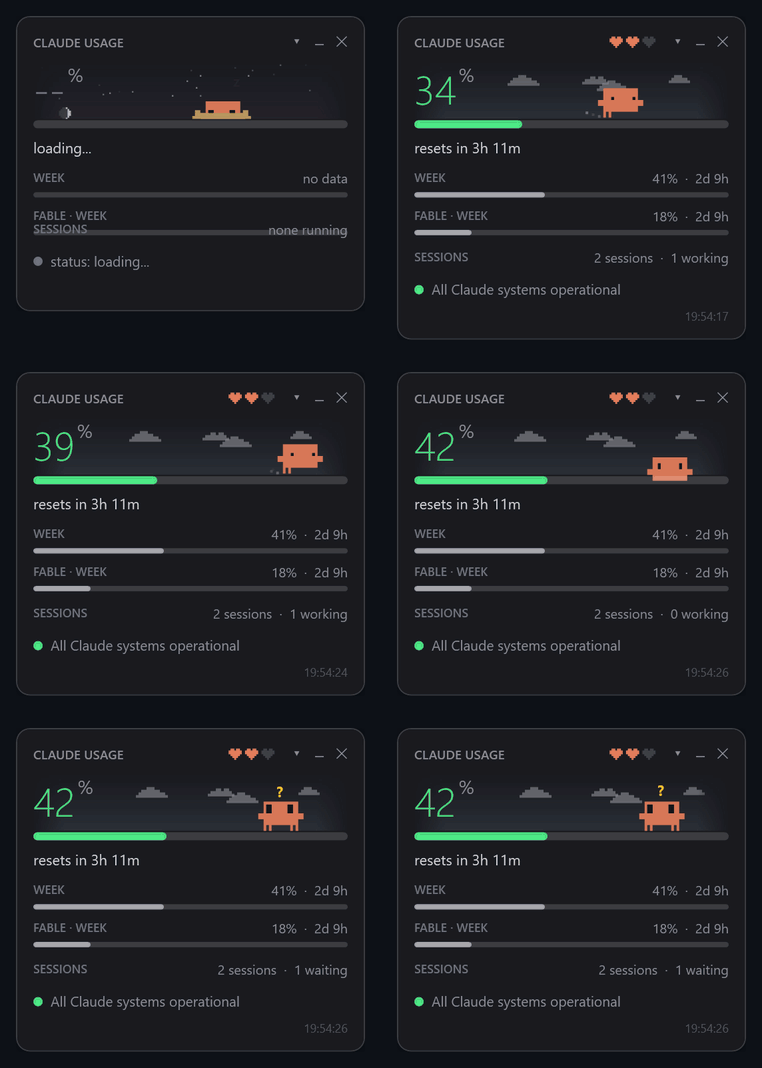
A tiny floating window + tray icon for Windows that shows how much of your Claude
plan limits you've used — the same numbers as /usage in Claude Code, refreshed
every minute. And a pixel Clawd who lives in it and reacts to what your sessions
are doing.
English · Русский
claude -p "/usage" — the
slash command runs headless, talks to Anthropic with your existing login and
does not call the model or spend tokens.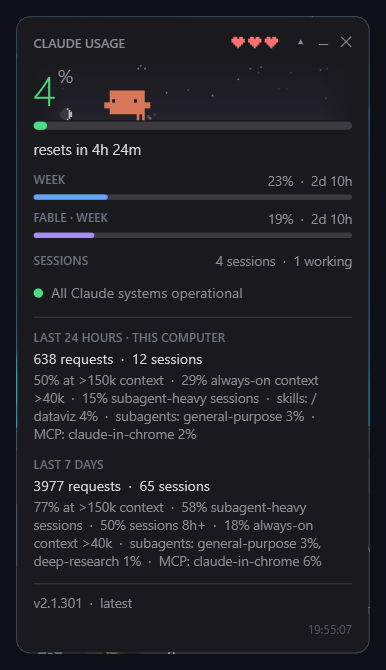
Requirements: Windows 10/11 and Claude Code
installed and logged in (claude on PATH).
git clone https://github.com/Enhed/clawd-usage-winwidget.git
or download the ZIP and unpack it anywhere. Then double-click start-widget.vbs
(it starts the widget silently, without a console window).
Start with Windows — run once in PowerShell from the widget folder:
$a = New-ScheduledTaskAction -Execute "wscript.exe" -Argument "`"$PWD\start-widget.vbs`""
$t = New-ScheduledTaskTrigger -AtLogOn
Register-ScheduledTask -TaskName "clawd usage widget" -Action $a -Trigger $t -RunLevel Limited
Only one copy runs at a time, so a manual start next to autostart is harmless.
Windows hides new tray icons in the overflow (^). To keep it visible:
Settings → Personalization → Taskbar → Other system tray icons → clawd-usage-winwidget.
/usage./usage doesn't report it.▶ working,
? waiting (permission, question, dialog — what exactly is in brackets),
○ idle, plus the folder. Handy for catching a forgotten agent quietly
burning your limit./usage answer, marked "stale" if it's old.The ▾ in the header expands details (remembered between runs):
/usage: share on large
context, always-on context, subagent-heavy sessions, top MCP servers, skills
and subagents. Claude Code itself calls this approximate and counts only this
computer.claude update in a separate window; otherwise a click opens
Claude Code's changelog. Next to it is the widget's own version: hover for what's
new in it, click for its CHANGELOG.md on GitHub.Left-click the tray icon to show/hide the window; right-click for the menu: refresh, larger/smaller, look the computer over, open config, language, Clawd's session, exit. Drag the window anywhere — the position is saved.
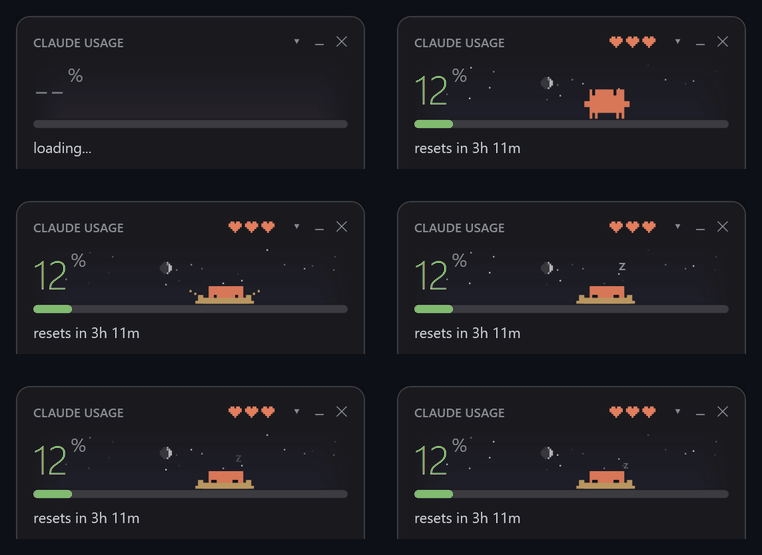 No Claude Code running — burrows into the sand and sleeps | 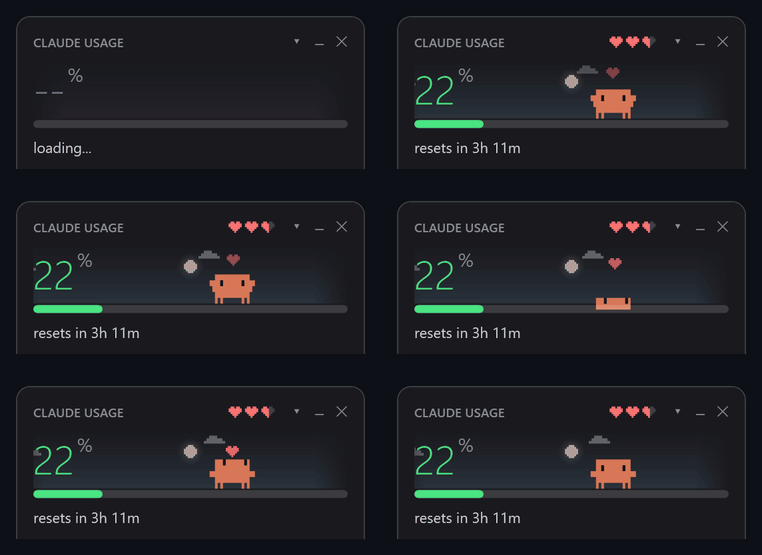 Click him — a random Claude Code animation and a heart |
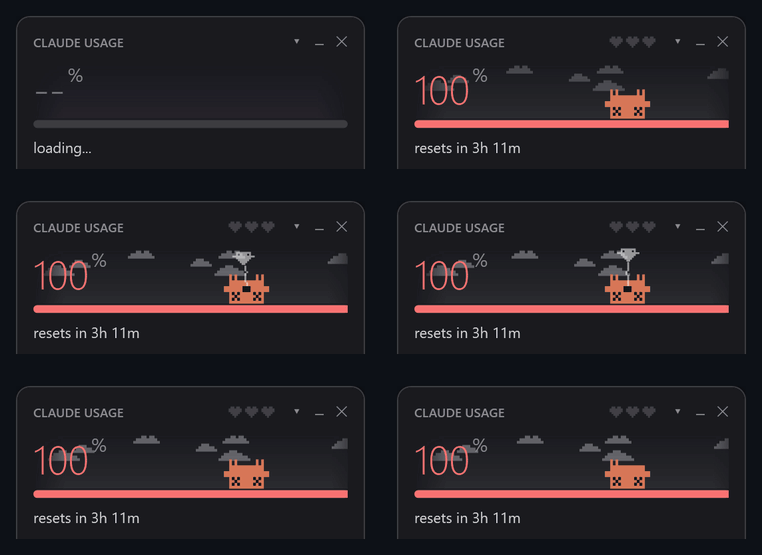 Session limit used up — belly-up; click and his soul floats out | 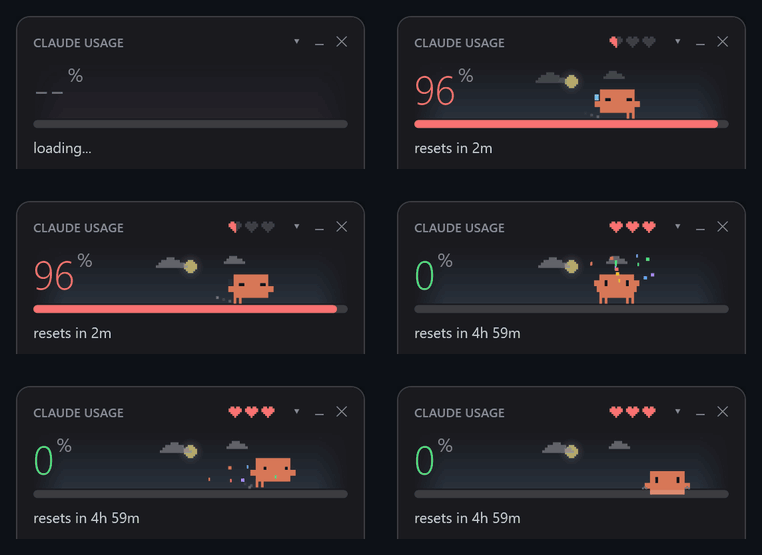 The 5-hour window resets — celebration and confetti |
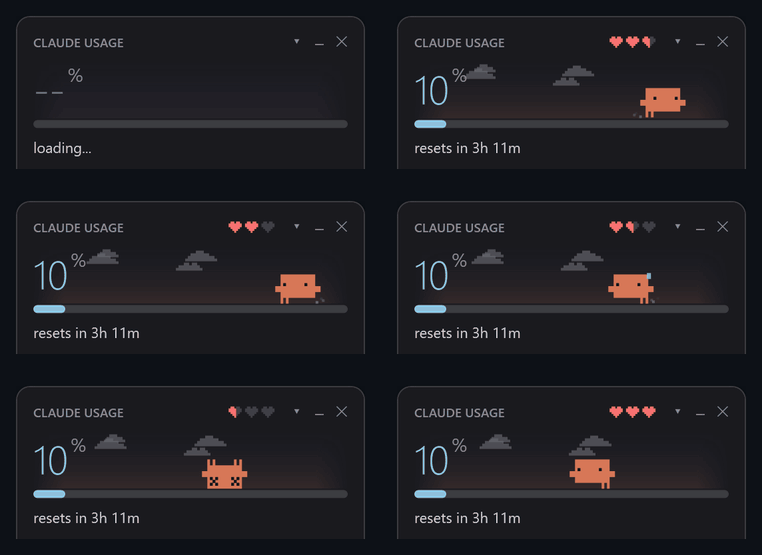 Hearts are his health — the session limit left | 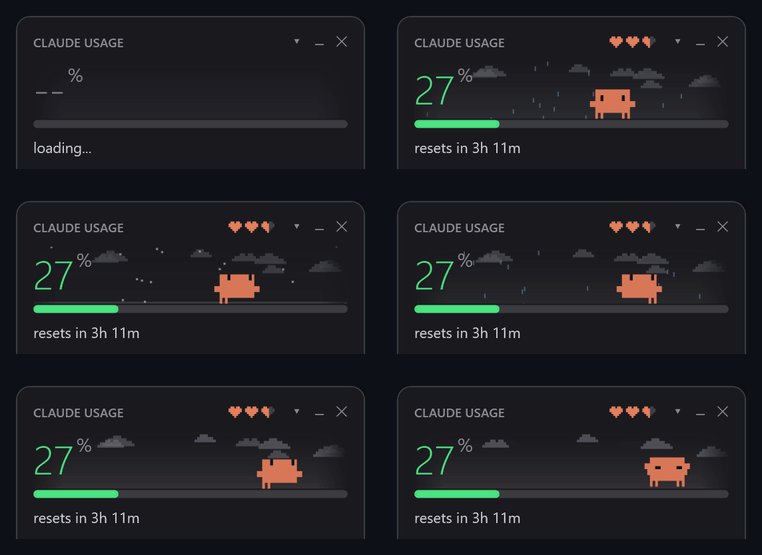 The sky follows real time of day and live weather |
| situation | Clawd |
|---|---|
| Claude Code isn't running | burrows into the sand and sleeps, "z"s float up |
| sessions are idle | wanders, looks around, follows your cursor, whistles; sometimes waves or stretches |
| 10 minutes with no mouse over the window | dozes standing up, sometimes startles |
| a session is working | runs edge to edge with a focused squint, dust flying |
| a session is waiting for you | wide eyes, jumps and waves, yellow "?" above |
| a session just finished | crouches and throws his arms up, like in Claude Code |
| you click him | a random Claude Code animation — jump, spin, peekaboo, wink, boop, sneeze, coin hop… — and a heart |
| the 5-hour window resets | celebrates: two jumps, green "!", confetti |
| session above the red threshold | sweats and darts his eyes |
| session at 100% | lies belly-up with X eyes; click him and his soul floats out on a string, anime-style |
The three hearts in the header are his health, tamagotchi-style: how much of the session limit is left. Each half-heart is about 16.7%; zero hearts only at 100%. Health changes how he behaves on top of everything above — full of energy he walks faster and hops, tired he yawns and slows down, barely alive he staggers, sweats and sometimes trips over.
Right-click Clawd for developer mode: force any state, play any animation, set the hearts, pick time of day and weather, or play everything as a demo. "Auto" goes back to live data.
Behind the numbers there's a faint sky that fades into the window edges. It follows real sunrise and sunset for your location: the sun moves along an arc, at night there's the moon in its actual phase and twinkling stars. Weather adds clouds drifting with the wind, drizzle, rain, showers, snow (that settles under Clawd's feet), fog and thunderstorms. Hover for city, temperature, weather, wind, sunrise and sunset.
Weather comes from Open-Meteo, falling back to
met.no where Open-Meteo is blocked; both need no key.
Location is looked up once per run by IP via ipwho.is — set
weatherLat / weatherLon to skip that. Without network the sky still follows
the clock. Turn it off with showSky.
An icon in the header opens a panel beside the widget; it stays open until you
close it with the cross or the icon, and stays on top only if the widget does
(topmost). The icon tells what's waiting: a bell — a
reminder went off, a blue chat — Clawd answered, a lamp with a number — tips
(yellow if urgent), a grey chat — nothing, just talk.
Tips. Every half hour Clawd quietly looks the computer over:
PATH or run as services count as used;Each tip links to the right place and has Do it (Clawd answers with a script
to approve), Refine (your next message goes to him with the tip, e.g. "all
but scoop") and Dismiss; it comes back after a
while if it's still true (a day; a month for unused apps). The check is local and
read-only — no network, no tokens. "Look the computer over now" in the tray menu
runs it right away. Turn it off with showAdvisor.
Chat. Ask Clawd anything about the computer, answer a tip ("clean it all up,
but leave Redis alone") or ask for a reminder ("on Monday at 10 remind me to call
the client", "in 20 minutes — hang the laundry"). Each message is a headless
claude -p call in a conversation of its own (your Claude Code sessions are not
touched), with the current tips, time and reminders attached. Clawd may look
around but can't change anything himself: no write tools, MCP servers off, only
read-only commands allowed. A change comes as a script you see in full, with
Run, Refine (write what to change — the script is replaced) and Not
now. Reminders are kept by the widget and fire on time with a card to
put them off, a bell in the header and a hop from Clawd — even with the panel
closed. The chat uses your plan's limits; the model is chatModel (Sonnet by
default), showChat turns it off.
Reminders and lists. A reminder that goes off shows as a card in the
bottom-right corner, like a phone notification: put it off — +15m, +1h, +3h,
tomorrow 9:00 or any time — or mark it done; it waits until you answer. The panel has three tabs: Chat, Reminders and Lists.
Reminders shows what's coming (Change, +1 hour, Delete) and a form to add one:
the "when" field understands 18:30, tomorrow 10, +20m, mon 9:00,
19.10 14:00 and shows what it made of it. Lists keeps shopping and any other
lists with checkboxes — add several items at once with commas, tick them off,
remove the ticked ones, start a new list with "+". Both are plain files in Clawd's
home, so the chat ("add milk to shopping") and Clawd on your phone ("what do I need
to buy?") work with the same ones.
Clawd's home and his own session. The chat works in Clawd's home folder
(clawdHome). Reminders are plain files there (lists too, in lists\) —
reminders\2026-11\2026-11-16 10-00 Pay the taxes.md with an at: line — so
anyone can make one: the chat, Clawd's session, or you by hand; fired ones move to
reminders\done. After each check the tips are written to tips.md there. With
clawdSession the widget also keeps Clawd's own interactive Claude Code session
running in that folder with Remote Control — talk to him from the Claude app on
your phone: he reads tips.md, makes reminders and keeps notes in the same home.
He is told about all this by clawd-session-prompt.md. While that session is
idle Clawd can still fall asleep; when you talk to him he runs around.
The panel and the phone are two conversations with one Clawd: the panel shows the
phone conversation in the same feed (marked "Remote Control"), its chat gets the
latest part of it as context, and the panel's conversation is written to
chat-log.md in the home for the phone session to read. "+" in the panel starts
a new conversation there and hides the phone conversation so far; on the phone
/clear starts a new one in the same Remote Control entry, and the feed follows.
| what | source | how often |
|---|---|---|
| limits and stats | claude -p "/usage" --output-format text | every 60 s |
| sessions | ~/.claude/sessions/<pid>.json, kept by Claude Code itself; only live processes count | every tick |
| account | claude auth status | every 10 min |
| latest version | downloads.claude.ai/claude-code-releases/latest (or stable if autoUpdatesChannel says so) — the same URL the official installer uses | hourly |
| changelog | raw.githubusercontent.com/anthropics/claude-code/main/CHANGELOG.md | only when an update is available |
| status | status.claude.com/api/v2/summary.json | every 2 min |
| weather | Open-Meteo / met.no, location via ipwho.is | every 15 min |
/usage takes about two seconds, so it runs asynchronously and the window never
freezes. If it doesn't answer, the widget keeps the last numbers and marks them
stale.
Don't run
claude -p "/usage"by hand from Git Bash: MSYS rewrites/usageinto a path (C:/Program Files/Git/usage) and the prompt goes to the model, spending tokens. PowerShell and cmd are fine.
Created next to the script on first save; open it from the tray menu. Changes are picked up on the fly, no restart needed.
| key | meaning |
|---|---|
language | en or ru (also in the tray menu) |
scale | window scale, 0.6–4.0 (default 1.35; also "Larger" / "Smaller" in the tray menu) |
opacity | window opacity, 0–1 |
topmost | keep the window above all others |
warnPercent / critPercent | yellow and red thresholds |
expanded | details expanded |
showStats / showStatus / showSessions / showAccount | show the corresponding block |
showMascot / showSky | Clawd and the sky behind him |
weatherLat / weatherLon | coordinates for weather; empty — by IP |
showAdvisor | Clawd's tips about the computer |
showChat / chatModel / chatTimeoutSeconds | the chat with Clawd; its model; a reply taking longer is cancelled (300 s) |
advisorDiskGB / advisorJunkGB | free space to warn below; size of temp files and caches worth mentioning, GB |
advisorUnusedDays / advisorUptimeDays / advisorMemPercent | when an app counts as unused; when to suggest a restart; memory share of one program worth a word |
runAsAdmin | run the widget itself as administrator: at start it asks UAC and restarts elevated (declined — runs as usual). Elevated, the tips also read Prefetch (the exact last start of every program, terminal ones included), Windows Temp and Windows Update downloads |
clawdHome | Clawd's home folder: the chat works there, reminders and tips.md live there, and so does his own session; empty — %USERPROFILE%\Clawd |
clawdSession | keep Clawd's own Claude Code session running in his home with Remote Control (named after the widget, clawdSessionName), to talk to him from the phone or claude.ai (default off; also in the tray menu). Started with the widget and again if it's gone; starts its own conversation and comes back to it. Skipped while another session runs in that folder |
clawdSessionAdmin / clawdSessionHidden | run that session as administrator; without a window (default on; a folder Claude Code hasn't trusted yet still opens in a window, to answer the trust question) |
refreshSeconds, usageIntervalSeconds, versionIntervalSeconds, statusIntervalSeconds, accountIntervalSeconds, weatherIntervalSeconds, advisorIntervalMinutes | polling periods, seconds |
left / top | window position, written when you drag it |
Errors in the update loop never crash the widget: the bottom-right corner shows
"error" and details go to widget-error.log next to the script.
If you edit the scripts: .ps1 files must stay UTF-8 with BOM — without it
Windows PowerShell 5.1 reads them as ANSI and breaks on non-ASCII text. Syntax
check:
foreach ($f in @('.\widget.ps1') + (Get-ChildItem .\lib\*.ps1).FullName) {
    $err = $null
    [void][System.Management.Automation.Language.Parser]::ParseFile((Resolve-Path $f), [ref]$null, [ref]$err)
    if ($err) { $f; $err }
}
widget.ps1 is the entry point: single instance, loads the modules from lib\
and runs the WPF loop. The window layout is in widget.xaml. Modules are
dot-sourced into one shared script scope in a fixed order; each may rely on the
ones loaded before it. All UI text lives in lib\i18n.ps1 — adding a language
is one more table there.
tools/ holds the recorder that made the GIFs in this README: it boots the
widget with scripted fake data and renders frames straight from WPF. It needs
ffmpeg and Pillow; the widget itself doesn't.
Not affiliated with Anthropic. Clawd and Claude are Anthropic's.
Claude usage limits in a tiny Windows widget + tray icon — with pixel Clawd who reacts to your Claude Code sessions, looks after your PC and chats with you, from the widget or your phone. PowerShell, no dependencies.
PowerShell
49
3 commits
updated Oct 17, 2026
A tiny floating window + tray icon for Windows that shows how much of your Claude
plan limits you've used — the same numbers as /usage in Claude Code, refreshed
every minute. And a pixel Clawd who lives in it and reacts to what your sessions
are doing.
English · Русский
claude -p "/usage" — the
slash command runs headless, talks to Anthropic with your existing login and
does not call the model or spend tokens.
Requirements: Windows 10/11 and Claude Code
installed and logged in (claude on PATH).
git clone https://github.com/Enhed/clawd-usage-winwidget.git
or download the ZIP and unpack it anywhere. Then double-click start-widget.vbs
(it starts the widget silently, without a console window).
Start with Windows — run once in PowerShell from the widget folder:
$a = New-ScheduledTaskAction -Execute "wscript.exe" -Argument "`"$PWD\start-widget.vbs`""
$t = New-ScheduledTaskTrigger -AtLogOn
Register-ScheduledTask -TaskName "clawd usage widget" -Action $a -Trigger $t -RunLevel Limited
Only one copy runs at a time, so a manual start next to autostart is harmless.
Windows hides new tray icons in the overflow (^). To keep it visible:
Settings → Personalization → Taskbar → Other system tray icons → clawd-usage-winwidget.
/usage./usage doesn't report it.▶ working,
? waiting (permission, question, dialog — what exactly is in brackets),
○ idle, plus the folder. Handy for catching a forgotten agent quietly
burning your limit./usage answer, marked "stale" if it's old.The ▾ in the header expands details (remembered between runs):
/usage: share on large
context, always-on context, subagent-heavy sessions, top MCP servers, skills
and subagents. Claude Code itself calls this approximate and counts only this
computer.claude update in a separate window; otherwise a click opens
Claude Code's changelog. Next to it is the widget's own version: hover for what's
new in it, click for its CHANGELOG.md on GitHub.Left-click the tray icon to show/hide the window; right-click for the menu: refresh, larger/smaller, look the computer over, open config, language, Clawd's session, exit. Drag the window anywhere — the position is saved.
No Claude Code running — burrows into the sand and sleeps | Click him — a random Claude Code animation and a heart |
Session limit used up — belly-up; click and his soul floats out | The 5-hour window resets — celebration and confetti |
Hearts are his health — the session limit left | The sky follows real time of day and live weather |
| situation | Clawd |
|---|---|
| Claude Code isn't running | burrows into the sand and sleeps, "z"s float up |
| sessions are idle | wanders, looks around, follows your cursor, whistles; sometimes waves or stretches |
| 10 minutes with no mouse over the window | dozes standing up, sometimes startles |
| a session is working | runs edge to edge with a focused squint, dust flying |
| a session is waiting for you | wide eyes, jumps and waves, yellow "?" above |
| a session just finished | crouches and throws his arms up, like in Claude Code |
| you click him | a random Claude Code animation — jump, spin, peekaboo, wink, boop, sneeze, coin hop… — and a heart |
| the 5-hour window resets | celebrates: two jumps, green "!", confetti |
| session above the red threshold | sweats and darts his eyes |
| session at 100% | lies belly-up with X eyes; click him and his soul floats out on a string, anime-style |
The three hearts in the header are his health, tamagotchi-style: how much of the session limit is left. Each half-heart is about 16.7%; zero hearts only at 100%. Health changes how he behaves on top of everything above — full of energy he walks faster and hops, tired he yawns and slows down, barely alive he staggers, sweats and sometimes trips over.
Right-click Clawd for developer mode: force any state, play any animation, set the hearts, pick time of day and weather, or play everything as a demo. "Auto" goes back to live data.
Behind the numbers there's a faint sky that fades into the window edges. It follows real sunrise and sunset for your location: the sun moves along an arc, at night there's the moon in its actual phase and twinkling stars. Weather adds clouds drifting with the wind, drizzle, rain, showers, snow (that settles under Clawd's feet), fog and thunderstorms. Hover for city, temperature, weather, wind, sunrise and sunset.
Weather comes from Open-Meteo, falling back to
met.no where Open-Meteo is blocked; both need no key.
Location is looked up once per run by IP via ipwho.is — set
weatherLat / weatherLon to skip that. Without network the sky still follows
the clock. Turn it off with showSky.
An icon in the header opens a panel beside the widget; it stays open until you
close it with the cross or the icon, and stays on top only if the widget does
(topmost). The icon tells what's waiting: a bell — a
reminder went off, a blue chat — Clawd answered, a lamp with a number — tips
(yellow if urgent), a grey chat — nothing, just talk.
Tips. Every half hour Clawd quietly looks the computer over:
PATH or run as services count as used;Each tip links to the right place and has Do it (Clawd answers with a script
to approve), Refine (your next message goes to him with the tip, e.g. "all
but scoop") and Dismiss; it comes back after a
while if it's still true (a day; a month for unused apps). The check is local and
read-only — no network, no tokens. "Look the computer over now" in the tray menu
runs it right away. Turn it off with showAdvisor.
Chat. Ask Clawd anything about the computer, answer a tip ("clean it all up,
but leave Redis alone") or ask for a reminder ("on Monday at 10 remind me to call
the client", "in 20 minutes — hang the laundry"). Each message is a headless
claude -p call in a conversation of its own (your Claude Code sessions are not
touched), with the current tips, time and reminders attached. Clawd may look
around but can't change anything himself: no write tools, MCP servers off, only
read-only commands allowed. A change comes as a script you see in full, with
Run, Refine (write what to change — the script is replaced) and Not
now. Reminders are kept by the widget and fire on time with a card to
put them off, a bell in the header and a hop from Clawd — even with the panel
closed. The chat uses your plan's limits; the model is chatModel (Sonnet by
default), showChat turns it off.
Reminders and lists. A reminder that goes off shows as a card in the
bottom-right corner, like a phone notification: put it off — +15m, +1h, +3h,
tomorrow 9:00 or any time — or mark it done; it waits until you answer. The panel has three tabs: Chat, Reminders and Lists.
Reminders shows what's coming (Change, +1 hour, Delete) and a form to add one:
the "when" field understands 18:30, tomorrow 10, +20m, mon 9:00,
19.10 14:00 and shows what it made of it. Lists keeps shopping and any other
lists with checkboxes — add several items at once with commas, tick them off,
remove the ticked ones, start a new list with "+". Both are plain files in Clawd's
home, so the chat ("add milk to shopping") and Clawd on your phone ("what do I need
to buy?") work with the same ones.
Clawd's home and his own session. The chat works in Clawd's home folder
(clawdHome). Reminders are plain files there (lists too, in lists\) —
reminders\2026-11\2026-11-16 10-00 Pay the taxes.md with an at: line — so
anyone can make one: the chat, Clawd's session, or you by hand; fired ones move to
reminders\done. After each check the tips are written to tips.md there. With
clawdSession the widget also keeps Clawd's own interactive Claude Code session
running in that folder with Remote Control — talk to him from the Claude app on
your phone: he reads tips.md, makes reminders and keeps notes in the same home.
He is told about all this by clawd-session-prompt.md. While that session is
idle Clawd can still fall asleep; when you talk to him he runs around.
The panel and the phone are two conversations with one Clawd: the panel shows the
phone conversation in the same feed (marked "Remote Control"), its chat gets the
latest part of it as context, and the panel's conversation is written to
chat-log.md in the home for the phone session to read. "+" in the panel starts
a new conversation there and hides the phone conversation so far; on the phone
/clear starts a new one in the same Remote Control entry, and the feed follows.
| what | source | how often |
|---|---|---|
| limits and stats | claude -p "/usage" --output-format text | every 60 s |
| sessions | ~/.claude/sessions/<pid>.json, kept by Claude Code itself; only live processes count | every tick |
| account | claude auth status | every 10 min |
| latest version | downloads.claude.ai/claude-code-releases/latest (or stable if autoUpdatesChannel says so) — the same URL the official installer uses | hourly |
| changelog | raw.githubusercontent.com/anthropics/claude-code/main/CHANGELOG.md | only when an update is available |
| status | status.claude.com/api/v2/summary.json | every 2 min |
| weather | Open-Meteo / met.no, location via ipwho.is | every 15 min |
/usage takes about two seconds, so it runs asynchronously and the window never
freezes. If it doesn't answer, the widget keeps the last numbers and marks them
stale.
Don't run
claude -p "/usage"by hand from Git Bash: MSYS rewrites/usageinto a path (C:/Program Files/Git/usage) and the prompt goes to the model, spending tokens. PowerShell and cmd are fine.
Created next to the script on first save; open it from the tray menu. Changes are picked up on the fly, no restart needed.
| key | meaning |
|---|---|
language | en or ru (also in the tray menu) |
scale | window scale, 0.6–4.0 (default 1.35; also "Larger" / "Smaller" in the tray menu) |
opacity | window opacity, 0–1 |
topmost | keep the window above all others |
warnPercent / critPercent | yellow and red thresholds |
expanded | details expanded |
showStats / showStatus / showSessions / showAccount | show the corresponding block |
showMascot / showSky | Clawd and the sky behind him |
weatherLat / weatherLon | coordinates for weather; empty — by IP |
showAdvisor | Clawd's tips about the computer |
showChat / chatModel / chatTimeoutSeconds | the chat with Clawd; its model; a reply taking longer is cancelled (300 s) |
advisorDiskGB / advisorJunkGB | free space to warn below; size of temp files and caches worth mentioning, GB |
advisorUnusedDays / advisorUptimeDays / advisorMemPercent | when an app counts as unused; when to suggest a restart; memory share of one program worth a word |
runAsAdmin | run the widget itself as administrator: at start it asks UAC and restarts elevated (declined — runs as usual). Elevated, the tips also read Prefetch (the exact last start of every program, terminal ones included), Windows Temp and Windows Update downloads |
clawdHome | Clawd's home folder: the chat works there, reminders and tips.md live there, and so does his own session; empty — %USERPROFILE%\Clawd |
clawdSession | keep Clawd's own Claude Code session running in his home with Remote Control (named after the widget, clawdSessionName), to talk to him from the phone or claude.ai (default off; also in the tray menu). Started with the widget and again if it's gone; starts its own conversation and comes back to it. Skipped while another session runs in that folder |
clawdSessionAdmin / clawdSessionHidden | run that session as administrator; without a window (default on; a folder Claude Code hasn't trusted yet still opens in a window, to answer the trust question) |
refreshSeconds, usageIntervalSeconds, versionIntervalSeconds, statusIntervalSeconds, accountIntervalSeconds, weatherIntervalSeconds, advisorIntervalMinutes | polling periods, seconds |
left / top | window position, written when you drag it |
Errors in the update loop never crash the widget: the bottom-right corner shows
"error" and details go to widget-error.log next to the script.
If you edit the scripts: .ps1 files must stay UTF-8 with BOM — without it
Windows PowerShell 5.1 reads them as ANSI and breaks on non-ASCII text. Syntax
check:
foreach ($f in @('.\widget.ps1') + (Get-ChildItem .\lib\*.ps1).FullName) {
    $err = $null
    [void][System.Management.Automation.Language.Parser]::ParseFile((Resolve-Path $f), [ref]$null, [ref]$err)
    if ($err) { $f; $err }
}
widget.ps1 is the entry point: single instance, loads the modules from lib\
and runs the WPF loop. The window layout is in widget.xaml. Modules are
dot-sourced into one shared script scope in a fixed order; each may rely on the
ones loaded before it. All UI text lives in lib\i18n.ps1 — adding a language
is one more table there.
tools/ holds the recorder that made the GIFs in this README: it boots the
widget with scripted fake data and renders frames straight from WPF. It needs
ffmpeg and Pillow; the widget itself doesn't.
Not affiliated with Anthropic. Clawd and Claude are Anthropic's.



