
Windows tray app for Claude Code usage limits: 5-hour and weekly windows, context meter, 7-day history, notifications. Tauri v2 + Rust + React.
See the codeSee what people are saying
README
UsageTray
Türkçe · English
A small Windows system tray app that shows your Claude Code usage limits. The Windows counterpart of Usagebar on macOS.
- Tray icon: a colour-coded ring (green / yellow / orange / red) filled to the 5-hour window's utilisation. The tooltip shows both windows.
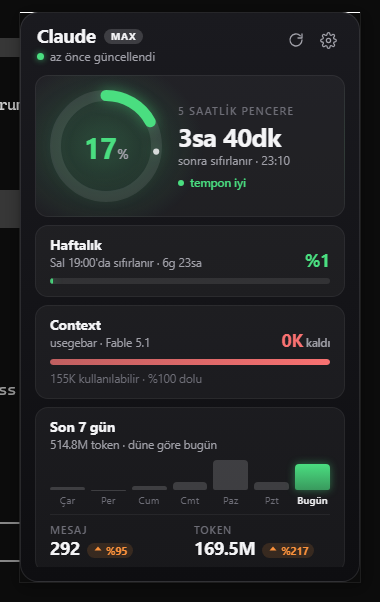
- Popup: ring gauge for the 5-hour window with a live countdown and a pace verdict; weekly limit with model-specific weekly limits (e.g. Fable) underneath; extra usage spend when it is switched on for the account; remaining context (with project and model); a 7-day daily token chart with up/down change badges versus yesterday.
- Pace marker: the small tick on each bar and on the ring shows how much of the window has elapsed. If the fill is left of the tick, you are fine.
- Notifications: 5-hour window at 50% / 75% / 90%, weekly at 80% / 95%, and when remaining context drops under 20K. Each threshold fires once per window. Optionally a toast when a busy 5-hour window resets.
- Starts with Windows, runs in the background. About 35 MB RAM idle, ~0 CPU, 2.5 MB installer.
- Turkish and English. Follows the system language by default; switchable in settings. The tray menu, tooltip and toasts use the same language.
Install
- Download
UsageTray_x.y.z_x64-setup.exefrom Releases and run it. Per-user install, no admin rights needed. Installers are built by GitHub Actions from the tagged source; each release lists SHA256 hashes and there is also a portable.exewithout installer or autostart. - You must have run
claudein a terminal and signed in at least once. UsageTray reads Claude Code's own session; it never asks you to sign in. - If the WebView2 runtime is missing it is downloaded during setup. Windows 11 already has it.
Windows 11 note: new tray icons are hidden in the overflow menu (
^) by default. Drag the icon onto the taskbar to keep it visible, or enable it under Settings → Personalization → Taskbar → Other system tray icons.
Left click opens the popup; it closes on focus loss or Esc. Right click: Refresh / Settings / Start with Windows / Quit.
Security and privacy
Being suspicious of an app that reads your OAuth token is the right instinct. So:
- The token is sent only to
https://api.anthropic.com/api/oauth/usage. There is no other network request; the CSP restrictsconnect-srcto that host. ~/.claude/.credentials.jsonis opened read-only. The app never refreshes the token or writes to the file; Claude Code does the refreshing.- The token never appears in a log line; it is masked as
sk-ant-oat01-****. - No telemetry, analytics or crash reporting.
- Everything stays local under
%APPDATA%\UsageTray\(settings, cache, scan state, notification state, logs).
The code is small and readable; if in doubt, look at src-tauri/src/usage_api.rs and credentials.rs.
Verify it yourself:
- Releases are built by the public release workflow on GitHub's runners, not on a developer machine. Compare the SHA256 in the release notes with
Get-FileHash. cargo run -- --probeprints exactly which file is read and the raw API response.- Watch the traffic with Fiddler or Wireshark: the only host is
api.anthropic.com. - The installer is not code-signed, so SmartScreen shows a warning on first run. That is about the missing certificate, not about the content.
Data sources
| Data | Source |
|---|---|
| 5-hour / weekly / model-specific limits, extra usage | Anthropic's OAuth usage endpoint. Not official, community-discovered; if the schema changes the app falls back to its cache instead of crashing. |
| Remaining context, daily tokens / messages, 7-day history | ~/.claude/projects/**/*.jsonl transcripts. Read incrementally with a byte offset per file; deduped on message.id + requestId. |
| Plan badge | subscriptionType from .credentials.json |
The API is polled at most every 5 minutes. The interval can be raised in settings but never goes below 180 seconds. After the PC wakes from sleep the next poll is pulled forward (still never closer than 180 seconds to the previous one). On a 429 the app backs off exponentially (5 → 10 → 20 → 30 min) and keeps showing the last known data marked as stale.
Context is computed as input + cache_read + cache_creation + output of the latest assistant message. The window is derived from the session's model id (Claude 5 family: 1M, earlier models: 200K), minus the share autocompact reserves. If a session somehow exceeds the assumed window, the app escalates to the next tier instead of showing a stuck 100%. Turn the automatic mode off in settings to pin a number yourself.
States
| What the popup says | Meaning |
|---|---|
| Claude Code not found | No credential file. Run claude in a terminal and sign in. |
| Token expired | Access tokens last about an hour and are only refreshed while Claude Code is running. Running claude once is enough; this is not an error. |
| Rate limit | Got a 429, retrying in X minutes. |
| Offline | No connection, showing cached data. |
Local data (context, daily stats) does not depend on the API and keeps updating in all of these states.
Settings
The gear icon in the popup. Refresh interval, automatic or manual context window, theme (dark / light / system), language (system / Türkçe / English), time format (system / 24-hour / 12-hour), used or remaining percentages, percent text on the tray icon, start with Windows, notification thresholds, reset notification. Stored in %APPDATA%\UsageTray\settings.json; a corrupt file falls back to defaults.
Development
Requirements: Rust (stable, MSVC), Node 20+, Visual Studio Build Tools (C++ workload), WebView2.
npm install
npm run tauri dev        # development (hot reload)
npm run tauri build      # NSIS installer: target/release/bundle/nsis/
cargo test               # Rust unit tests
cargo run -- --probe     # credential + API check, prints the raw JSON
Debugging: usagetray.exe --show opens the popup at startup, --settings opens it on the settings view, --pin disables auto-hide on focus loss (for screenshots). USAGETRAY_LOG=debug enables verbose logs. Point APPDATA at another folder to simulate a clean first run.
Layout:
src/                      popup UI (React + TS, plain CSS); src/i18n.ts strings
src-tauri/src/i18n.rs     Rust-side strings (menu, tooltip, toasts)
src-tauri/src/config.rs   constants: endpoint, headers, limits
src-tauri/src/context.rs  model -> context window sizing
src-tauri/src/credentials.rs   credential reading (read-only)
src-tauri/src/usage_api.rs     API client, cache, backoff
src-tauri/src/transcripts.rs   incremental JSONL scan, 7-day history
src-tauri/src/tray.rs          dynamic icon, menu, popup placement
src-tauri/src/state.rs         AppState, poll loop, usage-updated event
src-tauri/src/toasts.rs        notifications and dedupe
Stack: Tauri v2, Rust, React 19, Vite. The icon is drawn at runtime with tiny-skia. Full spec: USAGETRAY_SPEC.md, working notes: CLAUDE.md.
License
Developed by Sedat Okutan (hsnsdt, sedat@okutan.org, www.okutan.org).
MIT. The bundled Inter font is under the SIL Open Font License (src-tauri/assets/Inter-LICENSE.txt).
Contributors

1 commits
Similar repos


Languages
Rust
60.9%
TypeScript
30.2%
CSS
8.8%
Windows tray app for Claude Code usage limits: 5-hour and weekly windows, context meter, 7-day history, notifications. Tauri v2 + Rust + React.
See the codeSee what people are saying
README
UsageTray
Türkçe · English
A small Windows system tray app that shows your Claude Code usage limits. The Windows counterpart of Usagebar on macOS.
- Tray icon: a colour-coded ring (green / yellow / orange / red) filled to the 5-hour window's utilisation. The tooltip shows both windows.
- Popup: ring gauge for the 5-hour window with a live countdown and a pace verdict; weekly limit with model-specific weekly limits (e.g. Fable) underneath; extra usage spend when it is switched on for the account; remaining context (with project and model); a 7-day daily token chart with up/down change badges versus yesterday.
- Pace marker: the small tick on each bar and on the ring shows how much of the window has elapsed. If the fill is left of the tick, you are fine.
- Notifications: 5-hour window at 50% / 75% / 90%, weekly at 80% / 95%, and when remaining context drops under 20K. Each threshold fires once per window. Optionally a toast when a busy 5-hour window resets.
- Starts with Windows, runs in the background. About 35 MB RAM idle, ~0 CPU, 2.5 MB installer.
- Turkish and English. Follows the system language by default; switchable in settings. The tray menu, tooltip and toasts use the same language.
Install
- Download
UsageTray_x.y.z_x64-setup.exefrom Releases and run it. Per-user install, no admin rights needed. Installers are built by GitHub Actions from the tagged source; each release lists SHA256 hashes and there is also a portable.exewithout installer or autostart. - You must have run
claudein a terminal and signed in at least once. UsageTray reads Claude Code's own session; it never asks you to sign in. - If the WebView2 runtime is missing it is downloaded during setup. Windows 11 already has it.
Windows 11 note: new tray icons are hidden in the overflow menu (
^) by default. Drag the icon onto the taskbar to keep it visible, or enable it under Settings → Personalization → Taskbar → Other system tray icons.
Left click opens the popup; it closes on focus loss or Esc. Right click: Refresh / Settings / Start with Windows / Quit.
Security and privacy
Being suspicious of an app that reads your OAuth token is the right instinct. So:
- The token is sent only to
https://api.anthropic.com/api/oauth/usage. There is no other network request; the CSP restrictsconnect-srcto that host. ~/.claude/.credentials.jsonis opened read-only. The app never refreshes the token or writes to the file; Claude Code does the refreshing.- The token never appears in a log line; it is masked as
sk-ant-oat01-****. - No telemetry, analytics or crash reporting.
- Everything stays local under
%APPDATA%\UsageTray\(settings, cache, scan state, notification state, logs).
The code is small and readable; if in doubt, look at src-tauri/src/usage_api.rs and credentials.rs.
Verify it yourself:
- Releases are built by the public release workflow on GitHub's runners, not on a developer machine. Compare the SHA256 in the release notes with
Get-FileHash. cargo run -- --probeprints exactly which file is read and the raw API response.- Watch the traffic with Fiddler or Wireshark: the only host is
api.anthropic.com. - The installer is not code-signed, so SmartScreen shows a warning on first run. That is about the missing certificate, not about the content.
Data sources
| Data | Source |
|---|---|
| 5-hour / weekly / model-specific limits, extra usage | Anthropic's OAuth usage endpoint. Not official, community-discovered; if the schema changes the app falls back to its cache instead of crashing. |
| Remaining context, daily tokens / messages, 7-day history | ~/.claude/projects/**/*.jsonl transcripts. Read incrementally with a byte offset per file; deduped on message.id + requestId. |
| Plan badge | subscriptionType from .credentials.json |
The API is polled at most every 5 minutes. The interval can be raised in settings but never goes below 180 seconds. After the PC wakes from sleep the next poll is pulled forward (still never closer than 180 seconds to the previous one). On a 429 the app backs off exponentially (5 → 10 → 20 → 30 min) and keeps showing the last known data marked as stale.
Context is computed as input + cache_read + cache_creation + output of the latest assistant message. The window is derived from the session's model id (Claude 5 family: 1M, earlier models: 200K), minus the share autocompact reserves. If a session somehow exceeds the assumed window, the app escalates to the next tier instead of showing a stuck 100%. Turn the automatic mode off in settings to pin a number yourself.
States
| What the popup says | Meaning |
|---|---|
| Claude Code not found | No credential file. Run claude in a terminal and sign in. |
| Token expired | Access tokens last about an hour and are only refreshed while Claude Code is running. Running claude once is enough; this is not an error. |
| Rate limit | Got a 429, retrying in X minutes. |
| Offline | No connection, showing cached data. |
Local data (context, daily stats) does not depend on the API and keeps updating in all of these states.
Settings
The gear icon in the popup. Refresh interval, automatic or manual context window, theme (dark / light / system), language (system / Türkçe / English), time format (system / 24-hour / 12-hour), used or remaining percentages, percent text on the tray icon, start with Windows, notification thresholds, reset notification. Stored in %APPDATA%\UsageTray\settings.json; a corrupt file falls back to defaults.
Development
Requirements: Rust (stable, MSVC), Node 20+, Visual Studio Build Tools (C++ workload), WebView2.
npm install
npm run tauri dev        # development (hot reload)
npm run tauri build      # NSIS installer: target/release/bundle/nsis/
cargo test               # Rust unit tests
cargo run -- --probe     # credential + API check, prints the raw JSON
Debugging: usagetray.exe --show opens the popup at startup, --settings opens it on the settings view, --pin disables auto-hide on focus loss (for screenshots). USAGETRAY_LOG=debug enables verbose logs. Point APPDATA at another folder to simulate a clean first run.
Layout:
src/                      popup UI (React + TS, plain CSS); src/i18n.ts strings
src-tauri/src/i18n.rs     Rust-side strings (menu, tooltip, toasts)
src-tauri/src/config.rs   constants: endpoint, headers, limits
src-tauri/src/context.rs  model -> context window sizing
src-tauri/src/credentials.rs   credential reading (read-only)
src-tauri/src/usage_api.rs     API client, cache, backoff
src-tauri/src/transcripts.rs   incremental JSONL scan, 7-day history
src-tauri/src/tray.rs          dynamic icon, menu, popup placement
src-tauri/src/state.rs         AppState, poll loop, usage-updated event
src-tauri/src/toasts.rs        notifications and dedupe
Stack: Tauri v2, Rust, React 19, Vite. The icon is drawn at runtime with tiny-skia. Full spec: USAGETRAY_SPEC.md, working notes: CLAUDE.md.
License
Developed by Sedat Okutan (hsnsdt, sedat@okutan.org, www.okutan.org).
MIT. The bundled Inter font is under the SIL Open Font License (src-tauri/assets/Inter-LICENSE.txt).
Similar repos
Contributors
1 commits
Languages
Rust
60.9%
TypeScript
30.2%
CSS
8.8%