
Claude Code + Codex usage limits in your macOS menu bar. Zero setup.
Swift
0
12 commits
updated Sep 21, 2026
See what people are saying (1)
README
UsageBar
Claude Code + Codex limits in your macOS menu bar. Never hit the 5‑hour wall by surprise again.
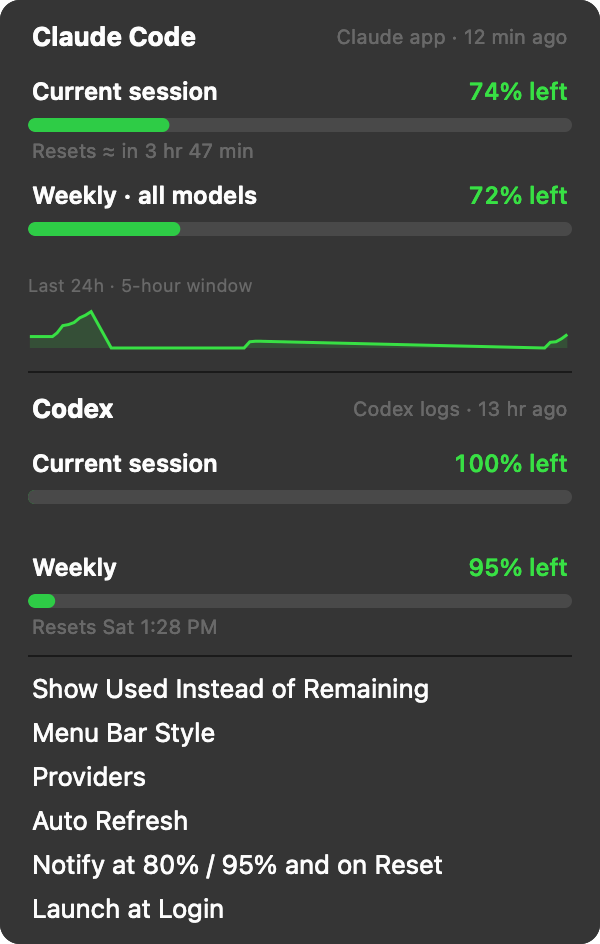
- Live 5‑hour and weekly usage for Claude Code and Codex, colour‑coded green / yellow / red
- Zero setup — if you use the Claude desktop app, it just works. No login, no API token.
- Native notifications at 80 % and 95 %, and when a window resets
- 24h sparkline of your Claude usage
- Three menu bar styles: two‑line pill, compact
C89 X100, or gauge rings - Countdown to reset in the menu bar when you're nearly out
- Show % remaining (default) or % used
- Click a row to open the provider's usage page
- Launch at login, configurable auto‑refresh, single native Swift binary (no Python, no Electron)
Install
brew install idark7/tap/usagebar
or download the latest UsageBar-x.y.z.dmg from Releases, drag to Applications.
Until the app is notarized, macOS will say it "can't be opened". Right‑click the app → Open once, or allow it under System Settings → Privacy & Security.
Or build it yourself (needs Xcode command line tools):
./build.sh # → build/UsageBar.app and build/UsageBar-<version>.dmg
How it detects usage
| Provider | Source | Needs |
|---|---|---|
| Claude | ~/Library/Application Support/Claude/plan-usage-history.json, sampled every ~15 min by the Claude desktop app | Claude app installed and signed in |
| Claude | claude_feed.json written by the optional Claude Code status line hook (adds exact reset times) | see below |
| Claude | api.anthropic.com/api/oauth/usage with the Claude Code OAuth token | fallback only |
| Codex | rate_limits entries in ~/.codex/sessions/**/*.jsonl | Codex CLI |
Whichever local source is freshest wins. When only the desktop‑app sample is available, the 5‑hour reset time is estimated from when the window started (shown as "≈").
Optional: exact reset times from Claude Code
Add the status line hook to ~/.claude/settings.json:
"statusLine": {
  "type": "command",
  "command": "/usr/bin/python3 \"/path/to/UsageBar/usagebar_statusline.py\""
}
It also gives you a Opus | 5h 11% | wk 26% | project status line in the terminal.
Releasing
Tag vX.Y.Z and push; the GitHub Action builds a universal DMG and attaches it to the release.
UsageBar --snapshot out.png renders the dropdown for docs. Add MACOS_CERT_P12, MACOS_CERT_PASSWORD, MACOS_SIGN_ID, APPLE_ID, APPLE_TEAM_ID,
APPLE_APP_PASSWORD secrets to get Developer ID signing + notarization.
License
MIT
Contributors

12 commits
Similar repos


Languages
Swift
88.2%
Shell
6.4%
Python
5.4%
Claude Code + Codex usage limits in your macOS menu bar. Zero setup.
Swift
0
12 commits
updated Sep 21, 2026
See what people are saying (1)
README
UsageBar
Claude Code + Codex limits in your macOS menu bar. Never hit the 5‑hour wall by surprise again.
- Live 5‑hour and weekly usage for Claude Code and Codex, colour‑coded green / yellow / red
- Zero setup — if you use the Claude desktop app, it just works. No login, no API token.
- Native notifications at 80 % and 95 %, and when a window resets
- 24h sparkline of your Claude usage
- Three menu bar styles: two‑line pill, compact
C89 X100, or gauge rings - Countdown to reset in the menu bar when you're nearly out
- Show % remaining (default) or % used
- Click a row to open the provider's usage page
- Launch at login, configurable auto‑refresh, single native Swift binary (no Python, no Electron)
Install
brew install idark7/tap/usagebar
or download the latest UsageBar-x.y.z.dmg from Releases, drag to Applications.
Until the app is notarized, macOS will say it "can't be opened". Right‑click the app → Open once, or allow it under System Settings → Privacy & Security.
Or build it yourself (needs Xcode command line tools):
./build.sh # → build/UsageBar.app and build/UsageBar-<version>.dmg
How it detects usage
| Provider | Source | Needs |
|---|---|---|
| Claude | ~/Library/Application Support/Claude/plan-usage-history.json, sampled every ~15 min by the Claude desktop app | Claude app installed and signed in |
| Claude | claude_feed.json written by the optional Claude Code status line hook (adds exact reset times) | see below |
| Claude | api.anthropic.com/api/oauth/usage with the Claude Code OAuth token | fallback only |
| Codex | rate_limits entries in ~/.codex/sessions/**/*.jsonl | Codex CLI |
Whichever local source is freshest wins. When only the desktop‑app sample is available, the 5‑hour reset time is estimated from when the window started (shown as "≈").
Optional: exact reset times from Claude Code
Add the status line hook to ~/.claude/settings.json:
"statusLine": {
  "type": "command",
  "command": "/usr/bin/python3 \"/path/to/UsageBar/usagebar_statusline.py\""
}
It also gives you a Opus | 5h 11% | wk 26% | project status line in the terminal.
Releasing
Tag vX.Y.Z and push; the GitHub Action builds a universal DMG and attaches it to the release.
UsageBar --snapshot out.png renders the dropdown for docs. Add MACOS_CERT_P12, MACOS_CERT_PASSWORD, MACOS_SIGN_ID, APPLE_ID, APPLE_TEAM_ID,
APPLE_APP_PASSWORD secrets to get Developer ID signing + notarization.
License
MIT
Similar repos
Contributors
12 commits
Languages
Swift
88.2%
Shell
6.4%
Python
5.4%