
README
Claude Meter
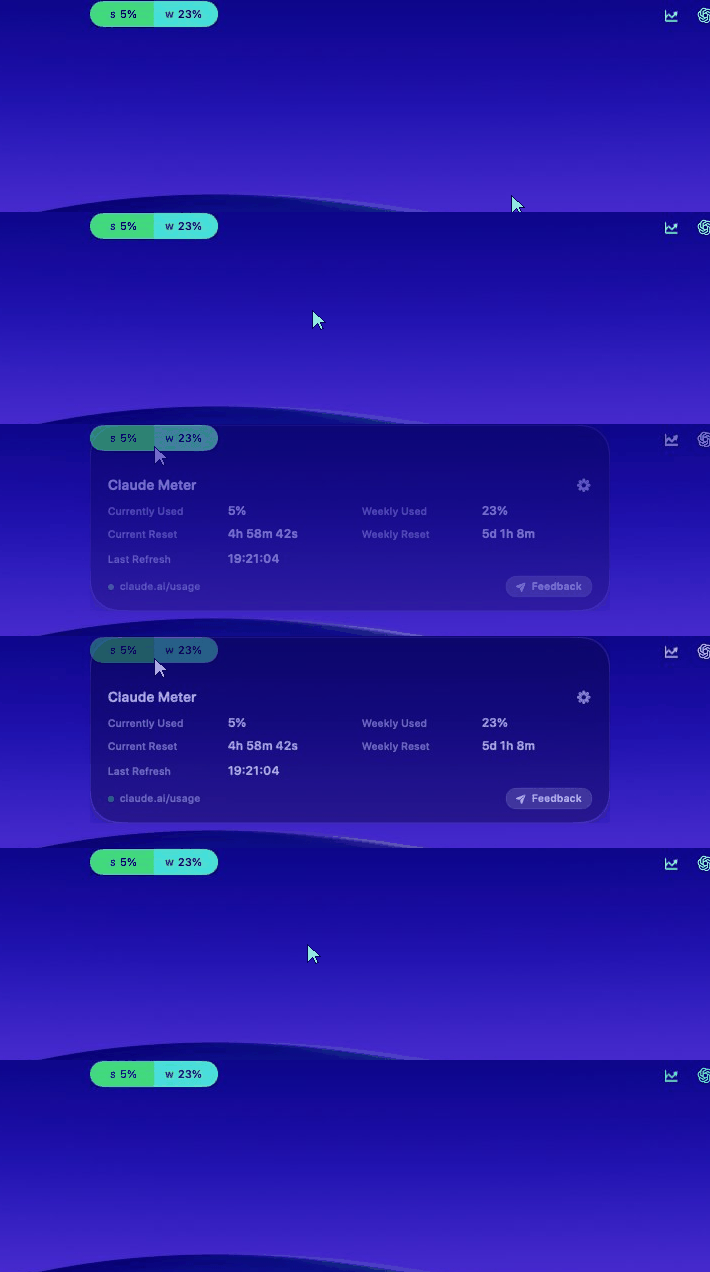
A native macOS menu-bar app that shows your Claude usage as a Dynamic Island–style pill — your session (5‑hour) and weekly limits, with live reset countdowns, always a glance away.
Built for people who live in Claude Code / claude.ai and want to stop hitting rate-limit walls by surprise.
What it does
A small pill sits in your menu bar (parked beside the notch). It shows how much of your Claude session and weekly limits you've used — color-coded green → red — and counts down to each reset. Hover it for a detail card. It refreshes itself in the background and the moment you look at it.
Features
- Combined pill — session (S) and weekly (W) percentages side by side, tinted by how close you are to the limit.
- Hover card — currently used, weekly used, current/weekly reset countdowns, last refresh.
- Green → red spectrum with automatic black/white text for contrast; every band is customizable.
- Notch-aware placement — pick built-in display, the active screen, the screen under your mouse, or a specific monitor.
- Smart refresh — configurable background interval (60s–30min) plus hover-to-refresh.
- Appearance — System / Dark / Light (the pill stays dark by design); launch at login; optional menu-bar icon.
- Per-model weekly caps — Anthropic caps some models (Fable, Opus…) separately from your all-models weekly limit. The pill shows the all-models number; hover it and every cap is listed, worst first, so you can see the one that's about to stop you.
- Almost entirely local — no account, no usage analytics. One outbound call besides claude.ai: an update check that sends the app version and a random anonymous install ID.
How it works
Claude has no public usage API. Claude Meter reads the same authenticated endpoint the claude.ai website uses — GET /api/organizations/{org}/usage — from inside a hidden WebKit view that carries your normal claude.ai login (a sessionKey cookie stored only in the app's local container). It decodes the session/weekly utilization and reset timestamps and renders them.
Two requests leave your Mac, ever: the usage call to claude.ai, and an update check to claude.sanchitkd.com/ping carrying the app version and a random anonymous install ID. Nothing else.
WARNING: Because it relies on an undocumented endpoint plus your web session, it can break if Anthropic changes things. This is a personal-use convenience tool, not an official Anthropic product, and isn't affiliated with or endorsed by Anthropic. The app checks for a new version on launch and prompts you when a fix ships.
Privacy & security
- No accounts, no usage analytics, no data collection.
- Your Claude session cookie stays in the app's local WebKit store on your Mac.
- The app talks to
claude.aiand toclaude.sanchitkd.com/ping— the update check. The ping carries exactly two things: the app version, and a random UUID generated on first launch and stored inUserDefaults. It is not derived from you, your account or your hardware; it exists so I can count how many installs are still running rather than how many times apps launch. It's ~40 lines inUpdateChecker.swift— read it. - Fully open source — read every line before you trust it.
Requirements
- macOS 14 (Sonoma) or later.
- A Claude account (Pro / Max / Team) you can sign into at claude.ai.
Install
Option A — download the app (recommended)
- Get the latest build from claude.sanchitkd.com — or download directly / browse all releases.
- Unzip and move
ClaudeMeter.appto/Applications. - First launch: the app is unsigned, so macOS Gatekeeper will warn you. Right-click the app -> Open -> Open, or go to System Settings -> Privacy & Security -> "Open Anyway." You only do this once.
Option B — build from source
git clone https://github.com/sanchitkd/claude-meter.git
cd claude-meter
./scripts/build-app.sh
open .build/release/ClaudeMeter.app
Needs the Swift 6 toolchain (Xcode 16+) and macOS 14+.
First run & sign-in
On first launch a "Sign in to Claude" window opens.
- Use Email sign-in (enter your email -> one-time code).
- Google sign-in won't work here — Google blocks OAuth inside embedded app windows (their anti-phishing policy). Use email.
Once you're in, the window closes automatically and the pill fills with your usage. The session persists across launches. If it ever expires, right-click the pill -> Sign in to Claude.
Using it
- Pill (menu bar):
S 42% W 13%— color shows how close to the limit you are. - Hover -> detail card (and an instant refresh if the data is stale).
- Right-click the pill or menu-bar icon -> Sign in - Refresh - Open Claude - Open Usage Page - Open Logs - Preferences - Quit.
- Gear (top-right of the card) -> Preferences.
Settings
| Section | Options |
|---|---|
| Updates | Refresh interval (60s-30min), enable animations |
| App | Launch at login, show menu-bar icon, appearance (System/Dark/Light) |
| Pill Position | Built-in display - Active screen - Screen under mouse - Specific display |
| Usage Colors | Customize each band of the green -> red palette |
| Logs | Current size, Rotate (keeps one backup), Clear |
Architecture
Swift Package with two targets:
ClaudeMeter— the app entry point (@main, accessory activation policy).ClaudeMeterCore— everything else:- Providers —
ClaudeWebSession(WebKit + the usage endpoint),AnthropicUsageProvider,AnthropicUsageModels,ClaudeLoginWindowController. - Domain —
UsageSnapshot/UsageWindow/UsageStatus, provider protocol,UsageColorPalette. - State —
UsageStateManager(refresh loop + countdown clock),SettingsManager. - UI —
IslandView(pill + hover card),UsageColorResolver,SettingsView. - Platform —
IslandPanelController(the floating panel + screen placement),AppearanceController,SettingsWindowController. - Utilities —
AppLogger,UsageFormatters.
- Providers —
Development
Compile:
swift build -c release
Run via the app bundle — recommended, because running with swift run has WebKit/CoreAnimation lifecycle issues for this style of app:
./scripts/build-app.sh
open .build/release/ClaudeMeter.app
For a fast rebuild-and-relaunch loop, add an alias to ~/.zshrc (adjust the path to your clone):
alias cm='cd ~/path/to/claude-meter && ./scripts/build-app.sh && killall ClaudeMeter 2>/dev/null; open .build/release/ClaudeMeter.app'
Then just run cm to rebuild and relaunch.
Troubleshooting
- "Sign in to Claude to show usage" -> right-click the pill -> Sign in (use email).
- Can't see the pill -> it may be on another display; Preferences -> Pill Position.
- Logs ->
~/Library/Application Support/ClaudeMeter/ClaudeMeter.log(or Preferences -> Logs -> Show in Finder).
Roadmap
- Auto-update (Sparkle) — today the app only tells you an update exists.
- Live plan name.
- Signed + notarized builds (no Gatekeeper prompt).
Author
Built by Sanchit Dikshit — sanchitkd.com - Dev.to - GitHub @sanchitkd.
Feedback or hi: claude.sanchitkd.com/#send-feedback.
If you use or fork Claude Meter, a star on the repo and a link back are appreciated.
License
MIT © 2026 Sanchit Dikshit. Not affiliated with Anthropic. "Claude" is a trademark of Anthropic.
Contributors

15 commits
See what people are saying
Similar repos


Languages
Swift
95.8%
Shell
4.2%
README
Claude Meter
A native macOS menu-bar app that shows your Claude usage as a Dynamic Island–style pill — your session (5‑hour) and weekly limits, with live reset countdowns, always a glance away.
Built for people who live in Claude Code / claude.ai and want to stop hitting rate-limit walls by surprise.
What it does
A small pill sits in your menu bar (parked beside the notch). It shows how much of your Claude session and weekly limits you've used — color-coded green → red — and counts down to each reset. Hover it for a detail card. It refreshes itself in the background and the moment you look at it.
Features
- Combined pill — session (S) and weekly (W) percentages side by side, tinted by how close you are to the limit.
- Hover card — currently used, weekly used, current/weekly reset countdowns, last refresh.
- Green → red spectrum with automatic black/white text for contrast; every band is customizable.
- Notch-aware placement — pick built-in display, the active screen, the screen under your mouse, or a specific monitor.
- Smart refresh — configurable background interval (60s–30min) plus hover-to-refresh.
- Appearance — System / Dark / Light (the pill stays dark by design); launch at login; optional menu-bar icon.
- Per-model weekly caps — Anthropic caps some models (Fable, Opus…) separately from your all-models weekly limit. The pill shows the all-models number; hover it and every cap is listed, worst first, so you can see the one that's about to stop you.
- Almost entirely local — no account, no usage analytics. One outbound call besides claude.ai: an update check that sends the app version and a random anonymous install ID.
How it works
Claude has no public usage API. Claude Meter reads the same authenticated endpoint the claude.ai website uses — GET /api/organizations/{org}/usage — from inside a hidden WebKit view that carries your normal claude.ai login (a sessionKey cookie stored only in the app's local container). It decodes the session/weekly utilization and reset timestamps and renders them.
Two requests leave your Mac, ever: the usage call to claude.ai, and an update check to claude.sanchitkd.com/ping carrying the app version and a random anonymous install ID. Nothing else.
WARNING: Because it relies on an undocumented endpoint plus your web session, it can break if Anthropic changes things. This is a personal-use convenience tool, not an official Anthropic product, and isn't affiliated with or endorsed by Anthropic. The app checks for a new version on launch and prompts you when a fix ships.
Privacy & security
- No accounts, no usage analytics, no data collection.
- Your Claude session cookie stays in the app's local WebKit store on your Mac.
- The app talks to
claude.aiand toclaude.sanchitkd.com/ping— the update check. The ping carries exactly two things: the app version, and a random UUID generated on first launch and stored inUserDefaults. It is not derived from you, your account or your hardware; it exists so I can count how many installs are still running rather than how many times apps launch. It's ~40 lines inUpdateChecker.swift— read it. - Fully open source — read every line before you trust it.
Requirements
- macOS 14 (Sonoma) or later.
- A Claude account (Pro / Max / Team) you can sign into at claude.ai.
Install
Option A — download the app (recommended)
- Get the latest build from claude.sanchitkd.com — or download directly / browse all releases.
- Unzip and move
ClaudeMeter.appto/Applications. - First launch: the app is unsigned, so macOS Gatekeeper will warn you. Right-click the app -> Open -> Open, or go to System Settings -> Privacy & Security -> "Open Anyway." You only do this once.
Option B — build from source
git clone https://github.com/sanchitkd/claude-meter.git
cd claude-meter
./scripts/build-app.sh
open .build/release/ClaudeMeter.app
Needs the Swift 6 toolchain (Xcode 16+) and macOS 14+.
First run & sign-in
On first launch a "Sign in to Claude" window opens.
- Use Email sign-in (enter your email -> one-time code).
- Google sign-in won't work here — Google blocks OAuth inside embedded app windows (their anti-phishing policy). Use email.
Once you're in, the window closes automatically and the pill fills with your usage. The session persists across launches. If it ever expires, right-click the pill -> Sign in to Claude.
Using it
- Pill (menu bar):
S 42% W 13%— color shows how close to the limit you are. - Hover -> detail card (and an instant refresh if the data is stale).
- Right-click the pill or menu-bar icon -> Sign in - Refresh - Open Claude - Open Usage Page - Open Logs - Preferences - Quit.
- Gear (top-right of the card) -> Preferences.
Settings
| Section | Options |
|---|---|
| Updates | Refresh interval (60s-30min), enable animations |
| App | Launch at login, show menu-bar icon, appearance (System/Dark/Light) |
| Pill Position | Built-in display - Active screen - Screen under mouse - Specific display |
| Usage Colors | Customize each band of the green -> red palette |
| Logs | Current size, Rotate (keeps one backup), Clear |
Architecture
Swift Package with two targets:
ClaudeMeter— the app entry point (@main, accessory activation policy).ClaudeMeterCore— everything else:- Providers —
ClaudeWebSession(WebKit + the usage endpoint),AnthropicUsageProvider,AnthropicUsageModels,ClaudeLoginWindowController. - Domain —
UsageSnapshot/UsageWindow/UsageStatus, provider protocol,UsageColorPalette. - State —
UsageStateManager(refresh loop + countdown clock),SettingsManager. - UI —
IslandView(pill + hover card),UsageColorResolver,SettingsView. - Platform —
IslandPanelController(the floating panel + screen placement),AppearanceController,SettingsWindowController. - Utilities —
AppLogger,UsageFormatters.
- Providers —
Development
Compile:
swift build -c release
Run via the app bundle — recommended, because running with swift run has WebKit/CoreAnimation lifecycle issues for this style of app:
./scripts/build-app.sh
open .build/release/ClaudeMeter.app
For a fast rebuild-and-relaunch loop, add an alias to ~/.zshrc (adjust the path to your clone):
alias cm='cd ~/path/to/claude-meter && ./scripts/build-app.sh && killall ClaudeMeter 2>/dev/null; open .build/release/ClaudeMeter.app'
Then just run cm to rebuild and relaunch.
Troubleshooting
- "Sign in to Claude to show usage" -> right-click the pill -> Sign in (use email).
- Can't see the pill -> it may be on another display; Preferences -> Pill Position.
- Logs ->
~/Library/Application Support/ClaudeMeter/ClaudeMeter.log(or Preferences -> Logs -> Show in Finder).
Roadmap
- Auto-update (Sparkle) — today the app only tells you an update exists.
- Live plan name.
- Signed + notarized builds (no Gatekeeper prompt).
Author
Built by Sanchit Dikshit — sanchitkd.com - Dev.to - GitHub @sanchitkd.
Feedback or hi: claude.sanchitkd.com/#send-feedback.
If you use or fork Claude Meter, a star on the repo and a link back are appreciated.
License
MIT © 2026 Sanchit Dikshit. Not affiliated with Anthropic. "Claude" is a trademark of Anthropic.
See what people are saying
Similar repos
Contributors
15 commits
Languages
Swift
95.8%
Shell
4.2%