
A quiet native macOS menu bar timer with a thin progress line.
Swift
3
9 commits
updated Sep 24, 2026
See what people are saying
README
Timebar
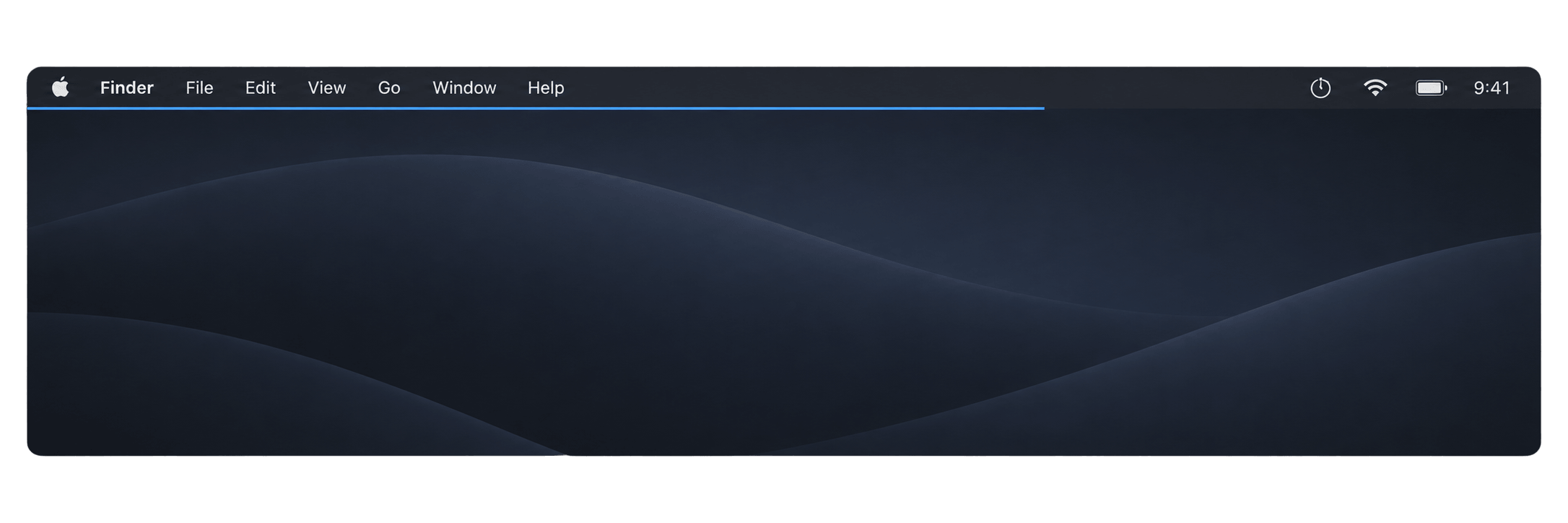
A quiet timer for your Mac's menu bar. Start a timer and a thin line appears below the menu bar. Its right edge moves left as time runs out. Glance up to see how much time remains.
Native Swift. No accounts, analytics, network requests, or third-party dependencies.
Download
Download Timebar 1.0.1 for macOS
1.73 MB download · 3.35 MB of app-bundle files, including both Mac architectures. Filesystem space used after installation can differ.
Requires macOS 14 Sonoma or later, including macOS 26 Tahoe. The universal download includes Apple silicon and Intel binaries. Interactive testing has been performed on Apple silicon; see verification for coverage.
- Download and open
Timebar-1.0.1-macOS-universal.dmg. - Drag Timebar onto the Applications shortcut in the disk image.
- Open Timebar from Applications, then click its timer icon in the menu bar. There is no Dock icon.
Timebar is Developer ID signed and notarized by Apple. macOS may ask you to confirm that you want to open the downloaded app on its first launch. You can eject the disk image after installation.
To update, quit Timebar, download the latest DMG, and replace the app in Applications. Your preferences and timer remain saved.
Use
- Start a preset immediately: 5, 15, 25, 50, 60, or 90 minutes.
- Set a custom duration from 1 second to 24 hours. Type into Hours, Minutes, and Seconds, or use the steppers and arrow keys. Press Return or the start arrow to begin.
- Open the menu to see the remaining time and percentage. Pause, resume, stop, or restart from there.
- Starting another timer replaces the current one. A paused timer leaves the line at its current width.
- At zero, the line disappears and the menu icon becomes a checkmark. An optional quiet sound marks completion.
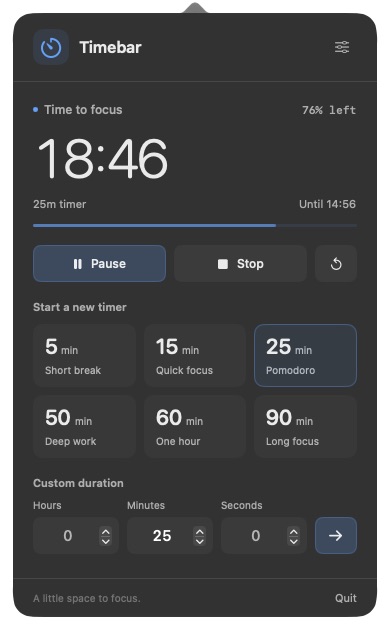
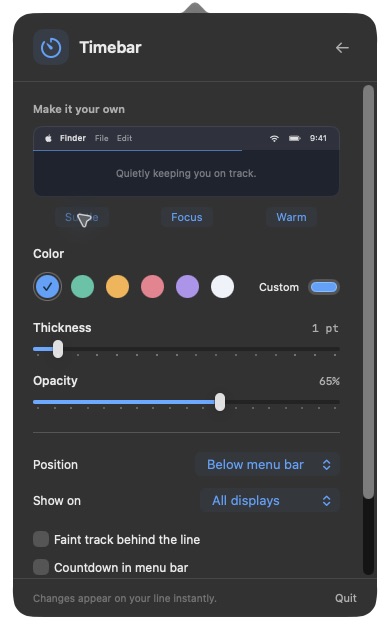
Timer controls and appearance settings from the current source build.
Make it yours
Timebar defaults to Subtle: blue, 1 point thick, at 65% opacity. Choose a preset appearance or adjust the line yourself:
| Setting | Options |
|---|---|
| Thickness | 0.5 to 8 points, in half-point steps |
| Color | Six swatches or a custom color |
| Opacity | 10% to 100% |
| Position | Below the menu bar, top edge, or bottom edge |
| Displays | All displays or the primary display |
| Extras | Faint background track, menu bar countdown, completion sound |
On a Retina display, 0.5 points is one physical pixel. Standard-resolution displays use a one-pixel minimum. The overlay never intercepts clicks or takes keyboard focus.
With an auto-hidden menu bar, the default line stays below the normal menu area. Top-edge placement offers an alternative for full-screen work, respecting a MacBook's notch.
Small by design
For an app left running in the menu bar, background resource use matters. Here are the recorded release-build measurements on an Apple silicon desktop running macOS 27.0:
| Timer state | Average CPU, one core | Physical memory footprint |
|---|---|---|
| Running, menu closed, before first menu opening | 0.067% | 13.2 MiB |
| Running, after opening and closing the menu | 0.033% | 35.3 MiB |
| Timer menu visible | 1.332% | 37.4 MiB |
The background samples lasted 30 seconds each; the open-menu sample lasted 15 seconds, using a 1-hour-45-minute timer. These are measurements from 2026-09-22, not fixed limits. Opening the interface also produced transient lifetime memory peaks up to 273.5 MiB in that run; the low startup figure is not the app's permanent footprint.
Timebar schedules updates around visible changes to the line, instead of continuously redrawing the interface. It creates the menu interface when opened and releases it when closed, while preserving your custom duration input. Idle and paused timers have no scheduled ticks. Sleeping displays keep only the completion callback.
Battery life has not been measured on a laptop. Low background CPU and fewer scheduled updates are useful efficiency evidence, but they do not establish a battery-drain figure. Short timers, display setup, visible controls, and macOS version affect resource use. See Performance for all results, size measurements, and the profiling command.
Timer behavior and privacy
The timer uses a saved deadline, so sleep and delayed callbacks do not accumulate drift. Quitting the app does not cancel a timer; Stop does. A running timer resumes from its deadline on relaunch. If it expired while the app was closed, Timebar shows it as finished without playing an old alert. A paused timer stays paused. Changing the system clock changes the deadline-based countdown.
All settings and timer state stay in local macOS preferences under com.velvetshark.timebar. Timebar has no server, telemetry, advertising, or background network service. It does not prevent sleep or require accessibility or screen-recording permissions.
To start it at login, first move it to Applications, then add it in System Settings > General > Login Items.
Build from source
Install Xcode 16 or later with Swift 6. A single-architecture local build also works with matching Xcode Command Line Tools. The universal build requires full Xcode.
git clone https://github.com/velvet-shark/timebar.git
cd timebar
swift test
./scripts/run.sh
Build both Mac architectures:
./scripts/build-app.sh --universal
The app is written to dist/Timebar.app. Builds use a local ad hoc signature by default. See Distribution for the Developer ID signing, notarization, and DMG release workflow.
TimebarCore contains deterministic timer state, refresh scheduling, duration validation, appearance settings, and display geometry. Timebar contains the SwiftUI menu and AppKit status item and overlay. Timer arithmetic is separate from real clocks and UI, so it can be tested without sleeping or driving the desktop.
Contributing
Bug reports and focused improvements are welcome. Include your macOS version, Mac architecture, display setup, and steps to reproduce. Please open an issue before proposing a substantial feature. Run swift test and ./scripts/build-app.sh before submitting changes.
License
MIT. Copyright 2026 Radek Sienkiewicz.
Contributors

9 commits
Similar repos


Languages
Swift
91.9%
Shell
5.9%
Python
2.1%
A quiet native macOS menu bar timer with a thin progress line.
Swift
3
9 commits
updated Sep 24, 2026
See what people are saying
README
Timebar
A quiet timer for your Mac's menu bar. Start a timer and a thin line appears below the menu bar. Its right edge moves left as time runs out. Glance up to see how much time remains.
Native Swift. No accounts, analytics, network requests, or third-party dependencies.
Download
Download Timebar 1.0.1 for macOS
1.73 MB download · 3.35 MB of app-bundle files, including both Mac architectures. Filesystem space used after installation can differ.
Requires macOS 14 Sonoma or later, including macOS 26 Tahoe. The universal download includes Apple silicon and Intel binaries. Interactive testing has been performed on Apple silicon; see verification for coverage.
- Download and open
Timebar-1.0.1-macOS-universal.dmg. - Drag Timebar onto the Applications shortcut in the disk image.
- Open Timebar from Applications, then click its timer icon in the menu bar. There is no Dock icon.
Timebar is Developer ID signed and notarized by Apple. macOS may ask you to confirm that you want to open the downloaded app on its first launch. You can eject the disk image after installation.
To update, quit Timebar, download the latest DMG, and replace the app in Applications. Your preferences and timer remain saved.
Use
- Start a preset immediately: 5, 15, 25, 50, 60, or 90 minutes.
- Set a custom duration from 1 second to 24 hours. Type into Hours, Minutes, and Seconds, or use the steppers and arrow keys. Press Return or the start arrow to begin.
- Open the menu to see the remaining time and percentage. Pause, resume, stop, or restart from there.
- Starting another timer replaces the current one. A paused timer leaves the line at its current width.
- At zero, the line disappears and the menu icon becomes a checkmark. An optional quiet sound marks completion.
Timer controls and appearance settings from the current source build.
Make it yours
Timebar defaults to Subtle: blue, 1 point thick, at 65% opacity. Choose a preset appearance or adjust the line yourself:
| Setting | Options |
|---|---|
| Thickness | 0.5 to 8 points, in half-point steps |
| Color | Six swatches or a custom color |
| Opacity | 10% to 100% |
| Position | Below the menu bar, top edge, or bottom edge |
| Displays | All displays or the primary display |
| Extras | Faint background track, menu bar countdown, completion sound |
On a Retina display, 0.5 points is one physical pixel. Standard-resolution displays use a one-pixel minimum. The overlay never intercepts clicks or takes keyboard focus.
With an auto-hidden menu bar, the default line stays below the normal menu area. Top-edge placement offers an alternative for full-screen work, respecting a MacBook's notch.
Small by design
For an app left running in the menu bar, background resource use matters. Here are the recorded release-build measurements on an Apple silicon desktop running macOS 27.0:
| Timer state | Average CPU, one core | Physical memory footprint |
|---|---|---|
| Running, menu closed, before first menu opening | 0.067% | 13.2 MiB |
| Running, after opening and closing the menu | 0.033% | 35.3 MiB |
| Timer menu visible | 1.332% | 37.4 MiB |
The background samples lasted 30 seconds each; the open-menu sample lasted 15 seconds, using a 1-hour-45-minute timer. These are measurements from 2026-09-22, not fixed limits. Opening the interface also produced transient lifetime memory peaks up to 273.5 MiB in that run; the low startup figure is not the app's permanent footprint.
Timebar schedules updates around visible changes to the line, instead of continuously redrawing the interface. It creates the menu interface when opened and releases it when closed, while preserving your custom duration input. Idle and paused timers have no scheduled ticks. Sleeping displays keep only the completion callback.
Battery life has not been measured on a laptop. Low background CPU and fewer scheduled updates are useful efficiency evidence, but they do not establish a battery-drain figure. Short timers, display setup, visible controls, and macOS version affect resource use. See Performance for all results, size measurements, and the profiling command.
Timer behavior and privacy
The timer uses a saved deadline, so sleep and delayed callbacks do not accumulate drift. Quitting the app does not cancel a timer; Stop does. A running timer resumes from its deadline on relaunch. If it expired while the app was closed, Timebar shows it as finished without playing an old alert. A paused timer stays paused. Changing the system clock changes the deadline-based countdown.
All settings and timer state stay in local macOS preferences under com.velvetshark.timebar. Timebar has no server, telemetry, advertising, or background network service. It does not prevent sleep or require accessibility or screen-recording permissions.
To start it at login, first move it to Applications, then add it in System Settings > General > Login Items.
Build from source
Install Xcode 16 or later with Swift 6. A single-architecture local build also works with matching Xcode Command Line Tools. The universal build requires full Xcode.
git clone https://github.com/velvet-shark/timebar.git
cd timebar
swift test
./scripts/run.sh
Build both Mac architectures:
./scripts/build-app.sh --universal
The app is written to dist/Timebar.app. Builds use a local ad hoc signature by default. See Distribution for the Developer ID signing, notarization, and DMG release workflow.
TimebarCore contains deterministic timer state, refresh scheduling, duration validation, appearance settings, and display geometry. Timebar contains the SwiftUI menu and AppKit status item and overlay. Timer arithmetic is separate from real clocks and UI, so it can be tested without sleeping or driving the desktop.
Contributing
Bug reports and focused improvements are welcome. Include your macOS version, Mac architecture, display setup, and steps to reproduce. Please open an issue before proposing a substantial feature. Run swift test and ./scripts/build-app.sh before submitting changes.
License
MIT. Copyright 2026 Radek Sienkiewicz.
Similar repos
Contributors
9 commits
Languages
Swift
91.9%
Shell
5.9%
Python
2.1%