Open-source Conductor.build alternative. Runs the real claude/gemini/codex CLIs in real terminals, no SDK middleman
See the code
claude, codex, antigravity, opencode and more in parallel. Each in its own git worktree.Every new feature the day they ship it: the real CLIs on your own Pro / Max plan, no vendor backend.





Install · What it does · Sandbox · vs. Conductor · Contributing
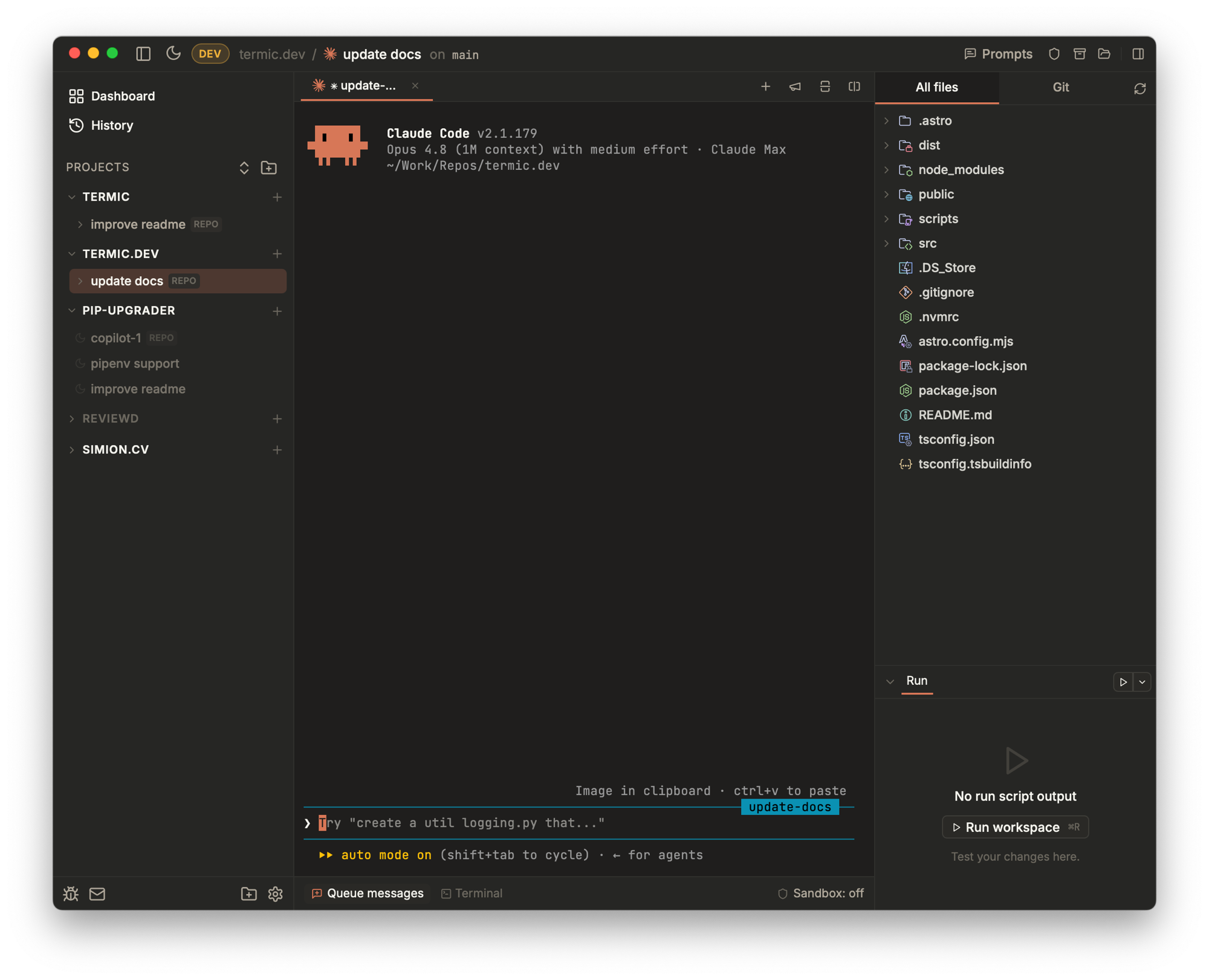
Termic is a free, open-source desktop app that runs your AI coding-agent CLIs
side by side, each isolated in its own git worktree, with an optional per-task
macOS sandbox cage. It spawns the real claude, codex, agy (Antigravity),
copilot and grok binaries (not the vendor SDKs), so inference rides on the Pro / Max plan you
already pay for. Spin up four agents on the same branch, broadcast one prompt to
all of them, watch a reliable work-done indicator tell you the moment each finishes.
The recommended path is Homebrew + the official tap:
brew install --cask simion/termic/termic
That single command auto-taps simion/homebrew-termic, downloads the
latest .dmg, and installs Termic.app into /Applications. Termic is
signed with a Developer ID certificate and notarized by Apple, so there's
no Gatekeeper warning.
Updates: Termic ships with a self-updater. When a new release lands you'll see an Update X.Y.Z pill in the top-right of the toolbar; click it to download + verify + relaunch. To check manually:
brew upgrade --cask termic
.dmg, .app.tar.gz, and the ed25519 signature for each version live at
the Releases page. The .dmg
is signed and notarized by Apple, so it opens on first launch with nothing
else to do.
Download termic_<version>_amd64.AppImage from the
Releases page, make it
executable, and run it:
chmod +x termic_*_amd64.AppImage
./termic_*_amd64.AppImage
The AppImage is ed25519-signed by the same CI flow as the macOS build,
so the in-app updater works the same way: a new release appears as the
Update X.Y.Z pill in the top-right, click to download + verify +
relaunch. Keep the AppImage somewhere writable like ~/Applications/
so the updater can replace it in place.
The Seatbelt sandbox is macOS-only, so on Linux the task's Shield toggle is disabled. Docker mode is the Linux answer: it is not macOS-gated, so wherever Docker runs you can cage an agent in a container instead. Everything else (worktrees, parallel tabs, find-in-files, themes, in-app diff) works the same.
Wayland note: if fonts render thin, force X11 with GDK_BACKEND=x11
in front of the launch command (or in the .desktop file's Exec=).
git clone https://github.com/simion/termic
cd termic
make setup          # brew/rust/node + npm install + cargo check
make install        # build, copy to /Applications, launch
make dev (vite HMR + Rust auto-rebuild) is the iteration loop — see
CONTRIBUTING.md if you plan to hack on the code.
The signed AppImage on the
Releases page is the
recommended path for most users — see Linux (AppImage)
above. Build from source if you want to hack on it, ship a .deb /
.rpm for your own distro packaging, or run an unreleased commit.
bash scripts/setup-linux.sh (or make setup once make is installed) does
all of the below on apt, dnf and pacman systems. By hand:
Prerequisites — Debian / Ubuntu (24.04+ has WebKitGTK 4.1):
sudo apt update
sudo apt install -y \
  build-essential curl wget file git pkg-config \
  libwebkit2gtk-4.1-dev libgtk-3-dev libayatana-appindicator3-dev \
  librsvg2-dev libssl-dev libsoup-3.0-dev libxdo-dev

# Rust stable
curl --proto '=https' --tlsv1.2 -sSf https://sh.rustup.rs | sh -s -- -y
. "$HOME/.cargo/env"

# Node 20+ — distro package, nvm, fnm, asdf, or mise (whichever you use)
Fedora:
sudo dnf install -y \
  @development-tools curl wget file git pkgconfig \
  webkit2gtk4.1-devel gtk3-devel libappindicator-gtk3-devel \
  librsvg2-devel openssl-devel libsoup3-devel libxdo-devel
Arch:
sudo pacman -S --needed base-devel curl wget file git pkgconf \
  webkit2gtk-4.1 gtk3 libayatana-appindicator librsvg openssl libsoup3 xdotool
Build and install:
git clone https://github.com/simion/termic
cd termic
npm install
npm run tauri build           # ~5 min first time, faster on incremental
The bundles land under src-tauri/target/release/bundle/. Pick whichever
fits your distro:
# Debian / Ubuntu / Pop / Mint
sudo apt install ./src-tauri/target/release/bundle/deb/termic_*_amd64.deb

# Fedora / RHEL / openSUSE
sudo dnf install ./src-tauri/target/release/bundle/rpm/termic-*.x86_64.rpm

# Distro-agnostic — no install needed, just make it executable and run
chmod +x src-tauri/target/release/bundle/appimage/termic_*_amd64.AppImage
./src-tauri/target/release/bundle/appimage/termic_*_amd64.AppImage
After the .deb / .rpm install, "Termic" shows up in your application
launcher. The in-app updater only knows how to replace the AppImage in
place — .deb / .rpm users upgrade via git pull && npm run tauri build
If the window looks slightly off — an empty gap on the left of the top bar, for example — that's the 84px reservation for macOS traffic-light controls. Harmless, will be cleaned up when the cross-platform chrome lands.
Wayland note: if fonts render thin, force X11 with
GDK_BACKEND=x11 termic (or set it in the .desktop file's Exec=).
Each release carries a Windows 11 x64 installer, Termic_<version>_x64-setup.exe,
on the Releases page. It
installs per user (no admin rights) and updates itself like the macOS and Linux
builds. It is not code-signed yet, so SmartScreen asks first: More info, then
Run anyway. Windows support is new and not yet used day to day. Docker mode is
the sandbox on Windows; the macOS Seatbelt sandbox does not exist there.
To build it yourself, from Git Bash (it comes with Git for Windows):
git clone https://github.com/simion/termic
cd termic
bash scripts/setup-windows.sh   # installs build tools, Rust, Node, make via winget; npm install; cargo check
make install                    # builds the NSIS installer, installs it per user, launches it
Setup details, what differs from macOS, and what is not on Windows yet: docs/windows.md.
See CONTRIBUTING.md for the full dev guide.
Every agent runs inside a real PTY, the same binary you'd launch in iTerm, so there's nothing between you and the CLI. No vendor SDK (which bills against a separate credit pool as of June 2026), no metered markup, no backend daemon. Here's what the window gives you on top:
~/termic/tasks/<project>/<name>/. Run N agents against the same
branch across tabs; attach to repo root when you don't want a worktree;
duplicate a worktree to spin up a parallel attempt off the same tip..termic.yaml). Persist all project-specific settings—setup scripts, run commands, preview URLs, and sandbox allowlists—into a .termic.yaml file. Commit it to your repo so your whole team gets the same optimized agent environment instantly.sandbox-exec and an in-process HTTPS CONNECT proxy with a hostname
allowlist. Lets the agent run with --dangerously-skip-permissions
safely — the cage is the boundary, not the prompt. Or cage it in a
container instead: Docker mode is an alternative isolation backend
with a stronger filesystem boundary (experimental; network egress is not
restricted the way the proxy restricts the seatbelt's).ripgrep when you have it, git grep otherwise, .gitignore-aware,
streams live). CodeMirror 6 editor with side-by-side / unified diffs,
highlighting for ~150 languages, inline git blame, scratchpad tabs that
survive a relaunch, and Markdown preview (including inline
Mermaid diagrams).az with the azure-devops extension (cloud
only, not Server). All three ride their official CLI's login.termic CLI creates tasks, prompts agents,
waits for one to go quiet and reads back what it produced, from any shell,
and an agent inside a task can do the same to fan work out to others. An
MCP endpoint (experimental) exposes the same verbs as tools for clients
like Claude Desktop. termic:// links open a pre-filled New Task dialog
that a human still has to press Create on.Optional per-task macOS Seatbelt (sandbox-exec) + an in-process
HTTPS CONNECT proxy per task. Configured per project, pinned per
task at creation (editable later from the task's Shield icon),
enforced from the moment the agent spawns.
The cage:
~/.claude,
~/.codex), package caches (~/.npm, ~/.cache,
~/.cargo/registry), and TMPDIR. Always-denied: ~/.ssh, ~/.aws,
~/.gnupg, ~/.netrc, ~/.docker/config.json, ~/.kube, Keychains.rm -rf $HOME at that point).Docker mode is the alternative backend: the agent runs inside a container rather than a seatbelt profile, for a stronger filesystem boundary and a blast radius that ends at the container. One generic image, editable as a plain Dockerfile in Settings, built by an explicit action; each agent's config folder is mounted separately so logins survive and cloning an agent keeps a work login apart from a personal one. Containers run as your host user, drop every Linux capability, and cap PID exhaustion. Marked experimental: network egress is not yet restricted the way the proxy restricts the seatbelt's.
For the full sandbox design — including the recent-denies debug panel and the auto-restart-on-edit flow — see CLAUDE.md §"Sandbox".
sandbox-exec is
Apple's frontend to it), so the Shield toggle is disabled on Linux
and Windows. Docker mode is not macOS-gated, so a container cage
is available wherever Docker runs.The honest pitch — see termic.dev/vs/conductor for the full version with explanations.
| Termic | Conductor | |
|---|---|---|
| License | Open source (AGPL-3.0) | Closed source, proprietary |
| Price | Free | Paid |
| Parallel agents in git worktrees | ✓ | ✓ |
| Attach an agent to the repo root (no worktree) | ✓ | ✗ (always a worktree) |
Runs claude | ✓ | ✓ |
Runs codex | ✓ | ✓ |
| Bring your own agent (PTY-based) | ✓ — opencode, aider, ollama, anything that runs in a terminal | ✗ |
| Multi-repo tasks | ✓ — N repos under one wrapper, shared CLAUDE.md, per-member ports | ✗ |
| Sync a worktree into the repo root live | ✓ — Spotlight, detached HEAD, never commits to your branch | ◐ Checkpoints onto your branch |
| Command palette + fuzzy project / file switch | ✓ — ⌘K / ⌘N / ⌘P | varies |
| Uses Claude Pro / Max subscription quota | ✓ — spawns the interactive claude CLI directly | ◐ Routes through the Claude Agent SDK |
| Monthly Claude cost on top of your Pro / Max plan | $0 — same quota as running claude in iTerm | Capped by the separate SDK credit ($20 / $100 / $200) |
| Local-only, no vendor backend in the loop | ✓ | ✗ — vendor-hosted services |
| Per-task macOS sandbox (filesystem + network) | ✓ — Seatbelt + in-process network allowlist | ✗ |
| Work-done indicator from real PTY signals | ✓ — OSC 9;4 + per-CLI title classifier, no idle guessing | ✗ |
| Side-by-side ⇄ unified diff with syntax highlighting | ✓ | varies |
| Platforms | macOS, Linux (signed AppImage), Windows (experimental installer) | macOS |
If you already pay for a Claude Pro / Max plan, Termic spawns the same
claude binary that plan covers — no separate metered usage, no
per-token markup. The agent and Anthropic still see the same auth they'd
see in iTerm.
Two lists, and the difference between them is a commitment.
Planned is what will be built. Each one has an issue labelled
planned,
and that issue is where its progress lives.
Ideas are not committed to. Most have a write-up under
docs/ideas/ arguing the case, and several are detailed
enough to build from, but none of them is decided. They deliberately have
no tracking issue: an issue implies someone intends to do it. Open one, or
comment on the discussion linked below, if you want to make the case or
pick something up.
Approved ideas move to docs/plans/ as implementation-ready
specs and get an issue at the same time. That is the whole promotion path:
docs/ideas/ → docs/plans/ + a planned issue → built.
container
runtime, so a sandboxed task on Apple Silicon needs no Docker Desktop.brew tap first. Upstream
would make it plain brew install --cask termic. The cask is ready (the
.dmg is signed and notarized, and its livecheck makes it
autobump-eligible), and
Homebrew/homebrew-cask#274896
is filed and closed on one thing only: notability. Homebrew asks for 90
forks, 90 watchers or 225 stars when the author submits their own
software. The forks already clear the third-party bar, so
stars are the realistic
lane, and at 225 the same PR gets reopened.--wait, prompt another, read its result
and branch on the exit code. What is missing is intent, and an opinion
about shape (fan out, queue behind, supervisor and workers).
docs/ideas/agent-orchestration.md.Termic is free, AGPL-3.0, and built by its author and a growing group of dedicated open-source contributors. If your team builds on AI coding agents and finds it useful, sponsoring helps keep it moving.
 |
|---|
Also sponsoring: Vyttle, Sage Haven.
AGPL-3.0-or-later. Fork it, modify it, build a derivative — the only string is that derivatives stay AGPL too. The "open core that quietly went proprietary" pattern can't happen with this license, which is most of the point.
156 followers · starred Jun 2026
175 followers · starred Aug 2026
58 followers · starred Aug 2026
292 followers · starred Aug 2026
Open-source Conductor.build alternative. Runs the real claude/gemini/codex CLIs in real terminals, no SDK middleman
See the code
claude, codex, antigravity, opencode and more in parallel. Each in its own git worktree.Every new feature the day they ship it: the real CLIs on your own Pro / Max plan, no vendor backend.
Install · What it does · Sandbox · vs. Conductor · Contributing
Termic is a free, open-source desktop app that runs your AI coding-agent CLIs
side by side, each isolated in its own git worktree, with an optional per-task
macOS sandbox cage. It spawns the real claude, codex, agy (Antigravity),
copilot and grok binaries (not the vendor SDKs), so inference rides on the Pro / Max plan you
already pay for. Spin up four agents on the same branch, broadcast one prompt to
all of them, watch a reliable work-done indicator tell you the moment each finishes.
The recommended path is Homebrew + the official tap:
brew install --cask simion/termic/termic
That single command auto-taps simion/homebrew-termic, downloads the
latest .dmg, and installs Termic.app into /Applications. Termic is
signed with a Developer ID certificate and notarized by Apple, so there's
no Gatekeeper warning.
Updates: Termic ships with a self-updater. When a new release lands you'll see an Update X.Y.Z pill in the top-right of the toolbar; click it to download + verify + relaunch. To check manually:
brew upgrade --cask termic
.dmg, .app.tar.gz, and the ed25519 signature for each version live at
the Releases page. The .dmg
is signed and notarized by Apple, so it opens on first launch with nothing
else to do.
Download termic_<version>_amd64.AppImage from the
Releases page, make it
executable, and run it:
chmod +x termic_*_amd64.AppImage
./termic_*_amd64.AppImage
The AppImage is ed25519-signed by the same CI flow as the macOS build,
so the in-app updater works the same way: a new release appears as the
Update X.Y.Z pill in the top-right, click to download + verify +
relaunch. Keep the AppImage somewhere writable like ~/Applications/
so the updater can replace it in place.
The Seatbelt sandbox is macOS-only, so on Linux the task's Shield toggle is disabled. Docker mode is the Linux answer: it is not macOS-gated, so wherever Docker runs you can cage an agent in a container instead. Everything else (worktrees, parallel tabs, find-in-files, themes, in-app diff) works the same.
Wayland note: if fonts render thin, force X11 with GDK_BACKEND=x11
in front of the launch command (or in the .desktop file's Exec=).
git clone https://github.com/simion/termic
cd termic
make setup          # brew/rust/node + npm install + cargo check
make install        # build, copy to /Applications, launch
make dev (vite HMR + Rust auto-rebuild) is the iteration loop — see
CONTRIBUTING.md if you plan to hack on the code.
The signed AppImage on the
Releases page is the
recommended path for most users — see Linux (AppImage)
above. Build from source if you want to hack on it, ship a .deb /
.rpm for your own distro packaging, or run an unreleased commit.
bash scripts/setup-linux.sh (or make setup once make is installed) does
all of the below on apt, dnf and pacman systems. By hand:
Prerequisites — Debian / Ubuntu (24.04+ has WebKitGTK 4.1):
sudo apt update
sudo apt install -y \
  build-essential curl wget file git pkg-config \
  libwebkit2gtk-4.1-dev libgtk-3-dev libayatana-appindicator3-dev \
  librsvg2-dev libssl-dev libsoup-3.0-dev libxdo-dev

# Rust stable
curl --proto '=https' --tlsv1.2 -sSf https://sh.rustup.rs | sh -s -- -y
. "$HOME/.cargo/env"

# Node 20+ — distro package, nvm, fnm, asdf, or mise (whichever you use)
Fedora:
sudo dnf install -y \
  @development-tools curl wget file git pkgconfig \
  webkit2gtk4.1-devel gtk3-devel libappindicator-gtk3-devel \
  librsvg2-devel openssl-devel libsoup3-devel libxdo-devel
Arch:
sudo pacman -S --needed base-devel curl wget file git pkgconf \
  webkit2gtk-4.1 gtk3 libayatana-appindicator librsvg openssl libsoup3 xdotool
Build and install:
git clone https://github.com/simion/termic
cd termic
npm install
npm run tauri build           # ~5 min first time, faster on incremental
The bundles land under src-tauri/target/release/bundle/. Pick whichever
fits your distro:
# Debian / Ubuntu / Pop / Mint
sudo apt install ./src-tauri/target/release/bundle/deb/termic_*_amd64.deb

# Fedora / RHEL / openSUSE
sudo dnf install ./src-tauri/target/release/bundle/rpm/termic-*.x86_64.rpm

# Distro-agnostic — no install needed, just make it executable and run
chmod +x src-tauri/target/release/bundle/appimage/termic_*_amd64.AppImage
./src-tauri/target/release/bundle/appimage/termic_*_amd64.AppImage
After the .deb / .rpm install, "Termic" shows up in your application
launcher. The in-app updater only knows how to replace the AppImage in
place — .deb / .rpm users upgrade via git pull && npm run tauri build
If the window looks slightly off — an empty gap on the left of the top bar, for example — that's the 84px reservation for macOS traffic-light controls. Harmless, will be cleaned up when the cross-platform chrome lands.
Wayland note: if fonts render thin, force X11 with
GDK_BACKEND=x11 termic (or set it in the .desktop file's Exec=).
Each release carries a Windows 11 x64 installer, Termic_<version>_x64-setup.exe,
on the Releases page. It
installs per user (no admin rights) and updates itself like the macOS and Linux
builds. It is not code-signed yet, so SmartScreen asks first: More info, then
Run anyway. Windows support is new and not yet used day to day. Docker mode is
the sandbox on Windows; the macOS Seatbelt sandbox does not exist there.
To build it yourself, from Git Bash (it comes with Git for Windows):
git clone https://github.com/simion/termic
cd termic
bash scripts/setup-windows.sh   # installs build tools, Rust, Node, make via winget; npm install; cargo check
make install                    # builds the NSIS installer, installs it per user, launches it
Setup details, what differs from macOS, and what is not on Windows yet: docs/windows.md.
See CONTRIBUTING.md for the full dev guide.
Every agent runs inside a real PTY, the same binary you'd launch in iTerm, so there's nothing between you and the CLI. No vendor SDK (which bills against a separate credit pool as of June 2026), no metered markup, no backend daemon. Here's what the window gives you on top:
~/termic/tasks/<project>/<name>/. Run N agents against the same
branch across tabs; attach to repo root when you don't want a worktree;
duplicate a worktree to spin up a parallel attempt off the same tip..termic.yaml). Persist all project-specific settings—setup scripts, run commands, preview URLs, and sandbox allowlists—into a .termic.yaml file. Commit it to your repo so your whole team gets the same optimized agent environment instantly.sandbox-exec and an in-process HTTPS CONNECT proxy with a hostname
allowlist. Lets the agent run with --dangerously-skip-permissions
safely — the cage is the boundary, not the prompt. Or cage it in a
container instead: Docker mode is an alternative isolation backend
with a stronger filesystem boundary (experimental; network egress is not
restricted the way the proxy restricts the seatbelt's).ripgrep when you have it, git grep otherwise, .gitignore-aware,
streams live). CodeMirror 6 editor with side-by-side / unified diffs,
highlighting for ~150 languages, inline git blame, scratchpad tabs that
survive a relaunch, and Markdown preview (including inline
Mermaid diagrams).az with the azure-devops extension (cloud
only, not Server). All three ride their official CLI's login.termic CLI creates tasks, prompts agents,
waits for one to go quiet and reads back what it produced, from any shell,
and an agent inside a task can do the same to fan work out to others. An
MCP endpoint (experimental) exposes the same verbs as tools for clients
like Claude Desktop. termic:// links open a pre-filled New Task dialog
that a human still has to press Create on.Optional per-task macOS Seatbelt (sandbox-exec) + an in-process
HTTPS CONNECT proxy per task. Configured per project, pinned per
task at creation (editable later from the task's Shield icon),
enforced from the moment the agent spawns.
The cage:
~/.claude,
~/.codex), package caches (~/.npm, ~/.cache,
~/.cargo/registry), and TMPDIR. Always-denied: ~/.ssh, ~/.aws,
~/.gnupg, ~/.netrc, ~/.docker/config.json, ~/.kube, Keychains.rm -rf $HOME at that point).Docker mode is the alternative backend: the agent runs inside a container rather than a seatbelt profile, for a stronger filesystem boundary and a blast radius that ends at the container. One generic image, editable as a plain Dockerfile in Settings, built by an explicit action; each agent's config folder is mounted separately so logins survive and cloning an agent keeps a work login apart from a personal one. Containers run as your host user, drop every Linux capability, and cap PID exhaustion. Marked experimental: network egress is not yet restricted the way the proxy restricts the seatbelt's.
For the full sandbox design — including the recent-denies debug panel and the auto-restart-on-edit flow — see CLAUDE.md §"Sandbox".
sandbox-exec is
Apple's frontend to it), so the Shield toggle is disabled on Linux
and Windows. Docker mode is not macOS-gated, so a container cage
is available wherever Docker runs.The honest pitch — see termic.dev/vs/conductor for the full version with explanations.
| Termic | Conductor | |
|---|---|---|
| License | Open source (AGPL-3.0) | Closed source, proprietary |
| Price | Free | Paid |
| Parallel agents in git worktrees | ✓ | ✓ |
| Attach an agent to the repo root (no worktree) | ✓ | ✗ (always a worktree) |
Runs claude | ✓ | ✓ |
Runs codex | ✓ | ✓ |
| Bring your own agent (PTY-based) | ✓ — opencode, aider, ollama, anything that runs in a terminal | ✗ |
| Multi-repo tasks | ✓ — N repos under one wrapper, shared CLAUDE.md, per-member ports | ✗ |
| Sync a worktree into the repo root live | ✓ — Spotlight, detached HEAD, never commits to your branch | ◐ Checkpoints onto your branch |
| Command palette + fuzzy project / file switch | ✓ — ⌘K / ⌘N / ⌘P | varies |
| Uses Claude Pro / Max subscription quota | ✓ — spawns the interactive claude CLI directly | ◐ Routes through the Claude Agent SDK |
| Monthly Claude cost on top of your Pro / Max plan | $0 — same quota as running claude in iTerm | Capped by the separate SDK credit ($20 / $100 / $200) |
| Local-only, no vendor backend in the loop | ✓ | ✗ — vendor-hosted services |
| Per-task macOS sandbox (filesystem + network) | ✓ — Seatbelt + in-process network allowlist | ✗ |
| Work-done indicator from real PTY signals | ✓ — OSC 9;4 + per-CLI title classifier, no idle guessing | ✗ |
| Side-by-side ⇄ unified diff with syntax highlighting | ✓ | varies |
| Platforms | macOS, Linux (signed AppImage), Windows (experimental installer) | macOS |
If you already pay for a Claude Pro / Max plan, Termic spawns the same
claude binary that plan covers — no separate metered usage, no
per-token markup. The agent and Anthropic still see the same auth they'd
see in iTerm.
Two lists, and the difference between them is a commitment.
Planned is what will be built. Each one has an issue labelled
planned,
and that issue is where its progress lives.
Ideas are not committed to. Most have a write-up under
docs/ideas/ arguing the case, and several are detailed
enough to build from, but none of them is decided. They deliberately have
no tracking issue: an issue implies someone intends to do it. Open one, or
comment on the discussion linked below, if you want to make the case or
pick something up.
Approved ideas move to docs/plans/ as implementation-ready
specs and get an issue at the same time. That is the whole promotion path:
docs/ideas/ → docs/plans/ + a planned issue → built.
container
runtime, so a sandboxed task on Apple Silicon needs no Docker Desktop.brew tap first. Upstream
would make it plain brew install --cask termic. The cask is ready (the
.dmg is signed and notarized, and its livecheck makes it
autobump-eligible), and
Homebrew/homebrew-cask#274896
is filed and closed on one thing only: notability. Homebrew asks for 90
forks, 90 watchers or 225 stars when the author submits their own
software. The forks already clear the third-party bar, so
stars are the realistic
lane, and at 225 the same PR gets reopened.--wait, prompt another, read its result
and branch on the exit code. What is missing is intent, and an opinion
about shape (fan out, queue behind, supervisor and workers).
docs/ideas/agent-orchestration.md.Termic is free, AGPL-3.0, and built by its author and a growing group of dedicated open-source contributors. If your team builds on AI coding agents and finds it useful, sponsoring helps keep it moving.
|
|---|
Also sponsoring: Vyttle, Sage Haven.
AGPL-3.0-or-later. Fork it, modify it, build a derivative — the only string is that derivatives stay AGPL too. The "open core that quietly went proprietary" pattern can't happen with this license, which is most of the point.
156 followers · starred Jun 2026
175 followers · starred Aug 2026
58 followers · starred Aug 2026
292 followers · starred Aug 2026