Windows workbench for Claude Code, Codex, OpenCode, Antigravity & Grok Build. See which agent needs you, resume sessions, and reconnect from your phone.
See the code
Let one AI operate your other coding agents.
English · 简体中文




Use MCP to let AI operate Claude Code, Codex, OpenCode, Grok Build, and Antigravity terminals.
Give a connected AI an instruction. Through Termexo, it can find another agent's terminal, send a prompt, submit it, and read the actual reply. Watch the process or take over in the same Windows workbench, with working, approval, and completion states in view.
All five agents run in real terminals on your PC. Termexo also organizes projects into workspaces, resumes native sessions, and lets you reconnect from your phone through your own relay, a trusted LAN, or a VPN.
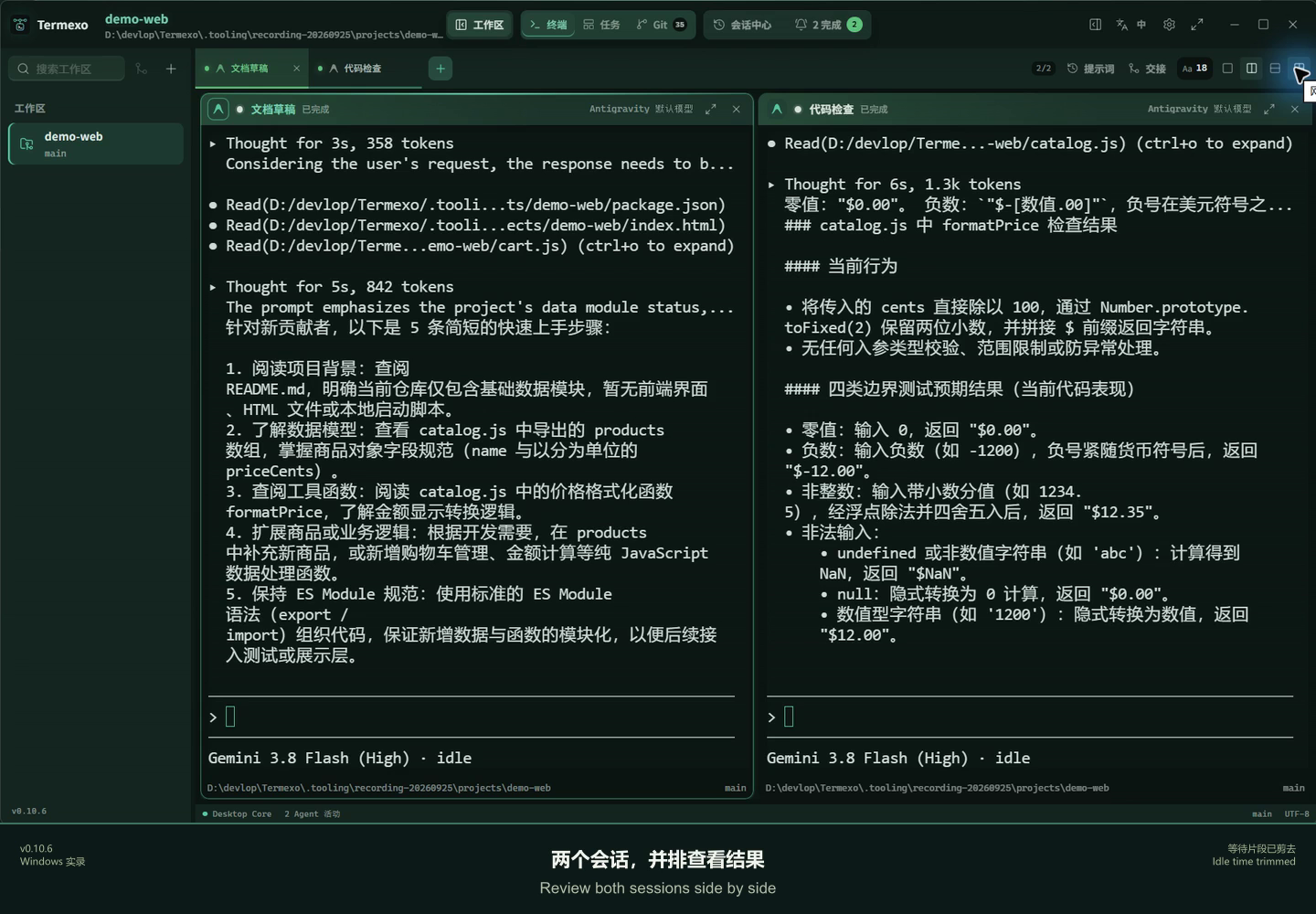
Watch 30 seconds of real v0.10.6 desktop use: completion notifications, return to a session, reply, and review two Antigravity sessions side by side. Includes Chinese and English captions; waiting intervals are cut.
Download for Windows · Watch the demo · Share first-use feedback
| Let AI operate other agents | Know who needs you | Continue from your phone |
|---|---|---|
| Find terminals, send prompts, submit them, and read replies through MCP. | View real terminals side by side, grouped by project, and spot an agent waiting for input or approval. | Connect across networks through a self-hosted relay, or directly over a trusted LAN or VPN. |
With several AI coding tools running, you spend time sending requests, checking progress, and copying replies between windows. Termexo's local MCP lets a connected AI handle those terminal operations. Workspaces, the task board, and status alerts help you follow the process; native sessions and handoff packages help you resume work, and remote access lets you continue away from your desk.

| Scenario | Individual developers | Enterprise team members | How Termexo helps |
|---|---|---|---|
| Multiple projects | Maintain work projects, a side product, and open-source repositories | Organize each business project's development environment | Workspaces group project folders, terminals, layouts, and configuration, reducing window switching. |
| Agent task allocation and progress | Assign agents to implementation, tests, and code review | Engineers assign tasks, follow progress, and approve results | Side-by-side terminals, a task board, status indicators, and approval reminders reduce repeated output checks. |
| Resuming and handing off work | Resume yesterday's session or continue with another agent | Summarize goals, progress, and next steps to help another engineer take over | Search and resume supported native sessions; carry task context in a handoff package. |
| Long tasks and remote access | Check progress, answer approvals, and send instructions from your phone | Leave tasks running on a development PC and reconnect through a controlled entry point | A self-hosted relay or trusted LAN / VPN connects to the same running terminal; the host PC must stay on. |
| Models and account configuration | Manage subscriptions and API profiles; choose a model for each task | Manage providers, compatible gateways, and network configuration | Model, account, and network profiles in one place, with quota visibility for supported providers. |
| Control over the development environment | Run projects and agents on your own PC and host your own remote entry point | Run the workbench in an environment controlled by your organization and manage your relay | Workbench state stays local and remote access is optional; agent and model configuration determines where model requests go. |
Available today and planned: These scenarios center on individuals and team members operating their own workbenches, with people assigning tasks and handling approvals. Shared workspaces, granular permissions, centralized audit, and broader automatic orchestration are part of the long-term product direction, not a ready-made enterprise administration platform.
Already have Node.js 18.18+? Run:
npx termexo@latest
Requires Windows 10 build 17763+ and WebView2 Chromium 111+. Install and configure your chosen agent CLI and model access; Termexo does not include a model subscription. MIT licensed. No Termexo account required.
MCP connects AI to Termexo. Ask in everyday language; no tool names or code required. Install and sign in to the agent CLIs you want to use, then:
Use Termexo MCP to list my workspaces and terminals, and tell me which are running. Do not change anything yet.
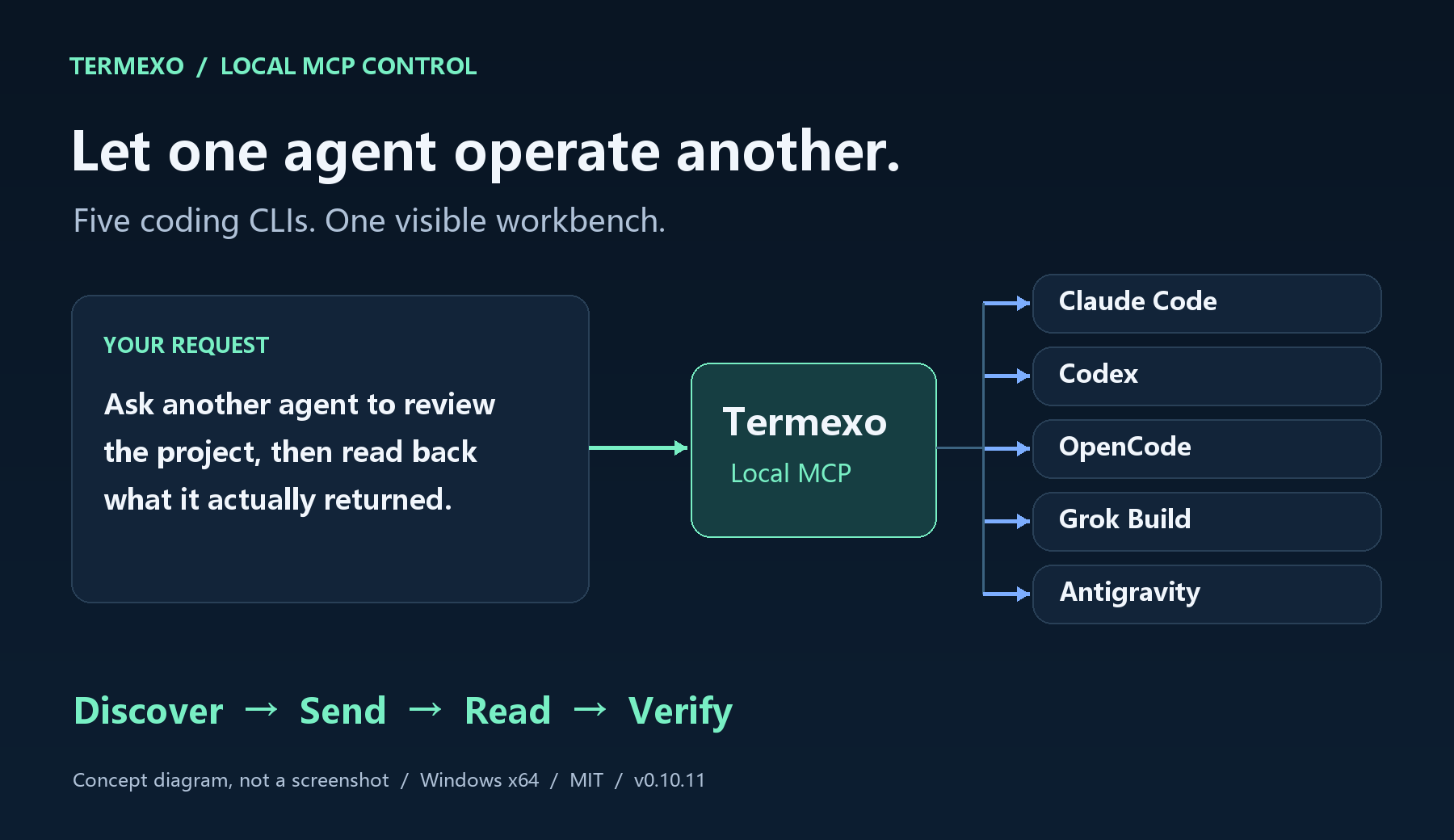
A diagram of implemented capabilities, not a software screenshot. Keep the Termexo desktop running during use.
For a first exchange, open an OpenCode terminal in Termexo, then tell the connected AI:
Use Termexo MCP to find the running OpenCode terminal in the current workspace. Send hi, submit Enter, and read its reply. If several terminals match, list their names so I can choose.
After that, try a project task:
Use Termexo MCP to create a Claude Code task in the current project titled “Map the project.” Use its configured default model. Read the project and explain its main folders, how to run it, and its test entry points without changing files. Start the task, inspect the terminal to confirm the prompt was submitted, and summarize the actual output.
Existing-terminal interaction works with all five agent types. Task-board execution supports Claude Code, Codex, OpenCode, and Grok Build. Start Antigravity in the workbench first, then operate its terminal through MCP. The terminal creation tool creates a Shell.
“Sent” and “started” do not mean “finished.” Continue reading output and task status, and check code changes and test results as the task requires. MCP is off by default and available only on the host PC; phone remote access is a separate feature, and the agent's own tool approvals still apply.
Online illustrated guide · MCP reference and troubleshooting
The desktop opens an outbound tunnel, with no public IP or router port forwarding required. Keep the PC on with Termexo running and connected to the relay. Direct access over a trusted LAN or controlled VPN is also available.
Relay login and the desktop access token are independent checks. After the v2 handshake, session frames use AES-256-GCM; the relay forwards encrypted terminal sessions. The relay has Linux, macOS and Windows x64 / arm64 binaries and container deployment; the Termexo desktop application is for Windows.
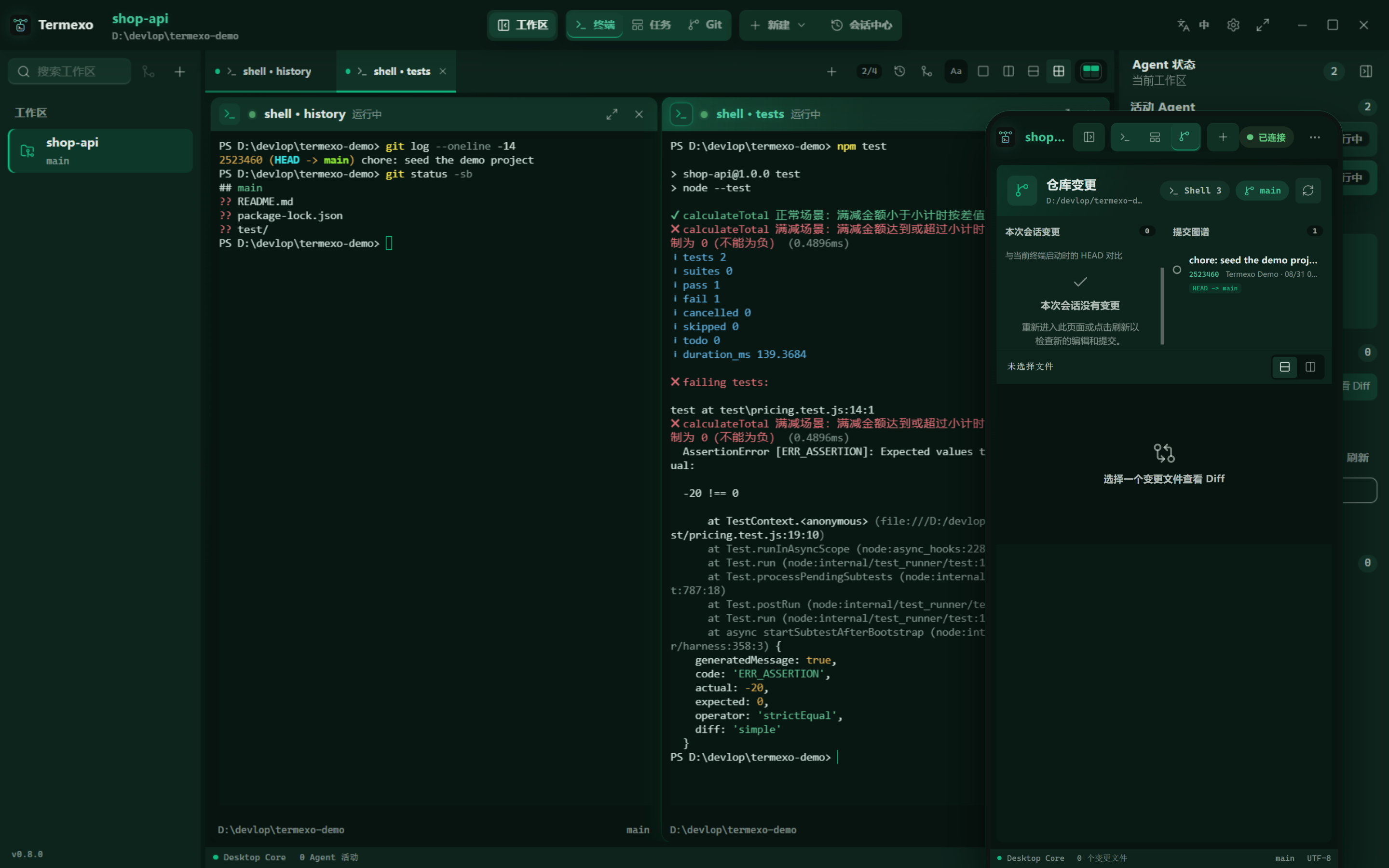
The image shows the mobile interface. Read the phone connection guide for the complete setup. Remote access is off by default. The relay browser entry point requires HTTPS; direct desktop access uses self-signed HTTPS by default. Keep the token private. Closing Termexo or stopping the PC ends the running processes.
v0.10.13 cleans up the Windows proxy environment, applies the default network profile to every terminal, rescues session scans on older OpenCode CLIs, strips instruction markup from Codex session titles, and separates completed tabs from the selected one. Start using MCP. Full changelog.
If Termexo helps your workflow, a Star on this repository helps other developers discover it. Found a problem? Open an issue with your Windows version and reproduction steps.
Trying it for the first time? Tell us what worked or where you got stuck. A short report is enough.
|
Five agents. One screen. Run Claude Code, Codex, OpenCode, Antigravity, and Grok Build side by side in as many real PTY terminals as you need, choose which stay visible, and arrange them in a custom 1–6 row/column grid. Reorder tabs by dragging, close one with the middle mouse button, and drive the workbench from the keyboard. Each workspace remembers its folder, tabs, layout, model, and theme.
|
Know when an agent needs you. Waiting for input, waiting for approval, completed, and failed states are distinct. A persistent banner, native Windows notification, and taskbar flash bring you back to the exact terminal that needs attention. 
|
|
Pick up yesterday's conversation. Search local Claude Code, Codex, OpenCode, Antigravity, and Grok Build sessions across projects, accounts, branches, and models. Termexo restores them through the CLIs' own claude --resume, codex resume, opencode --session,
agy --conversation, and grok --resume commands. It can reclaim a Claude session the CLI still holds
open and keeps native session files read-only.

|
Same CLI. Different model. Point Claude Code at Anthropic, DeepSeek, MiniMax, GLM, or a custom Anthropic-compatible endpoint. Save providers as profiles, keep API keys in Windows Credential Manager, and switch every Claude terminal in a workspace together. 
|
|
Answer it from your phone. Turn on remote access and any phone, tablet, or second computer connected through your own relay, trusted LAN or VPN opens the whole workbench in a browser — the same workspaces and the same live terminals, reading and writing the very PTYs the desktop is running. Terminals scroll by finger, the layout folds down to one terminal with panels that float over it, and the link is HTTPS behind an access token you can reveal, turn into a QR code, or rotate. 
|
See what this session changed. The Git view follows the active terminal and measures against the HEAD that terminal started on: the files it touched, the commits it made, and a unified or split diff of any one of them. It keeps reading while you are in it, so the list stays current without a refresh, and it comes back to the file and layout you left it on. 
|
|
Turn a task into a running agent. The task board keeps projects and tasks with priorities and acceptance criteria. Hand one to Claude Code, Codex, OpenCode, or Grok Build and it becomes a real terminal, moving through todo, executing, completed, and verified as that terminal reports its own status. |
Let it run without babysitting. Start any agent with automatic confirmation — --permission-mode auto for
Claude, --approve-for-me for Codex, --auto for OpenCode,
--dangerously-skip-permissions for Antigravity — so the
AUTO chip on a terminal means the same thing whichever agent drew it.
|
Termexo is local by default: it has no account, cloud service, or required sync. Workspace state stays in local SQLite storage, credentials stay in Windows Credential Manager, and Claude/Codex session histories are read-only. The agent CLIs still connect to the providers you configure under their own terms and privacy policies.
The interface is available in Simplified Chinese, English, Spanish, French, German, Japanese, and Korean. It follows the Windows language automatically, or you can choose a language from the main toolbar and keep that choice across restarts.
AI coding tools usually run in isolated terminals and sessions. As the number of projects grows, developers have to remember:
Termexo uses the Workspace as its organizing unit and turns this scattered state into a local control plane that is observable, recoverable, and extensible.
| Capability | Current implementation |
|---|---|
| Workspace management | Create, rename, theme, drag to reorder, and switch workspaces; persist paths, layouts, and terminal configuration |
| Multi-terminal workbench | Unlimited tabs, explicit pane selection, configurable 1–6 row/column grids, pane/workspace maximize, and real PTYs |
| Agent detection | Detect the Claude Code, Codex, OpenCode, Antigravity, and Grok Build executables, their versions, and health on Windows |
| Start agent sessions | Launch Claude, Codex, OpenCode, Antigravity, or Grok Build with a working directory and the available account, model, and confirmation options for that CLI |
| Session center | Read-only discovery of Claude/Codex/OpenCode/Antigravity/Grok Build sessions, search, workspace filtering, native resume, and reclaim of a Claude session the CLI still holds open |
| Agent status tracking | Isolated hooks per terminal for thinking, tool use, approval, user input, completion, and failure states |
| MCP agent control | Automatic local MCP connection for all five agents; a connected AI can find real terminals, send prompts or control keys, and read output. Task tools support Claude Code, Codex, OpenCode, and Grok Build |
| Model and MCP profiles | Manage endpoints, keys, and MCP configuration; switch Claude CLI across Anthropic-compatible backends |
| Network and npm profiles | Scope HTTP/HTTPS/SOCKS and npm settings globally or per workspace, test reachability, and inject them at launch |
| Account management | Manage multiple isolated Claude and ChatGPT/Codex logins, defaults, authentication status, and launch-time choice |
| Managed CLI lifecycle | Preview, confirm, install, or upgrade each agent's CLI — from its official npm package, or from the vendor's own Windows installer where one is published — then verify the result |
| Allowance visibility | Show reported quota where supported, including Grok Build's exhausted free allowance; unknown percentages remain unavailable |
| Task board | Organise projects and tasks with priorities and acceptance criteria, run one as a Claude/Codex/OpenCode/Grok Build terminal, and track it from todo through executing, completed, and verified |
| Prompt assets | Recover live per-terminal drafts; search, favorite, pin, delete, and reuse submitted prompts |
| Session handoff | Build redacted, token-budgeted Git/task packages; import/export documents and continue in another Agent |
| Git graph and diff | Show the active terminal's branch, commit topology, and changes since terminal start with unified or split diff |
| Remote access | Serve the whole workbench over HTTPS to phones and other computers on the network, gated by an access token with QR entry and rotation, with every remote call passing an explicit command allowlist |
| Local data and secrets | Store workspace/session/event data in SQLite and API keys in Windows Credential Manager |
| Browser preview | Preview the complete UI without Rust and exercise layout flows through an interactive simulated terminal |
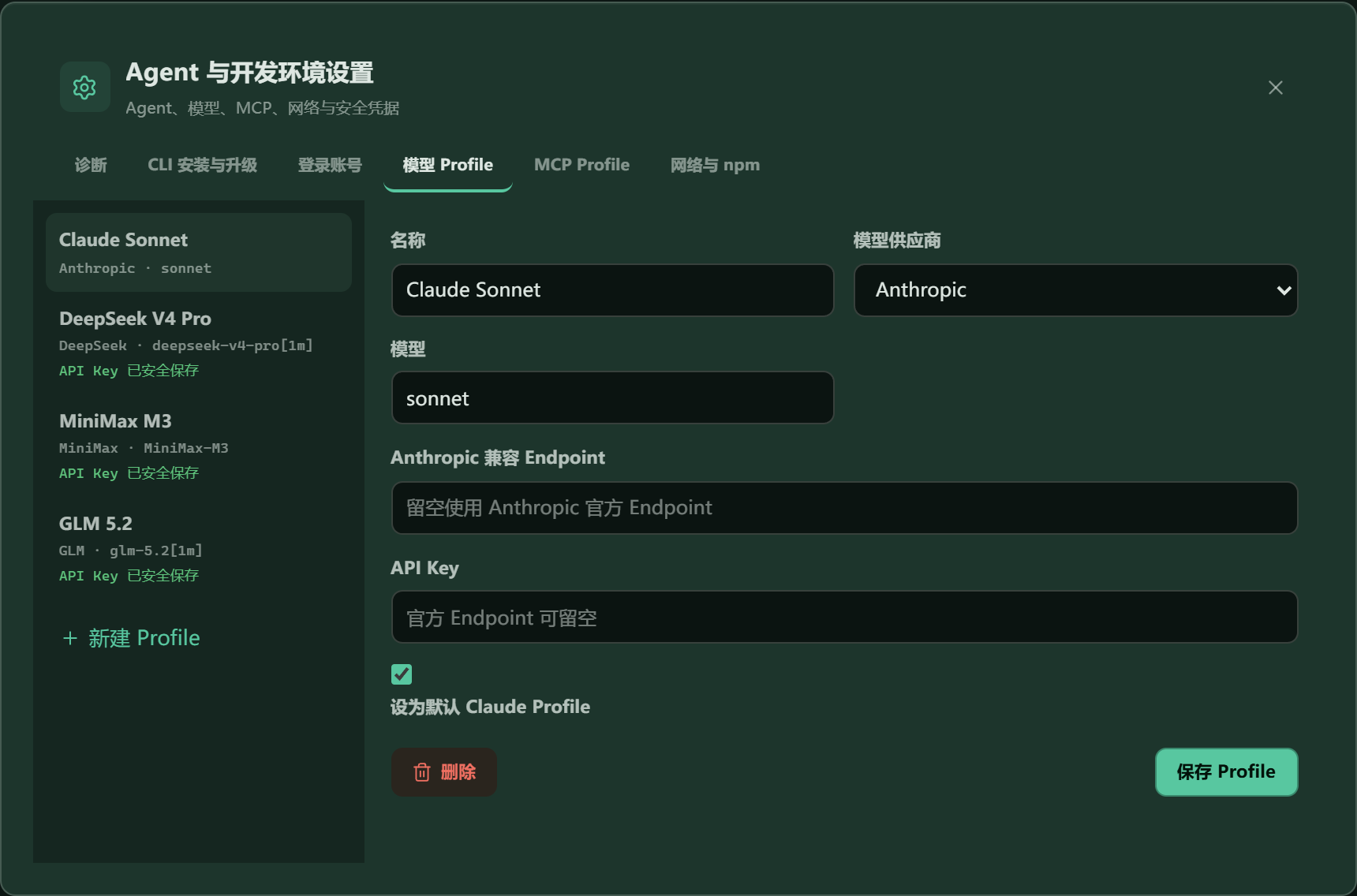
Models, endpoints, and credential entry are managed in one place. Stored secrets are never returned to the frontend.
See Termexo.md for the complete product plan and V0.2 architecture for current technical boundaries.
These requirements are for contributors building Termexo, not for installing the release.
color-mix() and oklch(), which older runtimes drop. Termexo says so and offers the download
when it finds an older one, and Windows 11 and the installers both provide a current runtime;^22.22.3, ^24.15.0, or >=26.0.0;git clone https://github.com/gemron/Termexo.git
cd Termexo
npm --prefix apps/desktop-ui install
npm run dev
Open http://127.0.0.1:4200. Browser mode uses a simulated terminal with help,
status, git status, and clear, making it suitable for UI development and review.
npm run tauri:dev
Desktop mode uses real PTYs. If Claude Code is not available on PATH, specify it:
$env:TERMEXO_CLAUDE_PATH = "C:\path\to\claude.exe"
npm run tauri:dev
flowchart LR
    UI["Angular Desktop UI"]
    IPC["Tauri Commands"]
    PTY["PTY Service"]
    Adapters["Agent Adapters"]
    Hooks["Hooks / Event Pipeline"]
    DB[("SQLite")]
    Vault["Windows Credential Manager"]
    Agents["Claude Code / Codex"]

    UI <--> IPC
    IPC --> PTY
    PTY --> Agents
    IPC --> Adapters
    Adapters --> Agents
    Agents --> Hooks
    Hooks --> DB
    IPC <--> DB
    IPC --> Vault
| Data | Storage | Policy |
|---|---|---|
| Workspaces and terminal configuration | SQLite | Local persistence |
| Claude/Codex session index | SQLite | Upserted from read-only native session files |
| Agent events | JSONL spool + SQLite | Deduplicated by event_key |
| Model and MCP profiles | SQLite | Plaintext API keys never enter the database |
| Prompt assets and handoff packages | SQLite | Common credentials are redacted before save |
| API keys | Windows Credential Manager | The frontend can read only hasCredential |
| Native agent sessions | Claude/Codex data directories | Read-only; never modified or deleted |
For compatibility with early installations, the database filename and some internal Tauri
identifiers still use a legacy name. This does not affect the Termexo product name or new
TERMEXO_* environment variables.
| Version | Delivered scope | Status |
|---|---|---|
| V0.1–0.5 | Workspaces, real terminals, native session resume, model profiles, and handoff | Released |
| V0.6 | OpenCode, task board, and agent confirmation options | Released |
| V0.7 | Custom window chrome, GPU terminal rendering, and account workflows | Released |
| V0.8.0–0.8.4 | Phone access, first-run guidance, input latency and mobile scrolling improvements | Released |
| V0.8.5 | Bundled ConPTY and WebView2 startup diagnostics | Released |
| V0.8.6 | Screen-accurate terminal replay and reconnect stability | Released |
| V0.8.7 | A screen parser that cannot strand a terminal | Released |
| V0.8.8 | A storage panel, and data that can be moved | Released |
| V0.9.0 | Antigravity as a fourth agent, and vendor installers | Released |
| V0.10.0 | A self-hosted relay, and end-to-end encrypted remote access | Released |
| V0.10.1 | Phone keypad, keyboard-aware remote pages, and settings that keep unsaved edits | Released |
| V0.10.2 | Reliable agent status and notifications, and a multilingual task board | Released |
| V0.10.3 | Clean agent prompts with several viewers, Ctrl+click links, and copying from OpenCode | Released |
| V0.10.4 | Grok Build, reliable Git changes, quieter terminals, and workspace ordering | Released |
| V0.10.5 | Todo board persistence and snapshot transfer, and lightweight Antigravity quota queries | Released |
| V0.10.6 | OpenCode v2 proxy reliability and current CLI installer | Shipped |
| V0.10.7 | Guided first run, CLI readiness and reliable project creation | Released |
| V0.10.8 | Accurate agent status and workspace state indicators | Released |
| V0.10.9 | Compact agent states, completion confirmation, and verified branch display | Released |
| V0.10.10 | Local MCP control and automatic connection for five Agents | Released |
| V0.10.11 | Agent status and launch fixes, mobile shortcuts, and clearer setup | Released |
| V0.10.12 | Responsive terminals, Windows paste, and Codex mobile shortcuts | Released |
| V0.10.13 | Proxy cleanup, older OpenCode scans, clean Codex titles, distinct completed tabs | Current |
| V1.0 | Stability, security hardening, and recovery experience | Planned |
See open issues for ongoing work and CHANGELOG.md for released changes. Planned work has no promised delivery date.
Termexo/
├── apps/desktop-ui/       # Angular desktop UI and browser preview
├── src-tauri/             # Rust core, PTY, agents, hooks, database, and commands
├── docs/architecture/     # Architecture notes for implemented versions
├── docs/images/           # README screenshots
└── Termexo.md             # Product design and long-term roadmap
npm run build
npm test
cargo test --manifest-path src-tauri/Cargo.toml
npm --prefix apps/desktop-ui run e2e:smoke
npm run tauri:build
With the local development server running, regenerate the README screenshots with:
npm run capture:readme
Use Issues to report bugs, discuss design decisions, or propose features. Before submitting code, make sure the change fits the current release scope and add tests for behavior changes.
Released under the MIT License.
Windows workbench for Claude Code, Codex, OpenCode, Antigravity & Grok Build. See which agent needs you, resume sessions, and reconnect from your phone.
See the code
Let one AI operate your other coding agents.
English · 简体中文
Use MCP to let AI operate Claude Code, Codex, OpenCode, Grok Build, and Antigravity terminals.
Give a connected AI an instruction. Through Termexo, it can find another agent's terminal, send a prompt, submit it, and read the actual reply. Watch the process or take over in the same Windows workbench, with working, approval, and completion states in view.
All five agents run in real terminals on your PC. Termexo also organizes projects into workspaces, resumes native sessions, and lets you reconnect from your phone through your own relay, a trusted LAN, or a VPN.
Watch 30 seconds of real v0.10.6 desktop use: completion notifications, return to a session, reply, and review two Antigravity sessions side by side. Includes Chinese and English captions; waiting intervals are cut.
Download for Windows · Watch the demo · Share first-use feedback
| Let AI operate other agents | Know who needs you | Continue from your phone |
|---|---|---|
| Find terminals, send prompts, submit them, and read replies through MCP. | View real terminals side by side, grouped by project, and spot an agent waiting for input or approval. | Connect across networks through a self-hosted relay, or directly over a trusted LAN or VPN. |
With several AI coding tools running, you spend time sending requests, checking progress, and copying replies between windows. Termexo's local MCP lets a connected AI handle those terminal operations. Workspaces, the task board, and status alerts help you follow the process; native sessions and handoff packages help you resume work, and remote access lets you continue away from your desk.
| Scenario | Individual developers | Enterprise team members | How Termexo helps |
|---|---|---|---|
| Multiple projects | Maintain work projects, a side product, and open-source repositories | Organize each business project's development environment | Workspaces group project folders, terminals, layouts, and configuration, reducing window switching. |
| Agent task allocation and progress | Assign agents to implementation, tests, and code review | Engineers assign tasks, follow progress, and approve results | Side-by-side terminals, a task board, status indicators, and approval reminders reduce repeated output checks. |
| Resuming and handing off work | Resume yesterday's session or continue with another agent | Summarize goals, progress, and next steps to help another engineer take over | Search and resume supported native sessions; carry task context in a handoff package. |
| Long tasks and remote access | Check progress, answer approvals, and send instructions from your phone | Leave tasks running on a development PC and reconnect through a controlled entry point | A self-hosted relay or trusted LAN / VPN connects to the same running terminal; the host PC must stay on. |
| Models and account configuration | Manage subscriptions and API profiles; choose a model for each task | Manage providers, compatible gateways, and network configuration | Model, account, and network profiles in one place, with quota visibility for supported providers. |
| Control over the development environment | Run projects and agents on your own PC and host your own remote entry point | Run the workbench in an environment controlled by your organization and manage your relay | Workbench state stays local and remote access is optional; agent and model configuration determines where model requests go. |
Available today and planned: These scenarios center on individuals and team members operating their own workbenches, with people assigning tasks and handling approvals. Shared workspaces, granular permissions, centralized audit, and broader automatic orchestration are part of the long-term product direction, not a ready-made enterprise administration platform.
Already have Node.js 18.18+? Run:
npx termexo@latest
Requires Windows 10 build 17763+ and WebView2 Chromium 111+. Install and configure your chosen agent CLI and model access; Termexo does not include a model subscription. MIT licensed. No Termexo account required.
MCP connects AI to Termexo. Ask in everyday language; no tool names or code required. Install and sign in to the agent CLIs you want to use, then:
Use Termexo MCP to list my workspaces and terminals, and tell me which are running. Do not change anything yet.
A diagram of implemented capabilities, not a software screenshot. Keep the Termexo desktop running during use.
For a first exchange, open an OpenCode terminal in Termexo, then tell the connected AI:
Use Termexo MCP to find the running OpenCode terminal in the current workspace. Send hi, submit Enter, and read its reply. If several terminals match, list their names so I can choose.
After that, try a project task:
Use Termexo MCP to create a Claude Code task in the current project titled “Map the project.” Use its configured default model. Read the project and explain its main folders, how to run it, and its test entry points without changing files. Start the task, inspect the terminal to confirm the prompt was submitted, and summarize the actual output.
Existing-terminal interaction works with all five agent types. Task-board execution supports Claude Code, Codex, OpenCode, and Grok Build. Start Antigravity in the workbench first, then operate its terminal through MCP. The terminal creation tool creates a Shell.
“Sent” and “started” do not mean “finished.” Continue reading output and task status, and check code changes and test results as the task requires. MCP is off by default and available only on the host PC; phone remote access is a separate feature, and the agent's own tool approvals still apply.
Online illustrated guide · MCP reference and troubleshooting
The desktop opens an outbound tunnel, with no public IP or router port forwarding required. Keep the PC on with Termexo running and connected to the relay. Direct access over a trusted LAN or controlled VPN is also available.
Relay login and the desktop access token are independent checks. After the v2 handshake, session frames use AES-256-GCM; the relay forwards encrypted terminal sessions. The relay has Linux, macOS and Windows x64 / arm64 binaries and container deployment; the Termexo desktop application is for Windows.
The image shows the mobile interface. Read the phone connection guide for the complete setup. Remote access is off by default. The relay browser entry point requires HTTPS; direct desktop access uses self-signed HTTPS by default. Keep the token private. Closing Termexo or stopping the PC ends the running processes.
v0.10.13 cleans up the Windows proxy environment, applies the default network profile to every terminal, rescues session scans on older OpenCode CLIs, strips instruction markup from Codex session titles, and separates completed tabs from the selected one. Start using MCP. Full changelog.
If Termexo helps your workflow, a Star on this repository helps other developers discover it. Found a problem? Open an issue with your Windows version and reproduction steps.
Trying it for the first time? Tell us what worked or where you got stuck. A short report is enough.
|
Five agents. One screen. Run Claude Code, Codex, OpenCode, Antigravity, and Grok Build side by side in as many real PTY terminals as you need, choose which stay visible, and arrange them in a custom 1–6 row/column grid. Reorder tabs by dragging, close one with the middle mouse button, and drive the workbench from the keyboard. Each workspace remembers its folder, tabs, layout, model, and theme.
|
Know when an agent needs you. Waiting for input, waiting for approval, completed, and failed states are distinct. A persistent banner, native Windows notification, and taskbar flash bring you back to the exact terminal that needs attention.
|
|
Pick up yesterday's conversation. Search local Claude Code, Codex, OpenCode, Antigravity, and Grok Build sessions across projects, accounts, branches, and models. Termexo restores them through the CLIs' own claude --resume, codex resume, opencode --session,
agy --conversation, and grok --resume commands. It can reclaim a Claude session the CLI still holds
open and keeps native session files read-only.
|
Same CLI. Different model. Point Claude Code at Anthropic, DeepSeek, MiniMax, GLM, or a custom Anthropic-compatible endpoint. Save providers as profiles, keep API keys in Windows Credential Manager, and switch every Claude terminal in a workspace together.
|
|
Answer it from your phone. Turn on remote access and any phone, tablet, or second computer connected through your own relay, trusted LAN or VPN opens the whole workbench in a browser — the same workspaces and the same live terminals, reading and writing the very PTYs the desktop is running. Terminals scroll by finger, the layout folds down to one terminal with panels that float over it, and the link is HTTPS behind an access token you can reveal, turn into a QR code, or rotate.
|
See what this session changed. The Git view follows the active terminal and measures against the HEAD that terminal started on: the files it touched, the commits it made, and a unified or split diff of any one of them. It keeps reading while you are in it, so the list stays current without a refresh, and it comes back to the file and layout you left it on.
|
|
Turn a task into a running agent. The task board keeps projects and tasks with priorities and acceptance criteria. Hand one to Claude Code, Codex, OpenCode, or Grok Build and it becomes a real terminal, moving through todo, executing, completed, and verified as that terminal reports its own status. |
Let it run without babysitting. Start any agent with automatic confirmation — --permission-mode auto for
Claude, --approve-for-me for Codex, --auto for OpenCode,
--dangerously-skip-permissions for Antigravity — so the
AUTO chip on a terminal means the same thing whichever agent drew it.
|
Termexo is local by default: it has no account, cloud service, or required sync. Workspace state stays in local SQLite storage, credentials stay in Windows Credential Manager, and Claude/Codex session histories are read-only. The agent CLIs still connect to the providers you configure under their own terms and privacy policies.
The interface is available in Simplified Chinese, English, Spanish, French, German, Japanese, and Korean. It follows the Windows language automatically, or you can choose a language from the main toolbar and keep that choice across restarts.
AI coding tools usually run in isolated terminals and sessions. As the number of projects grows, developers have to remember:
Termexo uses the Workspace as its organizing unit and turns this scattered state into a local control plane that is observable, recoverable, and extensible.
| Capability | Current implementation |
|---|---|
| Workspace management | Create, rename, theme, drag to reorder, and switch workspaces; persist paths, layouts, and terminal configuration |
| Multi-terminal workbench | Unlimited tabs, explicit pane selection, configurable 1–6 row/column grids, pane/workspace maximize, and real PTYs |
| Agent detection | Detect the Claude Code, Codex, OpenCode, Antigravity, and Grok Build executables, their versions, and health on Windows |
| Start agent sessions | Launch Claude, Codex, OpenCode, Antigravity, or Grok Build with a working directory and the available account, model, and confirmation options for that CLI |
| Session center | Read-only discovery of Claude/Codex/OpenCode/Antigravity/Grok Build sessions, search, workspace filtering, native resume, and reclaim of a Claude session the CLI still holds open |
| Agent status tracking | Isolated hooks per terminal for thinking, tool use, approval, user input, completion, and failure states |
| MCP agent control | Automatic local MCP connection for all five agents; a connected AI can find real terminals, send prompts or control keys, and read output. Task tools support Claude Code, Codex, OpenCode, and Grok Build |
| Model and MCP profiles | Manage endpoints, keys, and MCP configuration; switch Claude CLI across Anthropic-compatible backends |
| Network and npm profiles | Scope HTTP/HTTPS/SOCKS and npm settings globally or per workspace, test reachability, and inject them at launch |
| Account management | Manage multiple isolated Claude and ChatGPT/Codex logins, defaults, authentication status, and launch-time choice |
| Managed CLI lifecycle | Preview, confirm, install, or upgrade each agent's CLI — from its official npm package, or from the vendor's own Windows installer where one is published — then verify the result |
| Allowance visibility | Show reported quota where supported, including Grok Build's exhausted free allowance; unknown percentages remain unavailable |
| Task board | Organise projects and tasks with priorities and acceptance criteria, run one as a Claude/Codex/OpenCode/Grok Build terminal, and track it from todo through executing, completed, and verified |
| Prompt assets | Recover live per-terminal drafts; search, favorite, pin, delete, and reuse submitted prompts |
| Session handoff | Build redacted, token-budgeted Git/task packages; import/export documents and continue in another Agent |
| Git graph and diff | Show the active terminal's branch, commit topology, and changes since terminal start with unified or split diff |
| Remote access | Serve the whole workbench over HTTPS to phones and other computers on the network, gated by an access token with QR entry and rotation, with every remote call passing an explicit command allowlist |
| Local data and secrets | Store workspace/session/event data in SQLite and API keys in Windows Credential Manager |
| Browser preview | Preview the complete UI without Rust and exercise layout flows through an interactive simulated terminal |
Models, endpoints, and credential entry are managed in one place. Stored secrets are never returned to the frontend.
See Termexo.md for the complete product plan and V0.2 architecture for current technical boundaries.
These requirements are for contributors building Termexo, not for installing the release.
color-mix() and oklch(), which older runtimes drop. Termexo says so and offers the download
when it finds an older one, and Windows 11 and the installers both provide a current runtime;^22.22.3, ^24.15.0, or >=26.0.0;git clone https://github.com/gemron/Termexo.git
cd Termexo
npm --prefix apps/desktop-ui install
npm run dev
Open http://127.0.0.1:4200. Browser mode uses a simulated terminal with help,
status, git status, and clear, making it suitable for UI development and review.
npm run tauri:dev
Desktop mode uses real PTYs. If Claude Code is not available on PATH, specify it:
$env:TERMEXO_CLAUDE_PATH = "C:\path\to\claude.exe"
npm run tauri:dev
flowchart LR
    UI["Angular Desktop UI"]
    IPC["Tauri Commands"]
    PTY["PTY Service"]
    Adapters["Agent Adapters"]
    Hooks["Hooks / Event Pipeline"]
    DB[("SQLite")]
    Vault["Windows Credential Manager"]
    Agents["Claude Code / Codex"]

    UI <--> IPC
    IPC --> PTY
    PTY --> Agents
    IPC --> Adapters
    Adapters --> Agents
    Agents --> Hooks
    Hooks --> DB
    IPC <--> DB
    IPC --> Vault
| Data | Storage | Policy |
|---|---|---|
| Workspaces and terminal configuration | SQLite | Local persistence |
| Claude/Codex session index | SQLite | Upserted from read-only native session files |
| Agent events | JSONL spool + SQLite | Deduplicated by event_key |
| Model and MCP profiles | SQLite | Plaintext API keys never enter the database |
| Prompt assets and handoff packages | SQLite | Common credentials are redacted before save |
| API keys | Windows Credential Manager | The frontend can read only hasCredential |
| Native agent sessions | Claude/Codex data directories | Read-only; never modified or deleted |
For compatibility with early installations, the database filename and some internal Tauri
identifiers still use a legacy name. This does not affect the Termexo product name or new
TERMEXO_* environment variables.
| Version | Delivered scope | Status |
|---|---|---|
| V0.1–0.5 | Workspaces, real terminals, native session resume, model profiles, and handoff | Released |
| V0.6 | OpenCode, task board, and agent confirmation options | Released |
| V0.7 | Custom window chrome, GPU terminal rendering, and account workflows | Released |
| V0.8.0–0.8.4 | Phone access, first-run guidance, input latency and mobile scrolling improvements | Released |
| V0.8.5 | Bundled ConPTY and WebView2 startup diagnostics | Released |
| V0.8.6 | Screen-accurate terminal replay and reconnect stability | Released |
| V0.8.7 | A screen parser that cannot strand a terminal | Released |
| V0.8.8 | A storage panel, and data that can be moved | Released |
| V0.9.0 | Antigravity as a fourth agent, and vendor installers | Released |
| V0.10.0 | A self-hosted relay, and end-to-end encrypted remote access | Released |
| V0.10.1 | Phone keypad, keyboard-aware remote pages, and settings that keep unsaved edits | Released |
| V0.10.2 | Reliable agent status and notifications, and a multilingual task board | Released |
| V0.10.3 | Clean agent prompts with several viewers, Ctrl+click links, and copying from OpenCode | Released |
| V0.10.4 | Grok Build, reliable Git changes, quieter terminals, and workspace ordering | Released |
| V0.10.5 | Todo board persistence and snapshot transfer, and lightweight Antigravity quota queries | Released |
| V0.10.6 | OpenCode v2 proxy reliability and current CLI installer | Shipped |
| V0.10.7 | Guided first run, CLI readiness and reliable project creation | Released |
| V0.10.8 | Accurate agent status and workspace state indicators | Released |
| V0.10.9 | Compact agent states, completion confirmation, and verified branch display | Released |
| V0.10.10 | Local MCP control and automatic connection for five Agents | Released |
| V0.10.11 | Agent status and launch fixes, mobile shortcuts, and clearer setup | Released |
| V0.10.12 | Responsive terminals, Windows paste, and Codex mobile shortcuts | Released |
| V0.10.13 | Proxy cleanup, older OpenCode scans, clean Codex titles, distinct completed tabs | Current |
| V1.0 | Stability, security hardening, and recovery experience | Planned |
See open issues for ongoing work and CHANGELOG.md for released changes. Planned work has no promised delivery date.
Termexo/
├── apps/desktop-ui/       # Angular desktop UI and browser preview
├── src-tauri/             # Rust core, PTY, agents, hooks, database, and commands
├── docs/architecture/     # Architecture notes for implemented versions
├── docs/images/           # README screenshots
└── Termexo.md             # Product design and long-term roadmap
npm run build
npm test
cargo test --manifest-path src-tauri/Cargo.toml
npm --prefix apps/desktop-ui run e2e:smoke
npm run tauri:build
With the local development server running, regenerate the README screenshots with:
npm run capture:readme
Use Issues to report bugs, discuss design decisions, or propose features. Before submitting code, make sure the change fits the current release scope and add tests for behavior changes.
Released under the MIT License.



