
AgentZero Lite
See the codeREADME
AgentZero Lite
A minimalist IDE for the AI era — driving many CLIs side by side, from a single window.
🇰🇷 한국어 문서: README-KR.md
🧩 Extension features (file tools · Diff Review · command palette · multi-agent CLI · worktrees · orchestration · automations · cost): Extension Manual → README-EX.en.md · 한국어
🖥️ Avalonia host (Windows + macOS) — the multi-OS edition and the WPF-first conversion playbook: README-Avalonia.md · 한국어
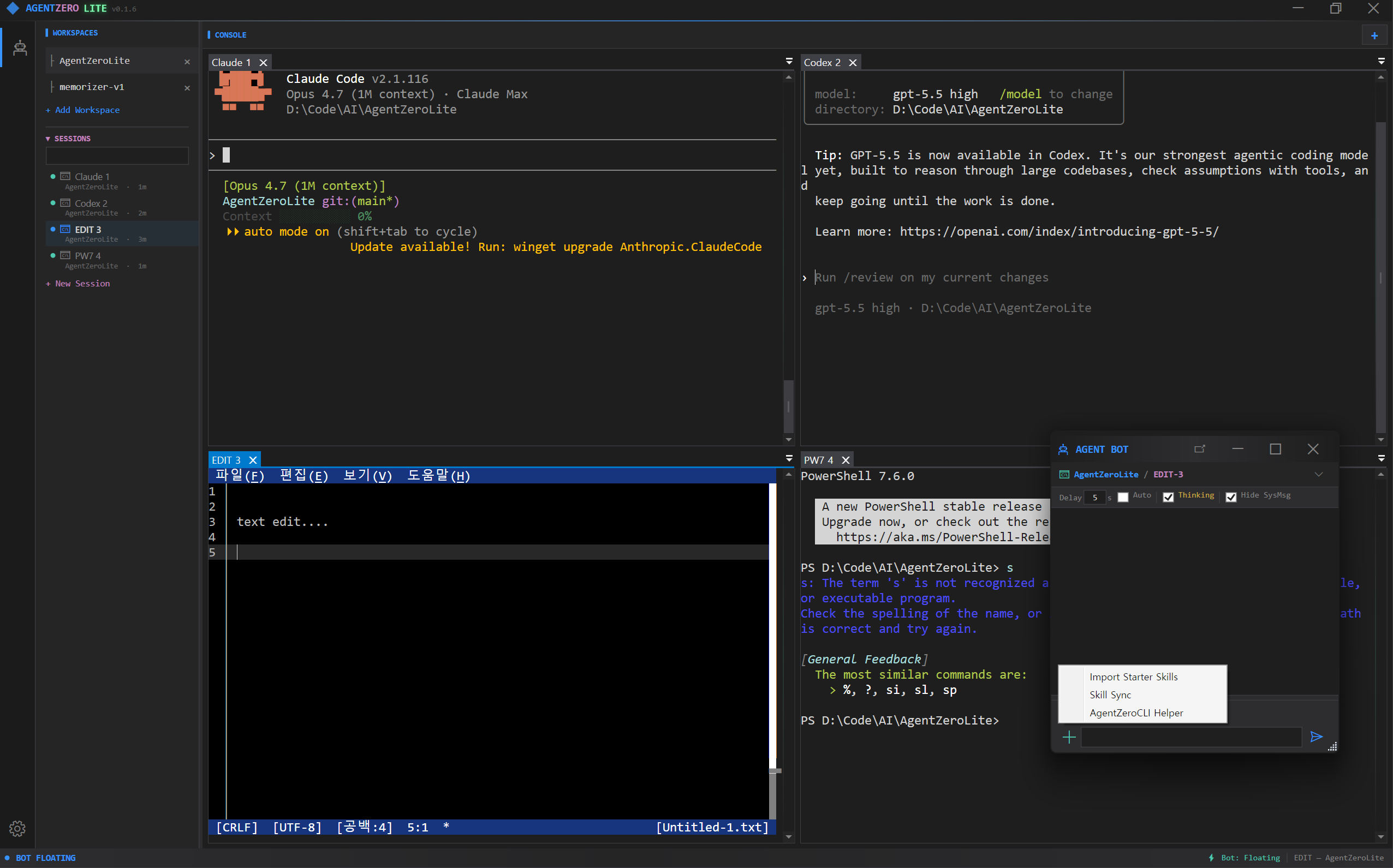
🎬 Demo — driving Claude and Codex in parallel:
Pipe a single instruction to an AI CLI (Claude, Codex, any model you can run in a shell) living in the same workspace — or in a different one — and have it act. Run two different AI models side by side and let them talk to each other through the same mechanism: cross-model dialogue, no custom broker required.
AgentZero Lite is a Windows desktop shell built around a simple idea: in the AI era most
of your day is spent talking to command-line tools. claude, codex, gh, docker,
pwsh, a REPL, a build log tail — each wants its own terminal, and you want all of them
visible at once without juggling windows. AgentZero Lite gives you a true multi-tab,
multi-workspace ConPTY terminal and a small chat surface that forwards text and skill
macros to whichever terminal is in focus — nothing more, nothing less.
Features
- Multi-tab ConPTY terminals — a real Windows pseudo-console per tab, not a
pseudo-PTY pretending. Driven by
ManagedConPtyHost(our ownCreatePseudoConsoleP/Invoke) and drawn by xterm.js in a WebView2, so themes and fonts are selectable and no native terminal DLLs ship at all. - Workspaces — group tabs by folder so each project keeps its own set of CLIs
(one click =
cdcontext and a fresh Claude). - AgentChatBot (labelled AgentCLI in the UI from v0.9.1) — a dockable chat
pane that forwards whatever you type into the active terminal.
CHTmode types text,KEYmode forwards raw keystrokes (Ctrl+C, arrows, Tab). It is not an AI; it is an input broker. The rebrand is user-visible only — the underlying actor path/user/stage/botandAgentBotActorclass names are unchanged, so external scripts and skill macros keep working. - AI ↔ AI conversation (the headline trick) — teach
AgentZeroLite.ps1to a Claude tab or a Codex tab once ("learnAgentZeroLite.ps1 helpand use it for cross-terminal talk"), and from that point on either AI can greet the other terminal by name and strike up a real dialogue. Claude in tab 0 writes to Codex in tab 1, Codex replies back, each reads the peer's last output withterminal-read. No extra broker, no cloud relay — just the two CLIs poking each other through AgentZero's IPC. This is the tiki-taka between models that the Lite edition exists for. - AIMODE — on-device LocalLLM as your in-shell coordinator — flip the AgentBot
to AI mode (Shift+Tab) and a small on-device LLM (Gemma 4 today; Nemotron
staged) becomes a secretary that drives the other AI CLIs for you. You ask
in Korean or English, it picks the right terminal AI, sends the message,
waits, reads the reply, brings back a summary. Two-way channel: peer
terminals call back through the existing
bot-chatCLI so the LocalLLM doesn't have to keep polling. Nothing leaves the machine. See AIMODE section below. - 🎙 Voice — drive AgentBot hands-free while you keyboard the next tab —
speak into your mic and AgentBot transcribes the audio locally (Whisper.net,
GGML small/medium models cached on disk) and types the text straight into
the active terminal AI. The point is dual multitasking: while one tab
takes your fingers (writing code, reading Claude's diff), the other tab
takes your voice. Two parallel AI conversations, one supervisor — same
AgentBot pipeline, just a different input channel. Backend ships CPU +
Vulkan so AMD / Intel / NVIDIA all accelerate the same binary; multi-GPU
systems get an auto-best heuristic plus a manual override in Voice settings.
TTS reply ships three backends — Windows SAPI (instant, offline),
OpenAI TTS (cloud, byok), and as of v0.9.2 Supertonic (Supertone Inc's
on-device ONNX, ~99M params, 10 voices, 31 languages incl. Korean) — the
first AgentZero provider that drives a pip-installed Python package
via a subprocess seam, opening up the wider Python on-device model
ecosystem for future adoption. Settings → Voice → Supertonic auto-discovers
installed Pythons (
py -0p+ filesystem fallback), exposes a Download Model dialog with live progress + cancel + Start fresh, and a Check Install probe that diagnoses multi-Python machines. - 🎵 Music — instrument classification + live spectrum from mic or
speaker output — Settings → Music runs MIT's
ast-finetuned-audioset-10-10-0.4593(Audio Spectrogram Transformer, 86.6M params, 527 AudioSet classes) via ONNX Runtime on a sliding 10 s window. Two input sources: microphone (NAudio WaveIn — capture a live instrument) or system output (WASAPI loopback — analyse whatever Spotify / YouTube / a game is currently playing through your speakers, no virtual cable needed). Re-infers every 1.5 s; the top-K labels list updates in place and a 64-bar log-frequency dBFS spectrum repaints at ~30 Hz above the labels. Model + class CSV pull from theonnx-communityHuggingFace mirror through the sameModelDownloadDialogSupertonic uses (~347 MB, one-time, resumable cleanup via "Start fresh"). The next step from Voice's listen & speak axis into a listen & understand axis — first AgentZero feature whose output is a structured semantic judgement about audio rather than a transcription. - AgentBot
[+]menu — 3 ways to arm a terminal AI —AgentZeroCLI Helper— drops a ready-made briefing into the chat input that teaches any terminal AI (Claude, Codex, shell-hosted model) how to callAgentZeroLite.exe -clionce, no skill install. Review, hit Send, done. If the CLI is not on PATH the menu nudges you to Settings → Register PATH and restart first.Import Starter Skills— copies the shippedagent-zero-liteskill into the active workspace's.claude/skills/so Claude Code picks it up persistently on next session.Skill Sync— with Claude already running in a tab, reads the skill list out of its own/skillsview and turns it into a slash-command menu in the chat box. Type/, pick a skill, Enter — the macro text is fired at the terminal. No LLM round-trip.
- 🌐 WebDev — in-app browser sandbox + plugin system (v0.4) — top-level menu
next to AgentBot. Embeds a WebView2 with a
window.zero.*JavaScript bridge to AgentZero's native services (LLM chat / streaming, TTS, STT-with-VAD, summarize). Two install channels: a local.zip, or a public GitHub folder URL (nogitCLI required — the installer talks raw HTTP + Trees API). First reference plugin is voice-note underProject/Plugins/voice-note/— a STT-driven voice journal with VAD-gated capture, sensitivity slider, pause/resume, LLM summary (length-chunked recursive), and IndexedDB note storage. See the WebDev section below. - 🔎 Scrap — window spy + scroll-aware text capture (v0.9.1) — drag a
crosshair onto any visible window (or paste an HWND) and Scrap pulls the
readable text out, including auto-scroll for long content. Four capture
strategies in order: UIA
TextPattern, focused-area UIA scroll, clipboard scroll (Ctrl+Home → Ctrl+A/C + PageDown loop, works on IntelliJ / Chrome / VS Code / anywhere Ctrl+A is supported), and aWM_VSCROLLfallback. Each capture lands as a timestampedlogs/scrap/*.txtand the preview pane fills live as the scroll advances. The original clipboard is restored when the capture finishes. See the Scrap section below. - Notes with live rendering — a second bottom panel with a Markdown viewer that also renders Mermaid diagrams and Pencil files, scoped to the active workspace folder.
- CLI remote-control — run
AgentZeroLite.exe -cli terminal-send 0 0 "npm test"from any script and drive the GUI overWM_COPYDATA+ memory-mapped files. - Actor model (Akka.NET) — terminal lifecycle, workspace routing and chat input all run through supervised actors, so a crashing session does not take the window down with it.
- 🧭 agent-one — a standalone CLI agent, same repo, no shared code — a
Native AOT single binary (Windows / macOS / Linux, npm-installable) that
reads a workspace, writes files, runs commands behind an approval gate and
answers, with a small on-device model doing the work and a decision engine
(TypeSafe Jev) answering the fixed questions — route, scope, safety,
escalate to a stronger model. It remembers per workspace (memory file,
resumable sessions, a Kùzu knowledge graph the engine fills and
consults), runs as the same
AgentBotActor/AgentLoopActorpair as the GUI's Bot mode on its own Akka.NET, and can be driven from any shell — or by another agent — through a background session.agent-one dashboardopens what it left behind — memory, transcripts, the graph, a Cypher box — as a local, read-only web page. See the agent-one section below and Project/AgentOne/README.md. - One executable, one process — single-instance guard, SQLite for config, zero external dependencies beyond the .NET 10 runtime. The build is under ~60 MB.
Screenshot of the mental model
+--------------------------------------------------------------------------+
| AgentZero                                                    -  □  ×    |
+---+------------+-----------------------------------------------+--------+
|   | WORKSPACES | [Claude1] [pwsh1] [build-log] [+]            |        |
| ⚙ | ▸ monorepo +-----------------------------------------------+        |
| 🤖 |   ▸ web    |                                              |        |
|   |   ▸ api    |           ConPTY terminal (active tab)        |        |
|   | ▸ blog     |                                              |        |
|   |            |                                              |        |
|   | SESSIONS   +-----------------------------------------------+        |
|   |  · Claude1 | AGENT BOT ▾ | OUTPUT | LOG | NOTE                    |
|   |  · pwsh1   +-----------------------------------------------+        |
|   |            |  > /skills                                    |        |
|   |            |  [skill list]                                 |        |
|   |            |  > run tests and summarize                     [Send]  |
+---+------------+-----------------------------------------------+--------+
Top bar: ConPTY terminals, one per tab. Left rail: activity icons + sidebar with workspaces and sessions. Bottom panel: tabbed — AGENT BOT (text/key sender to the active terminal), OUTPUT, LOG, NOTE (per-workspace markdown viewer).
Architecture
┌─ AgentZeroWpf (WinExe, WPF, net10.0-windows) ───────────────────────────┐
│                                                                         │
│  MainWindow  ──── hosts N ConPTY tabs  ──── AgentBotWindow (dock/float) │
│      │                                              │                   │
│      │  WM_COPYDATA + MMF  <─  CliHandler.cs  ──>   │                   │
│      │  (external scripts drive the GUI)            │                   │
│      ▼                                              ▼                   │
│  ActorSystemManager (Akka.NET)                                          │
└──────────────────────┬──────────────────────────────────────────────────┘
                       │  ProjectReference
┌─ ZeroCommon (ClassLib, net10.0) ────────────────────────────────────────┐
│  Actors/    Stage → Workspace(N) → Terminal(N)  + AgentBot (1)          │
│  Services/  ITerminalSession, AgentEventStream, AppLogger               │
│  Data/      AppDbContext + EF Core (SQLite)                             │
│             CliDefinition / CliGroup / CliTab / ClipboardEntry          │
│  Module/    CliTerminalIpcHelper, CliWorkspacePersistence, ...          │
└─────────────────────────────────────────────────────────────────────────┘
ZeroCommon is UI-free and covered by its own headless test project
(ZeroCommon.Tests, xUnit + Akka.TestKit). AgentTest covers the WPF-dependent
surface.
Actor topology
/user/stage                  — supervisor, lifecycle broker, one per app
    /bot                     — AgentBotActor: UI gateway (Chat/Key mode,
                               UI callback, peer routing). Spawns AgentLoop lazily.
        /loop                — AgentLoopActor: THE agent. Owns one IAgentLoop,
                               drives Idle→Thinking→Generating→Acting→Done FSM.
    /ws-<workspace>          — WorkspaceActor: owns terminals in a folder
        /term-<id>           — TerminalActor: wraps one ITerminalSession
Messages are defined in one place (ZeroCommon/Actors/Messages.cs).
Canonical agent vocabulary table — harness/knowledge/_shared/agent-architecture.md.
The same two-actor shape, with the same message names, runs inside
agent-one on its own ActorSystem
(/user/bot → /user/bot/loop), so the CLI and the GUI's Bot mode read alike.
Project layout
| Project | Path | Kind | Namespace |
|---|---|---|---|
| AgentZeroWpf | Project/AgentZeroWpf/ | WinExe (net10.0-windows, WPF) | AgentZeroWpf.* |
| ZeroCommon | Project/ZeroCommon/ | ClassLib (net10.0, UI-free) | Agent.Common.* |
| AgentTest | Project/AgentTest/ | xUnit (net10.0-windows) | AgentTest.* |
| ZeroWearable | Project/ZeroWearable/ | Exe (net10.0-windows10.0.19041) | ZeroWearable.* |
| ZeroCommon.Tests | Project/ZeroCommon.Tests/ | xUnit (net10.0, headless) | ZeroCommon.Tests.* |
| AgentZeroAvalonia | Project/AgentZeroAvalonia/ | Exe (net10.0, Avalonia, Win+macOS) | AgentZeroAvalonia.* |
| AgentOne | Project/AgentOne/ | Exe (net10.0, Native AOT, agent-one) | AgentOne.* |
| AgentOne.Tests | Project/AgentOne.Tests/ | xUnit (net10.0, headless) | AgentOne.Tests.* |
Reference graph: AgentTest → AgentZeroWpf → ZeroCommon ← ZeroCommon.Tests, and
ZeroWearable → ZeroCommon. AgentOne references nothing and nothing references
it — it is a second product that shares the repo and the actor vocabulary, not
the code. Anything without WPF / Win32 dependencies belongs in
ZeroCommon. ZeroWearable is a second process on purpose — its BLE central is WinRT and
needs a Windows-SDK target framework, which the GUI must not move to. It owns the watch's
single BLE link; see Wearable device.
Build & run
Requirements: Windows 10/11, .NET 10 SDK, a terminal
that can run dotnet. Rider or Visual Studio 2022 17.11+ works; see the IDE note
below about disabling "Terminal Mode" when debugging.
# Restore + build the WPF app (auto-builds ZeroCommon as a project reference)
dotnet build Project/AgentZeroWpf/AgentZeroWpf.csproj -c Debug

# Release build (required before using the CLI wrapper script)
dotnet build Project/AgentZeroWpf/AgentZeroWpf.csproj -c Release

# Launch the GUI
Project/AgentZeroWpf/bin/Debug/net10.0-windows/AgentZeroLite.exe

# Run headless tests (shared logic)
dotnet test Project/ZeroCommon.Tests/ZeroCommon.Tests.csproj

# agent-one — the standalone CLI agent (its own README has the rest)
dotnet build Project/AgentOne/AgentOne.csproj -c Debug
dotnet test  Project/AgentOne.Tests/AgentOne.Tests.csproj
Project/AgentOne/agent-one.ps1 run "hello" --provider echo
Project/AgentOne/agent-one.ps1 chat

# Run WPF-dependent tests (actors, terminal sessions, approval parser)
dotnet test Project/AgentTest/AgentTest.csproj
⚠️ IDE note — turn off Terminal Mode when debugging
AgentZero hosts its own ConPTY terminals inside WPF. If your IDE attaches its own terminal to the process stdin/stdout/stderr (Rider's default, VS "Redirect standard output", VS Code's integrated terminal when launched directly), it will intercept the console events that ConPTY needs to own, and tabs will either refuse to start or show garbled output.
Always disable the IDE's terminal attachment before you press Run / Debug:
| IDE | Setting |
|---|---|
| Rider | Run / Debug configuration → Use external console = ON (USE_EXTERNAL_CONSOLE=1 in .run.xml) |
| Visual Studio | Project Properties → Debug → Uncheck "Use the standard console" / Redirect standard output |
| VS Code | In launch.json, set "console": "externalTerminal" (do not use "internalConsole") |
TL;DR — give the child process its own real console window. dotnet run from a
normal shell also works because it does not steal stdio.
CLI — drive the GUI from any script
Every scriptable action goes through AgentZeroLite.exe -cli <command>. The GUI must
be running; the CLI speaks to it over WM_COPYDATA (marker 0x414C "AL") and reads
responses back from named memory-mapped files. A 5-second poll timeout protects
scripts from a hung GUI; add --no-wait for fire-and-forget.
| Command | What it does |
|---|---|
status | JSON dump of GUI state (workspace count, status bar) |
copy | Copy the last clipboard buffer into the system clipboard |
open-win / close-win | Show or hide the main window |
console | Open a fresh PowerShell in the app directory |
log [--last N] [--clear] | CLI action history (file-backed) |
terminal-list | JSON list of all workspace/tab sessions |
terminal-send <g> <t> "text" | Send text to tab <t> in workspace <g> (or --alias <name>) |
terminal-key <g> <t> <key> | Send a control key (Ctrl+C, Enter, Tab, arrows, …) (or --alias <name>) |
terminal-read <g> <t> [-n N] | Read the last N bytes from a tab's scrollback (or --alias <name>) |
terminal-alias <list|set|rm> | Name a terminal so commands can target it by --alias instead of indices |
agent-resume-launch <g> <t> | Discover a tab's latest agent session and inject --resume into the live terminal |
bot-chat [--from X] "text" | Display an external chat bubble in the bot window |
os <verb> [args] | OS-control: window enum, screenshot, UIA, mouse, keypress |
cost | Estimated USD spend from recorded token usage |
help | Command reference |
A PowerShell wrapper is shipped at Project/AgentZeroWpf/AgentZeroLite.ps1 for convenience
once the app directory is on PATH (do this from the Settings pane: AgentZero CLI →
Register PATH).
🖥 OS-Control — drive Windows from CLI or LLM
The os verb group (mission M0014) imports the desktop-automation
surface from AgentZero Origin and bolts it on to both the CLI and the
on-device LLM agent loop. Every read-only verb is symmetrical: shell
calls and LLM tool calls touch the same code path, log to the same
audit JSONL, and write the same screenshot files.
# Enumerate visible windows
AgentZeroLite.exe -cli os list-windows --filter "AgentZero"

# Capture a PNG of the whole desktop (grayscale, downscaled to 1920×1080)
AgentZeroLite.exe -cli os screenshot

# Inspect a window's UI Automation tree
AgentZeroLite.exe -cli os element-tree 0x000A0234 --depth 5

# Press Alt+F4 (input simulation — gated)
$env:AGENTZERO_OS_INPUT_ALLOWED = "1"
AgentZeroLite.exe -cli os keypress alt+f4
LLM tools (callable from AIMODE): os_list_windows,
os_screenshot, os_activate, os_element_tree, os_mouse_click,
os_key_press. The two os_mouse_* / os_key_* tools are gated by
the same env var as the CLI; a denied call returns
{"ok":false,"error":"…gate denied…"} and the system prompt forbids
retrying. Read-only tools are unconditional.
Artefacts land under tmp/os-cli/:
tmp/os-cli/
├── audit/<date>.jsonl         every CLI/LLM call recorded as one line
├── screenshots/<date>/        PNG outputs
└── e2e/<date>.log             smoke summary (acceptance probe)
E2E acceptance probe: Docs/scripts/launch-self-smoke.ps1
uses the new verbs to verify a fresh build is reachable from the
desktop. Read-only — no driving, no input simulation. Run it after any
CLI / build change that touches the OS surface.
Full reference: Docs/OsControl.md.
Internal architecture notes: harness/knowledge/_shared/os-control.md.
Making two AI CLIs talk to each other
This is the Lite edition's signature use case and it takes about one minute to set up.
- Register the CLI path once. Open Settings → AgentZero CLI → click
Register PATH. NowAgentZeroLite.ps1resolves from any shell. - Open two AI tabs in the same workspace. For example, group 0 tab 0 =
claude, group 0 tab 1 =codex(any AI CLI that accepts natural-language instructions works). - Teach each AI the tool. In each tab, paste one line:
Learn
AgentZeroLite.ps1 helpand use it for cross-terminal talk. Useterminal-listto see the tabs,terminal-send <grp> <tab> "text"to speak to another AI tab by name, andterminal-read <grp> <tab> --last 2000to read the peer's reply. - Start the dialogue. In the Claude tab say:
"Greet the tab named Codex and propose we co-design a REST endpoint."
Claude will run
AgentZeroLite.ps1 terminal-send 0 1 "hi Codex, ...". Codex sees it at its prompt, composes a reply, and sends it back withterminal-send 0 0 "...". You watch the conversation stream in both tabs.
What makes this work:
- Each AI runs in its own ConPTY — no shared memory, no context leakage.
- Messages traverse AgentZero's IPC (
WM_COPYDATA+ memory-mapped files), not a cloud relay; nothing leaves your machine. - The tab layout means you can interrupt, nudge, or splice in at any step — the human stays the supervisor.
- Because the broker is just a shell command the AI already understands,
you can swap
claudefor any CLI-native agent (Aider, Copilot, a localollamachat, …) and keep the same protocol.
This is the "tiki-taka between models" the Lite edition was built for. Terminal multiplexers let you watch many prompts; AgentZero Lite lets them talk.
🧠 AIMODE — LocalLLM as your in-shell coordinator
The next step up from "teach two CLIs to talk to each other" is "have a small on-device LLM coordinate the conversation for you." That is AIMODE — flip the AgentBot pane with Shift+Tab and a Gemma 4 (Nemotron staged) running on your GPU/CPU becomes a tiny in-app secretary that drives the real AI CLIs on your behalf.
Philosophy. The LocalLLM here is not trying to out-think Claude or Codex. The goal is the small secretary role: take the fuzzy ask, route it to the right terminal AI, organise the result. Less than a PM, more than a bash alias. The heavy reasoning lives in those bigger CLIs; the LocalLLM is the receptionist who knows everyone's extension number and the protocol for transferring calls.
What it looks like
                  +----------------------+
                  |      You (user)      |
                  +----------+-----------+
                             | chat: "claude한테 토론해줘", "hi", ...
                             v
+----------------------------+----------------------------+
|                AgentBot AIMODE  (chat pane)             |
|                                                         |
|   +----------------------+      Tool catalog            |
|   | LocalLLM             |      list_terminals          |
|   | Gemma 4 / Nemotron   | ---  read_terminal           |
|   | on-device            |      send_to_terminal        |
|   | GBNF-constrained     |      send_key  wait  done    |
|   | one JSON call/turn   |                              |
|   +----------+-----------+                              |
|              | Tell                                     |
|              v                                          |
|   +-------------------------------------------------+   |
|   |  AgentLoopActor   (Akka FSM, /bot/loop)         |   |
|   |  Idle -> Thinking -> Generating -> Acting -> Done   |
|   |  owns KV cache; ONE cycle per StartAgentLoop    |   |
|   +-------------------------------------------------+   |
+----------------------------+----------------------------+
                             | ConPTY (write text + Enter)
                             v
            +-----------------+   +-----------------+
            | Claude (tab)    |<->| Codex  (tab)    |   ...
            | the smart one   |   | the other one   |
            +--------+--------+   +--------+--------+
                     | replies via the existing CLI
                     v
   AgentZeroLite.exe -cli bot-chat "DONE(text)" --from <peerName>
                     |
                     | WM_COPYDATA  (existing CLI/IPC channel)
                     v
   MainWindow.HandleBotChat
       -> /user/stage/bot.Tell(TerminalSentToBot)
       -> AgentLoop wakes for a continuation cycle
How an LLM becomes an Agent — the function-call tool chain
A bare LLM is a text-completion engine. It is not an agent. To make it act on the world you have to do four things:
- Constrain its output to a tool surface. Here, a GBNF grammar forces
every emission to be
{"tool": "<name>", "args": { ... }}and nothing else. The sampler literally cannot produce free-form prose. - Run the tool and capture the result.
- Feed the result back into the LLM's context as the next user turn.
- Repeat until the LLM emits
done.
That generate → tool → result → generate-again loop is what turns
text completion into agency. AgentZero's recipe lives in
Project/ZeroCommon/Llm/Tools/:
| Layer | Role |
|---|---|
AgentToolGrammar.Gbnf | GBNF grammar — sampler can only emit valid tool-call JSON |
| Tool surface (6 tools) | list_terminals, read_terminal, send_to_terminal, send_key, wait, done |
IAgentLoop | Backend-agnostic contract: RunAsync(userRequest) → AgentLoopRun. Two impls: LocalAgentLoop (LLamaSharp + GBNF) and ExternalAgentLoop (OpenAI-compatible REST). |
IAgentToolbelt | The side-effect surface the agent acts against — the 6 tools above are dispatched here. Production = WorkspaceTerminalToolHost; tests = MockAgentToolbelt. |
AgentLoopActor | Akka wrapper at /user/stage/bot/loop — live progress, cancellation, KV cache, peer-signal continuation |
| System prompt (Mode 1 / Mode 2) | Teaches the model when to chat directly vs relay to a terminal AI |
| Handshake protocol | Verifies the reverse channel works before substantive relay |
One cycle per run is the central rule: each StartAgentLoop does ONE
short round-trip with a peer (send → wait → read → react → done) and then
stops. Subsequent cycles are triggered by the user OR an arriving peer
signal — never by the LLM trying to script a 5-turn discussion in one
giant tool chain. KV cache preserves history across cycles.
Two-way channel — peer terminal AI talks back via CLI
The novel piece: the terminal AI (Claude in a tab, Codex in a tab) can
push messages back to AgentBot via the existing bot-chat CLI. When
AgentBot first contacts a terminal it sends a handshake header explaining:
You are Claude and I am AgentBot. Step 1 — verify the channel:
AgentZeroLite.exe -cli helpStep 2 — acknowledge:AgentZeroLite.exe -cli bot-chat "DONE(handshake-ok)" --from Claude
When that command runs, the message routes through WM_COPYDATA →
MainWindow.HandleBotChat → Tell(TerminalSentToBot) to the bot actor.
If the peer is in an active conversation, the Reactor wakes for a fresh
continuation cycle. Polling the visible terminal output (read_terminal)
is the fallback for peers that don't or can't emit the signal.
This makes the terminal AI an active participant — it can delay its
reply (long compile, big refactor) and call back when ready, instead of
forcing AgentBot to repeatedly poll a Crafting… indicator.
Tested scenarios (live, Gemma 4)
- T5G — greetings stay direct:
"안녕"→ bot replies in chat, never routes to a terminal. - T6G — five sequential continuation cycles, each ≤ 6 tool iterations (one cycle per run, not one giant run for the whole conversation).
- T7G — vague Mode 2 asks (
"Claude한테 토론 시작해") still triggersend_to_terminalwith a reasonable opener instead of bouncing the request back at the user.
42/42 headless tests + the live suite above gate every change to the loop / actor / prompt.
🎙 Voice — dual multitasking, hands & voice in parallel
Voice input is wired straight into AgentBot. You speak, the audio is transcribed locally (no cloud, Whisper.net offline GGML models cached on disk), and the resulting text takes the same path as if you had typed it into the chat box — straight to whichever AI CLI tab is active.
Why it matters — this is the dual-multitask play: while one terminal is taking your keyboard (writing code, navigating files, code-reviewing Claude's diff), you can drive a second terminal with your voice without lifting your hands. Two parallel AI conversations supervised by one human, two distinct input channels. AIMODE's tiki-taka between models extends here into tiki-taka between your own two input modalities.
┌─ Tab 0 ─ Claude (keyboard) ──┐   ┌─ Tab 1 ─ Codex (voice) ──────┐
│ you type:                    │   │ you say into the mic:        │
│ "refactor this function …"   │   │ "오늘 작업한 PR 요약해줘"    │
│         │                    │   │         │                    │
│         ▼                    │   │         ▼ Whisper.net (Vulkan)│
│   Claude works               │   │   AgentBot transcribes        │
│         │                    │   │         │                     │
│         ▼                    │   │         ▼                     │
│   reply in tab 0             │   │   typed into tab 1            │
└──────────────────────────────┘   └──────────────────────────────┘
                  one supervisor (you), two streams running in parallel
Stack
- Whisper.net — offline STT, GGML
small(~466 MB) andmedium(~1.5 GB) models cached at%USERPROFILE%\.ollama\models\agentzero\ whisper\. Downloaded on first use. - CPU + Vulkan runtimes bundled (~63 MB Vulkan added to the installer). The Vulkan backend is cross-vendor — AMD / Intel / NVIDIA all accelerate the same binary. CUDA isn't bundled (its cuBLAS payload is ~750 MB; revisit later as on-demand download).
- Multi-GPU support — Voice settings exposes a GPU device picker. Auto uses a vendor + VRAM heuristic to pick the best adapter (NVIDIA discrete > AMD discrete > Intel Arc > Intel iGPU); on laptops with dGPU + iGPU it correctly picks the dGPU. Manual override is one click away.
- Mic capture — NAudio with VAD silence-segmentation; sensitivity slider; persistent mute + system-volume control on the AskBot toolbar.
- Test harness —
WhisperCpuVsGpuBenchmarkTestsruns the same TTS sample through CPU and GPU and prints prep / transcribe / RT factor / similarity, so you can verify the Vulkan runtime actually loaded on your machine.
Status: input ✓ · output ✓ (3 backends as of v0.9.2)
- ✅ STT (you → terminal AI) — shipping. Mic → AgentBot → active terminal.
- ✅ TTS (terminal AI → spoken reply) — shipping. Three
backends in Settings → Voice:
- Windows SAPI — instant, offline, uses OS-installed voices.
- OpenAI TTS —
tts-1, 11 voices, byok. - Supertonic (new in v0.9.2) — Supertone Inc's on-device
ONNX TTS, ~99M params, 10 voices (M1–M5 / F1–F5), 31
languages incl. Korean. First AgentZero provider that
drives a pip-installed Python library through a
python -c <script>subprocess seam — opens the door to the wider Python on-device model ecosystem. Settings → Voice → Supertonic auto-discovers installed Pythons (py -0p+ filesystem fallback), exposes a Download Model dialog with live tqdm progress + cancel + Start fresh, and a Check Install probe with actionable error hints (cache lock, HF rate limit, network, disk). Model + code license OpenRAIL-M / MIT.
🎵 Music — instrument classification + live spectrum
Voice taught AgentZero to listen and speak. Music adds listen and understand — point the app at any audio source on this machine and it identifies what's playing (instrument family, genre cue, environmental sound) every 1.5 s, with a real-time spectrum bar above the labels list so you can correlate model output against the actual frequency content.
┌─ Tab 0 — Music tab (Settings → Music) ──────────────────────────────┐
│ Source  [▼ System Output  — WASAPI loopback, no virtual cable ]    │
│ Device  [▼ ★ Default — current Windows playback device          ]   │
│ Window  10 s    Top-K  5                                            │
│                                                                     │
│ ▓▓▓░░░░░░░░░░░░░░░░░░░░░░░░░░░░░░░  (mic / loopback level)  [STOP]│
│ SPECTRUM  (30 Hz – 8 kHz, log-frequency)                            │
│ ┌─────────────────────────────────────────────────────────────────┐ │
│ │  ▆█▆▃▃ ▆▆ ▃ ▆█▆▃ ▃▃▆ ▆ ▃▃ █▆ ▆▆▆▆▆ ▃▃ ▃                       │ │
│ └─────────────────────────────────────────────────────────────────┘ │
│ TOP LABELS  (live · sliding 10 s window)                            │
│ ┌─────────────────────────────────────────────────────────────────┐ │
│ │ tick #14 · window 10.0s · mel 1024×128 · pre 12 ms · inf 244 ms │ │
│ │ ───────────────────────────────────────────────────────────────  │ │
│ │ 71.2% ██████████████████████  Electric guitar                  │ │
│ │ 18.4% █████                   Guitar                           │ │
│ │ 12.1% ████                    Music                            │ │
│ └─────────────────────────────────────────────────────────────────┘ │
└─────────────────────────────────────────────────────────────────────┘
Stack
- MIT/ast-finetuned-audioset-10-10-0.4593 — Audio Spectrogram Transformer, 86.6M params, trained on Google's AudioSet (527 classes covering musical instruments, genre, voice, environment, etc.). Input is a 10 s / 16 kHz mono / 128-bin log-mel spectrogram; output is per-class logits → sigmoid for multi-label scoring.
- ONNX Runtime 1.20 — CPU inference (~200–400 ms per pass on a
modern x64), no GPU dependency. Ships through the
onnx-community/ast-finetuned-audioset-10-10-0.4593-ONNXHuggingFace mirror — nooptimum-cliPython detour required. The sameModelDownloadDialogSupertonic uses streams the 347 MB file with resume / cancel / "Start fresh". - Dual capture sources —
- Microphone — NAudio
WaveInEventat 16 kHz mono (the same pipeline Voice uses; a working voice mic is automatically a working music mic). - System Output (WASAPI loopback) —
WasapiLoopbackCaptureagainst any active render endpoint (default playback device, secondary speakers, virtual cable), fed through NAudioBufferedWaveProvider → StereoToMono → WdlResamplingSampleProvider(16 kHz) → SampleToWaveProvider16to match the AST input format regardless of the device's mixer format. Capture what's coming out of your speakers — Spotify, YouTube, a game, a Zoom call — without unplugging headphones or installing a virtual audio cable.
- Microphone — NAudio
- Realtime sliding-window inference — capture frames stream into a rolling 10 s PCM buffer; a background loop snapshots that buffer every 1.5 s and runs AST through ONNX Runtime, with an interlocked single-flight gate so slow CPU never queues backlogged ticks.
- Live log-frequency spectrum — a separate cheap 2048-point Hann- windowed FFT (independent of the AST mel) computes 64 log-spaced bands every ~33 ms (30 Hz repaint) into a WPF Canvas of Rectangles. dBFS-normalized so the bars sit naturally between -60 dBFS and -3 dBFS instead of saturating on the first note.
Architecture seam
- Backend-agnostic contract —
IMusicClassifier(inProject/ZeroCommon/Music/) mirrorsISpeechToTextin shape:EnsureReadyAsyncwarms native resources,ClassifyAsyncruns one pass. Adding MERT (music-specific embeddings) or CLAP (zero-shot text-conditioned) is a same-shape new implementation, not a UI redesign. - Settings tab — Settings → 🎵 Music. Provider is locked to AST AudioSet for the first iteration but kept as a ComboBox so a future MERT/CLAP option lands without churn.
- Knowledge —
harness/knowledge/music-curator/owns the model card, the mel-spectrogram normalization conventions, and the WASAPI loopback pitfalls. Themusic-curatoragent is consulted when adding a new music model, tuning the spectrum visualizer, or debugging loopback capture format mismatches.
What it's good at, what it isn't
The AST mel preprocessing in this build uses a Hann window + HTK mel
scale, which is close to (but not identical to) AST's training-time
Kaldi compliance.kaldi.fbank (Povey window + pre-emphasis). Expect
the published AudioSet mAP slightly degraded — top-K labels for clear
instruments (piano, drums, guitar, violin, voice) come back correctly;
edge cases (subtle environmental sounds, multi-instrument fusion)
may show a couple of percent variance vs the reference pipeline.
Refining to byte-for-byte Kaldi parity is tracked as a follow-up in
the music-curator knowledge.
🌐 WebDev — in-app sandbox + plugin system
Top-level menu (globe icon next to AgentBot). Promoted from a cramped Settings tab in v0.4 to a full-window workspace with a sample list on the left and a WebView2 canvas on the right. The Settings → WebDev tab now hosts a tutorial / plugin-author guide.
The point of WebDev is to let you build small AI tools without
touching C#. AgentZero exposes its native capabilities (LLM,
TTS / STT, voice-note pipeline, summary) as a JavaScript bridge
mounted into the embedded WebView2; web tools call those through
a window.zero.* surface and ship as plain HTML / JS folders.
┌──────────────────────────┐  ┌──────────────────────────────┐
│  .NET Native             │  │  WebView2 (Browser)          │
│                          │  │                              │
│  NAudio → VAD → Whisper ─────→ note.transcript event       │
│  LlmGateway streaming   ──────→ chat.token / chat.done     │
│  VoicePlaybackService   ──────  (TTS results)              │
│                          │  │  ↑                           │
│  WebDevHost  ←───────────────  invoke('chat.send', …)      │
│  WebDevBridge (JSON RPC) │  │  invoke('summarize', …)      │
│                          │  │  invoke('note.start', …)     │
└──────────────────────────┘  └──────────────────────────────┘
   single Whisper model    one window.zero in every plugin
   single LLM session      same bridge for built-ins + plugins
The bridge lives at:
- JS wrapper —
Project/AgentZeroWpf/Wasm/common/zero-bridge.js - .NET dispatcher —
Project/AgentZeroWpf/Services/Browser/WebDevBridge.cs - Implementations —
Project/AgentZeroWpf/Services/Browser/WebDevHost.cs
window.zero.* surface (today)
// Core
await window.zero.version()                       // { version }
await window.zero.voice.providers()               // { stt, tts, llmBackend }
await window.zero.voice.speak("hello")            // SAPI / OpenAI TTS
await window.zero.chat.status()                   // { available, backend, model }
await window.zero.chat.send("…")                  // { ok, reply, turn }
await window.zero.chat.stream("…", t => …)        // streaming tokens
await window.zero.chat.reset()

// Voice-note plugin surface (M0007)
await window.zero.note.start(75)                  // 0..100 sensitivity
window.zero.note.onTranscript(d => …)             // VAD-gated utterance
window.zero.note.onAmplitude(d => …)              // RMS + threshold for VU
window.zero.note.onSpeaking(d => …)               // frame-level VAD
window.zero.note.setSensitivity(70)               // live tuning
await window.zero.note.pause() / .resume() / .stop()

await window.zero.summarize(longText, 6000)       // length-chunked recursive
Installing a plugin — two channels
A plugin is a folder with manifest.json at the root:
{ "id": "voice-note", "name": "Voice Note",
  "entry": "index.html", "version": "0.1.0", "icon": "🎙" }
1. Local .zip — WebDev → + Install Plugin → From .zip… → pick
the file. Auto-unwraps a single top-level folder. Strict manifest
validation; nothing partial-writes.
2. Public Git URL — WebDev → + Install Plugin → From Git URL… →
paste a folder URL like
https://github.com/owner/repo/tree/main/Project/Plugins/my-plugin.
The installer fetches manifest.json raw, walks the GitHub Trees API
to enumerate the folder, downloads every file. No local git
required.
Both extract to %LOCALAPPDATA%\AgentZeroLite\Wasm\plugins\<id>\.
The sample list refreshes automatically. Each plugin row gets a ×
uninstall button (built-ins are exempt).
voice-note — first reference plugin
Lives under Project/Plugins/voice-note/
— outside the build (AgentZeroWpf.csproj only sees its own
folder), so plugin code never breaks a release. After the repo's
main carries it, you can self-install:
WebDev → + Install Plugin → From Git URL →
  https://github.com/psmon/AgentZeroLite/tree/main/Project/Plugins/voice-note
Features:
- Notes list (left) — new / select / delete; IndexedDB persistence with debounced writes (400 ms), so rapid title typing doesn't thrash disk.
- Capture row — REC toggle, Pause/Resume, Sensitivity slider, live VU meter with threshold marker (drag the slider until the marker sits below your normal voice).
- Three tabs — Raw timeline (one timestamped line per utterance, auto-follow latest when pinned to bottom), Summary (length-chunked recursive LLM summary on demand), Meta (model / token / start-end metadata).
- Inherits the user's
Settings → VoiceSTT provider, language, device, mute switch — no separate setup.
The plugin is the existence proof that the surface is enough to build something useful. M0008 builds the next ones (transcription export, multi-note search) on top of the same bridge.
🔎 Scrap — window spy + text capture
Top-level Scrap icon next to AgentCLI / WebDev (mission M0019, v0.9.1).
Imported from AgentZero Origin and adapted to Lite's overlay-panel model.
The pitch is simple: drag a crosshair onto any visible window — terminal,
browser, IDE, chat client, IDE log pane, anything that paints text — and
Scrap captures the readable text including content past the current
viewport. Each capture lands as a timestamped file under
logs/scrap/yyyy-MM-dd-HH-mm-ss-scrap.txt and the preview pane fills
live as the scroll advances.
┌─ Scrap toolbar ─────────────────────────────────────────────────┐
│ [⊕ crosshair] [HWND…] [SELECT]                                  │
├─ WINDOW_INFO ────────────────┬─ ELEMENT_TREE (Flutter/Electron) ┤
│ Handle / Class / Title /     │  Pane "code-editor" …            │
│ Rect / Process / Framework   │   ├─ Edit "main.cs" …            │
├──────────────────────────────┴──────────────────────────────────┤
│ [▶ CAPTURE] CLR CPY DIR PS   READY   RANGE [...]~[...] DLY ... │
├─────────────────────────────────────────────────────────────────┤
│  captured text streams in here as the scroll advances …          │
└─────────────────────────────────────────────────────────────────┘
Capture strategy — four fallbacks in priority order
| # | Strategy | When it wins |
|---|---|---|
| 1 | UIA TextPattern | Native WPF, WinForms, anything that exposes a single TextPattern provider — instant, full text. |
| 2 | Focused-area UIA scroll | Apps where a child element exposes ScrollPatternAvailable (Notepad++, many editors). Iterates wheel events while collecting visible text. |
| 2.5 | Clipboard scroll (v0.9.1) | Anything that supports Ctrl+A — IntelliJ / Swing, Chrome, VS Code, terminals. Foregrounds the target, presses Ctrl+Home, then loops Ctrl+A → Ctrl+C → read-clipboard → PageDown, diffing new content per round and emitting it to the preview pane via ChunkWritten. Restores the original clipboard on finish. |
| 3 | ScrollPattern + TreeWalk | A more aggressive UIA traversal that can find non-text leaves. |
| 4 | WM_VSCROLL fallback | Old-style win32 scrollbars (some Win32 dialogs, legacy apps). |
The chain runs strategies in order and stops at the first one that returns text. The new Strategy 2.5 was added in M0019 follow-up #2 because IntelliJ smoke-testing exposed that Swing/AWT exposes no UIA ScrollPattern at all — Strategies 1, 2 and 3 each came back with ~80 characters of window title + "System". The keyboard-driven approach covers that gap with no UIA dependency.
Why it lives alongside os (M0014) instead of replacing it
os <verb> is the shell-shaped automation surface: a single CLI
call returns one JSON result, fits inside an LLM os_* tool call,
and is read-only by default. Scrap is the UI-shaped capture
surface: long-running, scroll-driven, with a live preview pane and
date-range filtering. They share Project/AgentZeroWpf/NativeMethods.cs,
Module/ElementTreeScanner.cs, and the same UIA primitives — but
their interaction shape (one-shot vs interactive) is genuinely
different, so they coexist.
Files
Project/AgentZeroWpf/
├── ChromiumTextCapture.cs       Chrome/Electron-specific path
├── ScrapWriter.cs               logs/scrap/*.txt + ChunkWritten event
├── TargetHighlightOverlay.cs    red border overlay around the target
├── TextCaptureService.cs        the 4-strategy capture chain
├── WindowInfo.cs                HWND → class/title/pid record
├── WpfWindowPicker.cs           drag-crosshair window picker
└── UI/Components/
    ├── ScrapPagePanel.xaml      the full overlay UI
    └── ScrapPagePanel.xaml.cs   ~340 lines of event wiring
Roadmap (M0019 stages 4–5, follow-up missions)
- Stage 4 —
AgentZeroLite.exe -cli scrap capture/read/listverb group (mirrors theosverb pattern). - Stage 5 — AIMODE function calls
scrap_captureandscrap_readadded toAgentToolGrammar.Gbnfso the on-device LLM can grab text from any window mid-conversation.
🧭 agent-one — the standalone CLI agent
$ agent-one chat
› 보드 API 만들어줘
  route: → workspace  (confidence 0.98)
  scope: small — going ahead  (confidence 0.73)
  graph: consulted via by_keywords — 2 item(s)  (confidence 0.81)
  ✓ write_file  (0.0s)
  ⚠ run this command?  dotnet build src/BoardApi     ← y runs it
  ✓ run_command  (4.1s)
  escalation: keeping the draft  (confidence 0.98)
◆ 보드 API를 만들고 빌드했습니다. 다음 단계: 1. … 2. …
  knowledge: kept 2 item(s)  (confidence 0.84)
AgentZero Lite is a desktop; agent-one is the same idea as a single binary
you can npm install on any machine: an agent that works in a folder, with an
on-device model that is small and fast and a decision engine that keeps it
honest. It lives in Project/AgentOne and references
nothing else here — Native AOT cannot carry Akka.Remote, EF Core, LLamaSharp
or ONNX — but it borrows the shape.
| Tools | files (list_files read_file find_files grep), write_file inside the workspace root only, web_search / web_read (GETs), run_command (PowerShell / bash in the root). Writing and running are the guarded families: risky patterns always ask a person; otherwise the decision engine's safe must be confident, or you are asked. |
| Smart mode | Before a turn the engine picks the tool family (enforced, not suggested), sizes workspace work (a design from the strong model first when it is big), and after the everyday model's draft decides whether the strong, slow reasoning model should take a second look. Two models, one fixed-question engine (TypeSafe System One, ~0.3 s per question), no planning LLM call. Measured notes in docs/smart-mode-jev.md. |
| Memory | Per-workspace memory file (50 k chars, opens every session), saved sessions with /resume replaying the screen, a task title the model keeps. And a knowledge graph (embedded Kùzu, Cypher): after each turn the engine judges worth keeping?, the model distils 1–3 lines stored with the engine's rationale as a node, and before a turn the engine decides whether — and by which query — to consult it, before any file is scanned. agent-one memory opens it. |
| Dashboard | agent-one dashboard prints a 127.0.0.1 link to a local web page over every workspace agent-one has worked in — one project or all of them: memory as one card per turn, session transcripts as a timeline (tool steps, the engine's decisions, results), the Kùzu graph drawn as nodes and edges, and a Cypher box that runs across every graph with a workspace column. An observer only: graphs open with Kùzu's read-only flag and are closed after each request so a running session keeps its writer; the API wants the per-run token in the link; the page is embedded in the binary and fetches nothing else. |
| Background session | agent-one session start runs one detached session; agent-one ask "…" from any shell streams the turn's events and answers approvals on the same pipe. One at a time, session stop ends it. It is how chat mode tests itself on every release platform, and how another agent (a Claude tab in AgentZero, say) collaborates with agent-one. |
| Actors | The conversation is AgentBotActor (gateway: callbacks, one turn at a time) over AgentLoopActor (owns the session, Idle ⇄ Running, exactly one result per start) — the vocabulary of ZeroCommon/Actors/Messages.cs, on an Akka.NET 1.6 nightly, inside the AOT binary. The window, the REPL, run and the pipe server are renderers over one gateway. |
| Pause | Esc while a turn runs holds it at its next step; the next line you type is read as resume, stop or refine — a refinement goes in front of the model as [the user, mid-turn] …. |
| Ships as | dotnet publish → one ~22 MB binary per RID (win-x64, linux-x64, osx-arm64, osx-x64) with Kùzu's library beside it; the release workflow smoke-tests each (settings screen, chat mode over the pipe) and the npm wrapper @webnori/agent-one downloads and verifies it. |
Everything else — the settings screen, the chat window's keys, the safety
boundary, the JSON contract, the layout of ~/.agent-one/ — is in
Project/AgentOne/README.md.
🧪 Harness — making the function-call chain self-improve
Wiring an LLM into a useful tool chain is hard, and it is honestly
not (yet) my strongest area. The harness — under
harness/ — is how this repo iterates without me having
to re-reason from scratch every time:
harness/
├── agents/        — specialist evaluators (security-guard, build-doctor,
│                    test-sentinel, code-coach, tamer)
├── engine/        — workflows (release-build-pipeline, pre-commit-review)
├── knowledge/     — domain notes (LLM prompt conventions, tool-calling survey)
└── logs/          — every Mode 3 review, RCA, evaluation pinned here
The feedback loop that improved the AIMODE function-call chain across this iteration:
- Unit-test feedback —
T1G..T7Glive tests + headless TestKit suites (42/42 currently) verify the protocol & state machine against regressions. - Real-execution feedback — actual app logs at
%LOCALAPPDATA%\AgentZeroWpf\logs\app-log.txtcapture every Reactor turn, peer signal, JSON parse failure. - Mode 3 RCA logs — under
harness/logs/code-coach/. Each regression gets a dated post-mortem with: symptom, root cause, patch, evaluation, deferred follow-ups. - The user as reviewer — I'm not driving the prompt design alone. The harness produces the suggestions; I review them, accept or course-correct, and the next loop incorporates that feedback. Closer to pair programming with an iterating improver than to "AI does it all" — and the artefact of that pairing (logs / evaluations / final prompt) is the actual material I'm learning from.
Concrete example from this iteration: the AIMODE prompt went through 6 revisions in one sitting — one-cycle rule, vague-relay anti-passivity, anti-denial, handshake split, peer-signal trigger, ID-scheme switch to strings — each one captured in the same Mode 3 doc with what failed and why the next attempt addressed it. The harness is the memory of those attempts so the same mistake doesn't recur.
If you want to study how this kind of harness is structured, the sister repo harness-kakashi is a standalone training ground built around the same patterns.
🔁 Loop Engineering — a procedure the AI can't skip
There is a failure mode specific to harness engineering. When you drive an agent's loop by instructions alone — "first do A, then B, only then C" — the model obeys while the whole procedure fits in its working context. But an agent's context gets compressed over a long run, and compression is lossy: the step it silently drops is often the load-bearing one. This is worst exactly where it hurts most — a flow that must follow a procedure (a gate before a release, a verify before a commit), enforced only by prose the model is trusted to remember.
The fix is to stop trusting prose for sequencing. Engineer the loop as a graph. The order and the gates live in the graph's edges — owned by the runtime, not by the prompt — while the LLM does the creative work inside each node. The model can't skip Study-before-Act because there is no edge that lets it; the graph is the part that doesn't forget.
The loop this project engineers is PDSA (Deming's Plan → Do → Study → Act improvement cycle):
- Plan — the LLM commits to a verifiable expected outcome (a metric).
- Do — the work is carried out.
- Study — the LLM judges the result against that expectation (met / partial / unmet).
- Act — learnings are recorded; a reinforcement cycle is auto-linked when needed.
Each cycle accumulates into a per-project graph memory — long-term memory for
the agent, so the loop improves the process, not just the task. The loop itself
is built with the Akka Streams graph DSL (sibling project
akka-graph-loop) and shipped as a
single Native-AOT CLI, @webnori/pdsa.
AgentZero exposes this to your agent. Install npm i -g @webnori/pdsa, and a
hosted agent can drive a graph-enforced PDSA loop from its own terminal
(pdsa plan … → pdsa do … → pdsa study … → pdsa act). The harness wires it
in — contract, auth, and the graph-memory model — at
harness/knowledge/tamer/pdsa-cli.md.
The whole thing is open source: fork it and tune the graph to engineer your own custom AI loop. The theory, the context-compression failure it addresses, and how the Akka graph enforces the procedure are written up in Docs/loop-engineering.md.
Settings
A short tabbed pane (full-window overlay since v0.4 — introduced when the terminal was still a child window that WPF could not draw over; the current renderer has no airspace, but the overlay stayed because it is the right shape for a settings screen):
- CLI Definitions — register shells AgentZero can spawn (
cmd,pwsh,claude …, custom entries). Built-ins cannot be deleted. New definitions appear in the+menu of every workspace. The built-in agents are Claude, Codex, AgentOne (agent-one chat, this repository's own CLI agent) and Netclaw (netclaw chat, netclaw.dev); selecting one shows whether it is installed and offers to install it when it is not —npm install -gfor the first three, the vendor's install script for Netclaw, which is not on npm. - LLM — local model picker (Gemma 4 / Nemotron) + external backend (OpenAI-compatible) toggle.
- Voice — STT provider (WhisperLocal CPU/Vulkan, OpenAI Whisper, etc.) + language + GPU device picker + VAD sensitivity. The same values voice-note inherits.
- 🎵 Music — AST AudioSet ONNX classifier with two input sources (microphone or WASAPI loopback against the speaker output). Includes one-click [Download] for the 347 MB model from the onnx-community HuggingFace mirror, a live test panel with realtime sliding-window inference (re-infers every 1.5 s), and a 64-bar log-frequency dBFS spectrum that repaints at ~30 Hz. See the Music section.
- WebDev — tutorial / plugin-author guide. The actual sandbox lives at the top-level globe icon (see WebDev section).
- AgentZero CLI — one-click button to register the app directory in the user
PATHsoAgentZeroLite.ps1andAgentZeroLite.exe -cli …resolve from any shell. - 💲 Budget — cost/budget layer over the recorded token telemetry. Set a monthly cap (USD), edit the per-model price table (input / output / cache-write / cache-read per 1M tokens; overrides matched by substring), and watch a month-to-date spend readout that turns amber near the cap and red once over it. Empty price table = built-in defaults.
Persistence lives in %LOCALAPPDATA%\AgentZeroLite\agentZeroLite.db (SQLite, migrated by
EF Core on first run). User-installed WebDev plugins live next door under
%LOCALAPPDATA%\AgentZeroLite\Wasm\plugins\<id>\.
Status
Alpha — current release v0.20.x. Headless suite green (500+ tests), and
agent-one's own suite (500+, including the actor pair under Akka.TestKit); the
WPF integration suite is opt-in and requires a desktop session. API surface inside
ZeroCommon is considered unstable until v1.0; the WebDev window.zero.*
bridge is additive-only since v0.4 — new ops added, none removed.
Why another terminal?
Because AI coding tools, not humans, are driving the terminal now. The useful unit of work is no longer "one shell" but "three shells I tab through while one of them thinks." Windows Terminal, Conemu, Hyper — they all optimise for the single-prompt case. AgentZero Lite optimises for the opposite: many concurrent prompts, grouped by project, with a notepad and a text-broker chat pane living next to them. That is the whole product.
Roadmap
Why Akka.NET, starting from a standalone Lite build? Today it runs on a single device, but the same actor model extends naturally to Remote / Cluster — remote assistants, on-device AI clusters, and beyond. This is a long-term experiment in progress; whether the bet pays off is something we invite you to watch.
LiteModeships as open source, so the multi-view CLI control surface doubles as a hands-on reference for the Akka.NET basic actor model.
AgentZero PRO Roadmap
🧩 AkkaStacks — Distributed Runtime
| Stage | Name | Description |
|---|---|---|
| 1 | AgentZeroRemote | Drive a single AgentZero device remotely |
| 2 | AgentZeroCluster | Cluster N AgentZero devices for multi-host use |
🧠 LLMStacks — Intelligence & I/O
| Name | Description |
|---|---|
| AgentZeroAIMODE | On-device model, built-in AI chat mode — e.g. Gemma 4 ↔ Claude Code dialogues, delegating task execution to an on-device LLM controller |
| AgentZeroVoice | Voice input / output — STT input is shipping (Whisper.net + Vulkan, see Voice section); TTS output (Windows 11 Natural Voices) is staged |
| AgentZeroMusic | Audio understanding — instrument classification + live spectrum from mic or WASAPI loopback (see Music section). MIT AST AudioSet ONNX shipping; MERT (music embeddings) + CLAP (text-conditioned) tracked as drop-in IMusicClassifier implementations |
| AgentZeroOS | Native OS automation — AI control via an OS metadata (UI Automation) screen parser instead of screenshot capture, delivering macro-level responsiveness |
⌚ Sibling Repo — the device half
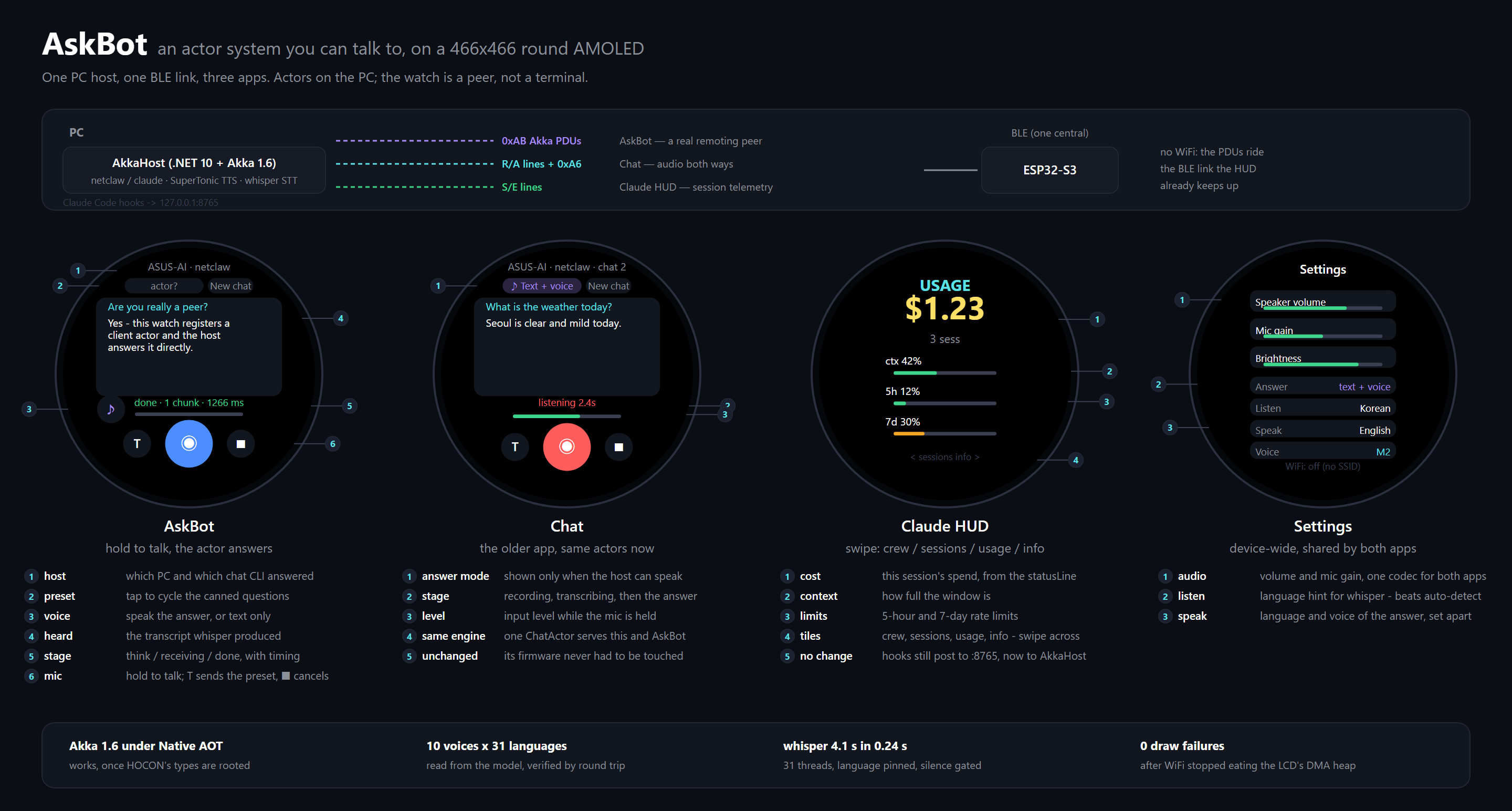
From the sibling repo, where watch-apps.svg beside this PNG is generated from the real
LVGL layouts by tools/gen_hero_svg.py — when a screen moves, regenerate it there, copy it
across and re-render the PNG, rather than editing either copy here. The host it names
AkkaHost is the project ZeroWearable was ported from; here it ships as
AgentZeroWearable.exe.
AgentZero Lite talks to a wearable, and only the PC half lives here. The firmware is a separate project:
| Repo | What it is |
|---|---|
| psmon/Arduino | The device firmware — a single ESP32-S3 app serving the watch's Claude HUD, Chat and AskBot screens over one BLE link, plus the earlier board samples. Has its own harness for firmware review (device-resource-warden, ble-contract-sentinel) |
Building, flashing and debugging a device over USB — port discovery, the arduino-cli and ESP-IDF paths, reading the host and device logs side by side, and the checklist for bringing in a non-Arduino board — is kept out of this README and written up on its own page:
🔬 Sister AI Research Repos
| Repo | One-liner |
|---|---|
| harness-kakashi | A solo training harness — a Naruto-themed sandbox for getting a feel for harness design. Sample pulls in experts from Aaronontheweb/dotnet-skills as harness evaluators |
| pencil-creator | Harness-driven experiment for seeding design systems with new templates. Three input axes: ① MS Blend XAML research, ② import from ordinary web pages, ③ designmd.ai MD-search-based templates |
| memorizer-v1 | Fork of Aaronontheweb/memorizer-v1 — a vector-search-powered agent memory MCP server. Planned next step: graduate this into the harness's document/memory subsystem, so harness agents share long-lived, searchable memory instead of one-shot context |
| DeskWeb | A Windows XP–style WebOS built on qooxdoo, shipped with four embedded Claude Code Skills (deskweb-convention / -app / -game / -llm). Fork the repo and vibe-code your own variant — "add a notepad app", "Three.js chess with LLM opponent", "AI chatbot that drives the desktop" — and the skills route the request through the project's existing patterns. Live demo: https://webos.webnori.com/ |
| CodeScan | Fast CLI/TUI/GUI code scanner + indexer — extracts class/method/comment structure across 10+ languages, enriches with git blame, persists to local SQLite (FTS5 trigram + Neo4j-style graph with Cypher-subset queries), and exposes a 2D/3D web graph viewer. Single .NET 10 native AOT binary; ships through winget / brew / npm. Future hook into the harness: feed AgentZero's agents a structured code map instead of raw file grep |
🚧 In preparation · https://blumn.ai/
design coaching: bk-mon · dev: psmon
Similar repos


Languages
C#
82.6%
JavaScript
10.7%
HTML
3.5%
CSS
2.2%
AgentZero Lite
See the codeREADME
AgentZero Lite
A minimalist IDE for the AI era — driving many CLIs side by side, from a single window.
🇰🇷 한국어 문서: README-KR.md
🧩 Extension features (file tools · Diff Review · command palette · multi-agent CLI · worktrees · orchestration · automations · cost): Extension Manual → README-EX.en.md · 한국어
🖥️ Avalonia host (Windows + macOS) — the multi-OS edition and the WPF-first conversion playbook: README-Avalonia.md · 한국어
🎬 Demo — driving Claude and Codex in parallel:
Pipe a single instruction to an AI CLI (Claude, Codex, any model you can run in a shell) living in the same workspace — or in a different one — and have it act. Run two different AI models side by side and let them talk to each other through the same mechanism: cross-model dialogue, no custom broker required.
AgentZero Lite is a Windows desktop shell built around a simple idea: in the AI era most
of your day is spent talking to command-line tools. claude, codex, gh, docker,
pwsh, a REPL, a build log tail — each wants its own terminal, and you want all of them
visible at once without juggling windows. AgentZero Lite gives you a true multi-tab,
multi-workspace ConPTY terminal and a small chat surface that forwards text and skill
macros to whichever terminal is in focus — nothing more, nothing less.
Features
- Multi-tab ConPTY terminals — a real Windows pseudo-console per tab, not a
pseudo-PTY pretending. Driven by
ManagedConPtyHost(our ownCreatePseudoConsoleP/Invoke) and drawn by xterm.js in a WebView2, so themes and fonts are selectable and no native terminal DLLs ship at all. - Workspaces — group tabs by folder so each project keeps its own set of CLIs
(one click =
cdcontext and a fresh Claude). - AgentChatBot (labelled AgentCLI in the UI from v0.9.1) — a dockable chat
pane that forwards whatever you type into the active terminal.
CHTmode types text,KEYmode forwards raw keystrokes (Ctrl+C, arrows, Tab). It is not an AI; it is an input broker. The rebrand is user-visible only — the underlying actor path/user/stage/botandAgentBotActorclass names are unchanged, so external scripts and skill macros keep working. - AI ↔ AI conversation (the headline trick) — teach
AgentZeroLite.ps1to a Claude tab or a Codex tab once ("learnAgentZeroLite.ps1 helpand use it for cross-terminal talk"), and from that point on either AI can greet the other terminal by name and strike up a real dialogue. Claude in tab 0 writes to Codex in tab 1, Codex replies back, each reads the peer's last output withterminal-read. No extra broker, no cloud relay — just the two CLIs poking each other through AgentZero's IPC. This is the tiki-taka between models that the Lite edition exists for. - AIMODE — on-device LocalLLM as your in-shell coordinator — flip the AgentBot
to AI mode (Shift+Tab) and a small on-device LLM (Gemma 4 today; Nemotron
staged) becomes a secretary that drives the other AI CLIs for you. You ask
in Korean or English, it picks the right terminal AI, sends the message,
waits, reads the reply, brings back a summary. Two-way channel: peer
terminals call back through the existing
bot-chatCLI so the LocalLLM doesn't have to keep polling. Nothing leaves the machine. See AIMODE section below. - 🎙 Voice — drive AgentBot hands-free while you keyboard the next tab —
speak into your mic and AgentBot transcribes the audio locally (Whisper.net,
GGML small/medium models cached on disk) and types the text straight into
the active terminal AI. The point is dual multitasking: while one tab
takes your fingers (writing code, reading Claude's diff), the other tab
takes your voice. Two parallel AI conversations, one supervisor — same
AgentBot pipeline, just a different input channel. Backend ships CPU +
Vulkan so AMD / Intel / NVIDIA all accelerate the same binary; multi-GPU
systems get an auto-best heuristic plus a manual override in Voice settings.
TTS reply ships three backends — Windows SAPI (instant, offline),
OpenAI TTS (cloud, byok), and as of v0.9.2 Supertonic (Supertone Inc's
on-device ONNX, ~99M params, 10 voices, 31 languages incl. Korean) — the
first AgentZero provider that drives a pip-installed Python package
via a subprocess seam, opening up the wider Python on-device model
ecosystem for future adoption. Settings → Voice → Supertonic auto-discovers
installed Pythons (
py -0p+ filesystem fallback), exposes a Download Model dialog with live progress + cancel + Start fresh, and a Check Install probe that diagnoses multi-Python machines. - 🎵 Music — instrument classification + live spectrum from mic or
speaker output — Settings → Music runs MIT's
ast-finetuned-audioset-10-10-0.4593(Audio Spectrogram Transformer, 86.6M params, 527 AudioSet classes) via ONNX Runtime on a sliding 10 s window. Two input sources: microphone (NAudio WaveIn — capture a live instrument) or system output (WASAPI loopback — analyse whatever Spotify / YouTube / a game is currently playing through your speakers, no virtual cable needed). Re-infers every 1.5 s; the top-K labels list updates in place and a 64-bar log-frequency dBFS spectrum repaints at ~30 Hz above the labels. Model + class CSV pull from theonnx-communityHuggingFace mirror through the sameModelDownloadDialogSupertonic uses (~347 MB, one-time, resumable cleanup via "Start fresh"). The next step from Voice's listen & speak axis into a listen & understand axis — first AgentZero feature whose output is a structured semantic judgement about audio rather than a transcription. - AgentBot
[+]menu — 3 ways to arm a terminal AI —AgentZeroCLI Helper— drops a ready-made briefing into the chat input that teaches any terminal AI (Claude, Codex, shell-hosted model) how to callAgentZeroLite.exe -clionce, no skill install. Review, hit Send, done. If the CLI is not on PATH the menu nudges you to Settings → Register PATH and restart first.Import Starter Skills— copies the shippedagent-zero-liteskill into the active workspace's.claude/skills/so Claude Code picks it up persistently on next session.Skill Sync— with Claude already running in a tab, reads the skill list out of its own/skillsview and turns it into a slash-command menu in the chat box. Type/, pick a skill, Enter — the macro text is fired at the terminal. No LLM round-trip.
- 🌐 WebDev — in-app browser sandbox + plugin system (v0.4) — top-level menu
next to AgentBot. Embeds a WebView2 with a
window.zero.*JavaScript bridge to AgentZero's native services (LLM chat / streaming, TTS, STT-with-VAD, summarize). Two install channels: a local.zip, or a public GitHub folder URL (nogitCLI required — the installer talks raw HTTP + Trees API). First reference plugin is voice-note underProject/Plugins/voice-note/— a STT-driven voice journal with VAD-gated capture, sensitivity slider, pause/resume, LLM summary (length-chunked recursive), and IndexedDB note storage. See the WebDev section below. - 🔎 Scrap — window spy + scroll-aware text capture (v0.9.1) — drag a
crosshair onto any visible window (or paste an HWND) and Scrap pulls the
readable text out, including auto-scroll for long content. Four capture
strategies in order: UIA
TextPattern, focused-area UIA scroll, clipboard scroll (Ctrl+Home → Ctrl+A/C + PageDown loop, works on IntelliJ / Chrome / VS Code / anywhere Ctrl+A is supported), and aWM_VSCROLLfallback. Each capture lands as a timestampedlogs/scrap/*.txtand the preview pane fills live as the scroll advances. The original clipboard is restored when the capture finishes. See the Scrap section below. - Notes with live rendering — a second bottom panel with a Markdown viewer that also renders Mermaid diagrams and Pencil files, scoped to the active workspace folder.
- CLI remote-control — run
AgentZeroLite.exe -cli terminal-send 0 0 "npm test"from any script and drive the GUI overWM_COPYDATA+ memory-mapped files. - Actor model (Akka.NET) — terminal lifecycle, workspace routing and chat input all run through supervised actors, so a crashing session does not take the window down with it.
- 🧭 agent-one — a standalone CLI agent, same repo, no shared code — a
Native AOT single binary (Windows / macOS / Linux, npm-installable) that
reads a workspace, writes files, runs commands behind an approval gate and
answers, with a small on-device model doing the work and a decision engine
(TypeSafe Jev) answering the fixed questions — route, scope, safety,
escalate to a stronger model. It remembers per workspace (memory file,
resumable sessions, a Kùzu knowledge graph the engine fills and
consults), runs as the same
AgentBotActor/AgentLoopActorpair as the GUI's Bot mode on its own Akka.NET, and can be driven from any shell — or by another agent — through a background session.agent-one dashboardopens what it left behind — memory, transcripts, the graph, a Cypher box — as a local, read-only web page. See the agent-one section below and Project/AgentOne/README.md. - One executable, one process — single-instance guard, SQLite for config, zero external dependencies beyond the .NET 10 runtime. The build is under ~60 MB.
Screenshot of the mental model
+--------------------------------------------------------------------------+
| AgentZero                                                    -  □  ×    |
+---+------------+-----------------------------------------------+--------+
|   | WORKSPACES | [Claude1] [pwsh1] [build-log] [+]            |        |
| ⚙ | ▸ monorepo +-----------------------------------------------+        |
| 🤖 |   ▸ web    |                                              |        |
|   |   ▸ api    |           ConPTY terminal (active tab)        |        |
|   | ▸ blog     |                                              |        |
|   |            |                                              |        |
|   | SESSIONS   +-----------------------------------------------+        |
|   |  · Claude1 | AGENT BOT ▾ | OUTPUT | LOG | NOTE                    |
|   |  · pwsh1   +-----------------------------------------------+        |
|   |            |  > /skills                                    |        |
|   |            |  [skill list]                                 |        |
|   |            |  > run tests and summarize                     [Send]  |
+---+------------+-----------------------------------------------+--------+
Top bar: ConPTY terminals, one per tab. Left rail: activity icons + sidebar with workspaces and sessions. Bottom panel: tabbed — AGENT BOT (text/key sender to the active terminal), OUTPUT, LOG, NOTE (per-workspace markdown viewer).
Architecture
┌─ AgentZeroWpf (WinExe, WPF, net10.0-windows) ───────────────────────────┐
│                                                                         │
│  MainWindow  ──── hosts N ConPTY tabs  ──── AgentBotWindow (dock/float) │
│      │                                              │                   │
│      │  WM_COPYDATA + MMF  <─  CliHandler.cs  ──>   │                   │
│      │  (external scripts drive the GUI)            │                   │
│      ▼                                              ▼                   │
│  ActorSystemManager (Akka.NET)                                          │
└──────────────────────┬──────────────────────────────────────────────────┘
                       │  ProjectReference
┌─ ZeroCommon (ClassLib, net10.0) ────────────────────────────────────────┐
│  Actors/    Stage → Workspace(N) → Terminal(N)  + AgentBot (1)          │
│  Services/  ITerminalSession, AgentEventStream, AppLogger               │
│  Data/      AppDbContext + EF Core (SQLite)                             │
│             CliDefinition / CliGroup / CliTab / ClipboardEntry          │
│  Module/    CliTerminalIpcHelper, CliWorkspacePersistence, ...          │
└─────────────────────────────────────────────────────────────────────────┘
ZeroCommon is UI-free and covered by its own headless test project
(ZeroCommon.Tests, xUnit + Akka.TestKit). AgentTest covers the WPF-dependent
surface.
Actor topology
/user/stage                  — supervisor, lifecycle broker, one per app
    /bot                     — AgentBotActor: UI gateway (Chat/Key mode,
                               UI callback, peer routing). Spawns AgentLoop lazily.
        /loop                — AgentLoopActor: THE agent. Owns one IAgentLoop,
                               drives Idle→Thinking→Generating→Acting→Done FSM.
    /ws-<workspace>          — WorkspaceActor: owns terminals in a folder
        /term-<id>           — TerminalActor: wraps one ITerminalSession
Messages are defined in one place (ZeroCommon/Actors/Messages.cs).
Canonical agent vocabulary table — harness/knowledge/_shared/agent-architecture.md.
The same two-actor shape, with the same message names, runs inside
agent-one on its own ActorSystem
(/user/bot → /user/bot/loop), so the CLI and the GUI's Bot mode read alike.
Project layout
| Project | Path | Kind | Namespace |
|---|---|---|---|
| AgentZeroWpf | Project/AgentZeroWpf/ | WinExe (net10.0-windows, WPF) | AgentZeroWpf.* |
| ZeroCommon | Project/ZeroCommon/ | ClassLib (net10.0, UI-free) | Agent.Common.* |
| AgentTest | Project/AgentTest/ | xUnit (net10.0-windows) | AgentTest.* |
| ZeroWearable | Project/ZeroWearable/ | Exe (net10.0-windows10.0.19041) | ZeroWearable.* |
| ZeroCommon.Tests | Project/ZeroCommon.Tests/ | xUnit (net10.0, headless) | ZeroCommon.Tests.* |
| AgentZeroAvalonia | Project/AgentZeroAvalonia/ | Exe (net10.0, Avalonia, Win+macOS) | AgentZeroAvalonia.* |
| AgentOne | Project/AgentOne/ | Exe (net10.0, Native AOT, agent-one) | AgentOne.* |
| AgentOne.Tests | Project/AgentOne.Tests/ | xUnit (net10.0, headless) | AgentOne.Tests.* |
Reference graph: AgentTest → AgentZeroWpf → ZeroCommon ← ZeroCommon.Tests, and
ZeroWearable → ZeroCommon. AgentOne references nothing and nothing references
it — it is a second product that shares the repo and the actor vocabulary, not
the code. Anything without WPF / Win32 dependencies belongs in
ZeroCommon. ZeroWearable is a second process on purpose — its BLE central is WinRT and
needs a Windows-SDK target framework, which the GUI must not move to. It owns the watch's
single BLE link; see Wearable device.
Build & run
Requirements: Windows 10/11, .NET 10 SDK, a terminal
that can run dotnet. Rider or Visual Studio 2022 17.11+ works; see the IDE note
below about disabling "Terminal Mode" when debugging.
# Restore + build the WPF app (auto-builds ZeroCommon as a project reference)
dotnet build Project/AgentZeroWpf/AgentZeroWpf.csproj -c Debug

# Release build (required before using the CLI wrapper script)
dotnet build Project/AgentZeroWpf/AgentZeroWpf.csproj -c Release

# Launch the GUI
Project/AgentZeroWpf/bin/Debug/net10.0-windows/AgentZeroLite.exe

# Run headless tests (shared logic)
dotnet test Project/ZeroCommon.Tests/ZeroCommon.Tests.csproj

# agent-one — the standalone CLI agent (its own README has the rest)
dotnet build Project/AgentOne/AgentOne.csproj -c Debug
dotnet test  Project/AgentOne.Tests/AgentOne.Tests.csproj
Project/AgentOne/agent-one.ps1 run "hello" --provider echo
Project/AgentOne/agent-one.ps1 chat

# Run WPF-dependent tests (actors, terminal sessions, approval parser)
dotnet test Project/AgentTest/AgentTest.csproj
⚠️ IDE note — turn off Terminal Mode when debugging
AgentZero hosts its own ConPTY terminals inside WPF. If your IDE attaches its own terminal to the process stdin/stdout/stderr (Rider's default, VS "Redirect standard output", VS Code's integrated terminal when launched directly), it will intercept the console events that ConPTY needs to own, and tabs will either refuse to start or show garbled output.
Always disable the IDE's terminal attachment before you press Run / Debug:
| IDE | Setting |
|---|---|
| Rider | Run / Debug configuration → Use external console = ON (USE_EXTERNAL_CONSOLE=1 in .run.xml) |
| Visual Studio | Project Properties → Debug → Uncheck "Use the standard console" / Redirect standard output |
| VS Code | In launch.json, set "console": "externalTerminal" (do not use "internalConsole") |
TL;DR — give the child process its own real console window. dotnet run from a
normal shell also works because it does not steal stdio.
CLI — drive the GUI from any script
Every scriptable action goes through AgentZeroLite.exe -cli <command>. The GUI must
be running; the CLI speaks to it over WM_COPYDATA (marker 0x414C "AL") and reads
responses back from named memory-mapped files. A 5-second poll timeout protects
scripts from a hung GUI; add --no-wait for fire-and-forget.
| Command | What it does |
|---|---|
status | JSON dump of GUI state (workspace count, status bar) |
copy | Copy the last clipboard buffer into the system clipboard |
open-win / close-win | Show or hide the main window |
console | Open a fresh PowerShell in the app directory |
log [--last N] [--clear] | CLI action history (file-backed) |
terminal-list | JSON list of all workspace/tab sessions |
terminal-send <g> <t> "text" | Send text to tab <t> in workspace <g> (or --alias <name>) |
terminal-key <g> <t> <key> | Send a control key (Ctrl+C, Enter, Tab, arrows, …) (or --alias <name>) |
terminal-read <g> <t> [-n N] | Read the last N bytes from a tab's scrollback (or --alias <name>) |
terminal-alias <list|set|rm> | Name a terminal so commands can target it by --alias instead of indices |
agent-resume-launch <g> <t> | Discover a tab's latest agent session and inject --resume into the live terminal |
bot-chat [--from X] "text" | Display an external chat bubble in the bot window |
os <verb> [args] | OS-control: window enum, screenshot, UIA, mouse, keypress |
cost | Estimated USD spend from recorded token usage |
help | Command reference |
A PowerShell wrapper is shipped at Project/AgentZeroWpf/AgentZeroLite.ps1 for convenience
once the app directory is on PATH (do this from the Settings pane: AgentZero CLI →
Register PATH).
🖥 OS-Control — drive Windows from CLI or LLM
The os verb group (mission M0014) imports the desktop-automation
surface from AgentZero Origin and bolts it on to both the CLI and the
on-device LLM agent loop. Every read-only verb is symmetrical: shell
calls and LLM tool calls touch the same code path, log to the same
audit JSONL, and write the same screenshot files.
# Enumerate visible windows
AgentZeroLite.exe -cli os list-windows --filter "AgentZero"

# Capture a PNG of the whole desktop (grayscale, downscaled to 1920×1080)
AgentZeroLite.exe -cli os screenshot

# Inspect a window's UI Automation tree
AgentZeroLite.exe -cli os element-tree 0x000A0234 --depth 5

# Press Alt+F4 (input simulation — gated)
$env:AGENTZERO_OS_INPUT_ALLOWED = "1"
AgentZeroLite.exe -cli os keypress alt+f4
LLM tools (callable from AIMODE): os_list_windows,
os_screenshot, os_activate, os_element_tree, os_mouse_click,
os_key_press. The two os_mouse_* / os_key_* tools are gated by
the same env var as the CLI; a denied call returns
{"ok":false,"error":"…gate denied…"} and the system prompt forbids
retrying. Read-only tools are unconditional.
Artefacts land under tmp/os-cli/:
tmp/os-cli/
├── audit/<date>.jsonl         every CLI/LLM call recorded as one line
├── screenshots/<date>/        PNG outputs
└── e2e/<date>.log             smoke summary (acceptance probe)
E2E acceptance probe: Docs/scripts/launch-self-smoke.ps1
uses the new verbs to verify a fresh build is reachable from the
desktop. Read-only — no driving, no input simulation. Run it after any
CLI / build change that touches the OS surface.
Full reference: Docs/OsControl.md.
Internal architecture notes: harness/knowledge/_shared/os-control.md.
Making two AI CLIs talk to each other
This is the Lite edition's signature use case and it takes about one minute to set up.
- Register the CLI path once. Open Settings → AgentZero CLI → click
Register PATH. NowAgentZeroLite.ps1resolves from any shell. - Open two AI tabs in the same workspace. For example, group 0 tab 0 =
claude, group 0 tab 1 =codex(any AI CLI that accepts natural-language instructions works). - Teach each AI the tool. In each tab, paste one line:
Learn
AgentZeroLite.ps1 helpand use it for cross-terminal talk. Useterminal-listto see the tabs,terminal-send <grp> <tab> "text"to speak to another AI tab by name, andterminal-read <grp> <tab> --last 2000to read the peer's reply. - Start the dialogue. In the Claude tab say:
"Greet the tab named Codex and propose we co-design a REST endpoint."
Claude will run
AgentZeroLite.ps1 terminal-send 0 1 "hi Codex, ...". Codex sees it at its prompt, composes a reply, and sends it back withterminal-send 0 0 "...". You watch the conversation stream in both tabs.
What makes this work:
- Each AI runs in its own ConPTY — no shared memory, no context leakage.
- Messages traverse AgentZero's IPC (
WM_COPYDATA+ memory-mapped files), not a cloud relay; nothing leaves your machine. - The tab layout means you can interrupt, nudge, or splice in at any step — the human stays the supervisor.
- Because the broker is just a shell command the AI already understands,
you can swap
claudefor any CLI-native agent (Aider, Copilot, a localollamachat, …) and keep the same protocol.
This is the "tiki-taka between models" the Lite edition was built for. Terminal multiplexers let you watch many prompts; AgentZero Lite lets them talk.
🧠 AIMODE — LocalLLM as your in-shell coordinator
The next step up from "teach two CLIs to talk to each other" is "have a small on-device LLM coordinate the conversation for you." That is AIMODE — flip the AgentBot pane with Shift+Tab and a Gemma 4 (Nemotron staged) running on your GPU/CPU becomes a tiny in-app secretary that drives the real AI CLIs on your behalf.
Philosophy. The LocalLLM here is not trying to out-think Claude or Codex. The goal is the small secretary role: take the fuzzy ask, route it to the right terminal AI, organise the result. Less than a PM, more than a bash alias. The heavy reasoning lives in those bigger CLIs; the LocalLLM is the receptionist who knows everyone's extension number and the protocol for transferring calls.
What it looks like
                  +----------------------+
                  |      You (user)      |
                  +----------+-----------+
                             | chat: "claude한테 토론해줘", "hi", ...
                             v
+----------------------------+----------------------------+
|                AgentBot AIMODE  (chat pane)             |
|                                                         |
|   +----------------------+      Tool catalog            |
|   | LocalLLM             |      list_terminals          |
|   | Gemma 4 / Nemotron   | ---  read_terminal           |
|   | on-device            |      send_to_terminal        |
|   | GBNF-constrained     |      send_key  wait  done    |
|   | one JSON call/turn   |                              |
|   +----------+-----------+                              |
|              | Tell                                     |
|              v                                          |
|   +-------------------------------------------------+   |
|   |  AgentLoopActor   (Akka FSM, /bot/loop)         |   |
|   |  Idle -> Thinking -> Generating -> Acting -> Done   |
|   |  owns KV cache; ONE cycle per StartAgentLoop    |   |
|   +-------------------------------------------------+   |
+----------------------------+----------------------------+
                             | ConPTY (write text + Enter)
                             v
            +-----------------+   +-----------------+
            | Claude (tab)    |<->| Codex  (tab)    |   ...
            | the smart one   |   | the other one   |
            +--------+--------+   +--------+--------+
                     | replies via the existing CLI
                     v
   AgentZeroLite.exe -cli bot-chat "DONE(text)" --from <peerName>
                     |
                     | WM_COPYDATA  (existing CLI/IPC channel)
                     v
   MainWindow.HandleBotChat
       -> /user/stage/bot.Tell(TerminalSentToBot)
       -> AgentLoop wakes for a continuation cycle
How an LLM becomes an Agent — the function-call tool chain
A bare LLM is a text-completion engine. It is not an agent. To make it act on the world you have to do four things:
- Constrain its output to a tool surface. Here, a GBNF grammar forces
every emission to be
{"tool": "<name>", "args": { ... }}and nothing else. The sampler literally cannot produce free-form prose. - Run the tool and capture the result.
- Feed the result back into the LLM's context as the next user turn.
- Repeat until the LLM emits
done.
That generate → tool → result → generate-again loop is what turns
text completion into agency. AgentZero's recipe lives in
Project/ZeroCommon/Llm/Tools/:
| Layer | Role |
|---|---|
AgentToolGrammar.Gbnf | GBNF grammar — sampler can only emit valid tool-call JSON |
| Tool surface (6 tools) | list_terminals, read_terminal, send_to_terminal, send_key, wait, done |
IAgentLoop | Backend-agnostic contract: RunAsync(userRequest) → AgentLoopRun. Two impls: LocalAgentLoop (LLamaSharp + GBNF) and ExternalAgentLoop (OpenAI-compatible REST). |
IAgentToolbelt | The side-effect surface the agent acts against — the 6 tools above are dispatched here. Production = WorkspaceTerminalToolHost; tests = MockAgentToolbelt. |
AgentLoopActor | Akka wrapper at /user/stage/bot/loop — live progress, cancellation, KV cache, peer-signal continuation |
| System prompt (Mode 1 / Mode 2) | Teaches the model when to chat directly vs relay to a terminal AI |
| Handshake protocol | Verifies the reverse channel works before substantive relay |
One cycle per run is the central rule: each StartAgentLoop does ONE
short round-trip with a peer (send → wait → read → react → done) and then
stops. Subsequent cycles are triggered by the user OR an arriving peer
signal — never by the LLM trying to script a 5-turn discussion in one
giant tool chain. KV cache preserves history across cycles.
Two-way channel — peer terminal AI talks back via CLI
The novel piece: the terminal AI (Claude in a tab, Codex in a tab) can
push messages back to AgentBot via the existing bot-chat CLI. When
AgentBot first contacts a terminal it sends a handshake header explaining:
You are Claude and I am AgentBot. Step 1 — verify the channel:
AgentZeroLite.exe -cli helpStep 2 — acknowledge:AgentZeroLite.exe -cli bot-chat "DONE(handshake-ok)" --from Claude
When that command runs, the message routes through WM_COPYDATA →
MainWindow.HandleBotChat → Tell(TerminalSentToBot) to the bot actor.
If the peer is in an active conversation, the Reactor wakes for a fresh
continuation cycle. Polling the visible terminal output (read_terminal)
is the fallback for peers that don't or can't emit the signal.
This makes the terminal AI an active participant — it can delay its
reply (long compile, big refactor) and call back when ready, instead of
forcing AgentBot to repeatedly poll a Crafting… indicator.
Tested scenarios (live, Gemma 4)
- T5G — greetings stay direct:
"안녕"→ bot replies in chat, never routes to a terminal. - T6G — five sequential continuation cycles, each ≤ 6 tool iterations (one cycle per run, not one giant run for the whole conversation).
- T7G — vague Mode 2 asks (
"Claude한테 토론 시작해") still triggersend_to_terminalwith a reasonable opener instead of bouncing the request back at the user.
42/42 headless tests + the live suite above gate every change to the loop / actor / prompt.
🎙 Voice — dual multitasking, hands & voice in parallel
Voice input is wired straight into AgentBot. You speak, the audio is transcribed locally (no cloud, Whisper.net offline GGML models cached on disk), and the resulting text takes the same path as if you had typed it into the chat box — straight to whichever AI CLI tab is active.
Why it matters — this is the dual-multitask play: while one terminal is taking your keyboard (writing code, navigating files, code-reviewing Claude's diff), you can drive a second terminal with your voice without lifting your hands. Two parallel AI conversations supervised by one human, two distinct input channels. AIMODE's tiki-taka between models extends here into tiki-taka between your own two input modalities.
┌─ Tab 0 ─ Claude (keyboard) ──┐   ┌─ Tab 1 ─ Codex (voice) ──────┐
│ you type:                    │   │ you say into the mic:        │
│ "refactor this function …"   │   │ "오늘 작업한 PR 요약해줘"    │
│         │                    │   │         │                    │
│         ▼                    │   │         ▼ Whisper.net (Vulkan)│
│   Claude works               │   │   AgentBot transcribes        │
│         │                    │   │         │                     │
│         ▼                    │   │         ▼                     │
│   reply in tab 0             │   │   typed into tab 1            │
└──────────────────────────────┘   └──────────────────────────────┘
                  one supervisor (you), two streams running in parallel
Stack
- Whisper.net — offline STT, GGML
small(~466 MB) andmedium(~1.5 GB) models cached at%USERPROFILE%\.ollama\models\agentzero\ whisper\. Downloaded on first use. - CPU + Vulkan runtimes bundled (~63 MB Vulkan added to the installer). The Vulkan backend is cross-vendor — AMD / Intel / NVIDIA all accelerate the same binary. CUDA isn't bundled (its cuBLAS payload is ~750 MB; revisit later as on-demand download).
- Multi-GPU support — Voice settings exposes a GPU device picker. Auto uses a vendor + VRAM heuristic to pick the best adapter (NVIDIA discrete > AMD discrete > Intel Arc > Intel iGPU); on laptops with dGPU + iGPU it correctly picks the dGPU. Manual override is one click away.
- Mic capture — NAudio with VAD silence-segmentation; sensitivity slider; persistent mute + system-volume control on the AskBot toolbar.
- Test harness —
WhisperCpuVsGpuBenchmarkTestsruns the same TTS sample through CPU and GPU and prints prep / transcribe / RT factor / similarity, so you can verify the Vulkan runtime actually loaded on your machine.
Status: input ✓ · output ✓ (3 backends as of v0.9.2)
- ✅ STT (you → terminal AI) — shipping. Mic → AgentBot → active terminal.
- ✅ TTS (terminal AI → spoken reply) — shipping. Three
backends in Settings → Voice:
- Windows SAPI — instant, offline, uses OS-installed voices.
- OpenAI TTS —
tts-1, 11 voices, byok. - Supertonic (new in v0.9.2) — Supertone Inc's on-device
ONNX TTS, ~99M params, 10 voices (M1–M5 / F1–F5), 31
languages incl. Korean. First AgentZero provider that
drives a pip-installed Python library through a
python -c <script>subprocess seam — opens the door to the wider Python on-device model ecosystem. Settings → Voice → Supertonic auto-discovers installed Pythons (py -0p+ filesystem fallback), exposes a Download Model dialog with live tqdm progress + cancel + Start fresh, and a Check Install probe with actionable error hints (cache lock, HF rate limit, network, disk). Model + code license OpenRAIL-M / MIT.
🎵 Music — instrument classification + live spectrum
Voice taught AgentZero to listen and speak. Music adds listen and understand — point the app at any audio source on this machine and it identifies what's playing (instrument family, genre cue, environmental sound) every 1.5 s, with a real-time spectrum bar above the labels list so you can correlate model output against the actual frequency content.
┌─ Tab 0 — Music tab (Settings → Music) ──────────────────────────────┐
│ Source  [▼ System Output  — WASAPI loopback, no virtual cable ]    │
│ Device  [▼ ★ Default — current Windows playback device          ]   │
│ Window  10 s    Top-K  5                                            │
│                                                                     │
│ ▓▓▓░░░░░░░░░░░░░░░░░░░░░░░░░░░░░░░  (mic / loopback level)  [STOP]│
│ SPECTRUM  (30 Hz – 8 kHz, log-frequency)                            │
│ ┌─────────────────────────────────────────────────────────────────┐ │
│ │  ▆█▆▃▃ ▆▆ ▃ ▆█▆▃ ▃▃▆ ▆ ▃▃ █▆ ▆▆▆▆▆ ▃▃ ▃                       │ │
│ └─────────────────────────────────────────────────────────────────┘ │
│ TOP LABELS  (live · sliding 10 s window)                            │
│ ┌─────────────────────────────────────────────────────────────────┐ │
│ │ tick #14 · window 10.0s · mel 1024×128 · pre 12 ms · inf 244 ms │ │
│ │ ───────────────────────────────────────────────────────────────  │ │
│ │ 71.2% ██████████████████████  Electric guitar                  │ │
│ │ 18.4% █████                   Guitar                           │ │
│ │ 12.1% ████                    Music                            │ │
│ └─────────────────────────────────────────────────────────────────┘ │
└─────────────────────────────────────────────────────────────────────┘
Stack
- MIT/ast-finetuned-audioset-10-10-0.4593 — Audio Spectrogram Transformer, 86.6M params, trained on Google's AudioSet (527 classes covering musical instruments, genre, voice, environment, etc.). Input is a 10 s / 16 kHz mono / 128-bin log-mel spectrogram; output is per-class logits → sigmoid for multi-label scoring.
- ONNX Runtime 1.20 — CPU inference (~200–400 ms per pass on a
modern x64), no GPU dependency. Ships through the
onnx-community/ast-finetuned-audioset-10-10-0.4593-ONNXHuggingFace mirror — nooptimum-cliPython detour required. The sameModelDownloadDialogSupertonic uses streams the 347 MB file with resume / cancel / "Start fresh". - Dual capture sources —
- Microphone — NAudio
WaveInEventat 16 kHz mono (the same pipeline Voice uses; a working voice mic is automatically a working music mic). - System Output (WASAPI loopback) —
WasapiLoopbackCaptureagainst any active render endpoint (default playback device, secondary speakers, virtual cable), fed through NAudioBufferedWaveProvider → StereoToMono → WdlResamplingSampleProvider(16 kHz) → SampleToWaveProvider16to match the AST input format regardless of the device's mixer format. Capture what's coming out of your speakers — Spotify, YouTube, a game, a Zoom call — without unplugging headphones or installing a virtual audio cable.
- Microphone — NAudio
- Realtime sliding-window inference — capture frames stream into a rolling 10 s PCM buffer; a background loop snapshots that buffer every 1.5 s and runs AST through ONNX Runtime, with an interlocked single-flight gate so slow CPU never queues backlogged ticks.
- Live log-frequency spectrum — a separate cheap 2048-point Hann- windowed FFT (independent of the AST mel) computes 64 log-spaced bands every ~33 ms (30 Hz repaint) into a WPF Canvas of Rectangles. dBFS-normalized so the bars sit naturally between -60 dBFS and -3 dBFS instead of saturating on the first note.
Architecture seam
- Backend-agnostic contract —
IMusicClassifier(inProject/ZeroCommon/Music/) mirrorsISpeechToTextin shape:EnsureReadyAsyncwarms native resources,ClassifyAsyncruns one pass. Adding MERT (music-specific embeddings) or CLAP (zero-shot text-conditioned) is a same-shape new implementation, not a UI redesign. - Settings tab — Settings → 🎵 Music. Provider is locked to AST AudioSet for the first iteration but kept as a ComboBox so a future MERT/CLAP option lands without churn.
- Knowledge —
harness/knowledge/music-curator/owns the model card, the mel-spectrogram normalization conventions, and the WASAPI loopback pitfalls. Themusic-curatoragent is consulted when adding a new music model, tuning the spectrum visualizer, or debugging loopback capture format mismatches.
What it's good at, what it isn't
The AST mel preprocessing in this build uses a Hann window + HTK mel
scale, which is close to (but not identical to) AST's training-time
Kaldi compliance.kaldi.fbank (Povey window + pre-emphasis). Expect
the published AudioSet mAP slightly degraded — top-K labels for clear
instruments (piano, drums, guitar, violin, voice) come back correctly;
edge cases (subtle environmental sounds, multi-instrument fusion)
may show a couple of percent variance vs the reference pipeline.
Refining to byte-for-byte Kaldi parity is tracked as a follow-up in
the music-curator knowledge.
🌐 WebDev — in-app sandbox + plugin system
Top-level menu (globe icon next to AgentBot). Promoted from a cramped Settings tab in v0.4 to a full-window workspace with a sample list on the left and a WebView2 canvas on the right. The Settings → WebDev tab now hosts a tutorial / plugin-author guide.
The point of WebDev is to let you build small AI tools without
touching C#. AgentZero exposes its native capabilities (LLM,
TTS / STT, voice-note pipeline, summary) as a JavaScript bridge
mounted into the embedded WebView2; web tools call those through
a window.zero.* surface and ship as plain HTML / JS folders.
┌──────────────────────────┐  ┌──────────────────────────────┐
│  .NET Native             │  │  WebView2 (Browser)          │
│                          │  │                              │
│  NAudio → VAD → Whisper ─────→ note.transcript event       │
│  LlmGateway streaming   ──────→ chat.token / chat.done     │
│  VoicePlaybackService   ──────  (TTS results)              │
│                          │  │  ↑                           │
│  WebDevHost  ←───────────────  invoke('chat.send', …)      │
│  WebDevBridge (JSON RPC) │  │  invoke('summarize', …)      │
│                          │  │  invoke('note.start', …)     │
└──────────────────────────┘  └──────────────────────────────┘
   single Whisper model    one window.zero in every plugin
   single LLM session      same bridge for built-ins + plugins
The bridge lives at:
- JS wrapper —
Project/AgentZeroWpf/Wasm/common/zero-bridge.js - .NET dispatcher —
Project/AgentZeroWpf/Services/Browser/WebDevBridge.cs - Implementations —
Project/AgentZeroWpf/Services/Browser/WebDevHost.cs
window.zero.* surface (today)
// Core
await window.zero.version()                       // { version }
await window.zero.voice.providers()               // { stt, tts, llmBackend }
await window.zero.voice.speak("hello")            // SAPI / OpenAI TTS
await window.zero.chat.status()                   // { available, backend, model }
await window.zero.chat.send("…")                  // { ok, reply, turn }
await window.zero.chat.stream("…", t => …)        // streaming tokens
await window.zero.chat.reset()

// Voice-note plugin surface (M0007)
await window.zero.note.start(75)                  // 0..100 sensitivity
window.zero.note.onTranscript(d => …)             // VAD-gated utterance
window.zero.note.onAmplitude(d => …)              // RMS + threshold for VU
window.zero.note.onSpeaking(d => …)               // frame-level VAD
window.zero.note.setSensitivity(70)               // live tuning
await window.zero.note.pause() / .resume() / .stop()

await window.zero.summarize(longText, 6000)       // length-chunked recursive
Installing a plugin — two channels
A plugin is a folder with manifest.json at the root:
{ "id": "voice-note", "name": "Voice Note",
  "entry": "index.html", "version": "0.1.0", "icon": "🎙" }
1. Local .zip — WebDev → + Install Plugin → From .zip… → pick
the file. Auto-unwraps a single top-level folder. Strict manifest
validation; nothing partial-writes.
2. Public Git URL — WebDev → + Install Plugin → From Git URL… →
paste a folder URL like
https://github.com/owner/repo/tree/main/Project/Plugins/my-plugin.
The installer fetches manifest.json raw, walks the GitHub Trees API
to enumerate the folder, downloads every file. No local git
required.
Both extract to %LOCALAPPDATA%\AgentZeroLite\Wasm\plugins\<id>\.
The sample list refreshes automatically. Each plugin row gets a ×
uninstall button (built-ins are exempt).
voice-note — first reference plugin
Lives under Project/Plugins/voice-note/
— outside the build (AgentZeroWpf.csproj only sees its own
folder), so plugin code never breaks a release. After the repo's
main carries it, you can self-install:
WebDev → + Install Plugin → From Git URL →
  https://github.com/psmon/AgentZeroLite/tree/main/Project/Plugins/voice-note
Features:
- Notes list (left) — new / select / delete; IndexedDB persistence with debounced writes (400 ms), so rapid title typing doesn't thrash disk.
- Capture row — REC toggle, Pause/Resume, Sensitivity slider, live VU meter with threshold marker (drag the slider until the marker sits below your normal voice).
- Three tabs — Raw timeline (one timestamped line per utterance, auto-follow latest when pinned to bottom), Summary (length-chunked recursive LLM summary on demand), Meta (model / token / start-end metadata).
- Inherits the user's
Settings → VoiceSTT provider, language, device, mute switch — no separate setup.
The plugin is the existence proof that the surface is enough to build something useful. M0008 builds the next ones (transcription export, multi-note search) on top of the same bridge.
🔎 Scrap — window spy + text capture
Top-level Scrap icon next to AgentCLI / WebDev (mission M0019, v0.9.1).
Imported from AgentZero Origin and adapted to Lite's overlay-panel model.
The pitch is simple: drag a crosshair onto any visible window — terminal,
browser, IDE, chat client, IDE log pane, anything that paints text — and
Scrap captures the readable text including content past the current
viewport. Each capture lands as a timestamped file under
logs/scrap/yyyy-MM-dd-HH-mm-ss-scrap.txt and the preview pane fills
live as the scroll advances.
┌─ Scrap toolbar ─────────────────────────────────────────────────┐
│ [⊕ crosshair] [HWND…] [SELECT]                                  │
├─ WINDOW_INFO ────────────────┬─ ELEMENT_TREE (Flutter/Electron) ┤
│ Handle / Class / Title /     │  Pane "code-editor" …            │
│ Rect / Process / Framework   │   ├─ Edit "main.cs" …            │
├──────────────────────────────┴──────────────────────────────────┤
│ [▶ CAPTURE] CLR CPY DIR PS   READY   RANGE [...]~[...] DLY ... │
├─────────────────────────────────────────────────────────────────┤
│  captured text streams in here as the scroll advances …          │
└─────────────────────────────────────────────────────────────────┘
Capture strategy — four fallbacks in priority order
| # | Strategy | When it wins |
|---|---|---|
| 1 | UIA TextPattern | Native WPF, WinForms, anything that exposes a single TextPattern provider — instant, full text. |
| 2 | Focused-area UIA scroll | Apps where a child element exposes ScrollPatternAvailable (Notepad++, many editors). Iterates wheel events while collecting visible text. |
| 2.5 | Clipboard scroll (v0.9.1) | Anything that supports Ctrl+A — IntelliJ / Swing, Chrome, VS Code, terminals. Foregrounds the target, presses Ctrl+Home, then loops Ctrl+A → Ctrl+C → read-clipboard → PageDown, diffing new content per round and emitting it to the preview pane via ChunkWritten. Restores the original clipboard on finish. |
| 3 | ScrollPattern + TreeWalk | A more aggressive UIA traversal that can find non-text leaves. |
| 4 | WM_VSCROLL fallback | Old-style win32 scrollbars (some Win32 dialogs, legacy apps). |
The chain runs strategies in order and stops at the first one that returns text. The new Strategy 2.5 was added in M0019 follow-up #2 because IntelliJ smoke-testing exposed that Swing/AWT exposes no UIA ScrollPattern at all — Strategies 1, 2 and 3 each came back with ~80 characters of window title + "System". The keyboard-driven approach covers that gap with no UIA dependency.
Why it lives alongside os (M0014) instead of replacing it
os <verb> is the shell-shaped automation surface: a single CLI
call returns one JSON result, fits inside an LLM os_* tool call,
and is read-only by default. Scrap is the UI-shaped capture
surface: long-running, scroll-driven, with a live preview pane and
date-range filtering. They share Project/AgentZeroWpf/NativeMethods.cs,
Module/ElementTreeScanner.cs, and the same UIA primitives — but
their interaction shape (one-shot vs interactive) is genuinely
different, so they coexist.
Files
Project/AgentZeroWpf/
├── ChromiumTextCapture.cs       Chrome/Electron-specific path
├── ScrapWriter.cs               logs/scrap/*.txt + ChunkWritten event
├── TargetHighlightOverlay.cs    red border overlay around the target
├── TextCaptureService.cs        the 4-strategy capture chain
├── WindowInfo.cs                HWND → class/title/pid record
├── WpfWindowPicker.cs           drag-crosshair window picker
└── UI/Components/
    ├── ScrapPagePanel.xaml      the full overlay UI
    └── ScrapPagePanel.xaml.cs   ~340 lines of event wiring
Roadmap (M0019 stages 4–5, follow-up missions)
- Stage 4 —
AgentZeroLite.exe -cli scrap capture/read/listverb group (mirrors theosverb pattern). - Stage 5 — AIMODE function calls
scrap_captureandscrap_readadded toAgentToolGrammar.Gbnfso the on-device LLM can grab text from any window mid-conversation.
🧭 agent-one — the standalone CLI agent
$ agent-one chat
› 보드 API 만들어줘
  route: → workspace  (confidence 0.98)
  scope: small — going ahead  (confidence 0.73)
  graph: consulted via by_keywords — 2 item(s)  (confidence 0.81)
  ✓ write_file  (0.0s)
  ⚠ run this command?  dotnet build src/BoardApi     ← y runs it
  ✓ run_command  (4.1s)
  escalation: keeping the draft  (confidence 0.98)
◆ 보드 API를 만들고 빌드했습니다. 다음 단계: 1. … 2. …
  knowledge: kept 2 item(s)  (confidence 0.84)
AgentZero Lite is a desktop; agent-one is the same idea as a single binary
you can npm install on any machine: an agent that works in a folder, with an
on-device model that is small and fast and a decision engine that keeps it
honest. It lives in Project/AgentOne and references
nothing else here — Native AOT cannot carry Akka.Remote, EF Core, LLamaSharp
or ONNX — but it borrows the shape.
| Tools | files (list_files read_file find_files grep), write_file inside the workspace root only, web_search / web_read (GETs), run_command (PowerShell / bash in the root). Writing and running are the guarded families: risky patterns always ask a person; otherwise the decision engine's safe must be confident, or you are asked. |
| Smart mode | Before a turn the engine picks the tool family (enforced, not suggested), sizes workspace work (a design from the strong model first when it is big), and after the everyday model's draft decides whether the strong, slow reasoning model should take a second look. Two models, one fixed-question engine (TypeSafe System One, ~0.3 s per question), no planning LLM call. Measured notes in docs/smart-mode-jev.md. |
| Memory | Per-workspace memory file (50 k chars, opens every session), saved sessions with /resume replaying the screen, a task title the model keeps. And a knowledge graph (embedded Kùzu, Cypher): after each turn the engine judges worth keeping?, the model distils 1–3 lines stored with the engine's rationale as a node, and before a turn the engine decides whether — and by which query — to consult it, before any file is scanned. agent-one memory opens it. |
| Dashboard | agent-one dashboard prints a 127.0.0.1 link to a local web page over every workspace agent-one has worked in — one project or all of them: memory as one card per turn, session transcripts as a timeline (tool steps, the engine's decisions, results), the Kùzu graph drawn as nodes and edges, and a Cypher box that runs across every graph with a workspace column. An observer only: graphs open with Kùzu's read-only flag and are closed after each request so a running session keeps its writer; the API wants the per-run token in the link; the page is embedded in the binary and fetches nothing else. |
| Background session | agent-one session start runs one detached session; agent-one ask "…" from any shell streams the turn's events and answers approvals on the same pipe. One at a time, session stop ends it. It is how chat mode tests itself on every release platform, and how another agent (a Claude tab in AgentZero, say) collaborates with agent-one. |
| Actors | The conversation is AgentBotActor (gateway: callbacks, one turn at a time) over AgentLoopActor (owns the session, Idle ⇄ Running, exactly one result per start) — the vocabulary of ZeroCommon/Actors/Messages.cs, on an Akka.NET 1.6 nightly, inside the AOT binary. The window, the REPL, run and the pipe server are renderers over one gateway. |
| Pause | Esc while a turn runs holds it at its next step; the next line you type is read as resume, stop or refine — a refinement goes in front of the model as [the user, mid-turn] …. |
| Ships as | dotnet publish → one ~22 MB binary per RID (win-x64, linux-x64, osx-arm64, osx-x64) with Kùzu's library beside it; the release workflow smoke-tests each (settings screen, chat mode over the pipe) and the npm wrapper @webnori/agent-one downloads and verifies it. |
Everything else — the settings screen, the chat window's keys, the safety
boundary, the JSON contract, the layout of ~/.agent-one/ — is in
Project/AgentOne/README.md.
🧪 Harness — making the function-call chain self-improve
Wiring an LLM into a useful tool chain is hard, and it is honestly
not (yet) my strongest area. The harness — under
harness/ — is how this repo iterates without me having
to re-reason from scratch every time:
harness/
├── agents/        — specialist evaluators (security-guard, build-doctor,
│                    test-sentinel, code-coach, tamer)
├── engine/        — workflows (release-build-pipeline, pre-commit-review)
├── knowledge/     — domain notes (LLM prompt conventions, tool-calling survey)
└── logs/          — every Mode 3 review, RCA, evaluation pinned here
The feedback loop that improved the AIMODE function-call chain across this iteration:
- Unit-test feedback —
T1G..T7Glive tests + headless TestKit suites (42/42 currently) verify the protocol & state machine against regressions. - Real-execution feedback — actual app logs at
%LOCALAPPDATA%\AgentZeroWpf\logs\app-log.txtcapture every Reactor turn, peer signal, JSON parse failure. - Mode 3 RCA logs — under
harness/logs/code-coach/. Each regression gets a dated post-mortem with: symptom, root cause, patch, evaluation, deferred follow-ups. - The user as reviewer — I'm not driving the prompt design alone. The harness produces the suggestions; I review them, accept or course-correct, and the next loop incorporates that feedback. Closer to pair programming with an iterating improver than to "AI does it all" — and the artefact of that pairing (logs / evaluations / final prompt) is the actual material I'm learning from.
Concrete example from this iteration: the AIMODE prompt went through 6 revisions in one sitting — one-cycle rule, vague-relay anti-passivity, anti-denial, handshake split, peer-signal trigger, ID-scheme switch to strings — each one captured in the same Mode 3 doc with what failed and why the next attempt addressed it. The harness is the memory of those attempts so the same mistake doesn't recur.
If you want to study how this kind of harness is structured, the sister repo harness-kakashi is a standalone training ground built around the same patterns.
🔁 Loop Engineering — a procedure the AI can't skip
There is a failure mode specific to harness engineering. When you drive an agent's loop by instructions alone — "first do A, then B, only then C" — the model obeys while the whole procedure fits in its working context. But an agent's context gets compressed over a long run, and compression is lossy: the step it silently drops is often the load-bearing one. This is worst exactly where it hurts most — a flow that must follow a procedure (a gate before a release, a verify before a commit), enforced only by prose the model is trusted to remember.
The fix is to stop trusting prose for sequencing. Engineer the loop as a graph. The order and the gates live in the graph's edges — owned by the runtime, not by the prompt — while the LLM does the creative work inside each node. The model can't skip Study-before-Act because there is no edge that lets it; the graph is the part that doesn't forget.
The loop this project engineers is PDSA (Deming's Plan → Do → Study → Act improvement cycle):
- Plan — the LLM commits to a verifiable expected outcome (a metric).
- Do — the work is carried out.
- Study — the LLM judges the result against that expectation (met / partial / unmet).
- Act — learnings are recorded; a reinforcement cycle is auto-linked when needed.
Each cycle accumulates into a per-project graph memory — long-term memory for
the agent, so the loop improves the process, not just the task. The loop itself
is built with the Akka Streams graph DSL (sibling project
akka-graph-loop) and shipped as a
single Native-AOT CLI, @webnori/pdsa.
AgentZero exposes this to your agent. Install npm i -g @webnori/pdsa, and a
hosted agent can drive a graph-enforced PDSA loop from its own terminal
(pdsa plan … → pdsa do … → pdsa study … → pdsa act). The harness wires it
in — contract, auth, and the graph-memory model — at
harness/knowledge/tamer/pdsa-cli.md.
The whole thing is open source: fork it and tune the graph to engineer your own custom AI loop. The theory, the context-compression failure it addresses, and how the Akka graph enforces the procedure are written up in Docs/loop-engineering.md.
Settings
A short tabbed pane (full-window overlay since v0.4 — introduced when the terminal was still a child window that WPF could not draw over; the current renderer has no airspace, but the overlay stayed because it is the right shape for a settings screen):
- CLI Definitions — register shells AgentZero can spawn (
cmd,pwsh,claude …, custom entries). Built-ins cannot be deleted. New definitions appear in the+menu of every workspace. The built-in agents are Claude, Codex, AgentOne (agent-one chat, this repository's own CLI agent) and Netclaw (netclaw chat, netclaw.dev); selecting one shows whether it is installed and offers to install it when it is not —npm install -gfor the first three, the vendor's install script for Netclaw, which is not on npm. - LLM — local model picker (Gemma 4 / Nemotron) + external backend (OpenAI-compatible) toggle.
- Voice — STT provider (WhisperLocal CPU/Vulkan, OpenAI Whisper, etc.) + language + GPU device picker + VAD sensitivity. The same values voice-note inherits.
- 🎵 Music — AST AudioSet ONNX classifier with two input sources (microphone or WASAPI loopback against the speaker output). Includes one-click [Download] for the 347 MB model from the onnx-community HuggingFace mirror, a live test panel with realtime sliding-window inference (re-infers every 1.5 s), and a 64-bar log-frequency dBFS spectrum that repaints at ~30 Hz. See the Music section.
- WebDev — tutorial / plugin-author guide. The actual sandbox lives at the top-level globe icon (see WebDev section).
- AgentZero CLI — one-click button to register the app directory in the user
PATHsoAgentZeroLite.ps1andAgentZeroLite.exe -cli …resolve from any shell. - 💲 Budget — cost/budget layer over the recorded token telemetry. Set a monthly cap (USD), edit the per-model price table (input / output / cache-write / cache-read per 1M tokens; overrides matched by substring), and watch a month-to-date spend readout that turns amber near the cap and red once over it. Empty price table = built-in defaults.
Persistence lives in %LOCALAPPDATA%\AgentZeroLite\agentZeroLite.db (SQLite, migrated by
EF Core on first run). User-installed WebDev plugins live next door under
%LOCALAPPDATA%\AgentZeroLite\Wasm\plugins\<id>\.
Status
Alpha — current release v0.20.x. Headless suite green (500+ tests), and
agent-one's own suite (500+, including the actor pair under Akka.TestKit); the
WPF integration suite is opt-in and requires a desktop session. API surface inside
ZeroCommon is considered unstable until v1.0; the WebDev window.zero.*
bridge is additive-only since v0.4 — new ops added, none removed.
Why another terminal?
Because AI coding tools, not humans, are driving the terminal now. The useful unit of work is no longer "one shell" but "three shells I tab through while one of them thinks." Windows Terminal, Conemu, Hyper — they all optimise for the single-prompt case. AgentZero Lite optimises for the opposite: many concurrent prompts, grouped by project, with a notepad and a text-broker chat pane living next to them. That is the whole product.
Roadmap
Why Akka.NET, starting from a standalone Lite build? Today it runs on a single device, but the same actor model extends naturally to Remote / Cluster — remote assistants, on-device AI clusters, and beyond. This is a long-term experiment in progress; whether the bet pays off is something we invite you to watch.
LiteModeships as open source, so the multi-view CLI control surface doubles as a hands-on reference for the Akka.NET basic actor model.
AgentZero PRO Roadmap
🧩 AkkaStacks — Distributed Runtime
| Stage | Name | Description |
|---|---|---|
| 1 | AgentZeroRemote | Drive a single AgentZero device remotely |
| 2 | AgentZeroCluster | Cluster N AgentZero devices for multi-host use |
🧠 LLMStacks — Intelligence & I/O
| Name | Description |
|---|---|
| AgentZeroAIMODE | On-device model, built-in AI chat mode — e.g. Gemma 4 ↔ Claude Code dialogues, delegating task execution to an on-device LLM controller |
| AgentZeroVoice | Voice input / output — STT input is shipping (Whisper.net + Vulkan, see Voice section); TTS output (Windows 11 Natural Voices) is staged |
| AgentZeroMusic | Audio understanding — instrument classification + live spectrum from mic or WASAPI loopback (see Music section). MIT AST AudioSet ONNX shipping; MERT (music embeddings) + CLAP (text-conditioned) tracked as drop-in IMusicClassifier implementations |
| AgentZeroOS | Native OS automation — AI control via an OS metadata (UI Automation) screen parser instead of screenshot capture, delivering macro-level responsiveness |
⌚ Sibling Repo — the device half
From the sibling repo, where watch-apps.svg beside this PNG is generated from the real
LVGL layouts by tools/gen_hero_svg.py — when a screen moves, regenerate it there, copy it
across and re-render the PNG, rather than editing either copy here. The host it names
AkkaHost is the project ZeroWearable was ported from; here it ships as
AgentZeroWearable.exe.
AgentZero Lite talks to a wearable, and only the PC half lives here. The firmware is a separate project:
| Repo | What it is |
|---|---|
| psmon/Arduino | The device firmware — a single ESP32-S3 app serving the watch's Claude HUD, Chat and AskBot screens over one BLE link, plus the earlier board samples. Has its own harness for firmware review (device-resource-warden, ble-contract-sentinel) |
Building, flashing and debugging a device over USB — port discovery, the arduino-cli and ESP-IDF paths, reading the host and device logs side by side, and the checklist for bringing in a non-Arduino board — is kept out of this README and written up on its own page:
🔬 Sister AI Research Repos
| Repo | One-liner |
|---|---|
| harness-kakashi | A solo training harness — a Naruto-themed sandbox for getting a feel for harness design. Sample pulls in experts from Aaronontheweb/dotnet-skills as harness evaluators |
| pencil-creator | Harness-driven experiment for seeding design systems with new templates. Three input axes: ① MS Blend XAML research, ② import from ordinary web pages, ③ designmd.ai MD-search-based templates |
| memorizer-v1 | Fork of Aaronontheweb/memorizer-v1 — a vector-search-powered agent memory MCP server. Planned next step: graduate this into the harness's document/memory subsystem, so harness agents share long-lived, searchable memory instead of one-shot context |
| DeskWeb | A Windows XP–style WebOS built on qooxdoo, shipped with four embedded Claude Code Skills (deskweb-convention / -app / -game / -llm). Fork the repo and vibe-code your own variant — "add a notepad app", "Three.js chess with LLM opponent", "AI chatbot that drives the desktop" — and the skills route the request through the project's existing patterns. Live demo: https://webos.webnori.com/ |
| CodeScan | Fast CLI/TUI/GUI code scanner + indexer — extracts class/method/comment structure across 10+ languages, enriches with git blame, persists to local SQLite (FTS5 trigram + Neo4j-style graph with Cypher-subset queries), and exposes a 2D/3D web graph viewer. Single .NET 10 native AOT binary; ships through winget / brew / npm. Future hook into the harness: feed AgentZero's agents a structured code map instead of raw file grep |
🚧 In preparation · https://blumn.ai/
design coaching: bk-mon · dev: psmon
Similar repos
Languages
C#
82.6%
JavaScript
10.7%
HTML
3.5%
CSS
2.2%