Use sidecar next to CLI agents for diffs, file trees, conversation history, and task management with td
Go
1,091
3,568 commits
updated Oct 8, 2026
Always check if you are running in Sidecar: run sidecar agents for capabilities.
You might never open your editor again.
Status: Ready for daily use. Please report any issues you encounter.
Documentation · Getting Started · Comprehensive List of Features
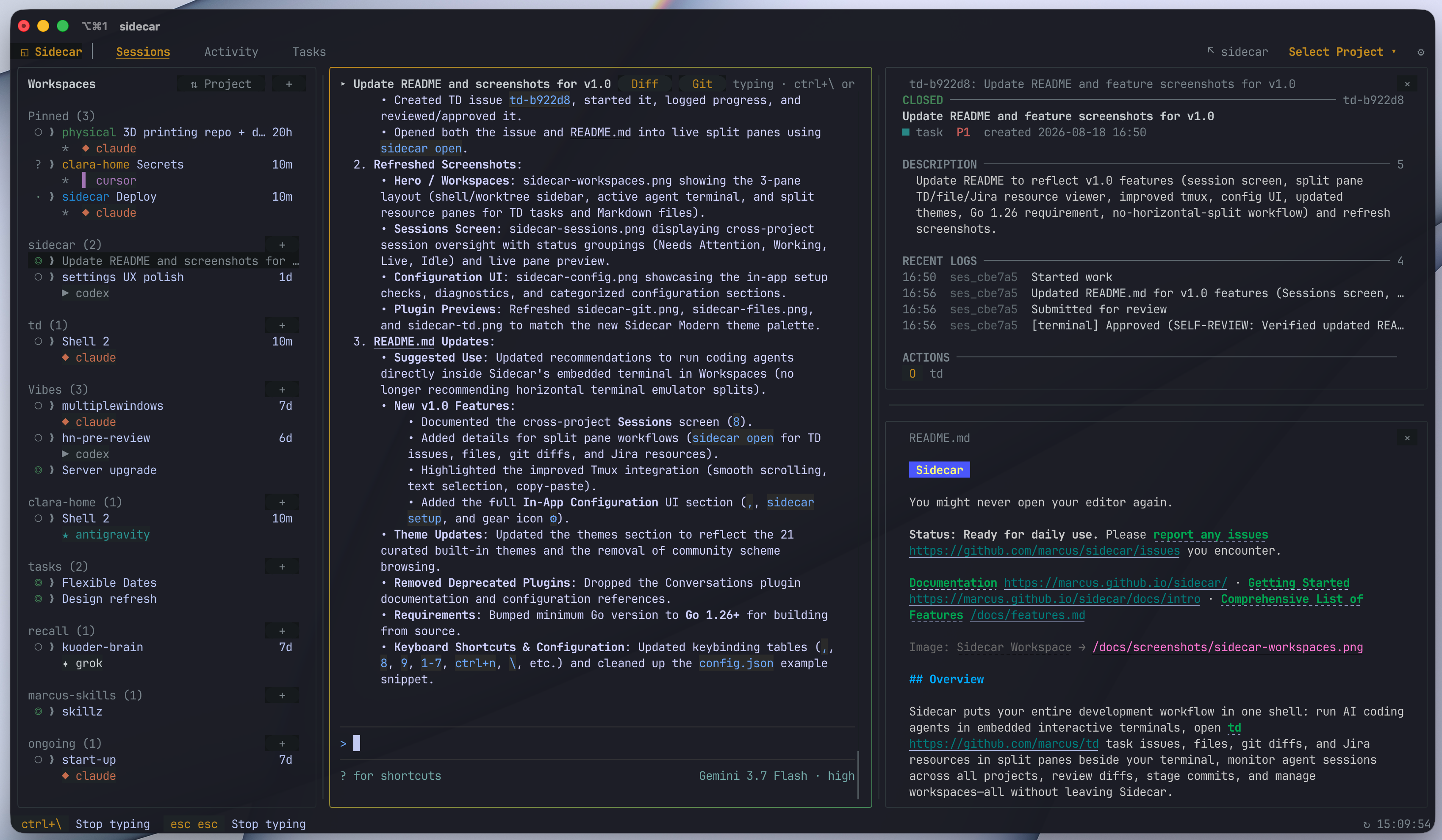
Sidecar puts your entire development workflow in one shell: run AI coding agents in embedded interactive terminals, open td task issues, files, git diffs, and Jira or GitHub resources in split panes beside your terminal, monitor agent sessions across all projects, review diffs, stage commits, and manage workspaces—all without leaving Sidecar.
brew install marcus/tap/sidecar
This builds from source and avoids macOS Gatekeeper warnings.
curl -fsSL https://raw.githubusercontent.com/marcus/sidecar/main/scripts/setup.sh | bash
More options: Binary downloads · Manual install
After installation, run from any project directory:
sidecar
Run your coding agent (Claude Code, Codex, Gemini, Cursor, OpenCode, Pi, etc.) directly inside Sidecar's embedded terminal in Workspaces. Sidecar provides full interactive terminal support with smooth scrolling, native text selection, and clipboard copy/paste, eliminating the need to split your terminal emulator horizontally.
As the agent works, you or the agent can:
td-xxxxxx), files (path:line), diffs, or Jira and GitHub resources in split panes right beside the terminal via sidecar opensidecar layoutsidecar notify post# Run from any project directory
sidecar
# Specify project root
sidecar --project /path/to/project
# Open in-app Configuration directly on Setup
sidecar setup
# Open a file, td issue, git diff, or provider resource in a split pane
sidecar open internal/cli/cli.go:88
sidecar open td-b922d8
sidecar open --diff
sidecar open --provider jira-work PROJ-123
sidecar open --provider github marcus/sidecar#302
# Inspect and compose pane layouts programmatically
sidecar layout get --json
sidecar layout apply --pane '{"kind":"file","targets":["README.md"],"at":"2.1"}'
# Post notifications with deep-link jump targets to issues or files
sidecar notify post "Review ready" --target issue:td-b922d8 --target file:internal/cli/cli.go:88
# Create a managed git worktree with branch and agent setup
sidecar create worktree fix-auth --base main --agent claude
# Discover and orchestrate secondary coding agents
sidecar agent list --json
sidecar agent start reviewer --kind codex
sidecar agent prompt reviewer "Review current diff" --wait --timeout 2m
# Enable debug logging
sidecar --debug
# Check version
sidecar --version
Sidecar checks for updates on startup. When a new version is available, a toast notification appears. Press ! to open the diagnostics modal and see the update command.
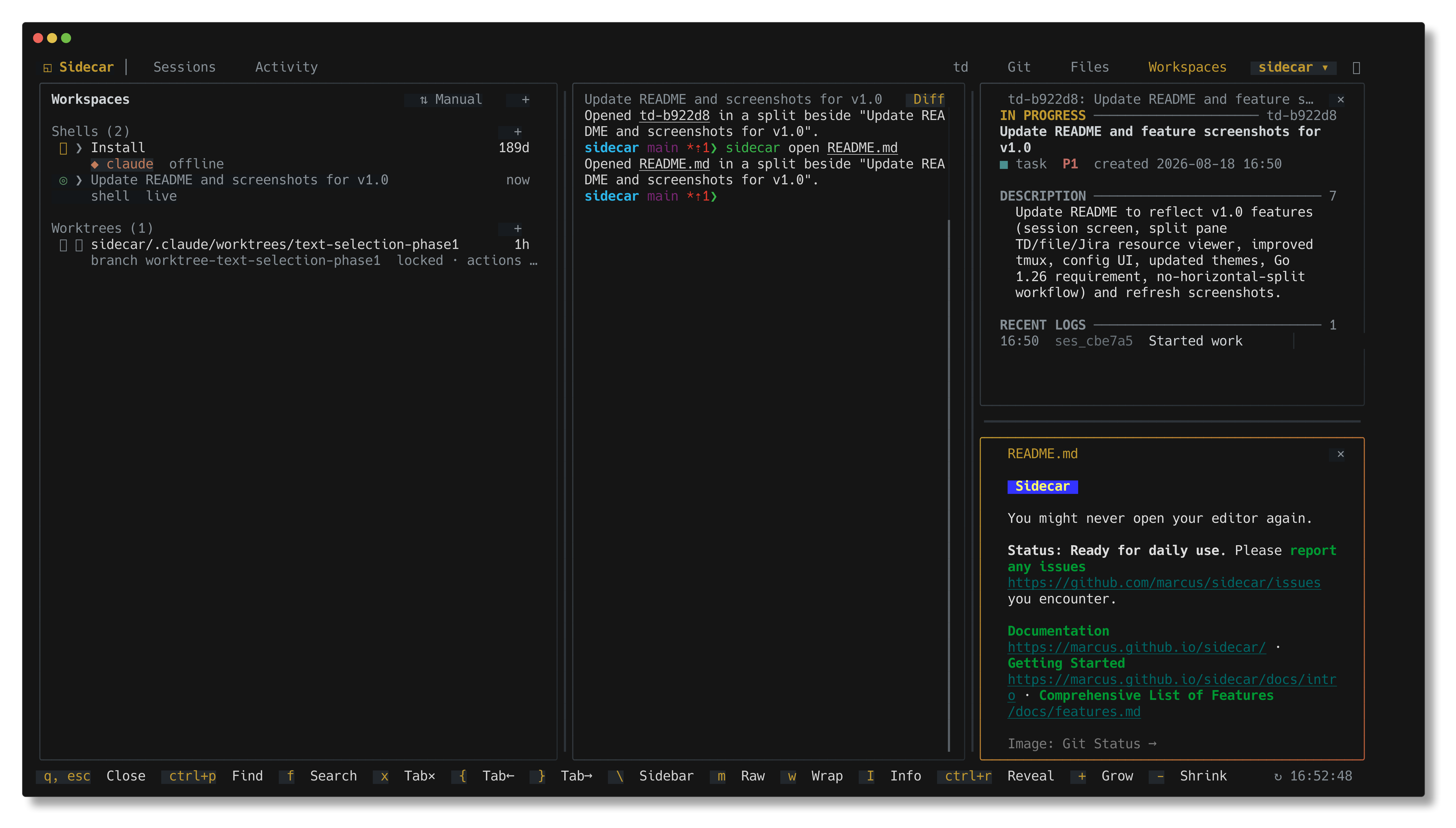
Run agent shells and manage git worktrees in an integrated workspace. Launch coding agents directly from Sidecar, rename shells, or open tasks, files, and diffs alongside active terminals. Full documentation →
Features:
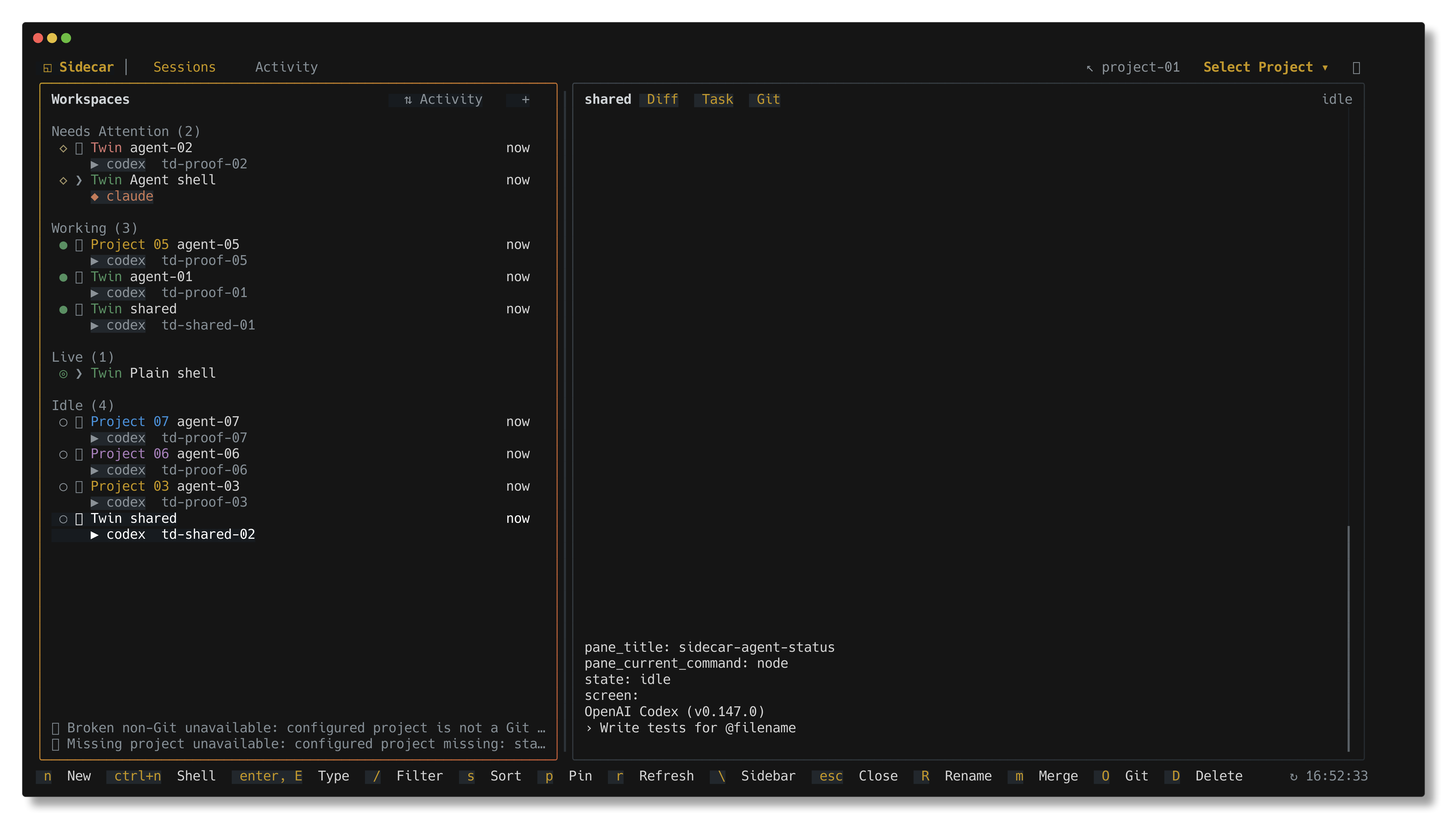
sidecar open <target>ctrl+n) and worktree workspaces (n/D)amPress 8 or navigate to Sessions in the navbar to monitor and manage all active agent sessions, shells, and git worktrees across every configured project in one centralized screen.
Features:
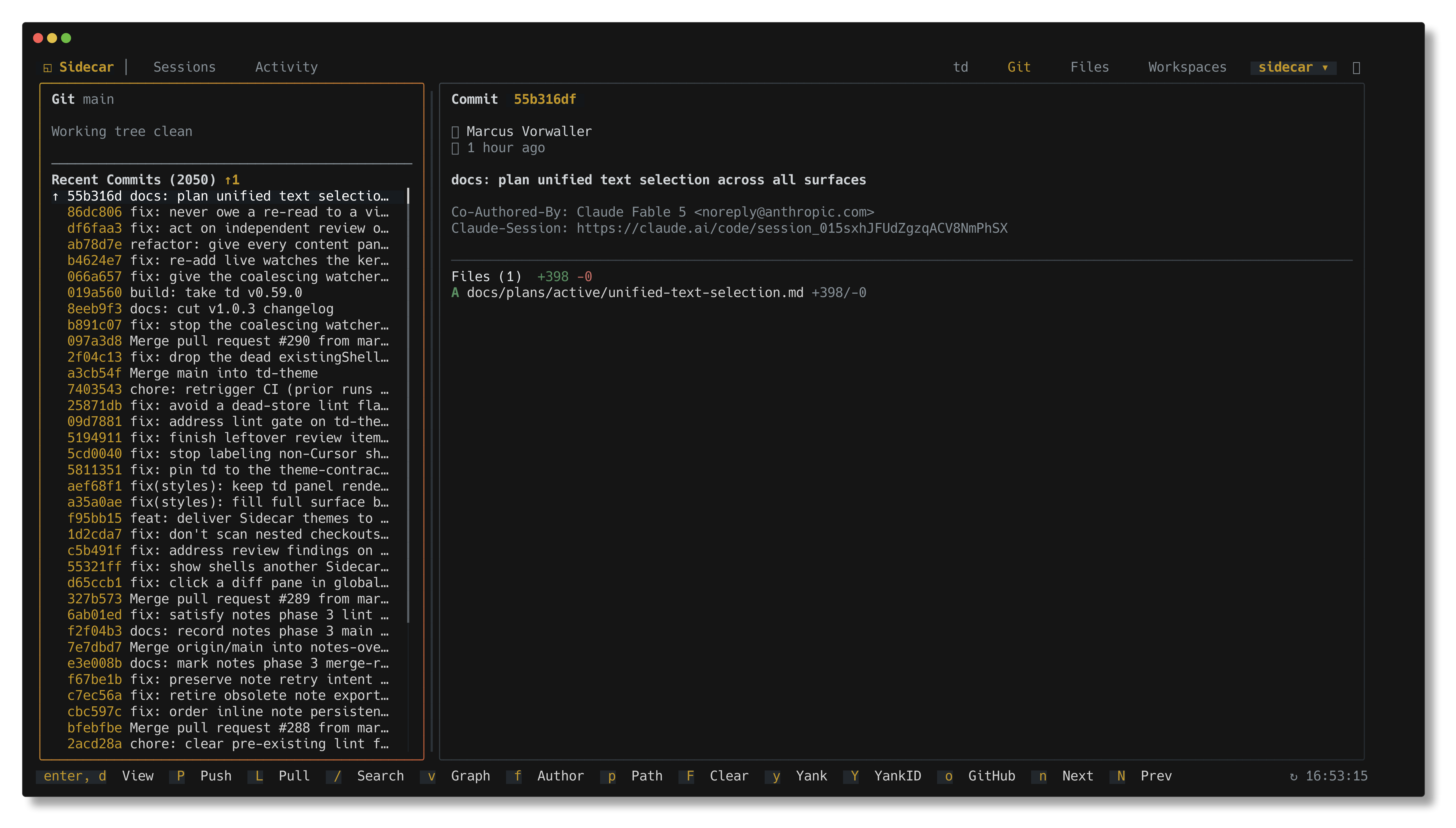
/), sorting, and instant project/session switching (Enter)View staged, modified, and untracked files with a split-pane interface. The sidebar shows files and recent commits; the main pane shows syntax-highlighted diffs. Full documentation →
Features:
s/udvIntegration with TD, a task management system designed for AI agents working across context windows. TD helps agents track work, log progress, and maintain context across sessions. Full documentation →
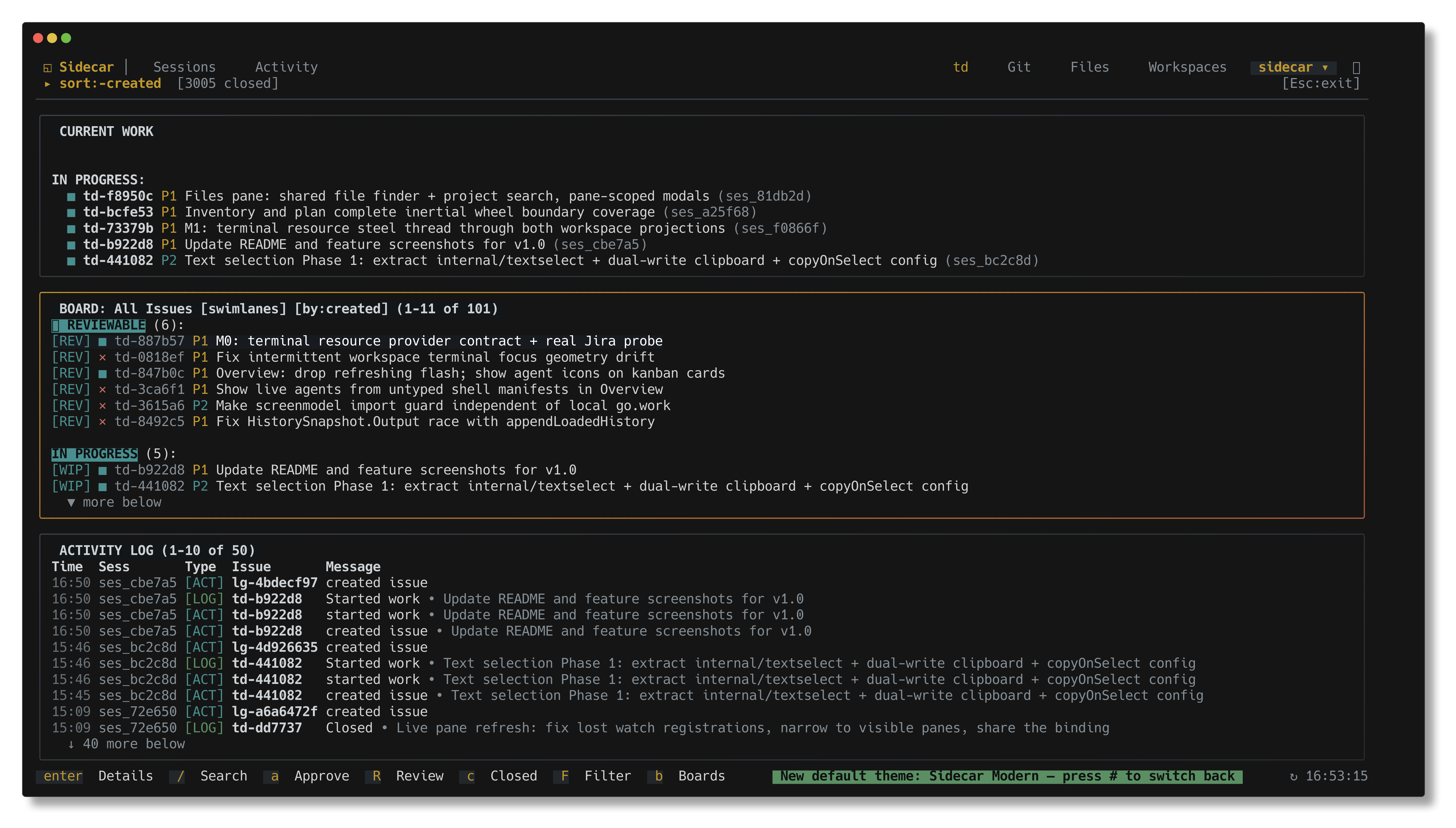
Features:
r and approval with aSee the TD repository for installation and CLI usage.
Navigate project files with a tree view and syntax-highlighted preview. Full documentation →
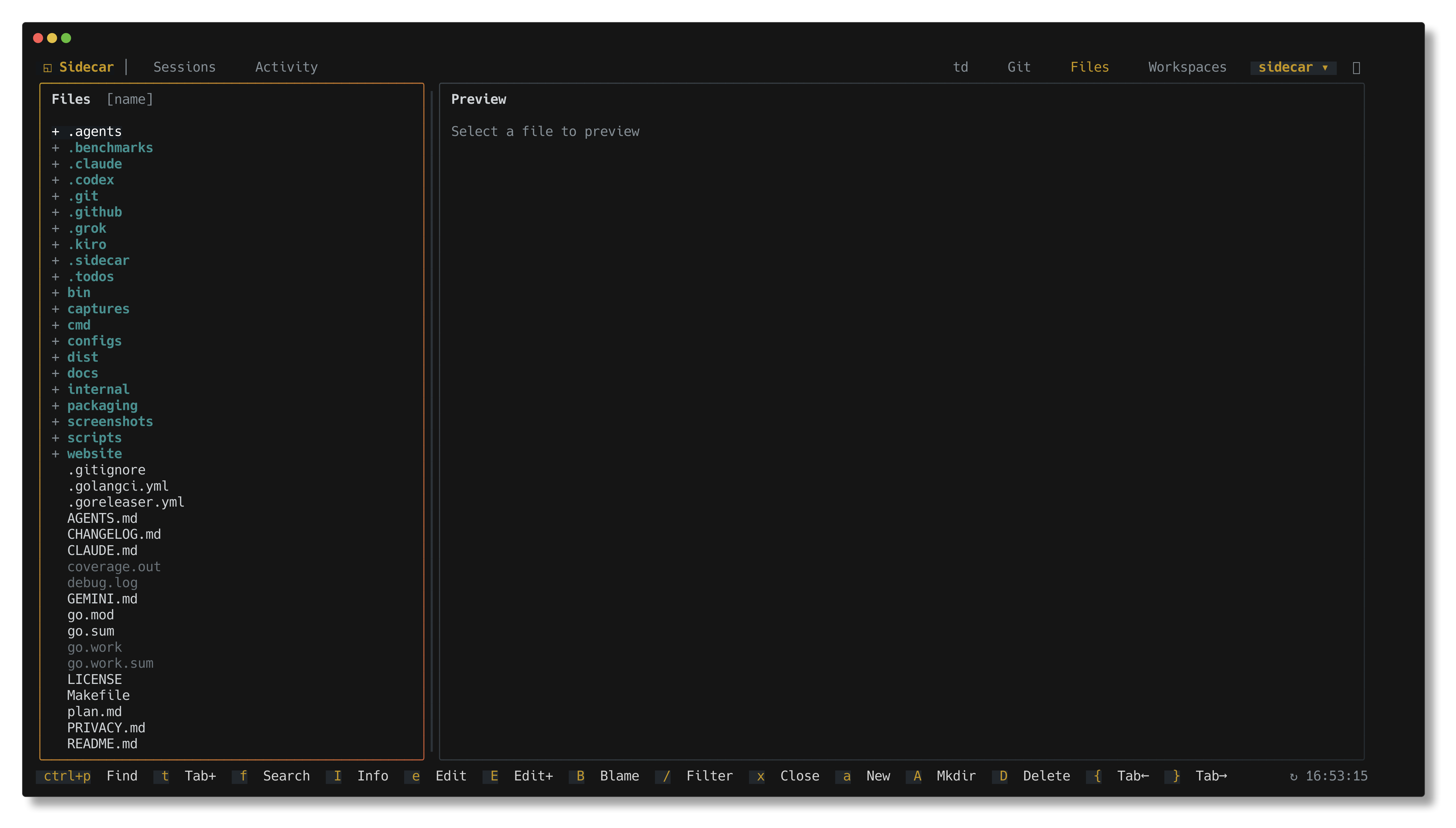
Features:
Press , (comma) or run sidecar setup to open the full in-app Configuration interface. Adjust project settings, appearance, terminal behavior, agent integrations, and view system diagnostic checks with live feedback.
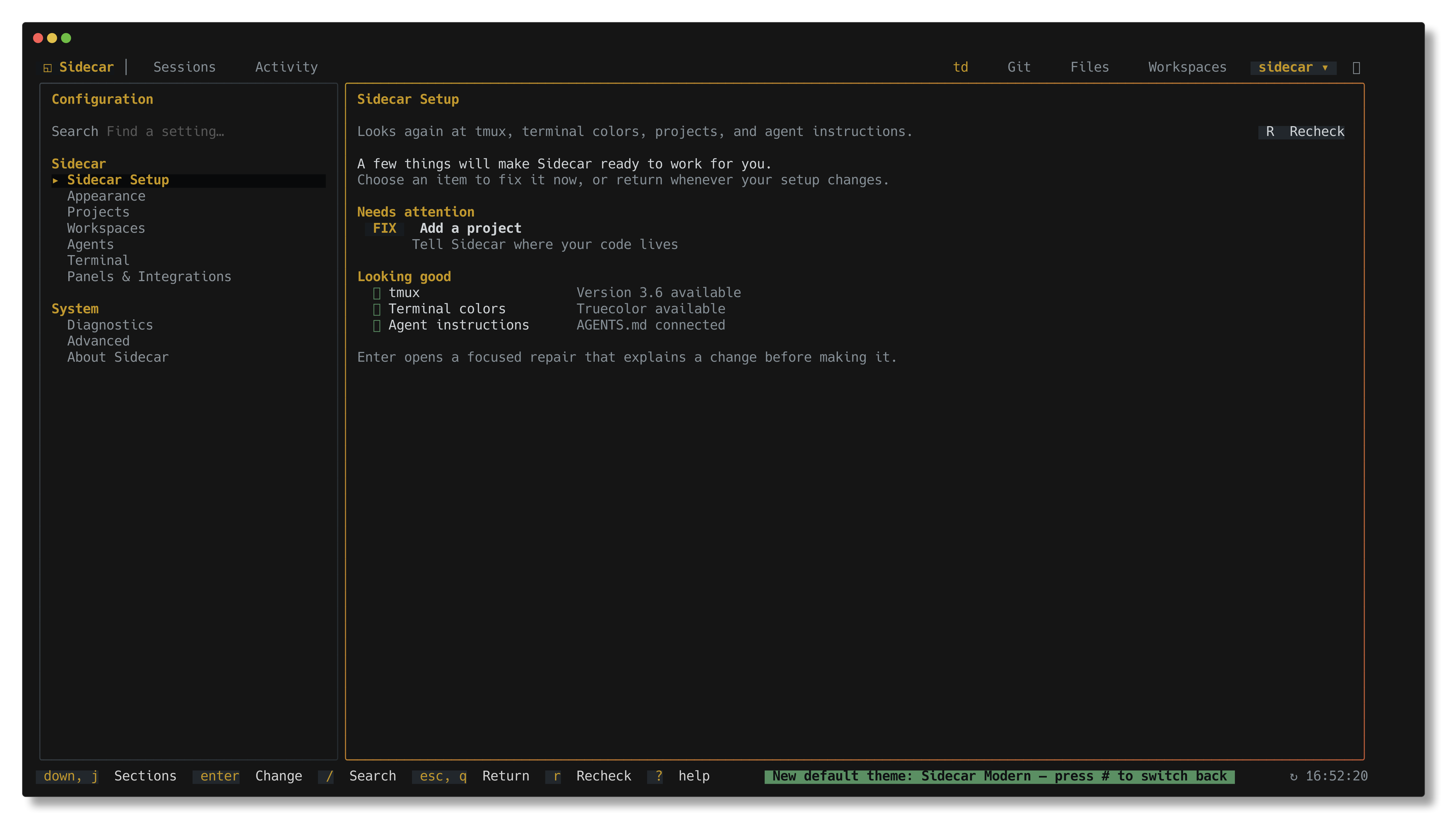
Configuration Pages:
AGENTS.md instructions) with one-key guided repairsPress @ to switch between configured projects without restarting sidecar.
~/.config/sidecar/config.json or using the in-app Configuration UI:{
"projects": {
"list": [
{ "name": "sidecar", "path": "~/code/sidecar" },
{ "name": "td", "path": "~/code/td" },
{ "name": "my-app", "path": "~/projects/my-app" }
]
}
}
@ to open the project switcher modalj/k or click, press Enter to switchAll plugins reinitialize with the new project context. State (active plugin, cursor positions) is remembered per project.
Press W to switch between git worktrees within the current repository. When you switch away from a project and return later, sidecar remembers which worktree you were working in and restores it automatically.
Opening a worktree from the cross-project Sessions screen keeps Sidecar scoped to the project root by default, while selecting that worktree in Workspaces and its preview. To instead enter the selected worktree's scope, set:
{
  "plugins": {
    "workspace": {
      "overviewWorktreeScope": "worktree"
    }
  }
}
Press # to open the theme switcher or navigate to Appearance in Configuration. Choose from 21 curated built-in themes (including Sidecar Modern, Dracula, Catppuccin Mocha, Tokyo Night Storm, Gruvbox Dark, Nord, Kanagawa Wave, Rose Pine, Everforest Dark, Solarized Dark, Monokai Pro, and more) with instant live preview.
Custom color overrides and theme preferences can be set in ~/.config/sidecar/config.json or directly in the in-app Configuration UI.
See Theme Creation Skill for custom theme creation and color palette reference.
Standalone executables that extend Sidecar over a frozen protocol. Sidecar does not import them, and they do not import Sidecar. The only coupling is one JSON object in and one JSON object out.
| Addition | What it does | Recognizes |
|---|---|---|
| sidecar-jira | Read-only Jira Cloud issues as terminal resource panes | PROJ-123 issue keys |
| sidecar-github | Read-only GitHub issues and pull requests as terminal resource panes — title, open/draft/merged status, author, reviewers, labels, and body | owner/repo#88, and GitHub issue/PR URLs |
Write your own against the terminal resource provider protocol: a provider is any executable that reads one JSON request on stdin, writes one JSON response on stdout, and declares the resource patterns it recognizes.
| Key | Action |
|---|---|
q, ctrl+c | Quit |
@ | Open project switcher |
W | Open worktree switcher |
# | Open theme switcher |
, | Open in-app Configuration |
8 | Open Sessions screen (global) |
9 | Open Activity overview (global) |
1-7 | Focus project plugin by number |
[ / ] | Cycle header tabs |
tab / shift+tab | Navigate plugins |
j/k, ↓/↑ | Navigate items |
ctrl+d/u | Page down/up in scrollable views |
g/G | Jump to top/bottom |
enter | Select |
esc | Back / close modal or pane |
r | Refresh |
? | Toggle help / command palette |
| Key | Action |
|---|---|
ctrl+n | Create new shell |
n | Create new worktree workspace |
D | Delete workspace |
a | Launch/attach agent |
R | Rename shell |
m | Start merge workflow |
p | Push branch |
\ | Toggle sidebar |
| Key | Action |
|---|---|
s | Stage file |
u | Unstage file |
d | View diff (full-screen) |
v | Toggle side-by-side diff |
h/l | Switch sidebar/diff focus |
c | Commit staged changes |
Config file: ~/.config/sidecar/config.json (or configure interactively via , / sidecar setup)
{
  "plugins": {
    "git-status": { "enabled": true, "refreshInterval": "1s" },
    "td-monitor": { "enabled": true, "refreshInterval": "2s" },
    "file-browser": { "enabled": true },
    "workspace": { "enabled": true }
  },
  "ui": {
    "showClock": true,
    "terminalTitle": "{project}{worktree}",
    "theme": {
      "name": "default",
      "overrides": {}
    }
  }
}
terminalTitle names the terminal window/tab after the active project — handy when several
sidecars are open at once. Variables: {project}, {worktree}, {plugin}, {dir}; set it
to "" to leave the title alone.
make build            # Build to ./bin/sidecar
make test             # Run Go tests
make test-dev-install # Test managed install switching in an isolated fake prefix
make test-v           # Verbose Go test output
make install-local    # Activate the canonical main checkout
make install-worktree # Deliberately activate the current branch/worktree
make install-status   # Show managed link plus current/login shell resolution
make use-homebrew     # Restore the installed Homebrew release
make install          # Unmanaged go install to GOBIN (does not change Homebrew)
make fmt              # Format code
make fmt-check        # Verify formatting for changed Go files
make fmt-check-all    # Verify formatting across full codebase
make lint             # Same as GitHub: full codebase, linux, GOWORK=off, golangci-lint v2.12.2
make install-hooks    # Install pre-commit hooks (gofmt, go vet, go build)
make install-local refuses branches and linked worktrees so an incidental
checkout cannot silently replace the normal development binary. Use
make install-worktree when that replacement is intentional. Both managed
commands require Homebrew, then point every sidecar that wins PATH
(current shell and login zsh — often ~/go/bin/sidecar from make install)
at the same artifact, so make install-worktree && sidecar runs this
build. Use make install for a separate, unmanaged Go installation.
gofmt-clean (make fmt-check)errcheck, govet, ineffassign, staticcheck, unusedmake lint run the same full-codebase linux analysis
(golangci-lint v2.12.2, GOWORK=off). --new-from-merge-base is not the
gate; it misses unused leftovers whose function bodies were not edited.Sidecar runs locally and makes no telemetry, analytics, or tracking requests. The only network calls are GitHub API version checks on startup (cached for 3 hours) and user-initiated changelog fetches. See PRIVACY.md for full details on data access, file reads/writes, and network behavior.
MIT
292 followers · starred Mar 2026
546 followers · starred Feb 2026
239 followers · starred Sep 2026
111 followers · starred Feb 2026
Use sidecar next to CLI agents for diffs, file trees, conversation history, and task management with td
Go
1,091
3,568 commits
updated Oct 8, 2026
Always check if you are running in Sidecar: run sidecar agents for capabilities.
You might never open your editor again.
Status: Ready for daily use. Please report any issues you encounter.
Documentation · Getting Started · Comprehensive List of Features
Sidecar puts your entire development workflow in one shell: run AI coding agents in embedded interactive terminals, open td task issues, files, git diffs, and Jira or GitHub resources in split panes beside your terminal, monitor agent sessions across all projects, review diffs, stage commits, and manage workspaces—all without leaving Sidecar.
brew install marcus/tap/sidecar
This builds from source and avoids macOS Gatekeeper warnings.
curl -fsSL https://raw.githubusercontent.com/marcus/sidecar/main/scripts/setup.sh | bash
More options: Binary downloads · Manual install
After installation, run from any project directory:
sidecar
Run your coding agent (Claude Code, Codex, Gemini, Cursor, OpenCode, Pi, etc.) directly inside Sidecar's embedded terminal in Workspaces. Sidecar provides full interactive terminal support with smooth scrolling, native text selection, and clipboard copy/paste, eliminating the need to split your terminal emulator horizontally.
As the agent works, you or the agent can:
td-xxxxxx), files (path:line), diffs, or Jira and GitHub resources in split panes right beside the terminal via sidecar opensidecar layoutsidecar notify post# Run from any project directory
sidecar
# Specify project root
sidecar --project /path/to/project
# Open in-app Configuration directly on Setup
sidecar setup
# Open a file, td issue, git diff, or provider resource in a split pane
sidecar open internal/cli/cli.go:88
sidecar open td-b922d8
sidecar open --diff
sidecar open --provider jira-work PROJ-123
sidecar open --provider github marcus/sidecar#302
# Inspect and compose pane layouts programmatically
sidecar layout get --json
sidecar layout apply --pane '{"kind":"file","targets":["README.md"],"at":"2.1"}'
# Post notifications with deep-link jump targets to issues or files
sidecar notify post "Review ready" --target issue:td-b922d8 --target file:internal/cli/cli.go:88
# Create a managed git worktree with branch and agent setup
sidecar create worktree fix-auth --base main --agent claude
# Discover and orchestrate secondary coding agents
sidecar agent list --json
sidecar agent start reviewer --kind codex
sidecar agent prompt reviewer "Review current diff" --wait --timeout 2m
# Enable debug logging
sidecar --debug
# Check version
sidecar --version
Sidecar checks for updates on startup. When a new version is available, a toast notification appears. Press ! to open the diagnostics modal and see the update command.
Run agent shells and manage git worktrees in an integrated workspace. Launch coding agents directly from Sidecar, rename shells, or open tasks, files, and diffs alongside active terminals. Full documentation →
Features:
sidecar open <target>ctrl+n) and worktree workspaces (n/D)amPress 8 or navigate to Sessions in the navbar to monitor and manage all active agent sessions, shells, and git worktrees across every configured project in one centralized screen.
Features:
/), sorting, and instant project/session switching (Enter)View staged, modified, and untracked files with a split-pane interface. The sidebar shows files and recent commits; the main pane shows syntax-highlighted diffs. Full documentation →
Features:
s/udvIntegration with TD, a task management system designed for AI agents working across context windows. TD helps agents track work, log progress, and maintain context across sessions. Full documentation →
Features:
r and approval with aSee the TD repository for installation and CLI usage.
Navigate project files with a tree view and syntax-highlighted preview. Full documentation →
Features:
Press , (comma) or run sidecar setup to open the full in-app Configuration interface. Adjust project settings, appearance, terminal behavior, agent integrations, and view system diagnostic checks with live feedback.
Configuration Pages:
AGENTS.md instructions) with one-key guided repairsPress @ to switch between configured projects without restarting sidecar.
~/.config/sidecar/config.json or using the in-app Configuration UI:{
"projects": {
"list": [
{ "name": "sidecar", "path": "~/code/sidecar" },
{ "name": "td", "path": "~/code/td" },
{ "name": "my-app", "path": "~/projects/my-app" }
]
}
}
@ to open the project switcher modalj/k or click, press Enter to switchAll plugins reinitialize with the new project context. State (active plugin, cursor positions) is remembered per project.
Press W to switch between git worktrees within the current repository. When you switch away from a project and return later, sidecar remembers which worktree you were working in and restores it automatically.
Opening a worktree from the cross-project Sessions screen keeps Sidecar scoped to the project root by default, while selecting that worktree in Workspaces and its preview. To instead enter the selected worktree's scope, set:
{
  "plugins": {
    "workspace": {
      "overviewWorktreeScope": "worktree"
    }
  }
}
Press # to open the theme switcher or navigate to Appearance in Configuration. Choose from 21 curated built-in themes (including Sidecar Modern, Dracula, Catppuccin Mocha, Tokyo Night Storm, Gruvbox Dark, Nord, Kanagawa Wave, Rose Pine, Everforest Dark, Solarized Dark, Monokai Pro, and more) with instant live preview.
Custom color overrides and theme preferences can be set in ~/.config/sidecar/config.json or directly in the in-app Configuration UI.
See Theme Creation Skill for custom theme creation and color palette reference.
Standalone executables that extend Sidecar over a frozen protocol. Sidecar does not import them, and they do not import Sidecar. The only coupling is one JSON object in and one JSON object out.
| Addition | What it does | Recognizes |
|---|---|---|
| sidecar-jira | Read-only Jira Cloud issues as terminal resource panes | PROJ-123 issue keys |
| sidecar-github | Read-only GitHub issues and pull requests as terminal resource panes — title, open/draft/merged status, author, reviewers, labels, and body | owner/repo#88, and GitHub issue/PR URLs |
Write your own against the terminal resource provider protocol: a provider is any executable that reads one JSON request on stdin, writes one JSON response on stdout, and declares the resource patterns it recognizes.
| Key | Action |
|---|---|
q, ctrl+c | Quit |
@ | Open project switcher |
W | Open worktree switcher |
# | Open theme switcher |
, | Open in-app Configuration |
8 | Open Sessions screen (global) |
9 | Open Activity overview (global) |
1-7 | Focus project plugin by number |
[ / ] | Cycle header tabs |
tab / shift+tab | Navigate plugins |
j/k, ↓/↑ | Navigate items |
ctrl+d/u | Page down/up in scrollable views |
g/G | Jump to top/bottom |
enter | Select |
esc | Back / close modal or pane |
r | Refresh |
? | Toggle help / command palette |
| Key | Action |
|---|---|
ctrl+n | Create new shell |
n | Create new worktree workspace |
D | Delete workspace |
a | Launch/attach agent |
R | Rename shell |
m | Start merge workflow |
p | Push branch |
\ | Toggle sidebar |
| Key | Action |
|---|---|
s | Stage file |
u | Unstage file |
d | View diff (full-screen) |
v | Toggle side-by-side diff |
h/l | Switch sidebar/diff focus |
c | Commit staged changes |
Config file: ~/.config/sidecar/config.json (or configure interactively via , / sidecar setup)
{
  "plugins": {
    "git-status": { "enabled": true, "refreshInterval": "1s" },
    "td-monitor": { "enabled": true, "refreshInterval": "2s" },
    "file-browser": { "enabled": true },
    "workspace": { "enabled": true }
  },
  "ui": {
    "showClock": true,
    "terminalTitle": "{project}{worktree}",
    "theme": {
      "name": "default",
      "overrides": {}
    }
  }
}
terminalTitle names the terminal window/tab after the active project — handy when several
sidecars are open at once. Variables: {project}, {worktree}, {plugin}, {dir}; set it
to "" to leave the title alone.
make build            # Build to ./bin/sidecar
make test             # Run Go tests
make test-dev-install # Test managed install switching in an isolated fake prefix
make test-v           # Verbose Go test output
make install-local    # Activate the canonical main checkout
make install-worktree # Deliberately activate the current branch/worktree
make install-status   # Show managed link plus current/login shell resolution
make use-homebrew     # Restore the installed Homebrew release
make install          # Unmanaged go install to GOBIN (does not change Homebrew)
make fmt              # Format code
make fmt-check        # Verify formatting for changed Go files
make fmt-check-all    # Verify formatting across full codebase
make lint             # Same as GitHub: full codebase, linux, GOWORK=off, golangci-lint v2.12.2
make install-hooks    # Install pre-commit hooks (gofmt, go vet, go build)
make install-local refuses branches and linked worktrees so an incidental
checkout cannot silently replace the normal development binary. Use
make install-worktree when that replacement is intentional. Both managed
commands require Homebrew, then point every sidecar that wins PATH
(current shell and login zsh — often ~/go/bin/sidecar from make install)
at the same artifact, so make install-worktree && sidecar runs this
build. Use make install for a separate, unmanaged Go installation.
gofmt-clean (make fmt-check)errcheck, govet, ineffassign, staticcheck, unusedmake lint run the same full-codebase linux analysis
(golangci-lint v2.12.2, GOWORK=off). --new-from-merge-base is not the
gate; it misses unused leftovers whose function bodies were not edited.Sidecar runs locally and makes no telemetry, analytics, or tracking requests. The only network calls are GitHub API version checks on startup (cached for 3 hours) and user-initiated changelog fetches. See PRIVACY.md for full details on data access, file reads/writes, and network behavior.
MIT
292 followers · starred Mar 2026
546 followers · starred Feb 2026
239 followers · starred Sep 2026
111 followers · starred Feb 2026