A personal library for everything you watch, play, read, listen to, and care about
See the codeA shelf for everything you love — and it stays yours.
KizunaShelf is a personal library for everything you watch, play, read, listen to, and care about. It feels familiar as a media tracker, but its shape is yours: you define the kinds of things in your library, the fields they carry, and how they relate.
Underneath, every entry is still a Markdown file in a folder you own. KizunaShelf helps you explore those files as a living shelf without turning them into data only one app can understand.
The iPhone and iPad app is available through TestFlight.
| Web & desktop Home | iOS Home |
|---|---|
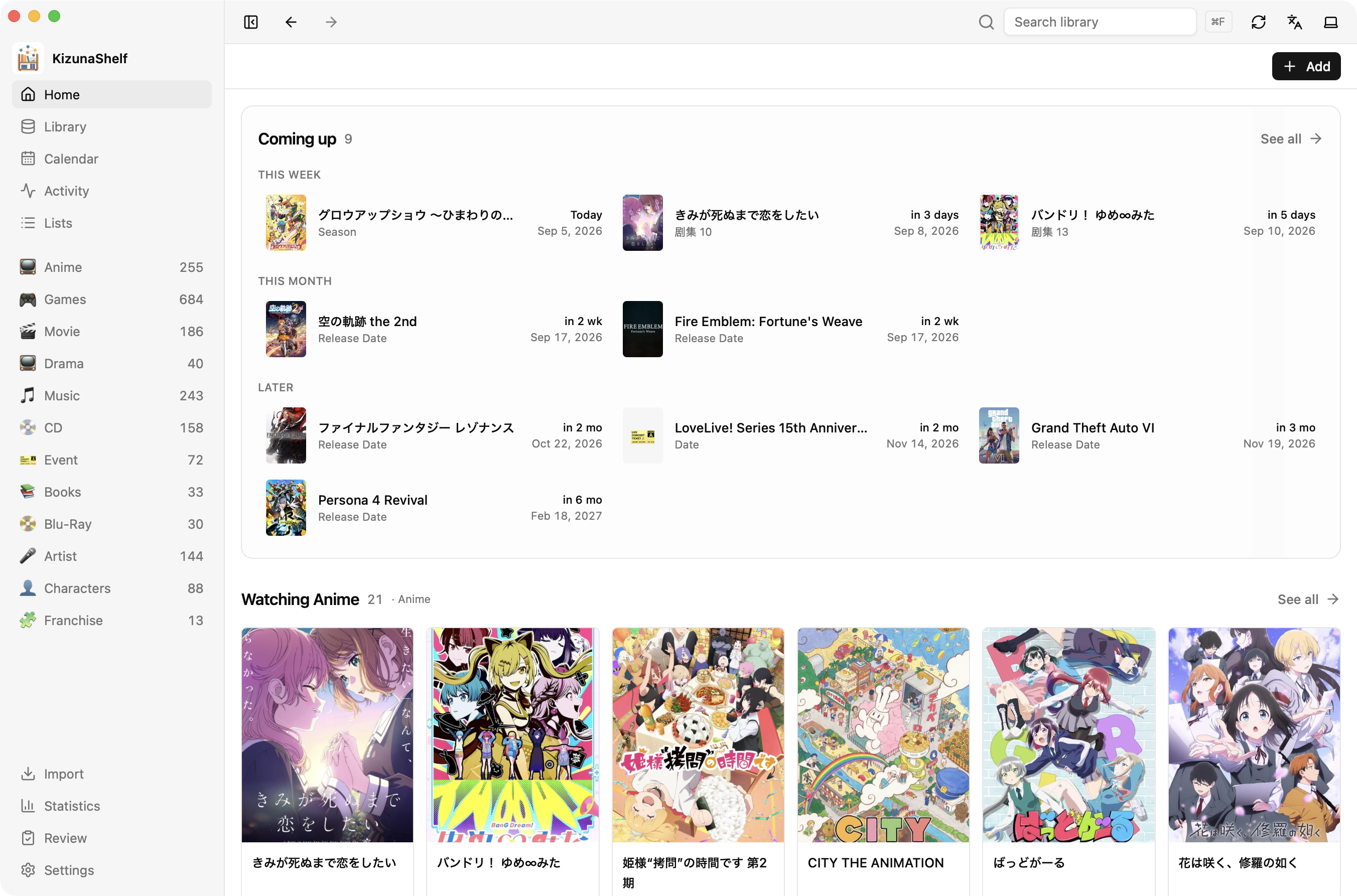 | 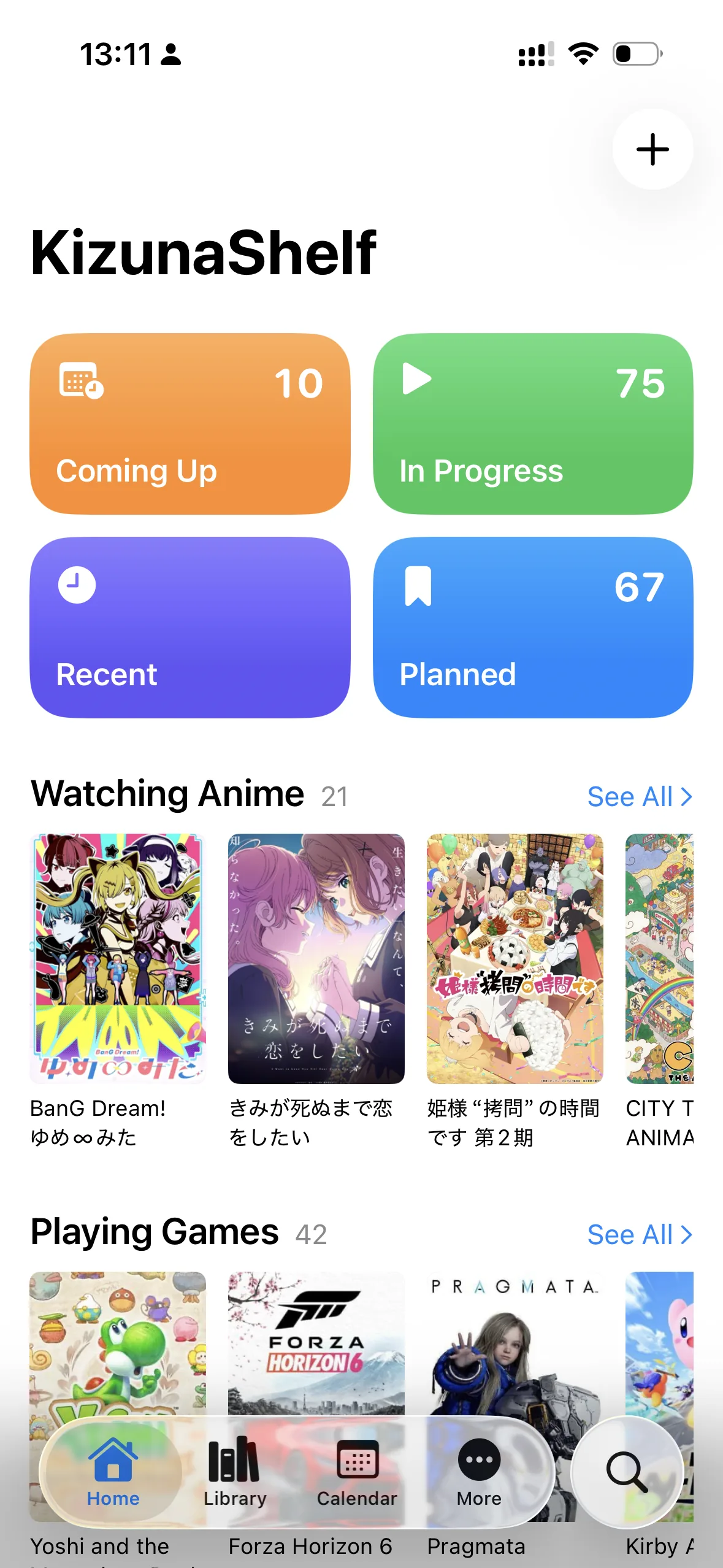 |
KizunaShelf begins with the familiar things waiting on a media shelf: shows, movies, books, games, anime, and albums. But it does not decide what a “thing” must be. You define the types in your library, their titles, covers, statuses, dates, ratings, progress, and relationships. If your world also needs characters, artists, live events, or something nobody else would think to model, KizunaShelf gives you the grammar to describe it.
The shelf is not flat. A game can belong to a franchise; an anime can be adapted from a novel; a character can connect to a voice actor. Ordinary Markdown links become a map of the relationships running through your library.
Time gives that map a history. Releases and plans appear on a calendar. Mentions in daily notes connect an ordinary day back to the things you care about. Episode check-ins become dated activity, while a quick log can write a line to your daily note in a format you choose. The activity feed gathers those moments into a record of what you watched, played, and read — and when it became part of your life.
That is the kizuna: the bond between you and what you keep.
And the files remain yours. Markdown is the source of truth, readable by Obsidian, SilverBullet, Zed, VS Code, any text editor, or no app at all. KizunaShelf can leave; your library does not.
Each collection has a schema of its own. Define types and fields for titles, covers, statuses, ratings, progress, dates, seasons, external references, and relations. Field names are yours, and the same schema drives every KizunaShelf app.
Quick Capture searches external metadata providers and creates an entity in one action, filling mapped metadata, covers, and episode or track lists when available. Whole-library imports use a review-before-write plan that maps the source service onto your schema and skips entries already on your shelf.
Relations are stored as ordinary wikilinks. KizunaShelf reads them in both directions, resolves their targets, and shows the network around each entity without inventing a separate proprietary graph.
Calendar, daily-note mentions, episode check-ins, quick logs, activity history, and custom lists turn a catalog into a record of the life around it.
Entity content, relations, lists, and the vault schema remain in the vault. The folder can be synced with whatever you already use.
One Rust core interprets the schema and Markdown everywhere. Web and desktop share the React interface; iOS presents the same library through a native SwiftUI app.
| App | How it fits |
|---|---|
| Self-hosted web | Available via Docker. Serves one vault per instance through a browser. |
| Desktop | Coming soon. Opens, creates, and switches between local vaults. |
| iOS | Full native mobile app with Liquid Glass design, widgets, notifications, Spotlight and Shortcuts integration. |
Browsing and editing a locally available vault do not depend on a KizunaShelf server. External metadata searches, cover downloads, and cloud or File Provider synchronization use their respective network services when needed.
The vault schema lives at KizunaShelf/config.yaml, so it travels with the Markdown files and stays consistent across devices.
External metadata matching is available for:
KizunaShelf can import a library from MyAnimeList, AniList, Kitsu, Trakt, Steam, and public Bangumi profiles, or from IMDb, Goodreads, and Yamtrack CSV exports. Before anything is written, the import plan shows what will be created, what needs review, and what is already present.
Run the web app with the published Docker image:
mkdir -p vault
docker run -p 127.0.0.1:8787:8787 \
  -v "$PWD/vault:/vault" \
  -e KIZUNASHELF_CONTENT_WRITABLE=true \
  -e KIZUNASHELF_SETTINGS_WRITABLE=true \
  ghcr.io/mudkipme/kizunashelf:latest
Open http://localhost:8787/. Your library is stored in the local vault folder; to use an existing vault, replace $PWD/vault with its absolute path. If the vault has no KizunaShelf/config.yaml, onboarding helps you choose some built-in types or create a schema of your own.
Source code is available on GitHub. See Self-hosting for deployment and authentication, the schema & configuration reference for the complete schema and runtime configuration, and Syncing your vault for using a vault across devices.
To run from source:
pnpm install
KIZUNASHELF_VAULT_ROOT=/path/to/your/vault pnpm dev
Open http://localhost:5173/. pnpm dev starts the Rust API and Vite together. Vite proxies /api to the Rust server on port 8787.
Use separate terminals if preferred:
pnpm dev:api
pnpm dev:web
Useful checks:
pnpm build
pnpm typecheck
pnpm test
Generate the OpenAPI document and TypeScript/Zod client with:
pnpm contract:generate
The generated web contract lives in packages/api-contract. See ARCHITECTURE.md for the schema-driven invariants, shared-core design, generated API contract, and iOS integration workflow.
For the production web app — including Docker, configuration, multiple instances, and optional single-user password authentication — see the self-hosting guide. Internet-facing deployments still need HTTPS and a reverse proxy; authentication does not replace that network boundary.
For desktop development and builds:
pnpm dev:desktop
pnpm build:desktop
KizunaShelf is licensed under the Mozilla Public License 2.0. You can use it, self-host it, and build on it; modifications to MPL-covered files must be shared under the same license, while larger works that merely combine with it can carry their own terms.
See Contributing and the security policy for contributor guidance.
A personal library for everything you watch, play, read, listen to, and care about
See the codeA shelf for everything you love — and it stays yours.
KizunaShelf is a personal library for everything you watch, play, read, listen to, and care about. It feels familiar as a media tracker, but its shape is yours: you define the kinds of things in your library, the fields they carry, and how they relate.
Underneath, every entry is still a Markdown file in a folder you own. KizunaShelf helps you explore those files as a living shelf without turning them into data only one app can understand.
The iPhone and iPad app is available through TestFlight.
| Web & desktop Home | iOS Home |
|---|---|
| |
KizunaShelf begins with the familiar things waiting on a media shelf: shows, movies, books, games, anime, and albums. But it does not decide what a “thing” must be. You define the types in your library, their titles, covers, statuses, dates, ratings, progress, and relationships. If your world also needs characters, artists, live events, or something nobody else would think to model, KizunaShelf gives you the grammar to describe it.
The shelf is not flat. A game can belong to a franchise; an anime can be adapted from a novel; a character can connect to a voice actor. Ordinary Markdown links become a map of the relationships running through your library.
Time gives that map a history. Releases and plans appear on a calendar. Mentions in daily notes connect an ordinary day back to the things you care about. Episode check-ins become dated activity, while a quick log can write a line to your daily note in a format you choose. The activity feed gathers those moments into a record of what you watched, played, and read — and when it became part of your life.
That is the kizuna: the bond between you and what you keep.
And the files remain yours. Markdown is the source of truth, readable by Obsidian, SilverBullet, Zed, VS Code, any text editor, or no app at all. KizunaShelf can leave; your library does not.
Each collection has a schema of its own. Define types and fields for titles, covers, statuses, ratings, progress, dates, seasons, external references, and relations. Field names are yours, and the same schema drives every KizunaShelf app.
Quick Capture searches external metadata providers and creates an entity in one action, filling mapped metadata, covers, and episode or track lists when available. Whole-library imports use a review-before-write plan that maps the source service onto your schema and skips entries already on your shelf.
Relations are stored as ordinary wikilinks. KizunaShelf reads them in both directions, resolves their targets, and shows the network around each entity without inventing a separate proprietary graph.
Calendar, daily-note mentions, episode check-ins, quick logs, activity history, and custom lists turn a catalog into a record of the life around it.
Entity content, relations, lists, and the vault schema remain in the vault. The folder can be synced with whatever you already use.
One Rust core interprets the schema and Markdown everywhere. Web and desktop share the React interface; iOS presents the same library through a native SwiftUI app.
| App | How it fits |
|---|---|
| Self-hosted web | Available via Docker. Serves one vault per instance through a browser. |
| Desktop | Coming soon. Opens, creates, and switches between local vaults. |
| iOS | Full native mobile app with Liquid Glass design, widgets, notifications, Spotlight and Shortcuts integration. |
Browsing and editing a locally available vault do not depend on a KizunaShelf server. External metadata searches, cover downloads, and cloud or File Provider synchronization use their respective network services when needed.
The vault schema lives at KizunaShelf/config.yaml, so it travels with the Markdown files and stays consistent across devices.
External metadata matching is available for:
KizunaShelf can import a library from MyAnimeList, AniList, Kitsu, Trakt, Steam, and public Bangumi profiles, or from IMDb, Goodreads, and Yamtrack CSV exports. Before anything is written, the import plan shows what will be created, what needs review, and what is already present.
Run the web app with the published Docker image:
mkdir -p vault
docker run -p 127.0.0.1:8787:8787 \
  -v "$PWD/vault:/vault" \
  -e KIZUNASHELF_CONTENT_WRITABLE=true \
  -e KIZUNASHELF_SETTINGS_WRITABLE=true \
  ghcr.io/mudkipme/kizunashelf:latest
Open http://localhost:8787/. Your library is stored in the local vault folder; to use an existing vault, replace $PWD/vault with its absolute path. If the vault has no KizunaShelf/config.yaml, onboarding helps you choose some built-in types or create a schema of your own.
Source code is available on GitHub. See Self-hosting for deployment and authentication, the schema & configuration reference for the complete schema and runtime configuration, and Syncing your vault for using a vault across devices.
To run from source:
pnpm install
KIZUNASHELF_VAULT_ROOT=/path/to/your/vault pnpm dev
Open http://localhost:5173/. pnpm dev starts the Rust API and Vite together. Vite proxies /api to the Rust server on port 8787.
Use separate terminals if preferred:
pnpm dev:api
pnpm dev:web
Useful checks:
pnpm build
pnpm typecheck
pnpm test
Generate the OpenAPI document and TypeScript/Zod client with:
pnpm contract:generate
The generated web contract lives in packages/api-contract. See ARCHITECTURE.md for the schema-driven invariants, shared-core design, generated API contract, and iOS integration workflow.
For the production web app — including Docker, configuration, multiple instances, and optional single-user password authentication — see the self-hosting guide. Internet-facing deployments still need HTTPS and a reverse proxy; authentication does not replace that network boundary.
For desktop development and builds:
pnpm dev:desktop
pnpm build:desktop
KizunaShelf is licensed under the Mozilla Public License 2.0. You can use it, self-host it, and build on it; modifications to MPL-covered files must be shared under the same license, while larger works that merely combine with it can carry their own terms.
See Contributing and the security policy for contributor guidance.



