
Your whole media life in one private, self-hosted library—watch, read, listen, request, and manage across web, iPhone, iPad, and Apple TV.
See the codeSee what people are saying
README
Prismedia
A clear home for all your media.
A private, self-hosted library for watching, reading, listening, and managing your collection.
Website · Quick start · Guides · App Store · Community
One library, across media types
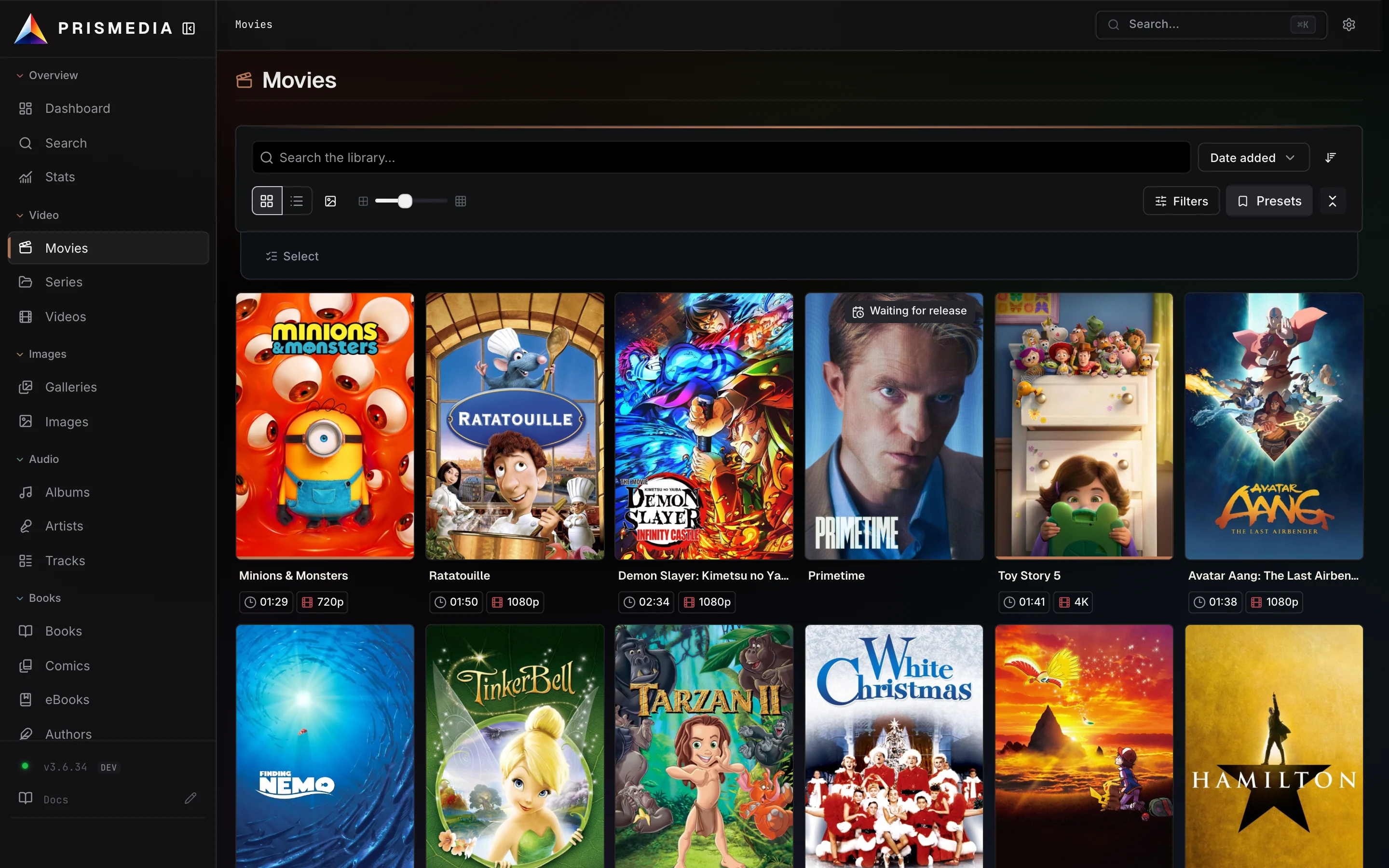
Movies, series, music, books, audiobooks, comics, images, and galleries share a common flow: find the right item, identify it, organize its files, then watch, read, or listen. Prismedia keeps that flow in one app, with an experience suited to each medium.
The shared foundation is the Entity: a library item that holds its identity, metadata, artwork, files, relationships, and personal progress. A requested title becomes the same item you eventually play or read. The prism represents that idea: one light enters, and the different media experiences take their own colors.
Run the server on your own computer or NAS. The web app is the complete management workspace; the native apps connect to the same server and account. Download Prismedia for iPhone, iPad, and Apple TV from the App Store.
What you can do
| Task | In Prismedia |
|---|---|
| Organize an existing collection | Scan watched folders, browse by medium, and connect items through people, artists, authors, tags, and collections. Folder guide. |
| Watch | Play video in the browser or native app, with resume, subtitles, and direct playback or conversion according to the client's capabilities. Playback guide. |
| Read and listen | Read EPUBs, PDFs, and comics; play audiobooks; use the native reader's typography and page settings. Titles with both text and audio can use approximate chapter alignment. Reading and listening. |
| Play music | Browse artists, albums, and tracks, then use the web or native player and queue. Playback sessions are separate on each device. Music players. |
| Find metadata | Use provider plugins to review matches, artwork, and relationships before applying them. Identify walkthrough. |
| Request media | Search metadata sources, use your existing indexers and download clients, and follow a request through acquisition and import. Request setup. |
| Manage the library | Use the browser file manager, household accounts, background jobs, and database backups. Start with the guides. |
Prismedia does not include media. You supply your own files or configure your sources. Requests, indexers, and download clients are optional when cataloging a collection you already have.
Quick start
You need Docker, persistent storage for Prismedia's state, and a media folder on the machine running Docker. The single container includes the database, web app, API, background worker, and media tools.
Save this as compose.yaml, replacing /path/to/your/media with your existing media folder:
services:
  prismedia:
    image: ghcr.io/pauljoda/prismedia:latest
    ports:
      - "8008:8008"
    volumes:
      - prismedia-data:/data
      - /path/to/your/media:/media
    restart: unless-stopped

volumes:
  prismedia-data:
From the same directory, run:
docker compose up -d
- Open http://localhost:8008 on the server computer. From another device, use the server's reachable network address and port.
- Complete the setup wizard to create your administrator account.
- Add a watched root in Settings → Watched Libraries, such as
/media/movies, and enable its matching scan type. Enter the path inside the container. - Check the scan in Jobs, then open an item from its library to play or read it.
See Install & Run for Docker run, configuration, and writable versus read-only mounts. The first-library guide walks through verifying the scan.
Storage
| Mount | What belongs there |
|---|---|
/data | Database, accounts, progress, settings, encryption secret, and generated artwork and playback files. Keep this volume when updating or recreating the container. |
/media | Your source media folders. Use a read-only mount for scanning and playback, or allow writes for imports and file-management operations. |
Keep download staging outside watched roots. Organize Your Media Folders explains layouts, Docker path mapping, and importing from a separate download client.
Back up your media separately from Prismedia's state. Read Backups & Restore before relying on built-in database backups as a full instance backup.
Updates
latest and release follow the promoted release channel. beta and alpha are for earlier testing; dev follows main. Use a published version-pinned tag when you want to keep a specific build.
Read CHANGELOG.md and the upgrade guide before changing versions. Preserve /data; a downgrade after a schema change may require restoring your pre-upgrade snapshot.
Help and contributions
- Search the documentation for setup and feature guides.
- Troubleshooting covers connection, scanning, imports, and playback.
- Ask setup and usage questions in r/Prismedia.
- Open an issue for a bug, missing documentation, or feature suggestion. Remove private details from logs and screenshots.
- Read Contributing for development conventions.
- Report suspected vulnerabilities privately using the security policy.
Metadata providers use Prismedia's .NET plugin protocol; Stash YAML scrapers run through the Stash compatibility adapter. See the plugin guide and Prismedia-Plugins for the current contract and implementations.
Development
Nix / NixOS
The repository flake is the recommended development setup. With Nix and a Docker daemon available, it installs the complete pinned system toolchain and the matching Playwright browser and Jellyfin FFmpeg build:
nix develop
prismedia-setup
prismedia-doctor
NixOS users can import the included host module to enable Docker, nix-ld,
flakes, optional GPU device access, and direnv integration. See the complete
Nix development guide for fresh-host configuration,
rootless/remote Docker options, and flake maintenance.
Manual Prerequisites
Without Nix, install:
- Node.js 22
- pnpm 10.30.3
- .NET 10 SDK
- Docker
- ffmpeg for media work outside the unified image
Local Stack
pnpm install
docker compose -f infra/docker/docker-compose.yml up -d postgres
pnpm --filter @prismedia/web-svelte dev
dotnet run --project apps/backend/src/Prismedia.Api/Prismedia.Api.csproj
dotnet run --project apps/backend/src/Prismedia.Worker/Prismedia.Worker.csproj
Open the running application through the .NET host at http://localhost:8008. Vite provides frontend hot reload behind the development stack, but port 8008 is the canonical app surface and same-origin API entry point.
Useful Commands
pnpm check          # frontend lint/typecheck through turbo
pnpm test:unit      # TypeScript unit tests
pnpm test:web-svelte
pnpm test:backend   # .NET tests
pnpm docs:check     # Docusaurus typecheck + build
pnpm release:check  # changelog + workspace version validation
Build The Production Image
docker build -f infra/docker/unified.Dockerfile -t prismedia:local .
Release Notes
Prismedia starts at 1.0.0 and uses plain SemVer versions. The root package.json is the build version and all workspace package versions must match it. Channel publishing never edits package versions or changelog headings; it only publishes the already-decided build.
See CHANGELOG.md for user-facing release notes.
License
See LICENSE.
AI Usage
AI tools assist with Crest's development, audits, testing, documentation, and project maintenance. Maintainers direct product design and architecture, review generated changes, and remain responsible for everything that ships.
Contributors are welcome to use AI tools. You must understand, review, and validate what you submit, explain your decisions, and address feedback. The same quality standards apply regardless of how a contribution was produced.
Submit only work you can stand behind. AI-generated code, test results, and claims need verification before they become part of a contribution.
Significant stargazers

44 followers · starred Jun 2026
Similar repos


Languages
C#
71.0%
TypeScript
15.5%
Svelte
12.6%
Your whole media life in one private, self-hosted library—watch, read, listen, request, and manage across web, iPhone, iPad, and Apple TV.
See the codeSee what people are saying
README
Prismedia
A clear home for all your media.
A private, self-hosted library for watching, reading, listening, and managing your collection.
Website · Quick start · Guides · App Store · Community
One library, across media types
Movies, series, music, books, audiobooks, comics, images, and galleries share a common flow: find the right item, identify it, organize its files, then watch, read, or listen. Prismedia keeps that flow in one app, with an experience suited to each medium.
The shared foundation is the Entity: a library item that holds its identity, metadata, artwork, files, relationships, and personal progress. A requested title becomes the same item you eventually play or read. The prism represents that idea: one light enters, and the different media experiences take their own colors.
Run the server on your own computer or NAS. The web app is the complete management workspace; the native apps connect to the same server and account. Download Prismedia for iPhone, iPad, and Apple TV from the App Store.
What you can do
| Task | In Prismedia |
|---|---|
| Organize an existing collection | Scan watched folders, browse by medium, and connect items through people, artists, authors, tags, and collections. Folder guide. |
| Watch | Play video in the browser or native app, with resume, subtitles, and direct playback or conversion according to the client's capabilities. Playback guide. |
| Read and listen | Read EPUBs, PDFs, and comics; play audiobooks; use the native reader's typography and page settings. Titles with both text and audio can use approximate chapter alignment. Reading and listening. |
| Play music | Browse artists, albums, and tracks, then use the web or native player and queue. Playback sessions are separate on each device. Music players. |
| Find metadata | Use provider plugins to review matches, artwork, and relationships before applying them. Identify walkthrough. |
| Request media | Search metadata sources, use your existing indexers and download clients, and follow a request through acquisition and import. Request setup. |
| Manage the library | Use the browser file manager, household accounts, background jobs, and database backups. Start with the guides. |
Prismedia does not include media. You supply your own files or configure your sources. Requests, indexers, and download clients are optional when cataloging a collection you already have.
Quick start
You need Docker, persistent storage for Prismedia's state, and a media folder on the machine running Docker. The single container includes the database, web app, API, background worker, and media tools.
Save this as compose.yaml, replacing /path/to/your/media with your existing media folder:
services:
  prismedia:
    image: ghcr.io/pauljoda/prismedia:latest
    ports:
      - "8008:8008"
    volumes:
      - prismedia-data:/data
      - /path/to/your/media:/media
    restart: unless-stopped

volumes:
  prismedia-data:
From the same directory, run:
docker compose up -d
- Open http://localhost:8008 on the server computer. From another device, use the server's reachable network address and port.
- Complete the setup wizard to create your administrator account.
- Add a watched root in Settings → Watched Libraries, such as
/media/movies, and enable its matching scan type. Enter the path inside the container. - Check the scan in Jobs, then open an item from its library to play or read it.
See Install & Run for Docker run, configuration, and writable versus read-only mounts. The first-library guide walks through verifying the scan.
Storage
| Mount | What belongs there |
|---|---|
/data | Database, accounts, progress, settings, encryption secret, and generated artwork and playback files. Keep this volume when updating or recreating the container. |
/media | Your source media folders. Use a read-only mount for scanning and playback, or allow writes for imports and file-management operations. |
Keep download staging outside watched roots. Organize Your Media Folders explains layouts, Docker path mapping, and importing from a separate download client.
Back up your media separately from Prismedia's state. Read Backups & Restore before relying on built-in database backups as a full instance backup.
Updates
latest and release follow the promoted release channel. beta and alpha are for earlier testing; dev follows main. Use a published version-pinned tag when you want to keep a specific build.
Read CHANGELOG.md and the upgrade guide before changing versions. Preserve /data; a downgrade after a schema change may require restoring your pre-upgrade snapshot.
Help and contributions
- Search the documentation for setup and feature guides.
- Troubleshooting covers connection, scanning, imports, and playback.
- Ask setup and usage questions in r/Prismedia.
- Open an issue for a bug, missing documentation, or feature suggestion. Remove private details from logs and screenshots.
- Read Contributing for development conventions.
- Report suspected vulnerabilities privately using the security policy.
Metadata providers use Prismedia's .NET plugin protocol; Stash YAML scrapers run through the Stash compatibility adapter. See the plugin guide and Prismedia-Plugins for the current contract and implementations.
Development
Nix / NixOS
The repository flake is the recommended development setup. With Nix and a Docker daemon available, it installs the complete pinned system toolchain and the matching Playwright browser and Jellyfin FFmpeg build:
nix develop
prismedia-setup
prismedia-doctor
NixOS users can import the included host module to enable Docker, nix-ld,
flakes, optional GPU device access, and direnv integration. See the complete
Nix development guide for fresh-host configuration,
rootless/remote Docker options, and flake maintenance.
Manual Prerequisites
Without Nix, install:
- Node.js 22
- pnpm 10.30.3
- .NET 10 SDK
- Docker
- ffmpeg for media work outside the unified image
Local Stack
pnpm install
docker compose -f infra/docker/docker-compose.yml up -d postgres
pnpm --filter @prismedia/web-svelte dev
dotnet run --project apps/backend/src/Prismedia.Api/Prismedia.Api.csproj
dotnet run --project apps/backend/src/Prismedia.Worker/Prismedia.Worker.csproj
Open the running application through the .NET host at http://localhost:8008. Vite provides frontend hot reload behind the development stack, but port 8008 is the canonical app surface and same-origin API entry point.
Useful Commands
pnpm check          # frontend lint/typecheck through turbo
pnpm test:unit      # TypeScript unit tests
pnpm test:web-svelte
pnpm test:backend   # .NET tests
pnpm docs:check     # Docusaurus typecheck + build
pnpm release:check  # changelog + workspace version validation
Build The Production Image
docker build -f infra/docker/unified.Dockerfile -t prismedia:local .
Release Notes
Prismedia starts at 1.0.0 and uses plain SemVer versions. The root package.json is the build version and all workspace package versions must match it. Channel publishing never edits package versions or changelog headings; it only publishes the already-decided build.
See CHANGELOG.md for user-facing release notes.
License
See LICENSE.
AI Usage
AI tools assist with Crest's development, audits, testing, documentation, and project maintenance. Maintainers direct product design and architecture, review generated changes, and remain responsible for everything that ships.
Contributors are welcome to use AI tools. You must understand, review, and validate what you submit, explain your decisions, and address feedback. The same quality standards apply regardless of how a contribution was produced.
Submit only work you can stand behind. AI-generated code, test results, and claims need verification before they become part of a contribution.
Similar repos
Significant stargazers
44 followers · starred Jun 2026
Languages
C#
71.0%
TypeScript
15.5%
Svelte
12.6%