
Listenarr automates audiobook collection management similar to Sonarr or Radarr, but for audiobooks. It can search, download, and organize your library automatically using metadata from Audible and other sources.
884
stars
1,472
commits
C#
primary language
Sep 3, 2026
updated
README

Automated Audiobook Collection Management








Listenarr is a fast, feature-rich, cross-platform audiobook management server. Built with a focus on being a complete solution for all your audiobook downloading needs. Set up your own server and get ready to streamline your audiobook listening!
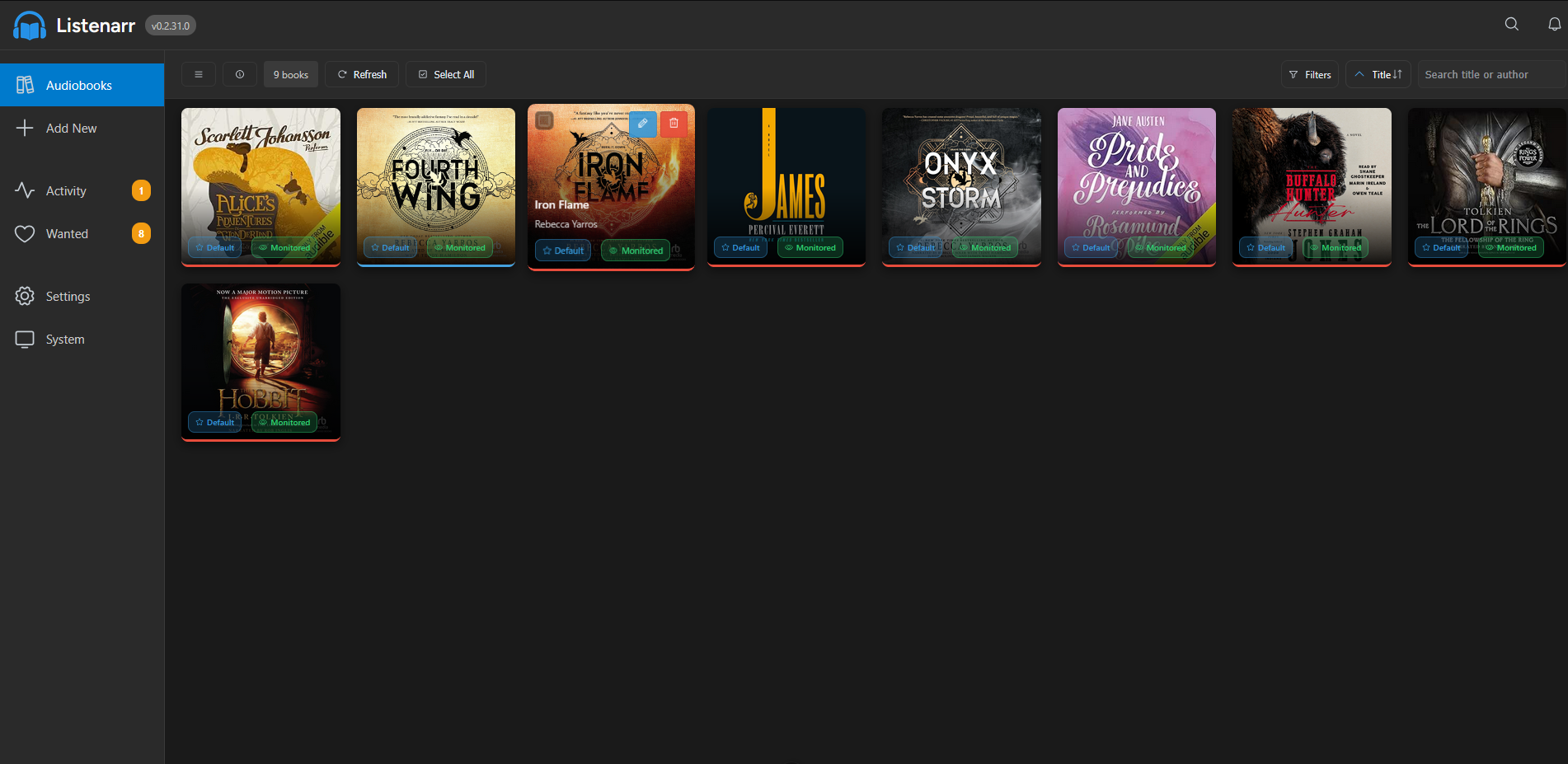
What Listenarr Provides
- Serve up Audiobooks from multiple sources (torrents, NZBs) with support for various formats (MP3, M4A, M4B, FLAC, AAC, OGG, OPUS)
- First-class responsive web interface that works great on any device (phone, tablet, desktop)
- Rich metadata support with automatic enrichment from Audible and Amazon
- External API integration for searching across multiple torrent and NZB indexers simultaneously
- Download management with support for popular clients (qBittorrent, Transmission, SABnzbd, NZBGet)
- Real-time monitoring of download progress and status
- Intelligent file organization with customizable naming patterns
- Full localization support Soon™️
To see what's coming up, check out our Roadmap! If you have a suggestion or feature request, please submit them in Discussions
Notice
[!WARNING] Listenarr is being actively developed and should be considered beta software. There may be security exploits despite best efforts. Expose this software to the internet at your own risk. The platform may be subject to changes as it is being built out. You may experience data loss and need to restart. The Listenarr team strives to avoid any data loss, but please maintain backups of important data.
Disclaimer
This app is coded with AI assistance. I started this because my wife (an avid audiobook listener) was reading through multiple series quickly and I wanted an automated way for her to request, download, and listen to new audiobooks. I am a front-end developer and I don't know C#, so I took this as an opportunity to learn and started this project.
[!NOTE]
This is just a fun a side project that solved a need for me; it is not my main priority. I will choose my work, family, and mental health before this project.
Support


Join our community on Discord for help, announcements, and discussion: https://discord.gg/CwZ2Sqp9NF
Setup
The easiest way to get started is to use Docker (recommended for production), pre-built executables, or npm scripts:
Docker (Recommended for Production)
Container images: GHCR is the preferred registry for Listenarr. Use
ghcr.io/listenarrs/listenarr:<tag>for the latest builds. A Docker Hub mirror (docker.io/therobbiedavis/listenarr:<tag>) is still published for backwards compatibility.
docker run -d \
  --name listenarr \
  -p 4545:4545 \
  ## OPTIONAL: Set container runtime user/group and file creation mask
  -e PUID=1000 \
  -e PGID=1000 \
  -e UMASK=022 \
  ## OPTIONAL: Used by Discord Bot
  -e LISTENARR_PUBLIC_URL=https://your-domain.com \
  -v listenarr_data:/app/config \
  -v /path/to/audiobooks:/audiobooks #optional \
  -v /path/to/downloadclient-downloads:/downloads #optional \
  ghcr.io/listenarrs/listenarr:canary
PUID and PGID control the user/group the container runs as. GID is also accepted as an alias for PGID for compatibility with other container stacks. UMASK controls default file permissions for newly created files and folders, and legacy UMASK_SET is also accepted as a compatibility alias. If PGID is omitted, it defaults to the same value as PUID. If neither UMASK nor UMASK_SET is provided, it defaults to 022.
Service will be available at:
- Web App: http://localhost:4545
Available Tags (GHCR + Docker Hub mirror):
latest/stablecanary- Latest canary build (pre-release)canary-X.Y.Z- Specific canary versionbeta- Latest beta build (pre-release)beta-X.Y.Z- Specific beta versionX.Y.Z- Specific release version
Docker Compose (Recommended):
version: '3.8'
services:
  listenarr:
    image: ghcr.io/listenarrs/listenarr:canary
    ports:
      - "4545:4545"
    environment:
      - PUID=1000
      - PGID=1000
      - UMASK=022
      - LISTENARR_PUBLIC_URL=https://your-domain.com ## OPTIONAL: Used by Discord Bot
    volumes:
      - listenarr_data:/app/config
      - /path/to/audiobooks:/audiobooks #optional
      - /path/to/downloadclient-downloads:/downloads #optional
    restart: unless-stopped

# For Docker Hub, replace the image with docker.io/therobbiedavis/listenarr:canary

volumes:
  listenarr_data:
Pre-built Executables
Download the latest release from GitHub Releases and extract the archive for your platform.
Windows
cd .\listenarr-win-x64
.\Listenarr.Api.exe
Linux
cd ./listenarr-linux-x64
chmod +x Listenarr.Api
./Listenarr.Api
macOS
cd ./listenarr-osx-x64  # or osx-arm64 for Apple Silicon
chmod +x Listenarr.Api
./Listenarr.Api
Prerequisites:
- Node.js 24.x or later (required for Discord bot functionality)
- Set environment variable:
LISTENARR_PUBLIC_URL=https://your-domain.com
Service will be available at:
- Web App: http://localhost:4545
Note:
- Pre-built executables are self-contained and include all dependencies
- Override port with:
--urls "http://localhost:5656" - For production, set
LISTENARR_PUBLIC_URLto your actual domain
Production Deployment (Advanced)
For custom deployments or when you need to build from source:
Prerequisites:
- .NET 10.0 Runtime or later (for framework-dependent deployments)
- Node.js 24.x or later (for Discord bot)
- Set
LISTENARR_PUBLIC_URLenvironment variable to your production domain
Option 1: Use Self-Contained Executables (Recommended)
# Build self-contained executable for your platform
dotnet publish listenarr.api/Listenarr.Api.csproj -c Release -r win-x64 --self-contained
cd ./bin/Release/net10.0/win-x64/publish
./Listenarr.Api.exe
Option 2: Framework-Dependent Deployment
# Requires .NET Runtime installed on target system
dotnet publish listenarr.api/Listenarr.Api.csproj -c Release
cd ./bin/Release/net10.0/publish
dotnet Listenarr.Api.dll
IIS Deployment (Windows):
- Install ASP.NET Core Hosting Bundle
- Copy published files to IIS site directory
- Set environment variable in IIS Manager or web.config
- Ensure Node.js is installed on the server
Service will be available at:
- Web App: http://localhost:4545 (or your configured port) LISTENARR_URL=http://localhost:4545 node index.js
Manual Setup
If you prefer to run the services separately:
Prerequisites:
- .NET 10.0 SDK or later
- Node.js 24.x or later
Install dependencies:
npm run install:all # Install frontend dependencies
Start development servers:
npm run dev          # Start both API and Web (recommended)
# OR run separately:
npm run dev:api      # Start only backend API
npm run dev:web      # Start only frontend web
Services will be available at:
- Backend API: http://localhost:4545
- Frontend Web: http://localhost:5173
Discord bot (optional)
Listenarr includes a small reference Discord bot (in tools/discord-bot) that registers a slash command and forwards requests to the running Listenarr API. The bot is optional — the preferred integration is configuring the Discord settings from the Listenarr UI so the server manages the registration for you. Use the steps below for local development or to run the bot separately.
Prerequisites:
- A running Listenarr instance (see steps above)
- Node.js 24+ and npm
- A Discord application with a bot token and application ID
Quick start (development):
- Create a Discord application and bot at https://discord.com/developers/applications. Copy the Application (client) ID and the Bot Token.
- Invite the bot to your guild with the following OAuth2 URL (replace <APP_ID>):
https://discord.com/oauth2/authorize?client_id=<APP_ID>&scope=bot%20applications.commands&permissions=27648
The permissions=27648 value requests the View Channels, Send Messages, Manage Messages, and Embed Links permissions which is the bare minimum permissions needed for the bot to function.
- Configure Listenarr (recommended):
- Open the Listenarr web UI and go to Settings → Integrations → Discord (or the Discord section in Configuration).
- Set the Discord Application ID to the Application ID you copied.
- Set the Discord Bot Token to the bot token you copied.
- Optionally set Discord Guild ID and Discord Channel ID so the bot registers commands in a specific guild and limits responses to one channel.
- Enable the Discord integration and Save.
When the Listenarr server has the bot token and application ID saved, the server will register the slash command and manage the bot. The tools/discord-bot helper is provided for local development or troubleshooting.
Run the bot standalone (development):
cd tools/discord-bot
npm install
# Point the helper at your running Listenarr instance (defaults to http://localhost:4545)
LISTENARR_URL=http://localhost:4545 npm start
Windows (PowerShell):
cd tools\discord-bot
npm install
$env:LISTENARR_URL = 'http://localhost:4545'
npm start
Notes and troubleshooting:
- The helper bot reads settings from the Listenarr API; configuring the settings in the Listenarr UI is the recommended path.
- For antiforgery (CSRF) support the helper tries to use
fetch-cookie+tough-cookieif installed — install them to avoid occasional CSRF errors:
npm install fetch-cookie tough-cookie
- If you see permissions errors when deleting messages, ensure the bot has Manage Messages in the configured channel or invite it again with the proper permissions.
- The helper borrows ephemeral replies (application interaction tokens) to remove ephemeral messages; this is best-effort and may not work across restarts.
Auto-persist Listenarr URL
To make the helper easier to run, it will automatically persist the Listenarr base URL when first started interactively. Order of precedence:
LISTENARR_URLenvironment variable (explicit)tools/discord-bot/.envfile withLISTENARR_URL=(created automatically on first run)- Interactive prompt on first run (saved to
.env) - Fallback
http://localhost:4545
This means you can run the helper once and enter your public domain (for example https://listenarr.example.com) when prompted. The URL is saved to tools/discord-bot/.env so you don't need to export environment variables on subsequent runs.
CI/CD
Listenarr uses GitHub Actions for automated building and deployment:
- Canary Builds (on
canarypushes): Builds self-contained executables (Linux x64, Windows x64), creates a GitHub prerelease taggedv{VERSION}-canary, and publishes container images taggedcanary/canary-X.Y.Zto GHCR & Docker Hub. - Beta Builds (on
betapushes): Builds self-contained executables (Linux x64, Windows x64), creates a GitHub prerelease taggedv{VERSION}-beta, and publishes container images taggedbeta/beta-X.Y.Zto GHCR & Docker Hub. - Release Builds (on version tags): Builds executables for Linux x64, Windows x64, and macOS x64. Creates GitHub releases and publishes container images tagged
stable,latest, andX.Y.Zto GHCR & Docker Hub.
All workflows push to ghcr.io/listenarrs/listenarr and docker.io/therobbiedavis/listenarr.
Contribution branching model:
- Feature PRs (all contributors) always target
canary. - When ready for a release candidate,
canaryis code-frozen and merged intobetaby an org member. - Feature development continues into
canaryduring the beta window. - Org members open fix PRs against
betato stabilise the release candidate. betais merged intomainfor the stable release, then rebased back intocanaryto carry fixes forward.- PRs directly to
mainwill be closed without review.
Version numbers are automatically incremented:
- Canary: Bumped by PR label —
patch,minor, ormajor(e.g.,patch: 1.2.3 → 1.2.4) - Beta: No version bump — carries the canary version as-is (stabilisation snapshot)
- Release: Version comes from the pushed tag (e.g.,
git tag v1.2.4); no automatic bump
All builds are CI-first: dotnet publish automatically builds the frontend and includes it in the API's wwwroot.
Feature Requests
Got a great idea? Throw it up on Discussions or vote on another idea. Many great features in Listenarr are driven by our community.
Technology Stack
Backend
- ASP.NET Core - Web API framework
- Entity Framework Core - Database ORM with SQLite
- C# with .NET 10.0+
Frontend
- Vue 3 - Progressive JavaScript framework
- TypeScript - Type-safe development
- Pinia - State management
- Vite - Lightning-fast build tool
- Phosphor Icons - Beautiful icon library
Project Structure
Listenarr/
├── listenarr.api/              # C# Backend API
│   ├── Controllers/            # API Endpoints
│   ├── Models/                 # Data Models
│   ├── Services/               # Business Logic
│   ├── Dockerfile.runtime      # Runtime Docker image for combined API + frontend
│   ├── Program.cs              # Entry Point
│   └── ...
├── .env/development/config/    # Development runtime data (generated, gitignored)
│   ├── appsettings/            # Application configuration files
│   ├── cache/                  # Image cache storage
│   ├── database/               # SQLite database files
│   ├── logs/                   # Application log files
│   └── temp/                   # Temporary download storage
├── fe/                         # Vue.js Frontend
│   ├── src/
│   │   ├── components/         # Vue Components
│   │   ├── views/              # Pages
│   │   ├── stores/             # Pinia Stores
│   │   └── services/           # API Services
│   └── public/                 # Static Assets
├── docker-compose.yml          # Docker Configuration
└── README.md
Configuration
API Sources
Configure your search APIs in the Settings page:
- Multiple torrent/NZB indexer support
- API key management
- Priority-based search ordering
- Connection testing
Logging Configuration
You can control the application logging level in three ways:
- Environment variable (recommended for Docker): set LISTENARR_LOG_LEVEL to one of Verbose, Debug, Information, Warning, Error, Fatal (e.g.,
LISTENARR_LOG_LEVEL=Debug). - Configuration file: create or edit
config/appsettings/appsettings.jsonunder the active content root. In local development this is.env/development/config/appsettings/appsettings.json; in Docker this is/app/config/appsettings/appsettings.json. Set eitherSerilog:MinimumLevel:DefaultorLogging:LogLevel:Defaultto the desired level. - Runtime args / orchestration: pass environment variables via
docker run -e LISTENARR_LOG_LEVEL=Debugordocker-composeenvironment section.
Docker users: the provided docker-compose.yml includes an example LISTENARR_LOG_LEVEL entry. For local development, edit .env/development/config/appsettings/appsettings.json after first startup; for a published non-Docker deployment, edit config/appsettings/appsettings.json under that deployment's content root.
Download Clients
Supported download clients:
- qBittorrent - Popular torrent client with web UI
- Transmission - Cross-platform torrent client
- SABnzbd - Usenet downloader
- NZBGet - Efficient usenet client
Application Settings
- Custom output paths and file organization
- Configurable naming patterns
- Automatic metadata fetching
- Library management options
API Endpoints
Search
GET /api/search?query={query}- Search all configured APIsPOST /api/search/audible?query={query}- Search Audible metadata
Library
GET /api/library- Get all audiobooksGET /api/library/{id}- Get specific audiobookPOST /api/library- Add audiobookPUT /api/library/{id}- Update audiobookDELETE /api/library/{id}- Remove audiobook
Configuration
GET /api/configuration- Get all settingsPOST /api/configuration- Save settings
For complete API documentation, see our API Reference (coming soon).
Development
Prerequisites
- .NET 10.0 SDK or later
- Node.js 24.x or later
- npm (comes with Node.js)
Available Commands
npm run dev          # Start both API and Web
npm run dev:api      # Start only backend API
npm run dev:web      # Start only frontend web
npm run build        # Build both for production
npm run test         # Run frontend tests
Building for Production
Backend:
cd listenarr.api
dotnet publish -c Release
Frontend:
cd fe
npm run build
CI-first monorepo build
The repository is configured so the API publish will build the frontend and copy the fe/dist output into the API wwwroot. This produces a single publish artifact that serves both backend and frontend.
To build locally (requires Node + npm):
# from repo root
dotnet publish listenarr.api/Listenarr.Api.csproj -c Release -o ./publish/local
If you want to skip the frontend build (no Node on host):
dotnet publish listenarr.api/Listenarr.Api.csproj -c Release -o ./publish/local /p:SkipFrontendBuild=true
To build a runtime Docker image from the publish output (CI-first):
# from repo root
# Optional: clean generated Docker publish output first.
rm -rf listenarr.api/docker-publish
dotnet publish listenarr.api/Listenarr.Api.csproj -c Release -r linux-x64 --self-contained false /p:UseAppHost=false -o listenarr.api/docker-publish/amd64
docker build -f listenarr.api/Dockerfile.runtime --build-arg TARGETARCH=amd64 -t <your-image> .
Version Management
Application versions are managed in listenarr.api/Listenarr.Api.csproj with a <Version> element. CI automatically bumps versions on builds:
- Canary: Bumped by PR label —
patch/minor/major; GitHub prerelease taggedv1.2.4-canary - Beta: No version bump — carries the canary version as-is; GitHub prerelease tagged
v1.2.4-beta-<sha> - Release: Version from the pushed tag (e.g.,
git tag v1.2.4); taggedvX.Y.Z
Bumped versions are persisted via PR to maintain branch protection.
Roadmap
- User authentication and authorization
- Real-time WebSocket updates for downloads
- Advanced search filters
- Notification system (email, webhooks, Discord)
- Smart Collections and Reading Lists
- Progress Scrobbling and Syncing
- Audiobookshelf integration
- Multi-language support
- Backup and restore functionality
- Plugin system for extensibility
Contributors
This project exists thanks to all the people who contribute. Contribute.

Backers
Thank you to all our backers! 🙏 Become a backer

Sponsors
Support this project by becoming a sponsor. Your logo will show up here with a link to your website. Become a sponsor

License
- GNU Affero General Public License v3.0
- Copyright 2024-2026 Listenarr Contributors
This program is free software: you can redistribute it and/or modify it under the terms of the GNU Affero General Public License as published by the Free Software Foundation, either version 3 of the License, or (at your option) any later version.
The AGPL-3.0 license ensures that any modifications made to Listenarr, including when hosted as a network service, must be shared with users. This protects the open-source nature of the project and prevents proprietary forks.
Acknowledgments
- Audnexus - Audible metadata API
- Audible - Direct catalog and metadata source
- Sonarr / Radarr - Inspiration for the *arr naming and architecture
- Vue.js and .NET communities
- All the open-source libraries that make this project possible
Disclaimer: This project is for educational and personal use. Ensure you comply with all applicable laws and terms of service when using download clients and API sources.
Contributors


Similar repos


Languages
C#
79.9%
Vue
11.4%
TypeScript
7.7%
Listenarr automates audiobook collection management similar to Sonarr or Radarr, but for audiobooks. It can search, download, and organize your library automatically using metadata from Audible and other sources.
884
stars
1,472
commits
C#
primary language
Sep 3, 2026
updated
README
Automated Audiobook Collection Management
Listenarr is a fast, feature-rich, cross-platform audiobook management server. Built with a focus on being a complete solution for all your audiobook downloading needs. Set up your own server and get ready to streamline your audiobook listening!
What Listenarr Provides
- Serve up Audiobooks from multiple sources (torrents, NZBs) with support for various formats (MP3, M4A, M4B, FLAC, AAC, OGG, OPUS)
- First-class responsive web interface that works great on any device (phone, tablet, desktop)
- Rich metadata support with automatic enrichment from Audible and Amazon
- External API integration for searching across multiple torrent and NZB indexers simultaneously
- Download management with support for popular clients (qBittorrent, Transmission, SABnzbd, NZBGet)
- Real-time monitoring of download progress and status
- Intelligent file organization with customizable naming patterns
- Full localization support Soon™️
To see what's coming up, check out our Roadmap! If you have a suggestion or feature request, please submit them in Discussions
Notice
[!WARNING] Listenarr is being actively developed and should be considered beta software. There may be security exploits despite best efforts. Expose this software to the internet at your own risk. The platform may be subject to changes as it is being built out. You may experience data loss and need to restart. The Listenarr team strives to avoid any data loss, but please maintain backups of important data.
Disclaimer
This app is coded with AI assistance. I started this because my wife (an avid audiobook listener) was reading through multiple series quickly and I wanted an automated way for her to request, download, and listen to new audiobooks. I am a front-end developer and I don't know C#, so I took this as an opportunity to learn and started this project.
[!NOTE]
This is just a fun a side project that solved a need for me; it is not my main priority. I will choose my work, family, and mental health before this project.
Support
Join our community on Discord for help, announcements, and discussion: https://discord.gg/CwZ2Sqp9NF
Setup
The easiest way to get started is to use Docker (recommended for production), pre-built executables, or npm scripts:
Docker (Recommended for Production)
Container images: GHCR is the preferred registry for Listenarr. Use
ghcr.io/listenarrs/listenarr:<tag>for the latest builds. A Docker Hub mirror (docker.io/therobbiedavis/listenarr:<tag>) is still published for backwards compatibility.
docker run -d \
  --name listenarr \
  -p 4545:4545 \
  ## OPTIONAL: Set container runtime user/group and file creation mask
  -e PUID=1000 \
  -e PGID=1000 \
  -e UMASK=022 \
  ## OPTIONAL: Used by Discord Bot
  -e LISTENARR_PUBLIC_URL=https://your-domain.com \
  -v listenarr_data:/app/config \
  -v /path/to/audiobooks:/audiobooks #optional \
  -v /path/to/downloadclient-downloads:/downloads #optional \
  ghcr.io/listenarrs/listenarr:canary
PUID and PGID control the user/group the container runs as. GID is also accepted as an alias for PGID for compatibility with other container stacks. UMASK controls default file permissions for newly created files and folders, and legacy UMASK_SET is also accepted as a compatibility alias. If PGID is omitted, it defaults to the same value as PUID. If neither UMASK nor UMASK_SET is provided, it defaults to 022.
Service will be available at:
- Web App: http://localhost:4545
Available Tags (GHCR + Docker Hub mirror):
latest/stablecanary- Latest canary build (pre-release)canary-X.Y.Z- Specific canary versionbeta- Latest beta build (pre-release)beta-X.Y.Z- Specific beta versionX.Y.Z- Specific release version
Docker Compose (Recommended):
version: '3.8'
services:
  listenarr:
    image: ghcr.io/listenarrs/listenarr:canary
    ports:
      - "4545:4545"
    environment:
      - PUID=1000
      - PGID=1000
      - UMASK=022
      - LISTENARR_PUBLIC_URL=https://your-domain.com ## OPTIONAL: Used by Discord Bot
    volumes:
      - listenarr_data:/app/config
      - /path/to/audiobooks:/audiobooks #optional
      - /path/to/downloadclient-downloads:/downloads #optional
    restart: unless-stopped

# For Docker Hub, replace the image with docker.io/therobbiedavis/listenarr:canary

volumes:
  listenarr_data:
Pre-built Executables
Download the latest release from GitHub Releases and extract the archive for your platform.
Windows
cd .\listenarr-win-x64
.\Listenarr.Api.exe
Linux
cd ./listenarr-linux-x64
chmod +x Listenarr.Api
./Listenarr.Api
macOS
cd ./listenarr-osx-x64  # or osx-arm64 for Apple Silicon
chmod +x Listenarr.Api
./Listenarr.Api
Prerequisites:
- Node.js 24.x or later (required for Discord bot functionality)
- Set environment variable:
LISTENARR_PUBLIC_URL=https://your-domain.com
Service will be available at:
- Web App: http://localhost:4545
Note:
- Pre-built executables are self-contained and include all dependencies
- Override port with:
--urls "http://localhost:5656" - For production, set
LISTENARR_PUBLIC_URLto your actual domain
Production Deployment (Advanced)
For custom deployments or when you need to build from source:
Prerequisites:
- .NET 10.0 Runtime or later (for framework-dependent deployments)
- Node.js 24.x or later (for Discord bot)
- Set
LISTENARR_PUBLIC_URLenvironment variable to your production domain
Option 1: Use Self-Contained Executables (Recommended)
# Build self-contained executable for your platform
dotnet publish listenarr.api/Listenarr.Api.csproj -c Release -r win-x64 --self-contained
cd ./bin/Release/net10.0/win-x64/publish
./Listenarr.Api.exe
Option 2: Framework-Dependent Deployment
# Requires .NET Runtime installed on target system
dotnet publish listenarr.api/Listenarr.Api.csproj -c Release
cd ./bin/Release/net10.0/publish
dotnet Listenarr.Api.dll
IIS Deployment (Windows):
- Install ASP.NET Core Hosting Bundle
- Copy published files to IIS site directory
- Set environment variable in IIS Manager or web.config
- Ensure Node.js is installed on the server
Service will be available at:
- Web App: http://localhost:4545 (or your configured port) LISTENARR_URL=http://localhost:4545 node index.js
Manual Setup
If you prefer to run the services separately:
Prerequisites:
- .NET 10.0 SDK or later
- Node.js 24.x or later
Install dependencies:
npm run install:all # Install frontend dependencies
Start development servers:
npm run dev          # Start both API and Web (recommended)
# OR run separately:
npm run dev:api      # Start only backend API
npm run dev:web      # Start only frontend web
Services will be available at:
- Backend API: http://localhost:4545
- Frontend Web: http://localhost:5173
Discord bot (optional)
Listenarr includes a small reference Discord bot (in tools/discord-bot) that registers a slash command and forwards requests to the running Listenarr API. The bot is optional — the preferred integration is configuring the Discord settings from the Listenarr UI so the server manages the registration for you. Use the steps below for local development or to run the bot separately.
Prerequisites:
- A running Listenarr instance (see steps above)
- Node.js 24+ and npm
- A Discord application with a bot token and application ID
Quick start (development):
- Create a Discord application and bot at https://discord.com/developers/applications. Copy the Application (client) ID and the Bot Token.
- Invite the bot to your guild with the following OAuth2 URL (replace <APP_ID>):
https://discord.com/oauth2/authorize?client_id=<APP_ID>&scope=bot%20applications.commands&permissions=27648
The permissions=27648 value requests the View Channels, Send Messages, Manage Messages, and Embed Links permissions which is the bare minimum permissions needed for the bot to function.
- Configure Listenarr (recommended):
- Open the Listenarr web UI and go to Settings → Integrations → Discord (or the Discord section in Configuration).
- Set the Discord Application ID to the Application ID you copied.
- Set the Discord Bot Token to the bot token you copied.
- Optionally set Discord Guild ID and Discord Channel ID so the bot registers commands in a specific guild and limits responses to one channel.
- Enable the Discord integration and Save.
When the Listenarr server has the bot token and application ID saved, the server will register the slash command and manage the bot. The tools/discord-bot helper is provided for local development or troubleshooting.
Run the bot standalone (development):
cd tools/discord-bot
npm install
# Point the helper at your running Listenarr instance (defaults to http://localhost:4545)
LISTENARR_URL=http://localhost:4545 npm start
Windows (PowerShell):
cd tools\discord-bot
npm install
$env:LISTENARR_URL = 'http://localhost:4545'
npm start
Notes and troubleshooting:
- The helper bot reads settings from the Listenarr API; configuring the settings in the Listenarr UI is the recommended path.
- For antiforgery (CSRF) support the helper tries to use
fetch-cookie+tough-cookieif installed — install them to avoid occasional CSRF errors:
npm install fetch-cookie tough-cookie
- If you see permissions errors when deleting messages, ensure the bot has Manage Messages in the configured channel or invite it again with the proper permissions.
- The helper borrows ephemeral replies (application interaction tokens) to remove ephemeral messages; this is best-effort and may not work across restarts.
Auto-persist Listenarr URL
To make the helper easier to run, it will automatically persist the Listenarr base URL when first started interactively. Order of precedence:
LISTENARR_URLenvironment variable (explicit)tools/discord-bot/.envfile withLISTENARR_URL=(created automatically on first run)- Interactive prompt on first run (saved to
.env) - Fallback
http://localhost:4545
This means you can run the helper once and enter your public domain (for example https://listenarr.example.com) when prompted. The URL is saved to tools/discord-bot/.env so you don't need to export environment variables on subsequent runs.
CI/CD
Listenarr uses GitHub Actions for automated building and deployment:
- Canary Builds (on
canarypushes): Builds self-contained executables (Linux x64, Windows x64), creates a GitHub prerelease taggedv{VERSION}-canary, and publishes container images taggedcanary/canary-X.Y.Zto GHCR & Docker Hub. - Beta Builds (on
betapushes): Builds self-contained executables (Linux x64, Windows x64), creates a GitHub prerelease taggedv{VERSION}-beta, and publishes container images taggedbeta/beta-X.Y.Zto GHCR & Docker Hub. - Release Builds (on version tags): Builds executables for Linux x64, Windows x64, and macOS x64. Creates GitHub releases and publishes container images tagged
stable,latest, andX.Y.Zto GHCR & Docker Hub.
All workflows push to ghcr.io/listenarrs/listenarr and docker.io/therobbiedavis/listenarr.
Contribution branching model:
- Feature PRs (all contributors) always target
canary. - When ready for a release candidate,
canaryis code-frozen and merged intobetaby an org member. - Feature development continues into
canaryduring the beta window. - Org members open fix PRs against
betato stabilise the release candidate. betais merged intomainfor the stable release, then rebased back intocanaryto carry fixes forward.- PRs directly to
mainwill be closed without review.
Version numbers are automatically incremented:
- Canary: Bumped by PR label —
patch,minor, ormajor(e.g.,patch: 1.2.3 → 1.2.4) - Beta: No version bump — carries the canary version as-is (stabilisation snapshot)
- Release: Version comes from the pushed tag (e.g.,
git tag v1.2.4); no automatic bump
All builds are CI-first: dotnet publish automatically builds the frontend and includes it in the API's wwwroot.
Feature Requests
Got a great idea? Throw it up on Discussions or vote on another idea. Many great features in Listenarr are driven by our community.
Technology Stack
Backend
- ASP.NET Core - Web API framework
- Entity Framework Core - Database ORM with SQLite
- C# with .NET 10.0+
Frontend
- Vue 3 - Progressive JavaScript framework
- TypeScript - Type-safe development
- Pinia - State management
- Vite - Lightning-fast build tool
- Phosphor Icons - Beautiful icon library
Project Structure
Listenarr/
├── listenarr.api/              # C# Backend API
│   ├── Controllers/            # API Endpoints
│   ├── Models/                 # Data Models
│   ├── Services/               # Business Logic
│   ├── Dockerfile.runtime      # Runtime Docker image for combined API + frontend
│   ├── Program.cs              # Entry Point
│   └── ...
├── .env/development/config/    # Development runtime data (generated, gitignored)
│   ├── appsettings/            # Application configuration files
│   ├── cache/                  # Image cache storage
│   ├── database/               # SQLite database files
│   ├── logs/                   # Application log files
│   └── temp/                   # Temporary download storage
├── fe/                         # Vue.js Frontend
│   ├── src/
│   │   ├── components/         # Vue Components
│   │   ├── views/              # Pages
│   │   ├── stores/             # Pinia Stores
│   │   └── services/           # API Services
│   └── public/                 # Static Assets
├── docker-compose.yml          # Docker Configuration
└── README.md
Configuration
API Sources
Configure your search APIs in the Settings page:
- Multiple torrent/NZB indexer support
- API key management
- Priority-based search ordering
- Connection testing
Logging Configuration
You can control the application logging level in three ways:
- Environment variable (recommended for Docker): set LISTENARR_LOG_LEVEL to one of Verbose, Debug, Information, Warning, Error, Fatal (e.g.,
LISTENARR_LOG_LEVEL=Debug). - Configuration file: create or edit
config/appsettings/appsettings.jsonunder the active content root. In local development this is.env/development/config/appsettings/appsettings.json; in Docker this is/app/config/appsettings/appsettings.json. Set eitherSerilog:MinimumLevel:DefaultorLogging:LogLevel:Defaultto the desired level. - Runtime args / orchestration: pass environment variables via
docker run -e LISTENARR_LOG_LEVEL=Debugordocker-composeenvironment section.
Docker users: the provided docker-compose.yml includes an example LISTENARR_LOG_LEVEL entry. For local development, edit .env/development/config/appsettings/appsettings.json after first startup; for a published non-Docker deployment, edit config/appsettings/appsettings.json under that deployment's content root.
Download Clients
Supported download clients:
- qBittorrent - Popular torrent client with web UI
- Transmission - Cross-platform torrent client
- SABnzbd - Usenet downloader
- NZBGet - Efficient usenet client
Application Settings
- Custom output paths and file organization
- Configurable naming patterns
- Automatic metadata fetching
- Library management options
API Endpoints
Search
GET /api/search?query={query}- Search all configured APIsPOST /api/search/audible?query={query}- Search Audible metadata
Library
GET /api/library- Get all audiobooksGET /api/library/{id}- Get specific audiobookPOST /api/library- Add audiobookPUT /api/library/{id}- Update audiobookDELETE /api/library/{id}- Remove audiobook
Configuration
GET /api/configuration- Get all settingsPOST /api/configuration- Save settings
For complete API documentation, see our API Reference (coming soon).
Development
Prerequisites
- .NET 10.0 SDK or later
- Node.js 24.x or later
- npm (comes with Node.js)
Available Commands
npm run dev          # Start both API and Web
npm run dev:api      # Start only backend API
npm run dev:web      # Start only frontend web
npm run build        # Build both for production
npm run test         # Run frontend tests
Building for Production
Backend:
cd listenarr.api
dotnet publish -c Release
Frontend:
cd fe
npm run build
CI-first monorepo build
The repository is configured so the API publish will build the frontend and copy the fe/dist output into the API wwwroot. This produces a single publish artifact that serves both backend and frontend.
To build locally (requires Node + npm):
# from repo root
dotnet publish listenarr.api/Listenarr.Api.csproj -c Release -o ./publish/local
If you want to skip the frontend build (no Node on host):
dotnet publish listenarr.api/Listenarr.Api.csproj -c Release -o ./publish/local /p:SkipFrontendBuild=true
To build a runtime Docker image from the publish output (CI-first):
# from repo root
# Optional: clean generated Docker publish output first.
rm -rf listenarr.api/docker-publish
dotnet publish listenarr.api/Listenarr.Api.csproj -c Release -r linux-x64 --self-contained false /p:UseAppHost=false -o listenarr.api/docker-publish/amd64
docker build -f listenarr.api/Dockerfile.runtime --build-arg TARGETARCH=amd64 -t <your-image> .
Version Management
Application versions are managed in listenarr.api/Listenarr.Api.csproj with a <Version> element. CI automatically bumps versions on builds:
- Canary: Bumped by PR label —
patch/minor/major; GitHub prerelease taggedv1.2.4-canary - Beta: No version bump — carries the canary version as-is; GitHub prerelease tagged
v1.2.4-beta-<sha> - Release: Version from the pushed tag (e.g.,
git tag v1.2.4); taggedvX.Y.Z
Bumped versions are persisted via PR to maintain branch protection.
Roadmap
- User authentication and authorization
- Real-time WebSocket updates for downloads
- Advanced search filters
- Notification system (email, webhooks, Discord)
- Smart Collections and Reading Lists
- Progress Scrobbling and Syncing
- Audiobookshelf integration
- Multi-language support
- Backup and restore functionality
- Plugin system for extensibility
Contributors
This project exists thanks to all the people who contribute. Contribute.
Backers
Thank you to all our backers! 🙏 Become a backer
Sponsors
Support this project by becoming a sponsor. Your logo will show up here with a link to your website. Become a sponsor
License
- GNU Affero General Public License v3.0
- Copyright 2024-2026 Listenarr Contributors
This program is free software: you can redistribute it and/or modify it under the terms of the GNU Affero General Public License as published by the Free Software Foundation, either version 3 of the License, or (at your option) any later version.
The AGPL-3.0 license ensures that any modifications made to Listenarr, including when hosted as a network service, must be shared with users. This protects the open-source nature of the project and prevents proprietary forks.
Acknowledgments
- Audnexus - Audible metadata API
- Audible - Direct catalog and metadata source
- Sonarr / Radarr - Inspiration for the *arr naming and architecture
- Vue.js and .NET communities
- All the open-source libraries that make this project possible
Disclaimer: This project is for educational and personal use. Ensure you comply with all applicable laws and terms of service when using download clients and API sources.
Similar repos
Contributors
Languages
C#
79.9%
Vue
11.4%
TypeScript
7.7%