Your personal digital assent library runs on NAS or Dokcer
See the codeWebsite · Docker Hub · Reader · Player · SpatialEMU · 简体中文 · Client API · MCP
FolioSpace Library is the optional, self-hosted content foundation connecting FolioSpace Reader, FolioLume Player, and SpatialEMU around your personal collection. It runs with Docker/Compose on a Mac, Windows or Linux computer, or a compatible NAS. The server indexes books, PDFs, comics, games, and local videos, and exposes catalogs, metadata, media URLs, reading progress, and supported private state through its web UI, HTTP API, and MCP.
Reader, Player, and SpatialEMU provide the reading, viewing, and retro gaming experiences. Each can use supported files or sources independently of Library. Release 1.03 adds movie/TV works, artwork, seasons, versions, playback-state synchronization, and continue/next-up APIs alongside the existing video catalog and direct/Range delivery. Compatible FolioLume test clients implement these features; availability in a public app build must be checked separately. A catalog entry or server capability does not guarantee playback on every client.
Other clients are welcome. Build your own reader, catalog browser, game frontend, or media client using the stable Client API v1. Keep feature discovery and compatibility checks in your client; Library is a shared content service, not a full Plex, Jellyfin, or Immich replacement.
Current release: 1.03.
The server primarily catalogs and delivers original files; dedicated clients decode and play them. Existing HLS remains an optional compatibility path, not a new always-on transcoding service. All earlier reader/game, CIA, MAME/FBNeo, PC-98 font, Triforce, and resumable-download features remain included.
TMDB is optional and bring-your-own-credential. Apply through your own TMDB account and configure your own API Read Access Token on the server. We provide no shared developer key. A personal token or this project's software license does not automatically authorize commercial use; review TMDB's terms, applicable commercial licensing, and attribution requirements. Keep tokens out of Git, URLs, logs and screenshots. See the TMDB setup and licensing notes · 中文.
See release notes, movie-library API, and season/progress API. Client integration was built/tested separately; Mac/iPad development packages were installed, while cross-device playback acceptance and visionOS/tvOS device checks remain distinct. No App Store update is implied by this server release.
FolioSpace is optional for SpatialEMU. SpatialEMU can open supported local files directly without a FolioSpace server.
You do not need a NAS and you do not need to write code. To use the self-hosted catalog, you need Docker, one or more media folders, the FolioSpace service URL, and an access token that you create during first-run web setup.
The SpatialEMU macOS app is a client, not the server. FolioSpace Library currently runs from the published Linux Docker image; there is no separate native macOS FolioSpace server app.
FolioSpace Library is a self-hosted Docker service for indexing and accessing your own books, PDFs, comics, games, and local videos across clients. Photo and broader spatial-media indexing are product direction, not current Client API promises.
No. FolioSpace runs with Docker on a computer or compatible NAS that you control. Your files remain under your control, and media is delivered through authenticated service URLs. Legacy collection/admin metadata can still contain path fields; see the API privacy notes.
The web UI, FolioSpace Reader, SpatialEMU, compatible FolioLume Player builds, MCP-enabled agents, and independently developed clients can use the implemented APIs. Check /api/client/info and the actual client version for movie-library/progress support. See Clients and Downloads for product links and current boundaries.
The fastest deployment path is the published multi-architecture Docker image. Follow the beginner quick start or Compose quick start, then open http://<docker-host>:8080 and complete first-run setup.
No. FolioSpace indexes and serves files that you provide and have the right to use. It does not bundle books, films, games, ROMs, BIOS, firmware, or a third-party download catalog.
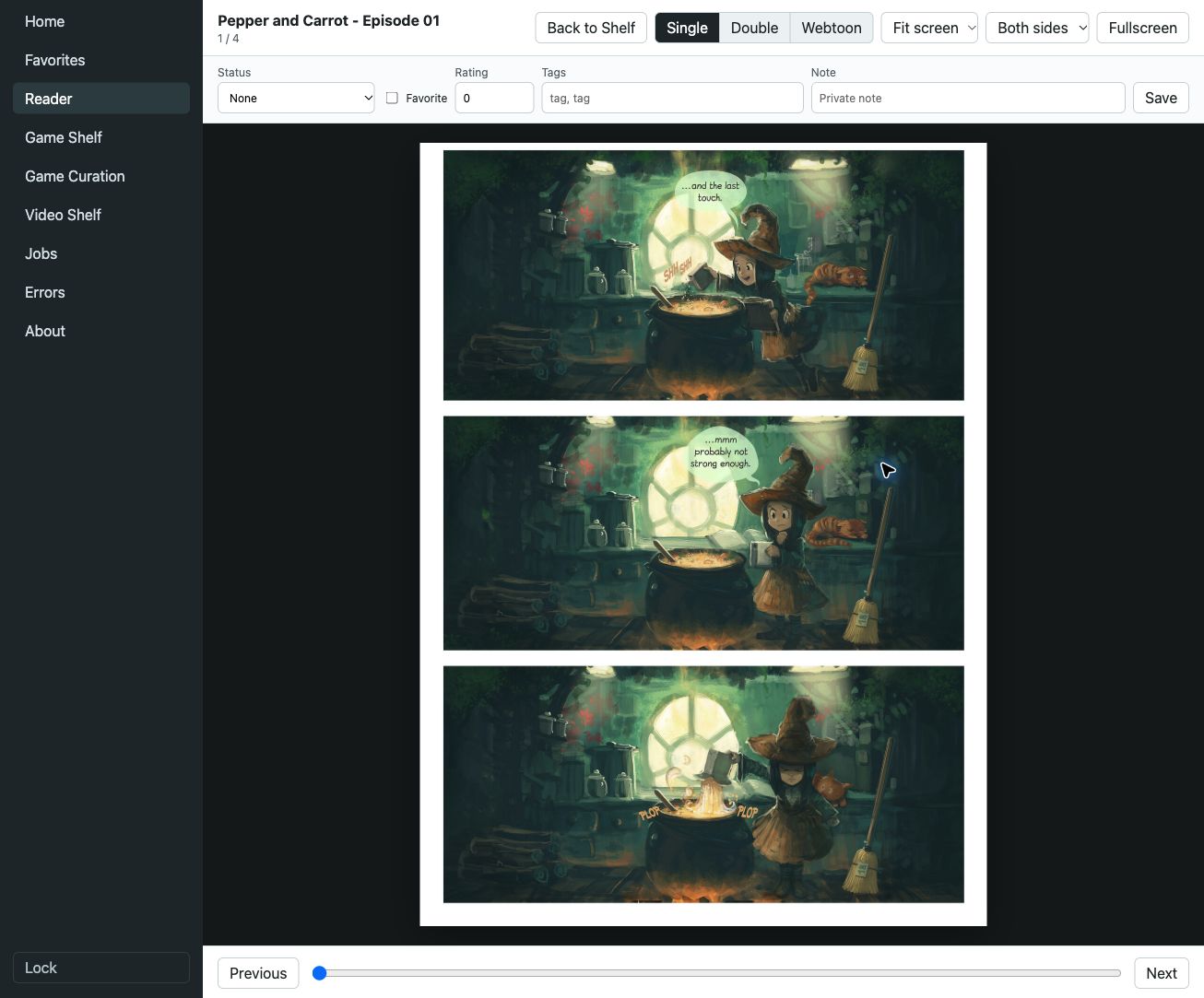
Pepper&Carrot by David Revoy, CC BY 4.0. Real test-instance capture; source, credits, and capture notes.
FolioSpace Library is the server layer. Your files stay on the Docker host or compatible NAS you control; clients connect to that service instead of turning FolioSpace into a hosted cloud library.
| Product | Personal content experience | Official links |
|---|---|---|
| FolioSpace Reader | Native EPUB, PDF, comic, and webtoon reading on iPhone, iPad, and Apple Vision Pro. Import files for offline reading or optionally connect Library. | App Store · Product website |
| FolioLume Player | Organize and watch your personal film collection, with supported local/network sources and compatible Blu-ray ISO/BDMV playback and menus. The current App Store lists iPhone, iPad, Mac, Apple Vision Pro, and Apple TV; format, hardware, and release compatibility apply. | App Store · Product website |
| SpatialEMU | Browse and play your own compatible retro game files, using local imports or optional Library catalogs, supported saves, and play records. Apple clients cover iPhone, iPad, Apple Vision Pro, Apple TV, and Apple silicon Mac; Windows is a separate download. | App Store · Product website · Downloads |
Platform availability and app features were checked against the official websites and App Store listings on 2026-10-10; current device/region availability is determined by the store. The Reader website describes the native app; Library's bundled web reader is served by your own Library instance.
All three apps can be used independently of Library. Library serves files you provide and control; it does not supply a third-party content catalog, books, films, ROMs, BIOS, or firmware. Player's app-level Blu-ray support is not a promise that Library scans or serves disc menus through its video API.
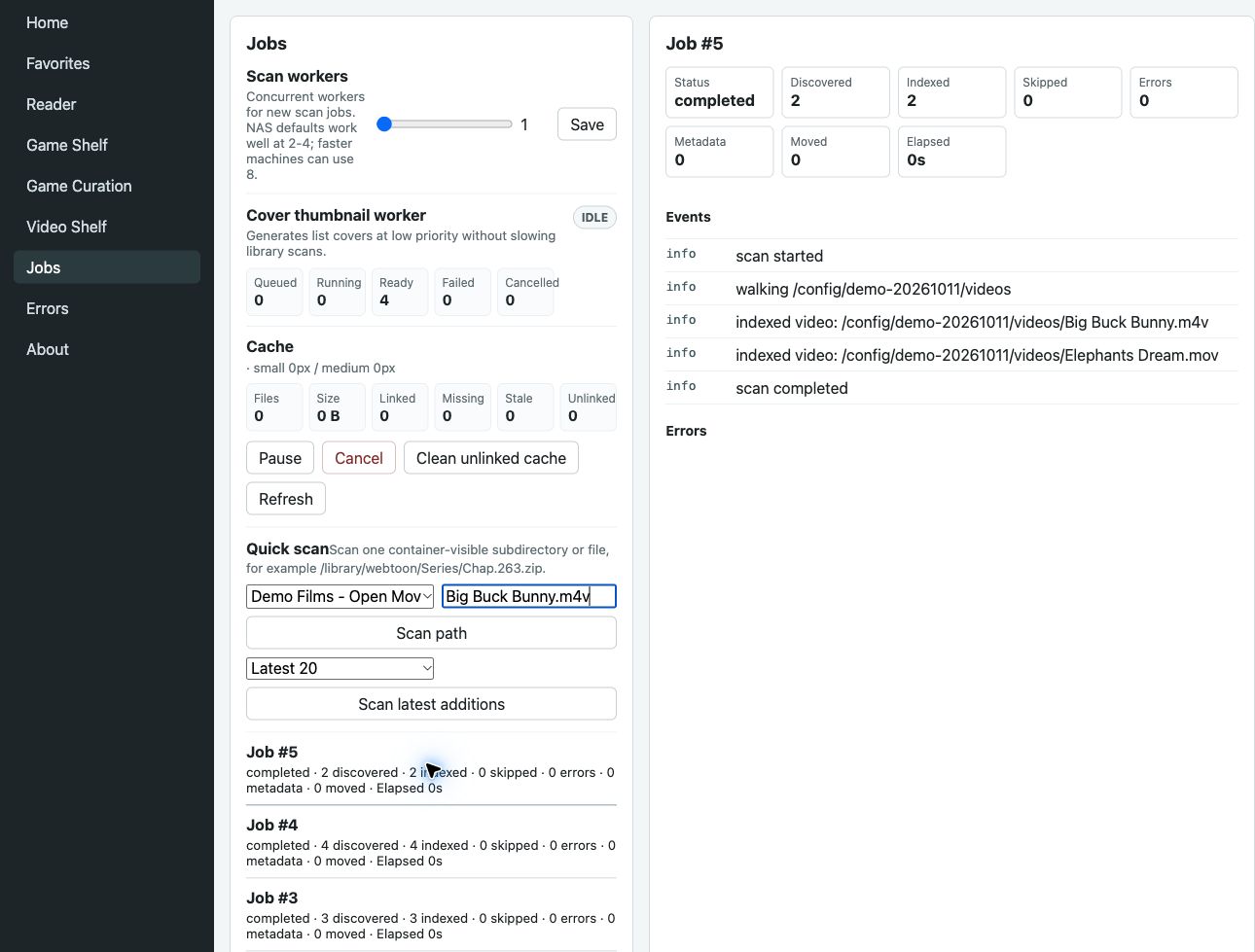
These English web UI captures were taken on 2026-10-11 from an owner-confirmed test instance using public-domain and openly licensed demonstration files. They show the bundled reading and administration experience. Capture notes and content credits record the exact capture environment; its old version label is not a 1.03 screenshot or proof of native-client interoperability.
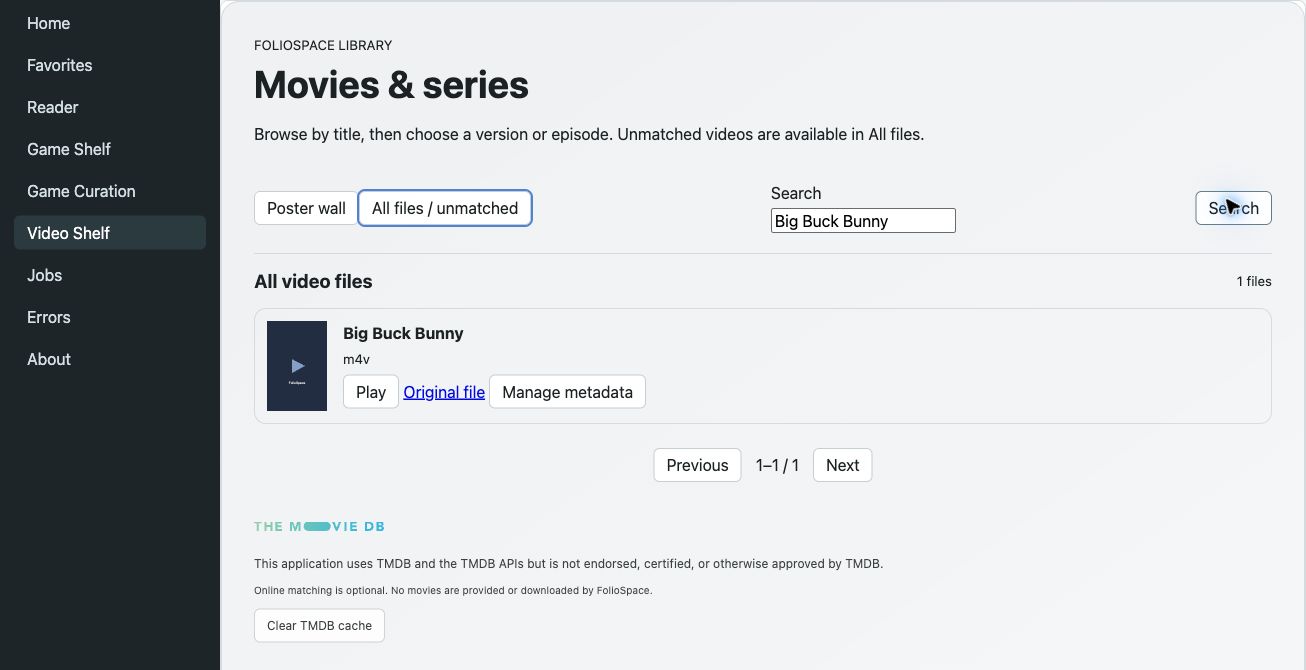
Captured on the pre-release test UI whose movie-library implementation is included in 1.03. Big Buck Bunny © 2008 Blender Foundation, CC BY 3.0. This is a real file-list capture, not a fabricated poster-wall mockup; credits and limitations.
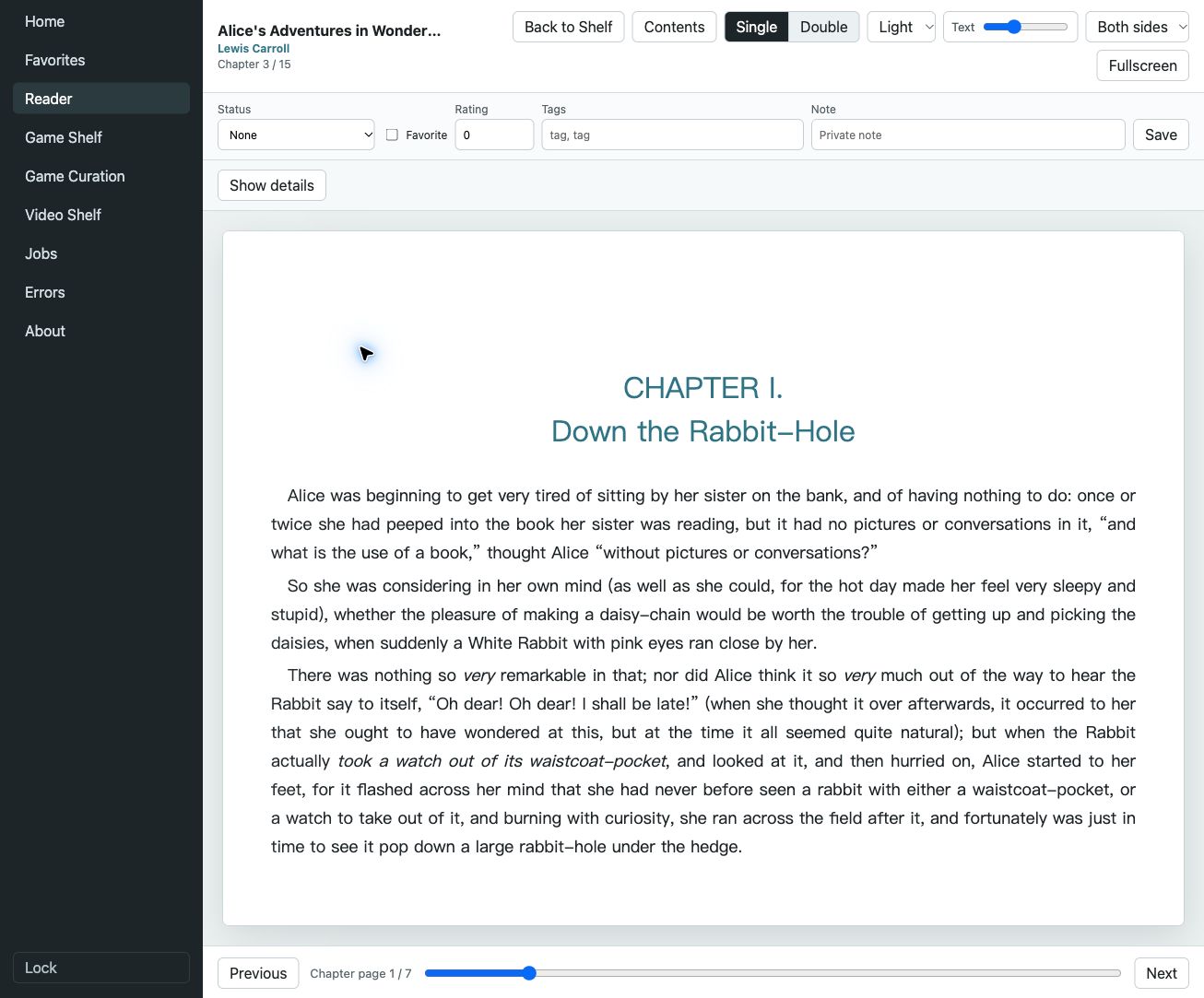
Lewis Carroll's Alice's Adventures in Wonderland, from Project Gutenberg.
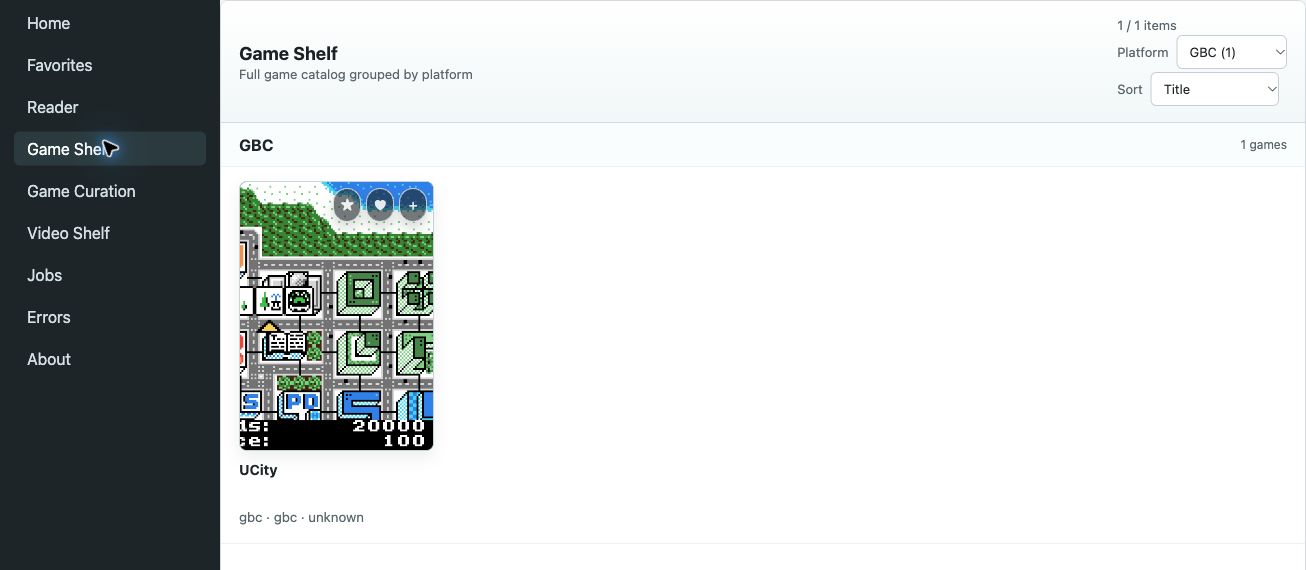
UCity by Antonio Niño Díaz / SkyLyrac; original author screenshot, CC BY-SA 4.0 artwork. Catalog indexing and checksums were verified; emulator gameplay was not tested.
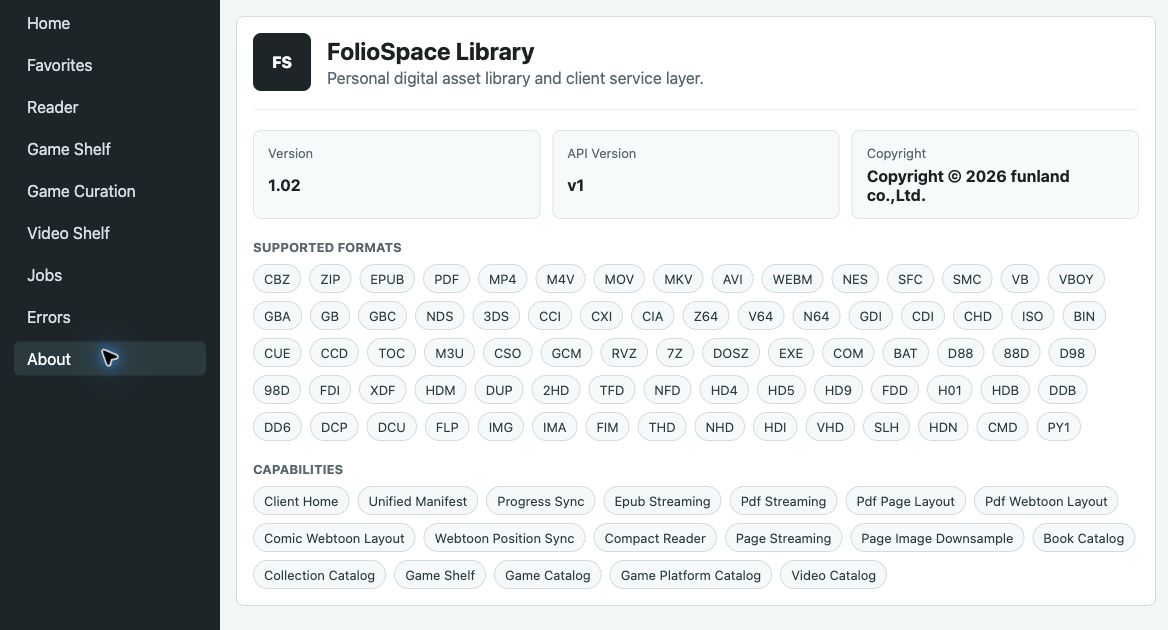
Use /api/client/info for the complete, machine-readable capabilities of your own running instance.
Copyright (C) 2026 funland co.,Ltd.
The server and web application source in this repository is released under the GNU Affero General Public License v3.0. See LICENSE.
FolioSpace Library indexes user-owned local files only. It does not distribute books, comics, ROMs, movies, or other media content.
/config: SQLite database, generated covers/thumbnails, runtime cache./library: read-only mounted asset library root./books, /games, /videos: optional read-only roots used by the default Docker compose example.8080: web UI and HTTP API.Example NAS config root:
/volume1/docker/foliospace-library
The backend requires Go 1.22 or newer. The frontend requires Node.js 20 or newer.
npm --prefix web install
npm --prefix web run build
go test ./...
go run ./cmd/foliospace-reader
FOLIOSPACE_CONFIG_DIR=/config
FOLIOSPACE_LIBRARY_DIR=/library
FOLIOSPACE_DIRECTORY_ROOTS=/library,/books,/games
FOLIOSPACE_ADDR=:8080
FOLIOSPACE_API_TOKEN=
FOLIOSPACE_SCAN_WORKERS=2
FOLIOSPACE_DISABLE_GAME_LAUNCH_RESOLVER=true
Set FOLIOSPACE_API_TOKEN to require API authentication from environment variables. If it is empty, release 0.966 can create the first access token from the web setup page and stores only a SHA-256 token hash in SQLite. Native clients can send Authorization: Bearer <token>. The web UI stays publicly loadable, then prompts for the access token and receives an HttpOnly cookie so covers, pages, and EPUB iframe resources can load through normal browser requests.
The normal server executable defaults to a disabled launch resolver (config.Load); the Dockerfile and Compose file do not override that setting. A directly embedded httpapi.New/zero-value Options instead enables it, so discover the running instance through /api/client/info rather than inferring from an example. With FOLIOSPACE_DISABLE_GAME_LAUNCH_RESOLVER=true, the server advertises gameLaunchResolver: false and returns 404 from the resolve endpoint, allowing compatible clients to use the established game manifest flow. Set the variable to false only after the runtime target catalog and profile migration have passed client acceptance tests.
Authentication helpers:
GET /api/auth/status: returns whether token auth is enabled.POST /api/auth/check: accepts {"token":"..."} and returns {"ok":true} for a valid token.POST /api/auth/logout: clears the web auth cookie.First-run setup helpers:
GET /api/setup/status: returns whether the service has an access token and at least one library.POST /api/setup/initialize: creates the first access token and first library.GET /api/config/directory-roots: returns container-visible root directories for the setup picker.Fresh installations can also configure the game catalog pipeline during setup. FolioSpace classifies new game files after scanning, keeps unverified archives in needs-curation, and exposes them for discovery without claiming that a compatible launch profile exists. Dependency-only files remain hidden from client catalogs. The setup page can enable automatic post-scan analysis, local/Libretro cover matching, optional Hasheous hash metadata, and explicit FBNeo/MAME compatibility policy paths under /config/policies.
Game catalog discovery is manifest-first while the resolver is stabilized. A missing runtime profile never removes a game from lists, search, or facets. The resolver remains disabled by default, allowing existing clients to use canonical manifests; strict FBNeo and MAME negotiation will be re-enabled only after policy migration and physical-device acceptance. Runtime descriptors accept an optional coreBuildId; when the resolver is explicitly enabled, the server also advertises stableRuntimeIdentityV1 so supported clients can negotiate exact runtime builds while retaining legacy manifest fallback.
After setup, open Game Curation in the web sidebar to inspect ready games, dependencies, and records that need attention. The page reports missing identity, launch-file checksum coverage, missing policy packs, and failed launch-profile audits; it can run bounded checksum backfill, re-run catalog analysis, batch-match local covers, optionally try Libretro artwork, and edit metadata without moving the source ROM. See docs/operations/game-catalog-curation.md for the complete workflow.
Detailed client integration docs are in docs/api/client-v1.md.
GET /api/client/info: service metadata, supported formats, and capability flags.GET /api/client/home: limited reading shelves, gameShelf, videoShelf, and collections in one response; includeCollections=false skips collection expansion.GET /api/client/books: paginated all-books catalog for native All / Library overview screens.GET /api/collections?primaryType=comic&limit=60&offset=0: paginated collection catalog for native Home / collection overview screens.GET /api/client/books/:id/manifest: a client-safe open manifest with readerModes and defaultReaderMode. CBZ/ZIP books include page URLs; EPUB books include spine, TOC, resourceBaseUrl, coverUrl, and progress; PDF books expose an opaque Range-capable stream URL for single-page, double-page, or webtoon/vertical-scroll client layouts.GET /api/books/:id/reading-position and PUT /api/books/:id/reading-position/webtoon: structured webtoon progress using a stable page key plus normalized page Y offset, with automatic legacy /progress fallback compatibility.GET /api/client/games, /api/client/games/facets, and /api/client/games/platforms: paginated discovery, indexed platform counts, and platform capability metadata.GET /api/client/videos and /api/client/videos/:id/manifest: paginated video browsing and direct/Range or on-demand HLS URLs. HLS retry rules apply.GET /api/client/games/:id/manifest: a client-safe game launch manifest with platform, checksums, emulator hint, and opaque file URLs. Sega Model 2 keeps original MAME ZIP names and bytes, exposes operator-arcade input metadata, and resolves hidden runtime dependencies without inflating facets. Nintendo 64 .z64, .v64, and .n64 games, Virtual Boy .vb/.vboy games, and PC-98 disk images are validated before indexing and downloaded as raw media bytes even when stored in a single-media ZIP. PC-98 multi-disk sets expose one ordered entry/dependency list, while byte-identical mirrors are collapsed into one catalog record. Dreamcast GDI, Saturn CUE, and PC-FX CUE/M3U manifests include the descriptor plus every required track in files[]. DOS ZIP/DOSZ archives keep their exact download bytes and add safe inner-archive launch candidates, hash-matched localized metadata, covers, and curated launch commands from a controlled games.json source.GET/PUT /api/client/games/:id/play-stats: profile-scoped first/last played time, cumulative play seconds, and launch count. Clients report cumulative seconds per stable session id, so heartbeat retries are idempotent.GET/PUT /api/client/books/:id/private-state: client-safe private status, favorite, rating, tags, and note sync.GET/PUT /api/client/preferences: client UI language and reader preference sync.GET/PUT /api/settings/scan: scan worker settings for NAS devices with different CPU and memory budgets.GET /api/client/search, /api/client/books/favorites, and /api/client/books/private-status/:status: private-state-aware discovery shelves.POST /api/libraries/:id/scan supports full scans, targeted path scans, and mode: "recent" scans for only the latest new or changed files.Client API book, game, and video DTOs omit source file paths. Collection DTOs still include legacy directoryPath; treat it as sensitive metadata, never as a client download path. Returned cover, thumbnail, page, EPUB, game, and video URLs are opaque service URLs; clients should preserve query parameters because FolioSpace uses them for cache-compatible media refreshes while keeping older routes valid.
Release 0.91 added a compact mobile reading mode tuned for Safari and small screens:
This mode is meant for phone and tablet browsing. Native clients can still use the stable Client API manifests and implement their own reading UI.
Release 0.93 adds anchored webtoon reading positions for long-strip comics and PDF/image webtoon layouts:
pageKey anchors and falls back to page index or document progress when needed.GET /api/books/:id/reading-position and PUT /api/books/:id/reading-position/webtoon for native clients./progress remains compatible through locator: "webtoon:<fraction>", so older clients and MCP progress tools keep working.Release 0.931 is a PDF webtoon stability hotfix:
Release 0.932 is a large-library scan performance hotfix:
Unsorted-style imports.Release 0.95 collects the post-0.932 reader and library-state fixes:
Release 0.96 adds a fast import path for large libraries:
mode: "recent" to index only the newest new or changed files under a library or subdirectory.foliospace.scan_recent, matching the HTTP API and allowing agents to trigger recent-file scans safely.recentScan: true from /api/client/info.Release 0.961 is a cleanup and cover-refresh hotfix:
__MACOSX/ and ._*, fixing doubled page counts and broken pseudo-pages in affected archives.0.961.Release 0.965 adds paginated catalog APIs for native clients:
GET /api/client/books returns a client-safe paginated All Books catalog with limit, offset, q, sort, direction, and format.manifestUrl so clients can open an item directly through the stable manifest route.GET /api/collections supports an optional paginated shape for Home / collection overview screens, including primaryType=book or primaryType=comic.GET /api/collections without query parameters remains an array response for existing web UI compatibility./api/client/info advertises bookCatalog: true and collectionCatalog: true.Release 0.966 adds embedded JSON metadata support for comic archives:
metadata.json, info.json, comicinfo.json, and 元数据.json.name, author, description, and tags map onto the existing book title, creator, description, and tag fields without a database migration.C106, 中文, or custom pack tags can find the indexed book.Release 0.969 improves metadata and scan hygiene for mixed book/comic libraries:
media, thumbnails, covers, __MACOSX, and @eaDir, preventing artwork and sidecar folders from being indexed as books.0.969.Release 0.970 improves game library organization and user-curated shelves:
gamelist.xml export for launcher-style integrations.0.970.Release 0.975 is a stability and performance hotfix for large game libraries:
0.975.Movie-library P0/P1/P2 is now included: consistent posters, local metadata and optional TMDB matching, seasons/episodes/versions, profile-scoped playback state, continue/next-up and explicit episode availability. Previous reader/game features remain intact. Full release notes and upgrade cautions.
TMDB requires your own API Read Access Token and remains disabled by default. No shared key is shipped; commercial permission and attribution are separate requirements. Setup · 中文.
FONT.bmp with its own checksum, and targeted rescans detect font-only changes. See font configuration..iso, .gcm, and .rvz files in a Triforce directory/library use the existing ngc / dolphin client route while retaining romSetName=Triforce. This is server catalog/routing support, not a guarantee of client gameplay or BIOS setup.简体中文:1.02 合并已在生产使用的 PC-98 独立字体与 Triforce 目录路由修复;保留 1.01 兼容性。字体变更后请定向扫描并刷新客户端 manifest;Triforce 实际运行仍取决于客户端模拟核心与配置。
Release 1.01 improves MAME upgrades without reintroducing FBNeo build-identity barriers:
contentAudit provenance.foliospace-mame-content-registry tool lets administrators generate reviewed evidence for later releases. A custom registry remains authoritative and is never overwritten. See MAME compatibility and upgrade notes.coreSha256 and coreBuildId remain diagnostic for supported official clients, as in 1.00. Re-signing or updating an application does not by itself block an otherwise approved FBNeo profile.1.01; Docker images support Linux AMD64 and ARM64.简体中文:1.01 为已有审核档案增加 MAME 跨版本内容兼容支持,内置 0.287 / 0.288 / 0.289 的内容定义证据,并附带管理员生成工具。FBNeo 不恢复 App 指纹或构建标识拦截;现有资料库、CIA 安装与断点下载保持兼容。升级不会自动导入游戏或改写管理员策略。
Release 1.00 makes the optional SpatialEMU + FolioSpace path understandable without requiring NAS or developer knowledge:
1.00.Release 0.998 adds an explicit, resumable Nintendo 3DS CIA installation contract for Apple clients:
contentMode=install, validation=client, the original filename, byte size, SHA-1, download URL, and installation-action URL.cia-install-v1 can negotiate POST /api/client/games/{gameId}/install; unsupported clients receive the stable content-mode-unsupported error instead of a misleading missing launch profile..3ds, .cci, and .cxi images keep their existing launch behavior.0.998.Release 0.997 restores stable Apple default FBNeo target coverage while keeping ROM validation content-based and strict:
coreSha256 and coreBuildId values are diagnostic only for supported official Windows, macOS, iOS, iPadOS, visionOS, tvOS, and Android clients. App signing, packaging, or core updates no longer block an otherwise approved launch profile.libretro/fbneo route, ROM profile, and complete dependency closure. MAME content-set matching and Android Flycast identity rules are unchanged.ioc1.ic7 PLD variant (279 bytes, CRC 0d182081) is registered narrowly for captcomm; unrelated or damaged content remains rejected.0.997.Release 0.996 adds audited Point Blank launch support for SpatialEMU Apple clients:
ptblank and ptblanka fingerprints now route to FBNeo instead of MAME metadata.coreBuildId identities while retaining strict rejection of unknown builds and legacy SHA-256 compatibility for older approved profiles.ptblank resolves with namcoc75.zip; ptblanka resolves with its parent ptblank.zip plus namcoc75.zip.namcoc75.zip is reconciled to catalog role dependency, keeping it out of client game directories while preserving resolver access.0.996.Release 0.995 expands safe native game delivery, compatibility curation, and offline access:
.3ds/.cci NCSD images, .cxi NCCH images, safe single-image ZIP packages, and the bounded section layout of .cia installers before indexing. Launchable images stream as their original inner bytes. CIA records are explicitly marked contentMode=install, advertise validation=client, and use the capability-gated cia-install-v1 action instead of entering the ordinary launch resolver.namcoc71 device ROM, without renaming or rewriting the source ZIP._maintenance directories by default.0.995.Release 0.994 expands native game delivery and adds stable offline identity for books and comics:
.nds files and supported single-ROM ZIP packages are indexed as canonical nds games, matched against Nintendo DS artwork, and negotiated only with the exact melonds-ds core on supported physical Apple clients..cue, .iso, and .chd images are indexed as canonical 3do games. CUE manifests preserve every referenced track, exclude BIOS files from the public catalog, and require an Opera-compatible client runtime..py1 descriptors are indexed as one game with their seven validated relative dependencies, complete file checksums, and an explicit pcsx2-reliquary launch contract.USER.FDI plus CUE/BIN CD media are published as one launchable game with a complete ordered manifest instead of separate or missing entries.awbios.zip dependency when required.contentHash, contentHashAlgorithm, fileSize, and contentRevision fields. A serialized background worker computes full-file SHA-256 values without blocking list or manifest requests and invalidates them when source bytes or page manifests change.0.994.Release 0.993 adds Nintendo Virtual Boy support and a server-owned game-platform catalog:
.vb and .vboy ROMs are classified as platform: "virtualboy" and exposed through existing game list, facet, manifest, and cover APIs.boxart directories are matched using normalized ROM and artwork names and take priority over previously cached network artwork.GET /api/client/games/platforms returns stable platform IDs, display titles, aliases, indexed counts, and availability so clients can build filters without a hard-coded platform allow-list./api/client/info advertises the additive gamePlatformCatalog capability; older clients and servers can continue using /api/client/games/facets.foliospace.get_game_platform_catalog while retaining the existing inventory-only platform facets tool.0.993.Release 0.992 stabilizes game delivery and improves responsiveness on large NAS libraries:
needs-curation records.0.992.Release 0.991 is a focused web catalog hotfix for CPS libraries:
cps1, cps2, and cps3 platform values used by the server./api/client/games.needs-curation records no longer inflate platform counts that lead to empty filtered pages.0.991.Release 0.990 introduces the Game Curation Center, a complete post-scan workflow for turning raw ROM imports into a clean, client-safe game catalog:
needs-curation records with actionable issue messages.media/<ROM name>/boxFront.*; optional Libretro matching can fill remaining artwork.0.990.See docs/operations/game-catalog-curation.md for setup, policy, and recovery details.
Release 0.982 makes audited arcade launch profiles durable and rebuildable for existing libraries:
foliospace-rebuild-launch-profiles maintenance command validates existing FBNeo ZIP sets against a deployment-supplied official Arcade DAT without rescanning or rewriting ROM files.listxml; Model 2 uses ZIP stems as canonical set names and publishes only archives whose complete parent/device/BIOS closure is available.needs-curation; segabill.zip remains a dependency only.409 runtime-profile-not-available.needs-curation records as playable games.0.982.The FBNeo DAT is intentionally not bundled in the image. Mount or copy it to /config/policies/fbneo-arcade.dat, then run the rebuild once after upgrading:
docker exec foliospace-library /app/foliospace-rebuild-launch-profiles \
  --dat=/config/policies/fbneo-arcade.dat
For Model 2, place the official MAME 0.288 listxml ZIP at /config/policies/mame0288lx.zip, inspect a dry-run, and then repeat without --dry-run:
docker exec foliospace-library /app/foliospace-rebuild-launch-profiles \
  --policy=mame \
  --mame-listxml=/config/policies/mame0288lx.zip \
  --platforms=model2 \
  --dry-run
Release 0.981 adds tiered launch-profile negotiation for native game clients while preserving the existing manifest contract:
POST /api/client/games/:id/resolve selects a compatible profile from the authoritative client and runtime inventory in the request body.dosLaunch contract and accept Windows DOSBox Staging 0.82.2.0 while preserving the exact selected runtime tuple in the response. Ambiguous DOS entries remain unavailable until curated.sf2, sfa, and sfiii profiles require the exact bundled FBNeo core hash.hypreact, hypreac2, srmp4, fromancr, fromanc4, and mcnpshnt; the latter receives ym2413.zip as a logical dependency alias while the physical source remains unchanged.409 runtime-profile-not-available instead of silently choosing a nearby ROM set.GET /api/client/games/:id/manifest unchanged.foliospace.resolve_game_launch_profile for the same exact negotiation flow.0.981.Release 0.98 expands game-platform indexing and adds a curated DOS launch contract:
foliospace.list_game_platforms, backed by full-library facets rather than a partial game page.games.json, including title, metadata, cover mapping, executable launch command, working directory, and package manifest data.0.98.Release 0.978 adds profile-scoped game play-time synchronization for native emulators and agents:
GET and PUT /api/client/games/{gameId}/play-stats expose first/last played time, total play seconds, and launch count without exposing NAS paths.foliospace.get_game_play_stats and foliospace.report_game_play_session for agents using the same profile-scoped data./api/client/info advertises gamePlayStats: true for capability detection.0.978.Release 0.977 expands FolioSpace Library's ROM ingestion and launch-manifest support across six additional console and arcade platforms:
dreamcast; GDI descriptors and every referenced track are delivered as one launchable package.saturn; referenced audio/data tracks no longer appear as separate catalog entries..z64, .v64, and .n64 ROMs are validated by byte-order headers; supported single-ROM ZIPs expose the original ROM payload to clients.model2, receive friendly titles and compatibility states, use the operator-arcade input profile, and keep runtime BIOS packages searchable without inflating platform counts.0.977.Release 0.976 is a T0 memory-safety and reader ergonomics release:
0.976.Agent integration docs are in docs/mcp/usage.md. The MCP server wraps the stable Client API for diagnostics, library lookup, manifests, favorites/private-status shelves, preferences, private reader state, game private state, progress, scan jobs, recent-file scans, scan worker settings, job control, manual collections, and collection access. Heavy media streams still use the HTTP URLs returned by the API.
End users can install the MCP binary on the machine where their agent client runs:
curl -fsSL https://foliospace.app/install-mcp.sh | sh
Release maintainers can build macOS/Linux MCP packages with:
VERSION=1.03 ./scripts/build-mcp-release.sh
Detailed product direction and the proposed Asset / LibraryItem model are in docs/product/foliospace-library-direction.md.
Core asset types:
ROM support is for indexing and launching user-owned local content. FolioSpace Library does not distribute ROMs, provide download sources, or bundle pirated assets.
The included Compose file is ready to use without cloning or building the application source. It pulls the published multi-architecture image for Linux AMD64 and ARM64 hosts.
Download the two deployment files into an empty directory:
curl -O https://raw.githubusercontent.com/funland/foliospace-Library/main/docker-compose.yml
curl -o .env https://raw.githubusercontent.com/funland/foliospace-Library/main/.env.example
Edit .env and set the host directories that contain your media. Then start
the service:
mkdir -p data/config data/library data/books data/games data/videos
docker compose up -d
docker compose ps
Open http://<docker-host>:8080. On a fresh /config, the setup page asks for
an access key and lets you choose a container path such as /library, /books,
/games, or /videos.
The default deployment currently pins this image:
docker pull funland/foliospace-library:1.03
To upgrade later, change FOLIOSPACE_IMAGE in .env, then run:
docker compose pull
docker compose up -d
The /config host directory is writable and persistent. Media directories are
mounted read-only. Back up /config before an upgrade because it contains the
SQLite database, generated covers, preferences, and runtime cache.
Example Synology-style .env paths:
FOLIOSPACE_CONFIG_PATH=/volume1/docker/foliospace-library/config
FOLIOSPACE_LIBRARY_PATH=/volume2/Media
FOLIOSPACE_BOOKS_PATH=/volume2/ComicCenter
FOLIOSPACE_GAMES_PATH=/volume2/GameROMS
FOLIOSPACE_VIDEOS_PATH=/volume2/MovieCollection/Movies
If port 8080 is already occupied, change only the host port:
FOLIOSPACE_PORT=18080
For a one-off NAS deployment without Compose:
docker run -p 8080:8080 \
  -v /volume1/docker/foliospace-library/config:/config \
  -v /volume2/ComicCenter:/library:ro \
  -v /volume2/Books:/books:ro \
  -v /volume2/GameROMS:/games:ro \
  -v /volume2/MovieCollection/Movies:/videos:ro \
  -e FOLIOSPACE_DIRECTORY_ROOTS=/library,/books,/games,/videos \
  funland/foliospace-library:1.03
If a directory is missing from the setup page, add its Docker volume mapping first. FolioSpace Library can only browse paths visible inside the container.
For source development, overlay the build configuration explicitly:
docker compose -f docker-compose.yml -f docker-compose.build.yml up -d --build
Docker Hub releases are built by GitHub Actions from Git tags. Configure these repository secrets before publishing:
DOCKERHUB_USERNAMEDOCKERHUB_TOKENThen create and push a version tag:
git tag v1.03
git push github v1.03
The workflow builds linux/amd64 and linux/arm64 images, then pushes funland/foliospace-library:1.03 and funland/foliospace-library:latest.
.cbz, .zip, .epub..nes, .sfc, .smc, .gba, .gb, .gbc, .nds, .3ds, .cia, .gdi, .cdi, .chd, .iso, .bin, .cue, plus validated PC-98 floppy and hard-disk image formats. Nintendo DS .nds files are exposed as single-entry games for the exact melonds-ds mobile runtime. 3DO .cue, .iso, and .chd images use canonical 3do metadata; CUE tracks remain dependencies and require a client-reported Opera core. .zip and .7z are treated as ROM sets only when the library type is game; PC-98 ZIP ingestion is limited to one validated media image and does not accept .7z, RAR, or TAR containers.Unsorted./config/cache/game-covers. Nintendo 3DS CIA files remain byte-exact client-side installation content; the server supplies size, SHA-1, range delivery, and a cia-install-v1 action but never decrypts or installs them. Dreamcast .gdi, Saturn .cue, and PC-FX .cue/.m3u sets are indexed as one launchable game; referenced track files remain dependencies instead of separate catalog records. PC-FX multi-disc folders are merged into one virtual M3U package, and Pegasus metadata plus local media/.../boxFront.* or PC-FX Covers/* [正面].jpg artwork is used when available. PC-98 media uses canonical pc98 / PC-98 / np2kai metadata, decodes CP932 archive names, rejects firmware/tool/DOS support files, merges byte-identical mirrors by raw-image SHA-1, and groups explicitly numbered disks into one ordered launch manifest.Near-term expansion priority:
Your personal digital assent library runs on NAS or Dokcer
See the codeWebsite · Docker Hub · Reader · Player · SpatialEMU · 简体中文 · Client API · MCP
FolioSpace Library is the optional, self-hosted content foundation connecting FolioSpace Reader, FolioLume Player, and SpatialEMU around your personal collection. It runs with Docker/Compose on a Mac, Windows or Linux computer, or a compatible NAS. The server indexes books, PDFs, comics, games, and local videos, and exposes catalogs, metadata, media URLs, reading progress, and supported private state through its web UI, HTTP API, and MCP.
Reader, Player, and SpatialEMU provide the reading, viewing, and retro gaming experiences. Each can use supported files or sources independently of Library. Release 1.03 adds movie/TV works, artwork, seasons, versions, playback-state synchronization, and continue/next-up APIs alongside the existing video catalog and direct/Range delivery. Compatible FolioLume test clients implement these features; availability in a public app build must be checked separately. A catalog entry or server capability does not guarantee playback on every client.
Other clients are welcome. Build your own reader, catalog browser, game frontend, or media client using the stable Client API v1. Keep feature discovery and compatibility checks in your client; Library is a shared content service, not a full Plex, Jellyfin, or Immich replacement.
Current release: 1.03.
The server primarily catalogs and delivers original files; dedicated clients decode and play them. Existing HLS remains an optional compatibility path, not a new always-on transcoding service. All earlier reader/game, CIA, MAME/FBNeo, PC-98 font, Triforce, and resumable-download features remain included.
TMDB is optional and bring-your-own-credential. Apply through your own TMDB account and configure your own API Read Access Token on the server. We provide no shared developer key. A personal token or this project's software license does not automatically authorize commercial use; review TMDB's terms, applicable commercial licensing, and attribution requirements. Keep tokens out of Git, URLs, logs and screenshots. See the TMDB setup and licensing notes · 中文.
See release notes, movie-library API, and season/progress API. Client integration was built/tested separately; Mac/iPad development packages were installed, while cross-device playback acceptance and visionOS/tvOS device checks remain distinct. No App Store update is implied by this server release.
FolioSpace is optional for SpatialEMU. SpatialEMU can open supported local files directly without a FolioSpace server.
You do not need a NAS and you do not need to write code. To use the self-hosted catalog, you need Docker, one or more media folders, the FolioSpace service URL, and an access token that you create during first-run web setup.
The SpatialEMU macOS app is a client, not the server. FolioSpace Library currently runs from the published Linux Docker image; there is no separate native macOS FolioSpace server app.
FolioSpace Library is a self-hosted Docker service for indexing and accessing your own books, PDFs, comics, games, and local videos across clients. Photo and broader spatial-media indexing are product direction, not current Client API promises.
No. FolioSpace runs with Docker on a computer or compatible NAS that you control. Your files remain under your control, and media is delivered through authenticated service URLs. Legacy collection/admin metadata can still contain path fields; see the API privacy notes.
The web UI, FolioSpace Reader, SpatialEMU, compatible FolioLume Player builds, MCP-enabled agents, and independently developed clients can use the implemented APIs. Check /api/client/info and the actual client version for movie-library/progress support. See Clients and Downloads for product links and current boundaries.
The fastest deployment path is the published multi-architecture Docker image. Follow the beginner quick start or Compose quick start, then open http://<docker-host>:8080 and complete first-run setup.
No. FolioSpace indexes and serves files that you provide and have the right to use. It does not bundle books, films, games, ROMs, BIOS, firmware, or a third-party download catalog.
Pepper&Carrot by David Revoy, CC BY 4.0. Real test-instance capture; source, credits, and capture notes.
FolioSpace Library is the server layer. Your files stay on the Docker host or compatible NAS you control; clients connect to that service instead of turning FolioSpace into a hosted cloud library.
| Product | Personal content experience | Official links |
|---|---|---|
| FolioSpace Reader | Native EPUB, PDF, comic, and webtoon reading on iPhone, iPad, and Apple Vision Pro. Import files for offline reading or optionally connect Library. | App Store · Product website |
| FolioLume Player | Organize and watch your personal film collection, with supported local/network sources and compatible Blu-ray ISO/BDMV playback and menus. The current App Store lists iPhone, iPad, Mac, Apple Vision Pro, and Apple TV; format, hardware, and release compatibility apply. | App Store · Product website |
| SpatialEMU | Browse and play your own compatible retro game files, using local imports or optional Library catalogs, supported saves, and play records. Apple clients cover iPhone, iPad, Apple Vision Pro, Apple TV, and Apple silicon Mac; Windows is a separate download. | App Store · Product website · Downloads |
Platform availability and app features were checked against the official websites and App Store listings on 2026-10-10; current device/region availability is determined by the store. The Reader website describes the native app; Library's bundled web reader is served by your own Library instance.
All three apps can be used independently of Library. Library serves files you provide and control; it does not supply a third-party content catalog, books, films, ROMs, BIOS, or firmware. Player's app-level Blu-ray support is not a promise that Library scans or serves disc menus through its video API.
These English web UI captures were taken on 2026-10-11 from an owner-confirmed test instance using public-domain and openly licensed demonstration files. They show the bundled reading and administration experience. Capture notes and content credits record the exact capture environment; its old version label is not a 1.03 screenshot or proof of native-client interoperability.
Captured on the pre-release test UI whose movie-library implementation is included in 1.03. Big Buck Bunny © 2008 Blender Foundation, CC BY 3.0. This is a real file-list capture, not a fabricated poster-wall mockup; credits and limitations.
Lewis Carroll's Alice's Adventures in Wonderland, from Project Gutenberg.
UCity by Antonio Niño Díaz / SkyLyrac; original author screenshot, CC BY-SA 4.0 artwork. Catalog indexing and checksums were verified; emulator gameplay was not tested.
Use /api/client/info for the complete, machine-readable capabilities of your own running instance.
Copyright (C) 2026 funland co.,Ltd.
The server and web application source in this repository is released under the GNU Affero General Public License v3.0. See LICENSE.
FolioSpace Library indexes user-owned local files only. It does not distribute books, comics, ROMs, movies, or other media content.
/config: SQLite database, generated covers/thumbnails, runtime cache./library: read-only mounted asset library root./books, /games, /videos: optional read-only roots used by the default Docker compose example.8080: web UI and HTTP API.Example NAS config root:
/volume1/docker/foliospace-library
The backend requires Go 1.22 or newer. The frontend requires Node.js 20 or newer.
npm --prefix web install
npm --prefix web run build
go test ./...
go run ./cmd/foliospace-reader
FOLIOSPACE_CONFIG_DIR=/config
FOLIOSPACE_LIBRARY_DIR=/library
FOLIOSPACE_DIRECTORY_ROOTS=/library,/books,/games
FOLIOSPACE_ADDR=:8080
FOLIOSPACE_API_TOKEN=
FOLIOSPACE_SCAN_WORKERS=2
FOLIOSPACE_DISABLE_GAME_LAUNCH_RESOLVER=true
Set FOLIOSPACE_API_TOKEN to require API authentication from environment variables. If it is empty, release 0.966 can create the first access token from the web setup page and stores only a SHA-256 token hash in SQLite. Native clients can send Authorization: Bearer <token>. The web UI stays publicly loadable, then prompts for the access token and receives an HttpOnly cookie so covers, pages, and EPUB iframe resources can load through normal browser requests.
The normal server executable defaults to a disabled launch resolver (config.Load); the Dockerfile and Compose file do not override that setting. A directly embedded httpapi.New/zero-value Options instead enables it, so discover the running instance through /api/client/info rather than inferring from an example. With FOLIOSPACE_DISABLE_GAME_LAUNCH_RESOLVER=true, the server advertises gameLaunchResolver: false and returns 404 from the resolve endpoint, allowing compatible clients to use the established game manifest flow. Set the variable to false only after the runtime target catalog and profile migration have passed client acceptance tests.
Authentication helpers:
GET /api/auth/status: returns whether token auth is enabled.POST /api/auth/check: accepts {"token":"..."} and returns {"ok":true} for a valid token.POST /api/auth/logout: clears the web auth cookie.First-run setup helpers:
GET /api/setup/status: returns whether the service has an access token and at least one library.POST /api/setup/initialize: creates the first access token and first library.GET /api/config/directory-roots: returns container-visible root directories for the setup picker.Fresh installations can also configure the game catalog pipeline during setup. FolioSpace classifies new game files after scanning, keeps unverified archives in needs-curation, and exposes them for discovery without claiming that a compatible launch profile exists. Dependency-only files remain hidden from client catalogs. The setup page can enable automatic post-scan analysis, local/Libretro cover matching, optional Hasheous hash metadata, and explicit FBNeo/MAME compatibility policy paths under /config/policies.
Game catalog discovery is manifest-first while the resolver is stabilized. A missing runtime profile never removes a game from lists, search, or facets. The resolver remains disabled by default, allowing existing clients to use canonical manifests; strict FBNeo and MAME negotiation will be re-enabled only after policy migration and physical-device acceptance. Runtime descriptors accept an optional coreBuildId; when the resolver is explicitly enabled, the server also advertises stableRuntimeIdentityV1 so supported clients can negotiate exact runtime builds while retaining legacy manifest fallback.
After setup, open Game Curation in the web sidebar to inspect ready games, dependencies, and records that need attention. The page reports missing identity, launch-file checksum coverage, missing policy packs, and failed launch-profile audits; it can run bounded checksum backfill, re-run catalog analysis, batch-match local covers, optionally try Libretro artwork, and edit metadata without moving the source ROM. See docs/operations/game-catalog-curation.md for the complete workflow.
Detailed client integration docs are in docs/api/client-v1.md.
GET /api/client/info: service metadata, supported formats, and capability flags.GET /api/client/home: limited reading shelves, gameShelf, videoShelf, and collections in one response; includeCollections=false skips collection expansion.GET /api/client/books: paginated all-books catalog for native All / Library overview screens.GET /api/collections?primaryType=comic&limit=60&offset=0: paginated collection catalog for native Home / collection overview screens.GET /api/client/books/:id/manifest: a client-safe open manifest with readerModes and defaultReaderMode. CBZ/ZIP books include page URLs; EPUB books include spine, TOC, resourceBaseUrl, coverUrl, and progress; PDF books expose an opaque Range-capable stream URL for single-page, double-page, or webtoon/vertical-scroll client layouts.GET /api/books/:id/reading-position and PUT /api/books/:id/reading-position/webtoon: structured webtoon progress using a stable page key plus normalized page Y offset, with automatic legacy /progress fallback compatibility.GET /api/client/games, /api/client/games/facets, and /api/client/games/platforms: paginated discovery, indexed platform counts, and platform capability metadata.GET /api/client/videos and /api/client/videos/:id/manifest: paginated video browsing and direct/Range or on-demand HLS URLs. HLS retry rules apply.GET /api/client/games/:id/manifest: a client-safe game launch manifest with platform, checksums, emulator hint, and opaque file URLs. Sega Model 2 keeps original MAME ZIP names and bytes, exposes operator-arcade input metadata, and resolves hidden runtime dependencies without inflating facets. Nintendo 64 .z64, .v64, and .n64 games, Virtual Boy .vb/.vboy games, and PC-98 disk images are validated before indexing and downloaded as raw media bytes even when stored in a single-media ZIP. PC-98 multi-disk sets expose one ordered entry/dependency list, while byte-identical mirrors are collapsed into one catalog record. Dreamcast GDI, Saturn CUE, and PC-FX CUE/M3U manifests include the descriptor plus every required track in files[]. DOS ZIP/DOSZ archives keep their exact download bytes and add safe inner-archive launch candidates, hash-matched localized metadata, covers, and curated launch commands from a controlled games.json source.GET/PUT /api/client/games/:id/play-stats: profile-scoped first/last played time, cumulative play seconds, and launch count. Clients report cumulative seconds per stable session id, so heartbeat retries are idempotent.GET/PUT /api/client/books/:id/private-state: client-safe private status, favorite, rating, tags, and note sync.GET/PUT /api/client/preferences: client UI language and reader preference sync.GET/PUT /api/settings/scan: scan worker settings for NAS devices with different CPU and memory budgets.GET /api/client/search, /api/client/books/favorites, and /api/client/books/private-status/:status: private-state-aware discovery shelves.POST /api/libraries/:id/scan supports full scans, targeted path scans, and mode: "recent" scans for only the latest new or changed files.Client API book, game, and video DTOs omit source file paths. Collection DTOs still include legacy directoryPath; treat it as sensitive metadata, never as a client download path. Returned cover, thumbnail, page, EPUB, game, and video URLs are opaque service URLs; clients should preserve query parameters because FolioSpace uses them for cache-compatible media refreshes while keeping older routes valid.
Release 0.91 added a compact mobile reading mode tuned for Safari and small screens:
This mode is meant for phone and tablet browsing. Native clients can still use the stable Client API manifests and implement their own reading UI.
Release 0.93 adds anchored webtoon reading positions for long-strip comics and PDF/image webtoon layouts:
pageKey anchors and falls back to page index or document progress when needed.GET /api/books/:id/reading-position and PUT /api/books/:id/reading-position/webtoon for native clients./progress remains compatible through locator: "webtoon:<fraction>", so older clients and MCP progress tools keep working.Release 0.931 is a PDF webtoon stability hotfix:
Release 0.932 is a large-library scan performance hotfix:
Unsorted-style imports.Release 0.95 collects the post-0.932 reader and library-state fixes:
Release 0.96 adds a fast import path for large libraries:
mode: "recent" to index only the newest new or changed files under a library or subdirectory.foliospace.scan_recent, matching the HTTP API and allowing agents to trigger recent-file scans safely.recentScan: true from /api/client/info.Release 0.961 is a cleanup and cover-refresh hotfix:
__MACOSX/ and ._*, fixing doubled page counts and broken pseudo-pages in affected archives.0.961.Release 0.965 adds paginated catalog APIs for native clients:
GET /api/client/books returns a client-safe paginated All Books catalog with limit, offset, q, sort, direction, and format.manifestUrl so clients can open an item directly through the stable manifest route.GET /api/collections supports an optional paginated shape for Home / collection overview screens, including primaryType=book or primaryType=comic.GET /api/collections without query parameters remains an array response for existing web UI compatibility./api/client/info advertises bookCatalog: true and collectionCatalog: true.Release 0.966 adds embedded JSON metadata support for comic archives:
metadata.json, info.json, comicinfo.json, and 元数据.json.name, author, description, and tags map onto the existing book title, creator, description, and tag fields without a database migration.C106, 中文, or custom pack tags can find the indexed book.Release 0.969 improves metadata and scan hygiene for mixed book/comic libraries:
media, thumbnails, covers, __MACOSX, and @eaDir, preventing artwork and sidecar folders from being indexed as books.0.969.Release 0.970 improves game library organization and user-curated shelves:
gamelist.xml export for launcher-style integrations.0.970.Release 0.975 is a stability and performance hotfix for large game libraries:
0.975.Movie-library P0/P1/P2 is now included: consistent posters, local metadata and optional TMDB matching, seasons/episodes/versions, profile-scoped playback state, continue/next-up and explicit episode availability. Previous reader/game features remain intact. Full release notes and upgrade cautions.
TMDB requires your own API Read Access Token and remains disabled by default. No shared key is shipped; commercial permission and attribution are separate requirements. Setup · 中文.
FONT.bmp with its own checksum, and targeted rescans detect font-only changes. See font configuration..iso, .gcm, and .rvz files in a Triforce directory/library use the existing ngc / dolphin client route while retaining romSetName=Triforce. This is server catalog/routing support, not a guarantee of client gameplay or BIOS setup.简体中文:1.02 合并已在生产使用的 PC-98 独立字体与 Triforce 目录路由修复;保留 1.01 兼容性。字体变更后请定向扫描并刷新客户端 manifest;Triforce 实际运行仍取决于客户端模拟核心与配置。
Release 1.01 improves MAME upgrades without reintroducing FBNeo build-identity barriers:
contentAudit provenance.foliospace-mame-content-registry tool lets administrators generate reviewed evidence for later releases. A custom registry remains authoritative and is never overwritten. See MAME compatibility and upgrade notes.coreSha256 and coreBuildId remain diagnostic for supported official clients, as in 1.00. Re-signing or updating an application does not by itself block an otherwise approved FBNeo profile.1.01; Docker images support Linux AMD64 and ARM64.简体中文:1.01 为已有审核档案增加 MAME 跨版本内容兼容支持,内置 0.287 / 0.288 / 0.289 的内容定义证据,并附带管理员生成工具。FBNeo 不恢复 App 指纹或构建标识拦截;现有资料库、CIA 安装与断点下载保持兼容。升级不会自动导入游戏或改写管理员策略。
Release 1.00 makes the optional SpatialEMU + FolioSpace path understandable without requiring NAS or developer knowledge:
1.00.Release 0.998 adds an explicit, resumable Nintendo 3DS CIA installation contract for Apple clients:
contentMode=install, validation=client, the original filename, byte size, SHA-1, download URL, and installation-action URL.cia-install-v1 can negotiate POST /api/client/games/{gameId}/install; unsupported clients receive the stable content-mode-unsupported error instead of a misleading missing launch profile..3ds, .cci, and .cxi images keep their existing launch behavior.0.998.Release 0.997 restores stable Apple default FBNeo target coverage while keeping ROM validation content-based and strict:
coreSha256 and coreBuildId values are diagnostic only for supported official Windows, macOS, iOS, iPadOS, visionOS, tvOS, and Android clients. App signing, packaging, or core updates no longer block an otherwise approved launch profile.libretro/fbneo route, ROM profile, and complete dependency closure. MAME content-set matching and Android Flycast identity rules are unchanged.ioc1.ic7 PLD variant (279 bytes, CRC 0d182081) is registered narrowly for captcomm; unrelated or damaged content remains rejected.0.997.Release 0.996 adds audited Point Blank launch support for SpatialEMU Apple clients:
ptblank and ptblanka fingerprints now route to FBNeo instead of MAME metadata.coreBuildId identities while retaining strict rejection of unknown builds and legacy SHA-256 compatibility for older approved profiles.ptblank resolves with namcoc75.zip; ptblanka resolves with its parent ptblank.zip plus namcoc75.zip.namcoc75.zip is reconciled to catalog role dependency, keeping it out of client game directories while preserving resolver access.0.996.Release 0.995 expands safe native game delivery, compatibility curation, and offline access:
.3ds/.cci NCSD images, .cxi NCCH images, safe single-image ZIP packages, and the bounded section layout of .cia installers before indexing. Launchable images stream as their original inner bytes. CIA records are explicitly marked contentMode=install, advertise validation=client, and use the capability-gated cia-install-v1 action instead of entering the ordinary launch resolver.namcoc71 device ROM, without renaming or rewriting the source ZIP._maintenance directories by default.0.995.Release 0.994 expands native game delivery and adds stable offline identity for books and comics:
.nds files and supported single-ROM ZIP packages are indexed as canonical nds games, matched against Nintendo DS artwork, and negotiated only with the exact melonds-ds core on supported physical Apple clients..cue, .iso, and .chd images are indexed as canonical 3do games. CUE manifests preserve every referenced track, exclude BIOS files from the public catalog, and require an Opera-compatible client runtime..py1 descriptors are indexed as one game with their seven validated relative dependencies, complete file checksums, and an explicit pcsx2-reliquary launch contract.USER.FDI plus CUE/BIN CD media are published as one launchable game with a complete ordered manifest instead of separate or missing entries.awbios.zip dependency when required.contentHash, contentHashAlgorithm, fileSize, and contentRevision fields. A serialized background worker computes full-file SHA-256 values without blocking list or manifest requests and invalidates them when source bytes or page manifests change.0.994.Release 0.993 adds Nintendo Virtual Boy support and a server-owned game-platform catalog:
.vb and .vboy ROMs are classified as platform: "virtualboy" and exposed through existing game list, facet, manifest, and cover APIs.boxart directories are matched using normalized ROM and artwork names and take priority over previously cached network artwork.GET /api/client/games/platforms returns stable platform IDs, display titles, aliases, indexed counts, and availability so clients can build filters without a hard-coded platform allow-list./api/client/info advertises the additive gamePlatformCatalog capability; older clients and servers can continue using /api/client/games/facets.foliospace.get_game_platform_catalog while retaining the existing inventory-only platform facets tool.0.993.Release 0.992 stabilizes game delivery and improves responsiveness on large NAS libraries:
needs-curation records.0.992.Release 0.991 is a focused web catalog hotfix for CPS libraries:
cps1, cps2, and cps3 platform values used by the server./api/client/games.needs-curation records no longer inflate platform counts that lead to empty filtered pages.0.991.Release 0.990 introduces the Game Curation Center, a complete post-scan workflow for turning raw ROM imports into a clean, client-safe game catalog:
needs-curation records with actionable issue messages.media/<ROM name>/boxFront.*; optional Libretro matching can fill remaining artwork.0.990.See docs/operations/game-catalog-curation.md for setup, policy, and recovery details.
Release 0.982 makes audited arcade launch profiles durable and rebuildable for existing libraries:
foliospace-rebuild-launch-profiles maintenance command validates existing FBNeo ZIP sets against a deployment-supplied official Arcade DAT without rescanning or rewriting ROM files.listxml; Model 2 uses ZIP stems as canonical set names and publishes only archives whose complete parent/device/BIOS closure is available.needs-curation; segabill.zip remains a dependency only.409 runtime-profile-not-available.needs-curation records as playable games.0.982.The FBNeo DAT is intentionally not bundled in the image. Mount or copy it to /config/policies/fbneo-arcade.dat, then run the rebuild once after upgrading:
docker exec foliospace-library /app/foliospace-rebuild-launch-profiles \
  --dat=/config/policies/fbneo-arcade.dat
For Model 2, place the official MAME 0.288 listxml ZIP at /config/policies/mame0288lx.zip, inspect a dry-run, and then repeat without --dry-run:
docker exec foliospace-library /app/foliospace-rebuild-launch-profiles \
  --policy=mame \
  --mame-listxml=/config/policies/mame0288lx.zip \
  --platforms=model2 \
  --dry-run
Release 0.981 adds tiered launch-profile negotiation for native game clients while preserving the existing manifest contract:
POST /api/client/games/:id/resolve selects a compatible profile from the authoritative client and runtime inventory in the request body.dosLaunch contract and accept Windows DOSBox Staging 0.82.2.0 while preserving the exact selected runtime tuple in the response. Ambiguous DOS entries remain unavailable until curated.sf2, sfa, and sfiii profiles require the exact bundled FBNeo core hash.hypreact, hypreac2, srmp4, fromancr, fromanc4, and mcnpshnt; the latter receives ym2413.zip as a logical dependency alias while the physical source remains unchanged.409 runtime-profile-not-available instead of silently choosing a nearby ROM set.GET /api/client/games/:id/manifest unchanged.foliospace.resolve_game_launch_profile for the same exact negotiation flow.0.981.Release 0.98 expands game-platform indexing and adds a curated DOS launch contract:
foliospace.list_game_platforms, backed by full-library facets rather than a partial game page.games.json, including title, metadata, cover mapping, executable launch command, working directory, and package manifest data.0.98.Release 0.978 adds profile-scoped game play-time synchronization for native emulators and agents:
GET and PUT /api/client/games/{gameId}/play-stats expose first/last played time, total play seconds, and launch count without exposing NAS paths.foliospace.get_game_play_stats and foliospace.report_game_play_session for agents using the same profile-scoped data./api/client/info advertises gamePlayStats: true for capability detection.0.978.Release 0.977 expands FolioSpace Library's ROM ingestion and launch-manifest support across six additional console and arcade platforms:
dreamcast; GDI descriptors and every referenced track are delivered as one launchable package.saturn; referenced audio/data tracks no longer appear as separate catalog entries..z64, .v64, and .n64 ROMs are validated by byte-order headers; supported single-ROM ZIPs expose the original ROM payload to clients.model2, receive friendly titles and compatibility states, use the operator-arcade input profile, and keep runtime BIOS packages searchable without inflating platform counts.0.977.Release 0.976 is a T0 memory-safety and reader ergonomics release:
0.976.Agent integration docs are in docs/mcp/usage.md. The MCP server wraps the stable Client API for diagnostics, library lookup, manifests, favorites/private-status shelves, preferences, private reader state, game private state, progress, scan jobs, recent-file scans, scan worker settings, job control, manual collections, and collection access. Heavy media streams still use the HTTP URLs returned by the API.
End users can install the MCP binary on the machine where their agent client runs:
curl -fsSL https://foliospace.app/install-mcp.sh | sh
Release maintainers can build macOS/Linux MCP packages with:
VERSION=1.03 ./scripts/build-mcp-release.sh
Detailed product direction and the proposed Asset / LibraryItem model are in docs/product/foliospace-library-direction.md.
Core asset types:
ROM support is for indexing and launching user-owned local content. FolioSpace Library does not distribute ROMs, provide download sources, or bundle pirated assets.
The included Compose file is ready to use without cloning or building the application source. It pulls the published multi-architecture image for Linux AMD64 and ARM64 hosts.
Download the two deployment files into an empty directory:
curl -O https://raw.githubusercontent.com/funland/foliospace-Library/main/docker-compose.yml
curl -o .env https://raw.githubusercontent.com/funland/foliospace-Library/main/.env.example
Edit .env and set the host directories that contain your media. Then start
the service:
mkdir -p data/config data/library data/books data/games data/videos
docker compose up -d
docker compose ps
Open http://<docker-host>:8080. On a fresh /config, the setup page asks for
an access key and lets you choose a container path such as /library, /books,
/games, or /videos.
The default deployment currently pins this image:
docker pull funland/foliospace-library:1.03
To upgrade later, change FOLIOSPACE_IMAGE in .env, then run:
docker compose pull
docker compose up -d
The /config host directory is writable and persistent. Media directories are
mounted read-only. Back up /config before an upgrade because it contains the
SQLite database, generated covers, preferences, and runtime cache.
Example Synology-style .env paths:
FOLIOSPACE_CONFIG_PATH=/volume1/docker/foliospace-library/config
FOLIOSPACE_LIBRARY_PATH=/volume2/Media
FOLIOSPACE_BOOKS_PATH=/volume2/ComicCenter
FOLIOSPACE_GAMES_PATH=/volume2/GameROMS
FOLIOSPACE_VIDEOS_PATH=/volume2/MovieCollection/Movies
If port 8080 is already occupied, change only the host port:
FOLIOSPACE_PORT=18080
For a one-off NAS deployment without Compose:
docker run -p 8080:8080 \
  -v /volume1/docker/foliospace-library/config:/config \
  -v /volume2/ComicCenter:/library:ro \
  -v /volume2/Books:/books:ro \
  -v /volume2/GameROMS:/games:ro \
  -v /volume2/MovieCollection/Movies:/videos:ro \
  -e FOLIOSPACE_DIRECTORY_ROOTS=/library,/books,/games,/videos \
  funland/foliospace-library:1.03
If a directory is missing from the setup page, add its Docker volume mapping first. FolioSpace Library can only browse paths visible inside the container.
For source development, overlay the build configuration explicitly:
docker compose -f docker-compose.yml -f docker-compose.build.yml up -d --build
Docker Hub releases are built by GitHub Actions from Git tags. Configure these repository secrets before publishing:
DOCKERHUB_USERNAMEDOCKERHUB_TOKENThen create and push a version tag:
git tag v1.03
git push github v1.03
The workflow builds linux/amd64 and linux/arm64 images, then pushes funland/foliospace-library:1.03 and funland/foliospace-library:latest.
.cbz, .zip, .epub..nes, .sfc, .smc, .gba, .gb, .gbc, .nds, .3ds, .cia, .gdi, .cdi, .chd, .iso, .bin, .cue, plus validated PC-98 floppy and hard-disk image formats. Nintendo DS .nds files are exposed as single-entry games for the exact melonds-ds mobile runtime. 3DO .cue, .iso, and .chd images use canonical 3do metadata; CUE tracks remain dependencies and require a client-reported Opera core. .zip and .7z are treated as ROM sets only when the library type is game; PC-98 ZIP ingestion is limited to one validated media image and does not accept .7z, RAR, or TAR containers.Unsorted./config/cache/game-covers. Nintendo 3DS CIA files remain byte-exact client-side installation content; the server supplies size, SHA-1, range delivery, and a cia-install-v1 action but never decrypts or installs them. Dreamcast .gdi, Saturn .cue, and PC-FX .cue/.m3u sets are indexed as one launchable game; referenced track files remain dependencies instead of separate catalog records. PC-FX multi-disc folders are merged into one virtual M3U package, and Pegasus metadata plus local media/.../boxFront.* or PC-FX Covers/* [正面].jpg artwork is used when available. PC-98 media uses canonical pc98 / PC-98 / np2kai metadata, decodes CP932 archive names, rejects firmware/tool/DOS support files, merges byte-identical mirrors by raw-image SHA-1, and groups explicitly numbered disks into one ordered launch manifest.Near-term expansion priority:



