CCTrans — macOS menu-bar translator: double Cmd+C to translate clipboard text, Shift+Cmd+2 for screenshot translation. Local Hy-MT2 or OpenRouter LLMs, Sparkle auto-update.
Swift
8
332 commits
updated Jul 28, 2026
Download CCTrans from the Mac App Store: apps.apple.com/app/cctrans/id6779669255
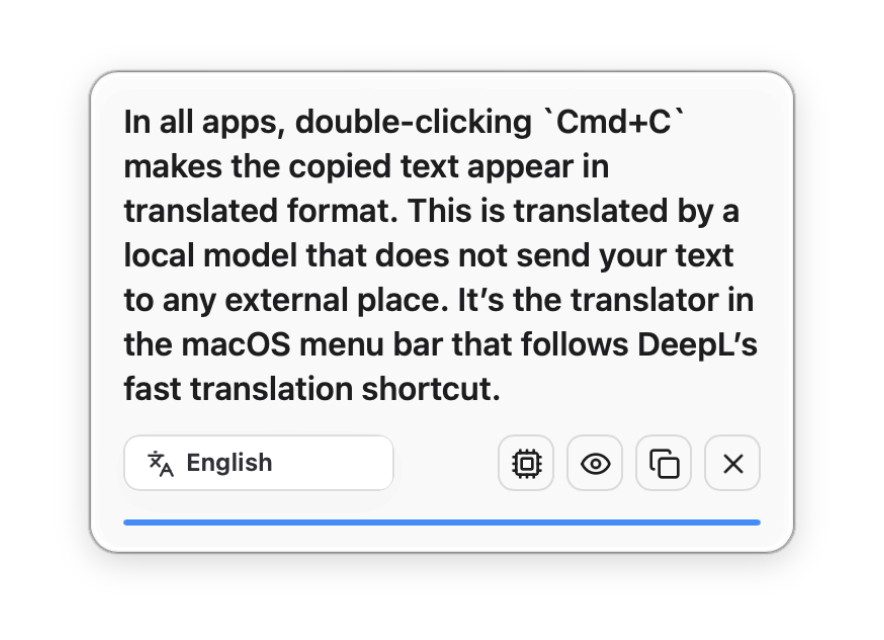

Press Cmd+C twice in any app — the copied text pops up as a translation toast, translated by a local model that never sends your text anywhere. A macOS menu-bar translator in the spirit of DeepL's quick-translate shortcut.
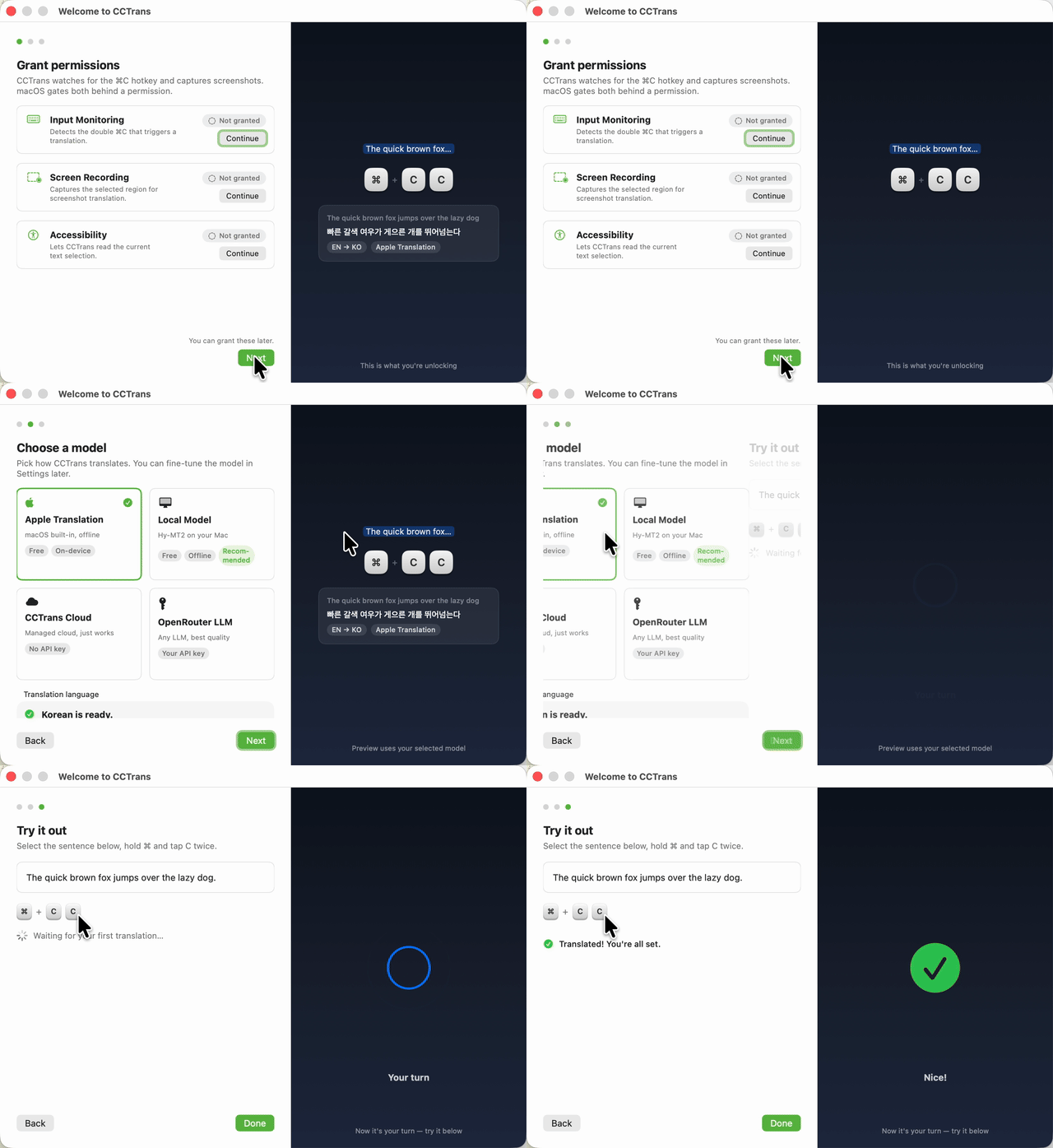
Choose Model → Grant Permissions → Try It
CCTrans saves your progress at every step, so onboarding resumes where you left off after macOS asks you to Quit & Reopen the app.
The easiest way to install CCTrans is from the Mac App Store.
brew install --cask kargnas/tap/cctrans
…or download the DMG →. macOS 15+, and the app updates itself either way.
| You do | CCTrans does |
|---|---|
Cmd+C twice on any text | Translates the clipboard and shows a toast where you parked it on screen |
Shift+Cmd+2 | Captures the screen and translates the visible text through a vision model |
Click ⌘C in the menu bar | Model picker, source/target language, toast position, request logs, settings |

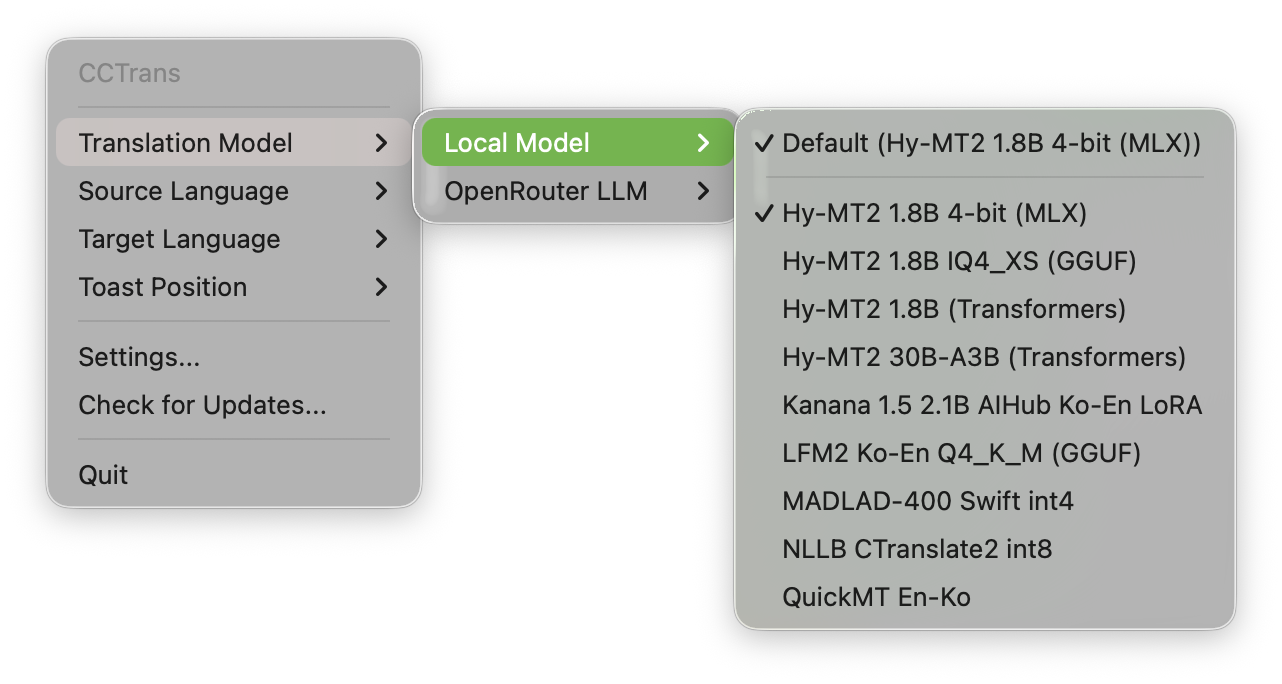
The default model is Hy-MT2 1.8B 4-bit running locally on MLX — no API key, no network, nothing leaves the Mac:
$ dist/CCTrans.app/Contents/MacOS/CCTrans --translate-text-once \
    "The deployment failed because the signing certificate expired last night."
지난 밤에 서명 인증서가 만료되었기 때문에 배포가 실패했습니다.
That run took 2.5 s warm on Apple Silicon, fully offline.
Pick an OpenRouter LLM instead and CCTrans silently attaches a downscaled screenshot of your current screen as context (only when Screen Recording is already granted), so short ambiguous snippets get translated the way the page around them means it.
Every built-in model was benchmarked on an Apple Silicon Mac before earning its menu slot — full data and sample outputs in docs/local-translation-benchmark-2026.md:
| Model | Status | Peak memory | Per request | Note |
|---|---|---|---|---|
| Hy-MT2 1.8B 4-bit (MLX) | ✅ default | 1.5 GB | 0.08–0.17 s | Best quality — keeps terminology right where others slip |
| Hy-MT2 1.8B (Transformers) | ✅ bundled | — | — | Legacy Python backend; slower than MLX on the same Mac |
| Hy-MT2 30B-A3B (Transformers) | ✅ bundled | — | — | Highest quality, needs serious RAM |
| QuickMT En-Ko | ✅ bundled | 1.2 GB | 0.02–0.03 s | Fastest of all, but fails isolated short words |
| Hy-MT2 1.8B IQ4_XS (GGUF) | 🔌 planned | 1.4 GB | 0.08–0.61 s | Benchmarked well; llama.cpp adapter not bundled yet |
| LFM2 Ko-En Q4_K_M (GGUF) | 🔌 planned | 1.6 GB | 0.07–0.20 s | Fast Ko↔En; license still under review |
| NLLB CTranslate2 int8 | 🔌 planned | 1.6 GB | 0.06–0.21 s | Widest language coverage, stiffer Korean output |
| Kanana 1.5 2.1B AIHub Ko-En LoRA | ⚠️ off by default | 0.8 GB | 0.4–1.7 s | CC-BY-NC license and fragile Python deps |
| MADLAD-400 Swift int4 | 🔌 planned | — | — | Swift runtime builds, MLX metallib loading still fails |
Numbers are peak RSS and warm per-request latency from the standalone benchmark runs. First launch opens Local Model Setup with this comparison built in, and custom models drop into ~/.config/cctrans/local-models.json (protocol).
These are not one-off numbers: every PR and push runs the bundled models end to end on GitHub Actions (Local Model CI) — the real binary translates fixed samples, and a backend error, non-Korean output, or latency budget overrun fails the build. Even on GitHub's virtualized arm64 runner the default MLX model answers in 5–6 s warm; the Transformers fallback takes 50–70 s.
| Layer | Tech |
|---|---|
| Menu-bar shell | Swift 6.2 + AppKit (SwiftPM, LSUIElement) |
| Settings / toast surfaces | Tauri 2 + Rust + Svelte |
| Local inference | Hy-MT2 on MLX, launched through uv |
| Cloud translation & vision | OpenRouter (deepseek/deepseek-v4-flash text default, google/gemini-3.1-flash-lite screenshot default) |
| Auto-update | Sparkle 2, appcast on GitHub Releases |
| Release pipeline | GitHub Actions: build → Developer ID sign → notarize → DMG |
git clone https://github.com/kargnas/cctrans && cd cctrans
npm install
./scripts/run-dev.zsh
run-dev.zsh builds the Swift shell and the Tauri helper, signs dist/CCTrans.app with a stable local identity (so macOS permissions stick across rebuilds), and launches it. Local models additionally need uv; OpenRouter features need cp .env.example .env.local with an OPENROUTER_API_KEY.
To install on this Mac: ./scripts/install-app.zsh --open. For another Mac, see docs/other-mac-setup.md.
Global shortcuts need macOS privacy approval once:
| Permission | Needed for |
|---|---|
| Input Monitoring or Accessibility | Detecting Cmd+C twice in other apps |
| Screen Recording | Shift+Cmd+2 screenshot translation and LLM screen context |
Settings → Permissions opens the native permission window and shows a draggable CCTrans.app icon when macOS needs the app added manually. Quit and relaunch CCTrans after granting — macOS applies trust on the next launch.
Every code push to main releases itself: a 10-minute cooldown collects follow-up commits, the patch version bumps from the latest tag, and GitHub Actions ships a signed, notarized CCTrans-vX.Y.Z.dmg plus appcast.xml. The same run then bumps the Homebrew cask in kargnas/homebrew-tap. Installed apps check the appcast daily and update in place via Sparkle; Check for Updates... in the menu bar checks immediately. Commit with [skip release] to opt out, or run the Auto Release workflow manually for a minor/major bump.
Copyright (C) 2026 Sangrak Choi.
AGPL-3.0. Forks and modified builds must stay AGPL and publish their full source. The official App Store and direct-download releases are published by the copyright holder, who is not bound by these terms; the "CCTrans" name and the store listing are not covered by the license.
CCTrans — macOS menu-bar translator: double Cmd+C to translate clipboard text, Shift+Cmd+2 for screenshot translation. Local Hy-MT2 or OpenRouter LLMs, Sparkle auto-update.
Swift
8
332 commits
updated Jul 28, 2026
Download CCTrans from the Mac App Store: apps.apple.com/app/cctrans/id6779669255
Press Cmd+C twice in any app — the copied text pops up as a translation toast, translated by a local model that never sends your text anywhere. A macOS menu-bar translator in the spirit of DeepL's quick-translate shortcut.
Choose Model → Grant Permissions → Try It
CCTrans saves your progress at every step, so onboarding resumes where you left off after macOS asks you to Quit & Reopen the app.
The easiest way to install CCTrans is from the Mac App Store.
brew install --cask kargnas/tap/cctrans
…or download the DMG →. macOS 15+, and the app updates itself either way.
| You do | CCTrans does |
|---|---|
Cmd+C twice on any text | Translates the clipboard and shows a toast where you parked it on screen |
Shift+Cmd+2 | Captures the screen and translates the visible text through a vision model |
Click ⌘C in the menu bar | Model picker, source/target language, toast position, request logs, settings |
The default model is Hy-MT2 1.8B 4-bit running locally on MLX — no API key, no network, nothing leaves the Mac:
$ dist/CCTrans.app/Contents/MacOS/CCTrans --translate-text-once \
    "The deployment failed because the signing certificate expired last night."
지난 밤에 서명 인증서가 만료되었기 때문에 배포가 실패했습니다.
That run took 2.5 s warm on Apple Silicon, fully offline.
Pick an OpenRouter LLM instead and CCTrans silently attaches a downscaled screenshot of your current screen as context (only when Screen Recording is already granted), so short ambiguous snippets get translated the way the page around them means it.
Every built-in model was benchmarked on an Apple Silicon Mac before earning its menu slot — full data and sample outputs in docs/local-translation-benchmark-2026.md:
| Model | Status | Peak memory | Per request | Note |
|---|---|---|---|---|
| Hy-MT2 1.8B 4-bit (MLX) | ✅ default | 1.5 GB | 0.08–0.17 s | Best quality — keeps terminology right where others slip |
| Hy-MT2 1.8B (Transformers) | ✅ bundled | — | — | Legacy Python backend; slower than MLX on the same Mac |
| Hy-MT2 30B-A3B (Transformers) | ✅ bundled | — | — | Highest quality, needs serious RAM |
| QuickMT En-Ko | ✅ bundled | 1.2 GB | 0.02–0.03 s | Fastest of all, but fails isolated short words |
| Hy-MT2 1.8B IQ4_XS (GGUF) | 🔌 planned | 1.4 GB | 0.08–0.61 s | Benchmarked well; llama.cpp adapter not bundled yet |
| LFM2 Ko-En Q4_K_M (GGUF) | 🔌 planned | 1.6 GB | 0.07–0.20 s | Fast Ko↔En; license still under review |
| NLLB CTranslate2 int8 | 🔌 planned | 1.6 GB | 0.06–0.21 s | Widest language coverage, stiffer Korean output |
| Kanana 1.5 2.1B AIHub Ko-En LoRA | ⚠️ off by default | 0.8 GB | 0.4–1.7 s | CC-BY-NC license and fragile Python deps |
| MADLAD-400 Swift int4 | 🔌 planned | — | — | Swift runtime builds, MLX metallib loading still fails |
Numbers are peak RSS and warm per-request latency from the standalone benchmark runs. First launch opens Local Model Setup with this comparison built in, and custom models drop into ~/.config/cctrans/local-models.json (protocol).
These are not one-off numbers: every PR and push runs the bundled models end to end on GitHub Actions (Local Model CI) — the real binary translates fixed samples, and a backend error, non-Korean output, or latency budget overrun fails the build. Even on GitHub's virtualized arm64 runner the default MLX model answers in 5–6 s warm; the Transformers fallback takes 50–70 s.
| Layer | Tech |
|---|---|
| Menu-bar shell | Swift 6.2 + AppKit (SwiftPM, LSUIElement) |
| Settings / toast surfaces | Tauri 2 + Rust + Svelte |
| Local inference | Hy-MT2 on MLX, launched through uv |
| Cloud translation & vision | OpenRouter (deepseek/deepseek-v4-flash text default, google/gemini-3.1-flash-lite screenshot default) |
| Auto-update | Sparkle 2, appcast on GitHub Releases |
| Release pipeline | GitHub Actions: build → Developer ID sign → notarize → DMG |
git clone https://github.com/kargnas/cctrans && cd cctrans
npm install
./scripts/run-dev.zsh
run-dev.zsh builds the Swift shell and the Tauri helper, signs dist/CCTrans.app with a stable local identity (so macOS permissions stick across rebuilds), and launches it. Local models additionally need uv; OpenRouter features need cp .env.example .env.local with an OPENROUTER_API_KEY.
To install on this Mac: ./scripts/install-app.zsh --open. For another Mac, see docs/other-mac-setup.md.
Global shortcuts need macOS privacy approval once:
| Permission | Needed for |
|---|---|
| Input Monitoring or Accessibility | Detecting Cmd+C twice in other apps |
| Screen Recording | Shift+Cmd+2 screenshot translation and LLM screen context |
Settings → Permissions opens the native permission window and shows a draggable CCTrans.app icon when macOS needs the app added manually. Quit and relaunch CCTrans after granting — macOS applies trust on the next launch.
Every code push to main releases itself: a 10-minute cooldown collects follow-up commits, the patch version bumps from the latest tag, and GitHub Actions ships a signed, notarized CCTrans-vX.Y.Z.dmg plus appcast.xml. The same run then bumps the Homebrew cask in kargnas/homebrew-tap. Installed apps check the appcast daily and update in place via Sparkle; Check for Updates... in the menu bar checks immediately. Commit with [skip release] to opt out, or run the Auto Release workflow manually for a minor/major bump.
Copyright (C) 2026 Sangrak Choi.
AGPL-3.0. Forks and modified builds must stay AGPL and publish their full source. The official App Store and direct-download releases are published by the copyright holder, who is not bound by these terms; the "CCTrans" name and the store listing are not covered by the license.



