
LiveLingo is a real-time translation input plugin for multilingual teams on Slack. It translates as you type, adapts tone and terminology before send, and keeps conversations natural without context switching. Built for low latency, local-first privacy, and seamless cross-language collaboration.
C#
0
74 commits
updated Apr 30, 2026
README
🌐 LiveLingo
Your words, any language, zero cloud. Instantly.
A privacy-first, AI-powered desktop translator that lives in your menu bar.
Press a hotkey → type → get your translation → send it. All offline. All local. All yours.
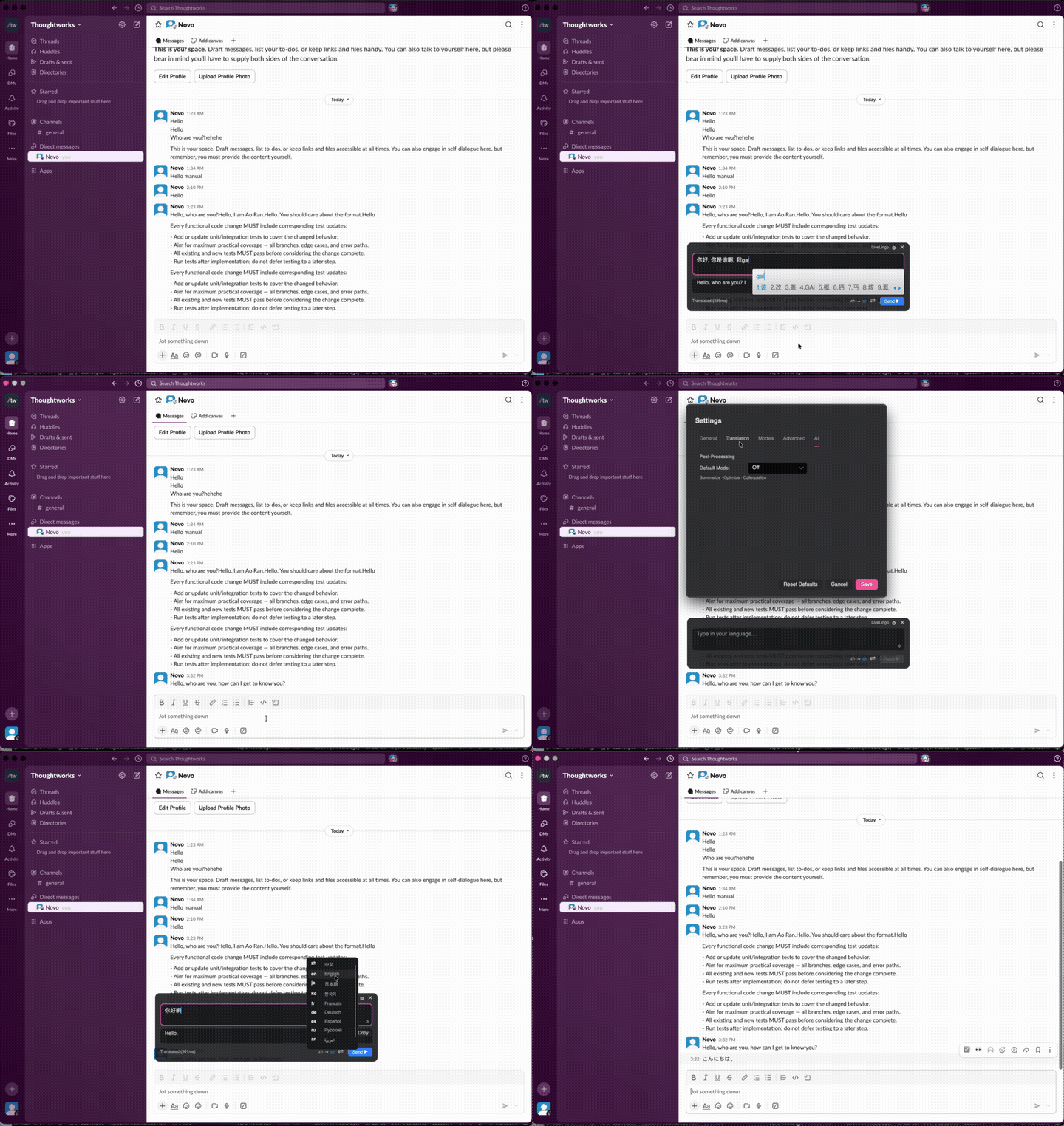




Why LiveLingo?
You're chatting with a colleague in Tokyo. Mid-conversation, you need to reply in Japanese — but your Japanese is… creative at best. You could open a browser, navigate to some translation site, copy-paste, wait for the response, copy-paste again…
Or you could just press Ctrl+Alt+T.
LiveLingo pops up as a sleek floating overlay — right where you're working. Type your message, get an instant AI translation, and hit Send. The translated text lands directly into the app you were using. No tab-switching. No copy-paste gymnastics. No data leaving your machine.
💡 Think of it as having a personal interpreter sitting inside your keyboard.
✨ Features
🔒 100% Offline & Private
Your text — and your voice — never leaves your computer. LiveLingo runs local AI models for both translation and speech recognition: Gemma 4 26B-A4B MoE (Mixture-of-Experts, ~26 B-class quality at ~4 B-class latency) for translation, and sherpa-onnx (Cohere Transcribe 14-Lang or SenseVoice CJK-tuned) for speech-to-text. No API keys, no cloud services, no "we may use your data to improve our products" surprises.
⚡ Ridiculously Fast
Translation in ~300ms. The overlay appears instantly with a global hotkey. Type, translate, send — all in one fluid motion.
🌍 10 Languages
Chinese, English, Japanese, Korean, French, German, Spanish, Russian, Arabic, and Portuguese. Mix and match source and target languages freely.
🎯 Smart Text Injection
Two modes to fit your workflow:
- Paste Only — drops the translation into your clipboard
- Paste & Send — pastes AND hits Enter for you (perfect for chat apps)
🎙️ Voice Input
Talk to LiveLingo instead of typing. Powered by sherpa-onnx with two interchangeable engines:
- Accuracy First — Cohere Transcribe (14 languages, top of the Open ASR Leaderboard, ~1.6 GB)
- Multilingual First — SenseVoice Small (中 / 粤 / 英 / 日 / 韩, on-model language detection, ~228 MB)
Switch engines anytime from Settings → Speech — the active model card shows exactly what will run, with a one-click jump to the Models tab when a download is missing.
🪟 Beautiful Floating Overlay
A frosted-glass overlay that floats above everything. Drag it, resize it, adjust its transparency from 10% to fully opaque. The text automatically adapts contrast based on your opacity setting — readable on any desktop background.
🖥️ Cross-Platform
Native experience on both Windows and macOS. Platform-specific hotkey hooks, text injection, and UI polish on each.
🔄 Auto-Update
Built-in update system via Velopack keeps you on the latest version without lifting a finger.
📸 Screenshots
|
Translation Overlay 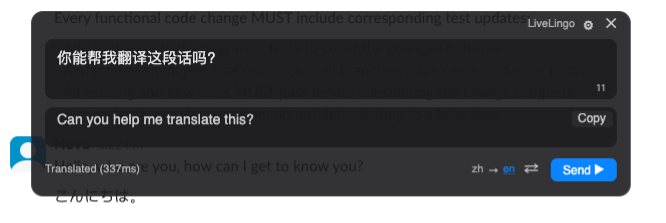
|
Long Text Translation 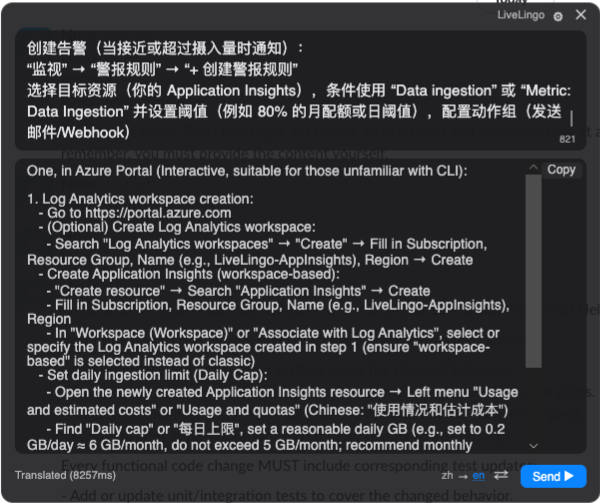
|
|
Settings — General 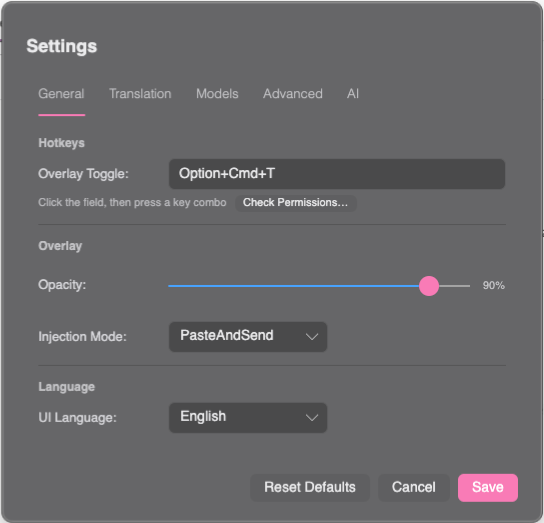
|
Settings — AI Models 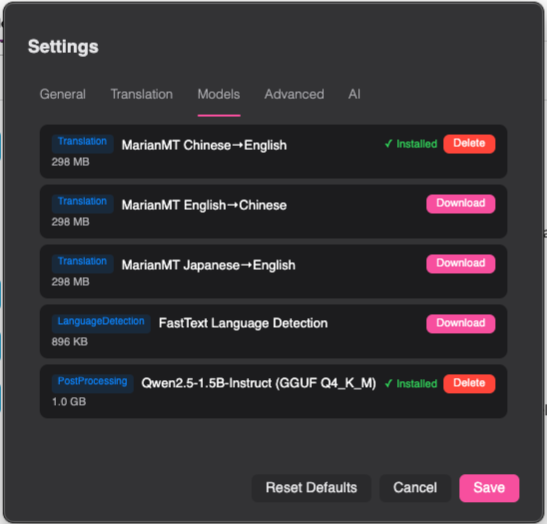
|
🚀 Getting Started
Install
Download the latest release for your platform:
| Platform | Format | Download |
|---|---|---|
| Windows | .exe (auto-update) | Releases |
| Windows | .msi (traditional) | Releases |
| macOS | .pkg | Releases |
First Launch
- Download the AI models — LiveLingo will prompt you on first run. Translation needs Gemma 4 26B-A4B MoE (~17 GB; falls back to Gemma 4 E4B ~5.4 GB on low-RAM devices). Voice input is optional — pull either Cohere Transcribe (~1.6 GB) or SenseVoice Small (~228 MB) from Settings → Models when you're ready.
- Set your hotkey — Default is
Ctrl+Alt+T(Windows) orOption+Cmd+T(macOS). Customize it anytime. - Start translating — Press the hotkey anywhere, type or speak your text, and go.
macOS users: Grant Accessibility and Input Monitoring permissions when prompted. LiveLingo needs these to register global hotkeys and inject text.
🤝 Contributing
Contributions are welcome! Whether it's a bug fix, new language support, or a feature idea — check the Contributing Guide to get started.
Stop copy-pasting between translator tabs.
Start LiveLingo-ing. 🚀
Similar repos


Languages
C#
99.3%
LiveLingo is a real-time translation input plugin for multilingual teams on Slack. It translates as you type, adapts tone and terminology before send, and keeps conversations natural without context switching. Built for low latency, local-first privacy, and seamless cross-language collaboration.
C#
0
74 commits
updated Apr 30, 2026
README
🌐 LiveLingo
Your words, any language, zero cloud. Instantly.
A privacy-first, AI-powered desktop translator that lives in your menu bar.
Press a hotkey → type → get your translation → send it. All offline. All local. All yours.
Why LiveLingo?
You're chatting with a colleague in Tokyo. Mid-conversation, you need to reply in Japanese — but your Japanese is… creative at best. You could open a browser, navigate to some translation site, copy-paste, wait for the response, copy-paste again…
Or you could just press Ctrl+Alt+T.
LiveLingo pops up as a sleek floating overlay — right where you're working. Type your message, get an instant AI translation, and hit Send. The translated text lands directly into the app you were using. No tab-switching. No copy-paste gymnastics. No data leaving your machine.
💡 Think of it as having a personal interpreter sitting inside your keyboard.
✨ Features
🔒 100% Offline & Private
Your text — and your voice — never leaves your computer. LiveLingo runs local AI models for both translation and speech recognition: Gemma 4 26B-A4B MoE (Mixture-of-Experts, ~26 B-class quality at ~4 B-class latency) for translation, and sherpa-onnx (Cohere Transcribe 14-Lang or SenseVoice CJK-tuned) for speech-to-text. No API keys, no cloud services, no "we may use your data to improve our products" surprises.
⚡ Ridiculously Fast
Translation in ~300ms. The overlay appears instantly with a global hotkey. Type, translate, send — all in one fluid motion.
🌍 10 Languages
Chinese, English, Japanese, Korean, French, German, Spanish, Russian, Arabic, and Portuguese. Mix and match source and target languages freely.
🎯 Smart Text Injection
Two modes to fit your workflow:
- Paste Only — drops the translation into your clipboard
- Paste & Send — pastes AND hits Enter for you (perfect for chat apps)
🎙️ Voice Input
Talk to LiveLingo instead of typing. Powered by sherpa-onnx with two interchangeable engines:
- Accuracy First — Cohere Transcribe (14 languages, top of the Open ASR Leaderboard, ~1.6 GB)
- Multilingual First — SenseVoice Small (中 / 粤 / 英 / 日 / 韩, on-model language detection, ~228 MB)
Switch engines anytime from Settings → Speech — the active model card shows exactly what will run, with a one-click jump to the Models tab when a download is missing.
🪟 Beautiful Floating Overlay
A frosted-glass overlay that floats above everything. Drag it, resize it, adjust its transparency from 10% to fully opaque. The text automatically adapts contrast based on your opacity setting — readable on any desktop background.
🖥️ Cross-Platform
Native experience on both Windows and macOS. Platform-specific hotkey hooks, text injection, and UI polish on each.
🔄 Auto-Update
Built-in update system via Velopack keeps you on the latest version without lifting a finger.
📸 Screenshots
|
Translation Overlay
|
Long Text Translation
|
|
Settings — General
|
Settings — AI Models
|
🚀 Getting Started
Install
Download the latest release for your platform:
| Platform | Format | Download |
|---|---|---|
| Windows | .exe (auto-update) | Releases |
| Windows | .msi (traditional) | Releases |
| macOS | .pkg | Releases |
First Launch
- Download the AI models — LiveLingo will prompt you on first run. Translation needs Gemma 4 26B-A4B MoE (~17 GB; falls back to Gemma 4 E4B ~5.4 GB on low-RAM devices). Voice input is optional — pull either Cohere Transcribe (~1.6 GB) or SenseVoice Small (~228 MB) from Settings → Models when you're ready.
- Set your hotkey — Default is
Ctrl+Alt+T(Windows) orOption+Cmd+T(macOS). Customize it anytime. - Start translating — Press the hotkey anywhere, type or speak your text, and go.
macOS users: Grant Accessibility and Input Monitoring permissions when prompted. LiveLingo needs these to register global hotkeys and inject text.
🤝 Contributing
Contributions are welcome! Whether it's a bug fix, new language support, or a feature idea — check the Contributing Guide to get started.
Stop copy-pasting between translator tabs.
Start LiveLingo-ing. 🚀
Similar repos
Languages
C#
99.3%