
README
Meet Minder
Privacy-First Multilingual Meeting Assistant & AI Meeting Minutes
Real-time Speech Translation, Obsidian-Style Notes & Automated Meeting Minutes
English | 日本語 (Japanese) | Tiếng Việt (Vietnamese)








📌 Overview
Meet Minder is a modern, standalone desktop application engineered for international business meetings, technical discussions, client calls, and cross-lingual webinars.
It seamlessly unifies dual-channel system audio & microphone capture, real-time speech translation with ultra-low latency, Obsidian-style Markdown notes (CodeMirror 6), and automated AI meeting minutes synthesis.
🛡️ Privacy & Security Commitments
- Zero Middleware Proxy: Direct client-to-provider connections via WebSocket and HTTPS. No telemetry server, no middleman.
- 100% Local-First Data: All meeting audio records (
.wav), transcripts, notes, and generated minutes are stored strictly on your local disk. - Zero Tracking / Telemetry: No user tracking, no behavioral analytics, no external metrics collection.
- Secure Key Storage: AI API keys are supplied by you and encrypted in your operating system's secure application storage.
⬇️ Downloads (v1.0.0)
Download pre-built installers directly from GitHub Releases.
| Operating System | Architecture / Devices | Installer Package | Guide |
|---|---|---|---|
| macOS | Apple Silicon (M1 / M2 / M3 / M4) | MeetMinder_1.0.0_aarch64.dmg | macOS Installation Guide |
| macOS | Intel Mac (i5 / i7 / i9) | MeetMinder_1.0.0_x64.dmg | macOS Installation Guide |
| Windows | Windows 10 / 11 (64-bit) | MeetMinder_1.0.0_x64-setup.exe | Windows Installation Guide |
🚀 Key Features
1. Advanced Translation Engines (Prioritized for Value & Performance)
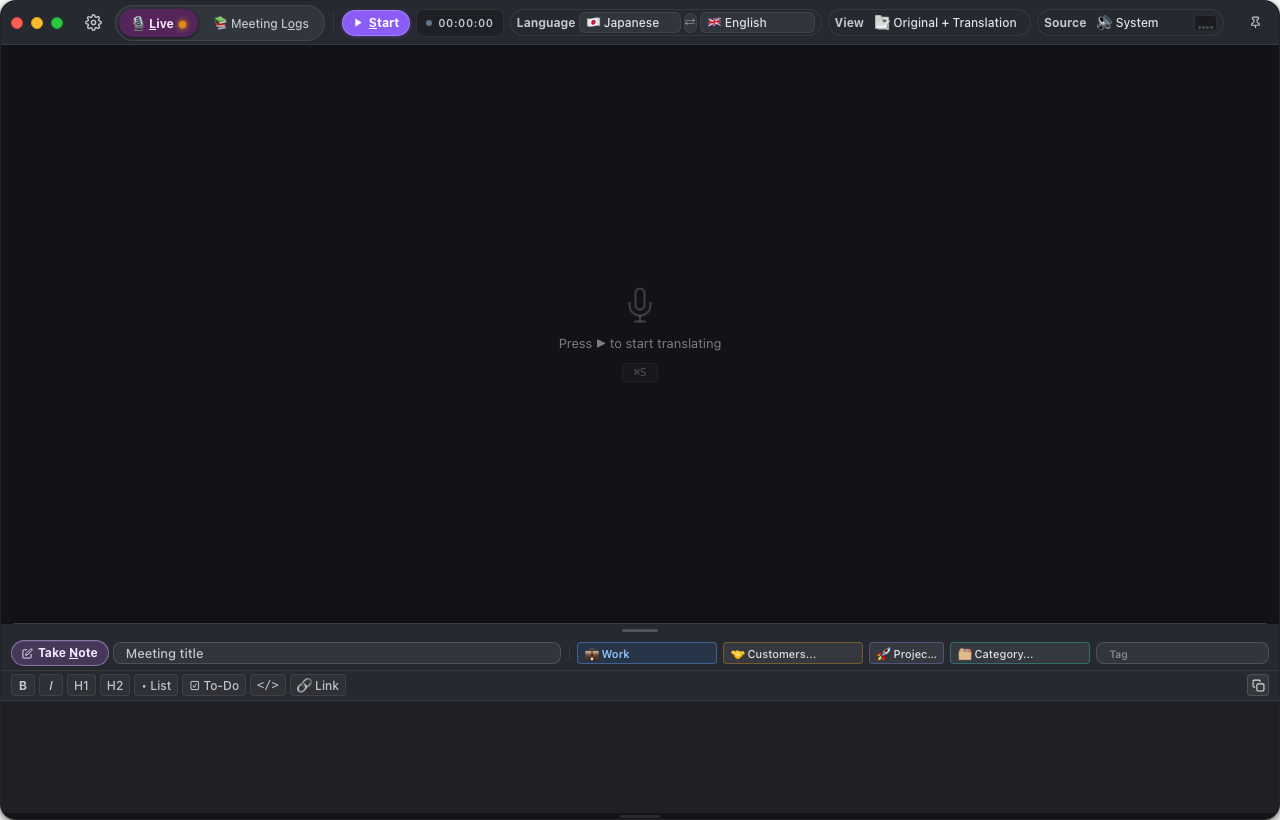
🥇 1. Google Gemini Multimodal Live API (Recommended Primary)
- Completely Free via Google AI Studio: Generous free tier quotas cover daily business meetings without requiring a paid subscription.
- Real-time 2-way Streaming: Direct WebSocket connection streaming linear PCM audio with sub-second translation feedback.
- Dynamic Model Discovery: Automatically discovers and utilizes the optimal available model (
gemini-2.0-flash,gemini-2.5-flash). - Superior Meeting Minutes: Outstanding synthesis capabilities extracting goals, discussions, decisions, and action items.
🥈 2. Local MLX Pipeline (100% Offline on Apple Silicon)
- Ultimate Privacy & Offline Freedom: Runs completely on-device utilizing Apple Silicon Metal & Neural Engine (Whisper + Gemma models).
- Zero Network Calls: Zero data transmitted over the internet—ideal for confidential and air-gapped environments.
- Free Forever: No API keys, no recurring costs.
🥉 3. Specialized Cloud Providers
- Soniox Real-time STT (
stt-rt-v5): Unrivaled Japanese-to-Vietnamese/English translation precision, low cost (~$0.12/hour), speaker diarization. - OpenAI Realtime API: High-fidelity conversational translation with natural voice responses.
- Alibaba Qwen LiveTranslate Flash: Ultra-low latency multi-language translation via DashScope.
📊 AI Engine Comparison Matrix
| Criteria | 🌟 Google Gemini Live | 🖥️ Local MLX | ☁️ Soniox STT | ⚡ OpenAI Realtime | 🌏 Qwen Live |
|---|---|---|---|---|---|
| Cost | Free (Free Tier) | Free forever | Very cheap (~$0.12/h) | Premium (~$4.00/h) | Free preview |
| Latency | Ultra-low (~1–2s) | Low (~2–3s) | Lowest (<1s) | Low (~1–2s) | Lowest (~1s) |
| Offline Operation | Internet required | Yes (100% Offline) | Internet required | Internet required | Internet required |
| AI Meeting Minutes | Outstanding (Native) | Basic | Via Gemini | Good | Not supported |
| Privacy Rating | Direct to Google | Maximum (Local-only) | Direct to Soniox | Direct to OpenAI | Direct to Alibaba |
| Platform Support | macOS & Windows | Apple Silicon (M1–M4) | macOS & Windows | macOS & Windows | macOS & Windows |
2. Auto Git Backup (Zero Data Loss)
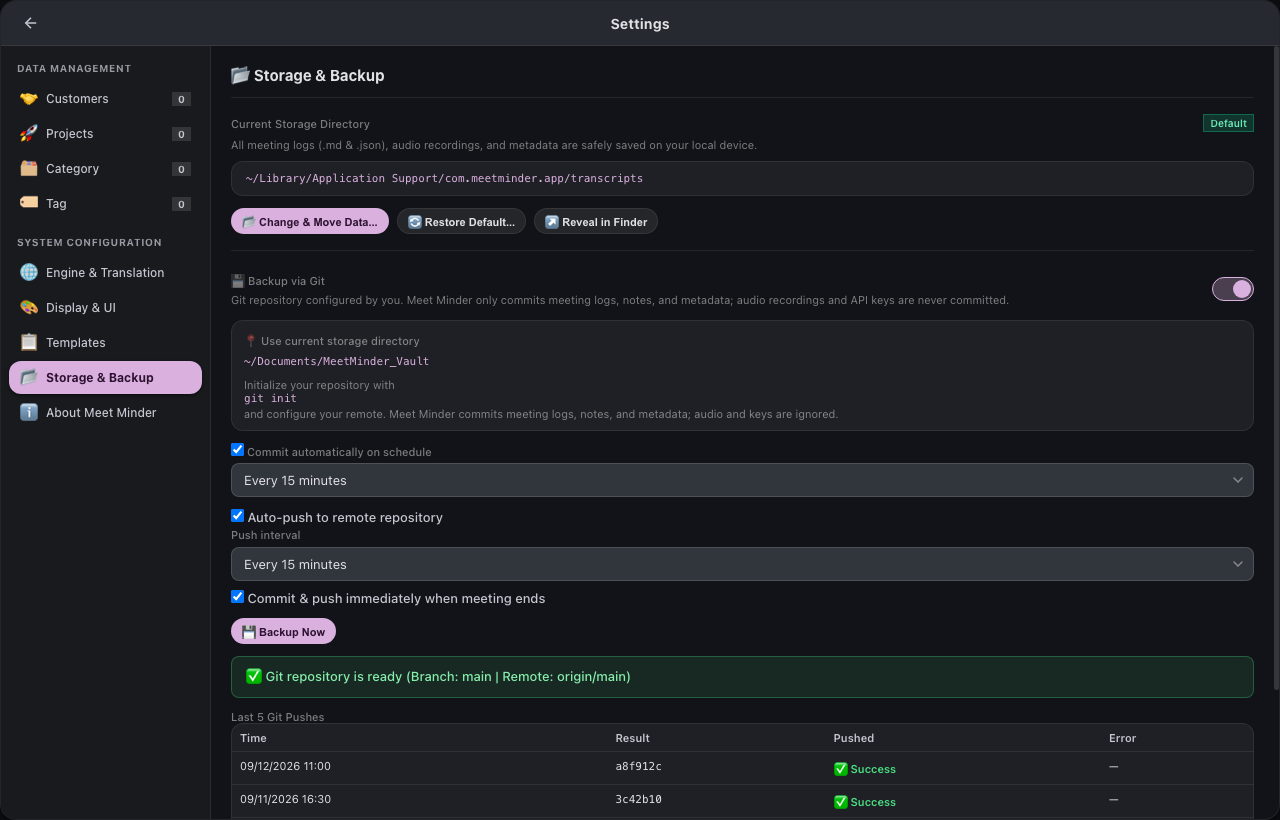
- Automated Version Control: Integrates directly with Git in your storage vault.
- Auto-Commit on Meeting End: Automatically commits transcripts, notes, and metadata when you finish a session (
⌘ T). - Periodic Background Push: Pushes to your private remote repository (GitHub, GitLab, Bitbucket) on a configurable schedule (e.g., every 15, 30, or 60 minutes).
- Push Audit History: View the last 5 pushes, commit hashes, and sync statuses right within the app settings.
3. Prompt Templates Manager (Customizable Meeting Minutes)
- Full Control over AI Prompts: Customize System Prompts and User Prompt Templates to tailor minutes for various meeting types:
- Daily Standups & Sprint Reviews
- Technical Architecture Discussions
- Client Proposals & Contract Negotiations
- Executive 1-on-1 Sessions
- One-Click Re-generation: Re-synthesize minutes instantly if meeting notes or requirements change.
4. 3-Tab Session Hub (Minutes • Notes • Logs)
- Tab 1: AI Meeting Minutes: Structured Markdown report with executive summary, key decisions, and actionable task lists generated in seconds. Multi-language output (English, Japanese, Vietnamese).
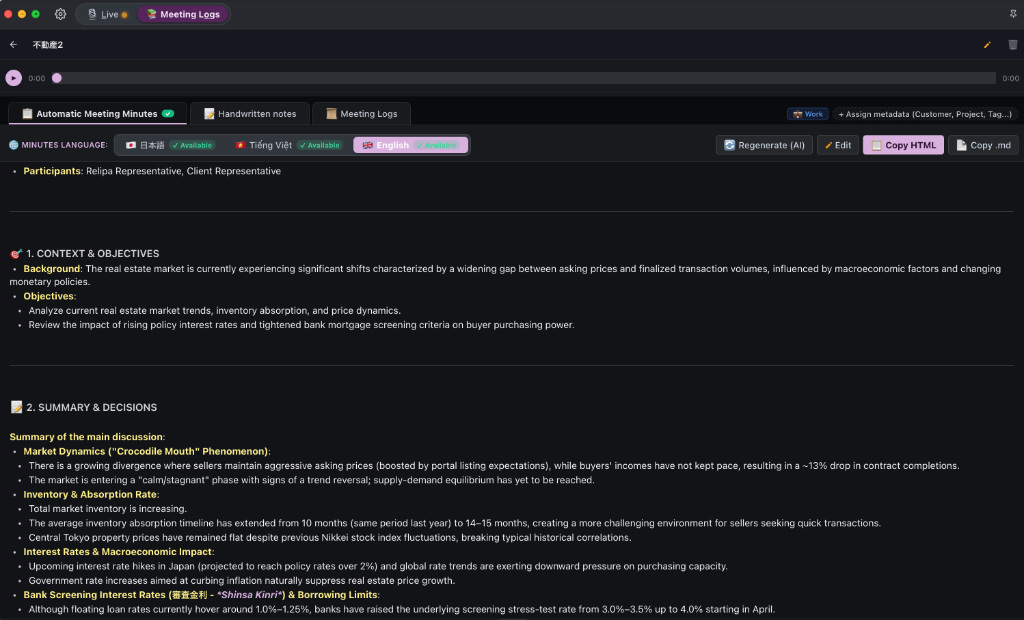
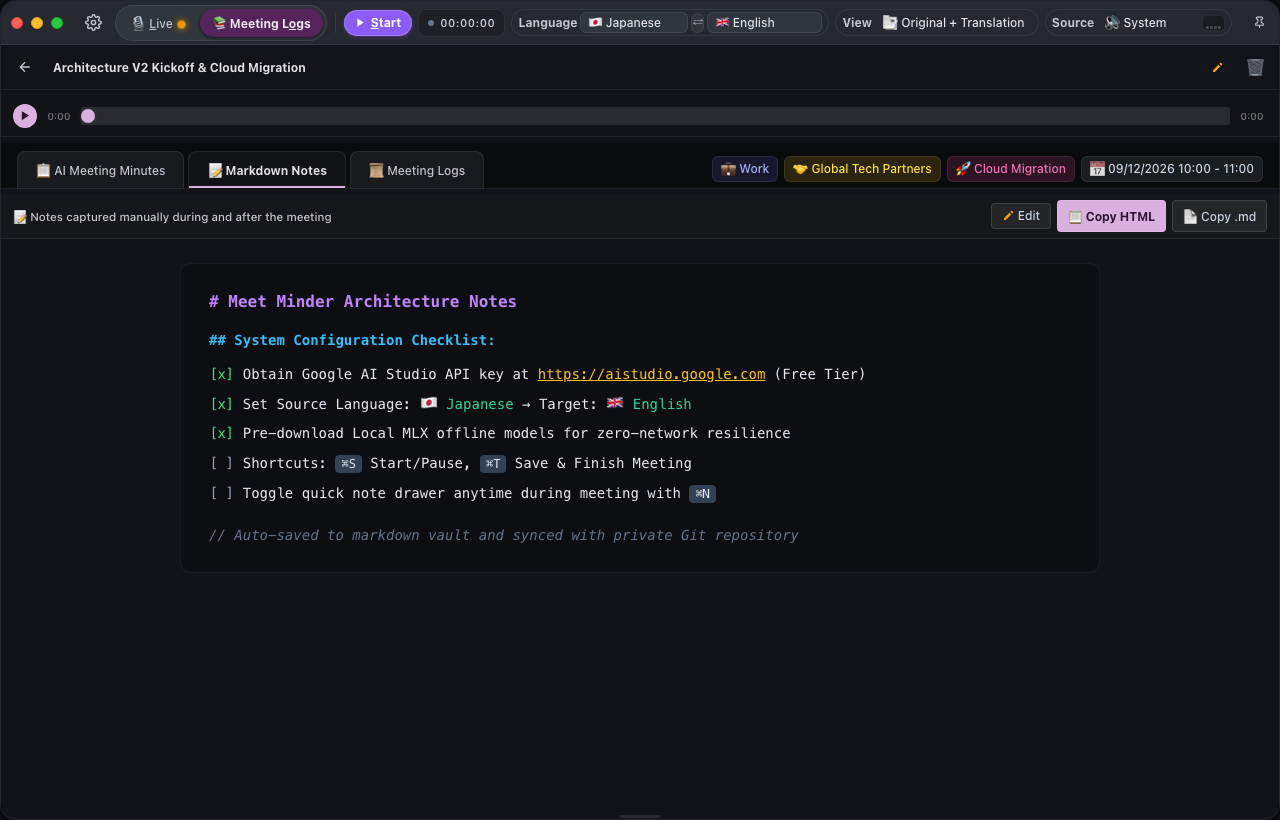
- Tab 2: Obsidian-Style Notes (CodeMirror 6): Full-featured Markdown editor with live preview, formatting toolbar, task checklists (
[ ]/[x]), and quick meeting drawer (⌘ N).
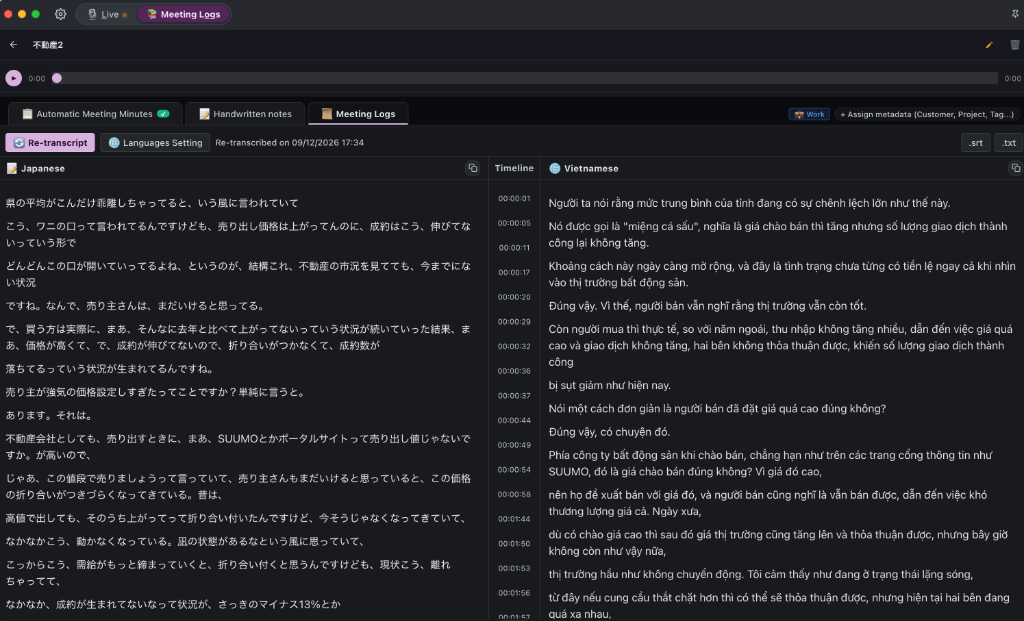
- Tab 3: Meeting Logs & Synchronized Audio Player: Speaker-labeled transcript lines, timeline-synced bilingual columns, inline editing for corrections, and audio waveform scrubber that syncs to any clicked sentence. Includes one-click
.srtand.txtexport.
5. Audio Recording Import (Transcribe & Generate Minutes from Audio)
- Universal Format Support: Import existing recordings in
.mp3,.m4a,.wav,.aac,.ogg, and.flac. - Drag & Drop Workflow: Drag audio files directly into the import dialog or browse local folders.
- Rich Metadata Organization: Tag meetings by Customer, Project, Category, Custom Tags, and Scope (Work vs. Personal).
- Automated AI Minutes: Automatically transcribes speech in the background and generates structured meeting minutes with action items.
- Full Meeting Archive: Creates a complete session identical to live recordings, complete with interactive audio player, speaker timeline, notes, and meeting minutes.
6. Multi-Language User Interface (i18n)
Meet Minder features full internationalization across all views, modals, and notifications:
- 🇺🇸 English (
en) — Default - 🇯🇵 日本語 (Japanese) (
ja) - 🇻🇳 Tiếng Việt (Vietnamese) (
vi)
⌨️ Keyboard Shortcuts
Speed up your meeting workflow with native hotkeys:
| macOS Shortcut | Windows Shortcut | Action Description |
|---|---|---|
| ⌘ + S | Ctrl + S | Start / Pause live speech translation |
| ⌘ + C | Ctrl + C | Continue session when paused |
| ⌘ + T | Ctrl + T | Save & Stop meeting session |
| ⌘ + N | Ctrl + N | Open / Close Take Note Drawer (Markdown editor) |
| ⌘ + L | Ctrl + L | Switch to Live Mode |
| ⌘ + O | Ctrl + O | Switch to Meeting Logs & Library |
| ⌘ + 1 | Ctrl + 1 | Audio Source: System Audio (Speakers) |
| ⌘ + 2 | Ctrl + 2 | Audio Source: Microphone |
| ⌘ + 3 | Ctrl + 3 | Audio Source: Both System + Microphone (Default) |
| ⌘ + , | Ctrl + , | Open Settings |
| ⌘ + P | Ctrl + P | Pin window always on top (or pause when running) |
| ⌘ + M | Ctrl + M | Minimize window |
| ? | ? | Open keyboard shortcut cheat sheet |
| Esc | Esc | Dismiss modals / Exit settings / Return to live view |
⚙️ Technical Architecture
| Layer / Component | Technology Stack |
|---|---|
| Desktop Runtime | Tauri v2 (Lightweight, memory-efficient, sandboxed) |
| Core Backend | Rust 2021 with asynchronous Tokio runtime |
| Frontend UI | Vanilla JavaScript (Modern ES Modules), CSS Variables, Material You Dark Theme |
| Markdown Engine | CodeMirror 6 & Lezer Markdown Parser |
| macOS Audio Capture | Native ScreenCaptureKit API (macOS 13.0+) |
| Windows Audio Capture | WASAPI Audio Loopback Capture |
| Microphone Capture | Cross-platform cpal (CoreAudio on macOS, WASAPI on Windows) |
| Audio Processing | Linear PCM 16-bit, 16kHz / 24kHz resampler & audio ring buffer |
| Storage Formats | Markdown (.md), JSON metadata (.json), Linear PCM WAV (.wav) |
🛠️ Development & Build
Prerequisites
- Node.js: Version 18.0 or later (Node 20+ LTS recommended).
- Rust & Cargo: Latest stable toolchain (
rustup update). - macOS: macOS 13+ with Xcode Command Line Tools (
xcode-select --install). - Windows: Windows 10/11 64-bit with Visual Studio C++ Build Tools.
Getting Started
-
Clone the repository:
git clone https://github.com/tuyennq1001/meetminder.git cd meetminder -
Install frontend dependencies:
npm install -
Build the CodeMirror 6 bundle:
npm run build:editor -
Launch development build:
npm run dev -
Lint and format:
npm run lint # Runs Cargo clippy npm run format # Runs Cargo fmt -
Compile production release:
npm run build
👤 Author & Support
- Author & Creator: Terry
- Email: tuyennq1001@gmail.com
- GitHub Repository: https://github.com/tuyennq1001/meetminder
- Issue Tracker: https://github.com/tuyennq1001/meetminder/issues
📄 License
This project is licensed under the MIT License. Free for research, personal, and enterprise use.
Contributors

259 commits
Similar repos


Languages
JavaScript
54.7%
Rust
27.1%
CSS
9.5%
HTML
6.8%
Python
1.8%
README
Meet Minder
Privacy-First Multilingual Meeting Assistant & AI Meeting Minutes
Real-time Speech Translation, Obsidian-Style Notes & Automated Meeting Minutes
English | 日本語 (Japanese) | Tiếng Việt (Vietnamese)
📌 Overview
Meet Minder is a modern, standalone desktop application engineered for international business meetings, technical discussions, client calls, and cross-lingual webinars.
It seamlessly unifies dual-channel system audio & microphone capture, real-time speech translation with ultra-low latency, Obsidian-style Markdown notes (CodeMirror 6), and automated AI meeting minutes synthesis.
🛡️ Privacy & Security Commitments
- Zero Middleware Proxy: Direct client-to-provider connections via WebSocket and HTTPS. No telemetry server, no middleman.
- 100% Local-First Data: All meeting audio records (
.wav), transcripts, notes, and generated minutes are stored strictly on your local disk. - Zero Tracking / Telemetry: No user tracking, no behavioral analytics, no external metrics collection.
- Secure Key Storage: AI API keys are supplied by you and encrypted in your operating system's secure application storage.
⬇️ Downloads (v1.0.0)
Download pre-built installers directly from GitHub Releases.
| Operating System | Architecture / Devices | Installer Package | Guide |
|---|---|---|---|
| macOS | Apple Silicon (M1 / M2 / M3 / M4) | MeetMinder_1.0.0_aarch64.dmg | macOS Installation Guide |
| macOS | Intel Mac (i5 / i7 / i9) | MeetMinder_1.0.0_x64.dmg | macOS Installation Guide |
| Windows | Windows 10 / 11 (64-bit) | MeetMinder_1.0.0_x64-setup.exe | Windows Installation Guide |
🚀 Key Features
1. Advanced Translation Engines (Prioritized for Value & Performance)
🥇 1. Google Gemini Multimodal Live API (Recommended Primary)
- Completely Free via Google AI Studio: Generous free tier quotas cover daily business meetings without requiring a paid subscription.
- Real-time 2-way Streaming: Direct WebSocket connection streaming linear PCM audio with sub-second translation feedback.
- Dynamic Model Discovery: Automatically discovers and utilizes the optimal available model (
gemini-2.0-flash,gemini-2.5-flash). - Superior Meeting Minutes: Outstanding synthesis capabilities extracting goals, discussions, decisions, and action items.
🥈 2. Local MLX Pipeline (100% Offline on Apple Silicon)
- Ultimate Privacy & Offline Freedom: Runs completely on-device utilizing Apple Silicon Metal & Neural Engine (Whisper + Gemma models).
- Zero Network Calls: Zero data transmitted over the internet—ideal for confidential and air-gapped environments.
- Free Forever: No API keys, no recurring costs.
🥉 3. Specialized Cloud Providers
- Soniox Real-time STT (
stt-rt-v5): Unrivaled Japanese-to-Vietnamese/English translation precision, low cost (~$0.12/hour), speaker diarization. - OpenAI Realtime API: High-fidelity conversational translation with natural voice responses.
- Alibaba Qwen LiveTranslate Flash: Ultra-low latency multi-language translation via DashScope.
📊 AI Engine Comparison Matrix
| Criteria | 🌟 Google Gemini Live | 🖥️ Local MLX | ☁️ Soniox STT | ⚡ OpenAI Realtime | 🌏 Qwen Live |
|---|---|---|---|---|---|
| Cost | Free (Free Tier) | Free forever | Very cheap (~$0.12/h) | Premium (~$4.00/h) | Free preview |
| Latency | Ultra-low (~1–2s) | Low (~2–3s) | Lowest (<1s) | Low (~1–2s) | Lowest (~1s) |
| Offline Operation | Internet required | Yes (100% Offline) | Internet required | Internet required | Internet required |
| AI Meeting Minutes | Outstanding (Native) | Basic | Via Gemini | Good | Not supported |
| Privacy Rating | Direct to Google | Maximum (Local-only) | Direct to Soniox | Direct to OpenAI | Direct to Alibaba |
| Platform Support | macOS & Windows | Apple Silicon (M1–M4) | macOS & Windows | macOS & Windows | macOS & Windows |
2. Auto Git Backup (Zero Data Loss)
- Automated Version Control: Integrates directly with Git in your storage vault.
- Auto-Commit on Meeting End: Automatically commits transcripts, notes, and metadata when you finish a session (
⌘ T). - Periodic Background Push: Pushes to your private remote repository (GitHub, GitLab, Bitbucket) on a configurable schedule (e.g., every 15, 30, or 60 minutes).
- Push Audit History: View the last 5 pushes, commit hashes, and sync statuses right within the app settings.
3. Prompt Templates Manager (Customizable Meeting Minutes)
- Full Control over AI Prompts: Customize System Prompts and User Prompt Templates to tailor minutes for various meeting types:
- Daily Standups & Sprint Reviews
- Technical Architecture Discussions
- Client Proposals & Contract Negotiations
- Executive 1-on-1 Sessions
- One-Click Re-generation: Re-synthesize minutes instantly if meeting notes or requirements change.
4. 3-Tab Session Hub (Minutes • Notes • Logs)
- Tab 1: AI Meeting Minutes: Structured Markdown report with executive summary, key decisions, and actionable task lists generated in seconds. Multi-language output (English, Japanese, Vietnamese).
- Tab 2: Obsidian-Style Notes (CodeMirror 6): Full-featured Markdown editor with live preview, formatting toolbar, task checklists (
[ ]/[x]), and quick meeting drawer (⌘ N).
- Tab 3: Meeting Logs & Synchronized Audio Player: Speaker-labeled transcript lines, timeline-synced bilingual columns, inline editing for corrections, and audio waveform scrubber that syncs to any clicked sentence. Includes one-click
.srtand.txtexport.
5. Audio Recording Import (Transcribe & Generate Minutes from Audio)
- Universal Format Support: Import existing recordings in
.mp3,.m4a,.wav,.aac,.ogg, and.flac. - Drag & Drop Workflow: Drag audio files directly into the import dialog or browse local folders.
- Rich Metadata Organization: Tag meetings by Customer, Project, Category, Custom Tags, and Scope (Work vs. Personal).
- Automated AI Minutes: Automatically transcribes speech in the background and generates structured meeting minutes with action items.
- Full Meeting Archive: Creates a complete session identical to live recordings, complete with interactive audio player, speaker timeline, notes, and meeting minutes.
6. Multi-Language User Interface (i18n)
Meet Minder features full internationalization across all views, modals, and notifications:
- 🇺🇸 English (
en) — Default - 🇯🇵 日本語 (Japanese) (
ja) - 🇻🇳 Tiếng Việt (Vietnamese) (
vi)
⌨️ Keyboard Shortcuts
Speed up your meeting workflow with native hotkeys:
| macOS Shortcut | Windows Shortcut | Action Description |
|---|---|---|
| ⌘ + S | Ctrl + S | Start / Pause live speech translation |
| ⌘ + C | Ctrl + C | Continue session when paused |
| ⌘ + T | Ctrl + T | Save & Stop meeting session |
| ⌘ + N | Ctrl + N | Open / Close Take Note Drawer (Markdown editor) |
| ⌘ + L | Ctrl + L | Switch to Live Mode |
| ⌘ + O | Ctrl + O | Switch to Meeting Logs & Library |
| ⌘ + 1 | Ctrl + 1 | Audio Source: System Audio (Speakers) |
| ⌘ + 2 | Ctrl + 2 | Audio Source: Microphone |
| ⌘ + 3 | Ctrl + 3 | Audio Source: Both System + Microphone (Default) |
| ⌘ + , | Ctrl + , | Open Settings |
| ⌘ + P | Ctrl + P | Pin window always on top (or pause when running) |
| ⌘ + M | Ctrl + M | Minimize window |
| ? | ? | Open keyboard shortcut cheat sheet |
| Esc | Esc | Dismiss modals / Exit settings / Return to live view |
⚙️ Technical Architecture
| Layer / Component | Technology Stack |
|---|---|
| Desktop Runtime | Tauri v2 (Lightweight, memory-efficient, sandboxed) |
| Core Backend | Rust 2021 with asynchronous Tokio runtime |
| Frontend UI | Vanilla JavaScript (Modern ES Modules), CSS Variables, Material You Dark Theme |
| Markdown Engine | CodeMirror 6 & Lezer Markdown Parser |
| macOS Audio Capture | Native ScreenCaptureKit API (macOS 13.0+) |
| Windows Audio Capture | WASAPI Audio Loopback Capture |
| Microphone Capture | Cross-platform cpal (CoreAudio on macOS, WASAPI on Windows) |
| Audio Processing | Linear PCM 16-bit, 16kHz / 24kHz resampler & audio ring buffer |
| Storage Formats | Markdown (.md), JSON metadata (.json), Linear PCM WAV (.wav) |
🛠️ Development & Build
Prerequisites
- Node.js: Version 18.0 or later (Node 20+ LTS recommended).
- Rust & Cargo: Latest stable toolchain (
rustup update). - macOS: macOS 13+ with Xcode Command Line Tools (
xcode-select --install). - Windows: Windows 10/11 64-bit with Visual Studio C++ Build Tools.
Getting Started
-
Clone the repository:
git clone https://github.com/tuyennq1001/meetminder.git cd meetminder -
Install frontend dependencies:
npm install -
Build the CodeMirror 6 bundle:
npm run build:editor -
Launch development build:
npm run dev -
Lint and format:
npm run lint # Runs Cargo clippy npm run format # Runs Cargo fmt -
Compile production release:
npm run build
👤 Author & Support
- Author & Creator: Terry
- Email: tuyennq1001@gmail.com
- GitHub Repository: https://github.com/tuyennq1001/meetminder
- Issue Tracker: https://github.com/tuyennq1001/meetminder/issues
📄 License
This project is licensed under the MIT License. Free for research, personal, and enterprise use.
Similar repos
Contributors
259 commits
Languages
JavaScript
54.7%
Rust
27.1%
CSS
9.5%
HTML
6.8%
Python
1.8%