
Transkit is a cross-platform translation & OCR app, originally based on Pot (GPL-3.0)
See the codeREADME
TransKit Desktop
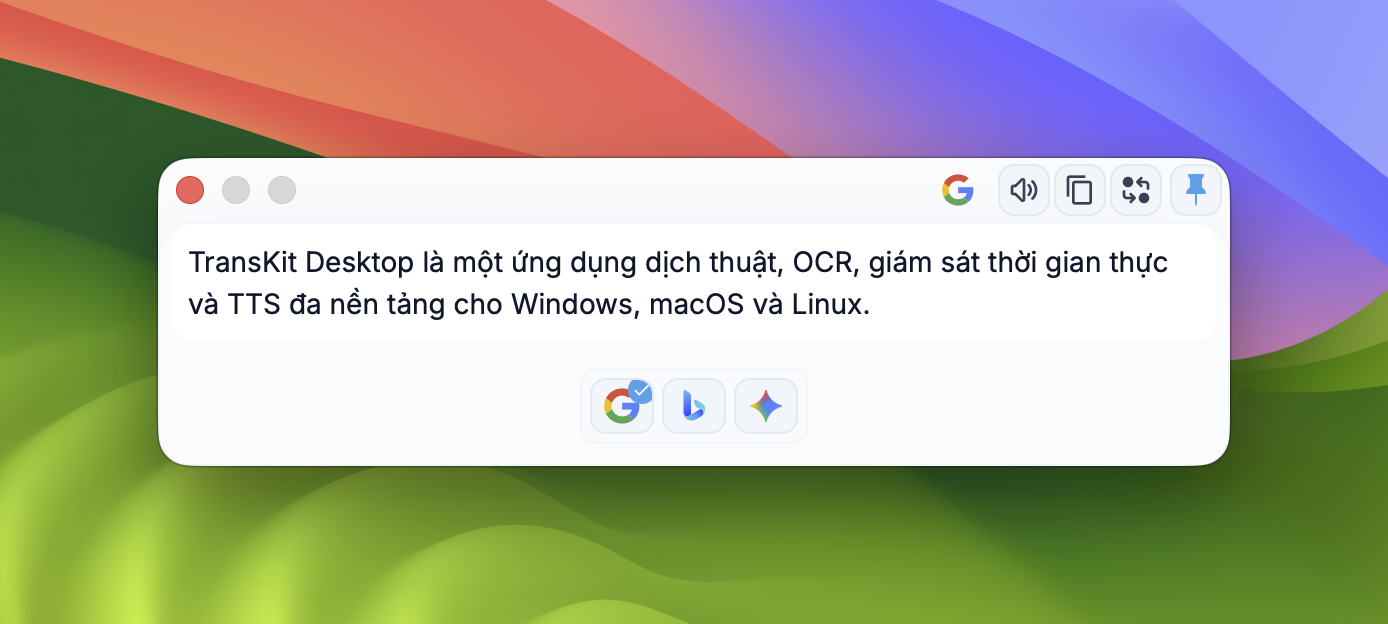
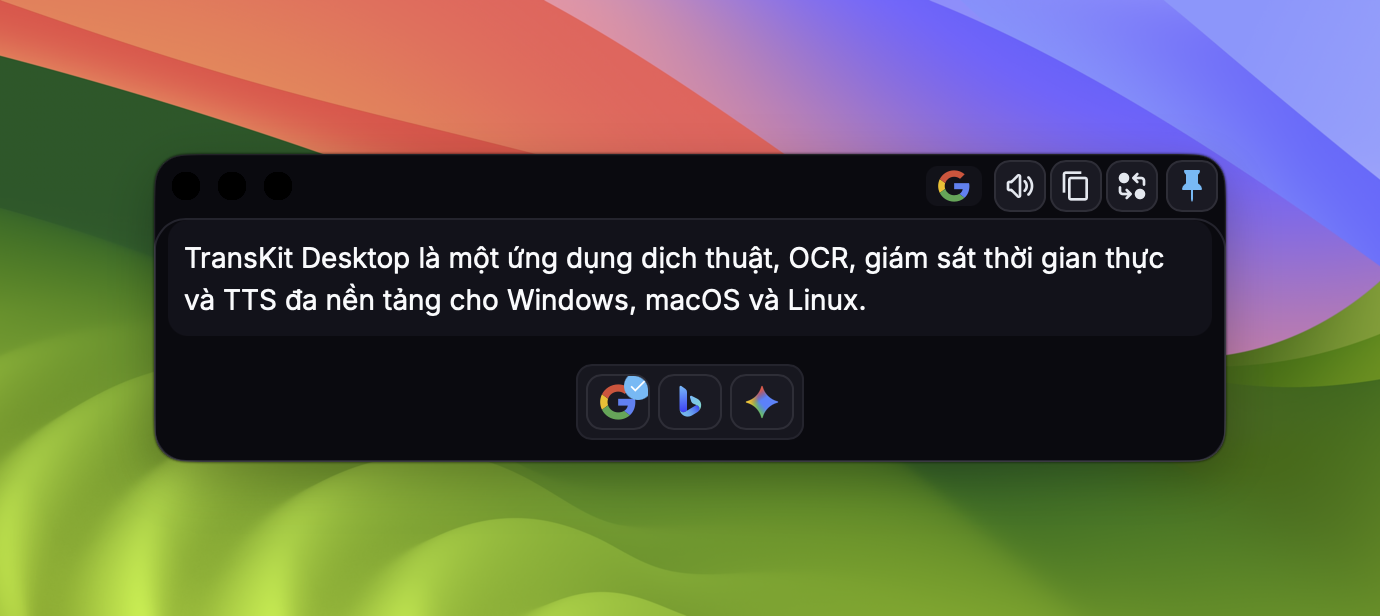
TransKit Desktop is a cross-platform translation, OCR, realtime monitor, and TTS app for Windows, macOS, and Linux.
- Full User Guide
- Usage
- Keyboard Shortcuts
- What Is New In TransKit
- Installation
- Transcription Setup (Monitor)
- FAQ & Troubleshooting
- Build From Source
- Release New Version (All Platforms)
- Contributing
- License
Usage
|
Live Interpreter Live Interpreter with AI suggestions, Submode, and TTS and PTT (Talking native language and listen to translated language). All services are configurable in the Service settings. 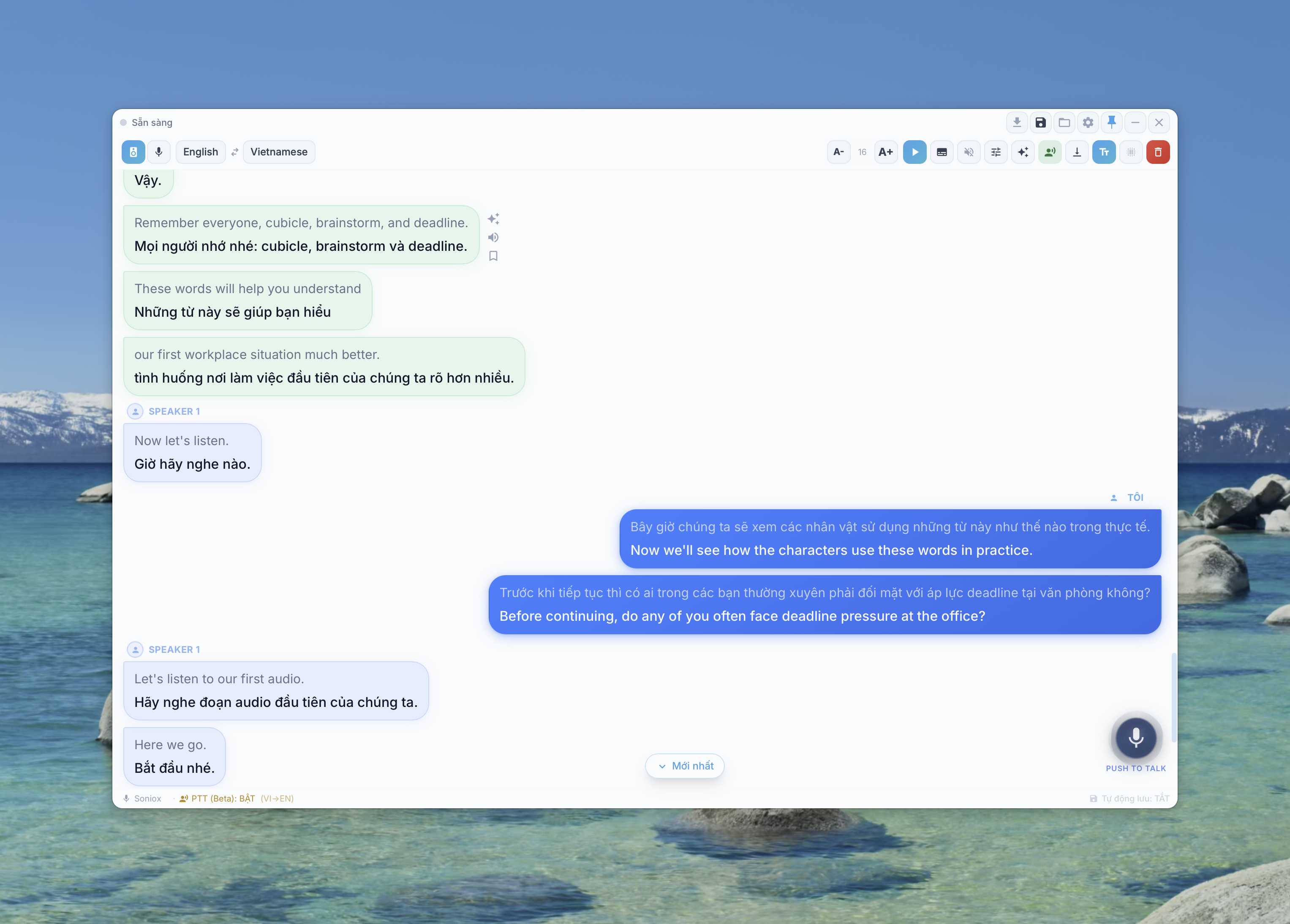
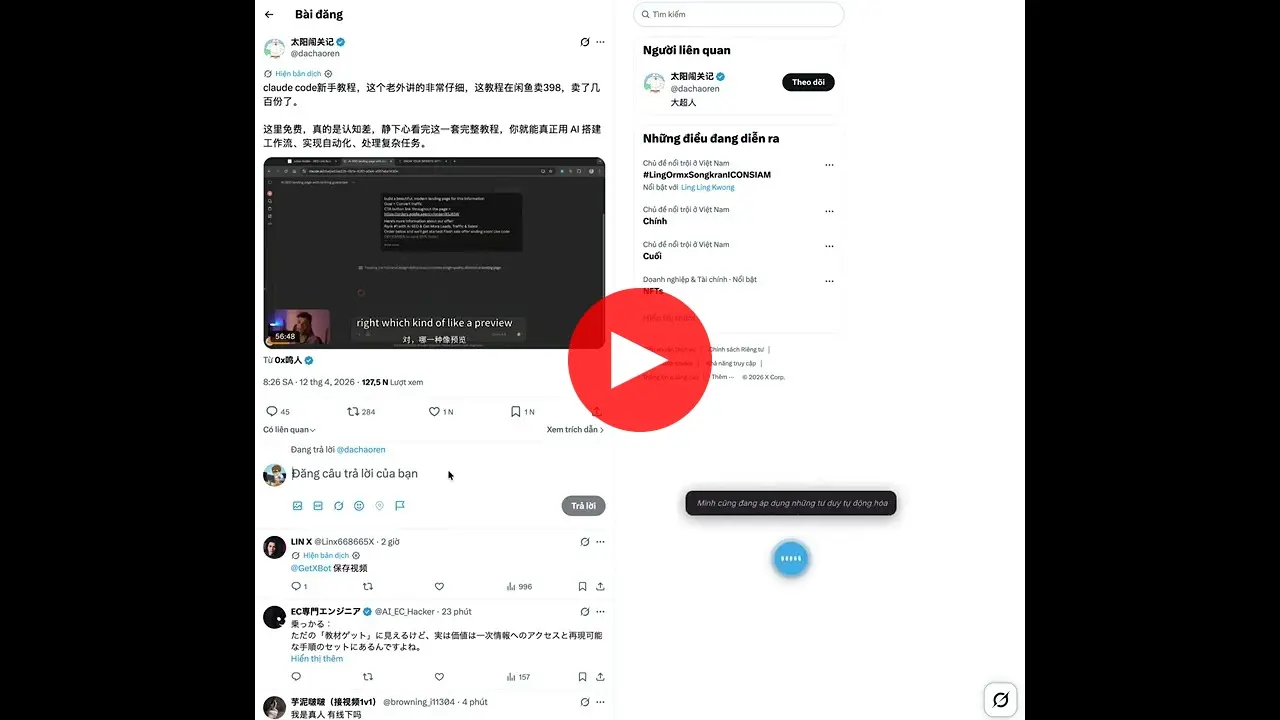
Voice Anywhere |
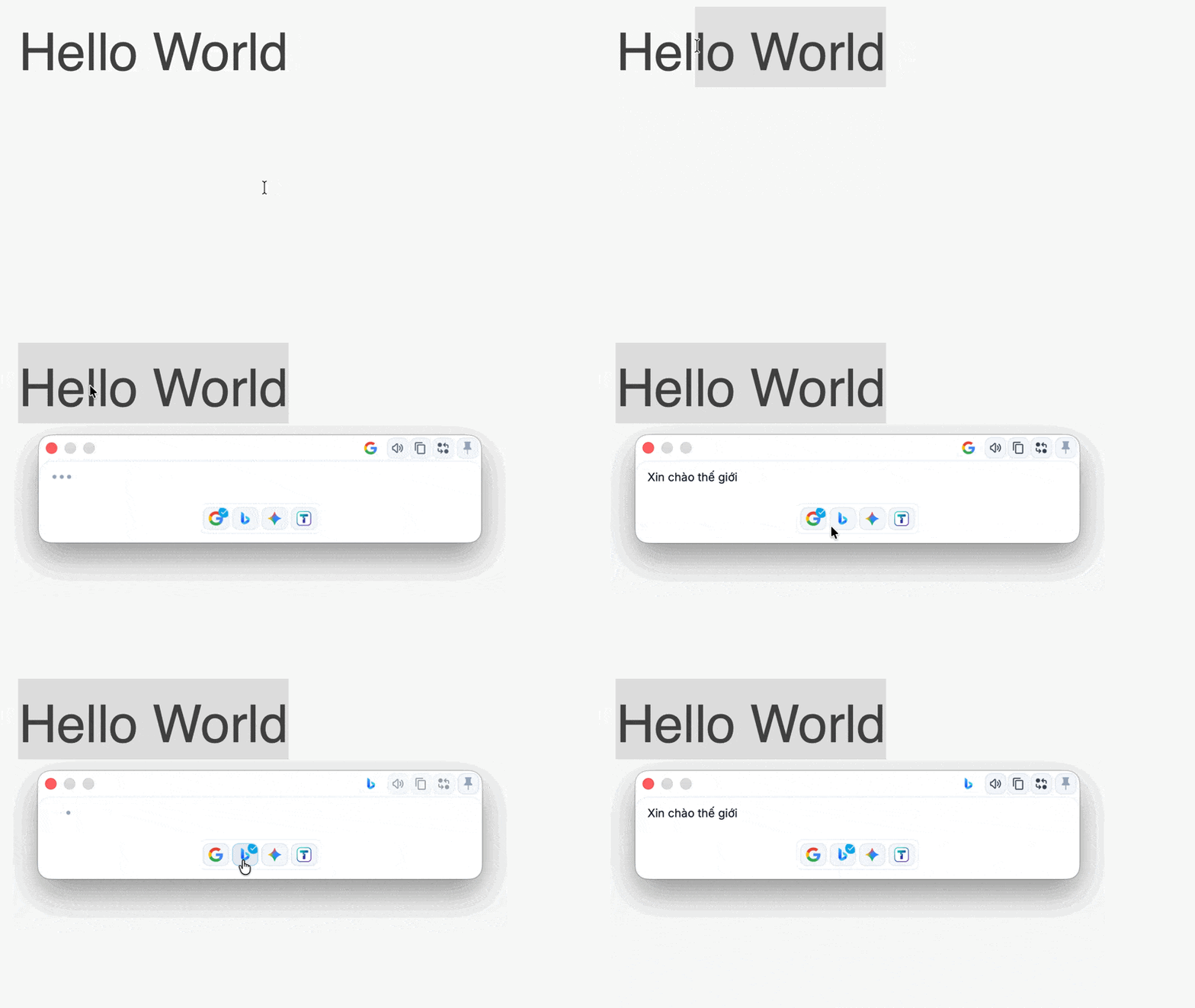
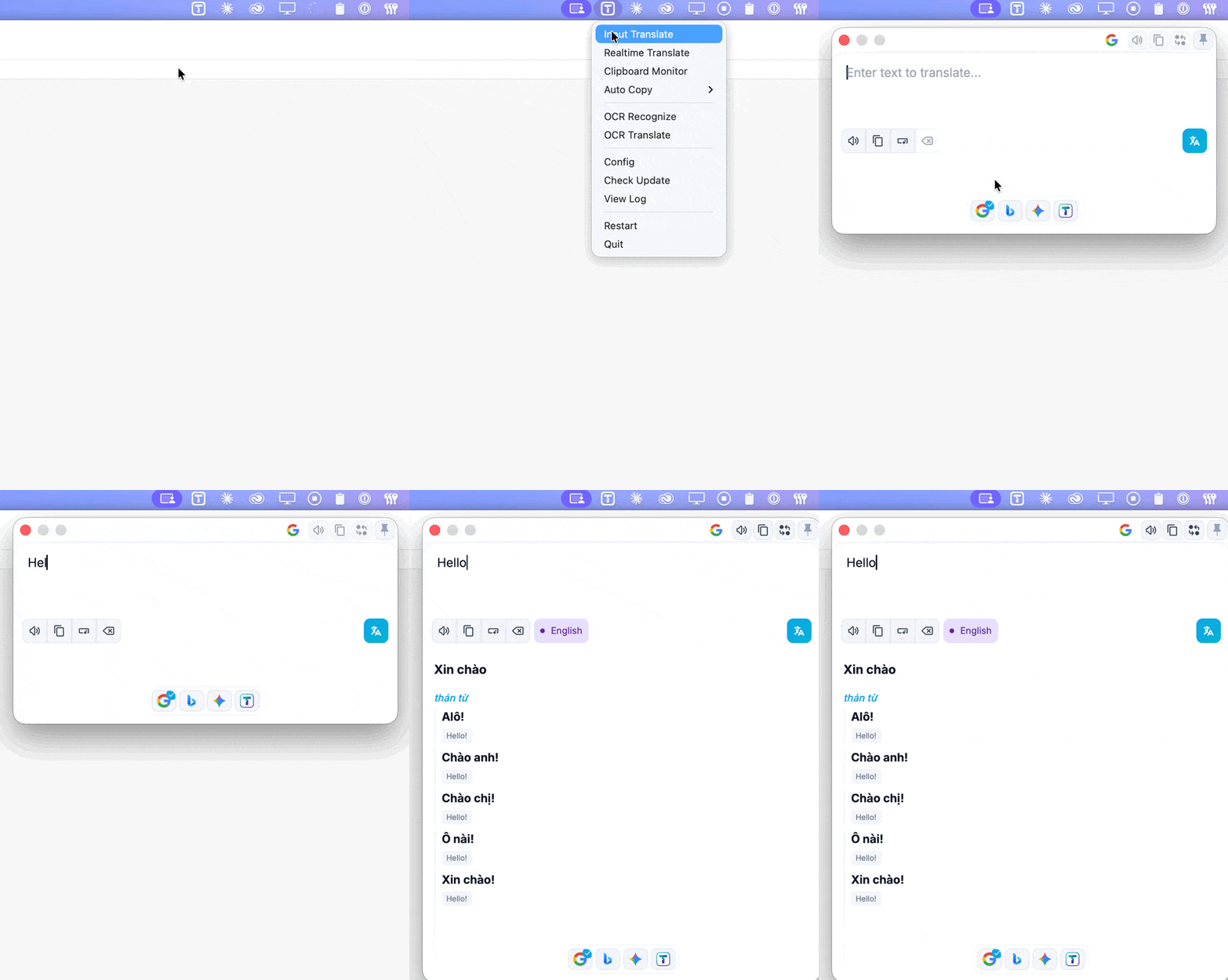
| Translation by selection | Translate by input | External calls |
|---|---|---|
| Select text and press the shortcut to translate | Press shortcut to open translation window, translate by hitting Enter | More efficient workflow by integrating with other apps |
 |  | |
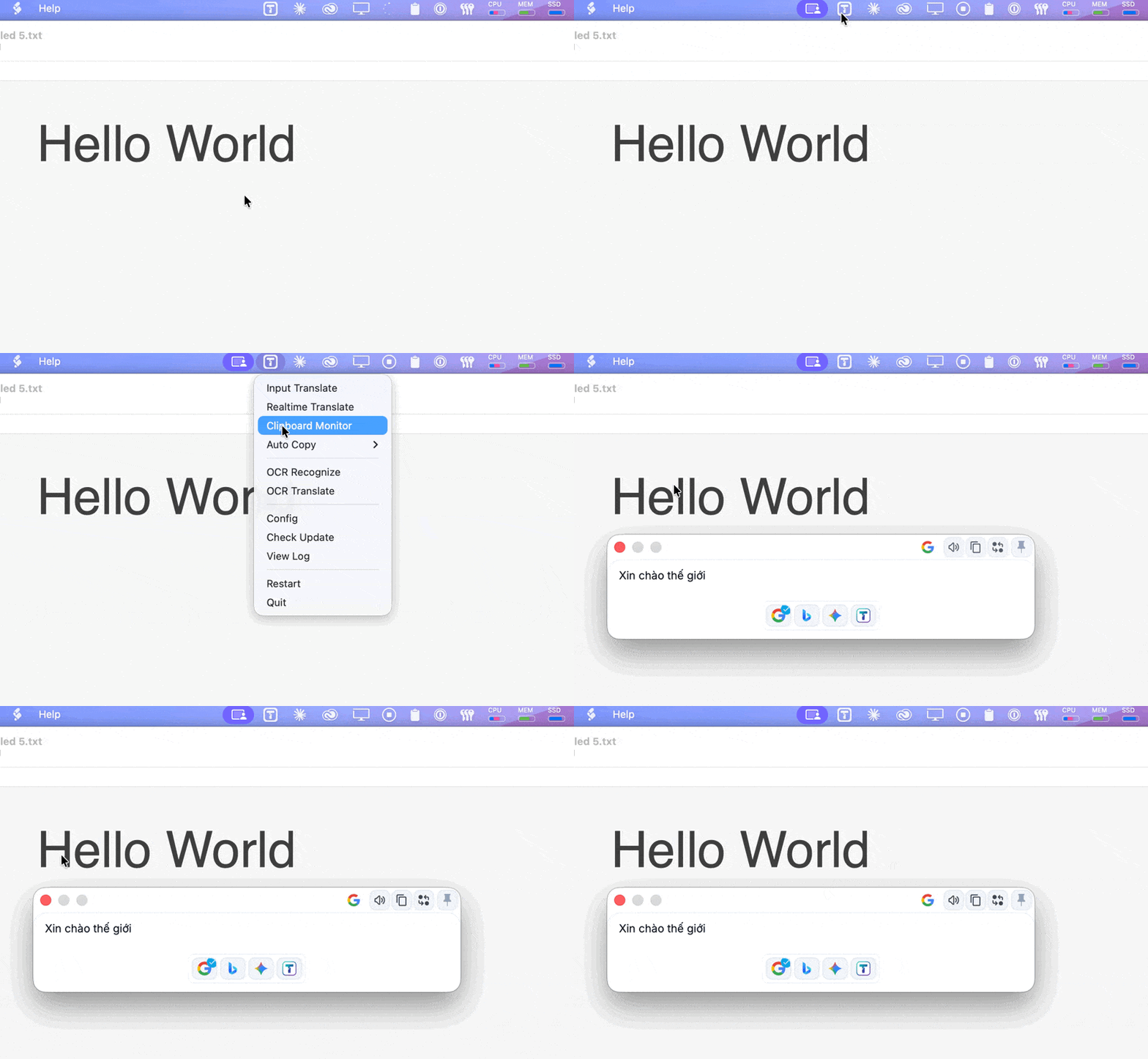
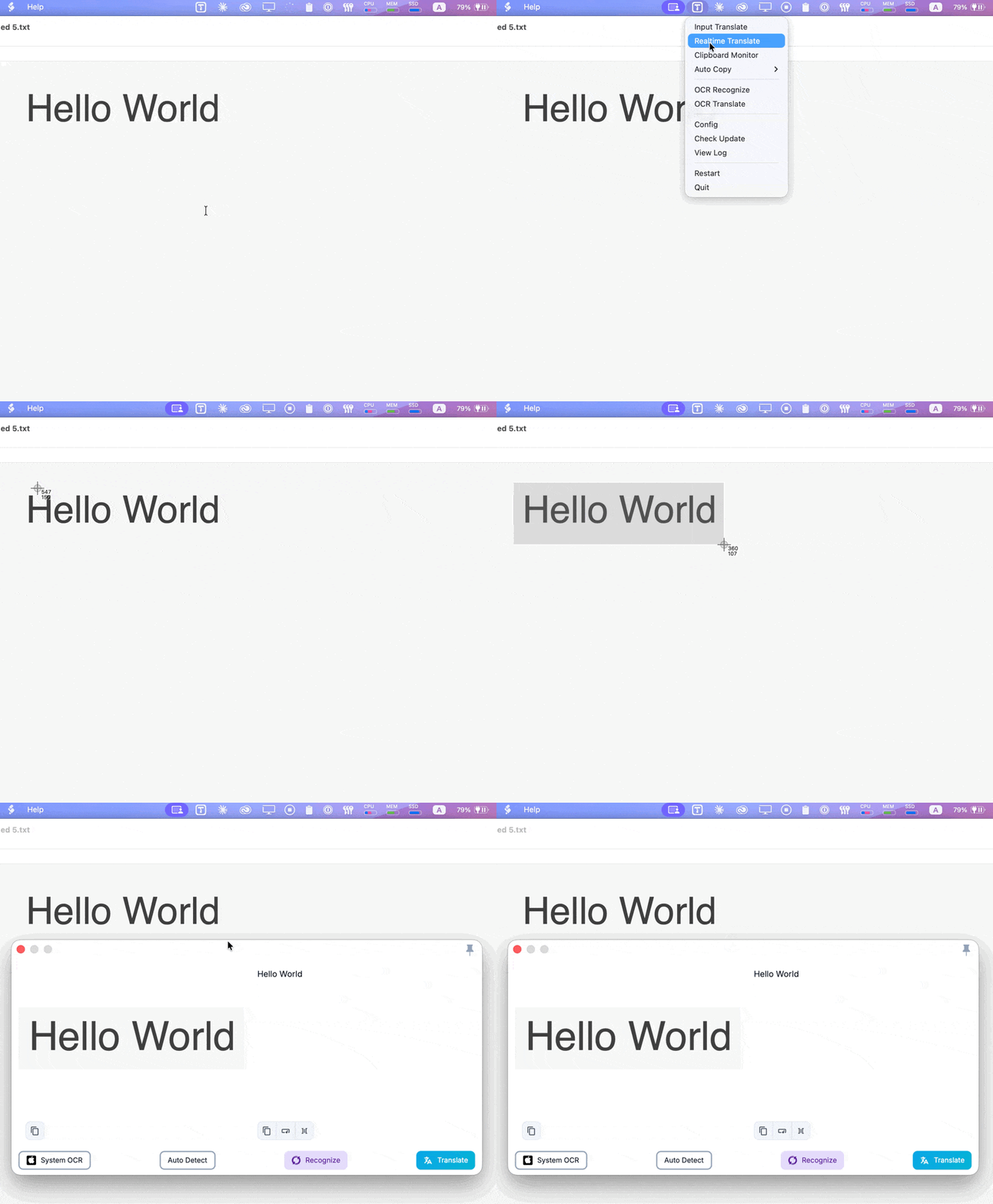
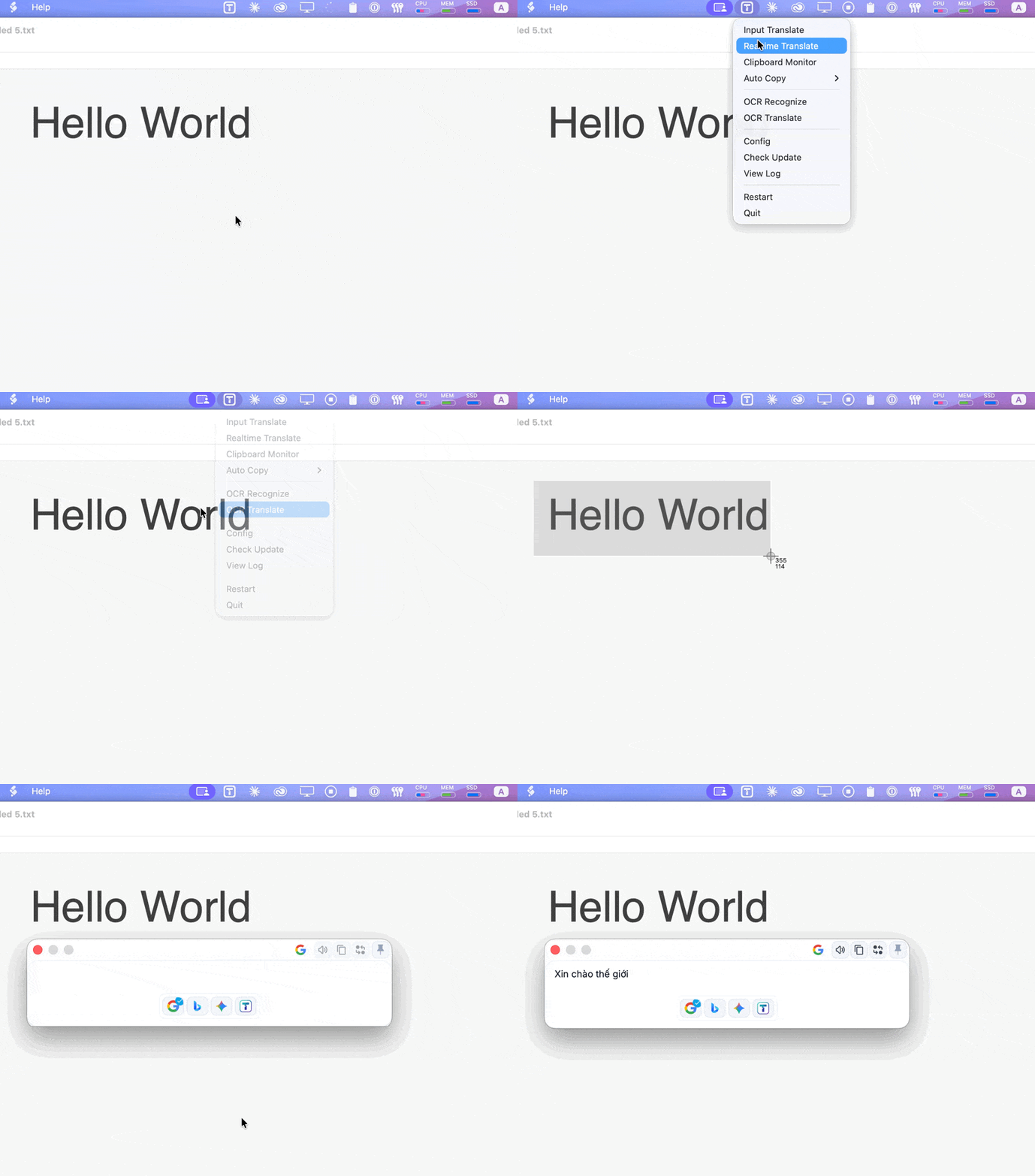
| Clipboard Listening | Screenshot OCR | Screenshot Translation |
| Click the top left icon on any translation panel to start clipboard listening. Copied text will be translated automatically. | Press shortcut, select area to OCR | Press shortcut, select area to translate |
 |  |  |
Keyboard Shortcuts
All shortcuts are fully configurable in Settings → Hotkey. The defaults below are registered automatically on a fresh install — you can reassign or clear any of them at any time.
Cross-platform note:
Ctrl+Alton Windows / Linux is physically the same key combination asCtrl+Optionon macOS. The shortcut is registered once and works on all three platforms without any per-OS adjustment.
| Feature | Default Shortcut | Description |
|---|---|---|
| Voice Anywhere | Ctrl+Alt+V | Show / hide the floating mic button for voice input into any app or window |
| Realtime Translate | Ctrl+Alt+M | Open the Audio Monitor for live speech-to-text + translation |
| Selection Translate | Ctrl+Alt+Q | Translate the currently selected text |
| Input Translate | Ctrl+Alt+W | Open the text-input translation window |
| OCR Recognize | Ctrl+Alt+R | Capture a screen region and extract text |
| OCR Translate | Ctrl+Alt+O | Capture a screen region and translate the text |
Why these keys?
The Ctrl+Alt+ prefix (Ctrl+Option+ on macOS) was chosen because:
- Not claimed by any OS system shortcut on Windows, macOS, or Linux
Ctrl+Alt+Del,Ctrl+Alt+T(Linux terminal), andCtrl+Alt+L(Linux lock) are the only reserved combinations in this family — all avoided above- Common developer shortcuts (
Ctrl+Shift+I,Ctrl+Shift+R, `Ctrl+``) that would conflict with browsers and IDEs are not used - Single-hand press is still comfortable with the left hand on
Ctrl+Altand a letter key
You can freely reassign any shortcut in Settings → Hotkey, or clear a field (Backspace) to disable it.
What Is New In TransKit
Compared to upstream Pot, TransKit extends realtime and AI workflows.
Realtime Monitor
Implemented in src/window/Monitor/index.jsx and related components.
- Realtime meeting monitor with low-latency speech-to-text and translation
- Sub Mode (subtitle-style overlay)
- AI context generation and AI suggestion per transcript entry
- Bookmark timeline for important lines
- Auto-save transcript to Markdown files
- Quick open for saved transcript file/folder
TTS (Free + Premium, BYO API)
- Free-friendly: Edge TTS, Google TTS
- Premium: ElevenLabs, OpenAI-compatible TTS
- Self-host option: VieNeu streaming TTS
- BYO API key per user in app settings
Installation
Release page: https://github.com/transkit-app/transkit-desktop/releases/latest
Windows
- Download the latest
.exeinstaller from Releases. - Choose package by architecture:
- x64:
TransKit_{version}_x64-setup.exe - x86:
TransKit_{version}_x86-setup.exe - arm64:
TransKit_{version}_arm64-setup.exe
- x64:
- Run the installer.
[!NOTE] If Windows Defender shows a "Windows protected your PC" message, click "More info" and then "Run anyway".
Alternatively, install via Winget:
winget install TransKit
macOS
Install via Homebrew:
brew tap transkit-app/tap
brew install --cask transkit
Alternatively
- Download the latest
.dmgfrom the Releases page. - Open the
.dmgand drag TransKit to Applications. - Important — the app is not yet signed with an Apple Developer certificate. macOS will block it on first open. Run this command once in Terminal to allow it:
xattr -cr /Applications/TransKit.app - On first launch, macOS will ask for Screen & System Audio Recording permissions. Toggle them ON in System Settings for TransKit to capture system audio.
Linux
- Download the package for your architecture from Releases.
- Available package formats:
.deb(Ubuntu/Debian).rpm(Fedora/RHEL).AppImage(Universal)
Transcription Setup (Monitor)
While basic translation features (Selection/Input/OCR) work out-of-the-box, the Realtime Monitor requires a Transcription (Speech-to-Text) provider.
- Go to Settings > Service > Transcription.
- Add a provider and enter your API Key. Supported providers include:
- Soniox (Recommended for low latency) - Get API Key require credit
- Deepgram - Get API Key free signup, get $200 credit
- AssemblyAI - Get API Key
- Gladia - Get API Key free signup, get free 10 hours transcription credit/month
- OpenAI Whisper - Get API Key
- Go to Settings > Hotkey and set a shortcut for Audio Monitor.
FAQ & Troubleshooting
Why is the translation window not appearing?
- Check if the hotkey is registered correctly in Settings > Hotkey.
- Ensure there are no hotkey conflicts with other applications.
Monitor status shows "Error"?
- Verify your Internet connection.
- Check if your API key for the Transcription provider is correct and has a balance.
No audio captured on macOS?
- Go to System Settings > Privacy & Security.
- Ensure TransKit has permissions for Microphone and Screen Recording (required for capturing system audio).
Build From Source
Requirements
- Node.js 20+
- pnpm 9+
- Rust stable
Commands
pnpm install
pnpm tauri dev
pnpm tauri build
[!TIP] For Developers Building from Source: If you want to disable Transkit Cloud features (Auth, Trial keys), copy
.env.exampleto.envand setVITE_DISABLE_CLOUD=truebefore building.
Release New Version (All Platforms)
TransKit uses CI workflow: .github/workflows/package.yml
- Update
CHANGELOG. - Create tag:
git tag v3.1.0
git push origin v3.1.0
- GitHub Actions builds and publishes:
- macOS:
aarch64,x86_64 - Windows:
x64,x86,arm64(+ fix-runtime variants) - Linux:
x86_64,i686,aarch64,armv7
- macOS:
Required release secrets include TAURI_PRIVATE_KEY, TAURI_KEY_PASSWORD, and Apple signing/notarization secrets for macOS jobs.
Updater scripts/docs: updater/README.md
Contributing
- Fork repo and create a feature branch.
- Keep changes focused and add tests/checks when applicable.
- Run local checks/build before PR:
pnpm install
pnpm tauri dev
pnpm tauri build
- Open a Pull Request with:
- clear summary
- screenshots/GIFs for UI changes
- migration notes if config keys are changed
Credits
This project was originally forked from Pot Desktop.
Significant improvements and modifications have been made.
License
GPL-3.0-only. See LICENSE.
Contributors
(top 30 of 50)


Similar repos


Languages
JavaScript
67.5%
Rust
21.3%
TypeScript
4.3%
Python
3.2%
PLpgSQL
1.2%
CSS
1.1%
Kotlin
1.1%
Transkit is a cross-platform translation & OCR app, originally based on Pot (GPL-3.0)
See the codeREADME
TransKit Desktop
TransKit Desktop is a cross-platform translation, OCR, realtime monitor, and TTS app for Windows, macOS, and Linux.
- Full User Guide
- Usage
- Keyboard Shortcuts
- What Is New In TransKit
- Installation
- Transcription Setup (Monitor)
- FAQ & Troubleshooting
- Build From Source
- Release New Version (All Platforms)
- Contributing
- License
Usage
|
Live Interpreter Live Interpreter with AI suggestions, Submode, and TTS and PTT (Talking native language and listen to translated language). All services are configurable in the Service settings.
Voice Anywhere |
| Translation by selection | Translate by input | External calls |
|---|---|---|
| Select text and press the shortcut to translate | Press shortcut to open translation window, translate by hitting Enter | More efficient workflow by integrating with other apps |
| | |
| Clipboard Listening | Screenshot OCR | Screenshot Translation |
| Click the top left icon on any translation panel to start clipboard listening. Copied text will be translated automatically. | Press shortcut, select area to OCR | Press shortcut, select area to translate |
| | |
Keyboard Shortcuts
All shortcuts are fully configurable in Settings → Hotkey. The defaults below are registered automatically on a fresh install — you can reassign or clear any of them at any time.
Cross-platform note:
Ctrl+Alton Windows / Linux is physically the same key combination asCtrl+Optionon macOS. The shortcut is registered once and works on all three platforms without any per-OS adjustment.
| Feature | Default Shortcut | Description |
|---|---|---|
| Voice Anywhere | Ctrl+Alt+V | Show / hide the floating mic button for voice input into any app or window |
| Realtime Translate | Ctrl+Alt+M | Open the Audio Monitor for live speech-to-text + translation |
| Selection Translate | Ctrl+Alt+Q | Translate the currently selected text |
| Input Translate | Ctrl+Alt+W | Open the text-input translation window |
| OCR Recognize | Ctrl+Alt+R | Capture a screen region and extract text |
| OCR Translate | Ctrl+Alt+O | Capture a screen region and translate the text |
Why these keys?
The Ctrl+Alt+ prefix (Ctrl+Option+ on macOS) was chosen because:
- Not claimed by any OS system shortcut on Windows, macOS, or Linux
Ctrl+Alt+Del,Ctrl+Alt+T(Linux terminal), andCtrl+Alt+L(Linux lock) are the only reserved combinations in this family — all avoided above- Common developer shortcuts (
Ctrl+Shift+I,Ctrl+Shift+R, `Ctrl+``) that would conflict with browsers and IDEs are not used - Single-hand press is still comfortable with the left hand on
Ctrl+Altand a letter key
You can freely reassign any shortcut in Settings → Hotkey, or clear a field (Backspace) to disable it.
What Is New In TransKit
Compared to upstream Pot, TransKit extends realtime and AI workflows.
Realtime Monitor
Implemented in src/window/Monitor/index.jsx and related components.
- Realtime meeting monitor with low-latency speech-to-text and translation
- Sub Mode (subtitle-style overlay)
- AI context generation and AI suggestion per transcript entry
- Bookmark timeline for important lines
- Auto-save transcript to Markdown files
- Quick open for saved transcript file/folder
TTS (Free + Premium, BYO API)
- Free-friendly: Edge TTS, Google TTS
- Premium: ElevenLabs, OpenAI-compatible TTS
- Self-host option: VieNeu streaming TTS
- BYO API key per user in app settings
Installation
Release page: https://github.com/transkit-app/transkit-desktop/releases/latest
Windows
- Download the latest
.exeinstaller from Releases. - Choose package by architecture:
- x64:
TransKit_{version}_x64-setup.exe - x86:
TransKit_{version}_x86-setup.exe - arm64:
TransKit_{version}_arm64-setup.exe
- x64:
- Run the installer.
[!NOTE] If Windows Defender shows a "Windows protected your PC" message, click "More info" and then "Run anyway".
Alternatively, install via Winget:
winget install TransKit
macOS
Install via Homebrew:
brew tap transkit-app/tap
brew install --cask transkit
Alternatively
- Download the latest
.dmgfrom the Releases page. - Open the
.dmgand drag TransKit to Applications. - Important — the app is not yet signed with an Apple Developer certificate. macOS will block it on first open. Run this command once in Terminal to allow it:
xattr -cr /Applications/TransKit.app - On first launch, macOS will ask for Screen & System Audio Recording permissions. Toggle them ON in System Settings for TransKit to capture system audio.
Linux
- Download the package for your architecture from Releases.
- Available package formats:
.deb(Ubuntu/Debian).rpm(Fedora/RHEL).AppImage(Universal)
Transcription Setup (Monitor)
While basic translation features (Selection/Input/OCR) work out-of-the-box, the Realtime Monitor requires a Transcription (Speech-to-Text) provider.
- Go to Settings > Service > Transcription.
- Add a provider and enter your API Key. Supported providers include:
- Soniox (Recommended for low latency) - Get API Key require credit
- Deepgram - Get API Key free signup, get $200 credit
- AssemblyAI - Get API Key
- Gladia - Get API Key free signup, get free 10 hours transcription credit/month
- OpenAI Whisper - Get API Key
- Go to Settings > Hotkey and set a shortcut for Audio Monitor.
FAQ & Troubleshooting
Why is the translation window not appearing?
- Check if the hotkey is registered correctly in Settings > Hotkey.
- Ensure there are no hotkey conflicts with other applications.
Monitor status shows "Error"?
- Verify your Internet connection.
- Check if your API key for the Transcription provider is correct and has a balance.
No audio captured on macOS?
- Go to System Settings > Privacy & Security.
- Ensure TransKit has permissions for Microphone and Screen Recording (required for capturing system audio).
Build From Source
Requirements
- Node.js 20+
- pnpm 9+
- Rust stable
Commands
pnpm install
pnpm tauri dev
pnpm tauri build
[!TIP] For Developers Building from Source: If you want to disable Transkit Cloud features (Auth, Trial keys), copy
.env.exampleto.envand setVITE_DISABLE_CLOUD=truebefore building.
Release New Version (All Platforms)
TransKit uses CI workflow: .github/workflows/package.yml
- Update
CHANGELOG. - Create tag:
git tag v3.1.0
git push origin v3.1.0
- GitHub Actions builds and publishes:
- macOS:
aarch64,x86_64 - Windows:
x64,x86,arm64(+ fix-runtime variants) - Linux:
x86_64,i686,aarch64,armv7
- macOS:
Required release secrets include TAURI_PRIVATE_KEY, TAURI_KEY_PASSWORD, and Apple signing/notarization secrets for macOS jobs.
Updater scripts/docs: updater/README.md
Contributing
- Fork repo and create a feature branch.
- Keep changes focused and add tests/checks when applicable.
- Run local checks/build before PR:
pnpm install
pnpm tauri dev
pnpm tauri build
- Open a Pull Request with:
- clear summary
- screenshots/GIFs for UI changes
- migration notes if config keys are changed
Credits
This project was originally forked from Pot Desktop.
Significant improvements and modifications have been made.
License
GPL-3.0-only. See LICENSE.
Similar repos
Contributors
(top 30 of 50)
Languages
JavaScript
67.5%
Rust
21.3%
TypeScript
4.3%
Python
3.2%
PLpgSQL
1.2%
CSS
1.1%
Kotlin
1.1%