
macOS menu bar app that translates selected text in place with a hotkey: up to three language pairs with automatic direction, your writing style, and Claude, ChatGPT or Grok via your subscription or API key.
See the codeSee what people are saying
README
Translate Like Me

A tiny macOS menu-bar app that translates the current selection with a global hotkey and rewrites it in your own writing style. Select text in any app, press the shortcut, and the selection is replaced in place with the translation.
It detects the direction automatically between the two languages you choose, so there is nothing to switch: type in one, get the other. If you use more languages, set up to three pairs, each on its own shortcut.
Features
- Translate in place: replaces the selected text directly, in any app.
- Automatic direction: detects which language of the pair you wrote in and translates to the other; text in any other language goes to the pair's first.
- Up to three language pairs: for example Russian ↔ English on ⌥⌘F and Russian ↔ Spanish on ⌥⌘G.
- Your writing style, per pair: an optional style description makes a pair's translations sound like you. Two pairs can share languages, for example one with your style for your own text and a plain one for someone else's.
- Bring your own engine: Claude or ChatGPT, each via your existing subscription (official CLI) or your own API key, or Grok via its official CLI and your grok.com account.
- Your model, or the CLI's default: pick the model and effort each CLI offers, or keep the one you set in the CLI itself; nothing is pinned in the app.
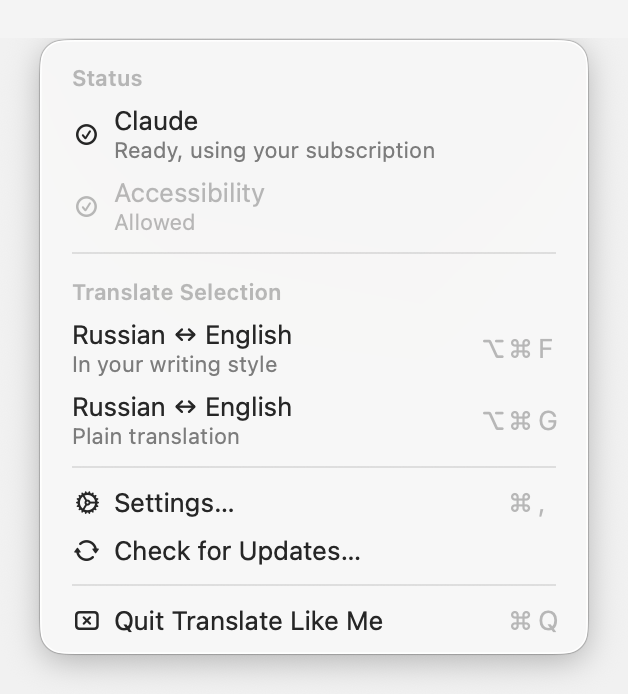
- Menu-bar only: no Dock icon, no window in the way. Click the icon for a standard menu with status, your language pairs, and settings.
- Native macOS design: built to Apple's Human Interface Guidelines, with Liquid Glass on macOS 26 and later.
- In-place updates: checks once a day and installs a new version when you choose to (Sparkle).
Requirements
- macOS 15 (Sequoia) or later, on a Mac with Apple silicon.
- For subscription mode: the provider's official CLI installed and signed in
(
claudefor Claude,codexfor ChatGPT,grokfor Grok). For API-key mode: an API key.
Install
With Homebrew
brew install --cask wiltodelta/tap/translate-like-me
After that the app keeps itself up to date (Sparkle), not brew upgrade.
From a release
- Download the latest
.zipfrom the Releases page. - Unzip it and move Translate Like Me.app to
/Applications. - Launch it. Releases are signed with a Developer ID and notarized by Apple, so macOS opens them without a warning.
From source
git clone https://github.com/wiltodelta/translate-like-me.git
cd translate-like-me
./build.sh
open "Translate Like Me.app"
Without the maintainer's Developer ID identity in your keychain, build.sh
signs the app ad hoc, so macOS asks for Accessibility again after every rebuild.
First run
- A small icon appears in the menu bar (there is no Dock icon). Settings opens on the Translation pane at first launch so you can pick an engine. The first language pair starts from your macOS languages (your first one and your second, or English) on ⌥⌘F; change it under General > Languages.
- Grant Accessibility in System Settings > Privacy & Security > Accessibility. It is required to read the selection (synthesized ⌘C) and to paste the replacement (⌘V).
Usage
- Select text in any app, then press a pair's shortcut (the first pair starts on ⌥⌘F) to replace it with the translation.
- Click the menu-bar icon for the menu: engine and Accessibility status, one Translate Selection item per language pair with its shortcut, Settings, updates, and Quit. Clicking the engine row opens its settings.
- The icon shows a busy glyph while a translation is running.
- If the selection can't be replaced in place (a read-only field, e.g. a message you are reading rather than writing), the translation is put on the clipboard and shown in a small popup near the cursor with a Copy button (in case you copy something else before pasting it), so it is never lost.
- If something goes wrong (no text selected, or the translation fails), that same popup shows the message instead.
Settings
Two panes, General and Translation. Changes apply immediately.
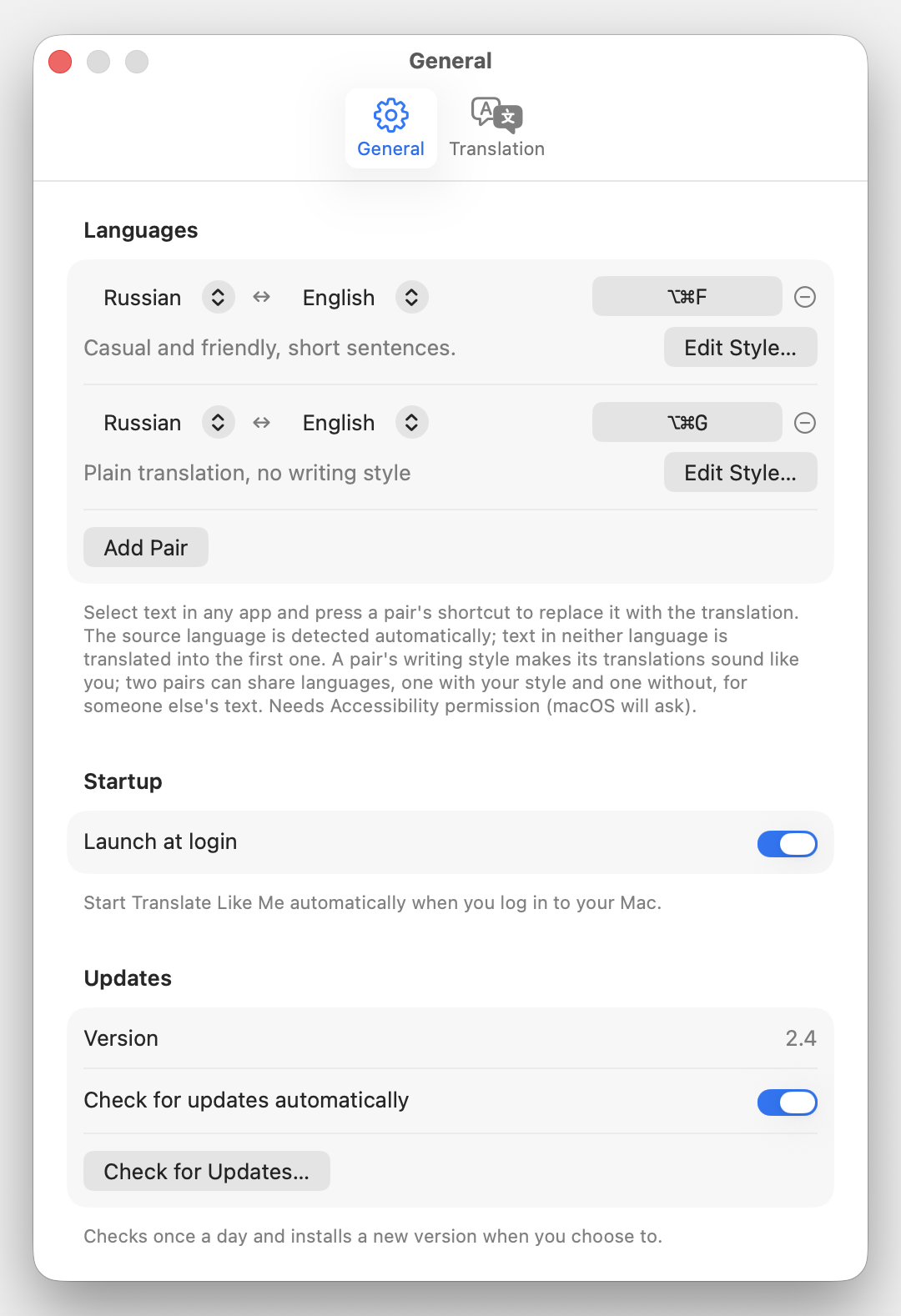
- Languages (General): up to three pairs. Each row has the two languages, the pair's shortcut (click it and press a combo with ⌘, ⌥, or ⌃; Delete clears it, and a combo another pair uses is refused), and a remove button, with the pair's writing style below (Edit Style… opens it): free text applied to that pair's translations. Paste a full voice guide or a short distilled version, or leave it empty for a plain translation. The direction is detected per translation; the order matters only for text in neither language, which is translated into the first one, so put the language you read first.
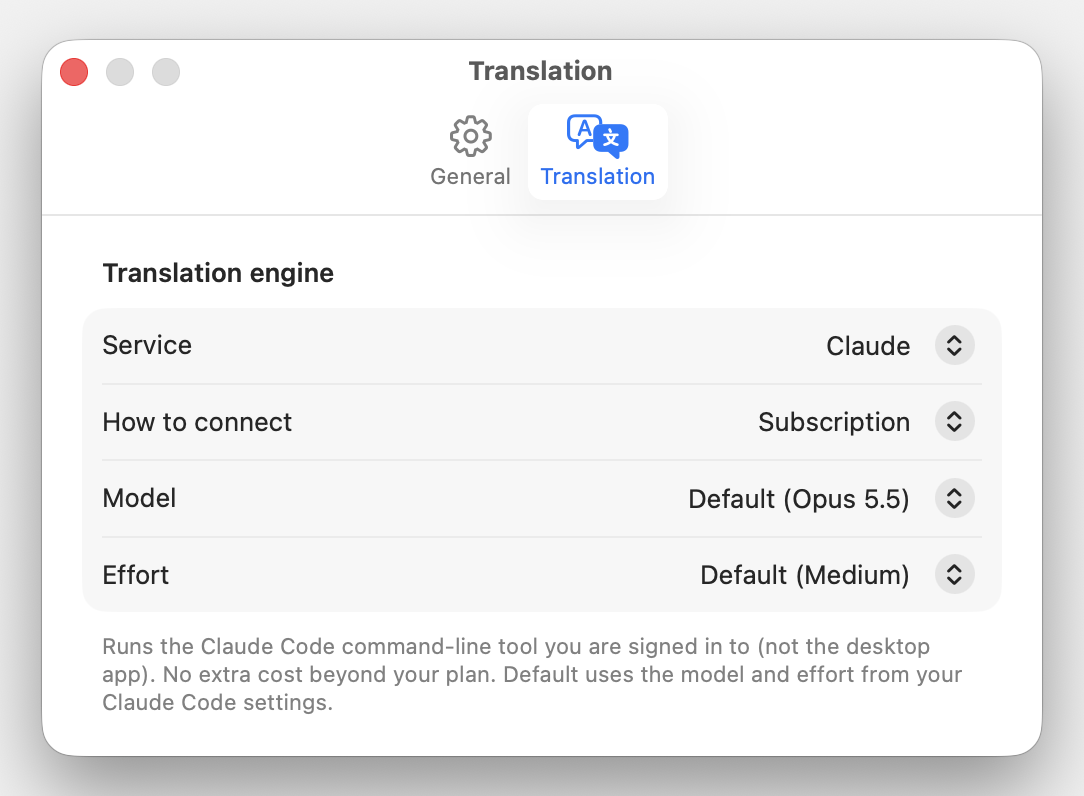
- Translation engine: provider (Claude / ChatGPT / Grok) and, for Claude and ChatGPT, how to connect (subscription or API key). In subscription mode, a Model and Effort picker lists what the CLI itself offers; Default keeps the CLI's configured default.
- API key: stored per provider; shown only in API-key mode.
- Launch at login: start the app automatically when you log in.
- Updates: current version, automatic daily checks on or off, and a "Check for Updates…" button.
Providers and connection modes
Three providers; Claude and ChatGPT each in two modes, Grok in subscription mode only:
| Provider | Subscription | API key |
|---|---|---|
| Anthropic (Claude) | claude -p (Pro/Max) | POST /v1/messages |
| OpenAI (ChatGPT) | codex exec (ChatGPT) | POST /v1/chat/completions |
| xAI (Grok) | grok -p (grok.com) | - |
Subscription runs the provider's official CLI as a subprocess, using the plan
you are already signed in to. No API key and no per-token billing beyond your
plan. For codex, run codex login once (ChatGPT account) before using it;
for grok, run grok login once.
Using the official CLIs with a subscription is an intended, supported way to run Claude / Codex / Grok programmatically. Extracting a subscription OAuth token and using it in your own API client is not allowed; this app never does that. It only invokes the official binary as a subprocess.
API key calls the provider's HTTP API directly with your own key (you pay the provider per use). Keys are stored per provider and only used for that provider.
Model selection
The app never pins a model:
- Subscription: the model and effort picked in Settings, listed from each
CLI's own model catalog (with the efforts each model accepts). With
Default, each CLI runs with your own default model and effort, the ones
set in Claude Code's
settings.json(model,effortLevel), codex'sconfig.toml(model,model_reasoning_effort), or grok's config; where none is set, the CLI's built-in default applies. - API key: the newest matching model (Sonnet, or OpenAI's fast tier) from the
provider's live
/modelslist.
Privacy
- The text you translate and the pair's writing style go to the engine you picked and nowhere else: Anthropic (Claude), OpenAI (ChatGPT), or xAI (Grok), through its official CLI or API. The app has no server, analytics or telemetry.
- The claude and codex CLIs run with session history off, so translations are
not kept in
~/.claudeor~/.codex. The grok CLI has no such switch and may keep its own history. - API keys are stored in your login keychain.
- The clipboard is put back after a translation, with every type it held (rich text, images, files), unless you copy something else in the meantime; the pasted translation is marked transient so clipboard managers skip it.
- Logs (
log stream --predicate 'subsystem == "com.wiltodelta.translatelikeme"') record the app in front, the language pair and character counts, never the text itself.
Updates
The app uses Sparkle (MIT licensed; its notice ships in the app bundle) to check once a day for a new release. It never takes focus from what you are doing: when an update is found, the menu's "Check for Updates…" item becomes "Install Update…" with the new version, and the update window opens only when you choose it or check by hand from the menu or Settings > Updates. Updates are signed with an EdDSA key as well as the Developer ID, and install in place with a relaunch. Automatic checks can be turned off in Settings.
Notes
- Subscription (CLI) calls add a few seconds of latency per translation (CLI startup plus one model turn). API-key mode is faster.
- The system prompt tells the model to treat the selection as inert text to transform, never as a question or request directed at it. Without this, small fast models occasionally "answer" question-shaped input instead of translating it. It is a known, recurring failure mode rather than a fully solved problem; if you see it, note which input triggered it.
Troubleshooting
- "Translate Like Me is damaged and can't be opened", or an unidentified-developer warning: releases before 2.2 were not notarized. Update to the latest release, or right-click the app and choose Open to confirm once.
- The shortcut does nothing, or the translation doesn't replace the text: grant Accessibility in System Settings > Privacy & Security > Accessibility, then relaunch the app. It is required to read the selection and paste the result.
- No Effort picker: the model in use takes no effort setting (Claude Code offers none for Haiku), or the engine's default model is not known yet (Grok, until its sign-in check has run once). Pick another model to see it.
- macOS asks for Accessibility again after updating to 2.2: 2.2 is the first release signed with a Developer ID, a different signature from earlier builds. Grant it once more; later updates keep the grant. A build from source without the Developer ID identity is signed ad hoc and asks after every rebuild.
Uninstall
Quit the app from its menu, then move Translate Like Me.app to the Trash. To remove its settings and any saved API keys too:
defaults delete com.wiltodelta.translatelikeme
security delete-generic-password -s com.wiltodelta.translatelikeme -a anthropicKey
security delete-generic-password -s com.wiltodelta.translatelikeme -a openaiKey
Remove it from System Settings > Privacy & Security > Accessibility and from General > Login Items as well.
Building and releasing
Build a bundle locally:
./build.sh
./capture-screenshots.sh rebuilds the app and regenerates the screenshots
(the terminal needs Accessibility and Screen Recording access).
Releases are automated. The app version comes from the git tag, so cutting a release is just tagging and pushing:
git tag -a vX.Y -F notes.md   # first line "Translate Like Me X.Y", blank line, then the notes
git push origin vX.Y
GitHub Actions then builds the app with the tag's version, signs it with the
Developer ID, notarizes it, and publishes a Release with
Translate-Like-Me-vX.Y-macOS.zip and the Sparkle appcast.xml attached; the
tag annotation's body becomes both the release notes and the text of the update
window, and its first line the release title. Use vMAJOR.MINOR tags. Local
./build.sh bundles carry the latest tag's version and are not meant for
distribution.
Signing secrets and verification steps are in
docs/build-and-release.md.
The bundle identifier is not a local label
CFBundleIdentifier in Resources/Info.plist is com.wiltodelta.translatelikeme,
and macOS keys durable per-app state to it. Three things here depend on that:
the UserDefaults.standard domain behind Settings, which holds every persisted
setting; the keychain items holding the API keys, whose service name is the
identifier; and the Accessibility grant that ensureAccessibilityPermission
relies on. Changing the identifier migrates none of them. An existing install would come up as a stranger, with its settings
gone and Accessibility needing to be granted again, so treat it as fixed rather
than as a string to tidy up. It is registered as an explicit App ID for team
K2GT9Q4S6U in the Apple Developer portal, which reserves it for a future Mac App
Store build.
License
Licensed under the Apache License, Version 2.0. See LICENSE for the full text.
Contributors

44 commits
Similar repos


Languages
Swift
88.2%
Shell
10.4%
Python
1.4%
macOS menu bar app that translates selected text in place with a hotkey: up to three language pairs with automatic direction, your writing style, and Claude, ChatGPT or Grok via your subscription or API key.
See the codeSee what people are saying
README
Translate Like Me
A tiny macOS menu-bar app that translates the current selection with a global hotkey and rewrites it in your own writing style. Select text in any app, press the shortcut, and the selection is replaced in place with the translation.
It detects the direction automatically between the two languages you choose, so there is nothing to switch: type in one, get the other. If you use more languages, set up to three pairs, each on its own shortcut.
Features
- Translate in place: replaces the selected text directly, in any app.
- Automatic direction: detects which language of the pair you wrote in and translates to the other; text in any other language goes to the pair's first.
- Up to three language pairs: for example Russian ↔ English on ⌥⌘F and Russian ↔ Spanish on ⌥⌘G.
- Your writing style, per pair: an optional style description makes a pair's translations sound like you. Two pairs can share languages, for example one with your style for your own text and a plain one for someone else's.
- Bring your own engine: Claude or ChatGPT, each via your existing subscription (official CLI) or your own API key, or Grok via its official CLI and your grok.com account.
- Your model, or the CLI's default: pick the model and effort each CLI offers, or keep the one you set in the CLI itself; nothing is pinned in the app.
- Menu-bar only: no Dock icon, no window in the way. Click the icon for a standard menu with status, your language pairs, and settings.
- Native macOS design: built to Apple's Human Interface Guidelines, with Liquid Glass on macOS 26 and later.
- In-place updates: checks once a day and installs a new version when you choose to (Sparkle).
Requirements
- macOS 15 (Sequoia) or later, on a Mac with Apple silicon.
- For subscription mode: the provider's official CLI installed and signed in
(
claudefor Claude,codexfor ChatGPT,grokfor Grok). For API-key mode: an API key.
Install
With Homebrew
brew install --cask wiltodelta/tap/translate-like-me
After that the app keeps itself up to date (Sparkle), not brew upgrade.
From a release
- Download the latest
.zipfrom the Releases page. - Unzip it and move Translate Like Me.app to
/Applications. - Launch it. Releases are signed with a Developer ID and notarized by Apple, so macOS opens them without a warning.
From source
git clone https://github.com/wiltodelta/translate-like-me.git
cd translate-like-me
./build.sh
open "Translate Like Me.app"
Without the maintainer's Developer ID identity in your keychain, build.sh
signs the app ad hoc, so macOS asks for Accessibility again after every rebuild.
First run
- A small icon appears in the menu bar (there is no Dock icon). Settings opens on the Translation pane at first launch so you can pick an engine. The first language pair starts from your macOS languages (your first one and your second, or English) on ⌥⌘F; change it under General > Languages.
- Grant Accessibility in System Settings > Privacy & Security > Accessibility. It is required to read the selection (synthesized ⌘C) and to paste the replacement (⌘V).
Usage
- Select text in any app, then press a pair's shortcut (the first pair starts on ⌥⌘F) to replace it with the translation.
- Click the menu-bar icon for the menu: engine and Accessibility status, one Translate Selection item per language pair with its shortcut, Settings, updates, and Quit. Clicking the engine row opens its settings.
- The icon shows a busy glyph while a translation is running.
- If the selection can't be replaced in place (a read-only field, e.g. a message you are reading rather than writing), the translation is put on the clipboard and shown in a small popup near the cursor with a Copy button (in case you copy something else before pasting it), so it is never lost.
- If something goes wrong (no text selected, or the translation fails), that same popup shows the message instead.
Settings
Two panes, General and Translation. Changes apply immediately.
- Languages (General): up to three pairs. Each row has the two languages, the pair's shortcut (click it and press a combo with ⌘, ⌥, or ⌃; Delete clears it, and a combo another pair uses is refused), and a remove button, with the pair's writing style below (Edit Style… opens it): free text applied to that pair's translations. Paste a full voice guide or a short distilled version, or leave it empty for a plain translation. The direction is detected per translation; the order matters only for text in neither language, which is translated into the first one, so put the language you read first.
- Translation engine: provider (Claude / ChatGPT / Grok) and, for Claude and ChatGPT, how to connect (subscription or API key). In subscription mode, a Model and Effort picker lists what the CLI itself offers; Default keeps the CLI's configured default.
- API key: stored per provider; shown only in API-key mode.
- Launch at login: start the app automatically when you log in.
- Updates: current version, automatic daily checks on or off, and a "Check for Updates…" button.
Providers and connection modes
Three providers; Claude and ChatGPT each in two modes, Grok in subscription mode only:
| Provider | Subscription | API key |
|---|---|---|
| Anthropic (Claude) | claude -p (Pro/Max) | POST /v1/messages |
| OpenAI (ChatGPT) | codex exec (ChatGPT) | POST /v1/chat/completions |
| xAI (Grok) | grok -p (grok.com) | - |
Subscription runs the provider's official CLI as a subprocess, using the plan
you are already signed in to. No API key and no per-token billing beyond your
plan. For codex, run codex login once (ChatGPT account) before using it;
for grok, run grok login once.
Using the official CLIs with a subscription is an intended, supported way to run Claude / Codex / Grok programmatically. Extracting a subscription OAuth token and using it in your own API client is not allowed; this app never does that. It only invokes the official binary as a subprocess.
API key calls the provider's HTTP API directly with your own key (you pay the provider per use). Keys are stored per provider and only used for that provider.
Model selection
The app never pins a model:
- Subscription: the model and effort picked in Settings, listed from each
CLI's own model catalog (with the efforts each model accepts). With
Default, each CLI runs with your own default model and effort, the ones
set in Claude Code's
settings.json(model,effortLevel), codex'sconfig.toml(model,model_reasoning_effort), or grok's config; where none is set, the CLI's built-in default applies. - API key: the newest matching model (Sonnet, or OpenAI's fast tier) from the
provider's live
/modelslist.
Privacy
- The text you translate and the pair's writing style go to the engine you picked and nowhere else: Anthropic (Claude), OpenAI (ChatGPT), or xAI (Grok), through its official CLI or API. The app has no server, analytics or telemetry.
- The claude and codex CLIs run with session history off, so translations are
not kept in
~/.claudeor~/.codex. The grok CLI has no such switch and may keep its own history. - API keys are stored in your login keychain.
- The clipboard is put back after a translation, with every type it held (rich text, images, files), unless you copy something else in the meantime; the pasted translation is marked transient so clipboard managers skip it.
- Logs (
log stream --predicate 'subsystem == "com.wiltodelta.translatelikeme"') record the app in front, the language pair and character counts, never the text itself.
Updates
The app uses Sparkle (MIT licensed; its notice ships in the app bundle) to check once a day for a new release. It never takes focus from what you are doing: when an update is found, the menu's "Check for Updates…" item becomes "Install Update…" with the new version, and the update window opens only when you choose it or check by hand from the menu or Settings > Updates. Updates are signed with an EdDSA key as well as the Developer ID, and install in place with a relaunch. Automatic checks can be turned off in Settings.
Notes
- Subscription (CLI) calls add a few seconds of latency per translation (CLI startup plus one model turn). API-key mode is faster.
- The system prompt tells the model to treat the selection as inert text to transform, never as a question or request directed at it. Without this, small fast models occasionally "answer" question-shaped input instead of translating it. It is a known, recurring failure mode rather than a fully solved problem; if you see it, note which input triggered it.
Troubleshooting
- "Translate Like Me is damaged and can't be opened", or an unidentified-developer warning: releases before 2.2 were not notarized. Update to the latest release, or right-click the app and choose Open to confirm once.
- The shortcut does nothing, or the translation doesn't replace the text: grant Accessibility in System Settings > Privacy & Security > Accessibility, then relaunch the app. It is required to read the selection and paste the result.
- No Effort picker: the model in use takes no effort setting (Claude Code offers none for Haiku), or the engine's default model is not known yet (Grok, until its sign-in check has run once). Pick another model to see it.
- macOS asks for Accessibility again after updating to 2.2: 2.2 is the first release signed with a Developer ID, a different signature from earlier builds. Grant it once more; later updates keep the grant. A build from source without the Developer ID identity is signed ad hoc and asks after every rebuild.
Uninstall
Quit the app from its menu, then move Translate Like Me.app to the Trash. To remove its settings and any saved API keys too:
defaults delete com.wiltodelta.translatelikeme
security delete-generic-password -s com.wiltodelta.translatelikeme -a anthropicKey
security delete-generic-password -s com.wiltodelta.translatelikeme -a openaiKey
Remove it from System Settings > Privacy & Security > Accessibility and from General > Login Items as well.
Building and releasing
Build a bundle locally:
./build.sh
./capture-screenshots.sh rebuilds the app and regenerates the screenshots
(the terminal needs Accessibility and Screen Recording access).
Releases are automated. The app version comes from the git tag, so cutting a release is just tagging and pushing:
git tag -a vX.Y -F notes.md   # first line "Translate Like Me X.Y", blank line, then the notes
git push origin vX.Y
GitHub Actions then builds the app with the tag's version, signs it with the
Developer ID, notarizes it, and publishes a Release with
Translate-Like-Me-vX.Y-macOS.zip and the Sparkle appcast.xml attached; the
tag annotation's body becomes both the release notes and the text of the update
window, and its first line the release title. Use vMAJOR.MINOR tags. Local
./build.sh bundles carry the latest tag's version and are not meant for
distribution.
Signing secrets and verification steps are in
docs/build-and-release.md.
The bundle identifier is not a local label
CFBundleIdentifier in Resources/Info.plist is com.wiltodelta.translatelikeme,
and macOS keys durable per-app state to it. Three things here depend on that:
the UserDefaults.standard domain behind Settings, which holds every persisted
setting; the keychain items holding the API keys, whose service name is the
identifier; and the Accessibility grant that ensureAccessibilityPermission
relies on. Changing the identifier migrates none of them. An existing install would come up as a stranger, with its settings
gone and Accessibility needing to be granted again, so treat it as fixed rather
than as a string to tidy up. It is registered as an explicit App ID for team
K2GT9Q4S6U in the Apple Developer portal, which reserves it for a future Mac App
Store build.
License
Licensed under the Apache License, Version 2.0. See LICENSE for the full text.
Similar repos
Contributors
44 commits
Languages
Swift
88.2%
Shell
10.4%
Python
1.4%